Skip to content
  • Home
  • Recent
  • Tags
  • 0 Unread 0
  • Categories
  • Unreplied
  • Popular
  • GitHub
  • Docu
  • Hilfe
Skins
  • Light
  • Brite
  • Cerulean
  • Cosmo
  • Flatly
  • Journal
  • Litera
  • Lumen
  • Lux
  • Materia
  • Minty
  • Morph
  • Pulse
  • Sandstone
  • Simplex
  • Sketchy
  • Spacelab
  • United
  • Yeti
  • Zephyr
  • Dark
  • Cyborg
  • Darkly
  • Quartz
  • Slate
  • Solar
  • Superhero
  • Vapor

  • Default (No Skin)
  • No Skin
Collapse
ioBroker Logo

Community Forum

donate donate
  1. ioBroker Community Home
  2. Deutsch
  3. Skripten / Logik
  4. JavaScript
  5. Hilfe bei Gardena API

NEWS

  • Jahresrückblick 2025 – unser neuer Blogbeitrag ist online! ✨
    BluefoxB
    Bluefox
    17
    1
    3.5k

  • Neuer Blogbeitrag: Monatsrückblick - Dezember 2025 🎄
    BluefoxB
    Bluefox
    13
    1
    1.1k

  • Weihnachtsangebot 2025! 🎄
    BluefoxB
    Bluefox
    25
    1
    2.5k

Hilfe bei Gardena API

Scheduled Pinned Locked Moved JavaScript
javascript
59 Posts 6 Posters 11.6k Views 6 Watching
  • Oldest to Newest
  • Newest to Oldest
  • Most Votes
Reply
  • Reply as topic
Log in to reply
This topic has been deleted. Only users with topic management privileges can see it.
  • J.A.R.V.I.S.J J.A.R.V.I.S.

    @dslraser dann versuch mal folgendes mit deinen Daten.

    const request = require('request');
    
    function requestLocations(token, key) {
        const options = {
            url: 'https://api.smart.gardena.dev/v1/locations',
            method: 'GET',
            headers: {
                'Authorization': 'Bearer ' + token,
                'Authorization-Provider': 'husqvarna',
                'X-Api-Key': key
            }
        }
    
        request(options, (error, response, body) => {
            console.log(body);
        });
    }
    
    dslraserD Offline
    dslraserD Offline
    dslraser
    Forum Testing Most Active
    wrote on last edited by
    #12

    @J-A-R-V-I-S
    Das ist die andere Methode, oder ?

    J.A.R.V.I.S.J Jey CeeJ 2 Replies Last reply
    0
    • dslraserD dslraser

      @J-A-R-V-I-S
      Das ist die andere Methode, oder ?

      J.A.R.V.I.S.J Offline
      J.A.R.V.I.S.J Offline
      J.A.R.V.I.S.
      Developer
      wrote on last edited by J.A.R.V.I.S.
      #13

      @dslraser das wäre das Abfragen der Locations. Du kannst da natürlich auch eine Funktion draus machen. Habe es oben geändert.

      1 Reply Last reply
      0
      • dslraserD dslraser

        @J-A-R-V-I-S
        Das ist die andere Methode, oder ?

        Jey CeeJ Online
        Jey CeeJ Online
        Jey Cee
        Developer
        wrote on last edited by
        #14

        @dslraser Die erste API ist für die Anmeldung, die Zweite zur Steuerung der Gardena Geräte. Du brauchst also beides.
        In Zeile 8 muss der Token aus Skript eins rein.

        Persönlicher Support
        Spenden -> paypal.me/J3YC33

        dslraserD 1 Reply Last reply
        0
        • Jey CeeJ Jey Cee

          @dslraser Die erste API ist für die Anmeldung, die Zweite zur Steuerung der Gardena Geräte. Du brauchst also beides.
          In Zeile 8 muss der Token aus Skript eins rein.

          dslraserD Offline
          dslraserD Offline
          dslraser
          Forum Testing Most Active
          wrote on last edited by dslraser
          #15

          @Jey-Cee sagte in Hilfe bei Gardena API:

          In Zeile 8 muss der Token aus Skript eins rein.

          Den habe ich noch nicht und auch noch nicht genau verstanden wie ich den ins Log oder in eine Variable bekomme.

          J.A.R.V.I.S.J 1 Reply Last reply
          0
          • dslraserD dslraser

            @Jey-Cee sagte in Hilfe bei Gardena API:

            In Zeile 8 muss der Token aus Skript eins rein.

            Den habe ich noch nicht und auch noch nicht genau verstanden wie ich den ins Log oder in eine Variable bekomme.

            J.A.R.V.I.S.J Offline
            J.A.R.V.I.S.J Offline
            J.A.R.V.I.S.
            Developer
            wrote on last edited by J.A.R.V.I.S.
            #16

            @dslraser

            @Jey-Cee sagte in Hilfe bei Gardena API:

            let token = login();

            Damit bekommst du den Token. Und dann rufst du die zweite Funktion auf.

            requestLocations(token, appKey);
            

            Meine Funktion ist ungetestet, da ich dort keine Zugangsdaten habe. Laut der Doku sollte die Abfrage aber so vonstattengehen.

            dslraserD 1 Reply Last reply
            0
            • J.A.R.V.I.S.J J.A.R.V.I.S.

              @dslraser

              @Jey-Cee sagte in Hilfe bei Gardena API:

              let token = login();

              Damit bekommst du den Token. Und dann rufst du die zweite Funktion auf.

              requestLocations(token, appKey);
              

              Meine Funktion ist ungetestet, da ich dort keine Zugangsdaten habe. Laut der Doku sollte die Abfrage aber so vonstattengehen.

              dslraserD Offline
              dslraserD Offline
              dslraser
              Forum Testing Most Active
              wrote on last edited by
              #17

              @J-A-R-V-I-S
              @Jey-Cee

              So ?

              const fetch = require('node-fetch');
              const { URLSearchParams } = require('url');
              
              const username = 'xxx@xxx.de';
              const password = 'xxxxx';
              const appKey   = 'xxxxx';
              
              async function login() {
                const params = new URLSearchParams();
                params.set('grant_type', 'password');
                params.set('client_id', appKey);
                params.set('username', username);
                params.set('password', password);
              
                const res = await fetch('https://api.authentication.husqvarnagroup.dev/v1/oauth2/token', { 
                  method: 'POST',
                  body: params
                });
              
                if (!res.ok) {
                  throw new Error(res.statusText);
                }
              
                return res.json();
              }
              let token = login();
              
              const request = require('request');
               
              function requestLocations(token, key) {
                  const options = {
                      url: 'https://api.smart.gardena.dev/v1/locations',
                      method: 'GET',
                      headers: {
                          'Authorization': 'Bearer ' + token,
                          'Authorization-Provider': 'husqvarna',
                          'X-Api-Key': '6dc5b7d9-d426-4b58-84c8-c3733e08e9cb'
                      }
                  }
               
                  request(options, (error, response, body) => {
                      console.log(body);
                  });
              }
              
              
              J.A.R.V.I.S.J 1 Reply Last reply
              0
              • dslraserD dslraser

                @J-A-R-V-I-S
                @Jey-Cee

                So ?

                const fetch = require('node-fetch');
                const { URLSearchParams } = require('url');
                
                const username = 'xxx@xxx.de';
                const password = 'xxxxx';
                const appKey   = 'xxxxx';
                
                async function login() {
                  const params = new URLSearchParams();
                  params.set('grant_type', 'password');
                  params.set('client_id', appKey);
                  params.set('username', username);
                  params.set('password', password);
                
                  const res = await fetch('https://api.authentication.husqvarnagroup.dev/v1/oauth2/token', { 
                    method: 'POST',
                    body: params
                  });
                
                  if (!res.ok) {
                    throw new Error(res.statusText);
                  }
                
                  return res.json();
                }
                let token = login();
                
                const request = require('request');
                 
                function requestLocations(token, key) {
                    const options = {
                        url: 'https://api.smart.gardena.dev/v1/locations',
                        method: 'GET',
                        headers: {
                            'Authorization': 'Bearer ' + token,
                            'Authorization-Provider': 'husqvarna',
                            'X-Api-Key': '6dc5b7d9-d426-4b58-84c8-c3733e08e9cb'
                        }
                    }
                 
                    request(options, (error, response, body) => {
                        console.log(body);
                    });
                }
                
                
                J.A.R.V.I.S.J Offline
                J.A.R.V.I.S.J Offline
                J.A.R.V.I.S.
                Developer
                wrote on last edited by
                #18

                @dslraser

                const fetch = require('node-fetch');
                const { URLSearchParams } = require('url');
                const request = require('request');
                
                const username = 'xxx@xxx.de';
                const password = 'xxxxx';
                const appKey   = 'xxxxx';
                
                async function login() {
                
                    const params = new URLSearchParams();
                    params.set('grant_type', 'password');
                    params.set('client_id', appKey);
                    params.set('username', username);
                    params.set('password', password);
                
                    const res = await fetch('https://api.authentication.husqvarnagroup.dev/v1/oauth2/token', { 
                        method: 'POST',
                        body: params
                    });
                
                    if (!res.ok) {
                        throw new Error(res.statusText);
                    }
                
                    return res.json();
                }
                
                function requestLocations(token, key) {
                    const options = {
                        url: 'https://api.smart.gardena.dev/v1/locations',
                        method: 'GET',
                        headers: {
                            'Authorization': 'Bearer ' + token,
                            'Authorization-Provider': 'husqvarna',
                            'X-Api-Key': '6dc5b7d9-d426-4b58-84c8-c3733e08e9cb'
                        }
                    }
                 
                    request(options, (error, response, body) => {
                        console.log(body);
                    });
                }
                
                let token = login();
                
                requestLocations(token, appKey);
                
                J.A.R.V.I.S.J dslraserD 2 Replies Last reply
                0
                • J.A.R.V.I.S.J J.A.R.V.I.S.

                  @dslraser

                  const fetch = require('node-fetch');
                  const { URLSearchParams } = require('url');
                  const request = require('request');
                  
                  const username = 'xxx@xxx.de';
                  const password = 'xxxxx';
                  const appKey   = 'xxxxx';
                  
                  async function login() {
                  
                      const params = new URLSearchParams();
                      params.set('grant_type', 'password');
                      params.set('client_id', appKey);
                      params.set('username', username);
                      params.set('password', password);
                  
                      const res = await fetch('https://api.authentication.husqvarnagroup.dev/v1/oauth2/token', { 
                          method: 'POST',
                          body: params
                      });
                  
                      if (!res.ok) {
                          throw new Error(res.statusText);
                      }
                  
                      return res.json();
                  }
                  
                  function requestLocations(token, key) {
                      const options = {
                          url: 'https://api.smart.gardena.dev/v1/locations',
                          method: 'GET',
                          headers: {
                              'Authorization': 'Bearer ' + token,
                              'Authorization-Provider': 'husqvarna',
                              'X-Api-Key': '6dc5b7d9-d426-4b58-84c8-c3733e08e9cb'
                          }
                      }
                   
                      request(options, (error, response, body) => {
                          console.log(body);
                      });
                  }
                  
                  let token = login();
                  
                  requestLocations(token, appKey);
                  
                  J.A.R.V.I.S.J Offline
                  J.A.R.V.I.S.J Offline
                  J.A.R.V.I.S.
                  Developer
                  wrote on last edited by
                  #19

                  bzw. unten anders, da das sonst asyncron ausgeführt wird und du keinen Token erhälst:

                  let token = await login();
                  
                  requestLocations(token, appKey);
                  

                  das untere

                  async function getData(appKey) {
                      let token = await login();
                  
                      requestLocations(token, appKey);
                  }
                  
                  getData(appKey);
                  
                  dslraserD 1 Reply Last reply
                  0
                  • J.A.R.V.I.S.J J.A.R.V.I.S.

                    @dslraser

                    const fetch = require('node-fetch');
                    const { URLSearchParams } = require('url');
                    const request = require('request');
                    
                    const username = 'xxx@xxx.de';
                    const password = 'xxxxx';
                    const appKey   = 'xxxxx';
                    
                    async function login() {
                    
                        const params = new URLSearchParams();
                        params.set('grant_type', 'password');
                        params.set('client_id', appKey);
                        params.set('username', username);
                        params.set('password', password);
                    
                        const res = await fetch('https://api.authentication.husqvarnagroup.dev/v1/oauth2/token', { 
                            method: 'POST',
                            body: params
                        });
                    
                        if (!res.ok) {
                            throw new Error(res.statusText);
                        }
                    
                        return res.json();
                    }
                    
                    function requestLocations(token, key) {
                        const options = {
                            url: 'https://api.smart.gardena.dev/v1/locations',
                            method: 'GET',
                            headers: {
                                'Authorization': 'Bearer ' + token,
                                'Authorization-Provider': 'husqvarna',
                                'X-Api-Key': '6dc5b7d9-d426-4b58-84c8-c3733e08e9cb'
                            }
                        }
                     
                        request(options, (error, response, body) => {
                            console.log(body);
                        });
                    }
                    
                    let token = login();
                    
                    requestLocations(token, appKey);
                    
                    dslraserD Offline
                    dslraserD Offline
                    dslraser
                    Forum Testing Most Active
                    wrote on last edited by
                    #20

                    @J-A-R-V-I-S
                    damit bekam ich

                    {"message":"Forbidden"}
                    
                    1 Reply Last reply
                    0
                    • J.A.R.V.I.S.J J.A.R.V.I.S.

                      bzw. unten anders, da das sonst asyncron ausgeführt wird und du keinen Token erhälst:

                      let token = await login();
                      
                      requestLocations(token, appKey);
                      

                      das untere

                      async function getData(appKey) {
                          let token = await login();
                      
                          requestLocations(token, appKey);
                      }
                      
                      getData(appKey);
                      
                      dslraserD Offline
                      dslraserD Offline
                      dslraser
                      Forum Testing Most Active
                      wrote on last edited by dslraser
                      #21

                      @J-A-R-V-I-S

                      async function getData(appKey) {
                          let token = await login();
                       
                          requestLocations(token, appKey);
                      }
                       
                      getData(appKey);


                      Damit habe ich nichts mehr im Log

                      J.A.R.V.I.S.J 1 Reply Last reply
                      0
                      • dslraserD dslraser

                        @J-A-R-V-I-S

                        async function getData(appKey) {
                            let token = await login();
                         
                            requestLocations(token, appKey);
                        }
                         
                        getData(appKey);


                        Damit habe ich nichts mehr im Log

                        J.A.R.V.I.S.J Offline
                        J.A.R.V.I.S.J Offline
                        J.A.R.V.I.S.
                        Developer
                        wrote on last edited by J.A.R.V.I.S.
                        #22

                        @dslraser sagte in Hilfe bei Gardena API:

                        async function getData(appKey) {

                        dann bau mal bitte in dieser Funktion eine Consolenausgabe ein, die den Token ausgibt.

                        console.log(token);
                        

                        und verwende sonst einmal in der anderen Ausgabe anstatt body response.

                        dslraserD 1 Reply Last reply
                        0
                        • J.A.R.V.I.S.J J.A.R.V.I.S.

                          @dslraser sagte in Hilfe bei Gardena API:

                          async function getData(appKey) {

                          dann bau mal bitte in dieser Funktion eine Consolenausgabe ein, die den Token ausgibt.

                          console.log(token);
                          

                          und verwende sonst einmal in der anderen Ausgabe anstatt body response.

                          dslraserD Offline
                          dslraserD Offline
                          dslraser
                          Forum Testing Most Active
                          wrote on last edited by
                          #23

                          @J-A-R-V-I-S
                          kommt kein Token im Log

                          const fetch = require('node-fetch');
                          const { URLSearchParams } = require('url');
                          const request = require('request');
                           
                          const username = 'xxx.xxx@xxx.de';
                          const password = 'xxx';
                          const appKey   = 'xxx';
                           
                          async function login() {
                           
                              const params = new URLSearchParams();
                              params.set('grant_type', 'password');
                              params.set('client_id', appKey);
                              params.set('username', username);
                              params.set('password', password);
                           
                              const res = await fetch('https://api.authentication.husqvarnagroup.dev/v1/oauth2/token', { 
                                  method: 'POST',
                                  body: params
                              });
                           
                              if (!res.ok) {
                                  throw new Error(res.statusText);
                              }
                           
                              return res.json();
                              
                          }
                           
                          function requestLocations(token, key) {
                              const options = {
                                  url: 'https://api.smart.gardena.dev/v1/locations',
                                  method: 'GET',
                                  headers: {
                                      'Authorization': 'Bearer ' + token,
                                      'Authorization-Provider': 'husqvarna',
                                      'X-Api-Key': 'xxx'
                                  }
                              }
                           
                              request(options, (error, response, body) => {
                                  console.log(response);
                              });
                          }
                           
                          async function getData(appKey) {
                              let token = await login();
                              requestLocations(token, appKey);
                              console.log(token);
                          }
                          
                          getData(appKey);


                          1 Reply Last reply
                          0
                          • J.A.R.V.I.S.J Offline
                            J.A.R.V.I.S.J Offline
                            J.A.R.V.I.S.
                            Developer
                            wrote on last edited by
                            #24

                            @dslraser probier einfach nur mal folgenden Code in einem eigenen Skrip aus:

                            const request = require('request');
                            
                            const username = 'xxx@xxx.de';
                            const password = 'xxxxx';
                            const appKey   = 'xxxxx';
                            
                            const options = {
                                url: 'https://api.authentication.husqvarnagroup.dev/v1/oauth2/token',
                                method: 'POST',
                                body: {
                                    grant_type: 'password',
                                    client_id: appKey,
                                    username: username,
                                    password: password
                                }
                            }
                            
                            request(options, (err, response, body) => {
                                console.log(body);
                            });
                            
                            dslraserD 1 Reply Last reply
                            0
                            • J.A.R.V.I.S.J J.A.R.V.I.S.

                              @dslraser probier einfach nur mal folgenden Code in einem eigenen Skrip aus:

                              const request = require('request');
                              
                              const username = 'xxx@xxx.de';
                              const password = 'xxxxx';
                              const appKey   = 'xxxxx';
                              
                              const options = {
                                  url: 'https://api.authentication.husqvarnagroup.dev/v1/oauth2/token',
                                  method: 'POST',
                                  body: {
                                      grant_type: 'password',
                                      client_id: appKey,
                                      username: username,
                                      password: password
                                  }
                              }
                              
                              request(options, (err, response, body) => {
                                  console.log(body);
                              });
                              
                              dslraserD Offline
                              dslraserD Offline
                              dslraser
                              Forum Testing Most Active
                              wrote on last edited by
                              #25

                              @J-A-R-V-I-S
                              damit schmiert es direkt ab

                              host.iobroker	2020-01-12 00:33:15.420	error	Caught by controller[1]: (node:1118) [DEP0018] DeprecationWarning: Unhandled promise rejections are deprecated. In the future, promise rejections that are not handled will terminate the Node.js proce
                              host.iobroker	2020-01-12 00:33:15.420	error	Caught by controller[1]: (node:1118) UnhandledPromiseRejectionWarning: Unhandled promise rejection. This error originated either by throwing inside of an async function without a catch block, or by r
                              host.iobroker	2020-01-12 00:33:15.420	error	Caught by controller[1]: (node:1118) UnhandledPromiseRejectionWarning: TypeError: URLSearchParams is not a constructor
                              host.iobroker	2020-01-12 00:33:15.420	error	Caught by controller[0]: at processImmediate (timers.js:658:5)
                              host.iobroker	2020-01-12 00:33:15.420	error	Caught by controller[0]: at tryOnImmediate (timers.js:676:5)
                              host.iobroker	2020-01-12 00:33:15.420	error	Caught by controller[0]: at runCallback (timers.js:705:18)
                              host.iobroker	2020-01-12 00:33:15.420	error	Caught by controller[0]: at Immediate.<anonymous> (/opt/iobroker/node_modules/iobroker.javascript/node_modules/request/request.js:578:7)
                              host.iobroker	2020-01-12 00:33:15.420	error	Caught by controller[0]: at end (/opt/iobroker/node_modules/iobroker.javascript/node_modules/request/request.js:549:18)
                              host.iobroker	2020-01-12 00:33:15.419	error	Caught by controller[0]: at Request.write (/opt/iobroker/node_modules/iobroker.javascript/node_modules/request/request.js:1500:27)
                              host.iobroker	2020-01-12 00:33:15.419	error	Caught by controller[0]: at ClientRequest.write (_http_outgoing.js:567:10)
                              host.iobroker	2020-01-12 00:33:15.419	error	Caught by controller[0]: at write_ (_http_outgoing.js:595:11)
                              host.iobroker	2020-01-12 00:33:15.418	error	Caught by controller[0]: TypeError [ERR_INVALID_ARG_TYPE]: The first argument must be one of type string or Buffer. Received type object
                              
                              J.A.R.V.I.S.J 1 Reply Last reply
                              0
                              • dslraserD dslraser

                                @J-A-R-V-I-S
                                damit schmiert es direkt ab

                                host.iobroker	2020-01-12 00:33:15.420	error	Caught by controller[1]: (node:1118) [DEP0018] DeprecationWarning: Unhandled promise rejections are deprecated. In the future, promise rejections that are not handled will terminate the Node.js proce
                                host.iobroker	2020-01-12 00:33:15.420	error	Caught by controller[1]: (node:1118) UnhandledPromiseRejectionWarning: Unhandled promise rejection. This error originated either by throwing inside of an async function without a catch block, or by r
                                host.iobroker	2020-01-12 00:33:15.420	error	Caught by controller[1]: (node:1118) UnhandledPromiseRejectionWarning: TypeError: URLSearchParams is not a constructor
                                host.iobroker	2020-01-12 00:33:15.420	error	Caught by controller[0]: at processImmediate (timers.js:658:5)
                                host.iobroker	2020-01-12 00:33:15.420	error	Caught by controller[0]: at tryOnImmediate (timers.js:676:5)
                                host.iobroker	2020-01-12 00:33:15.420	error	Caught by controller[0]: at runCallback (timers.js:705:18)
                                host.iobroker	2020-01-12 00:33:15.420	error	Caught by controller[0]: at Immediate.<anonymous> (/opt/iobroker/node_modules/iobroker.javascript/node_modules/request/request.js:578:7)
                                host.iobroker	2020-01-12 00:33:15.420	error	Caught by controller[0]: at end (/opt/iobroker/node_modules/iobroker.javascript/node_modules/request/request.js:549:18)
                                host.iobroker	2020-01-12 00:33:15.419	error	Caught by controller[0]: at Request.write (/opt/iobroker/node_modules/iobroker.javascript/node_modules/request/request.js:1500:27)
                                host.iobroker	2020-01-12 00:33:15.419	error	Caught by controller[0]: at ClientRequest.write (_http_outgoing.js:567:10)
                                host.iobroker	2020-01-12 00:33:15.419	error	Caught by controller[0]: at write_ (_http_outgoing.js:595:11)
                                host.iobroker	2020-01-12 00:33:15.418	error	Caught by controller[0]: TypeError [ERR_INVALID_ARG_TYPE]: The first argument must be one of type string or Buffer. Received type object
                                
                                J.A.R.V.I.S.J Offline
                                J.A.R.V.I.S.J Offline
                                J.A.R.V.I.S.
                                Developer
                                wrote on last edited by J.A.R.V.I.S.
                                #26

                                @dslraser habe es ausgebessert:

                                const request = require('request');
                                
                                const username = 'xxx@xxx.de';
                                const password = 'xxxxx';
                                const appKey   = 'xxxxx';
                                
                                const options = {
                                    url: 'https://api.authentication.husqvarnagroup.dev/v1/oauth2/token',
                                    method: 'POST',
                                    headers: {
                                        'Content-Type': 'application/x-www-form-urlencoded'
                                    },
                                    body: JSON.stringify({
                                        grant_type: 'password',
                                        client_id: appKey,
                                        username: username,
                                        password: password
                                    })
                                }
                                
                                request(options, (err, response, body) => {
                                    console.log(body);
                                });
                                
                                dslraserD 2 Replies Last reply
                                0
                                • J.A.R.V.I.S.J J.A.R.V.I.S.

                                  @dslraser habe es ausgebessert:

                                  const request = require('request');
                                  
                                  const username = 'xxx@xxx.de';
                                  const password = 'xxxxx';
                                  const appKey   = 'xxxxx';
                                  
                                  const options = {
                                      url: 'https://api.authentication.husqvarnagroup.dev/v1/oauth2/token',
                                      method: 'POST',
                                      headers: {
                                          'Content-Type': 'application/x-www-form-urlencoded'
                                      },
                                      body: JSON.stringify({
                                          grant_type: 'password',
                                          client_id: appKey,
                                          username: username,
                                          password: password
                                      })
                                  }
                                  
                                  request(options, (err, response, body) => {
                                      console.log(body);
                                  });
                                  
                                  dslraserD Offline
                                  dslraserD Offline
                                  dslraser
                                  Forum Testing Most Active
                                  wrote on last edited by
                                  #27

                                  @J-A-R-V-I-S

                                  javascript.0	2020-01-12 00:37:36.398	info	(1208) script.js.11_Gardena.Gardena1: {"error":"invalid_client","error_description":"Invalid client: cannot retrieve client credentials"}
                                  
                                  1 Reply Last reply
                                  0
                                  • dslraserD Offline
                                    dslraserD Offline
                                    dslraser
                                    Forum Testing Most Active
                                    wrote on last edited by dslraser
                                    #28

                                    Edit: morgen gehts weiter.....

                                    dslraserD 1 Reply Last reply
                                    0
                                    • dslraserD dslraser

                                      Edit: morgen gehts weiter.....

                                      dslraserD Offline
                                      dslraserD Offline
                                      dslraser
                                      Forum Testing Most Active
                                      wrote on last edited by dslraser
                                      #29

                                      @J-A-R-V-I-S
                                      Edit: gelöscht

                                      1 Reply Last reply
                                      0
                                      • J.A.R.V.I.S.J J.A.R.V.I.S.

                                        @dslraser habe es ausgebessert:

                                        const request = require('request');
                                        
                                        const username = 'xxx@xxx.de';
                                        const password = 'xxxxx';
                                        const appKey   = 'xxxxx';
                                        
                                        const options = {
                                            url: 'https://api.authentication.husqvarnagroup.dev/v1/oauth2/token',
                                            method: 'POST',
                                            headers: {
                                                'Content-Type': 'application/x-www-form-urlencoded'
                                            },
                                            body: JSON.stringify({
                                                grant_type: 'password',
                                                client_id: appKey,
                                                username: username,
                                                password: password
                                            })
                                        }
                                        
                                        request(options, (err, response, body) => {
                                            console.log(body);
                                        });
                                        
                                        dslraserD Offline
                                        dslraserD Offline
                                        dslraser
                                        Forum Testing Most Active
                                        wrote on last edited by dslraser
                                        #30

                                        @J-A-R-V-I-S
                                        @Jey-Cee

                                        Hier noch mal das bisherige Script, falls es jemand weiter verfolgen möchte. Ich werde wohl nicht damit weiter machen, obwohl jetzt die Anmeldung und auch der Abruf der Geräte soweit funktioniert.

                                        const request = require('request');
                                         
                                        const username = 'xxx.xxx@xxx.de';
                                        const password = 'xxxxxxxxxx';
                                        const appKey   = 'xxxxxxxxxx';
                                        
                                        const token = 'muss aus gelesen werden';
                                        const user_id = 'kommt hier rein';
                                        const refresh_token = 'wird auch erstellt und muss hier rein';
                                        
                                        const options = {
                                            url: 'https://sg-api.dss.husqvarnagroup.net/sg-1/sessions',
                                            method: 'POST',
                                            headers: {
                                                'Content-Type': 'application/json'
                                            },
                                            body: JSON.stringify({
                                                'sessions': {
                                                    'email': username,
                                                    'password': password
                                                }
                                            })
                                        }
                                        
                                        //Locations abrufen
                                        request({
                                            url: 'https://sg-api.dss.husqvarnagroup.net/sg-1/locations/?user_id=' + user_id,
                                            method: 'GET',
                                            headers: {
                                                'Content-Type': 'application/json',
                                                'X-Session': token
                                            },
                                        }, (err, res, body) => {
                                            //console.log(body);
                                        })
                                        
                                        //Devices abrufen
                                        request({
                                            url: 'https://sg-api.dss.husqvarnagroup.net/sg-1/devices/?locationId=' + 'xxxxxxx',
                                            method: 'GET',
                                            headers: {
                                                'Content-Type': 'application/json',
                                                'X-Session': token
                                            }
                                        }, (err, res, body) => {
                                            //console.log(body);
                                        })
                                        
                                        //Befehl an Device senden
                                        request({
                                            url: 'https://sg-api.dss.husqvarnagroup.net/sg-1/devices/' + 'xxx' + 
                                                '/abilities/valve/command?locationId=' + 'xxx',
                                            method: 'PUT',
                                            headers: {
                                                'Content-Type': 'application/json',
                                                'X-Session': token
                                            },
                                            body: JSON.stringify({
                                                'name': 'stop_until_next_task'
                                            })
                                        }, (err, res, body) => {
                                            //console.log(body);
                                        })
                                        
                                        1 Reply Last reply
                                        0
                                        • dslraserD Offline
                                          dslraserD Offline
                                          dslraser
                                          Forum Testing Most Active
                                          wrote on last edited by dslraser
                                          #31

                                          @Jey-Cee
                                          @J-A-R-V-I-S

                                          Hier noch bissl als Erklärung:

                                          Es ist etwas umständlicher als gedacht. Damit ich überhaupt etwas ausprobieren konnte, mußte ich erstmal die Ventile provisorisch wieder an klemmen, die sind über den Winter ausgebaut. Die sind normaler Weise draußen im Garten, nun provisorisch im Keller, sonst waren die Ventile auch in der Gardena App alle aus gegraut. Noch dazu kommt, das man immer zum einschalten zwei Datenpunkte setzen muß (duration --- die Zeit und von idl auf manuell umschalten) anschließend noch über einen dritten Datenpunkt starten (ein Button). Ausschalten dann mit idl und wieder den Button betätigen. Es ist also nicht nur an/aus, sondern man muß immer eine Laufzeit mitgeben. Außerdem ist es auf 2 Ventile gleichzeitig begrenzt. Will mann, wenn schon zwei Ventile aktiv sind, ein drittes Ventil dazu schalten, dann kommt eine Fehlermeldung in der App, das nur zwei gleichzeitig gehen. Auch die Laufzeit der Bewässerung ist auf 59 Minuten begrenzt, setzt man eine größere Zahl per Blockly/Script, passiert gar nichts, nichtmal eine Fehlermeldung.

                                          Vermutlich braucht man auch alle diese Datenpunkte im Script, was es dann auch nicht leichter macht als im Adapter, deshalb werde ich erstmal beim Adapter bleiben.

                                          Hier mal so ein Datenpunkt vom Adapter (bis man in dem was findet....)
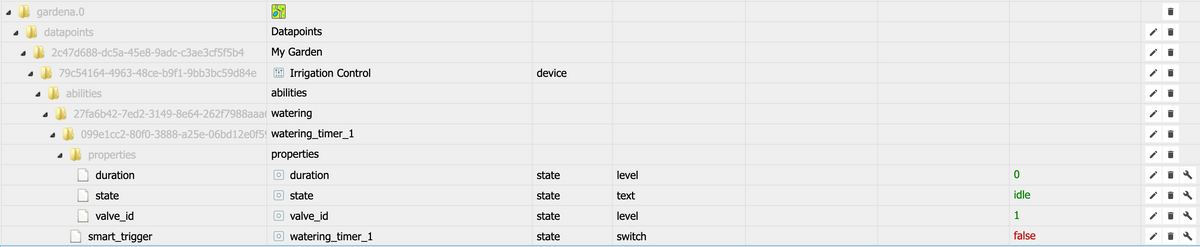
                                          Bildschirmfoto 2020-01-14 um 18.07.57.png

                                          Mein Blockly zum schalten über iQontrol (oder auch VIS) überarbeite ich gerade und stelle es dann gern noch hier rein.


                                          I 1 Reply Last reply
                                          0
                                          Reply
                                          • Reply as topic
                                          Log in to reply
                                          • Oldest to Newest
                                          • Newest to Oldest
                                          • Most Votes


                                          Support us

                                          ioBroker
                                          Community Adapters
                                          Donate

                                          334

                                          Online

                                          32.7k

                                          Users

                                          82.4k

                                          Topics

                                          1.3m

                                          Posts
                                          Community
                                          Impressum | Datenschutz-Bestimmungen | Nutzungsbedingungen | Einwilligungseinstellungen
                                          ioBroker Community 2014-2025
                                          logo
                                          • Login

                                          • Don't have an account? Register

                                          • Login or register to search.
                                          • First post
                                            Last post
                                          0
                                          • Home
                                          • Recent
                                          • Tags
                                          • Unread 0
                                          • Categories
                                          • Unreplied
                                          • Popular
                                          • GitHub
                                          • Docu
                                          • Hilfe