Skip to content
  • Home
  • Recent
  • Tags
  • 0 Unread 0
  • Categories
  • Unreplied
  • Popular
  • GitHub
  • Docu
  • Hilfe
Skins
  • Light
  • Brite
  • Cerulean
  • Cosmo
  • Flatly
  • Journal
  • Litera
  • Lumen
  • Lux
  • Materia
  • Minty
  • Morph
  • Pulse
  • Sandstone
  • Simplex
  • Sketchy
  • Spacelab
  • United
  • Yeti
  • Zephyr
  • Dark
  • Cyborg
  • Darkly
  • Quartz
  • Slate
  • Solar
  • Superhero
  • Vapor

  • Default (No Skin)
  • No Skin
Collapse
ioBroker Logo

Community Forum

donate donate
  1. ioBroker Community Home
  2. Deutsch
  3. Tester
  4. Test Adapter ioBroker.backitup v3.1.x

NEWS

  • Monatsrückblick Januar/Februar 2026 ist online!
    BluefoxB
    Bluefox
    12
    1
    132

  • Jahresrückblick 2025 – unser neuer Blogbeitrag ist online! ✨
    BluefoxB
    Bluefox
    17
    1
    4.3k

  • Neuer Blogbeitrag: Monatsrückblick - Dezember 2025 🎄
    BluefoxB
    Bluefox
    13
    1
    1.2k

Test Adapter ioBroker.backitup v3.1.x

Scheduled Pinned Locked Moved Tester
backitupbackitup backupccuhistorymysqlredisrestorerestore backup
2.8k Posts 170 Posters 2.4m Views 113 Watching
  • Oldest to Newest
  • Newest to Oldest
  • Most Votes
Reply
  • Reply as topic
Log in to reply
This topic has been deleted. Only users with topic management privileges can see it.
  • JB_SullivanJ JB_Sullivan

    @simatec Genau - soweit Richtig. Von lokal habe ich es noch nicht versucht, weil ich mit Linux nicht so firm bin und nicht weiß wie und vor allen Dingen wohin ich diese Sicherung kopieren soll.

    crunchipC Away
    crunchipC Away
    crunchip
    Forum Testing Most Active
    wrote on last edited by
    #2149

    @jb_sullivan https://github.com/simatec/ioBroker.backitup/wiki/ioBroker.backitup-Wiki-Deutsch

    Grundsätzlich ist aber der sicherste Weg, den Restore lokal auszuführen.
    
    Wer den sichersten Weg wählt und den Restore lokal ausführen möchte, muss die Backupdatei im iobroker Backup-Ordner ablegen. Auf Linuxsystemen befindet sich dieser Ordner unter folgenden Pfad: /opt/iobroker/backups
    

    umgestiegen von Proxmox auf Unraid

    1 Reply Last reply
    0
    • A Offline
      A Offline
      Andersmacher
      wrote on last edited by
      #2150

      Ich nutze seit einiger Zeit backitup in der Version 2.5.9 und habe mir jetzt in VIS einen View gebastelt, in dem ich z. B. den Datenpunkt backitup.0.info.ccuNextTime in einem basic-Timestamp-Widget einblende. Obwohl im ioBroker Objektbaum das erwartete Datum korrekt angezeigt wird, steht in VIS immer der gleiche Wert, wie unter backitup.0.info.ccuLastTime.
      Gleiches gilt für ...iobrokerNextTime.

      Die Suche diesbezüglich hat bei mir keine Treffer ergeben. Ich kann mir allerdings auch nicht vorstellen, daß das bisher noch niemandem aufgefallen ist, falls das ein Adapter-Problem sein sollte. Daher nehme ich an, daß ich da was falsch mache!?

      ioBroker auf Raspi4B 8GB Debian(12) 64Bit

      JB_SullivanJ A 2 Replies Last reply
      0
      • JB_SullivanJ JB_Sullivan

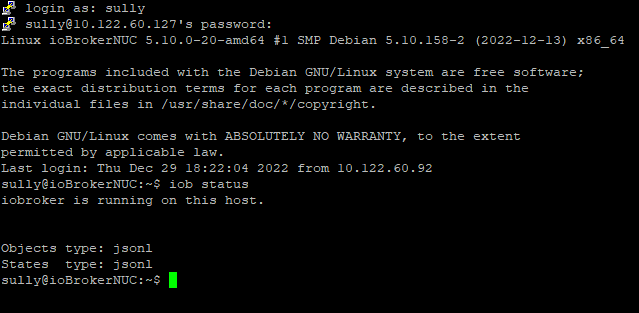
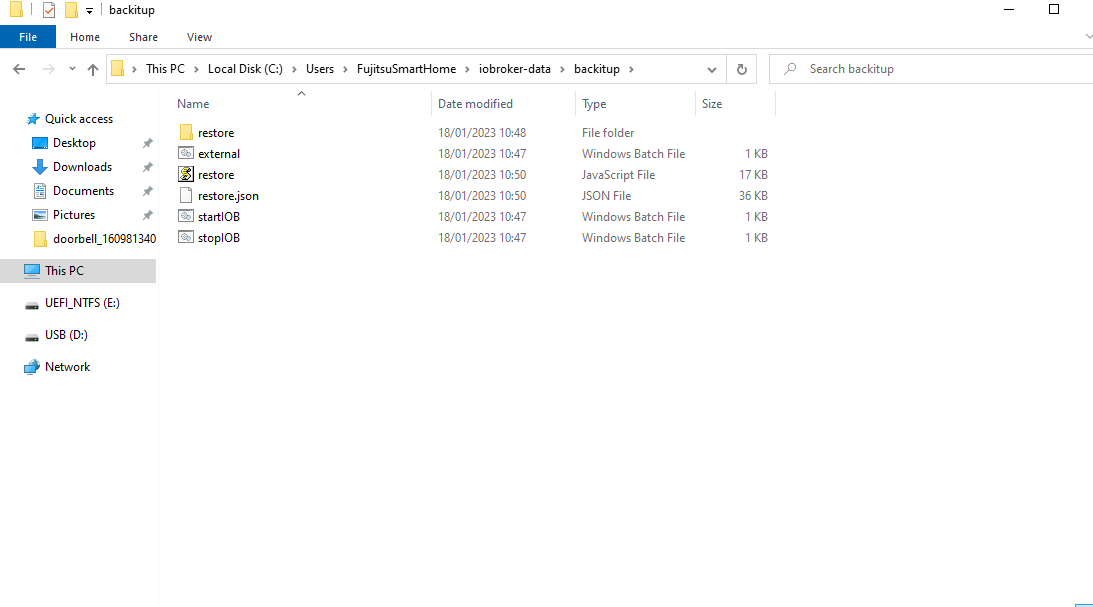
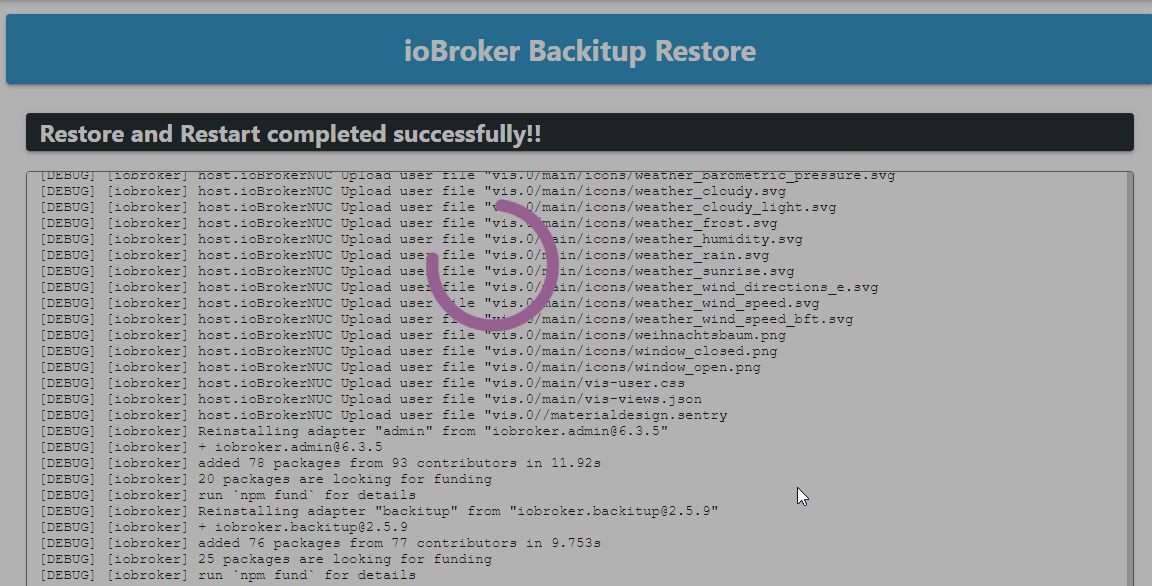
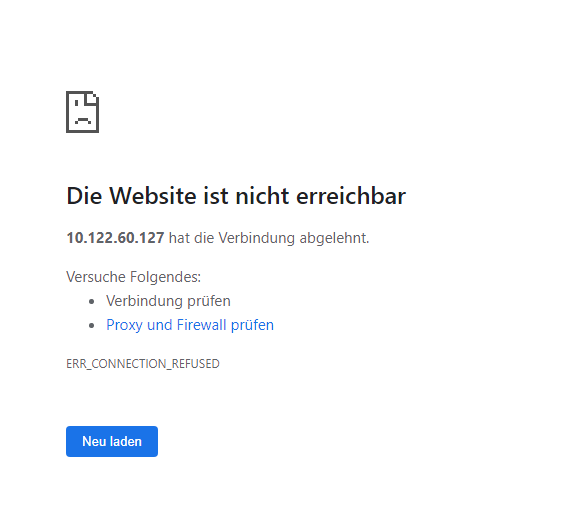
        @andersmacher So, ich habe das Restore jetzt lokal abgelegt und von dort eine Wiederherstellung vorgenommen - leider mit dem gleichen Ergebnis. Nach 2 Stunden dreht der Admin Ring immer noch und wenn ich den Browser Tab aktualisiere kommt die Webseite (Admin) ist nicht erreichbar Meldung und das obwohl ioBroker angeblich laufen soll.
        c5cfa918-125b-4684-93e7-b43ad906e199-image.png

        666db26d-1e0c-413e-9a18-d613181ac8b7-image.png

        db46fa59-608a-4b4c-8080-90875ff76850-image.png

        simatecS Online
        simatecS Online
        simatec
        Developer Most Active
        wrote on last edited by
        #2151

        @jb_sullivan

        So wie ich das sehe, hast du den Hostname geändert.
        Führe auf der Konsole folgendes aus.

        iob stop
        iob host this
        iob fix
        iob start
        
        • Besuche meine Github Seite
        • Beitrag hat geholfen oder willst du mich unterstützen
        • HowTo Restore ioBroker
        HomoranH 1 Reply Last reply
        0
        • simatecS simatec

          @jb_sullivan

          So wie ich das sehe, hast du den Hostname geändert.
          Führe auf der Konsole folgendes aus.

          iob stop
          iob host this
          iob fix
          iob start
          
          HomoranH Do not disturb
          HomoranH Do not disturb
          Homoran
          Global Moderator Administrators
          wrote on last edited by
          #2152

          @simatec wir sind schon soweit ;-)

          https://forum.iobroker.net/topic/61522/probleme-mit-admin-nach-restore

          kein Support per PN! - Fragen im Forum stellen -

          Benutzt das Voting rechts unten im Beitrag wenn er euch geholfen hat.

          ioBroker freut sich auch über eine Spende für das Forum. Benutzt dazu den Spendenbutton im Header. Danke!

          der Installationsfixer: curl -fsL https://iobroker.net/fix.sh | bash -

          1 Reply Last reply
          0
          • A Andersmacher

            Ich nutze seit einiger Zeit backitup in der Version 2.5.9 und habe mir jetzt in VIS einen View gebastelt, in dem ich z. B. den Datenpunkt backitup.0.info.ccuNextTime in einem basic-Timestamp-Widget einblende. Obwohl im ioBroker Objektbaum das erwartete Datum korrekt angezeigt wird, steht in VIS immer der gleiche Wert, wie unter backitup.0.info.ccuLastTime.
            Gleiches gilt für ...iobrokerNextTime.

            Die Suche diesbezüglich hat bei mir keine Treffer ergeben. Ich kann mir allerdings auch nicht vorstellen, daß das bisher noch niemandem aufgefallen ist, falls das ein Adapter-Problem sein sollte. Daher nehme ich an, daß ich da was falsch mache!?

            A Offline
            A Offline
            Andersmacher
            wrote on last edited by
            #2153

            @andersmacher Ich antworte mir mal selber:
            Ich habe das Widget basic-Timestamp falsch interpretiert. Es zeigt den Datenpunkt nicht in Form/Format eines Timestamps an, sondern den Timestamp des Datenpunktes. Und backitup.0.info.ccuNextTime und backitup.0.info.ccuLastTime werden in der Regel ja am selben Tag gesetzt und haben somit dann natürlich auch den gleichen Timestamp.

            Darstellung des Datenpunktes in einem basic-HTML-Widget zeigt dann die gewünschten Werte an. In einem basic-TimesValue-Widget klappt es nicht (oder höchstens mit zusätzlichem Bindingaufwand), da der Adapter den Wert als String liefert.

            ioBroker auf Raspi4B 8GB Debian(12) 64Bit

            1 Reply Last reply
            0
            • DK43D Offline
              DK43D Offline
              DK43
              wrote on last edited by
              #2154

              Ich hab da momentan ein Problem der dem von @JB_Sullivan ein bisschen ähnelt.

              Ich habe einen Raspi 3b+ mit 2GB RAM der langsam Schwächelt.

              Habe nun auf einem Mini pc Windows tiny10 installiert und auch iobroker mit dem neusten installer.

              Grundsätzlich wäre ein System Umzug mit dem Backitup Adapter möglich oder? Gibt's da etwas zu beachten?

              Da backitup schon vorinstalliert war habe ich die backup Datei (iobroker, zigbee und JavaScript) aus der Dropbox auf den Minipc geladen um eine Wiederherstellung durchzuführen .

              Wenn ich jetzt mit iobroker anfange tut sich garnichts mehr. Die adminoberfäche lässt sich nicht mehr öffnen.

              Mittels "obroker start" komme ich dann wieder drauf.

              Hab nun den hostnamen des Mini PC auf den gleichen geändert wie beim Raspi in der Hoffnung dass es vielleicht daran liegen.
              Es tut sich zwar immernoch nichts aber mittlerweile bleibt die Adminoberfäche erhalten.

              Ist ein Systemumzug mit backitup etwa nicht möglich?

              Thomas BraunT simatecS 3 Replies Last reply
              0
              • DK43D DK43

                Ich hab da momentan ein Problem der dem von @JB_Sullivan ein bisschen ähnelt.

                Ich habe einen Raspi 3b+ mit 2GB RAM der langsam Schwächelt.

                Habe nun auf einem Mini pc Windows tiny10 installiert und auch iobroker mit dem neusten installer.

                Grundsätzlich wäre ein System Umzug mit dem Backitup Adapter möglich oder? Gibt's da etwas zu beachten?

                Da backitup schon vorinstalliert war habe ich die backup Datei (iobroker, zigbee und JavaScript) aus der Dropbox auf den Minipc geladen um eine Wiederherstellung durchzuführen .

                Wenn ich jetzt mit iobroker anfange tut sich garnichts mehr. Die adminoberfäche lässt sich nicht mehr öffnen.

                Mittels "obroker start" komme ich dann wieder drauf.

                Hab nun den hostnamen des Mini PC auf den gleichen geändert wie beim Raspi in der Hoffnung dass es vielleicht daran liegen.
                Es tut sich zwar immernoch nichts aber mittlerweile bleibt die Adminoberfäche erhalten.

                Ist ein Systemumzug mit backitup etwa nicht möglich?

                Thomas BraunT Online
                Thomas BraunT Online
                Thomas Braun
                Most Active
                wrote on last edited by Thomas Braun
                #2155

                @dk43 sagte in Test Adapter ioBroker.backitup v2.5.x:

                Ist ein Systemumzug mit backitup etwa nicht möglich?

                Doch, geht grundsätzlich.
                Schau ins Log, wo es da klemmt.

                Wobei meiner Meinung nach ein Linux die bessere Basis für den Betrieb des ioBrokers darstellt.

                Linux-Werkzeugkasten:
                https://forum.iobroker.net/topic/42952/der-kleine-iobroker-linux-werkzeugkasten
                NodeJS Fixer Skript:
                https://forum.iobroker.net/topic/68035/iob-node-fix-skript
                iob_diag: curl -sLf -o diag.sh https://iobroker.net/diag.sh && bash diag.sh

                1 Reply Last reply
                0
                • DK43D DK43

                  Ich hab da momentan ein Problem der dem von @JB_Sullivan ein bisschen ähnelt.

                  Ich habe einen Raspi 3b+ mit 2GB RAM der langsam Schwächelt.

                  Habe nun auf einem Mini pc Windows tiny10 installiert und auch iobroker mit dem neusten installer.

                  Grundsätzlich wäre ein System Umzug mit dem Backitup Adapter möglich oder? Gibt's da etwas zu beachten?

                  Da backitup schon vorinstalliert war habe ich die backup Datei (iobroker, zigbee und JavaScript) aus der Dropbox auf den Minipc geladen um eine Wiederherstellung durchzuführen .

                  Wenn ich jetzt mit iobroker anfange tut sich garnichts mehr. Die adminoberfäche lässt sich nicht mehr öffnen.

                  Mittels "obroker start" komme ich dann wieder drauf.

                  Hab nun den hostnamen des Mini PC auf den gleichen geändert wie beim Raspi in der Hoffnung dass es vielleicht daran liegen.
                  Es tut sich zwar immernoch nichts aber mittlerweile bleibt die Adminoberfäche erhalten.

                  Ist ein Systemumzug mit backitup etwa nicht möglich?

                  simatecS Online
                  simatecS Online
                  simatec
                  Developer Most Active
                  wrote on last edited by
                  #2156

                  @dk43 Momentan schein es ein Problem mit dem neuen Windows Installer und Backitup zu geben.
                  Ich konnte aufgrund keiner richtigen Testmöglichkeit noch nicht den fehler eingrenzen.
                  Habe neulich bei einem User per Anydesk geholfen und dort den Fehler entdeckt.

                  Dies betrifft nur den iobroker restore.
                  Mache mal folgendes... Führe den Restore ganz normal über Backitup aus.
                  Wenn der iobroker gestoppt ist und nichts mehr passiert danach, gehe in das Verzeichnis C:/iobroker/iobroker-data/backitup (oder dein abweichender Installationspfad)

                  Da mache ein Doppelklick auf die stopIOB.bat
                  Dann habe etwas Geduld, bis der iobroker Restore abgeschlossen ist.

                  Bei anderen Restores wie zigbee usw. läuft es normal, da iobroker dort nicht gestoppt wird.
                  Ich suche noch nach dem Fehler... Wahrscheinlich killt iobroker auch den Restore Prozess beim stoppen

                  • Besuche meine Github Seite
                  • Beitrag hat geholfen oder willst du mich unterstützen
                  • HowTo Restore ioBroker
                  1 Reply Last reply
                  0
                  • DK43D DK43

                    Ich hab da momentan ein Problem der dem von @JB_Sullivan ein bisschen ähnelt.

                    Ich habe einen Raspi 3b+ mit 2GB RAM der langsam Schwächelt.

                    Habe nun auf einem Mini pc Windows tiny10 installiert und auch iobroker mit dem neusten installer.

                    Grundsätzlich wäre ein System Umzug mit dem Backitup Adapter möglich oder? Gibt's da etwas zu beachten?

                    Da backitup schon vorinstalliert war habe ich die backup Datei (iobroker, zigbee und JavaScript) aus der Dropbox auf den Minipc geladen um eine Wiederherstellung durchzuführen .

                    Wenn ich jetzt mit iobroker anfange tut sich garnichts mehr. Die adminoberfäche lässt sich nicht mehr öffnen.

                    Mittels "obroker start" komme ich dann wieder drauf.

                    Hab nun den hostnamen des Mini PC auf den gleichen geändert wie beim Raspi in der Hoffnung dass es vielleicht daran liegen.
                    Es tut sich zwar immernoch nichts aber mittlerweile bleibt die Adminoberfäche erhalten.

                    Ist ein Systemumzug mit backitup etwa nicht möglich?

                    simatecS Online
                    simatecS Online
                    simatec
                    Developer Most Active
                    wrote on last edited by
                    #2157

                    @dk43 Ich pushe gerade die v2.5.11 auf Github, wo ich versucht habe den Fehler mal zu fixen.
                    Kannst du das bitte direkt in deiner Installation testen?

                    • Besuche meine Github Seite
                    • Beitrag hat geholfen oder willst du mich unterstützen
                    • HowTo Restore ioBroker
                    DK43D 1 Reply Last reply
                    0
                    • simatecS simatec

                      @dk43 Ich pushe gerade die v2.5.11 auf Github, wo ich versucht habe den Fehler mal zu fixen.
                      Kannst du das bitte direkt in deiner Installation testen?

                      DK43D Offline
                      DK43D Offline
                      DK43
                      wrote on last edited by
                      #2158

                      @simatec

                      beim installieren

                      $ iobroker url https://github.com/simatec/ioBroker.backitup.git --host iobroker-pi --debug
                      
                      install simatec/ioBroker.backitup#7449f768b8a58f5a996f2b504f07d9cff2cf61b6
                      
                      host.iobroker-pi Adapter "system.adapter.backitup.0" is stopped.
                      
                      npm WARN config global `--global`, `--local` are deprecated. Use `--location=global` instead.
                      
                      up to date, audited 702 packages in 8s
                      
                      51 packages are looking for funding run `npm fund` for details
                      
                      
                      upload [19] backitup.admin C:/Users/FujitsuSmartHome/node_modules/iobroker.backitup/admin/backitup.svg backitup.svg image/svg+xml
                      
                      upload [12] backitup.admin C:/Users/FujitsuSmartHome/node_modules/iobroker.backitup/admin/i18n/pl/translations.json i18n/pl/translations.json application/json
                      
                      upload [1] backitup.admin C:/Users/FujitsuSmartHome/node_modules/iobroker.backitup/admin/tab_m.js tab_m.js application/javascript
                      
                      host.iobroker-pi Adapter "system.adapter.backitup.0" is started
                      
                      Process exited with code 0
                      

                      und debug unmittelbar nach dem restore

                      2023-01-18 10:03:51.477 - info: admin.0 (4576) ==> Connected system.user.admin from ::1
                      2023-01-18 10:03:52.001 - debug: backitup.0 (6468) telegram-instance:
                      2023-01-18 10:03:54.155 - debug: backitup.0 (6468) Backup list be read ...
                      2023-01-18 10:03:58.573 - info: admin.0 (4576) <== Disconnect system.user.admin from ::1
                      2023-01-18 10:04:04.714 - info: host.iobroker-pi stopInstance system.adapter.backitup.0 (force=false, process=true)
                      2023-01-18 10:04:04.717 - info: host.iobroker-pi stopInstance system.adapter.backitup.0 send kill signal
                      2023-01-18 10:04:04.716 - info: backitup.0 (6468) Got terminate signal TERMINATE_YOURSELF
                      2023-01-18 10:04:04.717 - info: backitup.0 (6468) cleaned everything up...
                      2023-01-18 10:04:04.718 - info: backitup.0 (6468) terminating
                      2023-01-18 10:04:04.719 - debug: backitup.0 (6468) Plugin sentry destroyed
                      2023-01-18 10:04:04.721 - info: backitup.0 (6468) Terminated (ADAPTER_REQUESTED_TERMINATION): Without reason
                      2023-01-18 10:04:05.273 - info: host.iobroker-pi instance system.adapter.backitup.0 terminated with code 11 (ADAPTER_REQUESTED_TERMINATION)
                      2023-01-18 10:04:07.749 - info: host.iobroker-pi instance system.adapter.backitup.0 started with pid 6824
                      2023-01-18 10:04:08.937 - debug: backitup.0 (6824) Redis Objects: Use Redis connection: 127.0.0.1:9001
                      2023-01-18 10:04:08.963 - debug: backitup.0 (6824) Objects client ready ... initialize now
                      2023-01-18 10:04:08.964 - debug: backitup.0 (6824) Objects create System PubSub Client
                      2023-01-18 10:04:08.965 - debug: backitup.0 (6824) Objects create User PubSub Client
                      2023-01-18 10:04:08.977 - debug: backitup.0 (6824) Objects client initialize lua scripts
                      2023-01-18 10:04:08.983 - debug: backitup.0 (6824) Objects connected to redis: 127.0.0.1:9001
                      2023-01-18 10:04:08.996 - debug: backitup.0 (6824) Redis States: Use Redis connection: 127.0.0.1:9000
                      2023-01-18 10:04:09.001 - debug: backitup.0 (6824) States create System PubSub Client
                      2023-01-18 10:04:09.002 - debug: backitup.0 (6824) States create User PubSub Client
                      2023-01-18 10:04:09.008 - debug: backitup.0 (6824) States connected to redis: 127.0.0.1:9000
                      2023-01-18 10:04:09.025 - debug: backitup.0 (6824) Plugin sentry Initialize Plugin (enabled=true)
                      2023-01-18 10:04:09.322 - info: backitup.0 (6824) starting. Version 2.5.10 (non-npm: simatec/ioBroker.backitup#7449f768b8a58f5a996f2b504f07d9cff2cf61b6) in C:/Users/FujitsuSmartHome/node_modules/iobroker.backitup, node: v16.15.1, js-controller: 4.0.24
                      2023-01-18 10:04:09.336 - debug: backitup.0 (6824) Backitup has recognized a win32 system
                      2023-01-18 10:04:09.409 - info: backitup.0 (6824) [iobroker] backup was activated at 01:30 every 1 day(s)
                      2023-01-18 10:04:09.469 - debug: backitup.0 (6824) [iobroker] 10 30 01 */1 * *
                      2023-01-18 10:04:10.374 - error: backitup.0 (6824) Dropbox: "expired_access_token/..."
                      2023-01-18 10:04:10.375 - error: backitup.0 (6824) Dropbox: "expired_access_token/..."
                      2023-01-18 10:04:13.989 - debug: backitup.0 (6824) detect backup file 1 from googledrive: iobroker_2023_01_04-01_30_10_backupiobroker.tar.gz
                      2023-01-18 10:04:13.990 - debug: backitup.0 (6824) detect backup file 2 from googledrive: iobroker_2022_12_30-01_30_10_backupiobroker.tar.gz
                      2023-01-18 10:04:13.990 - debug: backitup.0 (6824) detect backup file 3 from googledrive: iobroker_2022_12_28-01_30_10_backupiobroker.tar.gz
                      2023-01-18 10:04:13.991 - debug: backitup.0 (6824) detect backup file 4 from googledrive: iobroker_2022_12_25-01_30_10_backupiobroker.tar.gz
                      2023-01-18 10:04:13.991 - debug: backitup.0 (6824) detect backup file 5 from googledrive: iobroker_2022_12_24-01_30_10_backupiobroker.tar.gz
                      2023-01-18 10:04:13.991 - debug: backitup.0 (6824) detect backup file 6 from googledrive: iobroker_2022_12_23-17_59_32_backupiobroker.tar.gz
                      2023-01-18 10:04:13.991 - debug: backitup.0 (6824) detect backup file 7 from googledrive: iobroker_2022_12_23-17_54_33_backupiobroker.tar.gz
                      2023-01-18 10:04:13.992 - debug: backitup.0 (6824) detect backup file 8 from googledrive: iobroker_2022_12_23-01_30_10_backupiobroker.tar.gz
                      2023-01-18 10:04:13.992 - debug: backitup.0 (6824) detect backup file 9 from googledrive: iobroker_2022_12_21-01_30_10_backupiobroker.tar.gz
                      2023-01-18 10:04:13.992 - debug: backitup.0 (6824) detect backup file 10 from googledrive: iobroker_2022_12_20-01_30_10_backupiobroker.tar.gz
                      2023-01-18 10:04:13.992 - debug: backitup.0 (6824) detect backup file 11 from googledrive: iobroker_2022_12_19-01_30_10_backupiobroker.tar.gz
                      2023-01-18 10:04:13.992 - debug: backitup.0 (6824) detect backup file 12 from googledrive: iobroker_2022_12_18-01_30_10_backupiobroker.tar.gz
                      2023-01-18 10:04:13.992 - debug: backitup.0 (6824) detect backup file 13 from googledrive: iobroker_2022_12_17-01_30_10_backupiobroker.tar.gz
                      2023-01-18 10:04:13.993 - debug: backitup.0 (6824) detect backup file 14 from googledrive: iobroker_2022_12_13-01_30_10_backupiobroker.tar.gz
                      2023-01-18 10:04:13.993 - debug: backitup.0 (6824) detect backup file 15 from googledrive: iobroker_2022_12_12-01_30_10_backupiobroker.tar.gz
                      2023-01-18 10:04:13.993 - debug: backitup.0 (6824) detect backup file 16 from googledrive: iobroker_2022_12_08-01_30_10_backupiobroker.tar.gz
                      2023-01-18 10:04:13.993 - debug: backitup.0 (6824) detect backup file 17 from googledrive: iobroker_2022_12_07-01_30_10_backupiobroker.tar.gz
                      2023-01-18 10:04:13.993 - debug: backitup.0 (6824) detect backup file 18 from googledrive: iobroker_2022_12_03-01_30_10_backupiobroker.tar.gz
                      2023-01-18 10:04:13.994 - debug: backitup.0 (6824) detect backup file 19 from googledrive: iobroker_2022_12_02-01_30_10_backupiobroker.tar.gz
                      2023-01-18 10:04:13.994 - debug: backitup.0 (6824) detect backup file 20 from googledrive: iobroker_2022_12_01-01_30_10_backupiobroker.tar.gz
                      2023-01-18 10:04:13.995 - debug: backitup.0 (6824) detect last backup file: iobroker_2023_01_04-01_30_10_backupiobroker.tar.gz
                      2023-01-18 10:04:15.253 - info: admin.0 (4576) ==> Connected system.user.admin from ::1
                      2023-01-18 10:04:15.806 - debug: backitup.0 (6824) telegram-instance:
                      2023-01-18 10:04:17.463 - debug: backitup.0 (6824) Backup list be read ...
                      2023-01-18 10:04:26.589 - debug: backitup.0 (6824) set chmod for "C:/Users/FujitsuSmartHome/backups" successfully
                      2023-01-18 10:04:33.978 - info: admin.0 (4576) <== Disconnect system.user.admin from ::1
                      2023-01-18 10:04:43.975 - info: host.iobroker-pi iobroker.js-controller version 4.0.24 js-controller starting
                      2023-01-18 10:04:43.980 - info: host.iobroker-pi Copyright (c) 2014-2022 bluefox, 2014 hobbyquaker
                      2023-01-18 10:04:43.981 - info: host.iobroker-pi hostname: iobroker-pi, node: v16.15.1
                      2023-01-18 10:04:43.981 - info: host.iobroker-pi ip addresses: 2003:c9:1706:5500:d92d:a5dd:dbba:a5a4 2003:c9:1706:5500:a1ce:ec6f:1b0a:7bbd fe80::d92d:a5dd:dbba:a5a4 192.168.178.75
                      2023-01-18 10:04:46.108 - error: host.iobroker-pi-Server Cannot start inMem-objects on port 9001: Failed to lock DB file "C:\Users\FujitsuSmartHome\iobroker-data\objects.jsonl"!
                      2023-01-18 10:04:48.452 - info: host.iobroker-pi iobroker.js-controller version 4.0.24 js-controller starting
                      2023-01-18 10:04:48.457 - info: host.iobroker-pi Copyright (c) 2014-2022 bluefox, 2014 hobbyquaker
                      2023-01-18 10:04:48.457 - info: host.iobroker-pi hostname: iobroker-pi, node: v16.15.1
                      2023-01-18 10:04:48.458 - info: host.iobroker-pi ip addresses: 2003:c9:1706:5500:d92d:a5dd:dbba:a5a4 2003:c9:1706:5500:a1ce:ec6f:1b0a:7bbd fe80::d92d:a5dd:dbba:a5a4 192.168.178.75
                      2023-01-18 10:04:50.598 - error: host.iobroker-pi-Server Cannot start inMem-objects on port 9001: Failed to lock DB file "C:\Users\FujitsuSmartHome\iobroker-data\objects.jsonl"!
                      2023-01-18 10:04:53.233 - info: host.iobroker-pi iobroker.js-controller version 4.0.24 js-controller starting
                      2023-01-18 10:04:53.238 - info: host.iobroker-pi Copyright (c) 2014-2022 bluefox, 2014 hobbyquaker
                      2023-01-18 10:04:53.239 - info: host.iobroker-pi hostname: iobroker-pi, node: v16.15.1
                      2023-01-18 10:04:53.239 - info: host.iobroker-pi ip addresses: 2003:c9:1706:5500:d92d:a5dd:dbba:a5a4 2003:c9:1706:5500:a1ce:ec6f:1b0a:7bbd fe80::d92d:a5dd:dbba:a5a4 192.168.178.75
                      2023-01-18 10:04:55.362 - error: host.iobroker-pi-Server Cannot start inMem-objects on port 9001: Failed to lock DB file "C:\Users\FujitsuSmartHome\iobroker-data\objects.jsonl"!
                      

                      komischerweise wird mir noch die v2.5.10 angezeigt.

                      simatecS 2 Replies Last reply
                      0
                      • DK43D DK43

                        @simatec

                        beim installieren

                        $ iobroker url https://github.com/simatec/ioBroker.backitup.git --host iobroker-pi --debug
                        
                        install simatec/ioBroker.backitup#7449f768b8a58f5a996f2b504f07d9cff2cf61b6
                        
                        host.iobroker-pi Adapter "system.adapter.backitup.0" is stopped.
                        
                        npm WARN config global `--global`, `--local` are deprecated. Use `--location=global` instead.
                        
                        up to date, audited 702 packages in 8s
                        
                        51 packages are looking for funding run `npm fund` for details
                        
                        
                        upload [19] backitup.admin C:/Users/FujitsuSmartHome/node_modules/iobroker.backitup/admin/backitup.svg backitup.svg image/svg+xml
                        
                        upload [12] backitup.admin C:/Users/FujitsuSmartHome/node_modules/iobroker.backitup/admin/i18n/pl/translations.json i18n/pl/translations.json application/json
                        
                        upload [1] backitup.admin C:/Users/FujitsuSmartHome/node_modules/iobroker.backitup/admin/tab_m.js tab_m.js application/javascript
                        
                        host.iobroker-pi Adapter "system.adapter.backitup.0" is started
                        
                        Process exited with code 0
                        

                        und debug unmittelbar nach dem restore

                        2023-01-18 10:03:51.477 - info: admin.0 (4576) ==> Connected system.user.admin from ::1
                        2023-01-18 10:03:52.001 - debug: backitup.0 (6468) telegram-instance:
                        2023-01-18 10:03:54.155 - debug: backitup.0 (6468) Backup list be read ...
                        2023-01-18 10:03:58.573 - info: admin.0 (4576) <== Disconnect system.user.admin from ::1
                        2023-01-18 10:04:04.714 - info: host.iobroker-pi stopInstance system.adapter.backitup.0 (force=false, process=true)
                        2023-01-18 10:04:04.717 - info: host.iobroker-pi stopInstance system.adapter.backitup.0 send kill signal
                        2023-01-18 10:04:04.716 - info: backitup.0 (6468) Got terminate signal TERMINATE_YOURSELF
                        2023-01-18 10:04:04.717 - info: backitup.0 (6468) cleaned everything up...
                        2023-01-18 10:04:04.718 - info: backitup.0 (6468) terminating
                        2023-01-18 10:04:04.719 - debug: backitup.0 (6468) Plugin sentry destroyed
                        2023-01-18 10:04:04.721 - info: backitup.0 (6468) Terminated (ADAPTER_REQUESTED_TERMINATION): Without reason
                        2023-01-18 10:04:05.273 - info: host.iobroker-pi instance system.adapter.backitup.0 terminated with code 11 (ADAPTER_REQUESTED_TERMINATION)
                        2023-01-18 10:04:07.749 - info: host.iobroker-pi instance system.adapter.backitup.0 started with pid 6824
                        2023-01-18 10:04:08.937 - debug: backitup.0 (6824) Redis Objects: Use Redis connection: 127.0.0.1:9001
                        2023-01-18 10:04:08.963 - debug: backitup.0 (6824) Objects client ready ... initialize now
                        2023-01-18 10:04:08.964 - debug: backitup.0 (6824) Objects create System PubSub Client
                        2023-01-18 10:04:08.965 - debug: backitup.0 (6824) Objects create User PubSub Client
                        2023-01-18 10:04:08.977 - debug: backitup.0 (6824) Objects client initialize lua scripts
                        2023-01-18 10:04:08.983 - debug: backitup.0 (6824) Objects connected to redis: 127.0.0.1:9001
                        2023-01-18 10:04:08.996 - debug: backitup.0 (6824) Redis States: Use Redis connection: 127.0.0.1:9000
                        2023-01-18 10:04:09.001 - debug: backitup.0 (6824) States create System PubSub Client
                        2023-01-18 10:04:09.002 - debug: backitup.0 (6824) States create User PubSub Client
                        2023-01-18 10:04:09.008 - debug: backitup.0 (6824) States connected to redis: 127.0.0.1:9000
                        2023-01-18 10:04:09.025 - debug: backitup.0 (6824) Plugin sentry Initialize Plugin (enabled=true)
                        2023-01-18 10:04:09.322 - info: backitup.0 (6824) starting. Version 2.5.10 (non-npm: simatec/ioBroker.backitup#7449f768b8a58f5a996f2b504f07d9cff2cf61b6) in C:/Users/FujitsuSmartHome/node_modules/iobroker.backitup, node: v16.15.1, js-controller: 4.0.24
                        2023-01-18 10:04:09.336 - debug: backitup.0 (6824) Backitup has recognized a win32 system
                        2023-01-18 10:04:09.409 - info: backitup.0 (6824) [iobroker] backup was activated at 01:30 every 1 day(s)
                        2023-01-18 10:04:09.469 - debug: backitup.0 (6824) [iobroker] 10 30 01 */1 * *
                        2023-01-18 10:04:10.374 - error: backitup.0 (6824) Dropbox: "expired_access_token/..."
                        2023-01-18 10:04:10.375 - error: backitup.0 (6824) Dropbox: "expired_access_token/..."
                        2023-01-18 10:04:13.989 - debug: backitup.0 (6824) detect backup file 1 from googledrive: iobroker_2023_01_04-01_30_10_backupiobroker.tar.gz
                        2023-01-18 10:04:13.990 - debug: backitup.0 (6824) detect backup file 2 from googledrive: iobroker_2022_12_30-01_30_10_backupiobroker.tar.gz
                        2023-01-18 10:04:13.990 - debug: backitup.0 (6824) detect backup file 3 from googledrive: iobroker_2022_12_28-01_30_10_backupiobroker.tar.gz
                        2023-01-18 10:04:13.991 - debug: backitup.0 (6824) detect backup file 4 from googledrive: iobroker_2022_12_25-01_30_10_backupiobroker.tar.gz
                        2023-01-18 10:04:13.991 - debug: backitup.0 (6824) detect backup file 5 from googledrive: iobroker_2022_12_24-01_30_10_backupiobroker.tar.gz
                        2023-01-18 10:04:13.991 - debug: backitup.0 (6824) detect backup file 6 from googledrive: iobroker_2022_12_23-17_59_32_backupiobroker.tar.gz
                        2023-01-18 10:04:13.991 - debug: backitup.0 (6824) detect backup file 7 from googledrive: iobroker_2022_12_23-17_54_33_backupiobroker.tar.gz
                        2023-01-18 10:04:13.992 - debug: backitup.0 (6824) detect backup file 8 from googledrive: iobroker_2022_12_23-01_30_10_backupiobroker.tar.gz
                        2023-01-18 10:04:13.992 - debug: backitup.0 (6824) detect backup file 9 from googledrive: iobroker_2022_12_21-01_30_10_backupiobroker.tar.gz
                        2023-01-18 10:04:13.992 - debug: backitup.0 (6824) detect backup file 10 from googledrive: iobroker_2022_12_20-01_30_10_backupiobroker.tar.gz
                        2023-01-18 10:04:13.992 - debug: backitup.0 (6824) detect backup file 11 from googledrive: iobroker_2022_12_19-01_30_10_backupiobroker.tar.gz
                        2023-01-18 10:04:13.992 - debug: backitup.0 (6824) detect backup file 12 from googledrive: iobroker_2022_12_18-01_30_10_backupiobroker.tar.gz
                        2023-01-18 10:04:13.992 - debug: backitup.0 (6824) detect backup file 13 from googledrive: iobroker_2022_12_17-01_30_10_backupiobroker.tar.gz
                        2023-01-18 10:04:13.993 - debug: backitup.0 (6824) detect backup file 14 from googledrive: iobroker_2022_12_13-01_30_10_backupiobroker.tar.gz
                        2023-01-18 10:04:13.993 - debug: backitup.0 (6824) detect backup file 15 from googledrive: iobroker_2022_12_12-01_30_10_backupiobroker.tar.gz
                        2023-01-18 10:04:13.993 - debug: backitup.0 (6824) detect backup file 16 from googledrive: iobroker_2022_12_08-01_30_10_backupiobroker.tar.gz
                        2023-01-18 10:04:13.993 - debug: backitup.0 (6824) detect backup file 17 from googledrive: iobroker_2022_12_07-01_30_10_backupiobroker.tar.gz
                        2023-01-18 10:04:13.993 - debug: backitup.0 (6824) detect backup file 18 from googledrive: iobroker_2022_12_03-01_30_10_backupiobroker.tar.gz
                        2023-01-18 10:04:13.994 - debug: backitup.0 (6824) detect backup file 19 from googledrive: iobroker_2022_12_02-01_30_10_backupiobroker.tar.gz
                        2023-01-18 10:04:13.994 - debug: backitup.0 (6824) detect backup file 20 from googledrive: iobroker_2022_12_01-01_30_10_backupiobroker.tar.gz
                        2023-01-18 10:04:13.995 - debug: backitup.0 (6824) detect last backup file: iobroker_2023_01_04-01_30_10_backupiobroker.tar.gz
                        2023-01-18 10:04:15.253 - info: admin.0 (4576) ==> Connected system.user.admin from ::1
                        2023-01-18 10:04:15.806 - debug: backitup.0 (6824) telegram-instance:
                        2023-01-18 10:04:17.463 - debug: backitup.0 (6824) Backup list be read ...
                        2023-01-18 10:04:26.589 - debug: backitup.0 (6824) set chmod for "C:/Users/FujitsuSmartHome/backups" successfully
                        2023-01-18 10:04:33.978 - info: admin.0 (4576) <== Disconnect system.user.admin from ::1
                        2023-01-18 10:04:43.975 - info: host.iobroker-pi iobroker.js-controller version 4.0.24 js-controller starting
                        2023-01-18 10:04:43.980 - info: host.iobroker-pi Copyright (c) 2014-2022 bluefox, 2014 hobbyquaker
                        2023-01-18 10:04:43.981 - info: host.iobroker-pi hostname: iobroker-pi, node: v16.15.1
                        2023-01-18 10:04:43.981 - info: host.iobroker-pi ip addresses: 2003:c9:1706:5500:d92d:a5dd:dbba:a5a4 2003:c9:1706:5500:a1ce:ec6f:1b0a:7bbd fe80::d92d:a5dd:dbba:a5a4 192.168.178.75
                        2023-01-18 10:04:46.108 - error: host.iobroker-pi-Server Cannot start inMem-objects on port 9001: Failed to lock DB file "C:\Users\FujitsuSmartHome\iobroker-data\objects.jsonl"!
                        2023-01-18 10:04:48.452 - info: host.iobroker-pi iobroker.js-controller version 4.0.24 js-controller starting
                        2023-01-18 10:04:48.457 - info: host.iobroker-pi Copyright (c) 2014-2022 bluefox, 2014 hobbyquaker
                        2023-01-18 10:04:48.457 - info: host.iobroker-pi hostname: iobroker-pi, node: v16.15.1
                        2023-01-18 10:04:48.458 - info: host.iobroker-pi ip addresses: 2003:c9:1706:5500:d92d:a5dd:dbba:a5a4 2003:c9:1706:5500:a1ce:ec6f:1b0a:7bbd fe80::d92d:a5dd:dbba:a5a4 192.168.178.75
                        2023-01-18 10:04:50.598 - error: host.iobroker-pi-Server Cannot start inMem-objects on port 9001: Failed to lock DB file "C:\Users\FujitsuSmartHome\iobroker-data\objects.jsonl"!
                        2023-01-18 10:04:53.233 - info: host.iobroker-pi iobroker.js-controller version 4.0.24 js-controller starting
                        2023-01-18 10:04:53.238 - info: host.iobroker-pi Copyright (c) 2014-2022 bluefox, 2014 hobbyquaker
                        2023-01-18 10:04:53.239 - info: host.iobroker-pi hostname: iobroker-pi, node: v16.15.1
                        2023-01-18 10:04:53.239 - info: host.iobroker-pi ip addresses: 2003:c9:1706:5500:d92d:a5dd:dbba:a5a4 2003:c9:1706:5500:a1ce:ec6f:1b0a:7bbd fe80::d92d:a5dd:dbba:a5a4 192.168.178.75
                        2023-01-18 10:04:55.362 - error: host.iobroker-pi-Server Cannot start inMem-objects on port 9001: Failed to lock DB file "C:\Users\FujitsuSmartHome\iobroker-data\objects.jsonl"!
                        

                        komischerweise wird mir noch die v2.5.10 angezeigt.

                        simatecS Online
                        simatecS Online
                        simatec
                        Developer Most Active
                        wrote on last edited by
                        #2159

                        @dk43 Kann es sein, dass dein altes System nicht up2date war?
                        Zeige mal bitte die Ausgabe von iobroker status

                        • Besuche meine Github Seite
                        • Beitrag hat geholfen oder willst du mich unterstützen
                        • HowTo Restore ioBroker
                        DK43D 1 Reply Last reply
                        0
                        • DK43D DK43

                          @simatec

                          beim installieren

                          $ iobroker url https://github.com/simatec/ioBroker.backitup.git --host iobroker-pi --debug
                          
                          install simatec/ioBroker.backitup#7449f768b8a58f5a996f2b504f07d9cff2cf61b6
                          
                          host.iobroker-pi Adapter "system.adapter.backitup.0" is stopped.
                          
                          npm WARN config global `--global`, `--local` are deprecated. Use `--location=global` instead.
                          
                          up to date, audited 702 packages in 8s
                          
                          51 packages are looking for funding run `npm fund` for details
                          
                          
                          upload [19] backitup.admin C:/Users/FujitsuSmartHome/node_modules/iobroker.backitup/admin/backitup.svg backitup.svg image/svg+xml
                          
                          upload [12] backitup.admin C:/Users/FujitsuSmartHome/node_modules/iobroker.backitup/admin/i18n/pl/translations.json i18n/pl/translations.json application/json
                          
                          upload [1] backitup.admin C:/Users/FujitsuSmartHome/node_modules/iobroker.backitup/admin/tab_m.js tab_m.js application/javascript
                          
                          host.iobroker-pi Adapter "system.adapter.backitup.0" is started
                          
                          Process exited with code 0
                          

                          und debug unmittelbar nach dem restore

                          2023-01-18 10:03:51.477 - info: admin.0 (4576) ==> Connected system.user.admin from ::1
                          2023-01-18 10:03:52.001 - debug: backitup.0 (6468) telegram-instance:
                          2023-01-18 10:03:54.155 - debug: backitup.0 (6468) Backup list be read ...
                          2023-01-18 10:03:58.573 - info: admin.0 (4576) <== Disconnect system.user.admin from ::1
                          2023-01-18 10:04:04.714 - info: host.iobroker-pi stopInstance system.adapter.backitup.0 (force=false, process=true)
                          2023-01-18 10:04:04.717 - info: host.iobroker-pi stopInstance system.adapter.backitup.0 send kill signal
                          2023-01-18 10:04:04.716 - info: backitup.0 (6468) Got terminate signal TERMINATE_YOURSELF
                          2023-01-18 10:04:04.717 - info: backitup.0 (6468) cleaned everything up...
                          2023-01-18 10:04:04.718 - info: backitup.0 (6468) terminating
                          2023-01-18 10:04:04.719 - debug: backitup.0 (6468) Plugin sentry destroyed
                          2023-01-18 10:04:04.721 - info: backitup.0 (6468) Terminated (ADAPTER_REQUESTED_TERMINATION): Without reason
                          2023-01-18 10:04:05.273 - info: host.iobroker-pi instance system.adapter.backitup.0 terminated with code 11 (ADAPTER_REQUESTED_TERMINATION)
                          2023-01-18 10:04:07.749 - info: host.iobroker-pi instance system.adapter.backitup.0 started with pid 6824
                          2023-01-18 10:04:08.937 - debug: backitup.0 (6824) Redis Objects: Use Redis connection: 127.0.0.1:9001
                          2023-01-18 10:04:08.963 - debug: backitup.0 (6824) Objects client ready ... initialize now
                          2023-01-18 10:04:08.964 - debug: backitup.0 (6824) Objects create System PubSub Client
                          2023-01-18 10:04:08.965 - debug: backitup.0 (6824) Objects create User PubSub Client
                          2023-01-18 10:04:08.977 - debug: backitup.0 (6824) Objects client initialize lua scripts
                          2023-01-18 10:04:08.983 - debug: backitup.0 (6824) Objects connected to redis: 127.0.0.1:9001
                          2023-01-18 10:04:08.996 - debug: backitup.0 (6824) Redis States: Use Redis connection: 127.0.0.1:9000
                          2023-01-18 10:04:09.001 - debug: backitup.0 (6824) States create System PubSub Client
                          2023-01-18 10:04:09.002 - debug: backitup.0 (6824) States create User PubSub Client
                          2023-01-18 10:04:09.008 - debug: backitup.0 (6824) States connected to redis: 127.0.0.1:9000
                          2023-01-18 10:04:09.025 - debug: backitup.0 (6824) Plugin sentry Initialize Plugin (enabled=true)
                          2023-01-18 10:04:09.322 - info: backitup.0 (6824) starting. Version 2.5.10 (non-npm: simatec/ioBroker.backitup#7449f768b8a58f5a996f2b504f07d9cff2cf61b6) in C:/Users/FujitsuSmartHome/node_modules/iobroker.backitup, node: v16.15.1, js-controller: 4.0.24
                          2023-01-18 10:04:09.336 - debug: backitup.0 (6824) Backitup has recognized a win32 system
                          2023-01-18 10:04:09.409 - info: backitup.0 (6824) [iobroker] backup was activated at 01:30 every 1 day(s)
                          2023-01-18 10:04:09.469 - debug: backitup.0 (6824) [iobroker] 10 30 01 */1 * *
                          2023-01-18 10:04:10.374 - error: backitup.0 (6824) Dropbox: "expired_access_token/..."
                          2023-01-18 10:04:10.375 - error: backitup.0 (6824) Dropbox: "expired_access_token/..."
                          2023-01-18 10:04:13.989 - debug: backitup.0 (6824) detect backup file 1 from googledrive: iobroker_2023_01_04-01_30_10_backupiobroker.tar.gz
                          2023-01-18 10:04:13.990 - debug: backitup.0 (6824) detect backup file 2 from googledrive: iobroker_2022_12_30-01_30_10_backupiobroker.tar.gz
                          2023-01-18 10:04:13.990 - debug: backitup.0 (6824) detect backup file 3 from googledrive: iobroker_2022_12_28-01_30_10_backupiobroker.tar.gz
                          2023-01-18 10:04:13.991 - debug: backitup.0 (6824) detect backup file 4 from googledrive: iobroker_2022_12_25-01_30_10_backupiobroker.tar.gz
                          2023-01-18 10:04:13.991 - debug: backitup.0 (6824) detect backup file 5 from googledrive: iobroker_2022_12_24-01_30_10_backupiobroker.tar.gz
                          2023-01-18 10:04:13.991 - debug: backitup.0 (6824) detect backup file 6 from googledrive: iobroker_2022_12_23-17_59_32_backupiobroker.tar.gz
                          2023-01-18 10:04:13.991 - debug: backitup.0 (6824) detect backup file 7 from googledrive: iobroker_2022_12_23-17_54_33_backupiobroker.tar.gz
                          2023-01-18 10:04:13.992 - debug: backitup.0 (6824) detect backup file 8 from googledrive: iobroker_2022_12_23-01_30_10_backupiobroker.tar.gz
                          2023-01-18 10:04:13.992 - debug: backitup.0 (6824) detect backup file 9 from googledrive: iobroker_2022_12_21-01_30_10_backupiobroker.tar.gz
                          2023-01-18 10:04:13.992 - debug: backitup.0 (6824) detect backup file 10 from googledrive: iobroker_2022_12_20-01_30_10_backupiobroker.tar.gz
                          2023-01-18 10:04:13.992 - debug: backitup.0 (6824) detect backup file 11 from googledrive: iobroker_2022_12_19-01_30_10_backupiobroker.tar.gz
                          2023-01-18 10:04:13.992 - debug: backitup.0 (6824) detect backup file 12 from googledrive: iobroker_2022_12_18-01_30_10_backupiobroker.tar.gz
                          2023-01-18 10:04:13.992 - debug: backitup.0 (6824) detect backup file 13 from googledrive: iobroker_2022_12_17-01_30_10_backupiobroker.tar.gz
                          2023-01-18 10:04:13.993 - debug: backitup.0 (6824) detect backup file 14 from googledrive: iobroker_2022_12_13-01_30_10_backupiobroker.tar.gz
                          2023-01-18 10:04:13.993 - debug: backitup.0 (6824) detect backup file 15 from googledrive: iobroker_2022_12_12-01_30_10_backupiobroker.tar.gz
                          2023-01-18 10:04:13.993 - debug: backitup.0 (6824) detect backup file 16 from googledrive: iobroker_2022_12_08-01_30_10_backupiobroker.tar.gz
                          2023-01-18 10:04:13.993 - debug: backitup.0 (6824) detect backup file 17 from googledrive: iobroker_2022_12_07-01_30_10_backupiobroker.tar.gz
                          2023-01-18 10:04:13.993 - debug: backitup.0 (6824) detect backup file 18 from googledrive: iobroker_2022_12_03-01_30_10_backupiobroker.tar.gz
                          2023-01-18 10:04:13.994 - debug: backitup.0 (6824) detect backup file 19 from googledrive: iobroker_2022_12_02-01_30_10_backupiobroker.tar.gz
                          2023-01-18 10:04:13.994 - debug: backitup.0 (6824) detect backup file 20 from googledrive: iobroker_2022_12_01-01_30_10_backupiobroker.tar.gz
                          2023-01-18 10:04:13.995 - debug: backitup.0 (6824) detect last backup file: iobroker_2023_01_04-01_30_10_backupiobroker.tar.gz
                          2023-01-18 10:04:15.253 - info: admin.0 (4576) ==> Connected system.user.admin from ::1
                          2023-01-18 10:04:15.806 - debug: backitup.0 (6824) telegram-instance:
                          2023-01-18 10:04:17.463 - debug: backitup.0 (6824) Backup list be read ...
                          2023-01-18 10:04:26.589 - debug: backitup.0 (6824) set chmod for "C:/Users/FujitsuSmartHome/backups" successfully
                          2023-01-18 10:04:33.978 - info: admin.0 (4576) <== Disconnect system.user.admin from ::1
                          2023-01-18 10:04:43.975 - info: host.iobroker-pi iobroker.js-controller version 4.0.24 js-controller starting
                          2023-01-18 10:04:43.980 - info: host.iobroker-pi Copyright (c) 2014-2022 bluefox, 2014 hobbyquaker
                          2023-01-18 10:04:43.981 - info: host.iobroker-pi hostname: iobroker-pi, node: v16.15.1
                          2023-01-18 10:04:43.981 - info: host.iobroker-pi ip addresses: 2003:c9:1706:5500:d92d:a5dd:dbba:a5a4 2003:c9:1706:5500:a1ce:ec6f:1b0a:7bbd fe80::d92d:a5dd:dbba:a5a4 192.168.178.75
                          2023-01-18 10:04:46.108 - error: host.iobroker-pi-Server Cannot start inMem-objects on port 9001: Failed to lock DB file "C:\Users\FujitsuSmartHome\iobroker-data\objects.jsonl"!
                          2023-01-18 10:04:48.452 - info: host.iobroker-pi iobroker.js-controller version 4.0.24 js-controller starting
                          2023-01-18 10:04:48.457 - info: host.iobroker-pi Copyright (c) 2014-2022 bluefox, 2014 hobbyquaker
                          2023-01-18 10:04:48.457 - info: host.iobroker-pi hostname: iobroker-pi, node: v16.15.1
                          2023-01-18 10:04:48.458 - info: host.iobroker-pi ip addresses: 2003:c9:1706:5500:d92d:a5dd:dbba:a5a4 2003:c9:1706:5500:a1ce:ec6f:1b0a:7bbd fe80::d92d:a5dd:dbba:a5a4 192.168.178.75
                          2023-01-18 10:04:50.598 - error: host.iobroker-pi-Server Cannot start inMem-objects on port 9001: Failed to lock DB file "C:\Users\FujitsuSmartHome\iobroker-data\objects.jsonl"!
                          2023-01-18 10:04:53.233 - info: host.iobroker-pi iobroker.js-controller version 4.0.24 js-controller starting
                          2023-01-18 10:04:53.238 - info: host.iobroker-pi Copyright (c) 2014-2022 bluefox, 2014 hobbyquaker
                          2023-01-18 10:04:53.239 - info: host.iobroker-pi hostname: iobroker-pi, node: v16.15.1
                          2023-01-18 10:04:53.239 - info: host.iobroker-pi ip addresses: 2003:c9:1706:5500:d92d:a5dd:dbba:a5a4 2003:c9:1706:5500:a1ce:ec6f:1b0a:7bbd fe80::d92d:a5dd:dbba:a5a4 192.168.178.75
                          2023-01-18 10:04:55.362 - error: host.iobroker-pi-Server Cannot start inMem-objects on port 9001: Failed to lock DB file "C:\Users\FujitsuSmartHome\iobroker-data\objects.jsonl"!
                          

                          komischerweise wird mir noch die v2.5.10 angezeigt.

                          simatecS Online
                          simatecS Online
                          simatec
                          Developer Most Active
                          wrote on last edited by
                          #2160

                          @dk43 sagte in Test Adapter ioBroker.backitup v2.5.x:

                          komischerweise wird mir noch die v2.5.10 angezeigt.

                          Warte mal noch kurz, der push läuft noch

                          • Besuche meine Github Seite
                          • Beitrag hat geholfen oder willst du mich unterstützen
                          • HowTo Restore ioBroker
                          1 Reply Last reply
                          0
                          • simatecS simatec

                            @dk43 Kann es sein, dass dein altes System nicht up2date war?
                            Zeige mal bitte die Ausgabe von iobroker status

                            DK43D Offline
                            DK43D Offline
                            DK43
                            wrote on last edited by
                            #2161

                            @simatec sagte in Test Adapter ioBroker.backitup v2.5.x:

                            @dk43 Kann es sein, dass dein altes System nicht up2date war?
                            Zeige mal bitte die Ausgabe von iobroker status

                            C:\Users\FujitsuSmartHome>iobroker status
                            iobroker is running on this host.
                            
                            
                            Objects type: jsonl
                            States  type: jsonl
                            

                            auf dem raspi siehts genauso aus bis auf

                            iobroker@iobroker-pi:~  $  iobroker status
                            
                            simatecS 1 Reply Last reply
                            0
                            • DK43D DK43

                              @simatec sagte in Test Adapter ioBroker.backitup v2.5.x:

                              @dk43 Kann es sein, dass dein altes System nicht up2date war?
                              Zeige mal bitte die Ausgabe von iobroker status

                              C:\Users\FujitsuSmartHome>iobroker status
                              iobroker is running on this host.
                              
                              
                              Objects type: jsonl
                              States  type: jsonl
                              

                              auf dem raspi siehts genauso aus bis auf

                              iobroker@iobroker-pi:~  $  iobroker status
                              
                              simatecS Online
                              simatecS Online
                              simatec
                              Developer Most Active
                              wrote on last edited by
                              #2162

                              @dk43 Und was lief auf deinem alten System? auch die jsonl als Object und File DB?

                              • Besuche meine Github Seite
                              • Beitrag hat geholfen oder willst du mich unterstützen
                              • HowTo Restore ioBroker
                              DK43D 1 Reply Last reply
                              0
                              • simatecS simatec

                                @dk43 Und was lief auf deinem alten System? auch die jsonl als Object und File DB?

                                DK43D Offline
                                DK43D Offline
                                DK43
                                wrote on last edited by DK43
                                #2163

                                @simatec

                                Richtig. Also auf dem Raspi 3b+ mit 2GB RAM

                                so siehts aus wenn ich mit der Wiederherstellung starte
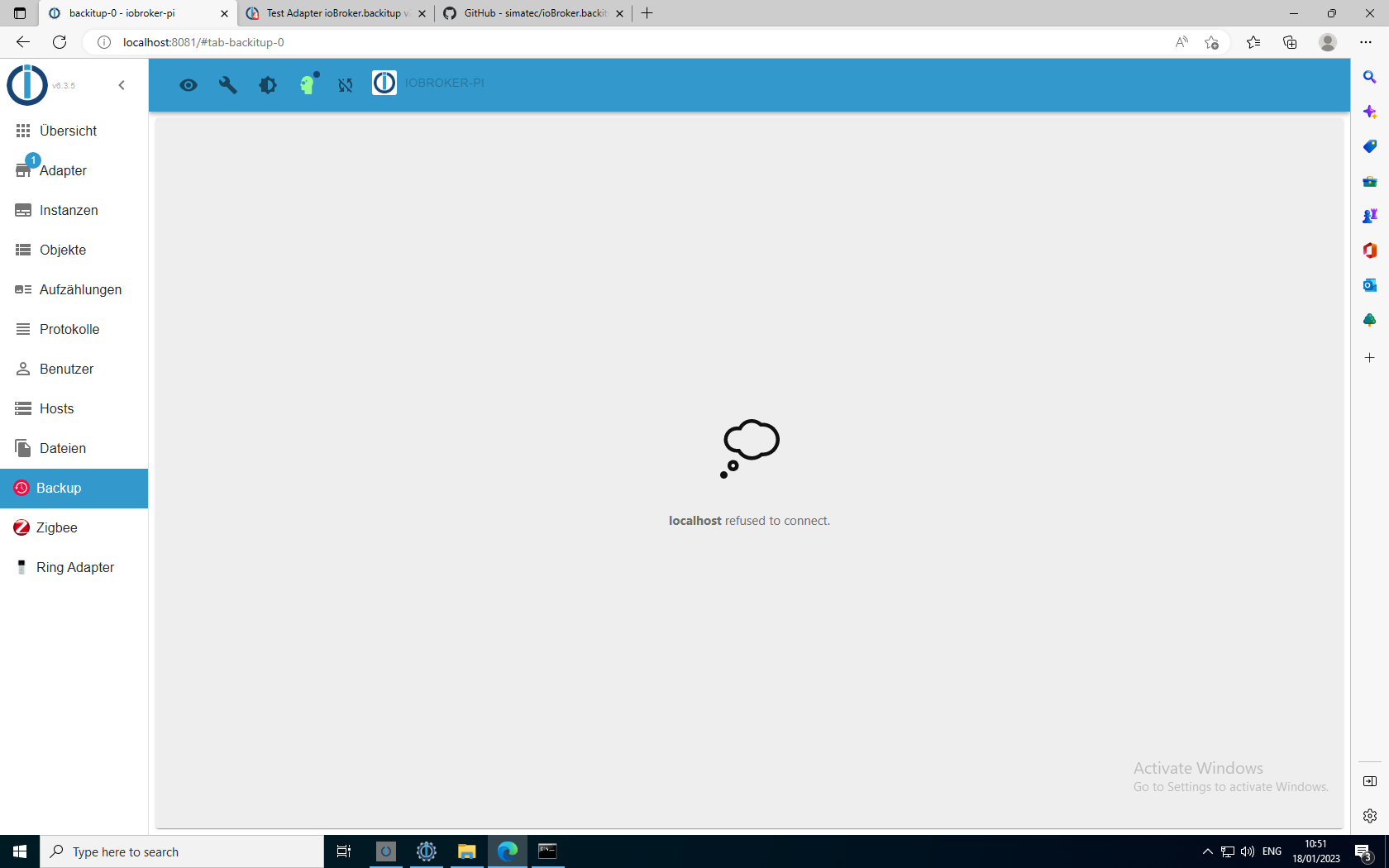
                                9038ad68-c2b4-4215-92c6-59acccc7293f-image.png

                                und bleibt auch so.

                                2023-01-18 10:50:14.294 - info: admin.0 (4576) ==> Connected system.user.admin from ::1
                                2023-01-18 10:50:14.807 - debug: backitup.0 (5032) telegram-instance:
                                2023-01-18 10:50:19.539 - info: admin.0 (4576) <== Disconnect system.user.admin from ::1
                                2023-01-18 10:50:31.094 - info: admin.0 (4576) ==> Connected system.user.admin from ::1
                                2023-01-18 10:50:33.628 - debug: backitup.0 (5032) Backup list be read ...
                                2023-01-18 10:50:39.519 - debug: backitup.0 (5032) set chmod for "C:/Users/FujitsuSmartHome/backups" successfully
                                2023-01-18 10:50:46.897 - info: admin.0 (4576) <== Disconnect system.user.admin from ::1
                                2023-01-18 10:50:56.674 - info: host.iobroker-pi iobroker.js-controller version 4.0.24 js-controller starting
                                2023-01-18 10:50:56.678 - info: host.iobroker-pi Copyright (c) 2014-2022 bluefox, 2014 hobbyquaker
                                2023-01-18 10:50:56.678 - info: host.iobroker-pi hostname: iobroker-pi, node: v16.15.1
                                2023-01-18 10:50:56.679 - info: host.iobroker-pi ip addresses: 2003:c9:1706:5500:d92d:a5dd:dbba:a5a4 2003:c9:1706:5500:a1ce:ec6f:1b0a:7bbd fe80::d92d:a5dd:dbba:a5a4 192.168.178.75
                                2023-01-18 10:50:58.799 - error: host.iobroker-pi-Server Cannot start inMem-objects on port 9001: Failed to lock DB file "C:\Users\FujitsuSmartHome\iobroker-data\objects.jsonl"!
                                2023-01-18 10:51:01.115 - info: host.iobroker-pi iobroker.js-controller version 4.0.24 js-controller starting
                                2023-01-18 10:51:01.119 - info: host.iobroker-pi Copyright (c) 2014-2022 bluefox, 2014 hobbyquaker
                                2023-01-18 10:51:01.119 - info: host.iobroker-pi hostname: iobroker-pi, node: v16.15.1
                                2023-01-18 10:51:01.120 - info: host.iobroker-pi ip addresses: 2003:c9:1706:5500:d92d:a5dd:dbba:a5a4 2003:c9:1706:5500:a1ce:ec6f:1b0a:7bbd fe80::d92d:a5dd:dbba:a5a4 192.168.178.75
                                2023-01-18 10:51:03.236 - error: host.iobroker-pi-Server Cannot start inMem-objects on port 9001: Failed to lock DB file "C:\Users\FujitsuSmartHome\iobroker-data\objects.jsonl"!
                                2023-01-18 10:51:05.766 - info: host.iobroker-pi iobroker.js-controller version 4.0.24 js-controller starting
                                2023-01-18 10:51:05.771 - info: host.iobroker-pi Copyright (c) 2014-2022 bluefox, 2014 hobbyquaker
                                2023-01-18 10:51:05.771 - info: host.iobroker-pi hostname: iobroker-pi, node: v16.15.1
                                2023-01-18 10:51:05.772 - info: host.iobroker-pi ip addresses: 2003:c9:1706:5500:d92d:a5dd:dbba:a5a4 2003:c9:1706:5500:a1ce:ec6f:1b0a:7bbd fe80::d92d:a5dd:dbba:a5a4 192.168.178.75
                                2023-01-18 10:51:07.903 - error: host.iobroker-pi-Server Cannot start inMem-objects on port 9001: Failed to lock DB file "C:\Users\FujitsuSmartHome\iobroker-data\objects.jsonl"!
                                

                                simatecS 1 Reply Last reply
                                0
                                • DK43D DK43

                                  @simatec

                                  Richtig. Also auf dem Raspi 3b+ mit 2GB RAM

                                  so siehts aus wenn ich mit der Wiederherstellung starte
                                  9038ad68-c2b4-4215-92c6-59acccc7293f-image.png

                                  und bleibt auch so.

                                  2023-01-18 10:50:14.294 - info: admin.0 (4576) ==> Connected system.user.admin from ::1
                                  2023-01-18 10:50:14.807 - debug: backitup.0 (5032) telegram-instance:
                                  2023-01-18 10:50:19.539 - info: admin.0 (4576) <== Disconnect system.user.admin from ::1
                                  2023-01-18 10:50:31.094 - info: admin.0 (4576) ==> Connected system.user.admin from ::1
                                  2023-01-18 10:50:33.628 - debug: backitup.0 (5032) Backup list be read ...
                                  2023-01-18 10:50:39.519 - debug: backitup.0 (5032) set chmod for "C:/Users/FujitsuSmartHome/backups" successfully
                                  2023-01-18 10:50:46.897 - info: admin.0 (4576) <== Disconnect system.user.admin from ::1
                                  2023-01-18 10:50:56.674 - info: host.iobroker-pi iobroker.js-controller version 4.0.24 js-controller starting
                                  2023-01-18 10:50:56.678 - info: host.iobroker-pi Copyright (c) 2014-2022 bluefox, 2014 hobbyquaker
                                  2023-01-18 10:50:56.678 - info: host.iobroker-pi hostname: iobroker-pi, node: v16.15.1
                                  2023-01-18 10:50:56.679 - info: host.iobroker-pi ip addresses: 2003:c9:1706:5500:d92d:a5dd:dbba:a5a4 2003:c9:1706:5500:a1ce:ec6f:1b0a:7bbd fe80::d92d:a5dd:dbba:a5a4 192.168.178.75
                                  2023-01-18 10:50:58.799 - error: host.iobroker-pi-Server Cannot start inMem-objects on port 9001: Failed to lock DB file "C:\Users\FujitsuSmartHome\iobroker-data\objects.jsonl"!
                                  2023-01-18 10:51:01.115 - info: host.iobroker-pi iobroker.js-controller version 4.0.24 js-controller starting
                                  2023-01-18 10:51:01.119 - info: host.iobroker-pi Copyright (c) 2014-2022 bluefox, 2014 hobbyquaker
                                  2023-01-18 10:51:01.119 - info: host.iobroker-pi hostname: iobroker-pi, node: v16.15.1
                                  2023-01-18 10:51:01.120 - info: host.iobroker-pi ip addresses: 2003:c9:1706:5500:d92d:a5dd:dbba:a5a4 2003:c9:1706:5500:a1ce:ec6f:1b0a:7bbd fe80::d92d:a5dd:dbba:a5a4 192.168.178.75
                                  2023-01-18 10:51:03.236 - error: host.iobroker-pi-Server Cannot start inMem-objects on port 9001: Failed to lock DB file "C:\Users\FujitsuSmartHome\iobroker-data\objects.jsonl"!
                                  2023-01-18 10:51:05.766 - info: host.iobroker-pi iobroker.js-controller version 4.0.24 js-controller starting
                                  2023-01-18 10:51:05.771 - info: host.iobroker-pi Copyright (c) 2014-2022 bluefox, 2014 hobbyquaker
                                  2023-01-18 10:51:05.771 - info: host.iobroker-pi hostname: iobroker-pi, node: v16.15.1
                                  2023-01-18 10:51:05.772 - info: host.iobroker-pi ip addresses: 2003:c9:1706:5500:d92d:a5dd:dbba:a5a4 2003:c9:1706:5500:a1ce:ec6f:1b0a:7bbd fe80::d92d:a5dd:dbba:a5a4 192.168.178.75
                                  2023-01-18 10:51:07.903 - error: host.iobroker-pi-Server Cannot start inMem-objects on port 9001: Failed to lock DB file "C:\Users\FujitsuSmartHome\iobroker-data\objects.jsonl"!
                                  

                                  simatecS Online
                                  simatecS Online
                                  simatec
                                  Developer Most Active
                                  wrote on last edited by
                                  #2164

                                  @dk43 Dann installiere mal über Github, mache danach zur Sicherheit einen Upload und zeige mir danach mal den Inhalt von C:\iobroker\iobroker-data\backitup

                                  • Besuche meine Github Seite
                                  • Beitrag hat geholfen oder willst du mich unterstützen
                                  • HowTo Restore ioBroker
                                  DK43D 1 Reply Last reply
                                  0
                                  • simatecS simatec

                                    @dk43 Dann installiere mal über Github, mache danach zur Sicherheit einen Upload und zeige mir danach mal den Inhalt von C:\iobroker\iobroker-data\backitup

                                    DK43D Offline
                                    DK43D Offline
                                    DK43
                                    wrote on last edited by
                                    #2165

                                    @simatec

                                    0553b121-152e-4f14-b38a-ddd7e2c0d612-image.png

                                    simatecS 1 Reply Last reply
                                    0
                                    • DK43D DK43

                                      @simatec

                                      0553b121-152e-4f14-b38a-ddd7e2c0d612-image.png

                                      simatecS Online
                                      simatecS Online
                                      simatec
                                      Developer Most Active
                                      wrote on last edited by
                                      #2166

                                      @dk43 Zeige mal den Inhalt von der external.bat und der stopIOB.bat

                                      • Besuche meine Github Seite
                                      • Beitrag hat geholfen oder willst du mich unterstützen
                                      • HowTo Restore ioBroker
                                      DK43D 1 Reply Last reply
                                      0
                                      • simatecS simatec

                                        @dk43 Zeige mal den Inhalt von der external.bat und der stopIOB.bat

                                        DK43D Offline
                                        DK43D Offline
                                        DK43
                                        wrote on last edited by
                                        #2167

                                        @simatec

                                        external.bat

                                        cd "C:\Users\FujitsuSmartHome"
                                        call iobroker stop
                                        timeout /T 10
                                        if exist "C:\Users\FujitsuSmartHome\iobroker-data\backitup\.redis.info" (
                                        redis-server --service-stop
                                        )
                                        if exist "C:/Users/FujitsuSmartHome/iobroker-data/backitup/.redis.info" (
                                        cd "C:\Users\FujitsuSmartHome\node_modules\iobroker.backitup\lib"
                                        ) else (
                                        cd "C:/Users/FujitsuSmartHome/iobroker-data/backitup"
                                        )
                                        node restore.js
                                        

                                        stop.bat

                                        start "" "C:\Users\FujitsuSmartHome\iobroker-data\backitup\external.bat"
                                        
                                        simatecS 1 Reply Last reply
                                        0
                                        • DK43D DK43

                                          @simatec

                                          external.bat

                                          cd "C:\Users\FujitsuSmartHome"
                                          call iobroker stop
                                          timeout /T 10
                                          if exist "C:\Users\FujitsuSmartHome\iobroker-data\backitup\.redis.info" (
                                          redis-server --service-stop
                                          )
                                          if exist "C:/Users/FujitsuSmartHome/iobroker-data/backitup/.redis.info" (
                                          cd "C:\Users\FujitsuSmartHome\node_modules\iobroker.backitup\lib"
                                          ) else (
                                          cd "C:/Users/FujitsuSmartHome/iobroker-data/backitup"
                                          )
                                          node restore.js
                                          

                                          stop.bat

                                          start "" "C:\Users\FujitsuSmartHome\iobroker-data\backitup\external.bat"
                                          
                                          simatecS Online
                                          simatecS Online
                                          simatec
                                          Developer Most Active
                                          wrote on last edited by
                                          #2168

                                          @dk43 Mache mein ein Doppelklick auf die stopIOB.bat und poste mal die Ausgabe

                                          • Besuche meine Github Seite
                                          • Beitrag hat geholfen oder willst du mich unterstützen
                                          • HowTo Restore ioBroker
                                          DK43D 1 Reply Last reply
                                          0
                                          Reply
                                          • Reply as topic
                                          Log in to reply
                                          • Oldest to Newest
                                          • Newest to Oldest
                                          • Most Votes


                                          Support us

                                          ioBroker
                                          Community Adapters
                                          Donate

                                          532

                                          Online

                                          32.7k

                                          Users

                                          82.4k

                                          Topics

                                          1.3m

                                          Posts
                                          Community
                                          Impressum | Datenschutz-Bestimmungen | Nutzungsbedingungen | Einwilligungseinstellungen
                                          ioBroker Community 2014-2025
                                          logo
                                          • Login

                                          • Don't have an account? Register

                                          • Login or register to search.
                                          • First post
                                            Last post
                                          0
                                          • Home
                                          • Recent
                                          • Tags
                                          • Unread 0
                                          • Categories
                                          • Unreplied
                                          • Popular
                                          • GitHub
                                          • Docu
                                          • Hilfe