




Proxmox container backup fehler
-
Ich habe seit Samstag ein pihole im Container auf proxmox. Datensicherung eingerichtet für nachts und bekomme dann folgenden Fehler.
102: 2019-07-23 02:00:03 INFO: Starting Backup of VM 102 (lxc)
102: 2019-07-23 02:00:03 INFO: status = running
102: 2019-07-23 02:00:03 INFO: CT Name: pi-hole
102: 2019-07-23 02:00:03 INFO: backup mode: snapshot
102: 2019-07-23 02:00:03 INFO: ionice priority: 7
102: 2019-07-23 02:00:03 INFO: create storage snapshot 'vzdump'
102: 2019-07-23 02:00:05 INFO: creating archive '/mnt/pve/NFSBackup/dump/vzdump-lxc-102-2019_07_23-02_00_03.tar.lzo'
102: 2019-07-23 02:00:05 INFO: tar: /mnt/pve/NFSBackup/dump/vzdump-lxc-102-2019_07_23-02_00_03.tmp: Cannot open: Permission denied
102: 2019-07-23 02:00:05 INFO: tar: Error is not recoverable: exiting now
102: 2019-07-23 02:00:05 INFO: remove vzdump snapshot
102: 2019-07-23 02:00:05 ERROR: Backup of VM 102 failed - command 'set -o pipefail && lxc-usernsexec -m u:0:100000:65536 -m g:0:100000:65536 -- tar cpf - --totals --one-file-system -p --sparse --numeric-owner --acls --xattrs '--xattrs-include=user.*' '--xattrs-include=security.capability' '--warning=no-file-ignored' '--warning=no-xattr-write' --one-file-system '--warning=no-file-ignored' '--directory=/mnt/pve/NFSBackup/dump/vzdump-lxc-102-2019_07_23-02_00_03.tmp' ./etc/vzdump/pct.conf '--directory=/mnt/vzsnap0' --no-anchored '--exclude=lost+found' --anchored '--exclude=./tmp/?*' '--exclude=./var/tmp/?*' '--exclude=./var/run/?*.pid' ./ | lzop >/mnt/pve/NFSBackup/dump/vzdump-lxc-102-2019_07_23-02_00_03.tar.dat' failed: exit code 2
Kann mir evtl jemand sagen warum er das nicht macht? Warum kann er das gerade selbst erstellte backup nicht öffnen und meckert dann?
Danke und Gruss Danyel
Intel NUC Celeron, Xiaomi Gateway, Fritzbox 7590, XS1
-
Ich habe seit Samstag ein pihole im Container auf proxmox. Datensicherung eingerichtet für nachts und bekomme dann folgenden Fehler.
102: 2019-07-23 02:00:03 INFO: Starting Backup of VM 102 (lxc)
102: 2019-07-23 02:00:03 INFO: status = running
102: 2019-07-23 02:00:03 INFO: CT Name: pi-hole
102: 2019-07-23 02:00:03 INFO: backup mode: snapshot
102: 2019-07-23 02:00:03 INFO: ionice priority: 7
102: 2019-07-23 02:00:03 INFO: create storage snapshot 'vzdump'
102: 2019-07-23 02:00:05 INFO: creating archive '/mnt/pve/NFSBackup/dump/vzdump-lxc-102-2019_07_23-02_00_03.tar.lzo'
102: 2019-07-23 02:00:05 INFO: tar: /mnt/pve/NFSBackup/dump/vzdump-lxc-102-2019_07_23-02_00_03.tmp: Cannot open: Permission denied
102: 2019-07-23 02:00:05 INFO: tar: Error is not recoverable: exiting now
102: 2019-07-23 02:00:05 INFO: remove vzdump snapshot
102: 2019-07-23 02:00:05 ERROR: Backup of VM 102 failed - command 'set -o pipefail && lxc-usernsexec -m u:0:100000:65536 -m g:0:100000:65536 -- tar cpf - --totals --one-file-system -p --sparse --numeric-owner --acls --xattrs '--xattrs-include=user.*' '--xattrs-include=security.capability' '--warning=no-file-ignored' '--warning=no-xattr-write' --one-file-system '--warning=no-file-ignored' '--directory=/mnt/pve/NFSBackup/dump/vzdump-lxc-102-2019_07_23-02_00_03.tmp' ./etc/vzdump/pct.conf '--directory=/mnt/vzsnap0' --no-anchored '--exclude=lost+found' --anchored '--exclude=./tmp/?*' '--exclude=./var/tmp/?*' '--exclude=./var/run/?*.pid' ./ | lzop >/mnt/pve/NFSBackup/dump/vzdump-lxc-102-2019_07_23-02_00_03.tar.dat' failed: exit code 2
Kann mir evtl jemand sagen warum er das nicht macht? Warum kann er das gerade selbst erstellte backup nicht öffnen und meckert dann?
Danke und Gruss Danyel
@Webranger sagte in Proxmox container backup fehler:
102: 2019-07-23 02:00:05 INFO: tar: /mnt/pve/NFSBackup/dump/vzdump-lxc-102-2019_07_23-02_00_03.tmp: Cannot open: Permission denied
Das klingt mir nach einem Berechtigungsproblem.
Du dürftest das Backup auch nicht manuell anlegen können(?)
ggf. stimmt etwas mit dem mount nicht, oder der User/das System das das Backup anlegt hat auf dem gemounteten Verzeichnis keine Schreibrechte -
Das Backup wird ja im proxmox angelegt bzw erstellt. Bei den beiden anderen vm und clx geht es ohne Probleme nur bei dem pihole nicht.
@Webranger
Wie schaut es denn mit der Anzahl Backups aus?
kann es sein dass Du die Limitierung (wie viele Backups je VM/Container sind möglich) erreicht hast und erst ein altes Backup löschen musst bevor Du ein aktuelles Backup anlegen kannst? -
1 backup iobroker vm
1 backup tasmoadmin container
1 backup pihole containerHört sich nicht zu viel an oder?
@Webranger wenn das Limit auf 1 steht schon ;-)
ioBroker auf NUC (VM debian v13 (Trixie ), node v22.22.0 npm v10.9.4, js-controller v7.2.2 jsonl/jsonl / HomeMatic CCU-2 (Wired und Funk) / Philips HUE / echo.DOT / Broadlink RM pro / SONOS
-
@Webranger wenn das Limit auf 1 steht schon ;-)
@Webranger
Kannst du manuel ein Backup erstellen?Wenn du schon ein Backup hast kannst du so wie @BBTown schreibt in der kostenlosen Version von Proxmox kein weiteres mehr machen...
Du musst erst das vorhandene löschen...
Beim manuellen Anstoßen des Backups mit bereits erstellten Backup sieht die Fehlermeldung so aus:ERROR: Backup of VM 101 failed - only 1 backup(s) allowed - please consider to remove old backup files. -
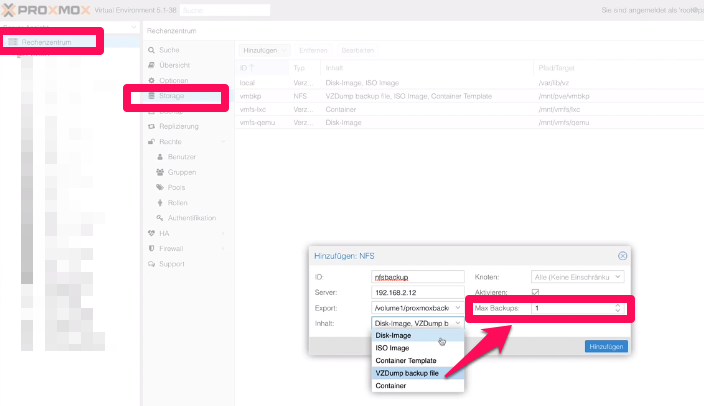
@Webranger dort wo Du in einem Pfad/Laufwerk/Ziel definierst, dass dieses Ziel auch für Backups genutzt werden kann .
Ich bin gerade nicht auf meinem System, daher kann ich dir leider keinen Screenshot schicken.
-
@Webranger
Kannst du manuel ein Backup erstellen?Wenn du schon ein Backup hast kannst du so wie @BBTown schreibt in der kostenlosen Version von Proxmox kein weiteres mehr machen...
Du musst erst das vorhandene löschen...
Beim manuellen Anstoßen des Backups mit bereits erstellten Backup sieht die Fehlermeldung so aus:ERROR: Backup of VM 101 failed - only 1 backup(s) allowed - please consider to remove old backup files.@Webranger
@FredF sagte in Proxmox container backup fehler:in der kostenlosen Version von Proxmox kein weiteres mehr machen...
Doch, das geht schon, aber wenn man ein Ziel für Backup definiert, dann ist - soviel ich mich erinnere - "1 " voreingestellt, ... aber du kannst den Wert erhöhen.
ioBroker auf NUC (VM debian v13 (Trixie ), node v22.22.0 npm v10.9.4, js-controller v7.2.2 jsonl/jsonl / HomeMatic CCU-2 (Wired und Funk) / Philips HUE / echo.DOT / Broadlink RM pro / SONOS
-
@Webranger
Kannst du manuel ein Backup erstellen?Wenn du schon ein Backup hast kannst du so wie @BBTown schreibt in der kostenlosen Version von Proxmox kein weiteres mehr machen...
Du musst erst das vorhandene löschen...
Beim manuellen Anstoßen des Backups mit bereits erstellten Backup sieht die Fehlermeldung so aus:ERROR: Backup of VM 101 failed - only 1 backup(s) allowed - please consider to remove old backup files.@FredF @Webranger
Ich habe nun doch einen Screenshot aus einem Erklär-Video machen können.
Ich hoffe es ist etwas drauf zu erkennen
-
Steht auf "Max Backups 15"
Wenn ich das Backup von Hand starte kommt folgendes:
INFO: starting new backup job: vzdump 102 --remove 0 --mode snapshot --node pve --storage NFSBackup --compress lzo INFO: Starting Backup of VM 102 (lxc) INFO: Backup started at 2019-07-23 17:12:06 INFO: status = running INFO: CT Name: pi-hole INFO: backup mode: snapshot INFO: ionice priority: 7 INFO: create storage snapshot 'vzdump' Using default stripesize 64.00 KiB. For thin pool auto extension activation/thin_pool_autoextend_threshold should be below 100. Logical volume "snap_vm-102-disk-0_vzdump" created. WARNING: Sum of all thin volume sizes (216.38 GiB) exceeds the size of thin pool pve/data and the size of whole volume group (118.99 GiB)! INFO: creating archive '/mnt/pve/NFSBackup/dump/vzdump-lxc-102-2019_07_23-17_12_06.tar.lzo' INFO: tar: /mnt/pve/NFSBackup/dump/vzdump-lxc-102-2019_07_23-17_12_06.tmp: Cannot open: Permission denied INFO: tar: Error is not recoverable: exiting now INFO: remove vzdump snapshot Logical volume "snap_vm-102-disk-0_vzdump" successfully removed ERROR: Backup of VM 102 failed - command 'set -o pipefail && lxc-usernsexec -m u:0:100000:65536 -m g:0:100000:65536 -- tar cpf - --totals --one-file-system -p --sparse --numeric-owner --acls --xattrs '--xattrs-include=user.*' '--xattrs-include=security.capability' '--warning=no-file-ignored' '--warning=no-xattr-write' --one-file-system '--warning=no-file-ignored' '--directory=/mnt/pve/NFSBackup/dump/vzdump-lxc-102-2019_07_23-17_12_06.tmp' ./etc/vzdump/pct.conf '--directory=/mnt/vzsnap0' --no-anchored '--exclude=lost+found' --anchored '--exclude=./tmp/?*' '--exclude=./var/tmp/?*' '--exclude=./var/run/?*.pid' ./ | lzop >/mnt/pve/NFSBackup/dump/vzdump-lxc-102-2019_07_23-17_12_06.tar.dat' failed: exit code 2 INFO: Failed at 2019-07-23 17:12:07 INFO: Backup job finished with errors -
@Webranger
@FredF sagte in Proxmox container backup fehler:in der kostenlosen Version von Proxmox kein weiteres mehr machen...
Doch, das geht schon, aber wenn man ein Ziel für Backup definiert, dann ist - soviel ich mich erinnere - "1 " voreingestellt, ... aber du kannst den Wert erhöhen.
-
Ich habe seit Samstag ein pihole im Container auf proxmox. Datensicherung eingerichtet für nachts und bekomme dann folgenden Fehler.
102: 2019-07-23 02:00:03 INFO: Starting Backup of VM 102 (lxc)
102: 2019-07-23 02:00:03 INFO: status = running
102: 2019-07-23 02:00:03 INFO: CT Name: pi-hole
102: 2019-07-23 02:00:03 INFO: backup mode: snapshot
102: 2019-07-23 02:00:03 INFO: ionice priority: 7
102: 2019-07-23 02:00:03 INFO: create storage snapshot 'vzdump'
102: 2019-07-23 02:00:05 INFO: creating archive '/mnt/pve/NFSBackup/dump/vzdump-lxc-102-2019_07_23-02_00_03.tar.lzo'
102: 2019-07-23 02:00:05 INFO: tar: /mnt/pve/NFSBackup/dump/vzdump-lxc-102-2019_07_23-02_00_03.tmp: Cannot open: Permission denied
102: 2019-07-23 02:00:05 INFO: tar: Error is not recoverable: exiting now
102: 2019-07-23 02:00:05 INFO: remove vzdump snapshot
102: 2019-07-23 02:00:05 ERROR: Backup of VM 102 failed - command 'set -o pipefail && lxc-usernsexec -m u:0:100000:65536 -m g:0:100000:65536 -- tar cpf - --totals --one-file-system -p --sparse --numeric-owner --acls --xattrs '--xattrs-include=user.*' '--xattrs-include=security.capability' '--warning=no-file-ignored' '--warning=no-xattr-write' --one-file-system '--warning=no-file-ignored' '--directory=/mnt/pve/NFSBackup/dump/vzdump-lxc-102-2019_07_23-02_00_03.tmp' ./etc/vzdump/pct.conf '--directory=/mnt/vzsnap0' --no-anchored '--exclude=lost+found' --anchored '--exclude=./tmp/?*' '--exclude=./var/tmp/?*' '--exclude=./var/run/?*.pid' ./ | lzop >/mnt/pve/NFSBackup/dump/vzdump-lxc-102-2019_07_23-02_00_03.tar.dat' failed: exit code 2
Kann mir evtl jemand sagen warum er das nicht macht? Warum kann er das gerade selbst erstellte backup nicht öffnen und meckert dann?
Danke und Gruss Danyel
@Webranger ich hatte gerade den gleichen Fehler beim Backup auf NFS.
Backup von VM geht, Backup von CT geht nicht.Lösung:
Auf dem Host muss in der Datei /etc/vzdump.conf ein tmp-Folder angegeben werden.
https://www.reddit.com/r/Proxmox/comments/ca7mep/cannot_backup_one_container/ -
Ich muss das Thema hier leider wieder hochholen. Kämpfe mit dem gleichen Problem. Kein Backup möglich wegen vermutlich Zugriffsproblemen. Das seltsame ich kann nur mit bei meinem Iobroker Container kein Backup ausführen. Egal ob lokal oder auf dem NAS. Die anderen beiden Container die laufen machen da keine Probleme.
Temp Verzeichnis in vzdump.conf habe ich gemacht.
()
INFO: starting new backup job: vzdump 100 --compress lzo --mode snapshot --node NUC --storage Syno-Backup --remove 0
INFO: Starting Backup of VM 100 (lxc)
INFO: Backup started at 2020-01-21 05:12:15
INFO: status = running
INFO: CT Name: IobrokerCT
INFO: backup mode: snapshot
INFO: ionice priority: 7
INFO: create storage snapshot 'vzdump'
  Logical volume "snap_vm-100-disk-0_vzdump" created.
INFO: creating archive '/mnt/pve/Syno-Backup/dump/vzdump-lxc-100-2020_01_21-05_12_15.tar.lzo'
INFO: tar: ./var/cache/private: Cannot open: Permission denied
INFO: tar: ./var/log/btmp: Cannot open: Permission denied
INFO: tar: ./var/log/private: Cannot open: Permission denied
INFO: tar: ./var/log/mail.err: Cannot open: Permission denied
INFO: tar: ./var/lib/private: Cannot open: Permission denied
INFO: Total bytes written: 3676989440 (3.5GiB, 164MiB/s)
INFO: tar: Exiting with failure status due to previous errors
INFO: remove vzdump snapshot
  Logical volume "snap_vm-100-disk-0_vzdump" successfully removed
ERROR: Backup of VM 100 failed - command 'set -o pipefail && lxc-usernsexec -m u:0:100000:65536 -m g:0:100000:65536 -- tar cpf - --totals --one-file-system -p --sparse --numeric-owner --acls --xattrs '--xattrs-include=user.*' '--xattrs-include=security.capability' '--warning=no-file-ignored' '--warning=no-xattr-write' --one-file-system '--warning=no-file-ignored' '--directory=/tmp/vzdumptmp7276' ./etc/vzdump/pct.conf ./etc/vzdump/pct.fw '--directory=/mnt/vzsnap0' --no-anchored '--exclude=lost+found' --anchored '--exclude=./tmp/?*' '--exclude=./var/tmp/?*' '--exclude=./var/run/?*.pid' ./ | lzop >/mnt/pve/Syno-Backup/dump/vzdump-lxc-100-2020_01_21-05_12_15.tar.dat' failed: exit code 2
INFO: Failed at 2020-01-21 05:12:41
INFO: Backup job finished with errors
TASK ERROR: job errors
Hat jemand eine Idee?
-
Das ist jetzt nicht hilfreich, aber bei mir funktioniert es im Moment grundsätzlich:
Virtual Environment 6.1-5
Suche
Container 202 (ioBrokerDebian10) auf Knoten 'pve'
SystemProxmoxBackup-NAS
lxc-202-
Server-Ansicht
Logs
()
INFO: starting new backup job: vzdump 202 --remove 0 --storage SystemProxmoxBackup-NAS --compress gzip --mode snapshot --node pve
INFO: Starting Backup of VM 202 (lxc)
INFO: Backup started at 2020-01-21 05:46:51
INFO: status = running
INFO: CT Name: ioBrokerDebian10
INFO: backup mode: snapshot
INFO: ionice priority: 7
INFO: create storage snapshot 'vzdump'
  Logical volume "snap_vm-202-disk-0_vzdump" created.
INFO: creating archive '/mnt/pve/SystemProxmoxBackup-NAS/dump/vzdump-lxc-202-2020_01_21-05_46_51.tar.gz'
INFO: Total bytes written: 1512294400 (1.5GiB, 14MiB/s)
INFO: archive file size: 606MB
INFO: remove vzdump snapshot
  Logical volume "snap_vm-202-disk-0_vzdump" successfully removed
INFO: Finished Backup of VM 202 (00:01:46)
INFO: Backup finished at 2020-01-21 05:48:37
INFO: Backup job finished successfully
TASK OK
Mein Proxmox steht auf 6.1-5 und ist im Moment auch absolut aktuell, da ich erst seit dem Wochenende daran arbeite. Vielleicht bringt es etwas, ein apt update und ein apt upgrade zu machen. Ansonsten würde ich zumindest proxmox mal neu starten und schauen, ob es dann geht.
Und dann boeobachte ich noch ein eigenartiges Phänomen bei mir, das aber eher mitd er Synology NAS zu tun hat: Bevor ich das System am Wochenende neu aufgesetzt habe hatte ich festegestellt, dass das eingerichtete Backup seit einigen Tagen nicht gelaufen war. Hier kam aber ein mount Fehler von der Syno. Gleiches Problem mit dem mount hatte ich schon mal unter ioBroker mit backitup-adapter. Da musste ich das Verzeichnis auf der Syno neu anlegen, sonst funktionierte es nicht mehr. Ich kann mich des Eindruckes nicht erwehren, dass updates der Syno manchmal Probleme machen, die dann später den NFS mount behindern... -
Das seltsame bei mir ist, dass das "gleiche" Backup ja bei den anderen beiden LXC Container funktioniert. Nur beim IoBroker Container nicht, egal ob ich als Ziel das Synology NAS angebe oder Lokal. Fehlermeldung ist in beiden Fällen "Permission denied".
Alle 3 Container laufen auch Fehlerfrei und basieren auf nem Debian 9 Template.
-
Das seltsame bei mir ist, dass das "gleiche" Backup ja bei den anderen beiden LXC Container funktioniert. Nur beim IoBroker Container nicht, egal ob ich als Ziel das Synology NAS angebe oder Lokal. Fehlermeldung ist in beiden Fällen "Permission denied".
Alle 3 Container laufen auch Fehlerfrei und basieren auf nem Debian 9 Template.
@ecki945 was hat dir den nun geholfen ? Stehe vor dem selben Problem ?!?!?
-
@ecki945 was hat dir den nun geholfen ? Stehe vor dem selben Problem ?!?!?
@Chrisidonner noch gar nix. Der Fehler ist, dass ich beim Anlegen des Containers nicht die richtigen Einstellungen gemacht habe. Wird darauf hinauslaufen nen neuen Container mit iobroker zu erstellen. Aktuell sind andere Sachen wichtiger. Deshalb muss das Warten.





Hey! Du scheinst an dieser Unterhaltung interessiert zu sein, hast aber noch kein Konto.
Hast du es satt, bei jedem Besuch durch die gleichen Beiträge zu scrollen? Wenn du dich für ein Konto anmeldest, kommst du immer genau dorthin zurück, wo du zuvor warst, und kannst dich über neue Antworten benachrichtigen lassen (entweder per E-Mail oder Push-Benachrichtigung). Du kannst auch Lesezeichen speichern und Beiträge positiv bewerten, um anderen Community-Mitgliedern deine Wertschätzung zu zeigen.
Mit deinem Input könnte dieser Beitrag noch besser werden 💗
Registrieren AnmeldenSupport us
360
Online33.0k
Benutzende83.7k
Themen1.3m
Beiträge