Skip to content
  • Home
  • Recent
  • Tags
  • 0 Unread 0
  • Categories
  • Unreplied
  • Popular
  • GitHub
  • Docu
  • Hilfe
Skins
  • Light
  • Brite
  • Cerulean
  • Cosmo
  • Flatly
  • Journal
  • Litera
  • Lumen
  • Lux
  • Materia
  • Minty
  • Morph
  • Pulse
  • Sandstone
  • Simplex
  • Sketchy
  • Spacelab
  • United
  • Yeti
  • Zephyr
  • Dark
  • Cyborg
  • Darkly
  • Quartz
  • Slate
  • Solar
  • Superhero
  • Vapor

  • Default (No Skin)
  • No Skin
Collapse
ioBroker Logo

Community Forum

donate donate
  1. ioBroker Community Home
  2. Deutsch
  3. Skripten / Logik
  4. [Gelöst] CPU Temperatur von Proxmox VM
NEWS

  • Jahresrückblick 2025 – unser neuer Blogbeitrag ist online! ✨
    BluefoxB
    Bluefox
    17
    1
    2.8k

  • Neuer Blogbeitrag: Monatsrückblick - Dezember 2025 🎄
    BluefoxB
    Bluefox
    13
    1
    1.1k

  • Weihnachtsangebot 2025! 🎄
    BluefoxB
    Bluefox
    25
    1
    2.4k

[Gelöst] CPU Temperatur von Proxmox VM

Scheduled Pinned Locked Moved Skripten / Logik
monitoringjavascriptblockly
129 Posts 31 Posters 29.2k Views 32 Watching
  • Oldest to Newest
  • Newest to Oldest
  • Most Votes
Reply
  • Reply as topic
Log in to reply
This topic has been deleted. Only users with topic management privileges can see it.
  • crunchipC crunchip

    @basti97 Benutzer oder root?

    Basti97B Offline
    Basti97B Offline
    Basti97
    Most Active
    wrote on last edited by Basti97
    #104

    @crunchip Ich hatte es mir Root probiert. Aber mir gefällt das nicht so das der iob die rootrechte bekommt. Ich habe den Port 8006 genommen

    Iobroker läuft als VM auf Proxmoxserver x folgende Hersteller im Einsatz Sonoff, Gosund, Siemens x Aofo über Tasmota x Zigbee x das Smarthome wächst und wächst

    crunchipC 1 Reply Last reply
    0
    • Basti97B Basti97

      @crunchip Ich hatte es mir Root probiert. Aber mir gefällt das nicht so das der iob die rootrechte bekommt. Ich habe den Port 8006 genommen

      crunchipC Away
      crunchipC Away
      crunchip
      Forum Testing Most Active
      wrote on last edited by crunchip
      #105

      @basti97 sagte in [Gelöst] CPU Temperatur von Proxmox VM:

      Ich habe den Port 8006 genommen

      weil? Port 22 ist dein ssh Zugang

      umgestiegen von Proxmox auf Unraid

      Basti97B 1 Reply Last reply
      0
      • crunchipC crunchip

        @basti97 sagte in [Gelöst] CPU Temperatur von Proxmox VM:

        Ich habe den Port 8006 genommen

        weil? Port 22 ist dein ssh Zugang

        Basti97B Offline
        Basti97B Offline
        Basti97
        Most Active
        wrote on last edited by
        #106

        @crunchip Achso jetzt verstehe ich es warum es nicht geht ich habe SSH deaktiviert. Weil ich es nicht brauche bzw mir zu gefährlich ist. Naja mal sehen ob es noch eine andere Möglichkeit gibt.

        Iobroker läuft als VM auf Proxmoxserver x folgende Hersteller im Einsatz Sonoff, Gosund, Siemens x Aofo über Tasmota x Zigbee x das Smarthome wächst und wächst

        Meister MopperM 1 Reply Last reply
        0
        • Basti97B Basti97

          @crunchip Achso jetzt verstehe ich es warum es nicht geht ich habe SSH deaktiviert. Weil ich es nicht brauche bzw mir zu gefährlich ist. Naja mal sehen ob es noch eine andere Möglichkeit gibt.

          Meister MopperM Offline
          Meister MopperM Offline
          Meister Mopper
          wrote on last edited by
          #107

          @basti97 sagte in [Gelöst] CPU Temperatur von Proxmox VM:

          mir zu gefährlich ist

          Was ist daran gefährlich? Ab und an sollte man ja mit dem Server doch sshprechen?!

          Proxmox und HA

          1 Reply Last reply
          0
          • crunchipC crunchip

            @basti97 hat er doch geschrieben, per script die Daten abrufen oder mit dem Adapter
            unter Host fügst du proxmox hinzu

            275a6782-7020-486b-a84f-766ddd07b706-image.png
            unter Befehle dieses
            2e2cbb84-03ae-4987-be6a-896299916620-image.png

            ? Offline
            ? Offline
            A Former User
            wrote on last edited by
            #108

            @crunchip sagte in [Gelöst] CPU Temperatur von Proxmox VM:

            @basti97 hat er doch geschrieben, per script die Daten abrufen oder mit dem Adapter
            unter Host fügst du proxmox hinzu
            275a6782-7020-486b-a84f-766ddd07b706-image.png
            unter Befehle dieses
            2e2cbb84-03ae-4987-be6a-896299916620-image.png

            Hi,
            welcher Adapter ist das, wo ich das einfügen kann.

            Gruß und danke vorab

            crunchipC 1 Reply Last reply
            0
            • ? A Former User

              @crunchip sagte in [Gelöst] CPU Temperatur von Proxmox VM:

              @basti97 hat er doch geschrieben, per script die Daten abrufen oder mit dem Adapter
              unter Host fügst du proxmox hinzu
              275a6782-7020-486b-a84f-766ddd07b706-image.png
              unter Befehle dieses
              2e2cbb84-03ae-4987-be6a-896299916620-image.png

              Hi,
              welcher Adapter ist das, wo ich das einfügen kann.

              Gruß und danke vorab

              crunchipC Away
              crunchipC Away
              crunchip
              Forum Testing Most Active
              wrote on last edited by
              #109

              @murmelbaerchen69 linux-control

              umgestiegen von Proxmox auf Unraid

              B 1 Reply Last reply
              0
              • crunchipC crunchip

                @martinschm ich habe z.b. Prometheus im Zusammenspiel mit Grafana und InfluxDB laufen. Somit habe ich sämtliche Servermetriken, falls du nach "mehr" suchst.
                Sieht dann so z.b. aus
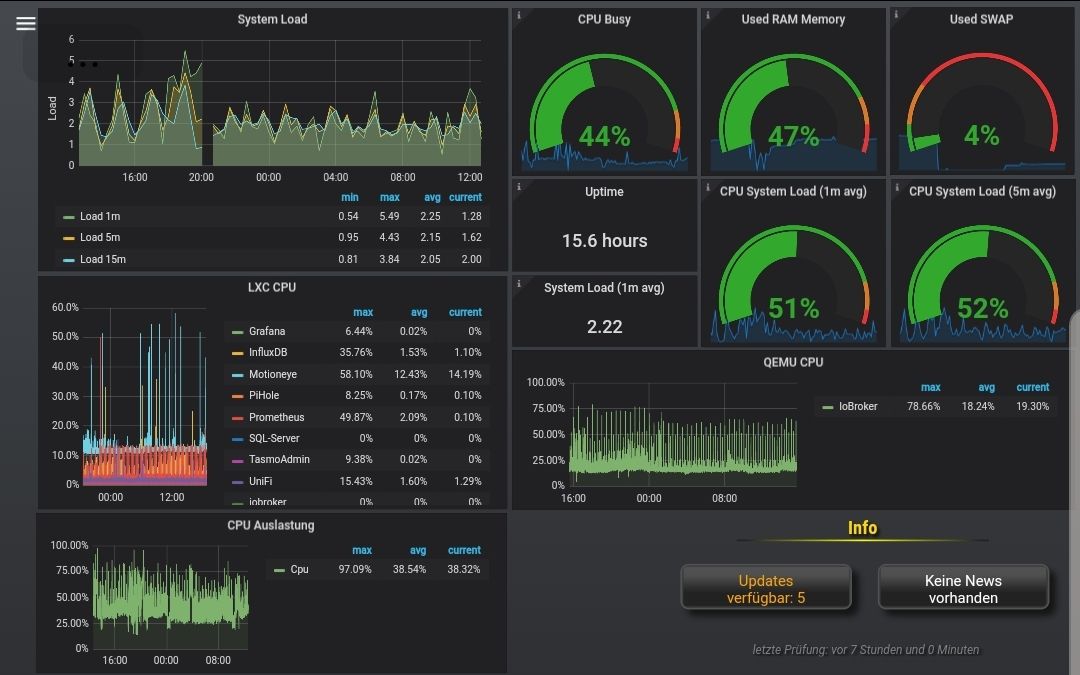
                Screenshot_20191022-184101_ioBrokervis.jpg
                Hier der Link
                https://prometheus.io/docs/guides/node-exporter/

                B Offline
                B Offline
                babl
                wrote on last edited by
                #110

                @crunchip da werde ich mich wohl mal dranmachen, damit man sieht was im system vor sich geht. danke für den link

                1 Reply Last reply
                0
                • crunchipC crunchip

                  @murmelbaerchen69 linux-control

                  B Offline
                  B Offline
                  babl
                  wrote on last edited by
                  #111

                  @crunchip bei der ausgabe in der shell mit diesem befehl bekomme ich folgendes:

                  .....@proxmox:~#  sensors | grep 'Core 0:'| awk '{print $3}'| cut -c2-3
                  ERROR: Can't get value of subfeature temp3_min: I/O error
                  ERROR: Can't get value of subfeature temp3_max: I/O error
                  ERROR: Can't get value of subfeature temp4_min: I/O error
                  ERROR: Can't get value of subfeature temp4_max: I/O error
                  ERROR: Can't get value of subfeature temp7_min: I/O error
                  ERROR: Can't get value of subfeature temp7_max: I/O error
                  57
                  

                  Wie bekomme ich die Error ANzeige noch rausgeschnitten, müsste doch mit dem cut befehl auch gehen, hoffe ich zumindest mal. Das Wäre super.

                  crunchipC 1 Reply Last reply
                  0
                  • B babl

                    @crunchip bei der ausgabe in der shell mit diesem befehl bekomme ich folgendes:

                    .....@proxmox:~#  sensors | grep 'Core 0:'| awk '{print $3}'| cut -c2-3
                    ERROR: Can't get value of subfeature temp3_min: I/O error
                    ERROR: Can't get value of subfeature temp3_max: I/O error
                    ERROR: Can't get value of subfeature temp4_min: I/O error
                    ERROR: Can't get value of subfeature temp4_max: I/O error
                    ERROR: Can't get value of subfeature temp7_min: I/O error
                    ERROR: Can't get value of subfeature temp7_max: I/O error
                    57
                    

                    Wie bekomme ich die Error ANzeige noch rausgeschnitten, müsste doch mit dem cut befehl auch gehen, hoffe ich zumindest mal. Das Wäre super.

                    crunchipC Away
                    crunchipC Away
                    crunchip
                    Forum Testing Most Active
                    wrote on last edited by crunchip
                    #112

                    @babl sagte in [Gelöst] CPU Temperatur von Proxmox VM:

                    0:'| a

                    @babl sagte in [Gelöst] CPU Temperatur von Proxmox VM:

                    3}'|

                    fehlt da nicht ein Leerzeichen

                    umgestiegen von Proxmox auf Unraid

                    B 1 Reply Last reply
                    0
                    • crunchipC crunchip

                      @babl sagte in [Gelöst] CPU Temperatur von Proxmox VM:

                      0:'| a

                      @babl sagte in [Gelöst] CPU Temperatur von Proxmox VM:

                      3}'|

                      fehlt da nicht ein Leerzeichen

                      B Offline
                      B Offline
                      babl
                      wrote on last edited by babl
                      #113

                      @crunchip leider das selbe

                      #  sensors | grep 'Core 1:' | awk '{print $3}' | cut -c2-3
                      ERROR: Can't get value of subfeature temp3_min: I/O error
                      ERROR: Can't get value of subfeature temp3_max: I/O error
                      ERROR: Can't get value of subfeature temp4_min: I/O error
                      ERROR: Can't get value of subfeature temp4_max: I/O error
                      ERROR: Can't get value of subfeature temp7_min: I/O error
                      ERROR: Can't get value of subfeature temp7_max: I/O error
                      59
                      
                      crunchipC 1 Reply Last reply
                      0
                      • B babl

                        @crunchip leider das selbe

                        #  sensors | grep 'Core 1:' | awk '{print $3}' | cut -c2-3
                        ERROR: Can't get value of subfeature temp3_min: I/O error
                        ERROR: Can't get value of subfeature temp3_max: I/O error
                        ERROR: Can't get value of subfeature temp4_min: I/O error
                        ERROR: Can't get value of subfeature temp4_max: I/O error
                        ERROR: Can't get value of subfeature temp7_min: I/O error
                        ERROR: Can't get value of subfeature temp7_max: I/O error
                        59
                        
                        crunchipC Away
                        crunchipC Away
                        crunchip
                        Forum Testing Most Active
                        wrote on last edited by
                        #114

                        @babl werden da nicht alle sensoren erkannt?
                        https://wiki.ubuntuusers.de/Lm_sensors/

                        wie sieht denn die Augabe aus von

                        sensors
                        

                        umgestiegen von Proxmox auf Unraid

                        B 1 Reply Last reply
                        0
                        • crunchipC crunchip

                          @babl werden da nicht alle sensoren erkannt?
                          https://wiki.ubuntuusers.de/Lm_sensors/

                          wie sieht denn die Augabe aus von

                          sensors
                          
                          B Offline
                          B Offline
                          babl
                          wrote on last edited by
                          #115

                          @crunchip

                          sensors
                          coretemp-isa-0000
                          Adapter: ISA adapter
                          Package id 0:  +62.0°C  (high = +84.0°C, crit = +100.0°C)
                          Core 0:        +59.0°C  (high = +84.0°C, crit = +100.0°C)
                          Core 1:        +62.0°C  (high = +84.0°C, crit = +100.0°C)
                          Core 2:        +59.0°C  (high = +84.0°C, crit = +100.0°C)
                          Core 3:        +61.0°C  (high = +84.0°C, crit = +100.0°C)
                          
                          acpitz-acpi-0
                          Adapter: ACPI interface
                          temp1:        +27.8°C  (crit = +119.0°C)
                          temp2:        +29.8°C  (crit = +119.0°C)
                          
                          nvme-pci-0100
                          Adapter: PCI adapter
                          Composite:    +54.9°C  (low  =  -0.1°C, high = +74.8°C)
                                                 (crit = +79.8°C)
                          ERROR: Can't get value of subfeature temp3_min: I/O error
                          ERROR: Can't get value of subfeature temp3_max: I/O error
                          Sensor 2:     +54.9°C  (low  =  +0.0°C, high =  +0.0°C)
                          ERROR: Can't get value of subfeature temp4_min: I/O error
                          ERROR: Can't get value of subfeature temp4_max: I/O error
                          Sensor 3:     +81.8°C  (low  =  +0.0°C, high =  +0.0°C)
                          ERROR: Can't get value of subfeature temp7_min: I/O error
                          ERROR: Can't get value of subfeature temp7_max: I/O error
                          Sensor 6:     +54.9°C  (low  =  +0.0°C, high =  +0.0°C)
                          
                          crunchipC 1 Reply Last reply
                          0
                          • B babl

                            @crunchip

                            sensors
                            coretemp-isa-0000
                            Adapter: ISA adapter
                            Package id 0:  +62.0°C  (high = +84.0°C, crit = +100.0°C)
                            Core 0:        +59.0°C  (high = +84.0°C, crit = +100.0°C)
                            Core 1:        +62.0°C  (high = +84.0°C, crit = +100.0°C)
                            Core 2:        +59.0°C  (high = +84.0°C, crit = +100.0°C)
                            Core 3:        +61.0°C  (high = +84.0°C, crit = +100.0°C)
                            
                            acpitz-acpi-0
                            Adapter: ACPI interface
                            temp1:        +27.8°C  (crit = +119.0°C)
                            temp2:        +29.8°C  (crit = +119.0°C)
                            
                            nvme-pci-0100
                            Adapter: PCI adapter
                            Composite:    +54.9°C  (low  =  -0.1°C, high = +74.8°C)
                                                   (crit = +79.8°C)
                            ERROR: Can't get value of subfeature temp3_min: I/O error
                            ERROR: Can't get value of subfeature temp3_max: I/O error
                            Sensor 2:     +54.9°C  (low  =  +0.0°C, high =  +0.0°C)
                            ERROR: Can't get value of subfeature temp4_min: I/O error
                            ERROR: Can't get value of subfeature temp4_max: I/O error
                            Sensor 3:     +81.8°C  (low  =  +0.0°C, high =  +0.0°C)
                            ERROR: Can't get value of subfeature temp7_min: I/O error
                            ERROR: Can't get value of subfeature temp7_max: I/O error
                            Sensor 6:     +54.9°C  (low  =  +0.0°C, high =  +0.0°C)
                            
                            crunchipC Away
                            crunchipC Away
                            crunchip
                            Forum Testing Most Active
                            wrote on last edited by
                            #116

                            @babl dann sollte ja die Abfrage eigentlich passen, schau mal wegen deinem

                            ERROR: Can't get value of subfeature temp3_min: I/O error
                            

                            https://github.com/lm-sensors/lm-sensors/issues/368/

                            umgestiegen von Proxmox auf Unraid

                            B 2 Replies Last reply
                            0
                            • crunchipC crunchip

                              @babl dann sollte ja die Abfrage eigentlich passen, schau mal wegen deinem

                              ERROR: Can't get value of subfeature temp3_min: I/O error
                              

                              https://github.com/lm-sensors/lm-sensors/issues/368/

                              B Offline
                              B Offline
                              babl
                              wrote on last edited by
                              #117

                              @crunchip ok, danke aber das ist mir leider zu hoch, mal schauen ob es einen anderen Weg gibt, ich versteh nur nicht warum daß in Proxmox nicht integriert ist.

                              1 Reply Last reply
                              0
                              • crunchipC crunchip

                                @babl dann sollte ja die Abfrage eigentlich passen, schau mal wegen deinem

                                ERROR: Can't get value of subfeature temp3_min: I/O error
                                

                                https://github.com/lm-sensors/lm-sensors/issues/368/

                                B Offline
                                B Offline
                                babl
                                wrote on last edited by
                                #118

                                @crunchip ok habs doch mal probiert, so lernt man ja auch was und es funktioniert, dank deinem Link.

                                 sensors
                                coretemp-isa-0000
                                Adapter: ISA adapter
                                Package id 0:  +60.0°C  (high = +84.0°C, crit = +100.0°C)
                                Core 0:        +60.0°C  (high = +84.0°C, crit = +100.0°C)
                                Core 1:        +57.0°C  (high = +84.0°C, crit = +100.0°C)
                                Core 2:        +57.0°C  (high = +84.0°C, crit = +100.0°C)
                                Core 3:        +56.0°C  (high = +84.0°C, crit = +100.0°C)
                                
                                acpitz-acpi-0
                                Adapter: ACPI interface
                                temp1:        +27.8°C  (crit = +119.0°C)
                                temp2:        +29.8°C  (crit = +119.0°C)
                                
                                nvme-pci-0100
                                Adapter: PCI adapter
                                Composite:    +54.9°C  (low  =  -0.1°C, high = +74.8°C)
                                                       (crit = +79.8°C)
                                

                                Hab mir im Ordner /etc/sensors.d/nvme.conf erstellt und hier habe ich folgendes reingeschrieben

                                chip "nvme-pci-0100"
                                    ignore temp3
                                    ignore temp4
                                    ignore temp7
                                

                                und das wars, das andere denke ich finde ich noch heraus. aber der eine grep befehl paßt dann

                                sensors | grep 'Core 1:' | awk '{print $3}' | cut -c2-3
                                

                                Kommt genau das raus was ich wollte, danke dir.

                                1 Reply Last reply
                                1
                                • M Offline
                                  M Offline
                                  Micha 3
                                  wrote on last edited by
                                  #119

                                  Wie kann ich info.0.sysinfo.cpu.temperature.main die schreibrechte dauerhaft einrichten? jedes mal bei einem Neustart sind die wieder weg.

                                  FredFF 1 Reply Last reply
                                  0
                                  • M Micha 3

                                    Wie kann ich info.0.sysinfo.cpu.temperature.main die schreibrechte dauerhaft einrichten? jedes mal bei einem Neustart sind die wieder weg.

                                    FredFF Offline
                                    FredFF Offline
                                    FredF
                                    Most Active Forum Testing
                                    wrote on last edited by
                                    #120

                                    @micha-3 Temperatur der CPU soll manuel geändert werden? verstehe ich nicht...

                                    M 1 Reply Last reply
                                    0
                                    • FredFF FredF

                                      @micha-3 Temperatur der CPU soll manuel geändert werden? verstehe ich nicht...

                                      M Offline
                                      M Offline
                                      Micha 3
                                      wrote on last edited by Micha 3
                                      #121

                                      @fredf Wie meinst du? Ist hiernach https://forum.iobroker.net/topic/23602/gel%C3%B6st-cpu-temperatur-von-proxmox-vm/37 eingerichtet, aber die schreibrechte sind immer weg nach einem Neustart. Bei anderen scheint es ja so zu funktionieren.

                                      FredFF 1 Reply Last reply
                                      0
                                      • M Micha 3

                                        @fredf Wie meinst du? Ist hiernach https://forum.iobroker.net/topic/23602/gel%C3%B6st-cpu-temperatur-von-proxmox-vm/37 eingerichtet, aber die schreibrechte sind immer weg nach einem Neustart. Bei anderen scheint es ja so zu funktionieren.

                                        FredFF Offline
                                        FredFF Offline
                                        FredF
                                        Most Active Forum Testing
                                        wrote on last edited by
                                        #122

                                        @micha-3 Da musst du dich beim Entwickler des Info Adapters beschweren

                                        1 Reply Last reply
                                        0
                                        • M martinschm

                                          @TeNNo2k5 said in [Gelöst] CPU Temperatur von Proxmox VM:

                                          Ich bin vor kurzem auf die gleiche Idee gekommen und habe es etwas simpler gelöst, ich poste es mal als alternative Lösung da es vielleicht der ein oder andere brauchen kann.

                                          Per Bashscript führe ich folgenden Befehl 1x pro Minute per Blockly Script aus:

                                          paste <(cat /sys/class/thermal/thermal_zone*/type) <(cat /sys/class/thermal/thermal_zone*/temp) \
                                          | column -s $'\t' -t | sed 's/\(.\)..$/.\1/' | grep x86_pkg_temp | cut -d " " -f3
                                          

                                          Ausgegeben wird nur der CPU Temperatur Wert vom Host also nicht die Werte der einzelnen Cores, dafür funktioniert der Code ootb, es müssen keine Abhängigkeiten oder Adapter installiert werden.

                                          Der code kann entweder direkt auf dem Proxmox Host, oder innerhalb einer VM/LXC ausgeführt werden, ich führe es auf dem Container vom iobroker aus.

                                          Hi,

                                          hab das Skript auch angelegt und rufe es auch über dein Blockly Skript auf. Leider bekomme ich nur null zurück. Wenn ich den Befehl auf der shell aufrufe bekomme ich einen Wert zurück.

                                          Müssen da noch irgendwelche Rechte gesetzt werden ?

                                          ciao
                                          Martin

                                          S Offline
                                          S Offline
                                          sherlock
                                          wrote on last edited by
                                          #123

                                          @martinschm

                                          Moin,
                                          dein Befehl kann nur in einem LXC ausgeführt werden, aber nicht in einer VM!
                                          Außerdem sollte man auf keinem Fall iobroker in einem LXC installieren!

                                          Grüße
                                          Rolf

                                          NashraN arteckA Meister MopperM 4 Replies Last reply
                                          0
                                          Reply
                                          • Reply as topic
                                          Log in to reply
                                          • Oldest to Newest
                                          • Newest to Oldest
                                          • Most Votes


                                          Support us

                                          ioBroker
                                          Community Adapters
                                          Donate

                                          339

                                          Online

                                          32.6k

                                          Users

                                          82.3k

                                          Topics

                                          1.3m

                                          Posts
                                          Community
                                          Impressum | Datenschutz-Bestimmungen | Nutzungsbedingungen | Einwilligungseinstellungen
                                          ioBroker Community 2014-2025
                                          logo
                                          • Login

                                          • Don't have an account? Register

                                          • Login or register to search.
                                          • First post
                                            Last post
                                          0
                                          • Home
                                          • Recent
                                          • Tags
                                          • Unread 0
                                          • Categories
                                          • Unreplied
                                          • Popular
                                          • GitHub
                                          • Docu
                                          • Hilfe