Skip to content
  • Home
  • Recent
  • Tags
  • 0 Unread 0
  • Categories
  • Unreplied
  • Popular
  • GitHub
  • Docu
  • Hilfe
Skins
  • Light
  • Brite
  • Cerulean
  • Cosmo
  • Flatly
  • Journal
  • Litera
  • Lumen
  • Lux
  • Materia
  • Minty
  • Morph
  • Pulse
  • Sandstone
  • Simplex
  • Sketchy
  • Spacelab
  • United
  • Yeti
  • Zephyr
  • Dark
  • Cyborg
  • Darkly
  • Quartz
  • Slate
  • Solar
  • Superhero
  • Vapor

  • Default (No Skin)
  • No Skin
Collapse
ioBroker Logo

Community Forum

donate donate
  1. ioBroker Community Home
  2. Deutsch
  3. ioBroker Allgemein
  4. Backup IT Einrichtung mit Synology NAS

NEWS

  • Monatsrückblick Januar/Februar 2026 ist online!
    BluefoxB
    Bluefox
    12
    1
    135

  • Jahresrückblick 2025 – unser neuer Blogbeitrag ist online! ✨
    BluefoxB
    Bluefox
    17
    1
    4.3k

  • Neuer Blogbeitrag: Monatsrückblick - Dezember 2025 🎄
    BluefoxB
    Bluefox
    13
    1
    1.3k

Backup IT Einrichtung mit Synology NAS

Scheduled Pinned Locked Moved ioBroker Allgemein
synology nasanleitungbackitup
54 Posts 16 Posters 17.2k Views 12 Watching
  • Oldest to Newest
  • Newest to Oldest
  • Most Votes
Reply
  • Reply as topic
Log in to reply
This topic has been deleted. Only users with topic management privileges can see it.
  • Thomas BraunT Thomas Braun

    @urknall

    Natürlich geht es, wenn man es richtig macht.
    Leerzeichen sind einfach tabu in Verzeichnispfaden!

    U Offline
    U Offline
    Urknall
    wrote on last edited by
    #42

    @thomas-braun
    Wieder was gelernt! Nochmals Danke kommt nicht mehr vor :-)

    1 Reply Last reply
    0
    • D Offline
      D Offline
      DasMoritz
      wrote on last edited by
      #43

      Moin,

      ich brauche auch einmal Hilfe mit den Einstellungen:

      [ERROR] [mount] - Error: Command failed: mount -t cifs -o username=Moritz,password=****,rw,file_mode=0777,dir_mode=0777 //DS3617xs/homes/Moritz/Backups /opt/iobroker/backups
      Unable to apply new capability set.


      Ich habe den gleichen Fehler, wenn ich statt des Hostnames die IP-Adresse eingebe...
      Hat da jemand einen guten Tipp?

      simatecS 1 Reply Last reply
      0
      • D DasMoritz

        Moin,

        ich brauche auch einmal Hilfe mit den Einstellungen:

        [ERROR] [mount] - Error: Command failed: mount -t cifs -o username=Moritz,password=****,rw,file_mode=0777,dir_mode=0777 //DS3617xs/homes/Moritz/Backups /opt/iobroker/backups
        Unable to apply new capability set.


        Ich habe den gleichen Fehler, wenn ich statt des Hostnames die IP-Adresse eingebe...
        Hat da jemand einen guten Tipp?

        simatecS Online
        simatecS Online
        simatec
        Developer Most Active
        wrote on last edited by
        #44

        @dasmoritz Hast du die cifs-utils installiert?
        Bitte in Backitup den "root mount" aktivieren

        • Besuche meine Github Seite
        • Beitrag hat geholfen oder willst du mich unterstützen
        • HowTo Restore ioBroker
        H 1 Reply Last reply
        0
        • simatecS simatec

          @dasmoritz Hast du die cifs-utils installiert?
          Bitte in Backitup den "root mount" aktivieren

          H Offline
          H Offline
          hutzen
          wrote on last edited by
          #45

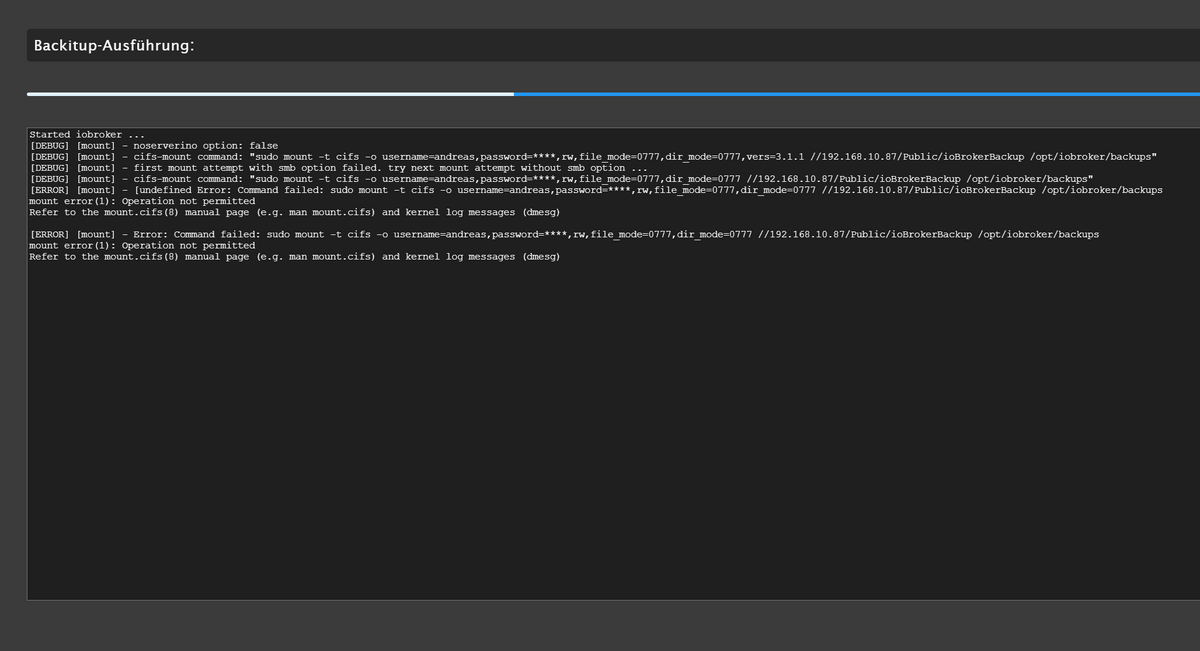
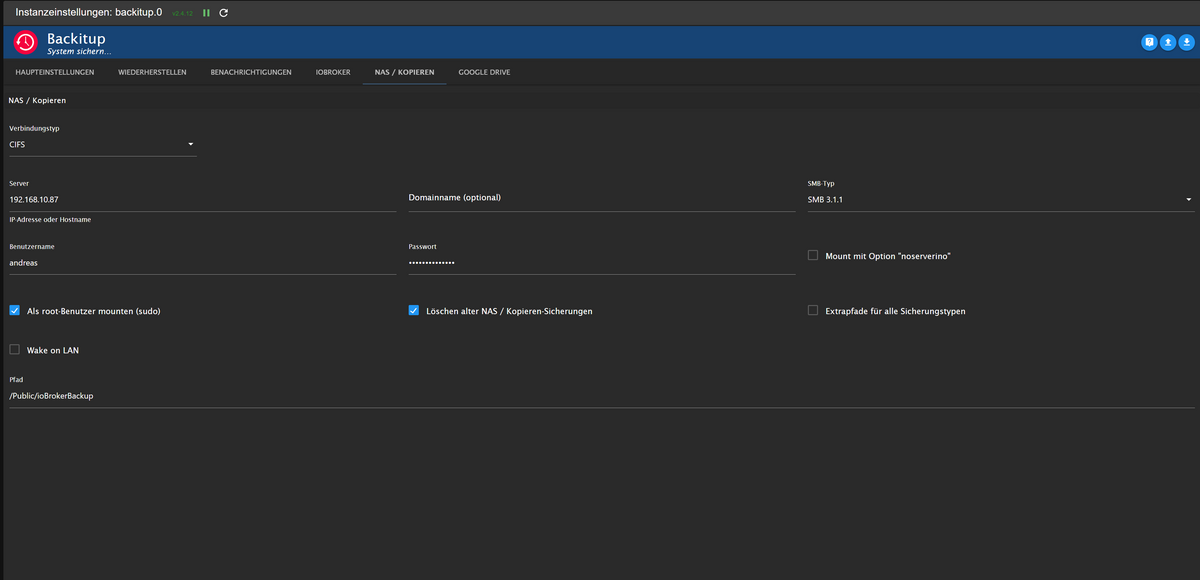
          Guten Abend. Also bei mir klappt seit dem letzten Update keine Sicherung mehr im NAS. Username uns Password sind richtig, da ich mich damit auch immer im NAS anmelde. Und bis zum letzten Update, ging auch alles mit den Daten und Einstellungen. Sicherung auf GoogleDrive klappt.Backitup2.png Backitup1.png

          Thomas BraunT 1 Reply Last reply
          0
          • H hutzen

            Guten Abend. Also bei mir klappt seit dem letzten Update keine Sicherung mehr im NAS. Username uns Password sind richtig, da ich mich damit auch immer im NAS anmelde. Und bis zum letzten Update, ging auch alles mit den Daten und Einstellungen. Sicherung auf GoogleDrive klappt.Backitup2.png Backitup1.png

            Thomas BraunT Online
            Thomas BraunT Online
            Thomas Braun
            Most Active
            wrote on last edited by Thomas Braun
            #46

            @hutzen sagte in Backup IT Einrichtung mit Synology NAS:

            seit dem letzten Update

            Update von was?

            Schau mal beim dmesg rein:

            dmesg -T | grep -i cifs
            

            Linux-Werkzeugkasten:
            https://forum.iobroker.net/topic/42952/der-kleine-iobroker-linux-werkzeugkasten
            NodeJS Fixer Skript:
            https://forum.iobroker.net/topic/68035/iob-node-fix-skript
            iob_diag: curl -sLf -o diag.sh https://iobroker.net/diag.sh && bash diag.sh

            1 Reply Last reply
            0
            • M Offline
              M Offline
              michael_f
              wrote on last edited by
              #47

              Guten Abend,

              bei mir funktioniert das Backup mit CIFS auf eine Synology NAS nicht. Irgendwie will es nicht.
              Habs auch mal mit NFS versucht aber da kommt auch eine Fehlermeldung. Mit FTP (auf einen anderen Server) funktioniert die Sicherung tadellos.

              Den Container ioBroker-WWW1 habe ich auch schon in portainer neu gestartet, kein Erfolg.
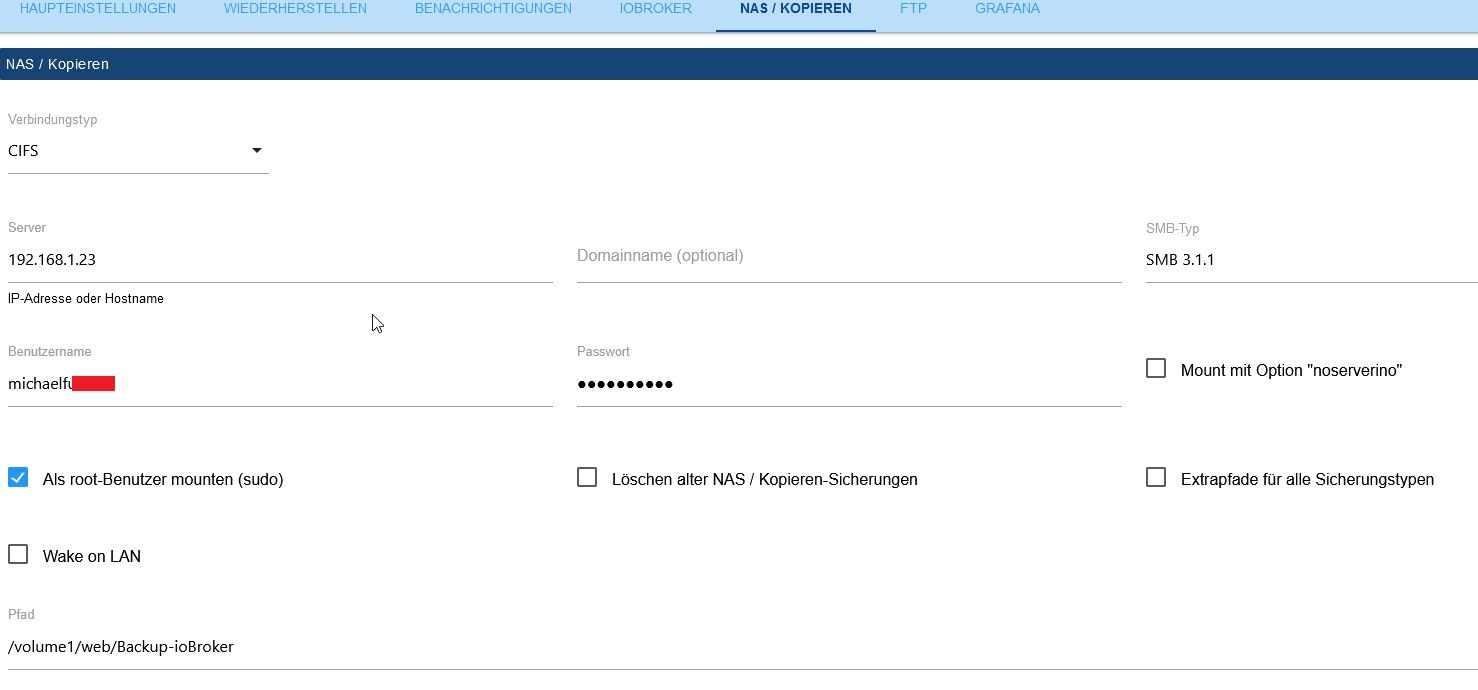
              ioBroker_Backitup.jpg

              Started iobroker ...
              [DEBUG] [mount] start with {"mountType":"CIFS","type":"storage","source":"local","mount":"//192.168.1.23","debugging":true,"fileDir":"/opt/iobroker/iobroker-data/backitup","wakeOnLAN":false,"macAd":"20:DE:20:DE:20:DE","wolTime":"25","smb":"vers=3.1.1","sudo":true,"cifsDomain":"","clientInodes":false,"deleteOldBackup":false,"ownDir":false,"dir":"/volume1/web/Backup-ioBroker","dirMinimal":"sharename/backupDir","user":"michaelfu....","pass":"****","ignoreErrors":false}
              [DEBUG] [mount] - noserverino option: false
              [DEBUG] [mount] - cifs-mount command: "sudo mount -t cifs -o username=michaelfu....,password=****,rw,file_mode=0777,dir_mode=0777,vers=3.1.1 //192.168.1.23/volume1/web/Backup-ioBroker /opt/iobroker/backups"
              [DEBUG] [mount] - first mount attempt with smb option failed. try next mount attempt without smb option ...
              [DEBUG] [mount] - cifs-mount command: "sudo mount -t cifs -o username=michaelfu....,password=****,rw,file_mode=0777,dir_mode=0777 //192.168.1.23/volume1/web/Backup-ioBroker /opt/iobroker/backups"
              [ERROR] [mount] - [undefined Error: Command failed: sudo mount -t cifs -o username=michaelfu....l,password=****,rw,file_mode=0777,dir_mode=0777 //192.168.1.23/volume1/web/Backup-ioBroker /opt/iobroker/backups
              sudo: unable to resolve host ioBroker-WWW1: Name or service not known
              Unable to apply new capability set.
              
              [ERROR] [mount] - Error: Command failed: sudo mount -t cifs -o username=michaelfu....,password=****,rw,file_mode=0777,dir_mode=0777 //192.168.1.23/volume1/web/Backup-ioBroker /opt/iobroker/backups
              sudo: unable to resolve host ioBroker-WWW1: Name or service not known
              Unable to apply new capability set.


              Ist das ein Berechtigungsproblem oder muss ich CIFS separat installieren?

              Kann mir jemand weiterhelfen?
              Danke.

              GlasfaserG 1 Reply Last reply
              0
              • M michael_f

                Guten Abend,

                bei mir funktioniert das Backup mit CIFS auf eine Synology NAS nicht. Irgendwie will es nicht.
                Habs auch mal mit NFS versucht aber da kommt auch eine Fehlermeldung. Mit FTP (auf einen anderen Server) funktioniert die Sicherung tadellos.

                Den Container ioBroker-WWW1 habe ich auch schon in portainer neu gestartet, kein Erfolg.

                ioBroker_Backitup.jpg

                Started iobroker ...
                [DEBUG] [mount] start with {"mountType":"CIFS","type":"storage","source":"local","mount":"//192.168.1.23","debugging":true,"fileDir":"/opt/iobroker/iobroker-data/backitup","wakeOnLAN":false,"macAd":"20:DE:20:DE:20:DE","wolTime":"25","smb":"vers=3.1.1","sudo":true,"cifsDomain":"","clientInodes":false,"deleteOldBackup":false,"ownDir":false,"dir":"/volume1/web/Backup-ioBroker","dirMinimal":"sharename/backupDir","user":"michaelfu....","pass":"****","ignoreErrors":false}
                [DEBUG] [mount] - noserverino option: false
                [DEBUG] [mount] - cifs-mount command: "sudo mount -t cifs -o username=michaelfu....,password=****,rw,file_mode=0777,dir_mode=0777,vers=3.1.1 //192.168.1.23/volume1/web/Backup-ioBroker /opt/iobroker/backups"
                [DEBUG] [mount] - first mount attempt with smb option failed. try next mount attempt without smb option ...
                [DEBUG] [mount] - cifs-mount command: "sudo mount -t cifs -o username=michaelfu....,password=****,rw,file_mode=0777,dir_mode=0777 //192.168.1.23/volume1/web/Backup-ioBroker /opt/iobroker/backups"
                [ERROR] [mount] - [undefined Error: Command failed: sudo mount -t cifs -o username=michaelfu....l,password=****,rw,file_mode=0777,dir_mode=0777 //192.168.1.23/volume1/web/Backup-ioBroker /opt/iobroker/backups
                sudo: unable to resolve host ioBroker-WWW1: Name or service not known
                Unable to apply new capability set.
                
                [ERROR] [mount] - Error: Command failed: sudo mount -t cifs -o username=michaelfu....,password=****,rw,file_mode=0777,dir_mode=0777 //192.168.1.23/volume1/web/Backup-ioBroker /opt/iobroker/backups
                sudo: unable to resolve host ioBroker-WWW1: Name or service not known
                Unable to apply new capability set.


                Ist das ein Berechtigungsproblem oder muss ich CIFS separat installieren?

                Kann mir jemand weiterhelfen?
                Danke.

                GlasfaserG Offline
                GlasfaserG Offline
                Glasfaser
                wrote on last edited by
                #48

                @michael_f

                Pfadangabe ohne volume1

                Synology 918+ 16GB - ioBroker in Docker v9 , VISO auf Trekstor Primebook C13 13,3" , Hikvision Domkameras mit Surveillance Station .. CCU RaspberryMatic in Synology VM .. Zigbee CC2538+CC2592 .. Sonoff .. KNX .. Modbus ..

                M 1 Reply Last reply
                0
                • GlasfaserG Glasfaser

                  @michael_f

                  Pfadangabe ohne volume1

                  M Offline
                  M Offline
                  michael_f
                  wrote on last edited by michael_f
                  #49

                  @glasfaser Sorry, hat doch nicht geklappt.

                  [ERROR] [mount] - [undefined Error: Command failed: sudo mount -t cifs -o username=michaelfu....,password=****,rw,file_mode=0777,dir_mode=0777 //192.168.1.23/web/Backup-ioBroker /opt/iobroker/backups
                  sudo: unable to resolve host ioBroker-WWW1: Name or service not known
                  Unable to apply new capability set.
                  
                  Thomas BraunT 1 Reply Last reply
                  0
                  • M michael_f

                    @glasfaser Sorry, hat doch nicht geklappt.

                    [ERROR] [mount] - [undefined Error: Command failed: sudo mount -t cifs -o username=michaelfu....,password=****,rw,file_mode=0777,dir_mode=0777 //192.168.1.23/web/Backup-ioBroker /opt/iobroker/backups
                    sudo: unable to resolve host ioBroker-WWW1: Name or service not known
                    Unable to apply new capability set.
                    
                    Thomas BraunT Online
                    Thomas BraunT Online
                    Thomas Braun
                    Most Active
                    wrote on last edited by Thomas Braun
                    #50

                    @michael_f sagte in Backup IT Einrichtung mit Synology NAS:

                    unable to resolve host ioBroker-WWW1

                    Docker? Hostname mal geändert?

                    Linux-Werkzeugkasten:
                    https://forum.iobroker.net/topic/42952/der-kleine-iobroker-linux-werkzeugkasten
                    NodeJS Fixer Skript:
                    https://forum.iobroker.net/topic/68035/iob-node-fix-skript
                    iob_diag: curl -sLf -o diag.sh https://iobroker.net/diag.sh && bash diag.sh

                    M 1 Reply Last reply
                    0
                    • Thomas BraunT Thomas Braun

                      @michael_f sagte in Backup IT Einrichtung mit Synology NAS:

                      unable to resolve host ioBroker-WWW1

                      Docker? Hostname mal geändert?

                      M Offline
                      M Offline
                      michael_f
                      wrote on last edited by
                      #51

                      @thomas-braun Ja Docker - evt bei der Installation, aber das ist schon lange her

                      1 Reply Last reply
                      0
                      • M Offline
                        M Offline
                        mooly
                        wrote on last edited by
                        #52

                        Hallo!

                        Ich habe aktuell das Problem, dass ich mit Backitup nicht über NFS auf meine Syno komme.

                        Einstellung Syno:
                        NFS aktiviert
                        IP Adresse vom RP eingetragen, root->admin aktiviert

                        im iobroker / backitup bekomme ich aber die Meldung "access denied"

                        Das Verzeichnis auf dem NAS ist /backup/iobroker

                        Hat jemand noch einen Tipp?

                        HomoranH 1 Reply Last reply
                        0
                        • M mooly

                          Hallo!

                          Ich habe aktuell das Problem, dass ich mit Backitup nicht über NFS auf meine Syno komme.

                          Einstellung Syno:
                          NFS aktiviert
                          IP Adresse vom RP eingetragen, root->admin aktiviert

                          im iobroker / backitup bekomme ich aber die Meldung "access denied"

                          Das Verzeichnis auf dem NAS ist /backup/iobroker

                          Hat jemand noch einen Tipp?

                          HomoranH Do not disturb
                          HomoranH Do not disturb
                          Homoran
                          Global Moderator Administrators
                          wrote on last edited by
                          #53

                          @mooly sagte in Backup IT Einrichtung mit Synology NAS:

                          Hat jemand noch einen Tipp?

                          ja!
                          Inhalte nicht auf zwei Threads verteilen!

                          kein Support per PN! - Fragen im Forum stellen -

                          Benutzt das Voting rechts unten im Beitrag wenn er euch geholfen hat.

                          ioBroker freut sich auch über eine Spende für das Forum. Benutzt dazu den Spendenbutton im Header. Danke!

                          der Installationsfixer: curl -fsL https://iobroker.net/fix.sh | bash -

                          M 1 Reply Last reply
                          0
                          • HomoranH Homoran

                            @mooly sagte in Backup IT Einrichtung mit Synology NAS:

                            Hat jemand noch einen Tipp?

                            ja!
                            Inhalte nicht auf zwei Threads verteilen!

                            M Offline
                            M Offline
                            mooly
                            wrote on last edited by
                            #54

                            @homoran

                            Sorry, dachte hier ist es thematisch vielleicht besser verortet. Bitte lösche dann einen der Beiden.

                            Danke!

                            1 Reply Last reply
                            0
                            Reply
                            • Reply as topic
                            Log in to reply
                            • Oldest to Newest
                            • Newest to Oldest
                            • Most Votes


                            Support us

                            ioBroker
                            Community Adapters
                            Donate
                            FAQ Cloud / IOT
                            HowTo: Node.js-Update
                            HowTo: Backup/Restore
                            Downloads
                            BLOG

                            543

                            Online

                            32.7k

                            Users

                            82.4k

                            Topics

                            1.3m

                            Posts
                            Community
                            Impressum | Datenschutz-Bestimmungen | Nutzungsbedingungen | Einwilligungseinstellungen
                            ioBroker Community 2014-2025
                            logo
                            • Login

                            • Don't have an account? Register

                            • Login or register to search.
                            • First post
                              Last post
                            0
                            • Home
                            • Recent
                            • Tags
                            • Unread 0
                            • Categories
                            • Unreplied
                            • Popular
                            • GitHub
                            • Docu
                            • Hilfe