




Backup IT Einrichtung mit Synology NAS
-
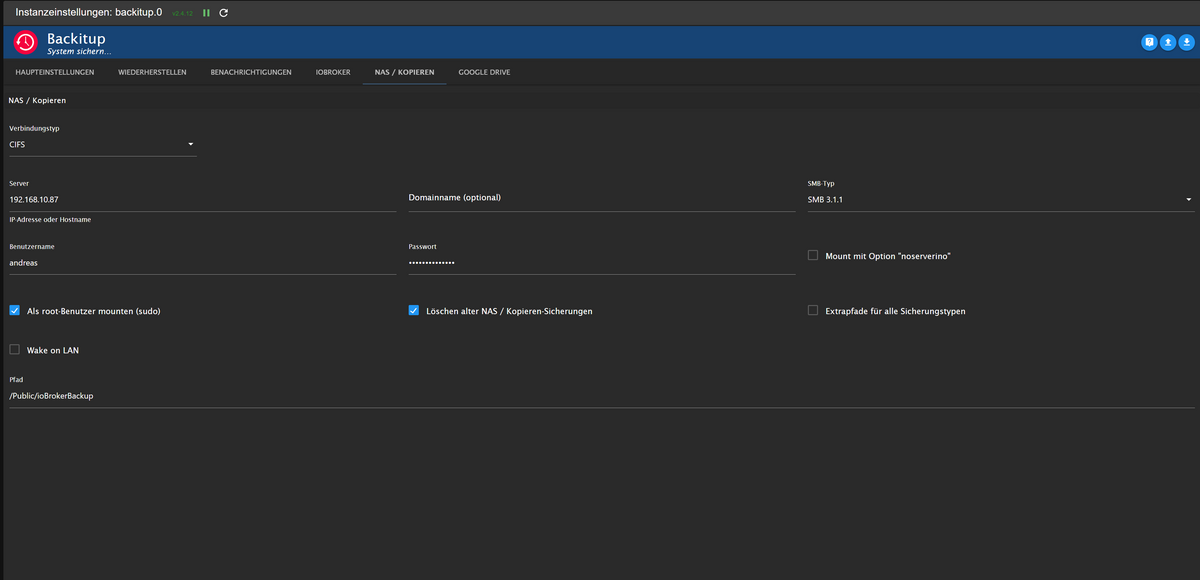
@dasmoritz Hast du die cifs-utils installiert?
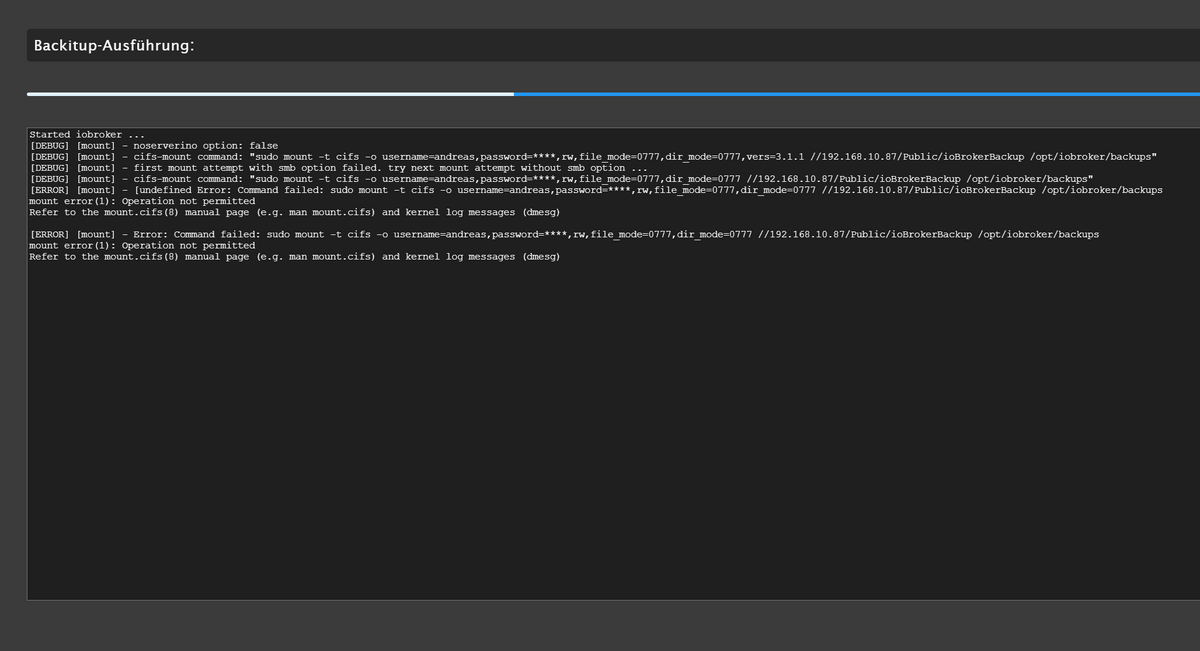
Bitte in Backitup den "root mount" aktivierenGuten Abend. Also bei mir klappt seit dem letzten Update keine Sicherung mehr im NAS. Username uns Password sind richtig, da ich mich damit auch immer im NAS anmelde. Und bis zum letzten Update, ging auch alles mit den Daten und Einstellungen. Sicherung auf GoogleDrive klappt.
-
Guten Abend. Also bei mir klappt seit dem letzten Update keine Sicherung mehr im NAS. Username uns Password sind richtig, da ich mich damit auch immer im NAS anmelde. Und bis zum letzten Update, ging auch alles mit den Daten und Einstellungen. Sicherung auf GoogleDrive klappt.
@hutzen sagte in Backup IT Einrichtung mit Synology NAS:
seit dem letzten Update
Update von was?
Schau mal beim dmesg rein:
dmesg -T | grep -i cifs -
Guten Abend,
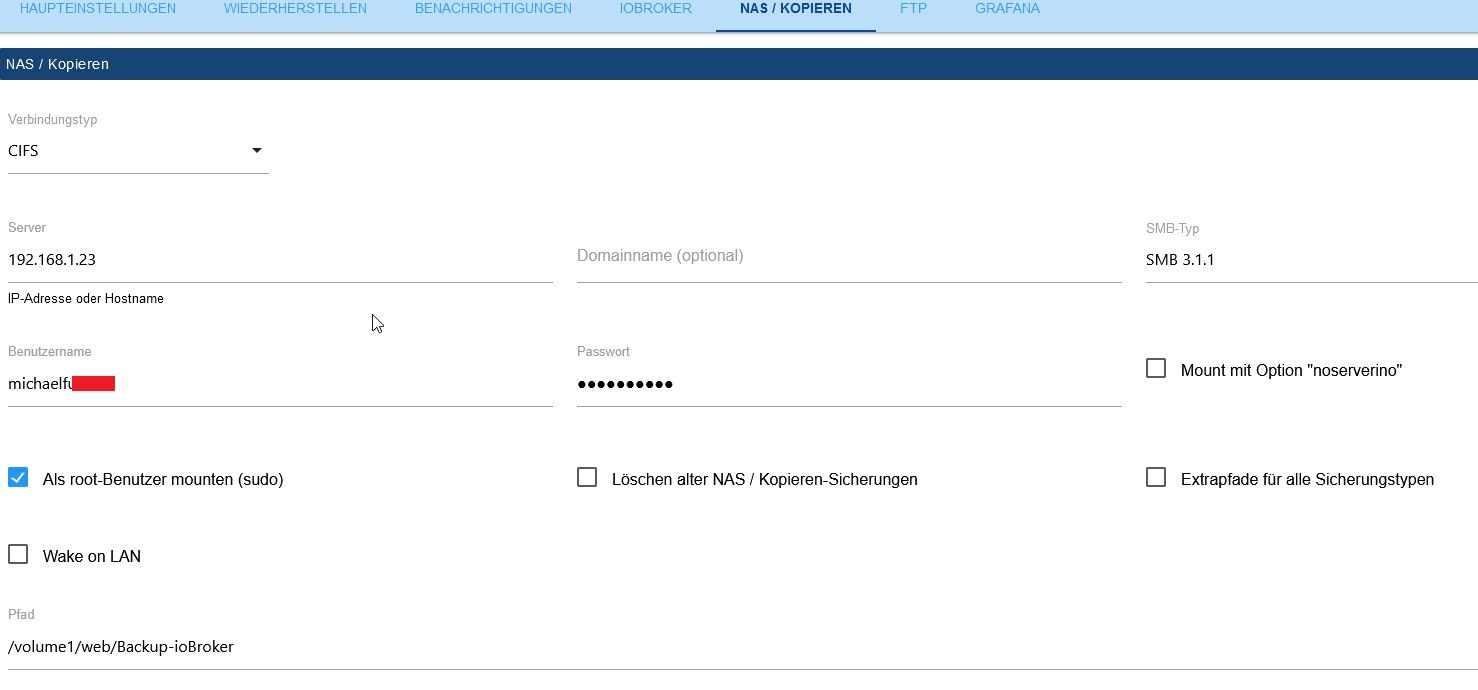
bei mir funktioniert das Backup mit CIFS auf eine Synology NAS nicht. Irgendwie will es nicht.
Habs auch mal mit NFS versucht aber da kommt auch eine Fehlermeldung. Mit FTP (auf einen anderen Server) funktioniert die Sicherung tadellos.Den Container ioBroker-WWW1 habe ich auch schon in portainer neu gestartet, kein Erfolg.
Started iobroker ...
[DEBUG] [mount] start with {"mountType":"CIFS","type":"storage","source":"local","mount":"//192.168.1.23","debugging":true,"fileDir":"/opt/iobroker/iobroker-data/backitup","wakeOnLAN":false,"macAd":"20:DE:20:DE:20:DE","wolTime":"25","smb":"vers=3.1.1","sudo":true,"cifsDomain":"","clientInodes":false,"deleteOldBackup":false,"ownDir":false,"dir":"/volume1/web/Backup-ioBroker","dirMinimal":"sharename/backupDir","user":"michaelfu....","pass":"****","ignoreErrors":false}
[DEBUG] [mount] - noserverino option: false
[DEBUG] [mount] - cifs-mount command: "sudo mount -t cifs -o username=michaelfu....,password=****,rw,file_mode=0777,dir_mode=0777,vers=3.1.1 //192.168.1.23/volume1/web/Backup-ioBroker /opt/iobroker/backups"
[DEBUG] [mount] - first mount attempt with smb option failed. try next mount attempt without smb option ...
[DEBUG] [mount] - cifs-mount command: "sudo mount -t cifs -o username=michaelfu....,password=****,rw,file_mode=0777,dir_mode=0777 //192.168.1.23/volume1/web/Backup-ioBroker /opt/iobroker/backups"
[ERROR] [mount] - [undefined Error: Command failed: sudo mount -t cifs -o username=michaelfu....l,password=****,rw,file_mode=0777,dir_mode=0777 //192.168.1.23/volume1/web/Backup-ioBroker /opt/iobroker/backups
sudo: unable to resolve host ioBroker-WWW1: Name or service not known
Unable to apply new capability set.

[ERROR] [mount] - Error: Command failed: sudo mount -t cifs -o username=michaelfu....,password=****,rw,file_mode=0777,dir_mode=0777 //192.168.1.23/volume1/web/Backup-ioBroker /opt/iobroker/backups
sudo: unable to resolve host ioBroker-WWW1: Name or service not known
Unable to apply new capability set.
Ist das ein Berechtigungsproblem oder muss ich CIFS separat installieren?
Kann mir jemand weiterhelfen?
Danke. -
Guten Abend,
bei mir funktioniert das Backup mit CIFS auf eine Synology NAS nicht. Irgendwie will es nicht.
Habs auch mal mit NFS versucht aber da kommt auch eine Fehlermeldung. Mit FTP (auf einen anderen Server) funktioniert die Sicherung tadellos.Den Container ioBroker-WWW1 habe ich auch schon in portainer neu gestartet, kein Erfolg.
Started iobroker ...
[DEBUG] [mount] start with {"mountType":"CIFS","type":"storage","source":"local","mount":"//192.168.1.23","debugging":true,"fileDir":"/opt/iobroker/iobroker-data/backitup","wakeOnLAN":false,"macAd":"20:DE:20:DE:20:DE","wolTime":"25","smb":"vers=3.1.1","sudo":true,"cifsDomain":"","clientInodes":false,"deleteOldBackup":false,"ownDir":false,"dir":"/volume1/web/Backup-ioBroker","dirMinimal":"sharename/backupDir","user":"michaelfu....","pass":"****","ignoreErrors":false}
[DEBUG] [mount] - noserverino option: false
[DEBUG] [mount] - cifs-mount command: "sudo mount -t cifs -o username=michaelfu....,password=****,rw,file_mode=0777,dir_mode=0777,vers=3.1.1 //192.168.1.23/volume1/web/Backup-ioBroker /opt/iobroker/backups"
[DEBUG] [mount] - first mount attempt with smb option failed. try next mount attempt without smb option ...
[DEBUG] [mount] - cifs-mount command: "sudo mount -t cifs -o username=michaelfu....,password=****,rw,file_mode=0777,dir_mode=0777 //192.168.1.23/volume1/web/Backup-ioBroker /opt/iobroker/backups"
[ERROR] [mount] - [undefined Error: Command failed: sudo mount -t cifs -o username=michaelfu....l,password=****,rw,file_mode=0777,dir_mode=0777 //192.168.1.23/volume1/web/Backup-ioBroker /opt/iobroker/backups
sudo: unable to resolve host ioBroker-WWW1: Name or service not known
Unable to apply new capability set.

[ERROR] [mount] - Error: Command failed: sudo mount -t cifs -o username=michaelfu....,password=****,rw,file_mode=0777,dir_mode=0777 //192.168.1.23/volume1/web/Backup-ioBroker /opt/iobroker/backups
sudo: unable to resolve host ioBroker-WWW1: Name or service not known
Unable to apply new capability set.
Ist das ein Berechtigungsproblem oder muss ich CIFS separat installieren?
Kann mir jemand weiterhelfen?
Danke.Pfadangabe ohne volume1
-
Pfadangabe ohne volume1
@glasfaser Sorry, hat doch nicht geklappt.
[ERROR] [mount] - [undefined Error: Command failed: sudo mount -t cifs -o username=michaelfu....,password=****,rw,file_mode=0777,dir_mode=0777 //192.168.1.23/web/Backup-ioBroker /opt/iobroker/backups sudo: unable to resolve host ioBroker-WWW1: Name or service not known Unable to apply new capability set. -
@glasfaser Sorry, hat doch nicht geklappt.
[ERROR] [mount] - [undefined Error: Command failed: sudo mount -t cifs -o username=michaelfu....,password=****,rw,file_mode=0777,dir_mode=0777 //192.168.1.23/web/Backup-ioBroker /opt/iobroker/backups sudo: unable to resolve host ioBroker-WWW1: Name or service not known Unable to apply new capability set.@michael_f sagte in Backup IT Einrichtung mit Synology NAS:
unable to resolve host ioBroker-WWW1
Docker? Hostname mal geändert?
-
@michael_f sagte in Backup IT Einrichtung mit Synology NAS:
unable to resolve host ioBroker-WWW1
Docker? Hostname mal geändert?
@thomas-braun Ja Docker - evt bei der Installation, aber das ist schon lange her
-
Hallo!
Ich habe aktuell das Problem, dass ich mit Backitup nicht über NFS auf meine Syno komme.
Einstellung Syno:
NFS aktiviert
IP Adresse vom RP eingetragen, root->admin aktiviertim iobroker / backitup bekomme ich aber die Meldung "access denied"
Das Verzeichnis auf dem NAS ist /backup/iobroker
Hat jemand noch einen Tipp?
-
Hallo!
Ich habe aktuell das Problem, dass ich mit Backitup nicht über NFS auf meine Syno komme.
Einstellung Syno:
NFS aktiviert
IP Adresse vom RP eingetragen, root->admin aktiviertim iobroker / backitup bekomme ich aber die Meldung "access denied"
Das Verzeichnis auf dem NAS ist /backup/iobroker
Hat jemand noch einen Tipp?
@mooly sagte in Backup IT Einrichtung mit Synology NAS:
Hat jemand noch einen Tipp?
ja!
Inhalte nicht auf zwei Threads verteilen! -
@mooly sagte in Backup IT Einrichtung mit Synology NAS:
Hat jemand noch einen Tipp?
ja!
Inhalte nicht auf zwei Threads verteilen!



Hey! Du scheinst an dieser Unterhaltung interessiert zu sein, hast aber noch kein Konto.
Hast du es satt, bei jedem Besuch durch die gleichen Beiträge zu scrollen? Wenn du dich für ein Konto anmeldest, kommst du immer genau dorthin zurück, wo du zuvor warst, und kannst dich über neue Antworten benachrichtigen lassen (entweder per E-Mail oder Push-Benachrichtigung). Du kannst auch Lesezeichen speichern und Beiträge positiv bewerten, um anderen Community-Mitgliedern deine Wertschätzung zu zeigen.
Mit deinem Input könnte dieser Beitrag noch besser werden 💗
Registrieren Anmelden398
Online33.0k
Benutzer83.5k
Themen1.3m
Beiträge