




Amazon Dash Adapter läuft nicht mehr?
-
Dieses Terminal ist gemeint.
Kann dir aber nicht sagen was du da eingeben must.
sudo xxx xxxxx
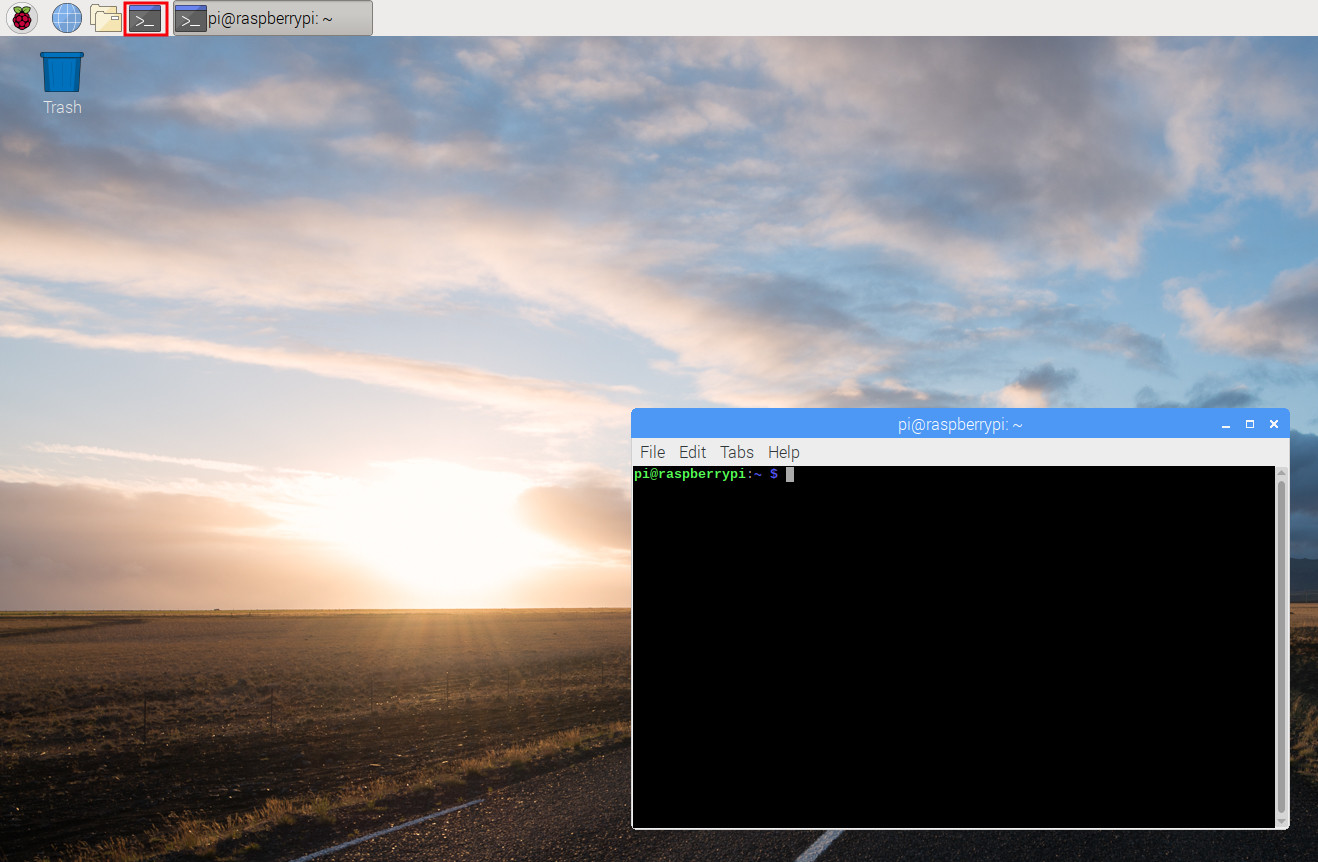
-
Dieses Terminal ist gemeint.
Kann dir aber nicht sagen was du da eingeben must.
sudo xxx xxxxx
-
Keine Ahnung,
eventuell sudo npm install adapter .amazon-dash
Mach aber vorher ein Backup wenn was schief läuft beim installieren. -
das hatte ich schon alles probiert, dann kommt diese Meldung
login as: pi pi@192.168.178.67's password: Linux raspberrypi 4.14.98-v7+ #1200 SMP Tue Feb 12 20:27:48 GMT 2019 armv7l The programs included with the Debian GNU/Linux system are free software; the exact distribution terms for each program are described in the individual files in /usr/share/doc/*/copyright. Debian GNU/Linux comes with ABSOLUTELY NO WARRANTY, to the extent permitted by applicable law. Last login: Fri May 17 15:16:13 2019 from 192.168.178.84 pi@raspberrypi:~ $ sudo npm install adapter .amazon-dash npm ERR! code ENOLOCAL npm ERR! Could not install from ".amazon-dash" as it does not contain a package.json file. npm ERR! A complete log of this run can be found in: npm ERR! /root/.npm/_logs/2019-05-17T13_18_56_540Z-debug.log pi@raspberrypi:~ $ -
https://github.com/PArns/ioBroker.amazon-dash
das hattest du auch ausgeführt ?
sudo apt-get install libpcap-dev -
https://github.com/PArns/ioBroker.amazon-dash
das hattest du auch ausgeführt ?
sudo apt-get install libpcap-dev -
https://github.com/PArns/ioBroker.amazon-dash
das hattest du auch ausgeführt ?
sudo apt-get install libpcap-dev -
das hatte ich schon alles probiert, dann kommt diese Meldung
login as: pi pi@192.168.178.67's password: Linux raspberrypi 4.14.98-v7+ #1200 SMP Tue Feb 12 20:27:48 GMT 2019 armv7l The programs included with the Debian GNU/Linux system are free software; the exact distribution terms for each program are described in the individual files in /usr/share/doc/*/copyright. Debian GNU/Linux comes with ABSOLUTELY NO WARRANTY, to the extent permitted by applicable law. Last login: Fri May 17 15:16:13 2019 from 192.168.178.84 pi@raspberrypi:~ $ sudo npm install adapter .amazon-dash npm ERR! code ENOLOCAL npm ERR! Could not install from ".amazon-dash" as it does not contain a package.json file. npm ERR! A complete log of this run can be found in: npm ERR! /root/.npm/_logs/2019-05-17T13_18_56_540Z-debug.log pi@raspberrypi:~ $@denjo sagte in Amazon Dash Adapter läuft nicht mehr?:
sudo npm install adapter .amazon-dash
Vier Fehler sehe ich hier.
Erstens:npm-Befehle zur Installation von Adaptern müssen in/opt/iobrokerausgeführt werden.
Die nächsten zwei kannst du durch Lektüre von https://forum.iobroker.net/topic/17109/wichtige-hinweise-bei-neueren-npm-versionen-und-sudo sicher beheben.
Der vierte ist alles was nachinstallkommt.Die korrekte Befehlszeile wäre
cd /opt/iobroker
npm install iobroker.amazon-dash
Und da ich davon ausgehe, dass du dir durch vorherige
sudo npm installOrgien die Rechte auf deinem System zerschossen hast, empfehle ich dir, den Fixer auszuführen.curl -sL https://iobroker.net/fix.sh | bash -Bei korrekten Rechten sollte es auf neuen Installationen nie nötig sein, npm-Pakete mit
sudozu installieren. -
@denjo sagte in Amazon Dash Adapter läuft nicht mehr?:
sudo npm install adapter .amazon-dash
Vier Fehler sehe ich hier.
Erstens:npm-Befehle zur Installation von Adaptern müssen in/opt/iobrokerausgeführt werden.
Die nächsten zwei kannst du durch Lektüre von https://forum.iobroker.net/topic/17109/wichtige-hinweise-bei-neueren-npm-versionen-und-sudo sicher beheben.
Der vierte ist alles was nachinstallkommt.Die korrekte Befehlszeile wäre
cd /opt/iobroker
npm install iobroker.amazon-dash
Und da ich davon ausgehe, dass du dir durch vorherige
sudo npm installOrgien die Rechte auf deinem System zerschossen hast, empfehle ich dir, den Fixer auszuführen.curl -sL https://iobroker.net/fix.sh | bash -Bei korrekten Rechten sollte es auf neuen Installationen nie nötig sein, npm-Pakete mit
sudozu installieren.@AlCalzone das echt nett und warscheinlich gut beschrieben, aber für mich zu hoch.
ich habe heut morgen das hier gemacht um mein nodejs zu aktualisierenhttps://www.synology-forum.de/showthread.html?99192-NodeJs-Update-von-NodeJs-So-funktionierts!
also bedeutet das ich habe alles zerschossen und darf es mal wieder neu machen.
man ist das zum kotzen -
@AlCalzone das echt nett und warscheinlich gut beschrieben, aber für mich zu hoch.
ich habe heut morgen das hier gemacht um mein nodejs zu aktualisierenhttps://www.synology-forum.de/showthread.html?99192-NodeJs-Update-von-NodeJs-So-funktionierts!
also bedeutet das ich habe alles zerschossen und darf es mal wieder neu machen.
man ist das zum kotzen@denjo sagte in Amazon Dash Adapter läuft nicht mehr?:
ich habe heut morgen das hier gemacht um mein nodejs zu aktualisieren
Warum nimmst du externe Anleitungen und nicht die offizielle von uns?
http://www.iobroker.net/docu/?page_id=8323&lang=de#Upgrade_von_nodejs_und_npm -
Die Anleitung ist klar besser, deswegen :
VORHER BACKUP MACHEN!! -
Das wird schon, immer schön Backups machen wenn es läuft.
Geht mir aber manch einmal auch so das der Spieltrieb höher ist :-) -
Das wird schon, immer schön Backups machen wenn es läuft.
Geht mir aber manch einmal auch so das der Spieltrieb höher ist :-) -
und wenn ich es dann übers terminal probiere kommt auch wieder nur misst
login as: pi pi@192.168.178.67's password: Linux raspberrypi 4.14.98-v7+ #1200 SMP Tue Feb 12 20:27:48 GMT 2019 armv7l The programs included with the Debian GNU/Linux system are free software; the exact distribution terms for each program are described in the individual files in /usr/share/doc/*/copyright. Debian GNU/Linux comes with ABSOLUTELY NO WARRANTY, to the extent permitted by applicable law. Last login: Fri May 17 16:24:12 2019 from 192.168.178.84 pi@raspberrypi:~ $ cd /opt/iobroker pi@raspberrypi:/opt/iobroker $ npm install iobroker.amazon-dash npm WARN checkPermissions Missing write access to /opt/iobroker/node_modules npm WARN svg-inline-react@1.0.3 requires a peer of react@^0.14.0 || ^15.0.0 but none is installed. You must install peer dependencies yourself. npm ERR! path /opt/iobroker/node_modules npm ERR! code EACCES npm ERR! errno -13 npm ERR! syscall access npm ERR! Error: EACCES: permission denied, access '/opt/iobroker/node_modules' npm ERR! { Error: EACCES: permission denied, access '/opt/iobroker/node_modules' npm ERR! stack: 'Error: EACCES: permission denied, access \'/opt/iobroker/node_modules\'', npm ERR! errno: -13, npm ERR! code: 'EACCES', npm ERR! syscall: 'access', npm ERR! path: '/opt/iobroker/node_modules' } npm ERR! npm ERR! The operation was rejected by your operating system. npm ERR! It is likely you do not have the permissions to access this file as the current user npm ERR! npm ERR! If you believe this might be a permissions issue, please double-check the npm ERR! permissions of the file and its containing directories, or try running npm ERR! the command again as root/Administrator (though this is not recommended). npm ERR! A complete log of this run can be found in: npm ERR! /home/pi/.npm/_logs/2019-05-17T14_56_12_770Z-debug.log pi@raspberrypi:/opt/iobroker $ -
Missing write access to /opt/iobroker/node_modules
Da fehlt wohl das Schreibrecht.
Wenn ich das richtig deute muß bei sudo "-H" und "–unsafe-perm" dazu. -
Missing write access to /opt/iobroker/node_modules
Da fehlt wohl das Schreibrecht.
Wenn ich das richtig deute muß bei sudo "-H" und "–unsafe-perm" dazu.pi@raspberrypi:~ $ cd /opt/iobroker pi@raspberrypi:/opt/iobroker $ sudo -H npm install iobroker.amazon-dash --unsafe-perm npm ERR! code 128 npm ERR! Command failed: /usr/bin/git submodule update -q --init --recursive npm ERR! fatal: Could not change back to '/root/.npm/_cacache/tmp/git-clone-75488af3': Keine Berechtigung npm ERR! npm ERR! A complete log of this run can be found in: npm ERR! /root/.npm/_logs/2019-05-17T15_17_14_054Z-debug.log pi@raspberrypi:/opt/iobroker $ -
Prima,
Backup machen und lächelnd durch die Welt laufen. :-)


Hey! Du scheinst an dieser Unterhaltung interessiert zu sein, hast aber noch kein Konto.
Hast du es satt, bei jedem Besuch durch die gleichen Beiträge zu scrollen? Wenn du dich für ein Konto anmeldest, kommst du immer genau dorthin zurück, wo du zuvor warst, und kannst dich über neue Antworten benachrichtigen lassen (entweder per E-Mail oder Push-Benachrichtigung). Du kannst auch Lesezeichen speichern und Beiträge positiv bewerten, um anderen Community-Mitgliedern deine Wertschätzung zu zeigen.
Mit deinem Input könnte dieser Beitrag noch besser werden 💗
Registrieren Anmelden388
Online33.0k
Benutzende83.7k
Themen1.3m
Beiträge