Skip to content
  • Home
  • Recent
  • Tags
  • 0 Unread 0
  • Categories
  • Unreplied
  • Popular
  • GitHub
  • Docu
  • Hilfe
Skins
  • Light
  • Brite
  • Cerulean
  • Cosmo
  • Flatly
  • Journal
  • Litera
  • Lumen
  • Lux
  • Materia
  • Minty
  • Morph
  • Pulse
  • Sandstone
  • Simplex
  • Sketchy
  • Spacelab
  • United
  • Yeti
  • Zephyr
  • Dark
  • Cyborg
  • Darkly
  • Quartz
  • Slate
  • Solar
  • Superhero
  • Vapor

  • Default (No Skin)
  • No Skin
Collapse
ioBroker Logo

Community Forum

donate donate
  1. ioBroker Community Home
  2. Deutsch
  3. Tester
  4. Test Adapter iQontrol 2.0.x Vis (Entwicklungs-Thread)

NEWS

  • UPDATE 31.10.: Amazon Alexa - ioBroker Skill läuft aus ?
    apollon77A
    apollon77
    48
    3
    8.8k

  • Monatsrückblick – September 2025
    BluefoxB
    Bluefox
    13
    1
    2.2k

  • Neues Video "KI im Smart Home" - ioBroker plus n8n
    BluefoxB
    Bluefox
    16
    1
    3.3k

Test Adapter iQontrol 2.0.x Vis (Entwicklungs-Thread)

Scheduled Pinned Locked Moved Tester
appdark-modeiqontrolresponsivevisvisualisierungvisualizationwidget
7.6k Posts 296 Posters 7.0m Views 201 Watching
  • Oldest to Newest
  • Newest to Oldest
  • Most Votes
Reply
  • Reply as topic
Log in to reply
This topic has been deleted. Only users with topic management privileges can see it.
  • s.bormannS s.bormann

    1.1.2 ist online

    • Compatibility enhancements for repeat function of Media-Player.
    • Made value-list and target-value-list sortable.
    • Made sortable lists only draggable in y-axis.
    • Add option to enter own value for value-lists.
    • Added PLAY_EVERYWHERE to Media-Player.

    Interessant ist vor allem die target-value-List, die jetzt neu auch die Wildcard * enthalten kann. Zudem kann man die Option, einen freien Text einzugeben, aktivieren.

    Beispiel:
    Als SOURCE im Mediaplayer habe ich für meine Echos folgendes definiert:

    d7ee01ed-f44a-43b8-808d-d32887bdccff-image.png

    Hier habe ich die Valuelist wie folgt angelegt:
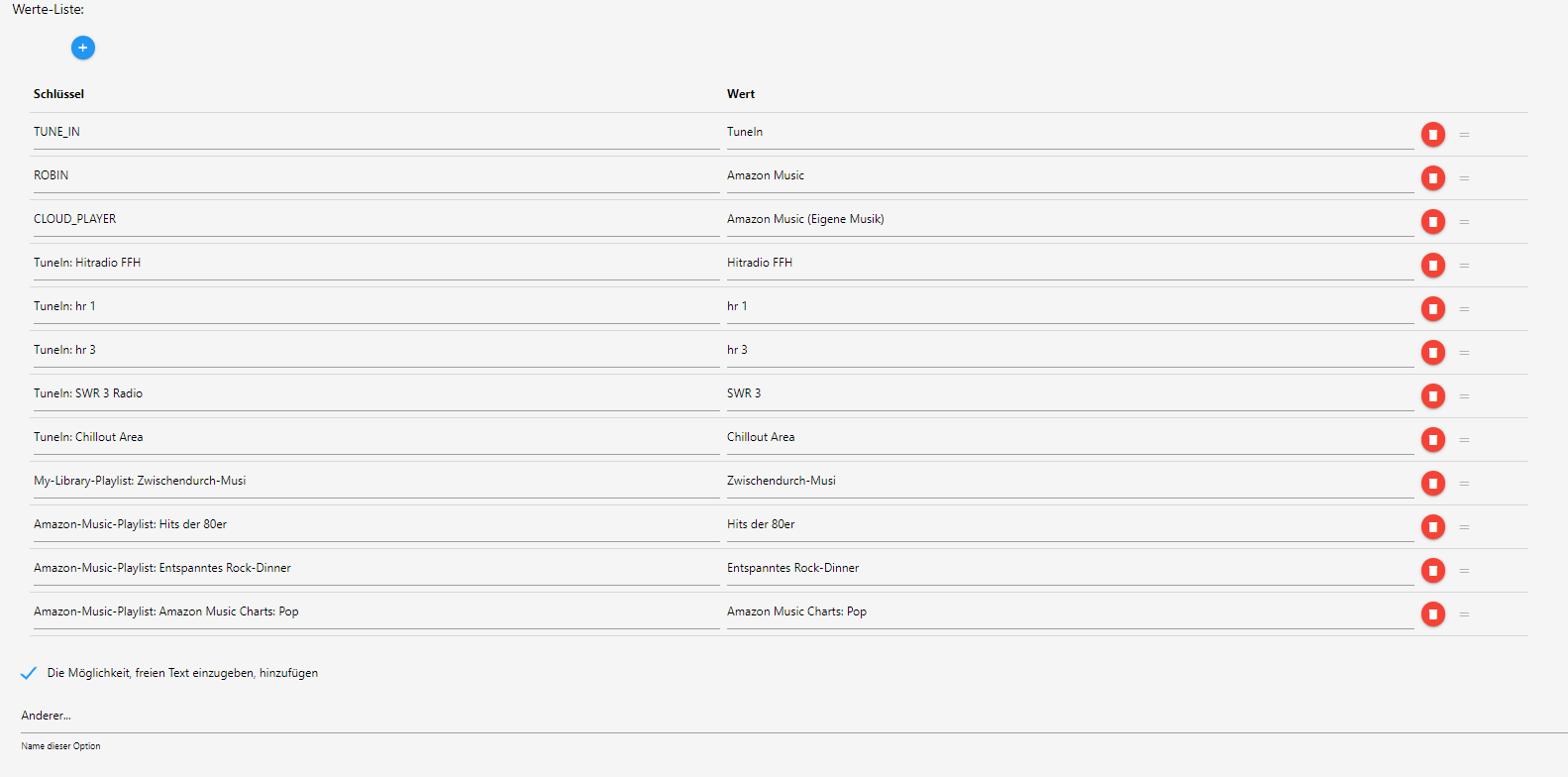
    4bd673ca-f037-4474-8996-a91e1bd93c9e-image.png

    Und als Ziel-Datenpunkte habe ich folgendes festgelegt:
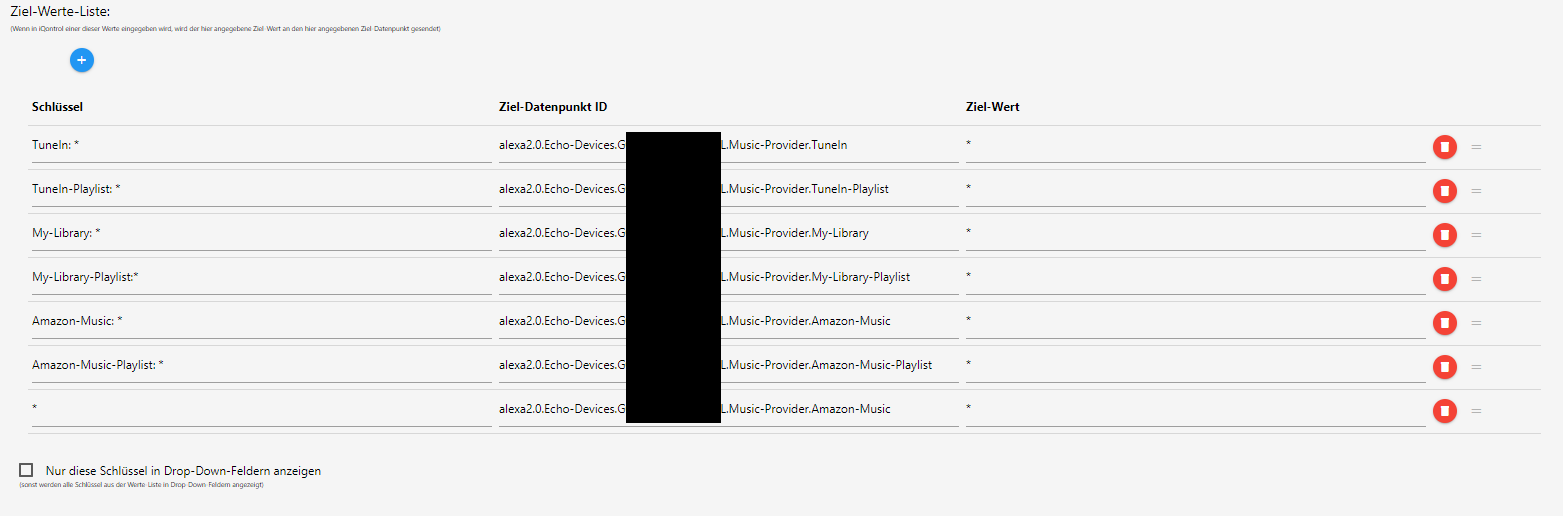
    1fda811b-cc20-428d-9419-1fd82ed2d8fb-image.png

    Damit kann man ziemlich effektiv Playlisten abrufen.

    Viel Spaß beim experimentieren!

    B Offline
    B Offline
    biker1602
    wrote on last edited by
    #2581

    @s-bormann wie und wo kann ich die Valuelist anlegen? Ich habe den Echo als Mediaplayer hinzugefügt aber, das mit der Liste bekomme ich nicht rein.
    Danke

    s.bormannS 1 Reply Last reply
    0
    • T Offline
      T Offline
      tigiba
      wrote on last edited by
      #2582

      Kann mir mit dem Problem jemand helfen?
      https://github.com/sbormann/ioBroker.iqontrol/issues/133
      hab ich da irgendwas simples übersehen / nicht verstanden?

      1 Reply Last reply
      0
      • B biker1602

        @s-bormann wie und wo kann ich die Valuelist anlegen? Ich habe den Echo als Mediaplayer hinzugefügt aber, das mit der Liste bekomme ich nicht rein.
        Danke

        s.bormannS Offline
        s.bormannS Offline
        s.bormann
        Most Active
        wrote on last edited by
        #2583

        @biker1602 Schau mal hier: https://forum.iobroker.net/post/452950

        B 1 Reply Last reply
        0
        • H heinzie

          @s-bormann Habe ein Mi 9T, Android 10, Browser Opera. Falls Du noch neue Funktionen für den tollen Adapter suchst, ich könnte noch ein Statusanzeige gebrauchen die abhängig von einer Variablen den Status 0-100 anzeigt

          s.bormannS Offline
          s.bormannS Offline
          s.bormann
          Most Active
          wrote on last edited by
          #2584

          @heinzie Das sollte mit dem Gerät "Wert" gehen, wenn das ganze als Readonly definiert ist, type number ist und min und max definiert sind.

          H 1 Reply Last reply
          0
          • s.bormannS s.bormann

            @biker1602 Schau mal hier: https://forum.iobroker.net/post/452950

            B Offline
            B Offline
            biker1602
            wrote on last edited by biker1602
            #2585

            @s-bormann said in Test Adapter iQontrol 1.1.x:

            @biker1602 Schau mal hier: https://forum.iobroker.net/post/452950

            Ja danach habe ich es ja versucht aber ich weiß nicht wie ich diese Liste erstellen kann. Wenn ich ein neues Gerät automatisch erstellen will suche dann nach der providerid im Alexa Adapter und wähle diesen aus. Dann weiß ich aber nicht wie und wo ich danach diese Werteliste aufrufen kann um das so einzutragen. Das ist mein Problem :angry:
            Wieso ist deinen Bezeichnung der Liste in Deutsch und meine in Englisch?

            1 Reply Last reply
            0
            • s.bormannS s.bormann

              @heinzie Das sollte mit dem Gerät "Wert" gehen, wenn das ganze als Readonly definiert ist, type number ist und min und max definiert sind.

              H Offline
              H Offline
              heinzie
              wrote on last edited by
              #2586

              @s-bormann Das habe ich jetzt mal gemacht. Default Wert ist 50 min=0, max=100
              dann wir das angezeigt
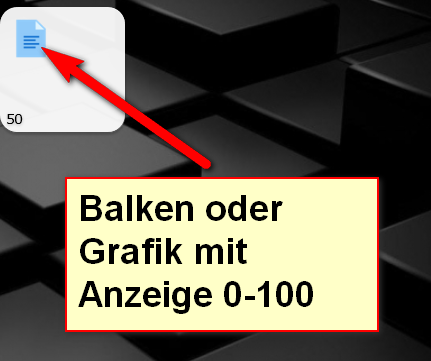
              68bc595b-8b67-4603-ad60-84d091fa6bd0-grafik.png
              Ich habe mich wahrscheinlich unklar ausgedrückt. Der Wunsch wäre, dass man anstelle des Text Icon irgendeinen Balken oder sowas anzeigt der dann z.B. bei 50 genau auf der Häfte steht.

              s.bormannS 1 Reply Last reply
              0
              • B Offline
                B Offline
                bug77
                wrote on last edited by
                #2587

                Hallo zusammen,
                ich benutze de Adapter sehr gerne, jedoch ist seit dem vorletzten Update der Wurm drin.

                Wenn ich den Homescreen auf meinem Iphone zum Homebildschirm hinzufüge und dann starte, funktioniert es.
                Wenn ich dann aber der screen erneut öffne, ist das Bild verschwommen, ich muss zuerst das App aus dem hintergrund löschen, dann gehts wieder.

                Kann das jemand mal testen?

                s.bormannS 1 Reply Last reply
                0
                • H heinzie

                  @s-bormann Das habe ich jetzt mal gemacht. Default Wert ist 50 min=0, max=100
                  dann wir das angezeigt
                  68bc595b-8b67-4603-ad60-84d091fa6bd0-grafik.png
                  Ich habe mich wahrscheinlich unklar ausgedrückt. Der Wunsch wäre, dass man anstelle des Text Icon irgendeinen Balken oder sowas anzeigt der dann z.B. bei 50 genau auf der Häfte steht.

                  s.bormannS Offline
                  s.bormannS Offline
                  s.bormann
                  Most Active
                  wrote on last edited by
                  #2588

                  @heinzie Hi, achso, nein, das geht von Haus aus nicht. Hätte jetzt auch erst mal keine Idee, wie man so was programmiert - aber warhscheinlich gibts für so was schon irgendwelche fertigen jQuery-Plugins oder so was. Kennt sich hier jemand damit aus?

                  Ansonsten gäbe es noch den Workaround, Icons nach dem Schema "Balken-0.png", "Balken-1.png", ..., "Balken-100.png" zu erstellen (gibts vielleicht ja schon fertig irgendwo?) und mit Variablen im Dateinamen zu arbeiten:
                  https://github.com/sbormann/ioBroker.iqontrol#icons-and-background-images

                  (Die Idee wurde hier auch schon mal diskutiert, aber glaube ich noch zu keinem Ergebnis gebracht).

                  LG

                  1 Reply Last reply
                  0
                  • B bug77

                    Hallo zusammen,
                    ich benutze de Adapter sehr gerne, jedoch ist seit dem vorletzten Update der Wurm drin.

                    Wenn ich den Homescreen auf meinem Iphone zum Homebildschirm hinzufüge und dann starte, funktioniert es.
                    Wenn ich dann aber der screen erneut öffne, ist das Bild verschwommen, ich muss zuerst das App aus dem hintergrund löschen, dann gehts wieder.

                    Kann das jemand mal testen?

                    s.bormannS Offline
                    s.bormannS Offline
                    s.bormann
                    Most Active
                    wrote on last edited by
                    #2589

                    @bug77 Das mal probiert? https://forum.iobroker.net/post/453466

                    B 1 Reply Last reply
                    0
                    • s.bormannS s.bormann

                      @bug77 Das mal probiert? https://forum.iobroker.net/post/453466

                      B Offline
                      B Offline
                      bug77
                      wrote on last edited by
                      #2590

                      @s-bormann
                      Ja danke das hat geholfen

                      B 1 Reply Last reply
                      0
                      • B bug77

                        @s-bormann
                        Ja danke das hat geholfen

                        B Offline
                        B Offline
                        biker1602
                        wrote on last edited by
                        #2591

                        Ich habe mal eine Frage. Ich würde gerne
                        ioBroker.openligadb mit einfügen. Leider gibt es das nur als VIS. Hat schon mal jemand versucht in iQontrol mit einzubinden. Ich nutze VIS nicht mehr seitdem ich iQontrol habe. Ich finde das mit der Bundesliga sehr interessant.
                        Vielleicht hat jemand eine Idee wie man das umsetzen kann.

                        Danke

                        dslraserD 1 Reply Last reply
                        0
                        • B biker1602

                          Ich habe mal eine Frage. Ich würde gerne
                          ioBroker.openligadb mit einfügen. Leider gibt es das nur als VIS. Hat schon mal jemand versucht in iQontrol mit einzubinden. Ich nutze VIS nicht mehr seitdem ich iQontrol habe. Ich finde das mit der Bundesliga sehr interessant.
                          Vielleicht hat jemand eine Idee wie man das umsetzen kann.

                          Danke

                          dslraserD Offline
                          dslraserD Offline
                          dslraser
                          Forum Testing Most Active
                          wrote on last edited by
                          #2592

                          @biker1602 sagte in Test Adapter iQontrol 1.1.x:

                          Hat schon mal jemand versucht in iQontrol mit einzubinden

                          Ja, hatte ich schon mal drinn, mich aber dann nicht weiter damit beschäftigt.
                          Geht jetzt sich auch einfacher, weil Du ja jetzt in iQontrol auch einen state angeben kannst (bei html)

                          https://forum.iobroker.net/post/368581

                          B 1 Reply Last reply
                          0
                          • dslraserD dslraser

                            @biker1602 sagte in Test Adapter iQontrol 1.1.x:

                            Hat schon mal jemand versucht in iQontrol mit einzubinden

                            Ja, hatte ich schon mal drinn, mich aber dann nicht weiter damit beschäftigt.
                            Geht jetzt sich auch einfacher, weil Du ja jetzt in iQontrol auch einen state angeben kannst (bei html)

                            https://forum.iobroker.net/post/368581

                            B Offline
                            B Offline
                            biker1602
                            wrote on last edited by
                            #2593

                            @dslraser Oh Gott da muss ich mich wohl erstmal einlesen. ob ich das hinbekomme

                            1 Reply Last reply
                            0
                            • s.bormannS Offline
                              s.bormannS Offline
                              s.bormann
                              Most Active
                              wrote on last edited by
                              #2594

                              1.1.3 (2020-06-28)

                              • (Sebastian Bormann) Added popup messagen (toast-messagen).
                              • (Sebastian Bormann) Enhanced scenes to be able to toggle (added option to always send true, if you need the old behaviour).

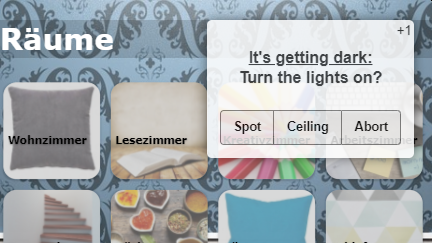
                              Popup-Messages

                              • Every instance creates the objects iqontrol.x.Popup.Message and iqontrol.x.Popup.Duration
                              • When passing values to these objects, a popup-message (or toast) is displayed
                              • You can use html-tags to format the message
                              • The duration is the time in ms the message is displayed; if the duration is 0 the message has to be confirmed
                              • Alternatively you can set these values via sendTo-command (for example by blockly) with the parameters PopupMessage and PopupDuration

                              Popup Screenshot
                              Popup Blockly

                              Scene:

                              • STATE: boolean - displays, if the scene is active. Depending on the configuration of the scene (virtual group, set values for false enabled or disabled), the toggle-command will send true, false, min, 0, max or 100. There is an option to always send true (disable toggleing).
                              M sigi234S 2 Replies Last reply
                              4
                              • s.bormannS s.bormann

                                1.1.3 (2020-06-28)

                                • (Sebastian Bormann) Added popup messagen (toast-messagen).
                                • (Sebastian Bormann) Enhanced scenes to be able to toggle (added option to always send true, if you need the old behaviour).

                                Popup-Messages

                                • Every instance creates the objects iqontrol.x.Popup.Message and iqontrol.x.Popup.Duration
                                • When passing values to these objects, a popup-message (or toast) is displayed
                                • You can use html-tags to format the message
                                • The duration is the time in ms the message is displayed; if the duration is 0 the message has to be confirmed
                                • Alternatively you can set these values via sendTo-command (for example by blockly) with the parameters PopupMessage and PopupDuration

                                Popup Screenshot
                                Popup Blockly

                                Scene:

                                • STATE: boolean - displays, if the scene is active. Depending on the configuration of the scene (virtual group, set values for false enabled or disabled), the toggle-command will send true, false, min, 0, max or 100. There is an option to always send true (disable toggleing).
                                M Offline
                                M Offline
                                martinschm
                                wrote on last edited by
                                #2595

                                @s-bormann said in Test Adapter iQontrol 1.1.x:

                                1.1.3 (2020-06-28)

                                • (Sebastian Bormann) Added popup messagen (toast-messagen).
                                • (Sebastian Bormann) Enhanced scenes to be able to toggle (added option to always send true, if you need the old behaviour).

                                Popup-Messages

                                • Every instance creates the objects iqontrol.x.Popup.Message and iqontrol.x.Popup.Duration
                                • When passing values to these objects, a popup-message (or toast) is displayed
                                • You can use html-tags to format the message
                                • The duration is the time in ms the message is displayed; if the duration is 0 the message has to be confirmed
                                • Alternatively you can set these values via sendTo-command (for example by blockly) with the parameters PopupMessage and PopupDuration

                                Popup Screenshot
                                Popup Blockly

                                Scene:

                                • STATE: boolean - displays, if the scene is active. Depending on the configuration of the scene (virtual group, set values for false enabled or disabled), the toggle-command will send true, false, min, 0, max or 100. There is an option to always send true (disable toggleing).

                                Mega cool mit den Pop ups @s-bormann . Vielen Dank für das ständige erweitern!

                                1 Reply Last reply
                                0
                                • M Offline
                                  M Offline
                                  martinschm
                                  wrote on last edited by martinschm
                                  #2596

                                  Hi,

                                  ich hab da mal ein Problem, vielleicht stelle ich mich auch nur zu blöd an.
                                  Ich habe unter 0_userdata einen true/false Datenpunkt angelegt. Den will ich mir in iQontrol anzeigen aber auch umschalten können.

                                  Hab ein "Schalter" als Typ verwendet und bei state den Wert ausgewählt. Der Zustand wird mir in iQontrol angezeigt, aber ich kann ihn nicht umschalten. Hab schon kontrolliert, er steht nicht auf Read only oder so.

                                  Wo ist mein Fehler?

                                  EDIT: Funktioniert das nur, wenn ich dem Datenpunkt eine Rolle zugewiesen hab? War das schon immer so?

                                  ciao
                                  Martin

                                  s.bormannS 1 Reply Last reply
                                  0
                                  • M martinschm

                                    Hi,

                                    ich hab da mal ein Problem, vielleicht stelle ich mich auch nur zu blöd an.
                                    Ich habe unter 0_userdata einen true/false Datenpunkt angelegt. Den will ich mir in iQontrol anzeigen aber auch umschalten können.

                                    Hab ein "Schalter" als Typ verwendet und bei state den Wert ausgewählt. Der Zustand wird mir in iQontrol angezeigt, aber ich kann ihn nicht umschalten. Hab schon kontrolliert, er steht nicht auf Read only oder so.

                                    Wo ist mein Fehler?

                                    EDIT: Funktioniert das nur, wenn ich dem Datenpunkt eine Rolle zugewiesen hab? War das schon immer so?

                                    ciao
                                    Martin

                                    s.bormannS Offline
                                    s.bormannS Offline
                                    s.bormann
                                    Most Active
                                    wrote on last edited by
                                    #2597

                                    @martinschm Ja, das liegt daran, dass die Art der Eingabe möglichst universell sein soll. iQontrol versucht so gut wie möglich zwischen button, string, level, value-list und ein paar specials zu unterscheiden, braucht dafür aber role und type. LG

                                    1 Reply Last reply
                                    1
                                    • B blackeagle998

                                      @s-bormann
                                      Mir ist noch aufgefallen, dass die Ansicht nach dem Laden einer Seite scharf ist.
                                      Klicke ich aber irgendwo hin, egal ob auf oder neben die Kacheln, wird alles unscharf / verwaschen und stellt sich auch nicht wieder zurück.

                                      Kann das noch jemand bestätigen?

                                      mike2507M Offline
                                      mike2507M Offline
                                      mike2507
                                      wrote on last edited by
                                      #2598

                                      @blackeagle998 Wie hast du das mit dem Tag und dem Datum sowie mit der Temperatur von bis gemacht?

                                      B 1 Reply Last reply
                                      0
                                      • E eMd

                                        @s-bormann
                                        Geniale Funktion, nun sieht mein Wetterbericht noch besser aus :)
                                        Und beim Müll wird mir der nächste Fällige Mülltyp angezeigt ^^ PERFEKT!
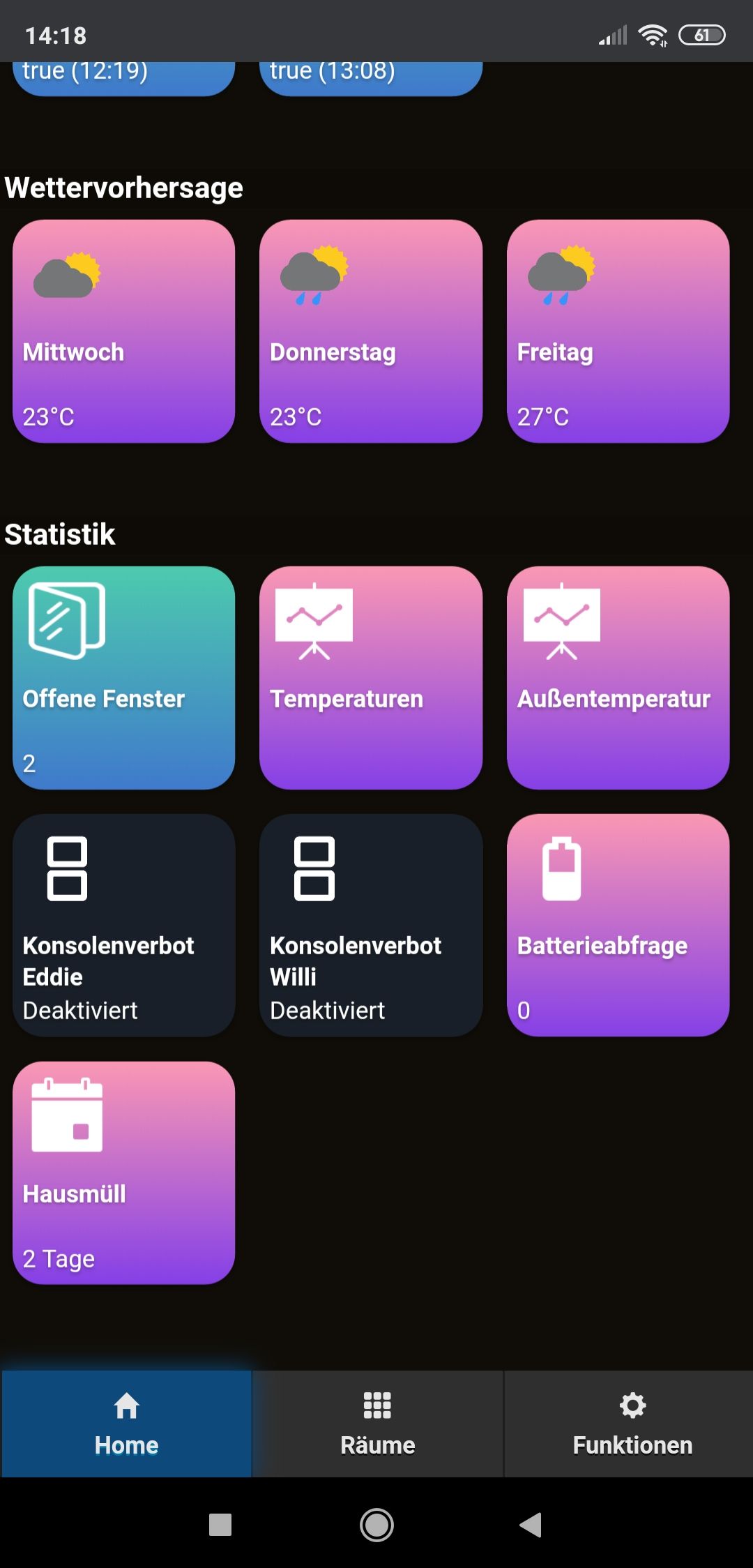
                                        Screenshot_2020-06-10-14-18-08-390_com.android.chrome.jpg

                                        Nur ein kleiner Schönheitsfehler bei der Anzeige wenn man die Kachel öffnet....
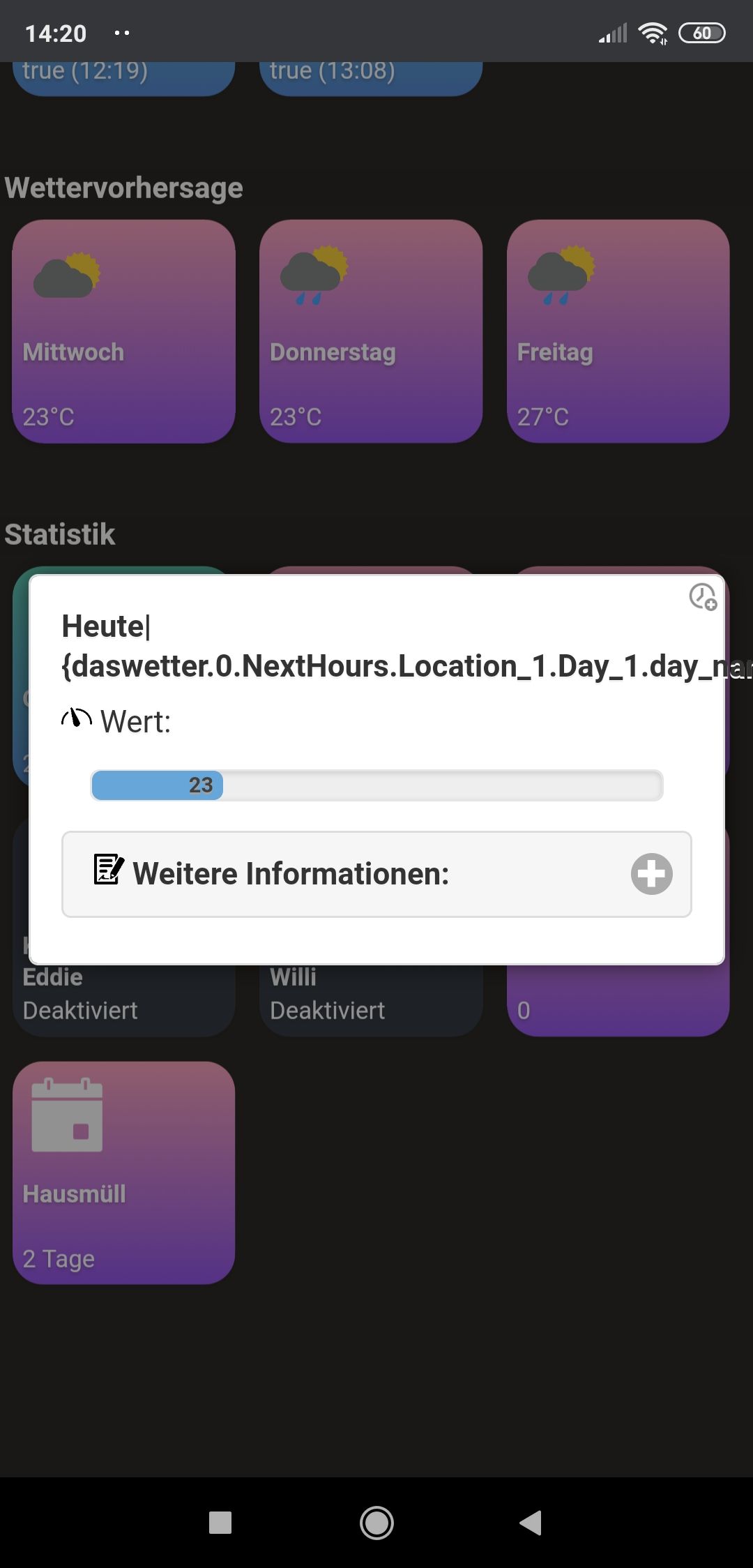
                                        Screenshot_2020-06-10-14-20-24-613_com.android.chrome.jpg

                                        Im Titel steht leider nicht der Datenpunkt drin. ALso in meinem Fall Mittwoch...

                                        mfg
                                        eMd

                                        mike2507M Offline
                                        mike2507M Offline
                                        mike2507
                                        wrote on last edited by
                                        #2599

                                        @eMd Hi, würdest du mir deine Kacheln Hintergründe zur Verfügung stellen?

                                        E 1 Reply Last reply
                                        0
                                        • mike2507M mike2507

                                          @blackeagle998 Wie hast du das mit dem Tag und dem Datum sowie mit der Temperatur von bis gemacht?

                                          B Offline
                                          B Offline
                                          blackeagle998
                                          wrote on last edited by blackeagle998
                                          #2600

                                          @mike2507
                                          Grundsätzlich kommen die Daten vom "das Wetter" Adapter.
                                          Die Formatierung erfolgt in einem eigenen Skript, das Ergebnis schreibe ich dann als String in eigene Datenpunkte unter 0_userdata.0.wetter.

                                          Den Inhalt dieser Datenpunkte verwende ich dann als Kachelname bzw. als State der Kachel.

                                          Reicht dir das so? Falls nicht, was brauchst du konkret?

                                          mike2507M 1 Reply Last reply
                                          0
                                          Reply
                                          • Reply as topic
                                          Log in to reply
                                          • Oldest to Newest
                                          • Newest to Oldest
                                          • Most Votes


                                          Support us

                                          ioBroker
                                          Community Adapters
                                          Donate

                                          872

                                          Online

                                          32.4k

                                          Users

                                          81.5k

                                          Topics

                                          1.3m

                                          Posts
                                          Community
                                          Impressum | Datenschutz-Bestimmungen | Nutzungsbedingungen | Einwilligungseinstellungen
                                          ioBroker Community 2014-2025
                                          logo
                                          • Login

                                          • Don't have an account? Register

                                          • Login or register to search.
                                          • First post
                                            Last post
                                          0
                                          • Home
                                          • Recent
                                          • Tags
                                          • Unread 0
                                          • Categories
                                          • Unreplied
                                          • Popular
                                          • GitHub
                                          • Docu
                                          • Hilfe