
NEWS




Windows Steuerung
-
@Bostil
Meinst du mein Script? Also https://github.com/Mic-M/iobroker.control-ms-windows/blob/master/control-ms-windows.js -
Erhalte in dem Control-PC Script von @Mic folgende Fehlermeldung:
15:08:28.895 error javascript.0 (2088) script.js.common.MSWindows compile failed: at script.js.common.MSWindows:49
Update:
Habe @mic Script übertragen und lediglich die IP des Rechners ergänzt. Letztlich würde ich gerne am Mini-PC wo auf einem Windows-PC die Verbindung zum iobroker auf einem Raspi4 hergestellt wird, direkt noch Programme neben der VIS (über Opera) starten können.Hat jemand ein ähnliches Problem ?
/*************************************************************************************** * Script to control Windows PCs * ------------------------------------------------------------------------------------- * Send commands to Windows PCs for shutdown, hibernate, etc. * Source: https://forum.iobroker.net/topic/1570/windows-steuerung and https://blog.instalator.ru/archives/47 * * Aktuelle Version: https://github.com/Mic-M/iobroker.control-ms-windows * Support: https://forum.iobroker.net/topic/1570/windows-steuerung * --------------------------- * Change Log: * 0.1 Mic - Initial Version * --------------------------- * Many thanks to Vladimir Vilisov for GetAdmin. Check out his website at * https://blog.instalator.ru/archives/47 ***************************************************************************************/ /******************************************************************************* * Zur Einrichtung von GetAdmin ******************************************************************************/ /* * 1) Software "GetAdmin" (getestet Version 2.6) auf Zielrechner installieren. * Link: https://blog.instalator.ru/archives/47 * 2) In GetAdmin, ganz oben links unter "Server": * - IP: die IP-Adresse der ioBrokers eintragen * - Port: Standard-Port 8585 so lassen * 3) In GetAdmin, oben unter "Options" Haken bei Minimize und Startup setzen, * damit sich GetAdmin bei jedem Rechnerstart startet und das minimiert. * Dann mit "Save" bestätigen. * 4) Fertig * ------------------------------------------------------------------------------ * Beispiele für individuelle Einträge in GetAdmin Command list: * a) Ruhezustand: * - in Spalte 'Command' z.B. "m_hibernate" eintragen * - in Spalte 'PATH or URL' eintragen: shutdown * - in Spalte 'PARAMETERS' eintragen: -h * b) Energie sparen: * - in Spalte 'Command' z.B. "m_sleep" eintragen * - in Spalte 'PATH or URL' eintragen: rundll32.exe * - in Spalte 'PARAMETERS' eintragen: powrprof.dll,SetSuspendState */ /******************************************************************************* * Konfiguration: Pfade ******************************************************************************/ // Pfad, unter dem die States (Datenpunkte) in den Objekten angelegt werden. // Kann man so bestehen lassen. const STATE_PATH = 'javascript.'+ instance + '.' + 'Control-PC'; /******************************************************************************* * Konfiguration: Geräte ******************************************************************************/ // Hier deine Geräte aufnehmen. Du kannst beliebig viele ergänzen. const CONFIG_DEVICES = [ { name: 'Mini-PC', // Für Datenpunkt und Ausgabe ip: '192.168.178.13', }, { name: 'Gästezimmer-PC', ip: '10.10.0.102', }, ]; /******************************************************************************* * Konfiguration: Get Admin Commands ******************************************************************************/ // Eigene Commands, die in Get Admin in der Command List eingetragen sind, Spalte "Command" // Bitte ohne Leerzeichen, Sonderzeichen, etc. // Falls keine eigenen Commands: GETADMIN_COMMANDS_OWN = []; const GETADMIN_COMMANDS_OWN = ['m_hibernate', 'm_sleep', '', '']; /******************************************************************************* * Konfiguration: Konsolen-Ausgaben ******************************************************************************/ // Auf true setzen, wenn ein paar Infos dieses Scripts im Log ausgegeben werden dürfen. const LOG_INFO = true; // Auf true setzen, wenn zur Fehlersuche einige Meldungen ausgegeben werden sollen. // Ansonsten bitte auf false stellen. const LOG_DEBUG = false; /************************************************************************************************************************* * Ab hier nichts mehr ändern / Stop editing here! *************************************************************************************************************************/ /******************************************************************************** * Durch Get Admin unterstützte Commands ********************************************************************************/ const GETADMIN_COMMANDS = ['process', 'shutdown', 'poweroff', 'reboot', 'forceifhung', 'logoff', 'monitor1', 'monitor2']; /******************************************************************************** * init - This is executed on every script (re)start. ********************************************************************************/ init(); function init() { // Create our states, if not yet existing. createStates(); // States should have been created, so continue setTimeout(function(){ // Subscribe to states doSubscriptions(); }, 2000); } function doSubscriptions() { // Loop through the devices for (let lpConfDevice of CONFIG_DEVICES) { let name = lpConfDevice['name']; let statePath = STATE_PATH + '.' + name; /***************** * Loop through the commands to subscribe accordingly *****************/ let allCommands = cleanArray([].concat(GETADMIN_COMMANDS, GETADMIN_COMMANDS_OWN)); // merge both into one array for (let lpCommand of allCommands) { on({id: statePath + '.' + lpCommand, change: 'any', val: true}, function(obj) { // First: Get the device + command state portion of obj.id, as variable is not available within "on({id..." let stateFull = obj.id // e.g. [javascript.0.Control-PC.PC-Maria.shutdown] let stateDeviceAndCommand = stateFull.substring(STATE_PATH.length +1); // e.g. [PC-Maria.shutdown] let stateDeviceAndCommandSplit = stateDeviceAndCommand.split('.'); let stateDevice = stateDeviceAndCommandSplit[0]; // e.g. [PC-Maria] let stateCommand = stateDeviceAndCommandSplit[1]; // e.g. [shutdown] // Next, get the ip let ip = getConfigValuePerKey(CONFIG_DEVICES, 'name', stateDevice, 'ip'); if( (ip != -1) ) { getAdminSendCommand(name, ip, 'cmd', stateCommand); } else { log('No configration found for ' + stateDevice, 'warn'); } }); } /***************** * Also subscribe to "sendKey" *****************/ on({id: statePath + '.sendKey', change: 'any'}, function(obj) { // First: Get the device + command state portion of obj.id, as variable is not available within "on({id..." let stateFull = obj.id // e.g. [javascript.0.Control-PC.PC-Maria.sendKey] let stateDeviceAndCommand = stateFull.substring(STATE_PATH.length +1); // e.g. [PC-Maria.sendKey] let stateDeviceAndCommandSplit = stateDeviceAndCommand.split('.'); let stateDevice = stateDeviceAndCommandSplit[0]; // e.g. [PC-Maria] // Next, get the ip let ip = getConfigValuePerKey(CONFIG_DEVICES, 'name', stateDevice, 'ip'); if( (ip != -1) ) { getAdminSendCommand(name, ip, 'key', obj.state.val); } else { log('No configration found for ' + stateDevice, 'warn'); } }); } } /* * @param {string} name Name des Rechners, nur für Log-Ausgabe * @param {string} host IP-Adresse des Windows-PCs, z.B. 10.10.0.107 * @param {string} action If command, use 'cmd', if key, use 'key', etc. * @param {string} command Userspezifischer Command wie z.B. "m_hibernate", oder "poweroff" */ function getAdminSendCommand(name, host, action, command){ let request = require('request'); let options = { url: 'http://' + host + ':' + '8585' + '/?' + action + '=' + command }; if (LOG_DEBUG) log('Send command to ' + name + ': ' + options.url); if (LOG_INFO) log('Send command [' + command + '] to ' + name); request(options, function (error, response, body) { if ( (response !== undefined) && !error ) { if ( parseInt(response.statusCode) === 200 ) { if (LOG_INFO) log(name + ' responds with [OK]'); } else { if (LOG_INFO) log(name + ' responds with unexpected status code [' + response.statusCode + ']'); } } else { if (LOG_INFO) log('No response from ' + name + ', so it seems to be off.'); } }); } /** * Create script states */ function createStates() { for (let lpConfDevice of CONFIG_DEVICES) { let name = lpConfDevice['name']; let nameClean = cleanStringForState(name); let statePath = STATE_PATH + '.' + nameClean; // Create Get Admin Command States for (let lpCommand of GETADMIN_COMMANDS) { createState(statePath + '.' + lpCommand, {'name':'Command: ' + lpCommand, 'type':'boolean', 'read':false, 'write':true, 'role':'button', 'def':false }); } // Create User Specific Command States if (! isLikeEmpty(GETADMIN_COMMANDS_OWN)) { for (let lpCommand of GETADMIN_COMMANDS_OWN) { createState(statePath + '.' + lpCommand, {'name':'User Command: ' + lpCommand, 'type':'boolean', 'read':false, 'write':true, 'role':'button', 'def':false }); } } // Create State for sending a key createState(statePath + '.sendKey', {'name':'Send Key', 'type':'string', 'read':true, 'write':true, 'role':'state', 'def':'' }); } } /** * Retrieve values from a CONFIG variable, example: * const CONF = [{car: 'bmw', color: 'black', hp: '250'}, {car: 'audi', color: 'blue', hp: '190'}] * To get the color of the Audi, use: getConfigValuePerKey('car', 'bmw', 'color') * To find out which car has 190 hp, use: getConfigValuePerKey('hp', '190', 'car') * @param {object} config The configuration variable/constant * @param {string} key1 Key to look for. * @param {string} key1Value The value the key should have * @param {string} key2 The key which value we return * @returns {any} Returns the element's value, or number -1 of nothing found. */ function getConfigValuePerKey(config, key1, key1Value, key2) { // We need to get all ids of LOG_FILTER into array for (let lpConfDevice of config) { if ( lpConfDevice[key1] === key1Value ) { if (lpConfDevice[key2] === undefined) { return -1; } else { return lpConfDevice[key2]; } } } return -1; } /** * Will just keep letters, incl. Umlauts, numbers, "-" and "_" and "." * @param {string} strInput Input String * @return {string} the processed string */ function cleanStringForState(strInput) { let strResult = strInput.replace(/([^a-zA-ZäöüÄÖÜß0-9\-\._]+)/gi, ''); return strResult; } /** * Checks if Array or String is not undefined, null or empty. * @param inputVar - Input Array or String, Number, etc. * @return true if it is undefined/null/empty, false if it contains value(s) * Array or String containing just whitespaces or >'< or >"< is considered empty */ function isLikeEmpty(inputVar) { if (typeof inputVar !== 'undefined' && inputVar !== null) { let strTemp = JSON.stringify(inputVar); strTemp = strTemp.replace(/\s+/g, ''); // remove all whitespaces strTemp = strTemp.replace(/\"+/g, ""); // remove all >"< strTemp = strTemp.replace(/\'+/g, ""); // remove all >'< if (strTemp !== '') { return false; } else { return true; } } else { return true; } } /** * Clean Array: Removes all falsy values: undefined, null, 0, false, NaN and "" (empty string) * Source: https://stackoverflow.com/questions/281264/remove-empty-elements-from-an-array-in-javascript * @param {array} inputArray Array to process * @return {array} Cleaned array */ function cleanArray(inputArray) { var newArray = []; for (let i = 0; i < inputArray.length; i++) { if (inputArray[i]) { newArray.push(inputArray[i]); } } return newArray; } -
@Bostil
Bitte poste das von dir verwendete JavaScript nicht als Spoiler, sondern in sog. "Code Tags".

Denn sonst kann man das JavaScript nicht richtig lesen.
-
Erhalte in dem Control-PC Script von @Mic folgende Fehlermeldung:
15:08:28.895 error javascript.0 (2088) script.js.common.MSWindows compile failed: at script.js.common.MSWindows:49
Update:
Habe @mic Script übertragen und lediglich die IP des Rechners ergänzt. Letztlich würde ich gerne am Mini-PC wo auf einem Windows-PC die Verbindung zum iobroker auf einem Raspi4 hergestellt wird, direkt noch Programme neben der VIS (über Opera) starten können.Hat jemand ein ähnliches Problem ?
/*************************************************************************************** * Script to control Windows PCs * ------------------------------------------------------------------------------------- * Send commands to Windows PCs for shutdown, hibernate, etc. * Source: https://forum.iobroker.net/topic/1570/windows-steuerung and https://blog.instalator.ru/archives/47 * * Aktuelle Version: https://github.com/Mic-M/iobroker.control-ms-windows * Support: https://forum.iobroker.net/topic/1570/windows-steuerung * --------------------------- * Change Log: * 0.1 Mic - Initial Version * --------------------------- * Many thanks to Vladimir Vilisov for GetAdmin. Check out his website at * https://blog.instalator.ru/archives/47 ***************************************************************************************/ /******************************************************************************* * Zur Einrichtung von GetAdmin ******************************************************************************/ /* * 1) Software "GetAdmin" (getestet Version 2.6) auf Zielrechner installieren. * Link: https://blog.instalator.ru/archives/47 * 2) In GetAdmin, ganz oben links unter "Server": * - IP: die IP-Adresse der ioBrokers eintragen * - Port: Standard-Port 8585 so lassen * 3) In GetAdmin, oben unter "Options" Haken bei Minimize und Startup setzen, * damit sich GetAdmin bei jedem Rechnerstart startet und das minimiert. * Dann mit "Save" bestätigen. * 4) Fertig * ------------------------------------------------------------------------------ * Beispiele für individuelle Einträge in GetAdmin Command list: * a) Ruhezustand: * - in Spalte 'Command' z.B. "m_hibernate" eintragen * - in Spalte 'PATH or URL' eintragen: shutdown * - in Spalte 'PARAMETERS' eintragen: -h * b) Energie sparen: * - in Spalte 'Command' z.B. "m_sleep" eintragen * - in Spalte 'PATH or URL' eintragen: rundll32.exe * - in Spalte 'PARAMETERS' eintragen: powrprof.dll,SetSuspendState */ /******************************************************************************* * Konfiguration: Pfade ******************************************************************************/ // Pfad, unter dem die States (Datenpunkte) in den Objekten angelegt werden. // Kann man so bestehen lassen. const STATE_PATH = 'javascript.'+ instance + '.' + 'Control-PC'; /******************************************************************************* * Konfiguration: Geräte ******************************************************************************/ // Hier deine Geräte aufnehmen. Du kannst beliebig viele ergänzen. const CONFIG_DEVICES = [ { name: 'Mini-PC', // Für Datenpunkt und Ausgabe ip: '192.168.178.13', }, { name: 'Gästezimmer-PC', ip: '10.10.0.102', }, ]; /******************************************************************************* * Konfiguration: Get Admin Commands ******************************************************************************/ // Eigene Commands, die in Get Admin in der Command List eingetragen sind, Spalte "Command" // Bitte ohne Leerzeichen, Sonderzeichen, etc. // Falls keine eigenen Commands: GETADMIN_COMMANDS_OWN = []; const GETADMIN_COMMANDS_OWN = ['m_hibernate', 'm_sleep', '', '']; /******************************************************************************* * Konfiguration: Konsolen-Ausgaben ******************************************************************************/ // Auf true setzen, wenn ein paar Infos dieses Scripts im Log ausgegeben werden dürfen. const LOG_INFO = true; // Auf true setzen, wenn zur Fehlersuche einige Meldungen ausgegeben werden sollen. // Ansonsten bitte auf false stellen. const LOG_DEBUG = false; /************************************************************************************************************************* * Ab hier nichts mehr ändern / Stop editing here! *************************************************************************************************************************/ /******************************************************************************** * Durch Get Admin unterstützte Commands ********************************************************************************/ const GETADMIN_COMMANDS = ['process', 'shutdown', 'poweroff', 'reboot', 'forceifhung', 'logoff', 'monitor1', 'monitor2']; /******************************************************************************** * init - This is executed on every script (re)start. ********************************************************************************/ init(); function init() { // Create our states, if not yet existing. createStates(); // States should have been created, so continue setTimeout(function(){ // Subscribe to states doSubscriptions(); }, 2000); } function doSubscriptions() { // Loop through the devices for (let lpConfDevice of CONFIG_DEVICES) { let name = lpConfDevice['name']; let statePath = STATE_PATH + '.' + name; /***************** * Loop through the commands to subscribe accordingly *****************/ let allCommands = cleanArray([].concat(GETADMIN_COMMANDS, GETADMIN_COMMANDS_OWN)); // merge both into one array for (let lpCommand of allCommands) { on({id: statePath + '.' + lpCommand, change: 'any', val: true}, function(obj) { // First: Get the device + command state portion of obj.id, as variable is not available within "on({id..." let stateFull = obj.id // e.g. [javascript.0.Control-PC.PC-Maria.shutdown] let stateDeviceAndCommand = stateFull.substring(STATE_PATH.length +1); // e.g. [PC-Maria.shutdown] let stateDeviceAndCommandSplit = stateDeviceAndCommand.split('.'); let stateDevice = stateDeviceAndCommandSplit[0]; // e.g. [PC-Maria] let stateCommand = stateDeviceAndCommandSplit[1]; // e.g. [shutdown] // Next, get the ip let ip = getConfigValuePerKey(CONFIG_DEVICES, 'name', stateDevice, 'ip'); if( (ip != -1) ) { getAdminSendCommand(name, ip, 'cmd', stateCommand); } else { log('No configration found for ' + stateDevice, 'warn'); } }); } /***************** * Also subscribe to "sendKey" *****************/ on({id: statePath + '.sendKey', change: 'any'}, function(obj) { // First: Get the device + command state portion of obj.id, as variable is not available within "on({id..." let stateFull = obj.id // e.g. [javascript.0.Control-PC.PC-Maria.sendKey] let stateDeviceAndCommand = stateFull.substring(STATE_PATH.length +1); // e.g. [PC-Maria.sendKey] let stateDeviceAndCommandSplit = stateDeviceAndCommand.split('.'); let stateDevice = stateDeviceAndCommandSplit[0]; // e.g. [PC-Maria] // Next, get the ip let ip = getConfigValuePerKey(CONFIG_DEVICES, 'name', stateDevice, 'ip'); if( (ip != -1) ) { getAdminSendCommand(name, ip, 'key', obj.state.val); } else { log('No configration found for ' + stateDevice, 'warn'); } }); } } /* * @param {string} name Name des Rechners, nur für Log-Ausgabe * @param {string} host IP-Adresse des Windows-PCs, z.B. 10.10.0.107 * @param {string} action If command, use 'cmd', if key, use 'key', etc. * @param {string} command Userspezifischer Command wie z.B. "m_hibernate", oder "poweroff" */ function getAdminSendCommand(name, host, action, command){ let request = require('request'); let options = { url: 'http://' + host + ':' + '8585' + '/?' + action + '=' + command }; if (LOG_DEBUG) log('Send command to ' + name + ': ' + options.url); if (LOG_INFO) log('Send command [' + command + '] to ' + name); request(options, function (error, response, body) { if ( (response !== undefined) && !error ) { if ( parseInt(response.statusCode) === 200 ) { if (LOG_INFO) log(name + ' responds with [OK]'); } else { if (LOG_INFO) log(name + ' responds with unexpected status code [' + response.statusCode + ']'); } } else { if (LOG_INFO) log('No response from ' + name + ', so it seems to be off.'); } }); } /** * Create script states */ function createStates() { for (let lpConfDevice of CONFIG_DEVICES) { let name = lpConfDevice['name']; let nameClean = cleanStringForState(name); let statePath = STATE_PATH + '.' + nameClean; // Create Get Admin Command States for (let lpCommand of GETADMIN_COMMANDS) { createState(statePath + '.' + lpCommand, {'name':'Command: ' + lpCommand, 'type':'boolean', 'read':false, 'write':true, 'role':'button', 'def':false }); } // Create User Specific Command States if (! isLikeEmpty(GETADMIN_COMMANDS_OWN)) { for (let lpCommand of GETADMIN_COMMANDS_OWN) { createState(statePath + '.' + lpCommand, {'name':'User Command: ' + lpCommand, 'type':'boolean', 'read':false, 'write':true, 'role':'button', 'def':false }); } } // Create State for sending a key createState(statePath + '.sendKey', {'name':'Send Key', 'type':'string', 'read':true, 'write':true, 'role':'state', 'def':'' }); } } /** * Retrieve values from a CONFIG variable, example: * const CONF = [{car: 'bmw', color: 'black', hp: '250'}, {car: 'audi', color: 'blue', hp: '190'}] * To get the color of the Audi, use: getConfigValuePerKey('car', 'bmw', 'color') * To find out which car has 190 hp, use: getConfigValuePerKey('hp', '190', 'car') * @param {object} config The configuration variable/constant * @param {string} key1 Key to look for. * @param {string} key1Value The value the key should have * @param {string} key2 The key which value we return * @returns {any} Returns the element's value, or number -1 of nothing found. */ function getConfigValuePerKey(config, key1, key1Value, key2) { // We need to get all ids of LOG_FILTER into array for (let lpConfDevice of config) { if ( lpConfDevice[key1] === key1Value ) { if (lpConfDevice[key2] === undefined) { return -1; } else { return lpConfDevice[key2]; } } } return -1; } /** * Will just keep letters, incl. Umlauts, numbers, "-" and "_" and "." * @param {string} strInput Input String * @return {string} the processed string */ function cleanStringForState(strInput) { let strResult = strInput.replace(/([^a-zA-ZäöüÄÖÜß0-9\-\._]+)/gi, ''); return strResult; } /** * Checks if Array or String is not undefined, null or empty. * @param inputVar - Input Array or String, Number, etc. * @return true if it is undefined/null/empty, false if it contains value(s) * Array or String containing just whitespaces or >'< or >"< is considered empty */ function isLikeEmpty(inputVar) { if (typeof inputVar !== 'undefined' && inputVar !== null) { let strTemp = JSON.stringify(inputVar); strTemp = strTemp.replace(/\s+/g, ''); // remove all whitespaces strTemp = strTemp.replace(/\"+/g, ""); // remove all >"< strTemp = strTemp.replace(/\'+/g, ""); // remove all >'< if (strTemp !== '') { return false; } else { return true; } } else { return true; } } /** * Clean Array: Removes all falsy values: undefined, null, 0, false, NaN and "" (empty string) * Source: https://stackoverflow.com/questions/281264/remove-empty-elements-from-an-array-in-javascript * @param {array} inputArray Array to process * @return {array} Cleaned array */ function cleanArray(inputArray) { var newArray = []; for (let i = 0; i < inputArray.length; i++) { if (inputArray[i]) { newArray.push(inputArray[i]); } } return newArray; }@Bostil sagte in Windows Steuerung:
Erhalte in dem Control-PC Script von @Mic folgende Fehlermeldung:
15:08:28.895 error javascript.0 (2088) script.js.common.MSWindows compile failed: at script.js.common.MSWindows:49
Ich bin kein JS Pro, aber die Fehlermeldung sagt, das in Zeile 49 ein fehler ist.
Ersetze mal die Zeile 49 durch diese hier:
const STATE_PATH = 'javascript.' + instance + '.' + 'Control-PC';Ich vermute das einfach eine Leerzeichen zwischen 'javascript' und dem + Zeichen gefehlt hat.
-
@Bostil sagte in Windows Steuerung:
Erhalte in dem Control-PC Script von @Mic folgende Fehlermeldung:
15:08:28.895 error javascript.0 (2088) script.js.common.MSWindows compile failed: at script.js.common.MSWindows:49
Ich bin kein JS Pro, aber die Fehlermeldung sagt, das in Zeile 49 ein fehler ist.
Ersetze mal die Zeile 49 durch diese hier:
const STATE_PATH = 'javascript.' + instance + '.' + 'Control-PC';Ich vermute das einfach eine Leerzeichen zwischen 'javascript' und dem + Zeichen gefehlt hat.
@el_malto Geil - vielen Dank dir! Script läuft nun.
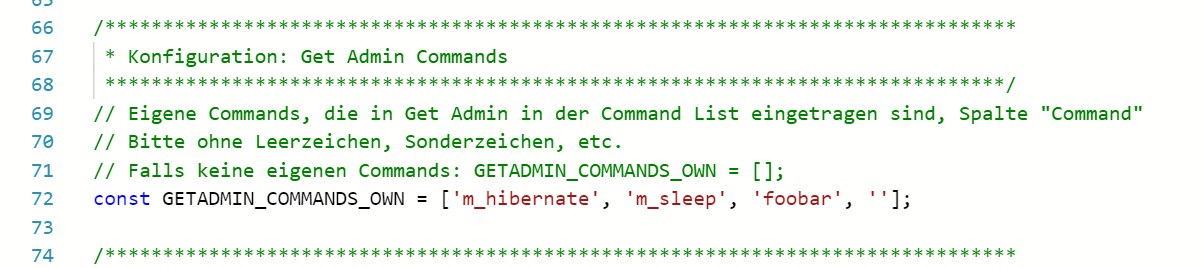
Habe in Zeile (Bild 1) ganz elegant um das Kommando "foobar" ergänzt und GetAdmin an meinem Mini-PC ebenfalls um einen "foobar"-Eintrag erweitert. SkyGo startet nun. Leider noch im Hintergrund, aber ich spiele einfach noch etwas mit den Parametern rum. DANKE!
-
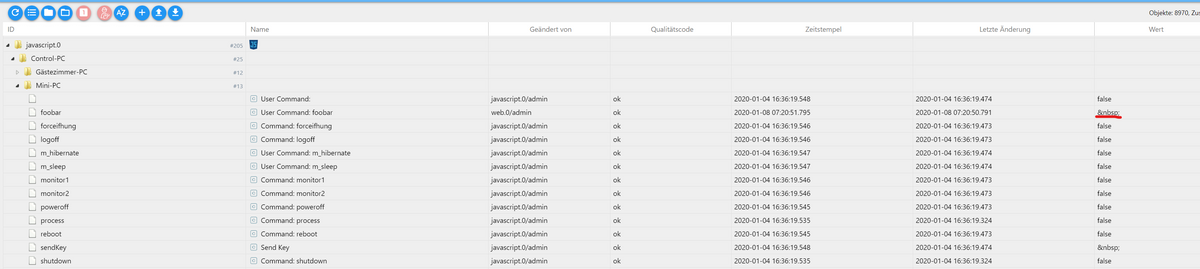
Ahhh ... und kleiner Schönheitsfehler: Mein Skyo konnte nur starten weil ich unter "Objekte" den seltsamen Wert (siehe Bild unterhalb) mit true überschrieben habe. Hat jemand noch ne Idee, wie ich hier dafür sorgen kann, dass dieses Objekt mit "true" anstatt mit "&nsbp" beschrieben wird?

Danke, LG ein totaler Dummy - hoffe, es hilft aber auch anderen Dummies ...
-
Ahhh ... und kleiner Schönheitsfehler: Mein Skyo konnte nur starten weil ich unter "Objekte" den seltsamen Wert (siehe Bild unterhalb) mit true überschrieben habe. Hat jemand noch ne Idee, wie ich hier dafür sorgen kann, dass dieses Objekt mit "true" anstatt mit "&nsbp" beschrieben wird?
Danke, LG ein totaler Dummy - hoffe, es hilft aber auch anderen Dummies ...
-
Ahhh ... und kleiner Schönheitsfehler: Mein Skyo konnte nur starten weil ich unter "Objekte" den seltsamen Wert (siehe Bild unterhalb) mit true überschrieben habe. Hat jemand noch ne Idee, wie ich hier dafür sorgen kann, dass dieses Objekt mit "true" anstatt mit "&nsbp" beschrieben wird?
Danke, LG ein totaler Dummy - hoffe, es hilft aber auch anderen Dummies ...
@Bostil sagte in Windows Steuerung:
Ahhh ... und kleiner Schönheitsfehler: Mein Skyo konnte nur starten weil ich unter "Objekte" den seltsamen Wert (siehe Bild unterhalb) mit true überschrieben habe. Hat jemand noch ne Idee, wie ich hier dafür sorgen kann, dass dieses Objekt mit "true" anstatt mit "&nsbp" beschrieben wird?
Bitte ersetze Zeile (ca. bei/nach Zeilennummer 120)
for (let lpCommand of GETADMIN_COMMANDS_OWN) {Durch:
for (let lpCommand of cleanArray(GETADMIN_COMMANDS_OWN)) {Habe ich auch auf Github mit Version 0.2 korrigiert. Damit wird kein leerer Wert mehr als State angelegt (falls in
GETADMIN_COMMANDS_OWNleere Werte enthalten sind) -
@Bostil sagte in Windows Steuerung:
Ahhh ... und kleiner Schönheitsfehler: Mein Skyo konnte nur starten weil ich unter "Objekte" den seltsamen Wert (siehe Bild unterhalb) mit true überschrieben habe. Hat jemand noch ne Idee, wie ich hier dafür sorgen kann, dass dieses Objekt mit "true" anstatt mit "&nsbp" beschrieben wird?
Bitte ersetze Zeile (ca. bei/nach Zeilennummer 120)
for (let lpCommand of GETADMIN_COMMANDS_OWN) {Durch:
for (let lpCommand of cleanArray(GETADMIN_COMMANDS_OWN)) {Habe ich auch auf Github mit Version 0.2 korrigiert. Damit wird kein leerer Wert mehr als State angelegt (falls in
GETADMIN_COMMANDS_OWNleere Werte enthalten sind)@Mic Danke für die Anpassung - in Zeile 50 fehlte auch noch ein Leerzeichen, siehe Beitrag oberhalb von @el_malto
Werde mal testen ...
- Leerzeichen korrigiert in Zeile 50
- Änderungen von Mic um Zeile 120 übernommen
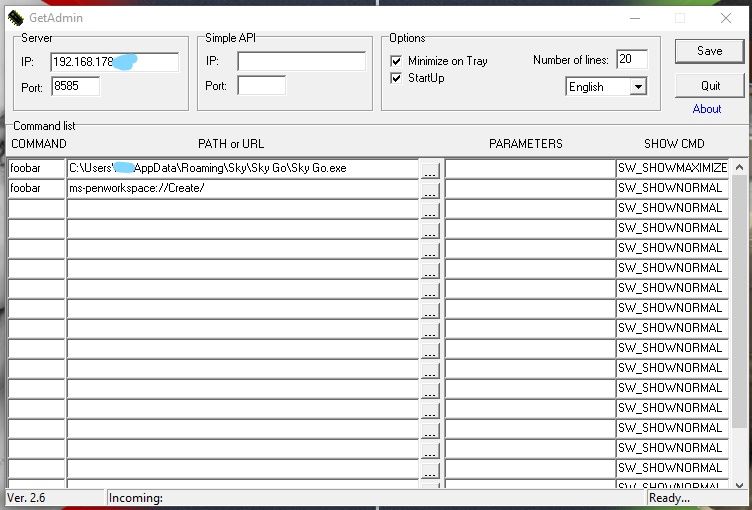
- IP des Mini-PC sowie Kommando (foobar) hinzugefügt
- allerdings stellt sich der Wert weiterhin nicht auf true, sondern immernoch auf &nsbp
Status Objekte iobroker:
GetAdmin auf Mini-PC (zweiten Eintrag bitte erstmal ignorieren)
-
@Mic Danke für die Anpassung - in Zeile 50 fehlte auch noch ein Leerzeichen, siehe Beitrag oberhalb von @el_malto
Werde mal testen ...
- Leerzeichen korrigiert in Zeile 50
- Änderungen von Mic um Zeile 120 übernommen
- IP des Mini-PC sowie Kommando (foobar) hinzugefügt
- allerdings stellt sich der Wert weiterhin nicht auf true, sondern immernoch auf &nsbp
Status Objekte iobroker:
GetAdmin auf Mini-PC (zweiten Eintrag bitte erstmal ignorieren)
@Bostil sagte in Windows Steuerung:
in Zeile 50 fehlte auch noch ein Leerzeichen, siehe Beitrag oberhalb von @el_malto
let x = 1 + 2;
let y = 1+2;Beide sind hier identisch, das Leerzeichen macht keinerlei Unterschied. Leerzeichen bei "+" usw. kannst du also völlig ignorieren ;-)
-
@Mic Danke für die Anpassung - in Zeile 50 fehlte auch noch ein Leerzeichen, siehe Beitrag oberhalb von @el_malto
Werde mal testen ...
- Leerzeichen korrigiert in Zeile 50
- Änderungen von Mic um Zeile 120 übernommen
- IP des Mini-PC sowie Kommando (foobar) hinzugefügt
- allerdings stellt sich der Wert weiterhin nicht auf true, sondern immernoch auf &nsbp
Status Objekte iobroker:
GetAdmin auf Mini-PC (zweiten Eintrag bitte erstmal ignorieren)
@Bostil sagte in Windows Steuerung:
allerdings stellt sich der Wert weiterhin nicht auf true, sondern immernoch auf &nsbp
Da ja zwischendurch das Script modifiziert wurde:
Stoppe mal bitte das Script, lösche dann alle Script-Datenpunkte, starte das Script, und schau dann noch mal ob es geht.Wegen Fehlermeldung im JavaScript-Editor: falls sich das bestätigt, bitte hier ein neues Issue ("Ticket") aufmachen.
-
Hallo, ich lese mich gerade in das Thema ein. Ich nutze einen All In One PC als Display für die vis und möchte diesen gerne über ioBroker steuern. Hier geht es mir vor allem um Hibernate, Display An/Aus, Power Off und Power On. Sehe ich das richtig, dass ich Power On dann über WOL steuern muss(ebenso aus dem Hibernate Status)? Ich habe keinen Befehl gefunden, das Display ein- oder auszuschalten. Vielen Dank!
-
Hallo, ich lese mich gerade in das Thema ein. Ich nutze einen All In One PC als Display für die vis und möchte diesen gerne über ioBroker steuern. Hier geht es mir vor allem um Hibernate, Display An/Aus, Power Off und Power On. Sehe ich das richtig, dass ich Power On dann über WOL steuern muss(ebenso aus dem Hibernate Status)? Ich habe keinen Befehl gefunden, das Display ein- oder auszuschalten. Vielen Dank!
-
@Matten lies mal ab hier https://forum.iobroker.net/topic/1570/windows-steuerung/91
vielleicht geht das Tool oder ein ähnliches ja bei dir. Google ist bei solchen Tools auch dein Freund.
Was Hibernate habe ich keine Ahnung... -
Hallo, ich lese mich gerade in das Thema ein. Ich nutze einen All In One PC als Display für die vis und möchte diesen gerne über ioBroker steuern. Hier geht es mir vor allem um Hibernate, Display An/Aus, Power Off und Power On. Sehe ich das richtig, dass ich Power On dann über WOL steuern muss(ebenso aus dem Hibernate Status)? Ich habe keinen Befehl gefunden, das Display ein- oder auszuschalten. Vielen Dank!
Ja ich habe es bei mir genau so umgesetzt.
Power On per WOL.
Ich verwende zusätzlich zu GetAdmin noch CCU Remote PC und CuxD auf der CCU.
Damit funktioniert dann z.B. auch Display Aus.
Display ein mache ich dann wieder per GetAdmin (Tastendruck)Funktioniert so seit mehreren Monaten sehr gut bei mir.
Mir wäre es natürlich auch lieber alles per GetAdmin zu steuern, aber z.B. Display Aus kann GA anscheinend leider nicht ... und es wird auch soweit ich sehe nicht mehr weiterentwickelt ...
Beste Grüße
-
Ja ich habe es bei mir genau so umgesetzt.
Power On per WOL.
Ich verwende zusätzlich zu GetAdmin noch CCU Remote PC und CuxD auf der CCU.
Damit funktioniert dann z.B. auch Display Aus.
Display ein mache ich dann wieder per GetAdmin (Tastendruck)Funktioniert so seit mehreren Monaten sehr gut bei mir.
Mir wäre es natürlich auch lieber alles per GetAdmin zu steuern, aber z.B. Display Aus kann GA anscheinend leider nicht ... und es wird auch soweit ich sehe nicht mehr weiterentwickelt ...
Beste Grüße
-
Ja ich habe es bei mir genau so umgesetzt.
Power On per WOL.
Ich verwende zusätzlich zu GetAdmin noch CCU Remote PC und CuxD auf der CCU.
Damit funktioniert dann z.B. auch Display Aus.
Display ein mache ich dann wieder per GetAdmin (Tastendruck)Funktioniert so seit mehreren Monaten sehr gut bei mir.
Mir wäre es natürlich auch lieber alles per GetAdmin zu steuern, aber z.B. Display Aus kann GA anscheinend leider nicht ... und es wird auch soweit ich sehe nicht mehr weiterentwickelt ...
Beste Grüße
-
Hallo,
habe 2.6 auf meinem win10 tablet versucht.Bekomme folgende Fehlermeldung:
HTTP/1.1 500 Internal Server Error.Was mache ich da falsch?



320
Online32.7k
Users82.4k
Topics1.3m
Posts