




vedirekt Adapter Verbindungsproblem
-
@laser im Expertenmodus
@laser sagte in vedirekt Adapter Verbindungsproblem:
Wenn das um die 100 Leute installiert haben, müßte doch mal jemand etwas bemerkt haben!
wie gesagt hatte ich keine Probleme
Außerdem sind 100 user bei 70.000 Installationen nicht gerade viel.
hier im Forum sind "nur" 30.000 davon.
und wenn niemand auf GitHub schreibt, bekommen Entwickler gar nichts mit@laser sagte in vedirekt Adapter Verbindungsproblem:
erst mal keine pausenlosen Meldungen mehr.
was meintest du damit?
Typfehler oder Werte??@homoran im Info- Modus kommen keine Meldungsketten, weder Werte noch Typenfehler. Im Debug- Modus kommen beide Meldungstypen. Pausenlos.
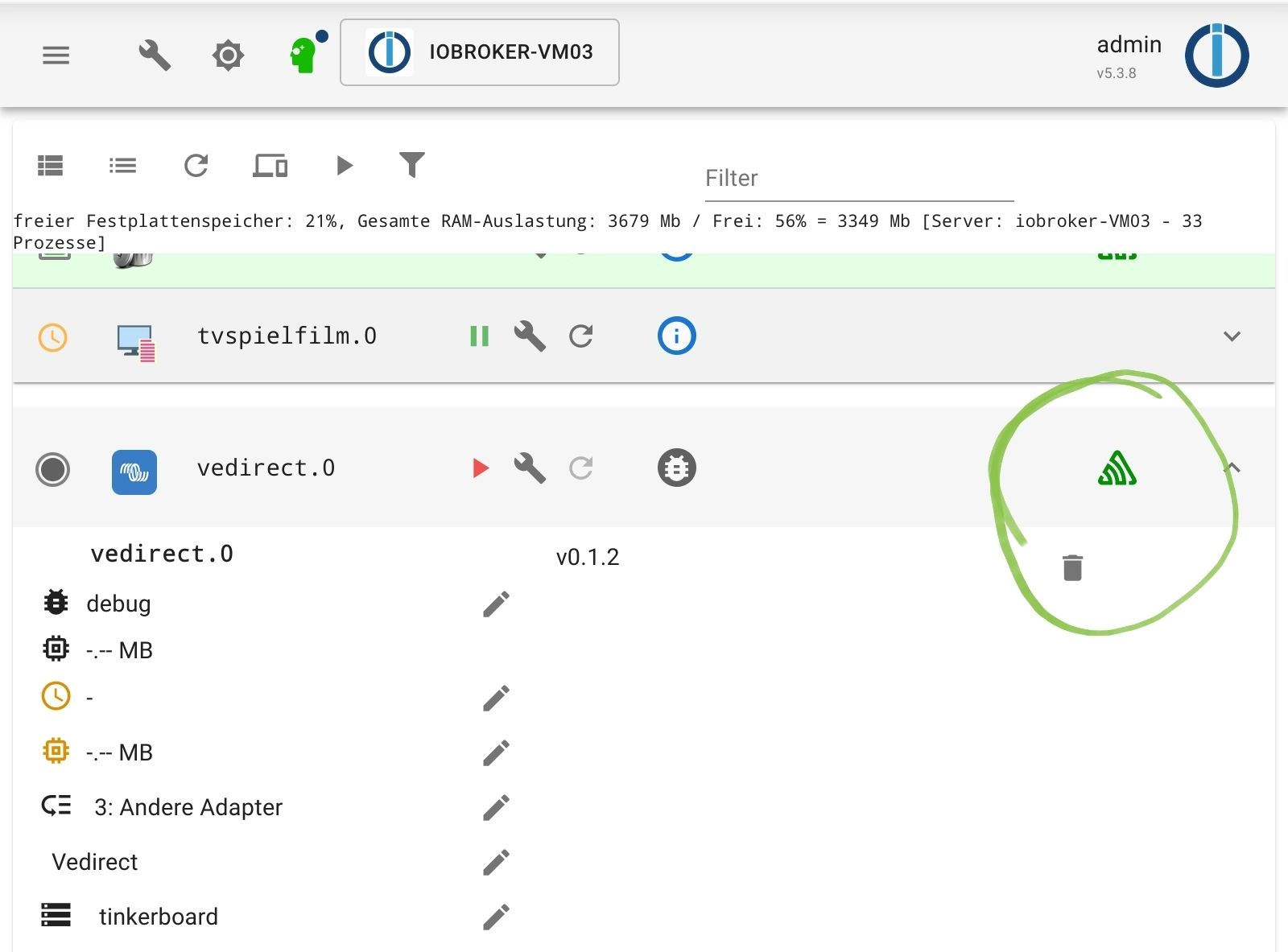
Das grüne "Sentry" Symbol ist da. Habe im Expertenmodus über Github installiert. Habe jetzt nicht beobachtet, ob das ohne Github auch da war.
Nebenbei: Adapter steht wieder auf "gelb". Jetzt müßte ja etwas an den Entwickler gemeldet werden? -
@homoran im Info- Modus kommen keine Meldungsketten, weder Werte noch Typenfehler. Im Debug- Modus kommen beide Meldungstypen. Pausenlos.
Das grüne "Sentry" Symbol ist da. Habe im Expertenmodus über Github installiert. Habe jetzt nicht beobachtet, ob das ohne Github auch da war.
Nebenbei: Adapter steht wieder auf "gelb". Jetzt müßte ja etwas an den Entwickler gemeldet werden?@laser sagte in vedirekt Adapter Verbindungsproblem:
Jetzt müßte ja etwas an den Entwickler gemeldet werden?
wenn nichts im Log steht wahrscheinlich nicht.
"Adapter gelb" ist nicht unbedingt eine präzise Meldung, mit der ein Entwickler ein Debugging machen könnte.
-
@laser sagte in vedirekt Adapter Verbindungsproblem:
Jetzt müßte ja etwas an den Entwickler gemeldet werden?
wenn nichts im Log steht wahrscheinlich nicht.
"Adapter gelb" ist nicht unbedingt eine präzise Meldung, mit der ein Entwickler ein Debugging machen könnte.
-
@homoran
Mehr als Gelb sehe ich nicht. Wenn es ein Linux -Problem mit USB ist- im Syslog oder in anderen Log's finde ich nichts, was zu den den Ausfallzeiten passiert. -
@homoran Das ist ja das Irre! Es gibt bei mir kein by-id mehr. Ich habe auf den Raspi 400 gewechstelt, weil es nichts Anderes gab. Ob der ein Problem hat? Ich meine aber, vor Update (??) ging es mit by-id. Bei beiden angeschlossenen USB- Geräten. Der Modbus- Adapter hängt an einem 5m Kabel, ohne erkennbare Probleme. Ist aber auch nur stundeweise aktiv.
-
@homoran im Info- Modus kommen keine Meldungsketten, weder Werte noch Typenfehler. Im Debug- Modus kommen beide Meldungstypen. Pausenlos.
Das grüne "Sentry" Symbol ist da. Habe im Expertenmodus über Github installiert. Habe jetzt nicht beobachtet, ob das ohne Github auch da war.
Nebenbei: Adapter steht wieder auf "gelb". Jetzt müßte ja etwas an den Entwickler gemeldet werden?@laser sagte in vedirekt Adapter Verbindungsproblem:
@homoran im Info- Modus kommen keine Meldungsketten, weder Werte noch Typenfehler. Im Debug- Modus kommen beide Meldungstypen. Pausenlos
auch das ist seltsam
Die Typmeldungen sind Info!
@laser sagte in vedirekt Adapter Verbindungsproblem:
2023-05-04 12:58:37.673 info State value to set for "vedirect.0.LOAD" has to be type "boolean" but received type
bei den Werten passt es, das schrieb ich ja bereits mehrfach@homoran sagte in vedirekt Adapter Verbindungsproblem:
das was du da zeigst, ist das "ankommen" von neuen Werten.
Jeweils mit Bezeichnung des zugehörigen Datenpunktes.
diese Informationen kommen auch nur im debug-Modus -
@homoran Das ist ja das Irre! Es gibt bei mir kein by-id mehr. Ich habe auf den Raspi 400 gewechstelt, weil es nichts Anderes gab. Ob der ein Problem hat? Ich meine aber, vor Update (??) ging es mit by-id. Bei beiden angeschlossenen USB- Geräten. Der Modbus- Adapter hängt an einem 5m Kabel, ohne erkennbare Probleme. Ist aber auch nur stundeweise aktiv.
@laser sagte in vedirekt Adapter Verbindungsproblem:
Es gibt bei mir kein by-id mehr.
ist jetzt nicht wahr!
dann hätten wir uns alles sparen können!
@homoran sagte in vedirekt Adapter Verbindungsproblem:
@laser sagte in vedirekt Adapter Verbindungsproblem:
eigenartigerweise finde ich die Adapter seit einiger Zeit (?) nicht mehr über "by-id"
pssst das?
https://forum.iobroker.net/topic/65017/warnung-vor-linux-update-udev-stable-247-3-7-deb11u2/66 -
@laser sagte in vedirekt Adapter Verbindungsproblem:
@homoran im Info- Modus kommen keine Meldungsketten, weder Werte noch Typenfehler. Im Debug- Modus kommen beide Meldungstypen. Pausenlos
auch das ist seltsam
Die Typmeldungen sind Info!
@laser sagte in vedirekt Adapter Verbindungsproblem:
2023-05-04 12:58:37.673 info State value to set for "vedirect.0.LOAD" has to be type "boolean" but received type
bei den Werten passt es, das schrieb ich ja bereits mehrfach@homoran sagte in vedirekt Adapter Verbindungsproblem:
das was du da zeigst, ist das "ankommen" von neuen Werten.
Jeweils mit Bezeichnung des zugehörigen Datenpunktes.
diese Informationen kommen auch nur im debug-Modus -
@homoran Ich beschwere mich ja nicht über die Typmeldungen. Ich hätte erwartet, daß, wenn der Adapter gestoppt ist, keine Meldungen mehr kommen.
Den o.g. Beitrag habe ich mir schon angesehen. Aber das Fachchinesisch darin nicht verstanden!
@laser sagte in vedirekt Adapter Verbindungsproblem:
Ich hätte erwartet, daß, wenn der Adapter gestoppt ist, keine Meldungen mehr kommen.
ich auch!
Jetzt suche ich schon sooo lange nach der Ursache, nachher ist es gar nicht der Adapter sondern deine Installation!
was sagt
iob diag? -
@homoran Ein Haufen Informationen. Was da nun die Lösung für mich sein soll- keine Ahnung. Der USB Port ist ja bei mir nicht tot. Es funktioniert ja, wenn ich den Port mit "by-path" angebe,
/dev/serial/by-path/platform-fd500000.pcie-pci-0000:01:00.0-usb-0:1.1:1.0-port0
wird eine Verbindung aufgebaut. Für lange Zeit. Irgendwann der Abbruch.nicht dauernd in alten Beiträgen etwas hinzufügen!
@laser sagte in vedirekt Adapter Verbindungsproblem:
Den o.g. Beitrag habe ich mir schon angesehen. Aber das Fachchinesisch darin nicht verstanden!
nein, du meintest, das würde auf dich nicht zutreffen
@laser sagte in vedirekt Adapter Verbindungsproblem:Der USB Port ist ja bei mir nicht tot. Es funktioniert ja,
ein aktuelles update in linux hat einen bug
-
nicht dauernd in alten Beiträgen etwas hinzufügen!
@laser sagte in vedirekt Adapter Verbindungsproblem:
Den o.g. Beitrag habe ich mir schon angesehen. Aber das Fachchinesisch darin nicht verstanden!
nein, du meintest, das würde auf dich nicht zutreffen
@laser sagte in vedirekt Adapter Verbindungsproblem:Der USB Port ist ja bei mir nicht tot. Es funktioniert ja,
ein aktuelles update in linux hat einen bug
@homoran USB funktioniert nur zeitweise nicht? Ich habe ja über einige Zeit Werte, die ich auch logge. Bisher habe ich mir damit geholfen, den Adapter jede Stunde neu zu starten. Ist keine Dauerlösung.
Reicht die "summary"? Den Rest kann ich nicht mehr kopieren.======================= SUMMARY ======================= v.2023-04-16 Operatingsystem: Debian GNU/Linux 11 (bullseye) Kernel: 6.1.21-v8+ Installation: Native Timezone: Europe/Berlin (CEST, +0200) User-ID: 1000 X-Server: false Boot Target: multi-user.target Pending OS-Updates: 0 Pending iob updates: 0 Nodejs-Installation: /usr/bin/nodejs v18.16.0 /usr/bin/node v18.16.0 /usr/bin/npm 9.5.1 /usr/bin/npx 9.5.1 Recommended versions are nodejs 18.x.y and npm 9.x.y Your nodejs installation is correct MEMORY: total used free shared buff/cache available Mem: 3.8G 1.7G 1.1G 1.0M 919M 2.0G Swap: 99M 0B 99M Total: 3.9G 1.7G 1.2G Active iob-Instances: 23 Active repo(s): stable ioBroker Core: js-controller 4.0.24 admin 6.3.5 ioBroker Status: iobroker is running on this host. Objects type: jsonl States type: jsonl Status admin and web instance: + system.adapter.admin.1 : admin : raspberrypiIO64 - enabled, port: 8081, bind: 0.0.0.0, run as: admin + system.adapter.web.0 : web : raspberrypiIO64 - enabled, port: 8082, bind: 0.0.0.0, run as: admin Objects: 5675 States: 5142 Size of iob-Database: 33M /opt/iobroker/iobroker-data/objects.jsonl 5.2M /opt/iobroker/iobroker-data/states.jsonl =================== END OF SUMMARY ==================== -
@homoran USB funktioniert nur zeitweise nicht? Ich habe ja über einige Zeit Werte, die ich auch logge. Bisher habe ich mir damit geholfen, den Adapter jede Stunde neu zu starten. Ist keine Dauerlösung.
Reicht die "summary"? Den Rest kann ich nicht mehr kopieren.======================= SUMMARY ======================= v.2023-04-16 Operatingsystem: Debian GNU/Linux 11 (bullseye) Kernel: 6.1.21-v8+ Installation: Native Timezone: Europe/Berlin (CEST, +0200) User-ID: 1000 X-Server: false Boot Target: multi-user.target Pending OS-Updates: 0 Pending iob updates: 0 Nodejs-Installation: /usr/bin/nodejs v18.16.0 /usr/bin/node v18.16.0 /usr/bin/npm 9.5.1 /usr/bin/npx 9.5.1 Recommended versions are nodejs 18.x.y and npm 9.x.y Your nodejs installation is correct MEMORY: total used free shared buff/cache available Mem: 3.8G 1.7G 1.1G 1.0M 919M 2.0G Swap: 99M 0B 99M Total: 3.9G 1.7G 1.2G Active iob-Instances: 23 Active repo(s): stable ioBroker Core: js-controller 4.0.24 admin 6.3.5 ioBroker Status: iobroker is running on this host. Objects type: jsonl States type: jsonl Status admin and web instance: + system.adapter.admin.1 : admin : raspberrypiIO64 - enabled, port: 8081, bind: 0.0.0.0, run as: admin + system.adapter.web.0 : web : raspberrypiIO64 - enabled, port: 8082, bind: 0.0.0.0, run as: admin Objects: 5675 States: 5142 Size of iob-Database: 33M /opt/iobroker/iobroker-data/objects.jsonl 5.2M /opt/iobroker/iobroker-data/states.jsonl =================== END OF SUMMARY ==================== -
@laser sagte in vedirekt Adapter Verbindungsproblem:
Den Rest kann ich nicht mehr kopieren.
dann starte diag nochmal
@homoran mal sehen, ob das was wird...
======== Start marking the full check here =========
Skript v.2023-04-16 *** BASE SYSTEM *** Model : Raspberry Pi 400 Rev 1.1 Architecture : aarch64 Docker : false Virtualization : none Distributor ID: Debian Description: Debian GNU/Linux 11 (bullseye) Release: 11 Codename: bullseye PRETTY_NAME="Debian GNU/Linux 11 (bullseye)" NAME="Debian GNU/Linux" VERSION_ID="11" VERSION="11 (bullseye)" VERSION_CODENAME=bullseye ID=debian HOME_URL="https://www.debian.org/" SUPPORT_URL="https://www.debian.org/support" BUG_REPORT_URL="https://bugs.debian.org/" Systemuptime and Load: 18:20:10 up 1:31, 1 user, load average: 0.58, 0.85, 0.84 CPU threads: 4 Raspberry only: throttled=0x0 Other values than 0x0 hint to temperature/voltage problems temp=40.4'C volt=0.9360V *** Time and Time Zones *** Local time: Thu 2023-05-04 18:20:10 CEST Universal time: Thu 2023-05-04 16:20:10 UTC RTC time: n/a Time zone: Europe/Berlin (CEST, +0200) System clock synchronized: yes NTP service: active RTC in local TZ: no *** User and Groups *** otto /home/otto otto adm dialout cdrom sudo audio video plugdev games users input render netdev gpio i2c spi iobroker *** X-Server-Setup *** X-Server: false Desktop: Terminal: tty Boot Target: multi-user.target *** MEMORY *** total used free shared buff/cache available Mem: 3.8G 1.8G 1.1G 1.0M 921M 1.9G Swap: 99M 0B 99M Total: 3.9G 1.8G 1.2G 3793 M total memory 1787 M used memory 2042 M active memory 518 M inactive memory 1083 M free memory 87 M buffer memory 834 M swap cache 99 M total swap 0 M used swap 99 M free swap Raspberry only: oom events: 0 lifetime oom required: 0 Mbytes total time in oom handler: 0 ms max time spent in oom handler: 0 ms *** FILESYSTEM *** Filesystem Type Size Used Avail Use% Mounted on /dev/root ext4 110G 5.2G 101G 5% / devtmpfs devtmpfs 1.7G 0 1.7G 0% /dev tmpfs tmpfs 1.9G 0 1.9G 0% /dev/shm tmpfs tmpfs 759M 1.1M 758M 1% /run tmpfs tmpfs 5.0M 0 5.0M 0% /run/lock /dev/sda1 vfat 255M 31M 225M 13% /boot tmpfs tmpfs 380M 0 380M 0% /run/user/1000 Messages concerning ext4 filesystem in dmesg: [Thu May 4 16:48:24 2023] Kernel command line: coherent_pool=1M 8250.nr_uarts=0 snd_bcm2835.enable_headphones=0 snd_bcm2835.enable_hdmi=1 smsc95xx.macaddr=D8:3A:DD:0F:ED:4A vc_mem.mem_base=0x3eb00000 vc_mem.mem_size=0x3ff00000 console=ttyS0,115200 console=tty1 root=PARTUUID=34877f34-02 rootfstype=ext4 fsck.repair=yes rootwait [Thu May 4 16:48:27 2023] EXT4-fs (sda2): INFO: recovery required on readonly filesystem [Thu May 4 16:48:27 2023] EXT4-fs (sda2): write access will be enabled during recovery [Thu May 4 16:48:28 2023] EXT4-fs (sda2): orphan cleanup on readonly fs [Thu May 4 16:48:28 2023] EXT4-fs (sda2): 1 orphan inode deleted [Thu May 4 16:48:28 2023] EXT4-fs (sda2): recovery complete [Thu May 4 16:48:28 2023] EXT4-fs (sda2): mounted filesystem with ordered data mode. Quota mode: none. [Thu May 4 16:48:28 2023] VFS: Mounted root (ext4 filesystem) readonly on device 8:2. [Thu May 4 16:48:30 2023] EXT4-fs (sda2): re-mounted. Quota mode: none. Show mounted filesystems (real ones only): TARGET SOURCE FSTYPE OPTIONS / /dev/sda2 ext4 rw,noatime `-/boot /dev/sda1 vfat rw,relatime,fmask=0022,dmask=0022,codepage=437,iocharset=ascii,shortname=mixed,errors=remount-ro Files in neuralgic directories: /var: 1.1G /var/ 405M /var/log 360M /var/cache 355M /var/cache/apt 345M /var/log/journal/007bdc1de22f4392961e44836db9bdcf Archived and active journals take up 344.0M in the file system. /opt/iobroker/backups: 4.0K /opt/iobroker/backups/ /opt/iobroker/iobroker-data: 1.1G /opt/iobroker/iobroker-data/ 796M /opt/iobroker/iobroker-data/history 147M /opt/iobroker/iobroker-data/files 68M /opt/iobroker/iobroker-data/backup-objects 51M /opt/iobroker/iobroker-data/files/javascript.admin The five largest files in iobroker-data are: 33M /opt/iobroker/iobroker-data/objects.jsonl 9.1M /opt/iobroker/iobroker-data/files/echarts.admin/static/js/2.bbf74d5f.chunk.js.map 8.9M /opt/iobroker/iobroker-data/files/echarts/static/js/2.3d2d025f.chunk.js.map 8.9M /opt/iobroker/iobroker-data/files/echarts.admin/chart/static/js/2.3d2d025f.chunk.js.map 6.9M /opt/iobroker/iobroker-data/files/javascript.admin/static/js/610.de0231c9.chunk.js.map *** NodeJS-Installation *** /usr/bin/nodejs v18.16.0 /usr/bin/node v18.16.0 /usr/bin/npm 9.5.1 /usr/bin/npx 9.5.1 nodejs: Installed: 18.16.0-deb-1nodesource1 Candidate: 18.16.0-deb-1nodesource1 Version table: *** 18.16.0-deb-1nodesource1 500 500 https://deb.nodesource.com/node_18.x bullseye/main arm64 Packages 100 /var/lib/dpkg/status 12.22.12~dfsg-1~deb11u4 500 500 http://security.debian.org/debian-security bullseye-security/main arm64 Packages 12.22.12~dfsg-1~deb11u3 500 500 http://deb.debian.org/debian bullseye/main arm64 Packages Temp directories causing npm8 problem: 0 No problems detected *** ioBroker-Installation *** ioBroker Status iobroker is running on this host. Objects type: jsonl States type: jsonl MULTIHOSTSERVICE/enabled: false Core adapters versions js-controller: 4.0.24 admin: 6.3.5 javascript: 6.1.4 Adapters from github: 3 Adapter State + system.adapter.admin.1 : admin : raspberrypiIO64 - enabled, port: 8081, bind: 0.0.0.0, run as: admin system.adapter.alias-manager.0 : alias-manager : raspberrypiIO64 - disabled + system.adapter.backitup.0 : backitup : raspberrypiIO64 - enabled + system.adapter.discovery.0 : discovery : raspberrypiIO64 - enabled + system.adapter.echarts.0 : echarts : raspberrypiIO64 - enabled system.adapter.flot.0 : flot : raspberrypiIO64 - disabled + system.adapter.history.0 : history : raspberrypiIO64 - enabled + system.adapter.hm-rega.0 : hm-rega : raspberrypiIO64 - enabled + system.adapter.hm-rpc.0 : hm-rpc : raspberrypiIO64 - enabled, port: 0 + system.adapter.hm-rpc.1 : hm-rpc : raspberrypiIO64 - enabled, port: 0 + system.adapter.influxdb.0 : influxdb : raspberrypiIO64 - enabled, port: 8086 + system.adapter.info.0 : info : raspberrypiIO64 - enabled + system.adapter.javascript.0 : javascript : raspberrypiIO64 - enabled + system.adapter.modbus.0 : modbus : raspberrypiIO64 - enabled + system.adapter.mqtt.0 : mqtt : raspberrypiIO64 - enabled, port: 1883, bind: 0.0.0.0 + system.adapter.net-tools.0 : net-tools : raspberrypiIO64 - enabled + system.adapter.opendtu.0 : opendtu : raspberrypiIO64 - enabled + system.adapter.owfs.0 : owfs : raspberrypiIO64 - enabled, port: 4304 + system.adapter.rpi2.0 : rpi2 : raspberrypiIO64 - enabled + system.adapter.shelly.1 : shelly : raspberrypiIO64 - enabled, port: 1882, bind: 0.0.0.0 + system.adapter.simple-api.0 : simple-api : raspberrypiIO64 - enabled, port: 8087, bind: 0.0.0.0, run as: admin + system.adapter.sourceanalytix.0 : sourceanalytix : raspberrypiIO64 - enabled + system.adapter.vedirect.0 : vedirect : raspberrypiIO64 - enabled system.adapter.vis-bars.0 : vis-bars : raspberrypiIO64 - enabled system.adapter.vis-hqwidgets.0 : vis-hqwidgets : raspberrypiIO64 - enabled system.adapter.vis.0 : vis : raspberrypiIO64 - enabled + system.adapter.web.0 : web : raspberrypiIO64 - enabled, port: 8082, bind: 0.0.0.0, run as: admin system.adapter.zigbee.0 : zigbee : raspberrypiIO64 - disabled, port: /dev/ttyACM0 + instance is alive Enabled adapters with bindings + system.adapter.admin.1 : admin : raspberrypiIO64 - enabled, port: 8081, bind: 0.0.0.0, run as: admin + system.adapter.hm-rpc.0 : hm-rpc : raspberrypiIO64 - enabled, port: 0 + system.adapter.hm-rpc.1 : hm-rpc : raspberrypiIO64 - enabled, port: 0 + system.adapter.influxdb.0 : influxdb : raspberrypiIO64 - enabled, port: 8086 + system.adapter.mqtt.0 : mqtt : raspberrypiIO64 - enabled, port: 1883, bind: 0.0.0.0 + system.adapter.owfs.0 : owfs : raspberrypiIO64 - enabled, port: 4304 + system.adapter.shelly.1 : shelly : raspberrypiIO64 - enabled, port: 1882, bind: 0.0.0.0 + system.adapter.simple-api.0 : simple-api : raspberrypiIO64 - enabled, port: 8087, bind: 0.0.0.0, run as: admin + system.adapter.web.0 : web : raspberrypiIO64 - enabled, port: 8082, bind: 0.0.0.0, run as: admin ioBroker-Repositories stable : http://download.iobroker.net/sources-dist.json beta : http://download.iobroker.net/sources-dist-latest.json Active repo(s): stable Installed ioBroker-Instances Used repository: stable Adapter "admin" : 6.3.5 , installed 6.3.5 Adapter "alias-manager": 1.2.4 , installed 1.2.4 Adapter "backitup" : 2.6.19 , installed 2.6.19 Adapter "discovery" : 3.1.0 , installed 3.1.0 Adapter "echarts" : 1.0.12 , installed 1.0.12 Adapter "flot" : 1.11.0 , installed 1.11.0 Adapter "history" : 2.2.4 , installed 2.2.4 Adapter "hm-rega" : 3.0.46 , installed 3.0.46 Adapter "hm-rpc" : 1.15.16 , installed 1.15.16 Adapter "influxdb" : 3.2.0 , installed 3.2.0 Adapter "info" : 1.9.26 , installed 1.9.26 Adapter "javascript" : 6.1.4 , installed 6.1.4 Controller "js-controller": 4.0.24 , installed 4.0.24 Adapter "modbus" : 5.0.11 , installed 5.0.11 Adapter "mqtt" : 4.0.7 , installed 4.0.7 Adapter "net-tools" : 0.2.0 , installed 0.2.0 Adapter "owfs" : 0.7.0 , installed 0.7.0 Adapter "rpi2" : 1.3.2 , installed 1.3.2 Adapter "shelly" : 6.3.1 , installed 6.3.1 Adapter "simple-api" : 2.7.2 , installed 2.7.2 Adapter "socketio" : 4.2.0 , installed 4.2.0 Adapter "vis" : 1.4.16 , installed 1.4.16 Adapter "vis-bars" : 0.1.4 , installed 0.1.4 Adapter "vis-hqwidgets": 1.3.0 , installed 1.3.0 Adapter "web" : 4.3.0 , installed 4.3.0 Adapter "ws" : 1.3.0 , installed 1.3.0 Adapter "zigbee" : 1.8.10 , installed 1.8.10 Objects and States Please stand by - This may take a while Objects: 5675 States: 5142 *** OS-Repositories and Updates *** W: GPG error: https://repos.influxdata.com/debian bullseye InRelease: The following signatures couldn't be verified because the public key is not available: NO_PUBKEY D8FF8E1F7DF8B07E E: The repository 'https://repos.influxdata.com/debian bullseye InRelease' is not signed. Pending Updates: 0 *** Listening Ports *** Active Internet connections (only servers) Proto Recv-Q Send-Q Local Address Foreign Address State User Inode PID/Program name tcp 0 0 0.0.0.0:1883 0.0.0.0:* LISTEN 1001 16707 1298/io.mqtt.0 tcp 0 0 0.0.0.0:9001 0.0.0.0:* LISTEN 1001 12139 868/iobroker.js-con tcp 0 0 0.0.0.0:9000 0.0.0.0:* LISTEN 1001 13121 868/iobroker.js-con tcp 0 0 192.168.2.54:2001 0.0.0.0:* LISTEN 1001 15732 1240/io.hm-rpc.1 tcp 0 0 192.168.2.54:2010 0.0.0.0:* LISTEN 1001 17534 1226/io.hm-rpc.0 tcp 0 0 0.0.0.0:22 0.0.0.0:* LISTEN 0 12972 578/sshd: /usr/sbin tcp6 0 0 :::8082 :::* LISTEN 1001 19169 2135/io.web.0 tcp6 0 0 :::8081 :::* LISTEN 1001 15537 1092/io.admin.1 tcp6 0 0 :::8087 :::* LISTEN 1001 18684 1675/io.simple-api. tcp6 0 0 :::8086 :::* LISTEN 999 12104 709/influxd tcp6 0 0 :::3000 :::* LISTEN 111 13154 867/grafana tcp6 0 0 :::22 :::* LISTEN 0 12974 578/sshd: /usr/sbin udp 0 0 0.0.0.0:49615 0.0.0.0:* 108 14575 413/avahi-daemon: r udp 0 0 0.0.0.0:5353 0.0.0.0:* 108 14573 413/avahi-daemon: r udp 0 0 0.0.0.0:5683 0.0.0.0:* 1001 16844 1531/io.shelly.1 udp 0 0 0.0.0.0:68 0.0.0.0:* 0 14051 706/dhcpcd udp6 0 0 :::546 :::* 0 12997 706/dhcpcd udp6 0 0 :::40016 :::* 108 14576 413/avahi-daemon: r udp6 0 0 :::5353 :::* 108 14574 413/avahi-daemon: r *** Log File - Last 25 Lines *** 2023-05-04 18:20:50.571 - warn: shelly.1 (1531) [authEnabled] 192.168.2.6 (shellyswitch25 / shellyswitch25-68C63AFA870D / SHSW-25#68C63AFA870D#1): This device is not protected via restricted login (see adapter documentation for details) 2023-05-04 18:20:50.659 - warn: shelly.1 (1531) [authEnabled] 192.168.2.5 (shellyswitch25 / shellyswitch25-68C63AFA51AA / SHSW-25#68C63AFA51AA#1): This device is not protected via restricted login (see adapter documentation for details) 2023-05-04 18:20:50.844 - warn: shelly.1 (1531) [authEnabled] 192.168.2.12 (shellyswitch25 / shellyswitch25-3C6105E462D5 / SHSW-25#3C6105E462D5#1): This device is not protected via restricted login (see adapter documentation for details) 2023-05-04 18:20:52.045 - warn: shelly.1 (1531) [authEnabled] 192.168.2.52 (shellyem3 / shellyem3-485519D7986A / SHEM-3#485519D7986A#1): This device is not protected via restricted login (see adapter documentation for details) 2023-05-04 18:20:55.665 - warn: shelly.1 (1531) [authEnabled] 192.168.2.56 (shellyem / shellyem-244CAB419A03 / SHEM#244CAB419A03#1): This device is not protected via restricted login (see adapter documentation for details) 2023-05-04 18:20:55.751 - warn: shelly.1 (1531) [authEnabled] 192.168.2.9 (shellyswitch25 / shellyswitch25-3C6105E3A7AF / SHSW-25#3C6105E3A7AF#1): This device is not protected via restricted login (see adapter documentation for details) 2023-05-04 18:20:55.991 - warn: shelly.1 (1531) [authEnabled] 192.168.2.5 (shellyswitch25 / shellyswitch25-68C63AFA51AA / SHSW-25#68C63AFA51AA#1): This device is not protected via restricted login (see adapter documentation for details) 2023-05-04 18:20:55.997 - warn: shelly.1 (1531) [authEnabled] 192.168.2.6 (shellyswitch25 / shellyswitch25-68C63AFA870D / SHSW-25#68C63AFA870D#1): This device is not protected via restricted login (see adapter documentation for details) 2023-05-04 18:20:56.216 - warn: shelly.1 (1531) [authEnabled] 192.168.2.12 (shellyswitch25 / shellyswitch25-3C6105E462D5 / SHSW-25#3C6105E462D5#1): This device is not protected via restricted login (see adapter documentation for details) 2023-05-04 18:20:57.313 - warn: shelly.1 (1531) [authEnabled] 192.168.2.52 (shellyem3 / shellyem3-485519D7986A / SHEM-3#485519D7986A#1): This device is not protected via restricted login (see adapter documentation for details) 2023-05-04 18:21:00.811 - warn: shelly.1 (1531) [authEnabled] 192.168.2.56 (shellyem / shellyem-244CAB419A03 / SHEM#244CAB419A03#1): This device is not protected via restricted login (see adapter documentation for details) 2023-05-04 18:21:01.092 - warn: shelly.1 (1531) [authEnabled] 192.168.2.9 (shellyswitch25 / shellyswitch25-3C6105E3A7AF / SHSW-25#3C6105E3A7AF#1): This device is not protected via restricted login (see adapter documentation for details) 2023-05-04 18:21:01.411 - warn: shelly.1 (1531) [authEnabled] 192.168.2.5 (shellyswitch25 / shellyswitch25-68C63AFA51AA / SHSW-25#68C63AFA51AA#1): This device is not protected via restricted login (see adapter documentation for details) 2023-05-04 18:21:01.464 - warn: shelly.1 (1531) [authEnabled] 192.168.2.6 (shellyswitch25 / shellyswitch25-68C63AFA870D / SHSW-25#68C63AFA870D#1): This device is not protected via restricted login (see adapter documentation for details) 2023-05-04 18:21:01.536 - warn: shelly.1 (1531) [authEnabled] 192.168.2.12 (shellyswitch25 / shellyswitch25-3C6105E462D5 / SHSW-25#3C6105E462D5#1): This device is not protected via restricted login (see adapter documentation for details) 2023-05-04 18:21:02.591 - warn: shelly.1 (1531) [authEnabled] 192.168.2.52 (shellyem3 / shellyem3-485519D7986A / SHEM-3#485519D7986A#1): This device is not protected via restricted login (see adapter documentation for details) 2023-05-04 18:21:03.445 - info: javascript.0 (1172) script.js.Heizung.GPIO-IOTag: IstTag: true 2023-05-04 18:21:03.445 - info: javascript.0 (1172) script.js.Heizung.GPIO-IOTag: istNacht: false 2023-05-04 18:21:03.446 - info: javascript.0 (1172) script.js.Heizung.GPIO-IOTag: DPNacht IO: true 2023-05-04 18:21:03.446 - info: javascript.0 (1172) script.js.Heizung.GPIO-IOTag: change GP23 2023-05-04 18:21:05.914 - warn: shelly.1 (1531) [authEnabled] 192.168.2.56 (shellyem / shellyem-244CAB419A03 / SHEM#244CAB419A03#1): This device is not protected via restricted login (see adapter documentation for details) 2023-05-04 18:21:06.275 - warn: shelly.1 (1531) [authEnabled] 192.168.2.9 (shellyswitch25 / shellyswitch25-3C6105E3A7AF / SHSW-25#3C6105E3A7AF#1): This device is not protected via restricted login (see adapter documentation for details) 2023-05-04 18:21:06.743 - warn: shelly.1 (1531) [authEnabled] 192.168.2.5 (shellyswitch25 / shellyswitch25-68C63AFA51AA / SHSW-25#68C63AFA51AA#1): This device is not protected via restricted login (see adapter documentation for details) 2023-05-04 18:21:06.779 - warn: shelly.1 (1531) [authEnabled] 192.168.2.6 (shellyswitch25 / shellyswitch25-68C63AFA870D / SHSW-25#68C63AFA870D#1): This device is not protected via restricted login (see adapter documentation for details) 2023-05-04 18:21:07.971 - warn: shelly.1 (1531) [authEnabled] 192.168.2.52 (shellyem3 / shellyem3-485519D7986A / SHEM-3#485519D7986A#1): This device is not protected via restricted login (see adapter documentation for details) ============ Mark until here for C&P ============= iob diag has finished. -
@homoran mal sehen, ob das was wird...
======== Start marking the full check here =========
Skript v.2023-04-16 *** BASE SYSTEM *** Model : Raspberry Pi 400 Rev 1.1 Architecture : aarch64 Docker : false Virtualization : none Distributor ID: Debian Description: Debian GNU/Linux 11 (bullseye) Release: 11 Codename: bullseye PRETTY_NAME="Debian GNU/Linux 11 (bullseye)" NAME="Debian GNU/Linux" VERSION_ID="11" VERSION="11 (bullseye)" VERSION_CODENAME=bullseye ID=debian HOME_URL="https://www.debian.org/" SUPPORT_URL="https://www.debian.org/support" BUG_REPORT_URL="https://bugs.debian.org/" Systemuptime and Load: 18:20:10 up 1:31, 1 user, load average: 0.58, 0.85, 0.84 CPU threads: 4 Raspberry only: throttled=0x0 Other values than 0x0 hint to temperature/voltage problems temp=40.4'C volt=0.9360V *** Time and Time Zones *** Local time: Thu 2023-05-04 18:20:10 CEST Universal time: Thu 2023-05-04 16:20:10 UTC RTC time: n/a Time zone: Europe/Berlin (CEST, +0200) System clock synchronized: yes NTP service: active RTC in local TZ: no *** User and Groups *** otto /home/otto otto adm dialout cdrom sudo audio video plugdev games users input render netdev gpio i2c spi iobroker *** X-Server-Setup *** X-Server: false Desktop: Terminal: tty Boot Target: multi-user.target *** MEMORY *** total used free shared buff/cache available Mem: 3.8G 1.8G 1.1G 1.0M 921M 1.9G Swap: 99M 0B 99M Total: 3.9G 1.8G 1.2G 3793 M total memory 1787 M used memory 2042 M active memory 518 M inactive memory 1083 M free memory 87 M buffer memory 834 M swap cache 99 M total swap 0 M used swap 99 M free swap Raspberry only: oom events: 0 lifetime oom required: 0 Mbytes total time in oom handler: 0 ms max time spent in oom handler: 0 ms *** FILESYSTEM *** Filesystem Type Size Used Avail Use% Mounted on /dev/root ext4 110G 5.2G 101G 5% / devtmpfs devtmpfs 1.7G 0 1.7G 0% /dev tmpfs tmpfs 1.9G 0 1.9G 0% /dev/shm tmpfs tmpfs 759M 1.1M 758M 1% /run tmpfs tmpfs 5.0M 0 5.0M 0% /run/lock /dev/sda1 vfat 255M 31M 225M 13% /boot tmpfs tmpfs 380M 0 380M 0% /run/user/1000 Messages concerning ext4 filesystem in dmesg: [Thu May 4 16:48:24 2023] Kernel command line: coherent_pool=1M 8250.nr_uarts=0 snd_bcm2835.enable_headphones=0 snd_bcm2835.enable_hdmi=1 smsc95xx.macaddr=D8:3A:DD:0F:ED:4A vc_mem.mem_base=0x3eb00000 vc_mem.mem_size=0x3ff00000 console=ttyS0,115200 console=tty1 root=PARTUUID=34877f34-02 rootfstype=ext4 fsck.repair=yes rootwait [Thu May 4 16:48:27 2023] EXT4-fs (sda2): INFO: recovery required on readonly filesystem [Thu May 4 16:48:27 2023] EXT4-fs (sda2): write access will be enabled during recovery [Thu May 4 16:48:28 2023] EXT4-fs (sda2): orphan cleanup on readonly fs [Thu May 4 16:48:28 2023] EXT4-fs (sda2): 1 orphan inode deleted [Thu May 4 16:48:28 2023] EXT4-fs (sda2): recovery complete [Thu May 4 16:48:28 2023] EXT4-fs (sda2): mounted filesystem with ordered data mode. Quota mode: none. [Thu May 4 16:48:28 2023] VFS: Mounted root (ext4 filesystem) readonly on device 8:2. [Thu May 4 16:48:30 2023] EXT4-fs (sda2): re-mounted. Quota mode: none. Show mounted filesystems (real ones only): TARGET SOURCE FSTYPE OPTIONS / /dev/sda2 ext4 rw,noatime `-/boot /dev/sda1 vfat rw,relatime,fmask=0022,dmask=0022,codepage=437,iocharset=ascii,shortname=mixed,errors=remount-ro Files in neuralgic directories: /var: 1.1G /var/ 405M /var/log 360M /var/cache 355M /var/cache/apt 345M /var/log/journal/007bdc1de22f4392961e44836db9bdcf Archived and active journals take up 344.0M in the file system. /opt/iobroker/backups: 4.0K /opt/iobroker/backups/ /opt/iobroker/iobroker-data: 1.1G /opt/iobroker/iobroker-data/ 796M /opt/iobroker/iobroker-data/history 147M /opt/iobroker/iobroker-data/files 68M /opt/iobroker/iobroker-data/backup-objects 51M /opt/iobroker/iobroker-data/files/javascript.admin The five largest files in iobroker-data are: 33M /opt/iobroker/iobroker-data/objects.jsonl 9.1M /opt/iobroker/iobroker-data/files/echarts.admin/static/js/2.bbf74d5f.chunk.js.map 8.9M /opt/iobroker/iobroker-data/files/echarts/static/js/2.3d2d025f.chunk.js.map 8.9M /opt/iobroker/iobroker-data/files/echarts.admin/chart/static/js/2.3d2d025f.chunk.js.map 6.9M /opt/iobroker/iobroker-data/files/javascript.admin/static/js/610.de0231c9.chunk.js.map *** NodeJS-Installation *** /usr/bin/nodejs v18.16.0 /usr/bin/node v18.16.0 /usr/bin/npm 9.5.1 /usr/bin/npx 9.5.1 nodejs: Installed: 18.16.0-deb-1nodesource1 Candidate: 18.16.0-deb-1nodesource1 Version table: *** 18.16.0-deb-1nodesource1 500 500 https://deb.nodesource.com/node_18.x bullseye/main arm64 Packages 100 /var/lib/dpkg/status 12.22.12~dfsg-1~deb11u4 500 500 http://security.debian.org/debian-security bullseye-security/main arm64 Packages 12.22.12~dfsg-1~deb11u3 500 500 http://deb.debian.org/debian bullseye/main arm64 Packages Temp directories causing npm8 problem: 0 No problems detected *** ioBroker-Installation *** ioBroker Status iobroker is running on this host. Objects type: jsonl States type: jsonl MULTIHOSTSERVICE/enabled: false Core adapters versions js-controller: 4.0.24 admin: 6.3.5 javascript: 6.1.4 Adapters from github: 3 Adapter State + system.adapter.admin.1 : admin : raspberrypiIO64 - enabled, port: 8081, bind: 0.0.0.0, run as: admin system.adapter.alias-manager.0 : alias-manager : raspberrypiIO64 - disabled + system.adapter.backitup.0 : backitup : raspberrypiIO64 - enabled + system.adapter.discovery.0 : discovery : raspberrypiIO64 - enabled + system.adapter.echarts.0 : echarts : raspberrypiIO64 - enabled system.adapter.flot.0 : flot : raspberrypiIO64 - disabled + system.adapter.history.0 : history : raspberrypiIO64 - enabled + system.adapter.hm-rega.0 : hm-rega : raspberrypiIO64 - enabled + system.adapter.hm-rpc.0 : hm-rpc : raspberrypiIO64 - enabled, port: 0 + system.adapter.hm-rpc.1 : hm-rpc : raspberrypiIO64 - enabled, port: 0 + system.adapter.influxdb.0 : influxdb : raspberrypiIO64 - enabled, port: 8086 + system.adapter.info.0 : info : raspberrypiIO64 - enabled + system.adapter.javascript.0 : javascript : raspberrypiIO64 - enabled + system.adapter.modbus.0 : modbus : raspberrypiIO64 - enabled + system.adapter.mqtt.0 : mqtt : raspberrypiIO64 - enabled, port: 1883, bind: 0.0.0.0 + system.adapter.net-tools.0 : net-tools : raspberrypiIO64 - enabled + system.adapter.opendtu.0 : opendtu : raspberrypiIO64 - enabled + system.adapter.owfs.0 : owfs : raspberrypiIO64 - enabled, port: 4304 + system.adapter.rpi2.0 : rpi2 : raspberrypiIO64 - enabled + system.adapter.shelly.1 : shelly : raspberrypiIO64 - enabled, port: 1882, bind: 0.0.0.0 + system.adapter.simple-api.0 : simple-api : raspberrypiIO64 - enabled, port: 8087, bind: 0.0.0.0, run as: admin + system.adapter.sourceanalytix.0 : sourceanalytix : raspberrypiIO64 - enabled + system.adapter.vedirect.0 : vedirect : raspberrypiIO64 - enabled system.adapter.vis-bars.0 : vis-bars : raspberrypiIO64 - enabled system.adapter.vis-hqwidgets.0 : vis-hqwidgets : raspberrypiIO64 - enabled system.adapter.vis.0 : vis : raspberrypiIO64 - enabled + system.adapter.web.0 : web : raspberrypiIO64 - enabled, port: 8082, bind: 0.0.0.0, run as: admin system.adapter.zigbee.0 : zigbee : raspberrypiIO64 - disabled, port: /dev/ttyACM0 + instance is alive Enabled adapters with bindings + system.adapter.admin.1 : admin : raspberrypiIO64 - enabled, port: 8081, bind: 0.0.0.0, run as: admin + system.adapter.hm-rpc.0 : hm-rpc : raspberrypiIO64 - enabled, port: 0 + system.adapter.hm-rpc.1 : hm-rpc : raspberrypiIO64 - enabled, port: 0 + system.adapter.influxdb.0 : influxdb : raspberrypiIO64 - enabled, port: 8086 + system.adapter.mqtt.0 : mqtt : raspberrypiIO64 - enabled, port: 1883, bind: 0.0.0.0 + system.adapter.owfs.0 : owfs : raspberrypiIO64 - enabled, port: 4304 + system.adapter.shelly.1 : shelly : raspberrypiIO64 - enabled, port: 1882, bind: 0.0.0.0 + system.adapter.simple-api.0 : simple-api : raspberrypiIO64 - enabled, port: 8087, bind: 0.0.0.0, run as: admin + system.adapter.web.0 : web : raspberrypiIO64 - enabled, port: 8082, bind: 0.0.0.0, run as: admin ioBroker-Repositories stable : http://download.iobroker.net/sources-dist.json beta : http://download.iobroker.net/sources-dist-latest.json Active repo(s): stable Installed ioBroker-Instances Used repository: stable Adapter "admin" : 6.3.5 , installed 6.3.5 Adapter "alias-manager": 1.2.4 , installed 1.2.4 Adapter "backitup" : 2.6.19 , installed 2.6.19 Adapter "discovery" : 3.1.0 , installed 3.1.0 Adapter "echarts" : 1.0.12 , installed 1.0.12 Adapter "flot" : 1.11.0 , installed 1.11.0 Adapter "history" : 2.2.4 , installed 2.2.4 Adapter "hm-rega" : 3.0.46 , installed 3.0.46 Adapter "hm-rpc" : 1.15.16 , installed 1.15.16 Adapter "influxdb" : 3.2.0 , installed 3.2.0 Adapter "info" : 1.9.26 , installed 1.9.26 Adapter "javascript" : 6.1.4 , installed 6.1.4 Controller "js-controller": 4.0.24 , installed 4.0.24 Adapter "modbus" : 5.0.11 , installed 5.0.11 Adapter "mqtt" : 4.0.7 , installed 4.0.7 Adapter "net-tools" : 0.2.0 , installed 0.2.0 Adapter "owfs" : 0.7.0 , installed 0.7.0 Adapter "rpi2" : 1.3.2 , installed 1.3.2 Adapter "shelly" : 6.3.1 , installed 6.3.1 Adapter "simple-api" : 2.7.2 , installed 2.7.2 Adapter "socketio" : 4.2.0 , installed 4.2.0 Adapter "vis" : 1.4.16 , installed 1.4.16 Adapter "vis-bars" : 0.1.4 , installed 0.1.4 Adapter "vis-hqwidgets": 1.3.0 , installed 1.3.0 Adapter "web" : 4.3.0 , installed 4.3.0 Adapter "ws" : 1.3.0 , installed 1.3.0 Adapter "zigbee" : 1.8.10 , installed 1.8.10 Objects and States Please stand by - This may take a while Objects: 5675 States: 5142 *** OS-Repositories and Updates *** W: GPG error: https://repos.influxdata.com/debian bullseye InRelease: The following signatures couldn't be verified because the public key is not available: NO_PUBKEY D8FF8E1F7DF8B07E E: The repository 'https://repos.influxdata.com/debian bullseye InRelease' is not signed. Pending Updates: 0 *** Listening Ports *** Active Internet connections (only servers) Proto Recv-Q Send-Q Local Address Foreign Address State User Inode PID/Program name tcp 0 0 0.0.0.0:1883 0.0.0.0:* LISTEN 1001 16707 1298/io.mqtt.0 tcp 0 0 0.0.0.0:9001 0.0.0.0:* LISTEN 1001 12139 868/iobroker.js-con tcp 0 0 0.0.0.0:9000 0.0.0.0:* LISTEN 1001 13121 868/iobroker.js-con tcp 0 0 192.168.2.54:2001 0.0.0.0:* LISTEN 1001 15732 1240/io.hm-rpc.1 tcp 0 0 192.168.2.54:2010 0.0.0.0:* LISTEN 1001 17534 1226/io.hm-rpc.0 tcp 0 0 0.0.0.0:22 0.0.0.0:* LISTEN 0 12972 578/sshd: /usr/sbin tcp6 0 0 :::8082 :::* LISTEN 1001 19169 2135/io.web.0 tcp6 0 0 :::8081 :::* LISTEN 1001 15537 1092/io.admin.1 tcp6 0 0 :::8087 :::* LISTEN 1001 18684 1675/io.simple-api. tcp6 0 0 :::8086 :::* LISTEN 999 12104 709/influxd tcp6 0 0 :::3000 :::* LISTEN 111 13154 867/grafana tcp6 0 0 :::22 :::* LISTEN 0 12974 578/sshd: /usr/sbin udp 0 0 0.0.0.0:49615 0.0.0.0:* 108 14575 413/avahi-daemon: r udp 0 0 0.0.0.0:5353 0.0.0.0:* 108 14573 413/avahi-daemon: r udp 0 0 0.0.0.0:5683 0.0.0.0:* 1001 16844 1531/io.shelly.1 udp 0 0 0.0.0.0:68 0.0.0.0:* 0 14051 706/dhcpcd udp6 0 0 :::546 :::* 0 12997 706/dhcpcd udp6 0 0 :::40016 :::* 108 14576 413/avahi-daemon: r udp6 0 0 :::5353 :::* 108 14574 413/avahi-daemon: r *** Log File - Last 25 Lines *** 2023-05-04 18:20:50.571 - warn: shelly.1 (1531) [authEnabled] 192.168.2.6 (shellyswitch25 / shellyswitch25-68C63AFA870D / SHSW-25#68C63AFA870D#1): This device is not protected via restricted login (see adapter documentation for details) 2023-05-04 18:20:50.659 - warn: shelly.1 (1531) [authEnabled] 192.168.2.5 (shellyswitch25 / shellyswitch25-68C63AFA51AA / SHSW-25#68C63AFA51AA#1): This device is not protected via restricted login (see adapter documentation for details) 2023-05-04 18:20:50.844 - warn: shelly.1 (1531) [authEnabled] 192.168.2.12 (shellyswitch25 / shellyswitch25-3C6105E462D5 / SHSW-25#3C6105E462D5#1): This device is not protected via restricted login (see adapter documentation for details) 2023-05-04 18:20:52.045 - warn: shelly.1 (1531) [authEnabled] 192.168.2.52 (shellyem3 / shellyem3-485519D7986A / SHEM-3#485519D7986A#1): This device is not protected via restricted login (see adapter documentation for details) 2023-05-04 18:20:55.665 - warn: shelly.1 (1531) [authEnabled] 192.168.2.56 (shellyem / shellyem-244CAB419A03 / SHEM#244CAB419A03#1): This device is not protected via restricted login (see adapter documentation for details) 2023-05-04 18:20:55.751 - warn: shelly.1 (1531) [authEnabled] 192.168.2.9 (shellyswitch25 / shellyswitch25-3C6105E3A7AF / SHSW-25#3C6105E3A7AF#1): This device is not protected via restricted login (see adapter documentation for details) 2023-05-04 18:20:55.991 - warn: shelly.1 (1531) [authEnabled] 192.168.2.5 (shellyswitch25 / shellyswitch25-68C63AFA51AA / SHSW-25#68C63AFA51AA#1): This device is not protected via restricted login (see adapter documentation for details) 2023-05-04 18:20:55.997 - warn: shelly.1 (1531) [authEnabled] 192.168.2.6 (shellyswitch25 / shellyswitch25-68C63AFA870D / SHSW-25#68C63AFA870D#1): This device is not protected via restricted login (see adapter documentation for details) 2023-05-04 18:20:56.216 - warn: shelly.1 (1531) [authEnabled] 192.168.2.12 (shellyswitch25 / shellyswitch25-3C6105E462D5 / SHSW-25#3C6105E462D5#1): This device is not protected via restricted login (see adapter documentation for details) 2023-05-04 18:20:57.313 - warn: shelly.1 (1531) [authEnabled] 192.168.2.52 (shellyem3 / shellyem3-485519D7986A / SHEM-3#485519D7986A#1): This device is not protected via restricted login (see adapter documentation for details) 2023-05-04 18:21:00.811 - warn: shelly.1 (1531) [authEnabled] 192.168.2.56 (shellyem / shellyem-244CAB419A03 / SHEM#244CAB419A03#1): This device is not protected via restricted login (see adapter documentation for details) 2023-05-04 18:21:01.092 - warn: shelly.1 (1531) [authEnabled] 192.168.2.9 (shellyswitch25 / shellyswitch25-3C6105E3A7AF / SHSW-25#3C6105E3A7AF#1): This device is not protected via restricted login (see adapter documentation for details) 2023-05-04 18:21:01.411 - warn: shelly.1 (1531) [authEnabled] 192.168.2.5 (shellyswitch25 / shellyswitch25-68C63AFA51AA / SHSW-25#68C63AFA51AA#1): This device is not protected via restricted login (see adapter documentation for details) 2023-05-04 18:21:01.464 - warn: shelly.1 (1531) [authEnabled] 192.168.2.6 (shellyswitch25 / shellyswitch25-68C63AFA870D / SHSW-25#68C63AFA870D#1): This device is not protected via restricted login (see adapter documentation for details) 2023-05-04 18:21:01.536 - warn: shelly.1 (1531) [authEnabled] 192.168.2.12 (shellyswitch25 / shellyswitch25-3C6105E462D5 / SHSW-25#3C6105E462D5#1): This device is not protected via restricted login (see adapter documentation for details) 2023-05-04 18:21:02.591 - warn: shelly.1 (1531) [authEnabled] 192.168.2.52 (shellyem3 / shellyem3-485519D7986A / SHEM-3#485519D7986A#1): This device is not protected via restricted login (see adapter documentation for details) 2023-05-04 18:21:03.445 - info: javascript.0 (1172) script.js.Heizung.GPIO-IOTag: IstTag: true 2023-05-04 18:21:03.445 - info: javascript.0 (1172) script.js.Heizung.GPIO-IOTag: istNacht: false 2023-05-04 18:21:03.446 - info: javascript.0 (1172) script.js.Heizung.GPIO-IOTag: DPNacht IO: true 2023-05-04 18:21:03.446 - info: javascript.0 (1172) script.js.Heizung.GPIO-IOTag: change GP23 2023-05-04 18:21:05.914 - warn: shelly.1 (1531) [authEnabled] 192.168.2.56 (shellyem / shellyem-244CAB419A03 / SHEM#244CAB419A03#1): This device is not protected via restricted login (see adapter documentation for details) 2023-05-04 18:21:06.275 - warn: shelly.1 (1531) [authEnabled] 192.168.2.9 (shellyswitch25 / shellyswitch25-3C6105E3A7AF / SHSW-25#3C6105E3A7AF#1): This device is not protected via restricted login (see adapter documentation for details) 2023-05-04 18:21:06.743 - warn: shelly.1 (1531) [authEnabled] 192.168.2.5 (shellyswitch25 / shellyswitch25-68C63AFA51AA / SHSW-25#68C63AFA51AA#1): This device is not protected via restricted login (see adapter documentation for details) 2023-05-04 18:21:06.779 - warn: shelly.1 (1531) [authEnabled] 192.168.2.6 (shellyswitch25 / shellyswitch25-68C63AFA870D / SHSW-25#68C63AFA870D#1): This device is not protected via restricted login (see adapter documentation for details) 2023-05-04 18:21:07.971 - warn: shelly.1 (1531) [authEnabled] 192.168.2.52 (shellyem3 / shellyem3-485519D7986A / SHEM-3#485519D7986A#1): This device is not protected via restricted login (see adapter documentation for details) ============ Mark until here for C&P ============= iob diag has finished.@laser aah, du hast nochmal editiert!
Ich bin kein Linux Crack, aber folgendes fällt mit auf
@laser sagte in vedirekt Adapter Verbindungsproblem:
[Thu May 4 16:48:28 2023] EXT4-fs (sda2): 1 orphan inode deleted
Dein Dateisystem hat einen Schuss.
@laser sagte in vedirekt Adapter Verbindungsproblem:
The repository 'https://repos.influxdata.com/debian bullseye InRelease' is not signed.
ist kein ioBroker Thema, aber deine influxdb ist nicht sauber installiert
läuft die auch noch auf dem Pi?
-
@laser aah, du hast nochmal editiert!
Ich bin kein Linux Crack, aber folgendes fällt mit auf
@laser sagte in vedirekt Adapter Verbindungsproblem:
[Thu May 4 16:48:28 2023] EXT4-fs (sda2): 1 orphan inode deleted
Dein Dateisystem hat einen Schuss.
@laser sagte in vedirekt Adapter Verbindungsproblem:
The repository 'https://repos.influxdata.com/debian bullseye InRelease' is not signed.
ist kein ioBroker Thema, aber deine influxdb ist nicht sauber installiert
läuft die auch noch auf dem Pi?
@homoran Die Influx 2.7 DB läuft auf dem PI. Habe ich neu installiert. Ist aber für mich absolutes Neuland.
Repostery ist nicht signiert. Jetzt habe ich zig Anleitungen gelesen. Vermutlich nie die "Richtige". Stand in irgendeiner, das kann man ignorieren. Muß aber nicht richtig sein.
Werde dieses Repostery löschen.
Werte werden in die DB geschrieben, kann sie auch mit grafana auslesen.======== Start marking the full check here ========= Skript v.2023-04-16 *** BASE SYSTEM *** Model : Raspberry Pi 400 Rev 1.1 Architecture : aarch64 Docker : false Virtualization : none Distributor ID: Debian Description: Debian GNU/Linux 11 (bullseye) Release: 11 Codename: bullseye PRETTY_NAME="Debian GNU/Linux 11 (bullseye)" NAME="Debian GNU/Linux" VERSION_ID="11" VERSION="11 (bullseye)" VERSION_CODENAME=bullseye ID=debian HOME_URL="https://www.debian.org/" SUPPORT_URL="https://www.debian.org/support" BUG_REPORT_URL="https://bugs.debian.org/" Systemuptime and Load: 11:16:51 up 18:28, 1 user, load average: 0.52, 0.67, 0.78 CPU threads: 4 Raspberry only: throttled=0x0 Other values than 0x0 hint to temperature/voltage problems temp=39.9'C volt=0.9360V *** Time and Time Zones *** Local time: Fri 2023-05-05 11:16:52 CEST Universal time: Fri 2023-05-05 09:16:52 UTC RTC time: n/a Time zone: Europe/Berlin (CEST, +0200) System clock synchronized: yes NTP service: active RTC in local TZ: no *** User and Groups *** otto /home/otto otto adm dialout cdrom sudo audio video plugdev games users input render netdev gpio i2c spi iobroker *** X-Server-Setup *** X-Server: false Desktop: Terminal: tty Boot Target: multi-user.target *** MEMORY *** total used free shared buff/cache available Mem: 3.8G 2.0G 723M 1.0M 1.1G 1.7G Swap: 99M 0B 99M Total: 3.9G 2.0G 823M 3793 M total memory 1988 M used memory 2247 M active memory 649 M inactive memory 723 M free memory 90 M buffer memory 991 M swap cache 99 M total swap 0 M used swap 99 M free swap Raspberry only: oom events: 0 lifetime oom required: 0 Mbytes total time in oom handler: 0 ms max time spent in oom handler: 0 ms *** FILESYSTEM *** Filesystem Type Size Used Avail Use% Mounted on /dev/root ext4 110G 5.2G 101G 5% / devtmpfs devtmpfs 1.7G 0 1.7G 0% /dev tmpfs tmpfs 1.9G 0 1.9G 0% /dev/shm tmpfs tmpfs 759M 1.1M 758M 1% /run tmpfs tmpfs 5.0M 0 5.0M 0% /run/lock /dev/sda1 vfat 255M 31M 225M 13% /boot //192.168.2.57/backup cifs 95G 12G 83G 13% /opt/iobroker/backups tmpfs tmpfs 380M 0 380M 0% /run/user/1000 Messages concerning ext4 filesystem in dmesg: Show mounted filesystems (real ones only): TARGET SOURCE FSTYPE OPTIONS / /dev/sda2 ext4 rw,noatime |-/boot /dev/sda1 vfat rw,relatime,fmask=0022,dmask=0022,codepage=437,iocharset=ascii,shortname=mixed,errors=remount-ro `-/opt/iobroker/backups //192.168.2.57/backup cifs rw,relatime,vers=3.0,cache=strict,username=iobroker,uid=1001,noforceuid,gid=1001,noforcegid,addr=192.168.2.57,file_mode=0777,dir_mode=0777,soft,nounix,serverino,mapposix,rsize=4194304,wsize=4194304,bsize=1048576,echo_interval=60,actimeo=1,closetimeo=5 Files in neuralgic directories: /var: 1.1G /var/ 418M /var/log 361M /var/cache 355M /var/cache/apt 353M /var/log/journal/007bdc1de22f4392961e44836db9bdcf Archived and active journals take up 352.0M in the file system. /opt/iobroker/backups: 368M /opt/iobroker/backups/ 88K /opt/iobroker/backups/otto 20K /opt/iobroker/backups/guest 4.0K /opt/iobroker/backups/otto/.config/htop 4.0K /opt/iobroker/backups/otto/.config /opt/iobroker/iobroker-data: 1.1G /opt/iobroker/iobroker-data/ 800M /opt/iobroker/iobroker-data/history 147M /opt/iobroker/iobroker-data/files 68M /opt/iobroker/iobroker-data/backup-objects 51M /opt/iobroker/iobroker-data/files/javascript.admin The five largest files in iobroker-data are: 12M /opt/iobroker/iobroker-data/objects.jsonl 9.1M /opt/iobroker/iobroker-data/files/echarts.admin/static/js/2.bbf74d5f.chunk.js.map 8.9M /opt/iobroker/iobroker-data/files/echarts/static/js/2.3d2d025f.chunk.js.map 8.9M /opt/iobroker/iobroker-data/files/echarts.admin/chart/static/js/2.3d2d025f.chunk.js.map 8.4M /opt/iobroker/iobroker-data/states.jsonl *** NodeJS-Installation *** /usr/bin/nodejs v18.16.0 /usr/bin/node v18.16.0 /usr/bin/npm 9.5.1 /usr/bin/npx 9.5.1 nodejs: Installed: 18.16.0-deb-1nodesource1 Candidate: 18.16.0-deb-1nodesource1 Version table: *** 18.16.0-deb-1nodesource1 500 500 https://deb.nodesource.com/node_18.x bullseye/main arm64 Packages 100 /var/lib/dpkg/status 12.22.12~dfsg-1~deb11u4 500 500 http://security.debian.org/debian-security bullseye-security/main arm64 Packages 12.22.12~dfsg-1~deb11u3 500 500 http://deb.debian.org/debian bullseye/main arm64 Packages Temp directories causing npm8 problem: 0 No problems detected *** ioBroker-Installation *** ioBroker Status iobroker is running on this host. Objects type: jsonl States type: jsonl MULTIHOSTSERVICE/enabled: false Core adapters versions js-controller: 4.0.24 admin: 6.3.5 javascript: 6.1.4 Adapters from github: 3 Adapter State + system.adapter.admin.1 : admin : raspberrypiIO64 - enabled, port: 8081, bind: 0.0.0.0, run as: admin system.adapter.alias-manager.0 : alias-manager : raspberrypiIO64 - disabled + system.adapter.backitup.0 : backitup : raspberrypiIO64 - enabled + system.adapter.discovery.0 : discovery : raspberrypiIO64 - enabled + system.adapter.echarts.0 : echarts : raspberrypiIO64 - enabled system.adapter.flot.0 : flot : raspberrypiIO64 - disabled + system.adapter.history.0 : history : raspberrypiIO64 - enabled + system.adapter.hm-rega.0 : hm-rega : raspberrypiIO64 - enabled + system.adapter.hm-rpc.0 : hm-rpc : raspberrypiIO64 - enabled, port: 0 + system.adapter.hm-rpc.1 : hm-rpc : raspberrypiIO64 - enabled, port: 0 + system.adapter.influxdb.0 : influxdb : raspberrypiIO64 - enabled, port: 8086 + system.adapter.info.0 : info : raspberrypiIO64 - enabled + system.adapter.javascript.0 : javascript : raspberrypiIO64 - enabled + system.adapter.modbus.0 : modbus : raspberrypiIO64 - enabled + system.adapter.mqtt.0 : mqtt : raspberrypiIO64 - enabled, port: 1883, bind: 0.0.0.0 + system.adapter.net-tools.0 : net-tools : raspberrypiIO64 - enabled + system.adapter.opendtu.0 : opendtu : raspberrypiIO64 - enabled + system.adapter.owfs.0 : owfs : raspberrypiIO64 - enabled, port: 4304 + system.adapter.rpi2.0 : rpi2 : raspberrypiIO64 - enabled + system.adapter.shelly.1 : shelly : raspberrypiIO64 - enabled, port: 1882, bind: 0.0.0.0 + system.adapter.simple-api.0 : simple-api : raspberrypiIO64 - enabled, port: 8087, bind: 0.0.0.0, run as: admin + system.adapter.sourceanalytix.0 : sourceanalytix : raspberrypiIO64 - enabled + system.adapter.vedirect.0 : vedirect : raspberrypiIO64 - enabled system.adapter.vis-bars.0 : vis-bars : raspberrypiIO64 - enabled system.adapter.vis-hqwidgets.0 : vis-hqwidgets : raspberrypiIO64 - enabled system.adapter.vis.0 : vis : raspberrypiIO64 - enabled + system.adapter.web.0 : web : raspberrypiIO64 - enabled, port: 8082, bind: 0.0.0.0, run as: admin system.adapter.zigbee.0 : zigbee : raspberrypiIO64 - disabled, port: /dev/ttyACM0 + instance is alive Enabled adapters with bindings + system.adapter.admin.1 : admin : raspberrypiIO64 - enabled, port: 8081, bind: 0.0.0.0, run as: admin + system.adapter.hm-rpc.0 : hm-rpc : raspberrypiIO64 - enabled, port: 0 + system.adapter.hm-rpc.1 : hm-rpc : raspberrypiIO64 - enabled, port: 0 + system.adapter.influxdb.0 : influxdb : raspberrypiIO64 - enabled, port: 8086 + system.adapter.mqtt.0 : mqtt : raspberrypiIO64 - enabled, port: 1883, bind: 0.0.0.0 + system.adapter.owfs.0 : owfs : raspberrypiIO64 - enabled, port: 4304 + system.adapter.shelly.1 : shelly : raspberrypiIO64 - enabled, port: 1882, bind: 0.0.0.0 + system.adapter.simple-api.0 : simple-api : raspberrypiIO64 - enabled, port: 8087, bind: 0.0.0.0, run as: admin + system.adapter.web.0 : web : raspberrypiIO64 - enabled, port: 8082, bind: 0.0.0.0, run as: admin ioBroker-Repositories stable : http://download.iobroker.net/sources-dist.json beta : http://download.iobroker.net/sources-dist-latest.json Active repo(s): stable Installed ioBroker-Instances Used repository: stable Adapter "admin" : 6.3.5 , installed 6.3.5 Adapter "alias-manager": 1.2.4 , installed 1.2.4 Adapter "backitup" : 2.6.19 , installed 2.6.19 Adapter "discovery" : 3.1.0 , installed 3.1.0 Adapter "echarts" : 1.0.12 , installed 1.0.12 Adapter "flot" : 1.11.0 , installed 1.11.0 Adapter "history" : 2.2.4 , installed 2.2.4 Adapter "hm-rega" : 3.0.46 , installed 3.0.46 Adapter "hm-rpc" : 1.15.16 , installed 1.15.16 Adapter "influxdb" : 3.2.0 , installed 3.2.0 Adapter "info" : 1.9.26 , installed 1.9.26 Adapter "javascript" : 6.1.4 , installed 6.1.4 Controller "js-controller": 4.0.24 , installed 4.0.24 Adapter "modbus" : 5.0.11 , installed 5.0.11 Adapter "mqtt" : 4.0.7 , installed 4.0.7 Adapter "net-tools" : 0.2.0 , installed 0.2.0 Adapter "owfs" : 0.7.0 , installed 0.7.0 Adapter "rpi2" : 1.3.2 , installed 1.3.2 Adapter "shelly" : 6.3.1 , installed 6.3.1 Adapter "simple-api" : 2.7.2 , installed 2.7.2 Adapter "socketio" : 4.2.0 , installed 4.2.0 Adapter "vis" : 1.4.16 , installed 1.4.16 Adapter "vis-bars" : 0.1.4 , installed 0.1.4 Adapter "vis-hqwidgets": 1.3.0 , installed 1.3.0 Adapter "web" : 4.3.0 , installed 4.3.0 Adapter "ws" : 1.3.0 , installed 1.3.0 Adapter "zigbee" : 1.8.10 , installed 1.8.10 Objects and States Please stand by - This may take a while Objects: 5675 States: 5142 *** OS-Repositories and Updates *** Hit:1 http://deb.debian.org/debian bullseye InRelease Hit:2 http://deb.debian.org/debian bullseye-updates InRelease Hit:3 http://security.debian.org/debian-security bullseye-security InRelease Hit:4 http://archive.raspberrypi.org/debian bullseye InRelease Hit:5 https://repos.influxdata.com/debian stable InRelease Hit:6 https://deb.nodesource.com/node_18.x bullseye InRelease Hit:7 https://packages.grafana.com/enterprise/deb stable InRelease Reading package lists... Pending Updates: 0 *** Listening Ports *** Active Internet connections (only servers) Proto Recv-Q Send-Q Local Address Foreign Address State User Inode PID/Program name tcp 0 0 0.0.0.0:1883 0.0.0.0:* LISTEN 1001 16707 1298/io.mqtt.0 tcp 0 0 0.0.0.0:9001 0.0.0.0:* LISTEN 1001 12139 868/iobroker.js-con tcp 0 0 0.0.0.0:9000 0.0.0.0:* LISTEN 1001 13121 868/iobroker.js-con tcp 0 0 192.168.2.54:2001 0.0.0.0:* LISTEN 1001 15732 1240/io.hm-rpc.1 tcp 0 0 192.168.2.54:2010 0.0.0.0:* LISTEN 1001 17534 1226/io.hm-rpc.0 tcp 0 0 0.0.0.0:22 0.0.0.0:* LISTEN 0 12972 578/sshd: /usr/sbin tcp6 0 0 :::8082 :::* LISTEN 1001 19169 2135/io.web.0 tcp6 0 0 :::8081 :::* LISTEN 1001 15537 1092/io.admin.1 tcp6 0 0 :::8087 :::* LISTEN 1001 18684 1675/io.simple-api. tcp6 0 0 :::8086 :::* LISTEN 999 12104 709/influxd tcp6 0 0 :::3000 :::* LISTEN 111 13154 867/grafana tcp6 0 0 :::22 :::* LISTEN 0 12974 578/sshd: /usr/sbin udp 0 0 0.0.0.0:49615 0.0.0.0:* 108 14575 413/avahi-daemon: r udp 0 0 0.0.0.0:5353 0.0.0.0:* 108 14573 413/avahi-daemon: r udp 0 0 0.0.0.0:5683 0.0.0.0:* 1001 16844 1531/io.shelly.1 udp 0 0 0.0.0.0:68 0.0.0.0:* 0 14051 706/dhcpcd udp6 0 0 :::546 :::* 0 12997 706/dhcpcd udp6 0 0 :::40016 :::* 108 14576 413/avahi-daemon: r udp6 0 0 :::5353 :::* 108 14574 413/avahi-daemon: r *** Log File - Last 25 Lines *** 2023-05-05 11:17:42.324 - warn: host.raspberrypiIO64 "system.host.debian11" is offline 2023-05-05 11:17:45.107 - warn: shelly.1 (1531) [authEnabled] 192.168.2.56 (shellyem / shellyem-244CAB419A03 / SHEM#244CAB419A03#1): This device is not protected via restricted login (see adapter documentation for details) 2023-05-05 11:17:45.328 - warn: shelly.1 (1531) [authEnabled] 192.168.2.12 (shellyswitch25 / shellyswitch25-3C6105E462D5 / SHSW-25#3C6105E462D5#1): This device is not protected via restricted login (see adapter documentation for details) 2023-05-05 11:17:45.370 - warn: shelly.1 (1531) [authEnabled] 192.168.2.9 (shellyswitch25 / shellyswitch25-3C6105E3A7AF / SHSW-25#3C6105E3A7AF#1): This device is not protected via restricted login (see adapter documentation for details) 2023-05-05 11:17:45.376 - warn: shelly.1 (1531) [authEnabled] 192.168.2.6 (shellyswitch25 / shellyswitch25-68C63AFA870D / SHSW-25#68C63AFA870D#1): This device is not protected via restricted login (see adapter documentation for details) 2023-05-05 11:17:45.467 - warn: shelly.1 (1531) [authEnabled] 192.168.2.5 (shellyswitch25 / shellyswitch25-68C63AFA51AA / SHSW-25#68C63AFA51AA#1): This device is not protected via restricted login (see adapter documentation for details) 2023-05-05 11:17:45.780 - warn: shelly.1 (1531) [authEnabled] 192.168.2.52 (shellyem3 / shellyem3-485519D7986A / SHEM-3#485519D7986A#1): This device is not protected via restricted login (see adapter documentation for details) 2023-05-05 11:17:50.202 - warn: shelly.1 (1531) [authEnabled] 192.168.2.56 (shellyem / shellyem-244CAB419A03 / SHEM#244CAB419A03#1): This device is not protected via restricted login (see adapter documentation for details) 2023-05-05 11:17:50.635 - warn: shelly.1 (1531) [authEnabled] 192.168.2.12 (shellyswitch25 / shellyswitch25-3C6105E462D5 / SHSW-25#3C6105E462D5#1): This device is not protected via restricted login (see adapter documentation for details) 2023-05-05 11:17:50.810 - warn: shelly.1 (1531) [authEnabled] 192.168.2.5 (shellyswitch25 / shellyswitch25-68C63AFA51AA / SHSW-25#68C63AFA51AA#1): This device is not protected via restricted login (see adapter documentation for details) 2023-05-05 11:17:50.823 - warn: shelly.1 (1531) [authEnabled] 192.168.2.6 (shellyswitch25 / shellyswitch25-68C63AFA870D / SHSW-25#68C63AFA870D#1): This device is not protected via restricted login (see adapter documentation for details) 2023-05-05 11:17:51.282 - warn: shelly.1 (1531) [authEnabled] 192.168.2.9 (shellyswitch25 / shellyswitch25-3C6105E3A7AF / SHSW-25#3C6105E3A7AF#1): This device is not protected via restricted login (see adapter documentation for details) 2023-05-05 11:17:51.733 - warn: shelly.1 (1531) [authEnabled] 192.168.2.52 (shellyem3 / shellyem3-485519D7986A / SHEM-3#485519D7986A#1): This device is not protected via restricted login (see adapter documentation for details) 2023-05-05 11:17:55.380 - warn: shelly.1 (1531) [authEnabled] 192.168.2.56 (shellyem / shellyem-244CAB419A03 / SHEM#244CAB419A03#1): This device is not protected via restricted login (see adapter documentation for details) 2023-05-05 11:17:55.856 - warn: shelly.1 (1531) [authEnabled] 192.168.2.12 (shellyswitch25 / shellyswitch25-3C6105E462D5 / SHSW-25#3C6105E462D5#1): This device is not protected via restricted login (see adapter documentation for details) 2023-05-05 11:17:56.280 - warn: shelly.1 (1531) [authEnabled] 192.168.2.6 (shellyswitch25 / shellyswitch25-68C63AFA870D / SHSW-25#68C63AFA870D#1): This device is not protected via restricted login (see adapter documentation for details) 2023-05-05 11:17:56.351 - warn: shelly.1 (1531) [authEnabled] 192.168.2.5 (shellyswitch25 / shellyswitch25-68C63AFA51AA / SHSW-25#68C63AFA51AA#1): This device is not protected via restricted login (see adapter documentation for details) 2023-05-05 11:17:56.494 - warn: shelly.1 (1531) [authEnabled] 192.168.2.9 (shellyswitch25 / shellyswitch25-3C6105E3A7AF / SHSW-25#3C6105E3A7AF#1): This device is not protected via restricted login (see adapter documentation for details) 2023-05-05 11:17:57.185 - warn: shelly.1 (1531) [authEnabled] 192.168.2.52 (shellyem3 / shellyem3-485519D7986A / SHEM-3#485519D7986A#1): This device is not protected via restricted login (see adapter documentation for details) 2023-05-05 11:18:00.477 - warn: shelly.1 (1531) [authEnabled] 192.168.2.56 (shellyem / shellyem-244CAB419A03 / SHEM#244CAB419A03#1): This device is not protected via restricted login (see adapter documentation for details) 2023-05-05 11:18:01.245 - warn: shelly.1 (1531) [authEnabled] 192.168.2.12 (shellyswitch25 / shellyswitch25-3C6105E462D5 / SHSW-25#3C6105E462D5#1): This device is not protected via restricted login (see adapter documentation for details) 2023-05-05 11:18:01.593 - warn: shelly.1 (1531) [authEnabled] 192.168.2.6 (shellyswitch25 / shellyswitch25-68C63AFA870D / SHSW-25#68C63AFA870D#1): This device is not protected via restricted login (see adapter documentation for details) 2023-05-05 11:18:01.784 - warn: shelly.1 (1531) [authEnabled] 192.168.2.9 (shellyswitch25 / shellyswitch25-3C6105E3A7AF / SHSW-25#3C6105E3A7AF#1): This device is not protected via restricted login (see adapter documentation for details) 2023-05-05 11:18:01.789 - warn: shelly.1 (1531) [authEnabled] 192.168.2.5 (shellyswitch25 / shellyswitch25-68C63AFA51AA / SHSW-25#68C63AFA51AA#1): This device is not protected via restricted login (see adapter documentation for details) 2023-05-05 11:18:02.523 - warn: shelly.1 (1531) [authEnabled] 192.168.2.52 (shellyem3 / shellyem3-485519D7986A / SHEM-3#485519D7986A#1): This device is not protected via restricted login (see adapter documentation for details) ============ Mark until here for C&P ============= iob diag has finished. Press any key for a summary -
@homoran Die Influx 2.7 DB läuft auf dem PI. Habe ich neu installiert. Ist aber für mich absolutes Neuland.
Repostery ist nicht signiert. Jetzt habe ich zig Anleitungen gelesen. Vermutlich nie die "Richtige". Stand in irgendeiner, das kann man ignorieren. Muß aber nicht richtig sein.
Werde dieses Repostery löschen.
Werte werden in die DB geschrieben, kann sie auch mit grafana auslesen.======== Start marking the full check here ========= Skript v.2023-04-16 *** BASE SYSTEM *** Model : Raspberry Pi 400 Rev 1.1 Architecture : aarch64 Docker : false Virtualization : none Distributor ID: Debian Description: Debian GNU/Linux 11 (bullseye) Release: 11 Codename: bullseye PRETTY_NAME="Debian GNU/Linux 11 (bullseye)" NAME="Debian GNU/Linux" VERSION_ID="11" VERSION="11 (bullseye)" VERSION_CODENAME=bullseye ID=debian HOME_URL="https://www.debian.org/" SUPPORT_URL="https://www.debian.org/support" BUG_REPORT_URL="https://bugs.debian.org/" Systemuptime and Load: 11:16:51 up 18:28, 1 user, load average: 0.52, 0.67, 0.78 CPU threads: 4 Raspberry only: throttled=0x0 Other values than 0x0 hint to temperature/voltage problems temp=39.9'C volt=0.9360V *** Time and Time Zones *** Local time: Fri 2023-05-05 11:16:52 CEST Universal time: Fri 2023-05-05 09:16:52 UTC RTC time: n/a Time zone: Europe/Berlin (CEST, +0200) System clock synchronized: yes NTP service: active RTC in local TZ: no *** User and Groups *** otto /home/otto otto adm dialout cdrom sudo audio video plugdev games users input render netdev gpio i2c spi iobroker *** X-Server-Setup *** X-Server: false Desktop: Terminal: tty Boot Target: multi-user.target *** MEMORY *** total used free shared buff/cache available Mem: 3.8G 2.0G 723M 1.0M 1.1G 1.7G Swap: 99M 0B 99M Total: 3.9G 2.0G 823M 3793 M total memory 1988 M used memory 2247 M active memory 649 M inactive memory 723 M free memory 90 M buffer memory 991 M swap cache 99 M total swap 0 M used swap 99 M free swap Raspberry only: oom events: 0 lifetime oom required: 0 Mbytes total time in oom handler: 0 ms max time spent in oom handler: 0 ms *** FILESYSTEM *** Filesystem Type Size Used Avail Use% Mounted on /dev/root ext4 110G 5.2G 101G 5% / devtmpfs devtmpfs 1.7G 0 1.7G 0% /dev tmpfs tmpfs 1.9G 0 1.9G 0% /dev/shm tmpfs tmpfs 759M 1.1M 758M 1% /run tmpfs tmpfs 5.0M 0 5.0M 0% /run/lock /dev/sda1 vfat 255M 31M 225M 13% /boot //192.168.2.57/backup cifs 95G 12G 83G 13% /opt/iobroker/backups tmpfs tmpfs 380M 0 380M 0% /run/user/1000 Messages concerning ext4 filesystem in dmesg: Show mounted filesystems (real ones only): TARGET SOURCE FSTYPE OPTIONS / /dev/sda2 ext4 rw,noatime |-/boot /dev/sda1 vfat rw,relatime,fmask=0022,dmask=0022,codepage=437,iocharset=ascii,shortname=mixed,errors=remount-ro `-/opt/iobroker/backups //192.168.2.57/backup cifs rw,relatime,vers=3.0,cache=strict,username=iobroker,uid=1001,noforceuid,gid=1001,noforcegid,addr=192.168.2.57,file_mode=0777,dir_mode=0777,soft,nounix,serverino,mapposix,rsize=4194304,wsize=4194304,bsize=1048576,echo_interval=60,actimeo=1,closetimeo=5 Files in neuralgic directories: /var: 1.1G /var/ 418M /var/log 361M /var/cache 355M /var/cache/apt 353M /var/log/journal/007bdc1de22f4392961e44836db9bdcf Archived and active journals take up 352.0M in the file system. /opt/iobroker/backups: 368M /opt/iobroker/backups/ 88K /opt/iobroker/backups/otto 20K /opt/iobroker/backups/guest 4.0K /opt/iobroker/backups/otto/.config/htop 4.0K /opt/iobroker/backups/otto/.config /opt/iobroker/iobroker-data: 1.1G /opt/iobroker/iobroker-data/ 800M /opt/iobroker/iobroker-data/history 147M /opt/iobroker/iobroker-data/files 68M /opt/iobroker/iobroker-data/backup-objects 51M /opt/iobroker/iobroker-data/files/javascript.admin The five largest files in iobroker-data are: 12M /opt/iobroker/iobroker-data/objects.jsonl 9.1M /opt/iobroker/iobroker-data/files/echarts.admin/static/js/2.bbf74d5f.chunk.js.map 8.9M /opt/iobroker/iobroker-data/files/echarts/static/js/2.3d2d025f.chunk.js.map 8.9M /opt/iobroker/iobroker-data/files/echarts.admin/chart/static/js/2.3d2d025f.chunk.js.map 8.4M /opt/iobroker/iobroker-data/states.jsonl *** NodeJS-Installation *** /usr/bin/nodejs v18.16.0 /usr/bin/node v18.16.0 /usr/bin/npm 9.5.1 /usr/bin/npx 9.5.1 nodejs: Installed: 18.16.0-deb-1nodesource1 Candidate: 18.16.0-deb-1nodesource1 Version table: *** 18.16.0-deb-1nodesource1 500 500 https://deb.nodesource.com/node_18.x bullseye/main arm64 Packages 100 /var/lib/dpkg/status 12.22.12~dfsg-1~deb11u4 500 500 http://security.debian.org/debian-security bullseye-security/main arm64 Packages 12.22.12~dfsg-1~deb11u3 500 500 http://deb.debian.org/debian bullseye/main arm64 Packages Temp directories causing npm8 problem: 0 No problems detected *** ioBroker-Installation *** ioBroker Status iobroker is running on this host. Objects type: jsonl States type: jsonl MULTIHOSTSERVICE/enabled: false Core adapters versions js-controller: 4.0.24 admin: 6.3.5 javascript: 6.1.4 Adapters from github: 3 Adapter State + system.adapter.admin.1 : admin : raspberrypiIO64 - enabled, port: 8081, bind: 0.0.0.0, run as: admin system.adapter.alias-manager.0 : alias-manager : raspberrypiIO64 - disabled + system.adapter.backitup.0 : backitup : raspberrypiIO64 - enabled + system.adapter.discovery.0 : discovery : raspberrypiIO64 - enabled + system.adapter.echarts.0 : echarts : raspberrypiIO64 - enabled system.adapter.flot.0 : flot : raspberrypiIO64 - disabled + system.adapter.history.0 : history : raspberrypiIO64 - enabled + system.adapter.hm-rega.0 : hm-rega : raspberrypiIO64 - enabled + system.adapter.hm-rpc.0 : hm-rpc : raspberrypiIO64 - enabled, port: 0 + system.adapter.hm-rpc.1 : hm-rpc : raspberrypiIO64 - enabled, port: 0 + system.adapter.influxdb.0 : influxdb : raspberrypiIO64 - enabled, port: 8086 + system.adapter.info.0 : info : raspberrypiIO64 - enabled + system.adapter.javascript.0 : javascript : raspberrypiIO64 - enabled + system.adapter.modbus.0 : modbus : raspberrypiIO64 - enabled + system.adapter.mqtt.0 : mqtt : raspberrypiIO64 - enabled, port: 1883, bind: 0.0.0.0 + system.adapter.net-tools.0 : net-tools : raspberrypiIO64 - enabled + system.adapter.opendtu.0 : opendtu : raspberrypiIO64 - enabled + system.adapter.owfs.0 : owfs : raspberrypiIO64 - enabled, port: 4304 + system.adapter.rpi2.0 : rpi2 : raspberrypiIO64 - enabled + system.adapter.shelly.1 : shelly : raspberrypiIO64 - enabled, port: 1882, bind: 0.0.0.0 + system.adapter.simple-api.0 : simple-api : raspberrypiIO64 - enabled, port: 8087, bind: 0.0.0.0, run as: admin + system.adapter.sourceanalytix.0 : sourceanalytix : raspberrypiIO64 - enabled + system.adapter.vedirect.0 : vedirect : raspberrypiIO64 - enabled system.adapter.vis-bars.0 : vis-bars : raspberrypiIO64 - enabled system.adapter.vis-hqwidgets.0 : vis-hqwidgets : raspberrypiIO64 - enabled system.adapter.vis.0 : vis : raspberrypiIO64 - enabled + system.adapter.web.0 : web : raspberrypiIO64 - enabled, port: 8082, bind: 0.0.0.0, run as: admin system.adapter.zigbee.0 : zigbee : raspberrypiIO64 - disabled, port: /dev/ttyACM0 + instance is alive Enabled adapters with bindings + system.adapter.admin.1 : admin : raspberrypiIO64 - enabled, port: 8081, bind: 0.0.0.0, run as: admin + system.adapter.hm-rpc.0 : hm-rpc : raspberrypiIO64 - enabled, port: 0 + system.adapter.hm-rpc.1 : hm-rpc : raspberrypiIO64 - enabled, port: 0 + system.adapter.influxdb.0 : influxdb : raspberrypiIO64 - enabled, port: 8086 + system.adapter.mqtt.0 : mqtt : raspberrypiIO64 - enabled, port: 1883, bind: 0.0.0.0 + system.adapter.owfs.0 : owfs : raspberrypiIO64 - enabled, port: 4304 + system.adapter.shelly.1 : shelly : raspberrypiIO64 - enabled, port: 1882, bind: 0.0.0.0 + system.adapter.simple-api.0 : simple-api : raspberrypiIO64 - enabled, port: 8087, bind: 0.0.0.0, run as: admin + system.adapter.web.0 : web : raspberrypiIO64 - enabled, port: 8082, bind: 0.0.0.0, run as: admin ioBroker-Repositories stable : http://download.iobroker.net/sources-dist.json beta : http://download.iobroker.net/sources-dist-latest.json Active repo(s): stable Installed ioBroker-Instances Used repository: stable Adapter "admin" : 6.3.5 , installed 6.3.5 Adapter "alias-manager": 1.2.4 , installed 1.2.4 Adapter "backitup" : 2.6.19 , installed 2.6.19 Adapter "discovery" : 3.1.0 , installed 3.1.0 Adapter "echarts" : 1.0.12 , installed 1.0.12 Adapter "flot" : 1.11.0 , installed 1.11.0 Adapter "history" : 2.2.4 , installed 2.2.4 Adapter "hm-rega" : 3.0.46 , installed 3.0.46 Adapter "hm-rpc" : 1.15.16 , installed 1.15.16 Adapter "influxdb" : 3.2.0 , installed 3.2.0 Adapter "info" : 1.9.26 , installed 1.9.26 Adapter "javascript" : 6.1.4 , installed 6.1.4 Controller "js-controller": 4.0.24 , installed 4.0.24 Adapter "modbus" : 5.0.11 , installed 5.0.11 Adapter "mqtt" : 4.0.7 , installed 4.0.7 Adapter "net-tools" : 0.2.0 , installed 0.2.0 Adapter "owfs" : 0.7.0 , installed 0.7.0 Adapter "rpi2" : 1.3.2 , installed 1.3.2 Adapter "shelly" : 6.3.1 , installed 6.3.1 Adapter "simple-api" : 2.7.2 , installed 2.7.2 Adapter "socketio" : 4.2.0 , installed 4.2.0 Adapter "vis" : 1.4.16 , installed 1.4.16 Adapter "vis-bars" : 0.1.4 , installed 0.1.4 Adapter "vis-hqwidgets": 1.3.0 , installed 1.3.0 Adapter "web" : 4.3.0 , installed 4.3.0 Adapter "ws" : 1.3.0 , installed 1.3.0 Adapter "zigbee" : 1.8.10 , installed 1.8.10 Objects and States Please stand by - This may take a while Objects: 5675 States: 5142 *** OS-Repositories and Updates *** Hit:1 http://deb.debian.org/debian bullseye InRelease Hit:2 http://deb.debian.org/debian bullseye-updates InRelease Hit:3 http://security.debian.org/debian-security bullseye-security InRelease Hit:4 http://archive.raspberrypi.org/debian bullseye InRelease Hit:5 https://repos.influxdata.com/debian stable InRelease Hit:6 https://deb.nodesource.com/node_18.x bullseye InRelease Hit:7 https://packages.grafana.com/enterprise/deb stable InRelease Reading package lists... Pending Updates: 0 *** Listening Ports *** Active Internet connections (only servers) Proto Recv-Q Send-Q Local Address Foreign Address State User Inode PID/Program name tcp 0 0 0.0.0.0:1883 0.0.0.0:* LISTEN 1001 16707 1298/io.mqtt.0 tcp 0 0 0.0.0.0:9001 0.0.0.0:* LISTEN 1001 12139 868/iobroker.js-con tcp 0 0 0.0.0.0:9000 0.0.0.0:* LISTEN 1001 13121 868/iobroker.js-con tcp 0 0 192.168.2.54:2001 0.0.0.0:* LISTEN 1001 15732 1240/io.hm-rpc.1 tcp 0 0 192.168.2.54:2010 0.0.0.0:* LISTEN 1001 17534 1226/io.hm-rpc.0 tcp 0 0 0.0.0.0:22 0.0.0.0:* LISTEN 0 12972 578/sshd: /usr/sbin tcp6 0 0 :::8082 :::* LISTEN 1001 19169 2135/io.web.0 tcp6 0 0 :::8081 :::* LISTEN 1001 15537 1092/io.admin.1 tcp6 0 0 :::8087 :::* LISTEN 1001 18684 1675/io.simple-api. tcp6 0 0 :::8086 :::* LISTEN 999 12104 709/influxd tcp6 0 0 :::3000 :::* LISTEN 111 13154 867/grafana tcp6 0 0 :::22 :::* LISTEN 0 12974 578/sshd: /usr/sbin udp 0 0 0.0.0.0:49615 0.0.0.0:* 108 14575 413/avahi-daemon: r udp 0 0 0.0.0.0:5353 0.0.0.0:* 108 14573 413/avahi-daemon: r udp 0 0 0.0.0.0:5683 0.0.0.0:* 1001 16844 1531/io.shelly.1 udp 0 0 0.0.0.0:68 0.0.0.0:* 0 14051 706/dhcpcd udp6 0 0 :::546 :::* 0 12997 706/dhcpcd udp6 0 0 :::40016 :::* 108 14576 413/avahi-daemon: r udp6 0 0 :::5353 :::* 108 14574 413/avahi-daemon: r *** Log File - Last 25 Lines *** 2023-05-05 11:17:42.324 - warn: host.raspberrypiIO64 "system.host.debian11" is offline 2023-05-05 11:17:45.107 - warn: shelly.1 (1531) [authEnabled] 192.168.2.56 (shellyem / shellyem-244CAB419A03 / SHEM#244CAB419A03#1): This device is not protected via restricted login (see adapter documentation for details) 2023-05-05 11:17:45.328 - warn: shelly.1 (1531) [authEnabled] 192.168.2.12 (shellyswitch25 / shellyswitch25-3C6105E462D5 / SHSW-25#3C6105E462D5#1): This device is not protected via restricted login (see adapter documentation for details) 2023-05-05 11:17:45.370 - warn: shelly.1 (1531) [authEnabled] 192.168.2.9 (shellyswitch25 / shellyswitch25-3C6105E3A7AF / SHSW-25#3C6105E3A7AF#1): This device is not protected via restricted login (see adapter documentation for details) 2023-05-05 11:17:45.376 - warn: shelly.1 (1531) [authEnabled] 192.168.2.6 (shellyswitch25 / shellyswitch25-68C63AFA870D / SHSW-25#68C63AFA870D#1): This device is not protected via restricted login (see adapter documentation for details) 2023-05-05 11:17:45.467 - warn: shelly.1 (1531) [authEnabled] 192.168.2.5 (shellyswitch25 / shellyswitch25-68C63AFA51AA / SHSW-25#68C63AFA51AA#1): This device is not protected via restricted login (see adapter documentation for details) 2023-05-05 11:17:45.780 - warn: shelly.1 (1531) [authEnabled] 192.168.2.52 (shellyem3 / shellyem3-485519D7986A / SHEM-3#485519D7986A#1): This device is not protected via restricted login (see adapter documentation for details) 2023-05-05 11:17:50.202 - warn: shelly.1 (1531) [authEnabled] 192.168.2.56 (shellyem / shellyem-244CAB419A03 / SHEM#244CAB419A03#1): This device is not protected via restricted login (see adapter documentation for details) 2023-05-05 11:17:50.635 - warn: shelly.1 (1531) [authEnabled] 192.168.2.12 (shellyswitch25 / shellyswitch25-3C6105E462D5 / SHSW-25#3C6105E462D5#1): This device is not protected via restricted login (see adapter documentation for details) 2023-05-05 11:17:50.810 - warn: shelly.1 (1531) [authEnabled] 192.168.2.5 (shellyswitch25 / shellyswitch25-68C63AFA51AA / SHSW-25#68C63AFA51AA#1): This device is not protected via restricted login (see adapter documentation for details) 2023-05-05 11:17:50.823 - warn: shelly.1 (1531) [authEnabled] 192.168.2.6 (shellyswitch25 / shellyswitch25-68C63AFA870D / SHSW-25#68C63AFA870D#1): This device is not protected via restricted login (see adapter documentation for details) 2023-05-05 11:17:51.282 - warn: shelly.1 (1531) [authEnabled] 192.168.2.9 (shellyswitch25 / shellyswitch25-3C6105E3A7AF / SHSW-25#3C6105E3A7AF#1): This device is not protected via restricted login (see adapter documentation for details) 2023-05-05 11:17:51.733 - warn: shelly.1 (1531) [authEnabled] 192.168.2.52 (shellyem3 / shellyem3-485519D7986A / SHEM-3#485519D7986A#1): This device is not protected via restricted login (see adapter documentation for details) 2023-05-05 11:17:55.380 - warn: shelly.1 (1531) [authEnabled] 192.168.2.56 (shellyem / shellyem-244CAB419A03 / SHEM#244CAB419A03#1): This device is not protected via restricted login (see adapter documentation for details) 2023-05-05 11:17:55.856 - warn: shelly.1 (1531) [authEnabled] 192.168.2.12 (shellyswitch25 / shellyswitch25-3C6105E462D5 / SHSW-25#3C6105E462D5#1): This device is not protected via restricted login (see adapter documentation for details) 2023-05-05 11:17:56.280 - warn: shelly.1 (1531) [authEnabled] 192.168.2.6 (shellyswitch25 / shellyswitch25-68C63AFA870D / SHSW-25#68C63AFA870D#1): This device is not protected via restricted login (see adapter documentation for details) 2023-05-05 11:17:56.351 - warn: shelly.1 (1531) [authEnabled] 192.168.2.5 (shellyswitch25 / shellyswitch25-68C63AFA51AA / SHSW-25#68C63AFA51AA#1): This device is not protected via restricted login (see adapter documentation for details) 2023-05-05 11:17:56.494 - warn: shelly.1 (1531) [authEnabled] 192.168.2.9 (shellyswitch25 / shellyswitch25-3C6105E3A7AF / SHSW-25#3C6105E3A7AF#1): This device is not protected via restricted login (see adapter documentation for details) 2023-05-05 11:17:57.185 - warn: shelly.1 (1531) [authEnabled] 192.168.2.52 (shellyem3 / shellyem3-485519D7986A / SHEM-3#485519D7986A#1): This device is not protected via restricted login (see adapter documentation for details) 2023-05-05 11:18:00.477 - warn: shelly.1 (1531) [authEnabled] 192.168.2.56 (shellyem / shellyem-244CAB419A03 / SHEM#244CAB419A03#1): This device is not protected via restricted login (see adapter documentation for details) 2023-05-05 11:18:01.245 - warn: shelly.1 (1531) [authEnabled] 192.168.2.12 (shellyswitch25 / shellyswitch25-3C6105E462D5 / SHSW-25#3C6105E462D5#1): This device is not protected via restricted login (see adapter documentation for details) 2023-05-05 11:18:01.593 - warn: shelly.1 (1531) [authEnabled] 192.168.2.6 (shellyswitch25 / shellyswitch25-68C63AFA870D / SHSW-25#68C63AFA870D#1): This device is not protected via restricted login (see adapter documentation for details) 2023-05-05 11:18:01.784 - warn: shelly.1 (1531) [authEnabled] 192.168.2.9 (shellyswitch25 / shellyswitch25-3C6105E3A7AF / SHSW-25#3C6105E3A7AF#1): This device is not protected via restricted login (see adapter documentation for details) 2023-05-05 11:18:01.789 - warn: shelly.1 (1531) [authEnabled] 192.168.2.5 (shellyswitch25 / shellyswitch25-68C63AFA51AA / SHSW-25#68C63AFA51AA#1): This device is not protected via restricted login (see adapter documentation for details) 2023-05-05 11:18:02.523 - warn: shelly.1 (1531) [authEnabled] 192.168.2.52 (shellyem3 / shellyem3-485519D7986A / SHEM-3#485519D7986A#1): This device is not protected via restricted login (see adapter documentation for details) ============ Mark until here for C&P ============= iob diag has finished. Press any key for a summary@laser sagte in vedirekt Adapter Verbindungsproblem:
das kann man ignorieren. Muß aber nicht richtig sein.
Werde dieses Repostery löschen.Du solltest es gescheit neu anlegen. Ist hier im Forum auch schon in einem Thread behandelt worden. Gleiches gilt für das grafana-Repo.
-
@Thomas-Braun OK, werde neu anlegen. Muß nur noch die "richtige" Beschreibung finden. Nur das Repostery neu anlegen, nicht die Installationen löschen und neu machen?
gefunden:
wget -qO- https://repos.influxdata.com/influxdb.key | gpg --dearmor | sudo tee /etc/apt/trusted.gpg.d/influxdb.gpg > /dev/null
export DISTRIB_ID=$(lsb_release -si); export DISTRIB_CODENAME=$(lsb_release -sc)
echo "deb [signed-by=/etc/apt/trusted.gpg.d/influxdb.gpg] https://repos.influxdata.com/${DISTRIB_ID,,} ${DISTRIB_CODENAME} stable" | sudo tee /etc/apt/sources.list.d/influxdb.list > /dev/null

sudo apt-get update && sudo apt-get install influxdb2
otto@raspberrypiIO64:~ $ sudo apt-get update Hit:1 http://security.debian.org/debian-security bullseye-security InRelease Hit:2 http://deb.debian.org/debian bullseye InRelease Hit:3 http://deb.debian.org/debian bullseye-updates InRelease Hit:4 http://archive.raspberrypi.org/debian bullseye InRelease Hit:5 https://repos.influxdata.com/debian stable InRelease Hit:6 https://deb.nodesource.com/node_18.x bullseye InRelease Get:7 https://repos.influxdata.com/debian bullseye InRelease [7,031 B] Hit:8 https://packages.grafana.com/enterprise/deb stable InRelease Err:7 https://repos.influxdata.com/debian bullseye InRelease The following signatures couldn't be verified because the public key is not available: NO_PUB KEY D8FF8E1F7DF8B07E Reading package lists... Done W: GPG error: https://repos.influxdata.com/debian bullseye InRelease: The following signatures couldn't be verified because the public key is not available: NO_PUBKEY D8FF8E1F7DF8B07E E: The repository 'https://repos.influxdata.com/debian bullseye InRelease' is not signed. N: Updating from such a repository can't be done securely, and is therefore disabled by default . N: See apt-secure(8) manpage for repository creation and user configuration details. -
@Thomas-Braun OK, werde neu anlegen. Muß nur noch die "richtige" Beschreibung finden. Nur das Repostery neu anlegen, nicht die Installationen löschen und neu machen?
gefunden:
wget -qO- https://repos.influxdata.com/influxdb.key | gpg --dearmor | sudo tee /etc/apt/trusted.gpg.d/influxdb.gpg > /dev/null
export DISTRIB_ID=$(lsb_release -si); export DISTRIB_CODENAME=$(lsb_release -sc)
echo "deb [signed-by=/etc/apt/trusted.gpg.d/influxdb.gpg] https://repos.influxdata.com/${DISTRIB_ID,,} ${DISTRIB_CODENAME} stable" | sudo tee /etc/apt/sources.list.d/influxdb.list > /dev/null

sudo apt-get update && sudo apt-get install influxdb2
otto@raspberrypiIO64:~ $ sudo apt-get update Hit:1 http://security.debian.org/debian-security bullseye-security InRelease Hit:2 http://deb.debian.org/debian bullseye InRelease Hit:3 http://deb.debian.org/debian bullseye-updates InRelease Hit:4 http://archive.raspberrypi.org/debian bullseye InRelease Hit:5 https://repos.influxdata.com/debian stable InRelease Hit:6 https://deb.nodesource.com/node_18.x bullseye InRelease Get:7 https://repos.influxdata.com/debian bullseye InRelease [7,031 B] Hit:8 https://packages.grafana.com/enterprise/deb stable InRelease Err:7 https://repos.influxdata.com/debian bullseye InRelease The following signatures couldn't be verified because the public key is not available: NO_PUB KEY D8FF8E1F7DF8B07E Reading package lists... Done W: GPG error: https://repos.influxdata.com/debian bullseye InRelease: The following signatures couldn't be verified because the public key is not available: NO_PUBKEY D8FF8E1F7DF8B07E E: The repository 'https://repos.influxdata.com/debian bullseye InRelease' is not signed. N: Updating from such a repository can't be done securely, and is therefore disabled by default . N: See apt-secure(8) manpage for repository creation and user configuration details.Ist eigentlich was für einen anderen Threads. Ich sehe aber nicht, dass du die alte .list-Datei gelöscht hast.
Hier steht mehr dazu drin:
https://forum.iobroker.net/topic/62040/linux-debian-grafana-repo-muss-aktualisiert-werden
-
Ist eigentlich was für einen anderen Threads. Ich sehe aber nicht, dass du die alte .list-Datei gelöscht hast.
Hier steht mehr dazu drin:
https://forum.iobroker.net/topic/62040/linux-debian-grafana-repo-muss-aktualisiert-werden


Hey! Du scheinst an dieser Unterhaltung interessiert zu sein, hast aber noch kein Konto.
Hast du es satt, bei jedem Besuch durch die gleichen Beiträge zu scrollen? Wenn du dich für ein Konto anmeldest, kommst du immer genau dorthin zurück, wo du zuvor warst, und kannst dich über neue Antworten benachrichtigen lassen (entweder per E-Mail oder Push-Benachrichtigung). Du kannst auch Lesezeichen speichern und Beiträge positiv bewerten, um anderen Community-Mitgliedern deine Wertschätzung zu zeigen.
Mit deinem Input könnte dieser Beitrag noch besser werden 💗
Registrieren AnmeldenSupport us
254
Online33.0k
Benutzer83.6k
Themen1.3m
Beiträge