




iobroker mit Docker: Kann keine Ports mehr durchschleifen
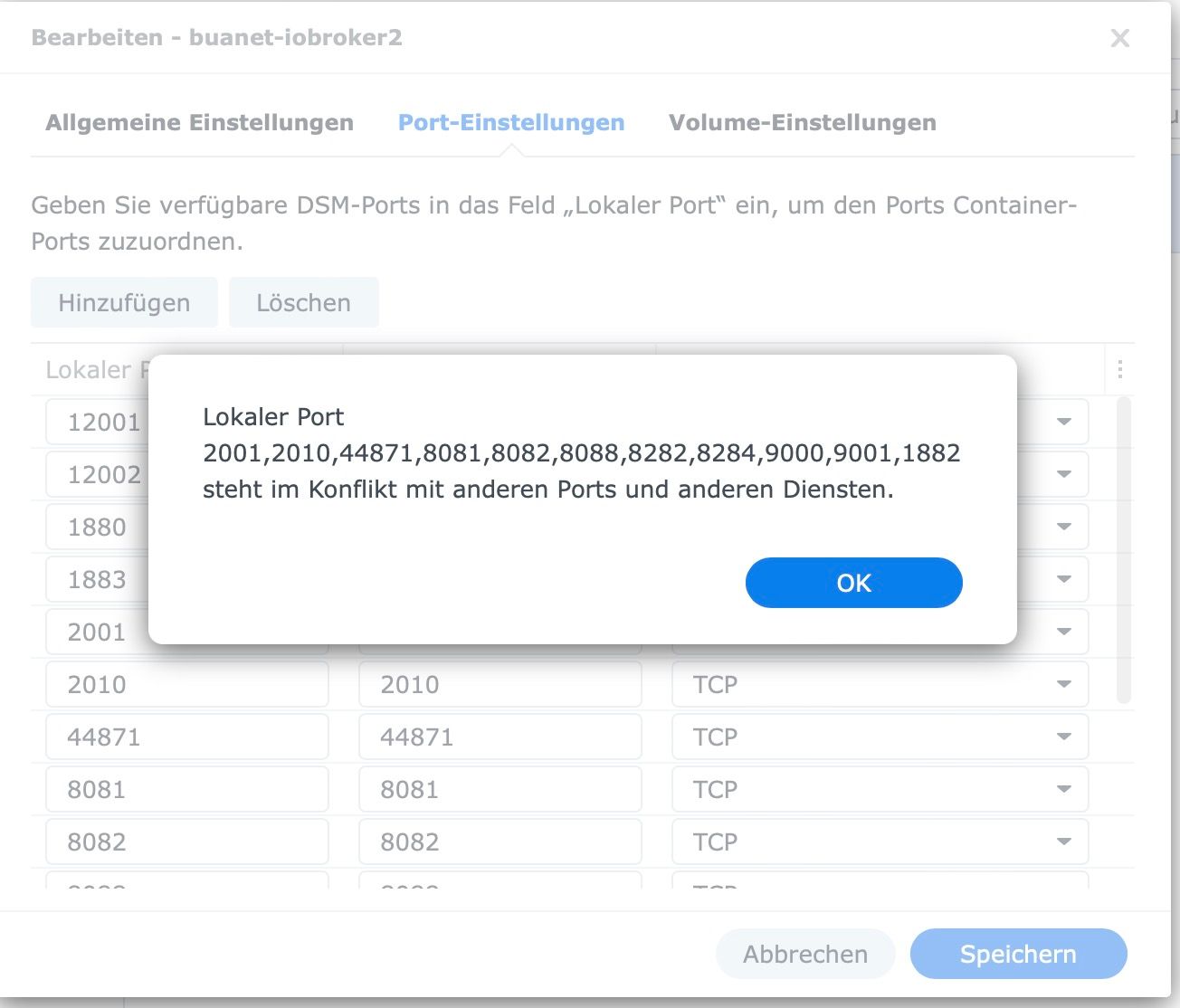
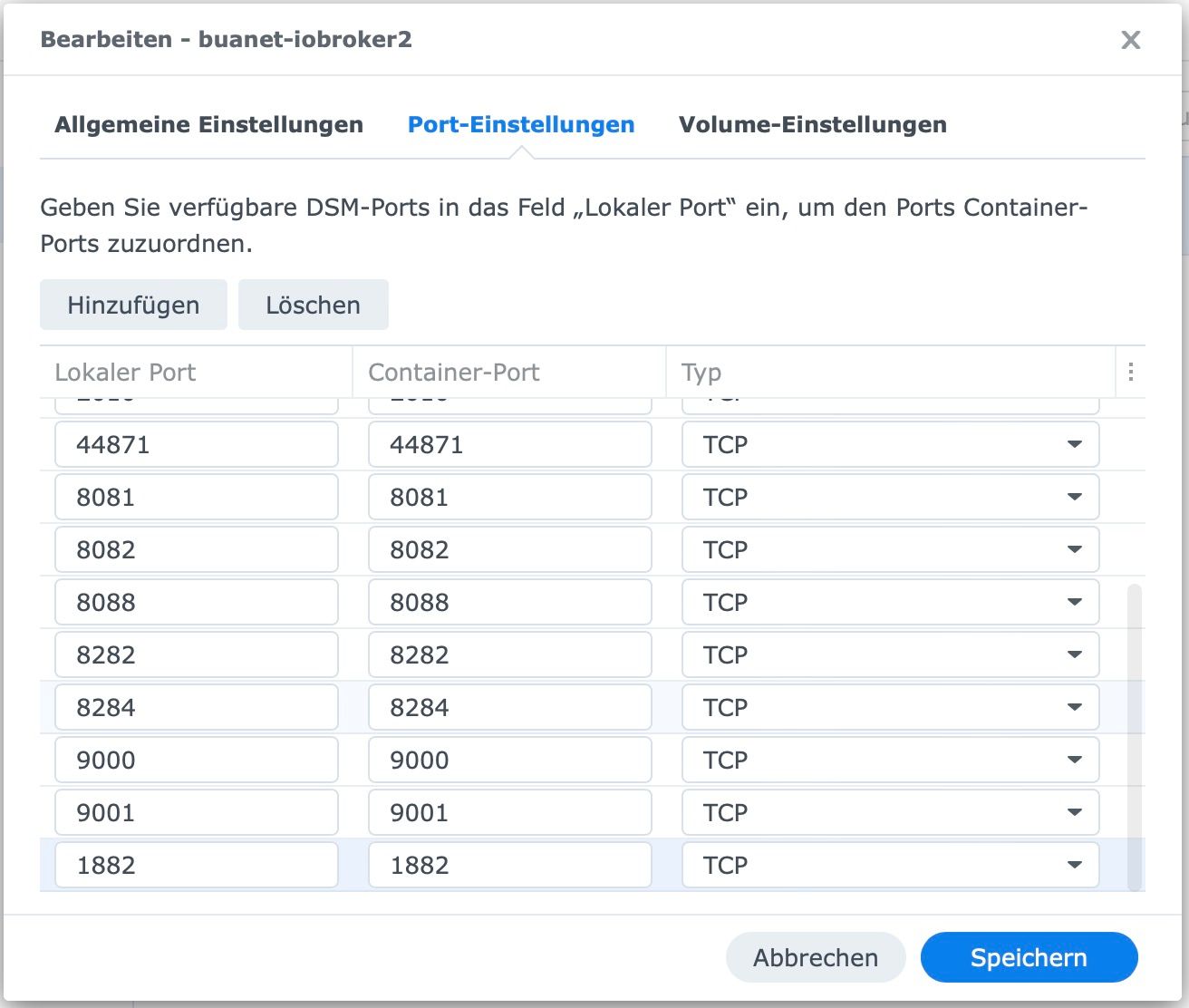
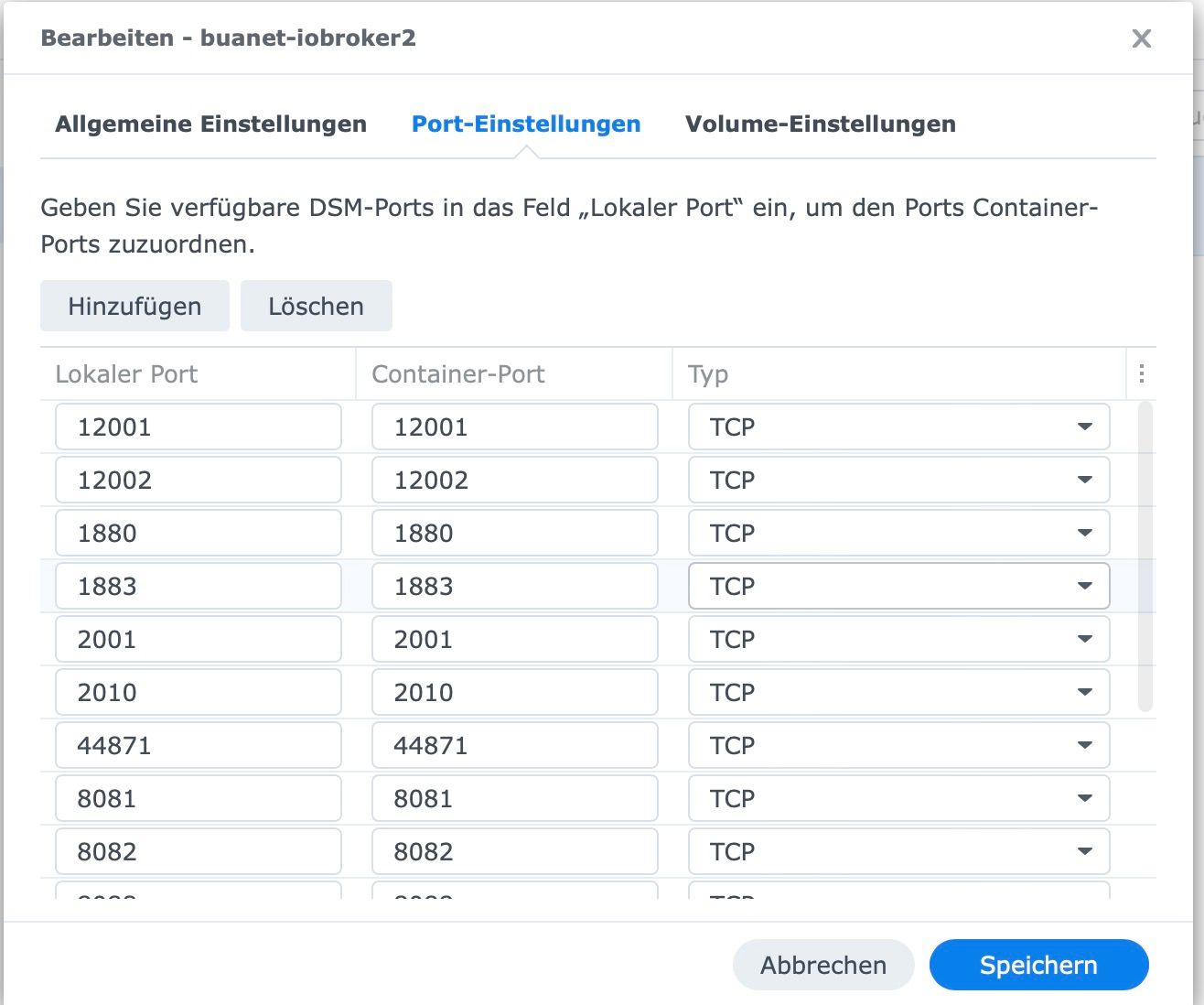
-
@glasfaser said in iobroker mit Docker: Kann keine Ports mehr durchschleifen:
curl -sLf -o diag.sh https://iobroker.net/diag.sh && bash diag.sh
<Skript v.2023-01-02
*** BASE SYSTEM ***
Architecture: x86_64
Docker: false
Virtualization: Unknown (buanet/Synology?)
diag.sh: line 66: lsb_release: command not foundcat: /etc/os-release: No such file or directory
Systemuptime and Load:
15:19:58 up 1 day, 20:09, 1 user, load average: 0.88, 0.86, 0.69 [IO: 0.71, 0.57, 0.37 CPU: 0.17, 0.27, 0.27]
CPU threads: 4*** Time and Time Zones ***
Sun Mar 19 14:19:58 UTC 2023
Sun Mar 19 15:19:58 CET 2023
CET +0100
cat: /etc/timezone: No such file or directory*** User and Groups ***
root
/root
diag.sh: line 83: groups: command not found*** X-Server-Setup ***
X-Server: false
Desktop:
Terminal:
Boot Target: syno-bootup-done.target*** MEMORY ***
total used free shared buff/cache available
Mem: 3.8G 2.0G 120M 22M 1.6G 1.5G
Swap: 4.3G 554M 3.8G
Total: 8.1G 2.6G 3.9Gdiag.sh: line 100: vmstat: command not found
*** FILESYSTEM ***
Filesystem Type Size Used Avail Use% Mounted on
/dev/md0 ext4 2.3G 2.0G 252M 89% /
devtmpfs devtmpfs 1.9G 0 1.9G 0% /dev
tmpfs tmpfs 1.9G 2.2M 1.9G 1% /dev/shm
tmpfs tmpfs 1.9G 17M 1.9G 1% /run
tmpfs tmpfs 1.9G 0 1.9G 0% /sys/fs/cgroup
tmpfs tmpfs 1.9G 1.7M 1.9G 1% /tmp
/dev/mapper/cachedev_0 ext4 28T 22T 6.0T 78% /volume1
/dev/usb1p1 hfsplus 1.9T 206G 1.7T 12% /volumeUSB1/usbshare
none aufs 28T 22T 6.0T 78% /volume1/@docker/aufs/mnt/f63aaf1ee160276583588147957dc0ab8ed509048905b85f90e0d8804b430cc2Messages in dmesg:
[Fri Mar 17 19:11:01 2023] EXT4-fs (md0): couldn't mount as ext3 due to feature incompatibilities
[Fri Mar 17 19:11:01 2023] EXT4-fs (md0): mounted filesystem with ordered data mode. Opts: (null)
[Fri Mar 17 19:11:02 2023] EXT4-fs (md0): couldn't mount as ext3 due to feature incompatibilities
[Fri Mar 17 19:11:02 2023] EXT4-fs (md0): mounted filesystem with ordered data mode. Opts: (null)
[Fri Mar 17 19:11:02 2023] EXT4-fs (loop0): couldn't mount as ext3 due to feature incompatibilities
[Fri Mar 17 19:11:02 2023] EXT4-fs (loop0): mounted filesystem with ordered data mode. Opts: (null)
[Fri Mar 17 19:11:06 2023] EXT4-fs (md0): couldn't mount as ext3 due to feature incompatibilities
[Fri Mar 17 19:11:06 2023] EXT4-fs (md0): mounted filesystem with ordered data mode. Opts: (null)
[Fri Mar 17 19:11:07 2023] EXT4-fs (md0): couldn't mount as ext3 due to feature incompatibilities
[Fri Mar 17 19:11:07 2023] EXT4-fs (md0): mounted filesystem with ordered data mode. Opts: barrier=1
[Fri Mar 17 19:11:26 2023] EXT4-fs (dm-2): barriers disabled
[Fri Mar 17 19:11:27 2023] EXT4-fs (dm-2): mounted filesystem with writeback data mode. Opts: usrjquota=aquota.user,grpjquota=aquota.group,jqfmt=vfsv0,synoacl
[Fri Mar 17 19:11:34 2023] EXT4-fs (loop0): mounted filesystem with ordered data mode. Opts: (null)Show mounted filesystems (real ones only):
diag.sh: line 109: findmnt: command not foundFiles in neuralgic directories:
/var:
168M /var/
79M /var/db
77M /var/db/geoip-database
49M /var/log
21M /var/lib/opt/iobroker/backups:
du: cannot access '/opt/iobroker/backups/': No such file or directory/opt/iobroker/iobroker-data:
du: cannot access '/opt/iobroker/iobroker-data/': No such file or directoryThe five largest files in iobroker-data are:
find: `/opt/iobroker/iobroker-data': No such file or directory*** NodeJS-Installation ***
diag.sh: line 132: nodejs: command not found
/usr/local/bin/node v12.22.12
/usr/local/bin/npm 6.14.16
diag.sh: line 135: npx: command not founddiag.sh: line 137: apt-cache: command not found
find: `/opt/iobroker/node_modules': No such file or directory
Temp directories causing npm8 problem: 0*** ioBroker-Installation ***
ioBroker Status
diag.sh: line 152: iobroker: command not foundCore adapters versions
diag.sh: line 155: iob: command not found
js-controller:
diag.sh: line 156: iob: command not found
admin:
diag.sh: line 157: iob: command not found
javascript:diag.sh: line 159: cd: /opt/iobroker: No such file or directory
Adapters from github:Adapter State
diag.sh: line 162: iob: command not foundEnabled adapters with bindings
diag.sh: line 165: iob: command not foundioBroker-Repositories
diag.sh: line 168: iob: command not foundInstalled ioBroker-Instances
diag.sh: line 171: iob: command not foundObjects and States
Please stand by - This may take a while
Objects: 0
States: 0*** OS-Repositories and Updates ***
sudo: apt-get: command not found
diag.sh: line 182: apt-get: command not found
Pending Updates:*** Listening Ports ***
Active Internet connections (only servers)
Proto Recv-Q Send-Q Local Address Foreign Address State User Inode PID/Program name
tcp 0 0 127.0.0.1:143 0.0.0.0:* LISTEN 0 96027 20977/dovecot
tcp 0 0 0.0.0.0:80 0.0.0.0:* LISTEN 0 39198 6000/nginx: worker
tcp 0 0 0.0.0.0:2001 0.0.0.0:* LISTEN 0 10414849 722/docker-proxy
tcp 0 0 0.0.0.0:8081 0.0.0.0:* LISTEN 0 10415616 679/docker-proxy
tcp 0 0 0.0.0.0:8082 0.0.0.0:* LISTEN 0 10416312 658/docker-proxy
tcp 0 0 127.0.0.1:914 0.0.0.0:* LISTEN 0 90667 5917/fcgi-pm
tcp 0 0 127.0.0.1:915 0.0.0.0:* LISTEN 0 89594 6179/httpd24
tcp 0 0 0.0.0.0:21 0.0.0.0:* LISTEN 0 38790 11463/ftpd
tcp 0 0 0.0.0.0:22 0.0.0.0:* LISTEN 0 23450 8452/sshd: /usr/bin
tcp 0 0 0.0.0.0:631 0.0.0.0:* LISTEN 0 42711 11868/cupsd
tcp 0 0 0.0.0.0:1880 0.0.0.0:* LISTEN 0 10411894 762/docker-proxy
tcp 0 0 0.0.0.0:8088 0.0.0.0:* LISTEN 0 10411822 640/docker-proxy
tcp 0 0 127.0.0.1:5432 0.0.0.0:* LISTEN 55 66882 14817/postgres
tcp 0 0 0.0.0.0:2010 0.0.0.0:* LISTEN 0 10416341 699/docker-proxy
tcp 0 0 0.0.0.0:8282 0.0.0.0:* LISTEN 0 10416297 620/docker-proxy
tcp 0 0 0.0.0.0:1883 0.0.0.0:* LISTEN 0 10415672 743/docker-proxy
tcp 0 0 0.0.0.0:443 0.0.0.0:* LISTEN 0 39200 6000/nginx: worker
tcp 0 0 0.0.0.0:8284 0.0.0.0:* LISTEN 0 10415537 601/docker-proxy
tcp 0 0 127.0.0.1:4700 0.0.0.0:* LISTEN 0 40096 11551/cnid_metad
tcp 0 0 0.0.0.0:445 0.0.0.0:* LISTEN 0 41343 11450/smbd
tcp 0 0 0.0.0.0:4190 0.0.0.0:* LISTEN 0 95984 20977/dovecot
tcp 0 0 127.0.0.1:512 0.0.0.0:* LISTEN 0 98185 21178/termd
tcp 0 0 0.0.0.0:12001 0.0.0.0:* LISTEN 0 10416267 546/docker-proxy
tcp 0 0 127.0.0.1:161 0.0.0.0:* LISTEN 0 36329 11020/snmpd
tcp 0 0 0.0.0.0:12002 0.0.0.0:* LISTEN 0 10411751 526/docker-proxy
tcp 0 0 0.0.0.0:3493 0.0.0.0:* LISTEN 0 101790 21460/upsd
tcp 0 0 0.0.0.0:50022 0.0.0.0:* LISTEN 0 23454 8452/sshd: /usr/bin
tcp 0 0 0.0.0.0:44871 0.0.0.0:* LISTEN 0 10415415 506/docker-proxy
tcp 0 0 0.0.0.0:9000 0.0.0.0:* LISTEN 0 10415504 582/docker-proxy
tcp 0 0 0.0.0.0:5000 0.0.0.0:* LISTEN 0 39194 6000/nginx: worker
tcp 0 0 0.0.0.0:9001 0.0.0.0:* LISTEN 0 10411780 564/docker-proxy
tcp 0 0 0.0.0.0:5001 0.0.0.0:* LISTEN 0 39196 6000/nginx: worker
tcp 0 0 0.0.0.0:3307 0.0.0.0:* LISTEN 66 1700649 5364/mysqld
tcp 0 0 0.0.0.0:139 0.0.0.0:* LISTEN 0 41344 11450/smbd
tcp 0 0 0.0.0.0:5357 0.0.0.0:* LISTEN 0 39377 6000/nginx: worker
tcp6 0 0 :::80 :::* LISTEN 0 39199 6000/nginx: worker
tcp6 0 0 :::21 :::* LISTEN 0 38791 11463/ftpd
tcp6 0 0 :::22 :::* LISTEN 0 23452 8452/sshd: /usr/bin
tcp6 0 0 :::631 :::* LISTEN 0 42712 11868/cupsd
tcp6 0 0 :::443 :::* LISTEN 0 39201 6000/nginx: worker
tcp6 0 0 :::3261 :::* LISTEN 0 44823 -
tcp6 0 0 :::445 :::* LISTEN 0 41341 11450/smbd
tcp6 0 0 :::4190 :::* LISTEN 0 95985 20977/dovecot
tcp6 0 0 :::3263 :::* LISTEN 0 44821 -
tcp6 0 0 :::3264 :::* LISTEN 0 46116 -
tcp6 0 0 :::3265 :::* LISTEN 0 48499 12581/scsi_plugin_s
tcp6 0 0 :::515 :::* LISTEN 0 39882 1/init
tcp6 0 0 :::548 :::* LISTEN 0 40185 11550/afpd
tcp6 0 0 :::50022 :::* LISTEN 0 23456 8452/sshd: /usr/bin
tcp6 0 0 :::5000 :::* LISTEN 0 39195 6000/nginx: worker
tcp6 0 0 :::6281 :::* LISTEN 0 81032 17419/img_backupd
tcp6 0 0 :::5001 :::* LISTEN 0 39197 6000/nginx: worker
tcp6 0 0 :::139 :::* LISTEN 0 41342 11450/smbd
tcp6 0 0 :::5357 :::* LISTEN 0 39378 6000/nginx: worker
udp 0 0 0.0.0.0:5353 0.0.0.0:* 0 73684 16976/avahi-daemon:
udp 0 0 0.0.0.0:44343 0.0.0.0:* 0 73686 16976/avahi-daemon:
udp 0 0 0.0.0.0:3702 0.0.0.0:* 99 34843 10620/synowsdiscove
udp 0 0 0.0.0.0:9997 0.0.0.0:* 0 26087 8468/findhostd
udp 0 0 0.0.0.0:9998 0.0.0.0:* 0 26086 8468/findhostd
udp 0 0 0.0.0.0:9999 0.0.0.0:* 0 26085 8468/findhostd
udp 0 0 0.0.0.0:1900 0.0.0.0:* 0 78468 17664/minissdpd
udp 0 0 0.0.0.0:36787 0.0.0.0:* 0 1704353 11830/synorelayd
udp 213248 0 0.0.0.0:68 0.0.0.0:* 0 30841 9763/dhclient
udp 0 0 0.0.0.0:68 0.0.0.0:* 0 24988 8145/dhclient
udp 0 0 172.18.0.1:123 0.0.0.0:* 87 10417186 8459/ntpd
udp 0 0 192.168.178.144:123 0.0.0.0:* 87 34195 8459/ntpd
udp 0 0 127.0.0.1:123 0.0.0.0:* 0 23387 8459/ntpd
udp 0 0 0.0.0.0:123 0.0.0.0:* 0 23383 8459/ntpd
udp 0 0 192.168.178.255:137 0.0.0.0:* 0 76335 17172/nmbd
udp 0 0 192.168.178.144:137 0.0.0.0:* 0 76334 17172/nmbd
udp 0 0 0.0.0.0:137 0.0.0.0:* 0 78007 17172/nmbd
udp 0 0 192.168.178.255:138 0.0.0.0:* 0 76337 17172/nmbd
udp 0 0 192.168.178.144:138 0.0.0.0:* 0 76336 17172/nmbd
udp 0 0 0.0.0.0:138 0.0.0.0:* 0 78008 17172/nmbd
udp 0 0 127.0.0.1:161 0.0.0.0:* 0 36328 11020/snmpd
udp6 0 0 :::5353 :::* 0 73685 16976/avahi-daemon:
udp6 0 0 :::3702 :::* 99 34845 10620/synowsdiscove
udp6 0 0 fe80::e44e:4aff:fe3:123 :::* 87 10417192 8459/ntpd
udp6 0 0 fe80::42:7aff:fea0::123 :::* 87 10417190 8459/ntpd
udp6 0 0 fe80::9209:d0ff:fe0:123 :::* 87 34198 8459/ntpd
udp6 0 0 ::1:123 :::* 0 23389 8459/ntpd
udp6 0 0 :::123 :::* 0 23380 8459/ntpd
udp6 0 0 :::52099 :::* 0 73687 16976/avahi-daemon:*** Log File - Last 25 Lines ***
tail: cannot open '/opt/iobroker/log/iobroker.current.log' for reading: No such file or directory
============ Mark until here for C&P =============

iob diag has finished.
======================= SUMMARY =======================
v.2023-01-02diag.sh: line 215: lsb_release: command not found
Operatingsystem:
Installation:
cat: /etc/timezone: No such file or directory
Timezone:
User-ID: 0
X-Server: false
Boot Target: syno-bootup-done.targetPending OS-Updates:
diag.sh: line 239: nodejs: command not found
Nodejs-Installation:
/usr/local/bin/node v12.22.12
/usr/local/bin/npm 6.14.16
diag.sh: line 242: npx: command not founddiag.sh: line 244: iob: command not found
ioBroker Core: js-controller
diag.sh: line 245: iob: command not found
admindiag.sh: line 247: iobroker: command not found
ioBroker Status:Status admin:
diag.sh: line 251: iobroker: command not founddiag.sh: line 253: iob: command not found
Pending iob updates: 0diag.sh: line 255: iob: command not found
Objects: 0
States: 0Size of iob-Database:
find:
/opt/iobroker/iobroker-data': No such file or directory find:/opt/iobroker/iobroker-data': No such file or directory=================== END OF SUMMARY ====================>
Der Portainerversuch ist m.E. gescheitert:
<root@Diskstation920:~# docker run -d -p 9000:9000 --name portainer --restart always -v /var/run/docker.sock:/var/run/docker.sock -v /volume1/docker/portainer_data:/data portainer/portainer-ce
Unable to find image 'portainer/portainer-ce:latest' locally
latest: Pulling from portainer/portainer-ce
772227786281: Pull complete
96fd13befc87: Pull complete
b733663f020c: Pull complete
9fbfa87be55d: Pull complete
Digest: sha256:9fa1ec78b4e29d83593cf9720674b72829c9cdc0db7083a962bc30e64e27f64e
Status: Downloaded newer image for portainer/portainer-ce:latest
42538ba0f62d1644098d8eeea2b54c57c1bc3a0d2a7fb1a30f81e5e521d44c4d
docker: Error response from daemon: driver failed programming external connectivity on endpoint portainer (3728dc0bcf157c19a93766fef7892f83600fcb8f8baa191899ab809a8fe199ad): Bind for 0.0.0.0:9000 failed: port is already allocated.> -
Kurzfassung
Dein ioBroker Container ist schrott ( nicht gepflegt )
und was mich auch wunder ist
/docker-proxy@glasfaser : Ja ok. Ich werde versuche mit Deinem Vorschlag alles neu aufzusetzen. Hoffentlich geht es gut
-
@glasfaser : Ja ok. Ich werde versuche mit Deinem Vorschlag alles neu aufzusetzen. Hoffentlich geht es gut
-
Ich erinnere mich an die damaligen Installationsprobleme: link text
Das hilft diesmal leider auch nicht.

Hast du auch das Paket Docker gelöscht / neu installiert
Eventuell auch mal die Syn neu starten !?@pingo sagte in iobroker mit Docker: Kann keine Ports mehr durchschleifen:
Ich erinnere mich an die damaligen Installationsprobleme: link text
OK .. da war mal was mit deinem Webstation Zugang ...
-
-
@glasfaser said in iobroker mit Docker: Kann keine Ports mehr durchschleifen:
curl -sLf -o diag.sh https://iobroker.net/diag.sh && bash diag.sh
<Skript v.2023-01-02
*** BASE SYSTEM ***
Architecture: x86_64
Docker: false
Virtualization: Unknown (buanet/Synology?)
diag.sh: line 66: lsb_release: command not foundcat: /etc/os-release: No such file or directory
Systemuptime and Load:
15:19:58 up 1 day, 20:09, 1 user, load average: 0.88, 0.86, 0.69 [IO: 0.71, 0.57, 0.37 CPU: 0.17, 0.27, 0.27]
CPU threads: 4*** Time and Time Zones ***
Sun Mar 19 14:19:58 UTC 2023
Sun Mar 19 15:19:58 CET 2023
CET +0100
cat: /etc/timezone: No such file or directory*** User and Groups ***
root
/root
diag.sh: line 83: groups: command not found*** X-Server-Setup ***
X-Server: false
Desktop:
Terminal:
Boot Target: syno-bootup-done.target*** MEMORY ***
total used free shared buff/cache available
Mem: 3.8G 2.0G 120M 22M 1.6G 1.5G
Swap: 4.3G 554M 3.8G
Total: 8.1G 2.6G 3.9Gdiag.sh: line 100: vmstat: command not found
*** FILESYSTEM ***
Filesystem Type Size Used Avail Use% Mounted on
/dev/md0 ext4 2.3G 2.0G 252M 89% /
devtmpfs devtmpfs 1.9G 0 1.9G 0% /dev
tmpfs tmpfs 1.9G 2.2M 1.9G 1% /dev/shm
tmpfs tmpfs 1.9G 17M 1.9G 1% /run
tmpfs tmpfs 1.9G 0 1.9G 0% /sys/fs/cgroup
tmpfs tmpfs 1.9G 1.7M 1.9G 1% /tmp
/dev/mapper/cachedev_0 ext4 28T 22T 6.0T 78% /volume1
/dev/usb1p1 hfsplus 1.9T 206G 1.7T 12% /volumeUSB1/usbshare
none aufs 28T 22T 6.0T 78% /volume1/@docker/aufs/mnt/f63aaf1ee160276583588147957dc0ab8ed509048905b85f90e0d8804b430cc2Messages in dmesg:
[Fri Mar 17 19:11:01 2023] EXT4-fs (md0): couldn't mount as ext3 due to feature incompatibilities
[Fri Mar 17 19:11:01 2023] EXT4-fs (md0): mounted filesystem with ordered data mode. Opts: (null)
[Fri Mar 17 19:11:02 2023] EXT4-fs (md0): couldn't mount as ext3 due to feature incompatibilities
[Fri Mar 17 19:11:02 2023] EXT4-fs (md0): mounted filesystem with ordered data mode. Opts: (null)
[Fri Mar 17 19:11:02 2023] EXT4-fs (loop0): couldn't mount as ext3 due to feature incompatibilities
[Fri Mar 17 19:11:02 2023] EXT4-fs (loop0): mounted filesystem with ordered data mode. Opts: (null)
[Fri Mar 17 19:11:06 2023] EXT4-fs (md0): couldn't mount as ext3 due to feature incompatibilities
[Fri Mar 17 19:11:06 2023] EXT4-fs (md0): mounted filesystem with ordered data mode. Opts: (null)
[Fri Mar 17 19:11:07 2023] EXT4-fs (md0): couldn't mount as ext3 due to feature incompatibilities
[Fri Mar 17 19:11:07 2023] EXT4-fs (md0): mounted filesystem with ordered data mode. Opts: barrier=1
[Fri Mar 17 19:11:26 2023] EXT4-fs (dm-2): barriers disabled
[Fri Mar 17 19:11:27 2023] EXT4-fs (dm-2): mounted filesystem with writeback data mode. Opts: usrjquota=aquota.user,grpjquota=aquota.group,jqfmt=vfsv0,synoacl
[Fri Mar 17 19:11:34 2023] EXT4-fs (loop0): mounted filesystem with ordered data mode. Opts: (null)Show mounted filesystems (real ones only):
diag.sh: line 109: findmnt: command not foundFiles in neuralgic directories:
/var:
168M /var/
79M /var/db
77M /var/db/geoip-database
49M /var/log
21M /var/lib/opt/iobroker/backups:
du: cannot access '/opt/iobroker/backups/': No such file or directory/opt/iobroker/iobroker-data:
du: cannot access '/opt/iobroker/iobroker-data/': No such file or directoryThe five largest files in iobroker-data are:
find: `/opt/iobroker/iobroker-data': No such file or directory*** NodeJS-Installation ***
diag.sh: line 132: nodejs: command not found
/usr/local/bin/node v12.22.12
/usr/local/bin/npm 6.14.16
diag.sh: line 135: npx: command not founddiag.sh: line 137: apt-cache: command not found
find: `/opt/iobroker/node_modules': No such file or directory
Temp directories causing npm8 problem: 0*** ioBroker-Installation ***
ioBroker Status
diag.sh: line 152: iobroker: command not foundCore adapters versions
diag.sh: line 155: iob: command not found
js-controller:
diag.sh: line 156: iob: command not found
admin:
diag.sh: line 157: iob: command not found
javascript:diag.sh: line 159: cd: /opt/iobroker: No such file or directory
Adapters from github:Adapter State
diag.sh: line 162: iob: command not foundEnabled adapters with bindings
diag.sh: line 165: iob: command not foundioBroker-Repositories
diag.sh: line 168: iob: command not foundInstalled ioBroker-Instances
diag.sh: line 171: iob: command not foundObjects and States
Please stand by - This may take a while
Objects: 0
States: 0*** OS-Repositories and Updates ***
sudo: apt-get: command not found
diag.sh: line 182: apt-get: command not found
Pending Updates:*** Listening Ports ***
Active Internet connections (only servers)
Proto Recv-Q Send-Q Local Address Foreign Address State User Inode PID/Program name
tcp 0 0 127.0.0.1:143 0.0.0.0:* LISTEN 0 96027 20977/dovecot
tcp 0 0 0.0.0.0:80 0.0.0.0:* LISTEN 0 39198 6000/nginx: worker
tcp 0 0 0.0.0.0:2001 0.0.0.0:* LISTEN 0 10414849 722/docker-proxy
tcp 0 0 0.0.0.0:8081 0.0.0.0:* LISTEN 0 10415616 679/docker-proxy
tcp 0 0 0.0.0.0:8082 0.0.0.0:* LISTEN 0 10416312 658/docker-proxy
tcp 0 0 127.0.0.1:914 0.0.0.0:* LISTEN 0 90667 5917/fcgi-pm
tcp 0 0 127.0.0.1:915 0.0.0.0:* LISTEN 0 89594 6179/httpd24
tcp 0 0 0.0.0.0:21 0.0.0.0:* LISTEN 0 38790 11463/ftpd
tcp 0 0 0.0.0.0:22 0.0.0.0:* LISTEN 0 23450 8452/sshd: /usr/bin
tcp 0 0 0.0.0.0:631 0.0.0.0:* LISTEN 0 42711 11868/cupsd
tcp 0 0 0.0.0.0:1880 0.0.0.0:* LISTEN 0 10411894 762/docker-proxy
tcp 0 0 0.0.0.0:8088 0.0.0.0:* LISTEN 0 10411822 640/docker-proxy
tcp 0 0 127.0.0.1:5432 0.0.0.0:* LISTEN 55 66882 14817/postgres
tcp 0 0 0.0.0.0:2010 0.0.0.0:* LISTEN 0 10416341 699/docker-proxy
tcp 0 0 0.0.0.0:8282 0.0.0.0:* LISTEN 0 10416297 620/docker-proxy
tcp 0 0 0.0.0.0:1883 0.0.0.0:* LISTEN 0 10415672 743/docker-proxy
tcp 0 0 0.0.0.0:443 0.0.0.0:* LISTEN 0 39200 6000/nginx: worker
tcp 0 0 0.0.0.0:8284 0.0.0.0:* LISTEN 0 10415537 601/docker-proxy
tcp 0 0 127.0.0.1:4700 0.0.0.0:* LISTEN 0 40096 11551/cnid_metad
tcp 0 0 0.0.0.0:445 0.0.0.0:* LISTEN 0 41343 11450/smbd
tcp 0 0 0.0.0.0:4190 0.0.0.0:* LISTEN 0 95984 20977/dovecot
tcp 0 0 127.0.0.1:512 0.0.0.0:* LISTEN 0 98185 21178/termd
tcp 0 0 0.0.0.0:12001 0.0.0.0:* LISTEN 0 10416267 546/docker-proxy
tcp 0 0 127.0.0.1:161 0.0.0.0:* LISTEN 0 36329 11020/snmpd
tcp 0 0 0.0.0.0:12002 0.0.0.0:* LISTEN 0 10411751 526/docker-proxy
tcp 0 0 0.0.0.0:3493 0.0.0.0:* LISTEN 0 101790 21460/upsd
tcp 0 0 0.0.0.0:50022 0.0.0.0:* LISTEN 0 23454 8452/sshd: /usr/bin
tcp 0 0 0.0.0.0:44871 0.0.0.0:* LISTEN 0 10415415 506/docker-proxy
tcp 0 0 0.0.0.0:9000 0.0.0.0:* LISTEN 0 10415504 582/docker-proxy
tcp 0 0 0.0.0.0:5000 0.0.0.0:* LISTEN 0 39194 6000/nginx: worker
tcp 0 0 0.0.0.0:9001 0.0.0.0:* LISTEN 0 10411780 564/docker-proxy
tcp 0 0 0.0.0.0:5001 0.0.0.0:* LISTEN 0 39196 6000/nginx: worker
tcp 0 0 0.0.0.0:3307 0.0.0.0:* LISTEN 66 1700649 5364/mysqld
tcp 0 0 0.0.0.0:139 0.0.0.0:* LISTEN 0 41344 11450/smbd
tcp 0 0 0.0.0.0:5357 0.0.0.0:* LISTEN 0 39377 6000/nginx: worker
tcp6 0 0 :::80 :::* LISTEN 0 39199 6000/nginx: worker
tcp6 0 0 :::21 :::* LISTEN 0 38791 11463/ftpd
tcp6 0 0 :::22 :::* LISTEN 0 23452 8452/sshd: /usr/bin
tcp6 0 0 :::631 :::* LISTEN 0 42712 11868/cupsd
tcp6 0 0 :::443 :::* LISTEN 0 39201 6000/nginx: worker
tcp6 0 0 :::3261 :::* LISTEN 0 44823 -
tcp6 0 0 :::445 :::* LISTEN 0 41341 11450/smbd
tcp6 0 0 :::4190 :::* LISTEN 0 95985 20977/dovecot
tcp6 0 0 :::3263 :::* LISTEN 0 44821 -
tcp6 0 0 :::3264 :::* LISTEN 0 46116 -
tcp6 0 0 :::3265 :::* LISTEN 0 48499 12581/scsi_plugin_s
tcp6 0 0 :::515 :::* LISTEN 0 39882 1/init
tcp6 0 0 :::548 :::* LISTEN 0 40185 11550/afpd
tcp6 0 0 :::50022 :::* LISTEN 0 23456 8452/sshd: /usr/bin
tcp6 0 0 :::5000 :::* LISTEN 0 39195 6000/nginx: worker
tcp6 0 0 :::6281 :::* LISTEN 0 81032 17419/img_backupd
tcp6 0 0 :::5001 :::* LISTEN 0 39197 6000/nginx: worker
tcp6 0 0 :::139 :::* LISTEN 0 41342 11450/smbd
tcp6 0 0 :::5357 :::* LISTEN 0 39378 6000/nginx: worker
udp 0 0 0.0.0.0:5353 0.0.0.0:* 0 73684 16976/avahi-daemon:
udp 0 0 0.0.0.0:44343 0.0.0.0:* 0 73686 16976/avahi-daemon:
udp 0 0 0.0.0.0:3702 0.0.0.0:* 99 34843 10620/synowsdiscove
udp 0 0 0.0.0.0:9997 0.0.0.0:* 0 26087 8468/findhostd
udp 0 0 0.0.0.0:9998 0.0.0.0:* 0 26086 8468/findhostd
udp 0 0 0.0.0.0:9999 0.0.0.0:* 0 26085 8468/findhostd
udp 0 0 0.0.0.0:1900 0.0.0.0:* 0 78468 17664/minissdpd
udp 0 0 0.0.0.0:36787 0.0.0.0:* 0 1704353 11830/synorelayd
udp 213248 0 0.0.0.0:68 0.0.0.0:* 0 30841 9763/dhclient
udp 0 0 0.0.0.0:68 0.0.0.0:* 0 24988 8145/dhclient
udp 0 0 172.18.0.1:123 0.0.0.0:* 87 10417186 8459/ntpd
udp 0 0 192.168.178.144:123 0.0.0.0:* 87 34195 8459/ntpd
udp 0 0 127.0.0.1:123 0.0.0.0:* 0 23387 8459/ntpd
udp 0 0 0.0.0.0:123 0.0.0.0:* 0 23383 8459/ntpd
udp 0 0 192.168.178.255:137 0.0.0.0:* 0 76335 17172/nmbd
udp 0 0 192.168.178.144:137 0.0.0.0:* 0 76334 17172/nmbd
udp 0 0 0.0.0.0:137 0.0.0.0:* 0 78007 17172/nmbd
udp 0 0 192.168.178.255:138 0.0.0.0:* 0 76337 17172/nmbd
udp 0 0 192.168.178.144:138 0.0.0.0:* 0 76336 17172/nmbd
udp 0 0 0.0.0.0:138 0.0.0.0:* 0 78008 17172/nmbd
udp 0 0 127.0.0.1:161 0.0.0.0:* 0 36328 11020/snmpd
udp6 0 0 :::5353 :::* 0 73685 16976/avahi-daemon:
udp6 0 0 :::3702 :::* 99 34845 10620/synowsdiscove
udp6 0 0 fe80::e44e:4aff:fe3:123 :::* 87 10417192 8459/ntpd
udp6 0 0 fe80::42:7aff:fea0::123 :::* 87 10417190 8459/ntpd
udp6 0 0 fe80::9209:d0ff:fe0:123 :::* 87 34198 8459/ntpd
udp6 0 0 ::1:123 :::* 0 23389 8459/ntpd
udp6 0 0 :::123 :::* 0 23380 8459/ntpd
udp6 0 0 :::52099 :::* 0 73687 16976/avahi-daemon:*** Log File - Last 25 Lines ***
tail: cannot open '/opt/iobroker/log/iobroker.current.log' for reading: No such file or directory
============ Mark until here for C&P =============

iob diag has finished.
======================= SUMMARY =======================
v.2023-01-02diag.sh: line 215: lsb_release: command not found
Operatingsystem:
Installation:
cat: /etc/timezone: No such file or directory
Timezone:
User-ID: 0
X-Server: false
Boot Target: syno-bootup-done.targetPending OS-Updates:
diag.sh: line 239: nodejs: command not found
Nodejs-Installation:
/usr/local/bin/node v12.22.12
/usr/local/bin/npm 6.14.16
diag.sh: line 242: npx: command not founddiag.sh: line 244: iob: command not found
ioBroker Core: js-controller
diag.sh: line 245: iob: command not found
admindiag.sh: line 247: iobroker: command not found
ioBroker Status:Status admin:
diag.sh: line 251: iobroker: command not founddiag.sh: line 253: iob: command not found
Pending iob updates: 0diag.sh: line 255: iob: command not found
Objects: 0
States: 0Size of iob-Database:
find:
/opt/iobroker/iobroker-data': No such file or directory find:/opt/iobroker/iobroker-data': No such file or directory=================== END OF SUMMARY ====================>
Der Portainerversuch ist m.E. gescheitert:
<root@Diskstation920:~# docker run -d -p 9000:9000 --name portainer --restart always -v /var/run/docker.sock:/var/run/docker.sock -v /volume1/docker/portainer_data:/data portainer/portainer-ce
Unable to find image 'portainer/portainer-ce:latest' locally
latest: Pulling from portainer/portainer-ce
772227786281: Pull complete
96fd13befc87: Pull complete
b733663f020c: Pull complete
9fbfa87be55d: Pull complete
Digest: sha256:9fa1ec78b4e29d83593cf9720674b72829c9cdc0db7083a962bc30e64e27f64e
Status: Downloaded newer image for portainer/portainer-ce:latest
42538ba0f62d1644098d8eeea2b54c57c1bc3a0d2a7fb1a30f81e5e521d44c4d
docker: Error response from daemon: driver failed programming external connectivity on endpoint portainer (3728dc0bcf157c19a93766fef7892f83600fcb8f8baa191899ab809a8fe199ad): Bind for 0.0.0.0:9000 failed: port is already allocated.>@pingo sagte in iobroker mit Docker: Kann keine Ports mehr durchschleifen:
nginx
ist in deinem Protokoll , hast du das Installiert !?
und wie ich schon schrieb :
@glasfaser sagte in iobroker mit Docker: Kann keine Ports mehr durchschleifen:
und was mich auch wunder ist
/docker-proxy -
@glasfaser said in iobroker mit Docker: Kann keine Ports mehr durchschleifen:
@pingo sagte in iobroker mit Docker: Kann keine Ports mehr durchschleifen:
nginx
ist in deinem Protokoll , hast du das Installiert !?
und wie ich schon schrieb :
@glasfaser sagte in iobroker mit Docker: Kann keine Ports mehr durchschleifen:
und was mich auch wunder ist
/docker-proxyNginx ist nicht installiert.
Ich habe jetzt mal die Host-Variante ausprobiert und die konnte ich tatsächlich installieren.
-
genau. Die Webstation brauche ich.
Mag sich vielleicht mal jemand hier aufschalten. Ich denke schon, dass dann die Fehlersuche schneller und einfacher wird? Ich bin mittlerweile echt verzweifelt. Iobroker weg und nix funktioniert, wie früher.
@pingo sagte in iobroker mit Docker: Kann keine Ports mehr durchschleifen:
Mag sich vielleicht mal jemand hier aufschalten.
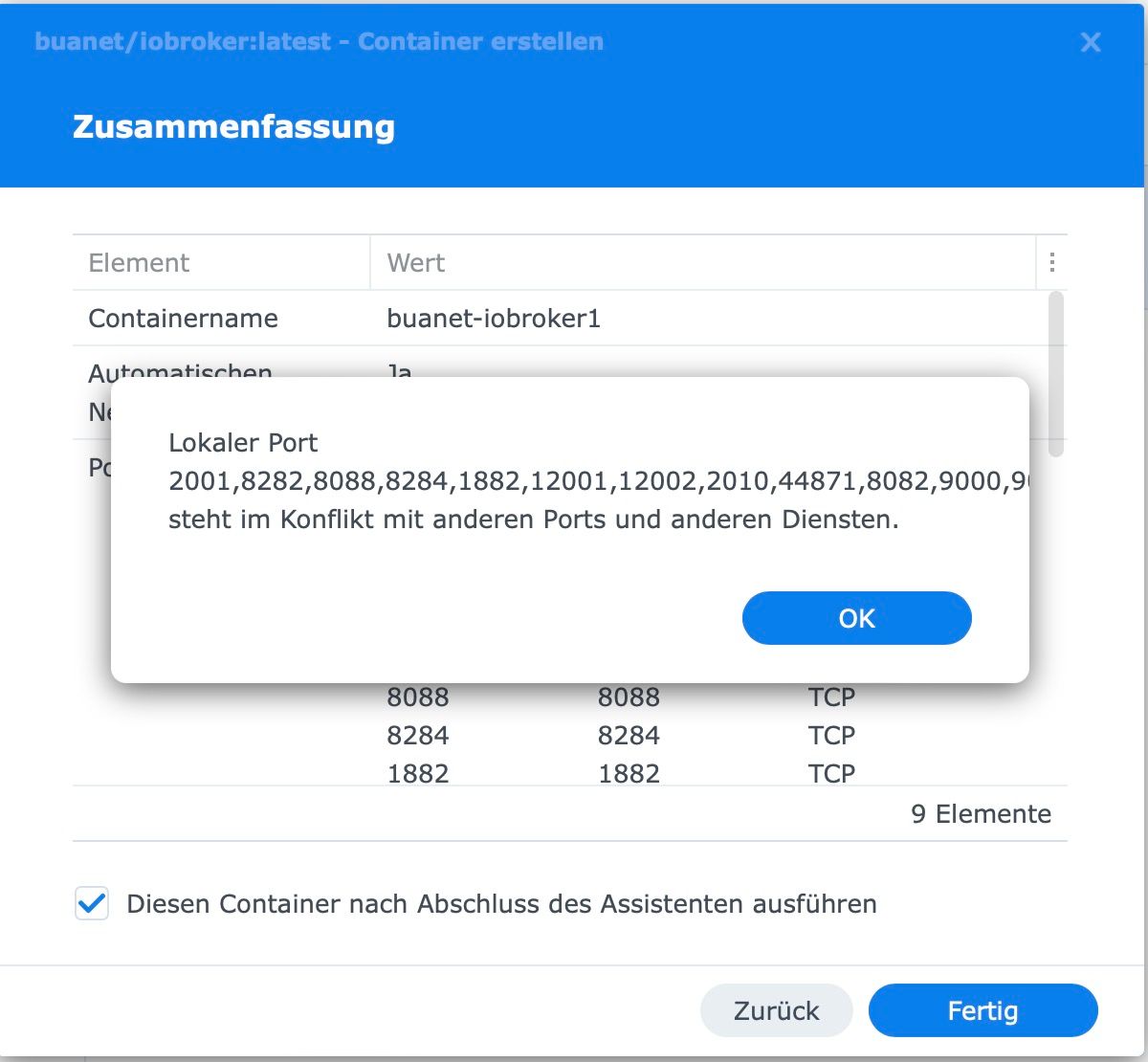
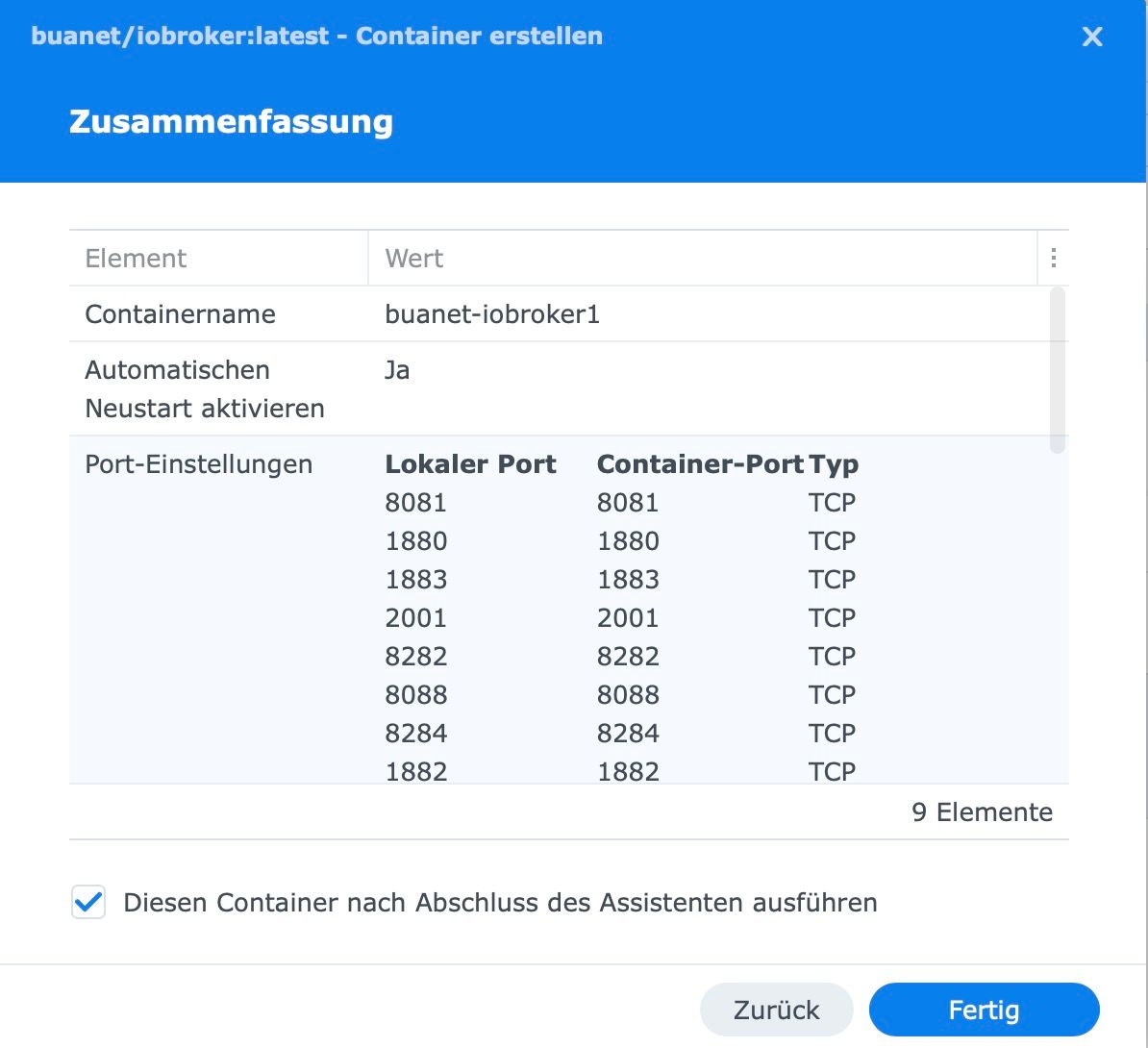
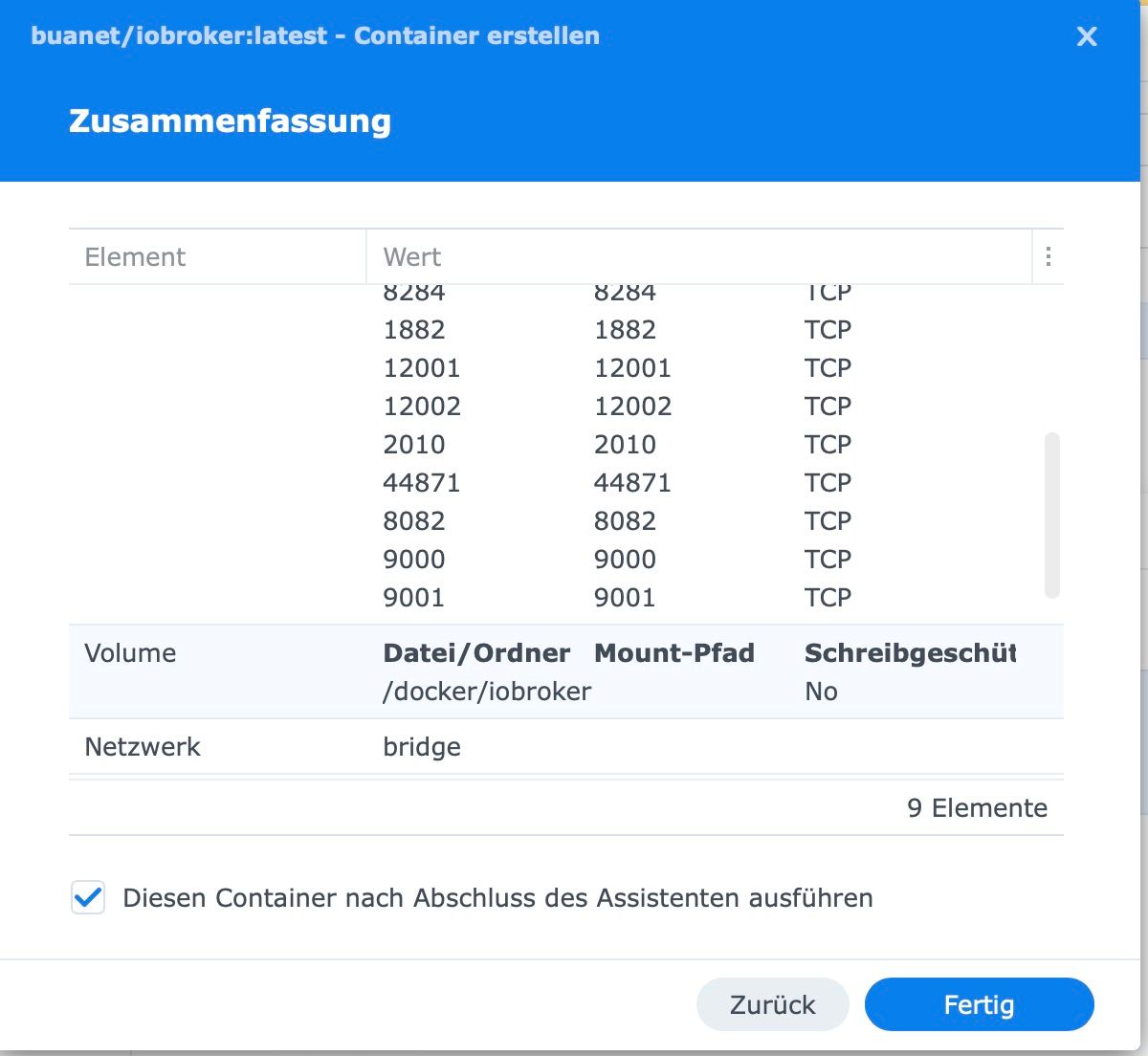
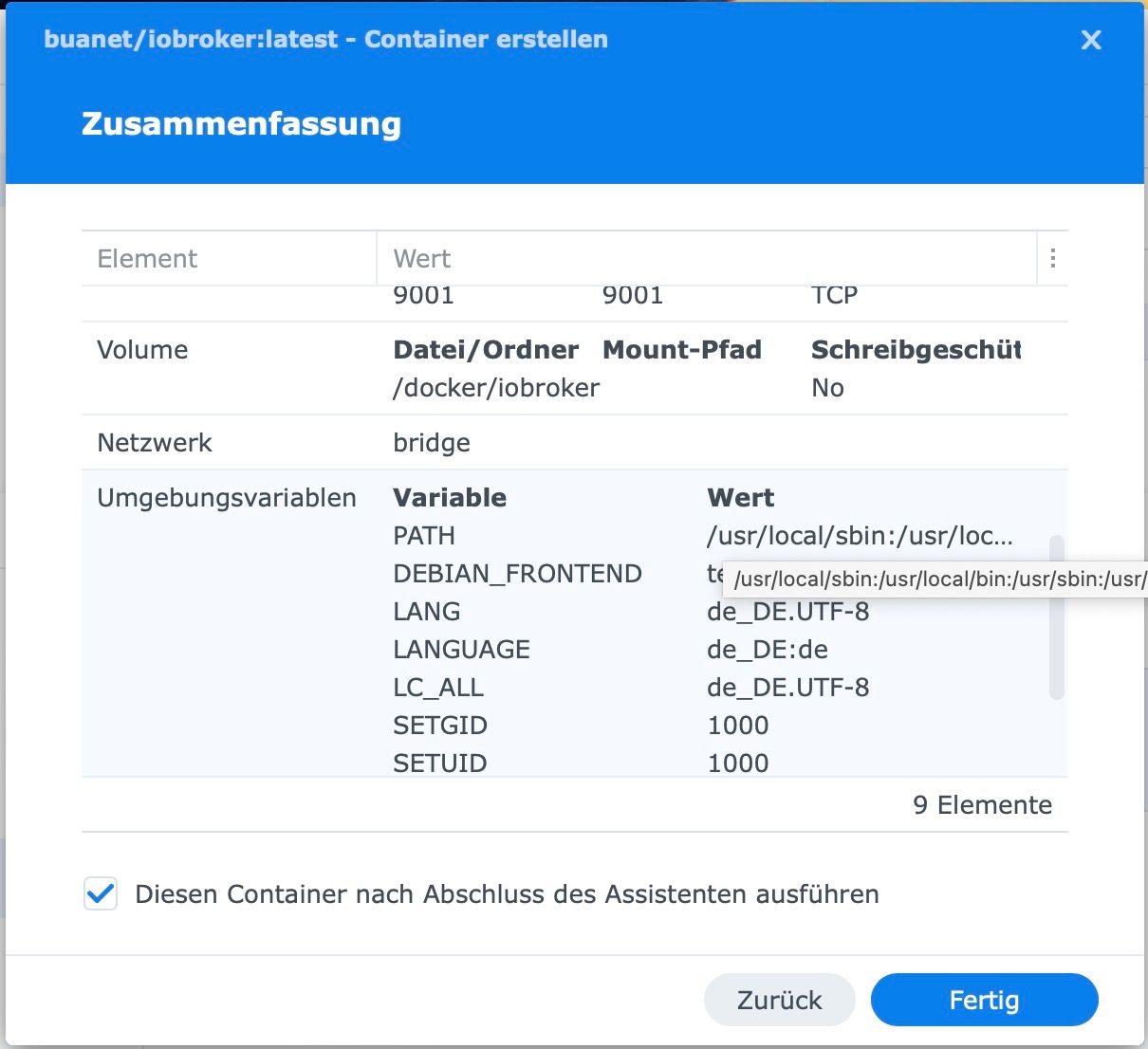
wer hat Dir eig. beigebracht tonnenweise Ports anzugeben? Profi-Tipp: Verklagen!
Du gibst (erstmal!) maximal 8081:8081 und evtl. noch 8082:8082 an und los gehts!
-
@pingo sagte in iobroker mit Docker: Kann keine Ports mehr durchschleifen:
Mag sich vielleicht mal jemand hier aufschalten.
wer hat Dir eig. beigebracht tonnenweise Ports anzugeben? Profi-Tipp: Verklagen!
Du gibst (erstmal!) maximal 8081:8081 und evtl. noch 8082:8082 an und los gehts!
@fastfoot : Das kam aus einer Anleitung, nach der ich vorgegangen bin. Aktuell läuft aber nur die Host-Installationsvariante.
Nun wollte ich mein Google Drive Backup einspielen, aber es nicht zu finden, obwohl alle Backups damals durchgelaufen sind und ich auch die Dateien gesehen hatte. Ich fürchte, dass ich nun wieder komplett von vorne anfangen muss. Das ist der Supergau, den ich vermeiden wollte
-
@fastfoot : Das kam aus einer Anleitung, nach der ich vorgegangen bin. Aktuell läuft aber nur die Host-Installationsvariante.
Nun wollte ich mein Google Drive Backup einspielen, aber es nicht zu finden, obwohl alle Backups damals durchgelaufen sind und ich auch die Dateien gesehen hatte. Ich fürchte, dass ich nun wieder komplett von vorne anfangen muss. Das ist der Supergau, den ich vermeiden wollte
-
@fastfoot : Das kam aus einer Anleitung, nach der ich vorgegangen bin. Aktuell läuft aber nur die Host-Installationsvariante.
Nun wollte ich mein Google Drive Backup einspielen, aber es nicht zu finden, obwohl alle Backups damals durchgelaufen sind und ich auch die Dateien gesehen hatte. Ich fürchte, dass ich nun wieder komplett von vorne anfangen muss. Das ist der Supergau, den ich vermeiden wollte
@pingo sagte in iobroker mit Docker: Kann keine Ports mehr durchschleifen:
Nun wollte ich mein Google Drive Backup einspielen, aber es nicht zu finden.
Neuen Container erstellen ... Mounte ein Ordner , lege ein aktuelles Backup dort rein , starte den Container dann erst
-
@pingo sagte in iobroker mit Docker: Kann keine Ports mehr durchschleifen:
Nun wollte ich mein Google Drive Backup einspielen, aber es nicht zu finden.
Neuen Container erstellen ... Mounte ein Ordner , lege ein aktuelles Backup dort rein , starte den Container dann erst
-
@glasfaser Ich finde leider keine Backupdatei, obwohl ich lokale und google drive Backupdateien hatte
@pingo sagte in iobroker mit Docker: Kann keine Ports mehr durchschleifen:
@glasfaser Ich finde leider keine Backupdatei,
???
auch nicht Online im Google Drive Konto !?
-
@pingo sagte in iobroker mit Docker: Kann keine Ports mehr durchschleifen:
@glasfaser Ich finde leider keine Backupdatei,
???
auch nicht Online im Google Drive Konto !?
@glasfaser Nein, obwohl mir vor dem Löschen des Containers alle Dateien angezeigt wurden. Habt Ihr noch einen Tipp wo ich suchen kann oder wie die Dateien heißen?
-
@pingo sagte in iobroker mit Docker: Kann keine Ports mehr durchschleifen:
obwohl ich lokale und google drive Backupdateien hatte
der 'alte' Mountpfad existiert doch noch?
iobroker läuft unter Docker auf Windows (WSL2)
-
@glasfaser Nein, obwohl mir vor dem Löschen des Containers alle Dateien angezeigt wurden. Habt Ihr noch einen Tipp wo ich suchen kann oder wie die Dateien heißen?
@pingo sagte in iobroker mit Docker: Kann keine Ports mehr durchschleifen:
Nein, obwohl mir vor dem Löschen des Containers alle Dateien angezeigt wurden
wer soll den Online deine Backups jetzt gelöscht haben !?
Habt Ihr noch einen Tipp wo ich suchen kann oder wie die Dateien heißen?
? Hääh
Hast du eventuell ein Mount vom Ordner zuvor gemacht
opt/iobrokerBeispiel :
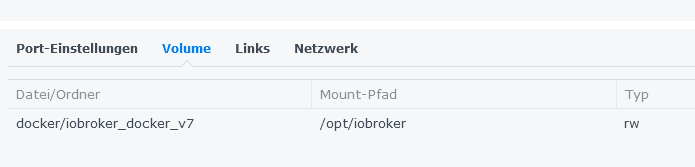
-
@pingo sagte in iobroker mit Docker: Kann keine Ports mehr durchschleifen:
obwohl ich lokale und google drive Backupdateien hatte
der 'alte' Mountpfad existiert doch noch?
@fastfoot sagte in iobroker mit Docker: Kann keine Ports mehr durchschleifen:
der 'alte' Mountpfad existiert doch noch?
Schau mal hier von Ihm .. da ist alles durcheinander bzw. nicht vorhanden ...
habe ich noch nie so gesehn :
-
@fastfoot sagte in iobroker mit Docker: Kann keine Ports mehr durchschleifen:
der 'alte' Mountpfad existiert doch noch?
Schau mal hier von Ihm .. da ist alles durcheinander bzw. nicht vorhanden ...
habe ich noch nie so gesehn :
@glasfaser wahrscheinlich das curl auf dem Host ausgeführt:-)
-
Ja vermutlich war da Einiges falsch eingestellt. Nun ist halt die Frage, wie ich auf der Synology suche, falls da noch irgendwie ein Backup liegt. Sonst habe ich sehr viel Arbeit vor mir, weil im iobroker ziemlich viel konfiguriert war, inkl. einiger Skripte,...
Aber ich mache regelmäßige Hyperbackups. Da sollte ich den Dockerbereich wieder herstellen können. Ich guck mir mal an, wie das geht

Hey! Du scheinst an dieser Unterhaltung interessiert zu sein, hast aber noch kein Konto.
Hast du es satt, bei jedem Besuch durch die gleichen Beiträge zu scrollen? Wenn du dich für ein Konto anmeldest, kommst du immer genau dorthin zurück, wo du zuvor warst, und kannst dich über neue Antworten benachrichtigen lassen (entweder per E-Mail oder Push-Benachrichtigung). Du kannst auch Lesezeichen speichern und Beiträge positiv bewerten, um anderen Community-Mitgliedern deine Wertschätzung zu zeigen.
Mit deinem Input könnte dieser Beitrag noch besser werden 💗
Registrieren Anmelden292
Online33.0k
Benutzende83.7k
Themen1.3m
Beiträge