




lgtv Adapter zur Steuerung von LG WebOS SmartTVs

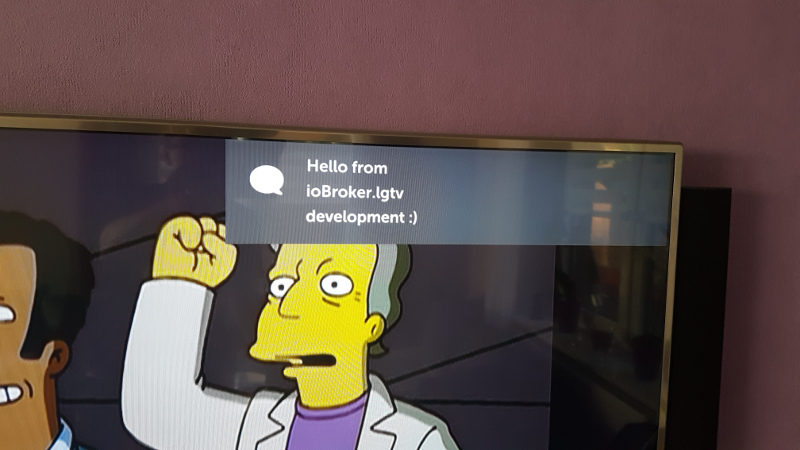
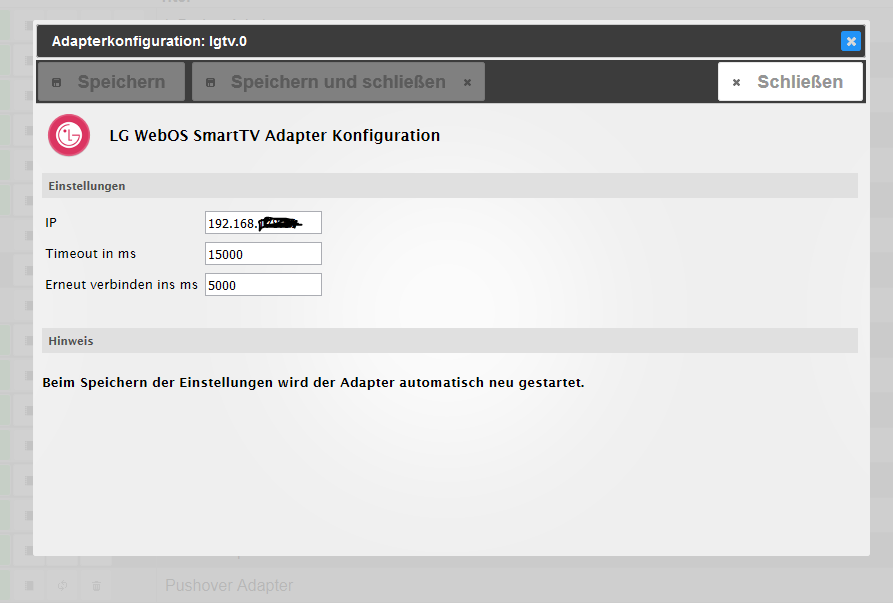

-
@michael_4358 was ist das für ein tv - evtl kann das jmd beantworten
-
OLED55C22LB
@michael_4358 ich denke - das waren die oleds, die das nicht mögen
-
OLED55C22LB
-
@michael_4358 ich denke - das waren die oleds, die das nicht mögen
Das habe ich befürchtet… werde mal ein Shelly dran hängen um den Verbrauch zu messen
-
Das habe ich befürchtet… werde mal ein Shelly dran hängen um den Verbrauch zu messen
@michael_4358
Aber warte mit der Messung noch mindestens 30 Minuten nach dem Ausschalten ab.
Mein LG geht ca. 20 Minuten nach Standby scheinbar noch in einen Schlafmodus und der Stromverbrauch geht dann nochmal um fast die Hälfte runter. -
Das habe ich befürchtet… werde mal ein Shelly dran hängen um den Verbrauch zu messen
@michael_4358 musst mal gucken, ob im Fernsehen auch Quick Start aktiviert ist. Das hat auch nochmal Auswirkung auf den Stromverbrauch.
-
@michael_4358 musst mal gucken, ob im Fernsehen auch Quick Start aktiviert ist. Das hat auch nochmal Auswirkung auf den Stromverbrauch.
kann ich das in den Einstellungen sehen❓gefunden.
klappt mit dem appel tv ohne wirklich Einbussen zuhaben❗️
-
Kann man die Lautstärke auch mittels Alexa steuern❓ hat das schon mal wer gemacht❓
-
@michael_4358
Aber warte mit der Messung noch mindestens 30 Minuten nach dem Ausschalten ab.
Mein LG geht ca. 20 Minuten nach Standby scheinbar noch in einen Schlafmodus und der Stromverbrauch geht dann nochmal um fast die Hälfte runter.Dieser Beitrag wurde gelöscht! -
Hallo Leute,
ich habe einen tolles neues TV, aber leider kann ich den LG WebOS Adapter nicht installieren. Da ich sonst keine Probleme mit dem IOBroker habe, liegt es wohl am Adapter. Mit Admin v6.3.5 und Node.js v16.15.0 und dazu passendem npm 8.5.5 lässt sich der Adapter nicht installieren. Folgende Fehlermeldung erscheint:
Installing SebastianSchultz/ioBroker.lgtv... (System call)
npm ERR! code 1
npm ERR! gyp info it worked if it ends with oknpm ERR! gyp info using node-gyp@8.4.1
npm ERR! gyp info using node@16.15.0 | linux | armnpm ERR! gyp ERR! find Python npm ERR! gyp ERR! find Python Python is not set from command line or npm configurationnpm ERR! gyp ERR! find Python Python is not set from environment variable PYTHONnpm ERR! gyp ERR! find Python checking if "python3" can be usednpm ERR! gyp ERR! find Python - executable path is "/usr/bin/python3"npm ERR! gyp ERR! find Python - version is "3.5.3"npm ERR! gyp ERR! find Python - version is 3.5.3 - should be >=3.6.0npm ERR! gyp ERR! find Python - THIS VERSION OF PYTHON IS NOT SUPPORTEDnpm ERR! gyp ERR! find Python checking if "python" can be usednpm ERR! gyp ERR! find Python - executable path is "/usr/bin/python"npm ERR! gyp ERR! find Python - version is "2.7.13"npm ERR! gyp ERR! find Python - version is 2.7.13 - should be >=3.6.0npm ERR! gyp ERR! find Python - THIS VERSION OF PYTHON IS NOT SUPPORTEDnpm ERR! gyp ERR! find Python npm ERR! gyp ERR! find Python **********************************************************npm ERR! gyp ERR! find Python You need to install the latest version of Python.npm ERR! gyp ERR! find Python Node-gyp should be able to find and use Python. If not,npm ERR! gyp ERR! find Python you can try one of the following options:npm ERR! gyp ERR! find Python - Use the switch --python="/path/to/pythonexecutable"npm ERR! gyp ERR! find Python (accepted by both node-gyp and npm)npm ERR! gyp ERR! find Python - Set the environment variable PYTHONnpm ERR! gyp ERR! find Python - Set the npm configuration variable python:npm ERR! gyp ERR! find Python npm config set python "/path/to/pythonexecutable"
npm ERR! A complete log of this run can be found in:
npm ERR! /home/iobroker/.npm/_logs/2022-12-15T14_38_49_292Z-debug-0.log
host.ioBroker-Tinker Cannot install SebastianSchultz/ioBroker.lgtv: 1
ERROR: Process exited with code 25
Sollte jemand eine Idee haben, bin ich für einen Hinweis dankbar!
Euch allen schöne Feiertage und Gruß aus der Eifel
Eugen
ioBroker auf Mac Mini und Raspi3 - CCU2 - Hue - Harmony - 2 Dot - 1 Echo - Sonos - Lightify
-
Hallo Leute,
ich habe einen tolles neues TV, aber leider kann ich den LG WebOS Adapter nicht installieren. Da ich sonst keine Probleme mit dem IOBroker habe, liegt es wohl am Adapter. Mit Admin v6.3.5 und Node.js v16.15.0 und dazu passendem npm 8.5.5 lässt sich der Adapter nicht installieren. Folgende Fehlermeldung erscheint:
Installing SebastianSchultz/ioBroker.lgtv... (System call)
npm ERR! code 1
npm ERR! gyp info it worked if it ends with oknpm ERR! gyp info using node-gyp@8.4.1
npm ERR! gyp info using node@16.15.0 | linux | armnpm ERR! gyp ERR! find Python npm ERR! gyp ERR! find Python Python is not set from command line or npm configurationnpm ERR! gyp ERR! find Python Python is not set from environment variable PYTHONnpm ERR! gyp ERR! find Python checking if "python3" can be usednpm ERR! gyp ERR! find Python - executable path is "/usr/bin/python3"npm ERR! gyp ERR! find Python - version is "3.5.3"npm ERR! gyp ERR! find Python - version is 3.5.3 - should be >=3.6.0npm ERR! gyp ERR! find Python - THIS VERSION OF PYTHON IS NOT SUPPORTEDnpm ERR! gyp ERR! find Python checking if "python" can be usednpm ERR! gyp ERR! find Python - executable path is "/usr/bin/python"npm ERR! gyp ERR! find Python - version is "2.7.13"npm ERR! gyp ERR! find Python - version is 2.7.13 - should be >=3.6.0npm ERR! gyp ERR! find Python - THIS VERSION OF PYTHON IS NOT SUPPORTEDnpm ERR! gyp ERR! find Python npm ERR! gyp ERR! find Python **********************************************************npm ERR! gyp ERR! find Python You need to install the latest version of Python.npm ERR! gyp ERR! find Python Node-gyp should be able to find and use Python. If not,npm ERR! gyp ERR! find Python you can try one of the following options:npm ERR! gyp ERR! find Python - Use the switch --python="/path/to/pythonexecutable"npm ERR! gyp ERR! find Python (accepted by both node-gyp and npm)npm ERR! gyp ERR! find Python - Set the environment variable PYTHONnpm ERR! gyp ERR! find Python - Set the npm configuration variable python:npm ERR! gyp ERR! find Python npm config set python "/path/to/pythonexecutable"
npm ERR! A complete log of this run can be found in:
npm ERR! /home/iobroker/.npm/_logs/2022-12-15T14_38_49_292Z-debug-0.log
host.ioBroker-Tinker Cannot install SebastianSchultz/ioBroker.lgtv: 1
ERROR: Process exited with code 25
Sollte jemand eine Idee haben, bin ich für einen Hinweis dankbar!
Euch allen schöne Feiertage und Gruß aus der Eifel
Eugen
@Eugene
sorry - hier stand dummes :-( -
Hallo Leute,
ich habe einen tolles neues TV, aber leider kann ich den LG WebOS Adapter nicht installieren. Da ich sonst keine Probleme mit dem IOBroker habe, liegt es wohl am Adapter. Mit Admin v6.3.5 und Node.js v16.15.0 und dazu passendem npm 8.5.5 lässt sich der Adapter nicht installieren. Folgende Fehlermeldung erscheint:
Installing SebastianSchultz/ioBroker.lgtv... (System call)
npm ERR! code 1
npm ERR! gyp info it worked if it ends with oknpm ERR! gyp info using node-gyp@8.4.1
npm ERR! gyp info using node@16.15.0 | linux | armnpm ERR! gyp ERR! find Python npm ERR! gyp ERR! find Python Python is not set from command line or npm configurationnpm ERR! gyp ERR! find Python Python is not set from environment variable PYTHONnpm ERR! gyp ERR! find Python checking if "python3" can be usednpm ERR! gyp ERR! find Python - executable path is "/usr/bin/python3"npm ERR! gyp ERR! find Python - version is "3.5.3"npm ERR! gyp ERR! find Python - version is 3.5.3 - should be >=3.6.0npm ERR! gyp ERR! find Python - THIS VERSION OF PYTHON IS NOT SUPPORTEDnpm ERR! gyp ERR! find Python checking if "python" can be usednpm ERR! gyp ERR! find Python - executable path is "/usr/bin/python"npm ERR! gyp ERR! find Python - version is "2.7.13"npm ERR! gyp ERR! find Python - version is 2.7.13 - should be >=3.6.0npm ERR! gyp ERR! find Python - THIS VERSION OF PYTHON IS NOT SUPPORTEDnpm ERR! gyp ERR! find Python npm ERR! gyp ERR! find Python **********************************************************npm ERR! gyp ERR! find Python You need to install the latest version of Python.npm ERR! gyp ERR! find Python Node-gyp should be able to find and use Python. If not,npm ERR! gyp ERR! find Python you can try one of the following options:npm ERR! gyp ERR! find Python - Use the switch --python="/path/to/pythonexecutable"npm ERR! gyp ERR! find Python (accepted by both node-gyp and npm)npm ERR! gyp ERR! find Python - Set the environment variable PYTHONnpm ERR! gyp ERR! find Python - Set the npm configuration variable python:npm ERR! gyp ERR! find Python npm config set python "/path/to/pythonexecutable"
npm ERR! A complete log of this run can be found in:
npm ERR! /home/iobroker/.npm/_logs/2022-12-15T14_38_49_292Z-debug-0.log
host.ioBroker-Tinker Cannot install SebastianSchultz/ioBroker.lgtv: 1
ERROR: Process exited with code 25
Sollte jemand eine Idee haben, bin ich für einen Hinweis dankbar!
Euch allen schöne Feiertage und Gruß aus der Eifel
Eugen
-
Hallo Leute,
ich habe einen tolles neues TV, aber leider kann ich den LG WebOS Adapter nicht installieren. Da ich sonst keine Probleme mit dem IOBroker habe, liegt es wohl am Adapter. Mit Admin v6.3.5 und Node.js v16.15.0 und dazu passendem npm 8.5.5 lässt sich der Adapter nicht installieren. Folgende Fehlermeldung erscheint:
Installing SebastianSchultz/ioBroker.lgtv... (System call)
npm ERR! code 1
npm ERR! gyp info it worked if it ends with oknpm ERR! gyp info using node-gyp@8.4.1
npm ERR! gyp info using node@16.15.0 | linux | armnpm ERR! gyp ERR! find Python npm ERR! gyp ERR! find Python Python is not set from command line or npm configurationnpm ERR! gyp ERR! find Python Python is not set from environment variable PYTHONnpm ERR! gyp ERR! find Python checking if "python3" can be usednpm ERR! gyp ERR! find Python - executable path is "/usr/bin/python3"npm ERR! gyp ERR! find Python - version is "3.5.3"npm ERR! gyp ERR! find Python - version is 3.5.3 - should be >=3.6.0npm ERR! gyp ERR! find Python - THIS VERSION OF PYTHON IS NOT SUPPORTEDnpm ERR! gyp ERR! find Python checking if "python" can be usednpm ERR! gyp ERR! find Python - executable path is "/usr/bin/python"npm ERR! gyp ERR! find Python - version is "2.7.13"npm ERR! gyp ERR! find Python - version is 2.7.13 - should be >=3.6.0npm ERR! gyp ERR! find Python - THIS VERSION OF PYTHON IS NOT SUPPORTEDnpm ERR! gyp ERR! find Python npm ERR! gyp ERR! find Python **********************************************************npm ERR! gyp ERR! find Python You need to install the latest version of Python.npm ERR! gyp ERR! find Python Node-gyp should be able to find and use Python. If not,npm ERR! gyp ERR! find Python you can try one of the following options:npm ERR! gyp ERR! find Python - Use the switch --python="/path/to/pythonexecutable"npm ERR! gyp ERR! find Python (accepted by both node-gyp and npm)npm ERR! gyp ERR! find Python - Set the environment variable PYTHONnpm ERR! gyp ERR! find Python - Set the npm configuration variable python:npm ERR! gyp ERR! find Python npm config set python "/path/to/pythonexecutable"
npm ERR! A complete log of this run can be found in:
npm ERR! /home/iobroker/.npm/_logs/2022-12-15T14_38_49_292Z-debug-0.log
host.ioBroker-Tinker Cannot install SebastianSchultz/ioBroker.lgtv: 1
ERROR: Process exited with code 25
Sollte jemand eine Idee haben, bin ich für einen Hinweis dankbar!
Euch allen schöne Feiertage und Gruß aus der Eifel
Eugen
@eugene sagte in lgtv Adapter zur Steuerung von LG WebOS SmartTVs:
version is 2.7.13 - should be >=3.6.0
Vermutlich ein veraltetes Betriebssystem. Aktuelles Zeuch kommt mit passenden Versionen daher.
-
@eugene also irgendwas ist mit deiner python version schief, hast du vlt. 2 und 3 gleichzeitig installiert? In dem bereicn solltest du mal suchen
-
@tofriedrich said in lgtv Adapter zur Steuerung von LG WebOS SmartTVs:
Guten Morgen, hat noch jemand das Problem keine Verbindung herstellen zu können? Ich habe mir einen LG C1 gegönnt. Nach Einrichtung habe ich direkt den Adapter installiert und die IP eingetragen. Auf dem TV kommt keine Anfrage die man akzeptieren kann. Ich würde den Adapter gerne nutzen.
Edit:
Über einen Umweg habe ich das Ganze ans laufen bekommen. Ich habe diese Version installiert:
https://github.com/SebastianSchultz/ioBroker.lgtv/tree/lgtv_test alles eingerichtet und ein Update auf die aktuelle Stable Version gemacht. Es wurde mehrfach eine Pairing-Anfrage geschickt. Im Moment läuft es. Vielleicht hilft das jemandem.Hallo,
danke für deine Editierung. Ich hatte das selbe Problem und mir hatte es sehr geholfen.
Wie oft kam so circa die pairing Anfrage bei dir?
Grüße M20
-
@maschine20 Moin, sory für die Noob-Frage, aber wie genau hast Du das installiert? Ich kenne nur die Möglichkeit, aus dem Repo zu installieren. Danke
@dado Hi, ich habe aus dem git https://github.com/SebastianSchultz/ioBroker.lgtv/tree/lgtv_test den link kopiert und dann im Expertenmodus den Adapter aus der github Quelle installiert.
Unter dem Button Code kann man den link kopieren für den Adapter.
-
@dado Hi, ich habe aus dem git https://github.com/SebastianSchultz/ioBroker.lgtv/tree/lgtv_test den link kopiert und dann im Expertenmodus den Adapter aus der github Quelle installiert.
Unter dem Button Code kann man den link kopieren für den Adapter.
Seit heute habe ich ein Update für meinen LG OLED55G29LA bekommen. Seitdem verbindet sich der Adapter nicht mehr mit dem Fernseher und ich habe beim Neustarten des Adapters:
2023-01-25 13:10:38.212 - info: host.iobroker stopInstance system.adapter.lgtv.0 (force=false, process=true)
2023-01-25 13:10:38.215 - info: lgtv.0 (14518) Got terminate signal TERMINATE_YOURSELF
2023-01-25 13:10:38.217 - info: lgtv.0 (14518) terminating
2023-01-25 13:10:38.218 - info: lgtv.0 (14518) Terminated (ADAPTER_REQUESTED_TERMINATION): Without reason
2023-01-25 13:10:38.257 - info: host.iobroker stopInstance system.adapter.lgtv.0 send kill signal
2023-01-25 13:10:38.772 - info: host.iobroker instance system.adapter.lgtv.0 terminated with code 11 (ADAPTER_REQUESTED_TERMINATION)
2023-01-25 13:10:41.269 - info: host.iobroker instance system.adapter.lgtv.0 started with pid 15224
2023-01-25 13:10:41.815 - info: lgtv.0 (15224) starting. Version 1.1.10 in /opt/iobroker/node_modules/iobroker.lgtv, node: v16.19.0, js-controller: 4.0.24
2023-01-25 13:10:41.825 - info: lgtv.0 (15224) Ready. Configured WebOS TV IP: 192.168.0.80Weiß jemand woran das liegt?
Gruß Stefan
-
Adapter verbindet sich mit meinem CS9 seit Firmware 03.30.16 nicht mehr:
lgtv.0 2023-01-27 22:37:11.349 debug Error on connecting or sending command to WebOS TV: Error: socket hang up lgtv.0 2023-01-27 22:37:11.340 debug Connecting to WebOS TV: ws://192.168.XX.XX:3000 lgtv.0 2023-01-27 22:37:11.298 debug TV is off lgtv.0 2023-01-27 22:37:06.338 debug Error on connecting or sending command to WebOS TV: Error: read ECONNRESET lgtv.0 2023-01-27 22:37:06.325 debug Connecting to WebOS TV: ws://192.168.XX.XX:3000 lgtv.0 2023-01-27 22:37:01.323 debug Error on connecting or sending command to WebOS TV: Error: socket hang up lgtv.0 2023-01-27 22:37:01.293 debug Connecting to WebOS TV: ws://192.168.XX.XX:3000 -
Adapter verbindet sich mit meinem CS9 seit Firmware 03.30.16 nicht mehr:
lgtv.0 2023-01-27 22:37:11.349 debug Error on connecting or sending command to WebOS TV: Error: socket hang up lgtv.0 2023-01-27 22:37:11.340 debug Connecting to WebOS TV: ws://192.168.XX.XX:3000 lgtv.0 2023-01-27 22:37:11.298 debug TV is off lgtv.0 2023-01-27 22:37:06.338 debug Error on connecting or sending command to WebOS TV: Error: read ECONNRESET lgtv.0 2023-01-27 22:37:06.325 debug Connecting to WebOS TV: ws://192.168.XX.XX:3000 lgtv.0 2023-01-27 22:37:01.323 debug Error on connecting or sending command to WebOS TV: Error: socket hang up lgtv.0 2023-01-27 22:37:01.293 debug Connecting to WebOS TV: ws://192.168.XX.XX:3000Ist eine Verbindungsanfrage am TV gekommen?





Hey! Du scheinst an dieser Unterhaltung interessiert zu sein, hast aber noch kein Konto.
Hast du es satt, bei jedem Besuch durch die gleichen Beiträge zu scrollen? Wenn du dich für ein Konto anmeldest, kommst du immer genau dorthin zurück, wo du zuvor warst, und kannst dich über neue Antworten benachrichtigen lassen (entweder per E-Mail oder Push-Benachrichtigung). Du kannst auch Lesezeichen speichern und Beiträge positiv bewerten, um anderen Community-Mitgliedern deine Wertschätzung zu zeigen.
Mit deinem Input könnte dieser Beitrag noch besser werden 💗
Registrieren AnmeldenSupport us
496
Online33.0k
Benutzer83.6k
Themen1.3m
Beiträge