



Skip to content
  • Home
  • Aktuell
  • Tags
  • 0 Ungelesen 0
  • Kategorien
  • Unreplied
  • Beliebt
  • GitHub
  • Docu
  • Hilfe
Skins
  • Light
  • Brite
  • Cerulean
  • Cosmo
  • Flatly
  • Journal
  • Litera
  • Lumen
  • Lux
  • Materia
  • Minty
  • Morph
  • Pulse
  • Sandstone
  • Simplex
  • Sketchy
  • Spacelab
  • United
  • Yeti
  • Zephyr
  • Dark
  • Cyborg
  • Darkly
  • Quartz
  • Slate
  • Solar
  • Superhero
  • Vapor

  • Standard: (Kein Skin)
  • Kein Skin
Einklappen
ioBroker Logo

Community Forum

donate donate
  1. ioBroker Community Home
  2. Deutsch
  3. Off Topic
  4. [done] pihole update. pfade stimmen nicht, proxmox update

NEWS

  • UPDATE 31.10.: Amazon Alexa - ioBroker Skill läuft aus ?
    apollon77A
    apollon77
    48
    3
    8.8k

  • Monatsrückblick – September 2025
    BluefoxB
    Bluefox
    13
    1
    2.2k

  • Neues Video "KI im Smart Home" - ioBroker plus n8n
    BluefoxB
    Bluefox
    16
    1
    3.2k

[done] pihole update. pfade stimmen nicht, proxmox update

Geplant Angeheftet Gesperrt Verschoben Off Topic
pihole iobroker proxmox
60 Beiträge 7 Kommentatoren 5.6k Aufrufe 5 Watching
  • Älteste zuerst
  • Neuste zuerst
  • Meiste Stimmen
Antworten
  • In einem neuen Thema antworten
Anmelden zum Antworten
Dieses Thema wurde gelöscht. Nur Nutzer mit entsprechenden Rechten können es sehen.
  • da_WoodyD da_Woody

    @crunchip nope. das ist noch immer der i5 von anfang an... :dizzy_face:
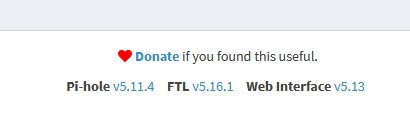
    k, pihole hab ich mal erledigt mit deiner liste! :)
    240f8fbe-7753-4a55-9c89-fba2d15c1be0-grafik.png

    crunchipC Abwesend
    crunchipC Abwesend
    crunchip
    Forum Testing Most Active
    schrieb am zuletzt editiert von crunchip
    #12

    @da_woody dann pass die IP an, unter

    /etc/issue
    

    danach sollte die Ausgabe auf deinem Bildschirm auch wieder stimmen

    bzw hast du zwei nics? zeig mal die Ausgabe von /etc/network/interfaces

    umgestiegen von Proxmox auf Unraid

    da_WoodyD 1 Antwort Letzte Antwort
    0
    • crunchipC crunchip

      @da_woody dann pass die IP an, unter

      /etc/issue
      

      danach sollte die Ausgabe auf deinem Bildschirm auch wieder stimmen

      bzw hast du zwei nics? zeig mal die Ausgabe von /etc/network/interfaces

      da_WoodyD Online
      da_WoodyD Online
      da_Woody
      schrieb am zuletzt editiert von
      #13

      @crunchip sorry, musste mal weg. nachbar ist heute früh gestorben...

      # network interface settings; autogenerated
      # Please do NOT modify this file directly, unless you know what
      # you're doing.
      #
      # If you want to manage parts of the network configuration manually,
      # please utilize the 'source' or 'source-directory' directives to do
      # so.
      # PVE will preserve these directives, but will NOT read its network
      # configuration from sourced files, so do not attempt to move any of
      # the PVE managed interfaces into external files!
      
      auto lo
      iface lo inet loopback
      
      iface eno1 inet manual
      
      auto vmbr0
      iface vmbr0 inet static
              address 192.168.0.254/21
              gateway 192.168.0.1
              bridge-ports eno1
              bridge-stp off
              bridge-fd 0



      musste mich aber händisch dort hinhangeln... bei den anderen dingens bekomm ich

      root@Homeserver:/etc/network# /etc/network/interfaces
      -bash: /etc/network/interfaces: Permission denied
      root@Homeserver:/etc/network# /etc/issue
      -bash: /etc/issue: Permission denied
      root@Homeserver:/etc/network#


      gruß vom Woody
      HAPPINESS is not a DESTINATION, it's a WAY of LIFE!

      crunchipC 1 Antwort Letzte Antwort
      0
      • da_WoodyD da_Woody

        @crunchip sorry, musste mal weg. nachbar ist heute früh gestorben...

        # network interface settings; autogenerated
        # Please do NOT modify this file directly, unless you know what
        # you're doing.
        #
        # If you want to manage parts of the network configuration manually,
        # please utilize the 'source' or 'source-directory' directives to do
        # so.
        # PVE will preserve these directives, but will NOT read its network
        # configuration from sourced files, so do not attempt to move any of
        # the PVE managed interfaces into external files!
        
        auto lo
        iface lo inet loopback
        
        iface eno1 inet manual
        
        auto vmbr0
        iface vmbr0 inet static
                address 192.168.0.254/21
                gateway 192.168.0.1
                bridge-ports eno1
                bridge-stp off
                bridge-fd 0


        musste mich aber händisch dort hinhangeln... bei den anderen dingens bekomm ich

        root@Homeserver:/etc/network# /etc/network/interfaces
        -bash: /etc/network/interfaces: Permission denied
        root@Homeserver:/etc/network# /etc/issue
        -bash: /etc/issue: Permission denied
        root@Homeserver:/etc/network#
        
        
        crunchipC Abwesend
        crunchipC Abwesend
        crunchip
        Forum Testing Most Active
        schrieb am zuletzt editiert von crunchip
        #14

        @da_woody sagte in pihole update. pfade stimmen nicht... proxmox update...:

        musste mich aber händisch dort hinhangeln

        Hä warum, einfach auf dem Host eingeben

        cat /etc/network/interfaces
        Aber passt schon so, die IP ist die

        192.168.0.254

        Und das andere mit nano bearbeiten
        nano /etc/issue

        Und dort die richtige ip eintragen, das ändert dann die Eingabemaske wie oben in deinem Screen zu sehen.

        Das muss man z.b. anpassen, bei einem Serverumzug, wenn eine neue IP vergeben wird, deshalb fragte ich.
        Weshalb das bei dir allerdings nicht übereinstimmt, wundert mich.

        Ps, oder hattest du nach dem Einrichten nachträglich die Ip geändert?

        umgestiegen von Proxmox auf Unraid

        da_WoodyD 1 Antwort Letzte Antwort
        0
        • crunchipC crunchip

          @da_woody sagte in pihole update. pfade stimmen nicht... proxmox update...:

          musste mich aber händisch dort hinhangeln

          Hä warum, einfach auf dem Host eingeben

          cat /etc/network/interfaces
          Aber passt schon so, die IP ist die

          192.168.0.254

          Und das andere mit nano bearbeiten
          nano /etc/issue

          Und dort die richtige ip eintragen, das ändert dann die Eingabemaske wie oben in deinem Screen zu sehen.

          Das muss man z.b. anpassen, bei einem Serverumzug, wenn eine neue IP vergeben wird, deshalb fragte ich.
          Weshalb das bei dir allerdings nicht übereinstimmt, wundert mich.

          Ps, oder hattest du nach dem Einrichten nachträglich die Ip geändert?

          da_WoodyD Online
          da_WoodyD Online
          da_Woody
          schrieb am zuletzt editiert von
          #15

          @crunchip :flushed: als linux nulpe...
          cat war mir nicht bewusst. mit nano hab ich nach dem hinholpern das ja rauskopiert.

          Ps, oder hattest du nach dem Einrichten nachträglich die Ip geändert?

          hüstel. die kiste hat mir damals ein "freund" eingerichtet. wie auch das LAN umgeschnitzt. alles was ich jetzt, teilweise kann, hab ich mir dann selbst beigebracht. klar, da wurde die IP auf 192.168.0.254 geändert. steht ja auch in der datei so drinnen. warum sich die kiste so meldet?
          ich muss auch nach einem reboot jedesmal

          ethtool -K eno1 gso off gro off tso off tx off rx off 
          

          eingeben. sonst gibts probleme. hab ich mal im proxmox forum gefunden. das seh ich nur auf dem überflüssigen monitor, der hal am homeserver angestoppelt ist.
          btw: hab inzwischen auch die VM mit influx/grafana/tasmoadmin hoch gezogen... :)

          gruß vom Woody
          HAPPINESS is not a DESTINATION, it's a WAY of LIFE!

          crunchipC 1 Antwort Letzte Antwort
          0
          • da_WoodyD da_Woody

            @crunchip :flushed: als linux nulpe...
            cat war mir nicht bewusst. mit nano hab ich nach dem hinholpern das ja rauskopiert.

            Ps, oder hattest du nach dem Einrichten nachträglich die Ip geändert?

            hüstel. die kiste hat mir damals ein "freund" eingerichtet. wie auch das LAN umgeschnitzt. alles was ich jetzt, teilweise kann, hab ich mir dann selbst beigebracht. klar, da wurde die IP auf 192.168.0.254 geändert. steht ja auch in der datei so drinnen. warum sich die kiste so meldet?
            ich muss auch nach einem reboot jedesmal

            ethtool -K eno1 gso off gro off tso off tx off rx off 
            

            eingeben. sonst gibts probleme. hab ich mal im proxmox forum gefunden. das seh ich nur auf dem überflüssigen monitor, der hal am homeserver angestoppelt ist.
            btw: hab inzwischen auch die VM mit influx/grafana/tasmoadmin hoch gezogen... :)

            crunchipC Abwesend
            crunchipC Abwesend
            crunchip
            Forum Testing Most Active
            schrieb am zuletzt editiert von
            #16

            @da_woody sagte in pihole update. pfade stimmen nicht... proxmox update...:

            warum sich die kiste so meldet

            Hast de es denn nu angepasst?

            umgestiegen von Proxmox auf Unraid

            da_WoodyD 1 Antwort Letzte Antwort
            0
            • crunchipC crunchip

              @da_woody sagte in pihole update. pfade stimmen nicht... proxmox update...:

              warum sich die kiste so meldet

              Hast de es denn nu angepasst?

              da_WoodyD Online
              da_WoodyD Online
              da_Woody
              schrieb am zuletzt editiert von
              #17

              @crunchip was soll ich anpassen? steht ja die richtige drinnen.

              auto lo
              iface lo inet loopback
              
              iface eno1 inet manual
              
              auto vmbr0
              iface vmbr0 inet static
                      address 192.168.0.254/21
                      gateway 192.168.0.1
                      bridge-ports eno1
                      bridge-stp off
                      bridge-fd 0
              

              5221118d-b263-4033-aa5c-cf93bea0ac80-grafik.png
              das ist ja mein problem, keine ahnung, wo die andere IP her kommt. 192.168.1.35 gibts in meinem router nicht.

              gruß vom Woody
              HAPPINESS is not a DESTINATION, it's a WAY of LIFE!

              crunchipC 1 Antwort Letzte Antwort
              0
              • da_WoodyD da_Woody

                @crunchip was soll ich anpassen? steht ja die richtige drinnen.

                auto lo
                iface lo inet loopback
                
                iface eno1 inet manual
                
                auto vmbr0
                iface vmbr0 inet static
                        address 192.168.0.254/21
                        gateway 192.168.0.1
                        bridge-ports eno1
                        bridge-stp off
                        bridge-fd 0
                

                5221118d-b263-4033-aa5c-cf93bea0ac80-grafik.png
                das ist ja mein problem, keine ahnung, wo die andere IP her kommt. 192.168.1.35 gibts in meinem router nicht.

                crunchipC Abwesend
                crunchipC Abwesend
                crunchip
                Forum Testing Most Active
                schrieb am zuletzt editiert von
                #18

                @da_woody sagte in pihole update. pfade stimmen nicht... proxmox update...:

                was soll ich anpassen?

                @crunchip sagte in pihole update. pfade stimmen nicht... proxmox update...:

                nano /etc/issue
                Und dort die richtige

                Hab ich dir doch erklärt, beim einrichten, war es die
                192.168.1.35, deshalb steht die auch in der Eingabemaske.
                Wenn du nun die statische Ip änderst, bleibt die Anzeige unverändert, wie in deinem Fall, deshalb musst du /etc/issue manuell anpassen und dort die richtige eintragen.

                umgestiegen von Proxmox auf Unraid

                da_WoodyD 1 Antwort Letzte Antwort
                0
                • crunchipC crunchip

                  @da_woody sagte in pihole update. pfade stimmen nicht... proxmox update...:

                  was soll ich anpassen?

                  @crunchip sagte in pihole update. pfade stimmen nicht... proxmox update...:

                  nano /etc/issue
                  Und dort die richtige

                  Hab ich dir doch erklärt, beim einrichten, war es die
                  192.168.1.35, deshalb steht die auch in der Eingabemaske.
                  Wenn du nun die statische Ip änderst, bleibt die Anzeige unverändert, wie in deinem Fall, deshalb musst du /etc/issue manuell anpassen und dort die richtige eintragen.

                  da_WoodyD Online
                  da_WoodyD Online
                  da_Woody
                  schrieb am zuletzt editiert von
                  #19

                  @crunchip hmpf. 2x jetzt nano /etc/issue geändert. nach nem neustart kommt wieder die 1.35
                  bin ich wirklich so dämlich? :face_with_head_bandage:

                  gruß vom Woody
                  HAPPINESS is not a DESTINATION, it's a WAY of LIFE!

                  crunchipC 1 Antwort Letzte Antwort
                  0
                  • da_WoodyD da_Woody

                    @crunchip hmpf. 2x jetzt nano /etc/issue geändert. nach nem neustart kommt wieder die 1.35
                    bin ich wirklich so dämlich? :face_with_head_bandage:

                    crunchipC Abwesend
                    crunchipC Abwesend
                    crunchip
                    Forum Testing Most Active
                    schrieb am zuletzt editiert von
                    #20

                    @da_woody schnell mal nachgelesen, das ist nicht persistent, da muss ebenfalls /etc/hosts angepasst werden, sonst wir es immer wieder überschrieben.

                    umgestiegen von Proxmox auf Unraid

                    da_WoodyD 2 Antworten Letzte Antwort
                    1
                    • crunchipC crunchip

                      @da_woody schnell mal nachgelesen, das ist nicht persistent, da muss ebenfalls /etc/hosts angepasst werden, sonst wir es immer wieder überschrieben.

                      da_WoodyD Online
                      da_WoodyD Online
                      da_Woody
                      schrieb am zuletzt editiert von
                      #21

                      @crunchip thnx! schau ich mir nach der F1 an... ;)

                      gruß vom Woody
                      HAPPINESS is not a DESTINATION, it's a WAY of LIFE!

                      crunchipC 1 Antwort Letzte Antwort
                      0
                      • da_WoodyD da_Woody

                        @crunchip thnx! schau ich mir nach der F1 an... ;)

                        crunchipC Abwesend
                        crunchipC Abwesend
                        crunchip
                        Forum Testing Most Active
                        schrieb am zuletzt editiert von
                        #22

                        @da_woody bzw schau mal https://www.bachmann-lan.de/proxmox-login-banner-aendern/

                        umgestiegen von Proxmox auf Unraid

                        1 Antwort Letzte Antwort
                        1
                        • crunchipC crunchip

                          @da_woody schnell mal nachgelesen, das ist nicht persistent, da muss ebenfalls /etc/hosts angepasst werden, sonst wir es immer wieder überschrieben.

                          da_WoodyD Online
                          da_WoodyD Online
                          da_Woody
                          schrieb am zuletzt editiert von
                          #23

                          @crunchip werkstatt büro, F1, yellow flag... yeah, geklappt. :)

                          root@Homeserver:~#  pve6to7 --full
                          = CHECKING VERSION INFORMATION FOR PVE PACKAGES =
                          
                          Checking for package updates..
                          WARN: updates for the following packages are available:
                            pve-kernel-5.4, pve-kernel-5.4.195-1-pve, pve-kernel-helper
                          
                          Checking proxmox-ve package version..
                          PASS: proxmox-ve package has version >= 6.4-1
                          
                          Checking running kernel version..
                          PASS: expected running kernel '5.4.189-2-pve'.
                          
                          = CHECKING CLUSTER HEALTH/SETTINGS =
                          
                          SKIP: standalone node.
                          
                          = CHECKING HYPER-CONVERGED CEPH STATUS =
                          
                          SKIP: no hyper-converged ceph setup detected!
                          
                          = CHECKING CONFIGURED STORAGES =
                          
                          PASS: storage 'local' enabled and active.
                          PASS: storage 'local-lvm' enabled and active.
                          PASS: storage 'proxmoxbackup' enabled and active.
                          
                          = MISCELLANEOUS CHECKS =
                          
                          INFO: Checking common daemon services..
                          PASS: systemd unit 'pveproxy.service' is in state 'active'
                          PASS: systemd unit 'pvedaemon.service' is in state 'active'
                          PASS: systemd unit 'pvestatd.service' is in state 'active'
                          INFO: Checking for running guests..
                          WARN: 4 running guest(s) detected - consider migrating or stopping them.
                          INFO: Checking if the local node's hostname 'Homeserver' is resolvable..
                          INFO: Checking if resolved IP is configured on local node..
                          PASS: Resolved node IP '192.168.0.254' configured and active on single interface.
                          INFO: Checking backup retention settings..
                          PASS: no problems found.
                          INFO: checking CIFS credential location..
                          PASS: no CIFS credentials at outdated location found.
                          INFO: Checking custom roles for pool permissions..
                          INFO: Checking node and guest description/note legnth..
                          PASS: All node config descriptions fit in the new limit of 64 KiB
                          PASS: All guest config descriptions fit in the new limit of 8 KiB
                          INFO: Checking container configs for deprecated lxc.cgroup entries
                          PASS: No legacy 'lxc.cgroup' keys found.
                          INFO: Checking storage content type configuration..
                          PASS: no problems found
                          INFO: Checking if the suite for the Debian security repository is correct..
                          INFO: Make sure to change the suite of the Debian security repository from 'buster/updates' to 'bullseye-security' - in /etc/apt/sources.list:9
                          SKIP: No containers on node detected.
                          
                          = SUMMARY =
                          
                          TOTAL:    20
                          PASSED:   15
                          SKIPPED:  3
                          WARNINGS: 2
                          FAILURES: 0
                          
                          ATTENTION: Please check the output for detailed information!
                          root@Homeserver:~#


                          gruß vom Woody
                          HAPPINESS is not a DESTINATION, it's a WAY of LIFE!

                          crunchipC 1 Antwort Letzte Antwort
                          0
                          • da_WoodyD da_Woody

                            @crunchip werkstatt büro, F1, yellow flag... yeah, geklappt. :)

                            root@Homeserver:~#  pve6to7 --full
                            = CHECKING VERSION INFORMATION FOR PVE PACKAGES =
                            
                            Checking for package updates..
                            WARN: updates for the following packages are available:
                              pve-kernel-5.4, pve-kernel-5.4.195-1-pve, pve-kernel-helper
                            
                            Checking proxmox-ve package version..
                            PASS: proxmox-ve package has version >= 6.4-1
                            
                            Checking running kernel version..
                            PASS: expected running kernel '5.4.189-2-pve'.
                            
                            = CHECKING CLUSTER HEALTH/SETTINGS =
                            
                            SKIP: standalone node.
                            
                            = CHECKING HYPER-CONVERGED CEPH STATUS =
                            
                            SKIP: no hyper-converged ceph setup detected!
                            
                            = CHECKING CONFIGURED STORAGES =
                            
                            PASS: storage 'local' enabled and active.
                            PASS: storage 'local-lvm' enabled and active.
                            PASS: storage 'proxmoxbackup' enabled and active.
                            
                            = MISCELLANEOUS CHECKS =
                            
                            INFO: Checking common daemon services..
                            PASS: systemd unit 'pveproxy.service' is in state 'active'
                            PASS: systemd unit 'pvedaemon.service' is in state 'active'
                            PASS: systemd unit 'pvestatd.service' is in state 'active'
                            INFO: Checking for running guests..
                            WARN: 4 running guest(s) detected - consider migrating or stopping them.
                            INFO: Checking if the local node's hostname 'Homeserver' is resolvable..
                            INFO: Checking if resolved IP is configured on local node..
                            PASS: Resolved node IP '192.168.0.254' configured and active on single interface.
                            INFO: Checking backup retention settings..
                            PASS: no problems found.
                            INFO: checking CIFS credential location..
                            PASS: no CIFS credentials at outdated location found.
                            INFO: Checking custom roles for pool permissions..
                            INFO: Checking node and guest description/note legnth..
                            PASS: All node config descriptions fit in the new limit of 64 KiB
                            PASS: All guest config descriptions fit in the new limit of 8 KiB
                            INFO: Checking container configs for deprecated lxc.cgroup entries
                            PASS: No legacy 'lxc.cgroup' keys found.
                            INFO: Checking storage content type configuration..
                            PASS: no problems found
                            INFO: Checking if the suite for the Debian security repository is correct..
                            INFO: Make sure to change the suite of the Debian security repository from 'buster/updates' to 'bullseye-security' - in /etc/apt/sources.list:9
                            SKIP: No containers on node detected.
                            
                            = SUMMARY =
                            
                            TOTAL:    20
                            PASSED:   15
                            SKIPPED:  3
                            WARNINGS: 2
                            FAILURES: 0
                            
                            ATTENTION: Please check the output for detailed information!
                            root@Homeserver:~#
                            
                            
                            crunchipC Abwesend
                            crunchipC Abwesend
                            crunchip
                            Forum Testing Most Active
                            schrieb am zuletzt editiert von
                            #24

                            @da_woody na also, dann steht dem upgrade ja nix mehr im Wege

                            umgestiegen von Proxmox auf Unraid

                            da_WoodyD 1 Antwort Letzte Antwort
                            0
                            • crunchipC crunchip

                              @da_woody na also, dann steht dem upgrade ja nix mehr im Wege

                              da_WoodyD Online
                              da_WoodyD Online
                              da_Woody
                              schrieb am zuletzt editiert von da_Woody
                              #25

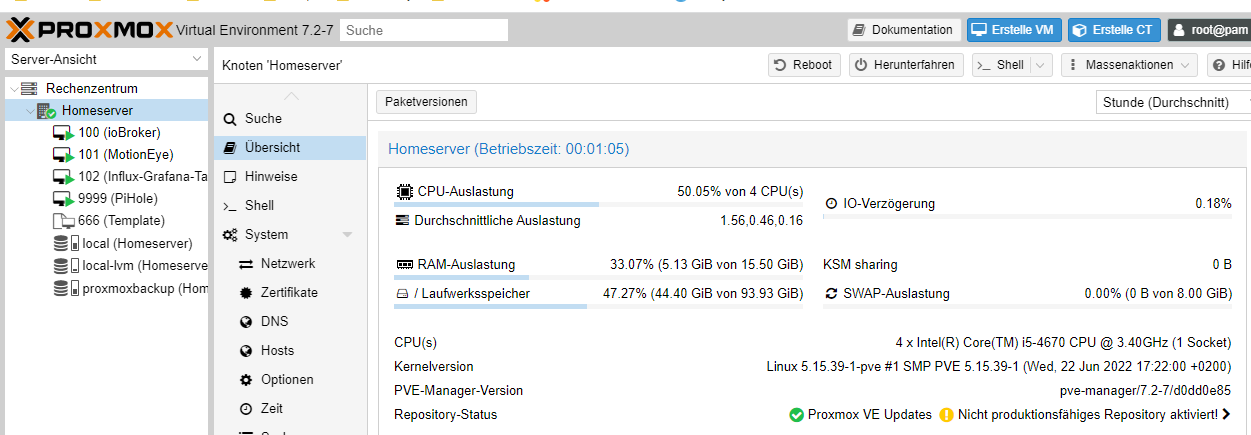
                              @crunchip püh, mühsam nähert sich der eichhorn... ;)
                              28aa329a-9ce7-4758-9d36-0615f191b792-grafik.png
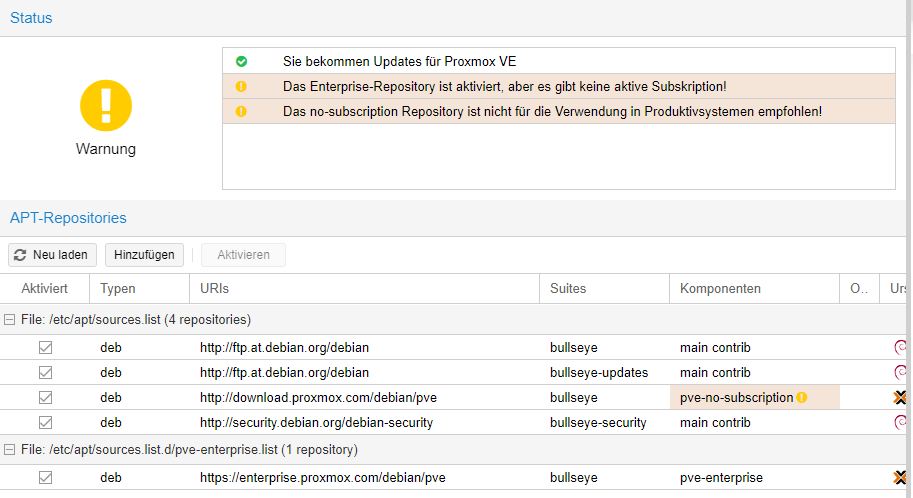
                              irgend nen schwachsinn muss ich doch verbrochen haben...
                              51190aeb-7447-4138-b0ac-9c6e14e9eaa3-grafik.png
                              denk mal, die unterste zeile wegklicken...
                              ah, zeile 3 und 5...
                              hmpf, geht nicht in proxmox...

                              gruß vom Woody
                              HAPPINESS is not a DESTINATION, it's a WAY of LIFE!

                              crunchipC Meister MopperM 2 Antworten Letzte Antwort
                              0
                              • da_WoodyD da_Woody

                                @crunchip püh, mühsam nähert sich der eichhorn... ;)
                                28aa329a-9ce7-4758-9d36-0615f191b792-grafik.png
                                irgend nen schwachsinn muss ich doch verbrochen haben...
                                51190aeb-7447-4138-b0ac-9c6e14e9eaa3-grafik.png
                                denk mal, die unterste zeile wegklicken...
                                ah, zeile 3 und 5...
                                hmpf, geht nicht in proxmox...

                                crunchipC Abwesend
                                crunchipC Abwesend
                                crunchip
                                Forum Testing Most Active
                                schrieb am zuletzt editiert von crunchip
                                #26

                                @da_woody sagte in pihole update. pfade stimmen nicht... proxmox update...:

                                denk mal, die unterste zeile wegklicken...

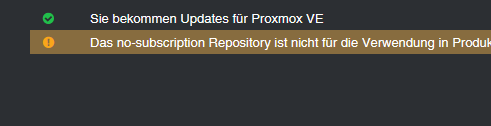
                                ja den Haken entfernen bei enterprise list, die ober 4 müssen aktiv bleiben
                                was zurück bleibt ist die Meldung
                                75259794-99b9-4828-85d7-328cc9a380ef-image.png
                                weil du proxmox ja umsonst nutzt

                                früher musste man das per shell erledigen, mittlerweile bequem per Gui

                                umgestiegen von Proxmox auf Unraid

                                da_WoodyD 1 Antwort Letzte Antwort
                                0
                                • crunchipC crunchip

                                  @da_woody sagte in pihole update. pfade stimmen nicht... proxmox update...:

                                  denk mal, die unterste zeile wegklicken...

                                  ja den Haken entfernen bei enterprise list, die ober 4 müssen aktiv bleiben
                                  was zurück bleibt ist die Meldung
                                  75259794-99b9-4828-85d7-328cc9a380ef-image.png
                                  weil du proxmox ja umsonst nutzt

                                  früher musste man das per shell erledigen, mittlerweile bequem per Gui

                                  da_WoodyD Online
                                  da_WoodyD Online
                                  da_Woody
                                  schrieb am zuletzt editiert von
                                  #27

                                  @crunchip siehe letzte zeile. lässt sich nicht wegklicken... hrnz, mit doppelklick kommt deaktivieren. ich werd wirklich alt... :D
                                  und das no subscription bekommt man temporär auch weg. irgendwo hab ich das mal gefunden. muss man nur nach jedem update neu machen. ob das mit 7.x auch noch funzt, k.a. ist aber egal.
                                  schankedön für die geduld und hilfe! :call_me_hand:

                                  gruß vom Woody
                                  HAPPINESS is not a DESTINATION, it's a WAY of LIFE!

                                  crunchipC 1 Antwort Letzte Antwort
                                  0
                                  • da_WoodyD da_Woody

                                    @crunchip siehe letzte zeile. lässt sich nicht wegklicken... hrnz, mit doppelklick kommt deaktivieren. ich werd wirklich alt... :D
                                    und das no subscription bekommt man temporär auch weg. irgendwo hab ich das mal gefunden. muss man nur nach jedem update neu machen. ob das mit 7.x auch noch funzt, k.a. ist aber egal.
                                    schankedön für die geduld und hilfe! :call_me_hand:

                                    crunchipC Abwesend
                                    crunchipC Abwesend
                                    crunchip
                                    Forum Testing Most Active
                                    schrieb am zuletzt editiert von crunchip
                                    #28

                                    @da_woody sagte in [done] pihole update. pfade stimmen nicht, proxmox update:

                                    irgendwo hab ich das mal gefunden.

                                    https://www.antary.de/2022/05/03/proxmox-meldung-no-valid-subscription-entfernen/#:~:text=Voraussetzung dazu ist der Zugriff,Proxmox VE 7.0 und höher.&text=Anschließend könnt ihr euch ausloggen,Anmeldung ist der Hinweis verschwunden.

                                    sed -i.backup -z "s/res === null || res === undefined || \!res || res\n\t\t\t.data.status.toLowerCase() \!== 'active'/false/g" /usr/share/javascript/proxmox-widget-toolkit/proxmoxlib.js && systemctl restart pveproxy.service
                                    

                                    umgestiegen von Proxmox auf Unraid

                                    da_WoodyD 1 Antwort Letzte Antwort
                                    1
                                    • crunchipC crunchip

                                      @da_woody sagte in [done] pihole update. pfade stimmen nicht, proxmox update:

                                      irgendwo hab ich das mal gefunden.

                                      https://www.antary.de/2022/05/03/proxmox-meldung-no-valid-subscription-entfernen/#:~:text=Voraussetzung dazu ist der Zugriff,Proxmox VE 7.0 und höher.&text=Anschließend könnt ihr euch ausloggen,Anmeldung ist der Hinweis verschwunden.

                                      sed -i.backup -z "s/res === null || res === undefined || \!res || res\n\t\t\t.data.status.toLowerCase() \!== 'active'/false/g" /usr/share/javascript/proxmox-widget-toolkit/proxmoxlib.js && systemctl restart pveproxy.service
                                      
                                      da_WoodyD Online
                                      da_WoodyD Online
                                      da_Woody
                                      schrieb am zuletzt editiert von
                                      #29

                                      @crunchip danke! ein klick weniger.
                                      ich gebs ja zu, bekennend fauler hund... :dog:

                                      gruß vom Woody
                                      HAPPINESS is not a DESTINATION, it's a WAY of LIFE!

                                      crunchipC 1 Antwort Letzte Antwort
                                      0
                                      • da_WoodyD da_Woody

                                        @crunchip danke! ein klick weniger.
                                        ich gebs ja zu, bekennend fauler hund... :dog:

                                        crunchipC Abwesend
                                        crunchipC Abwesend
                                        crunchip
                                        Forum Testing Most Active
                                        schrieb am zuletzt editiert von
                                        #30

                                        @da_woody mich stört das nicht, denn so oft ruf ich Proxmox auch nicht auf. Da gibt's schlimmeres, wie z.b. diese sche... cookie Meldungen😂


                                        umgestiegen von Proxmox auf Unraid

                                        da_WoodyD 1 Antwort Letzte Antwort
                                        0
                                        • crunchipC crunchip

                                          @da_woody mich stört das nicht, denn so oft ruf ich Proxmox auch nicht auf. Da gibt's schlimmeres, wie z.b. diese sche... cookie Meldungen😂

                                          da_WoodyD Online
                                          da_WoodyD Online
                                          da_Woody
                                          schrieb am zuletzt editiert von
                                          #31

                                          @crunchip auch wieder wahr... :)

                                          gruß vom Woody
                                          HAPPINESS is not a DESTINATION, it's a WAY of LIFE!

                                          M 1 Antwort Letzte Antwort
                                          0
                                          Antworten
                                          • In einem neuen Thema antworten
                                          Anmelden zum Antworten
                                          • Älteste zuerst
                                          • Neuste zuerst
                                          • Meiste Stimmen


                                          Support us

                                          ioBroker
                                          Community Adapters
                                          Donate

                                          460

                                          Online

                                          32.4k

                                          Benutzer

                                          81.5k

                                          Themen

                                          1.3m

                                          Beiträge
                                          Community
                                          Impressum | Datenschutz-Bestimmungen | Nutzungsbedingungen | Einwilligungseinstellungen
                                          ioBroker Community 2014-2025
                                          logo
                                          • Anmelden

                                          • Du hast noch kein Konto? Registrieren

                                          • Anmelden oder registrieren, um zu suchen
                                          • Erster Beitrag
                                            Letzter Beitrag
                                          0
                                          • Home
                                          • Aktuell
                                          • Tags
                                          • Ungelesen 0
                                          • Kategorien
                                          • Unreplied
                                          • Beliebt
                                          • GitHub
                                          • Docu
                                          • Hilfe