



Skip to content
  • Home
  • Aktuell
  • Tags
  • 0 Ungelesen 0
  • Kategorien
  • Unreplied
  • Beliebt
  • GitHub
  • Docu
  • Hilfe
Skins
  • Light
  • Brite
  • Cerulean
  • Cosmo
  • Flatly
  • Journal
  • Litera
  • Lumen
  • Lux
  • Materia
  • Minty
  • Morph
  • Pulse
  • Sandstone
  • Simplex
  • Sketchy
  • Spacelab
  • United
  • Yeti
  • Zephyr
  • Dark
  • Cyborg
  • Darkly
  • Quartz
  • Slate
  • Solar
  • Superhero
  • Vapor

  • Standard: (Kein Skin)
  • Kein Skin
Einklappen
ioBroker Logo

Community Forum

donate donate
  1. ioBroker Community Home
  2. Deutsch
  3. Off Topic
  4. [done] pihole update. pfade stimmen nicht, proxmox update

NEWS

  • UPDATE 31.10.: Amazon Alexa - ioBroker Skill läuft aus ?
    apollon77A
    apollon77
    48
    3
    8.8k

  • Monatsrückblick – September 2025
    BluefoxB
    Bluefox
    13
    1
    2.2k

  • Neues Video "KI im Smart Home" - ioBroker plus n8n
    BluefoxB
    Bluefox
    16
    1
    3.2k

[done] pihole update. pfade stimmen nicht, proxmox update

Geplant Angeheftet Gesperrt Verschoben Off Topic
pihole iobroker proxmox
60 Beiträge 7 Kommentatoren 5.6k Aufrufe 5 Watching
  • Älteste zuerst
  • Neuste zuerst
  • Meiste Stimmen
Antworten
  • In einem neuen Thema antworten
Anmelden zum Antworten
Dieses Thema wurde gelöscht. Nur Nutzer mit entsprechenden Rechten können es sehen.
  • da_WoodyD da_Woody

    hi!
    hab mal schüchtern und unwissend versucht pihole auf bullseye hoch zu ziehn. hat anscheinend geklappt, aber wenn ich jetzt versuche pihole -up bekomme ich:

    woody@pihole:~$ pihole -up
    [sudo] Passwort für woody:
      [✗] Update local cache of available packages
      Error: Unable to update package cache. Please try "sudo apt update"
    woody@pihole:~$ sudo apt update
    Ign:1 http://ftp.at.debian.org/debian bulleye InRelease
    Ign:2 http://ftp.at.debian.org/debian bullseye-security InRelease
    OK:3 http://security.debian.org/debian-security bullseye-security InRelease
    Fehl:4 http://ftp.at.debian.org/debian bulleye Release
      404  Not Found [IP: 213.129.232.18 80]
    Fehl:5 http://ftp.at.debian.org/debian bullseye-security Release
      404  Not Found [IP: 213.129.232.18 80]
    Paketlisten werden gelesen... Fertig
    E: Das Depot »http://ftp.at.debian.org/debian bulleye Release« enthält keine Release-Datei.
    N: Eine Aktualisierung von solch einem Depot kann nicht auf eine sichere Art durchgeführt werden, daher ist es standardmäßig d           eaktiviert.
    N: Weitere Details zur Erzeugung von Paketdepots sowie zu deren Benutzerkonfiguration finden Sie in der Handbuchseite apt-secu           re(8).
    E: Das Depot »http://ftp.at.debian.org/debian bullseye-security Release« enthält keine Release-Datei.
    N: Eine Aktualisierung von solch einem Depot kann nicht auf eine sichere Art durchgeführt werden, daher ist es standardmäßig d           eaktiviert.
    N: Weitere Details zur Erzeugung von Paketdepots sowie zu deren Benutzerkonfiguration finden Sie in der Handbuchseite apt-secu           re(8).
    woody@pihole:~$


    bevor ich noch mehr zerstöre, frag ich hier lieber die linux gurus, ala @Thomas-Braun und co... ;)
    eigentlich müsste der ganze rechner mit proxmox ein update bekommen.

    a3c3f6f2-f509-4b8a-acb9-53962413b345-grafik.png
    ich trau mich da halt nicht so ganz drüber... :(hilfe, auch über anydesk, wird gerne angenommen... :)

    Thomas BraunT Online
    Thomas BraunT Online
    Thomas Braun
    Most Active
    schrieb am zuletzt editiert von
    #2

    @da_woody sagte in pihole update. pfade stimmen anscheinend nicht...:

    Fehl:4 http://ftp.at.debian.org/debian bulleye Release

    Da fehlt ja auch ein S in bullseye.

    Linux-Werkzeugkasten:
    https://forum.iobroker.net/topic/42952/der-kleine-iobroker-linux-werkzeugkasten
    NodeJS Fixer Skript:
    https://forum.iobroker.net/topic/68035/iob-node-fix-skript
    iob_diag: curl -sLf -o diag.sh https://iobroker.net/diag.sh && bash diag.sh

    haselchenH NegaleinN 2 Antworten Letzte Antwort
    0
    • Thomas BraunT Thomas Braun

      @da_woody sagte in pihole update. pfade stimmen anscheinend nicht...:

      Fehl:4 http://ftp.at.debian.org/debian bulleye Release

      Da fehlt ja auch ein S in bullseye.

      haselchenH Offline
      haselchenH Offline
      haselchen
      Most Active
      schrieb am zuletzt editiert von
      #3

      @thomas-braun

      Hier ist es vorhanden ;)

      E: Das Depot »http://ftp.at.debian.org/debian bullseye-security Release« enthält keine Release-Datei.

      Synology DS218+ & 2 x Fujitsu Esprimo (VM/Container) + FritzBox7590 + 2 AVM 3000 Repeater & Homematic & HUE & Osram & Xiaomi, NPM 10.9.4, Nodejs 22.21.0 ,JS Controller 7.0.7 ,Admin 7.7.19

      Thomas BraunT 1 Antwort Letzte Antwort
      1
      • da_WoodyD da_Woody

        hi!
        hab mal schüchtern und unwissend versucht pihole auf bullseye hoch zu ziehn. hat anscheinend geklappt, aber wenn ich jetzt versuche pihole -up bekomme ich:

        woody@pihole:~$ pihole -up
        [sudo] Passwort für woody:
          [✗] Update local cache of available packages
          Error: Unable to update package cache. Please try "sudo apt update"
        woody@pihole:~$ sudo apt update
        Ign:1 http://ftp.at.debian.org/debian bulleye InRelease
        Ign:2 http://ftp.at.debian.org/debian bullseye-security InRelease
        OK:3 http://security.debian.org/debian-security bullseye-security InRelease
        Fehl:4 http://ftp.at.debian.org/debian bulleye Release
          404  Not Found [IP: 213.129.232.18 80]
        Fehl:5 http://ftp.at.debian.org/debian bullseye-security Release
          404  Not Found [IP: 213.129.232.18 80]
        Paketlisten werden gelesen... Fertig
        E: Das Depot »http://ftp.at.debian.org/debian bulleye Release« enthält keine Release-Datei.
        N: Eine Aktualisierung von solch einem Depot kann nicht auf eine sichere Art durchgeführt werden, daher ist es standardmäßig d           eaktiviert.
        N: Weitere Details zur Erzeugung von Paketdepots sowie zu deren Benutzerkonfiguration finden Sie in der Handbuchseite apt-secu           re(8).
        E: Das Depot »http://ftp.at.debian.org/debian bullseye-security Release« enthält keine Release-Datei.
        N: Eine Aktualisierung von solch einem Depot kann nicht auf eine sichere Art durchgeführt werden, daher ist es standardmäßig d           eaktiviert.
        N: Weitere Details zur Erzeugung von Paketdepots sowie zu deren Benutzerkonfiguration finden Sie in der Handbuchseite apt-secu           re(8).
        woody@pihole:~$


        bevor ich noch mehr zerstöre, frag ich hier lieber die linux gurus, ala @Thomas-Braun und co... ;)
        eigentlich müsste der ganze rechner mit proxmox ein update bekommen.
        a3c3f6f2-f509-4b8a-acb9-53962413b345-grafik.png
        ich trau mich da halt nicht so ganz drüber... :(hilfe, auch über anydesk, wird gerne angenommen... :)

        crunchipC Abwesend
        crunchipC Abwesend
        crunchip
        Forum Testing Most Active
        schrieb am zuletzt editiert von
        #4

        @da_woody sagte in pihole update. pfade stimmen anscheinend nicht...:

        eigentlich müsste der ganze rechner mit proxmox ein update bekommen.

        wie schon erwähnt, das s fehlt
        zum anderen, das Update zu Proxmox selbst sollte normalerweise problemlos durchlaufen
        https://pve.proxmox.com/wiki/Upgrade_from_6.x_to_7.0

        umgestiegen von Proxmox auf Unraid

        da_WoodyD 1 Antwort Letzte Antwort
        1
        • crunchipC crunchip

          @da_woody sagte in pihole update. pfade stimmen anscheinend nicht...:

          eigentlich müsste der ganze rechner mit proxmox ein update bekommen.

          wie schon erwähnt, das s fehlt
          zum anderen, das Update zu Proxmox selbst sollte normalerweise problemlos durchlaufen
          https://pve.proxmox.com/wiki/Upgrade_from_6.x_to_7.0

          da_WoodyD Offline
          da_WoodyD Offline
          da_Woody
          schrieb am zuletzt editiert von
          #5

          @crunchip schankedön! schau ich mir alles an. im mom wenig zeit für das alles... :)

          gruß vom Woody
          HAPPINESS is not a DESTINATION, it's a WAY of LIFE!

          crunchipC 1 Antwort Letzte Antwort
          0
          • da_WoodyD da_Woody

            @crunchip schankedön! schau ich mir alles an. im mom wenig zeit für das alles... :)

            crunchipC Abwesend
            crunchipC Abwesend
            crunchip
            Forum Testing Most Active
            schrieb am zuletzt editiert von
            #6

            @da_woody sagte in pihole update. pfade stimmen anscheinend nicht...:

            im mom wenig zeit für das alles

            genau dann geht immer was schief:grin:

            umgestiegen von Proxmox auf Unraid

            1 Antwort Letzte Antwort
            1
            • haselchenH haselchen

              @thomas-braun

              Hier ist es vorhanden ;)

              E: Das Depot »http://ftp.at.debian.org/debian bullseye-security Release« enthält keine Release-Datei.

              Thomas BraunT Online
              Thomas BraunT Online
              Thomas Braun
              Most Active
              schrieb am zuletzt editiert von Thomas Braun
              #7

              @haselchen @da_Woody

              Ja, da ist das ganze Repo falsch.
              Die entsprechende Zeile muss

              deb http://security.debian.org/debian-security bullseye-security main contrib non-free
              

              lauten.
              Meine sources.list schaut so aus:

              deb http://deb.debian.org/debian bullseye main contrib non-free
              deb http://security.debian.org/debian-security bullseye-security main contrib non-free
              deb http://deb.debian.org/debian bullseye-updates main contrib non-free
              # Uncomment deb-src lines below then 'apt-get update' to enable 'apt-get source'
              #deb-src http://deb.debian.org/debian bullseye main contrib non-free
              #deb-src http://security.debian.org/debian-security bullseye-security main contrib non-free
              #deb-src http://deb.debian.org/debian bullseye-updates main contrib non-free
              

              Linux-Werkzeugkasten:
              https://forum.iobroker.net/topic/42952/der-kleine-iobroker-linux-werkzeugkasten
              NodeJS Fixer Skript:
              https://forum.iobroker.net/topic/68035/iob-node-fix-skript
              iob_diag: curl -sLf -o diag.sh https://iobroker.net/diag.sh && bash diag.sh

              crunchipC da_WoodyD 2 Antworten Letzte Antwort
              1
              • Thomas BraunT Thomas Braun

                @haselchen @da_Woody

                Ja, da ist das ganze Repo falsch.
                Die entsprechende Zeile muss

                deb http://security.debian.org/debian-security bullseye-security main contrib non-free
                

                lauten.
                Meine sources.list schaut so aus:

                deb http://deb.debian.org/debian bullseye main contrib non-free
                deb http://security.debian.org/debian-security bullseye-security main contrib non-free
                deb http://deb.debian.org/debian bullseye-updates main contrib non-free
                # Uncomment deb-src lines below then 'apt-get update' to enable 'apt-get source'
                #deb-src http://deb.debian.org/debian bullseye main contrib non-free
                #deb-src http://security.debian.org/debian-security bullseye-security main contrib non-free
                #deb-src http://deb.debian.org/debian bullseye-updates main contrib non-free
                
                crunchipC Abwesend
                crunchipC Abwesend
                crunchip
                Forum Testing Most Active
                schrieb am zuletzt editiert von
                #8

                @thomas-braun meine sources.list mit pihole sieht so aus

                deb http://ftp.debian.org/debian bullseye main contrib
                
                deb http://ftp.debian.org/debian bullseye-updates main contrib
                
                deb http://security.debian.org bullseye-security main contrib


                umgestiegen von Proxmox auf Unraid

                1 Antwort Letzte Antwort
                0
                • Thomas BraunT Thomas Braun

                  @haselchen @da_Woody

                  Ja, da ist das ganze Repo falsch.
                  Die entsprechende Zeile muss

                  deb http://security.debian.org/debian-security bullseye-security main contrib non-free
                  

                  lauten.
                  Meine sources.list schaut so aus:

                  deb http://deb.debian.org/debian bullseye main contrib non-free
                  deb http://security.debian.org/debian-security bullseye-security main contrib non-free
                  deb http://deb.debian.org/debian bullseye-updates main contrib non-free
                  # Uncomment deb-src lines below then 'apt-get update' to enable 'apt-get source'
                  #deb-src http://deb.debian.org/debian bullseye main contrib non-free
                  #deb-src http://security.debian.org/debian-security bullseye-security main contrib non-free
                  #deb-src http://deb.debian.org/debian bullseye-updates main contrib non-free
                  
                  da_WoodyD Offline
                  da_WoodyD Offline
                  da_Woody
                  schrieb am zuletzt editiert von
                  #9

                  @thomas-braun thnx, anscheinend tippfehler meinereiner...
                  gerade versucht nach @crunchip proxmox update. der nächste kack.

                  root@Homeserver:~#  pve6to7 --full
                  = CHECKING VERSION INFORMATION FOR PVE PACKAGES =
                  
                  Checking for package updates..
                  WARN: updates for the following packages are available:
                    pve-kernel-5.4, pve-kernel-5.4.195-1-pve, pve-kernel-helper
                  
                  Checking proxmox-ve package version..
                  PASS: proxmox-ve package has version >= 6.4-1
                  
                  Checking running kernel version..
                  PASS: expected running kernel '5.4.189-2-pve'.
                  
                  = CHECKING CLUSTER HEALTH/SETTINGS =
                  
                  SKIP: standalone node.
                  
                  = CHECKING HYPER-CONVERGED CEPH STATUS =
                  
                  SKIP: no hyper-converged ceph setup detected!
                  
                  = CHECKING CONFIGURED STORAGES =
                  
                  PASS: storage 'local' enabled and active.
                  PASS: storage 'local-lvm' enabled and active.
                  PASS: storage 'proxmoxbackup' enabled and active.
                  
                  = MISCELLANEOUS CHECKS =
                  
                  INFO: Checking common daemon services..
                  PASS: systemd unit 'pveproxy.service' is in state 'active'
                  PASS: systemd unit 'pvedaemon.service' is in state 'active'
                  PASS: systemd unit 'pvestatd.service' is in state 'active'
                  INFO: Checking for running guests..
                  WARN: 4 running guest(s) detected - consider migrating or stopping them.
                  INFO: Checking if the local node's hostname 'Homeserver' is resolvable..
                  INFO: Checking if resolved IP is configured on local node..
                  FAIL: Resolved node IP '192.168.1.35' not configured or active for 'Homeserver'
                  INFO: Checking backup retention settings..
                  PASS: no problems found.
                  INFO: checking CIFS credential location..
                  PASS: no CIFS credentials at outdated location found.
                  INFO: Checking custom roles for pool permissions..
                  INFO: Checking node and guest description/note legnth..
                  PASS: All node config descriptions fit in the new limit of 64 KiB
                  PASS: All guest config descriptions fit in the new limit of 8 KiB
                  INFO: Checking container configs for deprecated lxc.cgroup entries
                  PASS: No legacy 'lxc.cgroup' keys found.
                  INFO: Checking storage content type configuration..
                  PASS: no problems found
                  INFO: Checking if the suite for the Debian security repository is correct..
                  INFO: Make sure to change the suite of the Debian security repository from 'buster/updates' to 'bullseye-security' - in /etc/apt/sources.list:9
                  SKIP: No containers on node detected.
                  
                  = SUMMARY =
                  
                  TOTAL:    20
                  PASSED:   14
                  SKIPPED:  3
                  WARNINGS: 2
                  FAILURES: 1
                  
                  ATTENTION: Please check the output for detailed information!
                  Try to solve the problems one at a time and then run this checklist tool again.
                  root@Homeserver:~#


                  mich hat das schon länger gewundert, daß ich am server eine andere IP lese. dort seh ich am monitor https://192.168.1.35: 8006. der server hat aber 192.168.0.254:8006
                  d63dfb0c-364d-4912-87fe-0aff2d5a9528-grafik.png

                  danke @Homoran fürs verschieben... ;)

                  gruß vom Woody
                  HAPPINESS is not a DESTINATION, it's a WAY of LIFE!

                  crunchipC 1 Antwort Letzte Antwort
                  0
                  • da_WoodyD da_Woody

                    @thomas-braun thnx, anscheinend tippfehler meinereiner...
                    gerade versucht nach @crunchip proxmox update. der nächste kack.

                    root@Homeserver:~#  pve6to7 --full
                    = CHECKING VERSION INFORMATION FOR PVE PACKAGES =
                    
                    Checking for package updates..
                    WARN: updates for the following packages are available:
                      pve-kernel-5.4, pve-kernel-5.4.195-1-pve, pve-kernel-helper
                    
                    Checking proxmox-ve package version..
                    PASS: proxmox-ve package has version >= 6.4-1
                    
                    Checking running kernel version..
                    PASS: expected running kernel '5.4.189-2-pve'.
                    
                    = CHECKING CLUSTER HEALTH/SETTINGS =
                    
                    SKIP: standalone node.
                    
                    = CHECKING HYPER-CONVERGED CEPH STATUS =
                    
                    SKIP: no hyper-converged ceph setup detected!
                    
                    = CHECKING CONFIGURED STORAGES =
                    
                    PASS: storage 'local' enabled and active.
                    PASS: storage 'local-lvm' enabled and active.
                    PASS: storage 'proxmoxbackup' enabled and active.
                    
                    = MISCELLANEOUS CHECKS =
                    
                    INFO: Checking common daemon services..
                    PASS: systemd unit 'pveproxy.service' is in state 'active'
                    PASS: systemd unit 'pvedaemon.service' is in state 'active'
                    PASS: systemd unit 'pvestatd.service' is in state 'active'
                    INFO: Checking for running guests..
                    WARN: 4 running guest(s) detected - consider migrating or stopping them.
                    INFO: Checking if the local node's hostname 'Homeserver' is resolvable..
                    INFO: Checking if resolved IP is configured on local node..
                    FAIL: Resolved node IP '192.168.1.35' not configured or active for 'Homeserver'
                    INFO: Checking backup retention settings..
                    PASS: no problems found.
                    INFO: checking CIFS credential location..
                    PASS: no CIFS credentials at outdated location found.
                    INFO: Checking custom roles for pool permissions..
                    INFO: Checking node and guest description/note legnth..
                    PASS: All node config descriptions fit in the new limit of 64 KiB
                    PASS: All guest config descriptions fit in the new limit of 8 KiB
                    INFO: Checking container configs for deprecated lxc.cgroup entries
                    PASS: No legacy 'lxc.cgroup' keys found.
                    INFO: Checking storage content type configuration..
                    PASS: no problems found
                    INFO: Checking if the suite for the Debian security repository is correct..
                    INFO: Make sure to change the suite of the Debian security repository from 'buster/updates' to 'bullseye-security' - in /etc/apt/sources.list:9
                    SKIP: No containers on node detected.
                    
                    = SUMMARY =
                    
                    TOTAL:    20
                    PASSED:   14
                    SKIPPED:  3
                    WARNINGS: 2
                    FAILURES: 1
                    
                    ATTENTION: Please check the output for detailed information!
                    Try to solve the problems one at a time and then run this checklist tool again.
                    root@Homeserver:~#


                    mich hat das schon länger gewundert, daß ich am server eine andere IP lese. dort seh ich am monitor https://192.168.1.35: 8006. der server hat aber 192.168.0.254:8006
                    d63dfb0c-364d-4912-87fe-0aff2d5a9528-grafik.png

                    danke @Homoran fürs verschieben... ;)

                    crunchipC Abwesend
                    crunchipC Abwesend
                    crunchip
                    Forum Testing Most Active
                    schrieb am zuletzt editiert von
                    #10

                    @da_woody sagte in pihole update. pfade stimmen nicht... proxmox update...:

                    mich hat das schon länger gewundert, daß ich am server eine andere IP lese

                    bist du damit mal "umgezogen" auf nen anderen Rechner?

                    umgestiegen von Proxmox auf Unraid

                    da_WoodyD 1 Antwort Letzte Antwort
                    0
                    • crunchipC crunchip

                      @da_woody sagte in pihole update. pfade stimmen nicht... proxmox update...:

                      mich hat das schon länger gewundert, daß ich am server eine andere IP lese

                      bist du damit mal "umgezogen" auf nen anderen Rechner?

                      da_WoodyD Offline
                      da_WoodyD Offline
                      da_Woody
                      schrieb am zuletzt editiert von
                      #11

                      @crunchip nope. das ist noch immer der i5 von anfang an... :dizzy_face:
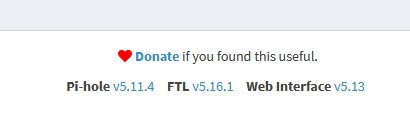
                      k, pihole hab ich mal erledigt mit deiner liste! :)
                      240f8fbe-7753-4a55-9c89-fba2d15c1be0-grafik.png

                      gruß vom Woody
                      HAPPINESS is not a DESTINATION, it's a WAY of LIFE!

                      crunchipC 1 Antwort Letzte Antwort
                      0
                      • da_WoodyD da_Woody

                        @crunchip nope. das ist noch immer der i5 von anfang an... :dizzy_face:
                        k, pihole hab ich mal erledigt mit deiner liste! :)
                        240f8fbe-7753-4a55-9c89-fba2d15c1be0-grafik.png

                        crunchipC Abwesend
                        crunchipC Abwesend
                        crunchip
                        Forum Testing Most Active
                        schrieb am zuletzt editiert von crunchip
                        #12

                        @da_woody dann pass die IP an, unter

                        /etc/issue
                        

                        danach sollte die Ausgabe auf deinem Bildschirm auch wieder stimmen

                        bzw hast du zwei nics? zeig mal die Ausgabe von /etc/network/interfaces

                        umgestiegen von Proxmox auf Unraid

                        da_WoodyD 1 Antwort Letzte Antwort
                        0
                        • crunchipC crunchip

                          @da_woody dann pass die IP an, unter

                          /etc/issue
                          

                          danach sollte die Ausgabe auf deinem Bildschirm auch wieder stimmen

                          bzw hast du zwei nics? zeig mal die Ausgabe von /etc/network/interfaces

                          da_WoodyD Offline
                          da_WoodyD Offline
                          da_Woody
                          schrieb am zuletzt editiert von
                          #13

                          @crunchip sorry, musste mal weg. nachbar ist heute früh gestorben...

                          # network interface settings; autogenerated
                          # Please do NOT modify this file directly, unless you know what
                          # you're doing.
                          #
                          # If you want to manage parts of the network configuration manually,
                          # please utilize the 'source' or 'source-directory' directives to do
                          # so.
                          # PVE will preserve these directives, but will NOT read its network
                          # configuration from sourced files, so do not attempt to move any of
                          # the PVE managed interfaces into external files!
                          
                          auto lo
                          iface lo inet loopback
                          
                          iface eno1 inet manual
                          
                          auto vmbr0
                          iface vmbr0 inet static
                                  address 192.168.0.254/21
                                  gateway 192.168.0.1
                                  bridge-ports eno1
                                  bridge-stp off
                                  bridge-fd 0



                          musste mich aber händisch dort hinhangeln... bei den anderen dingens bekomm ich

                          root@Homeserver:/etc/network# /etc/network/interfaces
                          -bash: /etc/network/interfaces: Permission denied
                          root@Homeserver:/etc/network# /etc/issue
                          -bash: /etc/issue: Permission denied
                          root@Homeserver:/etc/network#


                          gruß vom Woody
                          HAPPINESS is not a DESTINATION, it's a WAY of LIFE!

                          crunchipC 1 Antwort Letzte Antwort
                          0
                          • da_WoodyD da_Woody

                            @crunchip sorry, musste mal weg. nachbar ist heute früh gestorben...

                            # network interface settings; autogenerated
                            # Please do NOT modify this file directly, unless you know what
                            # you're doing.
                            #
                            # If you want to manage parts of the network configuration manually,
                            # please utilize the 'source' or 'source-directory' directives to do
                            # so.
                            # PVE will preserve these directives, but will NOT read its network
                            # configuration from sourced files, so do not attempt to move any of
                            # the PVE managed interfaces into external files!
                            
                            auto lo
                            iface lo inet loopback
                            
                            iface eno1 inet manual
                            
                            auto vmbr0
                            iface vmbr0 inet static
                                    address 192.168.0.254/21
                                    gateway 192.168.0.1
                                    bridge-ports eno1
                                    bridge-stp off
                                    bridge-fd 0


                            musste mich aber händisch dort hinhangeln... bei den anderen dingens bekomm ich

                            root@Homeserver:/etc/network# /etc/network/interfaces
                            -bash: /etc/network/interfaces: Permission denied
                            root@Homeserver:/etc/network# /etc/issue
                            -bash: /etc/issue: Permission denied
                            root@Homeserver:/etc/network#
                            
                            
                            crunchipC Abwesend
                            crunchipC Abwesend
                            crunchip
                            Forum Testing Most Active
                            schrieb am zuletzt editiert von crunchip
                            #14

                            @da_woody sagte in pihole update. pfade stimmen nicht... proxmox update...:

                            musste mich aber händisch dort hinhangeln

                            Hä warum, einfach auf dem Host eingeben

                            cat /etc/network/interfaces
                            Aber passt schon so, die IP ist die

                            192.168.0.254

                            Und das andere mit nano bearbeiten
                            nano /etc/issue

                            Und dort die richtige ip eintragen, das ändert dann die Eingabemaske wie oben in deinem Screen zu sehen.

                            Das muss man z.b. anpassen, bei einem Serverumzug, wenn eine neue IP vergeben wird, deshalb fragte ich.
                            Weshalb das bei dir allerdings nicht übereinstimmt, wundert mich.

                            Ps, oder hattest du nach dem Einrichten nachträglich die Ip geändert?

                            umgestiegen von Proxmox auf Unraid

                            da_WoodyD 1 Antwort Letzte Antwort
                            0
                            • crunchipC crunchip

                              @da_woody sagte in pihole update. pfade stimmen nicht... proxmox update...:

                              musste mich aber händisch dort hinhangeln

                              Hä warum, einfach auf dem Host eingeben

                              cat /etc/network/interfaces
                              Aber passt schon so, die IP ist die

                              192.168.0.254

                              Und das andere mit nano bearbeiten
                              nano /etc/issue

                              Und dort die richtige ip eintragen, das ändert dann die Eingabemaske wie oben in deinem Screen zu sehen.

                              Das muss man z.b. anpassen, bei einem Serverumzug, wenn eine neue IP vergeben wird, deshalb fragte ich.
                              Weshalb das bei dir allerdings nicht übereinstimmt, wundert mich.

                              Ps, oder hattest du nach dem Einrichten nachträglich die Ip geändert?

                              da_WoodyD Offline
                              da_WoodyD Offline
                              da_Woody
                              schrieb am zuletzt editiert von
                              #15

                              @crunchip :flushed: als linux nulpe...
                              cat war mir nicht bewusst. mit nano hab ich nach dem hinholpern das ja rauskopiert.

                              Ps, oder hattest du nach dem Einrichten nachträglich die Ip geändert?

                              hüstel. die kiste hat mir damals ein "freund" eingerichtet. wie auch das LAN umgeschnitzt. alles was ich jetzt, teilweise kann, hab ich mir dann selbst beigebracht. klar, da wurde die IP auf 192.168.0.254 geändert. steht ja auch in der datei so drinnen. warum sich die kiste so meldet?
                              ich muss auch nach einem reboot jedesmal

                              ethtool -K eno1 gso off gro off tso off tx off rx off 
                              

                              eingeben. sonst gibts probleme. hab ich mal im proxmox forum gefunden. das seh ich nur auf dem überflüssigen monitor, der hal am homeserver angestoppelt ist.
                              btw: hab inzwischen auch die VM mit influx/grafana/tasmoadmin hoch gezogen... :)

                              gruß vom Woody
                              HAPPINESS is not a DESTINATION, it's a WAY of LIFE!

                              crunchipC 1 Antwort Letzte Antwort
                              0
                              • da_WoodyD da_Woody

                                @crunchip :flushed: als linux nulpe...
                                cat war mir nicht bewusst. mit nano hab ich nach dem hinholpern das ja rauskopiert.

                                Ps, oder hattest du nach dem Einrichten nachträglich die Ip geändert?

                                hüstel. die kiste hat mir damals ein "freund" eingerichtet. wie auch das LAN umgeschnitzt. alles was ich jetzt, teilweise kann, hab ich mir dann selbst beigebracht. klar, da wurde die IP auf 192.168.0.254 geändert. steht ja auch in der datei so drinnen. warum sich die kiste so meldet?
                                ich muss auch nach einem reboot jedesmal

                                ethtool -K eno1 gso off gro off tso off tx off rx off 
                                

                                eingeben. sonst gibts probleme. hab ich mal im proxmox forum gefunden. das seh ich nur auf dem überflüssigen monitor, der hal am homeserver angestoppelt ist.
                                btw: hab inzwischen auch die VM mit influx/grafana/tasmoadmin hoch gezogen... :)

                                crunchipC Abwesend
                                crunchipC Abwesend
                                crunchip
                                Forum Testing Most Active
                                schrieb am zuletzt editiert von
                                #16

                                @da_woody sagte in pihole update. pfade stimmen nicht... proxmox update...:

                                warum sich die kiste so meldet

                                Hast de es denn nu angepasst?

                                umgestiegen von Proxmox auf Unraid

                                da_WoodyD 1 Antwort Letzte Antwort
                                0
                                • crunchipC crunchip

                                  @da_woody sagte in pihole update. pfade stimmen nicht... proxmox update...:

                                  warum sich die kiste so meldet

                                  Hast de es denn nu angepasst?

                                  da_WoodyD Offline
                                  da_WoodyD Offline
                                  da_Woody
                                  schrieb am zuletzt editiert von
                                  #17

                                  @crunchip was soll ich anpassen? steht ja die richtige drinnen.

                                  auto lo
                                  iface lo inet loopback
                                  
                                  iface eno1 inet manual
                                  
                                  auto vmbr0
                                  iface vmbr0 inet static
                                          address 192.168.0.254/21
                                          gateway 192.168.0.1
                                          bridge-ports eno1
                                          bridge-stp off
                                          bridge-fd 0
                                  

                                  5221118d-b263-4033-aa5c-cf93bea0ac80-grafik.png
                                  das ist ja mein problem, keine ahnung, wo die andere IP her kommt. 192.168.1.35 gibts in meinem router nicht.

                                  gruß vom Woody
                                  HAPPINESS is not a DESTINATION, it's a WAY of LIFE!

                                  crunchipC 1 Antwort Letzte Antwort
                                  0
                                  • da_WoodyD da_Woody

                                    @crunchip was soll ich anpassen? steht ja die richtige drinnen.

                                    auto lo
                                    iface lo inet loopback
                                    
                                    iface eno1 inet manual
                                    
                                    auto vmbr0
                                    iface vmbr0 inet static
                                            address 192.168.0.254/21
                                            gateway 192.168.0.1
                                            bridge-ports eno1
                                            bridge-stp off
                                            bridge-fd 0
                                    

                                    5221118d-b263-4033-aa5c-cf93bea0ac80-grafik.png
                                    das ist ja mein problem, keine ahnung, wo die andere IP her kommt. 192.168.1.35 gibts in meinem router nicht.

                                    crunchipC Abwesend
                                    crunchipC Abwesend
                                    crunchip
                                    Forum Testing Most Active
                                    schrieb am zuletzt editiert von
                                    #18

                                    @da_woody sagte in pihole update. pfade stimmen nicht... proxmox update...:

                                    was soll ich anpassen?

                                    @crunchip sagte in pihole update. pfade stimmen nicht... proxmox update...:

                                    nano /etc/issue
                                    Und dort die richtige

                                    Hab ich dir doch erklärt, beim einrichten, war es die
                                    192.168.1.35, deshalb steht die auch in der Eingabemaske.
                                    Wenn du nun die statische Ip änderst, bleibt die Anzeige unverändert, wie in deinem Fall, deshalb musst du /etc/issue manuell anpassen und dort die richtige eintragen.

                                    umgestiegen von Proxmox auf Unraid

                                    da_WoodyD 1 Antwort Letzte Antwort
                                    0
                                    • crunchipC crunchip

                                      @da_woody sagte in pihole update. pfade stimmen nicht... proxmox update...:

                                      was soll ich anpassen?

                                      @crunchip sagte in pihole update. pfade stimmen nicht... proxmox update...:

                                      nano /etc/issue
                                      Und dort die richtige

                                      Hab ich dir doch erklärt, beim einrichten, war es die
                                      192.168.1.35, deshalb steht die auch in der Eingabemaske.
                                      Wenn du nun die statische Ip änderst, bleibt die Anzeige unverändert, wie in deinem Fall, deshalb musst du /etc/issue manuell anpassen und dort die richtige eintragen.

                                      da_WoodyD Offline
                                      da_WoodyD Offline
                                      da_Woody
                                      schrieb am zuletzt editiert von
                                      #19

                                      @crunchip hmpf. 2x jetzt nano /etc/issue geändert. nach nem neustart kommt wieder die 1.35
                                      bin ich wirklich so dämlich? :face_with_head_bandage:

                                      gruß vom Woody
                                      HAPPINESS is not a DESTINATION, it's a WAY of LIFE!

                                      crunchipC 1 Antwort Letzte Antwort
                                      0
                                      • da_WoodyD da_Woody

                                        @crunchip hmpf. 2x jetzt nano /etc/issue geändert. nach nem neustart kommt wieder die 1.35
                                        bin ich wirklich so dämlich? :face_with_head_bandage:

                                        crunchipC Abwesend
                                        crunchipC Abwesend
                                        crunchip
                                        Forum Testing Most Active
                                        schrieb am zuletzt editiert von
                                        #20

                                        @da_woody schnell mal nachgelesen, das ist nicht persistent, da muss ebenfalls /etc/hosts angepasst werden, sonst wir es immer wieder überschrieben.

                                        umgestiegen von Proxmox auf Unraid

                                        da_WoodyD 2 Antworten Letzte Antwort
                                        1
                                        • crunchipC crunchip

                                          @da_woody schnell mal nachgelesen, das ist nicht persistent, da muss ebenfalls /etc/hosts angepasst werden, sonst wir es immer wieder überschrieben.

                                          da_WoodyD Offline
                                          da_WoodyD Offline
                                          da_Woody
                                          schrieb am zuletzt editiert von
                                          #21

                                          @crunchip thnx! schau ich mir nach der F1 an... ;)

                                          gruß vom Woody
                                          HAPPINESS is not a DESTINATION, it's a WAY of LIFE!

                                          crunchipC 1 Antwort Letzte Antwort
                                          0
                                          Antworten
                                          • In einem neuen Thema antworten
                                          Anmelden zum Antworten
                                          • Älteste zuerst
                                          • Neuste zuerst
                                          • Meiste Stimmen


                                          Support us

                                          ioBroker
                                          Community Adapters
                                          Donate

                                          884

                                          Online

                                          32.4k

                                          Benutzer

                                          81.5k

                                          Themen

                                          1.3m

                                          Beiträge
                                          Community
                                          Impressum | Datenschutz-Bestimmungen | Nutzungsbedingungen | Einwilligungseinstellungen
                                          ioBroker Community 2014-2025
                                          logo
                                          • Anmelden

                                          • Du hast noch kein Konto? Registrieren

                                          • Anmelden oder registrieren, um zu suchen
                                          • Erster Beitrag
                                            Letzter Beitrag
                                          0
                                          • Home
                                          • Aktuell
                                          • Tags
                                          • Ungelesen 0
                                          • Kategorien
                                          • Unreplied
                                          • Beliebt
                                          • GitHub
                                          • Docu
                                          • Hilfe


