

Skip to content
  • Home
  • Aktuell
  • Tags
  • 0 Ungelesen 0
  • Kategorien
  • Unreplied
  • Beliebt
  • GitHub
  • Docu
  • Hilfe
Skins
  • Light
  • Brite
  • Cerulean
  • Cosmo
  • Flatly
  • Journal
  • Litera
  • Lumen
  • Lux
  • Materia
  • Minty
  • Morph
  • Pulse
  • Sandstone
  • Simplex
  • Sketchy
  • Spacelab
  • United
  • Yeti
  • Zephyr
  • Dark
  • Cyborg
  • Darkly
  • Quartz
  • Slate
  • Solar
  • Superhero
  • Vapor

  • Standard: (Kein Skin)
  • Kein Skin
Einklappen
ioBroker Logo

Community Forum

donate donate
  1. ioBroker Community Home
  2. Deutsch
  3. ioBroker Allgemein
  4. ioBroker startet nicht mehr

NEWS

  • UPDATE 31.10.: Amazon Alexa - ioBroker Skill läuft aus ?
    apollon77A
    apollon77
    48
    3
    8.7k

  • Monatsrückblick – September 2025
    BluefoxB
    Bluefox
    13
    1
    2.2k

  • Neues Video "KI im Smart Home" - ioBroker plus n8n
    BluefoxB
    Bluefox
    16
    1
    3.2k

ioBroker startet nicht mehr

Geplant Angeheftet Gesperrt Verschoben ioBroker Allgemein
123 Beiträge 11 Kommentatoren 16.2k Aufrufe 12 Watching
  • Älteste zuerst
  • Neuste zuerst
  • Meiste Stimmen
Antworten
  • In einem neuen Thema antworten
Anmelden zum Antworten
Dieses Thema wurde gelöscht. Nur Nutzer mit entsprechenden Rechten können es sehen.
  • A Atticus

    @apollon77 bin gerade arbeiten, heute abend bin ich wieder dran

    A Offline
    A Offline
    Atticus
    schrieb am zuletzt editiert von
    #62

    Hallo, da bin ich wieder.
    Hier die Ausgabe von

    ps auxwww |grep io

    login as: pi
    pi@192.168.2.238's password:
    Linux ioBroker482 5.10.63-v7l+ #1496 SMP Wed Dec 1 15:58:56 GMT 2021 armv7l
    
    The programs included with the Debian GNU/Linux system are free software;
    the exact distribution terms for each program are described in the
    individual files in /usr/share/doc/*/copyright.
    
    Debian GNU/Linux comes with ABSOLUTELY NO WARRANTY, to the extent
    permitted by applicable law.
    Last login: Tue Feb 22 11:57:20 2022 from 192.168.2.196
    pi@ioBroker482:~ $ ps auxwww |grep io
    root        13  0.0  0.0      0     0 ?        S    14:12   0:00 [migration/0]
    root        16  0.0  0.0      0     0 ?        S    14:12   0:00 [migration/1]
    root        21  0.0  0.0      0     0 ?        S    14:12   0:00 [migration/2]
    root        26  0.0  0.0      0     0 ?        S    14:12   0:00 [migration/3]
    root        58  0.0  0.0      0     0 ?        I<   14:12   0:00 [blkcg_punt_bio]
    root        62  0.0  0.0      0     0 ?        I<   14:12   0:00 [rpciod]
    root        64  0.0  0.0      0     0 ?        I<   14:12   0:00 [xprtiod]
    root        66  0.0  0.0      0     0 ?        I<   14:12   0:00 [nfsiod]
    root        76  0.0  0.0      0     0 ?        I<   14:12   0:00 [DWC Notificatio]
    message+   369  0.1  0.0   6720  3500 ?        Ss   14:12   0:00 /usr/bin/dbus-daemon --system --address=systemd: --nofork --nopidfile --systemd-activation --syslog-only
    avahi      382  0.0  0.0   5900  2588 ?        Ss   14:12   0:00 avahi-daemon: running [ioBroker482.local]
    iobroker   763  137  4.8 507568 389432 ?       Rsl  14:16   0:17 iobroker.js-controller
    pi         804  0.0  0.0   7360   520 pts/0    S+   14:16   0:00 grep --color=auto io
    pi@ioBroker482:~ $ iobroker status
    Server Cannot start inMem-states on port 9000: Failed to lock DB file "/opt/iobroker/iobroker-data/states.jsonl"!
    pi@ioBroker482:~ $
    HomoranH apollon77A 2 Antworten Letzte Antwort
    0
    • A Atticus

      Hallo, da bin ich wieder.
      Hier die Ausgabe von

      ps auxwww |grep io

      login as: pi
      pi@192.168.2.238's password:
      Linux ioBroker482 5.10.63-v7l+ #1496 SMP Wed Dec 1 15:58:56 GMT 2021 armv7l
      
      The programs included with the Debian GNU/Linux system are free software;
      the exact distribution terms for each program are described in the
      individual files in /usr/share/doc/*/copyright.
      
      Debian GNU/Linux comes with ABSOLUTELY NO WARRANTY, to the extent
      permitted by applicable law.
      Last login: Tue Feb 22 11:57:20 2022 from 192.168.2.196
      pi@ioBroker482:~ $ ps auxwww |grep io
      root        13  0.0  0.0      0     0 ?        S    14:12   0:00 [migration/0]
      root        16  0.0  0.0      0     0 ?        S    14:12   0:00 [migration/1]
      root        21  0.0  0.0      0     0 ?        S    14:12   0:00 [migration/2]
      root        26  0.0  0.0      0     0 ?        S    14:12   0:00 [migration/3]
      root        58  0.0  0.0      0     0 ?        I<   14:12   0:00 [blkcg_punt_bio]
      root        62  0.0  0.0      0     0 ?        I<   14:12   0:00 [rpciod]
      root        64  0.0  0.0      0     0 ?        I<   14:12   0:00 [xprtiod]
      root        66  0.0  0.0      0     0 ?        I<   14:12   0:00 [nfsiod]
      root        76  0.0  0.0      0     0 ?        I<   14:12   0:00 [DWC Notificatio]
      message+   369  0.1  0.0   6720  3500 ?        Ss   14:12   0:00 /usr/bin/dbus-daemon --system --address=systemd: --nofork --nopidfile --systemd-activation --syslog-only
      avahi      382  0.0  0.0   5900  2588 ?        Ss   14:12   0:00 avahi-daemon: running [ioBroker482.local]
      iobroker   763  137  4.8 507568 389432 ?       Rsl  14:16   0:17 iobroker.js-controller
      pi         804  0.0  0.0   7360   520 pts/0    S+   14:16   0:00 grep --color=auto io
      pi@ioBroker482:~ $ iobroker status
      Server Cannot start inMem-states on port 9000: Failed to lock DB file "/opt/iobroker/iobroker-data/states.jsonl"!
      pi@ioBroker482:~ $
      HomoranH Nicht stören
      HomoranH Nicht stören
      Homoran
      Global Moderator Administrators
      schrieb am zuletzt editiert von
      #63

      @atticus sagte in ioBroker startet nicht mehr:

      iobroker 763 137 4.8 507568 389432 ? Rsl 14:16 0:17 iobroker.js-controller

      da läuft noch einer

      kein Support per PN! - Fragen im Forum stellen - es gibt fast nichts, was nicht auch für andere interessant ist.

      Benutzt das Voting rechts unten im Beitrag wenn er euch geholfen hat.

      der Installationsfixer: curl -fsL https://iobroker.net/fix.sh | bash -

      1 Antwort Letzte Antwort
      1
      • A Atticus

        Hallo, da bin ich wieder.
        Hier die Ausgabe von

        ps auxwww |grep io

        login as: pi
        pi@192.168.2.238's password:
        Linux ioBroker482 5.10.63-v7l+ #1496 SMP Wed Dec 1 15:58:56 GMT 2021 armv7l
        
        The programs included with the Debian GNU/Linux system are free software;
        the exact distribution terms for each program are described in the
        individual files in /usr/share/doc/*/copyright.
        
        Debian GNU/Linux comes with ABSOLUTELY NO WARRANTY, to the extent
        permitted by applicable law.
        Last login: Tue Feb 22 11:57:20 2022 from 192.168.2.196
        pi@ioBroker482:~ $ ps auxwww |grep io
        root        13  0.0  0.0      0     0 ?        S    14:12   0:00 [migration/0]
        root        16  0.0  0.0      0     0 ?        S    14:12   0:00 [migration/1]
        root        21  0.0  0.0      0     0 ?        S    14:12   0:00 [migration/2]
        root        26  0.0  0.0      0     0 ?        S    14:12   0:00 [migration/3]
        root        58  0.0  0.0      0     0 ?        I<   14:12   0:00 [blkcg_punt_bio]
        root        62  0.0  0.0      0     0 ?        I<   14:12   0:00 [rpciod]
        root        64  0.0  0.0      0     0 ?        I<   14:12   0:00 [xprtiod]
        root        66  0.0  0.0      0     0 ?        I<   14:12   0:00 [nfsiod]
        root        76  0.0  0.0      0     0 ?        I<   14:12   0:00 [DWC Notificatio]
        message+   369  0.1  0.0   6720  3500 ?        Ss   14:12   0:00 /usr/bin/dbus-daemon --system --address=systemd: --nofork --nopidfile --systemd-activation --syslog-only
        avahi      382  0.0  0.0   5900  2588 ?        Ss   14:12   0:00 avahi-daemon: running [ioBroker482.local]
        iobroker   763  137  4.8 507568 389432 ?       Rsl  14:16   0:17 iobroker.js-controller
        pi         804  0.0  0.0   7360   520 pts/0    S+   14:16   0:00 grep --color=auto io
        pi@ioBroker482:~ $ iobroker status
        Server Cannot start inMem-states on port 9000: Failed to lock DB file "/opt/iobroker/iobroker-data/states.jsonl"!
        pi@ioBroker482:~ $
        apollon77A Offline
        apollon77A Offline
        apollon77
        schrieb am zuletzt editiert von
        #64

        @atticus sagte in ioBroker startet nicht mehr:

        iobroker 763 137 4.8 507568 389432 ? Rsl 14:16 0:17 iobroker.js-controller

        Genau, da läuft noch ein conteoller Prozess, daher ost die DB gelockt. Kill den mal oder mach nochmal "iob stop" oder Reboote mal

        Beitrag hat geholfen? Votet rechts unten im Beitrag :-) https://paypal.me/Apollon77 / https://github.com/sponsors/Apollon77

        • Debug-Log für Instanz einschalten? Admin -> Instanzen -> Expertenmodus -> Instanz aufklappen - Loglevel ändern
        • Logfiles auf Platte /opt/iobroker/log/… nutzen, Admin schneidet Zeilen ab
        1 Antwort Letzte Antwort
        0
        • Max ZelmerM Offline
          Max ZelmerM Offline
          Max Zelmer
          schrieb am zuletzt editiert von
          #65

          Hallo zusammen,

          ich habe ebenfalls dieses Problem.
          Ich habe heute morgen ein Update durchgeführt:

          sudo apt-get update && sudo apt-get upgrade
          

          Im Anschluss habe ich meinen Server neugestartet:

          sudo reboot -h 0
          

          Danach habe ich versucht, per Webbrowser auf meinen iobroker (also die Adminoberfläche) zuzugreifen.
          Der Browser meldet zurück: 192.168.178.10 hat eine Verbindung verweigert.

          Also habe ich versucht, den iobroker Status abzufragen:

          max@server:/opt/iobroker/iobroker-data$ iobroker status
          Server Cannot start inMem-states on port 9000: Failed to lock DB file "/opt/iobroker/iobroker-data/states.jsonl"!
          

          Ich habe mich an den Dingen orientiert, die hierzu bereits geschrieben wurden. Leider ohne Erfolg.
          Ich habe dann den iobroker gestoppt und geschaut, ob noch ein Prozess dazu läuft. Leider nein:

          max@server:/opt/iobroker/iobroker-data$ iob stop
          max@server:/opt/iobroker/iobroker-data$ ps auxwww |grep io
          root          11  0.0  0.0      0     0 ?        S    11:00   0:00 [migration/0]
          root          17  0.0  0.0      0     0 ?        S    11:00   0:00 [migration/1]
          root          78  0.0  0.0      0     0 ?        I<   11:00   0:00 [blkcg_punt_bio]
          root          92  0.0  0.0      0     0 ?        I<   11:00   0:00 [vfio-irqfd-clea]
          root         398  0.0  0.0      0     0 ?        I<   11:00   0:00 [rpciod]
          root         399  0.0  0.0      0     0 ?        I<   11:00   0:00 [xprtiod]
          message+     661  0.0  0.1   7800  4572 ?        Ss   11:00   0:00 /usr/bin/dbus-daemon --system --address=systemd: --nofork --nopidfile --systemd-activation --syslog-only
          max         4391  0.0  0.0   6432   656 pts/0    S+   11:36   0:00 grep --color=auto io
          

          Und jetzt weiß ich auch absolut nicht mehr weiter :(

          sigi234S 1 Antwort Letzte Antwort
          0
          • crunchipC Abwesend
            crunchipC Abwesend
            crunchip
            Forum Testing Most Active
            schrieb am zuletzt editiert von crunchip
            #66

            @max-zelmer wenn kein Prozess mehr läuft, vllt ist der Port 9000 anderweitig belegt

            netstat -tulpen
            

            umgestiegen von Proxmox auf Unraid

            1 Antwort Letzte Antwort
            0
            • Max ZelmerM Max Zelmer

              Hallo zusammen,

              ich habe ebenfalls dieses Problem.
              Ich habe heute morgen ein Update durchgeführt:

              sudo apt-get update && sudo apt-get upgrade
              

              Im Anschluss habe ich meinen Server neugestartet:

              sudo reboot -h 0
              

              Danach habe ich versucht, per Webbrowser auf meinen iobroker (also die Adminoberfläche) zuzugreifen.
              Der Browser meldet zurück: 192.168.178.10 hat eine Verbindung verweigert.

              Also habe ich versucht, den iobroker Status abzufragen:

              max@server:/opt/iobroker/iobroker-data$ iobroker status
              Server Cannot start inMem-states on port 9000: Failed to lock DB file "/opt/iobroker/iobroker-data/states.jsonl"!
              

              Ich habe mich an den Dingen orientiert, die hierzu bereits geschrieben wurden. Leider ohne Erfolg.
              Ich habe dann den iobroker gestoppt und geschaut, ob noch ein Prozess dazu läuft. Leider nein:

              max@server:/opt/iobroker/iobroker-data$ iob stop
              max@server:/opt/iobroker/iobroker-data$ ps auxwww |grep io
              root          11  0.0  0.0      0     0 ?        S    11:00   0:00 [migration/0]
              root          17  0.0  0.0      0     0 ?        S    11:00   0:00 [migration/1]
              root          78  0.0  0.0      0     0 ?        I<   11:00   0:00 [blkcg_punt_bio]
              root          92  0.0  0.0      0     0 ?        I<   11:00   0:00 [vfio-irqfd-clea]
              root         398  0.0  0.0      0     0 ?        I<   11:00   0:00 [rpciod]
              root         399  0.0  0.0      0     0 ?        I<   11:00   0:00 [xprtiod]
              message+     661  0.0  0.1   7800  4572 ?        Ss   11:00   0:00 /usr/bin/dbus-daemon --system --address=systemd: --nofork --nopidfile --systemd-activation --syslog-only
              max         4391  0.0  0.0   6432   656 pts/0    S+   11:36   0:00 grep --color=auto io
              

              Und jetzt weiß ich auch absolut nicht mehr weiter :(

              sigi234S Online
              sigi234S Online
              sigi234
              Forum Testing Most Active
              schrieb am zuletzt editiert von
              #67

              @max-zelmer

              Hast du Logitech Media Server laufen?

              Bitte benutzt das Voting rechts unten im Beitrag wenn er euch geholfen hat.
              Immer Daten sichern!

              1 Antwort Letzte Antwort
              0
              • Max ZelmerM Offline
                Max ZelmerM Offline
                Max Zelmer
                schrieb am zuletzt editiert von Max Zelmer
                #68

                Hi,

                @sigi234 ich habe keinen Logitech Media Server am laufen.

                Ich konnte mir mittlerweile helfen, in dem ich die node_modules kopiert habe in node_modules_. Dann habe ich mit Force den NPM-Cache geleert, NPM und ein paar Adapter neu installiert.
                Konkret bin ich nach dieser Anleitung vorgegangen:
                https://forum.iobroker.net/topic/13693/howto-anleitung-reset-der-iobroker-installation-mit-beibehaltung-der-konfiguration

                Also kurz gesagt: mein ioBroker läuft wieder. Keine Ahnung, was da los war ...

                Edit: Nachdem der ioBroker wieder lief, habe ich mein Backup von letzter Nacht per Backitup wieder eingespielt.

                apollon77A 1 Antwort Letzte Antwort
                0
                • Max ZelmerM Max Zelmer

                  Hi,

                  @sigi234 ich habe keinen Logitech Media Server am laufen.

                  Ich konnte mir mittlerweile helfen, in dem ich die node_modules kopiert habe in node_modules_. Dann habe ich mit Force den NPM-Cache geleert, NPM und ein paar Adapter neu installiert.
                  Konkret bin ich nach dieser Anleitung vorgegangen:
                  https://forum.iobroker.net/topic/13693/howto-anleitung-reset-der-iobroker-installation-mit-beibehaltung-der-konfiguration

                  Also kurz gesagt: mein ioBroker läuft wieder. Keine Ahnung, was da los war ...

                  Edit: Nachdem der ioBroker wieder lief, habe ich mein Backup von letzter Nacht per Backitup wieder eingespielt.

                  apollon77A Offline
                  apollon77A Offline
                  apollon77
                  schrieb am zuletzt editiert von
                  #69

                  @max-zelmer WIeviele objekte und states hast du?

                  Beitrag hat geholfen? Votet rechts unten im Beitrag :-) https://paypal.me/Apollon77 / https://github.com/sponsors/Apollon77

                  • Debug-Log für Instanz einschalten? Admin -> Instanzen -> Expertenmodus -> Instanz aufklappen - Loglevel ändern
                  • Logfiles auf Platte /opt/iobroker/log/… nutzen, Admin schneidet Zeilen ab
                  Max ZelmerM 1 Antwort Letzte Antwort
                  0
                  • apollon77A apollon77

                    @max-zelmer WIeviele objekte und states hast du?

                    Max ZelmerM Offline
                    Max ZelmerM Offline
                    Max Zelmer
                    schrieb am zuletzt editiert von
                    #70

                    @apollon77 Laut der Seite "Objekte":
                    Objekte: 10056, Zustände: 9100

                    apollon77A 1 Antwort Letzte Antwort
                    0
                    • Max ZelmerM Max Zelmer

                      @apollon77 Laut der Seite "Objekte":
                      Objekte: 10056, Zustände: 9100

                      apollon77A Offline
                      apollon77A Offline
                      apollon77
                      schrieb am zuletzt editiert von
                      #71

                      @max-zelmer Ok, das ist jetzt nicht mega viel. Ok hast es ja gelöst bekommen.

                      Beitrag hat geholfen? Votet rechts unten im Beitrag :-) https://paypal.me/Apollon77 / https://github.com/sponsors/Apollon77

                      • Debug-Log für Instanz einschalten? Admin -> Instanzen -> Expertenmodus -> Instanz aufklappen - Loglevel ändern
                      • Logfiles auf Platte /opt/iobroker/log/… nutzen, Admin schneidet Zeilen ab
                      1 Antwort Letzte Antwort
                      0
                      • A Atticus

                        Hallo,
                        Meine ioBroker Installation hat ein Problem, der ioBroker startet nicht mehr.
                        Der ioBroker läuft auf einem Raspberry 4 mit 8GB Ram. Die Adapter einschließlich Admin sind auf dem neuesten Stand.
                        Der Fehler macht sich so bemerkbar, das man die den ioBroker im Browser nicht aufrufen kann.
                        Es wird angezeigt "192..... hat die Verbindung abgelehnt"
                        Mit Putty kann ich mich mit dem Raspberry verbinden.
                        Habe den Status des ioBroker abgefragt mit "status iob, bekomme folgende meldung: "ver Cannot start inMem-states on port 9000: Failed to lock DB file "/opt/iobroker/iobroker-data/states.jsonl"!
                        Was kann ich hier tun, um den Fehler zu beheben?
                        Danke
                        Thomas

                        F Offline
                        F Offline
                        fraso
                        schrieb am zuletzt editiert von fraso
                        #72

                        Hallo,

                        ich habe das gleiche Problem.
                        Admin 4.0.21
                        Mein iobroker startete nachts autmatisch neu (normaler, tägl. restart)

                        Auffällig finde ich das die states.jsonl so groß ist

                        -rw-rwxr--+  1 iobroker iobroker 25996559277 15. Apr 05:08 states.jsonl
                        

                        Meine Lösung:
                        löschen der Datei.
                        iobroker startet normal, die states sind leer...
                        dann RESTORE vom iobroker backup von der selben nacht
                        iobroker läuft wieder

                        Hier die Datei states.jsonl nach dem Restore:

                        -rw-rw-r--+  1 iobroker iobroker     7621579 15. Apr 08:49 states.jsonl
                        

                        Schon nach kurzer Zeit wächst die wieder.

                        -rw-rw-r--+  1 iobroker iobroker     8443910 15. Apr 08:54 states.jsonl
                        

                        Für Hinweise wie ich das in Zukunft verhindern kann wäre ich sehr dankbar. Das ist mir jetzt schon 1-2x in der letzten Woche passiert.

                        Fing an als ich modbus für meine Vestel zum Überschußladen programmiert habe (was wunderbar klappt). Allerdings polled mein Blockly dort alle 25ms-29ms die Daten. Vllt. ist das das Übel. Ich schalte das mal aus. Oder was meint Ihr? Kann es daran liegen?


                        ec72c37c-daa9-4b45-902a-64123fc1c485-image.png e2976975-44fd-43d4-a61b-01349380bd09-image.png

                        States Info:

                        [DEBUG] [iobroker] - host.NUCioBroker 20775 states saved
                        
                        [DEBUG] [iobroker] - host.NUCioBroker 31807 objects saved
                        

                        Und eine Frage: nur die states.jsonl habe ich in meinem Backup nicht gefunden... wo steht die? (fürs nächste mal :( )

                        Danke.

                        apollon77A 1 Antwort Letzte Antwort
                        0
                        • F fraso

                          Hallo,

                          ich habe das gleiche Problem.
                          Admin 4.0.21
                          Mein iobroker startete nachts autmatisch neu (normaler, tägl. restart)

                          Auffällig finde ich das die states.jsonl so groß ist

                          -rw-rwxr--+  1 iobroker iobroker 25996559277 15. Apr 05:08 states.jsonl
                          

                          Meine Lösung:
                          löschen der Datei.
                          iobroker startet normal, die states sind leer...
                          dann RESTORE vom iobroker backup von der selben nacht
                          iobroker läuft wieder

                          Hier die Datei states.jsonl nach dem Restore:

                          -rw-rw-r--+  1 iobroker iobroker     7621579 15. Apr 08:49 states.jsonl
                          

                          Schon nach kurzer Zeit wächst die wieder.

                          -rw-rw-r--+  1 iobroker iobroker     8443910 15. Apr 08:54 states.jsonl
                          

                          Für Hinweise wie ich das in Zukunft verhindern kann wäre ich sehr dankbar. Das ist mir jetzt schon 1-2x in der letzten Woche passiert.

                          Fing an als ich modbus für meine Vestel zum Überschußladen programmiert habe (was wunderbar klappt). Allerdings polled mein Blockly dort alle 25ms-29ms die Daten. Vllt. ist das das Übel. Ich schalte das mal aus. Oder was meint Ihr? Kann es daran liegen?

                          ec72c37c-daa9-4b45-902a-64123fc1c485-image.png e2976975-44fd-43d4-a61b-01349380bd09-image.png

                          States Info:

                          [DEBUG] [iobroker] - host.NUCioBroker 20775 states saved
                          
                          [DEBUG] [iobroker] - host.NUCioBroker 31807 objects saved
                          

                          Und eine Frage: nur die states.jsonl habe ich in meinem Backup nicht gefunden... wo steht die? (fürs nächste mal :( )

                          Danke.

                          apollon77A Offline
                          apollon77A Offline
                          apollon77
                          schrieb am zuletzt editiert von apollon77
                          #73

                          @fraso bitte zeige mal deine /opt/iobroker/iobroker-data/iobroker.json und da die Abschnitte mit States und objects.

                          Side question:

                          Mein iobroker startete nachts autmatisch neu (normaler, tägl. restart)

                          Warum das eigentlich?

                          Beitrag hat geholfen? Votet rechts unten im Beitrag :-) https://paypal.me/Apollon77 / https://github.com/sponsors/Apollon77

                          • Debug-Log für Instanz einschalten? Admin -> Instanzen -> Expertenmodus -> Instanz aufklappen - Loglevel ändern
                          • Logfiles auf Platte /opt/iobroker/log/… nutzen, Admin schneidet Zeilen ab
                          F 1 Antwort Letzte Antwort
                          0
                          • F Offline
                            F Offline
                            fraso
                            schrieb am zuletzt editiert von
                            #74

                            @apollon77 sagte in ioBroker startet nicht mehr:

                            Warum das eigentlich?

                            Das kann ich Dir nicht beantworten.
                            Ob ich das eingestellt habe oder bei der Installation vorgegeben war... ich wüßte jetzt nicht mal wo ich aus/einschalten kann.

                            1 Antwort Letzte Antwort
                            0
                            • apollon77A apollon77

                              @fraso bitte zeige mal deine /opt/iobroker/iobroker-data/iobroker.json und da die Abschnitte mit States und objects.

                              Side question:

                              Mein iobroker startete nachts autmatisch neu (normaler, tägl. restart)

                              Warum das eigentlich?

                              F Offline
                              F Offline
                              fraso
                              schrieb am zuletzt editiert von
                              #75

                              @apollon77 sagte in ioBroker startet nicht mehr:

                              bitte zeige mal deine /opt/iobroker/iobroker-data/iobroker.json und da die Abschnitte mit States und objects.

                              e6iob@NUCioBroker:~$ cat /opt/iobroker/iobroker-data/iobroker.json
                              {
                                "system": {
                                  "memoryLimitMB": 0,
                                  "hostname": "",
                                  "statisticsInterval": 15000,
                                  "statisticsIntervalComment": "Interval how often the counters for input/output in adapters and controller will be updated",
                                  "checkDiskInterval": 300000,
                                  "checkDiskIntervalComment": "Interval how often the disk size will be checked",
                                  "instanceStartInterval": 2000,
                                  "noChmodComment": "Flag to test new feature with no chmod call. Must be deleted later and noChmod must be mainline (2018.06.04)",
                                  "compact": false,
                                  "compactComment": "Controller will try to start the instances as a part of the same process. No spawn will be done. Only by adapters that support it and have flag compact flag in io-package.json",
                                  "allowShellCommands": false,
                                  "allowShellCommandsComment": "Allow execution of \"shell\" sendToHost commands",
                                  "memLimitWarn": 100,
                                  "memLimitWarnComment": "If the available RAM is below this threshold on adapter start, a warning will be logged.",
                                  "memLimitError": 50,
                                  "memLimitErrorComment": "If the available RAM is below this threshold on adapter start, an error will be logged."
                                },
                                "multihostService": {
                                  "enabled": false,
                                  "secure": true,
                                  "password": ""
                                },
                                "objects": {
                                  "type": "jsonl",
                                  "typeComment": "Possible values: 'file' - [port 9001], redis - [port 6379], couch - [port 5984].",
                                  "host": "127.0.0.1",
                                  "port": 9001,
                                  "noFileCache": false,
                                  "maxQueue": 1000,
                                  "connectTimeout": 2000,
                                  "writeFileInterval": 5000,
                                  "dataDir": "",
                                  "options": {
                                    "auth_pass": null,
                                    "retry_max_delay": 5000,
                                    "retry_max_count": 19,
                                    "db": 0,
                                    "family": 0
                                  },
                                  "backup": {
                                    "disabled": false,
                                    "files": 24,
                                    "filesComment": "Minimal number of backup files, after the deletion will be executed according to backupTime settings",
                                    "hours": 48,
                                    "hoursComment": "All backups older than 48 hours will be deleted. But only if the number of files is greater than of backupNumber",
                                    "period": 120,
                                    "periodComment": "by default backup every 2 hours. Time is in minutes. To disable backup set the value to 0",
                                    "path": "",
                                    "pathComment": "Absolute path to backup directory or empty to backup in data directory"
                                  },
                                  "jsonlOptions": {
                                    "autoCompress": {},
                                    "throttleFS": {}
                                  }
                                },
                                "states": {
                                  "type": "jsonl",
                                  "typeComment": "Possible values: 'file' - [port 9000], 'redis' - [port 6379].",
                                  "host": "127.0.0.1",
                                  "port": 9000,
                                  "connectTimeout": 2000,
                                  "writeFileInterval": 30000,
                                  "dataDir": "",
                                  "options": {
                                    "auth_pass": null,
                                    "retry_max_delay": 5000,
                                    "retry_max_count": 19,
                                    "db": 0,
                                    "family": 0
                                  },
                                  "backup": {
                                    "disabled": false,
                                    "files": 24,
                                    "filesComment": "Minimal number of backup files, after the deletion will be executed according to backupTime settings",
                                    "hours": 48,
                                    "hoursComment": "All backups older than 48 hours will be deleted. But only if the number of files is greater than of backupNumber",
                                    "period": 120,
                                    "periodComment": "by default backup every 2 hours. Time is in minutes. To disable backup set the value to 0",
                                    "path": "",
                                    "pathComment": "Absolute path to backup directory or empty to backup in data directory"
                                  },
                                  "jsonlOptions": {
                                    "autoCompress": {},
                                    "throttleFS": {}
                                  }
                                },
                                "log": {
                                  "level": "info",
                                  "maxDays": 3,
                                  "noStdout": true,
                                  "transport": {
                                    "file1": {
                                      "type": "file",
                                      "enabled": true,
                                      "filename": "log/iobroker",
                                      "fileext": ".log",
                                      "maxsize": null,
                                      "maxFiles": null,
                                      "maxSize": null,
                                      "level": ""
                                    },
                                    "syslog1": {
                                      "type": "syslog",
                                      "enabled": false,
                                      "host": "localhost",
                                      "hostComment": "The host running syslogd, defaults to localhost.",
                                      "portComment": "The port on the host that syslog is running on, defaults to syslogd's default port(514/UDP).",
                                      "protocol": "udp4",
                                      "protocolComment": "The network protocol to log over (e.g. tcp4, udp4, unix, unix-connect, etc).",
                                      "pathComment": "The path to the syslog dgram socket (i.e. /dev/log or /var/run/syslog for OS X).",
                                      "facilityComment": "Syslog facility to use (Default: local0).",
                                      "localhost": "iobroker",
                                      "localhostComment": "Host to indicate that log messages are coming from (Default: localhost).",
                                      "sysLogTypeComment": "The type of the syslog protocol to use (Default: BSD).",
                                      "app_nameComment": "The name of the application (Default: process.title).",
                                      "eolComment": "The end of line character to be added to the end of the message (Default: Message without modifications).",
                                      "level": "",
                                      "facility": ""
                                    },
                                    "seq1": {
                                      "type": "seq",
                                      "enabled": false,
                                      "serverUrl": "http://IP:PORT",
                                      "serverUrlComment": "The http(s) URL including port of the seq server. If you use HTTPS a real certificate is needed; self signed certs are ot accepted.",
                                      "apiKey": "",
                                      "apiKeyComment": "The apiKey of the seq system",
                                      "level": "",
                                      "eol": ""
                                    }
                                  }
                                },
                                "plugins": {},
                                "dataDir": "../../iobroker-data/"
                              }e6iob@NUCioBroker:~$ 
                              
                              
                              apollon77A 1 Antwort Letzte Antwort
                              0
                              • F fraso

                                @apollon77 sagte in ioBroker startet nicht mehr:

                                bitte zeige mal deine /opt/iobroker/iobroker-data/iobroker.json und da die Abschnitte mit States und objects.

                                e6iob@NUCioBroker:~$ cat /opt/iobroker/iobroker-data/iobroker.json
                                {
                                  "system": {
                                    "memoryLimitMB": 0,
                                    "hostname": "",
                                    "statisticsInterval": 15000,
                                    "statisticsIntervalComment": "Interval how often the counters for input/output in adapters and controller will be updated",
                                    "checkDiskInterval": 300000,
                                    "checkDiskIntervalComment": "Interval how often the disk size will be checked",
                                    "instanceStartInterval": 2000,
                                    "noChmodComment": "Flag to test new feature with no chmod call. Must be deleted later and noChmod must be mainline (2018.06.04)",
                                    "compact": false,
                                    "compactComment": "Controller will try to start the instances as a part of the same process. No spawn will be done. Only by adapters that support it and have flag compact flag in io-package.json",
                                    "allowShellCommands": false,
                                    "allowShellCommandsComment": "Allow execution of \"shell\" sendToHost commands",
                                    "memLimitWarn": 100,
                                    "memLimitWarnComment": "If the available RAM is below this threshold on adapter start, a warning will be logged.",
                                    "memLimitError": 50,
                                    "memLimitErrorComment": "If the available RAM is below this threshold on adapter start, an error will be logged."
                                  },
                                  "multihostService": {
                                    "enabled": false,
                                    "secure": true,
                                    "password": ""
                                  },
                                  "objects": {
                                    "type": "jsonl",
                                    "typeComment": "Possible values: 'file' - [port 9001], redis - [port 6379], couch - [port 5984].",
                                    "host": "127.0.0.1",
                                    "port": 9001,
                                    "noFileCache": false,
                                    "maxQueue": 1000,
                                    "connectTimeout": 2000,
                                    "writeFileInterval": 5000,
                                    "dataDir": "",
                                    "options": {
                                      "auth_pass": null,
                                      "retry_max_delay": 5000,
                                      "retry_max_count": 19,
                                      "db": 0,
                                      "family": 0
                                    },
                                    "backup": {
                                      "disabled": false,
                                      "files": 24,
                                      "filesComment": "Minimal number of backup files, after the deletion will be executed according to backupTime settings",
                                      "hours": 48,
                                      "hoursComment": "All backups older than 48 hours will be deleted. But only if the number of files is greater than of backupNumber",
                                      "period": 120,
                                      "periodComment": "by default backup every 2 hours. Time is in minutes. To disable backup set the value to 0",
                                      "path": "",
                                      "pathComment": "Absolute path to backup directory or empty to backup in data directory"
                                    },
                                    "jsonlOptions": {
                                      "autoCompress": {},
                                      "throttleFS": {}
                                    }
                                  },
                                  "states": {
                                    "type": "jsonl",
                                    "typeComment": "Possible values: 'file' - [port 9000], 'redis' - [port 6379].",
                                    "host": "127.0.0.1",
                                    "port": 9000,
                                    "connectTimeout": 2000,
                                    "writeFileInterval": 30000,
                                    "dataDir": "",
                                    "options": {
                                      "auth_pass": null,
                                      "retry_max_delay": 5000,
                                      "retry_max_count": 19,
                                      "db": 0,
                                      "family": 0
                                    },
                                    "backup": {
                                      "disabled": false,
                                      "files": 24,
                                      "filesComment": "Minimal number of backup files, after the deletion will be executed according to backupTime settings",
                                      "hours": 48,
                                      "hoursComment": "All backups older than 48 hours will be deleted. But only if the number of files is greater than of backupNumber",
                                      "period": 120,
                                      "periodComment": "by default backup every 2 hours. Time is in minutes. To disable backup set the value to 0",
                                      "path": "",
                                      "pathComment": "Absolute path to backup directory or empty to backup in data directory"
                                    },
                                    "jsonlOptions": {
                                      "autoCompress": {},
                                      "throttleFS": {}
                                    }
                                  },
                                  "log": {
                                    "level": "info",
                                    "maxDays": 3,
                                    "noStdout": true,
                                    "transport": {
                                      "file1": {
                                        "type": "file",
                                        "enabled": true,
                                        "filename": "log/iobroker",
                                        "fileext": ".log",
                                        "maxsize": null,
                                        "maxFiles": null,
                                        "maxSize": null,
                                        "level": ""
                                      },
                                      "syslog1": {
                                        "type": "syslog",
                                        "enabled": false,
                                        "host": "localhost",
                                        "hostComment": "The host running syslogd, defaults to localhost.",
                                        "portComment": "The port on the host that syslog is running on, defaults to syslogd's default port(514/UDP).",
                                        "protocol": "udp4",
                                        "protocolComment": "The network protocol to log over (e.g. tcp4, udp4, unix, unix-connect, etc).",
                                        "pathComment": "The path to the syslog dgram socket (i.e. /dev/log or /var/run/syslog for OS X).",
                                        "facilityComment": "Syslog facility to use (Default: local0).",
                                        "localhost": "iobroker",
                                        "localhostComment": "Host to indicate that log messages are coming from (Default: localhost).",
                                        "sysLogTypeComment": "The type of the syslog protocol to use (Default: BSD).",
                                        "app_nameComment": "The name of the application (Default: process.title).",
                                        "eolComment": "The end of line character to be added to the end of the message (Default: Message without modifications).",
                                        "level": "",
                                        "facility": ""
                                      },
                                      "seq1": {
                                        "type": "seq",
                                        "enabled": false,
                                        "serverUrl": "http://IP:PORT",
                                        "serverUrlComment": "The http(s) URL including port of the seq server. If you use HTTPS a real certificate is needed; self signed certs are ot accepted.",
                                        "apiKey": "",
                                        "apiKeyComment": "The apiKey of the seq system",
                                        "level": "",
                                        "eol": ""
                                      }
                                    }
                                  },
                                  "plugins": {},
                                  "dataDir": "../../iobroker-data/"
                                }e6iob@NUCioBroker:~$ 
                                
                                
                                apollon77A Offline
                                apollon77A Offline
                                apollon77
                                schrieb am zuletzt editiert von
                                #76

                                @fraso ok. Da ist in States und objects jeweils ein Bereich mit jsonOptions mit quasi zwei leeren Einträgen. Bitte wirf den kompletten jsonlOptions Teil raus. Und schau das nach dem } davor auch das Komma am Ende weg ist. Danach sollte alles wieder tun wie es soll.

                                Beitrag hat geholfen? Votet rechts unten im Beitrag :-) https://paypal.me/Apollon77 / https://github.com/sponsors/Apollon77

                                • Debug-Log für Instanz einschalten? Admin -> Instanzen -> Expertenmodus -> Instanz aufklappen - Loglevel ändern
                                • Logfiles auf Platte /opt/iobroker/log/… nutzen, Admin schneidet Zeilen ab
                                F 1 Antwort Letzte Antwort
                                0
                                • apollon77A apollon77

                                  @fraso ok. Da ist in States und objects jeweils ein Bereich mit jsonOptions mit quasi zwei leeren Einträgen. Bitte wirf den kompletten jsonlOptions Teil raus. Und schau das nach dem } davor auch das Komma am Ende weg ist. Danach sollte alles wieder tun wie es soll.

                                  F Offline
                                  F Offline
                                  fraso
                                  schrieb am zuletzt editiert von
                                  #77

                                  @apollon77

                                  Kurze Info. Startet wieder ganz normal nachts durch.
                                  Wie gesagt, nicht der NUC macht ein stummes reboot sonder der iobroker wird beendet und dann neu gestartet. warum weiß ich aber immer noch nicht :)

                                  crunchipC 1 Antwort Letzte Antwort
                                  0
                                  • F fraso

                                    @apollon77

                                    Kurze Info. Startet wieder ganz normal nachts durch.
                                    Wie gesagt, nicht der NUC macht ein stummes reboot sonder der iobroker wird beendet und dann neu gestartet. warum weiß ich aber immer noch nicht :)

                                    crunchipC Abwesend
                                    crunchipC Abwesend
                                    crunchip
                                    Forum Testing Most Active
                                    schrieb am zuletzt editiert von
                                    #78

                                    @fraso sagte in ioBroker startet nicht mehr:

                                    sonder der iobroker wird beendet und dann neu gestartet

                                    von alleine macht er das ja nicht, also muss du das ja irgendwo "programmiert" haben
                                    auf was genau läuft der iobroker?

                                    umgestiegen von Proxmox auf Unraid

                                    F 1 Antwort Letzte Antwort
                                    0
                                    • crunchipC crunchip

                                      @fraso sagte in ioBroker startet nicht mehr:

                                      sonder der iobroker wird beendet und dann neu gestartet

                                      von alleine macht er das ja nicht, also muss du das ja irgendwo "programmiert" haben
                                      auf was genau läuft der iobroker?

                                      F Offline
                                      F Offline
                                      fraso
                                      schrieb am zuletzt editiert von
                                      #79

                                      @crunchip

                                      Hi, als "Alleininstallation" zusammen mit motioneye. (Windows gekillt).
                                      Sonst nix drauf.

                                      Was genau er macht weiß ich gar nicht.

                                      Debian GNU/Linux 11

                                      Intel Nuc Mini Komplett PC, Intel Core i3-10110U 2X 4,10 GHz, 16 GB RAM, 256 GB SSD

                                      Jetzt wo ich mich aufgrund der Nachfrage damit beschäftige bin ich mir nicht sicher ob wirklich der iobroker neu startet. Ich habe das angenommen da mir Telegram diese Nachricht sendet. Ich kam nur drauf, da nach der Meldung "beendet" iobroker eben nicht mehr lief. Mit den oben beschriebenen Effekten.
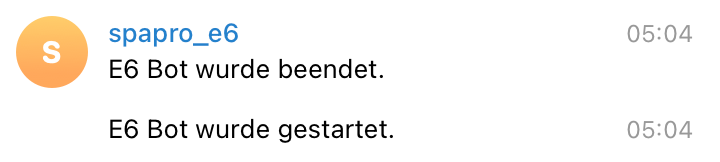
                                      83348616-d2d9-4be6-ba9c-7b6bceffd628-image.png

                                      Im Telegram Adapter habe ich diesen Text eingetragen, der eigentlich heißen müßte: Adapter Telegram wurde beendet / gestartet.

                                      f0df53af-8553-430e-9fb2-04e13444f722-image.png

                                      crunchipC 1 Antwort Letzte Antwort
                                      0
                                      • F fraso

                                        @crunchip

                                        Hi, als "Alleininstallation" zusammen mit motioneye. (Windows gekillt).
                                        Sonst nix drauf.

                                        Was genau er macht weiß ich gar nicht.

                                        Debian GNU/Linux 11

                                        Intel Nuc Mini Komplett PC, Intel Core i3-10110U 2X 4,10 GHz, 16 GB RAM, 256 GB SSD

                                        Jetzt wo ich mich aufgrund der Nachfrage damit beschäftige bin ich mir nicht sicher ob wirklich der iobroker neu startet. Ich habe das angenommen da mir Telegram diese Nachricht sendet. Ich kam nur drauf, da nach der Meldung "beendet" iobroker eben nicht mehr lief. Mit den oben beschriebenen Effekten.

                                        83348616-d2d9-4be6-ba9c-7b6bceffd628-image.png

                                        Im Telegram Adapter habe ich diesen Text eingetragen, der eigentlich heißen müßte: Adapter Telegram wurde beendet / gestartet.

                                        f0df53af-8553-430e-9fb2-04e13444f722-image.png

                                        crunchipC Abwesend
                                        crunchipC Abwesend
                                        crunchip
                                        Forum Testing Most Active
                                        schrieb am zuletzt editiert von
                                        #80

                                        @fraso hier ausschalten
                                        1edb8391-930a-452f-bf77-2985941cdfce-image.png

                                        umgestiegen von Proxmox auf Unraid

                                        1 Antwort Letzte Antwort
                                        0
                                        • apollon77A Offline
                                          apollon77A Offline
                                          apollon77
                                          schrieb am zuletzt editiert von
                                          #81

                                          Ansonsten einfach ins Log File schauen, liegt auf Platte unter /opt/iobroker/log/... ... wenn der Controller restarted und auch sonst alles findet man dort

                                          Beitrag hat geholfen? Votet rechts unten im Beitrag :-) https://paypal.me/Apollon77 / https://github.com/sponsors/Apollon77

                                          • Debug-Log für Instanz einschalten? Admin -> Instanzen -> Expertenmodus -> Instanz aufklappen - Loglevel ändern
                                          • Logfiles auf Platte /opt/iobroker/log/… nutzen, Admin schneidet Zeilen ab
                                          F 1 Antwort Letzte Antwort
                                          0
                                          Antworten
                                          • In einem neuen Thema antworten
                                          Anmelden zum Antworten
                                          • Älteste zuerst
                                          • Neuste zuerst
                                          • Meiste Stimmen


                                          Support us

                                          ioBroker
                                          Community Adapters
                                          Donate
                                          FAQ Cloud / IOT
                                          HowTo: Node.js-Update
                                          HowTo: Backup/Restore
                                          Downloads
                                          BLOG

                                          669

                                          Online

                                          32.4k

                                          Benutzer

                                          81.5k

                                          Themen

                                          1.3m

                                          Beiträge
                                          Community
                                          Impressum | Datenschutz-Bestimmungen | Nutzungsbedingungen | Einwilligungseinstellungen
                                          ioBroker Community 2014-2025
                                          logo
                                          • Anmelden

                                          • Du hast noch kein Konto? Registrieren

                                          • Anmelden oder registrieren, um zu suchen
                                          • Erster Beitrag
                                            Letzter Beitrag
                                          0
                                          • Home
                                          • Aktuell
                                          • Tags
                                          • Ungelesen 0
                                          • Kategorien
                                          • Unreplied
                                          • Beliebt
                                          • GitHub
                                          • Docu
                                          • Hilfe



