Skip to content
  • Home
  • Aktuell
  • Tags
  • 0 Ungelesen 0
  • Kategorien
  • Unreplied
  • Beliebt
  • GitHub
  • Docu
  • Hilfe
Skins
  • Light
  • Brite
  • Cerulean
  • Cosmo
  • Flatly
  • Journal
  • Litera
  • Lumen
  • Lux
  • Materia
  • Minty
  • Morph
  • Pulse
  • Sandstone
  • Simplex
  • Sketchy
  • Spacelab
  • United
  • Yeti
  • Zephyr
  • Dark
  • Cyborg
  • Darkly
  • Quartz
  • Slate
  • Solar
  • Superhero
  • Vapor

  • Standard: (Kein Skin)
  • Kein Skin
Einklappen
ioBroker Logo

Community Forum

donate donate
  1. ioBroker Community Home
  2. Deutsch
  3. ioBroker Allgemein
  4. Anfänger sucht Hilfe bei Install. proxmox auf INTELNUC8i3BEK
NEWS

  • Jahresrückblick 2025 – unser neuer Blogbeitrag ist online! ✨
    BluefoxB
    Bluefox
    15
    1
    502

  • Neuer Blogbeitrag: Monatsrückblick - Dezember 2025 🎄
    BluefoxB
    Bluefox
    13
    1
    616

  • Weihnachtsangebot 2025! 🎄
    BluefoxB
    Bluefox
    25
    1
    1.9k

Anfänger sucht Hilfe bei Install. proxmox auf INTELNUC8i3BEK

Geplant Angeheftet Gesperrt Verschoben ioBroker Allgemein
1.0k Beiträge 16 Kommentatoren 249.8k Aufrufe 15 Watching
  • Älteste zuerst
  • Neuste zuerst
  • Meiste Stimmen
Antworten
  • In einem neuen Thema antworten
Anmelden zum Antworten
Dieses Thema wurde gelöscht. Nur Nutzer mit entsprechenden Rechten können es sehen.
  • Thomas BraunT Thomas Braun

    @goetschhofer

    Intakte Datei:

    2021-08-21_09-25_objects.json.gz
    
    G Offline
    G Offline
    GOETSCHHOFER
    schrieb am zuletzt editiert von GOETSCHHOFER
    #945

    @thomas-braun said in Anfänger sucht Hilfe bei Install. proxmox auf INTELNUC8i3BEK:

    @goetschhofer

    Intakte Datei:

    2021-08-21_09-25_objects.json.gz
    

    Ich habe den Befehl mal aus dem Lösungsvorschlag übernommen und obige Datei eingefügt.
    Bei dem Beispiel war noch eine 2. Datei im Spiel, brauche ich diese nicht ?
    gunzip -ck INTAKTE_DATEI_states.json.gz

    Könntest du bitte den Befehl unten überprüfen, danke.

    iobroker stop
    cd /opt/iobroker/iobroker-data/
    mv objects.json objects.json.old
    mv states.json states.json.old
    cd backup-objects/
    gunzip -ck 2021-08-21_09-25_objects.json.gz > /opt/iobroker/iobroker-data/objects.json
    iobroker start
    
    G Thomas BraunT 2 Antworten Letzte Antwort
    0
    • G GOETSCHHOFER

      @thomas-braun said in Anfänger sucht Hilfe bei Install. proxmox auf INTELNUC8i3BEK:

      @goetschhofer

      Intakte Datei:

      2021-08-21_09-25_objects.json.gz
      

      Ich habe den Befehl mal aus dem Lösungsvorschlag übernommen und obige Datei eingefügt.
      Bei dem Beispiel war noch eine 2. Datei im Spiel, brauche ich diese nicht ?
      gunzip -ck INTAKTE_DATEI_states.json.gz

      Könntest du bitte den Befehl unten überprüfen, danke.

      iobroker stop
      cd /opt/iobroker/iobroker-data/
      mv objects.json objects.json.old
      mv states.json states.json.old
      cd backup-objects/
      gunzip -ck 2021-08-21_09-25_objects.json.gz > /opt/iobroker/iobroker-data/objects.json
      iobroker start
      
      G Offline
      G Offline
      guergen
      schrieb am zuletzt editiert von
      #946

      @goetschhofer Es steht doch eindeutig drin: "iobroker stop"

      G 1 Antwort Letzte Antwort
      0
      • G guergen

        @goetschhofer Es steht doch eindeutig drin: "iobroker stop"

        G Offline
        G Offline
        GOETSCHHOFER
        schrieb am zuletzt editiert von GOETSCHHOFER
        #947

        @guergen
        Habe es schon gesehen, war einfach auf die Dateien focusiert.

        1 Antwort Letzte Antwort
        1
        • G GOETSCHHOFER

          @thomas-braun said in Anfänger sucht Hilfe bei Install. proxmox auf INTELNUC8i3BEK:

          @goetschhofer

          Intakte Datei:

          2021-08-21_09-25_objects.json.gz
          

          Ich habe den Befehl mal aus dem Lösungsvorschlag übernommen und obige Datei eingefügt.
          Bei dem Beispiel war noch eine 2. Datei im Spiel, brauche ich diese nicht ?
          gunzip -ck INTAKTE_DATEI_states.json.gz

          Könntest du bitte den Befehl unten überprüfen, danke.

          iobroker stop
          cd /opt/iobroker/iobroker-data/
          mv objects.json objects.json.old
          mv states.json states.json.old
          cd backup-objects/
          gunzip -ck 2021-08-21_09-25_objects.json.gz > /opt/iobroker/iobroker-data/objects.json
          iobroker start
          
          Thomas BraunT Online
          Thomas BraunT Online
          Thomas Braun
          Most Active
          schrieb am zuletzt editiert von Thomas Braun
          #948

          @goetschhofer sagte in Anfänger sucht Hilfe bei Install. proxmox auf INTELNUC8i3BEK:

          Bei dem Beispiel war noch eine 2. Datei im Spiel, brauche ich diese nicht ?

          Schau ob die states bei dir auch defekt/geschrumpft ist. Wenn ja: Auch die zurückkopieren.

          Linux-Werkzeugkasten:
          https://forum.iobroker.net/topic/42952/der-kleine-iobroker-linux-werkzeugkasten
          NodeJS Fixer Skript:
          https://forum.iobroker.net/topic/68035/iob-node-fix-skript
          iob_diag: curl -sLf -o diag.sh https://iobroker.net/diag.sh && bash diag.sh

          G 2 Antworten Letzte Antwort
          0
          • Thomas BraunT Thomas Braun

            @goetschhofer sagte in Anfänger sucht Hilfe bei Install. proxmox auf INTELNUC8i3BEK:

            Bei dem Beispiel war noch eine 2. Datei im Spiel, brauche ich diese nicht ?

            Schau ob die states bei dir auch defekt/geschrumpft ist. Wenn ja: Auch die zurückkopieren.

            G Offline
            G Offline
            GOETSCHHOFER
            schrieb am zuletzt editiert von
            #949

            @thomas-braun

            Die ist zwar um 9 h 26 kurz nach dem Malheur auf 0 geschrumpft, aber um 09 h 32 wieder auf normale Größe angewachsen.

            Also vermutlich nichts zu machen ?

            -rw-rw-r--+ 1 iobroker iobroker    0 Aug 21 09:26 2021-08-21_09-26_states.json.g                                                                                                                                                             z
            -rw-rw-r--+ 1 iobroker iobroker  431 Aug 21 09:32 2021-08-21_09-32_states.json.g                                                                                                                                                             z
            -rw-rw-r--+ 1 iobroker iobroker  457 Aug 21 09:56 2021-08-21_09-56_states.json.g                                                                                                                                                             z
            -rw-rw-r--+ 1 iobroker iobroker  460 Aug 21 10:23 2021-08-21_10-23_states.json.g   
            
            1 Antwort Letzte Antwort
            0
            • Thomas BraunT Thomas Braun

              @goetschhofer sagte in Anfänger sucht Hilfe bei Install. proxmox auf INTELNUC8i3BEK:

              Bei dem Beispiel war noch eine 2. Datei im Spiel, brauche ich diese nicht ?

              Schau ob die states bei dir auch defekt/geschrumpft ist. Wenn ja: Auch die zurückkopieren.

              G Offline
              G Offline
              GOETSCHHOFER
              schrieb am zuletzt editiert von GOETSCHHOFER
              #950

              @thomas-braun @UncleSam @Homoran

              Danke, dies dürfte geklappt haben, ich kann wieder auf den iobroker zugreifen. :grinning:

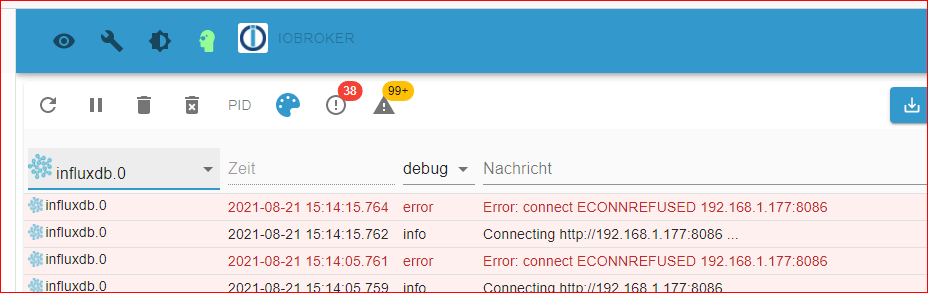
              Das weitere Problem, welches ich habe ist, dass ich im iobroker für die influxdb folgende Fehlermeldung bekomme, daher auch keine Anzeige in Grafana ?

              8013be57-15f9-4fa3-8c01-812a07c32e9a-image.png

              Thomas BraunT 1 Antwort Letzte Antwort
              0
              • G GOETSCHHOFER

                @thomas-braun @UncleSam @Homoran

                Danke, dies dürfte geklappt haben, ich kann wieder auf den iobroker zugreifen. :grinning:

                Das weitere Problem, welches ich habe ist, dass ich im iobroker für die influxdb folgende Fehlermeldung bekomme, daher auch keine Anzeige in Grafana ?

                8013be57-15f9-4fa3-8c01-812a07c32e9a-image.png

                Thomas BraunT Online
                Thomas BraunT Online
                Thomas Braun
                Most Active
                schrieb am zuletzt editiert von
                #951

                @goetschhofer
                influx und grafana hab ich nicht laufen.

                Linux-Werkzeugkasten:
                https://forum.iobroker.net/topic/42952/der-kleine-iobroker-linux-werkzeugkasten
                NodeJS Fixer Skript:
                https://forum.iobroker.net/topic/68035/iob-node-fix-skript
                iob_diag: curl -sLf -o diag.sh https://iobroker.net/diag.sh && bash diag.sh

                G 1 Antwort Letzte Antwort
                0
                • Thomas BraunT Thomas Braun

                  @goetschhofer
                  influx und grafana hab ich nicht laufen.

                  G Offline
                  G Offline
                  GOETSCHHOFER
                  schrieb am zuletzt editiert von
                  #952

                  @thomas-braun

                  Danke, wer könnte mir da weiterhelfen ?

                  WalW 1 Antwort Letzte Antwort
                  0
                  • G GOETSCHHOFER

                    @thomas-braun

                    Danke, wer könnte mir da weiterhelfen ?

                    WalW Offline
                    WalW Offline
                    Wal
                    Developer
                    schrieb am zuletzt editiert von
                    #953

                    @goetschhofer,
                    ist der influx-Server von iobroker ereichbar und läuft auf dem Server influxdb ?

                    ping 192.168.1.177
                    

                    von iobroker aus.

                    sudo systemctl status influxdb
                    

                    auf dem influx-Server

                    Gruß
                    Walter

                    DoorIO-Adapter
                    wioBrowser-Adapter und wioBrowser

                    G 1 Antwort Letzte Antwort
                    1
                    • WalW Wal

                      @goetschhofer,
                      ist der influx-Server von iobroker ereichbar und läuft auf dem Server influxdb ?

                      ping 192.168.1.177
                      

                      von iobroker aus.

                      sudo systemctl status influxdb
                      

                      auf dem influx-Server

                      G Offline
                      G Offline
                      GOETSCHHOFER
                      schrieb am zuletzt editiert von GOETSCHHOFER
                      #954

                      @wal said in Anfänger sucht Hilfe bei Install. proxmox auf INTELNUC8i3BEK:

                      @goetschhofer,
                      ist der influx-Server von iobroker ereichbar und läuft auf dem Server influxdb ?

                      ping 192.168.1.177
                      

                      von iobroker aus.

                      sudo systemctl status influxdb
                      

                      auf dem influx-Server

                      Debian GNU/Linux comes with ABSOLUTELY NO WARRANTY, to the extent
                      permitted by applicable law.
                      Last login: Sat Aug 21 11:25:06 2021 from 192.168.1.3
                      karl@LXC-INFLUXDB-192:~$ ping 192.168.1.177
                      PING 192.168.1.177 (192.168.1.177) 56(84) bytes of data.
                      64 bytes from 192.168.1.177: icmp_seq=1 ttl=64 time=0.029 ms
                      64 bytes from 192.168.1.177: icmp_seq=2 ttl=64 time=0.026 ms
                      64 bytes from 192.168.1.177: icmp_seq=3 ttl=64 time=0.026 ms
                      64 bytes from 192.168.1.177: icmp_seq=4 ttl=64 time=0.027 ms
                      64 bytes from 192.168.1.177: icmp_seq=5 ttl=64 time=0.030 ms
                      64 bytes from 192.168.1.177: icmp_seq=6 ttl=64 time=0.028 ms
                      64 bytes from 192.168.1.177: icmp_seq=7 ttl=64 time=0.028 ms
                      64 bytes from 192.168.1.177: icmp_seq=8 ttl=64 time=0.074 ms
                      64 bytes from 192.168.1.177: icmp_seq=9 ttl=64 time=0.021 ms
                      64 bytes from 192.168.1.177: icmp_seq=10 ttl=64 time=0.034 ms
                      64 bytes from 192.168.1.177: icmp_seq=11 ttl=64 time=0.027 ms
                      ^C
                      --- 192.168.1.177 ping statistics ---
                      11 packets transmitted, 11 received, 0% packet loss, time 257ms
                      rtt min/avg/max/mdev = 0.021/0.031/0.074/0.015 ms
                      karl@LXC-INFLUXDB-192:~$
                      
                      
                      karl@IOBROKER:~$ ping 192.168.1.177
                      PING 192.168.1.177 (192.168.1.177) 56(84) bytes of data.
                      64 bytes from 192.168.1.177: icmp_seq=1 ttl=64 time=0.085 ms
                      64 bytes from 192.168.1.177: icmp_seq=2 ttl=64 time=0.121 ms
                      64 bytes from 192.168.1.177: icmp_seq=3 ttl=64 time=0.180 ms
                      64 bytes from 192.168.1.177: icmp_seq=4 ttl=64 time=0.185 ms
                      64 bytes from 192.168.1.177: icmp_seq=5 ttl=64 time=0.120 ms
                      64 bytes from 192.168.1.177: icmp_seq=6 ttl=64 time=0.122 ms
                      64 bytes from 192.168.1.177: icmp_seq=7 ttl=64 time=0.123 ms
                      64 bytes from 192.168.1.177: icmp_seq=8 ttl=64 time=0.117 ms
                      64 bytes from 192.168.1.177: icmp_seq=9 ttl=64 time=0.185 ms
                      64 bytes from 192.168.1.177: icmp_seq=10 ttl=64 time=0.232 ms
                      64 bytes from 192.168.1.177: icmp_seq=11 ttl=64 time=0.194 ms
                      64 bytes from 192.168.1.177: icmp_seq=12 ttl=64 time=0.134 ms
                      64 bytes from 192.168.1.177: icmp_seq=13 ttl=64 time=0.190 ms
                      64 bytes from 192.168.1.177: icmp_seq=14 ttl=64 time=0.153 ms
                      64 bytes from 192.168.1.177: icmp_seq=15 ttl=64 time=0.123 ms
                      64 bytes from 192.168.1.177: icmp_seq=16 ttl=64 time=0.186 ms
                      64 bytes from 192.168.1.177: icmp_seq=17 ttl=64 time=0.185 ms
                      64 bytes from 192.168.1.177: icmp_seq=18 ttl=64 time=0.137 ms
                      64 bytes from 192.168.1.177: icmp_seq=19 ttl=64 time=0.116 ms
                      64 bytes from 192.168.1.177: icmp_seq=20 ttl=64 time=0.096 ms
                      64 bytes from 192.168.1.177: icmp_seq=21 ttl=64 time=0.083 ms
                      64 bytes from 192.168.1.177: icmp_seq=22 ttl=64 time=0.187 ms
                      ^C
                      --- 192.168.1.177 ping statistics ---
                      22 packets transmitted, 22 received, 0% packet loss, time 512ms
                      rtt min/avg/max/mdev = 0.083/0.147/0.232/0.043 ms
                      karl@IOBROKER:~$


                      Da könnte der Wurm liegen ?

                      Debian GNU/Linux comes with ABSOLUTELY NO WARRANTY, to the extent
                      permitted by applicable law.
                      Last login: Sat Aug 21 12:20:06 2021 from 192.168.1.3
                      karl@LXC-INFLUXDB-192:~$ sudo systemctl status influxdb
                      [sudo] password for karl:
                      * influxdb.service - InfluxDB is an open-source, distributed, time series databa
                         Loaded: loaded (/lib/systemd/system/influxdb.service; enabled; vendor preset:
                         Active: failed (Result: exit-code) since Sat 2021-08-21 11:57:37 CEST; 26min
                           Docs: https://docs.influxdata.com/influxdb/
                        Process: 277 ExecStart=/usr/lib/influxdb/scripts/influxd-systemd-start.sh (cod
                      
                      Aug 21 11:57:37 LXC-INFLUXDB-192 systemd[1]: influxdb.service: Service RestartSe
                      Aug 21 11:57:37 LXC-INFLUXDB-192 systemd[1]: influxdb.service: Scheduled restart
                      Aug 21 11:57:37 LXC-INFLUXDB-192 systemd[1]: Stopped InfluxDB is an open-source,
                      Aug 21 11:57:37 LXC-INFLUXDB-192 systemd[1]: influxdb.service: Start request rep
                      Aug 21 11:57:37 LXC-INFLUXDB-192 systemd[1]: influxdb.service: Failed with resul
                      Aug 21 11:57:37 LXC-INFLUXDB-192 systemd[1]: Failed to start InfluxDB is an open
                      lines 1-12/12 (END)...skipping...
                      * influxdb.service - InfluxDB is an open-source, distributed, time series database
                         Loaded: loaded (/lib/systemd/system/influxdb.service; enabled; vendor preset: enabled)
                         Active: failed (Result: exit-code) since Sat 2021-08-21 11:57:37 CEST; 26min ago
                           Docs: https://docs.influxdata.com/influxdb/
                        Process: 277 ExecStart=/usr/lib/influxdb/scripts/influxd-systemd-start.sh (code=exited, status=203/EXEC)
                      
                      Aug 21 11:57:37 LXC-INFLUXDB-192 systemd[1]: influxdb.service: Service RestartSec=100ms expired, scheduling restart.
                      Aug 21 11:57:37 LXC-INFLUXDB-192 systemd[1]: influxdb.service: Scheduled restart job, restart counter is at 5.
                      Aug 21 11:57:37 LXC-INFLUXDB-192 systemd[1]: Stopped InfluxDB is an open-source, distributed, time series database.
                      Aug 21 11:57:37 LXC-INFLUXDB-192 systemd[1]: influxdb.service: Start request repeated too quickly.
                      Aug 21 11:57:37 LXC-INFLUXDB-192 systemd[1]: influxdb.service: Failed with result 'exit-code'.
                      Aug 21 11:57:37 LXC-INFLUXDB-192 systemd[1]: Failed to start InfluxDB is an open-source, distributed, time series database.
                      
                      
                      WalW 1 Antwort Letzte Antwort
                      0
                      • G GOETSCHHOFER

                        @wal said in Anfänger sucht Hilfe bei Install. proxmox auf INTELNUC8i3BEK:

                        @goetschhofer,
                        ist der influx-Server von iobroker ereichbar und läuft auf dem Server influxdb ?

                        ping 192.168.1.177
                        

                        von iobroker aus.

                        sudo systemctl status influxdb
                        

                        auf dem influx-Server

                        Debian GNU/Linux comes with ABSOLUTELY NO WARRANTY, to the extent
                        permitted by applicable law.
                        Last login: Sat Aug 21 11:25:06 2021 from 192.168.1.3
                        karl@LXC-INFLUXDB-192:~$ ping 192.168.1.177
                        PING 192.168.1.177 (192.168.1.177) 56(84) bytes of data.
                        64 bytes from 192.168.1.177: icmp_seq=1 ttl=64 time=0.029 ms
                        64 bytes from 192.168.1.177: icmp_seq=2 ttl=64 time=0.026 ms
                        64 bytes from 192.168.1.177: icmp_seq=3 ttl=64 time=0.026 ms
                        64 bytes from 192.168.1.177: icmp_seq=4 ttl=64 time=0.027 ms
                        64 bytes from 192.168.1.177: icmp_seq=5 ttl=64 time=0.030 ms
                        64 bytes from 192.168.1.177: icmp_seq=6 ttl=64 time=0.028 ms
                        64 bytes from 192.168.1.177: icmp_seq=7 ttl=64 time=0.028 ms
                        64 bytes from 192.168.1.177: icmp_seq=8 ttl=64 time=0.074 ms
                        64 bytes from 192.168.1.177: icmp_seq=9 ttl=64 time=0.021 ms
                        64 bytes from 192.168.1.177: icmp_seq=10 ttl=64 time=0.034 ms
                        64 bytes from 192.168.1.177: icmp_seq=11 ttl=64 time=0.027 ms
                        ^C
                        --- 192.168.1.177 ping statistics ---
                        11 packets transmitted, 11 received, 0% packet loss, time 257ms
                        rtt min/avg/max/mdev = 0.021/0.031/0.074/0.015 ms
                        karl@LXC-INFLUXDB-192:~$
                        
                        
                        karl@IOBROKER:~$ ping 192.168.1.177
                        PING 192.168.1.177 (192.168.1.177) 56(84) bytes of data.
                        64 bytes from 192.168.1.177: icmp_seq=1 ttl=64 time=0.085 ms
                        64 bytes from 192.168.1.177: icmp_seq=2 ttl=64 time=0.121 ms
                        64 bytes from 192.168.1.177: icmp_seq=3 ttl=64 time=0.180 ms
                        64 bytes from 192.168.1.177: icmp_seq=4 ttl=64 time=0.185 ms
                        64 bytes from 192.168.1.177: icmp_seq=5 ttl=64 time=0.120 ms
                        64 bytes from 192.168.1.177: icmp_seq=6 ttl=64 time=0.122 ms
                        64 bytes from 192.168.1.177: icmp_seq=7 ttl=64 time=0.123 ms
                        64 bytes from 192.168.1.177: icmp_seq=8 ttl=64 time=0.117 ms
                        64 bytes from 192.168.1.177: icmp_seq=9 ttl=64 time=0.185 ms
                        64 bytes from 192.168.1.177: icmp_seq=10 ttl=64 time=0.232 ms
                        64 bytes from 192.168.1.177: icmp_seq=11 ttl=64 time=0.194 ms
                        64 bytes from 192.168.1.177: icmp_seq=12 ttl=64 time=0.134 ms
                        64 bytes from 192.168.1.177: icmp_seq=13 ttl=64 time=0.190 ms
                        64 bytes from 192.168.1.177: icmp_seq=14 ttl=64 time=0.153 ms
                        64 bytes from 192.168.1.177: icmp_seq=15 ttl=64 time=0.123 ms
                        64 bytes from 192.168.1.177: icmp_seq=16 ttl=64 time=0.186 ms
                        64 bytes from 192.168.1.177: icmp_seq=17 ttl=64 time=0.185 ms
                        64 bytes from 192.168.1.177: icmp_seq=18 ttl=64 time=0.137 ms
                        64 bytes from 192.168.1.177: icmp_seq=19 ttl=64 time=0.116 ms
                        64 bytes from 192.168.1.177: icmp_seq=20 ttl=64 time=0.096 ms
                        64 bytes from 192.168.1.177: icmp_seq=21 ttl=64 time=0.083 ms
                        64 bytes from 192.168.1.177: icmp_seq=22 ttl=64 time=0.187 ms
                        ^C
                        --- 192.168.1.177 ping statistics ---
                        22 packets transmitted, 22 received, 0% packet loss, time 512ms
                        rtt min/avg/max/mdev = 0.083/0.147/0.232/0.043 ms
                        karl@IOBROKER:~$


                        Da könnte der Wurm liegen ?

                        Debian GNU/Linux comes with ABSOLUTELY NO WARRANTY, to the extent
                        permitted by applicable law.
                        Last login: Sat Aug 21 12:20:06 2021 from 192.168.1.3
                        karl@LXC-INFLUXDB-192:~$ sudo systemctl status influxdb
                        [sudo] password for karl:
                        * influxdb.service - InfluxDB is an open-source, distributed, time series databa
                           Loaded: loaded (/lib/systemd/system/influxdb.service; enabled; vendor preset:
                           Active: failed (Result: exit-code) since Sat 2021-08-21 11:57:37 CEST; 26min
                             Docs: https://docs.influxdata.com/influxdb/
                          Process: 277 ExecStart=/usr/lib/influxdb/scripts/influxd-systemd-start.sh (cod
                        
                        Aug 21 11:57:37 LXC-INFLUXDB-192 systemd[1]: influxdb.service: Service RestartSe
                        Aug 21 11:57:37 LXC-INFLUXDB-192 systemd[1]: influxdb.service: Scheduled restart
                        Aug 21 11:57:37 LXC-INFLUXDB-192 systemd[1]: Stopped InfluxDB is an open-source,
                        Aug 21 11:57:37 LXC-INFLUXDB-192 systemd[1]: influxdb.service: Start request rep
                        Aug 21 11:57:37 LXC-INFLUXDB-192 systemd[1]: influxdb.service: Failed with resul
                        Aug 21 11:57:37 LXC-INFLUXDB-192 systemd[1]: Failed to start InfluxDB is an open
                        lines 1-12/12 (END)...skipping...
                        * influxdb.service - InfluxDB is an open-source, distributed, time series database
                           Loaded: loaded (/lib/systemd/system/influxdb.service; enabled; vendor preset: enabled)
                           Active: failed (Result: exit-code) since Sat 2021-08-21 11:57:37 CEST; 26min ago
                             Docs: https://docs.influxdata.com/influxdb/
                          Process: 277 ExecStart=/usr/lib/influxdb/scripts/influxd-systemd-start.sh (code=exited, status=203/EXEC)
                        
                        Aug 21 11:57:37 LXC-INFLUXDB-192 systemd[1]: influxdb.service: Service RestartSec=100ms expired, scheduling restart.
                        Aug 21 11:57:37 LXC-INFLUXDB-192 systemd[1]: influxdb.service: Scheduled restart job, restart counter is at 5.
                        Aug 21 11:57:37 LXC-INFLUXDB-192 systemd[1]: Stopped InfluxDB is an open-source, distributed, time series database.
                        Aug 21 11:57:37 LXC-INFLUXDB-192 systemd[1]: influxdb.service: Start request repeated too quickly.
                        Aug 21 11:57:37 LXC-INFLUXDB-192 systemd[1]: influxdb.service: Failed with result 'exit-code'.
                        Aug 21 11:57:37 LXC-INFLUXDB-192 systemd[1]: Failed to start InfluxDB is an open-source, distributed, time series database.
                        
                        
                        WalW Offline
                        WalW Offline
                        Wal
                        Developer
                        schrieb am zuletzt editiert von
                        #955

                        @goetschhofer ,
                        jepp influxdb Service läuft nicht.

                        Gruß
                        Walter

                        DoorIO-Adapter
                        wioBrowser-Adapter und wioBrowser

                        G 1 Antwort Letzte Antwort
                        0
                        • WalW Wal

                          @goetschhofer ,
                          jepp influxdb Service läuft nicht.

                          G Offline
                          G Offline
                          GOETSCHHOFER
                          schrieb am zuletzt editiert von GOETSCHHOFER
                          #956

                          @wal said in Anfänger sucht Hilfe bei Install. proxmox auf INTELNUC8i3BEK:

                          @goetschhofer ,
                          jepp influxdb Service läuft nicht.

                          Wie starte ich diesen jetzt:
                          start mit start service influxdb ?

                          WalW 1 Antwort Letzte Antwort
                          0
                          • G GOETSCHHOFER

                            @wal said in Anfänger sucht Hilfe bei Install. proxmox auf INTELNUC8i3BEK:

                            @goetschhofer ,
                            jepp influxdb Service läuft nicht.

                            Wie starte ich diesen jetzt:
                            start mit start service influxdb ?

                            WalW Offline
                            WalW Offline
                            Wal
                            Developer
                            schrieb am zuletzt editiert von
                            #957

                            @goetschhofer ,
                            das wird nichts bringen, da der Service automatisch neu gestartet wird.
                            Es stimmt was in deiner influx-config nicht. Da bin ich aber leider raus, habe meine local auf dem iobroker laufen.

                            Gruß
                            Walter

                            DoorIO-Adapter
                            wioBrowser-Adapter und wioBrowser

                            G 1 Antwort Letzte Antwort
                            0
                            • WalW Wal

                              @goetschhofer ,
                              das wird nichts bringen, da der Service automatisch neu gestartet wird.
                              Es stimmt was in deiner influx-config nicht. Da bin ich aber leider raus, habe meine local auf dem iobroker laufen.

                              G Offline
                              G Offline
                              GOETSCHHOFER
                              schrieb am zuletzt editiert von
                              #958

                              @wal said in Anfänger sucht Hilfe bei Install. proxmox auf INTELNUC8i3BEK:

                              @goetschhofer ,
                              das wird nichts bringen, da der Service automatisch neu gestartet wird.
                              Es stimmt was in deiner influx-config nicht. Da bin ich aber leider raus, habe meine local auf dem iobroker laufen.

                              O.k., dann sage ich mal vielen Dank für deine Hilfe.

                              G 1 Antwort Letzte Antwort
                              0
                              • G GOETSCHHOFER

                                @wal said in Anfänger sucht Hilfe bei Install. proxmox auf INTELNUC8i3BEK:

                                @goetschhofer ,
                                das wird nichts bringen, da der Service automatisch neu gestartet wird.
                                Es stimmt was in deiner influx-config nicht. Da bin ich aber leider raus, habe meine local auf dem iobroker laufen.

                                O.k., dann sage ich mal vielen Dank für deine Hilfe.

                                G Offline
                                G Offline
                                GOETSCHHOFER
                                schrieb am zuletzt editiert von GOETSCHHOFER
                                #959

                                @crunchip @Homoran

                                Ich habe offenbar ein Problem bei meinem influxdb Service.

                                d447a028-66f0-4c4b-b4b8-87f4ad9e0863-image.png

                                Könntet ihr mir hier bitte weiterhelfen ?

                                Wenn ich versuche den Influxdb Service zu starten bekomme ich folgende Fehlermeldung:

                                login as: karl
                                karl@192.168.1.177's password:
                                Linux LXC-INFLUXDB-192 5.4.124-1-pve #1 SMP PVE 5.4.124-1 (Wed, 23 Jun 2021 13:4                                                                                                                                                             7:09 +0200) x86_64
                                
                                The programs included with the Debian GNU/Linux system are free software;
                                the exact distribution terms for each program are described in the
                                individual files in /usr/share/doc/*/copyright.
                                
                                Debian GNU/Linux comes with ABSOLUTELY NO WARRANTY, to the extent
                                permitted by applicable law.
                                Last login: Sat Aug 21 12:42:56 2021 from 192.168.1.3
                                karl@LXC-INFLUXDB-192:~$ sudo service influxdb start
                                [sudo] password for karl:
                                Job for influxdb.service failed because the control process exited with error co                                                                                                                                                             de.
                                See "systemctl status influxdb.service" and "journalctl -xe" for details.
                                karl@LXC-INFLUXDB-192:~$


                                Danke

                                Aug 21 12:36:20 LXC-INFLUXDB-192 systemd[1]: Stopped InfluxDB is an open-source,
                                Aug 21 12:36:20 LXC-INFLUXDB-192 systemd[1]: influxdb.service: Start request rep
                                Aug 21 12:36:20 LXC-INFLUXDB-192 systemd[1]: influxdb.service: Failed with resul
                                Aug 21 12:36:20 LXC-INFLUXDB-192 systemd[1]: Failed to start InfluxDB is an open
                                lines 1-12/12 (END)...skipping...
                                * influxdb.service - InfluxDB is an open-source, distributed, time series database
                                   Loaded: loaded (/lib/systemd/system/influxdb.service; enabled; vendor preset: enabled)
                                   Active: failed (Result: exit-code) since Sat 2021-08-21 12:36:20 CEST; 10min ago
                                     Docs: https://docs.influxdata.com/influxdb/
                                  Process: 277 ExecStart=/usr/lib/influxdb/scripts/influxd-systemd-start.sh (code=exited, status=203/EXEC)
                                
                                Aug 21 12:36:20 LXC-INFLUXDB-192 systemd[1]: influxdb.service: Service RestartSec=100ms expired, scheduling restart.
                                Aug 21 12:36:20 LXC-INFLUXDB-192 systemd[1]: influxdb.service: Scheduled restart job, restart counter is at 5.
                                Aug 21 12:36:20 LXC-INFLUXDB-192 systemd[1]: Stopped InfluxDB is an open-source, distributed, time series database.
                                Aug 21 12:36:20 LXC-INFLUXDB-192 systemd[1]: influxdb.service: Start request repeated too quickly.
                                Aug 21 12:36:20 LXC-INFLUXDB-192 systemd[1]: influxdb.service: Failed with result 'exit-code'.
                                Aug 21 12:36:20 LXC-INFLUXDB-192 systemd[1]: Failed to start InfluxDB is an open-source, distributed, time series database.
                                
                                
                                crunchipC 1 Antwort Letzte Antwort
                                0
                                • G GOETSCHHOFER

                                  @meister-popper @crunchip

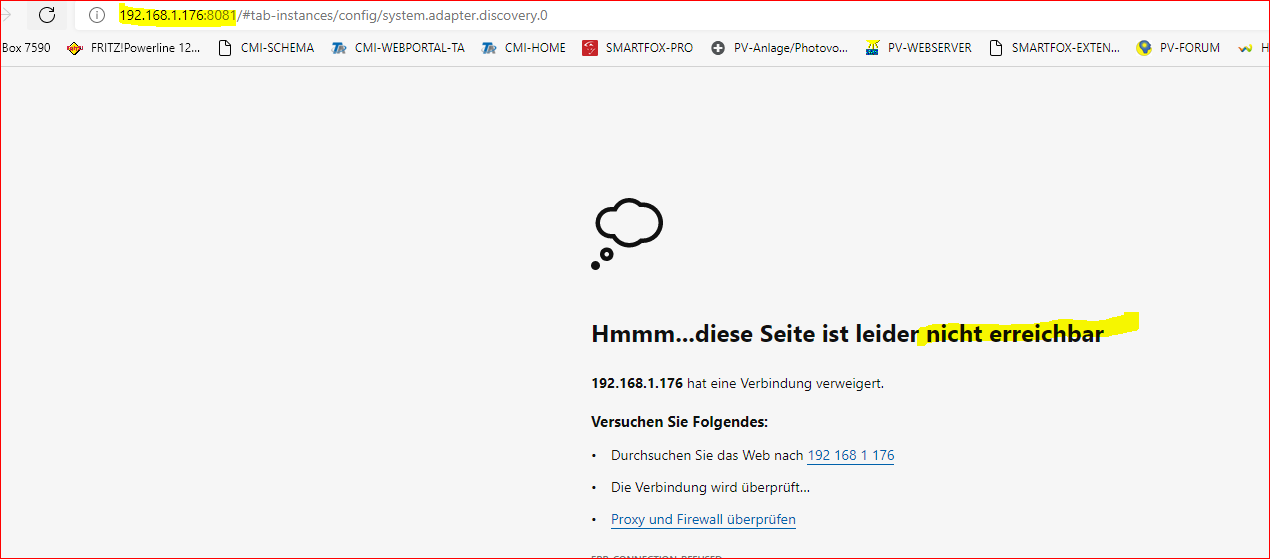
                                  Habe jetzt "nur" noch das Problem, dass ich den iobroker über die ip-Adresse nicht mehr aufrufen kann.

                                  Über die shell ist es möglich, er läuft auch in proxmox ohne Fehlermeldung.

                                  e49820c8-f89f-4389-bc5d-54fd9ff9f215-image.png

                                  cf1186cd-c2ce-4eac-9ba4-b4652114f26e-image.png

                                  737f2103-3159-4f7d-9ed1-adae28ce2cd7-image.png

                                  crunchipC Abwesend
                                  crunchipC Abwesend
                                  crunchip
                                  Forum Testing Most Active
                                  schrieb am zuletzt editiert von
                                  #960

                                  @goetschhofer deine VM läuft zwar, aber nicht der iobroker ansich, geb iobroker start ein, dann sollte er wieder anlaufen

                                  umgestiegen von Proxmox auf Unraid

                                  G 1 Antwort Letzte Antwort
                                  1
                                  • G GOETSCHHOFER

                                    @crunchip @Homoran

                                    Ich habe offenbar ein Problem bei meinem influxdb Service.

                                    d447a028-66f0-4c4b-b4b8-87f4ad9e0863-image.png

                                    Könntet ihr mir hier bitte weiterhelfen ?

                                    Wenn ich versuche den Influxdb Service zu starten bekomme ich folgende Fehlermeldung:

                                    login as: karl
                                    karl@192.168.1.177's password:
                                    Linux LXC-INFLUXDB-192 5.4.124-1-pve #1 SMP PVE 5.4.124-1 (Wed, 23 Jun 2021 13:4                                                                                                                                                             7:09 +0200) x86_64
                                    
                                    The programs included with the Debian GNU/Linux system are free software;
                                    the exact distribution terms for each program are described in the
                                    individual files in /usr/share/doc/*/copyright.
                                    
                                    Debian GNU/Linux comes with ABSOLUTELY NO WARRANTY, to the extent
                                    permitted by applicable law.
                                    Last login: Sat Aug 21 12:42:56 2021 from 192.168.1.3
                                    karl@LXC-INFLUXDB-192:~$ sudo service influxdb start
                                    [sudo] password for karl:
                                    Job for influxdb.service failed because the control process exited with error co                                                                                                                                                             de.
                                    See "systemctl status influxdb.service" and "journalctl -xe" for details.
                                    karl@LXC-INFLUXDB-192:~$


                                    Danke

                                    Aug 21 12:36:20 LXC-INFLUXDB-192 systemd[1]: Stopped InfluxDB is an open-source,
                                    Aug 21 12:36:20 LXC-INFLUXDB-192 systemd[1]: influxdb.service: Start request rep
                                    Aug 21 12:36:20 LXC-INFLUXDB-192 systemd[1]: influxdb.service: Failed with resul
                                    Aug 21 12:36:20 LXC-INFLUXDB-192 systemd[1]: Failed to start InfluxDB is an open
                                    lines 1-12/12 (END)...skipping...
                                    * influxdb.service - InfluxDB is an open-source, distributed, time series database
                                       Loaded: loaded (/lib/systemd/system/influxdb.service; enabled; vendor preset: enabled)
                                       Active: failed (Result: exit-code) since Sat 2021-08-21 12:36:20 CEST; 10min ago
                                         Docs: https://docs.influxdata.com/influxdb/
                                      Process: 277 ExecStart=/usr/lib/influxdb/scripts/influxd-systemd-start.sh (code=exited, status=203/EXEC)
                                    
                                    Aug 21 12:36:20 LXC-INFLUXDB-192 systemd[1]: influxdb.service: Service RestartSec=100ms expired, scheduling restart.
                                    Aug 21 12:36:20 LXC-INFLUXDB-192 systemd[1]: influxdb.service: Scheduled restart job, restart counter is at 5.
                                    Aug 21 12:36:20 LXC-INFLUXDB-192 systemd[1]: Stopped InfluxDB is an open-source, distributed, time series database.
                                    Aug 21 12:36:20 LXC-INFLUXDB-192 systemd[1]: influxdb.service: Start request repeated too quickly.
                                    Aug 21 12:36:20 LXC-INFLUXDB-192 systemd[1]: influxdb.service: Failed with result 'exit-code'.
                                    Aug 21 12:36:20 LXC-INFLUXDB-192 systemd[1]: Failed to start InfluxDB is an open-source, distributed, time series database.
                                    
                                    
                                    crunchipC Abwesend
                                    crunchipC Abwesend
                                    crunchip
                                    Forum Testing Most Active
                                    schrieb am zuletzt editiert von crunchip
                                    #961

                                    @goetschhofer sagte in Anfänger sucht Hilfe bei Install. proxmox auf INTELNUC8i3BEK:

                                    Process: 277 ExecStart=/usr/lib/influxdb/scripts/influxd-systemd-start.sh (code=exited, status=203/EXEC)

                                    hast du wahscheinlich auch ein Update auf die neue version gemacht, somit liegt das startscript an einem anderen Ort, bzw fehlen die nötigen Rechte, des weiteren gibt es da eine Zeitabfrage beim Start von Influx, guck mal hier

                                    umgestiegen von Proxmox auf Unraid

                                    1 Antwort Letzte Antwort
                                    1
                                    • crunchipC crunchip

                                      @goetschhofer deine VM läuft zwar, aber nicht der iobroker ansich, geb iobroker start ein, dann sollte er wieder anlaufen

                                      G Offline
                                      G Offline
                                      GOETSCHHOFER
                                      schrieb am zuletzt editiert von GOETSCHHOFER
                                      #962

                                      @crunchip said in Anfänger sucht Hilfe bei Install. proxmox auf INTELNUC8i3BEK:

                                      @goetschhofer deine VM läuft zwar, aber nicht der iobroker ansich, geb iobroker start ein, dann sollte er wieder anlaufen

                                      Iobroker start habe ich gemacht.
                                      Der iobroker läuft meines Erachtens aktuell schon, aber die Verbindung zur InfluxDB wirft einen Fehler aus.

                                      Drehe mich gerade im Kreis.

                                      ef98dc18-9dc7-469b-a75b-4170ccd715fb-image.png

                                      51740b83-6568-44ff-ac30-f357d8ed7b76-image.png

                                      login as: karl
                                      karl@192.168.1.177's password:
                                      Linux LXC-INFLUXDB-192 5.4.124-1-pve #1 SMP PVE 5.4.124-1 (Wed, 23 Jun 2021 13:4                                                                                                                                                             7:09 +0200) x86_64
                                      
                                      The programs included with the Debian GNU/Linux system are free software;
                                      the exact distribution terms for each program are described in the
                                      individual files in /usr/share/doc/*/copyright.
                                      
                                      Debian GNU/Linux comes with ABSOLUTELY NO WARRANTY, to the extent
                                      permitted by applicable law.
                                      Last login: Sat Aug 21 15:05:33 2021 from 192.168.1.3
                                      karl@LXC-INFLUXDB-192:~$ apt policy influxdb
                                      influxdb:
                                        Installed: 1.8.9-1
                                        Candidate: 1.8.9-1
                                        Version table:
                                       *** 1.8.9-1 500
                                              500 https://repos.influxdata.com/debian buster/stable amd64 Packages
                                              100 /var/lib/dpkg/status
                                           1.6.4-1+deb10u1 500
                                              500 http://ftp.debian.org/debian buster/main amd64 Packages
                                              500 http://security.debian.org buster/updates/main amd64 Packages
                                      karl@LXC-INFLUXDB-192:~$
                                      
                                      
                                      login as: karl
                                      karl@192.168.1.176's password:
                                      Linux IOBROKER 4.19.0-17-amd64 #1 SMP Debian 4.19.194-3 (2021-07-18) x86_64
                                      
                                      The programs included with the Debian GNU/Linux system are free software;
                                      the exact distribution terms for each program are described in the
                                      individual files in /usr/share/doc/*/copyright.
                                      
                                      Debian GNU/Linux comes with ABSOLUTELY NO WARRANTY, to the extent
                                      permitted by applicable law.
                                      Last login: Sat Aug 21 15:07:13 2021 from 192.168.1.3
                                      karl@IOBROKER:~$ login as: karl
                                      the exact distribution terms for each program are described in the
                                      individual files in /usr/share/doc/*/copyright.
                                      
                                      Debian GNU/Linux comes with ABSOLUTELY NO WARRANTY, to the extent
                                      permitted by applicable law.
                                      Last login: Sat Aug 21 15:05:33 2021 from 192.168.1.3
                                      karl@LXC-INFLUXDB-192:~$ apt policy influxdb
                                      influxdb:
                                        Installed: 1.8.9-1
                                        Candidate: 1.8.9-1
                                        Version table:
                                       *** 1.8.9-1 500
                                              500 https://repos.influxdata.com/debian buster/stable amd64 Packages
                                              100 /var/lib/dpkg/status
                                           1.6.4-1+deb10u1 500
                                              500 http://ftp.debian.org/debian buster/main amd64 Packages
                                              500 http://security.debian.org buster/updates/main amd64 Packages
                                      karl@LXC-INFLUXDB-192:~$
                                      login: Arbeit ohne effektive root-Rechte eventuell nicht möglich
                                      karl@IOBROKER:~$ karl@192.168.1.177's password:
                                      > Linux LXC-INFLUXDB-192 5.4.124-1-pve #1 SMP PVE 5.4.124-1 (Wed, 23 Jun 2021 13                                                                                                                                                             :4                                                                                                                                                                                                                                                                                                                          7                                                                                                                                                             :09 +0200) x86_64
                                      >
                                      > The programs included with the Debian GNU/Linux system are free software;
                                      > the exact distribution terms for each program are described in the
                                      > individual files in /usr/share/doc/*/copyright.
                                      >
                                      > Debian GNU/Linux comes with ABSOLUTELY NO WARRANTY, to the extent
                                      > permitted by applicable law.
                                      > Last login: Sat Aug 21 15:05:33 2021 from 192.168.1.3
                                      > karl@LXC-INFLUXDB-192:~$ apt policy influxdb
                                      > influxdb:
                                      >   Installed: 1.8.9-1
                                      >   Candidate: 1.8.9-1
                                      >   Version table:
                                      >  *** 1.8.9-1 500
                                      >         500 https://repos.influxdata.com/debian buster/stable amd64 Packages
                                      >         100 /var/lib/dpkg/status
                                      >      1.6.4-1+deb10u1 500
                                      >         500 http://ftp.debian.org/debian buster/main amd64 Packages
                                      >         500 http://security.debian.org buster/updates/main amd64 Packages
                                      > karl@LXC-INFLUXDB-192:~$
                                      >
                                      
                                      
                                      karl@LXC-INFLUXDB-192:~$ ls -la /usr/lib/influxdb/scripts
                                      total 24
                                      drwxr-xr-x 2 root root 4096 Aug 21 14:12 .
                                      drwxr-xr-x 3 root root 4096 May  8 19:25 ..
                                      -rwxr-xr-x 1 root root 1116 Aug  5 00:31 influxd-systemd-start.sh
                                      -rw-r--r-- 1 root root  533 Aug  5 00:31 influxdb.service
                                      -rw-r--r-- 1 root root 5702 Aug  5 00:31 init.sh
                                      karl@LXC-INFLUXDB-192:~$
                                      
                                      
                                      G crunchipC 2 Antworten Letzte Antwort
                                      0
                                      • G GOETSCHHOFER

                                        @crunchip said in Anfänger sucht Hilfe bei Install. proxmox auf INTELNUC8i3BEK:

                                        @goetschhofer deine VM läuft zwar, aber nicht der iobroker ansich, geb iobroker start ein, dann sollte er wieder anlaufen

                                        Iobroker start habe ich gemacht.
                                        Der iobroker läuft meines Erachtens aktuell schon, aber die Verbindung zur InfluxDB wirft einen Fehler aus.

                                        Drehe mich gerade im Kreis.

                                        ef98dc18-9dc7-469b-a75b-4170ccd715fb-image.png

                                        51740b83-6568-44ff-ac30-f357d8ed7b76-image.png

                                        login as: karl
                                        karl@192.168.1.177's password:
                                        Linux LXC-INFLUXDB-192 5.4.124-1-pve #1 SMP PVE 5.4.124-1 (Wed, 23 Jun 2021 13:4                                                                                                                                                             7:09 +0200) x86_64
                                        
                                        The programs included with the Debian GNU/Linux system are free software;
                                        the exact distribution terms for each program are described in the
                                        individual files in /usr/share/doc/*/copyright.
                                        
                                        Debian GNU/Linux comes with ABSOLUTELY NO WARRANTY, to the extent
                                        permitted by applicable law.
                                        Last login: Sat Aug 21 15:05:33 2021 from 192.168.1.3
                                        karl@LXC-INFLUXDB-192:~$ apt policy influxdb
                                        influxdb:
                                          Installed: 1.8.9-1
                                          Candidate: 1.8.9-1
                                          Version table:
                                         *** 1.8.9-1 500
                                                500 https://repos.influxdata.com/debian buster/stable amd64 Packages
                                                100 /var/lib/dpkg/status
                                             1.6.4-1+deb10u1 500
                                                500 http://ftp.debian.org/debian buster/main amd64 Packages
                                                500 http://security.debian.org buster/updates/main amd64 Packages
                                        karl@LXC-INFLUXDB-192:~$
                                        
                                        
                                        login as: karl
                                        karl@192.168.1.176's password:
                                        Linux IOBROKER 4.19.0-17-amd64 #1 SMP Debian 4.19.194-3 (2021-07-18) x86_64
                                        
                                        The programs included with the Debian GNU/Linux system are free software;
                                        the exact distribution terms for each program are described in the
                                        individual files in /usr/share/doc/*/copyright.
                                        
                                        Debian GNU/Linux comes with ABSOLUTELY NO WARRANTY, to the extent
                                        permitted by applicable law.
                                        Last login: Sat Aug 21 15:07:13 2021 from 192.168.1.3
                                        karl@IOBROKER:~$ login as: karl
                                        the exact distribution terms for each program are described in the
                                        individual files in /usr/share/doc/*/copyright.
                                        
                                        Debian GNU/Linux comes with ABSOLUTELY NO WARRANTY, to the extent
                                        permitted by applicable law.
                                        Last login: Sat Aug 21 15:05:33 2021 from 192.168.1.3
                                        karl@LXC-INFLUXDB-192:~$ apt policy influxdb
                                        influxdb:
                                          Installed: 1.8.9-1
                                          Candidate: 1.8.9-1
                                          Version table:
                                         *** 1.8.9-1 500
                                                500 https://repos.influxdata.com/debian buster/stable amd64 Packages
                                                100 /var/lib/dpkg/status
                                             1.6.4-1+deb10u1 500
                                                500 http://ftp.debian.org/debian buster/main amd64 Packages
                                                500 http://security.debian.org buster/updates/main amd64 Packages
                                        karl@LXC-INFLUXDB-192:~$
                                        login: Arbeit ohne effektive root-Rechte eventuell nicht möglich
                                        karl@IOBROKER:~$ karl@192.168.1.177's password:
                                        > Linux LXC-INFLUXDB-192 5.4.124-1-pve #1 SMP PVE 5.4.124-1 (Wed, 23 Jun 2021 13                                                                                                                                                             :4                                                                                                                                                                                                                                                                                                                          7                                                                                                                                                             :09 +0200) x86_64
                                        >
                                        > The programs included with the Debian GNU/Linux system are free software;
                                        > the exact distribution terms for each program are described in the
                                        > individual files in /usr/share/doc/*/copyright.
                                        >
                                        > Debian GNU/Linux comes with ABSOLUTELY NO WARRANTY, to the extent
                                        > permitted by applicable law.
                                        > Last login: Sat Aug 21 15:05:33 2021 from 192.168.1.3
                                        > karl@LXC-INFLUXDB-192:~$ apt policy influxdb
                                        > influxdb:
                                        >   Installed: 1.8.9-1
                                        >   Candidate: 1.8.9-1
                                        >   Version table:
                                        >  *** 1.8.9-1 500
                                        >         500 https://repos.influxdata.com/debian buster/stable amd64 Packages
                                        >         100 /var/lib/dpkg/status
                                        >      1.6.4-1+deb10u1 500
                                        >         500 http://ftp.debian.org/debian buster/main amd64 Packages
                                        >         500 http://security.debian.org buster/updates/main amd64 Packages
                                        > karl@LXC-INFLUXDB-192:~$
                                        >
                                        
                                        
                                        karl@LXC-INFLUXDB-192:~$ ls -la /usr/lib/influxdb/scripts
                                        total 24
                                        drwxr-xr-x 2 root root 4096 Aug 21 14:12 .
                                        drwxr-xr-x 3 root root 4096 May  8 19:25 ..
                                        -rwxr-xr-x 1 root root 1116 Aug  5 00:31 influxd-systemd-start.sh
                                        -rw-r--r-- 1 root root  533 Aug  5 00:31 influxdb.service
                                        -rw-r--r-- 1 root root 5702 Aug  5 00:31 init.sh
                                        karl@LXC-INFLUXDB-192:~$
                                        
                                        
                                        G Offline
                                        G Offline
                                        GOETSCHHOFER
                                        schrieb am zuletzt editiert von GOETSCHHOFER
                                        #963

                                        @crunchip

                                        Vielen herzlichen Dank.

                                        Die war jetzt die Lösung, jetzt läuft die InfluxDB wieder.

                                        Muss ich da jetzt noch etwas korrigieren ?

                                        sudo chmod +x /usr/lib/influxdb/scripts/influxd-systemd-start.sh
                                        sudo systemctl restart influxdb.service


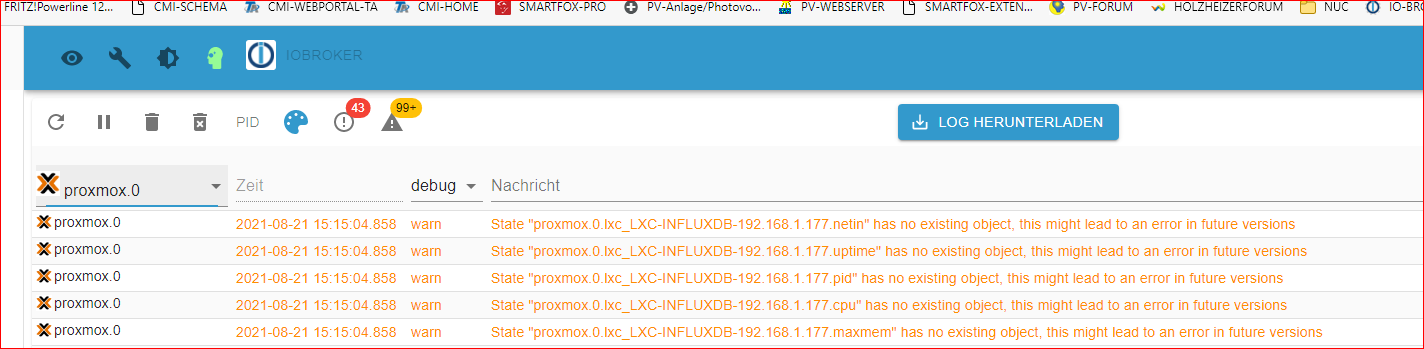
                                        Jetzt bringt er mir nur noch diese Fehlermeldung im iobroker zu proxmox.

                                        Was kann dies noch sein ?
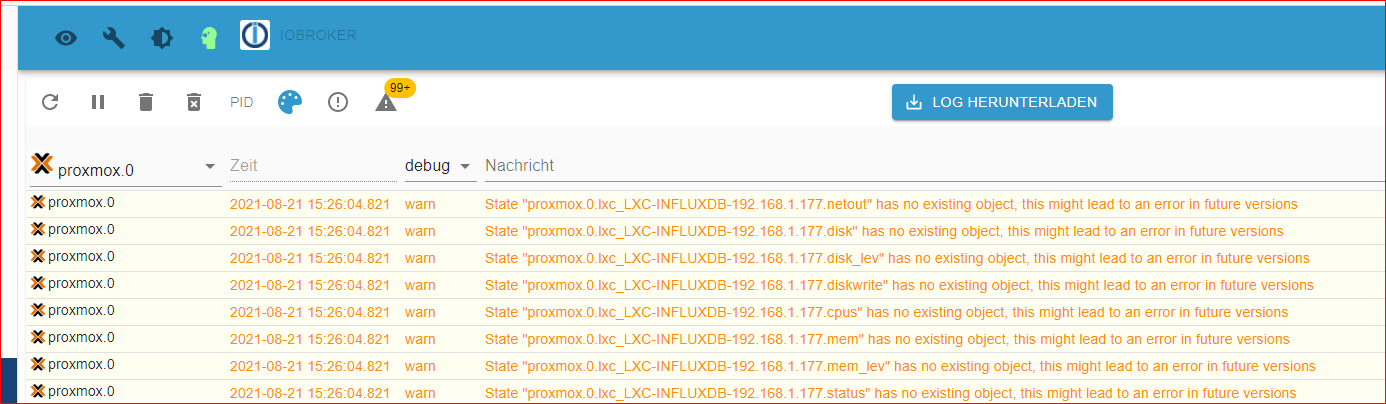
                                        8a882188-f332-4351-aeff-98ef7526d132-image.png

                                        crunchipC 1 Antwort Letzte Antwort
                                        0
                                        • G GOETSCHHOFER

                                          @crunchip said in Anfänger sucht Hilfe bei Install. proxmox auf INTELNUC8i3BEK:

                                          @goetschhofer deine VM läuft zwar, aber nicht der iobroker ansich, geb iobroker start ein, dann sollte er wieder anlaufen

                                          Iobroker start habe ich gemacht.
                                          Der iobroker läuft meines Erachtens aktuell schon, aber die Verbindung zur InfluxDB wirft einen Fehler aus.

                                          Drehe mich gerade im Kreis.

                                          ef98dc18-9dc7-469b-a75b-4170ccd715fb-image.png

                                          51740b83-6568-44ff-ac30-f357d8ed7b76-image.png

                                          login as: karl
                                          karl@192.168.1.177's password:
                                          Linux LXC-INFLUXDB-192 5.4.124-1-pve #1 SMP PVE 5.4.124-1 (Wed, 23 Jun 2021 13:4                                                                                                                                                             7:09 +0200) x86_64
                                          
                                          The programs included with the Debian GNU/Linux system are free software;
                                          the exact distribution terms for each program are described in the
                                          individual files in /usr/share/doc/*/copyright.
                                          
                                          Debian GNU/Linux comes with ABSOLUTELY NO WARRANTY, to the extent
                                          permitted by applicable law.
                                          Last login: Sat Aug 21 15:05:33 2021 from 192.168.1.3
                                          karl@LXC-INFLUXDB-192:~$ apt policy influxdb
                                          influxdb:
                                            Installed: 1.8.9-1
                                            Candidate: 1.8.9-1
                                            Version table:
                                           *** 1.8.9-1 500
                                                  500 https://repos.influxdata.com/debian buster/stable amd64 Packages
                                                  100 /var/lib/dpkg/status
                                               1.6.4-1+deb10u1 500
                                                  500 http://ftp.debian.org/debian buster/main amd64 Packages
                                                  500 http://security.debian.org buster/updates/main amd64 Packages
                                          karl@LXC-INFLUXDB-192:~$
                                          
                                          
                                          login as: karl
                                          karl@192.168.1.176's password:
                                          Linux IOBROKER 4.19.0-17-amd64 #1 SMP Debian 4.19.194-3 (2021-07-18) x86_64
                                          
                                          The programs included with the Debian GNU/Linux system are free software;
                                          the exact distribution terms for each program are described in the
                                          individual files in /usr/share/doc/*/copyright.
                                          
                                          Debian GNU/Linux comes with ABSOLUTELY NO WARRANTY, to the extent
                                          permitted by applicable law.
                                          Last login: Sat Aug 21 15:07:13 2021 from 192.168.1.3
                                          karl@IOBROKER:~$ login as: karl
                                          the exact distribution terms for each program are described in the
                                          individual files in /usr/share/doc/*/copyright.
                                          
                                          Debian GNU/Linux comes with ABSOLUTELY NO WARRANTY, to the extent
                                          permitted by applicable law.
                                          Last login: Sat Aug 21 15:05:33 2021 from 192.168.1.3
                                          karl@LXC-INFLUXDB-192:~$ apt policy influxdb
                                          influxdb:
                                            Installed: 1.8.9-1
                                            Candidate: 1.8.9-1
                                            Version table:
                                           *** 1.8.9-1 500
                                                  500 https://repos.influxdata.com/debian buster/stable amd64 Packages
                                                  100 /var/lib/dpkg/status
                                               1.6.4-1+deb10u1 500
                                                  500 http://ftp.debian.org/debian buster/main amd64 Packages
                                                  500 http://security.debian.org buster/updates/main amd64 Packages
                                          karl@LXC-INFLUXDB-192:~$
                                          login: Arbeit ohne effektive root-Rechte eventuell nicht möglich
                                          karl@IOBROKER:~$ karl@192.168.1.177's password:
                                          > Linux LXC-INFLUXDB-192 5.4.124-1-pve #1 SMP PVE 5.4.124-1 (Wed, 23 Jun 2021 13                                                                                                                                                             :4                                                                                                                                                                                                                                                                                                                          7                                                                                                                                                             :09 +0200) x86_64
                                          >
                                          > The programs included with the Debian GNU/Linux system are free software;
                                          > the exact distribution terms for each program are described in the
                                          > individual files in /usr/share/doc/*/copyright.
                                          >
                                          > Debian GNU/Linux comes with ABSOLUTELY NO WARRANTY, to the extent
                                          > permitted by applicable law.
                                          > Last login: Sat Aug 21 15:05:33 2021 from 192.168.1.3
                                          > karl@LXC-INFLUXDB-192:~$ apt policy influxdb
                                          > influxdb:
                                          >   Installed: 1.8.9-1
                                          >   Candidate: 1.8.9-1
                                          >   Version table:
                                          >  *** 1.8.9-1 500
                                          >         500 https://repos.influxdata.com/debian buster/stable amd64 Packages
                                          >         100 /var/lib/dpkg/status
                                          >      1.6.4-1+deb10u1 500
                                          >         500 http://ftp.debian.org/debian buster/main amd64 Packages
                                          >         500 http://security.debian.org buster/updates/main amd64 Packages
                                          > karl@LXC-INFLUXDB-192:~$
                                          >
                                          
                                          
                                          karl@LXC-INFLUXDB-192:~$ ls -la /usr/lib/influxdb/scripts
                                          total 24
                                          drwxr-xr-x 2 root root 4096 Aug 21 14:12 .
                                          drwxr-xr-x 3 root root 4096 May  8 19:25 ..
                                          -rwxr-xr-x 1 root root 1116 Aug  5 00:31 influxd-systemd-start.sh
                                          -rw-r--r-- 1 root root  533 Aug  5 00:31 influxdb.service
                                          -rw-r--r-- 1 root root 5702 Aug  5 00:31 init.sh
                                          karl@LXC-INFLUXDB-192:~$
                                          
                                          
                                          crunchipC Abwesend
                                          crunchipC Abwesend
                                          crunchip
                                          Forum Testing Most Active
                                          schrieb am zuletzt editiert von crunchip
                                          #964

                                          @goetschhofer hast du im link etwas geblättert. ja ab version 1.8.7 und folgende gab es Änderung.
                                          auf deinem Influx

                                          sudo chown -R influxdb:influxdb /usr/lib/influxdb
                                          

                                          dnach musst du noch ne Änderung im Startscript vornehmen

                                          edit :
                                          hast ja schon hinbekommen

                                          umgestiegen von Proxmox auf Unraid

                                          G 1 Antwort Letzte Antwort
                                          0
                                          Antworten
                                          • In einem neuen Thema antworten
                                          Anmelden zum Antworten
                                          • Älteste zuerst
                                          • Neuste zuerst
                                          • Meiste Stimmen


                                          Support us

                                          ioBroker
                                          Community Adapters
                                          Donate
                                          FAQ Cloud / IOT
                                          HowTo: Node.js-Update
                                          HowTo: Backup/Restore
                                          Downloads
                                          BLOG

                                          375

                                          Online

                                          32.6k

                                          Benutzer

                                          81.9k

                                          Themen

                                          1.3m

                                          Beiträge
                                          Community
                                          Impressum | Datenschutz-Bestimmungen | Nutzungsbedingungen | Einwilligungseinstellungen
                                          ioBroker Community 2014-2025
                                          logo
                                          • Anmelden

                                          • Du hast noch kein Konto? Registrieren

                                          • Anmelden oder registrieren, um zu suchen
                                          • Erster Beitrag
                                            Letzter Beitrag
                                          0
                                          • Home
                                          • Aktuell
                                          • Tags
                                          • Ungelesen 0
                                          • Kategorien
                                          • Unreplied
                                          • Beliebt
                                          • GitHub
                                          • Docu
                                          • Hilfe