




Anfänger sucht Hilfe bei Install. proxmox auf INTELNUC8i3BEK
-
@goetschhofer da fehlen noch deine Einstellungen, da kann noch gar nichts gefunden werden
als allererstes deine FTP muss genauso wie beim PI eingetragen sein
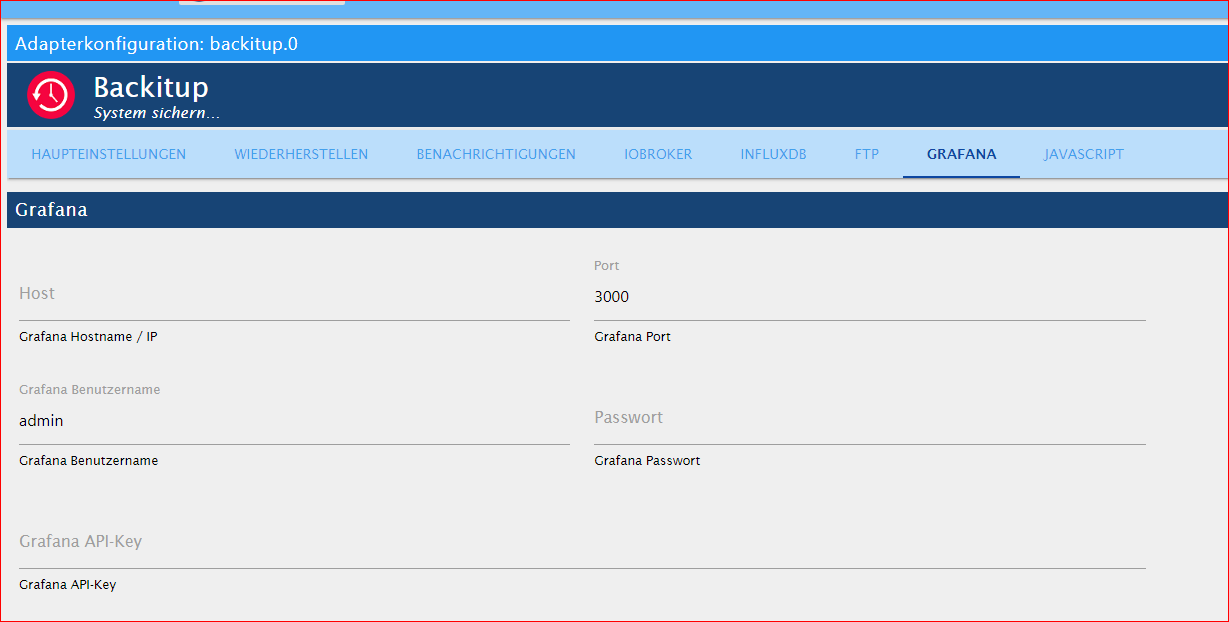
Grafana fehlen auch die kompletten Daten, Ip, Benutzer/PW, key
Influx, ist die Einstellung anzupassen, eigentlich remote, IP vom LXCvllt ist es möglich, gerade wegen dem Influx Backup, ohne influx zusätzlich auf dem iobroker zu installieren, wenn man die Daten manuell in das iobroker backup Verzeichnis kopiert, ob dann ein zurückspielen möglich ist, was ich aber nicht glaube.
Müsste sich mal @simatec dazu äussern -
@meister-mopper sagte in Anfänger sucht Hilfe bei Install. proxmox auf INTELNUC8i3BEK:
ch glaube mich zu erinnern, dass der Backitup nur influx-backups vom localhost kann
influx muss zusätzlich auf dem iobroker installiert sein, was meiner Meinung nach aber nicht unbedigt nötig ist, denn ein zukünftiges backup fällt eigendlich weg, da influx ja nun in einem separaten lxc läuft und dieser dann per proxmox gesichert wird.
kann aber sein das man es zwingend braucht um influx per backitup überhaupt zurück spielen zu können.
Andernfalls wie auch schon geschrieben, backup selbst erstellen und einspielenVersuch-1: Mit vorheriger Anlage Influxdb
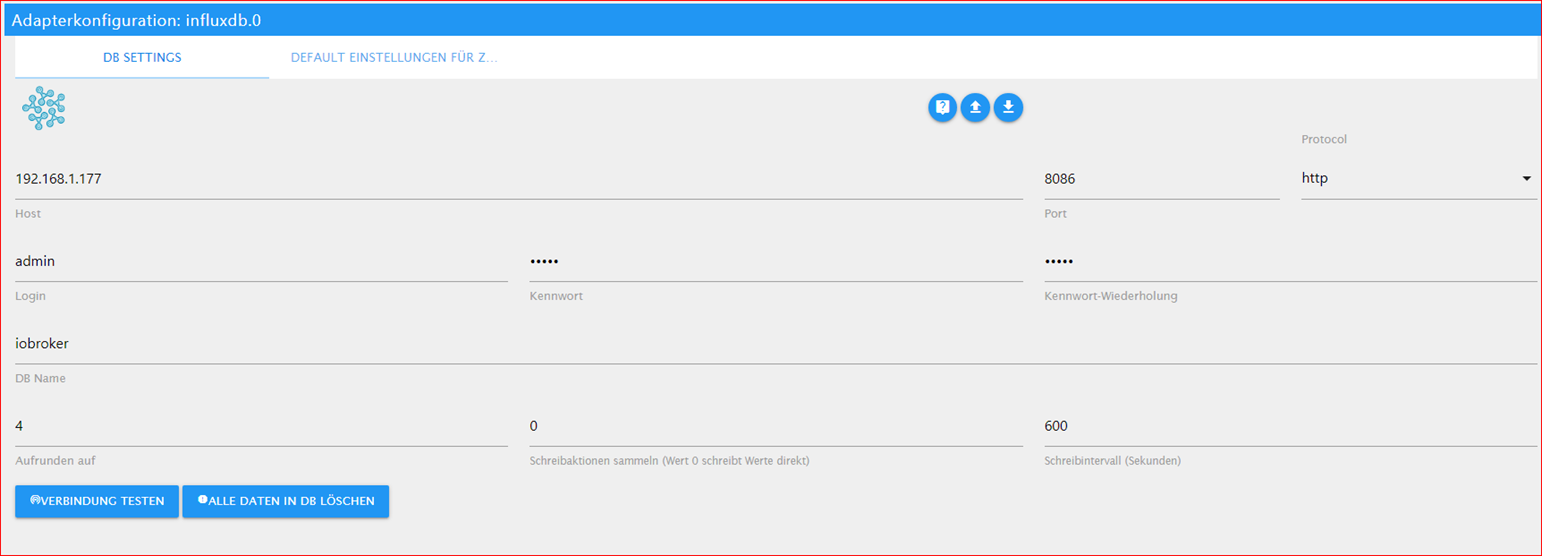
Habe jetzt im InfluxdbB-Adapter im iobroker anstatt localhost die IP-192.168.1.77 des LXC-Influxdb eintragen.
Der Adapter läuft und verbindet sich auch, da auf grün.Aber trotzdem kann ich im backitup-Adapter bei Wiederherstellen nichts hochladen.
-
Versuch-1: Mit vorheriger Anlage Influxdb
Habe jetzt im InfluxdbB-Adapter im iobroker anstatt localhost die IP-192.168.1.77 des LXC-Influxdb eintragen.
Der Adapter läuft und verbindet sich auch, da auf grün.Aber trotzdem kann ich im backitup-Adapter bei Wiederherstellen nichts hochladen.
@goetschhofer
STOP!!
das ist doch jetzt die Instanz von deinem PI?!warum nicht nach der offiziellen Beschreibung ein direktes backup machen und wiederherstellen?
https://docs.influxdata.com/influxdb/v1.8/administration/backup_and_restore/#configuring-remote-connections -
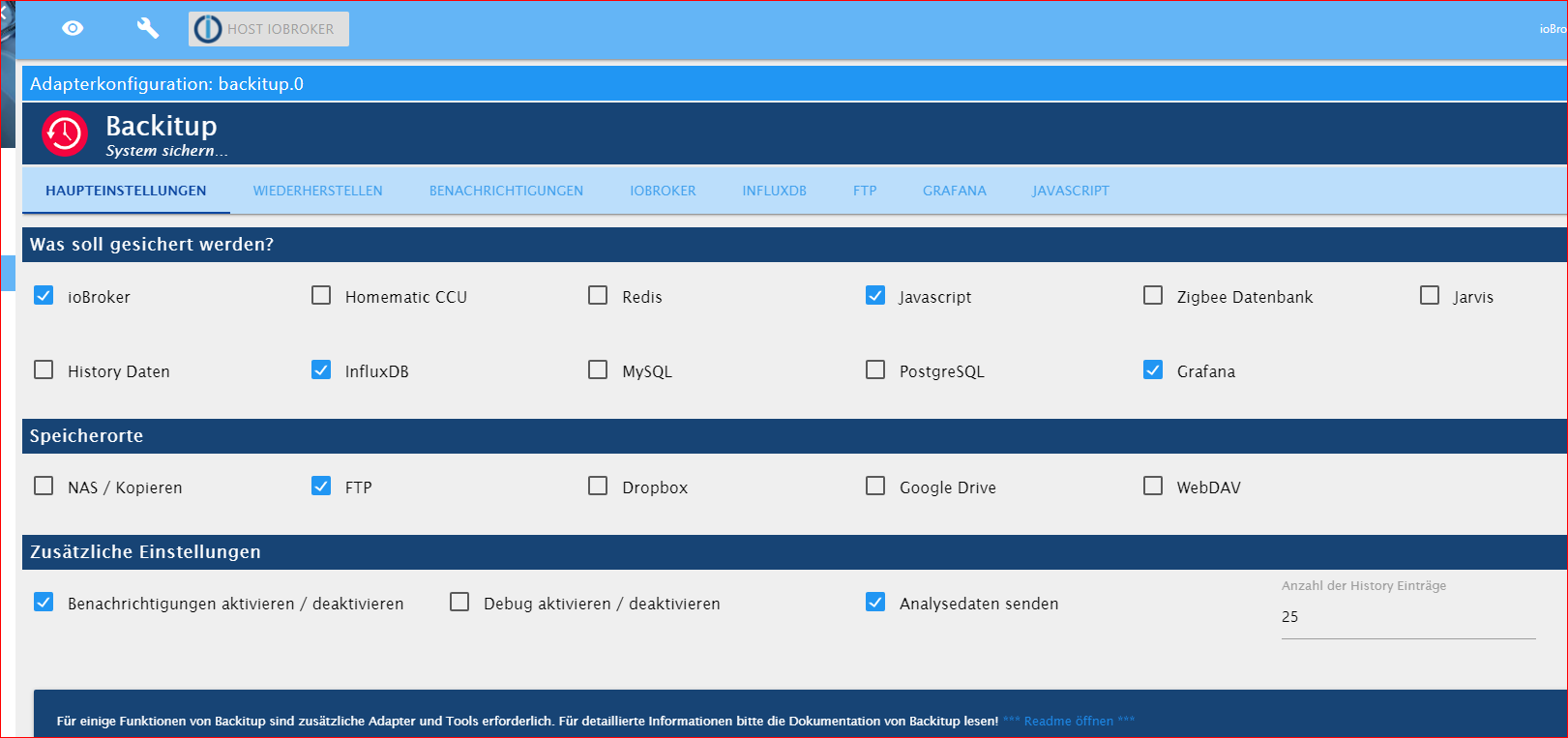
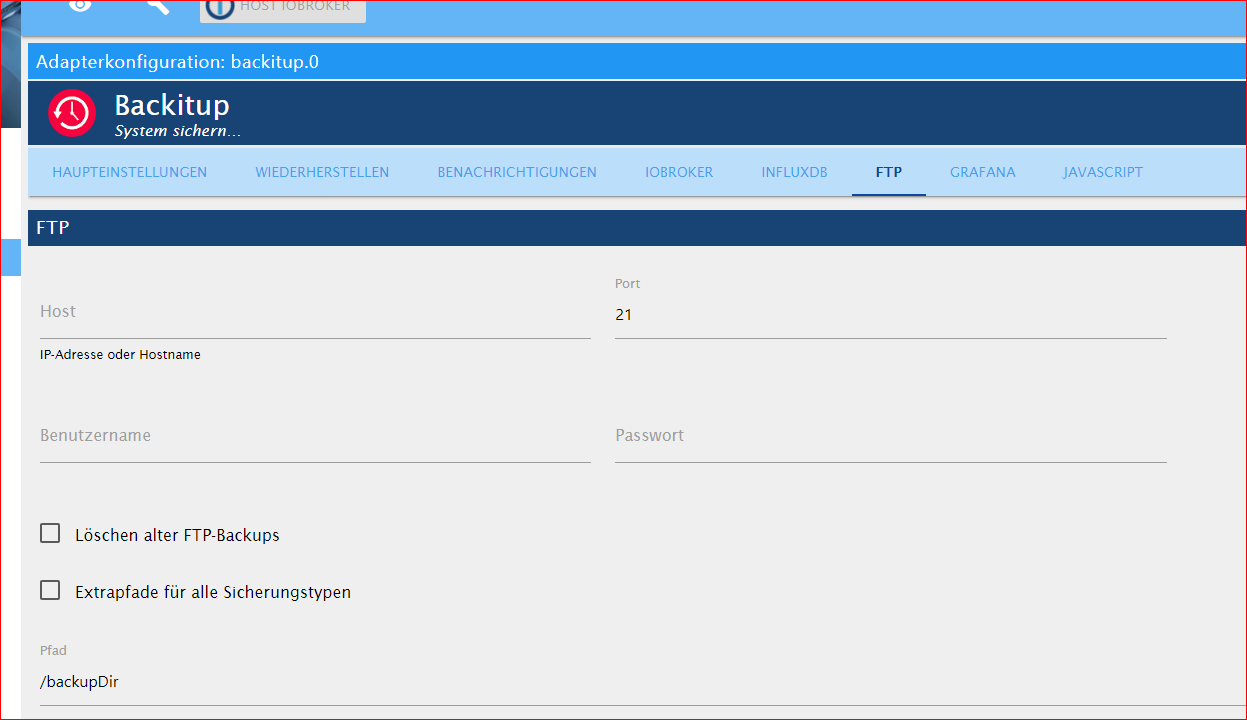
@goetschhofer da fehlen noch deine Einstellungen, da kann noch gar nichts gefunden werden
als allererstes deine FTP muss genauso wie beim PI eingetragen sein
Grafana fehlen auch die kompletten Daten, Ip, Benutzer/PW, key
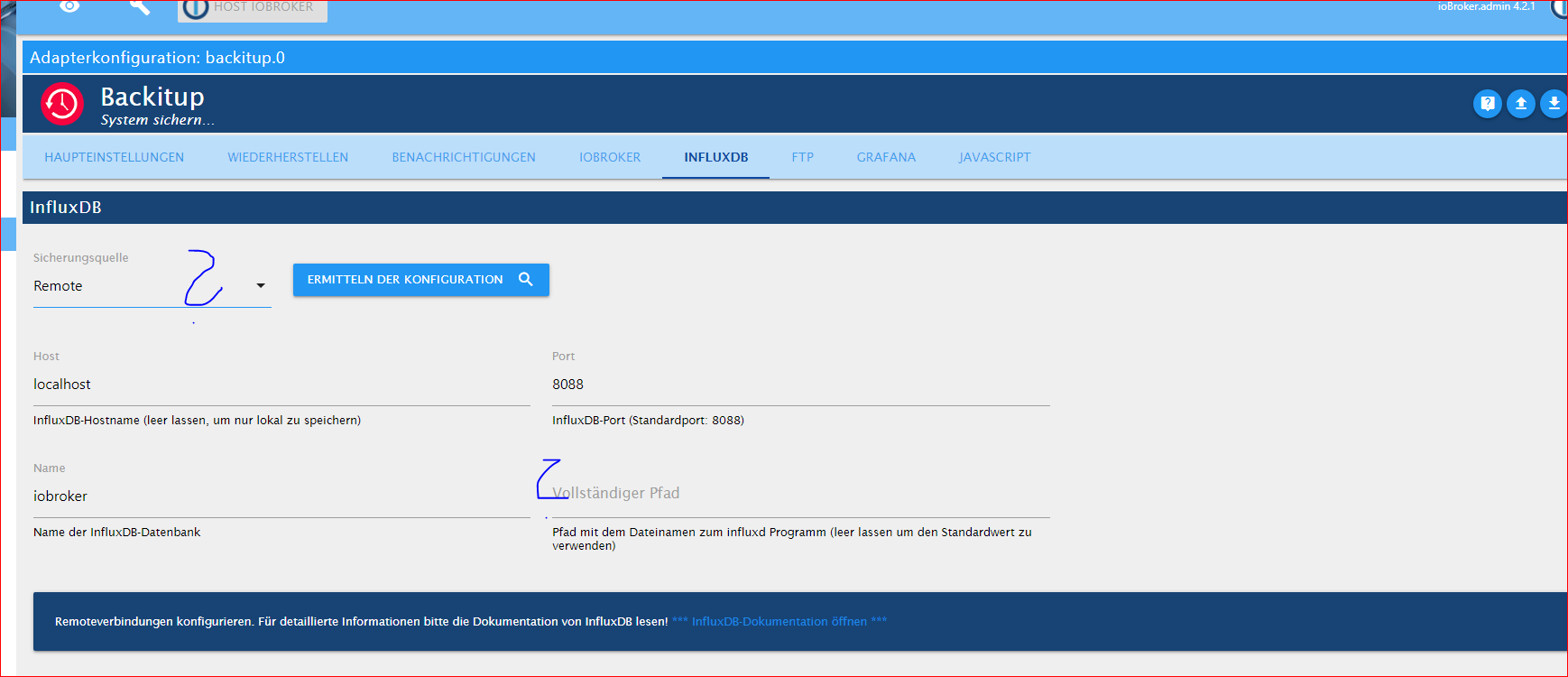
Influx, ist die Einstellung anzupassen, eigentlich remote, IP vom LXCvllt ist es möglich, gerade wegen dem Influx Backup, ohne influx zusätzlich auf dem iobroker zu installieren, wenn man die Daten manuell in das iobroker backup Verzeichnis kopiert, ob dann ein zurückspielen möglich ist, was ich aber nicht glaube.
Müsste sich mal @simatec dazu äussern@crunchip said in Anfänger sucht Hilfe bei Install. proxmox auf INTELNUC8i3BEK:
s allererstes deine FTP muss genauso wie beim PI eingetragen sein
Du wirst es nicht glauben
 , aber mit dem nachpflegen der fehlenden Einträge (FTP, Grafana etc.) sehe ich jetzt im iobroker-NUC meine backups vom RSP.


Folgende Reihenfolge würde ich beim restore wählen:
- Influxdb
- iobroker
- Grafana
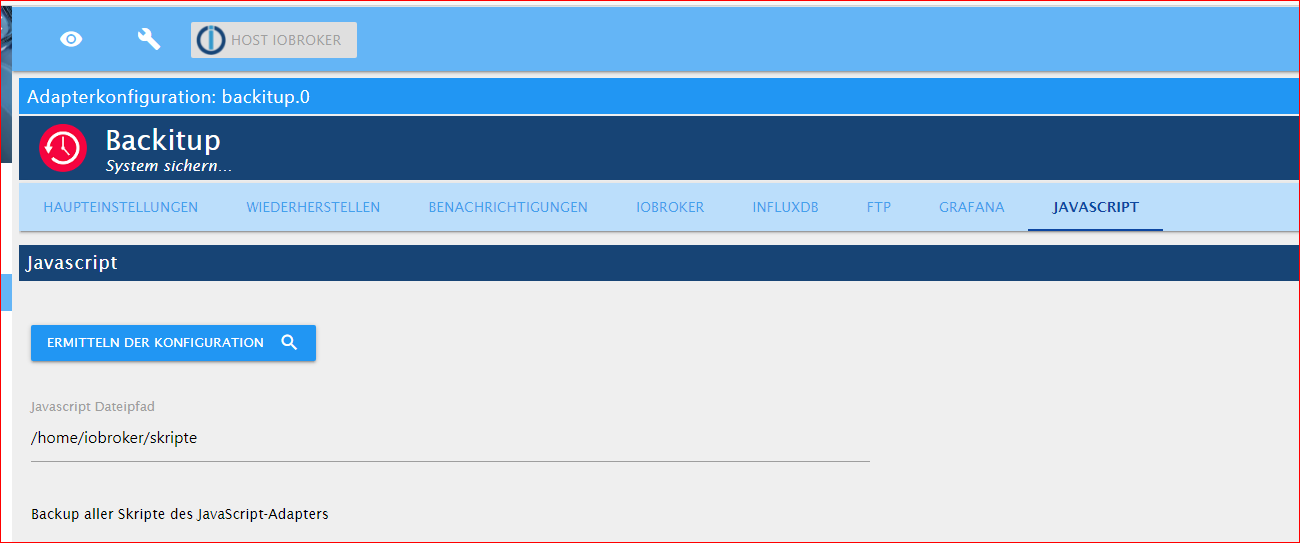
- Javaskript
Ist dies so in Ordnung ?
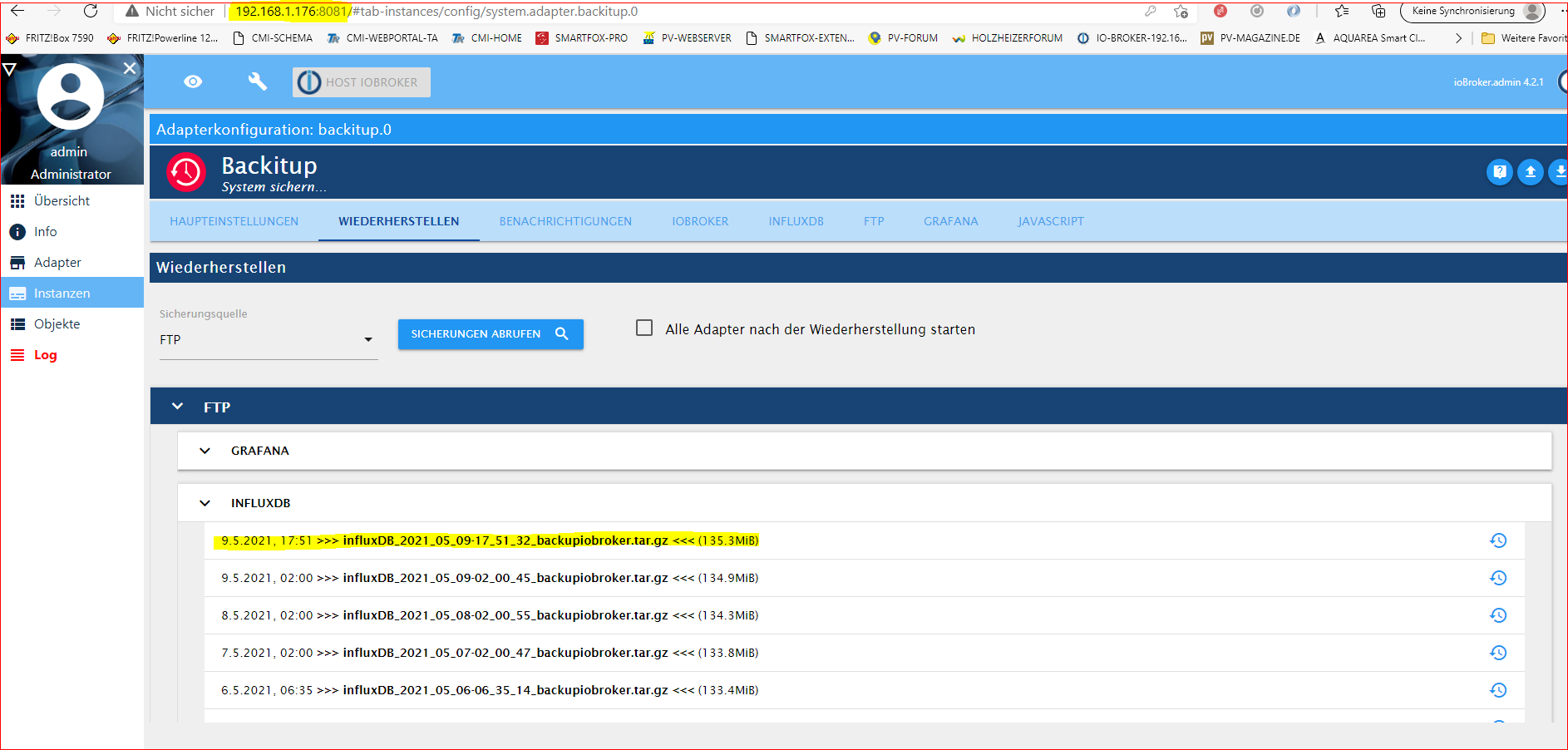
Was meinst du mit ?
STOP!! das ist doch jetzt die Instanz von deinem PI?! -
@goetschhofer
STOP!!
das ist doch jetzt die Instanz von deinem PI?!warum nicht nach der offiziellen Beschreibung ein direktes backup machen und wiederherstellen?
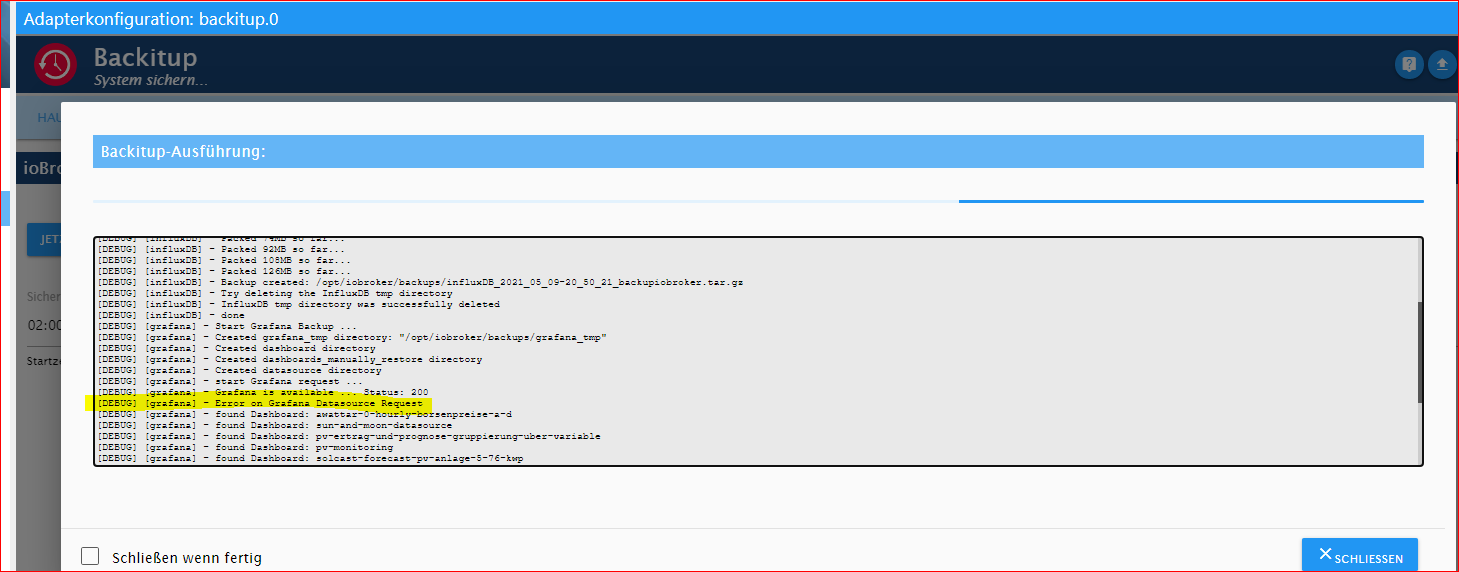
https://docs.influxdata.com/influxdb/v1.8/administration/backup_and_restore/#configuring-remote-connectionsHabe in der Zwischenzeit nochmals ein aktuelles backup gemacht und da sind mir beim Protokoll 2 Fehlermeldungen für Grafana aufgefallen
Ja, er hat beim händischen backup keine Datei in das NAS-USB-Stick-Fritzbox7590 geschrieben.
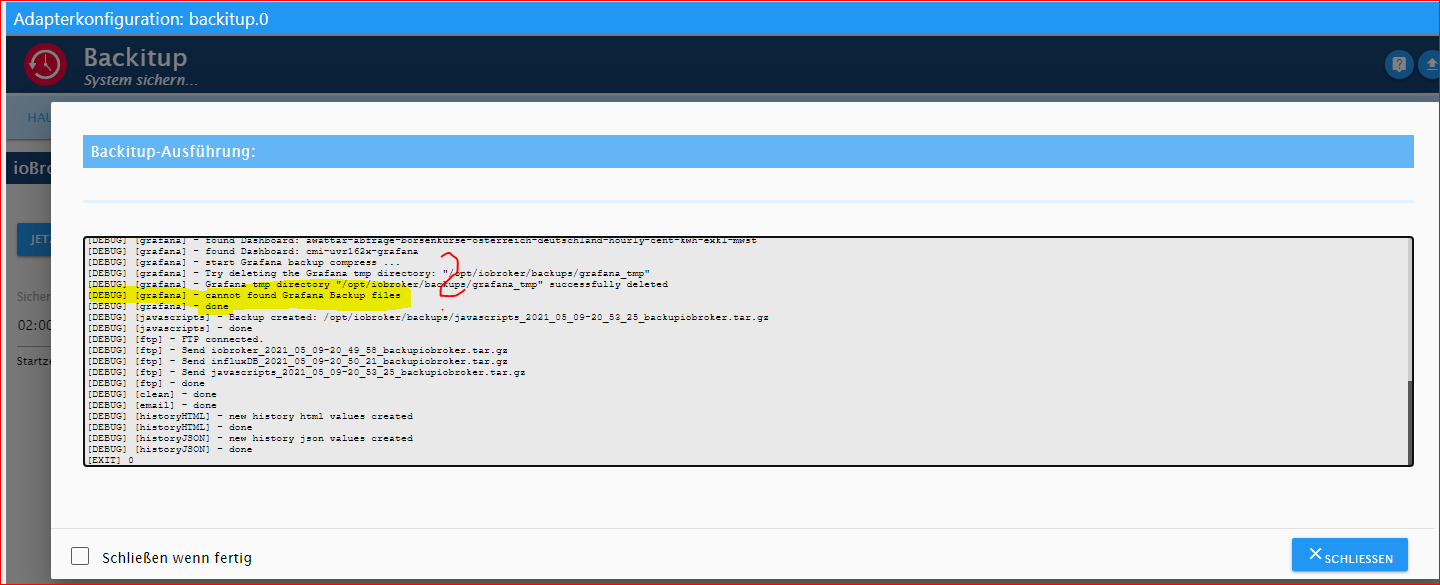
-
@crunchip said in Anfänger sucht Hilfe bei Install. proxmox auf INTELNUC8i3BEK:
s allererstes deine FTP muss genauso wie beim PI eingetragen sein
Du wirst es nicht glauben
, aber mit dem nachpflegen der fehlenden Einträge (FTP, Grafana etc.) sehe ich jetzt im iobroker-NUC meine backups vom RSP. Folgende Reihenfolge würde ich beim restore wählen:
- Influxdb
- iobroker
- Grafana
- Javaskript
Ist dies so in Ordnung ?
Was meinst du mit ?
STOP!! das ist doch jetzt die Instanz von deinem PI?!@goetschhofer sagte in Anfänger sucht Hilfe bei Install. proxmox auf INTELNUC8i3BEK:
Was meinst du mit ?
das war doch ein screen von deinem PI?
da gehört doch nicht die IP von deinem LXC rein@goetschhofer sagte in Anfänger sucht Hilfe bei Install. proxmox auf INTELNUC8i3BEK:
sehe ich jetzt im iobroker-NUC meine backups vom RSP
gut muss nur auch das Backup funktionieren, bei influx bin ich mir allerdings nicht sicher, ob das so klappt
iobroker und influx solltest in einem aufwasch machen, damit die Daten wieder fleißig weiter geschrieben werden, ob jetzt Grafana gleich läuft oder erst später, spielt keine Rolle, das dient nur zum Anzeigen. -
Habe in der Zwischenzeit nochmals ein aktuelles backup gemacht und da sind mir beim Protokoll 2 Fehlermeldungen für Grafana aufgefallen
Ja, er hat beim händischen backup keine Datei in das NAS-USB-Stick-Fritzbox7590 geschrieben.
@goetschhofer sagte in Anfänger sucht Hilfe bei Install. proxmox auf INTELNUC8i3BEK:
sind mir beim Protokoll 2 Fehlermeldungen für Grafana aufgefallen
hast du vllt aus versehen was in der grafana Einstellung verändert im backitup Adapter deines PI
-
@goetschhofer sagte in Anfänger sucht Hilfe bei Install. proxmox auf INTELNUC8i3BEK:
Was meinst du mit ?
das war doch ein screen von deinem PI?
da gehört doch nicht die IP von deinem LXC rein@goetschhofer sagte in Anfänger sucht Hilfe bei Install. proxmox auf INTELNUC8i3BEK:
sehe ich jetzt im iobroker-NUC meine backups vom RSP
gut muss nur auch das Backup funktionieren, bei influx bin ich mir allerdings nicht sicher, ob das so klappt
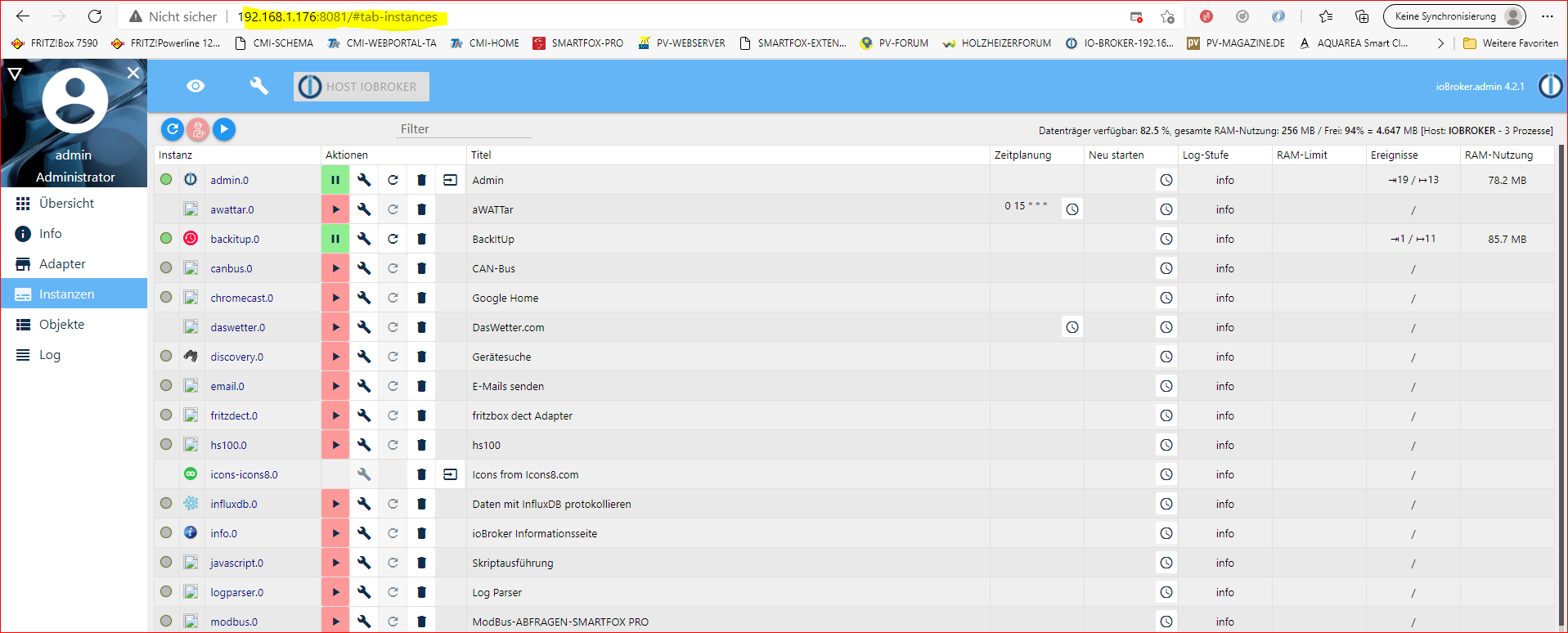
iobroker und influx solltest in einem aufwasch machen, damit die Daten wieder fleißig weiter geschrieben werden, ob jetzt Grafana gleich läuft oder erst später, spielt keine Rolle, das dient nur zum Anzeigen.Sorry, dies habe ich nicht ordentlich gekennzeichnet, dies war schon der Screen vom backitup vom iobroker-NUC.
Du bist Hellseher !
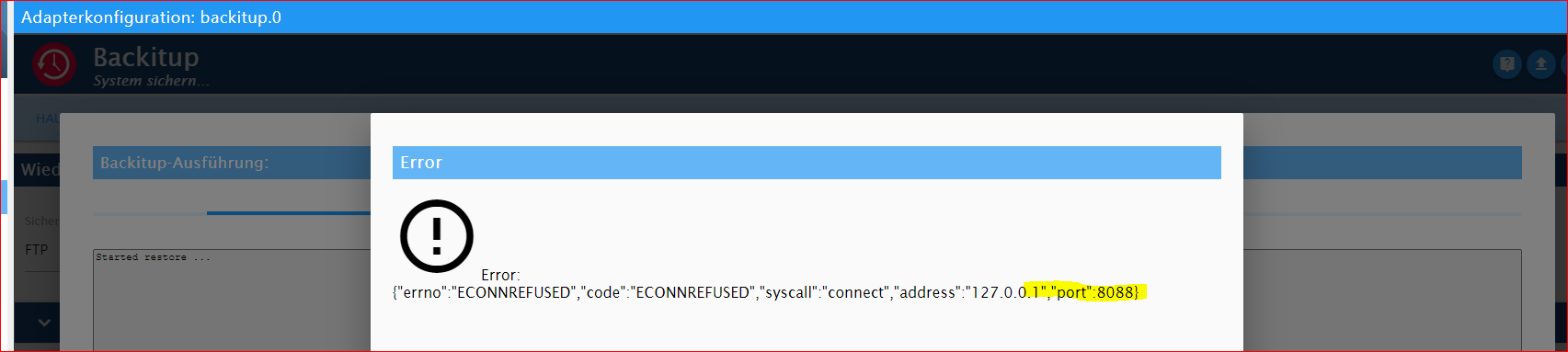
RESTORE INFLUXDB:
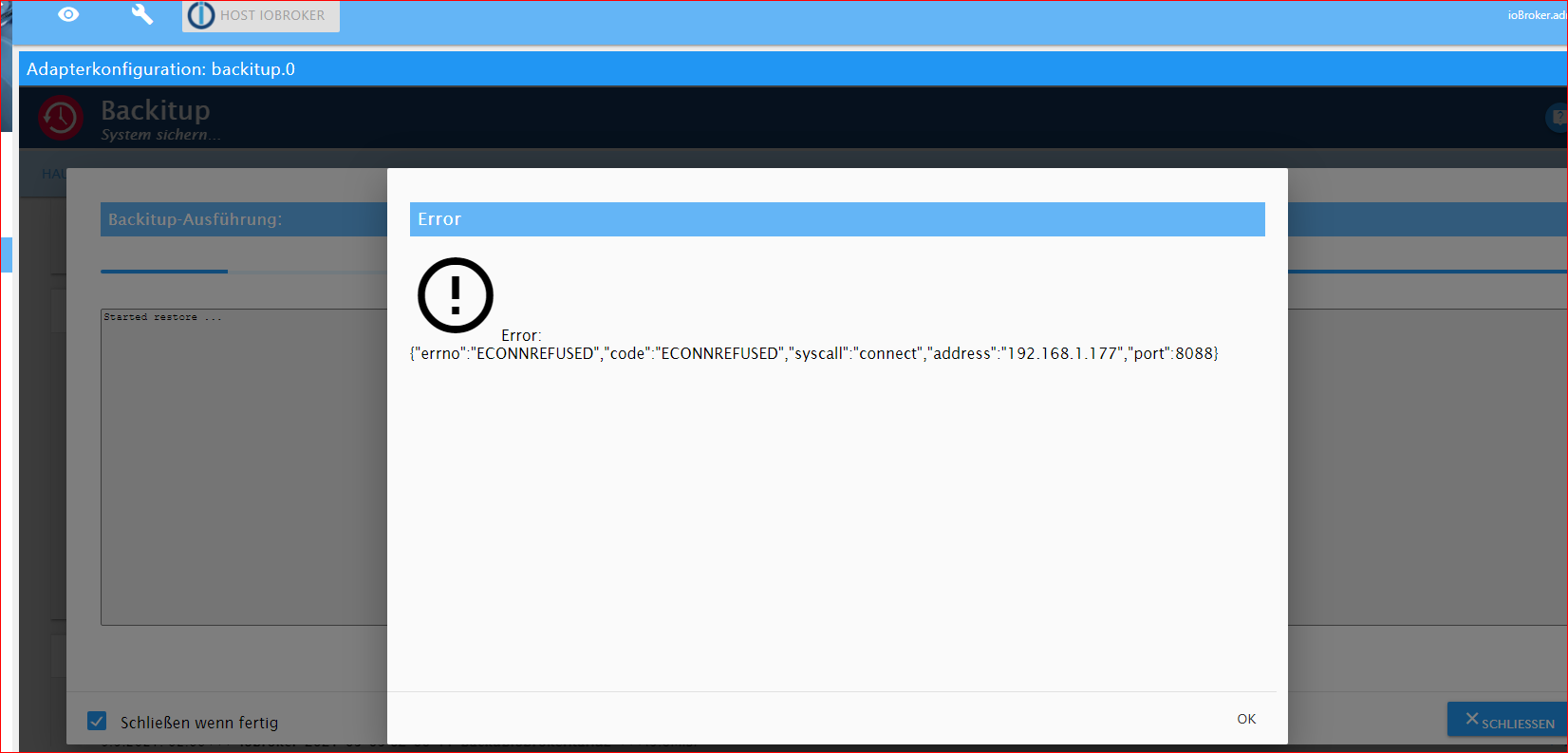
Den iobroker hat er mir aber jetzt gemacht. Ein 1. Schritt ist mal getan !

-
Sorry, dies habe ich nicht ordentlich gekennzeichnet, dies war schon der Screen vom backitup vom iobroker-NUC.
Du bist Hellseher !
RESTORE INFLUXDB:
Den iobroker hat er mir aber jetzt gemacht. Ein 1. Schritt ist mal getan !
@goetschhofer sagte in Anfänger sucht Hilfe bei Install. proxmox auf INTELNUC8i3BEK:
dies war schon der Screen vom backitup vom iobroker-NUC
ok
@goetschhofer sagte in Anfänger sucht Hilfe bei Install. proxmox auf INTELNUC8i3BEK:
Du bist Hellseher
dann wohl oder übel den anderen Weg
-
@goetschhofer sagte in Anfänger sucht Hilfe bei Install. proxmox auf INTELNUC8i3BEK:
dies war schon der Screen vom backitup vom iobroker-NUC
ok
@goetschhofer sagte in Anfänger sucht Hilfe bei Install. proxmox auf INTELNUC8i3BEK:
Du bist Hellseher
dann wohl oder übel den anderen Weg
@crunchip
Was ich bei dem 2. Weg des backup und restore für die Influxdb noch nicht verstanden habe, ist, dass man ein händisches backup auf dem RSP macht, aber wie kommt dieses physisch in die Influxdb-NUC ?Ich kann ja dies vom NUC aus nicht vom RSP hochladen ?
dann wohl oder übel den anderen Weg warum nicht nach der offiziellen Beschreibung ein direktes backup machen und wiederherstellen? https://docs.influxdata.com/influxdb/v1.8/administration/backup_and_restore/#configuring-remote-connections -
@crunchip
Was ich bei dem 2. Weg des backup und restore für die Influxdb noch nicht verstanden habe, ist, dass man ein händisches backup auf dem RSP macht, aber wie kommt dieses physisch in die Influxdb-NUC ?Ich kann ja dies vom NUC aus nicht vom RSP hochladen ?
dann wohl oder übel den anderen Weg warum nicht nach der offiziellen Beschreibung ein direktes backup machen und wiederherstellen? https://docs.influxdata.com/influxdb/v1.8/administration/backup_and_restore/#configuring-remote-connections@goetschhofer
also,- entweder du installierst dir den influx dienst ebenfalls auf deinen neuen iobroker, dann hast du die Möglichkeit per backitup vom neuen iobroker aus, ein backup aus deinem Pi zu ziehen. Da du aber jetzt mit proxmox unterwegs bist, ist eine Sicherung via backitup eigentlich nicht mehr nötig, somit auch unnötig nochmal influx auf dem neuen iobroker zu installieren.
- die normale Backup und Wiederherstellungsmethode, wie es influx beschreibt. Hab mich damit auch noch nicht auseinandergesetzt bzw noch nie benutzt.
ich gehe davon aus bzw verstehe es so, bin mir aber nicht 100% sicher
dieses von deinem Influx LXC auszuführen (mydatabase und ip vom PI musst du ersetzen)
influxd backup -portable -database mydatabase -host <remote-node-IP>:8088 /tmp/mysnapshotsomit hast du dann ein backup auf deinem LXC im verzeichnis /tmp/mysnapshot
dieses spielst du dann ein
<path-to-backup> wäre dann /tmp/mysnapshot, mydatabase ersetzen mit iobroker
<> lässt man natürlich weginfluxd restore -metadir /var/lib/influxdb/meta <path-to-backup> influxd restore -database <mydatabase> -datadir /var/lib/influxdb/data <path-to-backup> sudo chown -R influxdb:influxdb /var/lib/influxdb systemctl start influxdb -
@goetschhofer
also,- entweder du installierst dir den influx dienst ebenfalls auf deinen neuen iobroker, dann hast du die Möglichkeit per backitup vom neuen iobroker aus, ein backup aus deinem Pi zu ziehen. Da du aber jetzt mit proxmox unterwegs bist, ist eine Sicherung via backitup eigentlich nicht mehr nötig, somit auch unnötig nochmal influx auf dem neuen iobroker zu installieren.
- die normale Backup und Wiederherstellungsmethode, wie es influx beschreibt. Hab mich damit auch noch nicht auseinandergesetzt bzw noch nie benutzt.
ich gehe davon aus bzw verstehe es so, bin mir aber nicht 100% sicher
dieses von deinem Influx LXC auszuführen (mydatabase und ip vom PI musst du ersetzen)
influxd backup -portable -database mydatabase -host <remote-node-IP>:8088 /tmp/mysnapshotsomit hast du dann ein backup auf deinem LXC im verzeichnis /tmp/mysnapshot
dieses spielst du dann ein
<path-to-backup> wäre dann /tmp/mysnapshot, mydatabase ersetzen mit iobroker
<> lässt man natürlich weginfluxd restore -metadir /var/lib/influxdb/meta <path-to-backup> influxd restore -database <mydatabase> -datadir /var/lib/influxdb/data <path-to-backup> sudo chown -R influxdb:influxdb /var/lib/influxdb systemctl start influxdbIch habe mydatabase durch influxdb ersetzt, aber ich glaube dies ist falsch ?
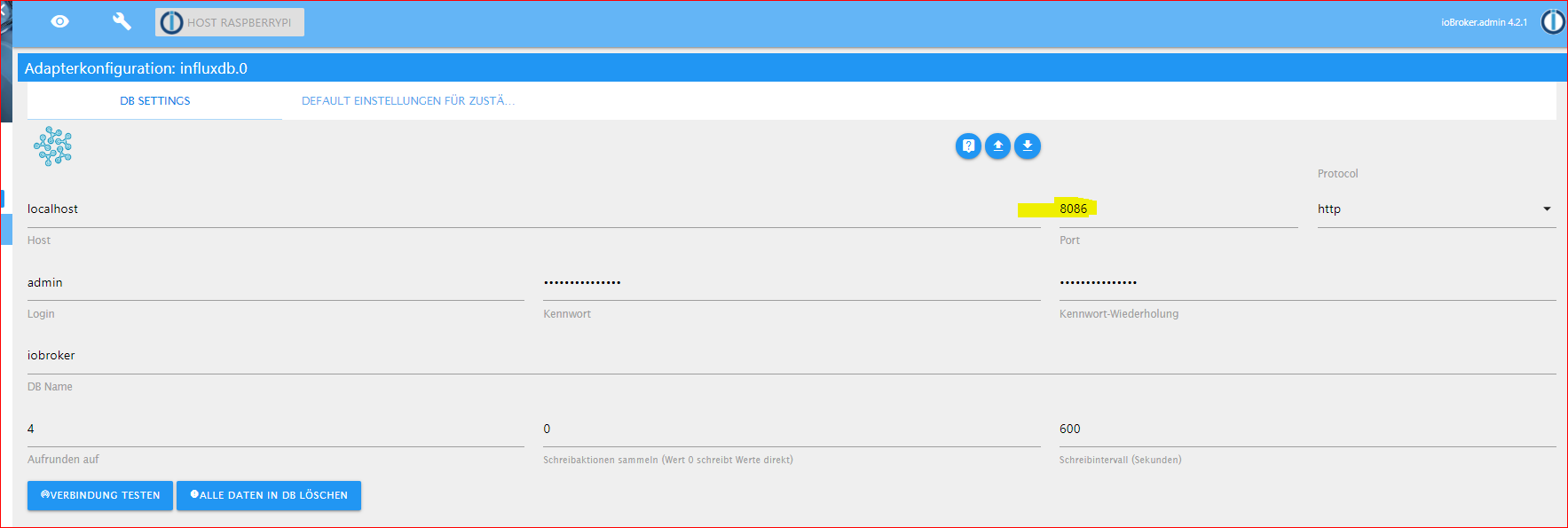
Eines ist mir noch aufgefallen. In Influx-Instanz bei meinem RSP habe ich als Port:8086 eingetragen.
Könnte dies nicht auch der Grund sein, warum er beim restore die Fehlermeldung erzeugt hat.
Debian GNU/Linux comes with ABSOLUTELY NO WARRANTY, to the extent permitted by applicable law. karl@LXC-INFLUXDB-192:~$ influxd backup -portable -database influxdb -host 192.168.1.160:8088 /tmp/mysnapshot 2021/05/10 09:40:10 backing up metastore to /tmp/mysnapshot/meta.00 2021/05/10 09:40:10 Download shard 0 failed dial tcp 192.168.1.160:8088: connect: connection refused. Waiting 2s and retrying (0)... 2021/05/10 09:40:12 Download shard 0 failed dial tcp 192.168.1.160:8088: connect: connection refused. Waiting 2s and retrying (1)... 2021/05/10 09:40:14 Download shard 0 failed dial tcp 192.168.1.160:8088: connect: connection refused. Waiting 2s and retrying (2)... 2021/05/10 09:40:16 Download shard 0 failed dial tcp 192.168.1.160:8088: connect: connection refused. Waiting 2s and retrying (3)... 2021/05/10 09:40:18 Download shard 0 failed dial tcp 192.168.1.160:8088: connect: connection refused. Waiting 2s and retrying (4)... 2021/05/10 09:40:20 Download shard 0 failed dial tcp 192.168.1.160:8088: connect: connection refused. Waiting 2s and retrying (5)... 2021/05/10 09:40:22 Download shard 0 failed dial tcp 192.168.1.160:8088: connect: connection refused. Waiting 3.01s and retrying (6)... 2021/05/10 09:40:25 Download shard 0 failed dial tcp 192.168.1.160:8088: connect: connection refused. Waiting 11.441s and retrying (7)... 2021/05/10 09:40:36 Download shard 0 failed dial tcp 192.168.1.160:8088: connect: connection refused. Waiting 43.477s and retrying (8)... 2021/05/10 09:41:20 Download shard 0 failed dial tcp 192.168.1.160:8088: connect: connection refused. Waiting 2m45.216s and retrying (9)... -
Ich habe mydatabase durch influxdb ersetzt, aber ich glaube dies ist falsch ?
Eines ist mir noch aufgefallen. In Influx-Instanz bei meinem RSP habe ich als Port:8086 eingetragen.
Könnte dies nicht auch der Grund sein, warum er beim restore die Fehlermeldung erzeugt hat.
Debian GNU/Linux comes with ABSOLUTELY NO WARRANTY, to the extent permitted by applicable law. karl@LXC-INFLUXDB-192:~$ influxd backup -portable -database influxdb -host 192.168.1.160:8088 /tmp/mysnapshot 2021/05/10 09:40:10 backing up metastore to /tmp/mysnapshot/meta.00 2021/05/10 09:40:10 Download shard 0 failed dial tcp 192.168.1.160:8088: connect: connection refused. Waiting 2s and retrying (0)... 2021/05/10 09:40:12 Download shard 0 failed dial tcp 192.168.1.160:8088: connect: connection refused. Waiting 2s and retrying (1)... 2021/05/10 09:40:14 Download shard 0 failed dial tcp 192.168.1.160:8088: connect: connection refused. Waiting 2s and retrying (2)... 2021/05/10 09:40:16 Download shard 0 failed dial tcp 192.168.1.160:8088: connect: connection refused. Waiting 2s and retrying (3)... 2021/05/10 09:40:18 Download shard 0 failed dial tcp 192.168.1.160:8088: connect: connection refused. Waiting 2s and retrying (4)... 2021/05/10 09:40:20 Download shard 0 failed dial tcp 192.168.1.160:8088: connect: connection refused. Waiting 2s and retrying (5)... 2021/05/10 09:40:22 Download shard 0 failed dial tcp 192.168.1.160:8088: connect: connection refused. Waiting 3.01s and retrying (6)... 2021/05/10 09:40:25 Download shard 0 failed dial tcp 192.168.1.160:8088: connect: connection refused. Waiting 11.441s and retrying (7)... 2021/05/10 09:40:36 Download shard 0 failed dial tcp 192.168.1.160:8088: connect: connection refused. Waiting 43.477s and retrying (8)... 2021/05/10 09:41:20 Download shard 0 failed dial tcp 192.168.1.160:8088: connect: connection refused. Waiting 2m45.216s and retrying (9)...@goetschhofer sagte in Anfänger sucht Hilfe bei Install. proxmox auf INTELNUC8i3BEK:
ch habe mydatabase durch influxdb ersetzt, aber ich glaube dies ist falsch ?
influxd backup -portable -database iobroker -host 192.168.1.160:8088 /tmp/mysnapshotdie ports passen schon so
8086 ist für deine inluxdb
8088 ist für den rpc dienst(sichern/wiederherstellen) -
@goetschhofer sagte in Anfänger sucht Hilfe bei Install. proxmox auf INTELNUC8i3BEK:
ch habe mydatabase durch influxdb ersetzt, aber ich glaube dies ist falsch ?
influxd backup -portable -database iobroker -host 192.168.1.160:8088 /tmp/mysnapshotdie ports passen schon so
8086 ist für deine inluxdb
8088 ist für den rpc dienst(sichern/wiederherstellen)@crunchip said in Anfänger sucht Hilfe bei Install. proxmox auf INTELNUC8i3BEK:
influxd backup -portable -database iobroker -host 192.168.1.160:8088 /tmp/mysnapshot
Dies habe ich vorhin ersetzen mydatabase mit iobroker auch schon versucht.
Debian GNU/Linux comes with ABSOLUTELY NO WARRANTY, to the extent permitted by applicable law. karl@LXC-INFLUXDB-192:~$ influxd backup -portable -database iobroker -host 192.168.1.160:8088 /tmp/mysnapshot 2021/05/10 10:01:37 backing up metastore to /tmp/mysnapshot/meta.00 2021/05/10 10:01:37 Download shard 0 failed dial tcp 192.168.1.160:8088: connect: connection refused. Waiting 2s and retrying (0)... 2021/05/10 10:01:39 Download shard 0 failed dial tcp 192.168.1.160:8088: connect: connection refused. Waiting 2s and retrying (1)... 2021/05/10 10:01:41 Download shard 0 failed dial tcp 192.168.1.160:8088: connect: connection refused. Waiting 2s and retrying (2)... 2021/05/10 10:01:43 Download shard 0 failed dial tcp 192.168.1.160:8088: connect: connection refused. Waiting 2s and retrying (3)... 2021/05/10 10:01:45 Download shard 0 failed dial tcp 192.168.1.160:8088: connect: connection refused. Waiting 2s and retrying (4)... 2021/05/10 10:01:47 Download shard 0 failed dial tcp 192.168.1.160:8088: connect: connection refused. Waiting 2s and retrying (5)... 2021/05/10 10:01:49 Download shard 0 failed dial tcp 192.168.1.160:8088: connect: connection refused. Waiting 3.01s and retrying (6)... -
@crunchip said in Anfänger sucht Hilfe bei Install. proxmox auf INTELNUC8i3BEK:
influxd backup -portable -database iobroker -host 192.168.1.160:8088 /tmp/mysnapshot
Dies habe ich vorhin ersetzen mydatabase mit iobroker auch schon versucht.
Debian GNU/Linux comes with ABSOLUTELY NO WARRANTY, to the extent permitted by applicable law. karl@LXC-INFLUXDB-192:~$ influxd backup -portable -database iobroker -host 192.168.1.160:8088 /tmp/mysnapshot 2021/05/10 10:01:37 backing up metastore to /tmp/mysnapshot/meta.00 2021/05/10 10:01:37 Download shard 0 failed dial tcp 192.168.1.160:8088: connect: connection refused. Waiting 2s and retrying (0)... 2021/05/10 10:01:39 Download shard 0 failed dial tcp 192.168.1.160:8088: connect: connection refused. Waiting 2s and retrying (1)... 2021/05/10 10:01:41 Download shard 0 failed dial tcp 192.168.1.160:8088: connect: connection refused. Waiting 2s and retrying (2)... 2021/05/10 10:01:43 Download shard 0 failed dial tcp 192.168.1.160:8088: connect: connection refused. Waiting 2s and retrying (3)... 2021/05/10 10:01:45 Download shard 0 failed dial tcp 192.168.1.160:8088: connect: connection refused. Waiting 2s and retrying (4)... 2021/05/10 10:01:47 Download shard 0 failed dial tcp 192.168.1.160:8088: connect: connection refused. Waiting 2s and retrying (5)... 2021/05/10 10:01:49 Download shard 0 failed dial tcp 192.168.1.160:8088: connect: connection refused. Waiting 3.01s and retrying (6)...@goetschhofer ich blicke gerade nicht ganz durch, die .160 ist dein PI?
-
@goetschhofer ich blicke gerade nicht ganz durch, die .160 ist dein PI?
-
@goetschhofer probier es mal anders herum und führe es von deinem Pi aus
.77 ist dein LXC? ansonsten ersetzen mit der richtigen ipinfluxd backup -portable -database iobroker -host 192.168.1.77:8088 /tmp/mysnapshot -
@goetschhofer probier es mal anders herum und führe es von deinem Pi aus
.77 ist dein LXC? ansonsten ersetzen mit der richtigen ipinfluxd backup -portable -database iobroker -host 192.168.1.77:8088 /tmp/mysnapshotJa, .77 mein LXC-Influxdb.
Port freigeben in Fritzbox7590 ?
pi@raspberrypi:~ $ influxd backup -portable -database iobroker -host 192.168.1.7 7:8088 /tmp/mysnapshot 2021/05/10 10:12:54 backing up metastore to /tmp/mysnapshot/meta.00 2021/05/10 10:12:57 Download shard 0 failed dial tcp 192.168.1.77:8088: connect: no route to host. Waiting 2s and retrying (0)... 2021/05/10 10:13:00 Download shard 0 failed dial tcp 192.168.1.77:8088: connect: no route to host. Waiting 2s and retrying (1)... 2021/05/10 10:13:03 Download shard 0 failed dial tcp 192.168.1.77:8088: connect: no route to host. Waiting 2s and retrying (2)... 2021/05/10 10:13:06 Download shard 0 failed dial tcp 192.168.1.77:8088: connect: no route to host. Waiting 2s and retrying (3)... pi@raspberrypi:~ $ influxd backup -portable -database iobroker -host 192.168.1.7 7:8088 /tmp/mysnapshot 2021/05/10 10:12:54 backing up metastore to /tmp/mysnapshot/meta.00 2021/05/10 10:12:57 Download shard 0 failed dial tcp 192.168.1.77:8088: connect: no route to host. Waiting 2s and retrying (0)... 2021/05/10 10:13:00 Download shard 0 failed dial tcp 192.168.1.77:8088: connect: no route to host. Waiting 2s and retrying (1)... 2021/05/10 10:13:03 Download shard 0 failed dial tcp 192.168.1.77:8088: connect: no route to host. Waiting 2s and retrying (2)... ^C -
Ja, .77 mein LXC-Influxdb.
Port freigeben in Fritzbox7590 ?
pi@raspberrypi:~ $ influxd backup -portable -database iobroker -host 192.168.1.7 7:8088 /tmp/mysnapshot 2021/05/10 10:12:54 backing up metastore to /tmp/mysnapshot/meta.00 2021/05/10 10:12:57 Download shard 0 failed dial tcp 192.168.1.77:8088: connect: no route to host. Waiting 2s and retrying (0)... 2021/05/10 10:13:00 Download shard 0 failed dial tcp 192.168.1.77:8088: connect: no route to host. Waiting 2s and retrying (1)... 2021/05/10 10:13:03 Download shard 0 failed dial tcp 192.168.1.77:8088: connect: no route to host. Waiting 2s and retrying (2)... 2021/05/10 10:13:06 Download shard 0 failed dial tcp 192.168.1.77:8088: connect: no route to host. Waiting 2s and retrying (3)... pi@raspberrypi:~ $ influxd backup -portable -database iobroker -host 192.168.1.7 7:8088 /tmp/mysnapshot 2021/05/10 10:12:54 backing up metastore to /tmp/mysnapshot/meta.00 2021/05/10 10:12:57 Download shard 0 failed dial tcp 192.168.1.77:8088: connect: no route to host. Waiting 2s and retrying (0)... 2021/05/10 10:13:00 Download shard 0 failed dial tcp 192.168.1.77:8088: connect: no route to host. Waiting 2s and retrying (1)... 2021/05/10 10:13:03 Download shard 0 failed dial tcp 192.168.1.77:8088: connect: no route to host. Waiting 2s and retrying (2)... ^C@goetschhofer in der ersten zeile steht aber nur 192.168.1.7 sollte doch .77 sein
-
@goetschhofer in der ersten zeile steht aber nur 192.168.1.7 sollte doch .77 sein
Sorry, hier war ich schlampig.
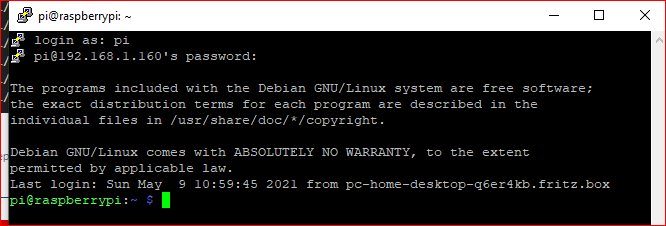
pi@raspberrypi:~ $ influxd backup -portable -database iobroker -host 192.168.1.77:8088 /tmp/mysnapshot
2021/05/10 10:16:20 backing up metastore to /tmp/mysnapshot/meta.00
2021/05/10 10:16:23 Download shard 0 failed dial tcp 192.168.1.77:8088: connect: no route to host.  Waiting 2s and retrying (0)...
2021/05/10 10:16:26 Download shard 0 failed dial tcp 192.168.1.77:8088: connect: no route to host.  Waiting 2s and retrying (1)...
2021/05/10 10:16:29 Download shard 0 failed dial tcp 192.168.1.77:8088: connect: no route to host.  Waiting 2s and retrying (2)...
2021/05/10 10:16:32 Download shard 0 failed dial tcp 192.168.1.77:8088: connect: no route to host.  Waiting 2s and retrying (3)...
2021/05/10 10:16:35 Download shard 0 failed dial tcp 192.168.1.77:8088: connect: no route to host.  Waiting 2s and retrying (4)...
2021/05/10 10:16:38 Download shard 0 failed dial tcp 192.168.1.77:8088: connect: no route to host.  Waiting 2s and retrying (5)...

Hey! Du scheinst an dieser Unterhaltung interessiert zu sein, hast aber noch kein Konto.
Hast du es satt, bei jedem Besuch durch die gleichen Beiträge zu scrollen? Wenn du dich für ein Konto anmeldest, kommst du immer genau dorthin zurück, wo du zuvor warst, und kannst dich über neue Antworten benachrichtigen lassen (entweder per E-Mail oder Push-Benachrichtigung). Du kannst auch Lesezeichen speichern und Beiträge positiv bewerten, um anderen Community-Mitgliedern deine Wertschätzung zu zeigen.
Mit deinem Input könnte dieser Beitrag noch besser werden 💗
Registrieren Anmelden523
Online33.0k
Benutzer83.6k
Themen1.3m
Beiträge