Weiter zum Inhalt
  • Home
  • Aktuell
  • Tags
  • 0 Ungelesen 0
  • Kategorien
  • Unreplied
  • Beliebt
  • GitHub
  • Docu
  • Hilfe
Skins
  • Hell
  • Brite
  • Cerulean
  • Cosmo
  • Flatly
  • Journal
  • Litera
  • Lumen
  • Lux
  • Materia
  • Minty
  • Morph
  • Pulse
  • Sandstone
  • Simplex
  • Sketchy
  • Spacelab
  • United
  • Yeti
  • Zephyr
  • Dunkel
  • Cyborg
  • Darkly
  • Quartz
  • Slate
  • Solar
  • Superhero
  • Vapor

  • Standard: (Kein Skin)
  • Kein Skin
Einklappen
ioBroker Logo

Community Forum

donate donate
  1. ioBroker Community Home
  2. Deutsch
  3. ioBroker Allgemein
  4. BackItUp - Fehler beim InfluxDB Backup

NEWS

  • Neues YouTube-Video: Visualisierung im Devices-Adapter
    BluefoxB
    Bluefox
    6
    1
    134

  • Neuer ioBroker-Blog online: Monatsrückblick März/April 2026
    BluefoxB
    Bluefox
    8
    1
    1.8k

  • Verwendung von KI bitte immer deutlich kennzeichnen
    HomoranH
    Homoran
    11
    1
    759

BackItUp - Fehler beim InfluxDB Backup

Geplant Angeheftet Gesperrt Verschoben ioBroker Allgemein
influxdbinfluxbackupbackitupbackitup influxdb
21 Beiträge 3 Kommentatoren 2.7k Aufrufe 3 Beobachtet
  • Älteste zuerst
  • Neuste zuerst
  • Meiste Stimmen
Antworten
  • In einem neuen Thema antworten
Anmelden zum Antworten
Dieses Thema wurde gelöscht. Nur Nutzer mit entsprechenden Rechten können es sehen.
  • crunchipC crunchip

    @prezl sagte in BackItUp - Fehler beim InfluxDB Backup:

    connect: connection refused. Waiting 2s and retrying (0)..

    läuft influx local oder separat?
    bind addresse RPC sollte standard "127.0.0.1:8088" in der influx config stehen, zufälligerweise da was geändert?

    P Offline
    P Offline
    Prezl
    schrieb am zuletzt editiert von
    #3

    In der Influx config wurde nichts geändert.

    pi@raspberrypi:~ $ influxd config
    Merging with configuration at: /etc/influxdb/influxdb.conf
    reporting-disabled = false
    bind-address = "127.0.0.1:8088"


    Die InfluxDB läuft auf dem gleichen Raspberry wie der iobroker (IP-Adresse 192.168.178.42). Deshalb sehen meine Einstellungen so aus:
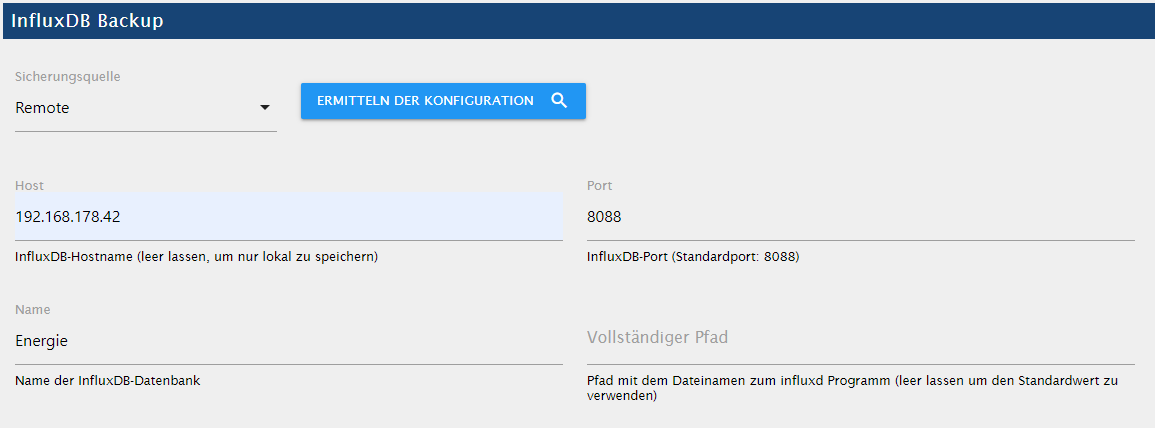
    739a3259-d694-41a2-a8a3-d989c5862988-image.png

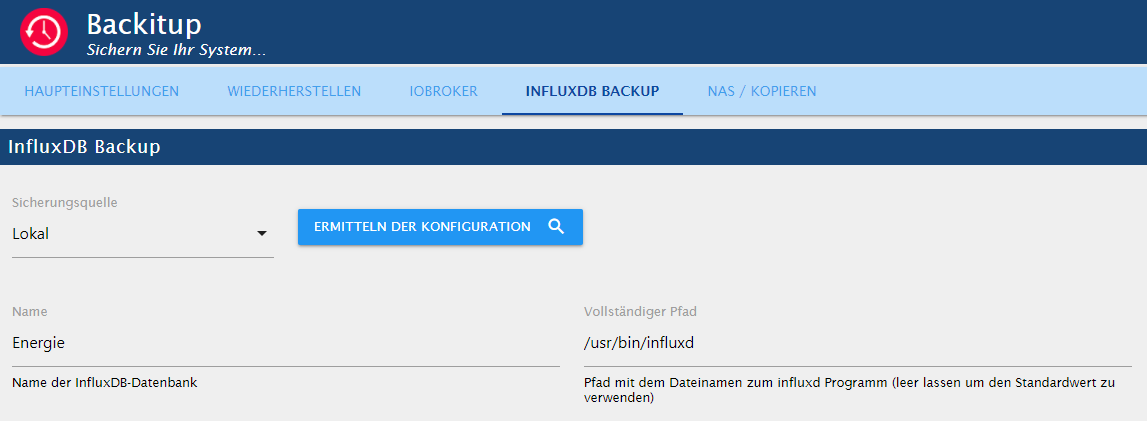
    Wenn ich "InfluxDB-Hostname" auf localhost oder Sicherungsquelle auf Lokal stelle, kommt folgender Fehler:

    [DEBUG] [mount] - mount successfully completed
    [DEBUG] [mount] - done
    [DEBUG] [iobroker] - host.raspberrypi 738 states saved
    
    [DEBUG] [iobroker] - host.raspberrypi 914 objects saved
    
    [DEBUG] [iobroker] - Backup created: /opt/iobroker/backups/iobroker_2021_02_27-14_43_50_backupiobroker.tar.gz
    
    [DEBUG] [iobroker] - done
    [DEBUG] [influxDB] - Start InfluxDB Backup ...
    [DEBUG] [influxDB] - InfluxDB Backup tmp directory created 
    [DEBUG] [influxDB] - Try deleting the InfluxDB tmp directory
    [DEBUG] [influxDB] - InfluxDB tmp directory was successfully deleted
    [ERROR] [influxDB] - [IGNORED] Error: Command failed: influxd backup -portable -database Energie -host localhost:8088 "/opt/iobroker/backups/influxDB_2021_02_27-14_43_56_backupiobroker"
    backup: open /opt/iobroker/backups/influxDB_2021_02_27-14_43_56_backupiobroker/meta.00.pending: stale NFS file handle
    
    [DEBUG] [cifs] - done
    [ERROR] [clean] - Backup files not deleted from /opt/iobroker/backups because some errors.
    [DEBUG] [clean] - done
    [DEBUG] [historyHTML] - new history html values created
    [DEBUG] [historyHTML] - done
    [DEBUG] [historyJSON] - new history json values created
    [DEBUG] [historyJSON] - done
    [DEBUG] [umount] - mount activ... umount in 60 Seconds!!
    
    crunchipC 1 Antwort Letzte Antwort
    0
    • P Prezl

      In der Influx config wurde nichts geändert.

      pi@raspberrypi:~ $ influxd config
      Merging with configuration at: /etc/influxdb/influxdb.conf
      reporting-disabled = false
      bind-address = "127.0.0.1:8088"


      Die InfluxDB läuft auf dem gleichen Raspberry wie der iobroker (IP-Adresse 192.168.178.42). Deshalb sehen meine Einstellungen so aus:
      739a3259-d694-41a2-a8a3-d989c5862988-image.png

      Wenn ich "InfluxDB-Hostname" auf localhost oder Sicherungsquelle auf Lokal stelle, kommt folgender Fehler:

      [DEBUG] [mount] - mount successfully completed
      [DEBUG] [mount] - done
      [DEBUG] [iobroker] - host.raspberrypi 738 states saved
      
      [DEBUG] [iobroker] - host.raspberrypi 914 objects saved
      
      [DEBUG] [iobroker] - Backup created: /opt/iobroker/backups/iobroker_2021_02_27-14_43_50_backupiobroker.tar.gz
      
      [DEBUG] [iobroker] - done
      [DEBUG] [influxDB] - Start InfluxDB Backup ...
      [DEBUG] [influxDB] - InfluxDB Backup tmp directory created 
      [DEBUG] [influxDB] - Try deleting the InfluxDB tmp directory
      [DEBUG] [influxDB] - InfluxDB tmp directory was successfully deleted
      [ERROR] [influxDB] - [IGNORED] Error: Command failed: influxd backup -portable -database Energie -host localhost:8088 "/opt/iobroker/backups/influxDB_2021_02_27-14_43_56_backupiobroker"
      backup: open /opt/iobroker/backups/influxDB_2021_02_27-14_43_56_backupiobroker/meta.00.pending: stale NFS file handle
      
      [DEBUG] [cifs] - done
      [ERROR] [clean] - Backup files not deleted from /opt/iobroker/backups because some errors.
      [DEBUG] [clean] - done
      [DEBUG] [historyHTML] - new history html values created
      [DEBUG] [historyHTML] - done
      [DEBUG] [historyJSON] - new history json values created
      [DEBUG] [historyJSON] - done
      [DEBUG] [umount] - mount activ... umount in 60 Seconds!!
      
      crunchipC Abwesend
      crunchipC Abwesend
      crunchip
      Forum Testing Most Active Developer
      schrieb am zuletzt editiert von crunchip
      #4

      @prezl deine Sicherungsquelle muss auf Local stehen, da du influx ja direkt auf dem iobroker laufen hast. Bei Host entweder die IP oder gar nichts eingeben, sollte auch automatisch richtig eingetragen werden, wenn du auf ermittle Konfig drückst.
      Desweiteren schreibst du

      @prezl sagte in BackItUp - Fehler beim InfluxDB Backup:

      Das Backup für den iobroker scheint zu funktionieren,

      ja oder nein?
      Wenn dies ebenfalls nicht funktioniert, dann stimmt deine CIFS Verbindung nicht

      umgestiegen von Proxmox auf Unraid

      P 1 Antwort Letzte Antwort
      0
      • crunchipC crunchip

        @prezl deine Sicherungsquelle muss auf Local stehen, da du influx ja direkt auf dem iobroker laufen hast. Bei Host entweder die IP oder gar nichts eingeben, sollte auch automatisch richtig eingetragen werden, wenn du auf ermittle Konfig drückst.
        Desweiteren schreibst du

        @prezl sagte in BackItUp - Fehler beim InfluxDB Backup:

        Das Backup für den iobroker scheint zu funktionieren,

        ja oder nein?
        Wenn dies ebenfalls nicht funktioniert, dann stimmt deine CIFS Verbindung nicht

        P Offline
        P Offline
        Prezl
        schrieb am zuletzt editiert von
        #5

        Ich gehe davon aus, dass das Backup vom iobroker funktioniert. Es wird eine Datei auf dem USB-Stick erstellt, z. B. "iobroker_2021_02_27-14_39_03_backupiobroker.tar.gz" und im Tab "Wiederherstellen" kann ich die entsprechende Sicherung auch auswählen.

        Wenn ich die Sicherungsquelle bei InfluxDB auf Local stelle, kommt es zu folgendem Fehler (Zeile 14).

        [DEBUG] [mount] - mount successfully completed
        [DEBUG] [mount] - done
        [DEBUG] [iobroker] - host.raspberrypi 738 states saved
        
        [DEBUG] [iobroker] - host.raspberrypi 914 objects saved
        
        [DEBUG] [iobroker] - Backup created: /opt/iobroker/backups/iobroker_2021_02_27-15_41_35_backupiobroker.tar.gz
        
        [DEBUG] [iobroker] - done
        [DEBUG] [influxDB] - Start InfluxDB Backup ...
        [DEBUG] [influxDB] - InfluxDB Backup tmp directory created 
        [DEBUG] [influxDB] - Try deleting the InfluxDB tmp directory
        [DEBUG] [influxDB] - InfluxDB tmp directory was successfully deleted
        [ERROR] [influxDB] - [IGNORED] Error: Command failed: influxd backup -portable -database Energie "/opt/iobroker/backups/influxDB_2021_02_27-15_41_41_backupiobroker"
        backup: open /opt/iobroker/backups/influxDB_2021_02_27-15_41_41_backupiobroker/meta.00.pending: stale NFS file handle
        
        [DEBUG] [cifs] - done
        [ERROR] [clean] - Backup files not deleted from /opt/iobroker/backups because some errors.
        [DEBUG] [clean] - done
        
        crunchipC 1 Antwort Letzte Antwort
        0
        • P Prezl

          Ich gehe davon aus, dass das Backup vom iobroker funktioniert. Es wird eine Datei auf dem USB-Stick erstellt, z. B. "iobroker_2021_02_27-14_39_03_backupiobroker.tar.gz" und im Tab "Wiederherstellen" kann ich die entsprechende Sicherung auch auswählen.

          Wenn ich die Sicherungsquelle bei InfluxDB auf Local stelle, kommt es zu folgendem Fehler (Zeile 14).

          [DEBUG] [mount] - mount successfully completed
          [DEBUG] [mount] - done
          [DEBUG] [iobroker] - host.raspberrypi 738 states saved
          
          [DEBUG] [iobroker] - host.raspberrypi 914 objects saved
          
          [DEBUG] [iobroker] - Backup created: /opt/iobroker/backups/iobroker_2021_02_27-15_41_35_backupiobroker.tar.gz
          
          [DEBUG] [iobroker] - done
          [DEBUG] [influxDB] - Start InfluxDB Backup ...
          [DEBUG] [influxDB] - InfluxDB Backup tmp directory created 
          [DEBUG] [influxDB] - Try deleting the InfluxDB tmp directory
          [DEBUG] [influxDB] - InfluxDB tmp directory was successfully deleted
          [ERROR] [influxDB] - [IGNORED] Error: Command failed: influxd backup -portable -database Energie "/opt/iobroker/backups/influxDB_2021_02_27-15_41_41_backupiobroker"
          backup: open /opt/iobroker/backups/influxDB_2021_02_27-15_41_41_backupiobroker/meta.00.pending: stale NFS file handle
          
          [DEBUG] [cifs] - done
          [ERROR] [clean] - Backup files not deleted from /opt/iobroker/backups because some errors.
          [DEBUG] [clean] - done
          
          crunchipC Abwesend
          crunchipC Abwesend
          crunchip
          Forum Testing Most Active Developer
          schrieb am zuletzt editiert von
          #6

          @prezl sagte in BackItUp - Fehler beim InfluxDB Backup:

          Es wird eine Datei auf dem USB-Stick erstellt

          ok, wenn die Datei vorhanden ist, funktioniert ja die generelle Verbindung zum Stick, also ein spezielles Problem mit Influx.

          stell mal auf Remote und gib bei Host deine IP an, so steht es auch im offiziellen Thread

          umgestiegen von Proxmox auf Unraid

          P 1 Antwort Letzte Antwort
          0
          • crunchipC crunchip

            @prezl sagte in BackItUp - Fehler beim InfluxDB Backup:

            Es wird eine Datei auf dem USB-Stick erstellt

            ok, wenn die Datei vorhanden ist, funktioniert ja die generelle Verbindung zum Stick, also ein spezielles Problem mit Influx.

            stell mal auf Remote und gib bei Host deine IP an, so steht es auch im offiziellen Thread

            P Offline
            P Offline
            Prezl
            schrieb am zuletzt editiert von
            #7

            @crunchip sagte in BackItUp - Fehler beim InfluxDB Backup:

            stell mal auf Remote und gib bei Host deine IP an

            So hatte ich es ja ganz am Anfang, siehe den ersten Post. Nur kommt dann eben der Fehler...

            Muss ich für ein Backup bei InfluxDB etwas spezielles einstellen?

            crunchipC 1 Antwort Letzte Antwort
            0
            • P Prezl

              @crunchip sagte in BackItUp - Fehler beim InfluxDB Backup:

              stell mal auf Remote und gib bei Host deine IP an

              So hatte ich es ja ganz am Anfang, siehe den ersten Post. Nur kommt dann eben der Fehler...

              Muss ich für ein Backup bei InfluxDB etwas spezielles einstellen?

              crunchipC Abwesend
              crunchipC Abwesend
              crunchip
              Forum Testing Most Active Developer
              schrieb am zuletzt editiert von
              #8

              @prezl sagte in BackItUp - Fehler beim InfluxDB Backup:

              Muss ich für ein Backup bei InfluxDB etwas spezielles einstellen?

              nicht das ich wüsste
              aber wenn du testweise mal in der influx config die bind Adresse änderst
              statt # bind-address = "127.0.0.1:8088"

              bind-address = "192.168.178.42.1:8088"
              

              danach den service neu starten

              systemctl restart influxdb.service


              umgestiegen von Proxmox auf Unraid

              P 1 Antwort Letzte Antwort
              0
              • crunchipC crunchip

                @prezl sagte in BackItUp - Fehler beim InfluxDB Backup:

                Muss ich für ein Backup bei InfluxDB etwas spezielles einstellen?

                nicht das ich wüsste
                aber wenn du testweise mal in der influx config die bind Adresse änderst
                statt # bind-address = "127.0.0.1:8088"

                bind-address = "192.168.178.42.1:8088"
                

                danach den service neu starten

                systemctl restart influxdb.service
                
                
                P Offline
                P Offline
                Prezl
                schrieb am zuletzt editiert von
                #9

                Hat leider auch nichts gebracht...

                crunchipC 1 Antwort Letzte Antwort
                0
                • P Prezl

                  Hat leider auch nichts gebracht...

                  crunchipC Abwesend
                  crunchipC Abwesend
                  crunchip
                  Forum Testing Most Active Developer
                  schrieb am zuletzt editiert von
                  #10

                  @prezl dann fällt mir leider auch nichts mehr ein, musst du mal @simatec um Rat fragen

                  umgestiegen von Proxmox auf Unraid

                  simatecS 1 Antwort Letzte Antwort
                  0
                  • crunchipC crunchip

                    @prezl dann fällt mir leider auch nichts mehr ein, musst du mal @simatec um Rat fragen

                    simatecS Online
                    simatecS Online
                    simatec
                    Developer Most Active
                    schrieb am zuletzt editiert von
                    #11

                    @crunchip
                    Wenn du Influx auf dem gleichen System wie iobroker hast, stelle in Backitup auf lokal.
                    Bind adress dann bitte auf dem Standard lassen.
                    Also 127.0.0.1.

                    Falls der Fehler immernoch erscheint, dann ermittelte den Pfad von influxd und trage diesen ebenfalls in Backitup ein.

                    • Besuche meine Github Seite
                    • Beitrag hat geholfen oder willst du mich unterstützen
                    • HowTo Restore ioBroker
                    crunchipC P 2 Antworten Letzte Antwort
                    0
                    • simatecS simatec

                      @crunchip
                      Wenn du Influx auf dem gleichen System wie iobroker hast, stelle in Backitup auf lokal.
                      Bind adress dann bitte auf dem Standard lassen.
                      Also 127.0.0.1.

                      Falls der Fehler immernoch erscheint, dann ermittelte den Pfad von influxd und trage diesen ebenfalls in Backitup ein.

                      crunchipC Abwesend
                      crunchipC Abwesend
                      crunchip
                      Forum Testing Most Active Developer
                      schrieb am zuletzt editiert von
                      #12

                      @simatec das hat er ja schon versucht, siehe https://forum.iobroker.net/post/589028
                      dann bleibt nur noch den Pfad direkt einzutragen, da dieser leer ist

                      umgestiegen von Proxmox auf Unraid

                      1 Antwort Letzte Antwort
                      0
                      • simatecS simatec

                        @crunchip
                        Wenn du Influx auf dem gleichen System wie iobroker hast, stelle in Backitup auf lokal.
                        Bind adress dann bitte auf dem Standard lassen.
                        Also 127.0.0.1.

                        Falls der Fehler immernoch erscheint, dann ermittelte den Pfad von influxd und trage diesen ebenfalls in Backitup ein.

                        P Offline
                        P Offline
                        Prezl
                        schrieb am zuletzt editiert von
                        #13

                        @simatec
                        Bind Adresse auf Standard und Sicherungsquelle auf Lokal funktioniert leider auch nicht.

                        Wie ermittle ich den richtigen Pfad der InfluxDB?

                        simatecS 1 Antwort Letzte Antwort
                        0
                        • P Prezl

                          @simatec
                          Bind Adresse auf Standard und Sicherungsquelle auf Lokal funktioniert leider auch nicht.

                          Wie ermittle ich den richtigen Pfad der InfluxDB?

                          simatecS Online
                          simatecS Online
                          simatec
                          Developer Most Active
                          schrieb am zuletzt editiert von
                          #14

                          @prezl

                          which influxd
                          
                          • Besuche meine Github Seite
                          • Beitrag hat geholfen oder willst du mich unterstützen
                          • HowTo Restore ioBroker
                          P 1 Antwort Letzte Antwort
                          0
                          • simatecS simatec

                            @prezl

                            which influxd
                            
                            P Offline
                            P Offline
                            Prezl
                            schrieb am zuletzt editiert von
                            #15

                            @simatec
                            Leider immer noch nicht.

                            Das ist eingestellt
                            823b2dc6-e407-4568-b53c-13d54f8f9819-image.png

                            pi@raspberrypi:~ $ which influxd
                            /usr/bin/influxd
                            
                            bind-address = "127.0.0.1:8088"
                            

                            Und dann kommt dieser Fehler

                            [DEBUG] [influxDB] - Start InfluxDB Backup ...
                            [DEBUG] [influxDB] - InfluxDB Backup tmp directory created 
                            [DEBUG] [influxDB] - Try deleting the InfluxDB tmp directory
                            [DEBUG] [influxDB] - InfluxDB tmp directory was successfully deleted
                            [ERROR] [influxDB] - [IGNORED] Error: Command failed: "/usr/bin/influxd" backup -portable -database Energie "/opt/iobroker/backups/influxDB_2021_02_27-21_45_49_backupiobroker"
                            backup: open /opt/iobroker/backups/influxDB_2021_02_27-21_45_49_backupiobroker/meta.00.pending: stale NFS file handle
                            
                            [DEBUG] [cifs] - done
                            [ERROR] [clean] - Backup files not deleted from /opt/iobroker/backups because some errors.
                            [DEBUG] [clean] - done
                            
                            simatecS 1 Antwort Letzte Antwort
                            0
                            • P Prezl

                              @simatec
                              Leider immer noch nicht.

                              Das ist eingestellt
                              823b2dc6-e407-4568-b53c-13d54f8f9819-image.png

                              pi@raspberrypi:~ $ which influxd
                              /usr/bin/influxd
                              
                              bind-address = "127.0.0.1:8088"
                              

                              Und dann kommt dieser Fehler

                              [DEBUG] [influxDB] - Start InfluxDB Backup ...
                              [DEBUG] [influxDB] - InfluxDB Backup tmp directory created 
                              [DEBUG] [influxDB] - Try deleting the InfluxDB tmp directory
                              [DEBUG] [influxDB] - InfluxDB tmp directory was successfully deleted
                              [ERROR] [influxDB] - [IGNORED] Error: Command failed: "/usr/bin/influxd" backup -portable -database Energie "/opt/iobroker/backups/influxDB_2021_02_27-21_45_49_backupiobroker"
                              backup: open /opt/iobroker/backups/influxDB_2021_02_27-21_45_49_backupiobroker/meta.00.pending: stale NFS file handle
                              
                              [DEBUG] [cifs] - done
                              [ERROR] [clean] - Backup files not deleted from /opt/iobroker/backups because some errors.
                              [DEBUG] [clean] - done
                              
                              simatecS Online
                              simatecS Online
                              simatec
                              Developer Most Active
                              schrieb am zuletzt editiert von
                              #16

                              @prezl
                              Versuche das ganze bitte mal lokal zu sichern.
                              Ich habe die Vermutung, dass etwas an deinen Schreibrechten auf dem NAS nicht passt.

                              Um das Problem einzugrenzen, schaue mal, ob es als lokale Sicherung läuft

                              • Besuche meine Github Seite
                              • Beitrag hat geholfen oder willst du mich unterstützen
                              • HowTo Restore ioBroker
                              P 2 Antworten Letzte Antwort
                              0
                              • simatecS simatec

                                @prezl
                                Versuche das ganze bitte mal lokal zu sichern.
                                Ich habe die Vermutung, dass etwas an deinen Schreibrechten auf dem NAS nicht passt.

                                Um das Problem einzugrenzen, schaue mal, ob es als lokale Sicherung läuft

                                P Offline
                                P Offline
                                Prezl
                                schrieb am zuletzt editiert von
                                #17

                                @simatec
                                Ok, werde ich mal versuchen. Komisch ist dann aber, dass die iobroker Sicherungsdatei auf das NAS geschrieben wird.

                                1 Antwort Letzte Antwort
                                0
                                • simatecS simatec

                                  @prezl
                                  Versuche das ganze bitte mal lokal zu sichern.
                                  Ich habe die Vermutung, dass etwas an deinen Schreibrechten auf dem NAS nicht passt.

                                  Um das Problem einzugrenzen, schaue mal, ob es als lokale Sicherung läuft

                                  P Offline
                                  P Offline
                                  Prezl
                                  schrieb am zuletzt editiert von
                                  #18

                                  @simatec
                                  Eine lokale Sicherung funktioniert auch nicht richtig.

                                  Ich habe das Verzeichnis /home/pi/Test erstellt und wollte darin sichern, aber auch das schaff ich nicht...

                                  Die Sicherungsdateien für iobroker und InfluxDB werden aber alle im Ordner /opt/iobroker/backups/ erstellt.
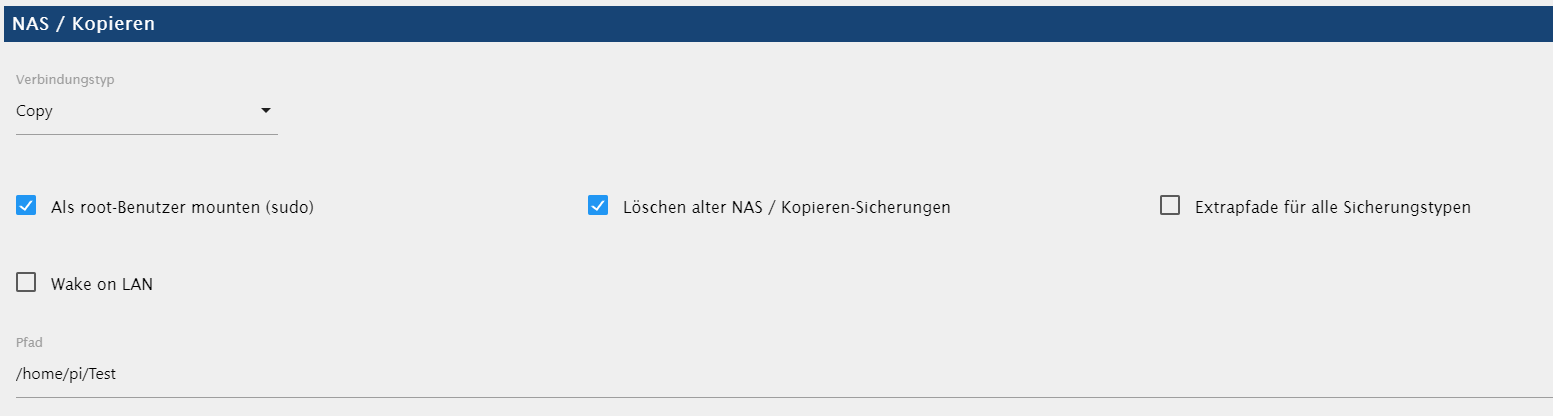
                                  b360f4af-6fa3-4dd3-b301-3ba0b6f2e66b-image.png

                                  Gestartet...
                                  [DEBUG] [mount] - done
                                  [DEBUG] [iobroker] - host.raspberrypi 767 states saved
                                  
                                  [DEBUG] [iobroker] - host.raspberrypi 945 objects saved
                                  
                                  [DEBUG] [iobroker] - Backup created: /opt/iobroker/backups/iobroker_2021_02_28-15_39_30_backupiobroker.tar.gz
                                  
                                  [DEBUG] [iobroker] - done
                                  [DEBUG] [influxDB] - Start InfluxDB Backup ...
                                  [DEBUG] [influxDB] - InfluxDB Backup tmp directory created 
                                  [DEBUG] [influxDB] - Backup created: /opt/iobroker/backups/influxDB_2021_02_28-15_39_36_backupiobroker.tar.gz
                                  [DEBUG] [influxDB] - Try deleting the InfluxDB tmp directory
                                  [DEBUG] [influxDB] - InfluxDB tmp directory was successfully deleted
                                  [DEBUG] [influxDB] - done
                                  [DEBUG] [cifs] - Copy iobroker_2021_02_28-15_39_30_backupiobroker.tar.gz...
                                  [ERROR] [cifs] - Error: EACCES: permission denied, open '/home/pi/Test/iobroker_2021_02_28-15_39_30_backupiobroker.tar.gz'
                                  [DEBUG] [cifs] - Copy influxDB_2021_02_28-15_39_36_backupiobroker.tar.gz...
                                  [ERROR] [cifs] - Error: EACCES: permission denied, open '/home/pi/Test/influxDB_2021_02_28-15_39_36_backupiobroker.tar.gz'
                                  [DEBUG] [cifs] - done
                                  [ERROR] [clean] - Backup files not deleted from /opt/iobroker/backups because some errors.
                                  [DEBUG] [clean] - done
                                  [DEBUG] [historyHTML] - new history html values created
                                  [DEBUG] [historyHTML] - done
                                  [DEBUG] [historyJSON] - new history json values created
                                  [DEBUG] [historyJSON] - done
                                  [DEBUG] [umount] - done
                                  [EXIT] 0
                                  
                                  simatecS 1 Antwort Letzte Antwort
                                  0
                                  • P Prezl

                                    @simatec
                                    Eine lokale Sicherung funktioniert auch nicht richtig.

                                    Ich habe das Verzeichnis /home/pi/Test erstellt und wollte darin sichern, aber auch das schaff ich nicht...

                                    Die Sicherungsdateien für iobroker und InfluxDB werden aber alle im Ordner /opt/iobroker/backups/ erstellt.

                                    b360f4af-6fa3-4dd3-b301-3ba0b6f2e66b-image.png

                                    Gestartet...
                                    [DEBUG] [mount] - done
                                    [DEBUG] [iobroker] - host.raspberrypi 767 states saved
                                    
                                    [DEBUG] [iobroker] - host.raspberrypi 945 objects saved
                                    
                                    [DEBUG] [iobroker] - Backup created: /opt/iobroker/backups/iobroker_2021_02_28-15_39_30_backupiobroker.tar.gz
                                    
                                    [DEBUG] [iobroker] - done
                                    [DEBUG] [influxDB] - Start InfluxDB Backup ...
                                    [DEBUG] [influxDB] - InfluxDB Backup tmp directory created 
                                    [DEBUG] [influxDB] - Backup created: /opt/iobroker/backups/influxDB_2021_02_28-15_39_36_backupiobroker.tar.gz
                                    [DEBUG] [influxDB] - Try deleting the InfluxDB tmp directory
                                    [DEBUG] [influxDB] - InfluxDB tmp directory was successfully deleted
                                    [DEBUG] [influxDB] - done
                                    [DEBUG] [cifs] - Copy iobroker_2021_02_28-15_39_30_backupiobroker.tar.gz...
                                    [ERROR] [cifs] - Error: EACCES: permission denied, open '/home/pi/Test/iobroker_2021_02_28-15_39_30_backupiobroker.tar.gz'
                                    [DEBUG] [cifs] - Copy influxDB_2021_02_28-15_39_36_backupiobroker.tar.gz...
                                    [ERROR] [cifs] - Error: EACCES: permission denied, open '/home/pi/Test/influxDB_2021_02_28-15_39_36_backupiobroker.tar.gz'
                                    [DEBUG] [cifs] - done
                                    [ERROR] [clean] - Backup files not deleted from /opt/iobroker/backups because some errors.
                                    [DEBUG] [clean] - done
                                    [DEBUG] [historyHTML] - new history html values created
                                    [DEBUG] [historyHTML] - done
                                    [DEBUG] [historyJSON] - new history json values created
                                    [DEBUG] [historyJSON] - done
                                    [DEBUG] [umount] - done
                                    [EXIT] 0
                                    
                                    simatecS Online
                                    simatecS Online
                                    simatec
                                    Developer Most Active
                                    schrieb am zuletzt editiert von
                                    #19

                                    @prezl
                                    Nein lokal meine ich ohne copy oder NAS.
                                    Einfach in das iobroker Backup Verzeichnis sichern

                                    • Besuche meine Github Seite
                                    • Beitrag hat geholfen oder willst du mich unterstützen
                                    • HowTo Restore ioBroker
                                    P 1 Antwort Letzte Antwort
                                    0
                                    • simatecS simatec

                                      @prezl
                                      Nein lokal meine ich ohne copy oder NAS.
                                      Einfach in das iobroker Backup Verzeichnis sichern

                                      P Offline
                                      P Offline
                                      Prezl
                                      schrieb am zuletzt editiert von
                                      #20

                                      @simatec
                                      Ohne copy oder NAS funktioniert es. Da läuft die Sicherung ohne Fehler durch.

                                      Gestartet...
                                      [DEBUG] [iobroker] - host.raspberrypi 767 states saved
                                      
                                      [DEBUG] [iobroker] - host.raspberrypi 945 objects saved
                                      
                                      [DEBUG] [iobroker] - Backup created: /opt/iobroker/backups/iobroker_2021_02_28-20_47_32_backupiobroker.tar.gz
                                      
                                      [DEBUG] [iobroker] - done
                                      [DEBUG] [influxDB] - Start InfluxDB Backup ...
                                      [DEBUG] [influxDB] - InfluxDB Backup tmp directory created 
                                      [DEBUG] [influxDB] - Backup created: /opt/iobroker/backups/influxDB_2021_02_28-20_47_38_backupiobroker.tar.gz
                                      [DEBUG] [influxDB] - Try deleting the InfluxDB tmp directory
                                      [DEBUG] [influxDB] - InfluxDB tmp directory was successfully deleted
                                      [DEBUG] [influxDB] - done
                                      [DEBUG] [clean] - done
                                      [DEBUG] [historyHTML] - new history html values created
                                      [DEBUG] [historyHTML] - done
                                      [DEBUG] [historyJSON] - new history json values created
                                      [DEBUG] [historyJSON] - done
                                      [EXIT] 0

                                      
                                      simatecS 1 Antwort Letzte Antwort
                                      0
                                      • P Prezl

                                        @simatec
                                        Ohne copy oder NAS funktioniert es. Da läuft die Sicherung ohne Fehler durch.

                                        Gestartet...
                                        [DEBUG] [iobroker] - host.raspberrypi 767 states saved
                                        
                                        [DEBUG] [iobroker] - host.raspberrypi 945 objects saved
                                        
                                        [DEBUG] [iobroker] - Backup created: /opt/iobroker/backups/iobroker_2021_02_28-20_47_32_backupiobroker.tar.gz
                                        
                                        [DEBUG] [iobroker] - done
                                        [DEBUG] [influxDB] - Start InfluxDB Backup ...
                                        [DEBUG] [influxDB] - InfluxDB Backup tmp directory created 
                                        [DEBUG] [influxDB] - Backup created: /opt/iobroker/backups/influxDB_2021_02_28-20_47_38_backupiobroker.tar.gz
                                        [DEBUG] [influxDB] - Try deleting the InfluxDB tmp directory
                                        [DEBUG] [influxDB] - InfluxDB tmp directory was successfully deleted
                                        [DEBUG] [influxDB] - done
                                        [DEBUG] [clean] - done
                                        [DEBUG] [historyHTML] - new history html values created
                                        [DEBUG] [historyHTML] - done
                                        [DEBUG] [historyJSON] - new history json values created
                                        [DEBUG] [historyJSON] - done
                                        [EXIT] 0

                                        
                                        simatecS Online
                                        simatecS Online
                                        simatec
                                        Developer Most Active
                                        schrieb am zuletzt editiert von
                                        #21

                                        @prezl
                                        Gut dann ist es eindeutig ein Rechteproblem auf deinem NAS.
                                        Es kann zwar ein Ordner angelegt werden, aber der Ordner kann nicht beschrieben werden.

                                        So deute ich den Log.

                                        • Besuche meine Github Seite
                                        • Beitrag hat geholfen oder willst du mich unterstützen
                                        • HowTo Restore ioBroker
                                        1 Antwort Letzte Antwort
                                        0

                                        Hey! Du scheinst an dieser Unterhaltung interessiert zu sein, hast aber noch kein Konto.

                                        Hast du es satt, bei jedem Besuch durch die gleichen Beiträge zu scrollen? Wenn du dich für ein Konto anmeldest, kommst du immer genau dorthin zurück, wo du zuvor warst, und kannst dich über neue Antworten benachrichtigen lassen (entweder per E-Mail oder Push-Benachrichtigung). Du kannst auch Lesezeichen speichern und Beiträge positiv bewerten, um anderen Community-Mitgliedern deine Wertschätzung zu zeigen.

                                        Mit deinem Input könnte dieser Beitrag noch besser werden 💗

                                        Registrieren Anmelden
                                        Antworten
                                        • In einem neuen Thema antworten
                                        Anmelden zum Antworten
                                        • Älteste zuerst
                                        • Neuste zuerst
                                        • Meiste Stimmen


                                        Support us

                                        ioBroker
                                        Community Adapters
                                        Donate
                                        FAQ Cloud / IOT
                                        HowTo: Node.js-Update
                                        HowTo: Backup/Restore
                                        Downloads
                                        BLOG

                                        388

                                        Online

                                        32.9k

                                        Benutzer

                                        83.0k

                                        Themen

                                        1.3m

                                        Beiträge
                                        Community
                                        Impressum | Datenschutz-Bestimmungen | Nutzungsbedingungen | Einwilligungseinstellungen
                                        ioBroker Community 2014-2025
                                        logo
                                        • Anmelden

                                        • Du hast noch kein Konto? Registrieren

                                        • Anmelden oder registrieren, um zu suchen
                                        • Erster Beitrag
                                          Letzter Beitrag
                                        0
                                        • Home
                                        • Aktuell
                                        • Tags
                                        • Ungelesen 0
                                        • Kategorien
                                        • Unreplied
                                        • Beliebt
                                        • GitHub
                                        • Docu
                                        • Hilfe