




(Frage) ioBroker stop - stoppt ioBroker nicht ?
-
pi@ioBrokerPV:/ $ sudo -u iobroker kill -9 901 kill: (901): Kein passender Prozess gefunden@humidor
Dann hat sich die PID geändert.Linux-Werkzeugkasten:
https://forum.iobroker.net/topic/42952/der-kleine-iobroker-linux-werkzeugkasten
NodeJS Fixer Skript:
https://forum.iobroker.net/topic/68035/iob-node-fix-skript
iob_diag: curl -sLf -o diag.sh https://iobroker.net/diag.sh && bash diag.sh -
@humidor
Dann hat sich die PID geändert. -
@thomas-braun OK, was ist eine PID, wie finde ich diese raus?
@humidor
Ist die Zahl in der zweiten Spalte. Aber versuch malsudo killall -u iobrokerLinux-Werkzeugkasten:
https://forum.iobroker.net/topic/42952/der-kleine-iobroker-linux-werkzeugkasten
NodeJS Fixer Skript:
https://forum.iobroker.net/topic/68035/iob-node-fix-skript
iob_diag: curl -sLf -o diag.sh https://iobroker.net/diag.sh && bash diag.sh -
@humidor
Ist die Zahl in der zweiten Spalte. Aber versuch malsudo killall -u iobroker@thomas-braun ach, so einfach ;)
ja hat sich geändert, werden diese bei jedem Neustart neu vergeben?pi@ioBrokerPV:/ $ ps auxww|grep io root 11 0.0 0.0 0 0 ? S Feb15 0:00 [migration/0] root 14 0.0 0.0 0 0 ? S Feb15 0:00 [migration/1] root 19 0.0 0.0 0 0 ? S Feb15 0:00 [migration/2] root 24 0.0 0.0 0 0 ? S Feb15 0:00 [migration/3] root 55 0.0 0.0 0 0 ? I< Feb15 0:00 [blkcg_punt_bio] root 57 0.0 0.0 0 0 ? I< Feb15 0:00 [rpciod] root 59 0.0 0.0 0 0 ? I< Feb15 0:00 [xprtiod] root 61 0.0 0.0 0 0 ? I< Feb15 0:00 [nfsiod] root 69 0.0 0.0 0 0 ? I< Feb15 0:00 [DWC Notificatio] avahi 330 0.0 0.1 6156 2380 ? Ss Feb15 2:31 avahi-daemon: running [ioBrokerPV.local] message+ 336 0.0 0.1 6556 2352 ? Ss Feb15 2:56 /usr/bin/dbus-daemon --system --address=systemd: --nofork --nopidfile --systemd-activation --syslog-only grafana 552 0.0 1.4 972256 28248 ? Ssl Feb15 4:08 /usr/sbin/grafana-server --config=/etc/grafana/grafana.ini --pidfile=/var/run/grafana/grafana-server.pid --packaging=deb cfg:default.paths.logs=/var/log/grafana cfg:default.paths.data=/var/lib/grafana cfg:default.paths.plugins=/var/lib/grafana/plugins cfg:default.paths.provisioning=/etc/grafana/provisioning root 1393 0.0 0.0 0 0 ? I< Feb15 0:00 [cifsiod] iobroker 2353 10.1 5.1 199400 98856 ? Ssl 08:12 6:33 iobroker.js-controller iobroker 2372 0.4 3.9 180120 75864 ? Sl 08:12 0:15 io.admin.0 iobroker 2387 0.1 2.1 145436 42272 ? Sl 08:12 0:07 io.discovery.0 iobroker 2402 0.2 2.6 154296 50784 ? Sl 08:12 0:09 io.info.0 iobroker 2508 2.6 2.6 154444 51568 ? Sl 08:12 1:41 io.kecontact.0 iobroker 2929 0.3 2.5 153156 49344 ? Sl 08:12 0:14 io.mqtt.0 iobroker 2946 4.8 3.3 165820 64328 ? Sl 08:12 3:04 io.web.0 iobroker 2961 3.1 5.1 202056 99424 ? Sl 08:13 2:01 io.javascript.0 iobroker 2976 0.7 2.9 158628 56632 ? Sl 08:13 0:28 io.history.0 iobroker 2993 0.2 2.4 152948 47748 ? Sl 08:13 0:09 io.cloud.0 iobroker 3008 0.2 2.7 156016 52164 ? Sl 08:13 0:08 io.iot.0 iobroker 3033 0.2 2.6 154544 51572 ? Sl 08:13 0:10 io.telegram.0 iobroker 3048 0.2 3.5 171136 68572 ? Sl 08:13 0:10 io.backitup.0 iobroker 3087 0.8 3.4 167504 65568 ? Sl 08:13 0:34 io.shelly.0 iobroker 3103 1.2 3.1 163500 60424 ? Sl 08:13 0:47 io.influxdb.0 iobroker 3123 0.1 2.1 143604 40480 ? Sl 08:13 0:06 io.vis-inventwo.0 iobroker 3144 0.5 2.5 151640 48160 ? Sl 08:13 0:22 io.modbus.0 iobroker 3159 0.5 2.5 152924 49848 ? Sl 08:13 0:22 io.modbus.1 iobroker 7972 82.0 2.5 109464 48176 ? Sl 09:17 0:00 /usr/bin/node /opt/iobroker/node_modules/iobroker.history/lib/getHistory.js {"id":"0_userdata.0.AMIS.Power","path":"/opt/iobroker/iobroker-data/history/","start":1613679423337,"end":1613722623337,"step":null,"count":300,"from":false,"ack":false,"q":false,"aggregate":"minmax","limit":2000,"addId":false,"sessionId":21} pi 7980 0.0 0.0 7360 524 pts/0 R+ 09:17 0:00 grep --color=auto io iobroker 7981 0.0 0.8 79040 16400 ? Rl 09:17 0:00 /usr/bin/node /opt/iobroker/node_modules/iobroker.history/lib/getHistory.js {"id":"0_userdata.0.AMIS.PVPower","path":"/opt/iobroker/iobroker-data/history/","start":1613679423337,"end":1613722623337,"step":null,"count":300,"from":false,"ack":false,"q":false,"aggregate":"minmax","limit":2000,"addId":false,"sessionId":21} dh ich muss 2353 abdrehen?BG
-
@thomas-braun ach, so einfach ;)
ja hat sich geändert, werden diese bei jedem Neustart neu vergeben?pi@ioBrokerPV:/ $ ps auxww|grep io root 11 0.0 0.0 0 0 ? S Feb15 0:00 [migration/0] root 14 0.0 0.0 0 0 ? S Feb15 0:00 [migration/1] root 19 0.0 0.0 0 0 ? S Feb15 0:00 [migration/2] root 24 0.0 0.0 0 0 ? S Feb15 0:00 [migration/3] root 55 0.0 0.0 0 0 ? I< Feb15 0:00 [blkcg_punt_bio] root 57 0.0 0.0 0 0 ? I< Feb15 0:00 [rpciod] root 59 0.0 0.0 0 0 ? I< Feb15 0:00 [xprtiod] root 61 0.0 0.0 0 0 ? I< Feb15 0:00 [nfsiod] root 69 0.0 0.0 0 0 ? I< Feb15 0:00 [DWC Notificatio] avahi 330 0.0 0.1 6156 2380 ? Ss Feb15 2:31 avahi-daemon: running [ioBrokerPV.local] message+ 336 0.0 0.1 6556 2352 ? Ss Feb15 2:56 /usr/bin/dbus-daemon --system --address=systemd: --nofork --nopidfile --systemd-activation --syslog-only grafana 552 0.0 1.4 972256 28248 ? Ssl Feb15 4:08 /usr/sbin/grafana-server --config=/etc/grafana/grafana.ini --pidfile=/var/run/grafana/grafana-server.pid --packaging=deb cfg:default.paths.logs=/var/log/grafana cfg:default.paths.data=/var/lib/grafana cfg:default.paths.plugins=/var/lib/grafana/plugins cfg:default.paths.provisioning=/etc/grafana/provisioning root 1393 0.0 0.0 0 0 ? I< Feb15 0:00 [cifsiod] iobroker 2353 10.1 5.1 199400 98856 ? Ssl 08:12 6:33 iobroker.js-controller iobroker 2372 0.4 3.9 180120 75864 ? Sl 08:12 0:15 io.admin.0 iobroker 2387 0.1 2.1 145436 42272 ? Sl 08:12 0:07 io.discovery.0 iobroker 2402 0.2 2.6 154296 50784 ? Sl 08:12 0:09 io.info.0 iobroker 2508 2.6 2.6 154444 51568 ? Sl 08:12 1:41 io.kecontact.0 iobroker 2929 0.3 2.5 153156 49344 ? Sl 08:12 0:14 io.mqtt.0 iobroker 2946 4.8 3.3 165820 64328 ? Sl 08:12 3:04 io.web.0 iobroker 2961 3.1 5.1 202056 99424 ? Sl 08:13 2:01 io.javascript.0 iobroker 2976 0.7 2.9 158628 56632 ? Sl 08:13 0:28 io.history.0 iobroker 2993 0.2 2.4 152948 47748 ? Sl 08:13 0:09 io.cloud.0 iobroker 3008 0.2 2.7 156016 52164 ? Sl 08:13 0:08 io.iot.0 iobroker 3033 0.2 2.6 154544 51572 ? Sl 08:13 0:10 io.telegram.0 iobroker 3048 0.2 3.5 171136 68572 ? Sl 08:13 0:10 io.backitup.0 iobroker 3087 0.8 3.4 167504 65568 ? Sl 08:13 0:34 io.shelly.0 iobroker 3103 1.2 3.1 163500 60424 ? Sl 08:13 0:47 io.influxdb.0 iobroker 3123 0.1 2.1 143604 40480 ? Sl 08:13 0:06 io.vis-inventwo.0 iobroker 3144 0.5 2.5 151640 48160 ? Sl 08:13 0:22 io.modbus.0 iobroker 3159 0.5 2.5 152924 49848 ? Sl 08:13 0:22 io.modbus.1 iobroker 7972 82.0 2.5 109464 48176 ? Sl 09:17 0:00 /usr/bin/node /opt/iobroker/node_modules/iobroker.history/lib/getHistory.js {"id":"0_userdata.0.AMIS.Power","path":"/opt/iobroker/iobroker-data/history/","start":1613679423337,"end":1613722623337,"step":null,"count":300,"from":false,"ack":false,"q":false,"aggregate":"minmax","limit":2000,"addId":false,"sessionId":21} pi 7980 0.0 0.0 7360 524 pts/0 R+ 09:17 0:00 grep --color=auto io iobroker 7981 0.0 0.8 79040 16400 ? Rl 09:17 0:00 /usr/bin/node /opt/iobroker/node_modules/iobroker.history/lib/getHistory.js {"id":"0_userdata.0.AMIS.PVPower","path":"/opt/iobroker/iobroker-data/history/","start":1613679423337,"end":1613722623337,"step":null,"count":300,"from":false,"ack":false,"q":false,"aggregate":"minmax","limit":2000,"addId":false,"sessionId":21} dh ich muss 2353 abdrehen?@humidor
Logisch. Neuer Prozess = Neue PID (process ID)Hau mal alles vom iobroker weg:
sudo killall -u iobroker -
Hallo

wie löse ich das ? (Telegram zeigt mir einen Restart und ioBroker kommt auch wieder hoch)
pi@ioBrokerPV:~ $ iobroker stop pi@ioBrokerPV:~ $ ps auxww|grep io root 11 0.0 0.0 0 0 ? S Feb15 0:00 [migration/0] root 14 0.0 0.0 0 0 ? S Feb15 0:00 [migration/1] root 19 0.0 0.0 0 0 ? S Feb15 0:00 [migration/2] root 24 0.0 0.0 0 0 ? S Feb15 0:00 [migration/3] root 55 0.0 0.0 0 0 ? I< Feb15 0:00 [blkcg_punt_bio] root 57 0.0 0.0 0 0 ? I< Feb15 0:00 [rpciod] root 59 0.0 0.0 0 0 ? I< Feb15 0:00 [xprtiod] root 61 0.0 0.0 0 0 ? I< Feb15 0:00 [nfsiod] root 69 0.0 0.0 0 0 ? I< Feb15 0:00 [DWC Notificatio] avahi 330 0.0 0.1 6156 2380 ? Ss Feb15 2:29 avahi-daemon: running [ioBrokerPV.local] message+ 336 0.0 0.1 6556 2352 ? Ss Feb15 2:53 /usr/bin/dbus-daemon --system --address=systemd: --nofork --nopidfile --systemd-activation --syslog-only grafana 552 0.0 1.3 972256 25412 ? Ssl Feb15 4:03 /usr/sbin/grafana-server --config=/etc/grafana/grafana.ini --pidfile=/var/run/grafana/grafana-server.pid --packaging=deb cfg:default.paths.logs=/var/log/grafana cfg:default.paths.data=/var/lib/grafana cfg:default.paths.plugins=/var/lib/grafana/plugins cfg:default.paths.provisioning=/etc/grafana/provisioning iobroker 901 32.3 6.2 205236 120052 ? Ssl 07:54 0:14 iobroker.js-controller iobroker 920 11.0 5.2 193816 100352 ? Sl 07:55 0:04 io.admin.0 iobroker 935 3.9 2.5 146460 49560 ? Sl 07:55 0:01 io.discovery.0 iobroker 950 11.0 2.3 149120 44364 ? Sl 07:55 0:03 io.info.0 iobroker 1082 13.8 2.1 143852 40672 ? Sl 07:55 0:04 io.kecontact.0 root 1393 0.0 0.0 0 0 ? I< Feb15 0:00 [cifsiod] iobroker 1483 7.2 2.9 150048 57328 ? Sl 07:55 0:01 io.mqtt.0 iobroker 1500 23.5 4.2 168184 80952 ? Sl 07:55 0:05 io.web.0 iobroker 1515 30.9 5.9 208616 113608 ? Sl 07:55 0:05 io.javascript.0 iobroker 1530 17.4 3.4 155360 65700 ? Sl 07:55 0:02 io.history.0 iobroker 1547 20.2 2.9 149132 56104 ? Sl 07:55 0:02 io.cloud.0 iobroker 1562 40.0 3.2 152464 62924 ? Sl 07:55 0:02 io.iot.0 iobroker 1579 111 2.9 151560 56004 ? Sl 07:55 0:02 io.telegram.0 pi 1595 0.0 0.0 7360 504 pts/0 S+ 07:55 0:00 grep --color=auto io -
@unclesam Bei dem Prompt eher nicht, oder:
@humidor sagte in (Frage) ioBroker stop - stoppt ioBroker nicht ?:
pi@ioBrokerPV:
Bitte keine Fragen per PN, die gehören ins Forum!
Benutzt das Voting rechts unten im Beitrag wenn er euch geholfen hat.
-
@unclesam Bei dem Prompt eher nicht, oder:
@humidor sagte in (Frage) ioBroker stop - stoppt ioBroker nicht ?:
pi@ioBrokerPV:
@wendy2702 @UncleSam @Thomas-Braun
Nein, kein Docker, std. Raspi4sudo killall -u iobroker - stoppt es auch nicht.
auch der direkte kill macht einen restart. Cronjob?
pi@ioBrokerPV:/ $ ps auxww|grep io
root        11  0.0  0.0      0     0 ?        S    Feb15   0:00 [migration/0]
root        14  0.0  0.0      0     0 ?        S    Feb15   0:00 [migration/1]
root        19  0.0  0.0      0     0 ?        S    Feb15   0:00 [migration/2]
root        24  0.0  0.0      0     0 ?        S    Feb15   0:00 [migration/3]
root        55  0.0  0.0      0     0 ?        I<   Feb15   0:00 [blkcg_punt_bio]
root        57  0.0  0.0      0     0 ?        I<   Feb15   0:00 [rpciod]
root        59  0.0  0.0      0     0 ?        I<   Feb15   0:00 [xprtiod]
root        61  0.0  0.0      0     0 ?        I<   Feb15   0:00 [nfsiod]
root        69  0.0  0.0      0     0 ?        I<   Feb15   0:00 [DWC Notificatio]
avahi      330  0.0  0.1   6156  2416 ?        Ss   Feb15   2:31 avahi-daemon: running [ioBrokerPV.local]
message+   336  0.0  0.1   6556  2352 ?        Ss   Feb15   2:56 /usr/bin/dbus-daemon --system --address=systemd: --nofork --nopidfile --systemd-activation --syslog-only
grafana    552  0.0  1.5 972256 28992 ?        Ssl  Feb15   4:08 /usr/sbin/grafana-server --config=/etc/grafana/grafana.ini --pidfile=/var/run/grafana/grafana-server.pid --packaging=deb cfg:default.paths.logs=/var/log/grafana cfg:default.paths.data=/var/lib/grafana cfg:default.paths.plugins=/var/lib/grafana/plugins cfg:default.paths.provisioning=/etc/grafana/provisioning
root      1393  0.0  0.0      0     0 ?        I<   Feb15   0:00 [cifsiod]
iobroker 10169 24.0  4.7 190896 90444 ?        Ssl  09:29   0:23 iobroker.js-controller
iobroker 10187  6.2  3.1 162348 61096 ?        Sl   09:29   0:05 io.admin.0
iobroker 10204  1.7  2.5 146972 49920 ?        Sl   09:29   0:01 io.discovery.0
iobroker 10219  4.5  2.3 149000 45024 ?        Sl   09:29   0:03 io.info.0
iobroker 10325  7.9  2.2 145484 42332 ?        Sl   09:29   0:06 io.kecontact.0
iobroker 10743  2.7  2.6 149068 51020 ?        Sl   09:30   0:02 io.mqtt.0
iobroker 10758 11.9  2.6 152696 51032 ?        Sl   09:30   0:08 io.web.0
iobroker 10776 12.3  4.7 201520 90592 ?        Sl   09:30   0:08 io.javascript.0
iobroker 10791  6.6  2.2 146660 43572 ?        Sl   09:30   0:04 io.history.0
iobroker 10827  3.5  2.9 148616 56436 ?        Sl   09:30   0:02 io.cloud.0
iobroker 10886  4.7  2.6 154880 50608 ?        Sl   09:30   0:02 io.iot.0
iobroker 10901  5.4  2.4 152548 46972 ?        Sl   09:30   0:03 io.telegram.0
iobroker 10960  9.0  3.4 170008 65676 ?        Sl   09:30   0:04 io.backitup.0
iobroker 11039  8.3  2.4 150824 47296 ?        Sl   09:30   0:03 io.shelly.0
iobroker 11098  9.6  2.5 153880 48488 ?        Sl   09:30   0:03 io.influxdb.0
iobroker 11123  4.0  2.4 135576 47492 ?        Sl   09:30   0:01 io.vis-inventwo.0
iobroker 11179  6.9  2.6 148228 51816 ?        Sl   09:30   0:02 io.modbus.0
iobroker 11215  7.7  2.7 147260 52200 ?        Sl   09:30   0:02 io.modbus.1
iobroker 11405  0.0  2.1 100476 41412 ?        Rl   09:31   0:00 /usr/bin/node /opt/iobroker/node_modules/iobroker.history/lib/getHistory.js {"id":"0_userdata.0.AMIS.Power","path":"/opt/iobroker/iobroker-data/history/","start":1613680279818,"end":1613723479818,"step":null,"count":300,"from":false,"ack":false,"q":false,"aggregate":"minmax","limit":2000,"addId":false,"sessionId":48}
pi       11414  0.0  0.0   7360   476 pts/0    S+   09:31   0:00 grep --color=auto io
pi@ioBrokerPV:/ $ sudo -u iobroker kill -9 10169
pi@ioBrokerPV:/ $ ps auxww|grep io
root        11  0.0  0.0      0     0 ?        S    Feb15   0:00 [migration/0]
root        14  0.0  0.0      0     0 ?        S    Feb15   0:00 [migration/1]
root        19  0.0  0.0      0     0 ?        S    Feb15   0:00 [migration/2]
root        24  0.0  0.0      0     0 ?        S    Feb15   0:00 [migration/3]
root        55  0.0  0.0      0     0 ?        I<   Feb15   0:00 [blkcg_punt_bio]
root        57  0.0  0.0      0     0 ?        I<   Feb15   0:00 [rpciod]
root        59  0.0  0.0      0     0 ?        I<   Feb15   0:00 [xprtiod]
root        61  0.0  0.0      0     0 ?        I<   Feb15   0:00 [nfsiod]
root        69  0.0  0.0      0     0 ?        I<   Feb15   0:00 [DWC Notificatio]
avahi      330  0.0  0.1   6156  2416 ?        Ss   Feb15   2:31 avahi-daemon: running [ioBrokerPV.local]
message+   336  0.0  0.1   6556  2352 ?        Ss   Feb15   2:56 /usr/bin/dbus-daemon --system --address=systemd: --nofork --nopidfile --systemd-activation --syslog-only
grafana    552  0.0  1.5 972256 28992 ?        Ssl  Feb15   4:08 /usr/sbin/grafana-server --config=/etc/grafana/grafana.ini --pidfile=/var/run/grafana/grafana-server.pid --packaging=deb cfg:default.paths.logs=/var/log/grafana cfg:default.paths.data=/var/lib/grafana cfg:default.paths.plugins=/var/lib/grafana/plugins cfg:default.paths.provisioning=/etc/grafana/provisioning
root      1393  0.0  0.0      0     0 ?        I<   Feb15   0:00 [cifsiod]
iobroker 11502 29.1  7.1 222320 137948 ?       Ssl  09:31   0:16 iobroker.js-controller
iobroker 11520  8.9  5.3 192728 102004 ?       Sl   09:31   0:05 io.admin.0
iobroker 11535  2.9  2.5 145960 49744 ?        Sl   09:31   0:01 io.discovery.0
iobroker 11552  8.0  2.3 148488 45376 ?        Sl   09:31   0:03 io.info.0
iobroker 11671 12.0  2.1 144616 41300 ?        Sl   09:31   0:05 io.kecontact.0
iobroker 12079  4.9  3.0 148512 57980 ?        Sl   09:32   0:01 io.mqtt.0
iobroker 12094 16.2  4.1 167072 79320 ?        Sl   09:32   0:05 io.web.0
iobroker 12109 18.8  5.1 208616 98716 ?        Sl   09:32   0:06 io.javascript.0
iobroker 12126 11.2  2.2 148160 42532 ?        Sl   09:32   0:03 io.history.0
iobroker 12141  8.8  2.9 148616 56032 ?        Sl   09:32   0:02 io.cloud.0
iobroker 12172 13.1  2.8 152312 54424 ?        Sl   09:32   0:02 io.iot.0
iobroker 12194 14.3  2.9 152544 56656 ?        Sl   09:32   0:02 io.telegram.0
iobroker 12209 33.1  4.1 168396 79852 ?        Sl   09:32   0:03 io.backitup.0
iobroker 12269 56.5  3.0 150316 59316 ?        Sl   09:32   0:02 io.shelly.0
iobroker 12285  0.0  1.3  83796 25496 ?        Rl   09:32   0:00 /usr/bin/node /opt/iobroker/node_modules/iobroker.influxdb/main.js 0 info
pi       12293  0.0  0.0   7360   512 pts/0    S+   09:32   0:00 grep --color=auto io
BG
-
@wendy2702 @UncleSam @Thomas-Braun
Nein, kein Docker, std. Raspi4sudo killall -u iobroker - stoppt es auch nicht.
auch der direkte kill macht einen restart. Cronjob?
pi@ioBrokerPV:/ $ ps auxww|grep io root 11 0.0 0.0 0 0 ? S Feb15 0:00 [migration/0] root 14 0.0 0.0 0 0 ? S Feb15 0:00 [migration/1] root 19 0.0 0.0 0 0 ? S Feb15 0:00 [migration/2] root 24 0.0 0.0 0 0 ? S Feb15 0:00 [migration/3] root 55 0.0 0.0 0 0 ? I< Feb15 0:00 [blkcg_punt_bio] root 57 0.0 0.0 0 0 ? I< Feb15 0:00 [rpciod] root 59 0.0 0.0 0 0 ? I< Feb15 0:00 [xprtiod] root 61 0.0 0.0 0 0 ? I< Feb15 0:00 [nfsiod] root 69 0.0 0.0 0 0 ? I< Feb15 0:00 [DWC Notificatio] avahi 330 0.0 0.1 6156 2416 ? Ss Feb15 2:31 avahi-daemon: running [ioBrokerPV.local] message+ 336 0.0 0.1 6556 2352 ? Ss Feb15 2:56 /usr/bin/dbus-daemon --system --address=systemd: --nofork --nopidfile --systemd-activation --syslog-only grafana 552 0.0 1.5 972256 28992 ? Ssl Feb15 4:08 /usr/sbin/grafana-server --config=/etc/grafana/grafana.ini --pidfile=/var/run/grafana/grafana-server.pid --packaging=deb cfg:default.paths.logs=/var/log/grafana cfg:default.paths.data=/var/lib/grafana cfg:default.paths.plugins=/var/lib/grafana/plugins cfg:default.paths.provisioning=/etc/grafana/provisioning root 1393 0.0 0.0 0 0 ? I< Feb15 0:00 [cifsiod] iobroker 10169 24.0 4.7 190896 90444 ? Ssl 09:29 0:23 iobroker.js-controller iobroker 10187 6.2 3.1 162348 61096 ? Sl 09:29 0:05 io.admin.0 iobroker 10204 1.7 2.5 146972 49920 ? Sl 09:29 0:01 io.discovery.0 iobroker 10219 4.5 2.3 149000 45024 ? Sl 09:29 0:03 io.info.0 iobroker 10325 7.9 2.2 145484 42332 ? Sl 09:29 0:06 io.kecontact.0 iobroker 10743 2.7 2.6 149068 51020 ? Sl 09:30 0:02 io.mqtt.0 iobroker 10758 11.9 2.6 152696 51032 ? Sl 09:30 0:08 io.web.0 iobroker 10776 12.3 4.7 201520 90592 ? Sl 09:30 0:08 io.javascript.0 iobroker 10791 6.6 2.2 146660 43572 ? Sl 09:30 0:04 io.history.0 iobroker 10827 3.5 2.9 148616 56436 ? Sl 09:30 0:02 io.cloud.0 iobroker 10886 4.7 2.6 154880 50608 ? Sl 09:30 0:02 io.iot.0 iobroker 10901 5.4 2.4 152548 46972 ? Sl 09:30 0:03 io.telegram.0 iobroker 10960 9.0 3.4 170008 65676 ? Sl 09:30 0:04 io.backitup.0 iobroker 11039 8.3 2.4 150824 47296 ? Sl 09:30 0:03 io.shelly.0 iobroker 11098 9.6 2.5 153880 48488 ? Sl 09:30 0:03 io.influxdb.0 iobroker 11123 4.0 2.4 135576 47492 ? Sl 09:30 0:01 io.vis-inventwo.0 iobroker 11179 6.9 2.6 148228 51816 ? Sl 09:30 0:02 io.modbus.0 iobroker 11215 7.7 2.7 147260 52200 ? Sl 09:30 0:02 io.modbus.1 iobroker 11405 0.0 2.1 100476 41412 ? Rl 09:31 0:00 /usr/bin/node /opt/iobroker/node_modules/iobroker.history/lib/getHistory.js {"id":"0_userdata.0.AMIS.Power","path":"/opt/iobroker/iobroker-data/history/","start":1613680279818,"end":1613723479818,"step":null,"count":300,"from":false,"ack":false,"q":false,"aggregate":"minmax","limit":2000,"addId":false,"sessionId":48} pi 11414 0.0 0.0 7360 476 pts/0 S+ 09:31 0:00 grep --color=auto io pi@ioBrokerPV:/ $ sudo -u iobroker kill -9 10169 pi@ioBrokerPV:/ $ ps auxww|grep io root 11 0.0 0.0 0 0 ? S Feb15 0:00 [migration/0] root 14 0.0 0.0 0 0 ? S Feb15 0:00 [migration/1] root 19 0.0 0.0 0 0 ? S Feb15 0:00 [migration/2] root 24 0.0 0.0 0 0 ? S Feb15 0:00 [migration/3] root 55 0.0 0.0 0 0 ? I< Feb15 0:00 [blkcg_punt_bio] root 57 0.0 0.0 0 0 ? I< Feb15 0:00 [rpciod] root 59 0.0 0.0 0 0 ? I< Feb15 0:00 [xprtiod] root 61 0.0 0.0 0 0 ? I< Feb15 0:00 [nfsiod] root 69 0.0 0.0 0 0 ? I< Feb15 0:00 [DWC Notificatio] avahi 330 0.0 0.1 6156 2416 ? Ss Feb15 2:31 avahi-daemon: running [ioBrokerPV.local] message+ 336 0.0 0.1 6556 2352 ? Ss Feb15 2:56 /usr/bin/dbus-daemon --system --address=systemd: --nofork --nopidfile --systemd-activation --syslog-only grafana 552 0.0 1.5 972256 28992 ? Ssl Feb15 4:08 /usr/sbin/grafana-server --config=/etc/grafana/grafana.ini --pidfile=/var/run/grafana/grafana-server.pid --packaging=deb cfg:default.paths.logs=/var/log/grafana cfg:default.paths.data=/var/lib/grafana cfg:default.paths.plugins=/var/lib/grafana/plugins cfg:default.paths.provisioning=/etc/grafana/provisioning root 1393 0.0 0.0 0 0 ? I< Feb15 0:00 [cifsiod] iobroker 11502 29.1 7.1 222320 137948 ? Ssl 09:31 0:16 iobroker.js-controller iobroker 11520 8.9 5.3 192728 102004 ? Sl 09:31 0:05 io.admin.0 iobroker 11535 2.9 2.5 145960 49744 ? Sl 09:31 0:01 io.discovery.0 iobroker 11552 8.0 2.3 148488 45376 ? Sl 09:31 0:03 io.info.0 iobroker 11671 12.0 2.1 144616 41300 ? Sl 09:31 0:05 io.kecontact.0 iobroker 12079 4.9 3.0 148512 57980 ? Sl 09:32 0:01 io.mqtt.0 iobroker 12094 16.2 4.1 167072 79320 ? Sl 09:32 0:05 io.web.0 iobroker 12109 18.8 5.1 208616 98716 ? Sl 09:32 0:06 io.javascript.0 iobroker 12126 11.2 2.2 148160 42532 ? Sl 09:32 0:03 io.history.0 iobroker 12141 8.8 2.9 148616 56032 ? Sl 09:32 0:02 io.cloud.0 iobroker 12172 13.1 2.8 152312 54424 ? Sl 09:32 0:02 io.iot.0 iobroker 12194 14.3 2.9 152544 56656 ? Sl 09:32 0:02 io.telegram.0 iobroker 12209 33.1 4.1 168396 79852 ? Sl 09:32 0:03 io.backitup.0 iobroker 12269 56.5 3.0 150316 59316 ? Sl 09:32 0:02 io.shelly.0 iobroker 12285 0.0 1.3 83796 25496 ? Rl 09:32 0:00 /usr/bin/node /opt/iobroker/node_modules/iobroker.influxdb/main.js 0 info pi 12293 0.0 0.0 7360 512 pts/0 S+ 09:32 0:00 grep --color=auto ioLinux-Werkzeugkasten:
https://forum.iobroker.net/topic/42952/der-kleine-iobroker-linux-werkzeugkasten
NodeJS Fixer Skript:
https://forum.iobroker.net/topic/68035/iob-node-fix-skript
iob_diag: curl -sLf -o diag.sh https://iobroker.net/diag.sh && bash diag.sh -
@thomas-braun sagte in (Frage) ioBroker stop - stoppt ioBroker nicht ?:
sudo systemctl stop iobroker
gerade probiert, auch damit macht er einen Restart.
BG
-
@thomas-braun sagte in (Frage) ioBroker stop - stoppt ioBroker nicht ?:
sudo systemctl stop iobroker
gerade probiert, auch damit macht er einen Restart.
-
sudo systemctl disable iobrokerDann einmal durchstarten.
sudo rebootDann schauen ob da noch irgendwelche ioBroker-Prozesse laufen. Eigentlich sollte da dann nichts mehr laufen.
iobroker update
iobroker upgrade self
iobroker upgrade
iobroker fix
iobroker start
Linux-Werkzeugkasten:
https://forum.iobroker.net/topic/42952/der-kleine-iobroker-linux-werkzeugkasten
NodeJS Fixer Skript:
https://forum.iobroker.net/topic/68035/iob-node-fix-skript
iob_diag: curl -sLf -o diag.sh https://iobroker.net/diag.sh && bash diag.sh -
sudo systemctl disable iobrokerDann einmal durchstarten.
sudo rebootDann schauen ob da noch irgendwelche ioBroker-Prozesse laufen. Eigentlich sollte da dann nichts mehr laufen.
iobroker update iobroker upgrade self iobroker upgrade iobroker fix iobroker start -
@thomas-braun tja, ich verstehe es nicht, nein er stoppt auch damit nicht.

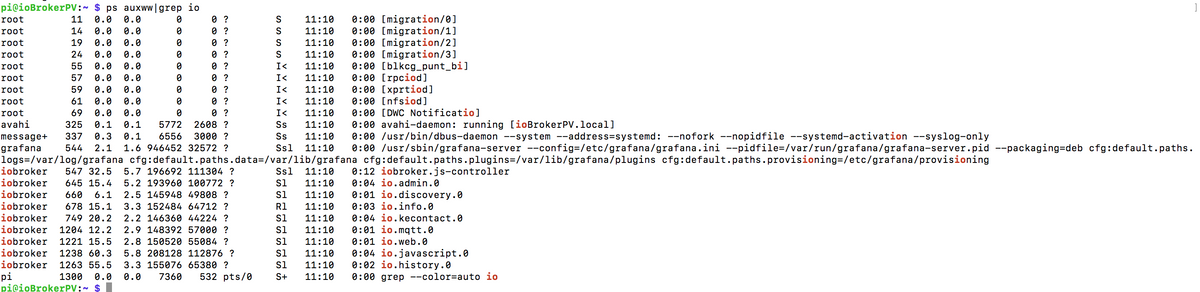
@humidor Kannst du mal
pstreeverwenden? Ich möchte wissen, wer der Vater von dem Prozess ist. Bitte ohne irgendeingrep.Bitte bei Problemen mit meinen Adaptern, Issue auf GitHub erfassen: Loxone | I2C | Luxtronik2
♡-lichen Dank an meine Sponsoren -
@humidor Kannst du mal
pstreeverwenden? Ich möchte wissen, wer der Vater von dem Prozess ist. Bitte ohne irgendeingrep.@unclesam sagte in (Frage) ioBroker stop - stoppt ioBroker nicht ?:
pstree
Morgen!
pi@ioBrokerPV:~ $ pstree
systemd─┬─agetty
        ├─alsactl
        ├─avahi-daemon───avahi-daemon
        ├─bluetoothd
        ├─cron
        ├─dbus-daemon
        ├─dhcpcd
        ├─grafana-server───13*[{grafana-server}]
        ├─hciattach
        ├─influxd───14*[{influxd}]
        ├─iobroker.js-con─┬─io.admin.0───10*[{io.admin.0}]
        │                 ├─io.backitup.0───10*[{io.backitup.0}]
        │                 ├─io.cloud.0───10*[{io.cloud.0}]
        │                 ├─io.discovery.0───10*[{io.discovery.0}]
        │                 ├─io.history.0───10*[{io.history.0}]
        │                 ├─io.influxdb.0───10*[{io.influxdb.0}]
        │                 ├─io.info.0───10*[{io.info.0}]
        │                 ├─io.iot.0───10*[{io.iot.0}]
        │                 ├─io.javascript.0───10*[{io.javascript.0}]
        │                 ├─io.kecontact.0───10*[{io.kecontact.0}]
        │                 ├─io.modbus.0───10*[{io.modbus.0}]
        │                 ├─io.modbus.1───10*[{io.modbus.1}]
        │                 ├─io.mqtt.0───10*[{io.mqtt.0}]
        │                 ├─io.shelly.0───10*[{io.shelly.0}]
        │                 ├─io.telegram.0───10*[{io.telegram.0}]
        │                 ├─io.vis-inventwo───10*[{io.vis-inventwo}]
        │                 ├─io.web.0───10*[{io.web.0}]
        │                 └─10*[{iobroker.js-con}]
        ├─rngd───3*[{rngd}]
        ├─rsyslogd───3*[{rsyslogd}]
        ├─sleep
        ├─sshd───sshd───sshd───bash───pstree
        ├─systemd───(sd-pam)
        ├─systemd-journal
        ├─systemd-logind
        ├─systemd-timesyn───{systemd-timesyn}
        ├─systemd-udevd
        ├─thd
        └─2*[wpa_supplicant]
BG
-
@unclesam sagte in (Frage) ioBroker stop - stoppt ioBroker nicht ?:
pstree
Morgen!
pi@ioBrokerPV:~ $ pstree systemd─┬─agetty ├─alsactl ├─avahi-daemon───avahi-daemon ├─bluetoothd ├─cron ├─dbus-daemon ├─dhcpcd ├─grafana-server───13*[{grafana-server}] ├─hciattach ├─influxd───14*[{influxd}] ├─iobroker.js-con─┬─io.admin.0───10*[{io.admin.0}] │ ├─io.backitup.0───10*[{io.backitup.0}] │ ├─io.cloud.0───10*[{io.cloud.0}] │ ├─io.discovery.0───10*[{io.discovery.0}] │ ├─io.history.0───10*[{io.history.0}] │ ├─io.influxdb.0───10*[{io.influxdb.0}] │ ├─io.info.0───10*[{io.info.0}] │ ├─io.iot.0───10*[{io.iot.0}] │ ├─io.javascript.0───10*[{io.javascript.0}] │ ├─io.kecontact.0───10*[{io.kecontact.0}] │ ├─io.modbus.0───10*[{io.modbus.0}] │ ├─io.modbus.1───10*[{io.modbus.1}] │ ├─io.mqtt.0───10*[{io.mqtt.0}] │ ├─io.shelly.0───10*[{io.shelly.0}] │ ├─io.telegram.0───10*[{io.telegram.0}] │ ├─io.vis-inventwo───10*[{io.vis-inventwo}] │ ├─io.web.0───10*[{io.web.0}] │ └─10*[{iobroker.js-con}] ├─rngd───3*[{rngd}] ├─rsyslogd───3*[{rsyslogd}] ├─sleep ├─sshd───sshd───sshd───bash───pstree ├─systemd───(sd-pam) ├─systemd-journal ├─systemd-logind ├─systemd-timesyn───{systemd-timesyn} ├─systemd-udevd ├─thd └─2*[wpa_supplicant]@humidor OK, also es ist definitiv das System selber (systemd), das den Prozess startet. Wie hast du denn ursprünglich ioBroker installiert? Und hast du danach am Aufstartverhalten noch etwas geändert? Und welche Versionen von js-controller und Nodejs hast du?
Bitte bei Problemen mit meinen Adaptern, Issue auf GitHub erfassen: Loxone | I2C | Luxtronik2
♡-lichen Dank an meine Sponsoren -
@humidor OK, also es ist definitiv das System selber (systemd), das den Prozess startet. Wie hast du denn ursprünglich ioBroker installiert? Und hast du danach am Aufstartverhalten noch etwas geändert? Und welche Versionen von js-controller und Nodejs hast du?
-
@unclesam
soweit ich mich erinnere habe ich nach dieser Anleitung installiert:
https://technikkram.net/blog/2019/07/21/funktioniert-iobroker-auf-neuem-raspberry-pi-4-installieren/verändert habe ich mW nichts
Node.js
v10.23.2js 3.1.6
systemctl status iobrokerLinux-Werkzeugkasten:
https://forum.iobroker.net/topic/42952/der-kleine-iobroker-linux-werkzeugkasten
NodeJS Fixer Skript:
https://forum.iobroker.net/topic/68035/iob-node-fix-skript
iob_diag: curl -sLf -o diag.sh https://iobroker.net/diag.sh && bash diag.sh -
systemctl status iobroker@thomas-braun sagte in (Frage) ioBroker stop - stoppt ioBroker nicht ?:
systemctl status iobroker
pi@ioBrokerPV:~ $ systemctl status iobroker
● iobroker.service - ioBroker Server
   Loaded: loaded (/lib/systemd/system/iobroker.service; disabled; vendor preset: enabled)
   Active: active (running) since Fri 2021-02-26 11:10:02 CET; 22h ago
     Docs: http://iobroker.net
 Main PID: 547 (iobroker.js-con)
    Tasks: 198 (limit: 3888)
   CGroup: /system.slice/iobroker.service
           ├─  547 iobroker.js-controller
           ├─  645 io.admin.0
           ├─  660 io.discovery.0
           ├─  749 io.kecontact.0
           ├─ 1204 io.mqtt.0
           ├─ 1238 io.javascript.0
           ├─ 1263 io.history.0
           ├─ 1301 io.cloud.0
           ├─ 1316 io.iot.0
           ├─ 1333 io.telegram.0
           ├─ 1348 io.backitup.0
           ├─ 1405 io.shelly.0
           ├─ 1420 io.influxdb.0
           ├─ 1440 io.vis-inventwo.0
           ├─ 1459 io.modbus.0
           ├─ 1474 io.modbus.1
           ├─12854 io.info.0
           └─23930 io.web.0

Feb 27 09:36:53 ioBrokerPV bash[547]: Send diag info: {"uuid":"767fc1e4-aa98-4c8f-dc46-daccf93cd3a3","language":"de","country":"Austria","hosts":[{"version":"3.1.6","platform":"Javascript/Node.js","type":
Feb 27 09:36:53 ioBrokerPV bash[547]: hash unchanged, use cached sources
Feb 27 09:36:55 ioBrokerPV bash[547]: Cannot send diag info: ESOCKETTIMEDOUT
Feb 27 09:52:28 ioBrokerPV bash[547]: Send diag info: {"uuid":"767fc1e4-aa98-4c8f-dc46-daccf93cd3a3","language":"de","country":"Austria","hosts":[{"version":"3.1.6","platform":"Javascript/Node.js","type":
Feb 27 09:52:28 ioBrokerPV bash[547]: hash unchanged, use cached sources
Feb 27 09:52:30 ioBrokerPV bash[547]: Cannot send diag info: ESOCKETTIMEDOUT
Feb 27 09:53:40 ioBrokerPV bash[547]: Send diag info: {"uuid":"767fc1e4-aa98-4c8f-dc46-daccf93cd3a3","language":"de","country":"Austria","hosts":[{"version":"3.1.6","platform":"Javascript/Node.js","type":
Feb 27 09:53:41 ioBrokerPV bash[547]: Send diag info: {"uuid":"767fc1e4-aa98-4c8f-dc46-daccf93cd3a3","language":"de","country":"Austria","hosts":[{"version":"3.1.6","platform":"Javascript/Node.js","type":
Feb 27 09:53:42 ioBrokerPV bash[547]: hash unchanged, use cached sources
Feb 27 09:53:44 ioBrokerPV bash[547]: Cannot send diag info: ESOCKETTIMEDOUT
lines 1-36/36 (END)
BG




Hey! Du scheinst an dieser Unterhaltung interessiert zu sein, hast aber noch kein Konto.
Hast du es satt, bei jedem Besuch durch die gleichen Beiträge zu scrollen? Wenn du dich für ein Konto anmeldest, kommst du immer genau dorthin zurück, wo du zuvor warst, und kannst dich über neue Antworten benachrichtigen lassen (entweder per E-Mail oder Push-Benachrichtigung). Du kannst auch Lesezeichen speichern und Beiträge positiv bewerten, um anderen Community-Mitgliedern deine Wertschätzung zu zeigen.
Mit deinem Input könnte dieser Beitrag noch besser werden 💗
Registrieren Anmelden162
Online33.0k
Benutzende83.7k
Themen1.3m
Beiträge