




Admin UI?
-
Hallo Leute,
ich bin noch recht neu im IoBroker und stehe grad irgendwie auf dem Schlauch.
Ich habe eine Instanz (Adapter HS.100) die sich anscheinend "aufzuhängen" scheint und die werte nicht mehr durchgehend übermittelt.
Dies soll wohl behoben werden können wenn ich in der Admin UI den Wert für Pooling ändere.Auszug aus Löusng:
Hast du im Admin-UI einen Polling-Interval gesetzt? Offenbar wurde der Wert von Millisekunden auf Sekunden geändert (sieheioBroker.hs100/main.js
Line 674 in 22bd086
interval = parseInt(this.config.interval * 1000, 10);
)
Hatte das gleiche Problem, musste von 5000 auf 5 umstellen, dann ging alles wieder.****Nur wie komme ich dahin? Also wie kann ich den wert überhaupt ändern in dieser main.js...
Ich hoffe ihr könnt mir helfen?
-
Hallo Leute,
ich bin noch recht neu im IoBroker und stehe grad irgendwie auf dem Schlauch.
Ich habe eine Instanz (Adapter HS.100) die sich anscheinend "aufzuhängen" scheint und die werte nicht mehr durchgehend übermittelt.
Dies soll wohl behoben werden können wenn ich in der Admin UI den Wert für Pooling ändere.Auszug aus Löusng:
Hast du im Admin-UI einen Polling-Interval gesetzt? Offenbar wurde der Wert von Millisekunden auf Sekunden geändert (sieheioBroker.hs100/main.js
Line 674 in 22bd086
interval = parseInt(this.config.interval * 1000, 10);
)
Hatte das gleiche Problem, musste von 5000 auf 5 umstellen, dann ging alles wieder.****Nur wie komme ich dahin? Also wie kann ich den wert überhaupt ändern in dieser main.js...
Ich hoffe ihr könnt mir helfen?
-
-
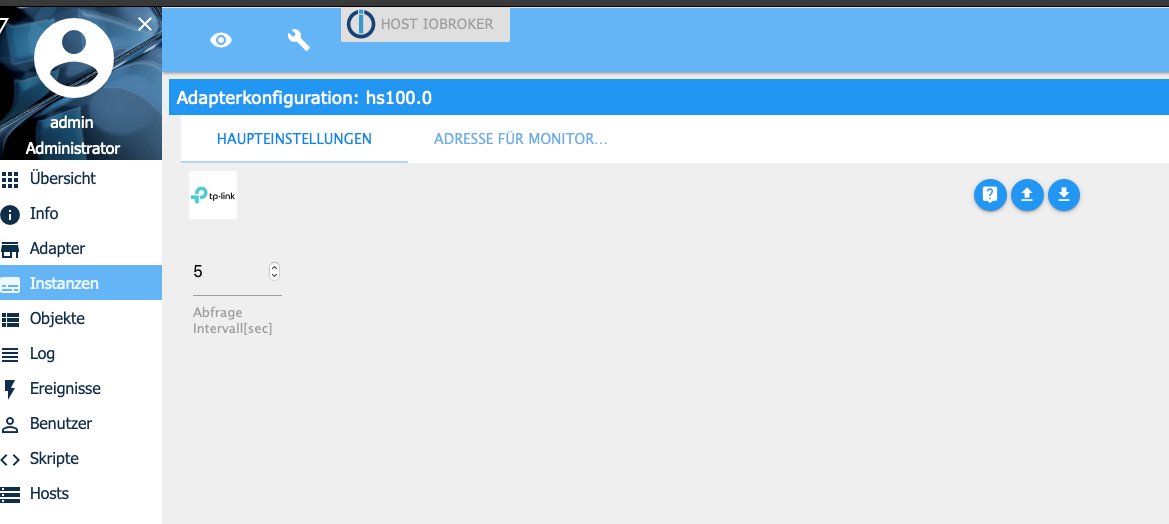
@AlCalzone hmmm also hier??
 Bildschirmfoto 2020-12-06 um 15.03.25 (2).png
diesen Wert einfach auf 5???
-
@AlCalzone asooo hmm ja der stand leider schon so... dann kann es wohl daran kaum liegen das sich die Instanz des öfteren verabschiedet...
@Fuxsism Dazu könntest du mal die Meldungen aus dem Log posten.
Zusätzlich nochwhich nodejs && nodejs -v && which node && node -v && which npm && npm -v && apt policy nodejsausführen, Eingabe und Ausgabe/Rückmeldung ungekürzt hier rein.
-
@Fuxsism Dazu könntest du mal die Meldungen aus dem Log posten.
Zusätzlich nochwhich nodejs && nodejs -v && which node && node -v && which npm && npm -v && apt policy nodejsausführen, Eingabe und Ausgabe/Rückmeldung ungekürzt hier rein.
@Thomas-Braun said in Admin UI?:
which nodejs && nodejs -v && which node && node -v && which npm && npm -v && apt policy nodejs
also hier das Ergebnis:
pi@IoBroker:~ $ which nodejs && nodejs -v && which node && node -v && which npm && npm -v && apt policy nodejs
/usr/bin/nodejs
v12.20.0
/usr/bin/node
v12.20.0
/usr/bin/npm
6.14.8
nodejs:
  Installiert:           12.20.0-1nodesource1
  Installationskandidat: 12.20.0-1nodesource1
  Versionstabelle:
 *** 12.20.0-1nodesource1 500
        500 https://deb.nodesource.com/node_12.x buster/main armhf Packages
        100 /var/lib/dpkg/status
     10.21.0~dfsg-1~deb10u1+rpi1 500
        500 http://raspbian.raspberrypi.org/raspbian buster/main armhf Packages
pi@IoBroker:~ $
Und hier etwas aus dem LOG:
hs100.0	2020-12-07 10:04:02.871	info	(25919) Start with IP : 192.168.0.33
hs100.0	2020-12-07 10:04:02.745	info	(25919) starting. Version 2.0.1 in /opt/iobroker/node_modules/iobroker.hs100, node: v12.20.0, js-controller: 3.1.6
host.IoBroker	2020-12-07 10:04:01.650	info	instance system.adapter.hs100.0 started with pid 25919
host.IoBroker	2020-12-07 10:04:00.534	info	Restart adapter system.adapter.hs100.0 because enabled
host.IoBroker	2020-12-07 10:04:00.534	info	instance system.adapter.hs100.0 scheduled normal terminated and will be restarted on schedule.
hs100.0	2020-12-07 10:04:00.017	info	(25902) Terminated (START_IMMEDIATELY_AFTER_STOP): Without reason
hs100.0	2020-12-07 10:04:00.016	info	(25902) terminating
hs100.0	2020-12-07 10:04:00.009	info	(25902) cleaned everything up...
hs100.0	2020-12-07 10:04:00.007	info	(25902) Scheduled restart.
hs100.0	2020-12-07 10:03:03.050	info	(25902) Start with IP : 192.168.0.33
hs100.0	2020-12-07 10:03:02.943	info	(25902) starting. Version 2.0.1 in /opt/iobroker/node_modules/iobroker.hs100, node: v12.20.0, js-controller: 3.1.6
host.IoBroker	2020-12-07 10:03:01.616	info	instance system.adapter.hs100.0 started with pid 25902
host.IoBroker	2020-12-07 10:03:00.576	info	Restart adapter system.adapter.hs100.0 because enabled
host.IoBroker	2020-12-07 10:03:00.575	info	instance system.adapter.hs100.0 scheduled normal terminated and will be restarted on schedule.
hs100.0	2020-12-07 10:03:00.031	info	(25886) Terminated (START_IMMEDIATELY_AFTER_STOP): Without reason
hs100.0	2020-12-07 10:03:00.028	info	(25886) terminating
hs100.0	2020-12-07 10:03:00.016	info	(25886) cleaned everything up...
hs100.0	2020-12-07 10:03:00.013	info	(25886) Scheduled restart.
hs100.0	2020-12-07 10:02:02.801	info	(25886) Start with IP : 192.168.0.33
hs100.0	2020-12-07 10:02:02.693	info	(25886) starting. Version 2.0.1 in /opt/iobroker/node_modules/iobroker.hs100, node: v12.20.0, js-controller: 3.1.6
host.IoBroker	2020-12-07 10:02:01.609	info	instance system.adapter.hs100.0 started with pid 25886
host.IoBroker	2020-12-07 10:02:00.568	info	Restart adapter system.adapter.hs100.0 because enabled
host.IoBroker	2020-12-07 10:02:00.566	info	instance system.adapter.hs100.0 scheduled normal terminated and will be restarted on schedule.
hs100.0	2020-12-07 10:02:00.030	info	(25798) Terminated (START_IMMEDIATELY_AFTER_STOP): Without reason
hs100.0	2020-12-07 10:02:00.027	info	(25798) terminating
hs100.0	2020-12-07 10:02:00.016	info	(25798) cleaned everything up...
hs100.0	2020-12-07 10:02:00.013	info	(25798) Scheduled restart.
hs100.0	2020-12-07 10:01:02.965	info	(25798) Start with IP : 192.168.0.33
hs100.0	2020-12-07 10:01:02.856	info	(25798) starting. Version 2.0.1 in /opt/iobroker/node_modules/iobroker.hs100, node: v12.20.0, js-controller: 3.1.6
host.IoBroker	2020-12-07 10:01:01.601	info	instance system.adapter.hs100.0 started with pid 25798
host.IoBroker	2020-12-07 10:01:00.556	info	Restart adapter system.adapter.hs100.0 because enabled
host.IoBroker	2020-12-07 10:01:00.555	info	instance system.adapter.hs100.0 scheduled normal terminated and will be restarted on schedule.
hs100.0	2020-12-07 10:01:00.032	info	(25753) Terminated (START_IMMEDIATELY_AFTER_STOP): Without reason
hs100.0	2020-12-07 10:01:00.028	info	(25753) terminating
hs100.0	2020-12-07 10:01:00.016	info	(25753) cleaned everything up...
hs100.0	2020-12-07 10:01:00.013	info	(25753) Scheduled restart.
hs100.0	2020-12-07 10:00:02.846	info	(25753) Start with IP : 192.168.0.33
hs100.0	2020-12-07 10:00:02.735	info	(25753) starting. Version 2.0.1 in /opt/iobroker/node_modules/iobroker.hs100, node: v12.20.0, js-controller: 3.1.6
host.IoBroker	2020-12-07 10:00:01.641	info	instance system.adapter.hs100.0 started with pid 25753
host.IoBroker	2020-12-07 10:00:00.596	info	Restart adapter system.adapter.hs100.0 because enabled
host.IoBroker	2020-12-07 10:00:00.595	info	instance system.adapter.hs100.0 scheduled normal terminated and will be restarted on schedule.
hs100.0	2020-12-07 10:00:00.016	info	(25737) Terminated (START_IMMEDIATELY_AFTER_STOP): Without reason
hs100.0	2020-12-07 10:00:00.015	info	(25737) terminating
hs100.0	2020-12-07 10:00:00.008	info	(25737) cleaned everything up...
hs100.0	2020-12-07 10:00:00.007	info	(25737) Scheduled restart.
hs100.0	2020-12-07 09:59:20.527	info	(25737) Start with IP : 192.168.0.33
hs100.0	2020-12-07 09:59:20.421	info	(25737) starting. Version 2.0.1 in /opt/iobroker/node_modules/iobroker.hs100, node: v12.20.0, js-controller: 3.1.6
host.IoBroker	2020-12-07 09:59:19.303	info	instance system.adapter.hs100.0 started with pid 25737
host.IoBroker	2020-12-07 09:59:19.241	info	"system.adapter.hs100.0" enabled
host.IoBroker	2020-12-07 09:59:15.702	info	instance system.adapter.hs100.0 terminated with code 0 (NO_ERROR)
hs100.0	2020-12-07 09:59:15.153	info	(23808) Terminated (NO_ERROR): Without reason
hs100.0	2020-12-07 09:59:15.152	info	(23808) terminating
host.IoBroker	2020-12-07 09:59:15.142	info	stopInstance system.adapter.hs100.0 send kill signal
hs100.0	2020-12-07 09:59:15.146	info	(23808) Got terminate signal TERMINATE_YOURSELF
host.IoBroker	2020-12-07 09:59:15.140	info	stopInstance system.adapter.hs100.0 (force=false, process=true)
host.IoBroker	2020-12-07 09:59:15.132	info	"system.adapter.hs100.0" disabled
hs100.0	2020-12-07 09:59:15.135	info	(23808) cleaned everything up...
hs100.0	2020-12-07 09:59:15.134	info	(23808) Adapter is disabled => stop
hs100.0	2020-12-07 08:25:02.868	warn	(23808) getDevice Socket connection Timeout ip: 192.168.0.33 please reconnect the Device
hs100.0	2020-12-07 07:46:59.307	info	(23808) Start with IP : 192.168.0.33
hs100.0	2020-12-07 07:46:59.203	info	(23808) starting. Version 2.0.1 in /opt/iobroker/node_modules/iobroker.hs100, node: v12.20.0, js-controller: 3.1.6
host.IoBroker	2020-12-07 07:46:58.017	info	instance system.adapter.hs100.0 started with pid 23808
host.IoBroker	2020-12-07 07:46:56.951	info	Restart adapter system.adapter.hs100.0 because enabled
host.IoBroker	2020-12-07 07:46:56.951	info	instance system.adapter.hs100.0 terminated with code 0 (NO_ERROR)
host.IoBroker	2020-12-07 07:46:56.951	error	Caught by controller[1]: at processTimers (internal/timers.js:497:7)
host.IoBroker	2020-12-07 07:46:56.950	error	Caught by controller[1]: at listOnTimeout (internal/timers.js:554:17)
host.IoBroker	2020-12-07 07:46:56.950	error	Caught by controller[1]: at Timeout._onTimeout (/opt/iobroker/node_modules/tplink-smarthome-api/lib/network/tcp-socket.js:59:36)
host.IoBroker	2020-12-07 07:46:56.950	error	Caught by controller[1]: 192.168.0.33:9999 {"system":{"get_sysinfo":{}}}
host.IoBroker	2020-12-07 07:46:56.950	error	Caught by controller[1]: TCP 192.168.0.33:9999 Error: TCP Timeout after 10000ms
host.IoBroker	2020-12-07 07:46:56.950	error	Caught by controller[1]: at processTimers (internal/timers.js:497:7)
host.IoBroker	2020-12-07 07:46:56.949	error	Caught by controller[1]: at listOnTimeout (internal/timers.js:554:17)
host.IoBroker	2020-12-07 07:46:56.949	error	Caught by controller[1]: at Timeout._onTimeout (/opt/iobroker/node_modules/tplink-smarthome-api/lib/network/tcp-socket.js:59:36)
host.IoBroker	2020-12-07 07:46:56.949	error	Caught by controller[1]: 192.168.0.33:9999 {"emeter":{"get_realtime":{}}}
host.IoBroker	2020-12-07 07:46:56.949	error	Caught by controller[1]: [Weihnachtsbaum] device.send() Error: TCP Timeout after 10000ms
host.IoBroker	2020-12-07 07:46:56.948	error	Caught by controller[0]: at processTimers (internal/timers.js:497:7)
host.IoBroker	2020-12-07 07:46:56.948	error	Caught by controller[0]: at listOnTimeout (internal/timers.js:554:17)
host.IoBroker	2020-12-07 07:46:56.948	error	Caught by controller[0]: at Timeout._onTimeout (/opt/iobroker/node_modules/tplink-smarthome-api/lib/network/tcp-socket.js:59:36)
host.IoBroker	2020-12-07 07:46:56.948	error	Caught by controller[0]: 192.168.0.33:9999 {"emeter":{"get_realtime":{}}}
host.IoBroker	2020-12-07 07:46:56.943	error	Caught by controller[0]: TCP 192.168.0.33:9999 Error: TCP Timeout after 10000ms
hs100.0	2020-12-07 07:46:56.414	info	(23033) Terminated (NO_ERROR): Without reason
hs100.0	2020-12-07 07:46:56.411	info	(23033) terminating
hs100.0	2020-12-07 07:46:56.401	warn	at processTimers (internal/timers.js:497:7)
hs100.0	2020-12-07 07:46:56.401	warn	at listOnTimeout (internal/timers.js:554:17)
hs100.0	2020-12-07 07:46:56.401	warn	at Timeout._onTimeout (/opt/iobroker/node_modules/tplink-smarthome-api/lib/network/tcp-socket.js:59:36)
hs100.0	2020-12-07 07:46:56.401	warn	192.168.0.33:9999 {"system":{"get_sysinfo":{}}}
hs100.0	2020-12-07 07:46:56.401	warn	(23033) Info Message setDevice: Error: TCP Timeout after 10000ms
hs100.0	2020-12-07 07:46:56.397	info	(23033) cleaned everything up...
hs100.0	2020-12-07 07:46:56.396	error	at processTimers (internal/timers.js:497:7)
hs100.0	2020-12-07 07:46:56.396	error	at listOnTimeout (internal/timers.js:554:17)
hs100.0	2020-12-07 07:46:56.396	error	at Timeout._onTimeout (/opt/iobroker/node_modules/tplink-smarthome-api/lib/network/tcp-socket.js:59:36)
hs100.0	2020-12-07 07:46:56.396	error	192.168.0.33:9999 {"emeter":{"get_realtime":{}}}
hs100.0	2020-12-07 07:46:56.396	error	(23033) Error: TCP Timeout after 10000ms
hs100.0	2020-12-07 07:46:56.395	error	192.168.0.33:9999 {"emeter":{"get_realtime":{}}}
hs100.0	2020-12-07 07:46:56.395	error	(23033) unhandled promise rejection: TCP Timeout after 10000ms
Unhandled	2020-12-07 07:46:56.393	error	promise rejection. This error originated either by throwing inside of an async function without a catch block, or by rejecting a promise which was not handled with .catch()
MOD-Edit: Code in code-tags gesetzt!
Ich hoffe ihr könnt damit was anfangen??
-
@Thomas-Braun said in Admin UI?:
which nodejs && nodejs -v && which node && node -v && which npm && npm -v && apt policy nodejs
also hier das Ergebnis:
pi@IoBroker:~ $ which nodejs && nodejs -v && which node && node -v && which npm && npm -v && apt policy nodejs
/usr/bin/nodejs
v12.20.0
/usr/bin/node
v12.20.0
/usr/bin/npm
6.14.8
nodejs:
  Installiert:           12.20.0-1nodesource1
  Installationskandidat: 12.20.0-1nodesource1
  Versionstabelle:
 *** 12.20.0-1nodesource1 500
        500 https://deb.nodesource.com/node_12.x buster/main armhf Packages
        100 /var/lib/dpkg/status
     10.21.0~dfsg-1~deb10u1+rpi1 500
        500 http://raspbian.raspberrypi.org/raspbian buster/main armhf Packages
pi@IoBroker:~ $
Und hier etwas aus dem LOG:
hs100.0	2020-12-07 10:04:02.871	info	(25919) Start with IP : 192.168.0.33
hs100.0	2020-12-07 10:04:02.745	info	(25919) starting. Version 2.0.1 in /opt/iobroker/node_modules/iobroker.hs100, node: v12.20.0, js-controller: 3.1.6
host.IoBroker	2020-12-07 10:04:01.650	info	instance system.adapter.hs100.0 started with pid 25919
host.IoBroker	2020-12-07 10:04:00.534	info	Restart adapter system.adapter.hs100.0 because enabled
host.IoBroker	2020-12-07 10:04:00.534	info	instance system.adapter.hs100.0 scheduled normal terminated and will be restarted on schedule.
hs100.0	2020-12-07 10:04:00.017	info	(25902) Terminated (START_IMMEDIATELY_AFTER_STOP): Without reason
hs100.0	2020-12-07 10:04:00.016	info	(25902) terminating
hs100.0	2020-12-07 10:04:00.009	info	(25902) cleaned everything up...
hs100.0	2020-12-07 10:04:00.007	info	(25902) Scheduled restart.
hs100.0	2020-12-07 10:03:03.050	info	(25902) Start with IP : 192.168.0.33
hs100.0	2020-12-07 10:03:02.943	info	(25902) starting. Version 2.0.1 in /opt/iobroker/node_modules/iobroker.hs100, node: v12.20.0, js-controller: 3.1.6
host.IoBroker	2020-12-07 10:03:01.616	info	instance system.adapter.hs100.0 started with pid 25902
host.IoBroker	2020-12-07 10:03:00.576	info	Restart adapter system.adapter.hs100.0 because enabled
host.IoBroker	2020-12-07 10:03:00.575	info	instance system.adapter.hs100.0 scheduled normal terminated and will be restarted on schedule.
hs100.0	2020-12-07 10:03:00.031	info	(25886) Terminated (START_IMMEDIATELY_AFTER_STOP): Without reason
hs100.0	2020-12-07 10:03:00.028	info	(25886) terminating
hs100.0	2020-12-07 10:03:00.016	info	(25886) cleaned everything up...
hs100.0	2020-12-07 10:03:00.013	info	(25886) Scheduled restart.
hs100.0	2020-12-07 10:02:02.801	info	(25886) Start with IP : 192.168.0.33
hs100.0	2020-12-07 10:02:02.693	info	(25886) starting. Version 2.0.1 in /opt/iobroker/node_modules/iobroker.hs100, node: v12.20.0, js-controller: 3.1.6
host.IoBroker	2020-12-07 10:02:01.609	info	instance system.adapter.hs100.0 started with pid 25886
host.IoBroker	2020-12-07 10:02:00.568	info	Restart adapter system.adapter.hs100.0 because enabled
host.IoBroker	2020-12-07 10:02:00.566	info	instance system.adapter.hs100.0 scheduled normal terminated and will be restarted on schedule.
hs100.0	2020-12-07 10:02:00.030	info	(25798) Terminated (START_IMMEDIATELY_AFTER_STOP): Without reason
hs100.0	2020-12-07 10:02:00.027	info	(25798) terminating
hs100.0	2020-12-07 10:02:00.016	info	(25798) cleaned everything up...
hs100.0	2020-12-07 10:02:00.013	info	(25798) Scheduled restart.
hs100.0	2020-12-07 10:01:02.965	info	(25798) Start with IP : 192.168.0.33
hs100.0	2020-12-07 10:01:02.856	info	(25798) starting. Version 2.0.1 in /opt/iobroker/node_modules/iobroker.hs100, node: v12.20.0, js-controller: 3.1.6
host.IoBroker	2020-12-07 10:01:01.601	info	instance system.adapter.hs100.0 started with pid 25798
host.IoBroker	2020-12-07 10:01:00.556	info	Restart adapter system.adapter.hs100.0 because enabled
host.IoBroker	2020-12-07 10:01:00.555	info	instance system.adapter.hs100.0 scheduled normal terminated and will be restarted on schedule.
hs100.0	2020-12-07 10:01:00.032	info	(25753) Terminated (START_IMMEDIATELY_AFTER_STOP): Without reason
hs100.0	2020-12-07 10:01:00.028	info	(25753) terminating
hs100.0	2020-12-07 10:01:00.016	info	(25753) cleaned everything up...
hs100.0	2020-12-07 10:01:00.013	info	(25753) Scheduled restart.
hs100.0	2020-12-07 10:00:02.846	info	(25753) Start with IP : 192.168.0.33
hs100.0	2020-12-07 10:00:02.735	info	(25753) starting. Version 2.0.1 in /opt/iobroker/node_modules/iobroker.hs100, node: v12.20.0, js-controller: 3.1.6
host.IoBroker	2020-12-07 10:00:01.641	info	instance system.adapter.hs100.0 started with pid 25753
host.IoBroker	2020-12-07 10:00:00.596	info	Restart adapter system.adapter.hs100.0 because enabled
host.IoBroker	2020-12-07 10:00:00.595	info	instance system.adapter.hs100.0 scheduled normal terminated and will be restarted on schedule.
hs100.0	2020-12-07 10:00:00.016	info	(25737) Terminated (START_IMMEDIATELY_AFTER_STOP): Without reason
hs100.0	2020-12-07 10:00:00.015	info	(25737) terminating
hs100.0	2020-12-07 10:00:00.008	info	(25737) cleaned everything up...
hs100.0	2020-12-07 10:00:00.007	info	(25737) Scheduled restart.
hs100.0	2020-12-07 09:59:20.527	info	(25737) Start with IP : 192.168.0.33
hs100.0	2020-12-07 09:59:20.421	info	(25737) starting. Version 2.0.1 in /opt/iobroker/node_modules/iobroker.hs100, node: v12.20.0, js-controller: 3.1.6
host.IoBroker	2020-12-07 09:59:19.303	info	instance system.adapter.hs100.0 started with pid 25737
host.IoBroker	2020-12-07 09:59:19.241	info	"system.adapter.hs100.0" enabled
host.IoBroker	2020-12-07 09:59:15.702	info	instance system.adapter.hs100.0 terminated with code 0 (NO_ERROR)
hs100.0	2020-12-07 09:59:15.153	info	(23808) Terminated (NO_ERROR): Without reason
hs100.0	2020-12-07 09:59:15.152	info	(23808) terminating
host.IoBroker	2020-12-07 09:59:15.142	info	stopInstance system.adapter.hs100.0 send kill signal
hs100.0	2020-12-07 09:59:15.146	info	(23808) Got terminate signal TERMINATE_YOURSELF
host.IoBroker	2020-12-07 09:59:15.140	info	stopInstance system.adapter.hs100.0 (force=false, process=true)
host.IoBroker	2020-12-07 09:59:15.132	info	"system.adapter.hs100.0" disabled
hs100.0	2020-12-07 09:59:15.135	info	(23808) cleaned everything up...
hs100.0	2020-12-07 09:59:15.134	info	(23808) Adapter is disabled => stop
hs100.0	2020-12-07 08:25:02.868	warn	(23808) getDevice Socket connection Timeout ip: 192.168.0.33 please reconnect the Device
hs100.0	2020-12-07 07:46:59.307	info	(23808) Start with IP : 192.168.0.33
hs100.0	2020-12-07 07:46:59.203	info	(23808) starting. Version 2.0.1 in /opt/iobroker/node_modules/iobroker.hs100, node: v12.20.0, js-controller: 3.1.6
host.IoBroker	2020-12-07 07:46:58.017	info	instance system.adapter.hs100.0 started with pid 23808
host.IoBroker	2020-12-07 07:46:56.951	info	Restart adapter system.adapter.hs100.0 because enabled
host.IoBroker	2020-12-07 07:46:56.951	info	instance system.adapter.hs100.0 terminated with code 0 (NO_ERROR)
host.IoBroker	2020-12-07 07:46:56.951	error	Caught by controller[1]: at processTimers (internal/timers.js:497:7)
host.IoBroker	2020-12-07 07:46:56.950	error	Caught by controller[1]: at listOnTimeout (internal/timers.js:554:17)
host.IoBroker	2020-12-07 07:46:56.950	error	Caught by controller[1]: at Timeout._onTimeout (/opt/iobroker/node_modules/tplink-smarthome-api/lib/network/tcp-socket.js:59:36)
host.IoBroker	2020-12-07 07:46:56.950	error	Caught by controller[1]: 192.168.0.33:9999 {"system":{"get_sysinfo":{}}}
host.IoBroker	2020-12-07 07:46:56.950	error	Caught by controller[1]: TCP 192.168.0.33:9999 Error: TCP Timeout after 10000ms
host.IoBroker	2020-12-07 07:46:56.950	error	Caught by controller[1]: at processTimers (internal/timers.js:497:7)
host.IoBroker	2020-12-07 07:46:56.949	error	Caught by controller[1]: at listOnTimeout (internal/timers.js:554:17)
host.IoBroker	2020-12-07 07:46:56.949	error	Caught by controller[1]: at Timeout._onTimeout (/opt/iobroker/node_modules/tplink-smarthome-api/lib/network/tcp-socket.js:59:36)
host.IoBroker	2020-12-07 07:46:56.949	error	Caught by controller[1]: 192.168.0.33:9999 {"emeter":{"get_realtime":{}}}
host.IoBroker	2020-12-07 07:46:56.949	error	Caught by controller[1]: [Weihnachtsbaum] device.send() Error: TCP Timeout after 10000ms
host.IoBroker	2020-12-07 07:46:56.948	error	Caught by controller[0]: at processTimers (internal/timers.js:497:7)
host.IoBroker	2020-12-07 07:46:56.948	error	Caught by controller[0]: at listOnTimeout (internal/timers.js:554:17)
host.IoBroker	2020-12-07 07:46:56.948	error	Caught by controller[0]: at Timeout._onTimeout (/opt/iobroker/node_modules/tplink-smarthome-api/lib/network/tcp-socket.js:59:36)
host.IoBroker	2020-12-07 07:46:56.948	error	Caught by controller[0]: 192.168.0.33:9999 {"emeter":{"get_realtime":{}}}
host.IoBroker	2020-12-07 07:46:56.943	error	Caught by controller[0]: TCP 192.168.0.33:9999 Error: TCP Timeout after 10000ms
hs100.0	2020-12-07 07:46:56.414	info	(23033) Terminated (NO_ERROR): Without reason
hs100.0	2020-12-07 07:46:56.411	info	(23033) terminating
hs100.0	2020-12-07 07:46:56.401	warn	at processTimers (internal/timers.js:497:7)
hs100.0	2020-12-07 07:46:56.401	warn	at listOnTimeout (internal/timers.js:554:17)
hs100.0	2020-12-07 07:46:56.401	warn	at Timeout._onTimeout (/opt/iobroker/node_modules/tplink-smarthome-api/lib/network/tcp-socket.js:59:36)
hs100.0	2020-12-07 07:46:56.401	warn	192.168.0.33:9999 {"system":{"get_sysinfo":{}}}
hs100.0	2020-12-07 07:46:56.401	warn	(23033) Info Message setDevice: Error: TCP Timeout after 10000ms
hs100.0	2020-12-07 07:46:56.397	info	(23033) cleaned everything up...
hs100.0	2020-12-07 07:46:56.396	error	at processTimers (internal/timers.js:497:7)
hs100.0	2020-12-07 07:46:56.396	error	at listOnTimeout (internal/timers.js:554:17)
hs100.0	2020-12-07 07:46:56.396	error	at Timeout._onTimeout (/opt/iobroker/node_modules/tplink-smarthome-api/lib/network/tcp-socket.js:59:36)
hs100.0	2020-12-07 07:46:56.396	error	192.168.0.33:9999 {"emeter":{"get_realtime":{}}}
hs100.0	2020-12-07 07:46:56.396	error	(23033) Error: TCP Timeout after 10000ms
hs100.0	2020-12-07 07:46:56.395	error	192.168.0.33:9999 {"emeter":{"get_realtime":{}}}
hs100.0	2020-12-07 07:46:56.395	error	(23033) unhandled promise rejection: TCP Timeout after 10000ms
Unhandled	2020-12-07 07:46:56.393	error	promise rejection. This error originated either by throwing inside of an async function without a catch block, or by rejecting a promise which was not handled with .catch()
MOD-Edit: Code in code-tags gesetzt!
Ich hoffe ihr könnt damit was anfangen??
-
meinst du so??
hs100.0 2020-12-07 10:04:02.871 info (25919) Start with IP : 192.168.0.33 hs100.0 2020-12-07 10:04:02.745 info (25919) starting. Version 2.0.1 in /opt/iobroker/node_modules/iobroker.hs100, node: v12.20.0, js-controller: 3.1.6 host.IoBroker 2020-12-07 10:04:01.650 info instance system.adapter.hs100.0 started with pid 25919 host.IoBroker 2020-12-07 10:04:00.534 info Restart adapter system.adapter.hs100.0 because enabled host.IoBroker 2020-12-07 10:04:00.534 info instance system.adapter.hs100.0 scheduled normal terminated and will be restarted on schedule. hs100.0 2020-12-07 10:04:00.017 info (25902) Terminated (START_IMMEDIATELY_AFTER_STOP): Without reason hs100.0 2020-12-07 10:04:00.016 info (25902) terminating hs100.0 2020-12-07 10:04:00.009 info (25902) cleaned everything up... hs100.0 2020-12-07 10:04:00.007 info (25902) Scheduled restart. hs100.0 2020-12-07 10:03:03.050 info (25902) Start with IP : 192.168.0.33 hs100.0 2020-12-07 10:03:02.943 info (25902) starting. Version 2.0.1 in /opt/iobroker/node_modules/iobroker.hs100, node: v12.20.0, js-controller: 3.1.6 host.IoBroker 2020-12-07 10:03:01.616 info instance system.adapter.hs100.0 started with pid 25902 host.IoBroker 2020-12-07 10:03:00.576 info Restart adapter system.adapter.hs100.0 because enabled host.IoBroker 2020-12-07 10:03:00.575 info instance system.adapter.hs100.0 scheduled normal terminated and will be restarted on schedule. hs100.0 2020-12-07 10:03:00.031 info (25886) Terminated (START_IMMEDIATELY_AFTER_STOP): Without reason hs100.0 2020-12-07 10:03:00.028 info (25886) terminating hs100.0 2020-12-07 10:03:00.016 info (25886) cleaned everything up... hs100.0 2020-12-07 10:03:00.013 info (25886) Scheduled restart. hs100.0 2020-12-07 10:02:02.801 info (25886) Start with IP : 192.168.0.33 hs100.0 2020-12-07 10:02:02.693 info (25886) starting. Version 2.0.1 in /opt/iobroker/node_modules/iobroker.hs100, node: v12.20.0, js-controller: 3.1.6 host.IoBroker 2020-12-07 10:02:01.609 info instance system.adapter.hs100.0 started with pid 25886 host.IoBroker 2020-12-07 10:02:00.568 info Restart adapter system.adapter.hs100.0 because enabled host.IoBroker 2020-12-07 10:02:00.566 info instance system.adapter.hs100.0 scheduled normal terminated and will be restarted on schedule. hs100.0 2020-12-07 10:02:00.030 info (25798) Terminated (START_IMMEDIATELY_AFTER_STOP): Without reason hs100.0 2020-12-07 10:02:00.027 info (25798) terminating hs100.0 2020-12-07 10:02:00.016 info (25798) cleaned everything up... hs100.0 2020-12-07 10:02:00.013 info (25798) Scheduled restart. hs100.0 2020-12-07 10:01:02.965 info (25798) Start with IP : 192.168.0.33 hs100.0 2020-12-07 10:01:02.856 info (25798) starting. Version 2.0.1 in /opt/iobroker/node_modules/iobroker.hs100, node: v12.20.0, js-controller: 3.1.6 host.IoBroker 2020-12-07 10:01:01.601 info instance system.adapter.hs100.0 started with pid 25798 host.IoBroker 2020-12-07 10:01:00.556 info Restart adapter system.adapter.hs100.0 because enabled host.IoBroker 2020-12-07 10:01:00.555 info instance system.adapter.hs100.0 scheduled normal terminated and will be restarted on schedule. hs100.0 2020-12-07 10:01:00.032 info (25753) Terminated (START_IMMEDIATELY_AFTER_STOP): Without reason hs100.0 2020-12-07 10:01:00.028 info (25753) terminating hs100.0 2020-12-07 10:01:00.016 info (25753) cleaned everything up... hs100.0 2020-12-07 10:01:00.013 info (25753) Scheduled restart. hs100.0 2020-12-07 10:00:02.846 info (25753) Start with IP : 192.168.0.33 hs100.0 2020-12-07 10:00:02.735 info (25753) starting. Version 2.0.1 in /opt/iobroker/node_modules/iobroker.hs100, node: v12.20.0, js-controller: 3.1.6 host.IoBroker 2020-12-07 10:00:01.641 info instance system.adapter.hs100.0 started with pid 25753 host.IoBroker 2020-12-07 10:00:00.596 info Restart adapter system.adapter.hs100.0 because enabled host.IoBroker 2020-12-07 10:00:00.595 info instance system.adapter.hs100.0 scheduled normal terminated and will be restarted on schedule. hs100.0 2020-12-07 10:00:00.016 info (25737) Terminated (START_IMMEDIATELY_AFTER_STOP): Without reason hs100.0 2020-12-07 10:00:00.015 info (25737) terminating hs100.0 2020-12-07 10:00:00.008 info (25737) cleaned everything up... hs100.0 2020-12-07 10:00:00.007 info (25737) Scheduled restart. hs100.0 2020-12-07 09:59:20.527 info (25737) Start with IP : 192.168.0.33 hs100.0 2020-12-07 09:59:20.421 info (25737) starting. Version 2.0.1 in /opt/iobroker/node_modules/iobroker.hs100, node: v12.20.0, js-controller: 3.1.6 host.IoBroker 2020-12-07 09:59:19.303 info instance system.adapter.hs100.0 started with pid 25737 host.IoBroker 2020-12-07 09:59:19.241 info "system.adapter.hs100.0" enabled host.IoBroker 2020-12-07 09:59:15.702 info instance system.adapter.hs100.0 terminated with code 0 (NO_ERROR) hs100.0 2020-12-07 09:59:15.153 info (23808) Terminated (NO_ERROR): Without reason hs100.0 2020-12-07 09:59:15.152 info (23808) terminating host.IoBroker 2020-12-07 09:59:15.142 info stopInstance system.adapter.hs100.0 send kill signal hs100.0 2020-12-07 09:59:15.146 info (23808) Got terminate signal TERMINATE_YOURSELF host.IoBroker 2020-12-07 09:59:15.140 info stopInstance system.adapter.hs100.0 (force=false, process=true) host.IoBroker 2020-12-07 09:59:15.132 info "system.adapter.hs100.0" disabled hs100.0 2020-12-07 09:59:15.135 info (23808) cleaned everything up... hs100.0 2020-12-07 09:59:15.134 info (23808) Adapter is disabled => stop hs100.0 2020-12-07 08:25:02.868 warn (23808) getDevice Socket connection Timeout ip: 192.168.0.33 please reconnect the Device hs100.0 2020-12-07 07:46:59.307 info (23808) Start with IP : 192.168.0.33 hs100.0 2020-12-07 07:46:59.203 info (23808) starting. Version 2.0.1 in /opt/iobroker/node_modules/iobroker.hs100, node: v12.20.0, js-controller: 3.1.6 host.IoBroker 2020-12-07 07:46:58.017 info instance system.adapter.hs100.0 started with pid 23808 host.IoBroker 2020-12-07 07:46:56.951 info Restart adapter system.adapter.hs100.0 because enabled host.IoBroker 2020-12-07 07:46:56.951 info instance system.adapter.hs100.0 terminated with code 0 (NO_ERROR) host.IoBroker 2020-12-07 07:46:56.951 error Caught by controller[1]: at processTimers (internal/timers.js:497:7) host.IoBroker 2020-12-07 07:46:56.950 error Caught by controller[1]: at listOnTimeout (internal/timers.js:554:17) host.IoBroker 2020-12-07 07:46:56.950 error Caught by controller[1]: at Timeout._onTimeout (/opt/iobroker/node_modules/tplink-smarthome-api/lib/network/tcp-socket.js:59:36) host.IoBroker 2020-12-07 07:46:56.950 error Caught by controller[1]: 192.168.0.33:9999 {"system":{"get_sysinfo":{}}} host.IoBroker 2020-12-07 07:46:56.950 error Caught by controller[1]: TCP 192.168.0.33:9999 Error: TCP Timeout after 10000ms host.IoBroker 2020-12-07 07:46:56.950 error Caught by controller[1]: at processTimers (internal/timers.js:497:7) host.IoBroker 2020-12-07 07:46:56.949 error Caught by controller[1]: at listOnTimeout (internal/timers.js:554:17) host.IoBroker 2020-12-07 07:46:56.949 error Caught by controller[1]: at Timeout._onTimeout (/opt/iobroker/node_modules/tplink-smarthome-api/lib/network/tcp-socket.js:59:36) host.IoBroker 2020-12-07 07:46:56.949 error Caught by controller[1]: 192.168.0.33:9999 {"emeter":{"get_realtime":{}}} host.IoBroker 2020-12-07 07:46:56.949 error Caught by controller[1]: [Weihnachtsbaum] device.send() Error: TCP Timeout after 10000ms host.IoBroker 2020-12-07 07:46:56.948 error Caught by controller[0]: at processTimers (internal/timers.js:497:7) host.IoBroker 2020-12-07 07:46:56.948 error Caught by controller[0]: at listOnTimeout (internal/timers.js:554:17) host.IoBroker 2020-12-07 07:46:56.948 error Caught by controller[0]: at Timeout._onTimeout (/opt/iobroker/node_modules/tplink-smarthome-api/lib/network/tcp-socket.js:59:36) host.IoBroker 2020-12-07 07:46:56.948 error Caught by controller[0]: 192.168.0.33:9999 {"emeter":{"get_realtime":{}}} host.IoBroker 2020-12-07 07:46:56.943 error Caught by controller[0]: TCP 192.168.0.33:9999 Error: TCP Timeout after 10000ms hs100.0 2020-12-07 07:46:56.414 info (23033) Terminated (NO_ERROR): Without reason hs100.0 2020-12-07 07:46:56.411 info (23033) terminating hs100.0 2020-12-07 07:46:56.401 warn at processTimers (internal/timers.js:497:7) hs100.0 2020-12-07 07:46:56.401 warn at listOnTimeout (internal/timers.js:554:17) hs100.0 2020-12-07 07:46:56.401 warn at Timeout._onTimeout (/opt/iobroker/node_modules/tplink-smarthome-api/lib/network/tcp-socket.js:59:36) hs100.0 2020-12-07 07:46:56.401 warn 192.168.0.33:9999 {"system":{"get_sysinfo":{}}} hs100.0 2020-12-07 07:46:56.401 warn (23033) Info Message setDevice: Error: TCP Timeout after 10000ms hs100.0 2020-12-07 07:46:56.397 info (23033) cleaned everything up... hs100.0 2020-12-07 07:46:56.396 error at processTimers (internal/timers.js:497:7) hs100.0 2020-12-07 07:46:56.396 error at listOnTimeout (internal/timers.js:554:17) hs100.0 2020-12-07 07:46:56.396 error at Timeout._onTimeout (/opt/iobroker/node_modules/tplink-smarthome-api/lib/network/tcp-socket.js:59:36) hs100.0 2020-12-07 07:46:56.396 error 192.168.0.33:9999 {"emeter":{"get_realtime":{}}} hs100.0 2020-12-07 07:46:56.396 error (23033) Error: TCP Timeout after 10000ms hs100.0 2020-12-07 07:46:56.395 error 192.168.0.33:9999 {"emeter":{"get_realtime":{}}} hs100.0 2020-12-07 07:46:56.395 error (23033) unhandled promise rejection: TCP Timeout after 10000ms Unhandled 2020-12-07 07:46:56.393 error promise rejection. This error originated either by throwing inside of an async function without a catch block, or by rejecting a promise which was not handled with .catch() -
-
@Thomas-Braun passt das so??
@Fuxsism
Ja, besser lesbar.Da wird die IP 192.168.0.33 wohl nicht erreicht. Netzwerkproblem, scheint mir.
-
@Fuxsism
Ja, besser lesbar.Da wird die IP 192.168.0.33 wohl nicht erreicht. Netzwerkproblem, scheint mir.
@Thomas-Braun aber woran kann das liegen?
Momentan habe ich ca jede Minute einmal die unteraufgeführte Schleife:
hs100.0	2020-12-07 11:06:02.822	info	(27870) Start with IP : 192.168.0.33
hs100.0	2020-12-07 11:06:02.700	info	(27870) starting. Version 2.0.1 in /opt/iobroker/node_modules/iobroker.hs100, node: v12.20.0, js-controller: 3.1.6
host.IoBroker	2020-12-07 11:06:01.590	info	instance system.adapter.hs100.0 started with pid 27870
host.IoBroker	2020-12-07 11:06:00.544	info	Restart adapter system.adapter.hs100.0 because enabled
host.IoBroker	2020-12-07 11:06:00.543	info	instance system.adapter.hs100.0 scheduled normal terminated and will be restarted on schedule.
hs100.0	2020-12-07 11:06:00.028	info	(27828) Terminated (START_IMMEDIATELY_AFTER_STOP): Without reason
hs100.0	2020-12-07 11:06:00.025	info	(27828) terminating
hs100.0	2020-12-07 11:06:00.015	info	(27828) cleaned everything up...
hs100.0	2020-12-07 11:06:00.013	info	(27828) Scheduled restart.
hs100.0	2020-12-07 11:05:02.948	info	(27828) Start with IP : 192.168.0.33
Der Adapter scheint aber soweit zu laufen... bzw zeigt er unter den Objekten einen alle 5 Sekunden abgefragten Verbrauchswert an...
-
@Thomas-Braun aber woran kann das liegen?
Momentan habe ich ca jede Minute einmal die unteraufgeführte Schleife:
hs100.0	2020-12-07 11:06:02.822	info	(27870) Start with IP : 192.168.0.33
hs100.0	2020-12-07 11:06:02.700	info	(27870) starting. Version 2.0.1 in /opt/iobroker/node_modules/iobroker.hs100, node: v12.20.0, js-controller: 3.1.6
host.IoBroker	2020-12-07 11:06:01.590	info	instance system.adapter.hs100.0 started with pid 27870
host.IoBroker	2020-12-07 11:06:00.544	info	Restart adapter system.adapter.hs100.0 because enabled
host.IoBroker	2020-12-07 11:06:00.543	info	instance system.adapter.hs100.0 scheduled normal terminated and will be restarted on schedule.
hs100.0	2020-12-07 11:06:00.028	info	(27828) Terminated (START_IMMEDIATELY_AFTER_STOP): Without reason
hs100.0	2020-12-07 11:06:00.025	info	(27828) terminating
hs100.0	2020-12-07 11:06:00.015	info	(27828) cleaned everything up...
hs100.0	2020-12-07 11:06:00.013	info	(27828) Scheduled restart.
hs100.0	2020-12-07 11:05:02.948	info	(27828) Start with IP : 192.168.0.33
Der Adapter scheint aber soweit zu laufen... bzw zeigt er unter den Objekten einen alle 5 Sekunden abgefragten Verbrauchswert an...
@Fuxsism
Was für ein Gerät verbirgt sich denn hinter der IP? -
@Fuxsism
Was für ein Gerät verbirgt sich denn hinter der IP?@Thomas-Braun das ist eine tp-Link Wlan Steckdose mit Verbauchserkennung...
-
@AlCalzone ich glaube es ist keine feste IP... soll ich ihr lieber eine feste ip zuweisen??


 einbetten.
Hey! Du scheinst an dieser Unterhaltung interessiert zu sein, hast aber noch kein Konto.
Hast du es satt, bei jedem Besuch durch die gleichen Beiträge zu scrollen? Wenn du dich für ein Konto anmeldest, kommst du immer genau dorthin zurück, wo du zuvor warst, und kannst dich über neue Antworten benachrichtigen lassen (entweder per E-Mail oder Push-Benachrichtigung). Du kannst auch Lesezeichen speichern und Beiträge positiv bewerten, um anderen Community-Mitgliedern deine Wertschätzung zu zeigen.
Mit deinem Input könnte dieser Beitrag noch besser werden 💗
Registrieren Anmelden184
Online33.0k
Benutzende83.7k
Themen1.3m
Beiträge