



Weiter zum Inhalt
  • Home
  • Aktuell
  • Tags
  • 0 Ungelesen 0
  • Kategorien
  • Unreplied
  • Beliebt
  • GitHub
  • Docu
  • Hilfe
Skins
  • Hell
  • Brite
  • Cerulean
  • Cosmo
  • Flatly
  • Journal
  • Litera
  • Lumen
  • Lux
  • Materia
  • Minty
  • Morph
  • Pulse
  • Sandstone
  • Simplex
  • Sketchy
  • Spacelab
  • United
  • Yeti
  • Zephyr
  • Dunkel
  • Cyborg
  • Darkly
  • Quartz
  • Slate
  • Solar
  • Superhero
  • Vapor

  • Standard: (Kein Skin)
  • Kein Skin
Einklappen
ioBroker Logo

Community Forum

donate donate
  1. ioBroker Community Home
  2. Deutsch
  3. ioBroker Allgemein
  4. Update tr-064 Adapter

NEWS

  • Neuer ioBroker-Blog online: Monatsrückblick März/April 2026
    BluefoxB
    Bluefox
    8
    1
    738

  • Verwendung von KI bitte immer deutlich kennzeichnen
    HomoranH
    Homoran
    10
    1
    570

  • Monatsrückblick Januar/Februar 2026 ist online!
    BluefoxB
    Bluefox
    18
    1
    1.1k

Update tr-064 Adapter

Geplant Angeheftet Gesperrt Verschoben ioBroker Allgemein
adapter
28 Beiträge 4 Kommentatoren 2.5k Aufrufe 4 Beobachtet
  • Älteste zuerst
  • Neuste zuerst
  • Meiste Stimmen
Antworten
  • In einem neuen Thema antworten
Anmelden zum Antworten
Dieses Thema wurde gelöscht. Nur Nutzer mit entsprechenden Rechten können es sehen.
  • R Ralf

    @Thomas-Braun Nach der Deinstallation und Restart von iobroker wird immer noch das Update angeboten obwohl der Adapter in den Instanzen nicht mehr vorhanden ist. Blicke im Moment leider nicht durch.

    J Offline
    J Offline
    Jan1
    schrieb am zuletzt editiert von
    #4

    @Ralf
    Du hast wohl nur die Instanz deinstalliert und nicht den ganzen Adapter

    1 Antwort Letzte Antwort
    0
    • R Ralf

      @Thomas-Braun Nach der Deinstallation und Restart von iobroker wird immer noch das Update angeboten obwohl der Adapter in den Instanzen nicht mehr vorhanden ist. Blicke im Moment leider nicht durch.

      Thomas BraunT Online
      Thomas BraunT Online
      Thomas Braun
      Most Active
      schrieb am zuletzt editiert von
      #5

      @Ralf

      iobroker list adapters
      iobroker update
      iobroker del tr-064
      iobroker add tr-064
      

      Linux-Werkzeugkasten:
      https://forum.iobroker.net/topic/42952/der-kleine-iobroker-linux-werkzeugkasten
      NodeJS Fixer Skript:
      https://forum.iobroker.net/topic/68035/iob-node-fix-skript
      iob_diag: curl -sLf -o diag.sh https://iobroker.net/diag.sh && bash diag.sh

      R 1 Antwort Letzte Antwort
      0
      • Thomas BraunT Thomas Braun

        @Ralf

        iobroker list adapters
        iobroker update
        iobroker del tr-064
        iobroker add tr-064
        
        R Offline
        R Offline
        Ralf
        schrieb am zuletzt editiert von
        #6

        @Thomas-Braun sagte in Update tr-064 Adapter:

        iobroker del tr-064

        Adapter lässt sich nicht deinstallieren :

        <Delete adapter "tr-064"
        npm uninstall iobroker.tr-064 --error --prefix "/opt/iobroker" (System call)
        npm WARN checkPermissions Missing write access to /opt/iobroker/node_modules/iobroker.tr-064/node_modules/array-ext
        npm WARN checkPermissions Missing write access to /opt/iobroker/node_modules/iobroker.tr-064/node_modules/dgram
        npm WARN checkPermissions Missing write access to /opt/iobroker/node_modules/iobroker.tr-064/node_modules/ip
        npm WARN checkPermissions Missing write access to /opt/iobroker/node_modules/iobroker.tr-064/node_modules/safe-buffer
        npm WARN checkPermissions Missing write access to /opt/iobroker/node_modules/iobroker.tr-064/node_modules/dns-packet
        npm WARN checkPermissions Missing write access to /opt/iobroker/node_modules/iobroker.tr-064/node_modules/sprintf-js
        npm WARN checkPermissions Missing write access to /opt/iobroker/node_modules/iobroker.tr-064/node_modules/soef
        npm WARN optional SKIPPING OPTIONAL DEPENDENCY: osx-temperature-sensor@^1.0.5 (node_modules/iobroker.info/node_modules/osx-temperature-sensor):
        npm WARN notsup SKIPPING OPTIONAL DEPENDENCY: Unsupported platform for osx-temperature-sensor@1.0.7: wanted {"os":"darwin","arch":"any"} (current: {"os":"linux","arch":"x64"})
        npm WARN optional SKIPPING OPTIONAL DEPENDENCY: fsevents@~2.1.2 (node_modules/chokidar/node_modules/fsevents):
        npm WARN notsup SKIPPING OPTIONAL DEPENDENCY: Unsupported platform for fsevents@2.1.3: wanted {"os":"darwin","arch":"any"} (current: {"os":"linux","arch":"x64"})

        npm ERR! code EACCES
        npm ERR! syscall access
        npm ERR! path /opt/iobroker/node_modules/iobroker.tr-064/node_modules/array-ext
        npm ERR! errno -13
        npm ERR! Error: EACCES: permission denied, access '/opt/iobroker/node_modules/iobroker.tr-064/node_modules/array-ext'
        npm ERR! { [Error: EACCES: permission denied, access '/opt/iobroker/node_modules/iobroker.tr-064/node_modules/array-ext']
        npm ERR! stack:
        npm ERR! 'Error: EACCES: permission denied, access '/opt/iobroker/node_modules/iobroker.tr-064/node_modules/array-ext'',
        npm ERR! errno: -13,
        npm ERR! code: 'EACCES',
        npm ERR! syscall: 'access',
        npm ERR! path:
        npm ERR! '/opt/iobroker/node_modules/iobroker.tr-064/node_modules/array-ext' }
        npm ERR!
        npm ERR! The operation was rejected by your operating system.
        npm ERR! It is likely you do not have the permissions to access this file as the current user
        npm ERR!
        npm ERR! If you believe this might be a permissions issue, please double-check the
        npm ERR! permissions of the file and its containing directories, or try running
        npm ERR! the command again as root/Administrator.

        npm ERR! A complete log of this run can be found in:
        npm ERR! /home/iobroker/.npm/_logs/2020-06-01T08_05_12_110Z-debug.log
        Error deleting adapter tr-064 from disk: Error: host.debian-iobroker: Cannot uninstall iobroker.tr-064: 243
        You might have to delete it yourself!
        root@debian-iobroker:~#

        Thomas BraunT 1 Antwort Letzte Antwort
        0
        • R Ralf

          @Thomas-Braun sagte in Update tr-064 Adapter:

          iobroker del tr-064

          Adapter lässt sich nicht deinstallieren :

          <Delete adapter "tr-064"
          npm uninstall iobroker.tr-064 --error --prefix "/opt/iobroker" (System call)
          npm WARN checkPermissions Missing write access to /opt/iobroker/node_modules/iobroker.tr-064/node_modules/array-ext
          npm WARN checkPermissions Missing write access to /opt/iobroker/node_modules/iobroker.tr-064/node_modules/dgram
          npm WARN checkPermissions Missing write access to /opt/iobroker/node_modules/iobroker.tr-064/node_modules/ip
          npm WARN checkPermissions Missing write access to /opt/iobroker/node_modules/iobroker.tr-064/node_modules/safe-buffer
          npm WARN checkPermissions Missing write access to /opt/iobroker/node_modules/iobroker.tr-064/node_modules/dns-packet
          npm WARN checkPermissions Missing write access to /opt/iobroker/node_modules/iobroker.tr-064/node_modules/sprintf-js
          npm WARN checkPermissions Missing write access to /opt/iobroker/node_modules/iobroker.tr-064/node_modules/soef
          npm WARN optional SKIPPING OPTIONAL DEPENDENCY: osx-temperature-sensor@^1.0.5 (node_modules/iobroker.info/node_modules/osx-temperature-sensor):
          npm WARN notsup SKIPPING OPTIONAL DEPENDENCY: Unsupported platform for osx-temperature-sensor@1.0.7: wanted {"os":"darwin","arch":"any"} (current: {"os":"linux","arch":"x64"})
          npm WARN optional SKIPPING OPTIONAL DEPENDENCY: fsevents@~2.1.2 (node_modules/chokidar/node_modules/fsevents):
          npm WARN notsup SKIPPING OPTIONAL DEPENDENCY: Unsupported platform for fsevents@2.1.3: wanted {"os":"darwin","arch":"any"} (current: {"os":"linux","arch":"x64"})

          npm ERR! code EACCES
          npm ERR! syscall access
          npm ERR! path /opt/iobroker/node_modules/iobroker.tr-064/node_modules/array-ext
          npm ERR! errno -13
          npm ERR! Error: EACCES: permission denied, access '/opt/iobroker/node_modules/iobroker.tr-064/node_modules/array-ext'
          npm ERR! { [Error: EACCES: permission denied, access '/opt/iobroker/node_modules/iobroker.tr-064/node_modules/array-ext']
          npm ERR! stack:
          npm ERR! 'Error: EACCES: permission denied, access '/opt/iobroker/node_modules/iobroker.tr-064/node_modules/array-ext'',
          npm ERR! errno: -13,
          npm ERR! code: 'EACCES',
          npm ERR! syscall: 'access',
          npm ERR! path:
          npm ERR! '/opt/iobroker/node_modules/iobroker.tr-064/node_modules/array-ext' }
          npm ERR!
          npm ERR! The operation was rejected by your operating system.
          npm ERR! It is likely you do not have the permissions to access this file as the current user
          npm ERR!
          npm ERR! If you believe this might be a permissions issue, please double-check the
          npm ERR! permissions of the file and its containing directories, or try running
          npm ERR! the command again as root/Administrator.

          npm ERR! A complete log of this run can be found in:
          npm ERR! /home/iobroker/.npm/_logs/2020-06-01T08_05_12_110Z-debug.log
          Error deleting adapter tr-064 from disk: Error: host.debian-iobroker: Cannot uninstall iobroker.tr-064: 243
          You might have to delete it yourself!
          root@debian-iobroker:~#

          Thomas BraunT Online
          Thomas BraunT Online
          Thomas Braun
          Most Active
          schrieb am zuletzt editiert von
          #7

          @Ralf
          Nicht als root rumhampeln und Konsolenausgaben in CodeTags setzen.

          Linux-Werkzeugkasten:
          https://forum.iobroker.net/topic/42952/der-kleine-iobroker-linux-werkzeugkasten
          NodeJS Fixer Skript:
          https://forum.iobroker.net/topic/68035/iob-node-fix-skript
          iob_diag: curl -sLf -o diag.sh https://iobroker.net/diag.sh && bash diag.sh

          R 1 Antwort Letzte Antwort
          0
          • R Ralf

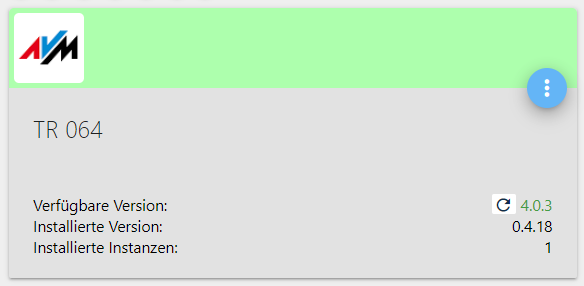
            Hallo,
            seit einiger Zeit wird im iobroker ein Update angeboten, welches aber nicht installiert werden kann. Im Log steht Folgendes :

            tr-064.0 2020-06-01 09:18:46.824 info (4526) Terminated (NO_ERROR): Without reason
            tr-064.0 2020-06-01 09:18:46.822 info (4526) terminating
            tr-064.0 2020-06-01 09:18:46.785 error (4526) TypeError: Cannot read property 'getState' of undefined at checkIfUpdated (/opt/iobroker/node_modules/iobroker.tr-064/node_modules/soef/soef.js:1239:20) at Object.options.ready (/opt/io
            tr-064.0 2020-06-01 09:18:46.782 error (4526) unhandled promise rejection: Cannot read property 'getState' of undefined
            tr-064.0 2020-06-01 09:18:46.781 error Unhandled promise rejection. This error originated either by throwing inside of an async function without a catch block, or by rejecting a promise which was not handled with .catch().
            tr-064.0 2020-06-01 09:18:46.724 info (4526) starting. Version 0.4.18 in /opt/iobroker/node_modules/iobroker.tr-064, node: v10.20.1, js-controller: 3.1.4
            tr-064.0 2020-06-01 09:18:13.493 info (3556) Terminated (NO_ERROR): Without reason
            tr-064.0 2020-06-01 09:18:13.492 info (3556) terminating
            tr-064.0 2020-06-01 09:18:13.459 error (3556) TypeError: Cannot read property 'getState' of undefined at checkIfUpdated (/opt/iobroker/node_modules/iobroker.tr-064/node_modules/soef/soef.js:1239:20) at Object.options.ready (/opt/io
            tr-064.0 2020-06-01 09:18:13.455 error (3556) unhandled promise rejection: Cannot read property 'getState' of undefined
            tr-064.0 2020-06-01 09:18:13.454 error Unhandled promise rejection. This error originated either by throwing inside of an async function without a catch block, or by rejecting a promise which was not handled with .catch().
            tr-064.0 2020-06-01 09:18:13.394 info (3556) starting. Version 0.4.18 in /opt/iobroker/node_modules/iobroker.tr-064, node: v10.20.1, js-controller: 3.1.4
            tr-064.0 2020-06-01 09:17:40.102 info (2500) Terminated (NO_ERROR): Without reason
            tr-064.0 2020-06-01 09:17:40.101 info (2500) terminating
            tr-064.0 2020-06-01 09:17:40.067 error (2500) TypeError: Cannot read property 'getState' of undefined at checkIfUpdated (/opt/iobroker/node_modules/iobroker.tr-064/node_modules/soef/soef.js:1239:20) at Object.options.ready (/opt/io
            tr-064.0 2020-06-01 09:17:40.064 error (2500) unhandled promise rejection: Cannot read property 'getState' of undefined
            tr-064.0 2020-06-01 09:17:40.062 error Unhandled promise rejection. This error originated either by throwing inside of an async function without a catch block, or by rejecting a promise which was not handled with .catch().
            tr-064.0 2020-06-01 09:17:39.999 info (2500) starting. Version 0.4.18 in /opt/iobroker/node_modules/iobroker.tr-064, node: v10.20.1, js-controller: 3.1.4
            tr-064.0 2020-06-01 09:17:06.757 info (1576) Terminated (NO_ERROR): Without reason
            tr-064.0 2020-06-01 09:17:06.756 info (1576) terminating
            51d5bd15-4ee8-4fb4-87e3-7f56ee80b0e5-image.png

            Der Adapter ist rot und lässt sich auch nicht mehr starten.

            Kann da vielleicht jemand helfen ?

            sigi234S Online
            sigi234S Online
            sigi234
            Forum Testing Most Active
            schrieb am zuletzt editiert von
            #8

            @Ralf

            Bitte benutzt die Code Tags Funktion -> </>
            Hier gehts zur Hilfe.

            Bitte benutzt das Voting rechts unten im Beitrag wenn er euch geholfen hat.
            Immer Daten sichern!

            R 1 Antwort Letzte Antwort
            0
            • Thomas BraunT Thomas Braun

              @Ralf
              Nicht als root rumhampeln und Konsolenausgaben in CodeTags setzen.

              R Offline
              R Offline
              Ralf
              schrieb am zuletzt editiert von
              #9

              @Thomas-Braun Meldung in der Konsole :
              Leider darf der Benutzer ralf »/usr/bin/iobroker update« als root auf debian-iobroker nicht ausführen.

              Thomas BraunT 1 Antwort Letzte Antwort
              0
              • sigi234S sigi234

                @Ralf

                Bitte benutzt die Code Tags Funktion -> </>
                Hier gehts zur Hilfe.

                R Offline
                R Offline
                Ralf
                schrieb am zuletzt editiert von
                #10

                @sigi234 sagte in Update tr-064 Adapter:

                Bitte benutzt die Code Tags Funktion -> </>

                Finde leider nichts dazu wie man´s macht.

                J 1 Antwort Letzte Antwort
                0
                • R Ralf

                  @sigi234 sagte in Update tr-064 Adapter:

                  Bitte benutzt die Code Tags Funktion -> </>

                  Finde leider nichts dazu wie man´s macht.

                  J Offline
                  J Offline
                  Jan1
                  schrieb am zuletzt editiert von
                  #11

                  @Ralf
                  Wie man mit der Maus scrollt ist aber bekannt, oder? Also scroll mal im Link von sigi234 bis Editor runter.

                  R 1 Antwort Letzte Antwort
                  0
                  • J Jan1

                    @Ralf
                    Wie man mit der Maus scrollt ist aber bekannt, oder? Also scroll mal im Link von sigi234 bis Editor runter.

                    R Offline
                    R Offline
                    Ralf
                    schrieb am zuletzt editiert von
                    #12

                    @Jan1 ```
                    manchmal dauert´s halt etwas länger

                    J 1 Antwort Letzte Antwort
                    0
                    • R Ralf

                      @Jan1 ```
                      manchmal dauert´s halt etwas länger

                      J Offline
                      J Offline
                      Jan1
                      schrieb am zuletzt editiert von
                      #13

                      @Ralf
                      ist egal, wenn es dann doch irgendwann mal klappt ;-)

                      R 1 Antwort Letzte Antwort
                      0
                      • J Jan1

                        @Ralf
                        ist egal, wenn es dann doch irgendwann mal klappt ;-)

                        R Offline
                        R Offline
                        Ralf
                        schrieb am zuletzt editiert von
                        #14

                        @Jan1 noch eine Idee wie ich den Adapter los werde und neu installieren kann ?

                        1 Antwort Letzte Antwort
                        0
                        • R Ralf

                          @Thomas-Braun Meldung in der Konsole :
                          Leider darf der Benutzer ralf »/usr/bin/iobroker update« als root auf debian-iobroker nicht ausführen.

                          Thomas BraunT Online
                          Thomas BraunT Online
                          Thomas Braun
                          Most Active
                          schrieb am zuletzt editiert von
                          #15

                          @Ralf

                          adduser ralf sudo
                          

                          Ggf. das nochmal als root und dann den root-login künftig vermeiden.

                          Linux-Werkzeugkasten:
                          https://forum.iobroker.net/topic/42952/der-kleine-iobroker-linux-werkzeugkasten
                          NodeJS Fixer Skript:
                          https://forum.iobroker.net/topic/68035/iob-node-fix-skript
                          iob_diag: curl -sLf -o diag.sh https://iobroker.net/diag.sh && bash diag.sh

                          R 1 Antwort Letzte Antwort
                          0
                          • Thomas BraunT Thomas Braun

                            @Ralf

                            adduser ralf sudo
                            

                            Ggf. das nochmal als root und dann den root-login künftig vermeiden.

                            R Offline
                            R Offline
                            Ralf
                            schrieb am zuletzt editiert von
                            #16

                            @Thomas-Braun sagte in Update tr-064 Adapter:

                            @Ralf

                            adduser ralf sudo
                            

                            Ggf. das nochmal als root und dann den root-login künftig vermeiden.

                            ...und dann als "Ralf" einloggen ?

                            Ist das ein Problem, wenn ich mich als root einlogge ?

                            Thomas BraunT 1 Antwort Letzte Antwort
                            0
                            • R Ralf

                              @Thomas-Braun sagte in Update tr-064 Adapter:

                              @Ralf

                              adduser ralf sudo
                              

                              Ggf. das nochmal als root und dann den root-login künftig vermeiden.

                              ...und dann als "Ralf" einloggen ?

                              Ist das ein Problem, wenn ich mich als root einlogge ?

                              Thomas BraunT Online
                              Thomas BraunT Online
                              Thomas Braun
                              Most Active
                              schrieb am zuletzt editiert von Thomas Braun
                              #17

                              @Ralf
                              Ja, dann als Ralf einloggen.
                              root-login sollte tabu sein.
                              Als ralf dann

                              sudo whoami
                              

                              Linux-Werkzeugkasten:
                              https://forum.iobroker.net/topic/42952/der-kleine-iobroker-linux-werkzeugkasten
                              NodeJS Fixer Skript:
                              https://forum.iobroker.net/topic/68035/iob-node-fix-skript
                              iob_diag: curl -sLf -o diag.sh https://iobroker.net/diag.sh && bash diag.sh

                              R 1 Antwort Letzte Antwort
                              0
                              • Thomas BraunT Thomas Braun

                                @Ralf
                                Ja, dann als Ralf einloggen.
                                root-login sollte tabu sein.
                                Als ralf dann

                                sudo whoami
                                
                                R Offline
                                R Offline
                                Ralf
                                schrieb am zuletzt editiert von
                                #18

                                @Thomas-Braun sagte in Update tr-064 Adapter:

                                root-login sollte tabu sein.

                                warum ??

                                Thomas BraunT 1 Antwort Letzte Antwort
                                0
                                • R Ralf

                                  @Thomas-Braun sagte in Update tr-064 Adapter:

                                  root-login sollte tabu sein.

                                  warum ??

                                  Thomas BraunT Online
                                  Thomas BraunT Online
                                  Thomas Braun
                                  Most Active
                                  schrieb am zuletzt editiert von Thomas Braun
                                  #19

                                  @Ralf

                                  Why sudo?
                                  Using sudo is better (safer) than opening a session as root for a number of reasons, including:
                                  Nobody needs to know the root password (sudo prompts for the current user's password). Extra privileges can be granted to individual users temporarily, and then taken away without the need for a password change.
                                  It's easy to run only the commands that require special privileges via sudo; the rest of the time, you work as an unprivileged user, which reduces the damage that mistakes can cause.
                                  Auditing/logging: when a sudo command is executed, the original username and the command are logged.
                                  For the reasons above, switching to root using sudo -i (or sudo su) is usually deprecated because it cancels the above features.

                                  Und das ganze System inkl. des Rechtemanagement ist darauf ausgelegt mit sudo zu agieren.

                                  Linux-Werkzeugkasten:
                                  https://forum.iobroker.net/topic/42952/der-kleine-iobroker-linux-werkzeugkasten
                                  NodeJS Fixer Skript:
                                  https://forum.iobroker.net/topic/68035/iob-node-fix-skript
                                  iob_diag: curl -sLf -o diag.sh https://iobroker.net/diag.sh && bash diag.sh

                                  R 1 Antwort Letzte Antwort
                                  0
                                  • Thomas BraunT Thomas Braun

                                    @Ralf

                                    Why sudo?
                                    Using sudo is better (safer) than opening a session as root for a number of reasons, including:
                                    Nobody needs to know the root password (sudo prompts for the current user's password). Extra privileges can be granted to individual users temporarily, and then taken away without the need for a password change.
                                    It's easy to run only the commands that require special privileges via sudo; the rest of the time, you work as an unprivileged user, which reduces the damage that mistakes can cause.
                                    Auditing/logging: when a sudo command is executed, the original username and the command are logged.
                                    For the reasons above, switching to root using sudo -i (or sudo su) is usually deprecated because it cancels the above features.

                                    Und das ganze System inkl. des Rechtemanagement ist darauf ausgelegt mit sudo zu agieren.

                                    R Offline
                                    R Offline
                                    Ralf
                                    schrieb am zuletzt editiert von
                                    #20

                                    @Thomas-Braun Adapter lässt sich nach wie vor nicht deinstallieren :

                                    ralf@debian-iobroker:~$ sudo whoami
                                    root
                                    ralf@debian-iobroker:~$ iobroker del tr-064
                                    Delete adapter "tr-064"
                                    npm uninstall iobroker.tr-064 --error --prefix "/opt/iobroker" (System call)
                                    npm WARN checkPermissions Missing write access to /opt/iobroker/node_modules/iobroker.tr-064/node_modules/array-ext
                                    npm WARN checkPermissions Missing write access to /opt/iobroker/node_modules/iobroker.tr-064/node_modules/dgram
                                    npm WARN checkPermissions Missing write access to /opt/iobroker/node_modules/iobroker.tr-064/node_modules/ip
                                    npm WARN checkPermissions Missing write access to /opt/iobroker/node_modules/iobroker.tr-064/node_modules/safe-buffer
                                    npm WARN checkPermissions Missing write access to /opt/iobroker/node_modules/iobroker.tr-064/node_modules/dns-packet
                                    npm WARN checkPermissions Missing write access to /opt/iobroker/node_modules/iobroker.tr-064/node_modules/sprintf-js
                                    npm WARN checkPermissions Missing write access to /opt/iobroker/node_modules/iobroker.tr-064/node_modules/soef
                                    npm WARN optional SKIPPING OPTIONAL DEPENDENCY: osx-temperature-sensor@^1.0.5 (node_modules/iobroker.info/node_modules/osx-temperature-sensor):
                                    npm WARN notsup SKIPPING OPTIONAL DEPENDENCY: Unsupported platform for osx-temperature-sensor@1.0.7: wanted {"os":"darwin","arch":"any"} (current: {"os":"linux","arch":"x64"})
                                    npm WARN optional SKIPPING OPTIONAL DEPENDENCY: fsevents@~2.1.2 (node_modules/chokidar/node_modules/fsevents):
                                    npm WARN notsup SKIPPING OPTIONAL DEPENDENCY: Unsupported platform for fsevents@2.1.3: wanted {"os":"darwin","arch":"any"} (current: {"os":"linux","arch":"x64"})
                                    
                                    npm ERR! code EACCES
                                    npm ERR! syscall access
                                    npm ERR! path /opt/iobroker/node_modules/iobroker.tr-064/node_modules/array-ext
                                    npm ERR! errno -13
                                    npm ERR! Error: EACCES: permission denied, access '/opt/iobroker/node_modules/iobroker.tr-064/node_modules/array-ext'
                                    npm ERR!  { [Error: EACCES: permission denied, access '/opt/iobroker/node_modules/iobroker.tr-064/node_modules/array-ext']
                                    npm ERR!   stack:
                                    npm ERR!    'Error: EACCES: permission denied, access \'/opt/iobroker/node_modules/iobroker.tr-064/node_modules/array-ext\'',
                                    npm ERR!   errno: -13,
                                    npm ERR!   code: 'EACCES',
                                    npm ERR!   syscall: 'access',
                                    npm ERR!   path:
                                    npm ERR!    '/opt/iobroker/node_modules/iobroker.tr-064/node_modules/array-ext' }
                                    npm ERR!
                                    npm ERR! The operation was rejected by your operating system.
                                    npm ERR! It is likely you do not have the permissions to access this file as the current user
                                    npm ERR!
                                    npm ERR! If you believe this might be a permissions issue, please double-check the
                                    npm ERR! permissions of the file and its containing directories, or try running
                                    npm ERR! the command again as root/Administrator.
                                    
                                    npm ERR! A complete log of this run can be found in:
                                    npm ERR!     /home/iobroker/.npm/_logs/2020-06-01T09_12_12_551Z-debug.log
                                    Error deleting adapter tr-064 from disk: Error: host.debian-iobroker: Cannot uninstall iobroker.tr-064: 243
                                    You might have to delete it yourself!
                                    ralf@debian-iobroker:~$
                                    
                                    
                                    Thomas BraunT 1 Antwort Letzte Antwort
                                    0
                                    • R Ralf

                                      @Thomas-Braun Adapter lässt sich nach wie vor nicht deinstallieren :

                                      ralf@debian-iobroker:~$ sudo whoami
                                      root
                                      ralf@debian-iobroker:~$ iobroker del tr-064
                                      Delete adapter "tr-064"
                                      npm uninstall iobroker.tr-064 --error --prefix "/opt/iobroker" (System call)
                                      npm WARN checkPermissions Missing write access to /opt/iobroker/node_modules/iobroker.tr-064/node_modules/array-ext
                                      npm WARN checkPermissions Missing write access to /opt/iobroker/node_modules/iobroker.tr-064/node_modules/dgram
                                      npm WARN checkPermissions Missing write access to /opt/iobroker/node_modules/iobroker.tr-064/node_modules/ip
                                      npm WARN checkPermissions Missing write access to /opt/iobroker/node_modules/iobroker.tr-064/node_modules/safe-buffer
                                      npm WARN checkPermissions Missing write access to /opt/iobroker/node_modules/iobroker.tr-064/node_modules/dns-packet
                                      npm WARN checkPermissions Missing write access to /opt/iobroker/node_modules/iobroker.tr-064/node_modules/sprintf-js
                                      npm WARN checkPermissions Missing write access to /opt/iobroker/node_modules/iobroker.tr-064/node_modules/soef
                                      npm WARN optional SKIPPING OPTIONAL DEPENDENCY: osx-temperature-sensor@^1.0.5 (node_modules/iobroker.info/node_modules/osx-temperature-sensor):
                                      npm WARN notsup SKIPPING OPTIONAL DEPENDENCY: Unsupported platform for osx-temperature-sensor@1.0.7: wanted {"os":"darwin","arch":"any"} (current: {"os":"linux","arch":"x64"})
                                      npm WARN optional SKIPPING OPTIONAL DEPENDENCY: fsevents@~2.1.2 (node_modules/chokidar/node_modules/fsevents):
                                      npm WARN notsup SKIPPING OPTIONAL DEPENDENCY: Unsupported platform for fsevents@2.1.3: wanted {"os":"darwin","arch":"any"} (current: {"os":"linux","arch":"x64"})
                                      
                                      npm ERR! code EACCES
                                      npm ERR! syscall access
                                      npm ERR! path /opt/iobroker/node_modules/iobroker.tr-064/node_modules/array-ext
                                      npm ERR! errno -13
                                      npm ERR! Error: EACCES: permission denied, access '/opt/iobroker/node_modules/iobroker.tr-064/node_modules/array-ext'
                                      npm ERR!  { [Error: EACCES: permission denied, access '/opt/iobroker/node_modules/iobroker.tr-064/node_modules/array-ext']
                                      npm ERR!   stack:
                                      npm ERR!    'Error: EACCES: permission denied, access \'/opt/iobroker/node_modules/iobroker.tr-064/node_modules/array-ext\'',
                                      npm ERR!   errno: -13,
                                      npm ERR!   code: 'EACCES',
                                      npm ERR!   syscall: 'access',
                                      npm ERR!   path:
                                      npm ERR!    '/opt/iobroker/node_modules/iobroker.tr-064/node_modules/array-ext' }
                                      npm ERR!
                                      npm ERR! The operation was rejected by your operating system.
                                      npm ERR! It is likely you do not have the permissions to access this file as the current user
                                      npm ERR!
                                      npm ERR! If you believe this might be a permissions issue, please double-check the
                                      npm ERR! permissions of the file and its containing directories, or try running
                                      npm ERR! the command again as root/Administrator.
                                      
                                      npm ERR! A complete log of this run can be found in:
                                      npm ERR!     /home/iobroker/.npm/_logs/2020-06-01T09_12_12_551Z-debug.log
                                      Error deleting adapter tr-064 from disk: Error: host.debian-iobroker: Cannot uninstall iobroker.tr-064: 243
                                      You might have to delete it yourself!
                                      ralf@debian-iobroker:~$
                                      
                                      
                                      Thomas BraunT Online
                                      Thomas BraunT Online
                                      Thomas Braun
                                      Most Active
                                      schrieb am zuletzt editiert von
                                      #21

                                      @Ralf

                                      iobroker fix
                                      

                                      Linux-Werkzeugkasten:
                                      https://forum.iobroker.net/topic/42952/der-kleine-iobroker-linux-werkzeugkasten
                                      NodeJS Fixer Skript:
                                      https://forum.iobroker.net/topic/68035/iob-node-fix-skript
                                      iob_diag: curl -sLf -o diag.sh https://iobroker.net/diag.sh && bash diag.sh

                                      R 1 Antwort Letzte Antwort
                                      0
                                      • Thomas BraunT Thomas Braun

                                        @Ralf

                                        iobroker fix
                                        
                                        R Offline
                                        R Offline
                                        Ralf
                                        schrieb am zuletzt editiert von
                                        #22

                                        @Thomas-Braun sagte in Update tr-064 Adapter:

                                        iobroker fix

                                        und dann ?

                                        ralf@debian-iobroker:~$ iobroker fix
                                        library: loaded
                                        Library version=2020-04-12
                                        ioBroker or some processes are still running:
                                         io.admin.0
                                         io.discovery.0
                                         io.info.0
                                         io.hue.0
                                         io.ping.0
                                         io.harmony.0
                                         io.fakeroku.0
                                         io.web.0
                                         io.history.0
                                         io.javascript.0
                                         io.alexa2.0
                                         io.sonoff.0
                                         io.milight.0
                                         io.iot.0
                                         io.worx.0
                                         io.tuya.0
                                         io.shelly.0
                                        Please stop them first and try again!
                                        ralf@debian-iobroker:~$
                                        
                                        
                                        Thomas BraunT 1 Antwort Letzte Antwort
                                        0
                                        • R Ralf

                                          @Thomas-Braun sagte in Update tr-064 Adapter:

                                          iobroker fix

                                          und dann ?

                                          ralf@debian-iobroker:~$ iobroker fix
                                          library: loaded
                                          Library version=2020-04-12
                                          ioBroker or some processes are still running:
                                           io.admin.0
                                           io.discovery.0
                                           io.info.0
                                           io.hue.0
                                           io.ping.0
                                           io.harmony.0
                                           io.fakeroku.0
                                           io.web.0
                                           io.history.0
                                           io.javascript.0
                                           io.alexa2.0
                                           io.sonoff.0
                                           io.milight.0
                                           io.iot.0
                                           io.worx.0
                                           io.tuya.0
                                           io.shelly.0
                                          Please stop them first and try again!
                                          ralf@debian-iobroker:~$
                                          
                                          
                                          Thomas BraunT Online
                                          Thomas BraunT Online
                                          Thomas Braun
                                          Most Active
                                          schrieb am zuletzt editiert von
                                          #23

                                          @Ralf

                                          iobroker stop
                                          iobroker fix
                                          

                                          Linux-Werkzeugkasten:
                                          https://forum.iobroker.net/topic/42952/der-kleine-iobroker-linux-werkzeugkasten
                                          NodeJS Fixer Skript:
                                          https://forum.iobroker.net/topic/68035/iob-node-fix-skript
                                          iob_diag: curl -sLf -o diag.sh https://iobroker.net/diag.sh && bash diag.sh

                                          R 1 Antwort Letzte Antwort
                                          0

                                          Hey! Du scheinst an dieser Unterhaltung interessiert zu sein, hast aber noch kein Konto.

                                          Hast du es satt, bei jedem Besuch durch die gleichen Beiträge zu scrollen? Wenn du dich für ein Konto anmeldest, kommst du immer genau dorthin zurück, wo du zuvor warst, und kannst dich über neue Antworten benachrichtigen lassen (entweder per E-Mail oder Push-Benachrichtigung). Du kannst auch Lesezeichen speichern und Beiträge positiv bewerten, um anderen Community-Mitgliedern deine Wertschätzung zu zeigen.

                                          Mit deinem Input könnte dieser Beitrag noch besser werden 💗

                                          Registrieren Anmelden
                                          Antworten
                                          • In einem neuen Thema antworten
                                          Anmelden zum Antworten
                                          • Älteste zuerst
                                          • Neuste zuerst
                                          • Meiste Stimmen


                                          Support us

                                          ioBroker
                                          Community Adapters
                                          Donate
                                          FAQ Cloud / IOT
                                          HowTo: Node.js-Update
                                          HowTo: Backup/Restore
                                          Downloads
                                          BLOG

                                          320

                                          Online

                                          32.8k

                                          Benutzer

                                          82.9k

                                          Themen

                                          1.3m

                                          Beiträge
                                          Community
                                          Impressum | Datenschutz-Bestimmungen | Nutzungsbedingungen | Einwilligungseinstellungen
                                          ioBroker Community 2014-2025
                                          logo
                                          • Anmelden

                                          • Du hast noch kein Konto? Registrieren

                                          • Anmelden oder registrieren, um zu suchen
                                          • Erster Beitrag
                                            Letzter Beitrag
                                          0
                                          • Home
                                          • Aktuell
                                          • Tags
                                          • Ungelesen 0
                                          • Kategorien
                                          • Unreplied
                                          • Beliebt
                                          • GitHub
                                          • Docu
                                          • Hilfe
