




Test Adapter Alexa2 3.0.x
-
@apollon77
Argh, ich kann nicht mehr zurück?
2.6.4 ist installiert, startet aber nicht, da es nun auch JS controller V2 verlangt?
-
@padrino Dann schau mal auf der Platte in /opt/iobroker/node_modules/iobroker.alexa2/io-package.json ob es da drin ist. Wenn nicht schau bitte in Objekten system.adapter.alexa2.0 ... und lösch es da raus :-)
Beitrag hat geholfen? Votet rechts unten im Beitrag :-) https://paypal.me/Apollon77 / https://github.com/sponsors/Apollon77
- Debug-Log für Instanz einschalten? Admin -> Instanzen -> Expertenmodus -> Instanz aufklappen - Loglevel ändern
- Logfiles auf Platte /opt/iobroker/log/… nutzen, Admin schneidet Zeilen ab
-
@padrino upload nochmal machen nach 2.6.4 downgrade? Ggf iobroker js.controller neu starten
@apollon77
Die 3.01 ist prima gelaufen. Ich hatte einen Computerabsturz und nun ist er gelb.
Was könnte die Fehlermeldung bedeuten?2019-12-22 22:56:57.952 - info: host.IOBroker(SmartHome) stopInstance system.adapter.iot.0 (force=false, process=true) 2019-12-22 22:56:57.953 - info: host.IOBroker(SmartHome) stopInstance system.adapter.iot.0 send kill signal 2019-12-22 22:56:58.007 - info: iot.0 (9076) Got terminate signal TERMINATE_YOURSELF 2019-12-22 22:56:58.010 - info: iot.0 (9076) terminating 2019-12-22 22:56:58.012 - info: iot.0 (9076) Terminated (START_IMMEDIATELY_AFTER_STOP): Without reason 2019-12-22 22:56:58.550 - info: host.IOBroker(SmartHome) instance system.adapter.iot.0 terminated with code 4294967196 (START_IMMEDIATELY_AFTER_STOP_HEX) 2019-12-22 22:57:00.495 - info: host.IOBroker(SmartHome) instance system.adapter.iot.0 started with pid 10904 2019-12-22 22:57:04.866 - info: iot.0 (10904) starting. Version 1.1.9 in C:/Iobroker/SmartHome/node_modules/iobroker.iot, node: v10.16.3 2019-12-22 22:57:04.903 - info: iot.0 (10904) Connecting with a18wym7vjdl22g.iot.eu-west-1.amazonaws.com 2019-12-22 22:57:06.180 - error: iot.0 (10904) Cannot read keys: "error:0909006C:PEM routines:get_name:no start line" / Error: error:0909006C:PEM routines:get_name:no start line -
@apollon77
Die 3.01 ist prima gelaufen. Ich hatte einen Computerabsturz und nun ist er gelb.
Was könnte die Fehlermeldung bedeuten?2019-12-22 22:56:57.952 - info: host.IOBroker(SmartHome) stopInstance system.adapter.iot.0 (force=false, process=true) 2019-12-22 22:56:57.953 - info: host.IOBroker(SmartHome) stopInstance system.adapter.iot.0 send kill signal 2019-12-22 22:56:58.007 - info: iot.0 (9076) Got terminate signal TERMINATE_YOURSELF 2019-12-22 22:56:58.010 - info: iot.0 (9076) terminating 2019-12-22 22:56:58.012 - info: iot.0 (9076) Terminated (START_IMMEDIATELY_AFTER_STOP): Without reason 2019-12-22 22:56:58.550 - info: host.IOBroker(SmartHome) instance system.adapter.iot.0 terminated with code 4294967196 (START_IMMEDIATELY_AFTER_STOP_HEX) 2019-12-22 22:57:00.495 - info: host.IOBroker(SmartHome) instance system.adapter.iot.0 started with pid 10904 2019-12-22 22:57:04.866 - info: iot.0 (10904) starting. Version 1.1.9 in C:/Iobroker/SmartHome/node_modules/iobroker.iot, node: v10.16.3 2019-12-22 22:57:04.903 - info: iot.0 (10904) Connecting with a18wym7vjdl22g.iot.eu-west-1.amazonaws.com 2019-12-22 22:57:06.180 - error: iot.0 (10904) Cannot read keys: "error:0909006C:PEM routines:get_name:no start line" / Error: error:0909006C:PEM routines:get_name:no start line -
@DocGame Bist Du im richtigen Thread? :-) in dem Log Auszug ist nur "iot" drin ... Hat mit Alexa2 nichts zu tun
@apollon77 Oh....
Wollte es noch kurz loswerden vor dem schlafengehen.
Sorry. -
@padrino Dann schau mal auf der Platte in /opt/iobroker/node_modules/iobroker.alexa2/io-package.json ob es da drin ist. Wenn nicht schau bitte in Objekten system.adapter.alexa2.0 ... und lösch es da raus :-)
@apollon77 sagte in Test Adapter Alexa2 3.0.x:
@padrino Dann schau mal auf der Platte in /opt/iobroker/node_modules/iobroker.alexa2/io-package.json ob es da drin ist. Wenn nicht schau bitte in Objekten system.adapter.alexa2.0 ... und lösch es da raus :-)
Was meinst Du mit "ob es da drin ist", was ist "es"?

-
@apollon77 sagte in Test Adapter Alexa2 3.0.x:
@padrino Dann schau mal auf der Platte in /opt/iobroker/node_modules/iobroker.alexa2/io-package.json ob es da drin ist. Wenn nicht schau bitte in Objekten system.adapter.alexa2.0 ... und lösch es da raus :-)
Was meinst Du mit "ob es da drin ist", was ist "es"?
@padrino Der textteil:
        "dependencies": [
            {
                "js-controller": ">=2.0.0"
            }
        ]
Beitrag hat geholfen? Votet rechts unten im Beitrag :-) https://paypal.me/Apollon77 / https://github.com/sponsors/Apollon77
- Debug-Log für Instanz einschalten? Admin -> Instanzen -> Expertenmodus -> Instanz aufklappen - Loglevel ändern
- Logfiles auf Platte /opt/iobroker/log/… nutzen, Admin schneidet Zeilen ab
-
@apollon77
Kein "depend" in der Datei gefunden. :( -
@apollon77
Kein "depend" in der Datei gefunden. :(@padrino Und im Objekt?
Beitrag hat geholfen? Votet rechts unten im Beitrag :-) https://paypal.me/Apollon77 / https://github.com/sponsors/Apollon77
- Debug-Log für Instanz einschalten? Admin -> Instanzen -> Expertenmodus -> Instanz aufklappen - Loglevel ändern
- Logfiles auf Platte /opt/iobroker/log/… nutzen, Admin schneidet Zeilen ab
-
(muss jetzt Frauchen von Arbeit abholen...)
-
@Matten-Matten ggf mal upload manuell ausführen (vor allem bei Controller 1.5 oder so).
@apollon77
Wenn ich von github install will kommt folgender Fehler:host.ccu3-webui 2019-12-22 23:28:56.372 error iobroker host.ccu3-webui Cannot install https://github.com/Apollon77/ioBroker.alexa2/tarball/master: 1Mein System:
ccu3-webui
Betriebssystem linux
Architektur arm
CPUs 4
Geschwindigkeit 1416 MHz
Modell ARMv7 Processor rev 1 (v7l)
RAM 1.96 GB
System Betriebszeit 00:12:43
Node.js v10.16.3 (Es gibt eine neuere Version: v10.18.0)
NPM 6.9.0
Anzahl der Adapter 262
Festplatte Größe 975.9 MB
Festplatte frei 401.55 MB
Betriebszeit 00:12:04
Aktive Instanzen 3
Hostname ccu3-webui
ioBroker auf Beelink mit WIN10 home|CCU3 (Raspberrymatic)|Neato BotVac D3|HYPERION Ambilight auf RPI3 und RPI ZeroW|HA-Bridge|Milight LED|Nodered&Redmatic|VU Duo2 & Solo se V2
-
(muss jetzt Frauchen von Arbeit abholen...)
@padrino Ja, in der Zeile mit dem "Ordner-Icon" hinten auf den Stift drücken, dann dort "Raw" tab
Beitrag hat geholfen? Votet rechts unten im Beitrag :-) https://paypal.me/Apollon77 / https://github.com/sponsors/Apollon77
- Debug-Log für Instanz einschalten? Admin -> Instanzen -> Expertenmodus -> Instanz aufklappen - Loglevel ändern
- Logfiles auf Platte /opt/iobroker/log/… nutzen, Admin schneidet Zeilen ab
-
@apollon77
Wenn ich von github install will kommt folgender Fehler:host.ccu3-webui 2019-12-22 23:28:56.372 error iobroker host.ccu3-webui Cannot install https://github.com/Apollon77/ioBroker.alexa2/tarball/master: 1Mein System:
ccu3-webui Betriebssystem linux Architektur arm CPUs 4 Geschwindigkeit 1416 MHz Modell ARMv7 Processor rev 1 (v7l) RAM 1.96 GB System Betriebszeit 00:12:43 Node.js v10.16.3 (Es gibt eine neuere Version: v10.18.0) NPM 6.9.0 Anzahl der Adapter 262 Festplatte Größe 975.9 MB Festplatte frei 401.55 MB Betriebszeit 00:12:04 Aktive Instanzen 3 Hostname ccu3-webui@Matten-Matten Vollständiges Log bitte. js.controller-version?
-
js-controller 2.1.1
undefined2019-12-22 23:50:02.409 - info: host.ccu3-webui iobroker url "https://github.com/Apollon77/ioBroker.alexa2/tarball/master" alexa2 2019-12-22 23:50:05.011 - info: host.ccu3-webui iobroker install https://github.com/Apollon77/ioBroker.alexa2/tarball/master 2019-12-22 23:50:06.557 - info: host.ccu3-webui iobroker NPM version: 6.9.0 2019-12-22 23:50:06.560 - info: host.ccu3-webui iobroker npm install https://github.com/Apollon77/ioBroker.alexa2/tarball/master --unsafe-perm --loglevel error --prefix "/usr/local/addons/hm-iobroker" (System call) 2019-12-22 23:50:17.963 - info: host.ccu3-webui iobroker npm 2019-12-22 23:50:17.965 - info: host.ccu3-webui iobroker ERR! path gitnpm ERR! code ENOENTnpm ERR! errno ENOENTnpm ERR! 2019-12-22 23:50:17.966 - info: host.ccu3-webui iobroker syscall spawn git 2019-12-22 23:50:17.968 - info: host.ccu3-webui iobroker npm 2019-12-22 23:50:17.969 - info: host.ccu3-webui iobroker ERR! enoent Error while executing:npm ERR! enoent undefined ls-remote -h -t ssh://git@github.com/Apollon77/alexa-remote.gitnpm ERR! enoent npm ERR! enoent npm ERR! enoent spawn git ENOENTnpm ERR! enoent This is related to npm not being able to find a file.npm 2019-12-22 23:50:17.971 - info: host.ccu3-webui iobroker ERR! enoent 2019-12-22 23:50:17.989 - info: host.ccu3-webui iobroker 2019-12-22 23:50:17.991 - info: host.ccu3-webui iobroker npm ERR! A complete log of this run can be found in:npm ERR! /usr/local/addons/hm-iobroker/npm_io/.npm/_logs/2019-12-22T22_50_17_974Z-debug.log 2019-12-22 23:50:18.014 - error: host.ccu3-webui iobroker host.ccu3-webui Cannot install https://github.com/Apollon77/ioBroker.alexa2/tarball/master: 1 2019-12-22 23:50:19.039 - info: host.ccu3-webui iobroker exit 25 -
wenn ich die version 2.6.4 ausm stable installiere funktioniert es. nur die version von git nicht
-
@padrino Ja, in der Zeile mit dem "Ordner-Icon" hinten auf den Stift drücken, dann dort "Raw" tab
@apollon77 sagte in Test Adapter Alexa2 3.0.x:
@padrino Ja, in der Zeile mit dem "Ordner-Icon" hinten auf den Stift drücken, dann dort "Raw" tab
Super, gefunden!
Raus und klappt, danke! -
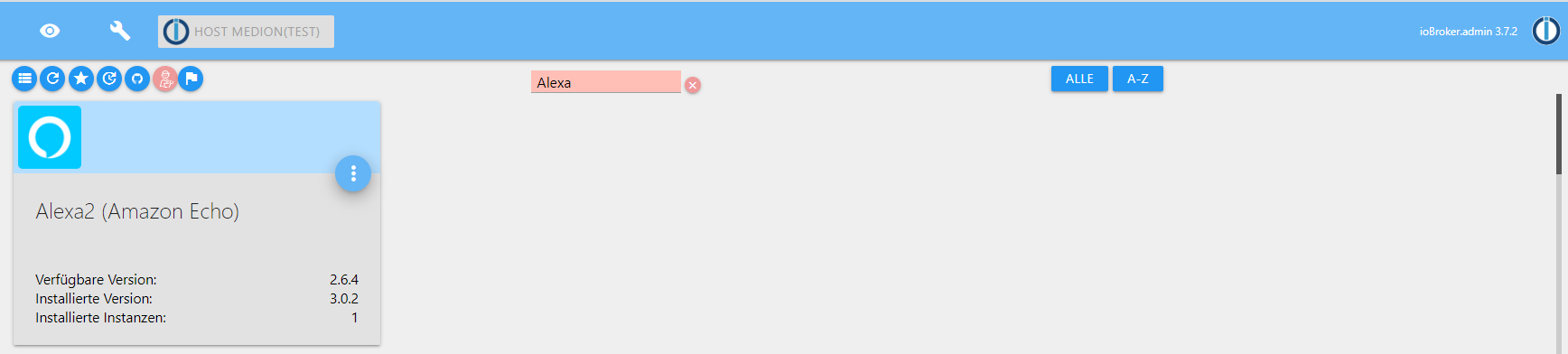
Auf GitHub gibt es die 3.0.2 ... Es könnten/sollten jetzt vllt ein paar mehr Antworten von Madam Alexa im "answerText" landen als vorher. Ansonsten hat die io-package jetzt offiziell die Info zur js-controller 2.0 Abhängigkeit.
@apollon77 Hi, die 3.02 läuft hier auch fehlerfrei. Listen und ToDo funktionieren auch, man kann einfach nicht meckern.. :-)
DANKE ! -
ich habe das auf meiner Windows Installation versucht , aber hier genau das selbe!
$ ./iobroker url "https://github.com/Apollon77/ioBroker.alexa2"
install https://github.com/Apollon77/ioBroker.alexa2/tarball/f0e94dd361d237109c4feb1f686536c4818447be
NPM version: 6.11.3
npm install https://github.com/Apollon77/ioBroker.alexa2/tarball/f0e94dd361d237109c4feb1f686536c4818447be --loglevel error --prefix "C:/ioBroker" (System call)
npm
 ERR! code ENOENTnpm ERR! syscall spawn gitnpm ERR! path gitnpm ERR! errno ENOENT
npm
ERR! enoent Error while executing:npm ERR! enoent undefined ls-remote -h -t ssh://git@github.com/Apollon77/alexa-remote.gitnpm ERR! enoent npm ERR! enoent npm ERR! enoent spawn git ENOENTnpm
 ERR! enoent This is related to npm not being able to find a file.npm ERR! enoent

npm ERR! A complete log of this run can be found in:npm ERR!     C:\WINDOWS\system32\config\systemprofile\AppData\Roaming\npm-cache\_logs\2019-12-23T08_49_54_057Z-debug.log
ERROR: host.ioBroker Cannot install https://github.com/Apollon77/ioBroker.alexa2/tarball/f0e94dd361d237109c4feb1f686536c4818447be: 1
ERROR: process exited with code 25
js-controller
2.1.1Betriebssystem Windows
Architektur x64
CPUs 4
Geschwindigkeit 1094 MHz
Modell Intel(R) Celeron(R) CPU N3450 @ 1.10GHz
RAM 7.85 GB
Node.js v10.17.0 (Es gibt eine neuere Version: v10.18.0)
NPM 6.11.3ioBroker auf Beelink mit WIN10 home|CCU3 (Raspberrymatic)|Neato BotVac D3|HYPERION Ambilight auf RPI3 und RPI ZeroW|HA-Bridge|Milight LED|Nodered&Redmatic|VU Duo2 & Solo se V2
-
ich habe das auf meiner Windows Installation versucht , aber hier genau das selbe!
$ ./iobroker url "https://github.com/Apollon77/ioBroker.alexa2"
install https://github.com/Apollon77/ioBroker.alexa2/tarball/f0e94dd361d237109c4feb1f686536c4818447be
NPM version: 6.11.3
npm install https://github.com/Apollon77/ioBroker.alexa2/tarball/f0e94dd361d237109c4feb1f686536c4818447be --loglevel error --prefix "C:/ioBroker" (System call)
npm
 ERR! code ENOENTnpm ERR! syscall spawn gitnpm ERR! path gitnpm ERR! errno ENOENT
npm
ERR! enoent Error while executing:npm ERR! enoent undefined ls-remote -h -t ssh://git@github.com/Apollon77/alexa-remote.gitnpm ERR! enoent npm ERR! enoent npm ERR! enoent spawn git ENOENTnpm
 ERR! enoent This is related to npm not being able to find a file.npm ERR! enoent

npm ERR! A complete log of this run can be found in:npm ERR!     C:\WINDOWS\system32\config\systemprofile\AppData\Roaming\npm-cache\_logs\2019-12-23T08_49_54_057Z-debug.log
ERROR: host.ioBroker Cannot install https://github.com/Apollon77/ioBroker.alexa2/tarball/f0e94dd361d237109c4feb1f686536c4818447be: 1
ERROR: process exited with code 25
js-controller
2.1.1Betriebssystem Windows
Architektur x64
CPUs 4
Geschwindigkeit 1094 MHz
Modell Intel(R) Celeron(R) CPU N3450 @ 1.10GHz
RAM 7.85 GB
Node.js v10.17.0 (Es gibt eine neuere Version: v10.18.0)
NPM 6.11.3Habe fast das selbe System wie du, hatte keine Probleme damit. Wie hast du das update gemacht?





Hey! Du scheinst an dieser Unterhaltung interessiert zu sein, hast aber noch kein Konto.
Hast du es satt, bei jedem Besuch durch die gleichen Beiträge zu scrollen? Wenn du dich für ein Konto anmeldest, kommst du immer genau dorthin zurück, wo du zuvor warst, und kannst dich über neue Antworten benachrichtigen lassen (entweder per E-Mail oder Push-Benachrichtigung). Du kannst auch Lesezeichen speichern und Beiträge positiv bewerten, um anderen Community-Mitgliedern deine Wertschätzung zu zeigen.
Mit deinem Input könnte dieser Beitrag noch besser werden 💗
Registrieren AnmeldenSupport us
497
Online33.0k
Benutzer83.6k
Themen1.3m
Beiträge