Weiter zum Inhalt
  • Home
  • Aktuell
  • Tags
  • 0 Ungelesen 0
  • Kategorien
  • Unreplied
  • Beliebt
  • GitHub
  • Docu
  • Hilfe
Skins
  • Hell
  • Brite
  • Cerulean
  • Cosmo
  • Flatly
  • Journal
  • Litera
  • Lumen
  • Lux
  • Materia
  • Minty
  • Morph
  • Pulse
  • Sandstone
  • Simplex
  • Sketchy
  • Spacelab
  • United
  • Yeti
  • Zephyr
  • Dunkel
  • Cyborg
  • Darkly
  • Quartz
  • Slate
  • Solar
  • Superhero
  • Vapor

  • Standard: (Kein Skin)
  • Kein Skin
Einklappen
ioBroker Logo

Community Forum

donate donate
  1. ioBroker Community Home
  2. Deutsch
  3. ioBroker Allgemein
  4. PI4 Lässt JS Kontrolle nicht updaten

NEWS

  • Neues YouTube-Video: Visualisierung im Devices-Adapter
    BluefoxB
    Bluefox
    11
    1
    289

  • Neuer ioBroker-Blog online: Monatsrückblick März/April 2026
    BluefoxB
    Bluefox
    8
    1
    1.8k

  • Verwendung von KI bitte immer deutlich kennzeichnen
    HomoranH
    Homoran
    11
    1
    775

PI4 Lässt JS Kontrolle nicht updaten

Geplant Angeheftet Gesperrt Verschoben ioBroker Allgemein
js-controller 2.0.25
106 Beiträge 8 Kommentatoren 11.9k Aufrufe 9 Beobachtet
  • Älteste zuerst
  • Neuste zuerst
  • Meiste Stimmen
Antworten
  • In einem neuen Thema antworten
Anmelden zum Antworten
Dieses Thema wurde gelöscht. Nur Nutzer mit entsprechenden Rechten können es sehen.
  • F freaktech

    @AlCalzone said in PI4 Lässt JS Kontrolle nicht updaten:

    tail -f /opt/iobroker/log/iobroker.2019-10-14.log

    
    The programs included with the Debian GNU/Linux system are free software;
    the exact distribution terms for each program are described in the
    individual files in /usr/share/doc/*/copyright.
    
    Debian GNU/Linux comes with ABSOLUTELY NO WARRANTY, to the extent
    permitted by applicable law.
    Last login: Mon Oct 14 10:24:34 2019 from 10.0.0.202
    pi@iobrocker:~ $ tail -f /opt/iobroker/log/iobroker.2019-10-14.log
    2019-10-14 10:54:25.005  - info: admin.0 requesting all objects
    2019-10-14 10:54:28.592  - info: iobroker NPM version: 6.12.0
    2019-10-14 10:54:29.691  - info: admin.0 received all objects
    2019-10-14 10:54:29.770  - info: admin.0 http server listening on port 8081
    2019-10-14 10:54:29.771  - info: admin.0 Use link "http://localhost:8081" to configure.
    2019-10-14 10:54:30.953  - info: iobroker npm install iobroker.telegram@1.4.3 --production --save --prefix "/opt/iobroker" (System ca                                                                                                        ll)
    2019-10-14 10:54:32.464  - info: host.iobrocker force terminating
    2019-10-14 10:54:32.465  - info: Adapter admin still running
    2019-10-14 10:54:33.598  - info: admin.0 terminating http server on port 8081
    2019-10-14 10:54:35.101  - info: admin.0 terminating http server on port 8081
    2019-10-14 10:54:37.483  - info: host.iobrocker iobroker.js-controller version 1.5.14 js-controller starting
    2019-10-14 10:54:37.489  - info: host.iobrocker Copyright (c) 2014-2018 bluefox, 2014 hobbyquaker
    2019-10-14 10:54:37.489  - info: host.iobrocker hostname: iobrocker, node: v10.15.2
    2019-10-14 10:54:37.491  - info: host.iobrocker ip addresses: 10.0.0.144 fe80::dea6:32ff:fe28:5861 fe80::fc74:2dff:fefc:7a31
    2019-10-14 10:54:37.743  - info: host.iobrocker  inMem-states listening on port 9000
    2019-10-14 10:54:38.845  - info: host.iobrocker  inMem-objects listening on port 9001
    2019-10-14 10:54:38.866  - info: host.iobrocker InMemoryDB connected
    2019-10-14 10:54:38.913  - info: host.iobrocker 29 instances found
    2019-10-14 10:54:38.946  - info: host.iobrocker starting 28 instances
    2019-10-14 10:54:38.951  - warn: host.iobrocker startInstance cannot find adapter "telegram@1.4.3". Try to install it... 1 attempt
    2019-10-14 10:54:38.951  - info: iobroker install telegram@1.4.3
    2019-10-14 10:54:39.060  - info: host.iobrocker instance system.adapter.admin.0 started with pid 1620
    2019-10-14 10:54:40.065  - error: uncaught exception: EACCES: permission denied, open '/opt/iobroker/node_modules/iobroker.js-control                                                                                                        ler/pids.txt'
    2019-10-14 10:54:40.068  - error: Error: EACCES: permission denied, open '/opt/iobroker/node_modules/iobroker.js-controller/pids.txt'
        at Object.openSync (fs.js:439:3)
        at Object.writeFileSync (fs.js:1190:35)
        at Timeout._onTimeout (/opt/iobroker/node_modules/iobroker.js-controller/controller.js:2024:16)
        at ontimeout (timers.js:436:11)
        at tryOnTimeout (timers.js:300:5)
        at listOnTimeout (timers.js:263:5)
        at Timer.processTimers (timers.js:223:10)
    2019-10-14 10:54:40.075  - info: iobroker _restart
    2019-10-14 10:54:42.397  - info: iobroker Starting node restart.js
    2019-10-14 10:54:42.420  - info: iobroker exit 0
    2019-10-14 10:54:42.490  - info: admin.0 starting. Version 3.6.9 in /opt/iobroker/node_modules/iobroker.admin, node: v10.15.2
    2019-10-14 10:54:42.602  - info: admin.0 requesting all states
    2019-10-14 10:54:42.603  - info: admin.0 requesting all objects
    2019-10-14 10:54:46.230  - info: iobroker NPM version: 6.12.0
    ^C
    pi@iobrocker:~ $


    code_text
    
    AlCalzoneA Offline
    AlCalzoneA Offline
    AlCalzone
    Developer
    schrieb am zuletzt editiert von
    #44

    @freaktech Schon wieder das permission-Ding. Lass mal den Fixer laufen:

    curl -sL https://iobroker.net/fix.sh | bash -
    

    Warum `sudo` böse ist: https://forum.iobroker.net/post/17109

    1 Antwort Letzte Antwort
    0
    • F Offline
      F Offline
      freaktech
      schrieb am zuletzt editiert von
      #45

      @AlCalzone said in PI4 Lässt JS Kontrolle nicht updaten:

      curl -sL https://iobroker.net/fix.sh | bash -

      ah jetzt ist er wieder da

      soll ich jetzt das upgrade shelf wieder probieren?

      AlCalzoneA 1 Antwort Letzte Antwort
      0
      • F freaktech

        @AlCalzone said in PI4 Lässt JS Kontrolle nicht updaten:

        curl -sL https://iobroker.net/fix.sh | bash -

        ah jetzt ist er wieder da

        soll ich jetzt das upgrade shelf wieder probieren?

        AlCalzoneA Offline
        AlCalzoneA Offline
        AlCalzone
        Developer
        schrieb am zuletzt editiert von
        #46

        @freaktech Das Upgrade müsste schon passiert sein oder? Schau mal im Hosts-Reiter nach der Version.

        Warum `sudo` böse ist: https://forum.iobroker.net/post/17109

        1 Antwort Letzte Antwort
        0
        • F Offline
          F Offline
          freaktech
          schrieb am zuletzt editiert von freaktech
          #47

          nein

          iobrocker
          Typ: js-controller
          Titel: JS controller
          OS: linux
          Verfügbar: 2.0.25
          Eingerichtet: 1.5.14

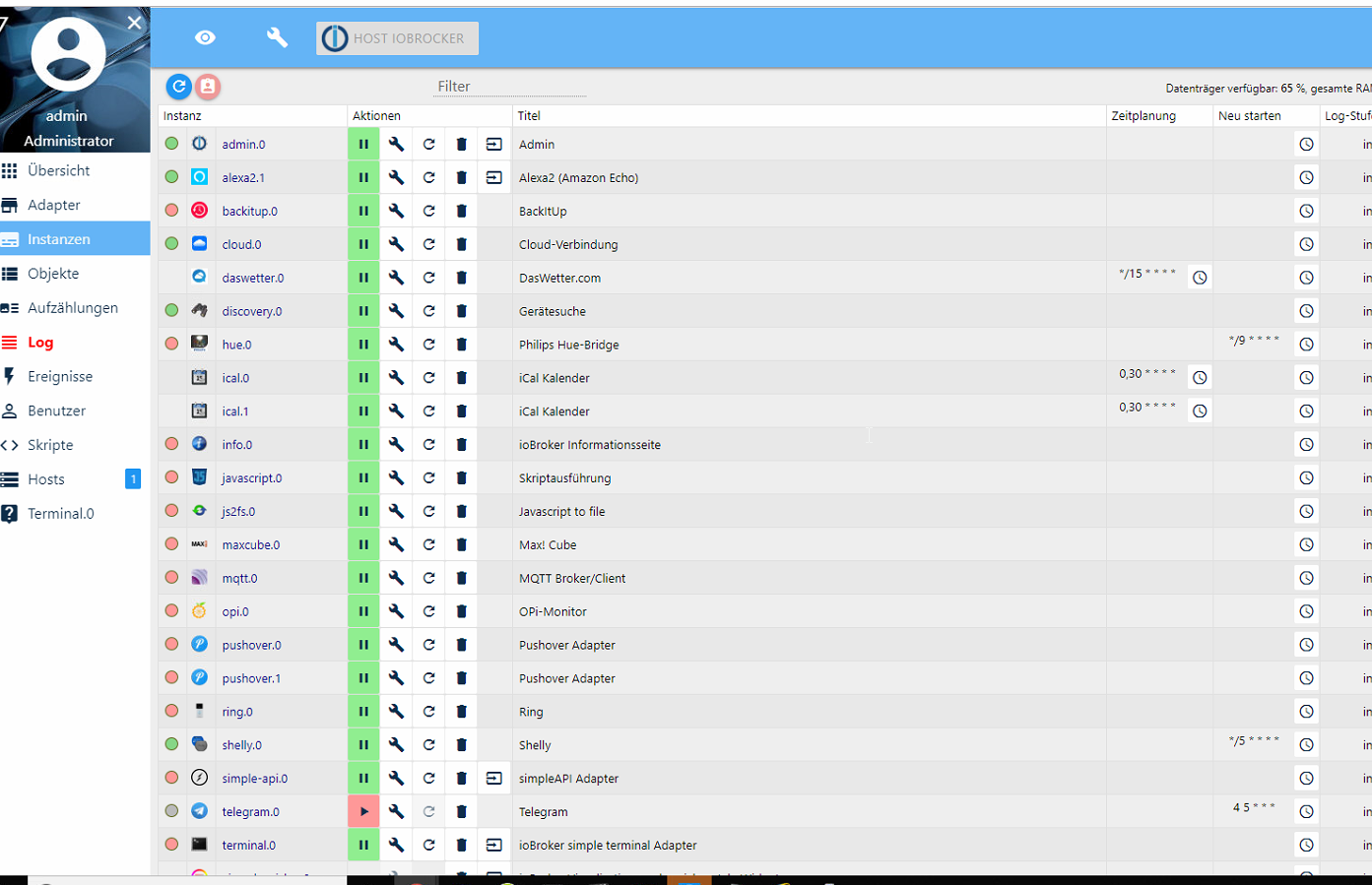
          seh grad die meisten Adapter laufen auch nicht und die VIS2.png

          1 Antwort Letzte Antwort
          0
          • F Offline
            F Offline
            freaktech
            schrieb am zuletzt editiert von
            #48

            bis auf den hue haben sich die meisten wieder gefangt

            update geht weiterhin nicht

            wie kann ich den hue auf grün bekommen

            
            pi@iobrocker:/opt/iobroker $ sudo iobroker upgrade self
            Update js-controller from @1.5.14 to @2.0.29
            NPM version: 6.12.0
            npm install iobroker.js-controller@2.0.29 --unsafe-perm --production --save --pr                                                                         efix "/opt/iobroker" (System call)
            npm WARN registry Unexpected warning for https://registry.npmjs.org/: Miscellane                                                                         ous Warning ENODATA: Cache input stream was empty
            npm WARN registry Using stale data from https://registry.npmjs.org/ due to a req                                                                         uest error during revalidation.
            npm ERR! code EINTEGRITY
            npm ERR! errno EINTEGRITY
            npm ERR! Invalid response body while trying to fetch https://registry.npmjs.org/                                                                         require-main-filename: Integrity verification failed for sha512-mt/8/lQDEN6TRunL                                                                         156JlOqfF1v32IYOe2Ey6+rn43FdBDLSNSblDErg9i/vfuLWA0PWo/NS6vOwM8iCP+SaSg== (/home/                                                                         iobroker/.npm/_cacache/content-v2/sha512/9a/df/fcfe540310de9346e9cbd79e8994ea9f1                                                                         75bf7d8860e7b6132ebeae7e3715d0432d23526e50c4ae0f62fef7ee2d60343d6a3f352eaf3b033c                                                                         8823fe49a4a)
            
            npm ERR! A complete log of this run can be found in:
            npm ERR!     /home/iobroker/.npm/_logs/2019-10-14T09_52_21_098Z-debug.log
            Host "iobrocker" (linux) updated
            Execute: chmod -R 777 /opt/iobroker
            Chmod finished. Restart controller
            Starting node restart.js
            
            
            AlCalzoneA 1 Antwort Letzte Antwort
            0
            • F freaktech

              bis auf den hue haben sich die meisten wieder gefangt

              update geht weiterhin nicht

              wie kann ich den hue auf grün bekommen

              
              pi@iobrocker:/opt/iobroker $ sudo iobroker upgrade self
              Update js-controller from @1.5.14 to @2.0.29
              NPM version: 6.12.0
              npm install iobroker.js-controller@2.0.29 --unsafe-perm --production --save --pr                                                                         efix "/opt/iobroker" (System call)
              npm WARN registry Unexpected warning for https://registry.npmjs.org/: Miscellane                                                                         ous Warning ENODATA: Cache input stream was empty
              npm WARN registry Using stale data from https://registry.npmjs.org/ due to a req                                                                         uest error during revalidation.
              npm ERR! code EINTEGRITY
              npm ERR! errno EINTEGRITY
              npm ERR! Invalid response body while trying to fetch https://registry.npmjs.org/                                                                         require-main-filename: Integrity verification failed for sha512-mt/8/lQDEN6TRunL                                                                         156JlOqfF1v32IYOe2Ey6+rn43FdBDLSNSblDErg9i/vfuLWA0PWo/NS6vOwM8iCP+SaSg== (/home/                                                                         iobroker/.npm/_cacache/content-v2/sha512/9a/df/fcfe540310de9346e9cbd79e8994ea9f1                                                                         75bf7d8860e7b6132ebeae7e3715d0432d23526e50c4ae0f62fef7ee2d60343d6a3f352eaf3b033c                                                                         8823fe49a4a)
              
              npm ERR! A complete log of this run can be found in:
              npm ERR!     /home/iobroker/.npm/_logs/2019-10-14T09_52_21_098Z-debug.log
              Host "iobrocker" (linux) updated
              Execute: chmod -R 777 /opt/iobroker
              Chmod finished. Restart controller
              Starting node restart.js
              
              
              AlCalzoneA Offline
              AlCalzoneA Offline
              AlCalzone
              Developer
              schrieb am zuletzt editiert von AlCalzone
              #49

              @freaktech sagte in PI4 Lässt JS Kontrolle nicht updaten:

              Invalid response body while trying to fetch https://registry.npmjs.org/

              Da ist der Fehler wieder... Irgendwas ist bei dir da faul. Alles was ich zu dem Fehler finde sagt entweder Proxy falsch konfiguriert oder npm-Cache kaputt. Das hatten wir aber beides ausgeschlossen.

              Hast du noch einen Pi, auf dem du testen kannst? D.h. ioBroker installieren und dein Backup vom aktuellen Pi einspielen?


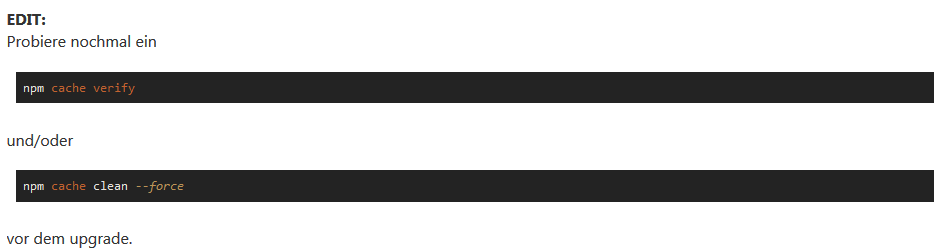
              EDIT:
              Probiere nochmal ein

              npm cache verify
              

              und/oder

              npm cache clean --force
              

              vor dem upgrade.

              Warum `sudo` böse ist: https://forum.iobroker.net/post/17109

              1 Antwort Letzte Antwort
              0
              • F Offline
                F Offline
                freaktech
                schrieb am zuletzt editiert von
                #50

                probier ich nachher

                und dass der HUE nicht grün wird?

                1 Antwort Letzte Antwort
                0
                • apollon77A Offline
                  apollon77A Offline
                  apollon77
                  schrieb am zuletzt editiert von
                  #51

                  @freaktech sagte in PI4 Lässt JS Kontrolle nicht updaten:

                  https://registry.npmjs.org/

                  Ok, mach mal:

                  curl -v https://registry.npmjs.org/

                  Falls Curl nicht installiert ist

                  wget -qO- https://registry.npmjs.org/

                  Beitrag hat geholfen? Votet rechts unten im Beitrag :-) https://paypal.me/Apollon77 / https://github.com/sponsors/Apollon77

                  • Debug-Log für Instanz einschalten? Admin -> Instanzen -> Expertenmodus -> Instanz aufklappen - Loglevel ändern
                  • Logfiles auf Platte /opt/iobroker/log/… nutzen, Admin schneidet Zeilen ab
                  1 Antwort Letzte Antwort
                  0
                  • F Offline
                    F Offline
                    freaktech
                    schrieb am zuletzt editiert von
                    #52

                    @apollon77 said in PI4 Lässt JS Kontrolle nicht updaten:

                    wget -qO- https://registry.npmjs.org/

                    bringt auch nix

                    
                    pi@iobrocker:/opt/iobroker $ sudo iobroker upgrade self
                    Update js-controller from @1.5.14 to @2.0.29
                    NPM version: 6.12.0
                    npm install iobroker.js-controller@2.0.29 --unsafe-perm --production --save --prefix "/opt/iobroker" (System call)
                    npm WARN registry Unexpected warning for https://registry.npmjs.org/: Miscellaneous Warning ENODATA: Cache input stream was empty
                    npm WARN registry Using stale data from https://registry.npmjs.org/ due to a request error during revalidation.
                    npm ERR! code EINTEGRITY
                    npm ERR! errno EINTEGRITY
                    npm ERR! Invalid response body while trying to fetch https://registry.npmjs.org/y18n: Integrity verification failed for sha512-nT7014PDaWpa3jrXmq1tS07aiudLEjWmD1iEbLzOxO/4+6DMqVptZ1Scz5PnnN/haHCZTAmWOMNvHKfY32wv9A== (/home/iobroker/.npm/_cacache/content-v2/sha512/9d/3e/f4d783c3696a5ade3ad79aad6d4b4eda8ae74b1235a60f58846cbccec4eff8fba0cca95a6d67549ccf93e79cdfe16870994c099638c36f1ca7d8df6c2ff4)
                    
                    npm ERR! A complete log of this run can be found in:
                    npm ERR!     /home/iobroker/.npm/_logs/2019-10-14T10_22_22_506Z-debug.log
                    Host "iobrocker" (linux) updated
                    Execute: chmod -R 777 /opt/iobroker
                    Chmod finished. Restart controller
                    Starting node restart.js


                    soll ich mir ein neues PI4 Image runterladen und dann mit backitup restoren ?!?

                    ist zwar mords aufwändig wieder aber aktuell geht der HUE scheinbar nicht mehr

                    apollon77A 1 Antwort Letzte Antwort
                    0
                    • F freaktech

                      @apollon77 said in PI4 Lässt JS Kontrolle nicht updaten:

                      wget -qO- https://registry.npmjs.org/

                      bringt auch nix

                      
                      pi@iobrocker:/opt/iobroker $ sudo iobroker upgrade self
                      Update js-controller from @1.5.14 to @2.0.29
                      NPM version: 6.12.0
                      npm install iobroker.js-controller@2.0.29 --unsafe-perm --production --save --prefix "/opt/iobroker" (System call)
                      npm WARN registry Unexpected warning for https://registry.npmjs.org/: Miscellaneous Warning ENODATA: Cache input stream was empty
                      npm WARN registry Using stale data from https://registry.npmjs.org/ due to a request error during revalidation.
                      npm ERR! code EINTEGRITY
                      npm ERR! errno EINTEGRITY
                      npm ERR! Invalid response body while trying to fetch https://registry.npmjs.org/y18n: Integrity verification failed for sha512-nT7014PDaWpa3jrXmq1tS07aiudLEjWmD1iEbLzOxO/4+6DMqVptZ1Scz5PnnN/haHCZTAmWOMNvHKfY32wv9A== (/home/iobroker/.npm/_cacache/content-v2/sha512/9d/3e/f4d783c3696a5ade3ad79aad6d4b4eda8ae74b1235a60f58846cbccec4eff8fba0cca95a6d67549ccf93e79cdfe16870994c099638c36f1ca7d8df6c2ff4)
                      
                      npm ERR! A complete log of this run can be found in:
                      npm ERR!     /home/iobroker/.npm/_logs/2019-10-14T10_22_22_506Z-debug.log
                      Host "iobrocker" (linux) updated
                      Execute: chmod -R 777 /opt/iobroker
                      Chmod finished. Restart controller
                      Starting node restart.js


                      soll ich mir ein neues PI4 Image runterladen und dann mit backitup restoren ?!?

                      ist zwar mords aufwändig wieder aber aktuell geht der HUE scheinbar nicht mehr

                      apollon77A Offline
                      apollon77A Offline
                      apollon77
                      schrieb am zuletzt editiert von
                      #53

                      @freaktech sagte in PI4 Lässt JS Kontrolle nicht updaten:

                      bringt auch nix

                      Das heisst? Keinerlei Ausgabe?
                      Dann hast Du irgendein Netzwerk oder DNS oder Proxy Problem, weil du von der npm Webseite scheinbar irgendwie nichts valides bekommst.

                      Geht ein ping registry.npmjs.org?

                      Beitrag hat geholfen? Votet rechts unten im Beitrag :-) https://paypal.me/Apollon77 / https://github.com/sponsors/Apollon77

                      • Debug-Log für Instanz einschalten? Admin -> Instanzen -> Expertenmodus -> Instanz aufklappen - Loglevel ändern
                      • Logfiles auf Platte /opt/iobroker/log/… nutzen, Admin schneidet Zeilen ab
                      F 1 Antwort Letzte Antwort
                      0
                      • apollon77A apollon77

                        @freaktech sagte in PI4 Lässt JS Kontrolle nicht updaten:

                        bringt auch nix

                        Das heisst? Keinerlei Ausgabe?
                        Dann hast Du irgendein Netzwerk oder DNS oder Proxy Problem, weil du von der npm Webseite scheinbar irgendwie nichts valides bekommst.

                        Geht ein ping registry.npmjs.org?

                        F Offline
                        F Offline
                        freaktech
                        schrieb am zuletzt editiert von
                        #54

                        @apollon77

                        
                        pi@iobrocker:/opt/iobroker $
                        pi@iobrocker:/opt/iobroker $
                        pi@iobrocker:/opt/iobroker $ ping registry.npmjs.org
                        PING registry.npmjs.org (104.16.27.35) 56(84) bytes of data.
                        64 bytes from 104.16.27.35: icmp_seq=1 ttl=59 time=14.2 ms
                        64 bytes from 104.16.27.35: icmp_seq=2 ttl=59 time=11.5 ms
                        64 bytes from 104.16.27.35: icmp_seq=3 ttl=59 time=10.9 ms
                        64 bytes from 104.16.27.35: icmp_seq=4 ttl=59 time=22.7 ms
                        64 bytes from 104.16.27.35: icmp_seq=5 ttl=59 time=13.8 ms
                        64 bytes from 104.16.27.35: icmp_seq=6 ttl=59 time=22.2 ms
                        64 bytes from 104.16.27.35: icmp_seq=7 ttl=59 time=20.4 ms
                        ^C
                        --- registry.npmjs.org ping statistics ---
                        7 packets transmitted, 7 received, 0% packet loss, time 211ms
                        rtt min/avg/max/mdev = 10.865/16.514/22.680/4.706 ms
                        pi@iobrocker:/opt/iobroker $
                        
                        
                        1 Antwort Letzte Antwort
                        0
                        • F Offline
                          F Offline
                          freaktech
                          schrieb am zuletzt editiert von
                          #55

                          wie kann ich den Hue adapter auf 2.0.1 bringen er zeigt mir nur 2.0 an ?!? evtl fängt er sich dann wieder

                          AlCalzoneA 1 Antwort Letzte Antwort
                          0
                          • F freaktech

                            wie kann ich den Hue adapter auf 2.0.1 bringen er zeigt mir nur 2.0 an ?!? evtl fängt er sich dann wieder

                            AlCalzoneA Offline
                            AlCalzoneA Offline
                            AlCalzone
                            Developer
                            schrieb am zuletzt editiert von
                            #56

                            @freaktech sagte in PI4 Lässt JS Kontrolle nicht updaten:

                            wie kann ich den Hue adapter auf 2.0.1 bringen

                            Gar nicht. Dein npm funktioniert nicht richtig, d.h. du kannst weder einen Adapter noch JS-Controller aktualisieren.

                            wget -qO- https://registry.npmjs.org/

                            Apollon wollte die Ausgabe davon sehen. upgrade self kannst du erst mal sein lassen, bis du wieder dazu aufgefordert wirst.

                            Warum `sudo` böse ist: https://forum.iobroker.net/post/17109

                            1 Antwort Letzte Antwort
                            0
                            • F Offline
                              F Offline
                              freaktech
                              schrieb am zuletzt editiert von freaktech
                              #57

                              ok dann wart ich mal auf Vorschläge so bringts halt nix da der HUE nicht mehr läuft

                              host.iobrocker	2019-10-14 13:04:51.723	info	Restart adapter system.adapter.hue.0 because enabled
                              host.iobrocker	2019-10-14 13:04:51.723	error	instance system.adapter.hue.0 terminated with code 0 (OK)
                              host.iobrocker	2019-10-14 13:04:50.008	info	instance system.adapter.hue.0 started with pid 30347
                              host.iobrocker	2019-10-14 13:04:48.987	info	Restart adapter system.adapter.hue.0 because enabled
                              host.iobrocker	2019-10-14 13:04:48.987	error	instance system.adapter.hue.0 terminated with code 0 (OK)
                              host.iobrocker	2019-10-14 13:04:47.359	info	instance system.adapter.hue.0 started with pid 30339
                              host.iobrocker	2019-10-14 13:04:46.333	info	Restart adapter system.adapter.hue.0 because enabled
                              host.iobrocker	2019-10-14 13:04:46.333	error	instance system.adapter.hue.0 terminated with code 0 (OK)
                              host.iobrocker	2019-10-14 13:04:44.697	info	instance system.adapter.hue.0 started with pid 30331
                              host.iobrocker	2019-10-14 13:04:43.680	info	Restart adapter system.adapter.hue.0 because enabled
                              host.iobrocker	2019-10-14 13:04:43.680	error	instance system.adapter.hue.0 terminated with code 0 (OK)
                              host.iobrocker	2019-10-14 13:04:42.010	info	instance system.adapter.hue.0 started with pid 30324
                              
                              AlCalzoneA 2 Antworten Letzte Antwort
                              0
                              • F freaktech

                                ok dann wart ich mal auf Vorschläge so bringts halt nix da der HUE nicht mehr läuft

                                host.iobrocker	2019-10-14 13:04:51.723	info	Restart adapter system.adapter.hue.0 because enabled
                                host.iobrocker	2019-10-14 13:04:51.723	error	instance system.adapter.hue.0 terminated with code 0 (OK)
                                host.iobrocker	2019-10-14 13:04:50.008	info	instance system.adapter.hue.0 started with pid 30347
                                host.iobrocker	2019-10-14 13:04:48.987	info	Restart adapter system.adapter.hue.0 because enabled
                                host.iobrocker	2019-10-14 13:04:48.987	error	instance system.adapter.hue.0 terminated with code 0 (OK)
                                host.iobrocker	2019-10-14 13:04:47.359	info	instance system.adapter.hue.0 started with pid 30339
                                host.iobrocker	2019-10-14 13:04:46.333	info	Restart adapter system.adapter.hue.0 because enabled
                                host.iobrocker	2019-10-14 13:04:46.333	error	instance system.adapter.hue.0 terminated with code 0 (OK)
                                host.iobrocker	2019-10-14 13:04:44.697	info	instance system.adapter.hue.0 started with pid 30331
                                host.iobrocker	2019-10-14 13:04:43.680	info	Restart adapter system.adapter.hue.0 because enabled
                                host.iobrocker	2019-10-14 13:04:43.680	error	instance system.adapter.hue.0 terminated with code 0 (OK)
                                host.iobrocker	2019-10-14 13:04:42.010	info	instance system.adapter.hue.0 started with pid 30324
                                
                                AlCalzoneA Offline
                                AlCalzoneA Offline
                                AlCalzone
                                Developer
                                schrieb am zuletzt editiert von
                                #58

                                @freaktech sagte in PI4 Lässt JS Kontrolle nicht updaten:

                                dann wart ich mal auf Vorschläge

                                Liefer doch erst mal die Informationen, die Helfer von dir wollen.

                                Was ist die Ausgabe von

                                wget -qO- https://registry.npmjs.org/
                                

                                ?

                                Für hue:

                                1. In der Oberfläche stoppen
                                2. In die Konsole
                                3. cd /opt/iobroker/node_modules/iobroker.hue
                                4. node main.js --force --logs
                                5. Die Ausgabe von 4. hier posten.

                                Warum `sudo` böse ist: https://forum.iobroker.net/post/17109

                                F 1 Antwort Letzte Antwort
                                0
                                • F freaktech

                                  ok dann wart ich mal auf Vorschläge so bringts halt nix da der HUE nicht mehr läuft

                                  host.iobrocker	2019-10-14 13:04:51.723	info	Restart adapter system.adapter.hue.0 because enabled
                                  host.iobrocker	2019-10-14 13:04:51.723	error	instance system.adapter.hue.0 terminated with code 0 (OK)
                                  host.iobrocker	2019-10-14 13:04:50.008	info	instance system.adapter.hue.0 started with pid 30347
                                  host.iobrocker	2019-10-14 13:04:48.987	info	Restart adapter system.adapter.hue.0 because enabled
                                  host.iobrocker	2019-10-14 13:04:48.987	error	instance system.adapter.hue.0 terminated with code 0 (OK)
                                  host.iobrocker	2019-10-14 13:04:47.359	info	instance system.adapter.hue.0 started with pid 30339
                                  host.iobrocker	2019-10-14 13:04:46.333	info	Restart adapter system.adapter.hue.0 because enabled
                                  host.iobrocker	2019-10-14 13:04:46.333	error	instance system.adapter.hue.0 terminated with code 0 (OK)
                                  host.iobrocker	2019-10-14 13:04:44.697	info	instance system.adapter.hue.0 started with pid 30331
                                  host.iobrocker	2019-10-14 13:04:43.680	info	Restart adapter system.adapter.hue.0 because enabled
                                  host.iobrocker	2019-10-14 13:04:43.680	error	instance system.adapter.hue.0 terminated with code 0 (OK)
                                  host.iobrocker	2019-10-14 13:04:42.010	info	instance system.adapter.hue.0 started with pid 30324
                                  
                                  AlCalzoneA Offline
                                  AlCalzoneA Offline
                                  AlCalzone
                                  Developer
                                  schrieb am zuletzt editiert von
                                  #59

                                  @freaktech Und hast du das
                                  2f081e07-bb96-47f3-8b40-4602f9d6c6da-grafik.png
                                  inzwischen gemacht? Was war die Ausgabe davon? Danach kannst du das Upgrade probieren.

                                  Warum `sudo` böse ist: https://forum.iobroker.net/post/17109

                                  F 1 Antwort Letzte Antwort
                                  0
                                  • AlCalzoneA AlCalzone

                                    @freaktech sagte in PI4 Lässt JS Kontrolle nicht updaten:

                                    dann wart ich mal auf Vorschläge

                                    Liefer doch erst mal die Informationen, die Helfer von dir wollen.

                                    Was ist die Ausgabe von

                                    wget -qO- https://registry.npmjs.org/
                                    

                                    ?

                                    Für hue:

                                    1. In der Oberfläche stoppen
                                    2. In die Konsole
                                    3. cd /opt/iobroker/node_modules/iobroker.hue
                                    4. node main.js --force --logs
                                    5. Die Ausgabe von 4. hier posten.
                                    F Offline
                                    F Offline
                                    freaktech
                                    schrieb am zuletzt editiert von
                                    #60

                                    @AlCalzone said in PI4 Lässt JS Kontrolle nicht updaten:

                                    wget -qO- https://registry.npmjs.org/

                                    
                                    pi@iobrocker:/opt/iobroker $ wget -qO- https://registry.npmjs.org/
                                    {"db_name":"registry","doc_count":1417354,"doc_del_count":340,"update_seq":5737861,"purge_seq":0,"compact_running":false,"disk_size":24759636103,"data_size":19681074249,"instance_start_time":"1570691704792381","disk_format_version":6,"committed_update_seq":5737861}pi@iobrocker:/opt/iobroker $


                                    hier passiert aber nichts

                                    
                                    pi@iobrocker:/opt/iobroker/node_modules/iobroker.hue $
                                    pi@iobrocker:/opt/iobroker/node_modules/iobroker.hue $
                                    pi@iobrocker:/opt/iobroker/node_modules/iobroker.hue $ node main.js --force --logs
                                    pi@iobrocker:/opt/iobroker/node_modules/iobroker.hue $ node main.js --force --logs
                                    pi@iobrocker:/opt/iobroker/node_modules/iobroker.hue $
                                    
                                    
                                    apollon77A 1 Antwort Letzte Antwort
                                    0
                                    • AlCalzoneA AlCalzone

                                      @freaktech Und hast du das
                                      2f081e07-bb96-47f3-8b40-4602f9d6c6da-grafik.png
                                      inzwischen gemacht? Was war die Ausgabe davon? Danach kannst du das Upgrade probieren.

                                      F Offline
                                      F Offline
                                      freaktech
                                      schrieb am zuletzt editiert von
                                      #61

                                      @AlCalzone

                                      
                                      pi@iobrocker:/opt/iobroker $
                                      pi@iobrocker:/opt/iobroker $ npm WARN using --force I sure hope you know what you are doing.
                                      npm WARN using --force I sure hope you know what you are doing.
                                      
                                      Usage: npm <command>
                                      
                                      where <command> is one of:
                                          access, adduser, audit, bin, bugs, c, cache, ci, cit,
                                          clean-install, clean-install-test, completion, config,
                                          create, ddp, dedupe, deprecate, dist-tag, docs, doctor,
                                          edit, explore, get, help, help-search, hook, i, init,
                                          install, install-ci-test, install-test, it, link, list, ln,
                                          login, logout, ls, org, outdated, owner, pack, ping, prefix,
                                          profile, prune, publish, rb, rebuild, repo, restart, root,
                                          run, run-script, s, se, search, set, shrinkwrap, star,
                                          stars, start, stop, t, team, test, token, tst, un,
                                          uninstall, unpublish, unstar, up, update, v, version, view,
                                          whoami
                                      
                                      npm <command> -h  quick help on <command>
                                      npm -l            display full usage info
                                      npm help <term>   search for help on <term>
                                      npm help npm      involved overview
                                      
                                      Specify configs in the ini-formatted file:
                                          /home/pi/.npmrc
                                      or on the command line via: npm <command> --key value
                                      Config info can be viewed via: npm help config
                                      
                                      npm@6.12.0 /usr/local/lib/node_modules/npm
                                      
                                      pi@iobrocker:/opt/iobroker $ pi@iobrocker:/opt/iobroker/node_modules/iobroker.hue $
                                      -bash: pi@iobrocker:/opt/iobroker/node_modules/iobroker.hue: Datei oder Verzeichnis nicht gefunden
                                      pi@iobrocker:/opt/iobroker $
                                      
                                      
                                      apollon77A 1 Antwort Letzte Antwort
                                      0
                                      • F freaktech

                                        @AlCalzone said in PI4 Lässt JS Kontrolle nicht updaten:

                                        wget -qO- https://registry.npmjs.org/

                                        
                                        pi@iobrocker:/opt/iobroker $ wget -qO- https://registry.npmjs.org/
                                        {"db_name":"registry","doc_count":1417354,"doc_del_count":340,"update_seq":5737861,"purge_seq":0,"compact_running":false,"disk_size":24759636103,"data_size":19681074249,"instance_start_time":"1570691704792381","disk_format_version":6,"committed_update_seq":5737861}pi@iobrocker:/opt/iobroker $


                                        hier passiert aber nichts

                                        
                                        pi@iobrocker:/opt/iobroker/node_modules/iobroker.hue $
                                        pi@iobrocker:/opt/iobroker/node_modules/iobroker.hue $
                                        pi@iobrocker:/opt/iobroker/node_modules/iobroker.hue $ node main.js --force --logs
                                        pi@iobrocker:/opt/iobroker/node_modules/iobroker.hue $ node main.js --force --logs
                                        pi@iobrocker:/opt/iobroker/node_modules/iobroker.hue $
                                        
                                        
                                        apollon77A Offline
                                        apollon77A Offline
                                        apollon77
                                        schrieb am zuletzt editiert von
                                        #62

                                        @freaktech Ok, die Ausgabe sieht an sich ok aus von dem npm Ding.

                                        Manueller Adapterstart: ist ioBroker auch gestartet auf dem Host? Der muss laufen sonst geht das nicht.

                                        bzw mach mal:
                                        ´node main.js silly --force --logs`

                                        Beitrag hat geholfen? Votet rechts unten im Beitrag :-) https://paypal.me/Apollon77 / https://github.com/sponsors/Apollon77

                                        • Debug-Log für Instanz einschalten? Admin -> Instanzen -> Expertenmodus -> Instanz aufklappen - Loglevel ändern
                                        • Logfiles auf Platte /opt/iobroker/log/… nutzen, Admin schneidet Zeilen ab
                                        F 1 Antwort Letzte Antwort
                                        0
                                        • F freaktech

                                          @AlCalzone

                                          
                                          pi@iobrocker:/opt/iobroker $
                                          pi@iobrocker:/opt/iobroker $ npm WARN using --force I sure hope you know what you are doing.
                                          npm WARN using --force I sure hope you know what you are doing.
                                          
                                          Usage: npm <command>
                                          
                                          where <command> is one of:
                                              access, adduser, audit, bin, bugs, c, cache, ci, cit,
                                              clean-install, clean-install-test, completion, config,
                                              create, ddp, dedupe, deprecate, dist-tag, docs, doctor,
                                              edit, explore, get, help, help-search, hook, i, init,
                                              install, install-ci-test, install-test, it, link, list, ln,
                                              login, logout, ls, org, outdated, owner, pack, ping, prefix,
                                              profile, prune, publish, rb, rebuild, repo, restart, root,
                                              run, run-script, s, se, search, set, shrinkwrap, star,
                                              stars, start, stop, t, team, test, token, tst, un,
                                              uninstall, unpublish, unstar, up, update, v, version, view,
                                              whoami
                                          
                                          npm <command> -h  quick help on <command>
                                          npm -l            display full usage info
                                          npm help <term>   search for help on <term>
                                          npm help npm      involved overview
                                          
                                          Specify configs in the ini-formatted file:
                                              /home/pi/.npmrc
                                          or on the command line via: npm <command> --key value
                                          Config info can be viewed via: npm help config
                                          
                                          npm@6.12.0 /usr/local/lib/node_modules/npm
                                          
                                          pi@iobrocker:/opt/iobroker $ pi@iobrocker:/opt/iobroker/node_modules/iobroker.hue $
                                          -bash: pi@iobrocker:/opt/iobroker/node_modules/iobroker.hue: Datei oder Verzeichnis nicht gefunden
                                          pi@iobrocker:/opt/iobroker $
                                          
                                          
                                          apollon77A Offline
                                          apollon77A Offline
                                          apollon77
                                          schrieb am zuletzt editiert von
                                          #63

                                          @freaktech Kommando sieht falsch aus

                                          Beitrag hat geholfen? Votet rechts unten im Beitrag :-) https://paypal.me/Apollon77 / https://github.com/sponsors/Apollon77

                                          • Debug-Log für Instanz einschalten? Admin -> Instanzen -> Expertenmodus -> Instanz aufklappen - Loglevel ändern
                                          • Logfiles auf Platte /opt/iobroker/log/… nutzen, Admin schneidet Zeilen ab
                                          1 Antwort Letzte Antwort
                                          0

                                          Hey! Du scheinst an dieser Unterhaltung interessiert zu sein, hast aber noch kein Konto.

                                          Hast du es satt, bei jedem Besuch durch die gleichen Beiträge zu scrollen? Wenn du dich für ein Konto anmeldest, kommst du immer genau dorthin zurück, wo du zuvor warst, und kannst dich über neue Antworten benachrichtigen lassen (entweder per E-Mail oder Push-Benachrichtigung). Du kannst auch Lesezeichen speichern und Beiträge positiv bewerten, um anderen Community-Mitgliedern deine Wertschätzung zu zeigen.

                                          Mit deinem Input könnte dieser Beitrag noch besser werden 💗

                                          Registrieren Anmelden
                                          Antworten
                                          • In einem neuen Thema antworten
                                          Anmelden zum Antworten
                                          • Älteste zuerst
                                          • Neuste zuerst
                                          • Meiste Stimmen


                                          Support us

                                          ioBroker
                                          Community Adapters
                                          Donate
                                          FAQ Cloud / IOT
                                          HowTo: Node.js-Update
                                          HowTo: Backup/Restore
                                          Downloads
                                          BLOG

                                          514

                                          Online

                                          32.9k

                                          Benutzer

                                          83.0k

                                          Themen

                                          1.3m

                                          Beiträge
                                          Community
                                          Impressum | Datenschutz-Bestimmungen | Nutzungsbedingungen | Einwilligungseinstellungen
                                          ioBroker Community 2014-2025
                                          logo
                                          • Anmelden

                                          • Du hast noch kein Konto? Registrieren

                                          • Anmelden oder registrieren, um zu suchen
                                          • Erster Beitrag
                                            Letzter Beitrag
                                          0
                                          • Home
                                          • Aktuell
                                          • Tags
                                          • Ungelesen 0
                                          • Kategorien
                                          • Unreplied
                                          • Beliebt
                                          • GitHub
                                          • Docu
                                          • Hilfe