




PI4 Lässt JS Kontrolle nicht updaten
-
pi@iobrocker:/opt/iobroker $ iobroker list instances
+ system.adapter.admin.0                 : admin       -  enabled, port: 8081, bind: 0.0.0.0, run as: admin
  system.adapter.alexa2.1                : alexa2      -  enabled
  system.adapter.backitup.0              : backitup    -  enabled
  system.adapter.cloud.0                 : cloud       -  enabled
  system.adapter.daswetter.0             : daswetter   -  enabled
  system.adapter.discovery.0             : discovery   -  enabled
  system.adapter.hue.0                   : hue         -  enabled, port: 80
  system.adapter.ical.0                  : ical        -  enabled
  system.adapter.ical.1                  : ical        -  enabled
  system.adapter.info.0                  : info        -  enabled
  system.adapter.javascript.0            : javascript  -  enabled
  system.adapter.js2fs.0                 : js2fs       -  enabled
  system.adapter.maxcube.0               : maxcube     -  enabled, port: 62910, bind: 0.0.0.0
  system.adapter.mqtt.0                  : mqtt        -  enabled, port: 1883
  system.adapter.opi.0                   : opi         -  enabled
  system.adapter.pushover.0              : pushover    -  enabled
  system.adapter.pushover.1              : pushover    -  enabled
  system.adapter.ring.0                  : ring        -  enabled
  system.adapter.shelly.0                : shelly      -  enabled, port: 1882, bind: 0.0.0.0
  system.adapter.simple-api.0            : simple-api  -  enabled, port: 8087, bind: 0.0.0.0, run as: admin
  system.adapter.telegram.0              : telegram    - disabled, port: 8443, bind: 0.0.0.0
  system.adapter.terminal.0              : terminal    -  enabled, port: 8088, bind: 0.0.0.0, run as: admin
  system.adapter.vis-colorpicker.0       : vis-colorpicker -  enabled
  system.adapter.vis-fancyswitch.0       : vis-fancyswitch -  enabled
  system.adapter.vis-hqwidgets.0         : vis-hqwidgets -  enabled
  system.adapter.vis-jqui-mfd.0          : vis-jqui-mfd -  enabled
  system.adapter.vis-timeandweather.0    : vis-timeandweather -  enabled
  system.adapter.vis.0                   : vis         -  enabled
  system.adapter.web.0                   : web         -  enabled, port: 8082, bind: 0.0.0.0, run as: admin

+ instance is alive
pi@iobrocker:/opt/iobroker $ ls -la /opt/iobroker insgesamt 112 drwxrwxrwx+ 9 iobroker iobroker 4096 Okt 14 10:08 . drwxr-xr-x 4 root root 4096 Jul 23 20:25 .. drwxrwxrwx+ 2 iobroker iobroker 4096 Okt 13 14:31 backups -rwxrwxrwx+ 1 iobroker iobroker 1049 Okt 13 14:00 CHANGELOG_FIXER_LINUX.md -rwxrwxrwx+ 1 iobroker iobroker 3556 Okt 13 14:00 CHANGELOG_INSTALLER_LINUX.md drwxrwxrwx+ 2 iobroker iobroker 4096 Aug 18 12:20 etc -rwxrwxrwx+ 1 iobroker iobroker 23988 Okt 13 14:00 fix_installation.sh drwxrwxrwx+ 3 iobroker iobroker 4096 Jul 23 20:25 install -rwxrwxrwx+ 1 iobroker iobroker 789 Okt 13 14:50 INSTALLER_INFO.txt lrwxrwxrwx 1 iobroker iobroker 22 Okt 13 14:50 iob -> /opt/iobroker/iobroker -rwxrwxrwx+ 1 iobroker iobroker 303 Okt 13 14:50 iobroker drwxrwxrwx+ 5 iobroker iobroker 4096 Sep 4 23:21 iobroker-data drwxrwxrwx+ 2 iobroker iobroker 4096 Okt 13 14:00 lib -rwxrwxrwx+ 1 iobroker iobroker 1137 Okt 13 14:00 LICENSE drwxrwxrwx+ 2 iobroker iobroker 4096 Okt 14 10:39 log drwxr-xr-x+ 367 pi pi 12288 Okt 14 10:09 node_modules -rwxrwxrwx+ 1 iobroker iobroker 19 Okt 13 14:01 .npmrc -rwxrwxrwx+ 1 pi pi 569 Okt 14 10:08 package.json -rwxrwxrwx+ 1 iobroker iobroker 6101 Okt 13 14:00 README.md -rwxrwxrwx+ 1 iobroker iobroker 5868 Okt 13 14:01 reinstall.js pi@iobrocker:/opt/iobroker $das dritte kann ich nicht posten das läuft ewig
2019-10-14 10:41:55.762 - info: admin.0 starting. Version 3.6.9 in /opt/iobroker/node_modules/iobroker.admin, node: v10.15.2 2019-10-14 10:41:55.870 - info: admin.0 requesting all states 2019-10-14 10:41:55.872 - info: admin.0 requesting all objects 0-14 10:41:28.919 - info: admin.0 terminating http server on port 8081 2019-10-14 10:41:30.423 - info: admin.0 terminating http server on port 8081 2019-10-14 10:41:32.846 - info: host.iobrocker iobroker.js-controller version 1.5.14 js-controller starting 2019-10-14 10:41:32.852 - info: host.iobrocker Copyright (c) 2014-2018 bluefox, 2014 hobbyquaker 2019-10-14 10:41:32.852 - info: host.iobrocker hostname: iobrocker, node: v10.15.2 2019-10-14 10:41:32.855 - info: host.iobrocker ip addresses: 10.0.0.144 fe80::dea6:32ff:fe28:5861 fe80::fc28:a4ff:fe7a:c5d8 2019-10-14 10:41:33.107 - info: host.iobrocker inMem-states listening on port 9000 2019-10-14 10:41:34.267 - info: host.iobrocker inMem-objects listening on port 9001 2019-10-14 10:41:34.289 - info: host.iobrocker InMemoryDB connected 2019-10-14 10:41:34.336 - info: host.iobrocker 29 instances found 2019-10-14 10:41:34.368 - info: host.iobrocker starting 28 instances 2019-10-14 10:41:34.374 - warn: host.iobrocker startInstance cannot find adapter "telegram@1.4.3". Try to install it... 1 attempt 2019-10-14 10:41:34.374 - info: iobroker install telegram@1.4.3 2019-10-14 10:41:34.483 - info: host.iobrocker instance system.adapter.admin.0 started with pid 6516 2019-10-14 10:41:35.489 - error: uncaught exception: EACCES: permission denied, open '/opt/iobroker/node_modules/iobroker.js-controller/pids.txt' 2019-10-14 10:41:35.491 - error: Error: EACCES: permission denied, open '/opt/iobroker/node_modules/iobroker.js-controller/pids.txt' at Object.openSync (fs.js:439:3) at Object.writeFileSync (fs.js:1190:35) at Timeout._onTimeout (/opt/iobroker/node_modules/iobroker.js-controller/controller.js:2024:16) at ontimeout (timers.js:436:11) at tryOnTimeout (timers.js:300:5) at listOnTimeout (timers.js:263:5) at Timer.processTimers (timers.js:223:10) 2019-10-14 10:41:35.497 - info: iobroker _restart 2019-10-14 10:41:37.827 - info: iobroker Starting node restart.js 2019-10-14 10:41:37.849 - info: iobroker exit 0 2019-10-14 10:41:37.999 - info: admin.0 starting. Version 3.6.9 in /opt/iobroker/node_modules/iobroker.admin, node: v10.15.2 2019-10-14 10:41:38.131 - info: admin.0 requesting all states 2019-10-14 10:41:38.132 - info: admin.0 requesting all objects 2019-10-14 10:41:41.714 - info: iobroker NPM version: 6.12.0 2019-10-14 10:41:42.799 - info: admin.0 received all objects 2019-10-14 10:41:42.879 - info: admin.0 http server listening on port 8081 2019-10-14 10:41:42.880 - info: admin.0 Use link "http://localhost:8081" to configure. 2019-10-14 10:41:44.068 - info: iobroker npm install iobroker.telegram@1.4.3 --production --save --prefix "/opt/iobroker" (System call) 2019-10-14 10:41:45.503 - info: host.iobrocker force terminating 2019-10-14 10:41:45.504 - info: Adapter admin still running 2019-10-14 10:41:46.632 - info: admin.0 terminating http server on port 8081 2019-10-14 10:41:48.136 - info: admin.0 terminating http server on port 8081 2019-10-14 10:41:59.427 - info: iobroker NPM version: 6.12.0 -
@AlCalzone said in PI4 Lässt JS Kontrolle nicht updaten:
sudo rm -f /opt/iobroker/node_modules/iobroker.js-controller/pids.txt
pi@iobrocker:/opt/iobroker $ sudo iobroker stop
pi@iobrocker:/opt/iobroker $ sudo rm -f /opt/iobroker/node_modules/iobroker.js-controller/pids.txt
pi@iobrocker:/opt/iobroker $ sudo iobroker start
pi@iobrocker:/opt/iobroker $
läuft wieder nur halb weg
-
@AlCalzone said in PI4 Lässt JS Kontrolle nicht updaten:
sudo rm -f /opt/iobroker/node_modules/iobroker.js-controller/pids.txt
pi@iobrocker:/opt/iobroker $ sudo iobroker stop
pi@iobrocker:/opt/iobroker $ sudo rm -f /opt/iobroker/node_modules/iobroker.js-controller/pids.txt
pi@iobrocker:/opt/iobroker $ sudo iobroker start
pi@iobrocker:/opt/iobroker $
läuft wieder nur halb weg
-
-
-
@AlCalzone said in PI4 Lässt JS Kontrolle nicht updaten:
tail -f /opt/iobroker/log/iobroker.2019-10-14.log
The programs included with the Debian GNU/Linux system are free software;
the exact distribution terms for each program are described in the
individual files in /usr/share/doc/*/copyright.

Debian GNU/Linux comes with ABSOLUTELY NO WARRANTY, to the extent
permitted by applicable law.
Last login: Mon Oct 14 10:24:34 2019 from 10.0.0.202
pi@iobrocker:~ $ tail -f /opt/iobroker/log/iobroker.2019-10-14.log
2019-10-14 10:54:25.005  - info: admin.0 requesting all objects
2019-10-14 10:54:28.592  - info: iobroker NPM version: 6.12.0
2019-10-14 10:54:29.691  - info: admin.0 received all objects
2019-10-14 10:54:29.770  - info: admin.0 http server listening on port 8081
2019-10-14 10:54:29.771  - info: admin.0 Use link "http://localhost:8081" to configure.
2019-10-14 10:54:30.953  - info: iobroker npm install iobroker.telegram@1.4.3 --production --save --prefix "/opt/iobroker" (System ca                                                                                                        ll)
2019-10-14 10:54:32.464  - info: host.iobrocker force terminating
2019-10-14 10:54:32.465  - info: Adapter admin still running
2019-10-14 10:54:33.598  - info: admin.0 terminating http server on port 8081
2019-10-14 10:54:35.101  - info: admin.0 terminating http server on port 8081
2019-10-14 10:54:37.483  - info: host.iobrocker iobroker.js-controller version 1.5.14 js-controller starting
2019-10-14 10:54:37.489  - info: host.iobrocker Copyright (c) 2014-2018 bluefox, 2014 hobbyquaker
2019-10-14 10:54:37.489  - info: host.iobrocker hostname: iobrocker, node: v10.15.2
2019-10-14 10:54:37.491  - info: host.iobrocker ip addresses: 10.0.0.144 fe80::dea6:32ff:fe28:5861 fe80::fc74:2dff:fefc:7a31
2019-10-14 10:54:37.743  - info: host.iobrocker  inMem-states listening on port 9000
2019-10-14 10:54:38.845  - info: host.iobrocker  inMem-objects listening on port 9001
2019-10-14 10:54:38.866  - info: host.iobrocker InMemoryDB connected
2019-10-14 10:54:38.913  - info: host.iobrocker 29 instances found
2019-10-14 10:54:38.946  - info: host.iobrocker starting 28 instances
2019-10-14 10:54:38.951  - warn: host.iobrocker startInstance cannot find adapter "telegram@1.4.3". Try to install it... 1 attempt
2019-10-14 10:54:38.951  - info: iobroker install telegram@1.4.3
2019-10-14 10:54:39.060  - info: host.iobrocker instance system.adapter.admin.0 started with pid 1620
2019-10-14 10:54:40.065  - error: uncaught exception: EACCES: permission denied, open '/opt/iobroker/node_modules/iobroker.js-control                                                                                                        ler/pids.txt'
2019-10-14 10:54:40.068  - error: Error: EACCES: permission denied, open '/opt/iobroker/node_modules/iobroker.js-controller/pids.txt'
    at Object.openSync (fs.js:439:3)
    at Object.writeFileSync (fs.js:1190:35)
    at Timeout._onTimeout (/opt/iobroker/node_modules/iobroker.js-controller/controller.js:2024:16)
    at ontimeout (timers.js:436:11)
    at tryOnTimeout (timers.js:300:5)
    at listOnTimeout (timers.js:263:5)
    at Timer.processTimers (timers.js:223:10)
2019-10-14 10:54:40.075  - info: iobroker _restart
2019-10-14 10:54:42.397  - info: iobroker Starting node restart.js
2019-10-14 10:54:42.420  - info: iobroker exit 0
2019-10-14 10:54:42.490  - info: admin.0 starting. Version 3.6.9 in /opt/iobroker/node_modules/iobroker.admin, node: v10.15.2
2019-10-14 10:54:42.602  - info: admin.0 requesting all states
2019-10-14 10:54:42.603  - info: admin.0 requesting all objects
2019-10-14 10:54:46.230  - info: iobroker NPM version: 6.12.0
^C
pi@iobrocker:~ $
code_text -
@AlCalzone said in PI4 Lässt JS Kontrolle nicht updaten:
tail -f /opt/iobroker/log/iobroker.2019-10-14.log
The programs included with the Debian GNU/Linux system are free software;
the exact distribution terms for each program are described in the
individual files in /usr/share/doc/*/copyright.

Debian GNU/Linux comes with ABSOLUTELY NO WARRANTY, to the extent
permitted by applicable law.
Last login: Mon Oct 14 10:24:34 2019 from 10.0.0.202
pi@iobrocker:~ $ tail -f /opt/iobroker/log/iobroker.2019-10-14.log
2019-10-14 10:54:25.005  - info: admin.0 requesting all objects
2019-10-14 10:54:28.592  - info: iobroker NPM version: 6.12.0
2019-10-14 10:54:29.691  - info: admin.0 received all objects
2019-10-14 10:54:29.770  - info: admin.0 http server listening on port 8081
2019-10-14 10:54:29.771  - info: admin.0 Use link "http://localhost:8081" to configure.
2019-10-14 10:54:30.953  - info: iobroker npm install iobroker.telegram@1.4.3 --production --save --prefix "/opt/iobroker" (System ca                                                                                                        ll)
2019-10-14 10:54:32.464  - info: host.iobrocker force terminating
2019-10-14 10:54:32.465  - info: Adapter admin still running
2019-10-14 10:54:33.598  - info: admin.0 terminating http server on port 8081
2019-10-14 10:54:35.101  - info: admin.0 terminating http server on port 8081
2019-10-14 10:54:37.483  - info: host.iobrocker iobroker.js-controller version 1.5.14 js-controller starting
2019-10-14 10:54:37.489  - info: host.iobrocker Copyright (c) 2014-2018 bluefox, 2014 hobbyquaker
2019-10-14 10:54:37.489  - info: host.iobrocker hostname: iobrocker, node: v10.15.2
2019-10-14 10:54:37.491  - info: host.iobrocker ip addresses: 10.0.0.144 fe80::dea6:32ff:fe28:5861 fe80::fc74:2dff:fefc:7a31
2019-10-14 10:54:37.743  - info: host.iobrocker  inMem-states listening on port 9000
2019-10-14 10:54:38.845  - info: host.iobrocker  inMem-objects listening on port 9001
2019-10-14 10:54:38.866  - info: host.iobrocker InMemoryDB connected
2019-10-14 10:54:38.913  - info: host.iobrocker 29 instances found
2019-10-14 10:54:38.946  - info: host.iobrocker starting 28 instances
2019-10-14 10:54:38.951  - warn: host.iobrocker startInstance cannot find adapter "telegram@1.4.3". Try to install it... 1 attempt
2019-10-14 10:54:38.951  - info: iobroker install telegram@1.4.3
2019-10-14 10:54:39.060  - info: host.iobrocker instance system.adapter.admin.0 started with pid 1620
2019-10-14 10:54:40.065  - error: uncaught exception: EACCES: permission denied, open '/opt/iobroker/node_modules/iobroker.js-control                                                                                                        ler/pids.txt'
2019-10-14 10:54:40.068  - error: Error: EACCES: permission denied, open '/opt/iobroker/node_modules/iobroker.js-controller/pids.txt'
    at Object.openSync (fs.js:439:3)
    at Object.writeFileSync (fs.js:1190:35)
    at Timeout._onTimeout (/opt/iobroker/node_modules/iobroker.js-controller/controller.js:2024:16)
    at ontimeout (timers.js:436:11)
    at tryOnTimeout (timers.js:300:5)
    at listOnTimeout (timers.js:263:5)
    at Timer.processTimers (timers.js:223:10)
2019-10-14 10:54:40.075  - info: iobroker _restart
2019-10-14 10:54:42.397  - info: iobroker Starting node restart.js
2019-10-14 10:54:42.420  - info: iobroker exit 0
2019-10-14 10:54:42.490  - info: admin.0 starting. Version 3.6.9 in /opt/iobroker/node_modules/iobroker.admin, node: v10.15.2
2019-10-14 10:54:42.602  - info: admin.0 requesting all states
2019-10-14 10:54:42.603  - info: admin.0 requesting all objects
2019-10-14 10:54:46.230  - info: iobroker NPM version: 6.12.0
^C
pi@iobrocker:~ $
code_text -
@AlCalzone said in PI4 Lässt JS Kontrolle nicht updaten:
curl -sL https://iobroker.net/fix.sh | bash -
ah jetzt ist er wieder da
soll ich jetzt das upgrade shelf wieder probieren?
-
@AlCalzone said in PI4 Lässt JS Kontrolle nicht updaten:
curl -sL https://iobroker.net/fix.sh | bash -
ah jetzt ist er wieder da
soll ich jetzt das upgrade shelf wieder probieren?
-
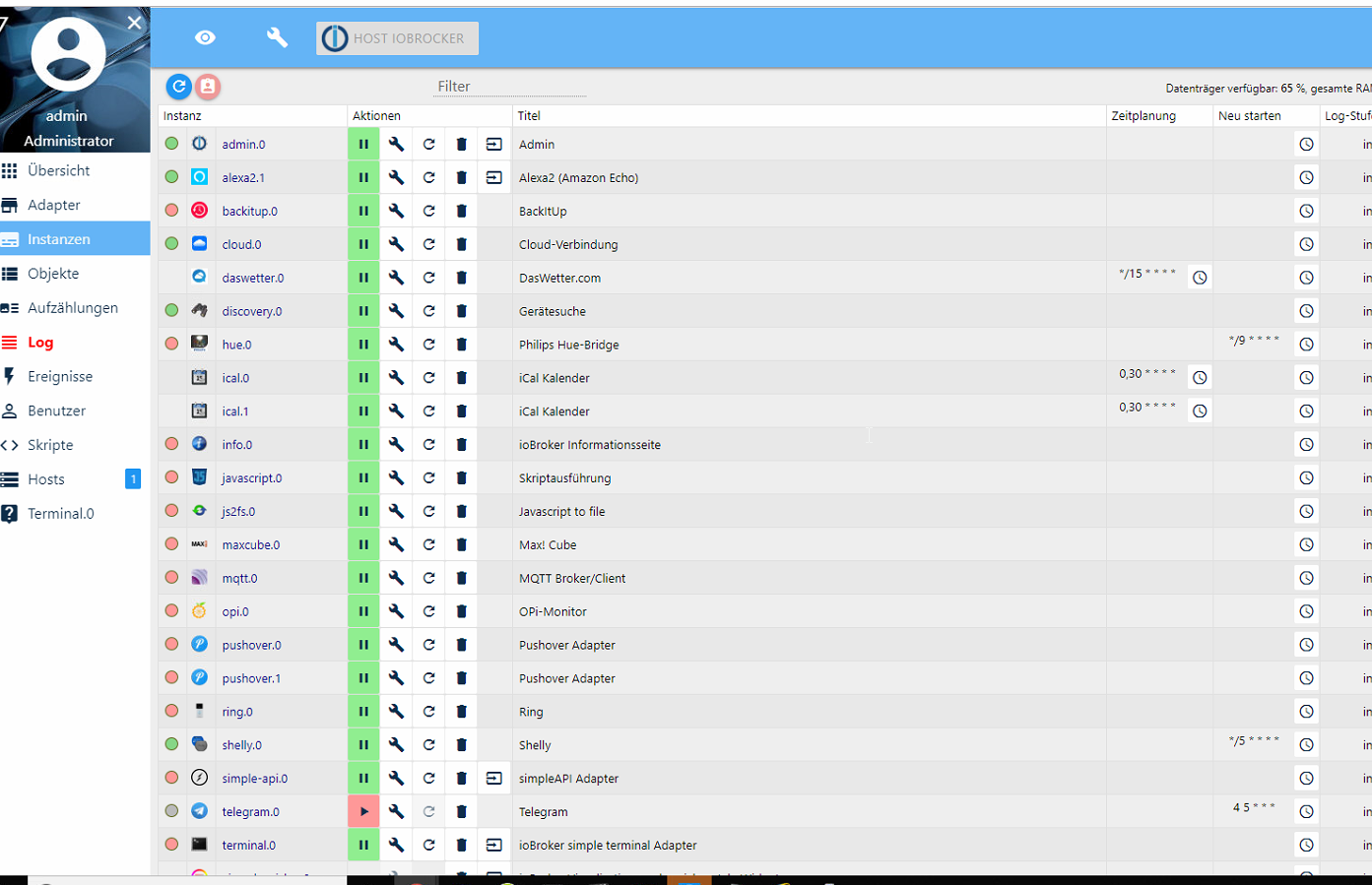
bis auf den hue haben sich die meisten wieder gefangt
update geht weiterhin nicht
wie kann ich den hue auf grün bekommen
pi@iobrocker:/opt/iobroker $ sudo iobroker upgrade self Update js-controller from @1.5.14 to @2.0.29 NPM version: 6.12.0 npm install iobroker.js-controller@2.0.29 --unsafe-perm --production --save --pr efix "/opt/iobroker" (System call) npm WARN registry Unexpected warning for https://registry.npmjs.org/: Miscellane ous Warning ENODATA: Cache input stream was empty npm WARN registry Using stale data from https://registry.npmjs.org/ due to a req uest error during revalidation. npm ERR! code EINTEGRITY npm ERR! errno EINTEGRITY npm ERR! Invalid response body while trying to fetch https://registry.npmjs.org/ require-main-filename: Integrity verification failed for sha512-mt/8/lQDEN6TRunL 156JlOqfF1v32IYOe2Ey6+rn43FdBDLSNSblDErg9i/vfuLWA0PWo/NS6vOwM8iCP+SaSg== (/home/ iobroker/.npm/_cacache/content-v2/sha512/9a/df/fcfe540310de9346e9cbd79e8994ea9f1 75bf7d8860e7b6132ebeae7e3715d0432d23526e50c4ae0f62fef7ee2d60343d6a3f352eaf3b033c 8823fe49a4a) npm ERR! A complete log of this run can be found in: npm ERR! /home/iobroker/.npm/_logs/2019-10-14T09_52_21_098Z-debug.log Host "iobrocker" (linux) updated Execute: chmod -R 777 /opt/iobroker Chmod finished. Restart controller Starting node restart.js -
bis auf den hue haben sich die meisten wieder gefangt
update geht weiterhin nicht
wie kann ich den hue auf grün bekommen
pi@iobrocker:/opt/iobroker $ sudo iobroker upgrade self Update js-controller from @1.5.14 to @2.0.29 NPM version: 6.12.0 npm install iobroker.js-controller@2.0.29 --unsafe-perm --production --save --pr efix "/opt/iobroker" (System call) npm WARN registry Unexpected warning for https://registry.npmjs.org/: Miscellane ous Warning ENODATA: Cache input stream was empty npm WARN registry Using stale data from https://registry.npmjs.org/ due to a req uest error during revalidation. npm ERR! code EINTEGRITY npm ERR! errno EINTEGRITY npm ERR! Invalid response body while trying to fetch https://registry.npmjs.org/ require-main-filename: Integrity verification failed for sha512-mt/8/lQDEN6TRunL 156JlOqfF1v32IYOe2Ey6+rn43FdBDLSNSblDErg9i/vfuLWA0PWo/NS6vOwM8iCP+SaSg== (/home/ iobroker/.npm/_cacache/content-v2/sha512/9a/df/fcfe540310de9346e9cbd79e8994ea9f1 75bf7d8860e7b6132ebeae7e3715d0432d23526e50c4ae0f62fef7ee2d60343d6a3f352eaf3b033c 8823fe49a4a) npm ERR! A complete log of this run can be found in: npm ERR! /home/iobroker/.npm/_logs/2019-10-14T09_52_21_098Z-debug.log Host "iobrocker" (linux) updated Execute: chmod -R 777 /opt/iobroker Chmod finished. Restart controller Starting node restart.js@freaktech sagte in PI4 Lässt JS Kontrolle nicht updaten:
Invalid response body while trying to fetch https://registry.npmjs.org/
Da ist der Fehler wieder... Irgendwas ist bei dir da faul. Alles was ich zu dem Fehler finde sagt entweder Proxy falsch konfiguriert oder npm-Cache kaputt. Das hatten wir aber beides ausgeschlossen.
Hast du noch einen Pi, auf dem du testen kannst? D.h. ioBroker installieren und dein Backup vom aktuellen Pi einspielen?
EDIT:
Probiere nochmal einnpm cache verifyund/oder
npm cache clean --forcevor dem upgrade.
-
@freaktech sagte in PI4 Lässt JS Kontrolle nicht updaten:
Ok, mach mal:
curl -v https://registry.npmjs.org/Falls Curl nicht installiert ist
wget -qO- https://registry.npmjs.org/ -
@apollon77 said in PI4 Lässt JS Kontrolle nicht updaten:
wget -qO- https://registry.npmjs.org/
bringt auch nix
pi@iobrocker:/opt/iobroker $ sudo iobroker upgrade self
Update js-controller from @1.5.14 to @2.0.29
NPM version: 6.12.0
npm install iobroker.js-controller@2.0.29 --unsafe-perm --production --save --prefix "/opt/iobroker" (System call)
npm WARN registry Unexpected warning for https://registry.npmjs.org/: Miscellaneous Warning ENODATA: Cache input stream was empty
npm WARN registry Using stale data from https://registry.npmjs.org/ due to a request error during revalidation.
npm ERR! code EINTEGRITY
npm ERR! errno EINTEGRITY
npm ERR! Invalid response body while trying to fetch https://registry.npmjs.org/y18n: Integrity verification failed for sha512-nT7014PDaWpa3jrXmq1tS07aiudLEjWmD1iEbLzOxO/4+6DMqVptZ1Scz5PnnN/haHCZTAmWOMNvHKfY32wv9A== (/home/iobroker/.npm/_cacache/content-v2/sha512/9d/3e/f4d783c3696a5ade3ad79aad6d4b4eda8ae74b1235a60f58846cbccec4eff8fba0cca95a6d67549ccf93e79cdfe16870994c099638c36f1ca7d8df6c2ff4)

npm ERR! A complete log of this run can be found in:
npm ERR!     /home/iobroker/.npm/_logs/2019-10-14T10_22_22_506Z-debug.log
Host "iobrocker" (linux) updated
Execute: chmod -R 777 /opt/iobroker
Chmod finished. Restart controller
Starting node restart.js
soll ich mir ein neues PI4 Image runterladen und dann mit backitup restoren ?!?
ist zwar mords aufwändig wieder aber aktuell geht der HUE scheinbar nicht mehr
-
@apollon77 said in PI4 Lässt JS Kontrolle nicht updaten:
wget -qO- https://registry.npmjs.org/
bringt auch nix
pi@iobrocker:/opt/iobroker $ sudo iobroker upgrade self
Update js-controller from @1.5.14 to @2.0.29
NPM version: 6.12.0
npm install iobroker.js-controller@2.0.29 --unsafe-perm --production --save --prefix "/opt/iobroker" (System call)
npm WARN registry Unexpected warning for https://registry.npmjs.org/: Miscellaneous Warning ENODATA: Cache input stream was empty
npm WARN registry Using stale data from https://registry.npmjs.org/ due to a request error during revalidation.
npm ERR! code EINTEGRITY
npm ERR! errno EINTEGRITY
npm ERR! Invalid response body while trying to fetch https://registry.npmjs.org/y18n: Integrity verification failed for sha512-nT7014PDaWpa3jrXmq1tS07aiudLEjWmD1iEbLzOxO/4+6DMqVptZ1Scz5PnnN/haHCZTAmWOMNvHKfY32wv9A== (/home/iobroker/.npm/_cacache/content-v2/sha512/9d/3e/f4d783c3696a5ade3ad79aad6d4b4eda8ae74b1235a60f58846cbccec4eff8fba0cca95a6d67549ccf93e79cdfe16870994c099638c36f1ca7d8df6c2ff4)

npm ERR! A complete log of this run can be found in:
npm ERR!     /home/iobroker/.npm/_logs/2019-10-14T10_22_22_506Z-debug.log
Host "iobrocker" (linux) updated
Execute: chmod -R 777 /opt/iobroker
Chmod finished. Restart controller
Starting node restart.js
soll ich mir ein neues PI4 Image runterladen und dann mit backitup restoren ?!?
ist zwar mords aufwändig wieder aber aktuell geht der HUE scheinbar nicht mehr
@freaktech sagte in PI4 Lässt JS Kontrolle nicht updaten:
bringt auch nix
Das heisst? Keinerlei Ausgabe?
Dann hast Du irgendein Netzwerk oder DNS oder Proxy Problem, weil du von der npm Webseite scheinbar irgendwie nichts valides bekommst.Geht ein
ping registry.npmjs.org? -
@freaktech sagte in PI4 Lässt JS Kontrolle nicht updaten:
bringt auch nix
Das heisst? Keinerlei Ausgabe?
Dann hast Du irgendein Netzwerk oder DNS oder Proxy Problem, weil du von der npm Webseite scheinbar irgendwie nichts valides bekommst.Geht ein
ping registry.npmjs.org?pi@iobrocker:/opt/iobroker $ pi@iobrocker:/opt/iobroker $ pi@iobrocker:/opt/iobroker $ ping registry.npmjs.org PING registry.npmjs.org (104.16.27.35) 56(84) bytes of data. 64 bytes from 104.16.27.35: icmp_seq=1 ttl=59 time=14.2 ms 64 bytes from 104.16.27.35: icmp_seq=2 ttl=59 time=11.5 ms 64 bytes from 104.16.27.35: icmp_seq=3 ttl=59 time=10.9 ms 64 bytes from 104.16.27.35: icmp_seq=4 ttl=59 time=22.7 ms 64 bytes from 104.16.27.35: icmp_seq=5 ttl=59 time=13.8 ms 64 bytes from 104.16.27.35: icmp_seq=6 ttl=59 time=22.2 ms 64 bytes from 104.16.27.35: icmp_seq=7 ttl=59 time=20.4 ms ^C --- registry.npmjs.org ping statistics --- 7 packets transmitted, 7 received, 0% packet loss, time 211ms rtt min/avg/max/mdev = 10.865/16.514/22.680/4.706 ms pi@iobrocker:/opt/iobroker $ -
wie kann ich den Hue adapter auf 2.0.1 bringen er zeigt mir nur 2.0 an ?!? evtl fängt er sich dann wieder
@freaktech sagte in PI4 Lässt JS Kontrolle nicht updaten:
wie kann ich den Hue adapter auf 2.0.1 bringen
Gar nicht. Dein npm funktioniert nicht richtig, d.h. du kannst weder einen Adapter noch JS-Controller aktualisieren.
wget -qO- https://registry.npmjs.org/
Apollon wollte die Ausgabe davon sehen.
upgrade selfkannst du erst mal sein lassen, bis du wieder dazu aufgefordert wirst. -
ok dann wart ich mal auf Vorschläge so bringts halt nix da der HUE nicht mehr läuft
host.iobrocker	2019-10-14 13:04:51.723	info	Restart adapter system.adapter.hue.0 because enabled
host.iobrocker	2019-10-14 13:04:51.723	error	instance system.adapter.hue.0 terminated with code 0 (OK)
host.iobrocker	2019-10-14 13:04:50.008	info	instance system.adapter.hue.0 started with pid 30347
host.iobrocker	2019-10-14 13:04:48.987	info	Restart adapter system.adapter.hue.0 because enabled
host.iobrocker	2019-10-14 13:04:48.987	error	instance system.adapter.hue.0 terminated with code 0 (OK)
host.iobrocker	2019-10-14 13:04:47.359	info	instance system.adapter.hue.0 started with pid 30339
host.iobrocker	2019-10-14 13:04:46.333	info	Restart adapter system.adapter.hue.0 because enabled
host.iobrocker	2019-10-14 13:04:46.333	error	instance system.adapter.hue.0 terminated with code 0 (OK)
host.iobrocker	2019-10-14 13:04:44.697	info	instance system.adapter.hue.0 started with pid 30331
host.iobrocker	2019-10-14 13:04:43.680	info	Restart adapter system.adapter.hue.0 because enabled
host.iobrocker	2019-10-14 13:04:43.680	error	instance system.adapter.hue.0 terminated with code 0 (OK)
host.iobrocker	2019-10-14 13:04:42.010	info	instance system.adapter.hue.0 started with pid 30324



Hey! Du scheinst an dieser Unterhaltung interessiert zu sein, hast aber noch kein Konto.
Hast du es satt, bei jedem Besuch durch die gleichen Beiträge zu scrollen? Wenn du dich für ein Konto anmeldest, kommst du immer genau dorthin zurück, wo du zuvor warst, und kannst dich über neue Antworten benachrichtigen lassen (entweder per E-Mail oder Push-Benachrichtigung). Du kannst auch Lesezeichen speichern und Beiträge positiv bewerten, um anderen Community-Mitgliedern deine Wertschätzung zu zeigen.
Mit deinem Input könnte dieser Beitrag noch besser werden 💗
Registrieren Anmelden365
Online33.0k
Benutzende83.7k
Themen1.3m
Beiträge