




Installation ioBroker bricht mit npm error code 22 ab
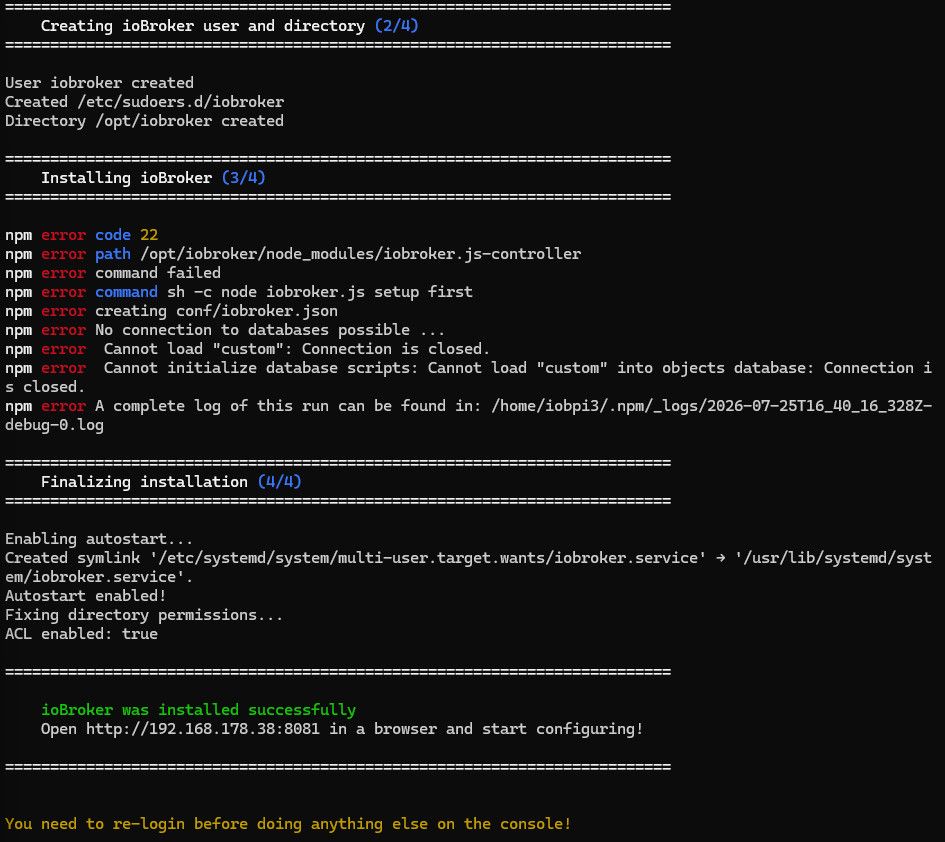
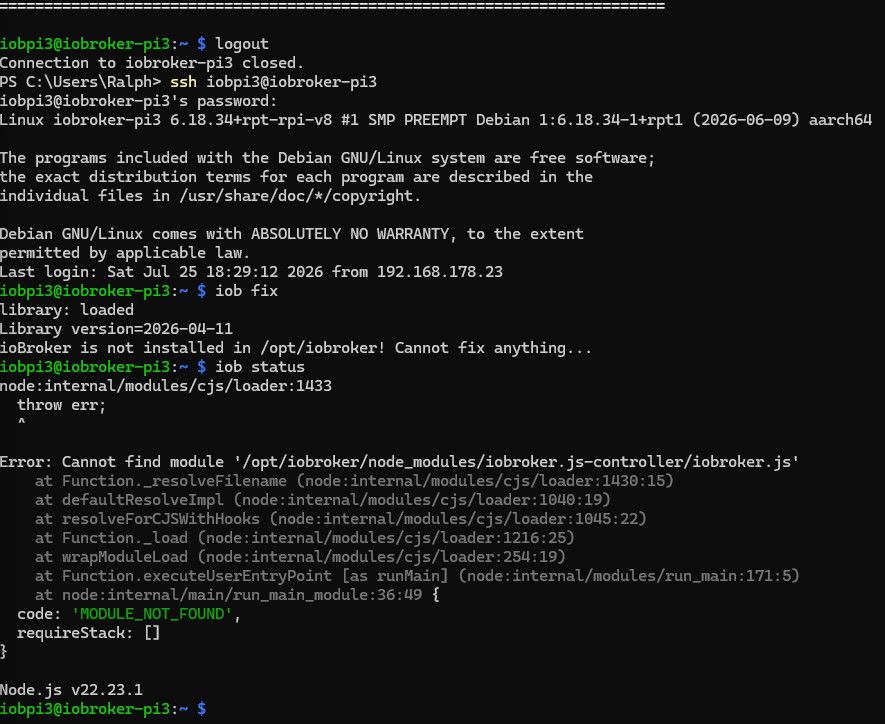
-
ja eientlich wollte ich den Pi3 nicht mit 64 bit betreiben :-) aber bei der alten IOB Installation wollte ein Modul die 64 bit ich weiß aber nicht mehr welches (Schritt 4/4 läuft nocht
-
Ok danke für den Hinweis dann probier ich das ganze mal bei Gelegenheit auf meinem PI4 mit 8GB
-
Hallo zusammen: Es sieht eigentlich jetzt nicht schlecht aus:
========================================================================== Finalizing installation (4/4) ========================================================================== Enabling autostart... Autostart enabled! Fixing directory permissions... ACL enabled: true ========================================================================== ioBroker was installed successfully Open http://192.168.178.38:8081 in a browser and start configuring! ========================================================================== You need to re-login before doing anything else on the console! ========================================================================== Please run 'iob fix' first after the required re-login to finalize the setup. ========================================================================== iobpi3@iobroker-pi3:/ $ exit logout Connection to iobroker-pi3 closed. PS C:\Users\Ralph> ssh iobpi3@iobroker-pi3 iobpi3@iobroker-pi3's password: Linux iobroker-pi3 6.18.34+rpt-rpi-v8 #1 SMP PREEMPT Debian 1:6.18.34-1+rpt1 (2026-06-09) aarch64 The programs included with the Debian GNU/Linux system are free software; the exact distribution terms for each program are described in the individual files in /usr/share/doc/*/copyright. Debian GNU/Linux comes with ABSOLUTELY NO WARRANTY, to the extent permitted by applicable law. Last login: Sun Jul 26 14:44:41 2026 from 192.168.178.23 iobpi3@iobroker-pi3:~ $ iob fix library: loaded Library version=2026-04-11 ioBroker or some processes are still running: 22922 iobroker.js-con 22976 io.admin.0 22991 io.backitup.0 23054 io.discovery.0 Please stop them first and try again! iobpi3@iobroker-pi3:~ $ iob stop iobpi3@iobroker-pi3:~ $ iob fix library: loaded Library version=2026-04-11 ========================================================================== Welcome to the ioBroker installation fixer! Script version: 2025-09-18 You might need to enter your password a couple of times. ========================================================================== ========================================================================== Installing prerequisites (1/5) ========================================================================== Hit:1 http://deb.debian.org/debian trixie InRelease Hit:2 http://deb.debian.org/debian trixie-updates InRelease Hit:3 http://deb.debian.org/debian-security trixie-security InRelease Hit:4 http://archive.raspberrypi.com/debian trixie InRelease Hit:5 https://deb.nodesource.com/node_22.x nodistro InRelease Reading package lists... Done ========================================================================== Checking ioBroker user and directory permissions (2/5) ========================================================================== Created /etc/sudoers.d/iobroker Fixing directory permissions... ACL enabled: true ========================================================================== Check and cleanup npm temporary directories (3/5) ========================================================================== Done. ========================================================================== Database maintenance (4/5) ========================================================================== Checking for uncompressed JSONL databases... This might take a while! Compressing /opt/iobroker/iobroker-data/states.jsonl Compressing /opt/iobroker/iobroker-data/objects.jsonl Compressed 2 JSONL files. Done ========================================================================== Checking autostart (5/5) ========================================================================== ==== AUTHENTICATING FOR org.freedesktop.systemd1.manage-units ==== Authentication is required to stop 'iobroker.service'. Authenticating as: Raspberry Pi OS (iobpi3) Password: polkit-agent-helper-1: pam_authenticate failed: Authentication failure ==== AUTHENTICATION FAILED ==== Enabling autostart... Autostart enabled! ========================================================================== Your installation was fixed successfully Run iobroker start to start ioBroker again! ========================================================================== -
Hallo zusammen: Es sieht eigentlich jetzt nicht schlecht aus:
========================================================================== Finalizing installation (4/4) ========================================================================== Enabling autostart... Autostart enabled! Fixing directory permissions... ACL enabled: true ========================================================================== ioBroker was installed successfully Open http://192.168.178.38:8081 in a browser and start configuring! ========================================================================== You need to re-login before doing anything else on the console! ========================================================================== Please run 'iob fix' first after the required re-login to finalize the setup. ========================================================================== iobpi3@iobroker-pi3:/ $ exit logout Connection to iobroker-pi3 closed. PS C:\Users\Ralph> ssh iobpi3@iobroker-pi3 iobpi3@iobroker-pi3's password: Linux iobroker-pi3 6.18.34+rpt-rpi-v8 #1 SMP PREEMPT Debian 1:6.18.34-1+rpt1 (2026-06-09) aarch64 The programs included with the Debian GNU/Linux system are free software; the exact distribution terms for each program are described in the individual files in /usr/share/doc/*/copyright. Debian GNU/Linux comes with ABSOLUTELY NO WARRANTY, to the extent permitted by applicable law. Last login: Sun Jul 26 14:44:41 2026 from 192.168.178.23 iobpi3@iobroker-pi3:~ $ iob fix library: loaded Library version=2026-04-11 ioBroker or some processes are still running: 22922 iobroker.js-con 22976 io.admin.0 22991 io.backitup.0 23054 io.discovery.0 Please stop them first and try again! iobpi3@iobroker-pi3:~ $ iob stop iobpi3@iobroker-pi3:~ $ iob fix library: loaded Library version=2026-04-11 ========================================================================== Welcome to the ioBroker installation fixer! Script version: 2025-09-18 You might need to enter your password a couple of times. ========================================================================== ========================================================================== Installing prerequisites (1/5) ========================================================================== Hit:1 http://deb.debian.org/debian trixie InRelease Hit:2 http://deb.debian.org/debian trixie-updates InRelease Hit:3 http://deb.debian.org/debian-security trixie-security InRelease Hit:4 http://archive.raspberrypi.com/debian trixie InRelease Hit:5 https://deb.nodesource.com/node_22.x nodistro InRelease Reading package lists... Done ========================================================================== Checking ioBroker user and directory permissions (2/5) ========================================================================== Created /etc/sudoers.d/iobroker Fixing directory permissions... ACL enabled: true ========================================================================== Check and cleanup npm temporary directories (3/5) ========================================================================== Done. ========================================================================== Database maintenance (4/5) ========================================================================== Checking for uncompressed JSONL databases... This might take a while! Compressing /opt/iobroker/iobroker-data/states.jsonl Compressing /opt/iobroker/iobroker-data/objects.jsonl Compressed 2 JSONL files. Done ========================================================================== Checking autostart (5/5) ========================================================================== ==== AUTHENTICATING FOR org.freedesktop.systemd1.manage-units ==== Authentication is required to stop 'iobroker.service'. Authenticating as: Raspberry Pi OS (iobpi3) Password: polkit-agent-helper-1: pam_authenticate failed: Authentication failure ==== AUTHENTICATION FAILED ==== Enabling autostart... Autostart enabled! ========================================================================== Your installation was fixed successfully Run iobroker start to start ioBroker again! ========================================================================== -
Ok ich komme auf die Web oberfläche und kann konfigurieren hier die Ausgabe von TOP:
Debian GNU/Linux comes with ABSOLUTELY NO WARRANTY, to the extent permitted by applicable law. Last login: Sun Jul 26 15:37:09 2026 from 192.168.178.23 iobpi3@iobroker-pi3:~ $ top top - 15:45:31 up 2:47, 1 user, load average: 0.05, 0.26, 0.44 Tasks: 135 total, 1 running, 134 sleeping, 0 stopped, 0 zombie %Cpu(s): 1.2 us, 0.2 sy, 0.0 ni, 98.3 id, 0.1 wa, 0.0 hi, 0.2 si, 0.0 st MiB Mem : 905.1 total, 216.8 free, 525.8 used, 227.5 buff/cache MiB Swap: 905.0 total, 855.8 free, 49.2 used. 379.3 avail Mem PID USER PR NI VIRT RES SHR S %CPU %MEM TIME+ COMMAND 25285 iobroker 20 0 10.9g 178740 49988 S 3.0 19.3 0:49.64 iobroker.js-con 25304 iobroker 20 0 21.1g 185212 56828 S 2.3 20.0 0:33.10 io.admin.0 25502 iobpi3 20 0 10196 5432 3320 R 1.0 0.6 0:00.19 top 571 root 20 0 342152 6040 4876 S 0.3 0.7 0:03.57 NetworkManager 1 root 20 0 25376 9724 6944 S 0.0 1.0 1:08.46 systemd 2 root 20 0 0 0 0 S 0.0 0.0 0:00.02 kthreadd 3 root 20 0 0 0 0 S 0.0 0.0 0:00.00 pool_workqueue_release 4 root 0 -20 0 0 0 I 0.0 0.0 0:00.00 kworker/R-rcu_gp 5 root 0 -20 0 0 0 I 0.0 0.0 0:00.00 kworker/R-sync_wq 6 root 0 -20 0 0 0 I 0.0 0.0 0:00.00 kworker/R-kvfree_rcu_reclaim 7 root 0 -20 0 0 0 I 0.0 0.0 0:00.00 kworker/R-slub_flushwq 8 root 0 -20 0 0 0 I 0.0 0.0 0:00.00 kworker/R-netns 13 root 0 -20 0 0 0 I 0.0 0.0 0:00.00 kworker/R-mm_percpu_wq 14 root 20 0 0 0 0 S 0.0 0.0 0:00.18 ksoftirqd/0 15 root 20 0 0 0 0 I 0.0 0.0 0:03.36 rcu_preempt 16 root 20 0 0 0 0 S 0.0 0.0 0:00.00 rcu_exp_par_gp_kthread_worker/0 17 root 20 0 0 0 0 S 0.0 0.0 0:00.00 rcu_exp_gp_kthread_worker 18 root rt 0 0 0 0 S 0.0 0.0 0:00.00 migration/0 19 root 20 0 0 0 0 S 0.0 0.0 0:00.00 cpuhp/0 20 root 20 0 0 0 0 S 0.0 0.0 0:00.00 cpuhp/1 21 root rt 0 0 0 0 S 0.0 0.0 0:00.00 migration/1 22 root 20 0 0 0 0 S 0.0 0.0 0:00.14 ksoftirqd/1 25 root 20 0 0 0 0 S 0.0 0.0 0:00.00 cpuhp/2 26 root rt 0 0 0 0 S 0.0 0.0 0:00.00 migration/2 27 root 20 0 0 0 0 S 0.0 0.0 0:00.12 ksoftirqd/2 30 root 20 0 0 0 0 S 0.0 0.0 0:00.00 cpuhp/3 31 root rt 0 0 0 0 S 0.0 0.0 0:00.00 migration/3 32 root 20 0 0 0 0 S 0.0 0.0 0:00.13 ksoftirqd/3 35 root 20 0 0 0 0 S 0.0 0.0 0:00.00 kdevtmpfs 36 root 0 -20 0 0 0 I 0.0 0.0 0:00.00 kworker/R-inet_frag_wq 37 root 20 0 0 0 0 I 0.0 0.0 0:00.00 rcu_tasks_kthread 38 root 20 0 0 0 0 I 0.0 0.0 0:00.00 rcu_tasks_rude_kthread 39 root 20 0 0 0 0 I 0.0 0.0 0:00.00 rcu_tasks_trace_kthread 40 root 20 0 0 0 0 S 0.0 0.0 0:00.00 kauditd 42 root 20 0 0 0 0 S 0.0 0.0 0:00.01 khungtaskd 43 root 20 0 0 0 0 S 0.0 0.0 0:00.00 oom_reaper 44 root 0 -20 0 0 0 I 0.0 0.0 0:00.00 kworker/R-writeback 45 root 20 0 0 0 0 S 0.0 0.0 0:05.87 kcompactd0 47 root 0 -20 0 0 0 I 0.0 0.0 0:00.00 kworker/R-kblockd 48 root 0 -20 0 0 0 I 0.0 0.0 0:00.00 kworker/R-blkcg_punt_bio -
-
Hallo Thomas, hier die Ausgabe von iob diag. Allerdings läuft parallel im Browser die Anwendung soll ich die vorher stoppen?```
*** ioBroker Diagnosis ***
Please stretch the window of your terminal programm (puTTY) as wide as possible or switch to full screenThe following checks may give hints to potential malconfigurations or errors, please post them in our forum:
Just copy and paste the Summary Page, including the ``` characters at start and end.
It helps us to help you!
- Some output is masked. For full results please use 'iob diag --unmask' *
Press any key to continue
-
Hallo Thomas, hier die Ausgabe von iob diag. Allerdings läuft parallel im Browser die Anwendung soll ich die vorher stoppen?```
*** ioBroker Diagnosis ***
Please stretch the window of your terminal programm (puTTY) as wide as possible or switch to full screenThe following checks may give hints to potential malconfigurations or errors, please post them in our forum:
Just copy and paste the Summary Page, including the ``` characters at start and end.
It helps us to help you!
- Some output is masked. For full results please use 'iob diag --unmask' *
Press any key to continue
Das ist nicht die Ausgabe, das ist der 'Vorspann'.
-
So jetzt :-):
========== Start marking the full check here ===========

```bash
Script v.2026-06-06

*** BASE SYSTEM ***
Operating System: Debian GNU/Linux 13 (trixie)
 Static hostname: iobroker-pi3
       Icon name: computer
          Kernel: Linux 6.18.34+rpt-rpi-v8
    Architecture: arm64
OS is similar to:

Model           : Raspberry Pi 3 Model B Rev 1.2

Docker          : false
Virtualization  : none
Unknown

Kernel          : aarch64
Userland        : 64bit

System was installed 38 days ago (on 2026-06-18).

Systemuptime and Load:
 15:54:58 up  2:56,  1 user,  load average: 0.77, 0.63, 0.55
CPU threads     : 4

*** LIFE CYCLE STATUS ***
Operating System is the current Debian stable version codenamed 'trixie'!

*** RASPBERRY THROTTLING ***
Current issues:
No throttling issues detected.

Previously detected issues:
No throttling issues detected.

*** TIME AND TIMEZONES ***
               Local time: Sun 2026-07-26 15:54:59 CEST
           Universal time: Sun 2026-07-26 13:54:59 UTC
                 RTC time: n/a
                Time zone: Europe/Berlin (CEST, +0200)
System clock synchronized: yes
              NTP service: active
          RTC in local TZ: no

*** Users and Groups ***
User that called 'iob diag':
iobpi3
HOME=/home/iobpi3
GROUPS=iobpi3 adm dialout cdrom sudo audio video plugdev games users netdev gpio i2c spi render input lpadmin iobroker

User that is running 'js-controller':
iobroker
HOME=/home/iobroker
GROUPS=iobroker tty dialout audio video plugdev bluetooth gpio i2c

*** DISPLAY-SERVER SETUP ***
Display-Server:         Unknown
Display-Manager:        Not found
Desktop:
Session:                tty
Boot Target:            multi-user.target

*** MEMORY ***
               total        used        free      shared  buff/cache   available
Mem:            949M        601M        157M        3.5M        260M        347M
Swap:           948M        100M        848M
Total:          1.9G        702M        1.0G

Active iob-Instances:   4

          905 M total memory
          573 M used memory
          457 M active memory
          138 M inactive memory
          149 M free memory
            8 M buffer memory
          240 M swap cache
          904 M total swap
           95 M used swap
          809 M free swap

*** top - Table Of Processes  ***
top - 15:55:00 up  2:56,  1 user,  load average: 0.77, 0.63, 0.55
Tasks: 149 total,   2 running, 147 sleeping,   0 stopped,   0 zombie
%Cpu(s): 12.7 us,  3.6 sy,  0.0 ni, 81.8 id,  1.8 wa,  0.0 hi,  0.0 si,  0.0 st
MiB Mem :    905.1 total,    149.7 free,    573.7 used,    249.2 buff/cache
MiB Swap:    905.0 total,    809.2 free,     95.8 used.    331.4 avail Mem

*** FAILED SERVICES ***
  UNIT LOAD ACTIVE SUB DESCRIPTION

0 loaded units listed.

*** DMESG CRITICAL ERRORS ***
No critical errors detected

*** FILESYSTEM ***
Filesystem     Type      Size  Used Avail Use% Mounted on
udev           devtmpfs  318M     0  318M   0% /dev
tmpfs          tmpfs     182M   17M  165M  10% /run
/dev/mmcblk0p2 ext4       15G  4.2G  9.3G  31% /
tmpfs          tmpfs     453M     0  453M   0% /dev/shm
tmpfs          tmpfs     5.0M   12K  5.0M   1% /run/lock
tmpfs          tmpfs     1.0M     0  1.0M   0% /run/credentials/systemd-journald.service
tmpfs          tmpfs     453M  2.6M  451M   1% /tmp
/dev/mmcblk0p1 vfat      505M   66M  439M  14% /boot/firmware
tmpfs          tmpfs     1.0M     0  1.0M   0% /run/credentials/getty@tty1.service
tmpfs          tmpfs      91M  8.0K   91M   1% /run/user/1000

Messages concerning filesystems in dmesg:
[Sun Jul 26 12:58:22 2026] EXT4-fs (mmcblk0p2): orphan cleanup on readonly fs
[Sun Jul 26 12:58:22 2026] EXT4-fs (mmcblk0p2): mounted filesystem 15f4c6be-1102-4331-9904-f78e78afd1fd ro with ordered data mode. Quota mode: none.
[Sun Jul 26 12:58:26 2026] EXT4-fs (mmcblk0p2): re-mounted 15f4c6be-1102-4331-9904-f78e78afd1fd r/w.

Show mounted filesystems:
TARGET           SOURCE         FSTYPE OPTIONS
/                /dev/mmcblk0p2 ext4   rw,noatime
`-/boot/firmware /dev/mmcblk0p1 vfat   rw,relatime,fmask=0022,dmask=0022,codepage=437,iocharset=ascii,shortname=mixed,errors=remount-ro

Files in neuralgic directories:
/var:
1.3G    /var/
233M    /var/cache
228M    /var/cache/apt
180M    /var/lib
148M    /var/lib/apt
Archived and active journals take up 15.8M in the file system.

/opt/iobroker/backups:
4.0K    /opt/iobroker/backups/

/opt/iobroker/iobroker-data:
72M     /opt/iobroker/iobroker-data/
65M     /opt/iobroker/iobroker-data/files
47M     /opt/iobroker/iobroker-data/files/admin.admin
46M     /opt/iobroker/iobroker-data/files/admin.admin/custom/assets
46M     /opt/iobroker/iobroker-data/files/admin.admin/custom

The five largest files in iobroker-data are:
7.5M    /opt/iobroker/iobroker-data/files/backitup.admin/assets/index-BeQV_TGa.js
7.0M    /opt/iobroker/iobroker-data/objects.jsonl
3.7M    /opt/iobroker/iobroker-data/files/backitup.admin/custom/assets/index-Byv11PyV.js
3.7M    /opt/iobroker/iobroker-data/files/admin.admin/custom/assets/index-ZPb95xPG.js
3.7M    /opt/iobroker/iobroker-data/files/admin.admin/custom/assets/index-IIKn7Ixx.js

USB-Devices by-id:
USB-Sticks - Avoid direct links to /dev/tty* in your adapter setups,
please always prefer the links 'by-id':

No Devices found 'by-id'
No nvbackup.json found.

*** NodeJS-Installation ***

/usr/bin/nodejs         v22.23.1
/usr/bin/node           v22.23.1
/usr/bin/npm            10.9.8
/usr/bin/npx            10.9.8

✓ Node.js installation is correct

nodejs:
  Installed: 22.23.1-1nodesource1
  Candidate: 22.23.1-1nodesource1
  Version table:
 *** 22.23.1-1nodesource1 1001
        500 https://deb.nodesource.com/node_22.x nodistro/main arm64 Packages
        100 /var/lib/dpkg/status
     22.23.0-1nodesource1 1001
        500 https://deb.nodesource.com/node_22.x nodistro/main arm64 Packages
     22.22.3-1nodesource1 1001
        500 https://deb.nodesource.com/node_22.x nodistro/main arm64 Packages
     22.22.2-1nodesource1 1001
        500 https://deb.nodesource.com/node_22.x nodistro/main arm64 Packages
     22.22.1-1nodesource1 1001
        500 https://deb.nodesource.com/node_22.x nodistro/main arm64 Packages
     22.22.0-1nodesource1 1001
        500 https://deb.nodesource.com/node_22.x nodistro/main arm64 Packages
     22.21.0-1nodesource1 1001
        500 https://deb.nodesource.com/node_22.x nodistro/main arm64 Packages
     22.20.0-1nodesource1 1001
        500 https://deb.nodesource.com/node_22.x nodistro/main arm64 Packages
     22.19.0-1nodesource1 1001
        500 https://deb.nodesource.com/node_22.x nodistro/main arm64 Packages
     22.18.0-1nodesource1 1001
        500 https://deb.nodesource.com/node_22.x nodistro/main arm64 Packages
     22.17.1-1nodesource1 1001
        500 https://deb.nodesource.com/node_22.x nodistro/main arm64 Packages
     22.17.0-1nodesource1 1001
        500 https://deb.nodesource.com/node_22.x nodistro/main arm64 Packages
     22.16.0-1nodesource1 1001
        500 https://deb.nodesource.com/node_22.x nodistro/main arm64 Packages
     22.15.1-1nodesource1 1001
        500 https://deb.nodesource.com/node_22.x nodistro/main arm64 Packages
     22.15.0-1nodesource1 1001
        500 https://deb.nodesource.com/node_22.x nodistro/main arm64 Packages
     22.14.0-1nodesource1 1001
        500 https://deb.nodesource.com/node_22.x nodistro/main arm64 Packages
     22.13.1-1nodesource1 1001
        500 https://deb.nodesource.com/node_22.x nodistro/main arm64 Packages
     22.13.0-1nodesource1 1001
        500 https://deb.nodesource.com/node_22.x nodistro/main arm64 Packages
     22.12.0-1nodesource1 1001
        500 https://deb.nodesource.com/node_22.x nodistro/main arm64 Packages
     22.11.0-1nodesource1 1001
        500 https://deb.nodesource.com/node_22.x nodistro/main arm64 Packages
     22.10.0-1nodesource1 1001
        500 https://deb.nodesource.com/node_22.x nodistro/main arm64 Packages
     22.9.0-1nodesource1 1001
        500 https://deb.nodesource.com/node_22.x nodistro/main arm64 Packages
     22.8.0-1nodesource1 1001
        500 https://deb.nodesource.com/node_22.x nodistro/main arm64 Packages
     22.7.0-1nodesource1 1001
        500 https://deb.nodesource.com/node_22.x nodistro/main arm64 Packages
     22.6.0-1nodesource1 1001
        500 https://deb.nodesource.com/node_22.x nodistro/main arm64 Packages
     22.5.1-1nodesource1 1001
        500 https://deb.nodesource.com/node_22.x nodistro/main arm64 Packages
     22.5.0-1nodesource1 1001
        500 https://deb.nodesource.com/node_22.x nodistro/main arm64 Packages
     22.4.1-1nodesource1 1001
        500 https://deb.nodesource.com/node_22.x nodistro/main arm64 Packages
     22.4.0-1nodesource1 1001
        500 https://deb.nodesource.com/node_22.x nodistro/main arm64 Packages
     22.3.0-1nodesource1 1001
        500 https://deb.nodesource.com/node_22.x nodistro/main arm64 Packages
     22.2.0-1nodesource1 1001
        500 https://deb.nodesource.com/node_22.x nodistro/main arm64 Packages
     22.1.0-1nodesource1 1001
        500 https://deb.nodesource.com/node_22.x nodistro/main arm64 Packages
     22.0.0-1nodesource1 1001
        500 https://deb.nodesource.com/node_22.x nodistro/main arm64 Packages
     20.19.2+dfsg-1+deb13u2 500
        500 http://deb.debian.org/debian trixie/main arm64 Packages
        500 http://deb.debian.org/debian-security trixie-security/main arm64 Packages

Temp directories causing deletion problem: 0
No problems detected

Errors in npm tree: 0
No problems detected

Checking for nodejs vulnerability:
No known Vulnerabilities detected!


*** ioBroker-Installation ***
ioBroker Status
iobroker is running on this host.


Objects type: jsonl
States  type: jsonl

Hosts:
iobroker-pi3        iobroker-pi3 (version: 7.1.2, hostname: iobroker-pi3  , alive, uptime: 1028)

Core adapters versions
js-controller:  7.1.2
admin:          7.8.23
javascript:     "javascript" not found

nodejs modules from github:     0


Adapter State
+ system.adapter.admin.0                  : admin                 : iobroker-pi3                             -  enabled, port: 8081, bind: 0.0.0.0, run as: admin
+ system.adapter.backitup.0               : backitup              : iobroker-pi3                             -  enabled
+ system.adapter.discovery.0              : discovery             : iobroker-pi3                             -  enabled
+ system.adapter.history.0                : history               : iobroker-pi3                             -  enabled

+ instance is alive

Enabled adapters with bindings
+ system.adapter.admin.0                  : admin                 : iobroker-pi3                             -  enabled, port: 8081, bind: 0.0.0.0, run as: admin


ioBroker-Repositories
┌─────────┬──────────┬─────────────────────────────────────────────────────────┬──────────────┐
│ (index) │ name     │ url                                                     │ auto upgrade │
├─────────┼──────────┼─────────────────────────────────────────────────────────┼──────────────┤
│ 0       │ 'stable' │ 'http://download.iobroker.net/sources-dist.json'        │ false        │
│ 1       │ 'beta'   │ 'http://download.iobroker.net/sources-dist-latest.json' │ false        │
└─────────┴──────────┴─────────────────────────────────────────────────────────┴──────────────┘

Active repo(s): stable
Upgrade policy: none


Installed ioBroker-Adapters
┌─────────┬────────────────────────────┬─────────────┬──────────┬────────────────┐
│ (index) │ id                         │ name        │ version  │ upgrade policy │
├─────────┼────────────────────────────┼─────────────┼──────────┼────────────────┤
│ 0       │ 'system.adapter.admin'     │ 'admin'     │ '7.8.23' │ 'none'         │
│ 1       │ 'system.adapter.backitup'  │ 'backitup'  │ '3.3.17' │ 'none'         │
│ 2       │ 'system.adapter.discovery' │ 'discovery' │ '5.0.0'  │ 'none'         │
│ 3       │ 'system.adapter.history'   │ 'history'   │ '4.0.0'  │ 'none'         │
└─────────┴────────────────────────────┴─────────────┴──────────┴────────────────┘


ioBroker-Adapter Versions and update status
Used repository: stable
Adapter    "admin"        : 7.8.23   , installed 7.8.23
Adapter    "backitup"     : 3.3.17   , installed 3.3.17
Adapter    "discovery"    : 5.0.0    , installed 5.0.0
Adapter    "history"      : 4.0.0    , installed 4.0.0
Controller "js-controller": 7.2.2    , installed 7.1.2  [Updatable]


Objects and States
Please stand by - This may take a while

Objects:        181
States:         130

*** OS-Repositories and Updates ***

Hit:1 http://archive.raspberrypi.com/debian trixie InRelease
Hit:2 http://deb.debian.org/debian trixie InRelease
Hit:3 http://deb.debian.org/debian trixie-updates InRelease
Hit:4 http://deb.debian.org/debian-security trixie-security InRelease
Hit:5 https://deb.nodesource.com/node_22.x nodistro InRelease
Reading package lists...

Pending systemupdates: 0

*** Listening Ports ***
Netid State  Recv-Q Send-Q Local Address:Port   Peer Address:PortProcess
udp   UNCONN 0      0            0.0.0.0:mdns        0.0.0.0:*    users:(("avahi-daemon",pid=538,fd=12))
udp   UNCONN 0      0            0.0.0.0:48611       0.0.0.0:*    users:(("avahi-daemon",pid=538,fd=14))
udp   UNCONN 0      0            0.0.0.0:5678        0.0.0.0:*    users:(("io.discovery.0",pid=25328,fd=30))
udp   UNCONN 0      0            0.0.0.0:sunrpc      0.0.0.0:*    users:(("rpcbind",pid=22159,fd=5),("systemd",pid=1,fd=161))
udp   UNCONN 0      0                  *:mdns              *:*    users:(("avahi-daemon",pid=538,fd=13))
udp   UNCONN 0      0                  *:53263             *:*    users:(("avahi-daemon",pid=538,fd=15))
udp   UNCONN 0      0                  *:sunrpc            *:*    users:(("rpcbind",pid=22159,fd=7),("systemd",pid=1,fd=169))
tcp   LISTEN 0      4096         0.0.0.0:sunrpc      0.0.0.0:*    users:(("rpcbind",pid=22159,fd=4),("systemd",pid=1,fd=160))
tcp   LISTEN 0      128          0.0.0.0:ssh         0.0.0.0:*    users:(("sshd",pid=991,fd=6))
tcp   LISTEN 0      511        127.0.0.1:9000        0.0.0.0:*    users:(("iobroker.js-con",pid=25285,fd=29))
tcp   LISTEN 0      511        127.0.0.1:9001        0.0.0.0:*    users:(("iobroker.js-con",pid=25285,fd=23))
tcp   LISTEN 0      4096            [::]:sunrpc         [::]:*    users:(("rpcbind",pid=22159,fd=6),("systemd",pid=1,fd=168))
tcp   LISTEN 0      128             [::]:ssh            [::]:*    users:(("sshd",pid=991,fd=7))
tcp   LISTEN 0      511                *:tproxy            *:*    users:(("io.admin.0",pid=25505,fd=34))


*** Log File - Last 25 Lines ***
2026-07-26 15:54:24.076  - info: host.iobroker-pi3 iobroker Installing iobroker.history@4.0.0... (System call)
2026-07-26 15:54:36.136  - info: host.iobroker-pi3 iobroker added 1 package in 12s
2026-07-26 15:54:36.139  - info: host.iobroker-pi3 iobroker 112 packages are looking for funding  run `npm fund` for details
2026-07-26 15:54:36.564  - info: host.iobroker-pi3 iobroker host.iobroker-pi3 install adapter history
2026-07-26 15:54:36.661  - info: host.iobroker-pi3 iobroker upload [13] history.admin /opt/iobroker/node_modules/iobroker.history/admin/history.png history.png image/png
2026-07-26 15:54:36.688  - info: host.iobroker-pi3 iobroker upload [12] history.admin /opt/iobroker/node_modules/iobroker.history/admin/history.psd history.psd image/vnd.adobe.photoshop
2026-07-26 15:54:36.768  - info: host.iobroker-pi3 iobroker upload [11] history.admin /opt/iobroker/node_modules/iobroker.history/admin/i18n/de.json i18n/de.json application/json
2026-07-26 15:54:37.162  - info: host.iobroker-pi3 iobroker upload [10] history.admin /opt/iobroker/node_modules/iobroker.history/admin/i18n/en.json i18n/en.json application/json
2026-07-26 15:54:37.178  - info: host.iobroker-pi3 iobroker upload [9] history.admin /opt/iobroker/node_modules/iobroker.history/admin/i18n/es.json i18n/es.json application/json
2026-07-26 15:54:37.192  - info: host.iobroker-pi3 iobroker upload [8] history.admin /opt/iobroker/node_modules/iobroker.history/admin/i18n/fr.json i18n/fr.json application/json
2026-07-26 15:54:37.207  - info: host.iobroker-pi3 iobroker upload [7] history.admin /opt/iobroker/node_modules/iobroker.history/admin/i18n/it.json i18n/it.json application/json
2026-07-26 15:54:37.221  - info: host.iobroker-pi3 iobroker upload [6] history.admin /opt/iobroker/node_modules/iobroker.history/admin/i18n/nl.json i18n/nl.json application/json
2026-07-26 15:54:37.247  - info: host.iobroker-pi3 iobroker upload [5] history.admin /opt/iobroker/node_modules/iobroker.history/admin/i18n/pl.json i18n/pl.json application/json
2026-07-26 15:54:37.266  - info: host.iobroker-pi3 iobroker upload [4] history.admin /opt/iobroker/node_modules/iobroker.history/admin/i18n/pt.json i18n/pt.json application/json
2026-07-26 15:54:37.316  - info: host.iobroker-pi3 iobroker upload [3] history.admin /opt/iobroker/node_modules/iobroker.history/admin/i18n/ru.json i18n/ru.json application/json
2026-07-26 15:54:37.353  - info: host.iobroker-pi3 iobroker upload [2] history.admin /opt/iobroker/node_modules/iobroker.history/admin/i18n/zh-cn.json i18n/zh-cn.json application/json
2026-07-26 15:54:37.367  - info: host.iobroker-pi3 iobroker upload [1] history.admin /opt/iobroker/node_modules/iobroker.history/admin/jsonConfig.json jsonConfig.json application/json
2026-07-26 15:54:37.380  - info: host.iobroker-pi3 iobroker upload [0] history.admin /opt/iobroker/node_modules/iobroker.history/admin/jsonCustom.json jsonCustom.json application/json
2026-07-26 15:54:37.449  - info: host.iobroker-pi3 iobroker host.iobroker-pi3 object system.adapter.history created/updated
2026-07-26 15:54:37.456  - info: host.iobroker-pi3 iobroker Updating objects from io-package.json for adapter "history" with version "4.0.0"
2026-07-26 15:54:38.563  - info: host.iobroker-pi3 iobroker exit 0
2026-07-26 15:54:38.698  - info: host.iobroker-pi3 Set hostname iobroker-pi3 for system.adapter.history.0
2026-07-26 15:54:39.686  - info: host.iobroker-pi3 instance system.adapter.history.0 in version "4.0.0" started with pid 26225
2026-07-26 15:54:45.219  - info: history.0 (26225) starting. Version 4.0.0 in /opt/iobroker/node_modules/iobroker.history, node: v22.23.1, js-controller: 7.1.2
2026-07-26 15:54:45.329  - info: history.0 (26225) Set default history instance to "history.0"
============= Mark until here for C&P =============
iob diag has finished.
-
So jetzt :-):
========== Start marking the full check here ===========

```bash
Script v.2026-06-06

*** BASE SYSTEM ***
Operating System: Debian GNU/Linux 13 (trixie)
 Static hostname: iobroker-pi3
       Icon name: computer
          Kernel: Linux 6.18.34+rpt-rpi-v8
    Architecture: arm64
OS is similar to:

Model           : Raspberry Pi 3 Model B Rev 1.2

Docker          : false
Virtualization  : none
Unknown

Kernel          : aarch64
Userland        : 64bit

System was installed 38 days ago (on 2026-06-18).

Systemuptime and Load:
 15:54:58 up  2:56,  1 user,  load average: 0.77, 0.63, 0.55
CPU threads     : 4

*** LIFE CYCLE STATUS ***
Operating System is the current Debian stable version codenamed 'trixie'!

*** RASPBERRY THROTTLING ***
Current issues:
No throttling issues detected.

Previously detected issues:
No throttling issues detected.

*** TIME AND TIMEZONES ***
               Local time: Sun 2026-07-26 15:54:59 CEST
           Universal time: Sun 2026-07-26 13:54:59 UTC
                 RTC time: n/a
                Time zone: Europe/Berlin (CEST, +0200)
System clock synchronized: yes
              NTP service: active
          RTC in local TZ: no

*** Users and Groups ***
User that called 'iob diag':
iobpi3
HOME=/home/iobpi3
GROUPS=iobpi3 adm dialout cdrom sudo audio video plugdev games users netdev gpio i2c spi render input lpadmin iobroker

User that is running 'js-controller':
iobroker
HOME=/home/iobroker
GROUPS=iobroker tty dialout audio video plugdev bluetooth gpio i2c

*** DISPLAY-SERVER SETUP ***
Display-Server:         Unknown
Display-Manager:        Not found
Desktop:
Session:                tty
Boot Target:            multi-user.target

*** MEMORY ***
               total        used        free      shared  buff/cache   available
Mem:            949M        601M        157M        3.5M        260M        347M
Swap:           948M        100M        848M
Total:          1.9G        702M        1.0G

Active iob-Instances:   4

          905 M total memory
          573 M used memory
          457 M active memory
          138 M inactive memory
          149 M free memory
            8 M buffer memory
          240 M swap cache
          904 M total swap
           95 M used swap
          809 M free swap

*** top - Table Of Processes  ***
top - 15:55:00 up  2:56,  1 user,  load average: 0.77, 0.63, 0.55
Tasks: 149 total,   2 running, 147 sleeping,   0 stopped,   0 zombie
%Cpu(s): 12.7 us,  3.6 sy,  0.0 ni, 81.8 id,  1.8 wa,  0.0 hi,  0.0 si,  0.0 st
MiB Mem :    905.1 total,    149.7 free,    573.7 used,    249.2 buff/cache
MiB Swap:    905.0 total,    809.2 free,     95.8 used.    331.4 avail Mem

*** FAILED SERVICES ***
  UNIT LOAD ACTIVE SUB DESCRIPTION

0 loaded units listed.

*** DMESG CRITICAL ERRORS ***
No critical errors detected

*** FILESYSTEM ***
Filesystem     Type      Size  Used Avail Use% Mounted on
udev           devtmpfs  318M     0  318M   0% /dev
tmpfs          tmpfs     182M   17M  165M  10% /run
/dev/mmcblk0p2 ext4       15G  4.2G  9.3G  31% /
tmpfs          tmpfs     453M     0  453M   0% /dev/shm
tmpfs          tmpfs     5.0M   12K  5.0M   1% /run/lock
tmpfs          tmpfs     1.0M     0  1.0M   0% /run/credentials/systemd-journald.service
tmpfs          tmpfs     453M  2.6M  451M   1% /tmp
/dev/mmcblk0p1 vfat      505M   66M  439M  14% /boot/firmware
tmpfs          tmpfs     1.0M     0  1.0M   0% /run/credentials/getty@tty1.service
tmpfs          tmpfs      91M  8.0K   91M   1% /run/user/1000

Messages concerning filesystems in dmesg:
[Sun Jul 26 12:58:22 2026] EXT4-fs (mmcblk0p2): orphan cleanup on readonly fs
[Sun Jul 26 12:58:22 2026] EXT4-fs (mmcblk0p2): mounted filesystem 15f4c6be-1102-4331-9904-f78e78afd1fd ro with ordered data mode. Quota mode: none.
[Sun Jul 26 12:58:26 2026] EXT4-fs (mmcblk0p2): re-mounted 15f4c6be-1102-4331-9904-f78e78afd1fd r/w.

Show mounted filesystems:
TARGET           SOURCE         FSTYPE OPTIONS
/                /dev/mmcblk0p2 ext4   rw,noatime
`-/boot/firmware /dev/mmcblk0p1 vfat   rw,relatime,fmask=0022,dmask=0022,codepage=437,iocharset=ascii,shortname=mixed,errors=remount-ro

Files in neuralgic directories:
/var:
1.3G    /var/
233M    /var/cache
228M    /var/cache/apt
180M    /var/lib
148M    /var/lib/apt
Archived and active journals take up 15.8M in the file system.

/opt/iobroker/backups:
4.0K    /opt/iobroker/backups/

/opt/iobroker/iobroker-data:
72M     /opt/iobroker/iobroker-data/
65M     /opt/iobroker/iobroker-data/files
47M     /opt/iobroker/iobroker-data/files/admin.admin
46M     /opt/iobroker/iobroker-data/files/admin.admin/custom/assets
46M     /opt/iobroker/iobroker-data/files/admin.admin/custom

The five largest files in iobroker-data are:
7.5M    /opt/iobroker/iobroker-data/files/backitup.admin/assets/index-BeQV_TGa.js
7.0M    /opt/iobroker/iobroker-data/objects.jsonl
3.7M    /opt/iobroker/iobroker-data/files/backitup.admin/custom/assets/index-Byv11PyV.js
3.7M    /opt/iobroker/iobroker-data/files/admin.admin/custom/assets/index-ZPb95xPG.js
3.7M    /opt/iobroker/iobroker-data/files/admin.admin/custom/assets/index-IIKn7Ixx.js

USB-Devices by-id:
USB-Sticks - Avoid direct links to /dev/tty* in your adapter setups,
please always prefer the links 'by-id':

No Devices found 'by-id'
No nvbackup.json found.

*** NodeJS-Installation ***

/usr/bin/nodejs         v22.23.1
/usr/bin/node           v22.23.1
/usr/bin/npm            10.9.8
/usr/bin/npx            10.9.8

✓ Node.js installation is correct

nodejs:
  Installed: 22.23.1-1nodesource1
  Candidate: 22.23.1-1nodesource1
  Version table:
 *** 22.23.1-1nodesource1 1001
        500 https://deb.nodesource.com/node_22.x nodistro/main arm64 Packages
        100 /var/lib/dpkg/status
     22.23.0-1nodesource1 1001
        500 https://deb.nodesource.com/node_22.x nodistro/main arm64 Packages
     22.22.3-1nodesource1 1001
        500 https://deb.nodesource.com/node_22.x nodistro/main arm64 Packages
     22.22.2-1nodesource1 1001
        500 https://deb.nodesource.com/node_22.x nodistro/main arm64 Packages
     22.22.1-1nodesource1 1001
        500 https://deb.nodesource.com/node_22.x nodistro/main arm64 Packages
     22.22.0-1nodesource1 1001
        500 https://deb.nodesource.com/node_22.x nodistro/main arm64 Packages
     22.21.0-1nodesource1 1001
        500 https://deb.nodesource.com/node_22.x nodistro/main arm64 Packages
     22.20.0-1nodesource1 1001
        500 https://deb.nodesource.com/node_22.x nodistro/main arm64 Packages
     22.19.0-1nodesource1 1001
        500 https://deb.nodesource.com/node_22.x nodistro/main arm64 Packages
     22.18.0-1nodesource1 1001
        500 https://deb.nodesource.com/node_22.x nodistro/main arm64 Packages
     22.17.1-1nodesource1 1001
        500 https://deb.nodesource.com/node_22.x nodistro/main arm64 Packages
     22.17.0-1nodesource1 1001
        500 https://deb.nodesource.com/node_22.x nodistro/main arm64 Packages
     22.16.0-1nodesource1 1001
        500 https://deb.nodesource.com/node_22.x nodistro/main arm64 Packages
     22.15.1-1nodesource1 1001
        500 https://deb.nodesource.com/node_22.x nodistro/main arm64 Packages
     22.15.0-1nodesource1 1001
        500 https://deb.nodesource.com/node_22.x nodistro/main arm64 Packages
     22.14.0-1nodesource1 1001
        500 https://deb.nodesource.com/node_22.x nodistro/main arm64 Packages
     22.13.1-1nodesource1 1001
        500 https://deb.nodesource.com/node_22.x nodistro/main arm64 Packages
     22.13.0-1nodesource1 1001
        500 https://deb.nodesource.com/node_22.x nodistro/main arm64 Packages
     22.12.0-1nodesource1 1001
        500 https://deb.nodesource.com/node_22.x nodistro/main arm64 Packages
     22.11.0-1nodesource1 1001
        500 https://deb.nodesource.com/node_22.x nodistro/main arm64 Packages
     22.10.0-1nodesource1 1001
        500 https://deb.nodesource.com/node_22.x nodistro/main arm64 Packages
     22.9.0-1nodesource1 1001
        500 https://deb.nodesource.com/node_22.x nodistro/main arm64 Packages
     22.8.0-1nodesource1 1001
        500 https://deb.nodesource.com/node_22.x nodistro/main arm64 Packages
     22.7.0-1nodesource1 1001
        500 https://deb.nodesource.com/node_22.x nodistro/main arm64 Packages
     22.6.0-1nodesource1 1001
        500 https://deb.nodesource.com/node_22.x nodistro/main arm64 Packages
     22.5.1-1nodesource1 1001
        500 https://deb.nodesource.com/node_22.x nodistro/main arm64 Packages
     22.5.0-1nodesource1 1001
        500 https://deb.nodesource.com/node_22.x nodistro/main arm64 Packages
     22.4.1-1nodesource1 1001
        500 https://deb.nodesource.com/node_22.x nodistro/main arm64 Packages
     22.4.0-1nodesource1 1001
        500 https://deb.nodesource.com/node_22.x nodistro/main arm64 Packages
     22.3.0-1nodesource1 1001
        500 https://deb.nodesource.com/node_22.x nodistro/main arm64 Packages
     22.2.0-1nodesource1 1001
        500 https://deb.nodesource.com/node_22.x nodistro/main arm64 Packages
     22.1.0-1nodesource1 1001
        500 https://deb.nodesource.com/node_22.x nodistro/main arm64 Packages
     22.0.0-1nodesource1 1001
        500 https://deb.nodesource.com/node_22.x nodistro/main arm64 Packages
     20.19.2+dfsg-1+deb13u2 500
        500 http://deb.debian.org/debian trixie/main arm64 Packages
        500 http://deb.debian.org/debian-security trixie-security/main arm64 Packages

Temp directories causing deletion problem: 0
No problems detected

Errors in npm tree: 0
No problems detected

Checking for nodejs vulnerability:
No known Vulnerabilities detected!


*** ioBroker-Installation ***
ioBroker Status
iobroker is running on this host.


Objects type: jsonl
States  type: jsonl

Hosts:
iobroker-pi3        iobroker-pi3 (version: 7.1.2, hostname: iobroker-pi3  , alive, uptime: 1028)

Core adapters versions
js-controller:  7.1.2
admin:          7.8.23
javascript:     "javascript" not found

nodejs modules from github:     0


Adapter State
+ system.adapter.admin.0                  : admin                 : iobroker-pi3                             -  enabled, port: 8081, bind: 0.0.0.0, run as: admin
+ system.adapter.backitup.0               : backitup              : iobroker-pi3                             -  enabled
+ system.adapter.discovery.0              : discovery             : iobroker-pi3                             -  enabled
+ system.adapter.history.0                : history               : iobroker-pi3                             -  enabled

+ instance is alive

Enabled adapters with bindings
+ system.adapter.admin.0                  : admin                 : iobroker-pi3                             -  enabled, port: 8081, bind: 0.0.0.0, run as: admin


ioBroker-Repositories
┌─────────┬──────────┬─────────────────────────────────────────────────────────┬──────────────┐
│ (index) │ name     │ url                                                     │ auto upgrade │
├─────────┼──────────┼─────────────────────────────────────────────────────────┼──────────────┤
│ 0       │ 'stable' │ 'http://download.iobroker.net/sources-dist.json'        │ false        │
│ 1       │ 'beta'   │ 'http://download.iobroker.net/sources-dist-latest.json' │ false        │
└─────────┴──────────┴─────────────────────────────────────────────────────────┴──────────────┘

Active repo(s): stable
Upgrade policy: none


Installed ioBroker-Adapters
┌─────────┬────────────────────────────┬─────────────┬──────────┬────────────────┐
│ (index) │ id                         │ name        │ version  │ upgrade policy │
├─────────┼────────────────────────────┼─────────────┼──────────┼────────────────┤
│ 0       │ 'system.adapter.admin'     │ 'admin'     │ '7.8.23' │ 'none'         │
│ 1       │ 'system.adapter.backitup'  │ 'backitup'  │ '3.3.17' │ 'none'         │
│ 2       │ 'system.adapter.discovery' │ 'discovery' │ '5.0.0'  │ 'none'         │
│ 3       │ 'system.adapter.history'   │ 'history'   │ '4.0.0'  │ 'none'         │
└─────────┴────────────────────────────┴─────────────┴──────────┴────────────────┘


ioBroker-Adapter Versions and update status
Used repository: stable
Adapter    "admin"        : 7.8.23   , installed 7.8.23
Adapter    "backitup"     : 3.3.17   , installed 3.3.17
Adapter    "discovery"    : 5.0.0    , installed 5.0.0
Adapter    "history"      : 4.0.0    , installed 4.0.0
Controller "js-controller": 7.2.2    , installed 7.1.2  [Updatable]


Objects and States
Please stand by - This may take a while

Objects:        181
States:         130

*** OS-Repositories and Updates ***

Hit:1 http://archive.raspberrypi.com/debian trixie InRelease
Hit:2 http://deb.debian.org/debian trixie InRelease
Hit:3 http://deb.debian.org/debian trixie-updates InRelease
Hit:4 http://deb.debian.org/debian-security trixie-security InRelease
Hit:5 https://deb.nodesource.com/node_22.x nodistro InRelease
Reading package lists...

Pending systemupdates: 0

*** Listening Ports ***
Netid State  Recv-Q Send-Q Local Address:Port   Peer Address:PortProcess
udp   UNCONN 0      0            0.0.0.0:mdns        0.0.0.0:*    users:(("avahi-daemon",pid=538,fd=12))
udp   UNCONN 0      0            0.0.0.0:48611       0.0.0.0:*    users:(("avahi-daemon",pid=538,fd=14))
udp   UNCONN 0      0            0.0.0.0:5678        0.0.0.0:*    users:(("io.discovery.0",pid=25328,fd=30))
udp   UNCONN 0      0            0.0.0.0:sunrpc      0.0.0.0:*    users:(("rpcbind",pid=22159,fd=5),("systemd",pid=1,fd=161))
udp   UNCONN 0      0                  *:mdns              *:*    users:(("avahi-daemon",pid=538,fd=13))
udp   UNCONN 0      0                  *:53263             *:*    users:(("avahi-daemon",pid=538,fd=15))
udp   UNCONN 0      0                  *:sunrpc            *:*    users:(("rpcbind",pid=22159,fd=7),("systemd",pid=1,fd=169))
tcp   LISTEN 0      4096         0.0.0.0:sunrpc      0.0.0.0:*    users:(("rpcbind",pid=22159,fd=4),("systemd",pid=1,fd=160))
tcp   LISTEN 0      128          0.0.0.0:ssh         0.0.0.0:*    users:(("sshd",pid=991,fd=6))
tcp   LISTEN 0      511        127.0.0.1:9000        0.0.0.0:*    users:(("iobroker.js-con",pid=25285,fd=29))
tcp   LISTEN 0      511        127.0.0.1:9001        0.0.0.0:*    users:(("iobroker.js-con",pid=25285,fd=23))
tcp   LISTEN 0      4096            [::]:sunrpc         [::]:*    users:(("rpcbind",pid=22159,fd=6),("systemd",pid=1,fd=168))
tcp   LISTEN 0      128             [::]:ssh            [::]:*    users:(("sshd",pid=991,fd=7))
tcp   LISTEN 0      511                *:tproxy            *:*    users:(("io.admin.0",pid=25505,fd=34))


*** Log File - Last 25 Lines ***
2026-07-26 15:54:24.076  - info: host.iobroker-pi3 iobroker Installing iobroker.history@4.0.0... (System call)
2026-07-26 15:54:36.136  - info: host.iobroker-pi3 iobroker added 1 package in 12s
2026-07-26 15:54:36.139  - info: host.iobroker-pi3 iobroker 112 packages are looking for funding  run `npm fund` for details
2026-07-26 15:54:36.564  - info: host.iobroker-pi3 iobroker host.iobroker-pi3 install adapter history
2026-07-26 15:54:36.661  - info: host.iobroker-pi3 iobroker upload [13] history.admin /opt/iobroker/node_modules/iobroker.history/admin/history.png history.png image/png
2026-07-26 15:54:36.688  - info: host.iobroker-pi3 iobroker upload [12] history.admin /opt/iobroker/node_modules/iobroker.history/admin/history.psd history.psd image/vnd.adobe.photoshop
2026-07-26 15:54:36.768  - info: host.iobroker-pi3 iobroker upload [11] history.admin /opt/iobroker/node_modules/iobroker.history/admin/i18n/de.json i18n/de.json application/json
2026-07-26 15:54:37.162  - info: host.iobroker-pi3 iobroker upload [10] history.admin /opt/iobroker/node_modules/iobroker.history/admin/i18n/en.json i18n/en.json application/json
2026-07-26 15:54:37.178  - info: host.iobroker-pi3 iobroker upload [9] history.admin /opt/iobroker/node_modules/iobroker.history/admin/i18n/es.json i18n/es.json application/json
2026-07-26 15:54:37.192  - info: host.iobroker-pi3 iobroker upload [8] history.admin /opt/iobroker/node_modules/iobroker.history/admin/i18n/fr.json i18n/fr.json application/json
2026-07-26 15:54:37.207  - info: host.iobroker-pi3 iobroker upload [7] history.admin /opt/iobroker/node_modules/iobroker.history/admin/i18n/it.json i18n/it.json application/json
2026-07-26 15:54:37.221  - info: host.iobroker-pi3 iobroker upload [6] history.admin /opt/iobroker/node_modules/iobroker.history/admin/i18n/nl.json i18n/nl.json application/json
2026-07-26 15:54:37.247  - info: host.iobroker-pi3 iobroker upload [5] history.admin /opt/iobroker/node_modules/iobroker.history/admin/i18n/pl.json i18n/pl.json application/json
2026-07-26 15:54:37.266  - info: host.iobroker-pi3 iobroker upload [4] history.admin /opt/iobroker/node_modules/iobroker.history/admin/i18n/pt.json i18n/pt.json application/json
2026-07-26 15:54:37.316  - info: host.iobroker-pi3 iobroker upload [3] history.admin /opt/iobroker/node_modules/iobroker.history/admin/i18n/ru.json i18n/ru.json application/json
2026-07-26 15:54:37.353  - info: host.iobroker-pi3 iobroker upload [2] history.admin /opt/iobroker/node_modules/iobroker.history/admin/i18n/zh-cn.json i18n/zh-cn.json application/json
2026-07-26 15:54:37.367  - info: host.iobroker-pi3 iobroker upload [1] history.admin /opt/iobroker/node_modules/iobroker.history/admin/jsonConfig.json jsonConfig.json application/json
2026-07-26 15:54:37.380  - info: host.iobroker-pi3 iobroker upload [0] history.admin /opt/iobroker/node_modules/iobroker.history/admin/jsonCustom.json jsonCustom.json application/json
2026-07-26 15:54:37.449  - info: host.iobroker-pi3 iobroker host.iobroker-pi3 object system.adapter.history created/updated
2026-07-26 15:54:37.456  - info: host.iobroker-pi3 iobroker Updating objects from io-package.json for adapter "history" with version "4.0.0"
2026-07-26 15:54:38.563  - info: host.iobroker-pi3 iobroker exit 0
2026-07-26 15:54:38.698  - info: host.iobroker-pi3 Set hostname iobroker-pi3 for system.adapter.history.0
2026-07-26 15:54:39.686  - info: host.iobroker-pi3 instance system.adapter.history.0 in version "4.0.0" started with pid 26225
2026-07-26 15:54:45.219  - info: history.0 (26225) starting. Version 4.0.0 in /opt/iobroker/node_modules/iobroker.history, node: v22.23.1, js-controller: 7.1.2
2026-07-26 15:54:45.329  - info: history.0 (26225) Set default history instance to "history.0"
============= Mark until here for C&P =============
iob diag has finished.
-
Aber das JS Controller Update auf die 7.2.2 (das vorher nicht mehr ging und der Grund letzlich für das neuaufsetzen war) hat jetzt noch geklappt :-)

Hey! Du scheinst an dieser Unterhaltung interessiert zu sein, hast aber noch kein Konto.
Hast du es satt, bei jedem Besuch durch die gleichen Beiträge zu scrollen? Wenn du dich für ein Konto anmeldest, kommst du immer genau dorthin zurück, wo du zuvor warst, und kannst dich über neue Antworten benachrichtigen lassen (entweder per E-Mail oder Push-Benachrichtigung). Du kannst auch Lesezeichen speichern und Beiträge positiv bewerten, um anderen Community-Mitgliedern deine Wertschätzung zu zeigen.
Mit deinem Input könnte dieser Beitrag noch besser werden 💗
Registrieren AnmeldenSupport us
200
Online33.0k
Benutzende83.7k
Themen1.3m
Beiträge