Skip to content
  • Home
  • Aktuell
  • Tags
  • 0 Ungelesen 0
  • Kategorien
  • Unreplied
  • Beliebt
  • GitHub
  • Docu
  • Hilfe
Skins
  • Light
  • Brite
  • Cerulean
  • Cosmo
  • Flatly
  • Journal
  • Litera
  • Lumen
  • Lux
  • Materia
  • Minty
  • Morph
  • Pulse
  • Sandstone
  • Simplex
  • Sketchy
  • Spacelab
  • United
  • Yeti
  • Zephyr
  • Dark
  • Cyborg
  • Darkly
  • Quartz
  • Slate
  • Solar
  • Superhero
  • Vapor

  • Standard: (Kein Skin)
  • Kein Skin
Einklappen
ioBroker Logo

Community Forum

donate donate
  1. ioBroker Community Home
  2. Deutsch
  3. Tester
  4. Test Adapter shelly - ALPHA Versionen

NEWS

  • UPDATE 31.10.: Amazon Alexa - ioBroker Skill läuft aus ?
    apollon77A
    apollon77
    48
    3
    8.9k

  • Monatsrückblick – September 2025
    BluefoxB
    Bluefox
    13
    1
    2.3k

  • Neues Video "KI im Smart Home" - ioBroker plus n8n
    BluefoxB
    Bluefox
    16
    1
    3.6k

Test Adapter shelly - ALPHA Versionen

Geplant Angeheftet Gesperrt Verschoben Tester
mcm1957shelly
178 Beiträge 21 Kommentatoren 21.2k Aufrufe 25 Watching
  • Älteste zuerst
  • Neuste zuerst
  • Meiste Stimmen
Antworten
  • In einem neuen Thema antworten
Anmelden zum Antworten
Dieses Thema wurde gelöscht. Nur Nutzer mit entsprechenden Rechten können es sehen.
  • S Offline
    S Offline
    Schreckus
    schrieb am zuletzt editiert von
    #58

    Viel Spass & Erholung! und em ja und komm bitte gesund wieder :D

    Grüße schreckus

    1 Antwort Letzte Antwort
    1
    • mcm1957M mcm1957

      @bilberry
      Danke mal für das rasche Feedback.

      temperature offset kommt in alpha.1
      input2 = Typ counter braucht noch Nachbesserungen - völlig richtig gefunden
      analog input wird auch nochmal überarbeitet. Da hab ich auchs chon Fehler gefunden.

      hoffe dass alpha.1 heute raus kann.

      S Offline
      S Offline
      stenmic
      schrieb am zuletzt editiert von
      #59

      @mcm1957
      moin, ich hab seit gestern das Ogemray 25A Relais.
      Adapter in der Version 9.5.1

      Der Switch im Adapter (Objekte) funktioniert nicht richtig.
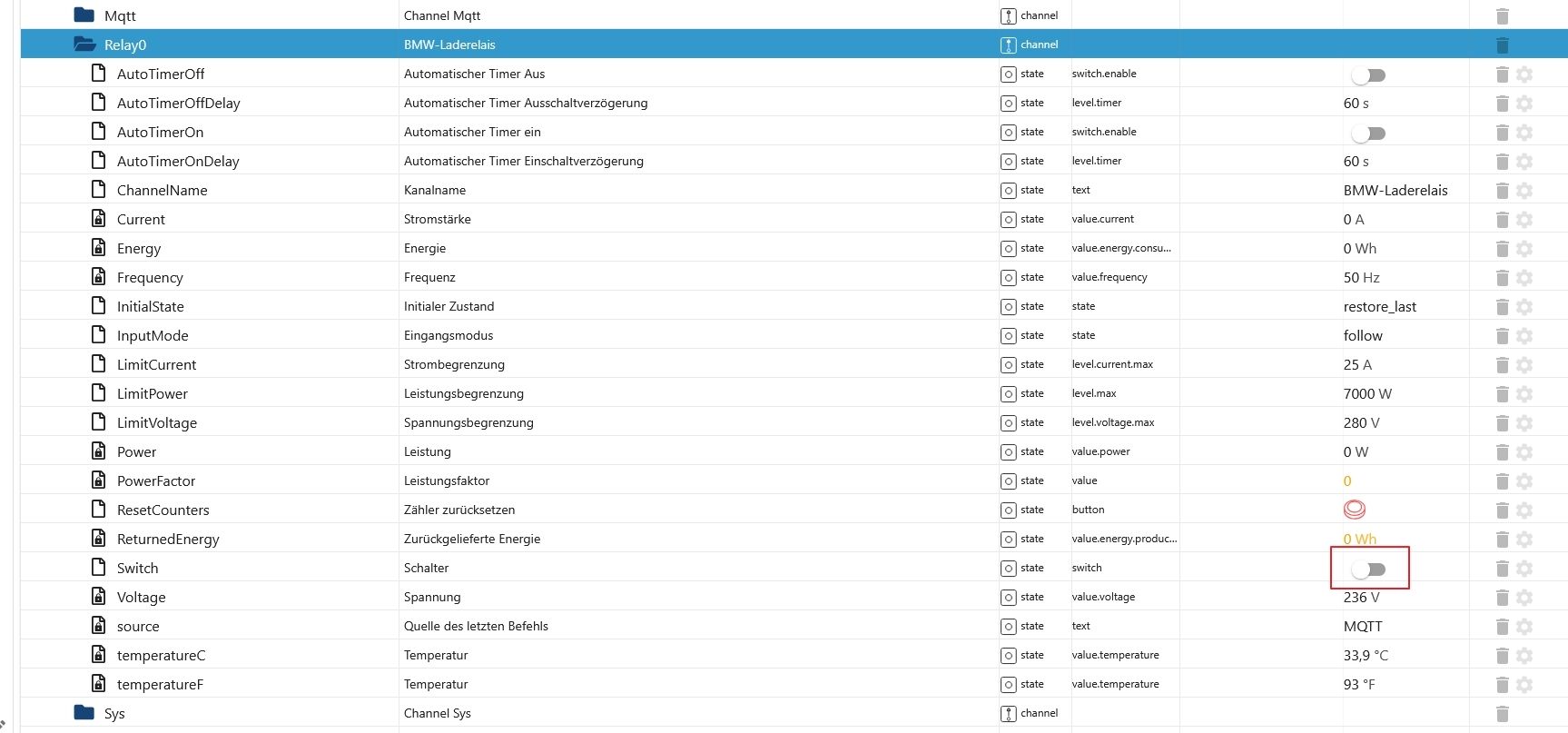
      2025-05-28 18 15 39.jpg
      Wenn ich über Blockly den Zustand vom Switch steuere (true / false) dann schaltet das Relais korrekt aber der Switch im Objektbaum wird nicht richtig aktualisiert. Er hängt meistens einen Schritt hinterher.
      Wenn ich auf der html Seite vom Ogemray den Zustand schalte, verzögerte Aktualisierung im Adapter (einen Schritt hinterher).
      Auch wenn ich den Switch direkt ändere ist es so (einen Schritt hinterher zum Zustand).
      So ist der Switch false, der echte Zustand aber true.
      Kann es nicht besser beschreiben :)

      Der Rest scheint zu funktionieren.

      mcm1957M 1 Antwort Letzte Antwort
      0
      • S stenmic

        @mcm1957
        moin, ich hab seit gestern das Ogemray 25A Relais.
        Adapter in der Version 9.5.1

        Der Switch im Adapter (Objekte) funktioniert nicht richtig.
        2025-05-28 18 15 39.jpg
        Wenn ich über Blockly den Zustand vom Switch steuere (true / false) dann schaltet das Relais korrekt aber der Switch im Objektbaum wird nicht richtig aktualisiert. Er hängt meistens einen Schritt hinterher.
        Wenn ich auf der html Seite vom Ogemray den Zustand schalte, verzögerte Aktualisierung im Adapter (einen Schritt hinterher).
        Auch wenn ich den Switch direkt ändere ist es so (einen Schritt hinterher zum Zustand).
        So ist der Switch false, der echte Zustand aber true.
        Kann es nicht besser beschreiben :)

        Der Rest scheint zu funktionieren.

        mcm1957M Online
        mcm1957M Online
        mcm1957
        schrieb am zuletzt editiert von
        #60

        @stenmic

        Erstell bitte ein Issue.

        Und häng dort bitte auch ein DEBUG Log an. Fürchte ich muss da ev. Support vom Spezialisten (@haus-automatisierung ) anfordern.

        Entwicklung u Betreuung: envertech-pv, hoymiles-ms, ns-client, pid, snmp Adapter;
        Support Repositoryverwaltung.

        Wer Danke sagen will, kann nen Kaffee spendieren: https://paypal.me/mcm1957atiobroker

        LESEN - gute Forenbeitrage

        mcm1957M 1 Antwort Letzte Antwort
        1
        • mcm1957M mcm1957

          @stenmic

          Erstell bitte ein Issue.

          Und häng dort bitte auch ein DEBUG Log an. Fürchte ich muss da ev. Support vom Spezialisten (@haus-automatisierung ) anfordern.

          mcm1957M Online
          mcm1957M Online
          mcm1957
          schrieb am zuletzt editiert von mcm1957
          #61

          @stenmic

          So wie ich es sehe bekommt der Adapter die Meldung via mqtt. Damit stellt sich die Frage:

          Kommt die Änderung verzögert, sprich du änderst den Wert in der shelly app / im Webinterface und der State im ioBroker wird erst nach x Sekunden angepasst?

          Oder wird im ioBroker IMMER das Gegenteil von dem angezeigt was tatsächlich eingestellt ist?

          Was passiert wenn du den State direkt in ioBroker admin umstellst?

          Ev. hol mag die json mit Output von http://ogemray-ip/rpc/Shelly.GetStatus ab und zwar sowohl im eingeschalteten als auch im ausgeschalteten Zustand und poste die (bitte dazu schreiben welches json zu ein / aus gehört). Alternativ zum posten auch gern im Issue gesehen.

          Und - wenn es das Relay kann - stell mal nen Timer ein der das Relais nach x Sekunden ein bzw. ausschaltet und beobachte ob / was sich im ioBroker State tut.

          Arbeitshypothese:
          Das Ding schickt den Status zeitlich verzögert ODER das Ding schickt den Status invertiert ...
          Da der switch Modul nicht spezifisch für dieses Relay ist sollte dort eigentlich kein Fehler drinnen sein... Aber wer weiß.

          Entwicklung u Betreuung: envertech-pv, hoymiles-ms, ns-client, pid, snmp Adapter;
          Support Repositoryverwaltung.

          Wer Danke sagen will, kann nen Kaffee spendieren: https://paypal.me/mcm1957atiobroker

          LESEN - gute Forenbeitrage

          S fuzzy1955F 3 Antworten Letzte Antwort
          0
          • mcm1957M mcm1957

            @stenmic

            So wie ich es sehe bekommt der Adapter die Meldung via mqtt. Damit stellt sich die Frage:

            Kommt die Änderung verzögert, sprich du änderst den Wert in der shelly app / im Webinterface und der State im ioBroker wird erst nach x Sekunden angepasst?

            Oder wird im ioBroker IMMER das Gegenteil von dem angezeigt was tatsächlich eingestellt ist?

            Was passiert wenn du den State direkt in ioBroker admin umstellst?

            Ev. hol mag die json mit Output von http://ogemray-ip/rpc/Shelly.GetStatus ab und zwar sowohl im eingeschalteten als auch im ausgeschalteten Zustand und poste die (bitte dazu schreiben welches json zu ein / aus gehört). Alternativ zum posten auch gern im Issue gesehen.

            Und - wenn es das Relay kann - stell mal nen Timer ein der das Relais nach x Sekunden ein bzw. ausschaltet und beobachte ob / was sich im ioBroker State tut.

            Arbeitshypothese:
            Das Ding schickt den Status zeitlich verzögert ODER das Ding schickt den Status invertiert ...
            Da der switch Modul nicht spezifisch für dieses Relay ist sollte dort eigentlich kein Fehler drinnen sein... Aber wer weiß.

            S Offline
            S Offline
            stenmic
            schrieb am zuletzt editiert von stenmic
            #62

            @mcm1957
            ich hab es mal gefilmt...
            https://www.dropbox.com/scl/fi/0nivazrw1yoztq74dbj2t/Ogemray.mp4?rlkey=dlh6iy8wdgu7hngofgtrk695q&st=7wna1c2m&dl=0

            Shelly.GetStatus AN

            {
            	"ble": {},
            	"bthome": {
            		"errors": [
            			"bluetooth_disabled"
            		]
            	},
            	"cloud": {
            		"connected": false
            	},
            	"input:0": {
            		"id": 0,
            		"state": false
            	},
            	"knx": {},
            	"mqtt": {
            		"connected": true
            	},
            	"switch:0": {
            		"id": 0,
            		"source": "WS_in",
            		"output": true,
            		"apower": 0.0,
            		"voltage": 237.9,
            		"freq": 50.0,
            		"current": 0.0,
            		"aenergy": {
            			"total": 0.0,
            			"by_minute": [
            				0.0,
            				0.0,
            				0.0
            			],
            			"minute_ts": 1748490540
            		},
            		"temperature": {
            			"tC": 33.4,
            			"tF": 92.2
            		}
            	},
            	"sys": {
            		"mac": "B08184E1xxx",
            		"restart_required": false,
            		"time": "05:49",
            		"unixtime": 1748490572,
            		"last_sync_ts": 1748490152,
            		"uptime": 423,
            		"ram_size": 252528,
            		"ram_free": 126080,
            		"ram_min_free": 112252,
            		"fs_size": 1048576,
            		"fs_free": 593920,
            		"cfg_rev": 14,
            		"kvs_rev": 0,
            		"schedule_rev": 0,
            		"webhook_rev": 0,
            		"btrelay_rev": 0,
            		"available_updates": {},
            		"reset_reason": 1,
            		"utc_offset": 7200
            	},
            	"wifi": {
            		"sta_ip": "xxxx",
            		"status": "got ip",
            		"ssid": "xxxx",
            		"rssi": -50,
            		"sta_ip6": [
            			"fe80::b281:84ff:fee1:deb4",
            			"2003:d5:a73e:7800:b281:84ff:fee1:deb4",
            			"fdf9:2cf3:d0b7:0:b281:84ff:fee1:deb4"
            		]
            	},
            	"ws": {
            		"connected": false
            	}
            }
            

            Shelly.GetStatus AUS

            {
            	"ble": {},
            	"bthome": {
            		"errors": [
            			"bluetooth_disabled"
            		]
            	},
            	"cloud": {
            		"connected": false
            	},
            	"input:0": {
            		"id": 0,
            		"state": false
            	},
            	"knx": {},
            	"mqtt": {
            		"connected": true
            	},
            	"switch:0": {
            		"id": 0,
            		"source": "MQTT",
            		"output": false,
            		"apower": 0.0,
            		"voltage": 237.9,
            		"freq": 50.0,
            		"current": 0.0,
            		"aenergy": {
            			"total": 0.0,
            			"by_minute": [
            				0.0,
            				0.0,
            				0.0
            			],
            			"minute_ts": 1748490480
            		},
            		"temperature": {
            			"tC": 32.9,
            			"tF": 91.2
            		}
            	},
            	"sys": {
            		"mac": "B08184E1xxx",
            		"restart_required": false,
            		"time": "05:48",
            		"unixtime": 1748490518,
            		"last_sync_ts": 1748490152,
            		"uptime": 369,
            		"ram_size": 252540,
            		"ram_free": 125912,
            		"ram_min_free": 112252,
            		"fs_size": 1048576,
            		"fs_free": 593920,
            		"cfg_rev": 14,
            		"kvs_rev": 0,
            		"schedule_rev": 0,
            		"webhook_rev": 0,
            		"btrelay_rev": 0,
            		"available_updates": {},
            		"reset_reason": 1,
            		"utc_offset": 7200
            	},
            	"wifi": {
            		"sta_ip": "xxx",
            		"status": "got ip",
            		"ssid": "xxx",
            		"rssi": -51,
            		"sta_ip6": [
            			"fe80::b281:84ff:fee1:deb4",
            			"2003:d5:a73e:7800:b281:84ff:fee1:deb4",
            			"fdf9:2cf3:d0b7:0:b281:84ff:fee1:deb4"
            		]
            	},
            	"ws": {
            		"connected": false
            	}
            }
            

            Meine anderen Shellys laufen ohne Probleme.

            S 1 Antwort Letzte Antwort
            0
            • mcm1957M mcm1957

              @stenmic

              So wie ich es sehe bekommt der Adapter die Meldung via mqtt. Damit stellt sich die Frage:

              Kommt die Änderung verzögert, sprich du änderst den Wert in der shelly app / im Webinterface und der State im ioBroker wird erst nach x Sekunden angepasst?

              Oder wird im ioBroker IMMER das Gegenteil von dem angezeigt was tatsächlich eingestellt ist?

              Was passiert wenn du den State direkt in ioBroker admin umstellst?

              Ev. hol mag die json mit Output von http://ogemray-ip/rpc/Shelly.GetStatus ab und zwar sowohl im eingeschalteten als auch im ausgeschalteten Zustand und poste die (bitte dazu schreiben welches json zu ein / aus gehört). Alternativ zum posten auch gern im Issue gesehen.

              Und - wenn es das Relay kann - stell mal nen Timer ein der das Relais nach x Sekunden ein bzw. ausschaltet und beobachte ob / was sich im ioBroker State tut.

              Arbeitshypothese:
              Das Ding schickt den Status zeitlich verzögert ODER das Ding schickt den Status invertiert ...
              Da der switch Modul nicht spezifisch für dieses Relay ist sollte dort eigentlich kein Fehler drinnen sein... Aber wer weiß.

              S Offline
              S Offline
              stenmic
              schrieb am zuletzt editiert von
              #63

              @mcm1957
              Jetzt nochmal gewartet.
              Also der "Switch" im Adapter wird aktualisiert, jedoch extrem Zeitverzögert.

              haus-automatisierungH 1 Antwort Letzte Antwort
              0
              • S stenmic

                @mcm1957
                Jetzt nochmal gewartet.
                Also der "Switch" im Adapter wird aktualisiert, jedoch extrem Zeitverzögert.

                haus-automatisierungH Offline
                haus-automatisierungH Offline
                haus-automatisierung
                Developer Most Active
                schrieb am zuletzt editiert von
                #64

                @stenmic RPC Events nicht aktiviert in der Shelly MQTT Konfiguration?

                🧑‍🎓 Autor des beliebten ioBroker-Master-Kurses
                🎥 Tutorials rund um das Thema DIY-Smart-Home: https://haus-automatisierung.com/
                📚 Meine inoffizielle ioBroker Dokumentation

                S 1 Antwort Letzte Antwort
                0
                • haus-automatisierungH haus-automatisierung

                  @stenmic RPC Events nicht aktiviert in der Shelly MQTT Konfiguration?

                  S Offline
                  S Offline
                  stenmic
                  schrieb am zuletzt editiert von stenmic
                  #65

                  @haus-automatisierung
                  das sollte eigentlich passen, oder?
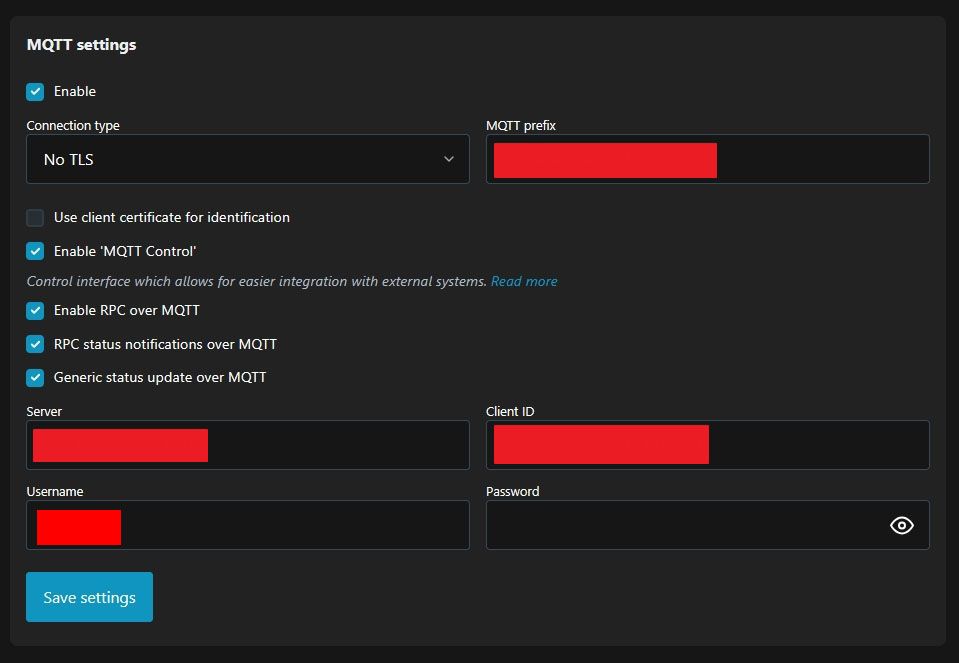
                  2025-05-29 06 39 02.jpg

                  1 Antwort Letzte Antwort
                  0
                  • mcm1957M mcm1957

                    @stenmic

                    So wie ich es sehe bekommt der Adapter die Meldung via mqtt. Damit stellt sich die Frage:

                    Kommt die Änderung verzögert, sprich du änderst den Wert in der shelly app / im Webinterface und der State im ioBroker wird erst nach x Sekunden angepasst?

                    Oder wird im ioBroker IMMER das Gegenteil von dem angezeigt was tatsächlich eingestellt ist?

                    Was passiert wenn du den State direkt in ioBroker admin umstellst?

                    Ev. hol mag die json mit Output von http://ogemray-ip/rpc/Shelly.GetStatus ab und zwar sowohl im eingeschalteten als auch im ausgeschalteten Zustand und poste die (bitte dazu schreiben welches json zu ein / aus gehört). Alternativ zum posten auch gern im Issue gesehen.

                    Und - wenn es das Relay kann - stell mal nen Timer ein der das Relais nach x Sekunden ein bzw. ausschaltet und beobachte ob / was sich im ioBroker State tut.

                    Arbeitshypothese:
                    Das Ding schickt den Status zeitlich verzögert ODER das Ding schickt den Status invertiert ...
                    Da der switch Modul nicht spezifisch für dieses Relay ist sollte dort eigentlich kein Fehler drinnen sein... Aber wer weiß.

                    fuzzy1955F Online
                    fuzzy1955F Online
                    fuzzy1955
                    schrieb am zuletzt editiert von fuzzy1955
                    #66

                    @mcm1957 sagte in Test Adapter shelly - ALPHA Versionen:

                    Da der switch Modul nicht spezifisch für dieses Relay ist sollte dort eigentlich kein Fehler drinnen sein

                    Hallo @mcm1957,

                    seit ich die Shelly-Version v9.5.1-alpha.8 installiert habe, funktioniert das Steuern aus dem IOB nicht mehr. Sowohl das manuelle Schalten über die Web-Adresse des Shelly oder über die Objekte im IOB, als auch das Steuern via JavaScript im IOB laufen nicht mehr. Auch die Temperaturen des ShellyPlus1Addon werden im IOB nicht korrekt angezeigt.
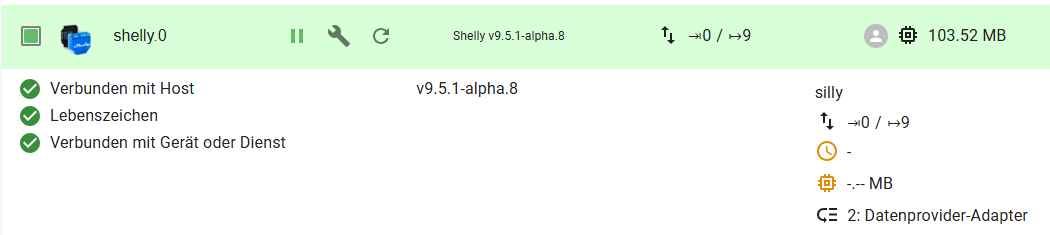
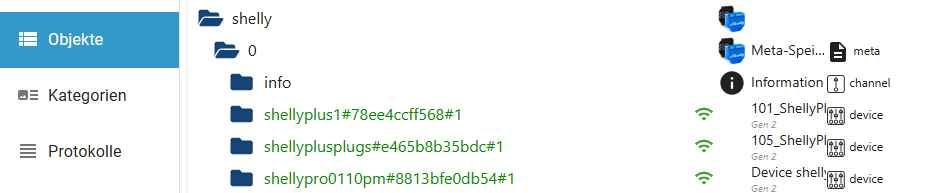
                    Clipboard01.jpg

                    Clipboard02.jpg

                    Clipboard03.jpg

                    Clipboard05.jpg

                    Protokoll silly


                    shelly.0
                    2025-05-29 07:46:49.662 debug [onStateChange] "shelly.0.shellyplusplugs#e465b8b35bdc#1.Relay0.LimitCurrent" state changed: {"val":0,"ack":false,"ts":1748497609654,"q":0,"c":"script.js.common.DpRefresh","from":"system.adapter.javascript.0","user":"system.user.admin","lc":1748366076244} - forwarding to objectHelper

                    shelly.0
                    2025-05-29 07:46:49.661 silly States user redis pmessage shelly.0.*/shelly.0.shellyplusplugs#e465b8b35bdc#1.Relay0.LimitCurrent:{"val":0,"ack":false,"ts":1748497609654,"q":0,"c":"script.js.common.DpRefresh","from":"system.adapter.javascript.0","user":"system.user.admin","lc":1748366076244}

                    shelly.0
                    2025-05-29 07:46:44.041 debug [onStateChange] "shelly.0.shellypro0110pm#8813bfe0db54#1.Light0.Brightness" state changed: {"val":0,"ack":false,"ts":1748497604035,"q":0,"c":"script.js.common.Photovoltaik.PvAblaufsteuerung","from":"system.adapter.javascript.0","user":"system.user.admin","lc":1748462232668} - forwarding to objectHelper

                    shelly.0
                    2025-05-29 07:46:44.040 silly States user redis pmessage shelly.0.*/shelly.0.shellypro0110pm#8813bfe0db54#1.Light0.Brightness:{"val":0,"ack":false,"ts":1748497604035,"q":0,"c":"script.js.common.Photovoltaik.PvAblaufsteuerung","from":"system.adapter.javascript.0","user":"system.user.admin","lc":1748462232668}

                    shelly.0
                    2025-05-29 07:46:44.038 debug [onStateChange] "shelly.0.shellypro0110pm#8813bfe0db54#1.Light0.Switch" state changed: {"val":false,"ack":false,"ts":1748497604035,"q":0,"c":"script.js.common.Photovoltaik.PvAblaufsteuerung","from":"system.adapter.javascript.0","user":"system.user.admin","lc":1748462232543} - forwarding to objectHelper

                    shelly.0
                    2025-05-29 07:46:44.038 silly States user redis pmessage shelly.0.*/shelly.0.shellypro0110pm#8813bfe0db54#1.Light0.Switch:{"val":false,"ack":false,"ts":1748497604035,"q":0,"c":"script.js.common.Photovoltaik.PvAblaufsteuerung","from":"system.adapter.javascript.0","user":"system.user.admin","lc":1748462232543}

                    shelly.0
                    2025-05-29 07:46:42.005 debug [deviceStatusUpdate] shellyplus1#78ee4ccff568#1: true

                    shelly.0
                    2025-05-29 07:46:42.001 debug [onlineCheck] Checking shellyplus1#78ee4ccff568#1 on 192.168.0.101:80

                    shelly.0
                    2025-05-29 07:46:42.001 debug [deviceStatusUpdate] shellyplusplugs#e465b8b35bdc#1: true

                    shelly.0
                    2025-05-29 07:46:41.997 debug [deviceStatusUpdate] shellypro0110pm#8813bfe0db54#1: true

                    shelly.0
                    2025-05-29 07:46:41.997 debug [onlineCheck] Checking shellyplusplugs#e465b8b35bdc#1 on 192.168.0.105:80

                    shelly.0
                    2025-05-29 07:46:41.995 debug [onlineCheck] Checking shellypro0110pm#8813bfe0db54#1 on 192.168.0.102:80

                    iob diag


                    ========== Start marking the full check here ===========

                    Script v.2025-03-08
                    
                    *** BASE SYSTEM ***
                     Static hostname: raspberrypi
                           Icon name: computer
                    Operating System: Debian GNU/Linux 12 (bookworm)
                              Kernel: Linux 6.12.25+rpt-rpi-2712
                        Architecture: arm64
                    OS is similar to:
                    
                    Model           : Raspberry Pi 5 Model B Rev 1.1
                    Docker          : false
                    Virtualization  : none
                    Kernel          : aarch64
                    Userland        : 64 bit
                    
                    Systemuptime and Load:
                     07:57:26 up 1 day, 18:23,  2 users,  load average: 0.07, 0.02, 0.00
                    CPU threads: 4
                    
                    
                    *** LIFE CYCLE STATUS ***
                    Operating System is the current Debian stable version codenamed 'bookworm'!
                    
                    *** RASPBERRY THROTTLING ***
                    Current issues:
                    No throttling issues detected.
                    
                    Previously detected issues:
                    No throttling issues detected.
                    
                    *** TIME AND TIMEZONES ***
                                   Local time: Thu 2025-05-29 07:57:26 CEST
                               Universal time: Thu 2025-05-29 05:57:26 UTC
                                     RTC time: Thu 2025-05-29 05:57:26
                                    Time zone: Europe/Vienna (CEST, +0200)
                    System clock synchronized: yes
                                  NTP service: active
                              RTC in local TZ: no
                    
                    *** Users and Groups ***
                    User that called 'iob diag':
                    pi
                    HOME=/home/pi
                    GROUPS=pi adm dialout cdrom sudo audio video plugdev games users input render netdev gpio i2c spi iobroker
                    
                    User that is running 'js-controller':
                    iobroker
                    HOME=/home/iobroker
                    GROUPS=iobroker tty dialout audio video plugdev bluetooth gpio i2c
                    
                    *** DISPLAY-SERVER SETUP ***
                    Display-Server: false
                    Desktop:
                    Terminal:       tty
                    
                    *** MEMORY ***
                                   total        used        free      shared  buff/cache   available
                    Mem:             17G        2.0G         13G        7.6M        1.4G         14G
                    Swap:           536M          0B        536M
                    Total:           17G        2.0G         14G
                    
                    Active iob-Instances:   14
                    
                            16219 M total memory
                             1941 M used memory
                             1769 M active memory
                             1048 M inactive memory
                            13054 M free memory
                              132 M buffer memory
                             1213 M swap cache
                              511 M total swap
                                0 M used swap
                              511 M free swap
                    
                    *** top - Table Of Processes  ***
                    top - 07:57:27 up 1 day, 18:23,  2 users,  load average: 0.07, 0.02, 0.00
                    Tasks: 202 total,   1 running, 201 sleeping,   0 stopped,   0 zombie
                    %Cpu(s):  0.0 us,  0.0 sy,  0.0 ni,100.0 id,  0.0 wa,  0.0 hi,  0.0 si,  0.0 st
                    MiB Mem :  16219.7 total,  13054.7 free,   1941.5 used,   1345.5 buff/cache
                    MiB Swap:    512.0 total,    512.0 free,      0.0 used.  14278.1 avail Mem
                    
                    *** FAILED SERVICES ***
                    
                      UNIT LOAD ACTIVE SUB DESCRIPTION
                    0 loaded units listed.
                    
                    
                    *** DMESG CRITICAL ERRORS ***
                    No critical errors detected
                    
                    *** FILESYSTEM ***
                    Filesystem     Type      Size  Used Avail Use% Mounted on
                    udev           devtmpfs  7.9G     0  7.9G   0% /dev
                    tmpfs          tmpfs     1.6G  7.3M  1.6G   1% /run
                    /dev/mmcblk0p2 ext4       15G   12G  2.0G  86% /
                    tmpfs          tmpfs     8.0G     0  8.0G   0% /dev/shm
                    tmpfs          tmpfs     5.0M   48K  5.0M   1% /run/lock
                    /dev/mmcblk0p1 vfat      510M   56M  455M  11% /boot/firmware
                    tmpfs          tmpfs     1.6G     0  1.6G   0% /run/user/1000
                    
                    Messages concerning ext4 filesystem in dmesg:
                    
                    Show mounted filesystems:
                    TARGET           SOURCE         FSTYPE OPTIONS
                    /                /dev/mmcblk0p2 ext4   rw,noatime
                    `-/boot/firmware /dev/mmcblk0p1 vfat   rw,relatime,fmask=0022,dmask=0022,codepage=437,iocharset=ascii,shortname=mixed,errors=remount-ro
                    
                    Files in neuralgic directories:
                    
                    /var:
                    2.3G    /var/
                    756M    /var/log
                    755M    /var/log/journal/ce49b5c207f74de48fc362bf23ca73ba
                    755M    /var/log/journal
                    551M    /var/lib
                    
                    Archived and active journals take up 754.7M in the file system.
                    
                    /opt/iobroker/backups:
                    167M    /opt/iobroker/backups/
                    
                    /opt/iobroker/iobroker-data:
                    1.2G    /opt/iobroker/iobroker-data/
                    1.1G    /opt/iobroker/iobroker-data/files
                    617M    /opt/iobroker/iobroker-data/files/javascript.admin
                    560M    /opt/iobroker/iobroker-data/files/javascript.admin/static
                    558M    /opt/iobroker/iobroker-data/files/javascript.admin/static/js
                    
                    The five largest files in iobroker-data are:
                    26M     /opt/iobroker/iobroker-data/files/echarts/static/js/main.41cee985.js.map
                    26M     /opt/iobroker/iobroker-data/files/echarts.admin/chart/static/js/main.41cee985.js.map
                    24M     /opt/iobroker/iobroker-data/files/vis-2/static/js/main.f305bc29.js.map
                    24M     /opt/iobroker/iobroker-data/files/vis-2/static/js/main.8e80ccb0.js.map
                    24M     /opt/iobroker/iobroker-data/files/vis-2/customWidgets.js.map
                    
                    USB-Devices by-id:
                    USB-Sticks -  Avoid direct links to /dev/tty* in your adapter setups, please always prefer the links 'by-id':
                    
                    No Devices found 'by-id'
                    
                    Zigbee Network Settings on your coordinator/in nvbackup are:
                    
                    zigbee.X
                    Extended Pan ID:
                    *** MASKED ***
                    Pan ID:
                    *** MASKED ***
                    Channel:
                    *** MASKED ***
                    Network Key:
                    *** MASKED ***
                    
                    To unmask the settings run 'iob diag --unmask'
                    
                    
                    *** NodeJS-Installation ***
                    
                    /usr/bin/nodejs         v20.19.2
                    /usr/bin/node           v20.19.2
                    /usr/bin/npm            10.8.2
                    /usr/bin/npx            10.8.2
                    /usr/bin/corepack       0.31.0
                    
                    nodejs:
                      Installed: 20.19.2-1nodesource1
                      Candidate: 20.19.2-1nodesource1
                      Version table:
                     *** 20.19.2-1nodesource1 1001
                            500 https://deb.nodesource.com/node_20.x nodistro/main arm64 Packages
                            100 /var/lib/dpkg/status
                         20.19.1-1nodesource1 1001
                            500 https://deb.nodesource.com/node_20.x nodistro/main arm64 Packages
                         20.19.0-1nodesource1 1001
                            500 https://deb.nodesource.com/node_20.x nodistro/main arm64 Packages
                         20.18.3-1nodesource1 1001
                            500 https://deb.nodesource.com/node_20.x nodistro/main arm64 Packages
                         20.18.2-1nodesource1 1001
                            500 https://deb.nodesource.com/node_20.x nodistro/main arm64 Packages
                         20.18.1-1nodesource1 1001
                            500 https://deb.nodesource.com/node_20.x nodistro/main arm64 Packages
                         20.18.0-1nodesource1 1001
                            500 https://deb.nodesource.com/node_20.x nodistro/main arm64 Packages
                         20.17.0-1nodesource1 1001
                            500 https://deb.nodesource.com/node_20.x nodistro/main arm64 Packages
                         20.16.0-1nodesource1 1001
                            500 https://deb.nodesource.com/node_20.x nodistro/main arm64 Packages
                         20.15.1-1nodesource1 1001
                            500 https://deb.nodesource.com/node_20.x nodistro/main arm64 Packages
                         20.15.0-1nodesource1 1001
                            500 https://deb.nodesource.com/node_20.x nodistro/main arm64 Packages
                         20.14.0-1nodesource1 1001
                            500 https://deb.nodesource.com/node_20.x nodistro/main arm64 Packages
                         20.13.1-1nodesource1 1001
                            500 https://deb.nodesource.com/node_20.x nodistro/main arm64 Packages
                         20.13.0-1nodesource1 1001
                            500 https://deb.nodesource.com/node_20.x nodistro/main arm64 Packages
                         20.12.2-1nodesource1 1001
                            500 https://deb.nodesource.com/node_20.x nodistro/main arm64 Packages
                         20.12.1-1nodesource1 1001
                            500 https://deb.nodesource.com/node_20.x nodistro/main arm64 Packages
                         20.12.0-1nodesource1 1001
                            500 https://deb.nodesource.com/node_20.x nodistro/main arm64 Packages
                         20.11.1-1nodesource1 1001
                            500 https://deb.nodesource.com/node_20.x nodistro/main arm64 Packages
                         20.11.0-1nodesource1 1001
                            500 https://deb.nodesource.com/node_20.x nodistro/main arm64 Packages
                         20.10.0-1nodesource1 1001
                            500 https://deb.nodesource.com/node_20.x nodistro/main arm64 Packages
                         20.9.0-1nodesource1 1001
                            500 https://deb.nodesource.com/node_20.x nodistro/main arm64 Packages
                         20.8.1-1nodesource1 1001
                            500 https://deb.nodesource.com/node_20.x nodistro/main arm64 Packages
                         20.8.0-1nodesource1 1001
                            500 https://deb.nodesource.com/node_20.x nodistro/main arm64 Packages
                         20.7.0-1nodesource1 1001
                            500 https://deb.nodesource.com/node_20.x nodistro/main arm64 Packages
                         20.6.1-1nodesource1 1001
                            500 https://deb.nodesource.com/node_20.x nodistro/main arm64 Packages
                         20.6.0-1nodesource1 1001
                            500 https://deb.nodesource.com/node_20.x nodistro/main arm64 Packages
                         20.5.1-1nodesource1 1001
                            500 https://deb.nodesource.com/node_20.x nodistro/main arm64 Packages
                         20.5.0-1nodesource1 1001
                            500 https://deb.nodesource.com/node_20.x nodistro/main arm64 Packages
                         20.4.0-1nodesource1 1001
                            500 https://deb.nodesource.com/node_20.x nodistro/main arm64 Packages
                         20.3.1-1nodesource1 1001
                            500 https://deb.nodesource.com/node_20.x nodistro/main arm64 Packages
                         20.3.0-1nodesource1 1001
                            500 https://deb.nodesource.com/node_20.x nodistro/main arm64 Packages
                         20.2.0-1nodesource1 1001
                            500 https://deb.nodesource.com/node_20.x nodistro/main arm64 Packages
                         20.1.0-1nodesource1 1001
                            500 https://deb.nodesource.com/node_20.x nodistro/main arm64 Packages
                         20.0.0-1nodesource1 1001
                            500 https://deb.nodesource.com/node_20.x nodistro/main arm64 Packages
                         18.19.0+dfsg-6~deb12u2 500
                            500 http://deb.debian.org/debian bookworm/main arm64 Packages
                         18.19.0+dfsg-6~deb12u1 500
                            500 http://deb.debian.org/debian-security bookworm-security/main arm64 Packages
                    
                    Temp directories causing deletion problem: 0
                    No problems detected
                    
                    Errors in npm tree: 0
                    No problems detected
                    
                    *** ioBroker-Installation ***
                    
                    ioBroker Status
                    iobroker is running on this host.
                    
                    
                    Objects type: jsonl
                    States  type: jsonl
                    
                    Hosts:
                    raspberrypi         raspberrypi (version: 7.0.6, hostname: raspberrypi   , alive, uptime: 152603)
                    
                    Core adapters versions
                    js-controller:  7.0.6
                    admin:          7.6.17
                    javascript:     8.8.3
                    
                    nodejs modules from github:     0
                    
                    Adapter State
                    + system.adapter.admin.0                  : admin                 : raspberrypi                              -  enabled, port: 8081, bind: 0.0.0.0, run as: admin
                    + system.adapter.backitup.0               : backitup              : raspberrypi                              -  enabled
                    + system.adapter.echarts.0                : echarts               : raspberrypi                              -  enabled
                    + system.adapter.email.0                  : email                 : raspberrypi                              -  enabled
                      system.adapter.emporia.0                : emporia               : raspberrypi                              - disabled
                    + system.adapter.javascript.0             : javascript            : raspberrypi                              -  enabled
                    + system.adapter.javascript.1             : javascript            : raspberrypi                              -  enabled
                    + system.adapter.kecontact.0              : kecontact             : raspberrypi                              -  enabled
                    + system.adapter.modbus.0                 : modbus                : raspberrypi                              -  enabled
                      system.adapter.modbus.1                 : modbus                : raspberrypi                              - disabled
                    + system.adapter.modbus.2                 : modbus                : raspberrypi                              -  enabled
                    + system.adapter.shelly.0                 : shelly                : raspberrypi                              -  enabled, port: 1882, bind: 192.168.0.100
                    + system.adapter.sql.0                    : sql                   : raspberrypi                              -  enabled, port: 3306
                      system.adapter.vis-2-widgets-energy.0   : vis-2-widgets-energy  : raspberrypi                              - disabled
                      system.adapter.vis-2-widgets-gauges.0   : vis-2-widgets-gauges  : raspberrypi                              -  enabled
                      system.adapter.vis-2-widgets-inventwo.0 : vis-2-widgets-inventwo: raspberrypi                              -  enabled
                      system.adapter.vis-2-widgets-material.0 : vis-2-widgets-material: raspberrypi                              - disabled
                      system.adapter.vis-2-widgets-weather-and-heating.0: vis-2-widgets-weather-and-heating: raspberrypi                              - disabled
                    + system.adapter.vis-2.0                  : vis-2                 : raspberrypi                              -  enabled
                    + system.adapter.web.0                    : web                   : raspberrypi                              -  enabled, port: 8082, bind: 0.0.0.0, run as: admin
                    
                    + instance is alive
                    
                    Enabled adapters with bindings
                    + system.adapter.admin.0                  : admin                 : raspberrypi                              -  enabled, port: 8081, bind: 0.0.0.0, run as: admin
                    + system.adapter.shelly.0                 : shelly                : raspberrypi                              -  enabled, port: 1882, bind: 192.168.0.100
                    + system.adapter.sql.0                    : sql                   : raspberrypi                              -  enabled, port: 3306
                    + system.adapter.web.0                    : web                   : raspberrypi                              -  enabled, port: 8082, bind: 0.0.0.0, run as: admin
                    
                    ioBroker-Repositories
                    ┌─────────┬──────────┬──────────────────────────────────────────────────┬──────────────┐
                    │ (index) │ name     │ url                                              │ auto upgrade │
                    ├─────────┼──────────┼──────────────────────────────────────────────────┼──────────────┤
                    │ 0       │ 'stable' │ 'http://download.iobroker.net/sources-dist.json' │ true         │
                    └─────────┴──────────┴──────────────────────────────────────────────────┴──────────────┘
                    
                    Active repo(s): stable
                    Upgrade policy: minor
                    
                    Installed ioBroker-Adapters
                    Used repository: stable
                    Adapter    "admin"        : 7.6.17   , installed 7.6.17
                    Adapter    "backitup"     : 3.2.2    , installed 3.2.2
                    Adapter    "echarts"      : 1.9.2    , installed 1.9.2
                    Adapter    "email"        : 2.0.4    , installed 2.0.4
                    Adapter    "emporia"      : 0.0.12   , installed 0.1.0
                    Adapter    "javascript"   : 8.8.3    , installed 8.8.3
                    Controller "js-controller": 7.0.6    , installed 7.0.6
                    Adapter    "kecontact"    : 3.1.0    , installed 3.1.0
                    Adapter    "modbus"       : 6.3.2    , installed 6.3.2
                    Adapter    "shelly"       : 9.5.1    , installed 9.5.1-alpha.8 [Updatable]
                    Adapter    "socketio"     : 6.7.1    , installed 6.7.1
                    Adapter    "sql"          : 3.0.1    , installed 3.0.1
                    Adapter    "vis-2"        : 2.9.64   , installed 2.9.64
                    Adapter    "vis-2-widgets-energy": 1.0.2, installed 1.0.2
                    Adapter    "vis-2-widgets-gauges": 1.1.0, installed 1.1.0
                    Adapter    "vis-2-widgets-inventwo": 0.1.11, installed 0.1.11
                    Adapter    "vis-2-widgets-material": 1.4.10, installed 1.4.10
                    Adapter    "vis-2-widgets-weather-and-heating": 0.10.4, installed 0.10.4
                    Adapter    "web"          : 7.0.8    , installed 7.0.8
                    Adapter    "ws"           : 2.6.2    , installed 2.6.2
                    
                    Objects and States
                    Please stand by - This may take a while
                    Objects:        1930
                    States:         1589
                    
                    *** OS-Repositories and Updates ***
                    Hit:1 http://deb.debian.org/debian bookworm InRelease
                    Hit:2 http://deb.debian.org/debian-security bookworm-security InRelease
                    Hit:3 http://deb.debian.org/debian bookworm-updates InRelease
                    Hit:4 http://archive.raspberrypi.com/debian bookworm InRelease
                    Hit:5 https://deb.nodesource.com/node_20.x nodistro InRelease
                    Reading package lists...
                    Pending Updates: 0
                    
                    *** Listening Ports ***
                    Active Internet connections (only servers)
                    Proto Recv-Q Send-Q Local Address           Foreign Address         State       User       Inode      PID/Program name
                    tcp        0      0 0.0.0.0:3306            0.0.0.0:*               LISTEN      106        6526       825/mariadbd
                    tcp        0      0 0.0.0.0:139             0.0.0.0:*               LISTEN      0          6699       933/smbd
                    tcp        0      0 0.0.0.0:22              0.0.0.0:*               LISTEN      0          821        765/sshd: /usr/sbin
                    tcp        0      0 0.0.0.0:445             0.0.0.0:*               LISTEN      0          6698       933/smbd
                    tcp        0      0 127.0.0.1:9001          0.0.0.0:*               LISTEN      1001       6712       745/iobroker.js-con
                    tcp        0      0 127.0.0.1:9000          0.0.0.0:*               LISTEN      1001       3003       745/iobroker.js-con
                    tcp        0      0 192.168.0.100:1882      0.0.0.0:*               LISTEN      1001       624470     11471/io.shelly.0
                    tcp6       0      0 :::139                  :::*                    LISTEN      0          6697       933/smbd
                    tcp6       0      0 :::22                   :::*                    LISTEN      0          823        765/sshd: /usr/sbin
                    tcp6       0      0 :::445                  :::*                    LISTEN      0          6696       933/smbd
                    tcp6       0      0 :::8081                 :::*                    LISTEN      1001       6802       1076/io.admin.0
                    tcp6       0      0 :::8082                 :::*                    LISTEN      1001       7661       1345/io.web.0
                    udp        0      0 192.168.0.255:137       0.0.0.0:*                           0          6587       921/nmbd
                    udp        0      0 192.168.0.100:137       0.0.0.0:*                           0          6586       921/nmbd
                    udp        0      0 0.0.0.0:137             0.0.0.0:*                           0          6574       921/nmbd
                    udp        0      0 192.168.0.255:138       0.0.0.0:*                           0          6589       921/nmbd
                    udp        0      0 192.168.0.100:138       0.0.0.0:*                           0          6588       921/nmbd
                    udp        0      0 0.0.0.0:138             0.0.0.0:*                           0          6575       921/nmbd
                    udp        0      0 0.0.0.0:42923           0.0.0.0:*                           104        5683       598/avahi-daemon: r
                    udp        0      0 0.0.0.0:5353            0.0.0.0:*                           104        5681       598/avahi-daemon: r
                    udp        0      0 0.0.0.0:46915           0.0.0.0:*                           1001       7045       1267/io.kecontact.0
                    udp        0      0 0.0.0.0:7090            0.0.0.0:*                           1001       7043       1267/io.kecontact.0
                    udp        0      0 0.0.0.0:7092            0.0.0.0:*                           1001       7044       1267/io.kecontact.0
                    udp6       0      0 fe80::7de6:a76b:229:546 :::*                                0          964        717/NetworkManager
                    udp6       0      0 :::53247                :::*                                104        5684       598/avahi-daemon: r
                    udp6       0      0 :::5353                 :::*                                104        5682       598/avahi-daemon: r
                    
                    *** Log File - Last 25 Lines ***
                    
                    2025-05-29 07:57:19.710  - debug: shelly.0 (11471) [onStateChange] "shelly.0.shellyplusplugs#e465b8b35bdc#1.Relay0.LimitCurrent" state changed: {"val":0,"ack":false,"ts":1748498239661,"q":0,"c":"script.js.common.DpRefresh","from":"system.adapter.javascript.0","user":"system.user.admin","lc":1748366076244} - forwarding to objectHelper
                    2025-05-29 07:57:24.056  - silly: shelly.0 (11471) States user redis pmessage shelly.0.*/shelly.0.shellypro0110pm#8813bfe0db54#1.Light0.Switch:{"val":false,"ack":false,"ts":1748498244053,"q":0,"c":"script.js.common.Photovoltaik.PvAblaufsteuerung","from":"system.adapter.javascript.0","user":"system.user.admin","lc":1748462232543}
                    2025-05-29 07:57:24.056  - debug: shelly.0 (11471) [onStateChange] "shelly.0.shellypro0110pm#8813bfe0db54#1.Light0.Switch" state changed: {"val":false,"ack":false,"ts":1748498244053,"q":0,"c":"script.js.common.Photovoltaik.PvAblaufsteuerung","from":"system.adapter.javascript.0","user":"system.user.admin","lc":1748462232543} - forwarding to objectHelper
                    2025-05-29 07:57:24.058  - silly: shelly.0 (11471) States user redis pmessage shelly.0.*/shelly.0.shellypro0110pm#8813bfe0db54#1.Light0.Brightness:{"val":0,"ack":false,"ts":1748498244053,"q":0,"c":"script.js.common.Photovoltaik.PvAblaufsteuerung","from":"system.adapter.javascript.0","user":"system.user.admin","lc":1748462232668}
                    2025-05-29 07:57:24.058  - debug: shelly.0 (11471) [onStateChange] "shelly.0.shellypro0110pm#8813bfe0db54#1.Light0.Brightness" state changed: {"val":0,"ack":false,"ts":1748498244053,"q":0,"c":"script.js.common.Photovoltaik.PvAblaufsteuerung","from":"system.adapter.javascript.0","user":"system.user.admin","lc":1748462232668} - forwarding to objectHelper
                    2025-05-29 07:57:29.666  - silly: shelly.0 (11471) States user redis pmessage shelly.0.*/shelly.0.shellyplusplugs#e465b8b35bdc#1.Relay0.LimitCurrent:{"val":0,"ack":false,"ts":1748498249662,"q":0,"c":"script.js.common.DpRefresh","from":"system.adapter.javascript.0","user":"system.user.admin","lc":1748366076244}
                    2025-05-29 07:57:29.667  - debug: shelly.0 (11471) [onStateChange] "shelly.0.shellyplusplugs#e465b8b35bdc#1.Relay0.LimitCurrent" state changed: {"val":0,"ack":false,"ts":1748498249662,"q":0,"c":"script.js.common.DpRefresh","from":"system.adapter.javascript.0","user":"system.user.admin","lc":1748366076244} - forwarding to objectHelper
                    2025-05-29 07:57:34.055  - silly: shelly.0 (11471) States user redis pmessage shelly.0.*/shelly.0.shellypro0110pm#8813bfe0db54#1.Light0.Switch:{"val":false,"ack":false,"ts":1748498254053,"q":0,"c":"script.js.common.Photovoltaik.PvAblaufsteuerung","from":"system.adapter.javascript.0","user":"system.user.admin","lc":1748462232543}
                    2025-05-29 07:57:34.056  - debug: shelly.0 (11471) [onStateChange] "shelly.0.shellypro0110pm#8813bfe0db54#1.Light0.Switch" state changed: {"val":false,"ack":false,"ts":1748498254053,"q":0,"c":"script.js.common.Photovoltaik.PvAblaufsteuerung","from":"system.adapter.javascript.0","user":"system.user.admin","lc":1748462232543} - forwarding to objectHelper
                    2025-05-29 07:57:34.056  - silly: shelly.0 (11471) States user redis pmessage shelly.0.*/shelly.0.shellypro0110pm#8813bfe0db54#1.Light0.Brightness:{"val":0,"ack":false,"ts":1748498254053,"q":0,"c":"script.js.common.Photovoltaik.PvAblaufsteuerung","from":"system.adapter.javascript.0","user":"system.user.admin","lc":1748462232668}
                    2025-05-29 07:57:34.057  - debug: shelly.0 (11471) [onStateChange] "shelly.0.shellypro0110pm#8813bfe0db54#1.Light0.Brightness" state changed: {"val":0,"ack":false,"ts":1748498254053,"q":0,"c":"script.js.common.Photovoltaik.PvAblaufsteuerung","from":"system.adapter.javascript.0","user":"system.user.admin","lc":1748462232668} - forwarding to objectHelper
                    2025-05-29 07:57:39.666  - silly: shelly.0 (11471) States user redis pmessage shelly.0.*/shelly.0.shellyplusplugs#e465b8b35bdc#1.Relay0.LimitCurrent:{"val":0,"ack":false,"ts":1748498259661,"q":0,"c":"script.js.common.DpRefresh","from":"system.adapter.javascript.0","user":"system.user.admin","lc":1748366076244}
                    2025-05-29 07:57:39.666  - debug: shelly.0 (11471) [onStateChange] "shelly.0.shellyplusplugs#e465b8b35bdc#1.Relay0.LimitCurrent" state changed: {"val":0,"ack":false,"ts":1748498259661,"q":0,"c":"script.js.common.DpRefresh","from":"system.adapter.javascript.0","user":"system.user.admin","lc":1748366076244} - forwarding to objectHelper
                    2025-05-29 07:57:42.151  - debug: shelly.0 (11471) [onlineCheck] Checking shellypro0110pm#8813bfe0db54#1 on 192.168.0.102:80
                    2025-05-29 07:57:42.153  - debug: shelly.0 (11471) [onlineCheck] Checking shellyplusplugs#e465b8b35bdc#1 on 192.168.0.105:80
                    2025-05-29 07:57:42.153  - debug: shelly.0 (11471) [deviceStatusUpdate] shellypro0110pm#8813bfe0db54#1: true
                    2025-05-29 07:57:42.157  - debug: shelly.0 (11471) [deviceStatusUpdate] shellyplusplugs#e465b8b35bdc#1: true
                    2025-05-29 07:57:42.157  - debug: shelly.0 (11471) [onlineCheck] Checking shellyplus1#78ee4ccff568#1 on 192.168.0.101:80
                    2025-05-29 07:57:42.170  - debug: shelly.0 (11471) [deviceStatusUpdate] shellyplus1#78ee4ccff568#1: true
                    2025-05-29 07:57:44.057  - silly: shelly.0 (11471) States user redis pmessage shelly.0.*/shelly.0.shellypro0110pm#8813bfe0db54#1.Light0.Switch:{"val":false,"ack":false,"ts":1748498264054,"q":0,"c":"script.js.common.Photovoltaik.PvAblaufsteuerung","from":"system.adapter.javascript.0","user":"system.user.admin","lc":1748462232543}
                    2025-05-29 07:57:44.058  - debug: shelly.0 (11471) [onStateChange] "shelly.0.shellypro0110pm#8813bfe0db54#1.Light0.Switch" state changed: {"val":false,"ack":false,"ts":1748498264054,"q":0,"c":"script.js.common.Photovoltaik.PvAblaufsteuerung","from":"system.adapter.javascript.0","user":"system.user.admin","lc":1748462232543} - forwarding to objectHelper
                    2025-05-29 07:57:44.065  - silly: shelly.0 (11471) States user redis pmessage shelly.0.*/shelly.0.shellypro0110pm#8813bfe0db54#1.Light0.Brightness:{"val":0,"ack":false,"ts":1748498264054,"q":0,"c":"script.js.common.Photovoltaik.PvAblaufsteuerung","from":"system.adapter.javascript.0","user":"system.user.admin","lc":1748462232668}
                    2025-05-29 07:57:44.066  - debug: shelly.0 (11471) [onStateChange] "shelly.0.shellypro0110pm#8813bfe0db54#1.Light0.Brightness" state changed: {"val":0,"ack":false,"ts":1748498264054,"q":0,"c":"script.js.common.Photovoltaik.PvAblaufsteuerung","from":"system.adapter.javascript.0","user":"system.user.admin","lc":1748462232668} - forwarding to objectHelper
                    2025-05-29 07:57:49.674  - silly: shelly.0 (11471) States user redis pmessage shelly.0.*/shelly.0.shellyplusplugs#e465b8b35bdc#1.Relay0.LimitCurrent:{"val":0,"ack":false,"ts":1748498269662,"q":0,"c":"script.js.common.DpRefresh","from":"system.adapter.javascript.0","user":"system.user.admin","lc":1748366076244}
                    2025-05-29 07:57:49.674  - debug: shelly.0 (11471) [onStateChange] "shelly.0.shellyplusplugs#e465b8b35bdc#1.Relay0.LimitCurrent" state changed: {"val":0,"ack":false,"ts":1748498269662,"q":0,"c":"script.js.common.DpRefresh","from":"system.adapter.javascript.0","user":"system.user.admin","lc":1748366076244} - forwarding to objectHelper


                    ============ Mark until here for C&P =============

                    iob diag has finished.

                    Was kann da die Ursache sein? Vorweg danke für dein Schaffen! Gruß, fuzzy

                    Raspberry PI5 mit Linux Debian 13 (Trixie), IoBroker v7.7.19, VIS-2, MariaDB (MySQL)
                    Shellies: 1G4, 1MiniG3, PlusI4DC, PlusPlugS, Pro0110PM. Modbus: Waveshare Relay 8 Channels, Waveshare RS485-TO-ETH.
                    PV: 10 kWp Module, 2 x Deye WR SUN-10K, 2 x 10 kWh MeritSun LiFe Speicher, KEBA P30 Wallbox, Fronius Wattpilot home 11

                    mcm1957M 1 Antwort Letzte Antwort
                    0
                    • fuzzy1955F fuzzy1955

                      @mcm1957 sagte in Test Adapter shelly - ALPHA Versionen:

                      Da der switch Modul nicht spezifisch für dieses Relay ist sollte dort eigentlich kein Fehler drinnen sein

                      Hallo @mcm1957,

                      seit ich die Shelly-Version v9.5.1-alpha.8 installiert habe, funktioniert das Steuern aus dem IOB nicht mehr. Sowohl das manuelle Schalten über die Web-Adresse des Shelly oder über die Objekte im IOB, als auch das Steuern via JavaScript im IOB laufen nicht mehr. Auch die Temperaturen des ShellyPlus1Addon werden im IOB nicht korrekt angezeigt.
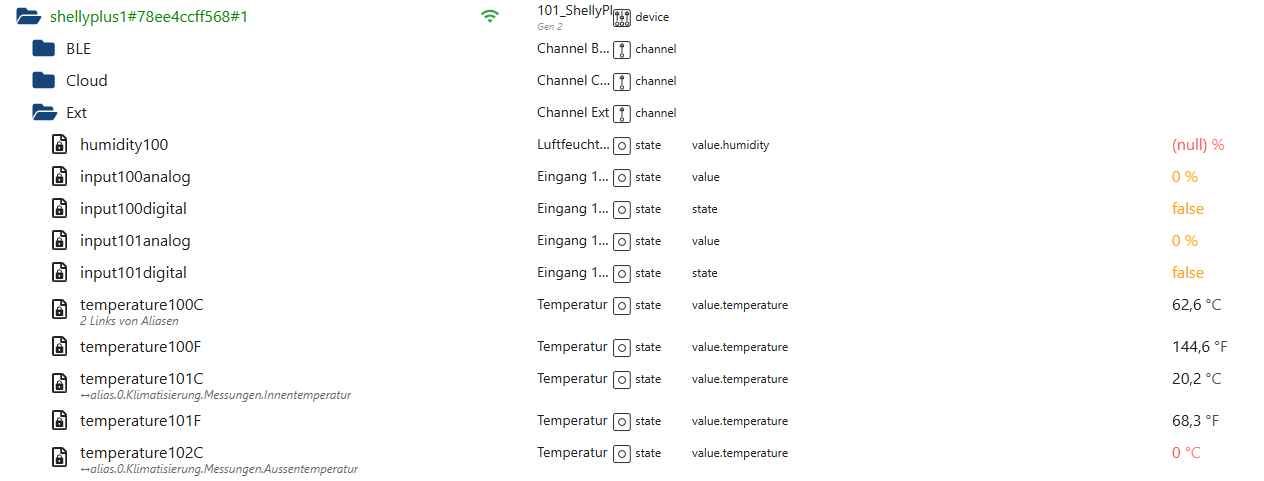
                      Clipboard01.jpg

                      Clipboard02.jpg

                      Clipboard03.jpg

                      Clipboard05.jpg

                      Protokoll silly


                      shelly.0
                      2025-05-29 07:46:49.662 debug [onStateChange] "shelly.0.shellyplusplugs#e465b8b35bdc#1.Relay0.LimitCurrent" state changed: {"val":0,"ack":false,"ts":1748497609654,"q":0,"c":"script.js.common.DpRefresh","from":"system.adapter.javascript.0","user":"system.user.admin","lc":1748366076244} - forwarding to objectHelper

                      shelly.0
                      2025-05-29 07:46:49.661 silly States user redis pmessage shelly.0.*/shelly.0.shellyplusplugs#e465b8b35bdc#1.Relay0.LimitCurrent:{"val":0,"ack":false,"ts":1748497609654,"q":0,"c":"script.js.common.DpRefresh","from":"system.adapter.javascript.0","user":"system.user.admin","lc":1748366076244}

                      shelly.0
                      2025-05-29 07:46:44.041 debug [onStateChange] "shelly.0.shellypro0110pm#8813bfe0db54#1.Light0.Brightness" state changed: {"val":0,"ack":false,"ts":1748497604035,"q":0,"c":"script.js.common.Photovoltaik.PvAblaufsteuerung","from":"system.adapter.javascript.0","user":"system.user.admin","lc":1748462232668} - forwarding to objectHelper

                      shelly.0
                      2025-05-29 07:46:44.040 silly States user redis pmessage shelly.0.*/shelly.0.shellypro0110pm#8813bfe0db54#1.Light0.Brightness:{"val":0,"ack":false,"ts":1748497604035,"q":0,"c":"script.js.common.Photovoltaik.PvAblaufsteuerung","from":"system.adapter.javascript.0","user":"system.user.admin","lc":1748462232668}

                      shelly.0
                      2025-05-29 07:46:44.038 debug [onStateChange] "shelly.0.shellypro0110pm#8813bfe0db54#1.Light0.Switch" state changed: {"val":false,"ack":false,"ts":1748497604035,"q":0,"c":"script.js.common.Photovoltaik.PvAblaufsteuerung","from":"system.adapter.javascript.0","user":"system.user.admin","lc":1748462232543} - forwarding to objectHelper

                      shelly.0
                      2025-05-29 07:46:44.038 silly States user redis pmessage shelly.0.*/shelly.0.shellypro0110pm#8813bfe0db54#1.Light0.Switch:{"val":false,"ack":false,"ts":1748497604035,"q":0,"c":"script.js.common.Photovoltaik.PvAblaufsteuerung","from":"system.adapter.javascript.0","user":"system.user.admin","lc":1748462232543}

                      shelly.0
                      2025-05-29 07:46:42.005 debug [deviceStatusUpdate] shellyplus1#78ee4ccff568#1: true

                      shelly.0
                      2025-05-29 07:46:42.001 debug [onlineCheck] Checking shellyplus1#78ee4ccff568#1 on 192.168.0.101:80

                      shelly.0
                      2025-05-29 07:46:42.001 debug [deviceStatusUpdate] shellyplusplugs#e465b8b35bdc#1: true

                      shelly.0
                      2025-05-29 07:46:41.997 debug [deviceStatusUpdate] shellypro0110pm#8813bfe0db54#1: true

                      shelly.0
                      2025-05-29 07:46:41.997 debug [onlineCheck] Checking shellyplusplugs#e465b8b35bdc#1 on 192.168.0.105:80

                      shelly.0
                      2025-05-29 07:46:41.995 debug [onlineCheck] Checking shellypro0110pm#8813bfe0db54#1 on 192.168.0.102:80

                      iob diag


                      ========== Start marking the full check here ===========

                      Script v.2025-03-08
                      
                      *** BASE SYSTEM ***
                       Static hostname: raspberrypi
                             Icon name: computer
                      Operating System: Debian GNU/Linux 12 (bookworm)
                                Kernel: Linux 6.12.25+rpt-rpi-2712
                          Architecture: arm64
                      OS is similar to:
                      
                      Model           : Raspberry Pi 5 Model B Rev 1.1
                      Docker          : false
                      Virtualization  : none
                      Kernel          : aarch64
                      Userland        : 64 bit
                      
                      Systemuptime and Load:
                       07:57:26 up 1 day, 18:23,  2 users,  load average: 0.07, 0.02, 0.00
                      CPU threads: 4
                      
                      
                      *** LIFE CYCLE STATUS ***
                      Operating System is the current Debian stable version codenamed 'bookworm'!
                      
                      *** RASPBERRY THROTTLING ***
                      Current issues:
                      No throttling issues detected.
                      
                      Previously detected issues:
                      No throttling issues detected.
                      
                      *** TIME AND TIMEZONES ***
                                     Local time: Thu 2025-05-29 07:57:26 CEST
                                 Universal time: Thu 2025-05-29 05:57:26 UTC
                                       RTC time: Thu 2025-05-29 05:57:26
                                      Time zone: Europe/Vienna (CEST, +0200)
                      System clock synchronized: yes
                                    NTP service: active
                                RTC in local TZ: no
                      
                      *** Users and Groups ***
                      User that called 'iob diag':
                      pi
                      HOME=/home/pi
                      GROUPS=pi adm dialout cdrom sudo audio video plugdev games users input render netdev gpio i2c spi iobroker
                      
                      User that is running 'js-controller':
                      iobroker
                      HOME=/home/iobroker
                      GROUPS=iobroker tty dialout audio video plugdev bluetooth gpio i2c
                      
                      *** DISPLAY-SERVER SETUP ***
                      Display-Server: false
                      Desktop:
                      Terminal:       tty
                      
                      *** MEMORY ***
                                     total        used        free      shared  buff/cache   available
                      Mem:             17G        2.0G         13G        7.6M        1.4G         14G
                      Swap:           536M          0B        536M
                      Total:           17G        2.0G         14G
                      
                      Active iob-Instances:   14
                      
                              16219 M total memory
                               1941 M used memory
                               1769 M active memory
                               1048 M inactive memory
                              13054 M free memory
                                132 M buffer memory
                               1213 M swap cache
                                511 M total swap
                                  0 M used swap
                                511 M free swap
                      
                      *** top - Table Of Processes  ***
                      top - 07:57:27 up 1 day, 18:23,  2 users,  load average: 0.07, 0.02, 0.00
                      Tasks: 202 total,   1 running, 201 sleeping,   0 stopped,   0 zombie
                      %Cpu(s):  0.0 us,  0.0 sy,  0.0 ni,100.0 id,  0.0 wa,  0.0 hi,  0.0 si,  0.0 st
                      MiB Mem :  16219.7 total,  13054.7 free,   1941.5 used,   1345.5 buff/cache
                      MiB Swap:    512.0 total,    512.0 free,      0.0 used.  14278.1 avail Mem
                      
                      *** FAILED SERVICES ***
                      
                        UNIT LOAD ACTIVE SUB DESCRIPTION
                      0 loaded units listed.
                      
                      
                      *** DMESG CRITICAL ERRORS ***
                      No critical errors detected
                      
                      *** FILESYSTEM ***
                      Filesystem     Type      Size  Used Avail Use% Mounted on
                      udev           devtmpfs  7.9G     0  7.9G   0% /dev
                      tmpfs          tmpfs     1.6G  7.3M  1.6G   1% /run
                      /dev/mmcblk0p2 ext4       15G   12G  2.0G  86% /
                      tmpfs          tmpfs     8.0G     0  8.0G   0% /dev/shm
                      tmpfs          tmpfs     5.0M   48K  5.0M   1% /run/lock
                      /dev/mmcblk0p1 vfat      510M   56M  455M  11% /boot/firmware
                      tmpfs          tmpfs     1.6G     0  1.6G   0% /run/user/1000
                      
                      Messages concerning ext4 filesystem in dmesg:
                      
                      Show mounted filesystems:
                      TARGET           SOURCE         FSTYPE OPTIONS
                      /                /dev/mmcblk0p2 ext4   rw,noatime
                      `-/boot/firmware /dev/mmcblk0p1 vfat   rw,relatime,fmask=0022,dmask=0022,codepage=437,iocharset=ascii,shortname=mixed,errors=remount-ro
                      
                      Files in neuralgic directories:
                      
                      /var:
                      2.3G    /var/
                      756M    /var/log
                      755M    /var/log/journal/ce49b5c207f74de48fc362bf23ca73ba
                      755M    /var/log/journal
                      551M    /var/lib
                      
                      Archived and active journals take up 754.7M in the file system.
                      
                      /opt/iobroker/backups:
                      167M    /opt/iobroker/backups/
                      
                      /opt/iobroker/iobroker-data:
                      1.2G    /opt/iobroker/iobroker-data/
                      1.1G    /opt/iobroker/iobroker-data/files
                      617M    /opt/iobroker/iobroker-data/files/javascript.admin
                      560M    /opt/iobroker/iobroker-data/files/javascript.admin/static
                      558M    /opt/iobroker/iobroker-data/files/javascript.admin/static/js
                      
                      The five largest files in iobroker-data are:
                      26M     /opt/iobroker/iobroker-data/files/echarts/static/js/main.41cee985.js.map
                      26M     /opt/iobroker/iobroker-data/files/echarts.admin/chart/static/js/main.41cee985.js.map
                      24M     /opt/iobroker/iobroker-data/files/vis-2/static/js/main.f305bc29.js.map
                      24M     /opt/iobroker/iobroker-data/files/vis-2/static/js/main.8e80ccb0.js.map
                      24M     /opt/iobroker/iobroker-data/files/vis-2/customWidgets.js.map
                      
                      USB-Devices by-id:
                      USB-Sticks -  Avoid direct links to /dev/tty* in your adapter setups, please always prefer the links 'by-id':
                      
                      No Devices found 'by-id'
                      
                      Zigbee Network Settings on your coordinator/in nvbackup are:
                      
                      zigbee.X
                      Extended Pan ID:
                      *** MASKED ***
                      Pan ID:
                      *** MASKED ***
                      Channel:
                      *** MASKED ***
                      Network Key:
                      *** MASKED ***
                      
                      To unmask the settings run 'iob diag --unmask'
                      
                      
                      *** NodeJS-Installation ***
                      
                      /usr/bin/nodejs         v20.19.2
                      /usr/bin/node           v20.19.2
                      /usr/bin/npm            10.8.2
                      /usr/bin/npx            10.8.2
                      /usr/bin/corepack       0.31.0
                      
                      nodejs:
                        Installed: 20.19.2-1nodesource1
                        Candidate: 20.19.2-1nodesource1
                        Version table:
                       *** 20.19.2-1nodesource1 1001
                              500 https://deb.nodesource.com/node_20.x nodistro/main arm64 Packages
                              100 /var/lib/dpkg/status
                           20.19.1-1nodesource1 1001
                              500 https://deb.nodesource.com/node_20.x nodistro/main arm64 Packages
                           20.19.0-1nodesource1 1001
                              500 https://deb.nodesource.com/node_20.x nodistro/main arm64 Packages
                           20.18.3-1nodesource1 1001
                              500 https://deb.nodesource.com/node_20.x nodistro/main arm64 Packages
                           20.18.2-1nodesource1 1001
                              500 https://deb.nodesource.com/node_20.x nodistro/main arm64 Packages
                           20.18.1-1nodesource1 1001
                              500 https://deb.nodesource.com/node_20.x nodistro/main arm64 Packages
                           20.18.0-1nodesource1 1001
                              500 https://deb.nodesource.com/node_20.x nodistro/main arm64 Packages
                           20.17.0-1nodesource1 1001
                              500 https://deb.nodesource.com/node_20.x nodistro/main arm64 Packages
                           20.16.0-1nodesource1 1001
                              500 https://deb.nodesource.com/node_20.x nodistro/main arm64 Packages
                           20.15.1-1nodesource1 1001
                              500 https://deb.nodesource.com/node_20.x nodistro/main arm64 Packages
                           20.15.0-1nodesource1 1001
                              500 https://deb.nodesource.com/node_20.x nodistro/main arm64 Packages
                           20.14.0-1nodesource1 1001
                              500 https://deb.nodesource.com/node_20.x nodistro/main arm64 Packages
                           20.13.1-1nodesource1 1001
                              500 https://deb.nodesource.com/node_20.x nodistro/main arm64 Packages
                           20.13.0-1nodesource1 1001
                              500 https://deb.nodesource.com/node_20.x nodistro/main arm64 Packages
                           20.12.2-1nodesource1 1001
                              500 https://deb.nodesource.com/node_20.x nodistro/main arm64 Packages
                           20.12.1-1nodesource1 1001
                              500 https://deb.nodesource.com/node_20.x nodistro/main arm64 Packages
                           20.12.0-1nodesource1 1001
                              500 https://deb.nodesource.com/node_20.x nodistro/main arm64 Packages
                           20.11.1-1nodesource1 1001
                              500 https://deb.nodesource.com/node_20.x nodistro/main arm64 Packages
                           20.11.0-1nodesource1 1001
                              500 https://deb.nodesource.com/node_20.x nodistro/main arm64 Packages
                           20.10.0-1nodesource1 1001
                              500 https://deb.nodesource.com/node_20.x nodistro/main arm64 Packages
                           20.9.0-1nodesource1 1001
                              500 https://deb.nodesource.com/node_20.x nodistro/main arm64 Packages
                           20.8.1-1nodesource1 1001
                              500 https://deb.nodesource.com/node_20.x nodistro/main arm64 Packages
                           20.8.0-1nodesource1 1001
                              500 https://deb.nodesource.com/node_20.x nodistro/main arm64 Packages
                           20.7.0-1nodesource1 1001
                              500 https://deb.nodesource.com/node_20.x nodistro/main arm64 Packages
                           20.6.1-1nodesource1 1001
                              500 https://deb.nodesource.com/node_20.x nodistro/main arm64 Packages
                           20.6.0-1nodesource1 1001
                              500 https://deb.nodesource.com/node_20.x nodistro/main arm64 Packages
                           20.5.1-1nodesource1 1001
                              500 https://deb.nodesource.com/node_20.x nodistro/main arm64 Packages
                           20.5.0-1nodesource1 1001
                              500 https://deb.nodesource.com/node_20.x nodistro/main arm64 Packages
                           20.4.0-1nodesource1 1001
                              500 https://deb.nodesource.com/node_20.x nodistro/main arm64 Packages
                           20.3.1-1nodesource1 1001
                              500 https://deb.nodesource.com/node_20.x nodistro/main arm64 Packages
                           20.3.0-1nodesource1 1001
                              500 https://deb.nodesource.com/node_20.x nodistro/main arm64 Packages
                           20.2.0-1nodesource1 1001
                              500 https://deb.nodesource.com/node_20.x nodistro/main arm64 Packages
                           20.1.0-1nodesource1 1001
                              500 https://deb.nodesource.com/node_20.x nodistro/main arm64 Packages
                           20.0.0-1nodesource1 1001
                              500 https://deb.nodesource.com/node_20.x nodistro/main arm64 Packages
                           18.19.0+dfsg-6~deb12u2 500
                              500 http://deb.debian.org/debian bookworm/main arm64 Packages
                           18.19.0+dfsg-6~deb12u1 500
                              500 http://deb.debian.org/debian-security bookworm-security/main arm64 Packages
                      
                      Temp directories causing deletion problem: 0
                      No problems detected
                      
                      Errors in npm tree: 0
                      No problems detected
                      
                      *** ioBroker-Installation ***
                      
                      ioBroker Status
                      iobroker is running on this host.
                      
                      
                      Objects type: jsonl
                      States  type: jsonl
                      
                      Hosts:
                      raspberrypi         raspberrypi (version: 7.0.6, hostname: raspberrypi   , alive, uptime: 152603)
                      
                      Core adapters versions
                      js-controller:  7.0.6
                      admin:          7.6.17
                      javascript:     8.8.3
                      
                      nodejs modules from github:     0
                      
                      Adapter State
                      + system.adapter.admin.0                  : admin                 : raspberrypi                              -  enabled, port: 8081, bind: 0.0.0.0, run as: admin
                      + system.adapter.backitup.0               : backitup              : raspberrypi                              -  enabled
                      + system.adapter.echarts.0                : echarts               : raspberrypi                              -  enabled
                      + system.adapter.email.0                  : email                 : raspberrypi                              -  enabled
                        system.adapter.emporia.0                : emporia               : raspberrypi                              - disabled
                      + system.adapter.javascript.0             : javascript            : raspberrypi                              -  enabled
                      + system.adapter.javascript.1             : javascript            : raspberrypi                              -  enabled
                      + system.adapter.kecontact.0              : kecontact             : raspberrypi                              -  enabled
                      + system.adapter.modbus.0                 : modbus                : raspberrypi                              -  enabled
                        system.adapter.modbus.1                 : modbus                : raspberrypi                              - disabled
                      + system.adapter.modbus.2                 : modbus                : raspberrypi                              -  enabled
                      + system.adapter.shelly.0                 : shelly                : raspberrypi                              -  enabled, port: 1882, bind: 192.168.0.100
                      + system.adapter.sql.0                    : sql                   : raspberrypi                              -  enabled, port: 3306
                        system.adapter.vis-2-widgets-energy.0   : vis-2-widgets-energy  : raspberrypi                              - disabled
                        system.adapter.vis-2-widgets-gauges.0   : vis-2-widgets-gauges  : raspberrypi                              -  enabled
                        system.adapter.vis-2-widgets-inventwo.0 : vis-2-widgets-inventwo: raspberrypi                              -  enabled
                        system.adapter.vis-2-widgets-material.0 : vis-2-widgets-material: raspberrypi                              - disabled
                        system.adapter.vis-2-widgets-weather-and-heating.0: vis-2-widgets-weather-and-heating: raspberrypi                              - disabled
                      + system.adapter.vis-2.0                  : vis-2                 : raspberrypi                              -  enabled
                      + system.adapter.web.0                    : web                   : raspberrypi                              -  enabled, port: 8082, bind: 0.0.0.0, run as: admin
                      
                      + instance is alive
                      
                      Enabled adapters with bindings
                      + system.adapter.admin.0                  : admin                 : raspberrypi                              -  enabled, port: 8081, bind: 0.0.0.0, run as: admin
                      + system.adapter.shelly.0                 : shelly                : raspberrypi                              -  enabled, port: 1882, bind: 192.168.0.100
                      + system.adapter.sql.0                    : sql                   : raspberrypi                              -  enabled, port: 3306
                      + system.adapter.web.0                    : web                   : raspberrypi                              -  enabled, port: 8082, bind: 0.0.0.0, run as: admin
                      
                      ioBroker-Repositories
                      ┌─────────┬──────────┬──────────────────────────────────────────────────┬──────────────┐
                      │ (index) │ name     │ url                                              │ auto upgrade │
                      ├─────────┼──────────┼──────────────────────────────────────────────────┼──────────────┤
                      │ 0       │ 'stable' │ 'http://download.iobroker.net/sources-dist.json' │ true         │
                      └─────────┴──────────┴──────────────────────────────────────────────────┴──────────────┘
                      
                      Active repo(s): stable
                      Upgrade policy: minor
                      
                      Installed ioBroker-Adapters
                      Used repository: stable
                      Adapter    "admin"        : 7.6.17   , installed 7.6.17
                      Adapter    "backitup"     : 3.2.2    , installed 3.2.2
                      Adapter    "echarts"      : 1.9.2    , installed 1.9.2
                      Adapter    "email"        : 2.0.4    , installed 2.0.4
                      Adapter    "emporia"      : 0.0.12   , installed 0.1.0
                      Adapter    "javascript"   : 8.8.3    , installed 8.8.3
                      Controller "js-controller": 7.0.6    , installed 7.0.6
                      Adapter    "kecontact"    : 3.1.0    , installed 3.1.0
                      Adapter    "modbus"       : 6.3.2    , installed 6.3.2
                      Adapter    "shelly"       : 9.5.1    , installed 9.5.1-alpha.8 [Updatable]
                      Adapter    "socketio"     : 6.7.1    , installed 6.7.1
                      Adapter    "sql"          : 3.0.1    , installed 3.0.1
                      Adapter    "vis-2"        : 2.9.64   , installed 2.9.64
                      Adapter    "vis-2-widgets-energy": 1.0.2, installed 1.0.2
                      Adapter    "vis-2-widgets-gauges": 1.1.0, installed 1.1.0
                      Adapter    "vis-2-widgets-inventwo": 0.1.11, installed 0.1.11
                      Adapter    "vis-2-widgets-material": 1.4.10, installed 1.4.10
                      Adapter    "vis-2-widgets-weather-and-heating": 0.10.4, installed 0.10.4
                      Adapter    "web"          : 7.0.8    , installed 7.0.8
                      Adapter    "ws"           : 2.6.2    , installed 2.6.2
                      
                      Objects and States
                      Please stand by - This may take a while
                      Objects:        1930
                      States:         1589
                      
                      *** OS-Repositories and Updates ***
                      Hit:1 http://deb.debian.org/debian bookworm InRelease
                      Hit:2 http://deb.debian.org/debian-security bookworm-security InRelease
                      Hit:3 http://deb.debian.org/debian bookworm-updates InRelease
                      Hit:4 http://archive.raspberrypi.com/debian bookworm InRelease
                      Hit:5 https://deb.nodesource.com/node_20.x nodistro InRelease
                      Reading package lists...
                      Pending Updates: 0
                      
                      *** Listening Ports ***
                      Active Internet connections (only servers)
                      Proto Recv-Q Send-Q Local Address           Foreign Address         State       User       Inode      PID/Program name
                      tcp        0      0 0.0.0.0:3306            0.0.0.0:*               LISTEN      106        6526       825/mariadbd
                      tcp        0      0 0.0.0.0:139             0.0.0.0:*               LISTEN      0          6699       933/smbd
                      tcp        0      0 0.0.0.0:22              0.0.0.0:*               LISTEN      0          821        765/sshd: /usr/sbin
                      tcp        0      0 0.0.0.0:445             0.0.0.0:*               LISTEN      0          6698       933/smbd
                      tcp        0      0 127.0.0.1:9001          0.0.0.0:*               LISTEN      1001       6712       745/iobroker.js-con
                      tcp        0      0 127.0.0.1:9000          0.0.0.0:*               LISTEN      1001       3003       745/iobroker.js-con
                      tcp        0      0 192.168.0.100:1882      0.0.0.0:*               LISTEN      1001       624470     11471/io.shelly.0
                      tcp6       0      0 :::139                  :::*                    LISTEN      0          6697       933/smbd
                      tcp6       0      0 :::22                   :::*                    LISTEN      0          823        765/sshd: /usr/sbin
                      tcp6       0      0 :::445                  :::*                    LISTEN      0          6696       933/smbd
                      tcp6       0      0 :::8081                 :::*                    LISTEN      1001       6802       1076/io.admin.0
                      tcp6       0      0 :::8082                 :::*                    LISTEN      1001       7661       1345/io.web.0
                      udp        0      0 192.168.0.255:137       0.0.0.0:*                           0          6587       921/nmbd
                      udp        0      0 192.168.0.100:137       0.0.0.0:*                           0          6586       921/nmbd
                      udp        0      0 0.0.0.0:137             0.0.0.0:*                           0          6574       921/nmbd
                      udp        0      0 192.168.0.255:138       0.0.0.0:*                           0          6589       921/nmbd
                      udp        0      0 192.168.0.100:138       0.0.0.0:*                           0          6588       921/nmbd
                      udp        0      0 0.0.0.0:138             0.0.0.0:*                           0          6575       921/nmbd
                      udp        0      0 0.0.0.0:42923           0.0.0.0:*                           104        5683       598/avahi-daemon: r
                      udp        0      0 0.0.0.0:5353            0.0.0.0:*                           104        5681       598/avahi-daemon: r
                      udp        0      0 0.0.0.0:46915           0.0.0.0:*                           1001       7045       1267/io.kecontact.0
                      udp        0      0 0.0.0.0:7090            0.0.0.0:*                           1001       7043       1267/io.kecontact.0
                      udp        0      0 0.0.0.0:7092            0.0.0.0:*                           1001       7044       1267/io.kecontact.0
                      udp6       0      0 fe80::7de6:a76b:229:546 :::*                                0          964        717/NetworkManager
                      udp6       0      0 :::53247                :::*                                104        5684       598/avahi-daemon: r
                      udp6       0      0 :::5353                 :::*                                104        5682       598/avahi-daemon: r
                      
                      *** Log File - Last 25 Lines ***
                      
                      2025-05-29 07:57:19.710  - debug: shelly.0 (11471) [onStateChange] "shelly.0.shellyplusplugs#e465b8b35bdc#1.Relay0.LimitCurrent" state changed: {"val":0,"ack":false,"ts":1748498239661,"q":0,"c":"script.js.common.DpRefresh","from":"system.adapter.javascript.0","user":"system.user.admin","lc":1748366076244} - forwarding to objectHelper
                      2025-05-29 07:57:24.056  - silly: shelly.0 (11471) States user redis pmessage shelly.0.*/shelly.0.shellypro0110pm#8813bfe0db54#1.Light0.Switch:{"val":false,"ack":false,"ts":1748498244053,"q":0,"c":"script.js.common.Photovoltaik.PvAblaufsteuerung","from":"system.adapter.javascript.0","user":"system.user.admin","lc":1748462232543}
                      2025-05-29 07:57:24.056  - debug: shelly.0 (11471) [onStateChange] "shelly.0.shellypro0110pm#8813bfe0db54#1.Light0.Switch" state changed: {"val":false,"ack":false,"ts":1748498244053,"q":0,"c":"script.js.common.Photovoltaik.PvAblaufsteuerung","from":"system.adapter.javascript.0","user":"system.user.admin","lc":1748462232543} - forwarding to objectHelper
                      2025-05-29 07:57:24.058  - silly: shelly.0 (11471) States user redis pmessage shelly.0.*/shelly.0.shellypro0110pm#8813bfe0db54#1.Light0.Brightness:{"val":0,"ack":false,"ts":1748498244053,"q":0,"c":"script.js.common.Photovoltaik.PvAblaufsteuerung","from":"system.adapter.javascript.0","user":"system.user.admin","lc":1748462232668}
                      2025-05-29 07:57:24.058  - debug: shelly.0 (11471) [onStateChange] "shelly.0.shellypro0110pm#8813bfe0db54#1.Light0.Brightness" state changed: {"val":0,"ack":false,"ts":1748498244053,"q":0,"c":"script.js.common.Photovoltaik.PvAblaufsteuerung","from":"system.adapter.javascript.0","user":"system.user.admin","lc":1748462232668} - forwarding to objectHelper
                      2025-05-29 07:57:29.666  - silly: shelly.0 (11471) States user redis pmessage shelly.0.*/shelly.0.shellyplusplugs#e465b8b35bdc#1.Relay0.LimitCurrent:{"val":0,"ack":false,"ts":1748498249662,"q":0,"c":"script.js.common.DpRefresh","from":"system.adapter.javascript.0","user":"system.user.admin","lc":1748366076244}
                      2025-05-29 07:57:29.667  - debug: shelly.0 (11471) [onStateChange] "shelly.0.shellyplusplugs#e465b8b35bdc#1.Relay0.LimitCurrent" state changed: {"val":0,"ack":false,"ts":1748498249662,"q":0,"c":"script.js.common.DpRefresh","from":"system.adapter.javascript.0","user":"system.user.admin","lc":1748366076244} - forwarding to objectHelper
                      2025-05-29 07:57:34.055  - silly: shelly.0 (11471) States user redis pmessage shelly.0.*/shelly.0.shellypro0110pm#8813bfe0db54#1.Light0.Switch:{"val":false,"ack":false,"ts":1748498254053,"q":0,"c":"script.js.common.Photovoltaik.PvAblaufsteuerung","from":"system.adapter.javascript.0","user":"system.user.admin","lc":1748462232543}
                      2025-05-29 07:57:34.056  - debug: shelly.0 (11471) [onStateChange] "shelly.0.shellypro0110pm#8813bfe0db54#1.Light0.Switch" state changed: {"val":false,"ack":false,"ts":1748498254053,"q":0,"c":"script.js.common.Photovoltaik.PvAblaufsteuerung","from":"system.adapter.javascript.0","user":"system.user.admin","lc":1748462232543} - forwarding to objectHelper
                      2025-05-29 07:57:34.056  - silly: shelly.0 (11471) States user redis pmessage shelly.0.*/shelly.0.shellypro0110pm#8813bfe0db54#1.Light0.Brightness:{"val":0,"ack":false,"ts":1748498254053,"q":0,"c":"script.js.common.Photovoltaik.PvAblaufsteuerung","from":"system.adapter.javascript.0","user":"system.user.admin","lc":1748462232668}
                      2025-05-29 07:57:34.057  - debug: shelly.0 (11471) [onStateChange] "shelly.0.shellypro0110pm#8813bfe0db54#1.Light0.Brightness" state changed: {"val":0,"ack":false,"ts":1748498254053,"q":0,"c":"script.js.common.Photovoltaik.PvAblaufsteuerung","from":"system.adapter.javascript.0","user":"system.user.admin","lc":1748462232668} - forwarding to objectHelper
                      2025-05-29 07:57:39.666  - silly: shelly.0 (11471) States user redis pmessage shelly.0.*/shelly.0.shellyplusplugs#e465b8b35bdc#1.Relay0.LimitCurrent:{"val":0,"ack":false,"ts":1748498259661,"q":0,"c":"script.js.common.DpRefresh","from":"system.adapter.javascript.0","user":"system.user.admin","lc":1748366076244}
                      2025-05-29 07:57:39.666  - debug: shelly.0 (11471) [onStateChange] "shelly.0.shellyplusplugs#e465b8b35bdc#1.Relay0.LimitCurrent" state changed: {"val":0,"ack":false,"ts":1748498259661,"q":0,"c":"script.js.common.DpRefresh","from":"system.adapter.javascript.0","user":"system.user.admin","lc":1748366076244} - forwarding to objectHelper
                      2025-05-29 07:57:42.151  - debug: shelly.0 (11471) [onlineCheck] Checking shellypro0110pm#8813bfe0db54#1 on 192.168.0.102:80
                      2025-05-29 07:57:42.153  - debug: shelly.0 (11471) [onlineCheck] Checking shellyplusplugs#e465b8b35bdc#1 on 192.168.0.105:80
                      2025-05-29 07:57:42.153  - debug: shelly.0 (11471) [deviceStatusUpdate] shellypro0110pm#8813bfe0db54#1: true
                      2025-05-29 07:57:42.157  - debug: shelly.0 (11471) [deviceStatusUpdate] shellyplusplugs#e465b8b35bdc#1: true
                      2025-05-29 07:57:42.157  - debug: shelly.0 (11471) [onlineCheck] Checking shellyplus1#78ee4ccff568#1 on 192.168.0.101:80
                      2025-05-29 07:57:42.170  - debug: shelly.0 (11471) [deviceStatusUpdate] shellyplus1#78ee4ccff568#1: true
                      2025-05-29 07:57:44.057  - silly: shelly.0 (11471) States user redis pmessage shelly.0.*/shelly.0.shellypro0110pm#8813bfe0db54#1.Light0.Switch:{"val":false,"ack":false,"ts":1748498264054,"q":0,"c":"script.js.common.Photovoltaik.PvAblaufsteuerung","from":"system.adapter.javascript.0","user":"system.user.admin","lc":1748462232543}
                      2025-05-29 07:57:44.058  - debug: shelly.0 (11471) [onStateChange] "shelly.0.shellypro0110pm#8813bfe0db54#1.Light0.Switch" state changed: {"val":false,"ack":false,"ts":1748498264054,"q":0,"c":"script.js.common.Photovoltaik.PvAblaufsteuerung","from":"system.adapter.javascript.0","user":"system.user.admin","lc":1748462232543} - forwarding to objectHelper
                      2025-05-29 07:57:44.065  - silly: shelly.0 (11471) States user redis pmessage shelly.0.*/shelly.0.shellypro0110pm#8813bfe0db54#1.Light0.Brightness:{"val":0,"ack":false,"ts":1748498264054,"q":0,"c":"script.js.common.Photovoltaik.PvAblaufsteuerung","from":"system.adapter.javascript.0","user":"system.user.admin","lc":1748462232668}
                      2025-05-29 07:57:44.066  - debug: shelly.0 (11471) [onStateChange] "shelly.0.shellypro0110pm#8813bfe0db54#1.Light0.Brightness" state changed: {"val":0,"ack":false,"ts":1748498264054,"q":0,"c":"script.js.common.Photovoltaik.PvAblaufsteuerung","from":"system.adapter.javascript.0","user":"system.user.admin","lc":1748462232668} - forwarding to objectHelper
                      2025-05-29 07:57:49.674  - silly: shelly.0 (11471) States user redis pmessage shelly.0.*/shelly.0.shellyplusplugs#e465b8b35bdc#1.Relay0.LimitCurrent:{"val":0,"ack":false,"ts":1748498269662,"q":0,"c":"script.js.common.DpRefresh","from":"system.adapter.javascript.0","user":"system.user.admin","lc":1748366076244}
                      2025-05-29 07:57:49.674  - debug: shelly.0 (11471) [onStateChange] "shelly.0.shellyplusplugs#e465b8b35bdc#1.Relay0.LimitCurrent" state changed: {"val":0,"ack":false,"ts":1748498269662,"q":0,"c":"script.js.common.DpRefresh","from":"system.adapter.javascript.0","user":"system.user.admin","lc":1748366076244} - forwarding to objectHelper


                      ============ Mark until here for C&P =============

                      iob diag has finished.

                      Was kann da die Ursache sein? Vorweg danke für dein Schaffen! Gruß, fuzzy

                      mcm1957M Online
                      mcm1957M Online
                      mcm1957
                      schrieb am zuletzt editiert von
                      #67

                      @fuzzy1955 said in Test Adapter shelly - ALPHA Versionen:

                      An sich ist die 9.5.1 seit kurzem bereits im Stabel, alle alphas sind damit outdated. Aber das tut mal nichts zur Sache.

                      Was ich nicht verstehe ist - du schreibst:

                      Sowohl das manuelle Schalten über die Web-Adresse des Shelly oder über die Objekte im IOB, als auch das Steuern via JavaScript im IOB laufen nicht mehr.

                      Lese ich das richtig? Auch ein steuern des Shelly direkt über die Web-Addresse des Shellys funktioniert nicht? Bei dieser Aktion ist ja der ioBroker Adapter ger nicht involviert. Was bedeutet außerdem "laufen nicht mehr."? Fehlermeldung? Welches Fehlverhalten? etc.

                      Triott das Problem bei einem Shelly auf (Modell?) oder bei mehreren? Alle gleicher Typ?

                      Im Moment klingt das für mich eher nach einen Hardwareproblem eines Shellies, ev. noch nach einem Netzwerkproblem (mit viel geringerer Wahrscheinlichkeit). Da Shelly derzeit eine neue Firmware ausrollt könnte bei einem Update auch was schief gegangen sein.

                      In jedem Fall macht es erst Sinn nach etwas im Adapter zu suchen wenn der Shelly via eigenem Webinterface und App normal funktioniert.

                      Entwicklung u Betreuung: envertech-pv, hoymiles-ms, ns-client, pid, snmp Adapter;
                      Support Repositoryverwaltung.

                      Wer Danke sagen will, kann nen Kaffee spendieren: https://paypal.me/mcm1957atiobroker

                      LESEN - gute Forenbeitrage

                      fuzzy1955F 1 Antwort Letzte Antwort
                      0
                      • mcm1957M mcm1957

                        @fuzzy1955 said in Test Adapter shelly - ALPHA Versionen:

                        An sich ist die 9.5.1 seit kurzem bereits im Stabel, alle alphas sind damit outdated. Aber das tut mal nichts zur Sache.

                        Was ich nicht verstehe ist - du schreibst:

                        Sowohl das manuelle Schalten über die Web-Adresse des Shelly oder über die Objekte im IOB, als auch das Steuern via JavaScript im IOB laufen nicht mehr.

                        Lese ich das richtig? Auch ein steuern des Shelly direkt über die Web-Addresse des Shellys funktioniert nicht? Bei dieser Aktion ist ja der ioBroker Adapter ger nicht involviert. Was bedeutet außerdem "laufen nicht mehr."? Fehlermeldung? Welches Fehlverhalten? etc.

                        Triott das Problem bei einem Shelly auf (Modell?) oder bei mehreren? Alle gleicher Typ?

                        Im Moment klingt das für mich eher nach einen Hardwareproblem eines Shellies, ev. noch nach einem Netzwerkproblem (mit viel geringerer Wahrscheinlichkeit). Da Shelly derzeit eine neue Firmware ausrollt könnte bei einem Update auch was schief gegangen sein.

                        In jedem Fall macht es erst Sinn nach etwas im Adapter zu suchen wenn der Shelly via eigenem Webinterface und App normal funktioniert.

                        fuzzy1955F Online
                        fuzzy1955F Online
                        fuzzy1955
                        schrieb am zuletzt editiert von
                        #68

                        @mcm1957 sagte in Test Adapter shelly - ALPHA Versionen:

                        Sowohl das manuelle Schalten über die Web-Adresse des Shelly

                        Pardon, das manuelle Schalten über die Web-Adresse hat schon funktioniert.

                        Inzwischen habe ich die Ursache gefunden. Es lag daran, dass der Raspi nicht auf die IP-Adresse der Shellies zugreifen konnte. Der Port 1882 war in der Firewall nicht auf die Raspi-IP eingetragen.

                        Ich muss wohl noch reichlich dazulernen. Danke jedenfalls!

                        Raspberry PI5 mit Linux Debian 13 (Trixie), IoBroker v7.7.19, VIS-2, MariaDB (MySQL)
                        Shellies: 1G4, 1MiniG3, PlusI4DC, PlusPlugS, Pro0110PM. Modbus: Waveshare Relay 8 Channels, Waveshare RS485-TO-ETH.
                        PV: 10 kWp Module, 2 x Deye WR SUN-10K, 2 x 10 kWh MeritSun LiFe Speicher, KEBA P30 Wallbox, Fronius Wattpilot home 11

                        mcm1957M haus-automatisierungH 2 Antworten Letzte Antwort
                        1
                        • fuzzy1955F fuzzy1955

                          @mcm1957 sagte in Test Adapter shelly - ALPHA Versionen:

                          Sowohl das manuelle Schalten über die Web-Adresse des Shelly

                          Pardon, das manuelle Schalten über die Web-Adresse hat schon funktioniert.

                          Inzwischen habe ich die Ursache gefunden. Es lag daran, dass der Raspi nicht auf die IP-Adresse der Shellies zugreifen konnte. Der Port 1882 war in der Firewall nicht auf die Raspi-IP eingetragen.

                          Ich muss wohl noch reichlich dazulernen. Danke jedenfalls!

                          mcm1957M Online
                          mcm1957M Online
                          mcm1957
                          schrieb am zuletzt editiert von
                          #69

                          @fuzzy1955
                          Danke fürs Feedback.

                          Entwicklung u Betreuung: envertech-pv, hoymiles-ms, ns-client, pid, snmp Adapter;
                          Support Repositoryverwaltung.

                          Wer Danke sagen will, kann nen Kaffee spendieren: https://paypal.me/mcm1957atiobroker

                          LESEN - gute Forenbeitrage

                          1 Antwort Letzte Antwort
                          0
                          • fuzzy1955F fuzzy1955

                            @mcm1957 sagte in Test Adapter shelly - ALPHA Versionen:

                            Sowohl das manuelle Schalten über die Web-Adresse des Shelly

                            Pardon, das manuelle Schalten über die Web-Adresse hat schon funktioniert.

                            Inzwischen habe ich die Ursache gefunden. Es lag daran, dass der Raspi nicht auf die IP-Adresse der Shellies zugreifen konnte. Der Port 1882 war in der Firewall nicht auf die Raspi-IP eingetragen.

                            Ich muss wohl noch reichlich dazulernen. Danke jedenfalls!

                            haus-automatisierungH Offline
                            haus-automatisierungH Offline
                            haus-automatisierung
                            Developer Most Active
                            schrieb am zuletzt editiert von
                            #70

                            @fuzzy1955 sagte in Test Adapter shelly - ALPHA Versionen:

                            Es lag daran, dass der Raspi nicht auf die IP-Adresse der Shellies zugreifen konnte.

                            Mh? Der Raspi öffnet den Port 1882 und der Shelly greift darauf zu. Nicht andersrum.

                            🧑‍🎓 Autor des beliebten ioBroker-Master-Kurses
                            🎥 Tutorials rund um das Thema DIY-Smart-Home: https://haus-automatisierung.com/
                            📚 Meine inoffizielle ioBroker Dokumentation

                            fuzzy1955F 1 Antwort Letzte Antwort
                            1
                            • haus-automatisierungH haus-automatisierung

                              @fuzzy1955 sagte in Test Adapter shelly - ALPHA Versionen:

                              Es lag daran, dass der Raspi nicht auf die IP-Adresse der Shellies zugreifen konnte.

                              Mh? Der Raspi öffnet den Port 1882 und der Shelly greift darauf zu. Nicht andersrum.

                              fuzzy1955F Online
                              fuzzy1955F Online
                              fuzzy1955
                              schrieb am zuletzt editiert von
                              #71

                              @haus-automatisierung sagte in Test Adapter shelly - ALPHA Versionen:

                              Der Raspi öffnet den Port 1882 und der Shelly greift darauf zu.

                              Ja, klar. Die IP des Raspi mit dem Port 1882 war nicht in dessen Linux-Firewall eingetragen.

                              Raspberry PI5 mit Linux Debian 13 (Trixie), IoBroker v7.7.19, VIS-2, MariaDB (MySQL)
                              Shellies: 1G4, 1MiniG3, PlusI4DC, PlusPlugS, Pro0110PM. Modbus: Waveshare Relay 8 Channels, Waveshare RS485-TO-ETH.
                              PV: 10 kWp Module, 2 x Deye WR SUN-10K, 2 x 10 kWh MeritSun LiFe Speicher, KEBA P30 Wallbox, Fronius Wattpilot home 11

                              1 Antwort Letzte Antwort
                              0
                              • mcm1957M mcm1957
                                Aktuelle Test Version 10.5.0-alpha.2
                                Veröffentlichungsdatum 30.11.2025
                                Github Link https://github.com/iobroker-community-adapters/ioBroker.shelly

                                Zum Thema Shelly gibt es mehrere aktive Topics. Bitte das am besten passende Topic benutzen:

                                Shelly Topics
                                Shelly BETA/LATEST Test https://forum.iobroker.net/topic/80722/test-adapter-shelly-10-1-0-latest-beta
                                Shelly STABLE Fragen https://forum.iobroker.net/topic/81297/shelly-adapter-genereller-support

                                ==============================================================================

                                Der Adapter ioBroker.shelly wird seit langer Zeit von @haus-automatisierung sehr gut betruet und weiter entwickelt. Um ihn ein wenig zu entlasten (und für anspruchsvollere Dinge freizuschaufeln) werde ich versuchen bei der Konfiguration neuer Geräte mitzuwirken.

                                Leider kann (und will) ich mir nicht alle verfügbaren Shellies kaufen wenn ich sie nicht selbst verwenden kann. Da es aus Erfahrung unrealistisch ist, dass es genug Spenden zur Finanzierung der Geräte gibt - und ich auch nicht garantieren kann und will dass ich kurzfristig auf geschenkte Geräte reagiere - werde ich hier um eure Mithilfe ersuchen.

                                Ich werde daher in diesem Topic primär um Informationen zu neuen Geräten bitten und um Feedback zu Alpha-Implementierungen bitten. Konkret in Arbeit befindliche Geräte werde ich im nächsten Kommentar nennen. Ansonsten gilt natürlich unverändert bitte bei Problemen und dem Wunsch nach Einbindung eines bestimmten Geräts ein Issue im Adapter-Repository eröffnen.

                                Changelog

                                siehe https://github.com/iobroker-community-adapters/ioBroker.shelly/blob/master/README.md#changelog

                                gelberlemmyG Offline
                                gelberlemmyG Offline
                                gelberlemmy
                                schrieb am zuletzt editiert von
                                #72

                                @mcm1957 Hallo, ich habe aktuell ein Problem mit meinem Shelly Adapter über MQTT. Ich würde jetzt tippen, dass es etwas mit der aktuellen Firmware zu tun hat. Egal welche Version vom Adapter ich nehme, bekomme ich folgende Nachrichten

                                shelly.1
                                2025-06-03 21:43:04.010	info	[MQTT] Client Close: (shellyplus1 / shellyplus1-64b7080b3d78 / shellyplus1#64b7080b3d78#1) (false)
                                
                                shelly.1
                                2025-06-03 21:42:54.016	info	[MQTT] Device with client id "shellyplus1-64b7080b3d78" connected from 192.168.171.80!
                                
                                shelly.1
                                2025-06-03 21:42:45.727	info	[MQTT] Client Close: (shellyplus1 / shellyplus1-441793a712a8 / shellyplus1#441793a712a8#1) (false)
                                
                                shelly.1
                                2025-06-03 21:42:44.328	info	[MQTT] Client Close: (shellypro3 / shellypro3-2cbcbba79f0c / shellypro3#2cbcbba79f0c#1) (false)
                                
                                shelly.1
                                2025-06-03 21:42:44.311	error	[MQTT] Wrong MQTT authentification of client "shellypro3-2cbcbba79f0c"
                                
                                shelly.1
                                2025-06-03 21:42:35.735	info	[MQTT] Device with client id "shellyplus1-441793a712a8" connected from 192.168.171.106!
                                
                                shelly.1
                                2025-06-03 21:41:56.079	info	[MQTT] Client Close: (shellyplus1 / shellyplus1-64b7080b3d78 / shellyplus1#64b7080b3d78#1) (false)
                                
                                shelly.1
                                2025-06-03 21:41:48.497	info	[MQTT] Client Close: (shellypro3 / shellypro3-2cbcbba79f0c / shellypro3#2cbcbba79f0c#1) (false)
                                
                                shelly.1
                                2025-06-03 21:41:48.473	error	[MQTT] Wrong MQTT authentification of client "shellypro3-2cbcbba79f0c"
                                
                                shelly.1
                                2025-06-03 21:41:46.083	info	[MQTT] Device with client id "shellyplus1-64b7080b3d78" connected from 192.168.171.80!
                                
                                shelly.1
                                2025-06-03 21:41:42.097	error	[MQTT] Unable to get mqttprefix of client with id "shellyplus1-441793a712a8"
                                
                                shelly.1
                                2025-06-03 21:41:42.057	error	[MQTT] Unable to get mqttprefix of client with id "shellyplus1-64b7080b3d78"
                                
                                shelly.1
                                2025-06-03 21:41:41.717	error	[MQTT] Unable to get mqttprefix of client with id "shellypro3-2cbcbba79f0c"
                                
                                shelly.1
                                2025-06-03 21:41:41.333	error	[MQTT] Unable to get mqttprefix of client with id "shellyplus1-441793a712a8"
                                
                                shelly.1
                                2025-06-03 21:41:41.333	error	[MQTT] Unable to get mqttprefix of client with id "shellypro3-2cbcbba79f0c"
                                
                                shelly.1
                                2025-06-03 21:41:41.085	error	[MQTT] Unable to get mqttprefix of client with id "shellypro3-2cbcbba79f0c"
                                
                                shelly.1
                                2025-06-03 21:41:41.048	error	[MQTT] Unable to get mqttprefix of client with id "shellyplus1-441793a712a8"
                                
                                shelly.1
                                2025-06-03 21:41:40.871	error	[MQTT] Unable to get mqttprefix of client with id "shellyplus1-64b7080b3d78"
                                
                                shelly.1
                                2025-06-03 21:41:40.870	error	[MQTT] Unable to get mqttprefix of client with id "shellypro3-2cbcbba79f0c"
                                
                                shelly.1
                                2025-06-03 21:41:40.870	error	[MQTT] Unable to get mqttprefix of client with id "shellypro3-2cbcbba79f0c"
                                

                                Es lief alles reibunsglos. Auch frage ich mich, warum hinter den IP Adressen im Text ein "!" steht.

                                Anbei einmal ein Screenshot von einem Teilnehmer auf der Adapter Instanz.
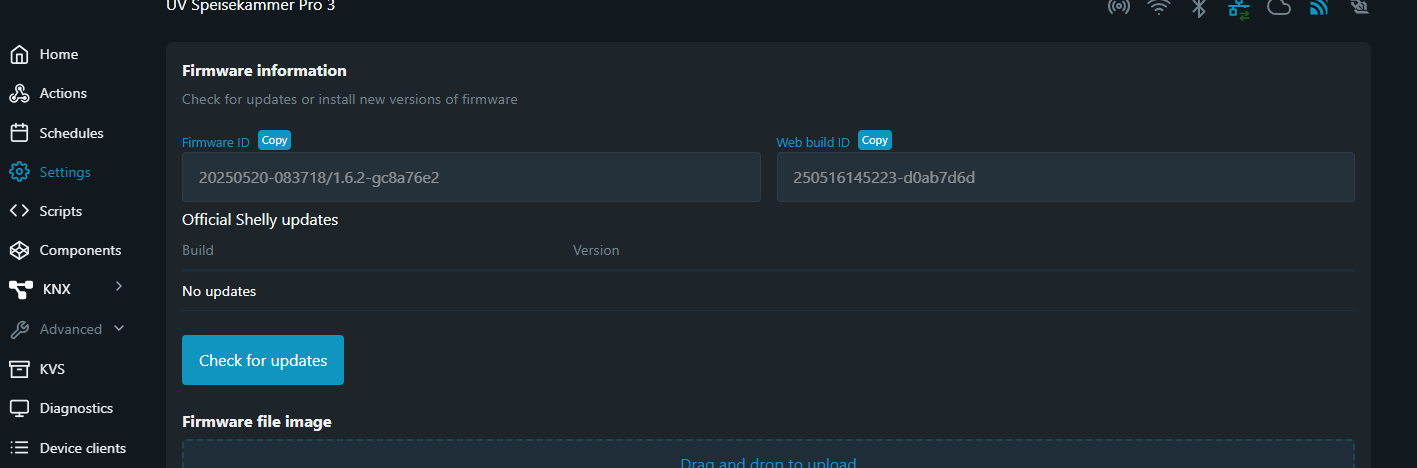
                                Screenshot 2025-06-03 214556.png
                                Screenshot 2025-06-03 214715.png
                                Hat da jemand einen Tipp ?

                                Gruß André

                                haus-automatisierungH 1 Antwort Letzte Antwort
                                0
                                • gelberlemmyG gelberlemmy

                                  @mcm1957 Hallo, ich habe aktuell ein Problem mit meinem Shelly Adapter über MQTT. Ich würde jetzt tippen, dass es etwas mit der aktuellen Firmware zu tun hat. Egal welche Version vom Adapter ich nehme, bekomme ich folgende Nachrichten

                                  shelly.1
                                  2025-06-03 21:43:04.010	info	[MQTT] Client Close: (shellyplus1 / shellyplus1-64b7080b3d78 / shellyplus1#64b7080b3d78#1) (false)
                                  
                                  shelly.1
                                  2025-06-03 21:42:54.016	info	[MQTT] Device with client id "shellyplus1-64b7080b3d78" connected from 192.168.171.80!
                                  
                                  shelly.1
                                  2025-06-03 21:42:45.727	info	[MQTT] Client Close: (shellyplus1 / shellyplus1-441793a712a8 / shellyplus1#441793a712a8#1) (false)
                                  
                                  shelly.1
                                  2025-06-03 21:42:44.328	info	[MQTT] Client Close: (shellypro3 / shellypro3-2cbcbba79f0c / shellypro3#2cbcbba79f0c#1) (false)
                                  
                                  shelly.1
                                  2025-06-03 21:42:44.311	error	[MQTT] Wrong MQTT authentification of client "shellypro3-2cbcbba79f0c"
                                  
                                  shelly.1
                                  2025-06-03 21:42:35.735	info	[MQTT] Device with client id "shellyplus1-441793a712a8" connected from 192.168.171.106!
                                  
                                  shelly.1
                                  2025-06-03 21:41:56.079	info	[MQTT] Client Close: (shellyplus1 / shellyplus1-64b7080b3d78 / shellyplus1#64b7080b3d78#1) (false)
                                  
                                  shelly.1
                                  2025-06-03 21:41:48.497	info	[MQTT] Client Close: (shellypro3 / shellypro3-2cbcbba79f0c / shellypro3#2cbcbba79f0c#1) (false)
                                  
                                  shelly.1
                                  2025-06-03 21:41:48.473	error	[MQTT] Wrong MQTT authentification of client "shellypro3-2cbcbba79f0c"
                                  
                                  shelly.1
                                  2025-06-03 21:41:46.083	info	[MQTT] Device with client id "shellyplus1-64b7080b3d78" connected from 192.168.171.80!
                                  
                                  shelly.1
                                  2025-06-03 21:41:42.097	error	[MQTT] Unable to get mqttprefix of client with id "shellyplus1-441793a712a8"
                                  
                                  shelly.1
                                  2025-06-03 21:41:42.057	error	[MQTT] Unable to get mqttprefix of client with id "shellyplus1-64b7080b3d78"
                                  
                                  shelly.1
                                  2025-06-03 21:41:41.717	error	[MQTT] Unable to get mqttprefix of client with id "shellypro3-2cbcbba79f0c"
                                  
                                  shelly.1
                                  2025-06-03 21:41:41.333	error	[MQTT] Unable to get mqttprefix of client with id "shellyplus1-441793a712a8"
                                  
                                  shelly.1
                                  2025-06-03 21:41:41.333	error	[MQTT] Unable to get mqttprefix of client with id "shellypro3-2cbcbba79f0c"
                                  
                                  shelly.1
                                  2025-06-03 21:41:41.085	error	[MQTT] Unable to get mqttprefix of client with id "shellypro3-2cbcbba79f0c"
                                  
                                  shelly.1
                                  2025-06-03 21:41:41.048	error	[MQTT] Unable to get mqttprefix of client with id "shellyplus1-441793a712a8"
                                  
                                  shelly.1
                                  2025-06-03 21:41:40.871	error	[MQTT] Unable to get mqttprefix of client with id "shellyplus1-64b7080b3d78"
                                  
                                  shelly.1
                                  2025-06-03 21:41:40.870	error	[MQTT] Unable to get mqttprefix of client with id "shellypro3-2cbcbba79f0c"
                                  
                                  shelly.1
                                  2025-06-03 21:41:40.870	error	[MQTT] Unable to get mqttprefix of client with id "shellypro3-2cbcbba79f0c"
                                  

                                  Es lief alles reibunsglos. Auch frage ich mich, warum hinter den IP Adressen im Text ein "!" steht.

                                  Anbei einmal ein Screenshot von einem Teilnehmer auf der Adapter Instanz.
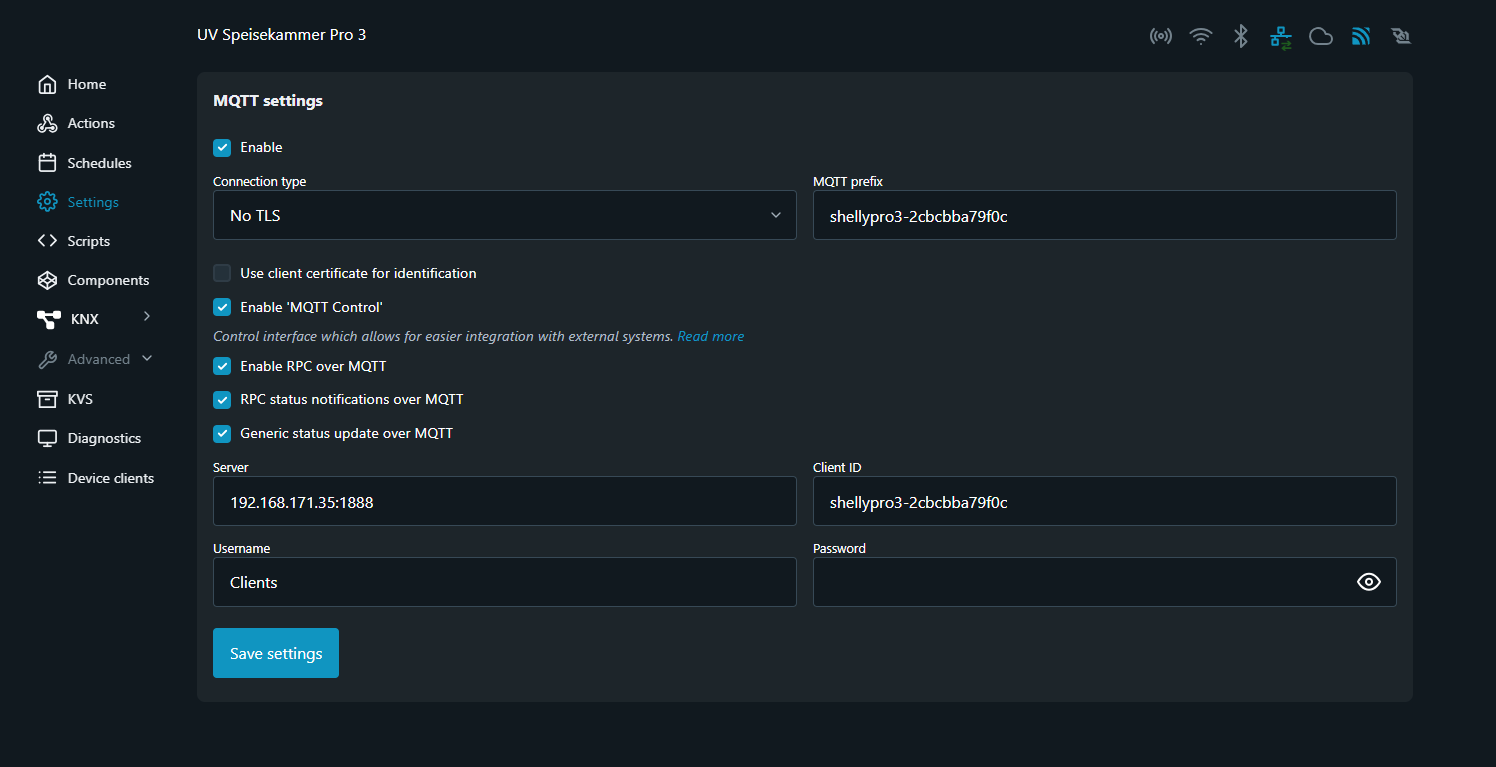
                                  Screenshot 2025-06-03 214556.png
                                  Screenshot 2025-06-03 214715.png
                                  Hat da jemand einen Tipp ?

                                  Gruß André

                                  haus-automatisierungH Offline
                                  haus-automatisierungH Offline
                                  haus-automatisierung
                                  Developer Most Active
                                  schrieb am zuletzt editiert von
                                  #73

                                  @gelberlemmy sagte in Test Adapter shelly - ALPHA Versionen:

                                  Auch frage ich mich, warum hinter den IP Adressen im Text ein "!" steht.

                                  Aus dem gleichen Grund, warum connected from davor steht. Ist halt Teil der Meldung:

                                  https://github.com/iobroker-community-adapters/ioBroker.shelly/blob/309081556b241388e979e0ecee132de41a5c7c60/lib/protocol/mqtt.js#L453

                                  🧑‍🎓 Autor des beliebten ioBroker-Master-Kurses
                                  🎥 Tutorials rund um das Thema DIY-Smart-Home: https://haus-automatisierung.com/
                                  📚 Meine inoffizielle ioBroker Dokumentation

                                  1 Antwort Letzte Antwort
                                  0
                                  • mcm1957M Online
                                    mcm1957M Online
                                    mcm1957
                                    schrieb am zuletzt editiert von
                                    #74

                                    @gelberlemmy said in Test Adapter shelly - ALPHA Versionen:

                                    @mcm1957 Hallo, ich habe aktuell ein Problem mit meinem Shelly Adapter über MQTT. Ich würde jetzt tippen, dass es etwas mit der aktuellen Firmware zu tun hat. Egal welche Version vom Adapter ich nehme, bekomme ich folgende Nachrichten

                                    shelly.1
                                    2025-06-03 21:43:04.010	info	[MQTT] Client Close: (shellyplus1 / shellyplus1-64b7080b3d78 / shellyplus1#64b7080b3d78#1) (false)
                                    
                                    shelly.1
                                    2025-06-03 21:42:54.016	info	[MQTT] Device with client id "shellyplus1-64b7080b3d78" connected from 192.168.171.80!
                                    
                                    shelly.1
                                    2025-06-03 21:42:45.727	info	[MQTT] Client Close: (shellyplus1 / shellyplus1-441793a712a8 / shellyplus1#441793a712a8#1) (false)
                                    
                                    shelly.1
                                    2025-06-03 21:42:44.328	info	[MQTT] Client Close: (shellypro3 / shellypro3-2cbcbba79f0c / shellypro3#2cbcbba79f0c#1) (false)
                                    
                                    shelly.1
                                    2025-06-03 21:42:44.311	error	[MQTT] Wrong MQTT authentification of client "shellypro3-2cbcbba79f0c"
                                    
                                    shelly.1
                                    2025-06-03 21:42:35.735	info	[MQTT] Device with client id "shellyplus1-441793a712a8" connected from 192.168.171.106!
                                    
                                    shelly.1
                                    2025-06-03 21:41:56.079	info	[MQTT] Client Close: (shellyplus1 / shellyplus1-64b7080b3d78 / shellyplus1#64b7080b3d78#1) (false)
                                    
                                    shelly.1
                                    2025-06-03 21:41:48.497	info	[MQTT] Client Close: (shellypro3 / shellypro3-2cbcbba79f0c / shellypro3#2cbcbba79f0c#1) (false)
                                    
                                    shelly.1
                                    2025-06-03 21:41:48.473	error	[MQTT] Wrong MQTT authentification of client "shellypro3-2cbcbba79f0c"
                                    
                                    shelly.1
                                    2025-06-03 21:41:46.083	info	[MQTT] Device with client id "shellyplus1-64b7080b3d78" connected from 192.168.171.80!
                                    
                                    shelly.1
                                    2025-06-03 21:41:42.097	error	[MQTT] Unable to get mqttprefix of client with id "shellyplus1-441793a712a8"
                                    
                                    shelly.1
                                    2025-06-03 21:41:42.057	error	[MQTT] Unable to get mqttprefix of client with id "shellyplus1-64b7080b3d78"
                                    
                                    shelly.1
                                    2025-06-03 21:41:41.717	error	[MQTT] Unable to get mqttprefix of client with id "shellypro3-2cbcbba79f0c"
                                    
                                    shelly.1
                                    2025-06-03 21:41:41.333	error	[MQTT] Unable to get mqttprefix of client with id "shellyplus1-441793a712a8"
                                    
                                    shelly.1
                                    2025-06-03 21:41:41.333	error	[MQTT] Unable to get mqttprefix of client with id "shellypro3-2cbcbba79f0c"
                                    
                                    shelly.1
                                    2025-06-03 21:41:41.085	error	[MQTT] Unable to get mqttprefix of client with id "shellypro3-2cbcbba79f0c"
                                    
                                    shelly.1
                                    2025-06-03 21:41:41.048	error	[MQTT] Unable to get mqttprefix of client with id "shellyplus1-441793a712a8"
                                    
                                    shelly.1
                                    2025-06-03 21:41:40.871	error	[MQTT] Unable to get mqttprefix of client with id "shellyplus1-64b7080b3d78"
                                    
                                    shelly.1
                                    2025-06-03 21:41:40.870	error	[MQTT] Unable to get mqttprefix of client with id "shellypro3-2cbcbba79f0c"
                                    
                                    shelly.1
                                    2025-06-03 21:41:40.870	error	[MQTT] Unable to get mqttprefix of client with id "shellypro3-2cbcbba79f0c"
                                    

                                    Es lief alles reibunsglos. Auch frage ich mich, warum hinter den IP Adressen im Text ein "!" steht.

                                    Anbei einmal ein Screenshot von einem Teilnehmer auf der Adapter Instanz.

                                    Screenshot 2025-06-03 214556.png
                                    Screenshot 2025-06-03 214715.png
                                    Hat da jemand einen Tipp ?

                                    Gruß André

                                    Das hat zwar nichts mit ALPHA Tests zu tun - derzeit läuft nicht mal einer - ABER:

                                    Kontrollier mal dein MQTT Passwort (und auch gleich den Username für MQTT).

                                    Bitte beachte, dass das Passwort am Shelly bei JEDER (!) Änderung der MQTT Einstellungen neu eingegeben werden muss. Und dass der Shelly nachher restartet werden muss.

                                    Falls du auch ein HTTP Passwort gesetzt hast, verwende für HTTP und MQTT unterschiedliche Usernames und Passwörter. (Hab keine Erklärung und auch noch icht expolizit getestet aber es gab eine diesbezügliche Meldung vin ein oder 2 User die meinten dass es bei identem Username / Passwortkombinationen für HTTP und MQTT Probleme gäbe).

                                    Entwicklung u Betreuung: envertech-pv, hoymiles-ms, ns-client, pid, snmp Adapter;
                                    Support Repositoryverwaltung.

                                    Wer Danke sagen will, kann nen Kaffee spendieren: https://paypal.me/mcm1957atiobroker

                                    LESEN - gute Forenbeitrage

                                    gelberlemmyG 1 Antwort Letzte Antwort
                                    0
                                    • mcm1957M mcm1957

                                      @gelberlemmy said in Test Adapter shelly - ALPHA Versionen:

                                      @mcm1957 Hallo, ich habe aktuell ein Problem mit meinem Shelly Adapter über MQTT. Ich würde jetzt tippen, dass es etwas mit der aktuellen Firmware zu tun hat. Egal welche Version vom Adapter ich nehme, bekomme ich folgende Nachrichten

                                      shelly.1
                                      2025-06-03 21:43:04.010	info	[MQTT] Client Close: (shellyplus1 / shellyplus1-64b7080b3d78 / shellyplus1#64b7080b3d78#1) (false)
                                      
                                      shelly.1
                                      2025-06-03 21:42:54.016	info	[MQTT] Device with client id "shellyplus1-64b7080b3d78" connected from 192.168.171.80!
                                      
                                      shelly.1
                                      2025-06-03 21:42:45.727	info	[MQTT] Client Close: (shellyplus1 / shellyplus1-441793a712a8 / shellyplus1#441793a712a8#1) (false)
                                      
                                      shelly.1
                                      2025-06-03 21:42:44.328	info	[MQTT] Client Close: (shellypro3 / shellypro3-2cbcbba79f0c / shellypro3#2cbcbba79f0c#1) (false)
                                      
                                      shelly.1
                                      2025-06-03 21:42:44.311	error	[MQTT] Wrong MQTT authentification of client "shellypro3-2cbcbba79f0c"
                                      
                                      shelly.1
                                      2025-06-03 21:42:35.735	info	[MQTT] Device with client id "shellyplus1-441793a712a8" connected from 192.168.171.106!
                                      
                                      shelly.1
                                      2025-06-03 21:41:56.079	info	[MQTT] Client Close: (shellyplus1 / shellyplus1-64b7080b3d78 / shellyplus1#64b7080b3d78#1) (false)
                                      
                                      shelly.1
                                      2025-06-03 21:41:48.497	info	[MQTT] Client Close: (shellypro3 / shellypro3-2cbcbba79f0c / shellypro3#2cbcbba79f0c#1) (false)
                                      
                                      shelly.1
                                      2025-06-03 21:41:48.473	error	[MQTT] Wrong MQTT authentification of client "shellypro3-2cbcbba79f0c"
                                      
                                      shelly.1
                                      2025-06-03 21:41:46.083	info	[MQTT] Device with client id "shellyplus1-64b7080b3d78" connected from 192.168.171.80!
                                      
                                      shelly.1
                                      2025-06-03 21:41:42.097	error	[MQTT] Unable to get mqttprefix of client with id "shellyplus1-441793a712a8"
                                      
                                      shelly.1
                                      2025-06-03 21:41:42.057	error	[MQTT] Unable to get mqttprefix of client with id "shellyplus1-64b7080b3d78"
                                      
                                      shelly.1
                                      2025-06-03 21:41:41.717	error	[MQTT] Unable to get mqttprefix of client with id "shellypro3-2cbcbba79f0c"
                                      
                                      shelly.1
                                      2025-06-03 21:41:41.333	error	[MQTT] Unable to get mqttprefix of client with id "shellyplus1-441793a712a8"
                                      
                                      shelly.1
                                      2025-06-03 21:41:41.333	error	[MQTT] Unable to get mqttprefix of client with id "shellypro3-2cbcbba79f0c"
                                      
                                      shelly.1
                                      2025-06-03 21:41:41.085	error	[MQTT] Unable to get mqttprefix of client with id "shellypro3-2cbcbba79f0c"
                                      
                                      shelly.1
                                      2025-06-03 21:41:41.048	error	[MQTT] Unable to get mqttprefix of client with id "shellyplus1-441793a712a8"
                                      
                                      shelly.1
                                      2025-06-03 21:41:40.871	error	[MQTT] Unable to get mqttprefix of client with id "shellyplus1-64b7080b3d78"
                                      
                                      shelly.1
                                      2025-06-03 21:41:40.870	error	[MQTT] Unable to get mqttprefix of client with id "shellypro3-2cbcbba79f0c"
                                      
                                      shelly.1
                                      2025-06-03 21:41:40.870	error	[MQTT] Unable to get mqttprefix of client with id "shellypro3-2cbcbba79f0c"
                                      

                                      Es lief alles reibunsglos. Auch frage ich mich, warum hinter den IP Adressen im Text ein "!" steht.

                                      Anbei einmal ein Screenshot von einem Teilnehmer auf der Adapter Instanz.

                                      Screenshot 2025-06-03 214556.png
                                      Screenshot 2025-06-03 214715.png
                                      Hat da jemand einen Tipp ?

                                      Gruß André

                                      Das hat zwar nichts mit ALPHA Tests zu tun - derzeit läuft nicht mal einer - ABER:

                                      Kontrollier mal dein MQTT Passwort (und auch gleich den Username für MQTT).

                                      Bitte beachte, dass das Passwort am Shelly bei JEDER (!) Änderung der MQTT Einstellungen neu eingegeben werden muss. Und dass der Shelly nachher restartet werden muss.

                                      Falls du auch ein HTTP Passwort gesetzt hast, verwende für HTTP und MQTT unterschiedliche Usernames und Passwörter. (Hab keine Erklärung und auch noch icht expolizit getestet aber es gab eine diesbezügliche Meldung vin ein oder 2 User die meinten dass es bei identem Username / Passwortkombinationen für HTTP und MQTT Probleme gäbe).

                                      gelberlemmyG Offline
                                      gelberlemmyG Offline
                                      gelberlemmy
                                      schrieb am zuletzt editiert von
                                      #75

                                      @mcm1957 Danke, aber das habe ich alles bereits getan. Lese aber gerade im Shelly Forum, dass es bei Firmware Probleme gibt. Da haben einige, dass Sie sich nicht mal mehr an der CLoud anmelden kann. Suche gerade das Firmwarefile zum downgraden zum testen.

                                      mcm1957M 1 Antwort Letzte Antwort
                                      0
                                      • gelberlemmyG gelberlemmy

                                        @mcm1957 Danke, aber das habe ich alles bereits getan. Lese aber gerade im Shelly Forum, dass es bei Firmware Probleme gibt. Da haben einige, dass Sie sich nicht mal mehr an der CLoud anmelden kann. Suche gerade das Firmwarefile zum downgraden zum testen.

                                        mcm1957M Online
                                        mcm1957M Online
                                        mcm1957
                                        schrieb am zuletzt editiert von
                                        #76

                                        @gelberlemmy

                                        • Welche Firmware hast du die die Probleme macht?
                                        • Wenn du einen Links ins Shelly Forum hast, dann post den gerne auch hier.

                                        Entwicklung u Betreuung: envertech-pv, hoymiles-ms, ns-client, pid, snmp Adapter;
                                        Support Repositoryverwaltung.

                                        Wer Danke sagen will, kann nen Kaffee spendieren: https://paypal.me/mcm1957atiobroker

                                        LESEN - gute Forenbeitrage

                                        gelberlemmyG 1 Antwort Letzte Antwort
                                        0
                                        • mcm1957M mcm1957

                                          @gelberlemmy

                                          • Welche Firmware hast du die die Probleme macht?
                                          • Wenn du einen Links ins Shelly Forum hast, dann post den gerne auch hier.
                                          gelberlemmyG Offline
                                          gelberlemmyG Offline
                                          gelberlemmy
                                          schrieb am zuletzt editiert von gelberlemmy
                                          #77

                                          @mcm1957 Das ist die 1.6.2
                                          Auf allen Geräte unter dem Adapter sind auf 1.6.2 . Da scheint es wirklich ein Problem mit der Version zu geben.

                                          Der Post im Shelly Forum war leider für 1.5.0 und nicht für1.6.2.

                                          Leider finde aktuell ich keine Firmware zum Downgrade.Beim Linkgenerator habe ich irgendwie nicht den korrekten Typen gefunden. Oder ich bin ein wenig Blind...:face_with_head_bandage:

                                          mcm1957M 1 Antwort Letzte Antwort
                                          0
                                          Antworten
                                          • In einem neuen Thema antworten
                                          Anmelden zum Antworten
                                          • Älteste zuerst
                                          • Neuste zuerst
                                          • Meiste Stimmen


                                          Support us

                                          ioBroker
                                          Community Adapters
                                          Donate

                                          832

                                          Online

                                          32.5k

                                          Benutzer

                                          81.6k

                                          Themen

                                          1.3m

                                          Beiträge
                                          Community
                                          Impressum | Datenschutz-Bestimmungen | Nutzungsbedingungen | Einwilligungseinstellungen
                                          ioBroker Community 2014-2025
                                          logo
                                          • Anmelden

                                          • Du hast noch kein Konto? Registrieren

                                          • Anmelden oder registrieren, um zu suchen
                                          • Erster Beitrag
                                            Letzter Beitrag
                                          0
                                          • Home
                                          • Aktuell
                                          • Tags
                                          • Ungelesen 0
                                          • Kategorien
                                          • Unreplied
                                          • Beliebt
                                          • GitHub
                                          • Docu
                                          • Hilfe