




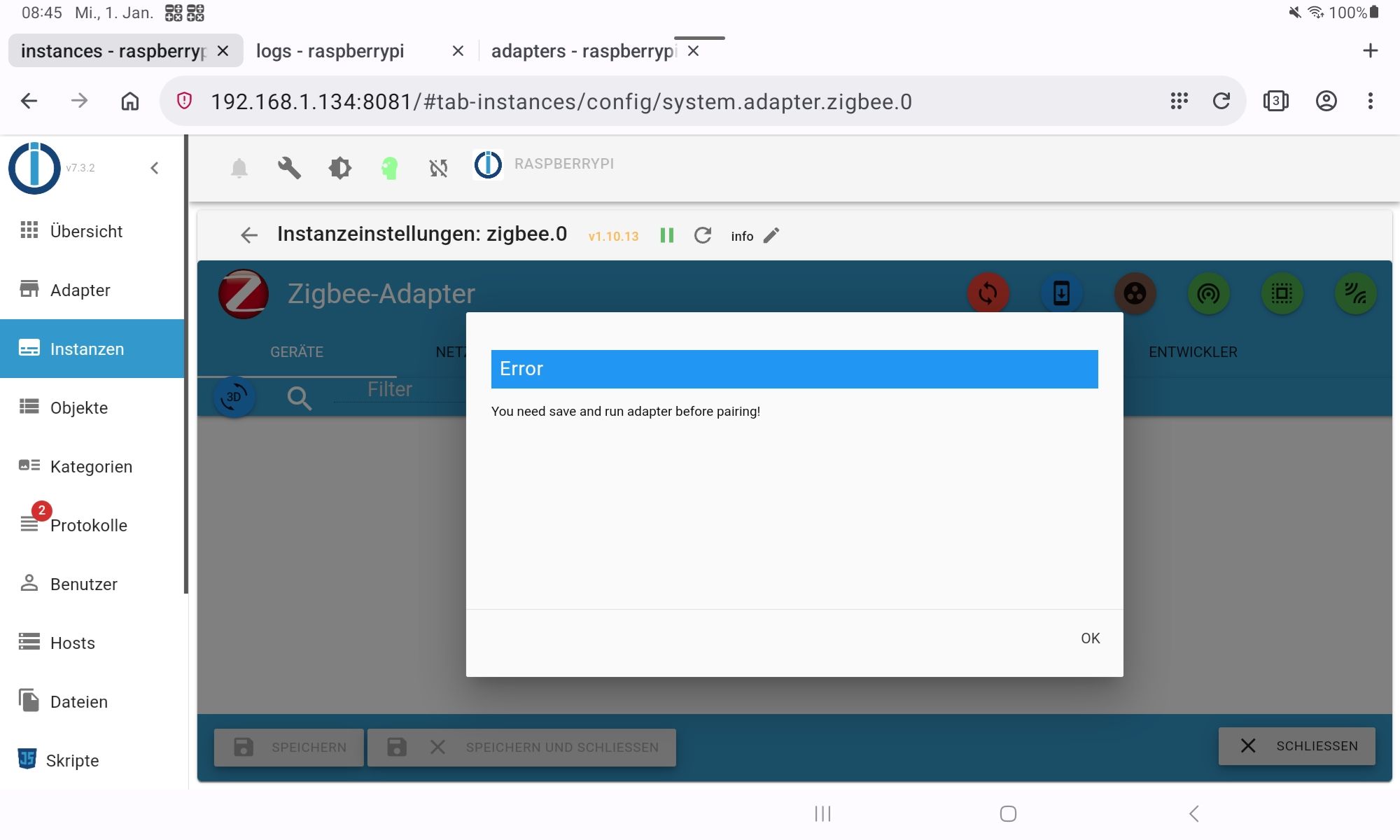
<gelöst>Zigbee ist tod
-
@crunchip Würde ich gerne, aber das ist leider nichts.
Jetzt ist was gekommen.
zigbee.0 Zeit info Nachricht zigbee.0 2025-01-01 10:30:58.370 error getGroups: caught error: TypeError: Cannot read properties of undefined (reading 'getGroups') zigbee.0 2025-01-01 10:30:39.253 error getGroups: caught error: TypeError: Cannot read properties of undefined (reading 'getGroups') zigbee.0 2025-01-01 10:25:57.540 error getGroups: caught error: TypeError: Cannot read properties of undefined (reading 'getGroups'@winni sagte in Zigbee ist tod:
Würde ich gerne
lass doch beides auf Info
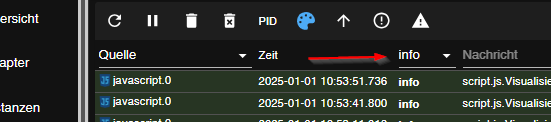

Adapter neu starten
danach kopierst du das gesamte zigbee

-
v7.3.2
5
0
Log-Größe: 10.0 KBzigbee.0
Zeit
silly
Nachrichtzigbee.0 2025-01-01 10:39:31.405 silly States user redis pmessage zigbee.0.*/zigbee.0.a4c138c68ce14507.state:{"val":true,"ack":false,"ts":1735724371402,"q":0,"c":"script.js.Sonstiges.Küche2","from":"system.adapter.javascript.0","user":"system.user.admin","lc":1735715195532} zigbee.0 2025-01-01 10:39:27.906 silly States user redis pmessage zigbee.0.*/zigbee.0.a4c13852a125023b.state:{"val":false,"ack":false,"ts":1735724367904,"q":0,"c":"script.js.Sonstiges.Dose_Küche_","from":"system.adapter.javascript.0","user":"system.user.admin","lc":1735724367904} zigbee.0 2025-01-01 10:38:53.533 silly States user redis pmessage zigbee.0.*/zigbee.0.info.connection:{"val":false,"ack":true,"ts":1735724333531,"q":0,"from":"system.adapter.zigbee.0","user":"system.user.admin","lc":1735686673059} zigbee.0 2025-01-01 10:38:53.525 debug Backup /opt/iobroker/iobroker-data/zigbee_0/backup_2025_01_01-10_38_53.tar.gz success zigbee.0 2025-01-01 10:38:53.413 info Installed Version: iobroker.zigbee@1.10.3 zigbee.0 2025-01-01 10:38:53.280 debug Starting zigbee-herdsman... zigbee.0 2025-01-01 10:38:53.273 silly States system redis pmessage system.adapter.zigbee.0.logLevel/system.adapter.zigbee.0.logLevel:{"val":"silly","ack":true,"ts":1735724333255,"q":0,"from":"system.adapter.zigbee.0","lc":1735724333255} zigbee.0 2025-01-01 10:38:53.254 info Starting Zigbee npm ... zigbee.0 2025-01-01 10:38:53.232 debug Using zigbee-herdsman with settings: {"network":{"panID":6754,"extendedPanID":[221,221,221,221,221,221,221,221],"channelList":[11],"networkKey":[1,3,5,7,9,11,13,15,0,2,4,6,8,10,12,13]},"databasePath":"/opt/iobroker/iobroker-data/zigbee_0/shepherd.db","backupPath":"/opt/iobroker/iobroker-data/zigbee_0/nvbackup.json","serialPort":{"baudRate":115200,"rtscts":false,"path":"/dev/ttyUSB0","adapter":"zstack"},"adapter":{"forceStartWithInconsistentAdapterConfiguration":false},"legacy":false} zigbee.0 2025-01-01 10:38:53.220 info starting. Version 1.10.3 in /opt/iobroker/node_modules/iobroker.zigbee, node: v20.18.1, js-controller: 7.0.6 zigbee.0 2025-01-01 10:38:53.130 debug Plugin sentry Do not initialize Plugin (enabled=false)Sorry für den verhunzt Post, aber ich kriegs im Moment nicht besser hin.
kein Support per PN! - Fragen im Forum stellen - Benutzt das Voting rechts unten im Beitrag wenn er euch geholfen hat.
Das Forum freut sich über eine Spende. Benutzt dazu den Spendenbutton oben rechts. Danke!
der Installationsfixer: curl -fsL https://iobroker.net/fix.sh | bash - -
Guten Morgen und ein gutes neues Jahr.
Ich habe folgendes Problem. Ich habe den Zigbee Adapter von der 1.10.9 auf die 1.10.13 upgedatet. Seitdem sind alle Geräte verschwunden.
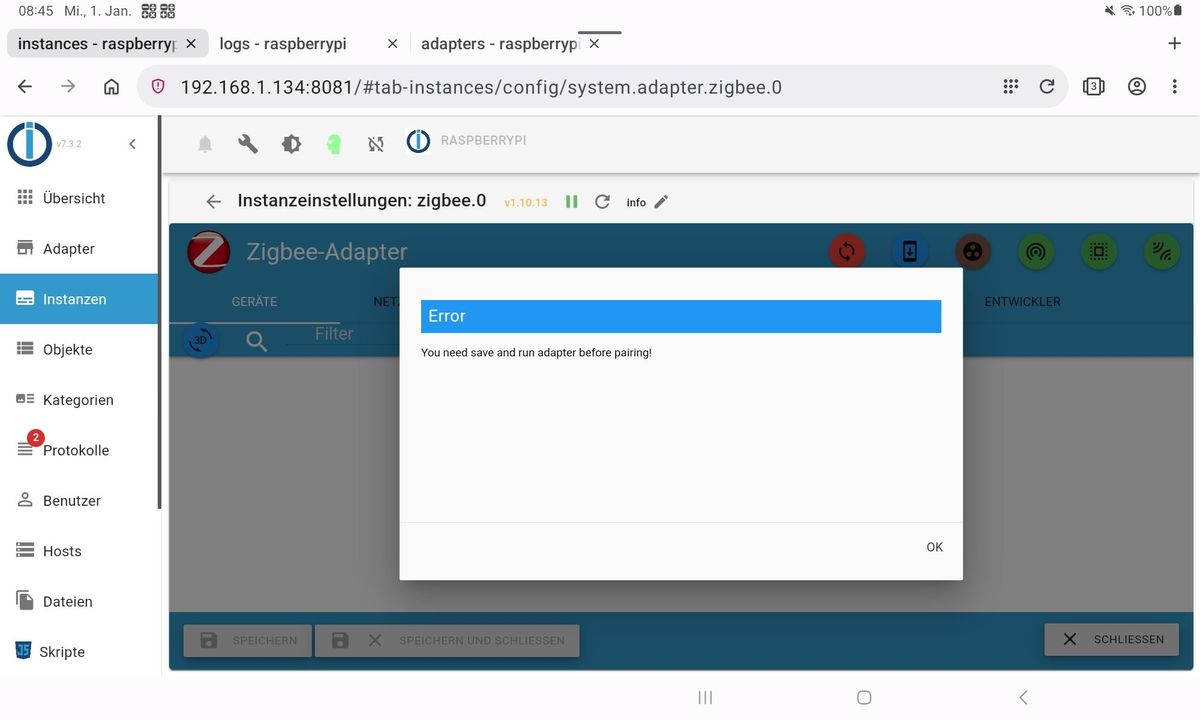
Statt dessen dieser Fehlerhinweis.
Im Log steht diese Meldung:zigbee.0
2025-01-01 08:50:25.199 error getGroups: caught error: TypeError: Cannot read properties of undefined (reading 'getGroups')Was ich bisher gemacht habe: iob stop, iob fix, iob Start. Versuch eine ältere Version des Adapters zu installieren, es wird aber nur bis 1.1.11 angeboten. Eine Backitup Sicherung einzuspielen, alles leider ohne Erfolg. Was ich noch machen kann, ich habe eine Kopie der ganzen Platte, die ist allerdings ein paar Tage alt. Auf diese dann die Backitup Sicherung von heute Nacht zurück spielen. Hat jemand eine andere Idee? Danke im voraus.========== Start marking the full check here ===========
Script v.2024-10-19 *** BASE SYSTEM *** Static hostname: raspberrypi Icon name: computer Operating System: Debian GNU/Linux 12 (bookworm) Kernel: Linux 6.6.62+rpt-rpi-2712 Architecture: arm64 OS is similar to: Model : Raspberry Pi 5 Model B Rev 1.0 Docker : false Virtualization : none Kernel : aarch64 Userland : 64 bit Systemuptime and Load: 09:29:41 up 9:19, 4 users, load average: 12.42, 12.23, 11.39 CPU threads: 4 *** LIFE CYCLE STATUS *** Operating System is the current Debian stable version codenamed 'bookworm'! *** RASPBERRY THROTTLING *** Current issues: No throttling issues detected. Previously detected issues: No throttling issues detected. *** TIME AND TIMEZONES *** Local time: Wed 2025-01-01 09:29:42 CET Universal time: Wed 2025-01-01 08:29:42 UTC RTC time: Wed 2025-01-01 08:29:42 Time zone: Europe/Berlin (CET, +0100) System clock synchronized: yes NTP service: active RTC in local TZ: no *** Users and Groups *** User that called 'iob diag': winni HOME=/home/winni GROUPS=winni adm dialout cdrom sudo audio video plugdev games users input render netdev lpadmin gpio i2c spi iobroker User that is running 'js-controller': iobroker HOME=/home/iobroker GROUPS=iobroker tty dialout audio video plugdev bluetooth gpio i2c *** DISPLAY-SERVER SETUP *** Display-Server: true Desktop: Terminal: tty System is booting into 'graphical.target'. Usually a server is running in 'multi-user.target'. Please set BootTarget to 'multi-user.target' or run 'iobroker fix' *** MEMORY *** total used free shared buff/cache available Mem: 8.4G 4.3G 439M 129M 4.0G 4.2G Swap: 209M 0B 209M Total: 8.7G 4.3G 649M Active iob-Instances: 49 8052 M total memory 4053 M used memory 4325 M active memory 2432 M inactive memory 419 M free memory 226 M buffer memory 3576 M swap cache 199 M total swap 0 M used swap 199 M free swap *** top - Table Of Processes *** top - 09:29:42 up 9:19, 4 users, load average: 12.42, 12.23, 11.39 Tasks: 295 total, 1 running, 294 sleeping, 0 stopped, 0 zombie %Cpu(s): 0.0 us, 0.0 sy, 0.0 ni,100.0 id, 0.0 wa, 0.0 hi, 0.0 si, 0.0 st MiB Mem : 8052.2 total, 418.8 free, 4054.6 used, 3802.7 buff/cache MiB Swap: 200.0 total, 200.0 free, 0.0 used. 3997.6 avail Mem *** FAILED SERVICES *** UNIT LOAD ACTIVE SUB DESCRIPTION 0 loaded units listed. *** DMESG CRITICAL ERRORS *** 15 CRITICAL ERRORS DETECTED! Check 'sudo dmesg --level=emerg,alert,crit -T' for details *** FILESYSTEM *** Filesystem Type Size Used Avail Use% Mounted on udev devtmpfs 3.9G 0 3.9G 0% /dev tmpfs tmpfs 806M 8.8M 797M 2% /run /dev/sda2 ext4 219G 30G 178G 15% / tmpfs tmpfs 4.0G 23M 4.0G 1% /dev/shm tmpfs tmpfs 5.0M 48K 5.0M 1% /run/lock /dev/sda1 vfat 511M 77M 435M 15% /boot/firmware tmpfs tmpfs 806M 192K 806M 1% /run/user/1000 Messages concerning ext4 filesystem in dmesg: [Wed Jan 1 00:10:21 2025] Kernel command line: reboot=w coherent_pool=1M 8250.nr_uarts=1 pci=pcie_bus_safe cgroup_disable=memory numa_policy=interleave smsc95xx.macaddr=D8:3A:DD:BA:ED:B0 vc_mem.mem_base=0x3fc00000 vc_mem.mem_size=0x40000000 console=ttyAMA10,115200 console=tty1 root=PARTUUID=6bc658c1-02 rootfstype=ext4 fsck.repair=yes rootwait quiet splash plymouth.ignore-serial-consoles cfg80211.ieee80211_regdom=DE [Wed Jan 1 00:10:23 2025] EXT4-fs (sda2): mounted filesystem b8316dab-786b-45e8-815c-3d4bbf198d98 ro with ordered data mode. Quota mode: none. [Wed Jan 1 00:10:24 2025] EXT4-fs (sda2): re-mounted b8316dab-786b-45e8-815c-3d4bbf198d98 r/w. Quota mode: none. Show mounted filesystems: TARGET SOURCE FSTYPE OPTIONS / /dev/sda2 ext4 rw,noatime |-/run/user/1000/doc portal fuse.portal rw,nosuid,nodev,relatime,user_id=1000,group_id=1000 `-/boot/firmware /dev/sda1 vfat rw,relatime,fmask=0022,dmask=0022,codepage=437,iocharset=ascii,shortname=mixed,errors=remount-ro Files in neuralgic directories: /var: 5.5G /var/ 4.3G /var/cache/apt 4.3G /var/cache 4.2G /var/cache/apt/archives 830M /var/log Archived and active journals take up 745.5M in the file system. /opt/iobroker/backups: 449M /opt/iobroker/backups/ /opt/iobroker/iobroker-data: 3.4G /opt/iobroker/iobroker-data/ 1.9G /opt/iobroker/iobroker-data/history 1.4G /opt/iobroker/iobroker-data/files 617M /opt/iobroker/iobroker-data/files/javascript.admin 560M /opt/iobroker/iobroker-data/files/javascript.admin/static The five largest files in iobroker-data are: 38M /opt/iobroker/iobroker-data/objects.jsonl 38M /opt/iobroker/iobroker-data/files/iot.admin/static/js/main.d3d286bd.js.map 26M /opt/iobroker/iobroker-data/files/echarts/static/js/main.41cee985.js.map 26M /opt/iobroker/iobroker-data/files/echarts.admin/chart/static/js/main.41cee985.js.map 24M /opt/iobroker/iobroker-data/files/web.admin/static/js/main.135279a0.js.map USB-Devices by-id: USB-Sticks - Avoid direct links to /dev/tty* in your adapter setups, please always prefer the links 'by-id': /dev/serial/by-id/usb-Silicon_Labs_Sonoff_Zigbee_3.0_USB_Dongle_Plus_0001-if00-port0 HINT: Your zigbee.0 COM-Port is NOT matching 'by-id'. Please check your setting: /dev/ttyUSB0 *** NodeJS-Installation *** /usr/bin/nodejs v20.18.1 /usr/bin/node v20.18.1 /usr/bin/npm 10.8.2 /usr/bin/npx 10.8.2 /usr/bin/corepack 0.29.4 nodejs: Installed: 20.18.1-1nodesource1 Candidate: 20.18.1-1nodesource1 Version table: *** 20.18.1-1nodesource1 1001 500 https://deb.nodesource.com/node_20.x nodistro/main arm64 Packages 100 /var/lib/dpkg/status 20.18.0-1nodesource1 1001 500 https://deb.nodesource.com/node_20.x nodistro/main arm64 Packages 20.17.0-1nodesource1 1001 500 https://deb.nodesource.com/node_20.x nodistro/main arm64 Packages 20.16.0-1nodesource1 1001 500 https://deb.nodesource.com/node_20.x nodistro/main arm64 Packages 20.15.1-1nodesource1 1001 500 https://deb.nodesource.com/node_20.x nodistro/main arm64 Packages 20.15.0-1nodesource1 1001 500 https://deb.nodesource.com/node_20.x nodistro/main arm64 Packages 20.14.0-1nodesource1 1001 500 https://deb.nodesource.com/node_20.x nodistro/main arm64 Packages 20.13.1-1nodesource1 1001 500 https://deb.nodesource.com/node_20.x nodistro/main arm64 Packages 20.13.0-1nodesource1 1001 500 https://deb.nodesource.com/node_20.x nodistro/main arm64 Packages 20.12.2-1nodesource1 1001 500 https://deb.nodesource.com/node_20.x nodistro/main arm64 Packages 20.12.1-1nodesource1 1001 500 https://deb.nodesource.com/node_20.x nodistro/main arm64 Packages 20.12.0-1nodesource1 1001 500 https://deb.nodesource.com/node_20.x nodistro/main arm64 Packages 20.11.1-1nodesource1 1001 500 https://deb.nodesource.com/node_20.x nodistro/main arm64 Packages 20.11.0-1nodesource1 1001 500 https://deb.nodesource.com/node_20.x nodistro/main arm64 Packages 20.10.0-1nodesource1 1001 500 https://deb.nodesource.com/node_20.x nodistro/main arm64 Packages 20.9.0-1nodesource1 1001 500 https://deb.nodesource.com/node_20.x nodistro/main arm64 Packages 20.8.1-1nodesource1 1001 500 https://deb.nodesource.com/node_20.x nodistro/main arm64 Packages 20.8.0-1nodesource1 1001 500 https://deb.nodesource.com/node_20.x nodistro/main arm64 Packages 20.7.0-1nodesource1 1001 500 https://deb.nodesource.com/node_20.x nodistro/main arm64 Packages 20.6.1-1nodesource1 1001 500 https://deb.nodesource.com/node_20.x nodistro/main arm64 Packages 20.6.0-1nodesource1 1001 500 https://deb.nodesource.com/node_20.x nodistro/main arm64 Packages 20.5.1-1nodesource1 1001 500 https://deb.nodesource.com/node_20.x nodistro/main arm64 Packages 20.5.0-1nodesource1 1001 500 https://deb.nodesource.com/node_20.x nodistro/main arm64 Packages 20.4.0-1nodesource1 1001 500 https://deb.nodesource.com/node_20.x nodistro/main arm64 Packages 20.3.1-1nodesource1 1001 500 https://deb.nodesource.com/node_20.x nodistro/main arm64 Packages 20.3.0-1nodesource1 1001 500 https://deb.nodesource.com/node_20.x nodistro/main arm64 Packages 20.2.0-1nodesource1 1001 500 https://deb.nodesource.com/node_20.x nodistro/main arm64 Packages 20.1.0-1nodesource1 1001 500 https://deb.nodesource.com/node_20.x nodistro/main arm64 Packages 20.0.0-1nodesource1 1001 500 https://deb.nodesource.com/node_20.x nodistro/main arm64 Packages 18.19.0+dfsg-6~deb12u2 500 500 http://deb.debian.org/debian bookworm/main arm64 Packages 18.19.0+dfsg-6~deb12u1 500 500 http://deb.debian.org/debian-security bookworm-security/main arm64 Packages Temp directories causing deletion problem: 0 No problems detected Errors in npm tree: 0 No problems detected *** ioBroker-Installation *** ioBroker Status iobroker is running on this host. Objects type: jsonl States type: jsonl Hosts: raspberrypi raspberrypi (version: 7.0.6, hostname: raspberrypi , alive, uptime: 1502) Core adapters versions js-controller: 7.0.6 admin: 7.3.2 javascript: 8.8.3 nodejs modules from github: 4 +-- iobroker.bluelink@3.1.0 (git+ssh://git@github.com/Newan/ioBroker.bluelink.git#ba4ca016c51236979f898af6d5310defe0e6a2a5) +-- iobroker.innogy-smarthome@1.2.6 (git+ssh://git@github.com/PArns/ioBroker.innogy-smarthome.git#8d8039c470db61972352f4578dd80e741e4640e8) +-- iobroker.nuki@2.0.0 (git+ssh://git@github.com/smaragdschlange/ioBroker.nuki.git#7bb88d9d2502908c7eadb3b573138b1ed72be910) +-- iobroker.sourceanalytix@0.4.14 (git+ssh://git@github.com/DrozmotiX/ioBroker.sourceanalytix.git#87a9b7837569274a136c4fa03ee6fbfd8a20f183) Adapter State + system.adapter.admin.0 : admin : raspberrypi - enabled, port: 8081, bind: 0.0.0.0, run as: admin + system.adapter.alexa2.0 : alexa2 : raspberrypi - enabled + system.adapter.backitup.0 : backitup : raspberrypi - enabled + system.adapter.bluelink.0 : bluelink : raspberrypi - enabled system.adapter.broadlink2.0 : broadlink2 : raspberrypi - disabled system.adapter.daswetter.0 : daswetter : raspberrypi - enabled system.adapter.device-watcher.0 : device-watcher : raspberrypi - disabled system.adapter.discovery.0 : discovery : raspberrypi - disabled system.adapter.dwd.0 : dwd : raspberrypi - enabled + system.adapter.echarts.0 : echarts : raspberrypi - enabled + system.adapter.email.0 : email : raspberrypi - enabled + system.adapter.energiefluss.0 : energiefluss : raspberrypi - enabled + system.adapter.fb-checkpresence.0 : fb-checkpresence : raspberrypi - enabled system.adapter.flot.0 : flot : raspberrypi - disabled system.adapter.fritzbox.0 : fritzbox : raspberrypi - disabled + system.adapter.fritzdect.0 : fritzdect : raspberrypi - enabled + system.adapter.heizoel.0 : heizoel : raspberrypi - enabled + system.adapter.history.0 : history : raspberrypi - enabled + system.adapter.hs100.0 : hs100 : raspberrypi - enabled + system.adapter.hue.1 : hue : raspberrypi - enabled, port: 80 system.adapter.ical.0 : ical : raspberrypi - enabled system.adapter.icons-addictive-flavour-png.0: icons-addictive-flavour-png: raspberrypi - disabled system.adapter.icons-eclipse-smarthome-classic.0: icons-eclipse-smarthome-classic: raspberrypi - disabled system.adapter.icons-freepic.0 : icons-freepic : raspberrypi - disabled system.adapter.icons-material-png.0 : icons-material-png : raspberrypi - disabled system.adapter.icons-mfd-svg.0 : icons-mfd-svg : raspberrypi - disabled system.adapter.icons-open-icon-library-png.0: icons-open-icon-library-png: raspberrypi - disabled system.adapter.icons-smarthome.0 : icons-smarthome : raspberrypi - disabled system.adapter.icons-ultimate-png.0 : icons-ultimate-png : raspberrypi - disabled + system.adapter.innogy-smarthome.0 : innogy-smarthome : raspberrypi - enabled + system.adapter.innogy-smarthome.1 : innogy-smarthome : raspberrypi - enabled + system.adapter.iot.0 : iot : raspberrypi - enabled + system.adapter.javascript.0 : javascript : raspberrypi - enabled + system.adapter.modbus.0 : modbus : raspberrypi - enabled + system.adapter.modbus.1 : modbus : raspberrypi - enabled + system.adapter.modbus.2 : modbus : raspberrypi - enabled + system.adapter.netatmo.0 : netatmo : raspberrypi - enabled + system.adapter.nuki.0 : nuki : raspberrypi - enabled + system.adapter.operating-hours.0 : operating-hours : raspberrypi - enabled + system.adapter.ping.0 : ping : raspberrypi - enabled + system.adapter.pvforecast.0 : pvforecast : raspberrypi - enabled + system.adapter.rpi2.0 : rpi2 : raspberrypi - enabled + system.adapter.sma-em.0 : sma-em : raspberrypi - enabled + system.adapter.sonoff.0 : sonoff : raspberrypi - enabled, port: 1883, bind: 0.0.0.0 + system.adapter.sonoff.10 : sonoff : raspberrypi - enabled, port: 1893, bind: 0.0.0.0 + system.adapter.sonoff.11 : sonoff : raspberrypi - enabled, port: 1896, bind: 0.0.0.0 + system.adapter.sonoff.12 : sonoff : raspberrypi - enabled, port: 1897, bind: 0.0.0.0 + system.adapter.sonoff.13 : sonoff : raspberrypi - enabled, port: 1898, bind: 0.0.0.0 + system.adapter.sonoff.14 : sonoff : raspberrypi - enabled, port: 1899, bind: 0.0.0.0 + system.adapter.sonoff.15 : sonoff : raspberrypi - enabled, port: 1900, bind: 0.0.0.0 + system.adapter.sonoff.2 : sonoff : raspberrypi - enabled, port: 1894, bind: 0.0.0.0 + system.adapter.sonoff.3 : sonoff : raspberrypi - enabled, port: 1886, bind: 0.0.0.0 + system.adapter.sonoff.4 : sonoff : raspberrypi - enabled, port: 1887, bind: 0.0.0.0 + system.adapter.sonoff.5 : sonoff : raspberrypi - enabled, port: 1888, bind: 0.0.0.0 + system.adapter.sonoff.6 : sonoff : raspberrypi - enabled, port: 1889, bind: 0.0.0.0 + system.adapter.sonoff.7 : sonoff : raspberrypi - enabled, port: 1890, bind: 0.0.0.0 + system.adapter.sonoff.8 : sonoff : raspberrypi - enabled, port: 1891, bind: 0.0.0.0 + system.adapter.sonoff.9 : sonoff : raspberrypi - enabled, port: 1892, bind: 0.0.0.0 + system.adapter.sourceanalytix.0 : sourceanalytix : raspberrypi - enabled + system.adapter.tr-064.0 : tr-064 : raspberrypi - enabled + system.adapter.tr-064.1 : tr-064 : raspberrypi - enabled system.adapter.vis-bars.0 : vis-bars : raspberrypi - disabled system.adapter.vis-canvas-gauges.0 : vis-canvas-gauges : raspberrypi - disabled system.adapter.vis-colorpicker.0 : vis-colorpicker : raspberrypi - disabled system.adapter.vis-fancyswitch.0 : vis-fancyswitch : raspberrypi - disabled system.adapter.vis-history.0 : vis-history : raspberrypi - disabled system.adapter.vis-hqwidgets.0 : vis-hqwidgets : raspberrypi - disabled + system.adapter.vis-inventwo.0 : vis-inventwo : raspberrypi - enabled system.adapter.vis-jqui-mfd.0 : vis-jqui-mfd : raspberrypi - disabled system.adapter.vis-justgage.0 : vis-justgage : raspberrypi - disabled system.adapter.vis-map.0 : vis-map : raspberrypi - disabled system.adapter.vis-material-advanced.0 : vis-material-advanced : raspberrypi - disabled system.adapter.vis-metro.0 : vis-metro : raspberrypi - disabled system.adapter.vis-plumb.0 : vis-plumb : raspberrypi - disabled system.adapter.vis.0 : vis : raspberrypi - enabled + system.adapter.web.0 : web : raspberrypi - enabled, port: 8082, bind: 0.0.0.0, run as: admin system.adapter.whatsapp-cmb.0 : whatsapp-cmb : raspberrypi - disabled + system.adapter.zigbee.0 : zigbee : raspberrypi - enabled, port: /dev/ttyUSB0 + instance is alive Enabled adapters with bindings + system.adapter.admin.0 : admin : raspberrypi - enabled, port: 8081, bind: 0.0.0.0, run as: admin + system.adapter.hue.1 : hue : raspberrypi - enabled, port: 80 + system.adapter.sonoff.0 : sonoff : raspberrypi - enabled, port: 1883, bind: 0.0.0.0 + system.adapter.sonoff.10 : sonoff : raspberrypi - enabled, port: 1893, bind: 0.0.0.0 + system.adapter.sonoff.11 : sonoff : raspberrypi - enabled, port: 1896, bind: 0.0.0.0 + system.adapter.sonoff.12 : sonoff : raspberrypi - enabled, port: 1897, bind: 0.0.0.0 + system.adapter.sonoff.13 : sonoff : raspberrypi - enabled, port: 1898, bind: 0.0.0.0 + system.adapter.sonoff.14 : sonoff : raspberrypi - enabled, port: 1899, bind: 0.0.0.0 + system.adapter.sonoff.15 : sonoff : raspberrypi - enabled, port: 1900, bind: 0.0.0.0 + system.adapter.sonoff.2 : sonoff : raspberrypi - enabled, port: 1894, bind: 0.0.0.0 + system.adapter.sonoff.3 : sonoff : raspberrypi - enabled, port: 1886, bind: 0.0.0.0 + system.adapter.sonoff.4 : sonoff : raspberrypi - enabled, port: 1887, bind: 0.0.0.0 + system.adapter.sonoff.5 : sonoff : raspberrypi - enabled, port: 1888, bind: 0.0.0.0 + system.adapter.sonoff.6 : sonoff : raspberrypi - enabled, port: 1889, bind: 0.0.0.0 + system.adapter.sonoff.7 : sonoff : raspberrypi - enabled, port: 1890, bind: 0.0.0.0 + system.adapter.sonoff.8 : sonoff : raspberrypi - enabled, port: 1891, bind: 0.0.0.0 + system.adapter.sonoff.9 : sonoff : raspberrypi - enabled, port: 1892, bind: 0.0.0.0 + system.adapter.web.0 : web : raspberrypi - enabled, port: 8082, bind: 0.0.0.0, run as: admin + system.adapter.zigbee.0 : zigbee : raspberrypi - enabled, port: /dev/ttyUSB0 ioBroker-Repositories ┌─────────┬──────────┬─────────────────────────────────────────────────────────┬──────────────┐ │ (index) │ name │ url │ auto upgrade │ ├─────────┼──────────┼─────────────────────────────────────────────────────────┼──────────────┤ │ 0 │ 'stable' │ 'http://download.iobroker.net/sources-dist.json' │ false │ │ 1 │ 'beta' │ 'http://download.iobroker.net/sources-dist-latest.json' │ false │ └─────────┴──────────┴─────────────────────────────────────────────────────────┴──────────────┘ Active repo(s): stable Upgrade policy: none Installed ioBroker-Instances Used repository: stable Adapter "admin" : 7.1.5 , installed 7.3.2 Adapter "alexa2" : 3.26.5 , installed 3.26.5 Adapter "backitup" : 3.0.25 , installed 3.0.25 Adapter "bluelink" : 2.3.6 , installed 3.1.0 Adapter "broadlink2" : 2.3.0 , installed 2.3.0 Adapter "daswetter" : 3.2.2 , installed 3.2.2 Adapter "device-watcher": 2.12.1 , installed 2.12.1 Adapter "discovery" : 5.0.0 , installed 5.0.0 Adapter "dwd" : 2.8.5 , installed 2.8.5 Adapter "echarts" : 1.9.2 , installed 1.9.2 Adapter "email" : 1.3.1 , installed 1.3.1 Adapter "energiefluss" : 3.6.2 , installed 3.6.2 Adapter "fb-checkpresence": 1.2.8 , installed 1.2.8 Adapter "flot" : 1.12.0 , installed 1.12.0 Adapter "fritzbox" : 0.6.0 , installed 0.6.0 Adapter "fritzdect" : 2.5.11 , installed 2.5.11 Adapter "heizoel" : 1.0.3 , installed 1.0.3 Adapter "history" : 3.0.1 , installed 3.0.1 Adapter "hs100" : 2.2.2 , installed 2.2.2 Adapter "hue" : 3.13.1 , installed 3.13.1 Adapter "ical" : 1.16.1 , installed 1.16.1 Adapter "icons-addictive-flavour-png": 0.1.0, installed 0.1.0 Adapter "icons-eclipse-smarthome-classic": 1.0.0, installed 1.0.0 Adapter "icons-freepic": 1.0.0 , installed 1.0.0 Adapter "icons-material-png": 0.1.0, installed 0.1.0 Adapter "icons-mfd-svg": 1.2.0 , installed 1.2.0 Adapter "icons-open-icon-library-png": 0.1.2, installed 0.1.2 Adapter "icons-smarthome": 1.0.0 , installed 1.0.0 Adapter "icons-ultimate-png": 1.0.1, installed 1.0.1 Adapter "innogy-smarthome": 1.2.6 , installed 1.2.6 Adapter "iot" : 3.3.0 , installed 3.3.0 Adapter "javascript" : 8.8.3 , installed 8.8.3 Controller "js-controller": 7.0.6 , installed 7.0.6 Adapter "modbus" : 6.3.2 , installed 6.3.2 Adapter "netatmo" : 3.1.0 , installed 3.1.0 Adapter "nuki" : 2.0.0 , installed 2.0.0 Adapter "operating-hours": 1.2.0 , installed 1.2.0 Adapter "ping" : 1.6.2 , installed 1.6.2 Adapter "pvforecast" : 4.1.0 , installed 4.1.0 Adapter "rpi2" : 2.2.1 , installed 2.2.1 Adapter "simple-api" : 2.8.0 , installed 2.8.0 Adapter "sma-em" : 1.1.0 , installed 1.1.0 Adapter "socketio" : 6.7.1 , installed 6.7.1 Adapter "sonoff" : 3.1.2 , installed 3.1.2 Adapter "tr-064" : 4.3.0 , installed 4.3.0 Adapter "vis" : 1.5.6 , installed 1.5.6 Adapter "vis-bars" : 0.1.4 , installed 0.1.4 Adapter "vis-canvas-gauges": 1.0.1, installed 1.0.1 Adapter "vis-colorpicker": 2.0.3 , installed 2.0.3 Adapter "vis-fancyswitch": 1.1.0 , installed 1.1.0 Adapter "vis-history" : 1.0.0 , installed 1.0.0 Adapter "vis-hqwidgets": 1.5.1 , installed 1.5.1 Adapter "vis-inventwo" : 3.3.4 , installed 3.3.4 Adapter "vis-jqui-mfd" : 1.1.1 , installed 1.1.1 Adapter "vis-justgage" : 2.1.7 , installed 2.1.7 Adapter "vis-map" : 1.1.2 , installed 1.1.2 Adapter "vis-material-advanced": 1.7.4, installed 1.7.4 Adapter "vis-metro" : 1.2.0 , installed 1.2.0 Adapter "vis-plumb" : 1.0.2 , installed 1.0.2 Adapter "web" : 6.2.5 , installed 6.2.5 Adapter "whatsapp-cmb" : 0.3.0 , installed 0.3.0 Adapter "ws" : 2.6.2 , installed 2.6.2 Adapter "zigbee" : 1.10.13 , installed 1.10.13 Objects and States Please stand by - This may take a while Objects: 32913 States: 26614 *** OS-Repositories and Updates *** Hit:1 http://deb.debian.org/debian bookworm InRelease Hit:2 http://deb.debian.org/debian-security bookworm-security InRelease Hit:3 http://deb.debian.org/debian bookworm-updates InRelease Hit:4 http://archive.raspberrypi.com/debian bookworm InRelease Hit:5 https://deb.nodesource.com/node_20.x nodistro InRelease Reading package lists... Pending Updates: 0 *** Listening Ports *** Active Internet connections (only servers) Proto Recv-Q Send-Q Local Address Foreign Address State User Inode PID/Program name tcp 0 0 0.0.0.0:1890 0.0.0.0:* LISTEN 1001 491202 42720/io.sonoff.7 tcp 0 0 0.0.0.0:1891 0.0.0.0:* LISTEN 1001 492692 42765/io.sonoff.8 tcp 0 0 0.0.0.0:1888 0.0.0.0:* LISTEN 1001 491725 42679/io.sonoff.5 tcp 0 0 0.0.0.0:1889 0.0.0.0:* LISTEN 1001 492607 42701/io.sonoff.6 tcp 0 0 0.0.0.0:1894 0.0.0.0:* LISTEN 1001 491695 42626/io.sonoff.2 tcp 0 0 0.0.0.0:1892 0.0.0.0:* LISTEN 1001 491909 42794/io.sonoff.9 tcp 0 0 0.0.0.0:1893 0.0.0.0:* LISTEN 1001 489455 42509/io.sonoff.10 tcp 0 0 0.0.0.0:1898 0.0.0.0:* LISTEN 1001 491603 42569/io.sonoff.13 tcp 0 0 0.0.0.0:1899 0.0.0.0:* LISTEN 1001 491642 42587/io.sonoff.14 tcp 0 0 0.0.0.0:1896 0.0.0.0:* LISTEN 1001 490312 42532/io.sonoff.11 tcp 0 0 0.0.0.0:1897 0.0.0.0:* LISTEN 1001 490970 42550/io.sonoff.12 tcp 0 0 0.0.0.0:1900 0.0.0.0:* LISTEN 1001 491671 42606/io.sonoff.15 tcp 0 0 0.0.0.0:1883 0.0.0.0:* LISTEN 1001 488215 42491/io.sonoff.0 tcp 0 0 0.0.0.0:1886 0.0.0.0:* LISTEN 1001 491090 42644/io.sonoff.3 tcp 0 0 0.0.0.0:1887 0.0.0.0:* LISTEN 1001 491117 42662/io.sonoff.4 tcp 0 0 0.0.0.0:445 0.0.0.0:* LISTEN 0 8674 1243/smbd tcp 0 0 0.0.0.0:80 0.0.0.0:* LISTEN 0 8594 1227/lighttpd tcp 0 0 0.0.0.0:53 0.0.0.0:* LISTEN 999 10575 1221/pihole-FTL tcp 0 0 0.0.0.0:22 0.0.0.0:* LISTEN 0 6082 955/sshd: /usr/sbin tcp 0 0 0.0.0.0:139 0.0.0.0:* LISTEN 0 8675 1243/smbd tcp 0 0 127.0.0.1:4711 0.0.0.0:* LISTEN 999 10581 1221/pihole-FTL tcp 0 0 127.0.0.1:631 0.0.0.0:* LISTEN 0 8301 934/cupsd tcp 0 0 127.0.0.1:9000 0.0.0.0:* LISTEN 1001 486392 42034/iobroker.js-c tcp 0 0 127.0.0.1:9001 0.0.0.0:* LISTEN 1001 486386 42034/iobroker.js-c tcp6 0 0 ::1:631 :::* LISTEN 0 8300 934/cupsd tcp6 0 0 ::1:4711 :::* LISTEN 999 10582 1221/pihole-FTL tcp6 0 0 :::445 :::* LISTEN 0 8672 1243/smbd tcp6 0 0 :::80 :::* LISTEN 0 8593 1227/lighttpd tcp6 0 0 :::53 :::* LISTEN 999 10577 1221/pihole-FTL tcp6 0 0 :::22 :::* LISTEN 0 6084 955/sshd: /usr/sbin tcp6 0 0 :::139 :::* LISTEN 0 8673 1243/smbd tcp6 0 0 :::8082 :::* LISTEN 1001 493842 42873/io.web.0 tcp6 0 0 :::8081 :::* LISTEN 1001 486988 42052/io.admin.0 udp 0 0 0.0.0.0:40165 0.0.0.0:* 1001 488102 42415/io.ping.0 udp 0 0 0.0.0.0:60746 0.0.0.0:* 104 6032 735/avahi-daemon: r udp 0 0 0.0.0.0:60835 0.0.0.0:* 1001 489154 42316/io.modbus.1 udp 0 0 0.0.0.0:56822 0.0.0.0:* 1001 492759 42843/io.vis-invent udp 0 0 0.0.0.0:60919 0.0.0.0:* 1001 490674 42332/io.modbus.2 udp 0 0 0.0.0.0:60922 0.0.0.0:* 1001 493009 43013/io.hs100.0 udp 0 0 0.0.0.0:56974 0.0.0.0:* 1001 488182 42472/io.sma-em.0 udp 0 0 0.0.0.0:40618 0.0.0.0:* 1001 489991 42348/io.netatmo.0 udp 0 0 0.0.0.0:52946 0.0.0.0:* 1001 487409 42201/io.alexa2.0 udp 0 0 0.0.0.0:40855 0.0.0.0:* 1001 490152 42441/io.rpi2.0 udp 0 0 0.0.0.0:44999 0.0.0.0:* 1001 494888 43120/io.echarts.0 udp 0 0 0.0.0.0:45038 0.0.0.0:* 1001 493924 42944/io.energieflu udp 0 0 0.0.0.0:53 0.0.0.0:* 999 10574 1221/pihole-FTL udp 0 0 192.168.1.255:137 0.0.0.0:* 0 9730 1239/nmbd udp 0 0 192.168.1.134:137 0.0.0.0:* 0 9729 1239/nmbd udp 0 0 0.0.0.0:137 0.0.0.0:* 0 9711 1239/nmbd udp 0 0 192.168.1.255:138 0.0.0.0:* 0 9732 1239/nmbd udp 0 0 192.168.1.134:138 0.0.0.0:* 0 9731 1239/nmbd udp 0 0 0.0.0.0:138 0.0.0.0:* 0 9712 1239/nmbd udp 0 0 0.0.0.0:41243 0.0.0.0:* 1001 490080 42389/io.operating- udp 0 0 0.0.0.0:53605 0.0.0.0:* 1001 490512 42221/io.backitup.0 udp 0 0 0.0.0.0:33194 0.0.0.0:* 1001 488560 42034/iobroker.js-c udp 0 0 0.0.0.0:41404 0.0.0.0:* 1001 492898 42961/io.fb-checkpr udp 0 0 0.0.0.0:41412 0.0.0.0:* 1001 493095 43085/io.pvforecast udp 0 0 0.0.0.0:45509 0.0.0.0:* 1001 494855 43102/io.sourceanal udp 0 0 0.0.0.0:41527 0.0.0.0:* 1001 488764 42145/io.email.0 udp 0 0 0.0.0.0:33344 0.0.0.0:* 1001 487717 42129/io.javascript udp 0 0 0.0.0.0:54131 0.0.0.0:* 1001 488939 42241/io.hue.1 udp 0 0 0.0.0.0:5353 0.0.0.0:* 104 6030 735/avahi-daemon: r udp 0 0 0.0.0.0:9522 0.0.0.0:* 1001 488183 42472/io.sma-em.0 udp 0 0 0.0.0.0:58763 0.0.0.0:* 1001 492809 42893/io.bluelink.0 udp 0 0 0.0.0.0:51029 0.0.0.0:* 1001 491980 42824/io.tr-064.1 udp 0 0 0.0.0.0:42850 0.0.0.0:* 1001 487911 42286/io.innogy-sma udp 0 0 0.0.0.0:42883 0.0.0.0:* 1001 487386 42190/io.zigbee.0 udp 0 0 0.0.0.0:47513 0.0.0.0:* 1001 487946 42301/io.modbus.0 udp 0 0 0.0.0.0:39328 0.0.0.0:* 1001 488605 42052/io.admin.0 udp 0 0 0.0.0.0:60156 0.0.0.0:* 1001 493066 43060/io.iot.0 udp6 0 0 :::35986 :::* 104 6033 735/avahi-daemon: r udp6 0 0 :::53 :::* 999 10576 1221/pihole-FTL udp6 0 0 fe80::67fb:be67:45b:546 :::* 0 10548 896/NetworkManager udp6 0 0 :::5353 :::* 104 6031 735/avahi-daemon: r *** Log File - Last 25 Lines *** 2025-01-01 09:08:05.587 - info: sourceanalytix.0 (43102) Successfully activated SourceAnalytix for 6 of 6 states, will do my Job until you stop me! 2025-01-01 09:08:09.352 - info: fb-checkpresence.0 (42961) createFbDeviceObjects finished successfully 2025-01-01 09:08:09.353 - info: fb-checkpresence.0 (42961) states successfully subscribed 2025-01-01 09:08:09.354 - info: fb-checkpresence.0 (42961) loop successfully started2025-01-01 09:08:34.234 - info: admin.0 (42052) ==> Connected system.user.admin from ::ffff:192.168.1.134 2025-01-01 09:08:53.130 - info: admin.0 (42052) ==> Connected system.user.admin from ::ffff:192.168.1.134 2025-01-01 09:08:58.890 - info: admin.0 (42052) <== Disconnect system.user.admin from ::ffff:192.168.1.134 2025-01-01 09:09:00.045 - info: javascript.0 (42129) script.js.Sonstiges.Zieltemperaturen-Pruefen: Achtung im Mariazimmer wurde die Zieltemperatur nicht übernommen 2025-01-01 09:09:00.045 - info: javascript.0 (42129) script.js.Sonstiges.ZieltemperaCopy text starting here: ```bash ======================= SUMMARY ======================= v.2024-10-19 Static hostname: raspberrypi Icon name: computer Operating System: Debian GNU/Linux 12 (bookworm) Kernel: Linux 6.6.62+rpt-rpi-2712 Architecture: arm64 Installation: native Kernel: aarch64 Userland: 64 bit Timezone: Europe/Berlin (CET, +0100) User-ID: 1000 Display-Server: true Boot Target: graphical.target Pending OS-Updates: 0 Pending iob updates: 0 Nodejs-Installation: /usr/bin/nodejs v20.18.1 /usr/bin/node v20.18.1 /usr/bin/npm 10.8.2 /usr/bin/npx 10.8.2 /usr/bin/corepack 0.29.4 Recommended versions are nodejs 20.18.1 and npm 10.8.2 nodeJS installation is correct MEMORY: total used free shared buff/cache available Mem: 8.4G 4.3G 878M 129M 3.5G 4.1G Swap: 209M 0B 209M Total: 8.7G 4.3G 1.1G Active iob-Instances: 49 Upgrade policy: none ioBroker Core: js-controller 7.0.6 admin 7.3.2 ioBroker Status: iobroker is running on this host. Objects type: jsonl States type: jsonl Status admin and web instance: + system.adapter.admin.0 : admin : raspberrypi - enabled, port: 8081, bind: 0.0.0.0, run as: admin + system.adapter.web.0 : web : raspberrypi - enabled, port: 8082, bind: 0.0.0.0, run as: admin Objects: 32913 States: 26614 Size of iob-Database: 48M /opt/iobroker/iobroker-data/objects.jsonl 22M /opt/iobroker/iobroker-data/states.jsonl 15 CRITICAL ERRORS DETECTED! Check 'sudo dmesg --level=emerg,alert,crit -T' for details Operating System is the current Debian stable version codenamed 'bookworm'! =================== END OF SUMMARY ======================= Mark text until here for copying ===
========== Start marking the full check here =========== ```bash Script v.2024-10-19 *** BASE SYSTEM *** Static hostname: raspberrypi Icon name: computer Operating System: Debian GNU/Linux 12 (bookworm) Kernel: Linux 6.6.62+rpt-rpi-2712 Architecture: arm64 OS is similar to: Model : Raspberry Pi 5 Model B Rev 1.0 Docker : false Virtualization : none Kernel : aarch64 Userland : 64 bit Systemuptime and Load: 09:29:41 up 9:19, 4 users, load average: 12.42, 12.23, 11.39 CPU threads: 4 *** LIFE CYCLE STATUS *** Operating System is the current Debian stable version codenamed 'bookworm'! *** RASPBERRY THROTTLING *** Current issues: No throttling issues detected. Previously detected issues: No throttling issues detected. *** TIME AND TIMEZONES *** Local time: Wed 2025-01-01 09:29:42 CET Universal time: Wed 2025-01-01 08:29:42 UTC RTC time: Wed 2025-01-01 08:29:42 Time zone: Europe/Berlin (CET, +0100) System clock synchronized: yes NTP service: active RTC in local TZ: no *** Users and Groups *** User that called 'iob diag': winni HOME=/home/winni GROUPS=winni adm dialout cdrom sudo audio video plugdev games users input render netdev lpadmin gpio i2c spi iobroker User that is running 'js-controller': iobroker HOME=/home/iobroker GROUPS=iobroker tty dialout audio video plugdev bluetooth gpio i2c *** DISPLAY-SERVER SETUP *** Display-Server: true Desktop: Terminal: tty System is booting into 'graphical.target'. Usually a server is running in 'multi-user.target'. Please set BootTarget to 'multi-user.target' or run 'iobroker fix' *** MEMORY *** total used free shared buff/cache available Mem: 8.4G 4.3G 439M 129M 4.0G 4.2G Swap: 209M 0B 209M Total: 8.7G 4.3G 649M Active iob-Instances: 49 8052 M total memory 4053 M used memory 4325 M active memory 2432 M inactive memory 419 M free memory 226 M buffer memory 3576 M swap cache 199 M total swap 0 M used swap 199 M free swap *** top - Table Of Processes *** top - 09:29:42 up 9:19, 4 users, load average: 12.42, 12.23, 11.39 Tasks: 295 total, 1 running, 294 sleeping, 0 stopped, 0 zombie %Cpu(s): 0.0 us, 0.0 sy, 0.0 ni,100.0 id, 0.0 wa, 0.0 hi, 0.0 si, 0.0 st MiB Mem : 8052.2 total, 418.8 free, 4054.6 used, 3802.7 buff/cache MiB Swap: 200.0 total, 200.0 free, 0.0 used. 3997.6 avail Mem *** FAILED SERVICES *** UNIT LOAD ACTIVE SUB DESCRIPTION 0 loaded units listed. *** DMESG CRITICAL ERRORS *** 15 CRITICAL ERRORS DETECTED! Check 'sudo dmesg --level=emerg,alert,crit -T' for details *** FILESYSTEM *** Filesystem Type Size Used Avail Use% Mounted on udev devtmpfs 3.9G 0 3.9G 0% /dev tmpfs tmpfs 806M 8.8M 797M 2% /run /dev/sda2 ext4 219G 30G 178G 15% / tmpfs tmpfs 4.0G 23M 4.0G 1% /dev/shm tmpfs tmpfs 5.0M 48K 5.0M 1% /run/lock /dev/sda1 vfat 511M 77M 435M 15% /boot/firmware tmpfs tmpfs 806M 192K 806M 1% /run/user/1000 Messages concerning ext4 filesystem in dmesg: [Wed Jan 1 00:10:21 2025] Kernel command line: reboot=w coherent_pool=1M 8250.nr_uarts=1 pci=pcie_bus_safe cgroup_disable=memory numa_policy=interleave smsc95xx.macaddr=D8:3A:DD:BA:ED:B0 vc_mem.mem_base=0x3fc00000 vc_mem.mem_size=0x40000000 console=ttyAMA10,115200 console=tty1 root=PARTUUID=6bc658c1-02 rootfstype=ext4 fsck.repair=yes rootwait quiet splash plymouth.ignore-serial-consoles cfg80211.ieee80211_regdom=DE [Wed Jan 1 00:10:23 2025] EXT4-fs (sda2): mounted filesystem b8316dab-786b-45e8-815c-3d4bbf198d98 ro with ordered data mode. Quota mode: none. [Wed Jan 1 00:10:24 2025] EXT4-fs (sda2): re-mounted b8316dab-786b-45e8-815c-3d4bbf198d98 r/w. Quota mode: none. Show mounted filesystems: TARGET SOURCE FSTYPE OPTIONS / /dev/sda2 ext4 rw,noatime |-/run/user/1000/doc portal fuse.portal rw,nosuid,nodev,relatime,user_id=1000,group_id=1000 `-/boot/firmware /dev/sda1 vfat rw,relatime,fmask=0022,dmask=0022,codepage=437,iocharset=ascii,shortname=mixed,errors=remount-ro Files in neuralgic directories: /var: 5.5G /var/ 4.3G /var/cache/apt 4.3G /var/cache 4.2G /var/cache/apt/archives 830M /var/log Archived and active journals take up 745.5M in the file system. /opt/iobroker/backups: 449M /opt/iobroker/backups/ /opt/iobroker/iobroker-data: 3.4G /opt/iobroker/iobroker-data/ 1.9G /opt/iobroker/iobroker-data/history 1.4G /opt/iobroker/iobroker-data/files 617M /opt/iobroker/iobroker-data/files/javascript.admin 560M /opt/iobroker/iobroker-data/files/javascript.admin/static The five largest files in iobroker-data are: 38M /opt/iobroker/iobroker-data/objects.jsonl 38M /opt/iobroker/iobroker-data/files/iot.admin/static/js/main.d3d286bd.js.map 26M /opt/iobroker/iobroker-data/files/echarts/static/js/main.41cee985.js.map 26M /opt/iobroker/iobroker-data/files/echarts.admin/chart/static/js/main.41cee985.js.map 24M /opt/iobroker/iobroker-data/files/web.admin/static/js/main.135279a0.js.map USB-Devices by-id: USB-Sticks - Avoid direct links to /dev/tty* in your adapter setups, please always prefer the links 'by-id': /dev/serial/by-id/usb-Silicon_Labs_Sonoff_Zigbee_3.0_USB_Dongle_Plus_0001-if00-port0 HINT: Your zigbee.0 COM-Port is NOT matching 'by-id'. Please check your setting: /dev/ttyUSB0 *** NodeJS-Installation *** /usr/bin/nodejs v20.18.1 /usr/bin/node v20.18.1 /usr/bin/npm 10.8.2 /usr/bin/npx 10.8.2 /usr/bin/corepack 0.29.4 nodejs: Installed: 20.18.1-1nodesource1 Candidate: 20.18.1-1nodesource1 Version table: *** 20.18.1-1nodesource1 1001 500 https://deb.nodesource.com/node_20.x nodistro/main arm64 Packages 100 /var/lib/dpkg/status 20.18.0-1nodesource1 1001 500 https://deb.nodesource.com/node_20.x nodistro/main arm64 Packages 20.17.0-1nodesource1 1001 500 https://deb.nodesource.com/node_20.x nodistro/main arm64 Packages 20.16.0-1nodesource1 1001 500 https://deb.nodesource.com/node_20.x nodistro/main arm64 Packages 20.15.1-1nodesource1 1001 500 https://deb.nodesource.com/node_20.x nodistro/main arm64 Packages 20.15.0-1nodesource1 1001 500 https://deb.nodesource.com/node_20.x nodistro/main arm64 Packages 20.14.0-1nodesource1 1001 500 https://deb.nodesource.com/node_20.x nodistro/main arm64 Packages 20.13.1-1nodesource1 1001 500 https://deb.nodesource.com/node_20.x nodistro/main arm64 Packages 20.13.0-1nodesource1 1001 500 https://deb.nodesource.com/node_20.x nodistro/main arm64 Packages 20.12.2-1nodesource1 1001 500 https://deb.nodesource.com/node_20.x nodistro/main arm64 Packages 20.12.1-1nodesource1 1001 500 https://deb.nodesource.com/node_20.x nodistro/main arm64 Packages 20.12.0-1nodesource1 1001 500 https://deb.nodesource.com/node_20.x nodistro/main arm64 Packages 20.11.1-1nodesource1 1001 500 https://deb.nodesource.com/node_20.x nodistro/main arm64 Packages 20.11.0-1nodesource1 1001 500 https://deb.nodesource.com/node_20.x nodistro/main arm64 Packages 20.10.0-1nodesource1 1001 500 https://deb.nodesource.com/node_20.x nodistro/main arm64 Packages 20.9.0-1nodesource1 1001 500 https://deb.nodesource.com/node_20.x nodistro/main arm64 Packages 20.8.1-1nodesource1 1001 500 https://deb.nodesource.com/node_20.x nodistro/main arm64 Packages 20.8.0-1nodesource1 1001 500 https://deb.nodesource.com/node_20.x nodistro/main arm64 Packages 20.7.0-1nodesource1 1001 500 https://deb.nodesource.com/node_20.x nodistro/main arm64 Packages 20.6.1-1nodesource1 1001 500 https://deb.nodesource.com/node_20.x nodistro/main arm64 Packages 20.6.0-1nodesource1 1001 500 https://deb.nodesource.com/node_20.x nodistro/main arm64 Packages 20.5.1-1nodesource1 1001 500 https://deb.nodesource.com/node_20.x nodistro/main arm64 Packages 20.5.0-1nodesource1 1001 500 https://deb.nodesource.com/node_20.x nodistro/main arm64 Packages 20.4.0-1nodesource1 1001 500 https://deb.nodesource.com/node_20.x nodistro/main arm64 Packages 20.3.1-1nodesource1 1001 500 https://deb.nodesource.com/node_20.x nodistro/main arm64 Packages 20.3.0-1nodesource1 1001 500 https://deb.nodesource.com/node_20.x nodistro/main arm64 Packages 20.2.0-1nodesource1 1001 500 https://deb.nodesource.com/node_20.x nodistro/main arm64 Packages 20.1.0-1nodesource1 1001 500 https://deb.nodesource.com/node_20.x nodistro/main arm64 Packages 20.0.0-1nodesource1 1001 500 https://deb.nodesource.com/node_20.x nodistro/main arm64 Packages 18.19.0+dfsg-6~deb12u2 500 500 http://deb.debian.org/debian bookworm/main arm64 Packages 18.19.0+dfsg-6~deb12u1 500 500 http://deb.debian.org/debian-security bookworm-security/main arm64 Packages Temp directories causing deletion problem: 0 No problems detected Errors in npm tree: 0 No problems detected *** ioBroker-Installation *** ioBroker Status iobroker is running on this host. Objects type: jsonl States type: jsonl Hosts: raspberrypi raspberrypi (version: 7.0.6, hostname: raspberrypi , alive, uptime: 1502) Core adapters versions js-controller: 7.0.6 admin: 7.3.2 javascript: 8.8.3 nodejs modules from github: 4 +-- iobroker.bluelink@3.1.0 (git+ssh://git@github.com/Newan/ioBroker.bluelink.git#ba4ca016c51236979f898af6d5310defe0e6a2a5) +-- iobroker.innogy-smarthome@1.2.6 (git+ssh://git@github.com/PArns/ioBroker.innogy-smarthome.git#8d8039c470db61972352f4578dd80e741e4640e8) +-- iobroker.nuki@2.0.0 (git+ssh://git@github.com/smaragdschlange/ioBroker.nuki.git#7bb88d9d2502908c7eadb3b573138b1ed72be910) +-- iobroker.sourceanalytix@0.4.14 (git+ssh://git@github.com/DrozmotiX/ioBroker.sourceanalytix.git#87a9b7837569274a136c4fa03ee6fbfd8a20f183) Adapter State + system.adapter.admin.0 : admin : raspberrypi - enabled, port: 8081, bind: 0.0.0.0, run as: admin + system.adapter.alexa2.0 : alexa2 : raspberrypi - enabled + system.adapter.backitup.0 : backitup : raspberrypi - enabled + system.adapter.bluelink.0 : bluelink : raspberrypi - enabled system.adapter.broadlink2.0 : broadlink2 : raspberrypi - disabled system.adapter.daswetter.0 : daswetter : raspberrypi - enabled system.adapter.device-watcher.0 : device-watcher : raspberrypi - disabled system.adapter.discovery.0 : discovery : raspberrypi - disabled system.adapter.dwd.0 : dwd : raspberrypi - enabled + system.adapter.echarts.0 : echarts : raspberrypi - enabled + system.adapter.email.0 : email : raspberrypi - enabled + system.adapter.energiefluss.0 : energiefluss : raspberrypi - enabled + system.adapter.fb-checkpresence.0 : fb-checkpresence : raspberrypi - enabled system.adapter.flot.0 : flot : raspberrypi - disabled system.adapter.fritzbox.0 : fritzbox : raspberrypi - disabled + system.adapter.fritzdect.0 : fritzdect : raspberrypi - enabled + system.adapter.heizoel.0 : heizoel : raspberrypi - enabled + system.adapter.history.0 : history : raspberrypi - enabled + system.adapter.hs100.0 : hs100 : raspberrypi - enabled + system.adapter.hue.1 : hue : raspberrypi - enabled, port: 80 system.adapter.ical.0 : ical : raspberrypi - enabled system.adapter.icons-addictive-flavour-png.0: icons-addictive-flavour-png: raspberrypi - disabled system.adapter.icons-eclipse-smarthome-classic.0: icons-eclipse-smarthome-classic: raspberrypi - disabled system.adapter.icons-freepic.0 : icons-freepic : raspberrypi - disabled system.adapter.icons-material-png.0 : icons-material-png : raspberrypi - disabled system.adapter.icons-mfd-svg.0 : icons-mfd-svg : raspberrypi - disabled system.adapter.icons-open-icon-library-png.0: icons-open-icon-library-png: raspberrypi - disabled system.adapter.icons-smarthome.0 : icons-smarthome : raspberrypi - disabled system.adapter.icons-ultimate-png.0 : icons-ultimate-png : raspberrypi - disabled + system.adapter.innogy-smarthome.0 : innogy-smarthome : raspberrypi - enabled + system.adapter.innogy-smarthome.1 : innogy-smarthome : raspberrypi - enabled + system.adapter.iot.0 : iot : raspberrypi - enabled + system.adapter.javascript.0 : javascript : raspberrypi - enabled + system.adapter.modbus.0 : modbus : raspberrypi - enabled + system.adapter.modbus.1 : modbus : raspberrypi - enabled + system.adapter.modbus.2 : modbus : raspberrypi - enabled + system.adapter.netatmo.0 : netatmo : raspberrypi - enabled + system.adapter.nuki.0 : nuki : raspberrypi - enabled + system.adapter.operating-hours.0 : operating-hours : raspberrypi - enabled + system.adapter.ping.0 : ping : raspberrypi - enabled + system.adapter.pvforecast.0 : pvforecast : raspberrypi - enabled + system.adapter.rpi2.0 : rpi2 : raspberrypi - enabled + system.adapter.sma-em.0 : sma-em : raspberrypi - enabled + system.adapter.sonoff.0 : sonoff : raspberrypi - enabled, port: 1883, bind: 0.0.0.0 + system.adapter.sonoff.10 : sonoff : raspberrypi - enabled, port: 1893, bind: 0.0.0.0 + system.adapter.sonoff.11 : sonoff : raspberrypi - enabled, port: 1896, bind: 0.0.0.0 + system.adapter.sonoff.12 : sonoff : raspberrypi - enabled, port: 1897, bind: 0.0.0.0 + system.adapter.sonoff.13 : sonoff : raspberrypi - enabled, port: 1898, bind: 0.0.0.0 + system.adapter.sonoff.14 : sonoff : raspberrypi - enabled, port: 1899, bind: 0.0.0.0 + system.adapter.sonoff.15 : sonoff : raspberrypi - enabled, port: 1900, bind: 0.0.0.0 + system.adapter.sonoff.2 : sonoff : raspberrypi - enabled, port: 1894, bind: 0.0.0.0 + system.adapter.sonoff.3 : sonoff : raspberrypi - enabled, port: 1886, bind: 0.0.0.0 + system.adapter.sonoff.4 : sonoff : raspberrypi - enabled, port: 1887, bind: 0.0.0.0 + system.adapter.sonoff.5 : sonoff : raspberrypi - enabled, port: 1888, bind: 0.0.0.0 + system.adapter.sonoff.6 : sonoff : raspberrypi - enabled, port: 1889, bind: 0.0.0.0 + system.adapter.sonoff.7 : sonoff : raspberrypi - enabled, port: 1890, bind: 0.0.0.0 + system.adapter.sonoff.8 : sonoff : raspberrypi - enabled, port: 1891, bind: 0.0.0.0 + system.adapter.sonoff.9 : sonoff : raspberrypi - enabled, port: 1892, bind: 0.0.0.0 + system.adapter.sourceanalytix.0 : sourceanalytix : raspberrypi - enabled + system.adapter.tr-064.0 : tr-064 : raspberrypi - enabled + system.adapter.tr-064.1 : tr-064 : raspberrypi - enabled system.adapter.vis-bars.0 : vis-bars : raspberrypi - disabled system.adapter.vis-canvas-gauges.0 : vis-canvas-gauges : raspberrypi - disabled system.adapter.vis-colorpicker.0 : vis-colorpicker : raspberrypi - disabled system.adapter.vis-fancyswitch.0 : vis-fancyswitch : raspberrypi - disabled system.adapter.vis-history.0 : vis-history : raspberrypi - disabled system.adapter.vis-hqwidgets.0 : vis-hqwidgets : raspberrypi - disabled + system.adapter.vis-inventwo.0 : vis-inventwo : raspberrypi - enabled system.adapter.vis-jqui-mfd.0 : vis-jqui-mfd : raspberrypi - disabled system.adapter.vis-justgage.0 : vis-justgage : raspberrypi - disabled system.adapter.vis-map.0 : vis-map : raspberrypi - disabled system.adapter.vis-material-advanced.0 : vis-material-advanced : raspberrypi - disabled system.adapter.vis-metro.0 : vis-metro : raspberrypi - disabled system.adapter.vis-plumb.0 : vis-plumb : raspberrypi - disabled system.adapter.vis.0 : vis : raspberrypi - enabled + system.adapter.web.0 : web : raspberrypi - enabled, port: 8082, bind: 0.0.0.0, run as: admin system.adapter.whatsapp-cmb.0 : whatsapp-cmb : raspberrypi - disabled + system.adapter.zigbee.0 : zigbee : raspberrypi - enabled, port: /dev/ttyUSB0 + instance is alive Enabled adapters with bindings + system.adapter.admin.0 : admin : raspberrypi - enabled, port: 8081, bind: 0.0.0.0, run as: admin + system.adapter.hue.1 : hue : raspberrypi - enabled, port: 80 + system.adapter.sonoff.0 : sonoff : raspberrypi - enabled, port: 1883, bind: 0.0.0.0 + system.adapter.sonoff.10 : sonoff : raspberrypi - enabled, port: 1893, bind: 0.0.0.0 + system.adapter.sonoff.11 : sonoff : raspberrypi - enabled, port: 1896, bind: 0.0.0.0 + system.adapter.sonoff.12 : sonoff : raspberrypi - enabled, port: 1897, bind: 0.0.0.0 + system.adapter.sonoff.13 : sonoff : raspberrypi - enabled, port: 1898, bind: 0.0.0.0 + system.adapter.sonoff.14 : sonoff : raspberrypi - enabled, port: 1899, bind: 0.0.0.0 + system.adapter.sonoff.15 : sonoff : raspberrypi - enabled, port: 1900, bind: 0.0.0.0 + system.adapter.sonoff.2 : sonoff : raspberrypi - enabled, port: 1894, bind: 0.0.0.0 + system.adapter.sonoff.3 : sonoff : raspberrypi - enabled, port: 1886, bind: 0.0.0.0 + system.adapter.sonoff.4 : sonoff : raspberrypi - enabled, port: 1887, bind: 0.0.0.0 + system.adapter.sonoff.5 : sonoff : raspberrypi - enabled, port: 1888, bind: 0.0.0.0 + system.adapter.sonoff.6 : sonoff : raspberrypi - enabled, port: 1889, bind: 0.0.0.0 + system.adapter.sonoff.7 : sonoff : raspberrypi - enabled, port: 1890, bind: 0.0.0.0 + system.adapter.sonoff.8 : sonoff : raspberrypi - enabled, port: 1891, bind: 0.0.0.0 + system.adapter.sonoff.9 : sonoff : raspberrypi - enabled, port: 1892, bind: 0.0.0.0 + system.adapter.web.0 : web : raspberrypi - enabled, port: 8082, bind: 0.0.0.0, run as: admin + system.adapter.zigbee.0 : zigbee : raspberrypi - enabled, port: /dev/ttyUSB0 ioBroker-Repositories ┌─────────┬──────────┬─────────────────────────────────────────────────────────┬──────────────┐ │ (index) │ name │ url │ auto upgrade │ ├─────────┼──────────┼─────────────────────────────────────────────────────────┼──────────────┤ │ 0 │ 'stable' │ 'http://download.iobroker.net/sources-dist.json' │ false │ │ 1 │ 'beta' │ 'http://download.iobroker.net/sources-dist-latest.json' │ false │ └─────────┴──────────┴─────────────────────────────────────────────────────────┴──────────────┘ Active repo(s): stable Upgrade policy: none Installed ioBroker-Instances Used repository: stable Adapter "admin" : 7.1.5 , installed 7.3.2 Adapter "alexa2" : 3.26.5 , installed 3.26.5 Adapter "backitup" : 3.0.25 , installed 3.0.25 Adapter "bluelink" : 2.3.6 , installed 3.1.0 Adapter "broadlink2" : 2.3.0 , installed 2.3.0 Adapter "daswetter" : 3.2.2 , installed 3.2.2 Adapter "device-watcher": 2.12.1 , installed 2.12.1 Adapter "discovery" : 5.0.0 , installed 5.0.0 Adapter "dwd" : 2.8.5 , installed 2.8.5 Adapter "echarts" : 1.9.2 , installed 1.9.2 Adapter "email" : 1.3.1 , installed 1.3.1 Adapter "energiefluss" : 3.6.2 , installed 3.6.2 Adapter "fb-checkpresence": 1.2.8 , installed 1.2.8 Adapter "flot" : 1.12.0 , installed 1.12.0 Adapter "fritzbox" : 0.6.0 , installed 0.6.0 Adapter "fritzdect" : 2.5.11 , installed 2.5.11 Adapter "heizoel" : 1.0.3 , installed 1.0.3 Adapter "history" : 3.0.1 , installed 3.0.1 Adapter "hs100" : 2.2.2 , installed 2.2.2 Adapter "hue" : 3.13.1 , installed 3.13.1 Adapter "ical" : 1.16.1 , installed 1.16.1 Adapter "icons-addictive-flavour-png": 0.1.0, installed 0.1.0 Adapter "icons-eclipse-smarthome-classic": 1.0.0, installed 1.0.0 Adapter "icons-freepic": 1.0.0 , installed 1.0.0 Adapter "icons-material-png": 0.1.0, installed 0.1.0 Adapter "icons-mfd-svg": 1.2.0 , installed 1.2.0 Adapter "icons-open-icon-library-png": 0.1.2, installed 0.1.2 Adapter "icons-smarthome": 1.0.0 , installed 1.0.0 Adapter "icons-ultimate-png": 1.0.1, installed 1.0.1 Adapter "innogy-smarthome": 1.2.6 , installed 1.2.6 Adapter "iot" : 3.3.0 , installed 3.3.0 Adapter "javascript" : 8.8.3 , installed 8.8.3 Controller "js-controller": 7.0.6 , installed 7.0.6 Adapter "modbus" : 6.3.2 , installed 6.3.2 Adapter "netatmo" : 3.1.0 , installed 3.1.0 Adapter "nuki" : 2.0.0 , installed 2.0.0 Adapter "operating-hours": 1.2.0 , installed 1.2.0 Adapter "ping" : 1.6.2 , installed 1.6.2 Adapter "pvforecast" : 4.1.0 , installed 4.1.0 Adapter "rpi2" : 2.2.1 , installed 2.2.1 Adapter "simple-api" : 2.8.0 , installed 2.8.0 Adapter "sma-em" : 1.1.0 , installed 1.1.0 Adapter "socketio" : 6.7.1 , installed 6.7.1 Adapter "sonoff" : 3.1.2 , installed 3.1.2 Adapter "tr-064" : 4.3.0 , installed 4.3.0 Adapter "vis" : 1.5.6 , installed 1.5.6 Adapter "vis-bars" : 0.1.4 , installed 0.1.4 Adapter "vis-canvas-gauges": 1.0.1, installed 1.0.1 Adapter "vis-colorpicker": 2.0.3 , installed 2.0.3 Adapter "vis-fancyswitch": 1.1.0 , installed 1.1.0 Adapter "vis-history" : 1.0.0 , installed 1.0.0 Adapter "vis-hqwidgets": 1.5.1 , installed 1.5.1 Adapter "vis-inventwo" : 3.3.4 , installed 3.3.4 Adapter "vis-jqui-mfd" : 1.1.1 , installed 1.1.1 Adapter "vis-justgage" : 2.1.7 , installed 2.1.7 Adapter "vis-map" : 1.1.2 , installed 1.1.2 Adapter "vis-material-advanced": 1.7.4, installed 1.7.4 Adapter "vis-metro" : 1.2.0 , installed 1.2.0 Adapter "vis-plumb" : 1.0.2 , installed 1.0.2 Adapter "web" : 6.2.5 , installed 6.2.5 Adapter "whatsapp-cmb" : 0.3.0 , installed 0.3.0 Adapter "ws" : 2.6.2 , installed 2.6.2 Adapter "zigbee" : 1.10.13 , installed 1.10.13 Objects and States Please stand by - This may take a while Objects: 32913 States: 26614 *** OS-Repositories and Updates *** Hit:1 http://deb.debian.org/debian bookworm InRelease Hit:2 http://deb.debian.org/debian-security bookworm-security InRelease Hit:3 http://deb.debian.org/debian bookworm-updates InRelease Hit:4 http://archive.raspberrypi.com/debian bookworm InRelease Hit:5 https://deb.nodesource.com/node_20.x nodistro InRelease Reading package lists... Pending Updates: 0 *** Listening Ports *** Active Internet connections (only servers) Proto Recv-Q Send-Q Local Address Foreign Address State User Inode PID/Program name tcp 0 0 0.0.0.0:1890 0.0.0.0:* LISTEN 1001 491202 42720/io.sonoff.7 tcp 0 0 0.0.0.0:1891 0.0.0.0:* LISTEN 1001 492692 42765/io.sonoff.8 tcp 0 0 0.0.0.0:1888 0.0.0.0:* LISTEN 1001 491725 42679/io.sonoff.5 tcp 0 0 0.0.0.0:1889 0.0.0.0:* LISTEN 1001 492607 42701/io.sonoff.6 tcp 0 0 0.0.0.0:1894 0.0.0.0:* LISTEN 1001 491695 42626/io.sonoff.2 tcp 0 0 0.0.0.0:1892 0.0.0.0:* LISTEN 1001 491909 42794/io.sonoff.9 tcp 0 0 0.0.0.0:1893 0.0.0.0:* LISTEN 1001 489455 42509/io.sonoff.10 tcp 0 0 0.0.0.0:1898 0.0.0.0:* LISTEN 1001 491603 42569/io.sonoff.13 tcp 0 0 0.0.0.0:1899 0.0.0.0:* LISTEN 1001 491642 42587/io.sonoff.14 tcp 0 0 0.0.0.0:1896 0.0.0.0:* LISTEN 1001 490312 42532/io.sonoff.11 tcp 0 0 0.0.0.0:1897 0.0.0.0:* LISTEN 1001 490970 42550/io.sonoff.12 tcp 0 0 0.0.0.0:1900 0.0.0.0:* LISTEN 1001 491671 42606/io.sonoff.15 tcp 0 0 0.0.0.0:1883 0.0.0.0:* LISTEN 1001 488215 42491/io.sonoff.0 tcp 0 0 0.0.0.0:1886 0.0.0.0:* LISTEN 1001 491090 42644/io.sonoff.3 tcp 0 0 0.0.0.0:1887 0.0.0.0:* LISTEN 1001 491117 42662/io.sonoff.4 tcp 0 0 0.0.0.0:445 0.0.0.0:* LISTEN 0 8674 1243/smbd tcp 0 0 0.0.0.0:80 0.0.0.0:* LISTEN 0 8594 1227/lighttpd tcp 0 0 0.0.0.0:53 0.0.0.0:* LISTEN 999 10575 1221/pihole-FTL tcp 0 0 0.0.0.0:22 0.0.0.0:* LISTEN 0 6082 955/sshd: /usr/sbin tcp 0 0 0.0.0.0:139 0.0.0.0:* LISTEN 0 8675 1243/smbd tcp 0 0 127.0.0.1:4711 0.0.0.0:* LISTEN 999 10581 1221/pihole-FTL tcp 0 0 127.0.0.1:631 0.0.0.0:* LISTEN 0 8301 934/cupsd tcp 0 0 127.0.0.1:9000 0.0.0.0:* LISTEN 1001 486392 42034/iobroker.js-c tcp 0 0 127.0.0.1:9001 0.0.0.0:* LISTEN 1001 486386 42034/iobroker.js-c tcp6 0 0 ::1:631 :::* LISTEN 0 8300 934/cupsd tcp6 0 0 ::1:4711 :::* LISTEN 999 10582 1221/pihole-FTL tcp6 0 0 :::445 :::* LISTEN 0 8672 1243/smbd tcp6 0 0 :::80 :::* LISTEN 0 8593 1227/lighttpd tcp6 0 0 :::53 :::* LISTEN 999 10577 1221/pihole-FTL tcp6 0 0 :::22 :::* LISTEN 0 6084 955/sshd: /usr/sbin tcp6 0 0 :::139 :::* LISTEN 0 8673 1243/smbd tcp6 0 0 :::8082 :::* LISTEN 1001 493842 42873/io.web.0 tcp6 0 0 :::8081 :::* LISTEN 1001 486988 42052/io.admin.0 udp 0 0 0.0.0.0:40165 0.0.0.0:* 1001 488102 42415/io.ping.0 udp 0 0 0.0.0.0:60746 0.0.0.0:* 104 6032 735/avahi-daemon: r udp 0 0 0.0.0.0:60835 0.0.0.0:* 1001 489154 42316/io.modbus.1 udp 0 0 0.0.0.0:56822 0.0.0.0:* 1001 492759 42843/io.vis-invent udp 0 0 0.0.0.0:60919 0.0.0.0:* 1001 490674 42332/io.modbus.2 udp 0 0 0.0.0.0:60922 0.0.0.0:* 1001 493009 43013/io.hs100.0 udp 0 0 0.0.0.0:56974 0.0.0.0:* 1001 488182 42472/io.sma-em.0 udp 0 0 0.0.0.0:40618 0.0.0.0:* 1001 489991 42348/io.netatmo.0 udp 0 0 0.0.0.0:52946 0.0.0.0:* 1001 487409 42201/io.alexa2.0 udp 0 0 0.0.0.0:40855 0.0.0.0:* 1001 490152 42441/io.rpi2.0 udp 0 0 0.0.0.0:44999 0.0.0.0:* 1001 494888 43120/io.echarts.0 udp 0 0 0.0.0.0:45038 0.0.0.0:* 1001 493924 42944/io.energieflu udp 0 0 0.0.0.0:53 0.0.0.0:* 999 10574 1221/pihole-FTL udp 0 0 192.168.1.255:137 0.0.0.0:* 0 9730 1239/nmbd udp 0 0 192.168.1.134:137 0.0.0.0:* 0 9729 1239/nmbd udp 0 0 0.0.0.0:137 0.0.0.0:* 0 9711 1239/nmbd udp 0 0 192.168.1.255:138 0.0.0.0:* 0 9732 1239/nmbd udp 0 0 192.168.1.134:138 0.0.0.0:* 0 9731 1239/nmbd udp 0 0 0.0.0.0:138 0.0.0.0:* 0 9712 1239/nmbd udp 0 0 0.0.0.0:41243 0.0.0.0:* 1001 490080 42389/io.operating- udp 0 0 0.0.0.0:53605 0.0.0.0:* 1001 490512 42221/io.backitup.0 udp 0 0 0.0.0.0:33194 0.0.0.0:* 1001 488560 42034/iobroker.js-c udp 0 0 0.0.0.0:41404 0.0.0.0:* 1001 492898 42961/io.fb-checkpr udp 0 0 0.0.0.0:41412 0.0.0.0:* 1001 493095 43085/io.pvforecast udp 0 0 0.0.0.0:45509 0.0.0.0:* 1001 494855 43102/io.sourceanal udp 0 0 0.0.0.0:41527 0.0.0.0:* 1001 488764 42145/io.email.0 udp 0 0 0.0.0.0:33344 0.0.0.0:* 1001 487717 42129/io.javascript udp 0 0 0.0.0.0:54131 0.0.0.0:* 1001 488939 42241/io.hue.1 udp 0 0 0.0.0.0:5353 0.0.0.0:* 104 6030 735/avahi-daemon: r udp 0 0 0.0.0.0:9522 0.0.0.0:* 1001 488183 42472/io.sma-em.0 udp 0 0 0.0.0.0:58763 0.0.0.0:* 1001 492809 42893/io.bluelink.0 udp 0 0 0.0.0.0:51029 0.0.0.0:* 1001 491980 42824/io.tr-064.1 udp 0 0 0.0.0.0:42850 0.0.0.0:* 1001 487911 42286/io.innogy-sma udp 0 0 0.0.0.0:42883 0.0.0.0:* 1001 487386 42190/io.zigbee.0 udp 0 0 0.0.0.0:47513 0.0.0.0:* 1001 487946 42301/io.modbus.0 udp 0 0 0.0.0.0:39328 0.0.0.0:* 1001 488605 42052/io.admin.0 udp 0 0 0.0.0.0:60156 0.0.0.0:* 1001 493066 43060/io.iot.0 udp6 0 0 :::35986 :::* 104 6033 735/avahi-daemon: r udp6 0 0 :::53 :::* 999 10576 1221/pihole-FTL udp6 0 0 fe80::67fb:be67:45b:546 :::* 0 10548 896/NetworkManager udp6 0 0 :::5353 :::* 104 6031 735/avahi-daemon: r *** Log File - Last 25 Lines *** 2025-01-01 09:08:05.587 - info: sourceanalytix.0 (43102) Successfully activated SourceAnalytix for 6 of 6 states, will do my Job until you stop me! 2025-01-01 09:08:09.352 - info: fb-checkpresence.0 (42961) createFbDeviceObjects finished successfully 2025-01-01 09:08:09.353 - info: fb-checkpresence.0 (42961) states successfully subscribed 2025-01-01 09:08:09.354 - info: fb-checkpresence.0 (42961) loop successfully started2025-01-01 09:08:34.234 - info: admin.0 (42052) ==> Connected system.user.admin from ::ffff:192.168.1.134 2025-01-01 09:08:53.130 - info: admin.0 (42052) ==> Connected system.user.admin from ::ffff:192.168.1.134 2025-01-01 09:08:58.890 - info: admin.0 (42052) <== Disconnect system.user.admin from ::ffff:192.168.1.134 2025-01-01 09:09:00.045 - info: javascript.0 (42129) script.js.Sonstiges.Zieltemperaturen-Pruefen: Achtung im Mariazimmer wurde die Zieltemperatur nicht übernommen 2025-01-01 09:09:00.045 - info: javascript.0 (42129) script.js.Sonstiges.ZieltemperaCopy text starting here: ```bash ======================= SUMMARY ======================= v.2024-10-19 Static hostname: raspberrypi Icon name: computer Operating System: Debian GNU/Linux 12 (bookworm) Kernel: Linux 6.6.62+rpt-rpi-2712 Architecture: arm64 Installation: native Kernel: aarch64 Userland: 64 bit Timezone: Europe/Berlin (CET, +0100) User-ID: 1000 Display-Server: true Boot Target: graphical.target Pending OS-Updates: 0 Pending iob updates: 0 Nodejs-Installation: /usr/bin/nodejs v20.18.1 /usr/bin/node v20.18.1 /usr/bin/npm 10.8.2 /usr/bin/npx 10.8.2 /usr/bin/corepack 0.29.4 Recommended versions are nodejs 20.18.1 and npm 10.8.2 nodeJS installation is correct MEMORY: total used free shared buff/cache available Mem: 8.4G 4.3G 878M 129M 3.5G 4.1G Swap: 209M 0B 209M Total: 8.7G 4.3G 1.1G Active iob-Instances: 49 Upgrade policy: none ioBroker Core: js-controller 7.0.6 admin 7.3.2 ioBroker Status: iobroker is running on this host. Objects type: jsonl States type: jsonl Status admin and web instance: + system.adapter.admin.0 : admin : raspberrypi - enabled, port: 8081, bind: 0.0.0.0, run as: admin + system.adapter.web.0 : web : raspberrypi - enabled, port: 8082, bind: 0.0.0.0, run as: admin Objects: 32913 States: 26614 Size of iob-Database: 48M /opt/iobroker/iobroker-data/objects.jsonl 22M /opt/iobroker/iobroker-data/states.jsonl 15 CRITICAL ERRORS DETECTED! Check 'sudo dmesg --level=emerg,alert,crit -T' for details Operating System is the current Debian stable version codenamed 'bookworm'! =================== END OF SUMMARY ====================Das schaut nicht gut aus.
15 CRITICAL ERRORS DETECTED!
Check 'sudo dmesg --level=emerg,alert,crit -T' for details
Operating System is the current Debian stable version codenamed 'bookworm=== Mark text until here for copying === winni@raspberrypi:~ $ sudo dmesg --level=emerg,alert,crit -T [Mi Jan 1 00:10:26 2025] Unable to handle kernel paging request at virtual address ffffc000809b3f04 [Mi Jan 1 00:10:26 2025] Mem abort info: [Mi Jan 1 00:10:26 2025] ESR = 0x0000000096000047 [Mi Jan 1 00:10:26 2025] EC = 0x25: DABT (current EL), IL = 32 bits [Mi Jan 1 00:10:26 2025] SET = 0, FnV = 0 [Mi Jan 1 00:10:26 2025] EA = 0, S1PTW = 0 [Mi Jan 1 00:10:26 2025] FSC = 0x07: level 3 translation fault [Mi Jan 1 00:10:26 2025] Data abort info: [Mi Jan 1 00:10:26 2025] ISV = 0, ISS = 0x00000047, ISS2 = 0x00000000 [Mi Jan 1 00:10:26 2025] CM = 0, WnR = 1, TnD = 0, TagAccess = 0 [Mi Jan 1 00:10:26 2025] GCS = 0, Overlay = 0, DirtyBit = 0, Xs = 0 [Mi Jan 1 00:10:26 2025] swapper pgtable: 16k pages, 47-bit VAs, pgdp=0000000001398000 [Mi Jan 1 00:10:26 2025] [ffffc000809b3f04] pgd=100000010019c003, p4d=1000000@winni sagte in Zigbee ist tod:
Wenn ich mir
Systemuptime and Load:
09:29:41 up 9:19, 4 users, load average: 12.42, 12.23, 11.39
CPU threads: 4
und
System is booting into 'graphical.target'. Usually a server is running in 'multi-user.target'. Please set BootTarget to 'multi-user.target' or run 'iobroker fix'
und
15 CRITICAL ERRORS DETECTED!
Vermute ich ein Fehler auf tieferer Ebene.
Dem
HINT:
Your zigbee.0 COM-Port is NOT matching 'by-id'. Please check your setting:
solltest du für ein 'rundes' Setup von Zigbee auch nachkommen.
Und warum hat man 16 Instanzen vom sonoff-Adapter laufen?
-
v7.3.2
5
0
Log-Größe: 10.0 KBzigbee.0
Zeit
silly
Nachrichtzigbee.0 2025-01-01 10:39:31.405 silly States user redis pmessage zigbee.0.*/zigbee.0.a4c138c68ce14507.state:{"val":true,"ack":false,"ts":1735724371402,"q":0,"c":"script.js.Sonstiges.Küche2","from":"system.adapter.javascript.0","user":"system.user.admin","lc":1735715195532} zigbee.0 2025-01-01 10:39:27.906 silly States user redis pmessage zigbee.0.*/zigbee.0.a4c13852a125023b.state:{"val":false,"ack":false,"ts":1735724367904,"q":0,"c":"script.js.Sonstiges.Dose_Küche_","from":"system.adapter.javascript.0","user":"system.user.admin","lc":1735724367904} zigbee.0 2025-01-01 10:38:53.533 silly States user redis pmessage zigbee.0.*/zigbee.0.info.connection:{"val":false,"ack":true,"ts":1735724333531,"q":0,"from":"system.adapter.zigbee.0","user":"system.user.admin","lc":1735686673059} zigbee.0 2025-01-01 10:38:53.525 debug Backup /opt/iobroker/iobroker-data/zigbee_0/backup_2025_01_01-10_38_53.tar.gz success zigbee.0 2025-01-01 10:38:53.413 info Installed Version: iobroker.zigbee@1.10.3 zigbee.0 2025-01-01 10:38:53.280 debug Starting zigbee-herdsman... zigbee.0 2025-01-01 10:38:53.273 silly States system redis pmessage system.adapter.zigbee.0.logLevel/system.adapter.zigbee.0.logLevel:{"val":"silly","ack":true,"ts":1735724333255,"q":0,"from":"system.adapter.zigbee.0","lc":1735724333255} zigbee.0 2025-01-01 10:38:53.254 info Starting Zigbee npm ... zigbee.0 2025-01-01 10:38:53.232 debug Using zigbee-herdsman with settings: {"network":{"panID":6754,"extendedPanID":[221,221,221,221,221,221,221,221],"channelList":[11],"networkKey":[1,3,5,7,9,11,13,15,0,2,4,6,8,10,12,13]},"databasePath":"/opt/iobroker/iobroker-data/zigbee_0/shepherd.db","backupPath":"/opt/iobroker/iobroker-data/zigbee_0/nvbackup.json","serialPort":{"baudRate":115200,"rtscts":false,"path":"/dev/ttyUSB0","adapter":"zstack"},"adapter":{"forceStartWithInconsistentAdapterConfiguration":false},"legacy":false} zigbee.0 2025-01-01 10:38:53.220 info starting. Version 1.10.3 in /opt/iobroker/node_modules/iobroker.zigbee, node: v20.18.1, js-controller: 7.0.6 zigbee.0 2025-01-01 10:38:53.130 debug Plugin sentry Do not initialize Plugin (enabled=false)Sorry für den verhunzt Post, aber ich kriegs im Moment nicht besser hin.
-
-
@winni sagte in Zigbee ist tod:
Wenn ich mir
Systemuptime and Load:
09:29:41 up 9:19, 4 users, load average: 12.42, 12.23, 11.39
CPU threads: 4
und
System is booting into 'graphical.target'. Usually a server is running in 'multi-user.target'. Please set BootTarget to 'multi-user.target' or run 'iobroker fix'
und
15 CRITICAL ERRORS DETECTED!
Vermute ich ein Fehler auf tieferer Ebene.
Dem
HINT:
Your zigbee.0 COM-Port is NOT matching 'by-id'. Please check your setting:
solltest du für ein 'rundes' Setup von Zigbee auch nachkommen.
Und warum hat man 16 Instanzen vom sonoff-Adapter laufen?
@thomas-braun ich habe 16 Tasmota Dosen. Ist im Laufe der Jahre einges zusammen gekommen.
Es gibt nicht Gutes. Außer man tut es. Erich Kästner
-
@thomas-braun ich habe 16 Tasmota Dosen. Ist im Laufe der Jahre einges zusammen gekommen.
Und warum muss jede Dose eine eigene Instanz haben? Versteh ich nicht...
Kiste mal ganz einfach sauber durchgestartet?
-
Hier nochmal der Versuch den richtigen Log zu senden.
terminated with code 11 (ADAPTER_REQUESTED_TERMINATION)
2025-01-01 11:05:00.603 - info: host.raspberrypi instance system.adapter.zigbee.0 in version "1.10.3" started with pid 56493
2025-01-01 11:05:02.766 - info: zigbee.0 (56493) starting. Version 1.10.3 in /opt/iobroker/node_modules/iobroker.zigbee, node: v20.18.1, js-controller: 7.0.6
2025-01-01 11:05:02.804 - info: zigbee.0 (56493) Starting Zigbee npm ...
2025-01-01 11:05:02.969 - info: zigbee.0 (56493) Installed Version: iobroker.zigbee@1.10.3
2025-01-01 11:05:41.859 - info: admin.0 (50672) <== Disconnect system.user.admin from ::ffff:192.168.1.21 admin
Es gibt nicht Gutes. Außer man tut es. Erich Kästner
-
Hier nochmal der Versuch den richtigen Log zu senden.
terminated with code 11 (ADAPTER_REQUESTED_TERMINATION) 2025-01-01 11:05:00.603 - info: host.raspberrypi instance system.adapter.zigbee.0 in version "1.10.3" started with pid 56493 2025-01-01 11:05:02.766 - info: zigbee.0 (56493) starting. Version 1.10.3 in /opt/iobroker/node_modules/iobroker.zigbee, node: v20.18.1, js-controller: 7.0.6 2025-01-01 11:05:02.804 - info: zigbee.0 (56493) Starting Zigbee npm ... 2025-01-01 11:05:02.969 - info: zigbee.0 (56493) Installed Version: iobroker.zigbee@1.10.3 2025-01-01 11:05:41.859 - info: admin.0 (50672) <== Disconnect system.user.admin from ::ffff:192.168.1.21 admin@winni sagte in Zigbee ist tod:
den richtigen Log
@asgothian sagte in Zigbee ist tod:
Ein komplettes Log des Startup des Zigbee Adapters hat so 10 - 40 Zeilen.
-
Und warum muss jede Dose eine eigene Instanz haben? Versteh ich nicht...
Kiste mal ganz einfach sauber durchgestartet?
@thomas-braun Naja, ich wusste es nicht besser. Ich wusste nicht dass man mehrere Dosen auf eine Inzanz legen kann. Werde den Raspi gleich mal neu starten.
-
Beim Neustart des Raspberry stehen diese Meldungen im Log:
zigbee.0
2025-01-01 11:23:48.228	error	Error herdsman start

zigbee.0
2025-01-01 11:23:48.227	error	Failed to start Zigbee

zigbee.0
2025-01-01 11:23:48.226	error	Starting zigbee-herdsman problem : "Error Resource temporarily unavailable Cannot lock port"

zigbee.0
2025-01-01 11:23:48.050	info	Installed Version: iobroker.zigbee@1.10.3

zigbee.0
2025-01-01 11:23:48.027	info	Starting Zigbee npm ...

zigbee.0
2025-01-01 11:23:48.026	info	Try to reconnect. 1 attempts left

zigbee.0
2025-01-01 11:23:38.024	error	Error herdsman start

zigbee.0
2025-01-01 11:23:38.023	error	Failed to start Zigbee

zigbee.0
2025-01-01 11:23:38.019	error	Starting zigbee-herdsman problem : "Attempt to access memory outside buffer bounds"

zigbee.0
2025-01-01 11:23:37.239	info	Installed Version: iobroker.zigbee@1.10.3

zigbee.0
2025-01-01 11:23:36.242	info	Starting Zigbee npm ...

zigbee.0
2025-01-01 11:23:36.181	info	starting. Version 1.10.3 in /opt/iobroker/node_modules/iobroker.zigbee, node: v20.18.1, js-controller: 7.0.6
Hoffe dass das aussagekräftiger ist.
Es gibt nicht Gutes. Außer man tut es. Erich Kästner
-
Beim Neustart des Raspberry stehen diese Meldungen im Log:
zigbee.0
2025-01-01 11:23:48.228	error	Error herdsman start

zigbee.0
2025-01-01 11:23:48.227	error	Failed to start Zigbee

zigbee.0
2025-01-01 11:23:48.226	error	Starting zigbee-herdsman problem : "Error Resource temporarily unavailable Cannot lock port"

zigbee.0
2025-01-01 11:23:48.050	info	Installed Version: iobroker.zigbee@1.10.3

zigbee.0
2025-01-01 11:23:48.027	info	Starting Zigbee npm ...

zigbee.0
2025-01-01 11:23:48.026	info	Try to reconnect. 1 attempts left

zigbee.0
2025-01-01 11:23:38.024	error	Error herdsman start

zigbee.0
2025-01-01 11:23:38.023	error	Failed to start Zigbee

zigbee.0
2025-01-01 11:23:38.019	error	Starting zigbee-herdsman problem : "Attempt to access memory outside buffer bounds"

zigbee.0
2025-01-01 11:23:37.239	info	Installed Version: iobroker.zigbee@1.10.3

zigbee.0
2025-01-01 11:23:36.242	info	Starting Zigbee npm ...

zigbee.0
2025-01-01 11:23:36.181	info	starting. Version 1.10.3 in /opt/iobroker/node_modules/iobroker.zigbee, node: v20.18.1, js-controller: 7.0.6
Hoffe dass das aussagekräftiger ist.
@winni Ist es. Bitte schau im Verzeichnis /opt/iobroker/iobroker-data/zigbee_0 nach, da liegen verschiedene tgz Dateien. Du musst folgendes tun:
- Zigbee Adapter anhalten (wichtig, auch wenn er nicht vollständig läuft)
- besagte Datei entpacken, damit shepherd.db und nvbackup.json zurück setzen
- Zigbee-Adapter starten
A,
ioBroker auf RPi4 - Hardware soweit wie möglich via Zigbee.
"Shit don't work" ist keine Fehlermeldung, sondern ein Fluch. -
@winni Ist es. Bitte schau im Verzeichnis /opt/iobroker/iobroker-data/zigbee_0 nach, da liegen verschiedene tgz Dateien. Du musst folgendes tun:
- Zigbee Adapter anhalten (wichtig, auch wenn er nicht vollständig läuft)
- besagte Datei entpacken, damit shepherd.db und nvbackup.json zurück setzen
- Zigbee-Adapter starten
A,
@asgothian das ist der Inhalt des Verzeichnis, welche Dateien meinst du?
 /opt/iobroker/iobroker-data/zigbee_0/backup_2025_01_01-10_29_50.tar.gz
/opt/iobroker/iobroker-data/zigbee_0/backup_2025_01_01-10_33_16.tar.gz
/opt/iobroker/iobroker-data/zigbee_0/backup_2025_01_01-10_37_18.tar.gz
/opt/iobroker/iobroker-data/zigbee_0/backup_2025_01_01-10_38_53.tar.gz
/opt/iobroker/iobroker-data/zigbee_0/backup_2025_01_01-11_02_51.tar.gz
/opt/iobroker/iobroker-data/zigbee_0/backup_2025_01_01-11_04_27.tar.gz
/opt/iobroker/iobroker-data/zigbee_0/backup_2025_01_01-11_05_02.tar.gz
/opt/iobroker/iobroker-data/zigbee_0/backup_2025_01_01-11_23_36.tar.gz
/opt/iobroker/iobroker-data/zigbee_0/backup_2025_01_01-11_47_19.tar.gz
/opt/iobroker/iobroker-data/zigbee_0/dev_names.json
/opt/iobroker/iobroker-data/zigbee_0/nvbackup.json
/opt/iobroker/iobroker-data/zigbee_0/shepherd.db
/opt/iobroker/iobroker-data/zigbee_0/shepherd.db.tmp.2024-09-04T06-44-44.442Z
/opt/iobroker/iobroker-data/zigbee_0/shepherd.db.tmp.2024-09-14T16-55-53.337Z
/opt/iobroker/iobroker-data/zigbee_0/shepherd.db.tmp.2024-09-28T14-21-20.762Z
/opt/iobroker/iobroker-data/zigbee_0/shepherd.db.tmp.2024-09-28T15-39-41.769Z
/opt/iobroker/iobroker-data/zigbee_0/shepherd.db.tmp.2024-11-08T05-14-11.384Z
MOD-EDIT: Code in code-tags gesetzt!
Es gibt nicht Gutes. Außer man tut es. Erich Kästner
-
@asgothian das ist der Inhalt des Verzeichnis, welche Dateien meinst du?
 /opt/iobroker/iobroker-data/zigbee_0/backup_2025_01_01-10_29_50.tar.gz
/opt/iobroker/iobroker-data/zigbee_0/backup_2025_01_01-10_33_16.tar.gz
/opt/iobroker/iobroker-data/zigbee_0/backup_2025_01_01-10_37_18.tar.gz
/opt/iobroker/iobroker-data/zigbee_0/backup_2025_01_01-10_38_53.tar.gz
/opt/iobroker/iobroker-data/zigbee_0/backup_2025_01_01-11_02_51.tar.gz
/opt/iobroker/iobroker-data/zigbee_0/backup_2025_01_01-11_04_27.tar.gz
/opt/iobroker/iobroker-data/zigbee_0/backup_2025_01_01-11_05_02.tar.gz
/opt/iobroker/iobroker-data/zigbee_0/backup_2025_01_01-11_23_36.tar.gz
/opt/iobroker/iobroker-data/zigbee_0/backup_2025_01_01-11_47_19.tar.gz
/opt/iobroker/iobroker-data/zigbee_0/dev_names.json
/opt/iobroker/iobroker-data/zigbee_0/nvbackup.json
/opt/iobroker/iobroker-data/zigbee_0/shepherd.db
/opt/iobroker/iobroker-data/zigbee_0/shepherd.db.tmp.2024-09-04T06-44-44.442Z
/opt/iobroker/iobroker-data/zigbee_0/shepherd.db.tmp.2024-09-14T16-55-53.337Z
/opt/iobroker/iobroker-data/zigbee_0/shepherd.db.tmp.2024-09-28T14-21-20.762Z
/opt/iobroker/iobroker-data/zigbee_0/shepherd.db.tmp.2024-09-28T15-39-41.769Z
/opt/iobroker/iobroker-data/zigbee_0/shepherd.db.tmp.2024-11-08T05-14-11.384Z
MOD-EDIT: Code in code-tags gesetzt!
@winni ich fürchte die Datei ist da nicht mehr - du hast den Adapter mehr als 10 mal neu gestartet. Bitte via backitup ausschliesslich das letzte Zigbee Backup zurück spielen. Wirklich nur das, der Rest darf bleiben
A.
ioBroker auf RPi4 - Hardware soweit wie möglich via Zigbee.
"Shit don't work" ist keine Fehlermeldung, sondern ein Fluch. -
@winni ich fürchte die Datei ist da nicht mehr - du hast den Adapter mehr als 10 mal neu gestartet. Bitte via backitup ausschliesslich das letzte Zigbee Backup zurück spielen. Wirklich nur das, der Rest darf bleiben
A.
@asgothian jetzt schaut es so aus:
/opt/iobroker/iobroker-data/zigbee_0/dev_names.json
/opt/iobroker/iobroker-data/zigbee_0/nvbackup.json
/opt/iobroker/iobroker-data/zigbee_0/shepherd.db
/opt/iobroker/iobroker-data/zigbee_0/shepherd.db.tmp.2024-09-04T06-44-44.442Z
/opt/iobroker/iobroker-data/zigbee_0/shepherd.db.tmp.2024-09-14T16-55-53.337Z
/opt/iobroker/iobroker-data/zigbee_0/shepherd.db.tmp.2024-09-28T14-21-20.762Z
/opt/iobroker/iobroker-data/zigbee_0/shepherd.db.tmp.2024-09-28T15-39-41.769Z
/opt/iobroker/iobroker-data/zigbee_0/shepherd.db.tmp.2024-11-08T05-14-11.384Z
Es gibt nicht Gutes. Außer man tut es. Erich Kästner
-
@asgothian jetzt schaut es so aus:
/opt/iobroker/iobroker-data/zigbee_0/dev_names.json /opt/iobroker/iobroker-data/zigbee_0/nvbackup.json /opt/iobroker/iobroker-data/zigbee_0/shepherd.db /opt/iobroker/iobroker-data/zigbee_0/shepherd.db.tmp.2024-09-04T06-44-44.442Z /opt/iobroker/iobroker-data/zigbee_0/shepherd.db.tmp.2024-09-14T16-55-53.337Z /opt/iobroker/iobroker-data/zigbee_0/shepherd.db.tmp.2024-09-28T14-21-20.762Z /opt/iobroker/iobroker-data/zigbee_0/shepherd.db.tmp.2024-09-28T15-39-41.769Z /opt/iobroker/iobroker-data/zigbee_0/shepherd.db.tmp.2024-11-08T05-14-11.384ZManchmal sieht man anhand der Dateigröße etwas. Schau dir die Daten also per
ls -lh /opt/iobroker/iobroker-data/zigbee_0/an.
-
@asgothian jetzt schaut es so aus:
/opt/iobroker/iobroker-data/zigbee_0/dev_names.json /opt/iobroker/iobroker-data/zigbee_0/nvbackup.json /opt/iobroker/iobroker-data/zigbee_0/shepherd.db /opt/iobroker/iobroker-data/zigbee_0/shepherd.db.tmp.2024-09-04T06-44-44.442Z /opt/iobroker/iobroker-data/zigbee_0/shepherd.db.tmp.2024-09-14T16-55-53.337Z /opt/iobroker/iobroker-data/zigbee_0/shepherd.db.tmp.2024-09-28T14-21-20.762Z /opt/iobroker/iobroker-data/zigbee_0/shepherd.db.tmp.2024-09-28T15-39-41.769Z /opt/iobroker/iobroker-data/zigbee_0/shepherd.db.tmp.2024-11-08T05-14-11.384Z@winni wie es aussieht ist nicht wichtig - solange das zurück gespielte backup des Zigbee Adapters von gestern ist, kannst du den jetzt starten und er sollte laufen
A.ioBroker auf RPi4 - Hardware soweit wie möglich via Zigbee.
"Shit don't work" ist keine Fehlermeldung, sondern ein Fluch. -
Manchmal sieht man anhand der Dateigröße etwas. Schau dir die Daten also per
ls -lh /opt/iobroker/iobroker-data/zigbee_0/an.
@thomas-braun sagte in Zigbee ist tod:
ls -lh /opt/iobroker/iobroker-data/zigbee_0/
-rw-rw-r--+ 1 iobroker iobroker 4,6K 1. Jan 12:17 backup_2025_01_01-12_17_17.tar.gz -rw-r-xr--+ 1 iobroker iobroker 992 1. Jan 12:11 dev_names.json -rw-r--r--+ 1 iobroker iobroker 6,5K 1. Jan 12:11 nvbackup.json -rw-r--r--+ 1 iobroker iobroker 41K 1. Jan 12:11 shepherd.db -rw-r-xr--+ 1 iobroker iobroker 33K 1. Jan 12:11 shepherd.db.tmp.2024-09-04T06-44-44.442Z -rw-r-xr--+ 1 iobroker iobroker 33K 1. Jan 12:11 shepherd.db.tmp.2024-09-14T16-55-53.337Z -rw-r-xr--+ 1 iobroker iobroker 0 1. Jan 12:11 shepherd.db.tmp.2024-09-28T14-21-20.762Z -rw-r-xr--+ 1 iobroker iobroker 0 1. Jan 12:11 shepherd.db.tmp.2024-09-28T15-39-41.769Z -
@winni wie es aussieht ist nicht wichtig - solange das zurück gespielte backup des Zigbee Adapters von gestern ist, kannst du den jetzt starten und er sollte laufen
A. -
@asgothian Leider nicht, alles so wie vorher
@winni sagte in Zigbee ist tod:
Leider nicht
was?
@asgothian sagte in Zigbee ist tod:
solange das zurück gespielte backup des Zigbee Adapters von gestern ist,
nicht von gestern?




Hey! Du scheinst an dieser Unterhaltung interessiert zu sein, hast aber noch kein Konto.
Hast du es satt, bei jedem Besuch durch die gleichen Beiträge zu scrollen? Wenn du dich für ein Konto anmeldest, kommst du immer genau dorthin zurück, wo du zuvor warst, und kannst dich über neue Antworten benachrichtigen lassen (entweder per E-Mail oder Push-Benachrichtigung). Du kannst auch Lesezeichen speichern und Beiträge positiv bewerten, um anderen Community-Mitgliedern deine Wertschätzung zu zeigen.
Mit deinem Input könnte dieser Beitrag noch besser werden 💗
Registrieren Anmelden203
Online33.0k
Benutzer83.7k
Themen1.3m
Beiträge