




Skript funktionieren nicht nach Neustart - Gelöst
-
Danke, erledigt. Funktioniert leider immer noch nicht.
Hier der erneute iob diag output:
========== Start marking the full check here ===========
Script v.2024-10-19 *** BASE SYSTEM *** Static hostname: iobroker Icon name: computer-container Chassis: container ☐ Virtualization: lxc Operating System: Debian GNU/Linux 12 (bookworm) Kernel: Linux 6.8.12-2-pve Architecture: x86-64 OS is similar to: model name : Intel(R) Core(TM) i5-7260U CPU @ 2.20GHz Docker : false Virtualization : lxc Kernel : x86_64 Userland : 64 bit Systemuptime and Load: 13:14:43 up 4 min, 2 users, load average: 0.46, 0.80, 0.49 CPU threads: 4 *** LIFE CYCLE STATUS *** Unknown release codenamed ''. Please check yourself if the Operating System is actively maintained. *** TIME AND TIMEZONES *** Local time: Fri 2024-11-08 13:14:43 CET Universal time: Fri 2024-11-08 12:14:43 UTC RTC time: n/a Time zone: Europe/Berlin (CET, +0100) System clock synchronized: yes NTP service: inactive RTC in local TZ: no *** Users and Groups *** User that called 'iob diag': svaggy HOME=/home/svaggy GROUPS=svaggy adm dialout sudo audio video plugdev users iobroker User that is running 'js-controller': iobroker HOME=/home/iobroker GROUPS=iobroker tty dialout audio video plugdev *** DISPLAY-SERVER SETUP *** Display-Server: false Desktop: Terminal: *** MEMORY *** total used free shared buff/cache available Mem: 4.3G 1.7G 2.2G 114K 468M 2.6G Swap: 536M 0B 536M Total: 4.8G 1.7G 2.7G Active iob-Instances: 25 4096 M total memory 1599 M used memory 1576 M active memory 321 M inactive memory 2049 M free memory 0 M buffer memory 446 M swap cache 512 M total swap 0 M used swap 512 M free swap *** top - Table Of Processes *** top - 13:14:44 up 4 min, 2 users, load average: 0.46, 0.80, 0.49 Tasks: 50 total, 1 running, 49 sleeping, 0 stopped, 0 zombie %Cpu(s): 0.0 us, 0.0 sy, 0.0 ni,100.0 id, 0.0 wa, 0.0 hi, 0.0 si, 0.0 st MiB Mem : 4096.0 total, 2048.3 free, 1601.2 used, 446.7 buff/cache MiB Swap: 512.0 total, 512.0 free, 0.0 used. 2494.8 avail Mem *** FAILED SERVICES *** UNIT LOAD ACTIVE SUB DESCRIPTION * run-rpc_pipefs.mount loaded failed failed RPC Pipe File System * sys-kernel-config.mount loaded failed failed Kernel Configuration File System LOAD = Reflects whether the unit definition was properly loaded. ACTIVE = The high-level unit activation state, i.e. generalization of SUB. SUB = The low-level unit activation state, values depend on unit type. 2 loaded units listed. *** DMESG CRITICAL ERRORS *** dmesg: read kernel buffer failed: Operation not permitted No critical errors detected *** FILESYSTEM *** Filesystem Type Size Used Avail Use% Mounted on /dev/mapper/pve-vm--100--disk--0 ext4 63G 5.1G 55G 9% / none tmpfs 492K 4.0K 488K 1% /dev udev devtmpfs 3.8G 0 3.8G 0% /dev/tty tmpfs tmpfs 3.9G 0 3.9G 0% /dev/shm tmpfs tmpfs 1.6G 108K 1.6G 1% /run tmpfs tmpfs 5.0M 0 5.0M 0% /run/lock Messages concerning ext4 filesystem in dmesg: dmesg: read kernel buffer failed: Operation not permitted Show mounted filesystems: TARGET SOURCE FSTYPE OPTIONS / /dev/mapper/pve-vm--100--disk--0 ext4 rw,relatime,stripe=16 Files in neuralgic directories: /var: 493M /var/ 251M /var/cache 247M /var/cache/apt 171M /var/cache/apt/archives 146M /var/lib Archived and active journals take up 95.3M in the file system. /opt/iobroker/backups: 62M /opt/iobroker/backups/ /opt/iobroker/iobroker-data: 1.1G /opt/iobroker/iobroker-data/ 945M /opt/iobroker/iobroker-data/files 617M /opt/iobroker/iobroker-data/files/javascript.admin 560M /opt/iobroker/iobroker-data/files/javascript.admin/static 558M /opt/iobroker/iobroker-data/files/javascript.admin/static/js The five largest files in iobroker-data are: 38M /opt/iobroker/iobroker-data/files/iot.admin/static/js/main.d3d286bd.js.map 24M /opt/iobroker/iobroker-data/files/web.admin/static/js/main.135279a0.js.map 24M /opt/iobroker/iobroker-data/files/vis-2/static/js/main.f305bc29.js.map 24M /opt/iobroker/iobroker-data/files/vis-2/static/js/main.8e80ccb0.js.map 24M /opt/iobroker/iobroker-data/files/vis-2/customWidgets.js.map USB-Devices by-id: USB-Sticks - Avoid direct links to /dev/tty* in your adapter setups, please always prefer the links 'by-id': No Devices found 'by-id' *** NodeJS-Installation *** /usr/bin/nodejs v20.18.0 /usr/bin/node v20.18.0 /usr/bin/npm 10.8.2 /usr/bin/npx 10.8.2 /usr/bin/corepack 0.29.3 nodejs: Installed: 20.18.0-1nodesource1 Candidate: 20.18.0-1nodesource1 Version table: *** 20.18.0-1nodesource1 1001 500 https://deb.nodesource.com/node_20.x nodistro/main amd64 Packages 100 /var/lib/dpkg/status 20.17.0-1nodesource1 1001 500 https://deb.nodesource.com/node_20.x nodistro/main amd64 Packages 20.16.0-1nodesource1 1001 500 https://deb.nodesource.com/node_20.x nodistro/main amd64 Packages 20.15.1-1nodesource1 1001 500 https://deb.nodesource.com/node_20.x nodistro/main amd64 Packages 20.15.0-1nodesource1 1001 500 https://deb.nodesource.com/node_20.x nodistro/main amd64 Packages 20.14.0-1nodesource1 1001 500 https://deb.nodesource.com/node_20.x nodistro/main amd64 Packages 20.13.1-1nodesource1 1001 500 https://deb.nodesource.com/node_20.x nodistro/main amd64 Packages 20.13.0-1nodesource1 1001 500 https://deb.nodesource.com/node_20.x nodistro/main amd64 Packages 20.12.2-1nodesource1 1001 500 https://deb.nodesource.com/node_20.x nodistro/main amd64 Packages 20.12.1-1nodesource1 1001 500 https://deb.nodesource.com/node_20.x nodistro/main amd64 Packages 20.12.0-1nodesource1 1001 500 https://deb.nodesource.com/node_20.x nodistro/main amd64 Packages 20.11.1-1nodesource1 1001 500 https://deb.nodesource.com/node_20.x nodistro/main amd64 Packages 20.11.0-1nodesource1 1001 500 https://deb.nodesource.com/node_20.x nodistro/main amd64 Packages 20.10.0-1nodesource1 1001 500 https://deb.nodesource.com/node_20.x nodistro/main amd64 Packages 20.9.0-1nodesource1 1001 500 https://deb.nodesource.com/node_20.x nodistro/main amd64 Packages 20.8.1-1nodesource1 1001 500 https://deb.nodesource.com/node_20.x nodistro/main amd64 Packages 20.8.0-1nodesource1 1001 500 https://deb.nodesource.com/node_20.x nodistro/main amd64 Packages 20.7.0-1nodesource1 1001 500 https://deb.nodesource.com/node_20.x nodistro/main amd64 Packages 20.6.1-1nodesource1 1001 500 https://deb.nodesource.com/node_20.x nodistro/main amd64 Packages 20.6.0-1nodesource1 1001 500 https://deb.nodesource.com/node_20.x nodistro/main amd64 Packages 20.5.1-1nodesource1 1001 500 https://deb.nodesource.com/node_20.x nodistro/main amd64 Packages 20.5.0-1nodesource1 1001 500 https://deb.nodesource.com/node_20.x nodistro/main amd64 Packages 20.4.0-1nodesource1 1001 500 https://deb.nodesource.com/node_20.x nodistro/main amd64 Packages 20.3.1-1nodesource1 1001 500 https://deb.nodesource.com/node_20.x nodistro/main amd64 Packages 20.3.0-1nodesource1 1001 500 https://deb.nodesource.com/node_20.x nodistro/main amd64 Packages 20.2.0-1nodesource1 1001 500 https://deb.nodesource.com/node_20.x nodistro/main amd64 Packages 20.1.0-1nodesource1 1001 500 https://deb.nodesource.com/node_20.x nodistro/main amd64 Packages 20.0.0-1nodesource1 1001 500 https://deb.nodesource.com/node_20.x nodistro/main amd64 Packages 18.19.0+dfsg-6~deb12u2 500 500 http://deb.debian.org/debian bookworm/main amd64 Packages 18.19.0+dfsg-6~deb12u1 500 500 http://security.debian.org bookworm-security/main amd64 Packages Temp directories causing deletion problem: 0 No problems detected Errors in npm tree: 0 No problems detected *** ioBroker-Installation *** ioBroker Status iobroker is running on this host. Objects type: jsonl States type: jsonl Hosts: iobroker iobroker (version: 6.0.11, hostname: iobroker , alive, uptime: 196) Core adapters versions js-controller: 6.0.11 admin: 7.1.5 javascript: 8.8.3 nodejs modules from github: 0 Adapter State + system.adapter.admin.0 : admin : iobroker - enabled, port: 8081, bind: 0.0.0.0, run as: admin + system.adapter.alexa2.0 : alexa2 : iobroker - enabled + system.adapter.backitup.0 : backitup : iobroker - enabled + system.adapter.cloud.0 : cloud : iobroker - enabled + system.adapter.deconz.0 : deconz : iobroker - enabled, port: 8080 + system.adapter.discovery.0 : discovery : iobroker - enabled + system.adapter.eusec.0 : eusec : iobroker - enabled + system.adapter.fakeroku.0 : fakeroku : iobroker - enabled system.adapter.feiertage.0 : feiertage : iobroker - enabled + system.adapter.fhem.0 : fhem : iobroker - enabled, port: 7072 + system.adapter.harmony.0 : harmony : iobroker - enabled + system.adapter.homekit-controller.0 : homekit-controller : iobroker - enabled + system.adapter.hue.0 : hue : iobroker - enabled, port: 443 + system.adapter.iot.0 : iot : iobroker - enabled + system.adapter.javascript.0 : javascript : iobroker - enabled + system.adapter.javascript.1 : javascript : iobroker - enabled + system.adapter.lgtv.0 : lgtv : iobroker - enabled + system.adapter.maxcul.0 : maxcul : iobroker - enabled + system.adapter.nuki-extended.0 : nuki-extended : iobroker - enabled + system.adapter.nuki.0 : nuki : iobroker - enabled + system.adapter.pushover.0 : pushover : iobroker - enabled + system.adapter.shelly.0 : shelly : iobroker - enabled, port: 1882, bind: 0.0.0.0 + system.adapter.shelly.1 : shelly : iobroker - enabled, port: 1882, bind: 0.0.0.0 + system.adapter.vis-2.0 : vis-2 : iobroker - enabled system.adapter.vis-colorpicker.0 : vis-colorpicker : iobroker - enabled system.adapter.vis.0 : vis : iobroker - enabled system.adapter.weatherunderground.0 : weatherunderground : iobroker - disabled + system.adapter.web.0 : web : iobroker - enabled, port: 8082, bind: 0.0.0.0, run as: admin + instance is alive Enabled adapters with bindings + system.adapter.admin.0 : admin : iobroker - enabled, port: 8081, bind: 0.0.0.0, run as: admin + system.adapter.deconz.0 : deconz : iobroker - enabled, port: 8080 + system.adapter.fhem.0 : fhem : iobroker - enabled, port: 7072 + system.adapter.hue.0 : hue : iobroker - enabled, port: 443 + system.adapter.shelly.0 : shelly : iobroker - enabled, port: 1882, bind: 0.0.0.0 + system.adapter.shelly.1 : shelly : iobroker - enabled, port: 1882, bind: 0.0.0.0 + system.adapter.web.0 : web : iobroker - enabled, port: 8082, bind: 0.0.0.0, run as: admin ioBroker-Repositories ┌─────────┬──────────┬─────────────────────────────────────────────────────────┬──────────────┐ │ (index) │ name │ url │ auto upgrade │ ├─────────┼──────────┼─────────────────────────────────────────────────────────┼──────────────┤ │ 0 │ 'stable' │ 'http://download.iobroker.net/sources-dist.json' │ false │ │ 1 │ 'beta' │ 'http://download.iobroker.net/sources-dist-latest.json' │ false │ └─────────┴──────────┴─────────────────────────────────────────────────────────┴──────────────┘ Active repo(s): stable Upgrade policy: none Installed ioBroker-Instances Used repository: stable Adapter "admin" : 7.1.5 , installed 7.1.5 Adapter "alexa2" : 3.26.5 , installed 3.26.6 Adapter "backitup" : 3.0.25 , installed 3.0.25 Adapter "cloud" : 5.0.1 , installed 5.0.1 Adapter "deconz" : 1.4.1 , installed 1.4.1 Adapter "discovery" : 5.0.0 , installed 5.0.0 Adapter "eusec" : 1.3.3 , installed 1.3.3 Adapter "fakeroku" : 0.3.0 , installed 0.3.0 Adapter "feiertage" : 1.2.0 , installed 1.2.0 Adapter "fhem" : 3.0.0 , installed 3.0.0 Adapter "harmony" : 1.5.0 , installed 1.5.0 Adapter "homekit-controller": 0.5.10, installed 0.5.10 Adapter "hue" : 3.12.0 , installed 3.12.0 Adapter "iot" : 3.3.0 , installed 3.3.0 Adapter "javascript" : 8.8.3 , installed 8.8.3 Controller "js-controller": 6.0.11 , installed 6.0.11 Adapter "lgtv" : 2.2.0 , installed 2.2.0 Adapter "maxcul" : 1.3.1 , installed 1.3.1 Adapter "nuki" : 2.0.0 , installed 2.0.0 Adapter "nuki-extended": 2.7.0 , installed 2.7.0 Adapter "pushover" : 4.1.0 , installed 4.1.0 Adapter "shelly" : 8.2.1 , installed 8.2.1 Adapter "simple-api" : 2.8.0 , installed 2.8.0 Adapter "socketio" : 6.7.1 , installed 6.7.1 Adapter "vis" : 1.5.6 , installed 1.5.6 Adapter "vis-2" : 2.9.64 , installed 2.9.64 Adapter "vis-colorpicker": 2.0.3 , installed 2.0.3 Adapter "weatherunderground": 3.7.0, installed 3.7.0 Adapter "web" : 6.2.5 , installed 6.2.5 Adapter "ws" : 2.6.2 , installed 2.6.2 Objects and States Please stand by - This may take a while Objects: 10290 States: 6704 *** OS-Repositories and Updates *** Hit:1 http://security.debian.org bookworm-security InRelease Hit:2 http://deb.debian.org/debian bookworm InRelease Hit:3 http://deb.debian.org/debian bookworm-updates InRelease Hit:4 https://deb.nodesource.com/node_20.x nodistro InRelease Reading package lists... Pending Updates: 0 *** Listening Ports *** Active Internet connections (only servers) Proto Recv-Q Send-Q Local Address Foreign Address State User Inode PID/Program name tcp 0 0 127.0.0.1:9000 0.0.0.0:* LISTEN 1000 5074162 1448/iobroker.js-co tcp 0 0 127.0.0.1:9001 0.0.0.0:* LISTEN 1000 5074157 1448/iobroker.js-co tcp 0 0 127.0.0.1:25 0.0.0.0:* LISTEN 0 5066049 296/master tcp 0 0 192.168.2.250:9093 0.0.0.0:* LISTEN 1000 5077678 1733/io.fakeroku.0 tcp 0 0 0.0.0.0:111 0.0.0.0:* LISTEN 0 5065778 1/init tcp 0 0 0.0.0.0:1882 0.0.0.0:* LISTEN 1000 5074725 1628/io.shelly.1 tcp6 0 0 ::1:25 :::* LISTEN 0 5066050 296/master tcp6 0 0 :::8082 :::* LISTEN 1000 5078488 1808/io.web.0 tcp6 0 0 :::8081 :::* LISTEN 1000 5075216 1466/io.admin.0 tcp6 0 0 :::22 :::* LISTEN 0 5065378 1/init tcp6 0 0 :::111 :::* LISTEN 0 5065780 1/init tcp6 0 0 :::61991 :::* LISTEN 1000 5077623 1718/io.harmony.0 udp 0 0 0.0.0.0:5353 0.0.0.0:* 1000 5079643 1838/io.homekit-con udp 0 0 0.0.0.0:5683 0.0.0.0:* 1000 5074578 1583/io.shelly.0 udp 0 0 0.0.0.0:1900 0.0.0.0:* 1000 5078315 1763/io.deconz.0 udp 0 0 0.0.0.0:1900 0.0.0.0:* 1000 5077679 1733/io.fakeroku.0 udp 0 0 0.0.0.0:111 0.0.0.0:* 0 5065779 1/init udp 0 0 0.0.0.0:61991 0.0.0.0:* 1000 5077624 1718/io.harmony.0 udp6 0 0 :::1900 :::* 1000 5078317 1763/io.deconz.0 udp6 0 0 :::1900 :::* 1000 5078316 1763/io.deconz.0 udp6 0 0 :::111 :::* 0 5065781 1/init *** Log File - Last 25 Lines *** 2024-11-08 13:12:58.868 - info: vis.0 (1853) starting. Version 1.5.6 in /opt/iobroker/node_modules/iobroker.vis, node: v20.18.0, js-controller: 6.0.11 2024-11-08 13:12:59.476 - info: vis.0 (1853) Terminated (NO_ERROR): Without reason 2024-11-08 13:13:00.002 - info: host.iobroker instance system.adapter.vis.0 terminated while should be started once 2024-11-08 13:13:01.400 - warn: homekit-controller.0 (1838) IP-58:03:3A:5D:47:0C Could not initialize device: connect EHOSTUNREACH 192.168.2.88:60274 Error: connect EHOSTUNREACH 192.168.2.88:60274 at TCPConnectWrap.afterConnect [as oncomplete] (node:net:1607:16) 2024-11-08 13:13:02.491 - info: host.iobroker instance system.adapter.maxcul.0 in version "1.3.1" started with pid 1868 2024-11-08 13:13:03.119 - info: maxcul.0 (1868) starting. Version 1.3.1 in /opt/iobroker/node_modules/iobroker.maxcul, node: v20.18.0, js-controller: 6.0.11 2024-11-08 13:13:03.215 - info: maxcul.0 (1868) using serial device /dev/ttyACM0@38400 2024-11-08 13:13:03.221 - info: maxcul.0 (1868) serialPort /dev/ttyACM0 is open! 2024-11-08 13:13:03.224 - info: maxcul.0 (1868) deviceRequestTimeInformation: "076f7d" 2024-11-08 13:13:03.228 - info: maxcul.0 (1868) deviceRequestTimeInformation: "076f7d" 2024-11-08 13:13:03.229 - info: maxcul.0 (1868) deviceRequestTimeInformation: "076f7d" 2024-11-08 13:13:04.622 - info: homekit-controller.0 (1838) IP-66:7A:54:63:50:00 (eufy HomeBase2-0F53) found without pairing data but available for pairing: Create basic objects 2024-11-08 13:13:04.792 - warn: homekit-controller.0 (1838) IP-D2:B6:84:EF:1D:70 Could not initialize device: connect EHOSTUNREACH 192.168.2.65:61818 Error: connect EHOSTUNREACH 192.168.2.65:61818 at TCPConnectWrap.afterConnect [as oncomplete] (node:net:1607:16) 2024-11-08 13:13:05.224 - info: maxcul.0 (1868) CUL FW Version: V 1.66_nocredits CUL868 2024-11-08 13:13:06.255 - info: host.iobroker instance system.adapter.iot.0 in version "3.3.0" started with pid 1883 2024-11-08 13:13:07.061 - info: iot.0 (1883) starting. Version 3.3.0 in /opt/iobroker/node_modules/iobroker.iot, node: v20.18.0, js-controller: 6.0.11 2024-11-08 13:13:07.099 - info: iot.0 (1883) Connecting with a18wym7vjdl22g.iot.eu-west-1.amazonaws.com 2024-11-08 13:13:07.679 - info: iot.0 (1883) Connection changed: connect "xxxxx_gmail_com" 2024-11-08 13:13:07.784 - info: alexa2.0 (1643) Initialization Done ... 2024-11-08 13:13:45.751 - info: maxcul.0 (1868) deviceRequestTimeInformation: "076f5e" 2024-11-08 13:13:50.750 - info: maxcul.0 (1868) deviceRequestTimeInformation: "076f5e" 2024-11-08 13:13:55.751 - info: maxcul.0 (1868) deviceRequestTimeInformation: "076f5e" 2024-11-08 13:15:00.209 - error: host.iobroker cannot call visUtils: Not exists============ Mark until here for C&P =============
iob diag has finished.
Press any key for a summary
====================== SUMMARY =======================
v.2024-10-19Static hostname: iobroker
Icon name: computer-container
Chassis: container ☐
Virtualization: lxc
Operating System: Debian GNU/Linux 12 (bookworm)
Kernel: Linux 6.8.12-2-pve
Architecture: x86-64Installation: lxc
Kernel: x86_64
Userland: 64 bit
Timezone: Europe/Berlin (CET, +0100)
User-ID: 1001
Display-Server: false
Boot Target: multi-user.targetPending OS-Updates: 0
Pending iob updates: 0Nodejs-Installation:
/usr/bin/nodejs v20.18.0
/usr/bin/node v20.18.0
/usr/bin/npm 10.8.2
/usr/bin/npx 10.8.2
/usr/bin/corepack 0.29.3Recommended versions are nodejs 20.18.0 and npm 10.8.2
nodeJS installation is correctMEMORY:
total used free shared buff/cache available
Mem: 4.3G 1.8G 2.1G 114K 470M 2.5G
Swap: 536M 0B 536M
Total: 4.8G 1.8G 2.6GActive iob-Instances: 25
Upgrade policy: noneioBroker Core: js-controller 6.0.11
admin 7.1.5ioBroker Status: iobroker is running on this host.
Objects type: jsonl
States type: jsonlStatus admin and web instance:
- system.adapter.admin.0 : admin : iobroker - enabled, port: 8081, bind: 0.0.0.0, run as: admin
- system.adapter.web.0 : web : iobroker - enabled, port: 8082, bind: 0.0.0.0, run as: admin
Objects: 10290
States: 6704Size of iob-Database:
31M /opt/iobroker/iobroker-data/objects.jsonl
2.8M /opt/iobroker/iobroker-data/states.jsonlUnknown release codenamed ''. Please check yourself if the Operating System is actively maintained.
=================== END OF SUMMARY ====================
-
Danke, erledigt. Funktioniert leider immer noch nicht.
Hier der erneute iob diag output:
========== Start marking the full check here ===========
Script v.2024-10-19 *** BASE SYSTEM *** Static hostname: iobroker Icon name: computer-container Chassis: container ☐ Virtualization: lxc Operating System: Debian GNU/Linux 12 (bookworm) Kernel: Linux 6.8.12-2-pve Architecture: x86-64 OS is similar to: model name : Intel(R) Core(TM) i5-7260U CPU @ 2.20GHz Docker : false Virtualization : lxc Kernel : x86_64 Userland : 64 bit Systemuptime and Load: 13:14:43 up 4 min, 2 users, load average: 0.46, 0.80, 0.49 CPU threads: 4 *** LIFE CYCLE STATUS *** Unknown release codenamed ''. Please check yourself if the Operating System is actively maintained. *** TIME AND TIMEZONES *** Local time: Fri 2024-11-08 13:14:43 CET Universal time: Fri 2024-11-08 12:14:43 UTC RTC time: n/a Time zone: Europe/Berlin (CET, +0100) System clock synchronized: yes NTP service: inactive RTC in local TZ: no *** Users and Groups *** User that called 'iob diag': svaggy HOME=/home/svaggy GROUPS=svaggy adm dialout sudo audio video plugdev users iobroker User that is running 'js-controller': iobroker HOME=/home/iobroker GROUPS=iobroker tty dialout audio video plugdev *** DISPLAY-SERVER SETUP *** Display-Server: false Desktop: Terminal: *** MEMORY *** total used free shared buff/cache available Mem: 4.3G 1.7G 2.2G 114K 468M 2.6G Swap: 536M 0B 536M Total: 4.8G 1.7G 2.7G Active iob-Instances: 25 4096 M total memory 1599 M used memory 1576 M active memory 321 M inactive memory 2049 M free memory 0 M buffer memory 446 M swap cache 512 M total swap 0 M used swap 512 M free swap *** top - Table Of Processes *** top - 13:14:44 up 4 min, 2 users, load average: 0.46, 0.80, 0.49 Tasks: 50 total, 1 running, 49 sleeping, 0 stopped, 0 zombie %Cpu(s): 0.0 us, 0.0 sy, 0.0 ni,100.0 id, 0.0 wa, 0.0 hi, 0.0 si, 0.0 st MiB Mem : 4096.0 total, 2048.3 free, 1601.2 used, 446.7 buff/cache MiB Swap: 512.0 total, 512.0 free, 0.0 used. 2494.8 avail Mem *** FAILED SERVICES *** UNIT LOAD ACTIVE SUB DESCRIPTION * run-rpc_pipefs.mount loaded failed failed RPC Pipe File System * sys-kernel-config.mount loaded failed failed Kernel Configuration File System LOAD = Reflects whether the unit definition was properly loaded. ACTIVE = The high-level unit activation state, i.e. generalization of SUB. SUB = The low-level unit activation state, values depend on unit type. 2 loaded units listed. *** DMESG CRITICAL ERRORS *** dmesg: read kernel buffer failed: Operation not permitted No critical errors detected *** FILESYSTEM *** Filesystem Type Size Used Avail Use% Mounted on /dev/mapper/pve-vm--100--disk--0 ext4 63G 5.1G 55G 9% / none tmpfs 492K 4.0K 488K 1% /dev udev devtmpfs 3.8G 0 3.8G 0% /dev/tty tmpfs tmpfs 3.9G 0 3.9G 0% /dev/shm tmpfs tmpfs 1.6G 108K 1.6G 1% /run tmpfs tmpfs 5.0M 0 5.0M 0% /run/lock Messages concerning ext4 filesystem in dmesg: dmesg: read kernel buffer failed: Operation not permitted Show mounted filesystems: TARGET SOURCE FSTYPE OPTIONS / /dev/mapper/pve-vm--100--disk--0 ext4 rw,relatime,stripe=16 Files in neuralgic directories: /var: 493M /var/ 251M /var/cache 247M /var/cache/apt 171M /var/cache/apt/archives 146M /var/lib Archived and active journals take up 95.3M in the file system. /opt/iobroker/backups: 62M /opt/iobroker/backups/ /opt/iobroker/iobroker-data: 1.1G /opt/iobroker/iobroker-data/ 945M /opt/iobroker/iobroker-data/files 617M /opt/iobroker/iobroker-data/files/javascript.admin 560M /opt/iobroker/iobroker-data/files/javascript.admin/static 558M /opt/iobroker/iobroker-data/files/javascript.admin/static/js The five largest files in iobroker-data are: 38M /opt/iobroker/iobroker-data/files/iot.admin/static/js/main.d3d286bd.js.map 24M /opt/iobroker/iobroker-data/files/web.admin/static/js/main.135279a0.js.map 24M /opt/iobroker/iobroker-data/files/vis-2/static/js/main.f305bc29.js.map 24M /opt/iobroker/iobroker-data/files/vis-2/static/js/main.8e80ccb0.js.map 24M /opt/iobroker/iobroker-data/files/vis-2/customWidgets.js.map USB-Devices by-id: USB-Sticks - Avoid direct links to /dev/tty* in your adapter setups, please always prefer the links 'by-id': No Devices found 'by-id' *** NodeJS-Installation *** /usr/bin/nodejs v20.18.0 /usr/bin/node v20.18.0 /usr/bin/npm 10.8.2 /usr/bin/npx 10.8.2 /usr/bin/corepack 0.29.3 nodejs: Installed: 20.18.0-1nodesource1 Candidate: 20.18.0-1nodesource1 Version table: *** 20.18.0-1nodesource1 1001 500 https://deb.nodesource.com/node_20.x nodistro/main amd64 Packages 100 /var/lib/dpkg/status 20.17.0-1nodesource1 1001 500 https://deb.nodesource.com/node_20.x nodistro/main amd64 Packages 20.16.0-1nodesource1 1001 500 https://deb.nodesource.com/node_20.x nodistro/main amd64 Packages 20.15.1-1nodesource1 1001 500 https://deb.nodesource.com/node_20.x nodistro/main amd64 Packages 20.15.0-1nodesource1 1001 500 https://deb.nodesource.com/node_20.x nodistro/main amd64 Packages 20.14.0-1nodesource1 1001 500 https://deb.nodesource.com/node_20.x nodistro/main amd64 Packages 20.13.1-1nodesource1 1001 500 https://deb.nodesource.com/node_20.x nodistro/main amd64 Packages 20.13.0-1nodesource1 1001 500 https://deb.nodesource.com/node_20.x nodistro/main amd64 Packages 20.12.2-1nodesource1 1001 500 https://deb.nodesource.com/node_20.x nodistro/main amd64 Packages 20.12.1-1nodesource1 1001 500 https://deb.nodesource.com/node_20.x nodistro/main amd64 Packages 20.12.0-1nodesource1 1001 500 https://deb.nodesource.com/node_20.x nodistro/main amd64 Packages 20.11.1-1nodesource1 1001 500 https://deb.nodesource.com/node_20.x nodistro/main amd64 Packages 20.11.0-1nodesource1 1001 500 https://deb.nodesource.com/node_20.x nodistro/main amd64 Packages 20.10.0-1nodesource1 1001 500 https://deb.nodesource.com/node_20.x nodistro/main amd64 Packages 20.9.0-1nodesource1 1001 500 https://deb.nodesource.com/node_20.x nodistro/main amd64 Packages 20.8.1-1nodesource1 1001 500 https://deb.nodesource.com/node_20.x nodistro/main amd64 Packages 20.8.0-1nodesource1 1001 500 https://deb.nodesource.com/node_20.x nodistro/main amd64 Packages 20.7.0-1nodesource1 1001 500 https://deb.nodesource.com/node_20.x nodistro/main amd64 Packages 20.6.1-1nodesource1 1001 500 https://deb.nodesource.com/node_20.x nodistro/main amd64 Packages 20.6.0-1nodesource1 1001 500 https://deb.nodesource.com/node_20.x nodistro/main amd64 Packages 20.5.1-1nodesource1 1001 500 https://deb.nodesource.com/node_20.x nodistro/main amd64 Packages 20.5.0-1nodesource1 1001 500 https://deb.nodesource.com/node_20.x nodistro/main amd64 Packages 20.4.0-1nodesource1 1001 500 https://deb.nodesource.com/node_20.x nodistro/main amd64 Packages 20.3.1-1nodesource1 1001 500 https://deb.nodesource.com/node_20.x nodistro/main amd64 Packages 20.3.0-1nodesource1 1001 500 https://deb.nodesource.com/node_20.x nodistro/main amd64 Packages 20.2.0-1nodesource1 1001 500 https://deb.nodesource.com/node_20.x nodistro/main amd64 Packages 20.1.0-1nodesource1 1001 500 https://deb.nodesource.com/node_20.x nodistro/main amd64 Packages 20.0.0-1nodesource1 1001 500 https://deb.nodesource.com/node_20.x nodistro/main amd64 Packages 18.19.0+dfsg-6~deb12u2 500 500 http://deb.debian.org/debian bookworm/main amd64 Packages 18.19.0+dfsg-6~deb12u1 500 500 http://security.debian.org bookworm-security/main amd64 Packages Temp directories causing deletion problem: 0 No problems detected Errors in npm tree: 0 No problems detected *** ioBroker-Installation *** ioBroker Status iobroker is running on this host. Objects type: jsonl States type: jsonl Hosts: iobroker iobroker (version: 6.0.11, hostname: iobroker , alive, uptime: 196) Core adapters versions js-controller: 6.0.11 admin: 7.1.5 javascript: 8.8.3 nodejs modules from github: 0 Adapter State + system.adapter.admin.0 : admin : iobroker - enabled, port: 8081, bind: 0.0.0.0, run as: admin + system.adapter.alexa2.0 : alexa2 : iobroker - enabled + system.adapter.backitup.0 : backitup : iobroker - enabled + system.adapter.cloud.0 : cloud : iobroker - enabled + system.adapter.deconz.0 : deconz : iobroker - enabled, port: 8080 + system.adapter.discovery.0 : discovery : iobroker - enabled + system.adapter.eusec.0 : eusec : iobroker - enabled + system.adapter.fakeroku.0 : fakeroku : iobroker - enabled system.adapter.feiertage.0 : feiertage : iobroker - enabled + system.adapter.fhem.0 : fhem : iobroker - enabled, port: 7072 + system.adapter.harmony.0 : harmony : iobroker - enabled + system.adapter.homekit-controller.0 : homekit-controller : iobroker - enabled + system.adapter.hue.0 : hue : iobroker - enabled, port: 443 + system.adapter.iot.0 : iot : iobroker - enabled + system.adapter.javascript.0 : javascript : iobroker - enabled + system.adapter.javascript.1 : javascript : iobroker - enabled + system.adapter.lgtv.0 : lgtv : iobroker - enabled + system.adapter.maxcul.0 : maxcul : iobroker - enabled + system.adapter.nuki-extended.0 : nuki-extended : iobroker - enabled + system.adapter.nuki.0 : nuki : iobroker - enabled + system.adapter.pushover.0 : pushover : iobroker - enabled + system.adapter.shelly.0 : shelly : iobroker - enabled, port: 1882, bind: 0.0.0.0 + system.adapter.shelly.1 : shelly : iobroker - enabled, port: 1882, bind: 0.0.0.0 + system.adapter.vis-2.0 : vis-2 : iobroker - enabled system.adapter.vis-colorpicker.0 : vis-colorpicker : iobroker - enabled system.adapter.vis.0 : vis : iobroker - enabled system.adapter.weatherunderground.0 : weatherunderground : iobroker - disabled + system.adapter.web.0 : web : iobroker - enabled, port: 8082, bind: 0.0.0.0, run as: admin + instance is alive Enabled adapters with bindings + system.adapter.admin.0 : admin : iobroker - enabled, port: 8081, bind: 0.0.0.0, run as: admin + system.adapter.deconz.0 : deconz : iobroker - enabled, port: 8080 + system.adapter.fhem.0 : fhem : iobroker - enabled, port: 7072 + system.adapter.hue.0 : hue : iobroker - enabled, port: 443 + system.adapter.shelly.0 : shelly : iobroker - enabled, port: 1882, bind: 0.0.0.0 + system.adapter.shelly.1 : shelly : iobroker - enabled, port: 1882, bind: 0.0.0.0 + system.adapter.web.0 : web : iobroker - enabled, port: 8082, bind: 0.0.0.0, run as: admin ioBroker-Repositories ┌─────────┬──────────┬─────────────────────────────────────────────────────────┬──────────────┐ │ (index) │ name │ url │ auto upgrade │ ├─────────┼──────────┼─────────────────────────────────────────────────────────┼──────────────┤ │ 0 │ 'stable' │ 'http://download.iobroker.net/sources-dist.json' │ false │ │ 1 │ 'beta' │ 'http://download.iobroker.net/sources-dist-latest.json' │ false │ └─────────┴──────────┴─────────────────────────────────────────────────────────┴──────────────┘ Active repo(s): stable Upgrade policy: none Installed ioBroker-Instances Used repository: stable Adapter "admin" : 7.1.5 , installed 7.1.5 Adapter "alexa2" : 3.26.5 , installed 3.26.6 Adapter "backitup" : 3.0.25 , installed 3.0.25 Adapter "cloud" : 5.0.1 , installed 5.0.1 Adapter "deconz" : 1.4.1 , installed 1.4.1 Adapter "discovery" : 5.0.0 , installed 5.0.0 Adapter "eusec" : 1.3.3 , installed 1.3.3 Adapter "fakeroku" : 0.3.0 , installed 0.3.0 Adapter "feiertage" : 1.2.0 , installed 1.2.0 Adapter "fhem" : 3.0.0 , installed 3.0.0 Adapter "harmony" : 1.5.0 , installed 1.5.0 Adapter "homekit-controller": 0.5.10, installed 0.5.10 Adapter "hue" : 3.12.0 , installed 3.12.0 Adapter "iot" : 3.3.0 , installed 3.3.0 Adapter "javascript" : 8.8.3 , installed 8.8.3 Controller "js-controller": 6.0.11 , installed 6.0.11 Adapter "lgtv" : 2.2.0 , installed 2.2.0 Adapter "maxcul" : 1.3.1 , installed 1.3.1 Adapter "nuki" : 2.0.0 , installed 2.0.0 Adapter "nuki-extended": 2.7.0 , installed 2.7.0 Adapter "pushover" : 4.1.0 , installed 4.1.0 Adapter "shelly" : 8.2.1 , installed 8.2.1 Adapter "simple-api" : 2.8.0 , installed 2.8.0 Adapter "socketio" : 6.7.1 , installed 6.7.1 Adapter "vis" : 1.5.6 , installed 1.5.6 Adapter "vis-2" : 2.9.64 , installed 2.9.64 Adapter "vis-colorpicker": 2.0.3 , installed 2.0.3 Adapter "weatherunderground": 3.7.0, installed 3.7.0 Adapter "web" : 6.2.5 , installed 6.2.5 Adapter "ws" : 2.6.2 , installed 2.6.2 Objects and States Please stand by - This may take a while Objects: 10290 States: 6704 *** OS-Repositories and Updates *** Hit:1 http://security.debian.org bookworm-security InRelease Hit:2 http://deb.debian.org/debian bookworm InRelease Hit:3 http://deb.debian.org/debian bookworm-updates InRelease Hit:4 https://deb.nodesource.com/node_20.x nodistro InRelease Reading package lists... Pending Updates: 0 *** Listening Ports *** Active Internet connections (only servers) Proto Recv-Q Send-Q Local Address Foreign Address State User Inode PID/Program name tcp 0 0 127.0.0.1:9000 0.0.0.0:* LISTEN 1000 5074162 1448/iobroker.js-co tcp 0 0 127.0.0.1:9001 0.0.0.0:* LISTEN 1000 5074157 1448/iobroker.js-co tcp 0 0 127.0.0.1:25 0.0.0.0:* LISTEN 0 5066049 296/master tcp 0 0 192.168.2.250:9093 0.0.0.0:* LISTEN 1000 5077678 1733/io.fakeroku.0 tcp 0 0 0.0.0.0:111 0.0.0.0:* LISTEN 0 5065778 1/init tcp 0 0 0.0.0.0:1882 0.0.0.0:* LISTEN 1000 5074725 1628/io.shelly.1 tcp6 0 0 ::1:25 :::* LISTEN 0 5066050 296/master tcp6 0 0 :::8082 :::* LISTEN 1000 5078488 1808/io.web.0 tcp6 0 0 :::8081 :::* LISTEN 1000 5075216 1466/io.admin.0 tcp6 0 0 :::22 :::* LISTEN 0 5065378 1/init tcp6 0 0 :::111 :::* LISTEN 0 5065780 1/init tcp6 0 0 :::61991 :::* LISTEN 1000 5077623 1718/io.harmony.0 udp 0 0 0.0.0.0:5353 0.0.0.0:* 1000 5079643 1838/io.homekit-con udp 0 0 0.0.0.0:5683 0.0.0.0:* 1000 5074578 1583/io.shelly.0 udp 0 0 0.0.0.0:1900 0.0.0.0:* 1000 5078315 1763/io.deconz.0 udp 0 0 0.0.0.0:1900 0.0.0.0:* 1000 5077679 1733/io.fakeroku.0 udp 0 0 0.0.0.0:111 0.0.0.0:* 0 5065779 1/init udp 0 0 0.0.0.0:61991 0.0.0.0:* 1000 5077624 1718/io.harmony.0 udp6 0 0 :::1900 :::* 1000 5078317 1763/io.deconz.0 udp6 0 0 :::1900 :::* 1000 5078316 1763/io.deconz.0 udp6 0 0 :::111 :::* 0 5065781 1/init *** Log File - Last 25 Lines *** 2024-11-08 13:12:58.868 - info: vis.0 (1853) starting. Version 1.5.6 in /opt/iobroker/node_modules/iobroker.vis, node: v20.18.0, js-controller: 6.0.11 2024-11-08 13:12:59.476 - info: vis.0 (1853) Terminated (NO_ERROR): Without reason 2024-11-08 13:13:00.002 - info: host.iobroker instance system.adapter.vis.0 terminated while should be started once 2024-11-08 13:13:01.400 - warn: homekit-controller.0 (1838) IP-58:03:3A:5D:47:0C Could not initialize device: connect EHOSTUNREACH 192.168.2.88:60274 Error: connect EHOSTUNREACH 192.168.2.88:60274 at TCPConnectWrap.afterConnect [as oncomplete] (node:net:1607:16) 2024-11-08 13:13:02.491 - info: host.iobroker instance system.adapter.maxcul.0 in version "1.3.1" started with pid 1868 2024-11-08 13:13:03.119 - info: maxcul.0 (1868) starting. Version 1.3.1 in /opt/iobroker/node_modules/iobroker.maxcul, node: v20.18.0, js-controller: 6.0.11 2024-11-08 13:13:03.215 - info: maxcul.0 (1868) using serial device /dev/ttyACM0@38400 2024-11-08 13:13:03.221 - info: maxcul.0 (1868) serialPort /dev/ttyACM0 is open! 2024-11-08 13:13:03.224 - info: maxcul.0 (1868) deviceRequestTimeInformation: "076f7d" 2024-11-08 13:13:03.228 - info: maxcul.0 (1868) deviceRequestTimeInformation: "076f7d" 2024-11-08 13:13:03.229 - info: maxcul.0 (1868) deviceRequestTimeInformation: "076f7d" 2024-11-08 13:13:04.622 - info: homekit-controller.0 (1838) IP-66:7A:54:63:50:00 (eufy HomeBase2-0F53) found without pairing data but available for pairing: Create basic objects 2024-11-08 13:13:04.792 - warn: homekit-controller.0 (1838) IP-D2:B6:84:EF:1D:70 Could not initialize device: connect EHOSTUNREACH 192.168.2.65:61818 Error: connect EHOSTUNREACH 192.168.2.65:61818 at TCPConnectWrap.afterConnect [as oncomplete] (node:net:1607:16) 2024-11-08 13:13:05.224 - info: maxcul.0 (1868) CUL FW Version: V 1.66_nocredits CUL868 2024-11-08 13:13:06.255 - info: host.iobroker instance system.adapter.iot.0 in version "3.3.0" started with pid 1883 2024-11-08 13:13:07.061 - info: iot.0 (1883) starting. Version 3.3.0 in /opt/iobroker/node_modules/iobroker.iot, node: v20.18.0, js-controller: 6.0.11 2024-11-08 13:13:07.099 - info: iot.0 (1883) Connecting with a18wym7vjdl22g.iot.eu-west-1.amazonaws.com 2024-11-08 13:13:07.679 - info: iot.0 (1883) Connection changed: connect "xxxxx_gmail_com" 2024-11-08 13:13:07.784 - info: alexa2.0 (1643) Initialization Done ... 2024-11-08 13:13:45.751 - info: maxcul.0 (1868) deviceRequestTimeInformation: "076f5e" 2024-11-08 13:13:50.750 - info: maxcul.0 (1868) deviceRequestTimeInformation: "076f5e" 2024-11-08 13:13:55.751 - info: maxcul.0 (1868) deviceRequestTimeInformation: "076f5e" 2024-11-08 13:15:00.209 - error: host.iobroker cannot call visUtils: Not exists============ Mark until here for C&P =============
iob diag has finished.
Press any key for a summary
====================== SUMMARY =======================
v.2024-10-19Static hostname: iobroker
Icon name: computer-container
Chassis: container ☐
Virtualization: lxc
Operating System: Debian GNU/Linux 12 (bookworm)
Kernel: Linux 6.8.12-2-pve
Architecture: x86-64Installation: lxc
Kernel: x86_64
Userland: 64 bit
Timezone: Europe/Berlin (CET, +0100)
User-ID: 1001
Display-Server: false
Boot Target: multi-user.targetPending OS-Updates: 0
Pending iob updates: 0Nodejs-Installation:
/usr/bin/nodejs v20.18.0
/usr/bin/node v20.18.0
/usr/bin/npm 10.8.2
/usr/bin/npx 10.8.2
/usr/bin/corepack 0.29.3Recommended versions are nodejs 20.18.0 and npm 10.8.2
nodeJS installation is correctMEMORY:
total used free shared buff/cache available
Mem: 4.3G 1.8G 2.1G 114K 470M 2.5G
Swap: 536M 0B 536M
Total: 4.8G 1.8G 2.6GActive iob-Instances: 25
Upgrade policy: noneioBroker Core: js-controller 6.0.11
admin 7.1.5ioBroker Status: iobroker is running on this host.
Objects type: jsonl
States type: jsonlStatus admin and web instance:
- system.adapter.admin.0 : admin : iobroker - enabled, port: 8081, bind: 0.0.0.0, run as: admin
- system.adapter.web.0 : web : iobroker - enabled, port: 8082, bind: 0.0.0.0, run as: admin
Objects: 10290
States: 6704Size of iob-Database:
31M /opt/iobroker/iobroker-data/objects.jsonl
2.8M /opt/iobroker/iobroker-data/states.jsonlUnknown release codenamed ''. Please check yourself if the Operating System is actively maintained.
=================== END OF SUMMARY ====================
@svaggy sagte in Skript funktionieren nicht nach Neustart:
Funktioniert leider immer noch nicht.
Aber jetzt ist die Ausgangsbasis eine andere.
Objects: 10290
States: 6704sieht schon mal anders aus.
-
@svaggy sagte in Skript funktionieren nicht nach Neustart:
Funktioniert leider immer noch nicht.
Aber jetzt ist die Ausgangsbasis eine andere.
Objects: 10290
States: 6704sieht schon mal anders aus.
-
@svaggy auf welcher Logstufe steht der JS-Adapter?
Ro75.
SERVER = Beelink U59 16GB DDR4 RAM 512GB SSD, FB 7490, FritzDect 200+301+440, ConBee II, Zigbee Aqara Sensoren + NOUS A1Z, NOUS A1T, Philips Hue ** ioBroker, REDIS, influxdb2, Grafana, PiHole, Plex-Mediaserver, paperless-ngx (Docker), MariaDB + phpmyadmin *** VIS-Runtime = Intel NUC 8GB RAM 128GB SSD + 24" Touchscreen
-
@svaggy OK. Was taucht denn im Log nach einem Neustart vom Docker-Container bzgl. JS/JS-Adapter auf. Alos bei mir kommen auf alle Fälle ne Menge an Einträgen. Jeder Start eines Skriptes wird dokumentiert. Also, wie sieht es bei dir konkret aus?
Ro75.
SERVER = Beelink U59 16GB DDR4 RAM 512GB SSD, FB 7490, FritzDect 200+301+440, ConBee II, Zigbee Aqara Sensoren + NOUS A1Z, NOUS A1T, Philips Hue ** ioBroker, REDIS, influxdb2, Grafana, PiHole, Plex-Mediaserver, paperless-ngx (Docker), MariaDB + phpmyadmin *** VIS-Runtime = Intel NUC 8GB RAM 128GB SSD + 24" Touchscreen
-
@svaggy OK. Was taucht denn im Log nach einem Neustart vom Docker-Container bzgl. JS/JS-Adapter auf. Alos bei mir kommen auf alle Fälle ne Menge an Einträgen. Jeder Start eines Skriptes wird dokumentiert. Also, wie sieht es bei dir konkret aus?
Ro75.
Wenn ich die "Testinstanz" starte kommt das. Hierbei auch der untenstehende Fehler:
javascript.1
2024-11-08 18:24:21.401 error Cannot find view "script" for search "javascript"javascript.1
2024-11-08 18:24:21.346 info received all objectsjavascript.1
2024-11-08 18:24:21.124 info received all statesjavascript.1
2024-11-08 18:24:20.698 info requesting all objectsjavascript.1
2024-11-08 18:24:20.697 info requesting all statesjavascript.1
2024-11-08 18:24:20.401 info starting. Version 8.8.3 in /opt/iobroker/node_modules/iobroker.javascript, node: v20.18.0, js-controller: 6.0.11 -
Wenn ich die "Testinstanz" starte kommt das. Hierbei auch der untenstehende Fehler:
javascript.1
2024-11-08 18:24:21.401 error Cannot find view "script" for search "javascript"javascript.1
2024-11-08 18:24:21.346 info received all objectsjavascript.1
2024-11-08 18:24:21.124 info received all statesjavascript.1
2024-11-08 18:24:20.698 info requesting all objectsjavascript.1
2024-11-08 18:24:20.697 info requesting all statesjavascript.1
2024-11-08 18:24:20.401 info starting. Version 8.8.3 in /opt/iobroker/node_modules/iobroker.javascript, node: v20.18.0, js-controller: 6.0.11 -
Wenn ich die "Testinstanz" starte kommt das. Hierbei auch der untenstehende Fehler:
javascript.1
2024-11-08 18:24:21.401 error Cannot find view "script" for search "javascript"javascript.1
2024-11-08 18:24:21.346 info received all objectsjavascript.1
2024-11-08 18:24:21.124 info received all statesjavascript.1
2024-11-08 18:24:20.698 info requesting all objectsjavascript.1
2024-11-08 18:24:20.697 info requesting all statesjavascript.1
2024-11-08 18:24:20.401 info starting. Version 8.8.3 in /opt/iobroker/node_modules/iobroker.javascript, node: v20.18.0, js-controller: 6.0.11Das Log am besten aus
iob logsnehmen und in CodeTags posten. Das ist besser formatiert und chronologisch sortiert.
-
Das Log am besten aus
iob logsnehmen und in CodeTags posten. Das ist besser formatiert und chronologisch sortiert.
-
@thomas-braun
Bekomme den log hier nicht rein iob logs ist zeitlich abgeschnitten und für ein Reinkopieren hat er zu viel Zeichen..@svaggy sagte in Skript funktionieren nicht nach Neustart:
iob logs ist zeitlich abgeschnitten
Nein, das ist eben nicht abgeschnitten, das ist immer das volle log seit 0 Uhr.
Es interessiert aber eh im Moment nur der Neustart des adapters. -
@svaggy sagte in Skript funktionieren nicht nach Neustart:
iob logs ist zeitlich abgeschnitten
Nein, das ist eben nicht abgeschnitten, das ist immer das volle log seit 0 Uhr.
Es interessiert aber eh im Moment nur der Neustart des adapters.Reicht das?
2024-11-08 19:06:51.057 - info: host.iobroker "system.adapter.javascript.1" disabled 2024-11-08 19:06:51.057 - info: host.iobroker stopInstance system.adapter.javascript.1 (force=false, process=true) 2024-11-08 19:06:51.060 - info: javascript.1 (2032) Got terminate signal TERMINATE_YOURSELF 2024-11-08 19:06:51.062 - info: javascript.1 (2032) terminating 2024-11-08 19:06:51.063 - info: javascript.1 (2032) Terminated (ADAPTER_REQUESTED_TERMINATION): Without reason 2024-11-08 19:06:51.100 - info: host.iobroker stopInstance system.adapter.javascript.1 send kill signal 2024-11-08 19:06:51.561 - info: javascript.1 (2032) terminating 2024-11-08 19:06:51.599 - info: host.iobroker instance system.adapter.javascript.1 terminated with code 11 (ADAPTER_REQUESTED_TERMINATION) 2024-11-08 19:06:52.309 - info: host.iobroker "system.adapter.javascript.1" enabled 2024-11-08 19:06:52.582 - info: host.iobroker instance system.adapter.javascript.1 in version "8.8.3" started with pid 2047 2024-11-08 19:06:53.565 - info: javascript.1 (2047) starting. Version 8.8.3 in /opt/iobroker/node_modules/iobroker.javascript, node: v20.18.0, js-controller: 6.0.11 2024-11-08 19:06:53.810 - info: javascript.1 (2047) requesting all states 2024-11-08 19:06:53.811 - info: javascript.1 (2047) requesting all objects 2024-11-08 19:06:54.226 - info: javascript.1 (2047) received all states 2024-11-08 19:06:54.442 - info: javascript.1 (2047) received all objects 2024-11-08 19:06:54.493 - error: javascript.1 (2047) Cannot find view "script" for search "javascript" -
Reicht das?
2024-11-08 19:06:51.057 - info: host.iobroker "system.adapter.javascript.1" disabled 2024-11-08 19:06:51.057 - info: host.iobroker stopInstance system.adapter.javascript.1 (force=false, process=true) 2024-11-08 19:06:51.060 - info: javascript.1 (2032) Got terminate signal TERMINATE_YOURSELF 2024-11-08 19:06:51.062 - info: javascript.1 (2032) terminating 2024-11-08 19:06:51.063 - info: javascript.1 (2032) Terminated (ADAPTER_REQUESTED_TERMINATION): Without reason 2024-11-08 19:06:51.100 - info: host.iobroker stopInstance system.adapter.javascript.1 send kill signal 2024-11-08 19:06:51.561 - info: javascript.1 (2032) terminating 2024-11-08 19:06:51.599 - info: host.iobroker instance system.adapter.javascript.1 terminated with code 11 (ADAPTER_REQUESTED_TERMINATION) 2024-11-08 19:06:52.309 - info: host.iobroker "system.adapter.javascript.1" enabled 2024-11-08 19:06:52.582 - info: host.iobroker instance system.adapter.javascript.1 in version "8.8.3" started with pid 2047 2024-11-08 19:06:53.565 - info: javascript.1 (2047) starting. Version 8.8.3 in /opt/iobroker/node_modules/iobroker.javascript, node: v20.18.0, js-controller: 6.0.11 2024-11-08 19:06:53.810 - info: javascript.1 (2047) requesting all states 2024-11-08 19:06:53.811 - info: javascript.1 (2047) requesting all objects 2024-11-08 19:06:54.226 - info: javascript.1 (2047) received all states 2024-11-08 19:06:54.442 - info: javascript.1 (2047) received all objects 2024-11-08 19:06:54.493 - error: javascript.1 (2047) Cannot find view "script" for search "javascript"Und was ist mit javascript.0?
Warum überhaupt zwei Instanzen? -
Und was ist mit javascript.0?
Warum überhaupt zwei Instanzen?@thomas-braun
Zwei Instanzen, weil ich zum Probieren nicht immer wieder alle benötigten Skripte neustarten wollte ;-). Hier Instanz 02024-11-08 19:11:15.349 - info: host.iobroker "system.adapter.javascript.0" disabled 2024-11-08 19:11:15.349 - info: host.iobroker stopInstance system.adapter.javascript.0 (force=false, process=true) 2024-11-08 19:11:15.351 - info: javascript.0 (348) Got terminate signal TERMINATE_YOURSELF 2024-11-08 19:11:15.354 - info: javascript.0 (348) terminating 2024-11-08 19:11:15.354 - info: javascript.0 (348) Terminated (ADAPTER_REQUESTED_TERMINATION): Without reason 2024-11-08 19:11:15.392 - info: host.iobroker stopInstance system.adapter.javascript.0 send kill signal 2024-11-08 19:11:15.853 - info: javascript.0 (348) terminating 2024-11-08 19:11:15.886 - info: host.iobroker instance system.adapter.javascript.0 terminated with code 11 (ADAPTER_REQUESTED_TERMINATION) 2024-11-08 19:11:18.596 - info: host.iobroker "system.adapter.javascript.0" enabled 2024-11-08 19:11:18.865 - info: host.iobroker instance system.adapter.javascript.0 in version "8.8.3" started with pid 2081 2024-11-08 19:11:19.820 - info: javascript.0 (2081) starting. Version 8.8.3 in /opt/iobroker/node_modules/iobroker.javascript, node: v20.18.0, js-controller: 6.0.11 2024-11-08 19:11:20.060 - info: javascript.0 (2081) requesting all states 2024-11-08 19:11:20.061 - info: javascript.0 (2081) requesting all objects 2024-11-08 19:11:20.680 - info: javascript.0 (2081) received all objects 2024-11-08 19:11:20.682 - info: javascript.0 (2081) received all states 2024-11-08 19:11:20.748 - error: javascript.0 (2081) Cannot find view "script" for search "javascript" -
@thomas-braun
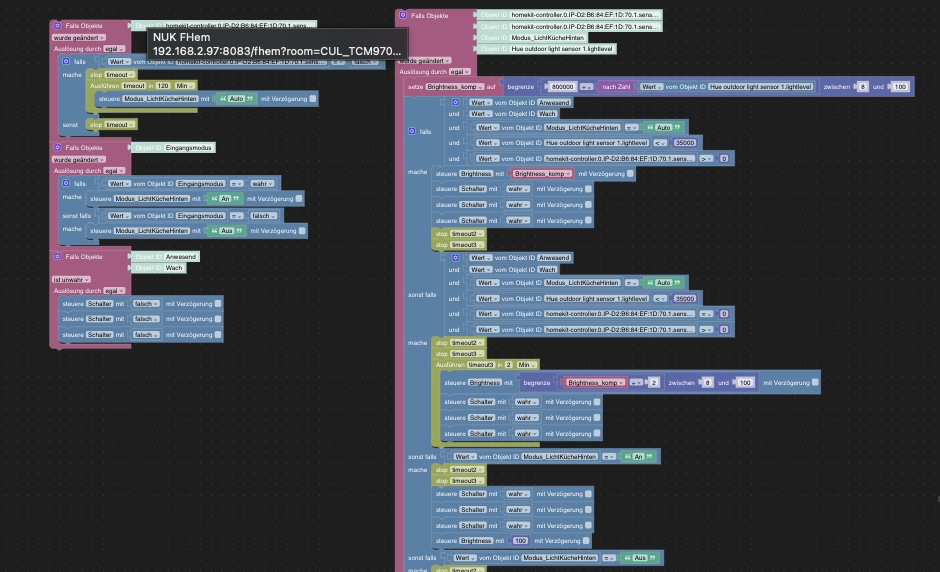
Zwei Instanzen, weil ich zum Probieren nicht immer wieder alle benötigten Skripte neustarten wollte ;-). Hier Instanz 02024-11-08 19:11:15.349 - info: host.iobroker "system.adapter.javascript.0" disabled 2024-11-08 19:11:15.349 - info: host.iobroker stopInstance system.adapter.javascript.0 (force=false, process=true) 2024-11-08 19:11:15.351 - info: javascript.0 (348) Got terminate signal TERMINATE_YOURSELF 2024-11-08 19:11:15.354 - info: javascript.0 (348) terminating 2024-11-08 19:11:15.354 - info: javascript.0 (348) Terminated (ADAPTER_REQUESTED_TERMINATION): Without reason 2024-11-08 19:11:15.392 - info: host.iobroker stopInstance system.adapter.javascript.0 send kill signal 2024-11-08 19:11:15.853 - info: javascript.0 (348) terminating 2024-11-08 19:11:15.886 - info: host.iobroker instance system.adapter.javascript.0 terminated with code 11 (ADAPTER_REQUESTED_TERMINATION) 2024-11-08 19:11:18.596 - info: host.iobroker "system.adapter.javascript.0" enabled 2024-11-08 19:11:18.865 - info: host.iobroker instance system.adapter.javascript.0 in version "8.8.3" started with pid 2081 2024-11-08 19:11:19.820 - info: javascript.0 (2081) starting. Version 8.8.3 in /opt/iobroker/node_modules/iobroker.javascript, node: v20.18.0, js-controller: 6.0.11 2024-11-08 19:11:20.060 - info: javascript.0 (2081) requesting all states 2024-11-08 19:11:20.061 - info: javascript.0 (2081) requesting all objects 2024-11-08 19:11:20.680 - info: javascript.0 (2081) received all objects 2024-11-08 19:11:20.682 - info: javascript.0 (2081) received all states 2024-11-08 19:11:20.748 - error: javascript.0 (2081) Cannot find view "script" for search "javascript"@svaggy zeig mal bitte bildlich deine Skripte / Blockly's
Ro75.
SERVER = Beelink U59 16GB DDR4 RAM 512GB SSD, FB 7490, FritzDect 200+301+440, ConBee II, Zigbee Aqara Sensoren + NOUS A1Z, NOUS A1T, Philips Hue ** ioBroker, REDIS, influxdb2, Grafana, PiHole, Plex-Mediaserver, paperless-ngx (Docker), MariaDB + phpmyadmin *** VIS-Runtime = Intel NUC 8GB RAM 128GB SSD + 24" Touchscreen
-
@ro75
Ganz oben habe ich doch ein super simples aus der Instanz 1 gezeigt, was nicht funktioniertHier was größeres aus der Instanz 0
SERVER = Beelink U59 16GB DDR4 RAM 512GB SSD, FB 7490, FritzDect 200+301+440, ConBee II, Zigbee Aqara Sensoren + NOUS A1Z, NOUS A1T, Philips Hue ** ioBroker, REDIS, influxdb2, Grafana, PiHole, Plex-Mediaserver, paperless-ngx (Docker), MariaDB + phpmyadmin *** VIS-Runtime = Intel NUC 8GB RAM 128GB SSD + 24" Touchscreen
-
Hallo,
ich habe das Problem, dass meine Blockly Skripte nach einem Neustart nicht funktionieren.
Hierbei scheint es bereits auszureichen, wenn die Javaskript Instanz neugestartet wird. Die Skripte werden alle als laufend angezeigt, funktionieren jedoch nicht. Erst ein manuelles Neustarten der Skripte lässt diese wieder arbeiten.Was kann hierfür die Ursache sein?
Hardware/ SW Infos:
NUK
Proxmox
iobroker im lxc containerGrüße,
Sven@svaggy sagte in Skript funktionieren nicht nach Neustart:
nach einem Neustart
nur ein einfacher Neustart, oder vllt doch das ein odere andere Update gemacht?
mach mal im terminal ein
iob upload allumgestiegen von Proxmox auf Unraid
-
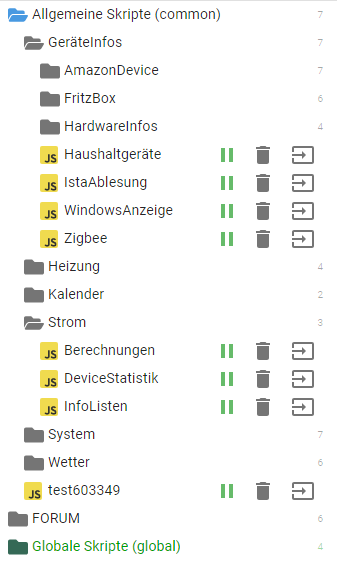
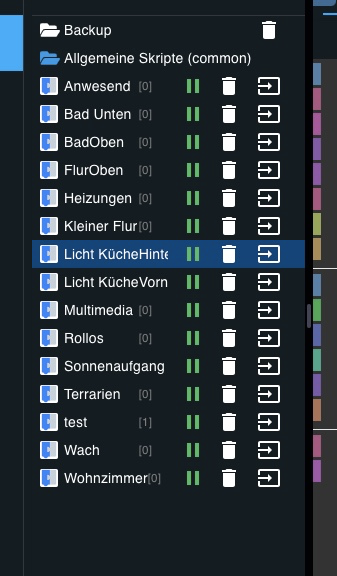
@svaggy sagte in Skript funktionieren nicht nach Neustart:
nach einem Neustart
nur ein einfacher Neustart, oder vllt doch das ein odere andere Update gemacht?
mach mal im terminal ein
iob upload all




Hey! Du scheinst an dieser Unterhaltung interessiert zu sein, hast aber noch kein Konto.
Hast du es satt, bei jedem Besuch durch die gleichen Beiträge zu scrollen? Wenn du dich für ein Konto anmeldest, kommst du immer genau dorthin zurück, wo du zuvor warst, und kannst dich über neue Antworten benachrichtigen lassen (entweder per E-Mail oder Push-Benachrichtigung). Du kannst auch Lesezeichen speichern und Beiträge positiv bewerten, um anderen Community-Mitgliedern deine Wertschätzung zu zeigen.
Mit deinem Input könnte dieser Beitrag noch besser werden 💗
Registrieren AnmeldenSupport us
230
Online33.0k
Benutzer83.6k
Themen1.3m
Beiträge