




pivCCU nach Update node.js nicht erreichbar
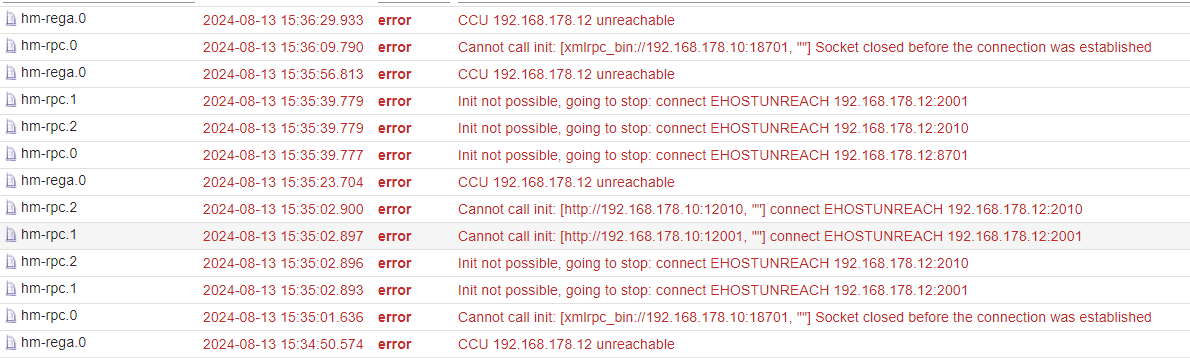
-
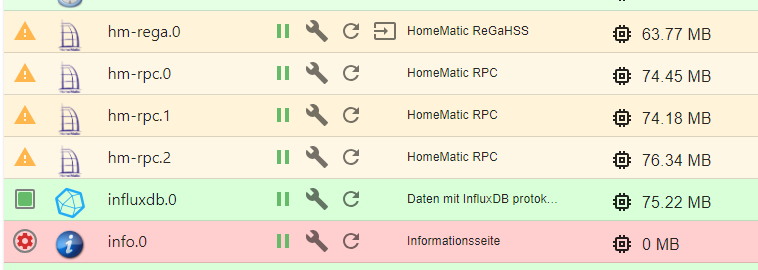
Es ist noch eine Frage zu INFO Adapter, der auch Fehler bringt. Ist auch nach dem Update aufgetreten.
Was kann das sein?iobroker npm-install: adapter "info" cannot be installed: Unknown packetName info. Please install packages from outside the repository using npm! host.iobroker-pi iobroker npm-install: host.iobroker-pi Unknown packetName info. Please install packages from outside the repository using "iobroker url <url-or-package>"! host.iobroker-pi startInstance cannot find adapter "info@2.0.0". Try to install it... 1 attempt -
@wibear sagte in pivCCU nach Update node.js nicht erreichbar:
pivCCU zeigt State: STOPPED
immer alles zeigen!
da steht nämlich noch viel mehr wichtiges
@homoran sagte in pivCCU nach Update node.js nicht erreichbar:
da steht nämlich noch viel mehr wichtiges
piVCCU version: 3.77.6-90 OS: Raspbian GNU/Linux 11 (bullseye) Kernel: 6.6.45-v7l+ armv7l Kernel modules: Not available Raw UART dev: Not available Rasp.Pi UART: Assigned to GPIO pins HMRF Hardware: unknown HMIP Hardware: unknown State: STOPPED -
@homoran sagte in pivCCU nach Update node.js nicht erreichbar:
da steht nämlich noch viel mehr wichtiges
piVCCU version: 3.77.6-90 OS: Raspbian GNU/Linux 11 (bullseye) Kernel: 6.6.45-v7l+ armv7l Kernel modules: Not available Raw UART dev: Not available Rasp.Pi UART: Assigned to GPIO pins HMRF Hardware: unknown HMIP Hardware: unknown State: STOPPED@wibear sagte in pivCCU nach Update node.js nicht erreichbar:
Raw UART dev: Not available
Funkmodul abgerutscht?
-
Es ist noch eine Frage zu INFO Adapter, der auch Fehler bringt. Ist auch nach dem Update aufgetreten.
Was kann das sein?iobroker npm-install: adapter "info" cannot be installed: Unknown packetName info. Please install packages from outside the repository using npm! host.iobroker-pi iobroker npm-install: host.iobroker-pi Unknown packetName info. Please install packages from outside the repository using "iobroker url <url-or-package>"! host.iobroker-pi startInstance cannot find adapter "info@2.0.0". Try to install it... 1 attempt@wibear sagte in pivCCU nach Update node.js nicht erreichbar:
Was kann das sein?
Den gibt es nicht mehr. Deinstallier den.
-
@wibear sagte in pivCCU nach Update node.js nicht erreichbar:
Raw UART dev: Not available
Funkmodul abgerutscht?
@homoran sagte in pivCCU nach Update node.js nicht erreichbar:
Funkmodul abgerutscht?
Ich glaube nicht, es ist fest vedrahtet:
Rasp.Pi UART: Assigned to GPIO pins -
@wibear sagte in pivCCU nach Update node.js nicht erreichbar:
Was kann das sein?
Den gibt es nicht mehr. Deinstallier den.
@thomas-braun sagte in pivCCU nach Update node.js nicht erreichbar:
Deinstallier den.
Danke, schon geschehen.
-
@homoran sagte in pivCCU nach Update node.js nicht erreichbar:
Funkmodul abgerutscht?
Ich glaube nicht, es ist fest vedrahtet:
Rasp.Pi UART: Assigned to GPIO pins@wibear dann versuch es mal mit einem reboot
-
@homoran sagte in pivCCU nach Update node.js nicht erreichbar:
dann versuch es mal mit einem reboot
Habe schon zum 10. mal gemacht, ohne Erfolg.
@wibear auch ganz stromlos für 30 Sekunden?
Ro75.
SERVER = Beelink U59 16GB DDR4 RAM 512GB SSD, FB 7490, FritzDect 200+301+440, ConBee II, Zigbee Aqara Sensoren + NOUS A1Z, NOUS A1T, Philips Hue ** ioBroker, REDIS, influxdb2, Grafana, PiHole, Plex-Mediaserver, paperless-ngx (Docker), MariaDB + phpmyadmin *** VIS-Runtime = Intel NUC 8GB RAM 128GB SSD + 24" Touchscreen
-
@ro75 sagte in pivCCU nach Update node.js nicht erreichbar:
@wibear auch ganz stromlos für 30 Sekunden?
Ro75.
@wibear
aber erst nach dem runterfahren den Stecker ziehenkein Support per PN! - Fragen im Forum stellen - Benutzt das Voting rechts unten im Beitrag wenn er euch geholfen hat.
Das Forum freut sich über eine Spende. Benutzt dazu den Spendenbutton oben rechts. Danke!
der Installationsfixer: curl -fsL https://iobroker.net/fix.sh | bash - -
@ro75 sagte in pivCCU nach Update node.js nicht erreichbar:
@wibear auch ganz stromlos für 30 Sekunden?
Ro75.
@wibear
aber erst nach dem runterfahren den Stecker ziehen -
@ro75 sagte in pivCCU nach Update node.js nicht erreichbar:
@wibear auch ganz stromlos für 30 Sekunden?
Ro75.
@wibear
aber erst nach dem runterfahren den Stecker ziehenImmer noch dasselbe:
systemctl status pivccu-dkms.service ● pivccu-dkms.service - piVCCU DKMS Modules Loaded: loaded (/lib/systemd/system/pivccu-dkms.service; enabled; vendor p> Active: failed (Result: exit-code) since Tue 2024-08-13 18:55:50 CEST; 5mi> Process: 814 ExecStart=/var/lib/piVCCU/dkms/ensure_modules.sh (code=exited,> Main PID: 814 (code=exited, status=1/FAILURE) CPU: 713ms Aug 13 18:55:48 iobroker-pi systemd[1]: Starting piVCCU DKMS Modules... Aug 13 18:55:50 iobroker-pi ensure_modules.sh[814]: Remove DKMS package ... FAI> Aug 13 18:55:50 iobroker-pi ensure_modules.sh[814]: Error! There is no instance> Aug 13 18:55:50 iobroker-pi ensure_modules.sh[814]: for kernel 6.6.45-v7l+ (arm> Aug 13 18:55:50 iobroker-pi systemd[1]: pivccu-dkms.service: Main process exite> Aug 13 18:55:50 iobroker-pi systemd[1]: pivccu-dkms.service: Failed with result> Aug 13 18:55:50 iobroker-pi systemd[1]: Failed to start piVCCU DKMS Modules. lines 1-14/14 (END) ● pivccu-dkms.service - piVCCU DKMS Modules Loaded: loaded (/lib/systemd/system/pivccu-dkms.service; enabled; vendor preset: enabled) Active: failed (Result: exit-code) since Tue 2024-08-13 18:55:50 CEST; 5min ago Process: 814 ExecStart=/var/lib/piVCCU/dkms/ensure_modules.sh (code=exited, status=1/FAILURE) Main PID: 814 (code=exited, status=1/FAILURE) CPU: 713ms Aug 13 18:55:48 iobroker-pi systemd[1]: Starting piVCCU DKMS Modules... Aug 13 18:55:50 iobroker-pi ensure_modules.sh[814]: Remove DKMS package ... FAILED Aug 13 18:55:50 iobroker-pi ensure_modules.sh[814]: Error! There is no instance of pivccu 1.0.84 Aug 13 18:55:50 iobroker-pi ensure_modules.sh[814]: for kernel 6.6.45-v7l+ (armv7l) located in the DKMS tree. Aug 13 18:55:50 iobroker-pi systemd[1]: pivccu-dkms.service: Main process exited, code=exited, status=1/FAILURE Aug 13 18:55:50 iobroker-pi systemd[1]: pivccu-dkms.service: Failed with result 'exit-code'. Aug 13 18:55:50 iobroker-pi systemd[1]: Failed to start piVCCU DKMS Modules. -
Immer noch dasselbe:
systemctl status pivccu-dkms.service ● pivccu-dkms.service - piVCCU DKMS Modules Loaded: loaded (/lib/systemd/system/pivccu-dkms.service; enabled; vendor p> Active: failed (Result: exit-code) since Tue 2024-08-13 18:55:50 CEST; 5mi> Process: 814 ExecStart=/var/lib/piVCCU/dkms/ensure_modules.sh (code=exited,> Main PID: 814 (code=exited, status=1/FAILURE) CPU: 713ms Aug 13 18:55:48 iobroker-pi systemd[1]: Starting piVCCU DKMS Modules... Aug 13 18:55:50 iobroker-pi ensure_modules.sh[814]: Remove DKMS package ... FAI> Aug 13 18:55:50 iobroker-pi ensure_modules.sh[814]: Error! There is no instance> Aug 13 18:55:50 iobroker-pi ensure_modules.sh[814]: for kernel 6.6.45-v7l+ (arm> Aug 13 18:55:50 iobroker-pi systemd[1]: pivccu-dkms.service: Main process exite> Aug 13 18:55:50 iobroker-pi systemd[1]: pivccu-dkms.service: Failed with result> Aug 13 18:55:50 iobroker-pi systemd[1]: Failed to start piVCCU DKMS Modules. lines 1-14/14 (END) ● pivccu-dkms.service - piVCCU DKMS Modules Loaded: loaded (/lib/systemd/system/pivccu-dkms.service; enabled; vendor preset: enabled) Active: failed (Result: exit-code) since Tue 2024-08-13 18:55:50 CEST; 5min ago Process: 814 ExecStart=/var/lib/piVCCU/dkms/ensure_modules.sh (code=exited, status=1/FAILURE) Main PID: 814 (code=exited, status=1/FAILURE) CPU: 713ms Aug 13 18:55:48 iobroker-pi systemd[1]: Starting piVCCU DKMS Modules... Aug 13 18:55:50 iobroker-pi ensure_modules.sh[814]: Remove DKMS package ... FAILED Aug 13 18:55:50 iobroker-pi ensure_modules.sh[814]: Error! There is no instance of pivccu 1.0.84 Aug 13 18:55:50 iobroker-pi ensure_modules.sh[814]: for kernel 6.6.45-v7l+ (armv7l) located in the DKMS tree. Aug 13 18:55:50 iobroker-pi systemd[1]: pivccu-dkms.service: Main process exited, code=exited, status=1/FAILURE Aug 13 18:55:50 iobroker-pi systemd[1]: pivccu-dkms.service: Failed with result 'exit-code'. Aug 13 18:55:50 iobroker-pi systemd[1]: Failed to start piVCCU DKMS Modules.@wibear sagte in pivCCU nach Update node.js nicht erreichbar:
There is no instance of pivccu 1.0.84
hattest du ein Betriebssystem Update gefahren, das ggf. gestört wurde?
-
@wibear sagte in pivCCU nach Update node.js nicht erreichbar:
There is no instance of pivccu 1.0.84
hattest du ein Betriebssystem Update gefahren, das ggf. gestört wurde?
-
@wibear sagte in pivCCU nach Update node.js nicht erreichbar:
Ich habe raspi-update ausgeführt, es lief aber ohne Probleme.
Jaja... Damit knallst du dir aber den offiziellen Kernel weg. Und die pivCCU-Kernelmodule laufen so erst mal nur mit dem offiziellen.
Finger weg von raspi-update! Das ist NICHT der Weg sein System aktuell zu halten!
-
@wibear sagte in pivCCU nach Update node.js nicht erreichbar:
Ich habe raspi-update ausgeführt,
oooh!
da bin ich jetzt überfragt, ob du dir damit nicht ins Knie geschossen hast.Wahrscheinlich musst du jetzt eine Installation für Bookworm machen.
Möglicherweise sind die komplexen Änderungen jetzt bei dir schon in PiOS 11 drin.kein Support per PN! - Fragen im Forum stellen - Benutzt das Voting rechts unten im Beitrag wenn er euch geholfen hat.
Das Forum freut sich über eine Spende. Benutzt dazu den Spendenbutton oben rechts. Danke!
der Installationsfixer: curl -fsL https://iobroker.net/fix.sh | bash - -
@wibear sagte in pivCCU nach Update node.js nicht erreichbar:
Ich habe raspi-update ausgeführt,
oooh!
da bin ich jetzt überfragt, ob du dir damit nicht ins Knie geschossen hast.Wahrscheinlich musst du jetzt eine Installation für Bookworm machen.
Möglicherweise sind die komplexen Änderungen jetzt bei dir schon in PiOS 11 drin.Zu genau dem Fall gibt es drüben bei pivCCU aber in der Installationsanleitung was.
Hab ich eben gelesen. -
@wibear sagte in pivCCU nach Update node.js nicht erreichbar:
Ich habe raspi-update ausgeführt,
oooh!
da bin ich jetzt überfragt, ob du dir damit nicht ins Knie geschossen hast.Wahrscheinlich musst du jetzt eine Installation für Bookworm machen.
Möglicherweise sind die komplexen Änderungen jetzt bei dir schon in PiOS 11 drin. -
@wibear sagte in pivCCU nach Update node.js nicht erreichbar:
Kann ich da ein downgrade machen?
Du solltest eher ein Upgrade der pivCCU-Pakete machen, wenn es denn welche gibt.
Hier gibt es aber ein paar Hinweise, was man da machen kann:
https://alexreinert.github.io/piVCCU/docs/setup/raspberrypi.html
@wibear
sieh mal da nach was dazu dort steht@thomas-braun sagte in pivCCU nach Update node.js nicht erreichbar:
@wibear sagte in pivCCU nach Update node.js nicht erreichbar:
Kann ich da ein downgrade machen?
Du solltest eher ein Upgrade der pivCCU-Pakete machen, wenn es denn welche gibt.
Hier gibt es aber ein paar Hinweise, was man da machen kann:
https://alexreinert.github.io/piVCCU/docs/setup/raspberrypi.html
-
@wibear
sieh mal da nach was dazu dort steht@thomas-braun sagte in pivCCU nach Update node.js nicht erreichbar:
@wibear sagte in pivCCU nach Update node.js nicht erreichbar:
Kann ich da ein downgrade machen?
Du solltest eher ein Upgrade der pivCCU-Pakete machen, wenn es denn welche gibt.
Hier gibt es aber ein paar Hinweise, was man da machen kann:
https://alexreinert.github.io/piVCCU/docs/setup/raspberrypi.html
@homoran sagte in pivCCU nach Update node.js nicht erreichbar:
Hier gibt es aber ein paar Hinweise, was man da machen kann:
Nach diesen Hinweisen habe ich ausgeführt, aber alles war bei mir aktuell.
Was ist, wenn ich ein funktionierendes Image nach der Installation und dann die aktuellen Backups einspiele?



Hey! Du scheinst an dieser Unterhaltung interessiert zu sein, hast aber noch kein Konto.
Hast du es satt, bei jedem Besuch durch die gleichen Beiträge zu scrollen? Wenn du dich für ein Konto anmeldest, kommst du immer genau dorthin zurück, wo du zuvor warst, und kannst dich über neue Antworten benachrichtigen lassen (entweder per E-Mail oder Push-Benachrichtigung). Du kannst auch Lesezeichen speichern und Beiträge positiv bewerten, um anderen Community-Mitgliedern deine Wertschätzung zu zeigen.
Mit deinem Input könnte dieser Beitrag noch besser werden 💗
Registrieren Anmelden362
Online33.0k
Benutzende83.7k
Themen1.3m
Beiträge