




Einrichtung Multihost klappt nicht - Meldung Slave

-
@homoran also der pi hat schon einen eigenen Namen. Nur beim anmelden ist der Benutzername pi.
Auf einem anderen pi läuft die Instanz. Denke das ich ein Spannungsproblem habe. 4 von den 8 Sensoren zeigen Werte an. Muss ich morgen mal schauen
jetzt muss ich noch grafana installieren. Nach deiner Anleitung:
pi@Homee:~ $ sudo apt-get install -y apt-transport-https
Reading package lists... Done
Building dependency tree... Done
Reading state information... Done
The following packages were automatically installed and are no longer required:
  libraspberrypi0 libwpe-1.0-1 libwpebackend-fdo-1.0-1
Use 'sudo apt autoremove' to remove them.
The following NEW packages will be installed:
  apt-transport-https
0 upgraded, 1 newly installed, 0 to remove and 0 not upgraded.
Need to get 25.2 kB of archives.
After this operation, 35.8 kB of additional disk space will be used.
Get:1 http://deb.debian.org/debian bookworm/main arm64 apt-transport-https all 2.6.1 [25.2 kB]
Fetched 25.2 kB in 0s (295 kB/s)
Selecting previously unselected package apt-transport-https.
(Reading database ... 158457 files and directories currently installed.)
Preparing to unpack .../apt-transport-https_2.6.1_all.deb ...
Unpacking apt-transport-https (2.6.1) ...
Setting up apt-transport-https (2.6.1) ...
pi@Homee:~ $ sudo apt-get install -y software-properties-common wget
Reading package lists... Done
Building dependency tree... Done
Reading state information... Done
wget is already the newest version (1.21.3-1+b1).
wget set to manually installed.
The following packages were automatically installed and are no longer required:
  libraspberrypi0 libwpe-1.0-1 libwpebackend-fdo-1.0-1
Use 'sudo apt autoremove' to remove them.
The following additional packages will be installed:
  python3-httplib2 python3-lazr.restfulclient python3-lazr.uri python3-pyparsing python3-software-properties python3-wadllib
Suggested packages:
  python-pyparsing-doc
The following NEW packages will be installed:
  python3-httplib2 python3-lazr.restfulclient python3-lazr.uri python3-pyparsing python3-software-properties python3-wadllib
  software-properties-common
0 upgraded, 7 newly installed, 0 to remove and 0 not upgraded.
Need to get 370 kB of archives.
After this operation, 1,836 kB of additional disk space will be used.
Get:1 http://deb.debian.org/debian bookworm/main arm64 python3-pyparsing all 3.0.9-1 [138 kB]
Get:2 http://deb.debian.org/debian bookworm/main arm64 python3-httplib2 all 0.20.4-3 [36.0 kB]
Get:3 http://deb.debian.org/debian bookworm/main arm64 python3-lazr.uri all 1.0.6-3 [13.7 kB]
Get:4 http://deb.debian.org/debian bookworm/main arm64 python3-wadllib all 1.3.6-4 [37.2 kB]
Get:5 http://deb.debian.org/debian bookworm/main arm64 python3-lazr.restfulclient all 0.14.5-1 [50.4 kB]
Get:6 http://deb.debian.org/debian bookworm/main arm64 python3-software-properties all 0.99.30-4 [32.7 kB]
Get:7 http://deb.debian.org/debian bookworm/main arm64 software-properties-common all 0.99.30-4 [62.0 kB]
Fetched 370 kB in 0s (4,820 kB/s)
Selecting previously unselected package python3-pyparsing.
(Reading database ... 158461 files and directories currently installed.)
Preparing to unpack .../0-python3-pyparsing_3.0.9-1_all.deb ...
Unpacking python3-pyparsing (3.0.9-1) ...
Selecting previously unselected package python3-httplib2.
Preparing to unpack .../1-python3-httplib2_0.20.4-3_all.deb ...
Unpacking python3-httplib2 (0.20.4-3) ...
Selecting previously unselected package python3-lazr.uri.
Preparing to unpack .../2-python3-lazr.uri_1.0.6-3_all.deb ...
Unpacking python3-lazr.uri (1.0.6-3) ...
Selecting previously unselected package python3-wadllib.
Preparing to unpack .../3-python3-wadllib_1.3.6-4_all.deb ...
Unpacking python3-wadllib (1.3.6-4) ...
Selecting previously unselected package python3-lazr.restfulclient.
Preparing to unpack .../4-python3-lazr.restfulclient_0.14.5-1_all.deb ...
Unpacking python3-lazr.restfulclient (0.14.5-1) ...
Selecting previously unselected package python3-software-properties.
Preparing to unpack .../5-python3-software-properties_0.99.30-4_all.deb ...
Unpacking python3-software-properties (0.99.30-4) ...
Selecting previously unselected package software-properties-common.
Preparing to unpack .../6-software-properties-common_0.99.30-4_all.deb ...
Unpacking software-properties-common (0.99.30-4) ...
Setting up python3-lazr.uri (1.0.6-3) ...
Setting up python3-pyparsing (3.0.9-1) ...
Setting up python3-wadllib (1.3.6-4) ...
Setting up python3-httplib2 (0.20.4-3) ...
Setting up python3-lazr.restfulclient (0.14.5-1) ...
Setting up python3-software-properties (0.99.30-4) ...
Setting up software-properties-common (0.99.30-4) ...
Processing triggers for man-db (2.11.2-2) ...
Processing triggers for dbus (1.14.10-1~deb12u1) ...
pi@Homee:~ $ sudo wget -q -O /usr/share/keyrings/grafana.key https://apt.grafana.com/gpg.key
pi@Homee:~ $ echo "deb [signed-by=/usr/share/keyrings/grafana.key] https://apt.grafana.com stable main" | sudo tee /etc/apt/sources.list.d/grafana.list
deb [signed-by=/usr/share/keyrings/grafana.key] https://apt.grafana.com stable main
pi@Homee:~ $
Alles richtig?
@sms sagte in Einrichtung Multihost klappt nicht - Meldung Slave:
Alles richtig?
Ich denke.
Hast du das aus den 'phantastischen Repos' kopiert? -
Laufen die Kernelmodule dazu?
lsmodbzw
lsmod | grep w1anschauen.
Wobei ich von 1-wire keine Ahnung habe, ob sich das nicht wegen GPIO-Umstellereien im aktuellen Raspberry OS wieder alles geändert hat.@thomas-braun sagte in Einrichtung Multihost klappt nicht - Meldung Slave:
Laufen die Kernelmodule dazu?
lsmodpi@Homee:~ $ lsmod Module Size Used by rfcomm 53248 4 snd_seq_dummy 12288 0 snd_hrtimer 12288 1 snd_seq 81920 7 snd_seq_dummy snd_seq_device 16384 1 snd_seq cmac 12288 3 algif_hash 12288 1 aes_arm64 12288 3 aes_generic 32768 1 aes_arm64 algif_skcipher 12288 1 af_alg 28672 6 algif_hash,algif_skcipher bnep 24576 2 brcmfmac_wcc 12288 0 ftdi_sio 53248 0 brcmfmac 348160 1 brcmfmac_wcc usbserial 45056 1 ftdi_sio binfmt_misc 16384 1 hci_uart 49152 0 btbcm 24576 1 hci_uart brcmutil 24576 1 brcmfmac bluetooth 606208 33 hci_uart,btbcm,bnep,rfcomm rpivid_hevc 45056 0 bcm2835_codec 45056 0 cfg80211 995328 1 brcmfmac bcm2835_isp 28672 0 v4l2_mem2mem 53248 2 bcm2835_codec,rpivid_hevc ecdh_generic 16384 2 bluetooth bcm2835_v4l2 40960 0 bcm2835_mmal_vchiq 36864 3 bcm2835_codec,bcm2835_v4l2,bcm2835_isp ecc 36864 1 ecdh_generic videobuf2_vmalloc 12288 1 bcm2835_v4l2 videobuf2_dma_contig 20480 3 bcm2835_codec,rpivid_hevc,bcm2835_isp videobuf2_memops 12288 2 videobuf2_vmalloc,videobuf2_dma_contig libaes 12288 3 aes_arm64,bluetooth,aes_generic raspberrypi_hwmon 12288 0 videobuf2_v4l2 32768 5 bcm2835_codec,bcm2835_v4l2,rpivid_hevc,v4l2_mem2mem,bcm2835_isp rfkill 32768 6 bluetooth,cfg80211 videodev 319488 6 bcm2835_codec,videobuf2_v4l2,bcm2835_v4l2,rpivid_hevc,v4l2_mem2mem,bcm2835_isp raspberrypi_gpiomem 12288 0 videobuf2_common 73728 9 bcm2835_codec,videobuf2_vmalloc,videobuf2_dma_contig,videobuf2_v4l2,bcm2835_v4l2,rpivid_hevc,v4l2_mem2mem,videobuf2_memops,bcm2835_isp mc 65536 7 videodev,bcm2835_codec,videobuf2_v4l2,videobuf2_common,rpivid_hevc,v4l2_mem2mem,bcm2835_isp snd_bcm2835 24576 1 vc_sm_cma 28672 2 bcm2835_mmal_vchiq,bcm2835_isp nvmem_rmem 12288 0 uio_pdrv_genirq 12288 0 uio 20480 1 uio_pdrv_genirq i2c_dev 16384 0 fuse 139264 5 dm_mod 143360 0 ip_tables 32768 0 x_tables 57344 1 ip_tables ipv6 573440 73 vc4 372736 10 snd_soc_hdmi_codec 20480 2 drm_display_helper 16384 1 vc4 cec 53248 1 vc4 drm_dma_helper 24576 2 vc4 drm_kms_helper 233472 2 drm_dma_helper,vc4 snd_soc_core 307200 2 vc4,snd_soc_hdmi_codec v3d 90112 4 snd_compress 20480 1 snd_soc_core gpu_sched 53248 1 v3d drm_shmem_helper 24576 1 v3d snd_pcm_dmaengine 16384 1 snd_soc_core drm 688128 17 gpu_sched,drm_kms_helper,drm_dma_helper,v3d,vc4,drm_shmem_helper,drm_display_helper drm_panel_orientation_quirks 24576 1 drm snd_pcm 151552 5 snd_bcm2835,snd_soc_hdmi_codec,snd_compress,snd_soc_core,snd_pcm_dmaengine i2c_brcmstb 12288 0 snd_timer 36864 3 snd_seq,snd_hrtimer,snd_pcm snd 122880 12 snd_seq,snd_seq_device,snd_bcm2835,snd_soc_hdmi_codec,snd_timer,snd_compress,snd_soc_core,snd_pcm backlight 24576 1 drm pi@Homee:~ $bzw
lsmod | grep w1pi@Homee:~ $ lsmod | grep w1 pi@Homee:~ $Ja, habe ich von dir
-
@thomas-braun sagte in Einrichtung Multihost klappt nicht - Meldung Slave:
Laufen die Kernelmodule dazu?
lsmodpi@Homee:~ $ lsmod Module Size Used by rfcomm 53248 4 snd_seq_dummy 12288 0 snd_hrtimer 12288 1 snd_seq 81920 7 snd_seq_dummy snd_seq_device 16384 1 snd_seq cmac 12288 3 algif_hash 12288 1 aes_arm64 12288 3 aes_generic 32768 1 aes_arm64 algif_skcipher 12288 1 af_alg 28672 6 algif_hash,algif_skcipher bnep 24576 2 brcmfmac_wcc 12288 0 ftdi_sio 53248 0 brcmfmac 348160 1 brcmfmac_wcc usbserial 45056 1 ftdi_sio binfmt_misc 16384 1 hci_uart 49152 0 btbcm 24576 1 hci_uart brcmutil 24576 1 brcmfmac bluetooth 606208 33 hci_uart,btbcm,bnep,rfcomm rpivid_hevc 45056 0 bcm2835_codec 45056 0 cfg80211 995328 1 brcmfmac bcm2835_isp 28672 0 v4l2_mem2mem 53248 2 bcm2835_codec,rpivid_hevc ecdh_generic 16384 2 bluetooth bcm2835_v4l2 40960 0 bcm2835_mmal_vchiq 36864 3 bcm2835_codec,bcm2835_v4l2,bcm2835_isp ecc 36864 1 ecdh_generic videobuf2_vmalloc 12288 1 bcm2835_v4l2 videobuf2_dma_contig 20480 3 bcm2835_codec,rpivid_hevc,bcm2835_isp videobuf2_memops 12288 2 videobuf2_vmalloc,videobuf2_dma_contig libaes 12288 3 aes_arm64,bluetooth,aes_generic raspberrypi_hwmon 12288 0 videobuf2_v4l2 32768 5 bcm2835_codec,bcm2835_v4l2,rpivid_hevc,v4l2_mem2mem,bcm2835_isp rfkill 32768 6 bluetooth,cfg80211 videodev 319488 6 bcm2835_codec,videobuf2_v4l2,bcm2835_v4l2,rpivid_hevc,v4l2_mem2mem,bcm2835_isp raspberrypi_gpiomem 12288 0 videobuf2_common 73728 9 bcm2835_codec,videobuf2_vmalloc,videobuf2_dma_contig,videobuf2_v4l2,bcm2835_v4l2,rpivid_hevc,v4l2_mem2mem,videobuf2_memops,bcm2835_isp mc 65536 7 videodev,bcm2835_codec,videobuf2_v4l2,videobuf2_common,rpivid_hevc,v4l2_mem2mem,bcm2835_isp snd_bcm2835 24576 1 vc_sm_cma 28672 2 bcm2835_mmal_vchiq,bcm2835_isp nvmem_rmem 12288 0 uio_pdrv_genirq 12288 0 uio 20480 1 uio_pdrv_genirq i2c_dev 16384 0 fuse 139264 5 dm_mod 143360 0 ip_tables 32768 0 x_tables 57344 1 ip_tables ipv6 573440 73 vc4 372736 10 snd_soc_hdmi_codec 20480 2 drm_display_helper 16384 1 vc4 cec 53248 1 vc4 drm_dma_helper 24576 2 vc4 drm_kms_helper 233472 2 drm_dma_helper,vc4 snd_soc_core 307200 2 vc4,snd_soc_hdmi_codec v3d 90112 4 snd_compress 20480 1 snd_soc_core gpu_sched 53248 1 v3d drm_shmem_helper 24576 1 v3d snd_pcm_dmaengine 16384 1 snd_soc_core drm 688128 17 gpu_sched,drm_kms_helper,drm_dma_helper,v3d,vc4,drm_shmem_helper,drm_display_helper drm_panel_orientation_quirks 24576 1 drm snd_pcm 151552 5 snd_bcm2835,snd_soc_hdmi_codec,snd_compress,snd_soc_core,snd_pcm_dmaengine i2c_brcmstb 12288 0 snd_timer 36864 3 snd_seq,snd_hrtimer,snd_pcm snd 122880 12 snd_seq,snd_seq_device,snd_bcm2835,snd_soc_hdmi_codec,snd_timer,snd_compress,snd_soc_core,snd_pcm backlight 24576 1 drm pi@Homee:~ $bzw
lsmod | grep w1pi@Homee:~ $ lsmod | grep w1 pi@Homee:~ $Ja, habe ich von dir
Dann halt wie üblich:
sudo apt update
sudo apt install grafana
Zu 1wire kann ich dir nix sagen, hab ich noch nie mit zu tun gehabt.
Linux-Werkzeugkasten:
https://forum.iobroker.net/topic/42952/der-kleine-iobroker-linux-werkzeugkasten
NodeJS Fixer Skript:
https://forum.iobroker.net/topic/68035/iob-node-fix-skript
iob_diag: curl -sLf -o diag.sh https://iobroker.net/diag.sh && bash diag.sh -
Zu 1wire kann ich dir nix sagen, hab ich noch nie mit zu tun gehabt.
Da schau ich morgen mal nach
-
Dann halt wie üblich:
sudo apt update
sudo apt install grafana
Zu 1wire kann ich dir nix sagen, hab ich noch nie mit zu tun gehabt.
@thomas-braun sagte in Einrichtung Multihost klappt nicht - Meldung Slave:
Dann halt wie üblich:
sudo apt update
sudo apt install grafana
Und nun:
pi@Homee:~ $ sudo apt install grafana Reading package lists... Done Building dependency tree... Done Reading state information... Done The following packages were automatically installed and are no longer required: libraspberrypi0 libwpe-1.0-1 libwpebackend-fdo-1.0-1 Use 'sudo apt autoremove' to remove them. The following additional packages will be installed: musl The following NEW packages will be installed: grafana musl 0 upgraded, 2 newly installed, 0 to remove and 0 not upgraded. Need to get 111 MB of archives. After this operation, 424 MB of additional disk space will be used. Do you want to continue? [Y/n] y Get:1 http://deb.debian.org/debian bookworm/main arm64 musl arm64 1.2.3-1 [392 kB] Get:2 https://apt.grafana.com stable/main arm64 grafana arm64 11.0.0 [111 MB] Fetched 111 MB in 9s (12.0 MB/s) Selecting previously unselected package musl:arm64. (Reading database ... 158707 files and directories currently installed.) Preparing to unpack .../musl_1.2.3-1_arm64.deb ... Unpacking musl:arm64 (1.2.3-1) ... Selecting previously unselected package grafana. Preparing to unpack .../grafana_11.0.0_arm64.deb ... Unpacking grafana (11.0.0) ... Setting up musl:arm64 (1.2.3-1) ... Setting up grafana (11.0.0) ... Adding system user `grafana' (UID 112) ... Adding new user `grafana' (UID 112) with group `grafana' ... Not creating home directory `/usr/share/grafana'. ### NOT starting on installation, please execute the following statements to configure grafana to start automatically using systemd sudo /bin/systemctl daemon-reload sudo /bin/systemctl enable grafana-server ### You can start grafana-server by executing sudo /bin/systemctl start grafana-server Processing triggers for man-db (2.11.2-2) ... -
@thomas-braun sagte in Einrichtung Multihost klappt nicht - Meldung Slave:
Dann halt wie üblich:
sudo apt update
sudo apt install grafana
Und nun:
pi@Homee:~ $ sudo apt install grafana Reading package lists... Done Building dependency tree... Done Reading state information... Done The following packages were automatically installed and are no longer required: libraspberrypi0 libwpe-1.0-1 libwpebackend-fdo-1.0-1 Use 'sudo apt autoremove' to remove them. The following additional packages will be installed: musl The following NEW packages will be installed: grafana musl 0 upgraded, 2 newly installed, 0 to remove and 0 not upgraded. Need to get 111 MB of archives. After this operation, 424 MB of additional disk space will be used. Do you want to continue? [Y/n] y Get:1 http://deb.debian.org/debian bookworm/main arm64 musl arm64 1.2.3-1 [392 kB] Get:2 https://apt.grafana.com stable/main arm64 grafana arm64 11.0.0 [111 MB] Fetched 111 MB in 9s (12.0 MB/s) Selecting previously unselected package musl:arm64. (Reading database ... 158707 files and directories currently installed.) Preparing to unpack .../musl_1.2.3-1_arm64.deb ... Unpacking musl:arm64 (1.2.3-1) ... Selecting previously unselected package grafana. Preparing to unpack .../grafana_11.0.0_arm64.deb ... Unpacking grafana (11.0.0) ... Setting up musl:arm64 (1.2.3-1) ... Setting up grafana (11.0.0) ... Adding system user `grafana' (UID 112) ... Adding new user `grafana' (UID 112) with group `grafana' ... Not creating home directory `/usr/share/grafana'. ### NOT starting on installation, please execute the following statements to configure grafana to start automatically using systemd sudo /bin/systemctl daemon-reload sudo /bin/systemctl enable grafana-server ### You can start grafana-server by executing sudo /bin/systemctl start grafana-server Processing triggers for man-db (2.11.2-2) ...Gut. Wenn das ganze automatisch gestartet werden soll halt die drei systemctl-Befehle noch eingeben.
Linux-Werkzeugkasten:
https://forum.iobroker.net/topic/42952/der-kleine-iobroker-linux-werkzeugkasten
NodeJS Fixer Skript:
https://forum.iobroker.net/topic/68035/iob-node-fix-skript
iob_diag: curl -sLf -o diag.sh https://iobroker.net/diag.sh && bash diag.sh -
Gut. Wenn das ganze automatisch gestartet werden soll halt die drei systemctl-Befehle noch eingeben.
@thomas-braun welches PW ist gemeint?
pi@Homee:~ $ sudo systemctl enable grafana-server Synchronizing state of grafana-server.service with SysV service script with /lib/systemd/systemd-sysv-install. Executing: /lib/systemd/systemd-sysv-install enable grafana-server Created symlink /etc/systemd/system/multi-user.target.wants/grafana-server.service → /lib/systemd/system/grafana-server.service. pi@Homee:~ $ systemctl enable grafana-server.service Synchronizing state of grafana-server.service with SysV service script with /lib/systemd/systemd-sysv-install. Executing: /lib/systemd/systemd-sysv-install enable grafana-server ==== AUTHENTICATING FOR org.freedesktop.systemd1.reload-daemon ==== Authentication is required to reload the systemd state. Authenticating as: ,,, (pi) Password: ==== AUTHENTICATION COMPLETE ==== ==== AUTHENTICATING FOR org.freedesktop.systemd1.reload-daemon ==== Authentication is required to reload the systemd state. Authenticating as: ,,, (pi) Password: ==== AUTHENTICATION COMPLETE ==== ==== AUTHENTICATING FOR org.freedesktop.systemd1.manage-unit-files ==== Authentication is required to manage system service or unit files. Authenticating as: ,,, (pi) Password: ==== AUTHENTICATION COMPLETE ==== ==== AUTHENTICATING FOR org.freedesktop.systemd1.reload-daemon ==== Authentication is required to reload the systemd state. Authenticating as: ,,, (pi) Password: polkit-agent-helper-1: pam_authenticate failed: Authentication failure ==== AUTHENTICATION FAILED ==== Reload daemon failed: Access denied pi@Homee:~ $ pi@Homee:~ $ systemctl status grafana-server ○ grafana-server.service - Grafana instance Loaded: loaded (/lib/systemd/system/grafana-server.service; enabled; preset: enabled) Active: inactive (dead) Docs: http://docs.grafana.org -
@thomas-braun welches PW ist gemeint?
pi@Homee:~ $ sudo systemctl enable grafana-server Synchronizing state of grafana-server.service with SysV service script with /lib/systemd/systemd-sysv-install. Executing: /lib/systemd/systemd-sysv-install enable grafana-server Created symlink /etc/systemd/system/multi-user.target.wants/grafana-server.service → /lib/systemd/system/grafana-server.service. pi@Homee:~ $ systemctl enable grafana-server.service Synchronizing state of grafana-server.service with SysV service script with /lib/systemd/systemd-sysv-install. Executing: /lib/systemd/systemd-sysv-install enable grafana-server ==== AUTHENTICATING FOR org.freedesktop.systemd1.reload-daemon ==== Authentication is required to reload the systemd state. Authenticating as: ,,, (pi) Password: ==== AUTHENTICATION COMPLETE ==== ==== AUTHENTICATING FOR org.freedesktop.systemd1.reload-daemon ==== Authentication is required to reload the systemd state. Authenticating as: ,,, (pi) Password: ==== AUTHENTICATION COMPLETE ==== ==== AUTHENTICATING FOR org.freedesktop.systemd1.manage-unit-files ==== Authentication is required to manage system service or unit files. Authenticating as: ,,, (pi) Password: ==== AUTHENTICATION COMPLETE ==== ==== AUTHENTICATING FOR org.freedesktop.systemd1.reload-daemon ==== Authentication is required to reload the systemd state. Authenticating as: ,,, (pi) Password: polkit-agent-helper-1: pam_authenticate failed: Authentication failure ==== AUTHENTICATION FAILED ==== Reload daemon failed: Access denied pi@Homee:~ $ pi@Homee:~ $ systemctl status grafana-server ○ grafana-server.service - Grafana instance Loaded: loaded (/lib/systemd/system/grafana-server.service; enabled; preset: enabled) Active: inactive (dead) Docs: http://docs.grafana.orgMuss mit sudo eingeleitet werden.
Deswegen steht das auch so drin.
sudo /bin/systemctl daemon-reload
sudo /bin/systemctl enable grafana-server
sudo /bin/systemctl start grafana-server
Linux-Werkzeugkasten:
https://forum.iobroker.net/topic/42952/der-kleine-iobroker-linux-werkzeugkasten
NodeJS Fixer Skript:
https://forum.iobroker.net/topic/68035/iob-node-fix-skript
iob_diag: curl -sLf -o diag.sh https://iobroker.net/diag.sh && bash diag.sh -
Muss mit sudo eingeleitet werden.
Deswegen steht das auch so drin.
sudo /bin/systemctl daemon-reload sudo /bin/systemctl enable grafana-server sudo /bin/systemctl start grafana-server@thomas-braun sagte in Einrichtung Multihost klappt nicht - Meldung Slave:
sudo /bin/systemctl start grafana-server
OK, auf die Seite komme ich jetzt wieder. Aber wie ist der Benutzername und das Passwort? Das Alte funzt nicht mehr.
-
@thomas-braun sagte in Einrichtung Multihost klappt nicht - Meldung Slave:
sudo /bin/systemctl start grafana-server
OK, auf die Seite komme ich jetzt wieder. Aber wie ist der Benutzername und das Passwort? Das Alte funzt nicht mehr.
@sms sagte in Einrichtung Multihost klappt nicht - Meldung Slave:
Aber wie ist der Benutzername und das Passwort?
Ich verwende Grafana nicht.
Aber war da nicht irgendwas mit Token, die da benutzt werden?Linux-Werkzeugkasten:
https://forum.iobroker.net/topic/42952/der-kleine-iobroker-linux-werkzeugkasten
NodeJS Fixer Skript:
https://forum.iobroker.net/topic/68035/iob-node-fix-skript
iob_diag: curl -sLf -o diag.sh https://iobroker.net/diag.sh && bash diag.sh -
@sms sagte in Einrichtung Multihost klappt nicht - Meldung Slave:
Aber wie ist der Benutzername und das Passwort?
Ich verwende Grafana nicht.
Aber war da nicht irgendwas mit Token, die da benutzt werden? -
@thomas-braun keine Ahnung
@sms sagte in Einrichtung Multihost klappt nicht - Meldung Slave:
keine Ahnung
Ich auch nicht. Steht bestimmt in der Doku zu Grafana drin.
Linux-Werkzeugkasten:
https://forum.iobroker.net/topic/42952/der-kleine-iobroker-linux-werkzeugkasten
NodeJS Fixer Skript:
https://forum.iobroker.net/topic/68035/iob-node-fix-skript
iob_diag: curl -sLf -o diag.sh https://iobroker.net/diag.sh && bash diag.sh -
@sms sagte in Einrichtung Multihost klappt nicht - Meldung Slave:
keine Ahnung
Ich auch nicht. Steht bestimmt in der Doku zu Grafana drin.
@thomas-braun morgen geht's weiter.
Danke, warst wie immer eine große HILFE!! :-)
-
@sms sagte in Einrichtung Multihost klappt nicht - Meldung Slave:
keine Ahnung
Ich auch nicht. Steht bestimmt in der Doku zu Grafana drin.
@thomas-braun Hi, muss mal wieder kurz stören.
Da mitlerweile alles wieder läuft, zumindest die Adapter, habe ich festgestellt das meine GPIOs nicht mehr funktionieren. Habe irgendwas im Kopf das man die wo freischalten muss. Hier
sudo raspi-confighabe ich sie aktiviert.
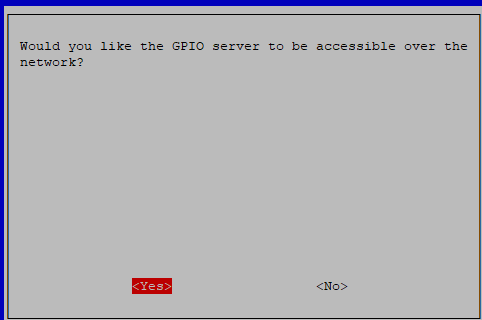
Kannst du mir weiterhelfen?
Danke!
-
@thomas-braun Hi, muss mal wieder kurz stören.
Da mitlerweile alles wieder läuft, zumindest die Adapter, habe ich festgestellt das meine GPIOs nicht mehr funktionieren. Habe irgendwas im Kopf das man die wo freischalten muss. Hier
sudo raspi-confighabe ich sie aktiviert.
Kannst du mir weiterhelfen?
Danke!
@sms sagte in Einrichtung Multihost klappt nicht - Meldung Slave:
habe ich festgestellt das meine GPIOs nicht mehr funktionieren.
Da wurde einiges umgestellt. Wie greifst du auf die GPIOs zu?
Linux-Werkzeugkasten:
https://forum.iobroker.net/topic/42952/der-kleine-iobroker-linux-werkzeugkasten
NodeJS Fixer Skript:
https://forum.iobroker.net/topic/68035/iob-node-fix-skript
iob_diag: curl -sLf -o diag.sh https://iobroker.net/diag.sh && bash diag.sh -
@sms sagte in Einrichtung Multihost klappt nicht - Meldung Slave:
habe ich festgestellt das meine GPIOs nicht mehr funktionieren.
Da wurde einiges umgestellt. Wie greifst du auf die GPIOs zu?
-
@thomas-braun über den Adapter rpi2
Der wird soweit ich das sehe gerade auf neue Gegebenheiten angepasst.
Wie weit das gediehen ist kann ich dir aber nicht sagen.Linux-Werkzeugkasten:
https://forum.iobroker.net/topic/42952/der-kleine-iobroker-linux-werkzeugkasten
NodeJS Fixer Skript:
https://forum.iobroker.net/topic/68035/iob-node-fix-skript
iob_diag: curl -sLf -o diag.sh https://iobroker.net/diag.sh && bash diag.sh -
Der wird soweit ich das sehe gerade auf neue Gegebenheiten angepasst.
Wie weit das gediehen ist kann ich dir aber nicht sagen. -
@thomas-braun gibt es ne andere Möglichkeit? Steuere darüber meine Poolpumpe und andere Sachen
Linux-Werkzeugkasten:
https://forum.iobroker.net/topic/42952/der-kleine-iobroker-linux-werkzeugkasten
NodeJS Fixer Skript:
https://forum.iobroker.net/topic/68035/iob-node-fix-skript
iob_diag: curl -sLf -o diag.sh https://iobroker.net/diag.sh && bash diag.sh -
@thomas-braun sagte in Einrichtung Multihost klappt nicht - Meldung Slave:
Ist der iobroker zumindest in der Gruppe
gpiodrin?sudo -H -u iobroker groupspi@Gartenklo:~ $ sudo -H -u iobroker groups iobroker tty dialout audio video plugdev bluetooth gpio i2c pi@Gartenklo:~ $


Hey! Du scheinst an dieser Unterhaltung interessiert zu sein, hast aber noch kein Konto.
Hast du es satt, bei jedem Besuch durch die gleichen Beiträge zu scrollen? Wenn du dich für ein Konto anmeldest, kommst du immer genau dorthin zurück, wo du zuvor warst, und kannst dich über neue Antworten benachrichtigen lassen (entweder per E-Mail oder Push-Benachrichtigung). Du kannst auch Lesezeichen speichern und Beiträge positiv bewerten, um anderen Community-Mitgliedern deine Wertschätzung zu zeigen.
Mit deinem Input könnte dieser Beitrag noch besser werden 💗
Registrieren Anmelden407
Online33.0k
Benutzende83.7k
Themen1.3m
Beiträge