




vedirect keine Verbindung bei rasp 4
-
Hallo
nachdem vedirect von DrotmotiX am rasp 3b problemlos lief zusammen mit dem USB Kabel von victroenic (Bluesolar MPTT 100/50) bin ich auf rasp 4 umgestiegen und hab alles genauso installiert. iobroker und Adapter. Leider keine Verbindung zum USB. Hat jemand eine Idee, woran das liegt? Ein paar Details:
Get error "Issue handling serial port connection : {}" and no connection to USB. power supply is no problem, because active usb hub. also tried without hub. same result. MPTT Bluesolar 100/50, ve.direct USB
settings are /dev/ttyUSB0 , both times on 0sec
is there an issue with rasp 4? any idea?
These are my usb devices:
usb-devicesT: Bus=01 Lev=00 Prnt=00 Port=00 Cnt=00 Dev#= 1 Spd=480 MxCh= 1
D: Ver= 2.00 Cls=09(hub ) Sub=00 Prot=01 MxPS=64 #Cfgs= 1
P: Vendor=1d6b ProdID=0002 Rev=06.06
S: Manufacturer=Linux 6.6.20+rpt-rpi-v8 xhci-hcd
S: Product=xHCI Host Controller
S: SerialNumber=0000:01:00.0
C: #Ifs= 1 Cfg#= 1 Atr=e0 MxPwr=0mA
I: If#= 0 Alt= 0 #EPs= 1 Cls=09(hub ) Sub=00 Prot=00 Driver=hub
E: Ad=81(I) Atr=03(Int.) MxPS= 4 Ivl=256msT: Bus=01 Lev=01 Prnt=01 Port=00 Cnt=01 Dev#= 2 Spd=480 MxCh= 4
D: Ver= 2.10 Cls=09(hub ) Sub=00 Prot=01 MxPS=64 #Cfgs= 1
P: Vendor=2109 ProdID=3431 Rev=04.21
S: Product=USB2.0 Hub
C: #Ifs= 1 Cfg#= 1 Atr=e0 MxPwr=100mA
I: If#= 0 Alt= 0 #EPs= 1 Cls=09(hub ) Sub=00 Prot=00 Driver=hub
E: Ad=81(I) Atr=03(Int.) MxPS= 1 Ivl=256msT: Bus=01 Lev=02 Prnt=02 Port=02 Cnt=01 Dev#= 3 Spd=480 MxCh= 4
D: Ver= 2.00 Cls=09(hub ) Sub=00 Prot=02 MxPS=64 #Cfgs= 1
P: Vendor=05e3 ProdID=0610 Rev=92.24
S: Manufacturer=GenesysLogic
S: Product=USB2.0 Hub
C: #Ifs= 1 Cfg#= 1 Atr=e0 MxPwr=100mA
I: If#= 0 Alt= 1 #EPs= 1 Cls=09(hub ) Sub=00 Prot=02 Driver=hub
E: Ad=81(I) Atr=03(Int.) MxPS= 1 Ivl=256msT: Bus=01 Lev=03 Prnt=03 Port=03 Cnt=01 Dev#= 4 Spd=12 MxCh= 0
D: Ver= 2.00 Cls=00(>ifc ) Sub=00 Prot=00 MxPS= 8 #Cfgs= 1
P: Vendor=0403 ProdID=6015 Rev=10.00
S: Manufacturer=VictronEnergy BV
S: Product=VE Direct cable
S: SerialNumber=VE6WATIJ
C: #Ifs= 1 Cfg#= 1 Atr=80 MxPwr=90mA
I: If#= 0 Alt= 0 #EPs= 2 Cls=ff(vend.) Sub=ff Prot=ff Driver=ftdi_sio
E: Ad=02(O) Atr=02(Bulk) MxPS= 64 Ivl=0ms
E: Ad=81(I) Atr=02(Bulk) MxPS= 64 Ivl=0msT: Bus=02 Lev=00 Prnt=00 Port=00 Cnt=00 Dev#= 1 Spd=5000 MxCh= 4
D: Ver= 3.00 Cls=09(hub ) Sub=00 Prot=03 MxPS= 9 #Cfgs= 1
P: Vendor=1d6b ProdID=0003 Rev=06.06
S: Manufacturer=Linux 6.6.20+rpt-rpi-v8 xhci-hcd
S: Product=xHCI Host Controller
S: SerialNumber=0000:01:00.0
C: #Ifs= 1 Cfg#= 1 Atr=e0 MxPwr=0mA
I: If#= 0 Alt= 0 #EPs= 1 Cls=09(hub ) Sub=00 Prot=00 Driver=hub
E: Ad=81(I) Atr=03(Int.) MxPS= 4 Ivl=256msVersions:
Adapter version: recent
JS-Controller version: 5.0.19
Node version: 18.20.2
Operating system: rasp OS 64 bit -
Hallo
nachdem vedirect von DrotmotiX am rasp 3b problemlos lief zusammen mit dem USB Kabel von victroenic (Bluesolar MPTT 100/50) bin ich auf rasp 4 umgestiegen und hab alles genauso installiert. iobroker und Adapter. Leider keine Verbindung zum USB. Hat jemand eine Idee, woran das liegt? Ein paar Details:
Get error "Issue handling serial port connection : {}" and no connection to USB. power supply is no problem, because active usb hub. also tried without hub. same result. MPTT Bluesolar 100/50, ve.direct USB
settings are /dev/ttyUSB0 , both times on 0sec
is there an issue with rasp 4? any idea?
These are my usb devices:
usb-devicesT: Bus=01 Lev=00 Prnt=00 Port=00 Cnt=00 Dev#= 1 Spd=480 MxCh= 1
D: Ver= 2.00 Cls=09(hub ) Sub=00 Prot=01 MxPS=64 #Cfgs= 1
P: Vendor=1d6b ProdID=0002 Rev=06.06
S: Manufacturer=Linux 6.6.20+rpt-rpi-v8 xhci-hcd
S: Product=xHCI Host Controller
S: SerialNumber=0000:01:00.0
C: #Ifs= 1 Cfg#= 1 Atr=e0 MxPwr=0mA
I: If#= 0 Alt= 0 #EPs= 1 Cls=09(hub ) Sub=00 Prot=00 Driver=hub
E: Ad=81(I) Atr=03(Int.) MxPS= 4 Ivl=256msT: Bus=01 Lev=01 Prnt=01 Port=00 Cnt=01 Dev#= 2 Spd=480 MxCh= 4
D: Ver= 2.10 Cls=09(hub ) Sub=00 Prot=01 MxPS=64 #Cfgs= 1
P: Vendor=2109 ProdID=3431 Rev=04.21
S: Product=USB2.0 Hub
C: #Ifs= 1 Cfg#= 1 Atr=e0 MxPwr=100mA
I: If#= 0 Alt= 0 #EPs= 1 Cls=09(hub ) Sub=00 Prot=00 Driver=hub
E: Ad=81(I) Atr=03(Int.) MxPS= 1 Ivl=256msT: Bus=01 Lev=02 Prnt=02 Port=02 Cnt=01 Dev#= 3 Spd=480 MxCh= 4
D: Ver= 2.00 Cls=09(hub ) Sub=00 Prot=02 MxPS=64 #Cfgs= 1
P: Vendor=05e3 ProdID=0610 Rev=92.24
S: Manufacturer=GenesysLogic
S: Product=USB2.0 Hub
C: #Ifs= 1 Cfg#= 1 Atr=e0 MxPwr=100mA
I: If#= 0 Alt= 1 #EPs= 1 Cls=09(hub ) Sub=00 Prot=02 Driver=hub
E: Ad=81(I) Atr=03(Int.) MxPS= 1 Ivl=256msT: Bus=01 Lev=03 Prnt=03 Port=03 Cnt=01 Dev#= 4 Spd=12 MxCh= 0
D: Ver= 2.00 Cls=00(>ifc ) Sub=00 Prot=00 MxPS= 8 #Cfgs= 1
P: Vendor=0403 ProdID=6015 Rev=10.00
S: Manufacturer=VictronEnergy BV
S: Product=VE Direct cable
S: SerialNumber=VE6WATIJ
C: #Ifs= 1 Cfg#= 1 Atr=80 MxPwr=90mA
I: If#= 0 Alt= 0 #EPs= 2 Cls=ff(vend.) Sub=ff Prot=ff Driver=ftdi_sio
E: Ad=02(O) Atr=02(Bulk) MxPS= 64 Ivl=0ms
E: Ad=81(I) Atr=02(Bulk) MxPS= 64 Ivl=0msT: Bus=02 Lev=00 Prnt=00 Port=00 Cnt=00 Dev#= 1 Spd=5000 MxCh= 4
D: Ver= 3.00 Cls=09(hub ) Sub=00 Prot=03 MxPS= 9 #Cfgs= 1
P: Vendor=1d6b ProdID=0003 Rev=06.06
S: Manufacturer=Linux 6.6.20+rpt-rpi-v8 xhci-hcd
S: Product=xHCI Host Controller
S: SerialNumber=0000:01:00.0
C: #Ifs= 1 Cfg#= 1 Atr=e0 MxPwr=0mA
I: If#= 0 Alt= 0 #EPs= 1 Cls=09(hub ) Sub=00 Prot=00 Driver=hub
E: Ad=81(I) Atr=03(Int.) MxPS= 4 Ivl=256msVersions:
Adapter version: recent
JS-Controller version: 5.0.19
Node version: 18.20.2
Operating system: rasp OS 64 bit@mere13 sagte in vedirect keine Verbindung bei rasp 4:
hab alles genauso installiert.
incl. des identischen USB Ports?
wie sieht die config aus?was ergibt bei dir
pi@tinkerboard:~$ ls /dev/serial/by-id/ usb-FTDI_FT232R_USB_UART_A10NBMVW-if00-port0 usb-FTDI_FT232R_USB_UART_AB0OH9QR-if00-port0 usb-Silicon_Labs_CP2104_USB_to_UART_Bridge_Controller_01066523-if00-port0 pi@tinkerboard:~$ -
Hallo
nachdem vedirect von DrotmotiX am rasp 3b problemlos lief zusammen mit dem USB Kabel von victroenic (Bluesolar MPTT 100/50) bin ich auf rasp 4 umgestiegen und hab alles genauso installiert. iobroker und Adapter. Leider keine Verbindung zum USB. Hat jemand eine Idee, woran das liegt? Ein paar Details:
Get error "Issue handling serial port connection : {}" and no connection to USB. power supply is no problem, because active usb hub. also tried without hub. same result. MPTT Bluesolar 100/50, ve.direct USB
settings are /dev/ttyUSB0 , both times on 0sec
is there an issue with rasp 4? any idea?
These are my usb devices:
usb-devicesT: Bus=01 Lev=00 Prnt=00 Port=00 Cnt=00 Dev#= 1 Spd=480 MxCh= 1
D: Ver= 2.00 Cls=09(hub ) Sub=00 Prot=01 MxPS=64 #Cfgs= 1
P: Vendor=1d6b ProdID=0002 Rev=06.06
S: Manufacturer=Linux 6.6.20+rpt-rpi-v8 xhci-hcd
S: Product=xHCI Host Controller
S: SerialNumber=0000:01:00.0
C: #Ifs= 1 Cfg#= 1 Atr=e0 MxPwr=0mA
I: If#= 0 Alt= 0 #EPs= 1 Cls=09(hub ) Sub=00 Prot=00 Driver=hub
E: Ad=81(I) Atr=03(Int.) MxPS= 4 Ivl=256msT: Bus=01 Lev=01 Prnt=01 Port=00 Cnt=01 Dev#= 2 Spd=480 MxCh= 4
D: Ver= 2.10 Cls=09(hub ) Sub=00 Prot=01 MxPS=64 #Cfgs= 1
P: Vendor=2109 ProdID=3431 Rev=04.21
S: Product=USB2.0 Hub
C: #Ifs= 1 Cfg#= 1 Atr=e0 MxPwr=100mA
I: If#= 0 Alt= 0 #EPs= 1 Cls=09(hub ) Sub=00 Prot=00 Driver=hub
E: Ad=81(I) Atr=03(Int.) MxPS= 1 Ivl=256msT: Bus=01 Lev=02 Prnt=02 Port=02 Cnt=01 Dev#= 3 Spd=480 MxCh= 4
D: Ver= 2.00 Cls=09(hub ) Sub=00 Prot=02 MxPS=64 #Cfgs= 1
P: Vendor=05e3 ProdID=0610 Rev=92.24
S: Manufacturer=GenesysLogic
S: Product=USB2.0 Hub
C: #Ifs= 1 Cfg#= 1 Atr=e0 MxPwr=100mA
I: If#= 0 Alt= 1 #EPs= 1 Cls=09(hub ) Sub=00 Prot=02 Driver=hub
E: Ad=81(I) Atr=03(Int.) MxPS= 1 Ivl=256msT: Bus=01 Lev=03 Prnt=03 Port=03 Cnt=01 Dev#= 4 Spd=12 MxCh= 0
D: Ver= 2.00 Cls=00(>ifc ) Sub=00 Prot=00 MxPS= 8 #Cfgs= 1
P: Vendor=0403 ProdID=6015 Rev=10.00
S: Manufacturer=VictronEnergy BV
S: Product=VE Direct cable
S: SerialNumber=VE6WATIJ
C: #Ifs= 1 Cfg#= 1 Atr=80 MxPwr=90mA
I: If#= 0 Alt= 0 #EPs= 2 Cls=ff(vend.) Sub=ff Prot=ff Driver=ftdi_sio
E: Ad=02(O) Atr=02(Bulk) MxPS= 64 Ivl=0ms
E: Ad=81(I) Atr=02(Bulk) MxPS= 64 Ivl=0msT: Bus=02 Lev=00 Prnt=00 Port=00 Cnt=00 Dev#= 1 Spd=5000 MxCh= 4
D: Ver= 3.00 Cls=09(hub ) Sub=00 Prot=03 MxPS= 9 #Cfgs= 1
P: Vendor=1d6b ProdID=0003 Rev=06.06
S: Manufacturer=Linux 6.6.20+rpt-rpi-v8 xhci-hcd
S: Product=xHCI Host Controller
S: SerialNumber=0000:01:00.0
C: #Ifs= 1 Cfg#= 1 Atr=e0 MxPwr=0mA
I: If#= 0 Alt= 0 #EPs= 1 Cls=09(hub ) Sub=00 Prot=00 Driver=hub
E: Ad=81(I) Atr=03(Int.) MxPS= 4 Ivl=256msVersions:
Adapter version: recent
JS-Controller version: 5.0.19
Node version: 18.20.2
Operating system: rasp OS 64 bit@mere13 sagte in vedirect keine Verbindung bei rasp 4:
settings are /dev/ttyUSB0 , both times on 0sec
Setz da den Link aus /dev/serial/by-id rein, nicht die Gerätedatei direkt.
-
@mere13 sagte in vedirect keine Verbindung bei rasp 4:
settings are /dev/ttyUSB0 , both times on 0sec
Setz da den Link aus /dev/serial/by-id rein, nicht die Gerätedatei direkt.
-
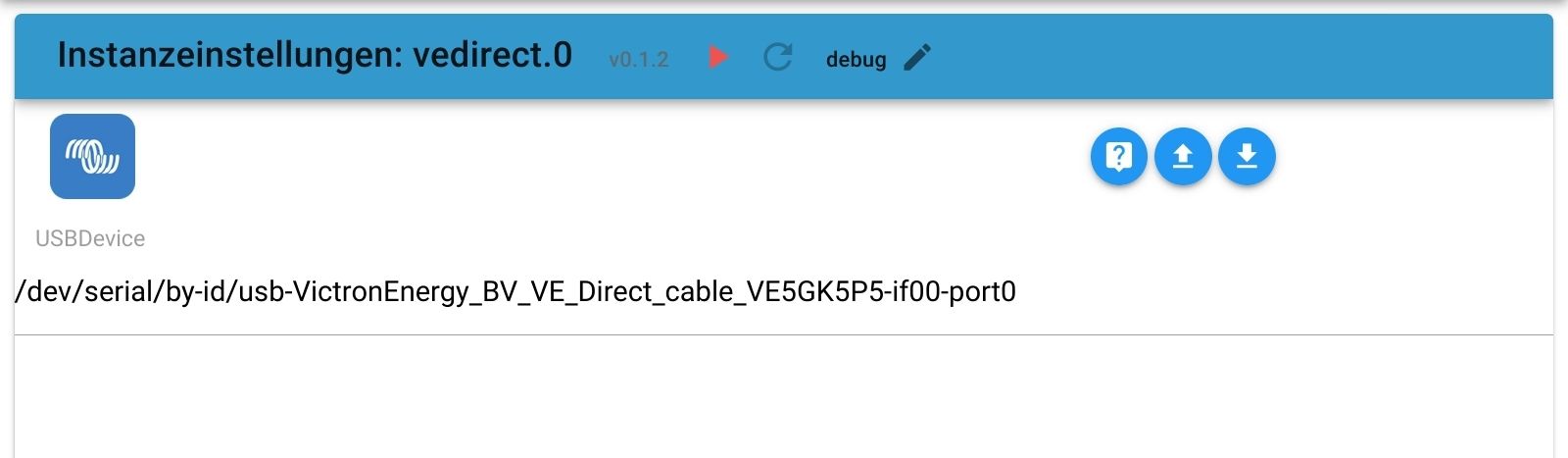
@thomas-braun marcel@rasp:~ $ ls /dev/serial/by-id
usb-VictronEnergy_BV_VE_Direct_cable_VE6WATIJ-if00-port0und was soll ich jetzt einsetzen?
@mere13 sagte in vedirect keine Verbindung bei rasp 4:
und was soll ich jetzt einsetzen?
genau das
@mere13 sagte in vedirect keine Verbindung bei rasp 4:
/dev/serial/by-id/usb-VictronEnergy_BV_VE_Direct_cable_VE6WATIJ-if00-port0so wie hier
-
-
Das ist nicht die Langfassung sondern die Zusammenfassung.
-
Das ist nicht die Langfassung sondern die Zusammenfassung.
-
@thomas-braun sorry.
iobdiag.txt@mere13 sagte in vedirect keine Verbindung bei rasp 4:
@thomas-braun sorry.
iobdiag.txtbitte in code-tags gesetzt posten
-
@mere13 sagte in vedirect keine Verbindung bei rasp 4:
@thomas-braun sorry.
iobdiag.txtbitte in code-tags gesetzt posten
@homoran verstehe ich leider nicht. wie bekomme ich die code-tags? Hab alles per copy-paste übertragen. So?
======== Start marking the full check here =========
Skript v.2023-10-10

*** BASE SYSTEM ***
 Static hostname: rasp
       Icon name: computer
Operating System: Debian GNU/Linux 12 (bookworm)
          Kernel: Linux 6.6.20+rpt-rpi-v8
    Architecture: arm64

Model		: Raspberry Pi 4 Model B Rev 1.5
Docker          : false
Virtualization  : none
Kernel          : aarch64
Userland        : arm64

Systemuptime and Load:
 11:15:46 up 1 day,  1:06,  3 users,  load average: 0.14, 0.26, 0.34
CPU threads: 4


*** RASPBERRY THROTTLING ***
Current issues:
No throttling issues detected.

Previously detected issues:
No throttling issues detected.

*** Time and Time Zones ***
               Local time: Sun 2024-04-14 11:15:47 CEST
           Universal time: Sun 2024-04-14 09:15:47 UTC
                 RTC time: n/a
                Time zone: Europe/Berlin (CEST, +0200)
System clock synchronized: yes
              NTP service: active
          RTC in local TZ: no

*** User and Groups ***
marcel
/home/marcel
marcel adm dialout cdrom sudo audio video plugdev games users input render netdev lpadmin gpio i2c spi iobroker

*** X-Server-Setup ***
X-Server: 	false
Desktop:
Terminal: 	tty
Boot Target: 	graphical.target

*** MEMORY ***
               total        used        free      shared  buff/cache   available
Mem:            8.2G        1.2G        5.7G        1.4M        1.4G        6.9G
Swap:           104M          0B        104M
Total:          8.3G        1.2G        5.8G

         7810 M total memory
         1184 M used memory
         1421 M active memory
          775 M inactive memory
         5445 M free memory
          122 M buffer memory
         1181 M swap cache
           99 M total swap
            0 M used swap
           99 M free swap

Raspberry only:
oom events: 0
lifetime oom required: 0 Mbytes
total time in oom handler: 0 ms
max time spent in oom handler: 0 ms


*** FAILED SERVICES ***

  UNIT            LOAD   ACTIVE SUB    DESCRIPTION
* lightdm.service loaded failed failed Light Display Manager

LOAD   = Reflects whether the unit definition was properly loaded.
ACTIVE = The high-level unit activation state, i.e. generalization of SUB.
SUB    = The low-level unit activation state, values depend on unit type.
1 loaded units listed.

*** FILESYSTEM ***
Filesystem     Type      Size  Used Avail Use% Mounted on
udev           devtmpfs  3.6G     0  3.6G   0% /dev
tmpfs          tmpfs     782M  1.3M  780M   1% /run
/dev/mmcblk0p2 ext4       58G  6.4G   48G  12% /
tmpfs          tmpfs     3.9G  8.0K  3.9G   1% /dev/shm
tmpfs          tmpfs     5.0M   16K  5.0M   1% /run/lock
/dev/mmcblk0p1 vfat      510M   82M  429M  17% /boot/firmware
tmpfs          tmpfs     782M   28K  781M   1% /run/user/1000

Messages concerning ext4 filesystem in dmesg:
[Sat Apr 13 10:09:04 2024] Kernel command line: coherent_pool=1M 8250.nr_uarts=0 snd_bcm2835.enable_headphones=0 snd_bcm2835.enable_headphones=1 snd_bcm2835.enable_hdmi=1 snd_bcm2835.enable_hdmi=0  smsc95xx.macaddr=D8:3A:DD:B1:D2:3A vc_mem.mem_base=0x3ec00000 vc_mem.mem_size=0x40000000  console=ttyS0,115200 console=tty1 root=PARTUUID=8a167c7b-02 rootfstype=ext4 fsck.repair=yes rootwait cfg80211.ieee80211_regdom=DE
[Sat Apr 13 10:09:07 2024] EXT4-fs (mmcblk0p2): mounted filesystem fc7a1f9e-4967-4f41-a1f5-1b5927e6c5f9 ro with ordered data mode. Quota mode: none.
[Sat Apr 13 10:09:09 2024] EXT4-fs (mmcblk0p2): re-mounted fc7a1f9e-4967-4f41-a1f5-1b5927e6c5f9 r/w. Quota mode: none.

Show mounted filesystems \(real ones only\):
TARGET           SOURCE         FSTYPE OPTIONS
/                /dev/mmcblk0p2 ext4   rw,noatime
`-/boot/firmware /dev/mmcblk0p1 vfat   rw,relatime,fmask=0022,dmask=0022,codepage=437,iocharset=ascii,shortname=mixed,errors=remount-ro

Files in neuralgic directories:

/var:
870M	/var/
341M	/var/cache
334M	/var/cache/apt
322M	/var/lib
221M	/var/cache/apt/archives

Archived and active journals take up 104.0M in the file system.

/opt/iobroker/backups:
2.9M	/opt/iobroker/backups/

/opt/iobroker/iobroker-data:
62M	/opt/iobroker/iobroker-data/
31M	/opt/iobroker/iobroker-data/backup-objects
19M	/opt/iobroker/iobroker-data/files
13M	/opt/iobroker/iobroker-data/files/admin.admin/custom/static/js
13M	/opt/iobroker/iobroker-data/files/admin.admin/custom/static

The five largest files in iobroker-data are:
8.8M	/opt/iobroker/iobroker-data/objects.jsonl
6.3M	/opt/iobroker/iobroker-data/files/admin.admin/custom/static/js/vendors-node_modules_iobroker_adapter-react-v5_assets_devices_parseNames_js-node_modules_iobr-99c23e.847b8ad9.chunk.js.map
4.6M	/opt/iobroker/iobroker-data/states.jsonl
2.8M	/opt/iobroker/iobroker-data/files/admin.admin/custom/static/js/vendors-node_modules_iobroker_adapter-react-v5_assets_devices_parseNames_js-node_modules_iobr-99c23e.847b8ad9.chunk.js
2.6M	/opt/iobroker/iobroker-data/files/ble.admin/build/index.js.map

USB-Devices by-id:
USB-Sticks -  Avoid direct links to /dev/* in your adapter setups, please always prefer the links 'by-id':

/dev/serial/by-id/usb-VictronEnergy_BV_VE_Direct_cable_VE6WATIJ-if00-port0

*** NodeJS-Installation ***

/usr/bin/nodejs 	v18.20.2
/usr/bin/node 		v18.20.2
/usr/bin/npm 		10.5.0
/usr/bin/npx 		10.5.0
/usr/bin/corepack 	0.25.2


nodejs:
  Installed: 18.20.2-1nodesource1
  Candidate: 18.20.2-1nodesource1
  Version table:
 *** 18.20.2-1nodesource1 600
        500 https://deb.nodesource.com/node_18.x nodistro/main arm64 Packages
        100 /var/lib/dpkg/status
     18.20.1-1nodesource1 600
        500 https://deb.nodesource.com/node_18.x nodistro/main arm64 Packages
     18.20.0-1nodesource1 600
        500 https://deb.nodesource.com/node_18.x nodistro/main arm64 Packages
     18.19.1-1nodesource1 600
        500 https://deb.nodesource.com/node_18.x nodistro/main arm64 Packages
     18.19.0+dfsg-6~deb12u1 500
        500 http://deb.debian.org/debian-security bookworm-security/main arm64 Packages
     18.19.0-1nodesource1 600
        500 https://deb.nodesource.com/node_18.x nodistro/main arm64 Packages
     18.18.2-1nodesource1 600
        500 https://deb.nodesource.com/node_18.x nodistro/main arm64 Packages
     18.18.1-1nodesource1 600
        500 https://deb.nodesource.com/node_18.x nodistro/main arm64 Packages
     18.18.0-1nodesource1 600
        500 https://deb.nodesource.com/node_18.x nodistro/main arm64 Packages
     18.17.1-1nodesource1 600
        500 https://deb.nodesource.com/node_18.x nodistro/main arm64 Packages
     18.17.0-1nodesource1 600
        500 https://deb.nodesource.com/node_18.x nodistro/main arm64 Packages
     18.16.1-1nodesource1 600
        500 https://deb.nodesource.com/node_18.x nodistro/main arm64 Packages
     18.16.0-1nodesource1 600
        500 https://deb.nodesource.com/node_18.x nodistro/main arm64 Packages
     18.15.0-1nodesource1 600
        500 https://deb.nodesource.com/node_18.x nodistro/main arm64 Packages
     18.14.2-1nodesource1 600
        500 https://deb.nodesource.com/node_18.x nodistro/main arm64 Packages
     18.14.1-1nodesource1 600
        500 https://deb.nodesource.com/node_18.x nodistro/main arm64 Packages
     18.14.0-1nodesource1 600
        500 https://deb.nodesource.com/node_18.x nodistro/main arm64 Packages
     18.13.0+dfsg1-1 500
        500 http://deb.debian.org/debian bookworm/main arm64 Packages
     18.13.0-1nodesource1 600
        500 https://deb.nodesource.com/node_18.x nodistro/main arm64 Packages
     18.12.0-1nodesource1 600
        500 https://deb.nodesource.com/node_18.x nodistro/main arm64 Packages
     18.11.0-1nodesource1 600
        500 https://deb.nodesource.com/node_18.x nodistro/main arm64 Packages
     18.10.0-1nodesource1 600
        500 https://deb.nodesource.com/node_18.x nodistro/main arm64 Packages
     18.9.1-1nodesource1 600
        500 https://deb.nodesource.com/node_18.x nodistro/main arm64 Packages
     18.9.0-1nodesource1 600
        500 https://deb.nodesource.com/node_18.x nodistro/main arm64 Packages
     18.8.0-1nodesource1 600
        500 https://deb.nodesource.com/node_18.x nodistro/main arm64 Packages
     18.7.0-1nodesource1 600
        500 https://deb.nodesource.com/node_18.x nodistro/main arm64 Packages
     18.6.0-1nodesource1 600
        500 https://deb.nodesource.com/node_18.x nodistro/main arm64 Packages
     18.5.0-1nodesource1 600
        500 https://deb.nodesource.com/node_18.x nodistro/main arm64 Packages
     18.4.0-1nodesource1 600
        500 https://deb.nodesource.com/node_18.x nodistro/main arm64 Packages
     18.3.0-1nodesource1 600
        500 https://deb.nodesource.com/node_18.x nodistro/main arm64 Packages
     18.2.0-1nodesource1 600
        500 https://deb.nodesource.com/node_18.x nodistro/main arm64 Packages
     18.1.0-1nodesource1 600
        500 https://deb.nodesource.com/node_18.x nodistro/main arm64 Packages
     18.0.0-1nodesource1 600
        500 https://deb.nodesource.com/node_18.x nodistro/main arm64 Packages

Temp directories causing npm8 problem: 0
No problems detected

Errors in npm tree:

*** ioBroker-Installation ***

ioBroker Status
iobroker is running on this host.


Objects type: jsonl
States  type: jsonl

Core adapters versions
js-controller: 	5.0.19
admin: 		6.13.16
javascript: 	"javascript" not found

Adapters from github: 	1

Adapter State
+ system.adapter.admin.0                  : admin                 : rasp                                     -  enabled, port: 8081, bind: 0.0.0.0, run as: admin
+ system.adapter.backitup.0               : backitup              : rasp                                     -  enabled
+ system.adapter.ble.0                    : ble                   : rasp                                     -  enabled
+ system.adapter.discovery.0              : discovery             : rasp                                     -  enabled
+ system.adapter.influxdb.0               : influxdb              : rasp                                     -  enabled, port: 8086
+ system.adapter.mqtt.0                   : mqtt                  : rasp                                     -  enabled, port: 1883, bind: 0.0.0.0
+ system.adapter.mystrom.0                : mystrom               : rasp                                     -  enabled
+ system.adapter.vedirect.0               : vedirect              : rasp                                     -  enabled

+ instance is alive

Enabled adapters with bindings
+ system.adapter.admin.0                  : admin                 : rasp                                     -  enabled, port: 8081, bind: 0.0.0.0, run as: admin
+ system.adapter.influxdb.0               : influxdb              : rasp                                     -  enabled, port: 8086
+ system.adapter.mqtt.0                   : mqtt                  : rasp                                     -  enabled, port: 1883, bind: 0.0.0.0

ioBroker-Repositories
stable        : http://download.iobroker.net/sources-dist.json
beta          : http://download.iobroker.net/sources-dist-latest.json

Active repo(s): stable

Installed ioBroker-Instances
Used repository: stable
Adapter    "admin"        : 6.13.16  , installed 6.13.16
Adapter    "backitup"     : 2.10.11  , installed 2.10.11
Adapter    "ble"          : 0.14.0   , installed 0.14.0
Adapter    "discovery"    : 4.4.0    , installed 4.4.0
Adapter    "influxdb"     : 4.0.2    , installed 4.0.2
Controller "js-controller": 5.0.19   , installed 5.0.19
Adapter    "mqtt"         : 5.2.0    , installed 5.2.0
Adapter    "mystrom"      : 0.0.14   , installed 0.0.14

Objects and States
Please stand by - This may take a while
Objects: 	385
States: 	287

*** OS-Repositories and Updates ***
Hit:1 http://deb.debian.org/debian bookworm InRelease
Hit:2 http://archive.raspberrypi.com/debian bookworm InRelease
Hit:3 http://deb.debian.org/debian-security bookworm-security InRelease
Hit:4 http://deb.debian.org/debian bookworm-updates InRelease
Hit:5 https://repos.influxdata.com/debian stable InRelease
Hit:6 https://apt.grafana.com stable InRelease
Hit:7 https://deb.nodesource.com/node_18.x nodistro InRelease
Reading package lists...
Pending Updates: 0

*** Listening Ports ***
Active Internet connections (only servers)
Proto Recv-Q Send-Q Local Address           Foreign Address         State       User       Inode      PID/Program name
tcp        0      0 127.0.0.1:631           0.0.0.0:*               LISTEN      0          2106529    42615/cupsd
tcp        0      0 0.0.0.0:1883            0.0.0.0:*               LISTEN      1001       42475      11730/io.mqtt.0
tcp        0      0 127.0.0.1:9000          0.0.0.0:*               LISTEN      1001       8479       1072/iobroker.js-co
tcp        0      0 127.0.0.1:9001          0.0.0.0:*               LISTEN      1001       8472       1072/iobroker.js-co
tcp        0      0 0.0.0.0:22              0.0.0.0:*               LISTEN      0          9234       778/sshd: /usr/sbin
tcp6       0      0 :::8086                 :::*                    LISTEN      999        6022       896/influxd
tcp6       0      0 :::8081                 :::*                    LISTEN      1001       7635       1122/io.admin.0
tcp6       0      0 ::1:631                 :::*                    LISTEN      0          2106528    42615/cupsd
tcp6       0      0 :::3000                 :::*                    LISTEN      113        6061       1071/grafana
tcp6       0      0 :::22                   :::*                    LISTEN      0          9236       778/sshd: /usr/sbin
udp        0      0 0.0.0.0:68              0.0.0.0:*                           0          1857       626/dhcpcd: [networ
udp        0      0 0.0.0.0:631             0.0.0.0:*                           0          2107407    42643/cups-browsed
udp        0      0 0.0.0.0:5353            0.0.0.0:*                           104        7074       570/avahi-daemon: r
udp        0      0 0.0.0.0:38954           0.0.0.0:*                           104        7076       570/avahi-daemon: r
udp6       0      0 :::36418                :::*                                104        7077       570/avahi-daemon: r
udp6       0      0 :::546                  :::*                                0          1859       626/dhcpcd: [networ
udp6       0      0 :::5353                 :::*                                104        7075       570/avahi-daemon: r

*** Log File - Last 25 Lines ***

2024-04-14 10:37:15.420  - debug: vedirect.0 (70677) Objects client ready ... initialize now
2024-04-14 10:37:15.423  - debug: vedirect.0 (70677) Objects create System PubSub Client
2024-04-14 10:37:15.425  - debug: vedirect.0 (70677) Objects create User PubSub Client
2024-04-14 10:37:15.461  - debug: vedirect.0 (70677) Objects client initialize lua scripts
2024-04-14 10:37:15.470  - debug: vedirect.0 (70677) Objects connected to redis: 127.0.0.1:9001
2024-04-14 10:37:15.488  - debug: vedirect.0 (70677) Redis States: Use Redis connection: 127.0.0.1:9000
2024-04-14 10:37:15.496  - debug: vedirect.0 (70677) States create System PubSub Client
2024-04-14 10:37:15.497  - debug: vedirect.0 (70677) States create User PubSub Client
2024-04-14 10:37:15.511  - debug: vedirect.0 (70677) States connected to redis: 127.0.0.1:9000
2024-04-14 10:37:15.541  - debug: vedirect.0 (70677) Plugin sentry Initialize Plugin (enabled=true)
2024-04-14 10:37:15.965  - info: vedirect.0 (70677) starting. Version 0.3.3 (non-npm: DrozmotiX/ioBroker.vedirect#8435302add9dc410535180c6c0d5ebbaef2eeb1e) in /opt/iobroker/node_modules/iobroker.vedirect, node: v18.20.2, js-controller: 5.0.19
2024-04-14 10:37:15.987  - info: vedirect.0 (70677) Starting VE.Direct with Protocol Version 3.33 and configurable expiring state capability
2024-04-14 10:37:15.998  - error: vedirect.0 (70677) Issue handling serial port connection : {}
2024-04-14 10:37:45.453  - info: admin.0 (1122) ==> Connected system.user.admin from ::ffff:192.168.2.201
2024-04-14 10:37:55.638  - info: admin.0 (1122) <== Disconnect system.user.admin from ::ffff:192.168.2.201
2024-04-14 10:39:42.298  - info: admin.0 (1122) <== Disconnect system.user.admin from ::ffff:192.168.2.201 admin
2024-04-14 10:40:09.177  - info: mystrom.0 (1240) Set update interval for 9C9C1FE323DC to 60
2024-04-14 10:43:51.983  - info: admin.0 (1122) ==> Connected system.user.admin from ::ffff:192.168.2.201
2024-04-14 10:44:41.987  - info: admin.0 (1122) <== Disconnect system.user.admin from ::ffff:192.168.2.201 admin
2024-04-14 10:57:05.970  - info: admin.0 (1122) ==> Connected system.user.admin from ::ffff:192.168.2.201
2024-04-14 11:01:56.002  - info: admin.0 (1122) <== Disconnect system.user.admin from ::ffff:192.168.2.201 admin
2024-04-14 11:06:49.715  - info: admin.0 (1122) ==> Connected system.user.admin from ::ffff:192.168.2.201
2024-04-14 11:08:09.723  - info: admin.0 (1122) <== Disconnect system.user.admin from ::ffff:192.168.2.201 admin
2024-04-14 11:10:09.427  - info: mystrom.0 (1240) Set update interval for 9C9C1FE323DC to 60
2024-04-14 11:14:58.222  - info: admin.0 (1122) ==> Connected system.user.admin from ::ffff:192.168.2.201
============ Mark until here for C&P =============
iob diag has finished.
Press any key for a summary
-
@homoran verstehe ich leider nicht. wie bekomme ich die code-tags? Hab alles per copy-paste übertragen. So?
======== Start marking the full check here =========
Skript v.2023-10-10

*** BASE SYSTEM ***
 Static hostname: rasp
       Icon name: computer
Operating System: Debian GNU/Linux 12 (bookworm)
          Kernel: Linux 6.6.20+rpt-rpi-v8
    Architecture: arm64

Model		: Raspberry Pi 4 Model B Rev 1.5
Docker          : false
Virtualization  : none
Kernel          : aarch64
Userland        : arm64

Systemuptime and Load:
 11:15:46 up 1 day,  1:06,  3 users,  load average: 0.14, 0.26, 0.34
CPU threads: 4


*** RASPBERRY THROTTLING ***
Current issues:
No throttling issues detected.

Previously detected issues:
No throttling issues detected.

*** Time and Time Zones ***
               Local time: Sun 2024-04-14 11:15:47 CEST
           Universal time: Sun 2024-04-14 09:15:47 UTC
                 RTC time: n/a
                Time zone: Europe/Berlin (CEST, +0200)
System clock synchronized: yes
              NTP service: active
          RTC in local TZ: no

*** User and Groups ***
marcel
/home/marcel
marcel adm dialout cdrom sudo audio video plugdev games users input render netdev lpadmin gpio i2c spi iobroker

*** X-Server-Setup ***
X-Server: 	false
Desktop:
Terminal: 	tty
Boot Target: 	graphical.target

*** MEMORY ***
               total        used        free      shared  buff/cache   available
Mem:            8.2G        1.2G        5.7G        1.4M        1.4G        6.9G
Swap:           104M          0B        104M
Total:          8.3G        1.2G        5.8G

         7810 M total memory
         1184 M used memory
         1421 M active memory
          775 M inactive memory
         5445 M free memory
          122 M buffer memory
         1181 M swap cache
           99 M total swap
            0 M used swap
           99 M free swap

Raspberry only:
oom events: 0
lifetime oom required: 0 Mbytes
total time in oom handler: 0 ms
max time spent in oom handler: 0 ms


*** FAILED SERVICES ***

  UNIT            LOAD   ACTIVE SUB    DESCRIPTION
* lightdm.service loaded failed failed Light Display Manager

LOAD   = Reflects whether the unit definition was properly loaded.
ACTIVE = The high-level unit activation state, i.e. generalization of SUB.
SUB    = The low-level unit activation state, values depend on unit type.
1 loaded units listed.

*** FILESYSTEM ***
Filesystem     Type      Size  Used Avail Use% Mounted on
udev           devtmpfs  3.6G     0  3.6G   0% /dev
tmpfs          tmpfs     782M  1.3M  780M   1% /run
/dev/mmcblk0p2 ext4       58G  6.4G   48G  12% /
tmpfs          tmpfs     3.9G  8.0K  3.9G   1% /dev/shm
tmpfs          tmpfs     5.0M   16K  5.0M   1% /run/lock
/dev/mmcblk0p1 vfat      510M   82M  429M  17% /boot/firmware
tmpfs          tmpfs     782M   28K  781M   1% /run/user/1000

Messages concerning ext4 filesystem in dmesg:
[Sat Apr 13 10:09:04 2024] Kernel command line: coherent_pool=1M 8250.nr_uarts=0 snd_bcm2835.enable_headphones=0 snd_bcm2835.enable_headphones=1 snd_bcm2835.enable_hdmi=1 snd_bcm2835.enable_hdmi=0  smsc95xx.macaddr=D8:3A:DD:B1:D2:3A vc_mem.mem_base=0x3ec00000 vc_mem.mem_size=0x40000000  console=ttyS0,115200 console=tty1 root=PARTUUID=8a167c7b-02 rootfstype=ext4 fsck.repair=yes rootwait cfg80211.ieee80211_regdom=DE
[Sat Apr 13 10:09:07 2024] EXT4-fs (mmcblk0p2): mounted filesystem fc7a1f9e-4967-4f41-a1f5-1b5927e6c5f9 ro with ordered data mode. Quota mode: none.
[Sat Apr 13 10:09:09 2024] EXT4-fs (mmcblk0p2): re-mounted fc7a1f9e-4967-4f41-a1f5-1b5927e6c5f9 r/w. Quota mode: none.

Show mounted filesystems \(real ones only\):
TARGET           SOURCE         FSTYPE OPTIONS
/                /dev/mmcblk0p2 ext4   rw,noatime
`-/boot/firmware /dev/mmcblk0p1 vfat   rw,relatime,fmask=0022,dmask=0022,codepage=437,iocharset=ascii,shortname=mixed,errors=remount-ro

Files in neuralgic directories:

/var:
870M	/var/
341M	/var/cache
334M	/var/cache/apt
322M	/var/lib
221M	/var/cache/apt/archives

Archived and active journals take up 104.0M in the file system.

/opt/iobroker/backups:
2.9M	/opt/iobroker/backups/

/opt/iobroker/iobroker-data:
62M	/opt/iobroker/iobroker-data/
31M	/opt/iobroker/iobroker-data/backup-objects
19M	/opt/iobroker/iobroker-data/files
13M	/opt/iobroker/iobroker-data/files/admin.admin/custom/static/js
13M	/opt/iobroker/iobroker-data/files/admin.admin/custom/static

The five largest files in iobroker-data are:
8.8M	/opt/iobroker/iobroker-data/objects.jsonl
6.3M	/opt/iobroker/iobroker-data/files/admin.admin/custom/static/js/vendors-node_modules_iobroker_adapter-react-v5_assets_devices_parseNames_js-node_modules_iobr-99c23e.847b8ad9.chunk.js.map
4.6M	/opt/iobroker/iobroker-data/states.jsonl
2.8M	/opt/iobroker/iobroker-data/files/admin.admin/custom/static/js/vendors-node_modules_iobroker_adapter-react-v5_assets_devices_parseNames_js-node_modules_iobr-99c23e.847b8ad9.chunk.js
2.6M	/opt/iobroker/iobroker-data/files/ble.admin/build/index.js.map

USB-Devices by-id:
USB-Sticks -  Avoid direct links to /dev/* in your adapter setups, please always prefer the links 'by-id':

/dev/serial/by-id/usb-VictronEnergy_BV_VE_Direct_cable_VE6WATIJ-if00-port0

*** NodeJS-Installation ***

/usr/bin/nodejs 	v18.20.2
/usr/bin/node 		v18.20.2
/usr/bin/npm 		10.5.0
/usr/bin/npx 		10.5.0
/usr/bin/corepack 	0.25.2


nodejs:
  Installed: 18.20.2-1nodesource1
  Candidate: 18.20.2-1nodesource1
  Version table:
 *** 18.20.2-1nodesource1 600
        500 https://deb.nodesource.com/node_18.x nodistro/main arm64 Packages
        100 /var/lib/dpkg/status
     18.20.1-1nodesource1 600
        500 https://deb.nodesource.com/node_18.x nodistro/main arm64 Packages
     18.20.0-1nodesource1 600
        500 https://deb.nodesource.com/node_18.x nodistro/main arm64 Packages
     18.19.1-1nodesource1 600
        500 https://deb.nodesource.com/node_18.x nodistro/main arm64 Packages
     18.19.0+dfsg-6~deb12u1 500
        500 http://deb.debian.org/debian-security bookworm-security/main arm64 Packages
     18.19.0-1nodesource1 600
        500 https://deb.nodesource.com/node_18.x nodistro/main arm64 Packages
     18.18.2-1nodesource1 600
        500 https://deb.nodesource.com/node_18.x nodistro/main arm64 Packages
     18.18.1-1nodesource1 600
        500 https://deb.nodesource.com/node_18.x nodistro/main arm64 Packages
     18.18.0-1nodesource1 600
        500 https://deb.nodesource.com/node_18.x nodistro/main arm64 Packages
     18.17.1-1nodesource1 600
        500 https://deb.nodesource.com/node_18.x nodistro/main arm64 Packages
     18.17.0-1nodesource1 600
        500 https://deb.nodesource.com/node_18.x nodistro/main arm64 Packages
     18.16.1-1nodesource1 600
        500 https://deb.nodesource.com/node_18.x nodistro/main arm64 Packages
     18.16.0-1nodesource1 600
        500 https://deb.nodesource.com/node_18.x nodistro/main arm64 Packages
     18.15.0-1nodesource1 600
        500 https://deb.nodesource.com/node_18.x nodistro/main arm64 Packages
     18.14.2-1nodesource1 600
        500 https://deb.nodesource.com/node_18.x nodistro/main arm64 Packages
     18.14.1-1nodesource1 600
        500 https://deb.nodesource.com/node_18.x nodistro/main arm64 Packages
     18.14.0-1nodesource1 600
        500 https://deb.nodesource.com/node_18.x nodistro/main arm64 Packages
     18.13.0+dfsg1-1 500
        500 http://deb.debian.org/debian bookworm/main arm64 Packages
     18.13.0-1nodesource1 600
        500 https://deb.nodesource.com/node_18.x nodistro/main arm64 Packages
     18.12.0-1nodesource1 600
        500 https://deb.nodesource.com/node_18.x nodistro/main arm64 Packages
     18.11.0-1nodesource1 600
        500 https://deb.nodesource.com/node_18.x nodistro/main arm64 Packages
     18.10.0-1nodesource1 600
        500 https://deb.nodesource.com/node_18.x nodistro/main arm64 Packages
     18.9.1-1nodesource1 600
        500 https://deb.nodesource.com/node_18.x nodistro/main arm64 Packages
     18.9.0-1nodesource1 600
        500 https://deb.nodesource.com/node_18.x nodistro/main arm64 Packages
     18.8.0-1nodesource1 600
        500 https://deb.nodesource.com/node_18.x nodistro/main arm64 Packages
     18.7.0-1nodesource1 600
        500 https://deb.nodesource.com/node_18.x nodistro/main arm64 Packages
     18.6.0-1nodesource1 600
        500 https://deb.nodesource.com/node_18.x nodistro/main arm64 Packages
     18.5.0-1nodesource1 600
        500 https://deb.nodesource.com/node_18.x nodistro/main arm64 Packages
     18.4.0-1nodesource1 600
        500 https://deb.nodesource.com/node_18.x nodistro/main arm64 Packages
     18.3.0-1nodesource1 600
        500 https://deb.nodesource.com/node_18.x nodistro/main arm64 Packages
     18.2.0-1nodesource1 600
        500 https://deb.nodesource.com/node_18.x nodistro/main arm64 Packages
     18.1.0-1nodesource1 600
        500 https://deb.nodesource.com/node_18.x nodistro/main arm64 Packages
     18.0.0-1nodesource1 600
        500 https://deb.nodesource.com/node_18.x nodistro/main arm64 Packages

Temp directories causing npm8 problem: 0
No problems detected

Errors in npm tree:

*** ioBroker-Installation ***

ioBroker Status
iobroker is running on this host.


Objects type: jsonl
States  type: jsonl

Core adapters versions
js-controller: 	5.0.19
admin: 		6.13.16
javascript: 	"javascript" not found

Adapters from github: 	1

Adapter State
+ system.adapter.admin.0                  : admin                 : rasp                                     -  enabled, port: 8081, bind: 0.0.0.0, run as: admin
+ system.adapter.backitup.0               : backitup              : rasp                                     -  enabled
+ system.adapter.ble.0                    : ble                   : rasp                                     -  enabled
+ system.adapter.discovery.0              : discovery             : rasp                                     -  enabled
+ system.adapter.influxdb.0               : influxdb              : rasp                                     -  enabled, port: 8086
+ system.adapter.mqtt.0                   : mqtt                  : rasp                                     -  enabled, port: 1883, bind: 0.0.0.0
+ system.adapter.mystrom.0                : mystrom               : rasp                                     -  enabled
+ system.adapter.vedirect.0               : vedirect              : rasp                                     -  enabled

+ instance is alive

Enabled adapters with bindings
+ system.adapter.admin.0                  : admin                 : rasp                                     -  enabled, port: 8081, bind: 0.0.0.0, run as: admin
+ system.adapter.influxdb.0               : influxdb              : rasp                                     -  enabled, port: 8086
+ system.adapter.mqtt.0                   : mqtt                  : rasp                                     -  enabled, port: 1883, bind: 0.0.0.0

ioBroker-Repositories
stable        : http://download.iobroker.net/sources-dist.json
beta          : http://download.iobroker.net/sources-dist-latest.json

Active repo(s): stable

Installed ioBroker-Instances
Used repository: stable
Adapter    "admin"        : 6.13.16  , installed 6.13.16
Adapter    "backitup"     : 2.10.11  , installed 2.10.11
Adapter    "ble"          : 0.14.0   , installed 0.14.0
Adapter    "discovery"    : 4.4.0    , installed 4.4.0
Adapter    "influxdb"     : 4.0.2    , installed 4.0.2
Controller "js-controller": 5.0.19   , installed 5.0.19
Adapter    "mqtt"         : 5.2.0    , installed 5.2.0
Adapter    "mystrom"      : 0.0.14   , installed 0.0.14

Objects and States
Please stand by - This may take a while
Objects: 	385
States: 	287

*** OS-Repositories and Updates ***
Hit:1 http://deb.debian.org/debian bookworm InRelease
Hit:2 http://archive.raspberrypi.com/debian bookworm InRelease
Hit:3 http://deb.debian.org/debian-security bookworm-security InRelease
Hit:4 http://deb.debian.org/debian bookworm-updates InRelease
Hit:5 https://repos.influxdata.com/debian stable InRelease
Hit:6 https://apt.grafana.com stable InRelease
Hit:7 https://deb.nodesource.com/node_18.x nodistro InRelease
Reading package lists...
Pending Updates: 0

*** Listening Ports ***
Active Internet connections (only servers)
Proto Recv-Q Send-Q Local Address           Foreign Address         State       User       Inode      PID/Program name
tcp        0      0 127.0.0.1:631           0.0.0.0:*               LISTEN      0          2106529    42615/cupsd
tcp        0      0 0.0.0.0:1883            0.0.0.0:*               LISTEN      1001       42475      11730/io.mqtt.0
tcp        0      0 127.0.0.1:9000          0.0.0.0:*               LISTEN      1001       8479       1072/iobroker.js-co
tcp        0      0 127.0.0.1:9001          0.0.0.0:*               LISTEN      1001       8472       1072/iobroker.js-co
tcp        0      0 0.0.0.0:22              0.0.0.0:*               LISTEN      0          9234       778/sshd: /usr/sbin
tcp6       0      0 :::8086                 :::*                    LISTEN      999        6022       896/influxd
tcp6       0      0 :::8081                 :::*                    LISTEN      1001       7635       1122/io.admin.0
tcp6       0      0 ::1:631                 :::*                    LISTEN      0          2106528    42615/cupsd
tcp6       0      0 :::3000                 :::*                    LISTEN      113        6061       1071/grafana
tcp6       0      0 :::22                   :::*                    LISTEN      0          9236       778/sshd: /usr/sbin
udp        0      0 0.0.0.0:68              0.0.0.0:*                           0          1857       626/dhcpcd: [networ
udp        0      0 0.0.0.0:631             0.0.0.0:*                           0          2107407    42643/cups-browsed
udp        0      0 0.0.0.0:5353            0.0.0.0:*                           104        7074       570/avahi-daemon: r
udp        0      0 0.0.0.0:38954           0.0.0.0:*                           104        7076       570/avahi-daemon: r
udp6       0      0 :::36418                :::*                                104        7077       570/avahi-daemon: r
udp6       0      0 :::546                  :::*                                0          1859       626/dhcpcd: [networ
udp6       0      0 :::5353                 :::*                                104        7075       570/avahi-daemon: r

*** Log File - Last 25 Lines ***

2024-04-14 10:37:15.420  - debug: vedirect.0 (70677) Objects client ready ... initialize now
2024-04-14 10:37:15.423  - debug: vedirect.0 (70677) Objects create System PubSub Client
2024-04-14 10:37:15.425  - debug: vedirect.0 (70677) Objects create User PubSub Client
2024-04-14 10:37:15.461  - debug: vedirect.0 (70677) Objects client initialize lua scripts
2024-04-14 10:37:15.470  - debug: vedirect.0 (70677) Objects connected to redis: 127.0.0.1:9001
2024-04-14 10:37:15.488  - debug: vedirect.0 (70677) Redis States: Use Redis connection: 127.0.0.1:9000
2024-04-14 10:37:15.496  - debug: vedirect.0 (70677) States create System PubSub Client
2024-04-14 10:37:15.497  - debug: vedirect.0 (70677) States create User PubSub Client
2024-04-14 10:37:15.511  - debug: vedirect.0 (70677) States connected to redis: 127.0.0.1:9000
2024-04-14 10:37:15.541  - debug: vedirect.0 (70677) Plugin sentry Initialize Plugin (enabled=true)
2024-04-14 10:37:15.965  - info: vedirect.0 (70677) starting. Version 0.3.3 (non-npm: DrozmotiX/ioBroker.vedirect#8435302add9dc410535180c6c0d5ebbaef2eeb1e) in /opt/iobroker/node_modules/iobroker.vedirect, node: v18.20.2, js-controller: 5.0.19
2024-04-14 10:37:15.987  - info: vedirect.0 (70677) Starting VE.Direct with Protocol Version 3.33 and configurable expiring state capability
2024-04-14 10:37:15.998  - error: vedirect.0 (70677) Issue handling serial port connection : {}
2024-04-14 10:37:45.453  - info: admin.0 (1122) ==> Connected system.user.admin from ::ffff:192.168.2.201
2024-04-14 10:37:55.638  - info: admin.0 (1122) <== Disconnect system.user.admin from ::ffff:192.168.2.201
2024-04-14 10:39:42.298  - info: admin.0 (1122) <== Disconnect system.user.admin from ::ffff:192.168.2.201 admin
2024-04-14 10:40:09.177  - info: mystrom.0 (1240) Set update interval for 9C9C1FE323DC to 60
2024-04-14 10:43:51.983  - info: admin.0 (1122) ==> Connected system.user.admin from ::ffff:192.168.2.201
2024-04-14 10:44:41.987  - info: admin.0 (1122) <== Disconnect system.user.admin from ::ffff:192.168.2.201 admin
2024-04-14 10:57:05.970  - info: admin.0 (1122) ==> Connected system.user.admin from ::ffff:192.168.2.201
2024-04-14 11:01:56.002  - info: admin.0 (1122) <== Disconnect system.user.admin from ::ffff:192.168.2.201 admin
2024-04-14 11:06:49.715  - info: admin.0 (1122) ==> Connected system.user.admin from ::ffff:192.168.2.201
2024-04-14 11:08:09.723  - info: admin.0 (1122) <== Disconnect system.user.admin from ::ffff:192.168.2.201 admin
2024-04-14 11:10:09.427  - info: mystrom.0 (1240) Set update interval for 9C9C1FE323DC to 60
2024-04-14 11:14:58.222  - info: admin.0 (1122) ==> Connected system.user.admin from ::ffff:192.168.2.201
============ Mark until here for C&P =============
iob diag has finished.
Press any key for a summary
@mere13 sagte in vedirect keine Verbindung bei rasp 4:
/dev/serial/by-id/usb-VictronEnergy_BV_VE_Direct_cable_VE6WATIJ-if00-port0
da steht er.
in deinem Screenshot leider nicht zu lesen.
Aber da sind anscheinend Leerzeichen verwendet und der abschließende Slash fehlt -
@homoran verstehe ich leider nicht. wie bekomme ich die code-tags? Hab alles per copy-paste übertragen. So?
======== Start marking the full check here =========
Skript v.2023-10-10

*** BASE SYSTEM ***
 Static hostname: rasp
       Icon name: computer
Operating System: Debian GNU/Linux 12 (bookworm)
          Kernel: Linux 6.6.20+rpt-rpi-v8
    Architecture: arm64

Model		: Raspberry Pi 4 Model B Rev 1.5
Docker          : false
Virtualization  : none
Kernel          : aarch64
Userland        : arm64

Systemuptime and Load:
 11:15:46 up 1 day,  1:06,  3 users,  load average: 0.14, 0.26, 0.34
CPU threads: 4


*** RASPBERRY THROTTLING ***
Current issues:
No throttling issues detected.

Previously detected issues:
No throttling issues detected.

*** Time and Time Zones ***
               Local time: Sun 2024-04-14 11:15:47 CEST
           Universal time: Sun 2024-04-14 09:15:47 UTC
                 RTC time: n/a
                Time zone: Europe/Berlin (CEST, +0200)
System clock synchronized: yes
              NTP service: active
          RTC in local TZ: no

*** User and Groups ***
marcel
/home/marcel
marcel adm dialout cdrom sudo audio video plugdev games users input render netdev lpadmin gpio i2c spi iobroker

*** X-Server-Setup ***
X-Server: 	false
Desktop:
Terminal: 	tty
Boot Target: 	graphical.target

*** MEMORY ***
               total        used        free      shared  buff/cache   available
Mem:            8.2G        1.2G        5.7G        1.4M        1.4G        6.9G
Swap:           104M          0B        104M
Total:          8.3G        1.2G        5.8G

         7810 M total memory
         1184 M used memory
         1421 M active memory
          775 M inactive memory
         5445 M free memory
          122 M buffer memory
         1181 M swap cache
           99 M total swap
            0 M used swap
           99 M free swap

Raspberry only:
oom events: 0
lifetime oom required: 0 Mbytes
total time in oom handler: 0 ms
max time spent in oom handler: 0 ms


*** FAILED SERVICES ***

  UNIT            LOAD   ACTIVE SUB    DESCRIPTION
* lightdm.service loaded failed failed Light Display Manager

LOAD   = Reflects whether the unit definition was properly loaded.
ACTIVE = The high-level unit activation state, i.e. generalization of SUB.
SUB    = The low-level unit activation state, values depend on unit type.
1 loaded units listed.

*** FILESYSTEM ***
Filesystem     Type      Size  Used Avail Use% Mounted on
udev           devtmpfs  3.6G     0  3.6G   0% /dev
tmpfs          tmpfs     782M  1.3M  780M   1% /run
/dev/mmcblk0p2 ext4       58G  6.4G   48G  12% /
tmpfs          tmpfs     3.9G  8.0K  3.9G   1% /dev/shm
tmpfs          tmpfs     5.0M   16K  5.0M   1% /run/lock
/dev/mmcblk0p1 vfat      510M   82M  429M  17% /boot/firmware
tmpfs          tmpfs     782M   28K  781M   1% /run/user/1000

Messages concerning ext4 filesystem in dmesg:
[Sat Apr 13 10:09:04 2024] Kernel command line: coherent_pool=1M 8250.nr_uarts=0 snd_bcm2835.enable_headphones=0 snd_bcm2835.enable_headphones=1 snd_bcm2835.enable_hdmi=1 snd_bcm2835.enable_hdmi=0  smsc95xx.macaddr=D8:3A:DD:B1:D2:3A vc_mem.mem_base=0x3ec00000 vc_mem.mem_size=0x40000000  console=ttyS0,115200 console=tty1 root=PARTUUID=8a167c7b-02 rootfstype=ext4 fsck.repair=yes rootwait cfg80211.ieee80211_regdom=DE
[Sat Apr 13 10:09:07 2024] EXT4-fs (mmcblk0p2): mounted filesystem fc7a1f9e-4967-4f41-a1f5-1b5927e6c5f9 ro with ordered data mode. Quota mode: none.
[Sat Apr 13 10:09:09 2024] EXT4-fs (mmcblk0p2): re-mounted fc7a1f9e-4967-4f41-a1f5-1b5927e6c5f9 r/w. Quota mode: none.

Show mounted filesystems \(real ones only\):
TARGET           SOURCE         FSTYPE OPTIONS
/                /dev/mmcblk0p2 ext4   rw,noatime
`-/boot/firmware /dev/mmcblk0p1 vfat   rw,relatime,fmask=0022,dmask=0022,codepage=437,iocharset=ascii,shortname=mixed,errors=remount-ro

Files in neuralgic directories:

/var:
870M	/var/
341M	/var/cache
334M	/var/cache/apt
322M	/var/lib
221M	/var/cache/apt/archives

Archived and active journals take up 104.0M in the file system.

/opt/iobroker/backups:
2.9M	/opt/iobroker/backups/

/opt/iobroker/iobroker-data:
62M	/opt/iobroker/iobroker-data/
31M	/opt/iobroker/iobroker-data/backup-objects
19M	/opt/iobroker/iobroker-data/files
13M	/opt/iobroker/iobroker-data/files/admin.admin/custom/static/js
13M	/opt/iobroker/iobroker-data/files/admin.admin/custom/static

The five largest files in iobroker-data are:
8.8M	/opt/iobroker/iobroker-data/objects.jsonl
6.3M	/opt/iobroker/iobroker-data/files/admin.admin/custom/static/js/vendors-node_modules_iobroker_adapter-react-v5_assets_devices_parseNames_js-node_modules_iobr-99c23e.847b8ad9.chunk.js.map
4.6M	/opt/iobroker/iobroker-data/states.jsonl
2.8M	/opt/iobroker/iobroker-data/files/admin.admin/custom/static/js/vendors-node_modules_iobroker_adapter-react-v5_assets_devices_parseNames_js-node_modules_iobr-99c23e.847b8ad9.chunk.js
2.6M	/opt/iobroker/iobroker-data/files/ble.admin/build/index.js.map

USB-Devices by-id:
USB-Sticks -  Avoid direct links to /dev/* in your adapter setups, please always prefer the links 'by-id':

/dev/serial/by-id/usb-VictronEnergy_BV_VE_Direct_cable_VE6WATIJ-if00-port0

*** NodeJS-Installation ***

/usr/bin/nodejs 	v18.20.2
/usr/bin/node 		v18.20.2
/usr/bin/npm 		10.5.0
/usr/bin/npx 		10.5.0
/usr/bin/corepack 	0.25.2


nodejs:
  Installed: 18.20.2-1nodesource1
  Candidate: 18.20.2-1nodesource1
  Version table:
 *** 18.20.2-1nodesource1 600
        500 https://deb.nodesource.com/node_18.x nodistro/main arm64 Packages
        100 /var/lib/dpkg/status
     18.20.1-1nodesource1 600
        500 https://deb.nodesource.com/node_18.x nodistro/main arm64 Packages
     18.20.0-1nodesource1 600
        500 https://deb.nodesource.com/node_18.x nodistro/main arm64 Packages
     18.19.1-1nodesource1 600
        500 https://deb.nodesource.com/node_18.x nodistro/main arm64 Packages
     18.19.0+dfsg-6~deb12u1 500
        500 http://deb.debian.org/debian-security bookworm-security/main arm64 Packages
     18.19.0-1nodesource1 600
        500 https://deb.nodesource.com/node_18.x nodistro/main arm64 Packages
     18.18.2-1nodesource1 600
        500 https://deb.nodesource.com/node_18.x nodistro/main arm64 Packages
     18.18.1-1nodesource1 600
        500 https://deb.nodesource.com/node_18.x nodistro/main arm64 Packages
     18.18.0-1nodesource1 600
        500 https://deb.nodesource.com/node_18.x nodistro/main arm64 Packages
     18.17.1-1nodesource1 600
        500 https://deb.nodesource.com/node_18.x nodistro/main arm64 Packages
     18.17.0-1nodesource1 600
        500 https://deb.nodesource.com/node_18.x nodistro/main arm64 Packages
     18.16.1-1nodesource1 600
        500 https://deb.nodesource.com/node_18.x nodistro/main arm64 Packages
     18.16.0-1nodesource1 600
        500 https://deb.nodesource.com/node_18.x nodistro/main arm64 Packages
     18.15.0-1nodesource1 600
        500 https://deb.nodesource.com/node_18.x nodistro/main arm64 Packages
     18.14.2-1nodesource1 600
        500 https://deb.nodesource.com/node_18.x nodistro/main arm64 Packages
     18.14.1-1nodesource1 600
        500 https://deb.nodesource.com/node_18.x nodistro/main arm64 Packages
     18.14.0-1nodesource1 600
        500 https://deb.nodesource.com/node_18.x nodistro/main arm64 Packages
     18.13.0+dfsg1-1 500
        500 http://deb.debian.org/debian bookworm/main arm64 Packages
     18.13.0-1nodesource1 600
        500 https://deb.nodesource.com/node_18.x nodistro/main arm64 Packages
     18.12.0-1nodesource1 600
        500 https://deb.nodesource.com/node_18.x nodistro/main arm64 Packages
     18.11.0-1nodesource1 600
        500 https://deb.nodesource.com/node_18.x nodistro/main arm64 Packages
     18.10.0-1nodesource1 600
        500 https://deb.nodesource.com/node_18.x nodistro/main arm64 Packages
     18.9.1-1nodesource1 600
        500 https://deb.nodesource.com/node_18.x nodistro/main arm64 Packages
     18.9.0-1nodesource1 600
        500 https://deb.nodesource.com/node_18.x nodistro/main arm64 Packages
     18.8.0-1nodesource1 600
        500 https://deb.nodesource.com/node_18.x nodistro/main arm64 Packages
     18.7.0-1nodesource1 600
        500 https://deb.nodesource.com/node_18.x nodistro/main arm64 Packages
     18.6.0-1nodesource1 600
        500 https://deb.nodesource.com/node_18.x nodistro/main arm64 Packages
     18.5.0-1nodesource1 600
        500 https://deb.nodesource.com/node_18.x nodistro/main arm64 Packages
     18.4.0-1nodesource1 600
        500 https://deb.nodesource.com/node_18.x nodistro/main arm64 Packages
     18.3.0-1nodesource1 600
        500 https://deb.nodesource.com/node_18.x nodistro/main arm64 Packages
     18.2.0-1nodesource1 600
        500 https://deb.nodesource.com/node_18.x nodistro/main arm64 Packages
     18.1.0-1nodesource1 600
        500 https://deb.nodesource.com/node_18.x nodistro/main arm64 Packages
     18.0.0-1nodesource1 600
        500 https://deb.nodesource.com/node_18.x nodistro/main arm64 Packages

Temp directories causing npm8 problem: 0
No problems detected

Errors in npm tree:

*** ioBroker-Installation ***

ioBroker Status
iobroker is running on this host.


Objects type: jsonl
States  type: jsonl

Core adapters versions
js-controller: 	5.0.19
admin: 		6.13.16
javascript: 	"javascript" not found

Adapters from github: 	1

Adapter State
+ system.adapter.admin.0                  : admin                 : rasp                                     -  enabled, port: 8081, bind: 0.0.0.0, run as: admin
+ system.adapter.backitup.0               : backitup              : rasp                                     -  enabled
+ system.adapter.ble.0                    : ble                   : rasp                                     -  enabled
+ system.adapter.discovery.0              : discovery             : rasp                                     -  enabled
+ system.adapter.influxdb.0               : influxdb              : rasp                                     -  enabled, port: 8086
+ system.adapter.mqtt.0                   : mqtt                  : rasp                                     -  enabled, port: 1883, bind: 0.0.0.0
+ system.adapter.mystrom.0                : mystrom               : rasp                                     -  enabled
+ system.adapter.vedirect.0               : vedirect              : rasp                                     -  enabled

+ instance is alive

Enabled adapters with bindings
+ system.adapter.admin.0                  : admin                 : rasp                                     -  enabled, port: 8081, bind: 0.0.0.0, run as: admin
+ system.adapter.influxdb.0               : influxdb              : rasp                                     -  enabled, port: 8086
+ system.adapter.mqtt.0                   : mqtt                  : rasp                                     -  enabled, port: 1883, bind: 0.0.0.0

ioBroker-Repositories
stable        : http://download.iobroker.net/sources-dist.json
beta          : http://download.iobroker.net/sources-dist-latest.json

Active repo(s): stable

Installed ioBroker-Instances
Used repository: stable
Adapter    "admin"        : 6.13.16  , installed 6.13.16
Adapter    "backitup"     : 2.10.11  , installed 2.10.11
Adapter    "ble"          : 0.14.0   , installed 0.14.0
Adapter    "discovery"    : 4.4.0    , installed 4.4.0
Adapter    "influxdb"     : 4.0.2    , installed 4.0.2
Controller "js-controller": 5.0.19   , installed 5.0.19
Adapter    "mqtt"         : 5.2.0    , installed 5.2.0
Adapter    "mystrom"      : 0.0.14   , installed 0.0.14

Objects and States
Please stand by - This may take a while
Objects: 	385
States: 	287

*** OS-Repositories and Updates ***
Hit:1 http://deb.debian.org/debian bookworm InRelease
Hit:2 http://archive.raspberrypi.com/debian bookworm InRelease
Hit:3 http://deb.debian.org/debian-security bookworm-security InRelease
Hit:4 http://deb.debian.org/debian bookworm-updates InRelease
Hit:5 https://repos.influxdata.com/debian stable InRelease
Hit:6 https://apt.grafana.com stable InRelease
Hit:7 https://deb.nodesource.com/node_18.x nodistro InRelease
Reading package lists...
Pending Updates: 0

*** Listening Ports ***
Active Internet connections (only servers)
Proto Recv-Q Send-Q Local Address           Foreign Address         State       User       Inode      PID/Program name
tcp        0      0 127.0.0.1:631           0.0.0.0:*               LISTEN      0          2106529    42615/cupsd
tcp        0      0 0.0.0.0:1883            0.0.0.0:*               LISTEN      1001       42475      11730/io.mqtt.0
tcp        0      0 127.0.0.1:9000          0.0.0.0:*               LISTEN      1001       8479       1072/iobroker.js-co
tcp        0      0 127.0.0.1:9001          0.0.0.0:*               LISTEN      1001       8472       1072/iobroker.js-co
tcp        0      0 0.0.0.0:22              0.0.0.0:*               LISTEN      0          9234       778/sshd: /usr/sbin
tcp6       0      0 :::8086                 :::*                    LISTEN      999        6022       896/influxd
tcp6       0      0 :::8081                 :::*                    LISTEN      1001       7635       1122/io.admin.0
tcp6       0      0 ::1:631                 :::*                    LISTEN      0          2106528    42615/cupsd
tcp6       0      0 :::3000                 :::*                    LISTEN      113        6061       1071/grafana
tcp6       0      0 :::22                   :::*                    LISTEN      0          9236       778/sshd: /usr/sbin
udp        0      0 0.0.0.0:68              0.0.0.0:*                           0          1857       626/dhcpcd: [networ
udp        0      0 0.0.0.0:631             0.0.0.0:*                           0          2107407    42643/cups-browsed
udp        0      0 0.0.0.0:5353            0.0.0.0:*                           104        7074       570/avahi-daemon: r
udp        0      0 0.0.0.0:38954           0.0.0.0:*                           104        7076       570/avahi-daemon: r
udp6       0      0 :::36418                :::*                                104        7077       570/avahi-daemon: r
udp6       0      0 :::546                  :::*                                0          1859       626/dhcpcd: [networ
udp6       0      0 :::5353                 :::*                                104        7075       570/avahi-daemon: r

*** Log File - Last 25 Lines ***

2024-04-14 10:37:15.420  - debug: vedirect.0 (70677) Objects client ready ... initialize now
2024-04-14 10:37:15.423  - debug: vedirect.0 (70677) Objects create System PubSub Client
2024-04-14 10:37:15.425  - debug: vedirect.0 (70677) Objects create User PubSub Client
2024-04-14 10:37:15.461  - debug: vedirect.0 (70677) Objects client initialize lua scripts
2024-04-14 10:37:15.470  - debug: vedirect.0 (70677) Objects connected to redis: 127.0.0.1:9001
2024-04-14 10:37:15.488  - debug: vedirect.0 (70677) Redis States: Use Redis connection: 127.0.0.1:9000
2024-04-14 10:37:15.496  - debug: vedirect.0 (70677) States create System PubSub Client
2024-04-14 10:37:15.497  - debug: vedirect.0 (70677) States create User PubSub Client
2024-04-14 10:37:15.511  - debug: vedirect.0 (70677) States connected to redis: 127.0.0.1:9000
2024-04-14 10:37:15.541  - debug: vedirect.0 (70677) Plugin sentry Initialize Plugin (enabled=true)
2024-04-14 10:37:15.965  - info: vedirect.0 (70677) starting. Version 0.3.3 (non-npm: DrozmotiX/ioBroker.vedirect#8435302add9dc410535180c6c0d5ebbaef2eeb1e) in /opt/iobroker/node_modules/iobroker.vedirect, node: v18.20.2, js-controller: 5.0.19
2024-04-14 10:37:15.987  - info: vedirect.0 (70677) Starting VE.Direct with Protocol Version 3.33 and configurable expiring state capability
2024-04-14 10:37:15.998  - error: vedirect.0 (70677) Issue handling serial port connection : {}
2024-04-14 10:37:45.453  - info: admin.0 (1122) ==> Connected system.user.admin from ::ffff:192.168.2.201
2024-04-14 10:37:55.638  - info: admin.0 (1122) <== Disconnect system.user.admin from ::ffff:192.168.2.201
2024-04-14 10:39:42.298  - info: admin.0 (1122) <== Disconnect system.user.admin from ::ffff:192.168.2.201 admin
2024-04-14 10:40:09.177  - info: mystrom.0 (1240) Set update interval for 9C9C1FE323DC to 60
2024-04-14 10:43:51.983  - info: admin.0 (1122) ==> Connected system.user.admin from ::ffff:192.168.2.201
2024-04-14 10:44:41.987  - info: admin.0 (1122) <== Disconnect system.user.admin from ::ffff:192.168.2.201 admin
2024-04-14 10:57:05.970  - info: admin.0 (1122) ==> Connected system.user.admin from ::ffff:192.168.2.201
2024-04-14 11:01:56.002  - info: admin.0 (1122) <== Disconnect system.user.admin from ::ffff:192.168.2.201 admin
2024-04-14 11:06:49.715  - info: admin.0 (1122) ==> Connected system.user.admin from ::ffff:192.168.2.201
2024-04-14 11:08:09.723  - info: admin.0 (1122) <== Disconnect system.user.admin from ::ffff:192.168.2.201 admin
2024-04-14 11:10:09.427  - info: mystrom.0 (1240) Set update interval for 9C9C1FE323DC to 60
2024-04-14 11:14:58.222  - info: admin.0 (1122) ==> Connected system.user.admin from ::ffff:192.168.2.201
============ Mark until here for C&P =============
iob diag has finished.
Press any key for a summary
@mere13 sagte in vedirect keine Verbindung bei rasp 4:
Boot Target: graphical.target
Setz das auf
sudo systemctl set-default multi-user.targetNach einem Neustart:
ls -la /dev/serial/by-id -
@thomas-braun said in vedirect keine Verbindung bei rasp 4:
ls -la /dev/serial/by-id
Bekomme das:
total 0
drwxr-xr-x 2 root root 60 Apr 14 12:29 .
drwxr-xr-x 4 root root 80 Apr 14 12:29 ..
lrwxrwxrwx 1 root root 13 Apr 14 12:29 usb-VictronEnergy_BV_VE_Direct_cable_VE6WATIJ-if00-port0 -> ../../ttyUSB0und im Adapter ist das eingetragen, keine Leerzeichen
/dev/serial/by-id usb-VictronEnergy_BV_VE_Direct_cable_VE6WATIJ-if00-port0 -
@thomas-braun said in vedirect keine Verbindung bei rasp 4:
ls -la /dev/serial/by-id
Bekomme das:
total 0
drwxr-xr-x 2 root root 60 Apr 14 12:29 .
drwxr-xr-x 4 root root 80 Apr 14 12:29 ..
lrwxrwxrwx 1 root root 13 Apr 14 12:29 usb-VictronEnergy_BV_VE_Direct_cable_VE6WATIJ-if00-port0 -> ../../ttyUSB0und im Adapter ist das eingetragen, keine Leerzeichen
/dev/serial/by-id usb-VictronEnergy_BV_VE_Direct_cable_VE6WATIJ-if00-port0 -
@mere13 sagte in vedirect keine Verbindung bei rasp 4:
keine Leerzeichen
doch, zwischen id und usb
/dev/serial/by-id usb-VictronEnergy_BV_VE_Direct_cable_VE6WATIJ-if00-port0 -
@djmarc75 ok. sorry, war blind. habs jetzt korrigiert und mit / ersetzt. Was meintest Du mit abschließendem Slash? Jetzt steht das da, aber leider noch keine Verbindung:
/dev/serial/by-id/usb-VictronEnergy_BV_VE_Direct_cable_VE6WATIJ-if00-port0
Es muss exakt das eingetragen werden:
/dev/serial/by-id/usb-VictronEnergy_BV_VE_Direct_cable_VE6WATIJ-if00-port0Rechte sind vorhanden?
ls -la /dev/ttyUSB0 sudo -u iobroker groups -
@thomas-braun said in vedirect keine Verbindung bei rasp 4:
sudo -u iobroker groups
mit copy-paste übertragen. leider nix.
marcel@rasp:~ $ ls -la /dev/ttyUSB0
sudo -u iobroker groups
crw-rw----+ 1 root plugdev 188, 0 Apr 14 12:29 /dev/ttyUSB0
iobroker tty dialout audio video bluetooth gpio i2c -
@thomas-braun said in vedirect keine Verbindung bei rasp 4:
sudo -u iobroker groups
mit copy-paste übertragen. leider nix.
marcel@rasp:~ $ ls -la /dev/ttyUSB0
sudo -u iobroker groups
crw-rw----+ 1 root plugdev 188, 0 Apr 14 12:29 /dev/ttyUSB0
iobroker tty dialout audio video bluetooth gpio i2c@mere13 sagte in vedirect keine Verbindung bei rasp 4:
leider nix.
Wie nix? Da sind doch die Ausgaben. Würde man besser sehen, wenn du freundlicherweise für solche Ausgaben aus der Konsole die CodeTags verwenden würdest.
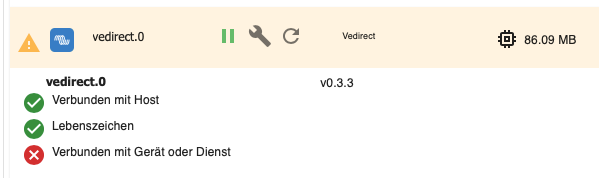
Der user 'iobroker' ist nicht in der Gruppe 'plugdev' drin. Deswegen darf der mit dem Gerät nix anfangen.
Setz den da rein:sudo usermod -a -G plugdev iobroker iob stop sudo rebootSollte danach funktionieren.



Hey! Du scheinst an dieser Unterhaltung interessiert zu sein, hast aber noch kein Konto.
Hast du es satt, bei jedem Besuch durch die gleichen Beiträge zu scrollen? Wenn du dich für ein Konto anmeldest, kommst du immer genau dorthin zurück, wo du zuvor warst, und kannst dich über neue Antworten benachrichtigen lassen (entweder per E-Mail oder Push-Benachrichtigung). Du kannst auch Lesezeichen speichern und Beiträge positiv bewerten, um anderen Community-Mitgliedern deine Wertschätzung zu zeigen.
Mit deinem Input könnte dieser Beitrag noch besser werden 💗
Registrieren Anmelden437
Online33.0k
Benutzende83.7k
Themen1.3m
Beiträge