Skip to content
  • Home
  • Aktuell
  • Tags
  • 0 Ungelesen 0
  • Kategorien
  • Unreplied
  • Beliebt
  • GitHub
  • Docu
  • Hilfe
Skins
  • Light
  • Brite
  • Cerulean
  • Cosmo
  • Flatly
  • Journal
  • Litera
  • Lumen
  • Lux
  • Materia
  • Minty
  • Morph
  • Pulse
  • Sandstone
  • Simplex
  • Sketchy
  • Spacelab
  • United
  • Yeti
  • Zephyr
  • Dark
  • Cyborg
  • Darkly
  • Quartz
  • Slate
  • Solar
  • Superhero
  • Vapor

  • Standard: (Kein Skin)
  • Kein Skin
Einklappen
ioBroker Logo

Community Forum

donate donate
  1. ioBroker Community Home
  2. Deutsch
  3. Error/Bug
  4. Zigbee iobroker Error while opening serialport

NEWS

  • Weihnachtsangebot 2025! 🎄
    BluefoxB
    Bluefox
    18
    1
    631

  • UPDATE 31.10.: Amazon Alexa - ioBroker Skill läuft aus ?
    apollon77A
    apollon77
    48
    3
    9.0k

  • Monatsrückblick – September 2025
    BluefoxB
    Bluefox
    13
    1
    2.3k

Zigbee iobroker Error while opening serialport

Geplant Angeheftet Gesperrt Verschoben Error/Bug
231 Beiträge 28 Kommentatoren 46.0k Aufrufe 24 Watching
  • Älteste zuerst
  • Neuste zuerst
  • Meiste Stimmen
Antworten
  • In einem neuen Thema antworten
Anmelden zum Antworten
Dieses Thema wurde gelöscht. Nur Nutzer mit entsprechenden Rechten können es sehen.
  • arteckA arteck

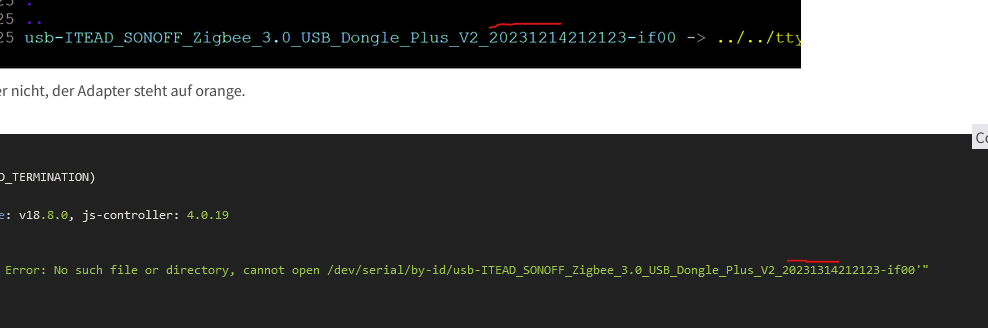
    @flodirmann wenn du schon abschreibst dann machs richtig und kontrolliere es 5 mal
    5accb254-a713-44c4-a714-46d440f83359-grafik.png

    F Offline
    F Offline
    flodirmann
    schrieb am zuletzt editiert von
    #126

    @arteck
    Danke für den Hinweis auf meinen, zugegebenermaßen tatsächlich echt vermeidbaren, Fehler. :confounded:
    Leider kann ich noch nicht vermelden, ob jetzt alles klappt, weil ich augenscheinlich nebenbei bei den Updates des raspis in den wohl im Forum schon bekannteren udev-Bug hineingelaufen bin, es gibt jetzt kein /by-id/ mehr...
    Jetzt muss dabei erst mal eine Lösung her.

    Thomas BraunT 1 Antwort Letzte Antwort
    0
    • F flodirmann

      @arteck
      Danke für den Hinweis auf meinen, zugegebenermaßen tatsächlich echt vermeidbaren, Fehler. :confounded:
      Leider kann ich noch nicht vermelden, ob jetzt alles klappt, weil ich augenscheinlich nebenbei bei den Updates des raspis in den wohl im Forum schon bekannteren udev-Bug hineingelaufen bin, es gibt jetzt kein /by-id/ mehr...
      Jetzt muss dabei erst mal eine Lösung her.

      Thomas BraunT Online
      Thomas BraunT Online
      Thomas Braun
      Most Active
      schrieb am zuletzt editiert von
      #127

      @flodirmann sagte in Zigbee iobroker Error while opening serialport:

      Jetzt muss dabei erst mal eine Lösung her.

      Aktuelles System verwenden, das hat den Fehler nicht.

      Linux-Werkzeugkasten:
      https://forum.iobroker.net/topic/42952/der-kleine-iobroker-linux-werkzeugkasten
      NodeJS Fixer Skript:
      https://forum.iobroker.net/topic/68035/iob-node-fix-skript
      iob_diag: curl -sLf -o diag.sh https://iobroker.net/diag.sh && bash diag.sh

      F 1 Antwort Letzte Antwort
      1
      • Thomas BraunT Thomas Braun

        @flodirmann sagte in Zigbee iobroker Error while opening serialport:

        Jetzt muss dabei erst mal eine Lösung her.

        Aktuelles System verwenden, das hat den Fehler nicht.

        F Offline
        F Offline
        flodirmann
        schrieb am zuletzt editiert von flodirmann
        #128

        @thomas-braun

        So. Auch nach komplettem Neuaufsetzen des Systems mit Debian 12 Bookworm und dem Korrigieren eigenverschuldeter Rechtschreibfehler (diesmal aus PuTTY direkt rauskopiert) funktioniert es noch nicht besser.

        Egal ob ich in den Einstellungen den by-id path verwende "/dev/serial/by-id/usb-ITEAD_SONOFF_Zigbee_3.0_USB_Dongle_Plus_V2_20231214212123-if00" oder die alternative Adresse "/dev/ttyACM0", in beiden Fällen tritt der identische Fehler auf:

        2024-03-28 15:51:59.165 - info: admin.0 (1017) ==> Connected system.user.admin from ::ffff:192.168.188.23
        2024-03-28 15:51:59.266 - error: zigbee.0 (2510) getGroups: caught error: TypeError: Cannot read properties of undefined (reading 'getGroups')
        2024-03-28 15:51:59.379 - info: zigbee.0 (2510) List of port: [{"path":"/dev/ttyACM0","manufacturer":"ITEAD","serialNumber":"20231214212123","pnpId":"usb-ITEAD_SONOFF_Zigbee_3.0_USB_Dongle_Plus_V2_20231214212123-if00","vendorId":"1a86","productId":"55d4"}]
        2024-03-28 15:52:38.919 - info: host.raspberrypi stopInstance system.adapter.zigbee.0 (force=false, process=true)
        2024-03-28 15:52:38.926 - info: zigbee.0 (2510) Got terminate signal TERMINATE_YOURSELF
        2024-03-28 15:52:38.930 - info: zigbee.0 (2510) cleaned everything up...
        2024-03-28 15:52:38.934 - info: zigbee.0 (2510) Zigbee: disabling joining new devices.
        2024-03-28 15:52:38.958 - warn: zigbee.0 (2510) Failed to stop zigbee during startup
        2024-03-28 15:52:38.960 - info: zigbee.0 (2510) terminating
        2024-03-28 15:52:38.963 - info: zigbee.0 (2510) Terminated (ADAPTER_REQUESTED_TERMINATION): Without reason
        2024-03-28 15:52:38.967 - info: host.raspberrypi stopInstance system.adapter.zigbee.0 send kill signal
        2024-03-28 15:52:39.042 - info: admin.0 (1017) <== Disconnect system.user.admin from ::ffff:192.168.188.23
        2024-03-28 15:52:39.431 - info: zigbee.0 (2510) terminating
        2024-03-28 15:52:39.519 - info: host.raspberrypi instance system.adapter.zigbee.0 terminated with code 11 (ADAPTER_REQUESTED_TERMINATION)
        2024-03-28 15:52:42.016 - info: host.raspberrypi instance system.adapter.zigbee.0 started with pid 2586
        2024-03-28 15:52:45.840 - info: zigbee.0 (2586) starting. Version 1.10.1 in /opt/iobroker/node_modules/iobroker.zigbee, node: v20.12.0, js-controller: 5.0.19
        2024-03-28 15:52:45.922 - info: zigbee.0 (2586) delete old Backup files. keep only last 10
        2024-03-28 15:52:45.925 - info: zigbee.0 (2586) Starting Zigbee npm ...
        2024-03-28 15:52:46.171 - info: zigbee.0 (2586) Installed Version: iobroker.zigbee@1.10.1
        2024-03-28 15:53:06.711 - error: zigbee.0 (2586) Starting zigbee-herdsman problem : "Failed to connect to the adapter (Error: SRSP - SYS - ping after 6000ms)"
        2024-03-28 15:53:06.712 - error: zigbee.0 (2586) Failed to start Zigbee
        2024-03-28 15:53:06.712 - error: zigbee.0 (2586) Error herdsman start
        2024-03-28 15:53:16.717 - info: zigbee.0 (2586) Try to reconnect. 1 attempts left
        2024-03-28 15:53:16.721 - info: zigbee.0 (2586) Starting Zigbee npm ...
        2024-03-28 15:53:16.751 - info: zigbee.0 (2586) Installed Version: iobroker.zigbee@1.10.1
        2024-03-28 15:53:16.959 - error: zigbee.0 (2586) Starting zigbee-herdsman problem : "Error while opening serialport 'Error: Error Resource temporarily unavailable Cannot lock port'"
        2024-03-28 15:53:16.960 - error: zigbee.0 (2586) Failed to start Zigbee
        2024-03-28 15:53:16.961 - error: zigbee.0 (2586) Error herdsman start
        

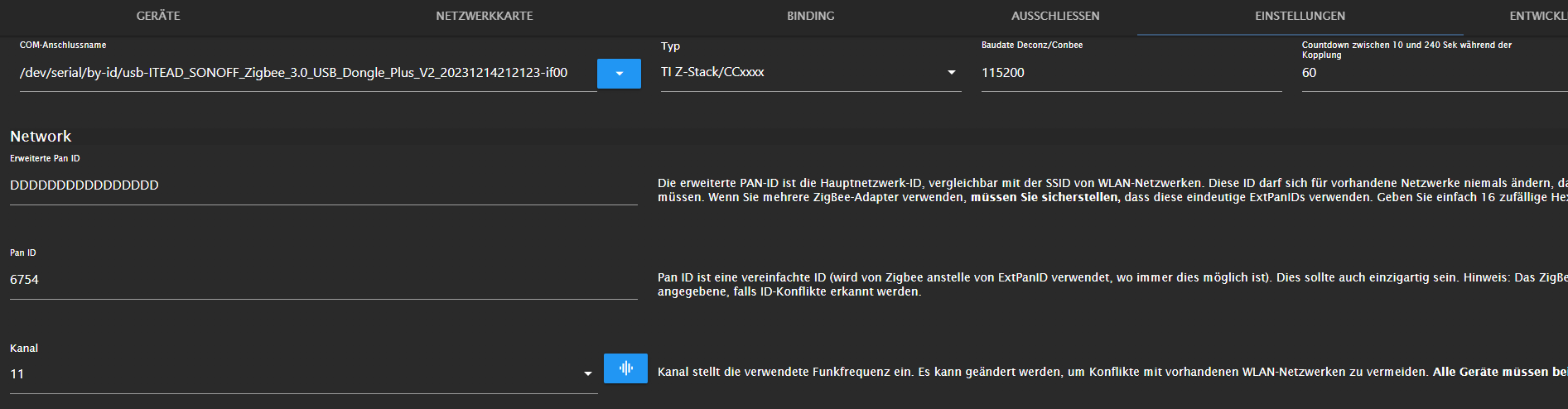
        Hier noch ein Screenshot der Adaptereinstellungen:
        abdb6720-4203-47ae-b681-159cd2ff8ce4-image.png

        Könnt ihr mir da irgendwie weiterhelfen? Falls weitere Informationen benötigt werden, gerne Bescheid geben.

        DJMarc75D AsgothianA 2 Antworten Letzte Antwort
        0
        • F flodirmann

          @thomas-braun

          So. Auch nach komplettem Neuaufsetzen des Systems mit Debian 12 Bookworm und dem Korrigieren eigenverschuldeter Rechtschreibfehler (diesmal aus PuTTY direkt rauskopiert) funktioniert es noch nicht besser.

          Egal ob ich in den Einstellungen den by-id path verwende "/dev/serial/by-id/usb-ITEAD_SONOFF_Zigbee_3.0_USB_Dongle_Plus_V2_20231214212123-if00" oder die alternative Adresse "/dev/ttyACM0", in beiden Fällen tritt der identische Fehler auf:

          2024-03-28 15:51:59.165 - info: admin.0 (1017) ==> Connected system.user.admin from ::ffff:192.168.188.23
          2024-03-28 15:51:59.266 - error: zigbee.0 (2510) getGroups: caught error: TypeError: Cannot read properties of undefined (reading 'getGroups')
          2024-03-28 15:51:59.379 - info: zigbee.0 (2510) List of port: [{"path":"/dev/ttyACM0","manufacturer":"ITEAD","serialNumber":"20231214212123","pnpId":"usb-ITEAD_SONOFF_Zigbee_3.0_USB_Dongle_Plus_V2_20231214212123-if00","vendorId":"1a86","productId":"55d4"}]
          2024-03-28 15:52:38.919 - info: host.raspberrypi stopInstance system.adapter.zigbee.0 (force=false, process=true)
          2024-03-28 15:52:38.926 - info: zigbee.0 (2510) Got terminate signal TERMINATE_YOURSELF
          2024-03-28 15:52:38.930 - info: zigbee.0 (2510) cleaned everything up...
          2024-03-28 15:52:38.934 - info: zigbee.0 (2510) Zigbee: disabling joining new devices.
          2024-03-28 15:52:38.958 - warn: zigbee.0 (2510) Failed to stop zigbee during startup
          2024-03-28 15:52:38.960 - info: zigbee.0 (2510) terminating
          2024-03-28 15:52:38.963 - info: zigbee.0 (2510) Terminated (ADAPTER_REQUESTED_TERMINATION): Without reason
          2024-03-28 15:52:38.967 - info: host.raspberrypi stopInstance system.adapter.zigbee.0 send kill signal
          2024-03-28 15:52:39.042 - info: admin.0 (1017) <== Disconnect system.user.admin from ::ffff:192.168.188.23
          2024-03-28 15:52:39.431 - info: zigbee.0 (2510) terminating
          2024-03-28 15:52:39.519 - info: host.raspberrypi instance system.adapter.zigbee.0 terminated with code 11 (ADAPTER_REQUESTED_TERMINATION)
          2024-03-28 15:52:42.016 - info: host.raspberrypi instance system.adapter.zigbee.0 started with pid 2586
          2024-03-28 15:52:45.840 - info: zigbee.0 (2586) starting. Version 1.10.1 in /opt/iobroker/node_modules/iobroker.zigbee, node: v20.12.0, js-controller: 5.0.19
          2024-03-28 15:52:45.922 - info: zigbee.0 (2586) delete old Backup files. keep only last 10
          2024-03-28 15:52:45.925 - info: zigbee.0 (2586) Starting Zigbee npm ...
          2024-03-28 15:52:46.171 - info: zigbee.0 (2586) Installed Version: iobroker.zigbee@1.10.1
          2024-03-28 15:53:06.711 - error: zigbee.0 (2586) Starting zigbee-herdsman problem : "Failed to connect to the adapter (Error: SRSP - SYS - ping after 6000ms)"
          2024-03-28 15:53:06.712 - error: zigbee.0 (2586) Failed to start Zigbee
          2024-03-28 15:53:06.712 - error: zigbee.0 (2586) Error herdsman start
          2024-03-28 15:53:16.717 - info: zigbee.0 (2586) Try to reconnect. 1 attempts left
          2024-03-28 15:53:16.721 - info: zigbee.0 (2586) Starting Zigbee npm ...
          2024-03-28 15:53:16.751 - info: zigbee.0 (2586) Installed Version: iobroker.zigbee@1.10.1
          2024-03-28 15:53:16.959 - error: zigbee.0 (2586) Starting zigbee-herdsman problem : "Error while opening serialport 'Error: Error Resource temporarily unavailable Cannot lock port'"
          2024-03-28 15:53:16.960 - error: zigbee.0 (2586) Failed to start Zigbee
          2024-03-28 15:53:16.961 - error: zigbee.0 (2586) Error herdsman start
          

          Hier noch ein Screenshot der Adaptereinstellungen:

          abdb6720-4203-47ae-b681-159cd2ff8ce4-image.png

          Könnt ihr mir da irgendwie weiterhelfen? Falls weitere Informationen benötigt werden, gerne Bescheid geben.

          DJMarc75D Offline
          DJMarc75D Offline
          DJMarc75
          schrieb am zuletzt editiert von
          #129

          @flodirmann sagte in Zigbee iobroker Error while opening serialport:

          node: v20.12.0

          hmpf... da bist Du schon zu aktuell und hast Dein System wohl nicht korrekt aufgesetzt

          Lehrling seit 1975 !!!
          Beitrag geholfen ? dann gerne ein upvote rechts unten im Beitrag klicken ;)
          https://forum.iobroker.net/topic/51555/hinweise-f%C3%BCr-gute-forenbeitr%C3%A4ge

          F 1 Antwort Letzte Antwort
          0
          • DJMarc75D DJMarc75

            @flodirmann sagte in Zigbee iobroker Error while opening serialport:

            node: v20.12.0

            hmpf... da bist Du schon zu aktuell und hast Dein System wohl nicht korrekt aufgesetzt

            F Offline
            F Offline
            flodirmann
            schrieb am zuletzt editiert von
            #130

            @djmarc75
            Mensch, na super. Da dachte ich, da 20 ja die aktuellste geradzahlige Major ist...
            Also wieder zurück auf 18.x?

            DJMarc75D Meister MopperM Thomas BraunT 3 Antworten Letzte Antwort
            0
            • F flodirmann

              @djmarc75
              Mensch, na super. Da dachte ich, da 20 ja die aktuellste geradzahlige Major ist...
              Also wieder zurück auf 18.x?

              DJMarc75D Offline
              DJMarc75D Offline
              DJMarc75
              schrieb am zuletzt editiert von
              #131

              @flodirmann sagte in Zigbee iobroker Error while opening serialport:

              Also wieder zurück auf 18.x?

              jawoll :)

              Lehrling seit 1975 !!!
              Beitrag geholfen ? dann gerne ein upvote rechts unten im Beitrag klicken ;)
              https://forum.iobroker.net/topic/51555/hinweise-f%C3%BCr-gute-forenbeitr%C3%A4ge

              1 Antwort Letzte Antwort
              0
              • F flodirmann

                @djmarc75
                Mensch, na super. Da dachte ich, da 20 ja die aktuellste geradzahlige Major ist...
                Also wieder zurück auf 18.x?

                Meister MopperM Offline
                Meister MopperM Offline
                Meister Mopper
                schrieb am zuletzt editiert von
                #132

                @flodirmann sagte in Zigbee iobroker Error while opening serialport:

                Mensch, na super. Da dachte ich, da 20 ja die aktuellste geradzahlige Major ist...
                Also wieder zurück auf 18.x?

                Mit dem "Einzeiler" aus der Doku wäre das auf einem neuen System nicht passiert.

                Proxmox und HA

                1 Antwort Letzte Antwort
                0
                • F flodirmann

                  @djmarc75
                  Mensch, na super. Da dachte ich, da 20 ja die aktuellste geradzahlige Major ist...
                  Also wieder zurück auf 18.x?

                  Thomas BraunT Online
                  Thomas BraunT Online
                  Thomas Braun
                  Most Active
                  schrieb am zuletzt editiert von
                  #133

                  @flodirmann sagte in Zigbee iobroker Error while opening serialport:

                  Also wieder zurück auf 18.x?

                  iob nodejs-update 18
                  

                  Linux-Werkzeugkasten:
                  https://forum.iobroker.net/topic/42952/der-kleine-iobroker-linux-werkzeugkasten
                  NodeJS Fixer Skript:
                  https://forum.iobroker.net/topic/68035/iob-node-fix-skript
                  iob_diag: curl -sLf -o diag.sh https://iobroker.net/diag.sh && bash diag.sh

                  1 Antwort Letzte Antwort
                  0
                  • F flodirmann

                    @thomas-braun

                    So. Auch nach komplettem Neuaufsetzen des Systems mit Debian 12 Bookworm und dem Korrigieren eigenverschuldeter Rechtschreibfehler (diesmal aus PuTTY direkt rauskopiert) funktioniert es noch nicht besser.

                    Egal ob ich in den Einstellungen den by-id path verwende "/dev/serial/by-id/usb-ITEAD_SONOFF_Zigbee_3.0_USB_Dongle_Plus_V2_20231214212123-if00" oder die alternative Adresse "/dev/ttyACM0", in beiden Fällen tritt der identische Fehler auf:

                    2024-03-28 15:51:59.165 - info: admin.0 (1017) ==> Connected system.user.admin from ::ffff:192.168.188.23
                    2024-03-28 15:51:59.266 - error: zigbee.0 (2510) getGroups: caught error: TypeError: Cannot read properties of undefined (reading 'getGroups')
                    2024-03-28 15:51:59.379 - info: zigbee.0 (2510) List of port: [{"path":"/dev/ttyACM0","manufacturer":"ITEAD","serialNumber":"20231214212123","pnpId":"usb-ITEAD_SONOFF_Zigbee_3.0_USB_Dongle_Plus_V2_20231214212123-if00","vendorId":"1a86","productId":"55d4"}]
                    2024-03-28 15:52:38.919 - info: host.raspberrypi stopInstance system.adapter.zigbee.0 (force=false, process=true)
                    2024-03-28 15:52:38.926 - info: zigbee.0 (2510) Got terminate signal TERMINATE_YOURSELF
                    2024-03-28 15:52:38.930 - info: zigbee.0 (2510) cleaned everything up...
                    2024-03-28 15:52:38.934 - info: zigbee.0 (2510) Zigbee: disabling joining new devices.
                    2024-03-28 15:52:38.958 - warn: zigbee.0 (2510) Failed to stop zigbee during startup
                    2024-03-28 15:52:38.960 - info: zigbee.0 (2510) terminating
                    2024-03-28 15:52:38.963 - info: zigbee.0 (2510) Terminated (ADAPTER_REQUESTED_TERMINATION): Without reason
                    2024-03-28 15:52:38.967 - info: host.raspberrypi stopInstance system.adapter.zigbee.0 send kill signal
                    2024-03-28 15:52:39.042 - info: admin.0 (1017) <== Disconnect system.user.admin from ::ffff:192.168.188.23
                    2024-03-28 15:52:39.431 - info: zigbee.0 (2510) terminating
                    2024-03-28 15:52:39.519 - info: host.raspberrypi instance system.adapter.zigbee.0 terminated with code 11 (ADAPTER_REQUESTED_TERMINATION)
                    2024-03-28 15:52:42.016 - info: host.raspberrypi instance system.adapter.zigbee.0 started with pid 2586
                    2024-03-28 15:52:45.840 - info: zigbee.0 (2586) starting. Version 1.10.1 in /opt/iobroker/node_modules/iobroker.zigbee, node: v20.12.0, js-controller: 5.0.19
                    2024-03-28 15:52:45.922 - info: zigbee.0 (2586) delete old Backup files. keep only last 10
                    2024-03-28 15:52:45.925 - info: zigbee.0 (2586) Starting Zigbee npm ...
                    2024-03-28 15:52:46.171 - info: zigbee.0 (2586) Installed Version: iobroker.zigbee@1.10.1
                    2024-03-28 15:53:06.711 - error: zigbee.0 (2586) Starting zigbee-herdsman problem : "Failed to connect to the adapter (Error: SRSP - SYS - ping after 6000ms)"
                    2024-03-28 15:53:06.712 - error: zigbee.0 (2586) Failed to start Zigbee
                    2024-03-28 15:53:06.712 - error: zigbee.0 (2586) Error herdsman start
                    2024-03-28 15:53:16.717 - info: zigbee.0 (2586) Try to reconnect. 1 attempts left
                    2024-03-28 15:53:16.721 - info: zigbee.0 (2586) Starting Zigbee npm ...
                    2024-03-28 15:53:16.751 - info: zigbee.0 (2586) Installed Version: iobroker.zigbee@1.10.1
                    2024-03-28 15:53:16.959 - error: zigbee.0 (2586) Starting zigbee-herdsman problem : "Error while opening serialport 'Error: Error Resource temporarily unavailable Cannot lock port'"
                    2024-03-28 15:53:16.960 - error: zigbee.0 (2586) Failed to start Zigbee
                    2024-03-28 15:53:16.961 - error: zigbee.0 (2586) Error herdsman start
                    

                    Hier noch ein Screenshot der Adaptereinstellungen:

                    abdb6720-4203-47ae-b681-159cd2ff8ce4-image.png

                    Könnt ihr mir da irgendwie weiterhelfen? Falls weitere Informationen benötigt werden, gerne Bescheid geben.

                    AsgothianA Offline
                    AsgothianA Offline
                    Asgothian
                    Developer
                    schrieb am zuletzt editiert von Asgothian
                    #134

                    @flodirmann sagte in Zigbee iobroker Error while opening serialport:

                    @thomas-braun

                    So. Auch nach komplettem Neuaufsetzen des Systems mit Debian 12 Bookworm und dem Korrigieren eigenverschuldeter Rechtschreibfehler (diesmal aus PuTTY direkt rauskopiert) funktioniert es noch nicht besser.

                    Könnt ihr mir da irgendwie weiterhelfen? Falls weitere Informationen benötigt werden, gerne Bescheid geben.

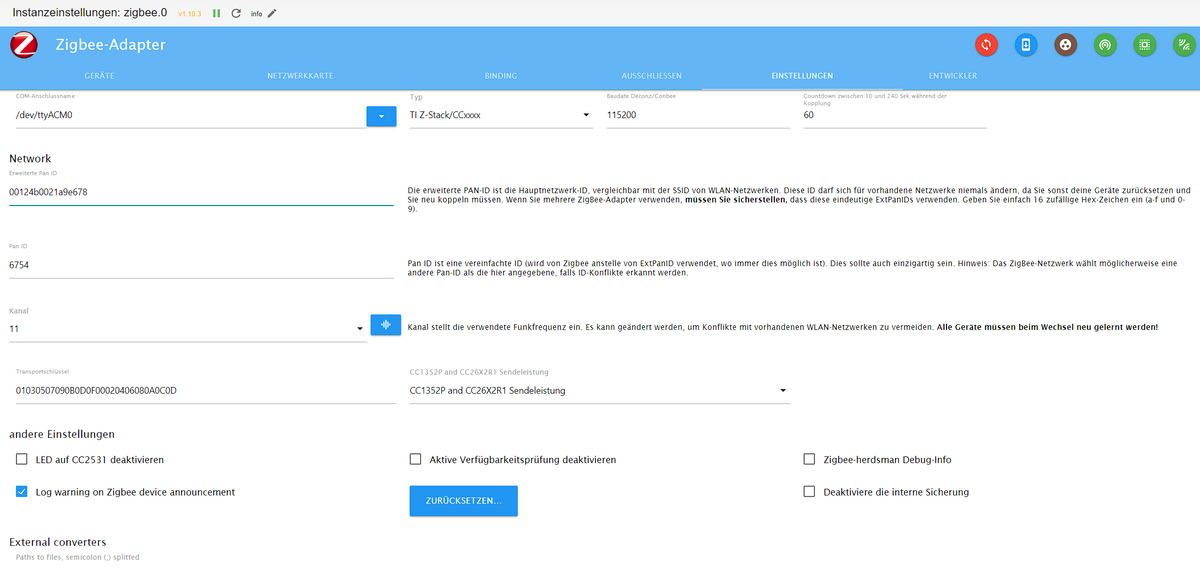
                    Stell mal bitte die Firmware im zigbee-Adapter auf EZSP (oder ähnlich) um - der sonoff dongle V2 nutzt meines Wissens nach nicht den TI Chip Satz

                    A.

                    ioBroker auf RPi4 - Hardware soweit wie möglich via Zigbee.
                    "Shit don't work" ist keine Fehlermeldung, sondern ein Fluch.

                    F 1 Antwort Letzte Antwort
                    1
                    • AsgothianA Asgothian

                      @flodirmann sagte in Zigbee iobroker Error while opening serialport:

                      @thomas-braun

                      So. Auch nach komplettem Neuaufsetzen des Systems mit Debian 12 Bookworm und dem Korrigieren eigenverschuldeter Rechtschreibfehler (diesmal aus PuTTY direkt rauskopiert) funktioniert es noch nicht besser.

                      Könnt ihr mir da irgendwie weiterhelfen? Falls weitere Informationen benötigt werden, gerne Bescheid geben.

                      Stell mal bitte die Firmware im zigbee-Adapter auf EZSP (oder ähnlich) um - der sonoff dongle V2 nutzt meines Wissens nach nicht den TI Chip Satz

                      A.

                      F Offline
                      F Offline
                      flodirmann
                      schrieb am zuletzt editiert von
                      #135

                      @asgothian
                      Danke danke danke!
                      Das hat tatsächlich endlich geholfen. :+1:

                      1 Antwort Letzte Antwort
                      0
                      • S Offline
                        S Offline
                        stauber
                        schrieb am zuletzt editiert von
                        #136

                        Hallo zusammen,

                        seit gestern läuft der Zigbee Adapter nicht mehr ich musste gestern Router und Rasp abstecken und seitdem wird er nur noch Orange.

                        Bei mir stand die ganze Zeit das Node js v22.x empfohlen wird seit dem letzten Update wird nun die 18.x empfohlen im Forum wiederum die 20.x welche soll ich jetzt Installieren?
                        Mit den Befehl iob Node js-update 18 bleibt er bei 22.x hab ich schon Probiert gibt es noch eine andere Möglichkeit?

                        Hardware
                        Raspberry4 und das CC26x02R1

                        Ansonsten könntet ihr mir irgendwie weiterhelfen?
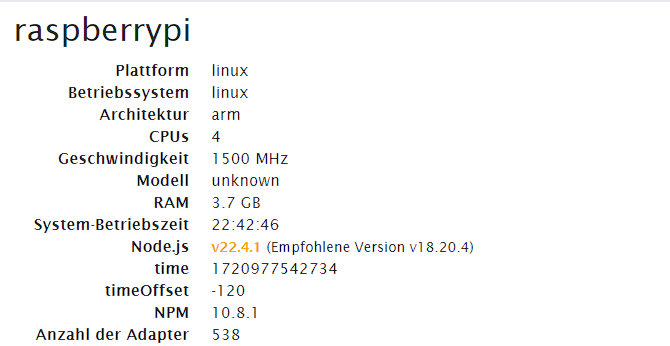
                        7b9ac2a0-bf02-456d-a579-4c19baf00f73-image.png
                        82a3f089-b66e-428f-be79-cc8e16533e17-image.png
                        c6fe201f-c271-4cce-8cf1-a0b231f56c52-image.png

                        Thomas BraunT 1 Antwort Letzte Antwort
                        0
                        • S stauber

                          Hallo zusammen,

                          seit gestern läuft der Zigbee Adapter nicht mehr ich musste gestern Router und Rasp abstecken und seitdem wird er nur noch Orange.

                          Bei mir stand die ganze Zeit das Node js v22.x empfohlen wird seit dem letzten Update wird nun die 18.x empfohlen im Forum wiederum die 20.x welche soll ich jetzt Installieren?
                          Mit den Befehl iob Node js-update 18 bleibt er bei 22.x hab ich schon Probiert gibt es noch eine andere Möglichkeit?

                          Hardware
                          Raspberry4 und das CC26x02R1

                          Ansonsten könntet ihr mir irgendwie weiterhelfen?
                          7b9ac2a0-bf02-456d-a579-4c19baf00f73-image.png
                          82a3f089-b66e-428f-be79-cc8e16533e17-image.png
                          c6fe201f-c271-4cce-8cf1-a0b231f56c52-image.png

                          Thomas BraunT Online
                          Thomas BraunT Online
                          Thomas Braun
                          Most Active
                          schrieb am zuletzt editiert von
                          #137

                          @stauber

                          iob nodejs-update 20
                          

                          Und dann mal die Ausgabe von

                          iob diag
                          

                          Da kannst du den Link 'by-id' herausnehmen und in den Einstellungen des Adapters statt /dev/ttyACM0 eintragen.

                          Linux-Werkzeugkasten:
                          https://forum.iobroker.net/topic/42952/der-kleine-iobroker-linux-werkzeugkasten
                          NodeJS Fixer Skript:
                          https://forum.iobroker.net/topic/68035/iob-node-fix-skript
                          iob_diag: curl -sLf -o diag.sh https://iobroker.net/diag.sh && bash diag.sh

                          S 1 Antwort Letzte Antwort
                          0
                          • Thomas BraunT Thomas Braun

                            @stauber

                            iob nodejs-update 20
                            

                            Und dann mal die Ausgabe von

                            iob diag
                            

                            Da kannst du den Link 'by-id' herausnehmen und in den Einstellungen des Adapters statt /dev/ttyACM0 eintragen.

                            S Offline
                            S Offline
                            stauber
                            schrieb am zuletzt editiert von
                            #138

                            @thomas-braun

                            Hallo Thomas

                            bleib weiterhin auf 22.4
                            nochmal zur Verständnis ich Kopiere den Text danach y

                            oder mach ich was Falsch?

                            adbef6cd-48d1-4bf7-8bcb-95dffd250af0-image.png

                            Thomas BraunT 1 Antwort Letzte Antwort
                            0
                            • S stauber

                              @thomas-braun

                              Hallo Thomas

                              bleib weiterhin auf 22.4
                              nochmal zur Verständnis ich Kopiere den Text danach y

                              oder mach ich was Falsch?

                              adbef6cd-48d1-4bf7-8bcb-95dffd250af0-image.png

                              Thomas BraunT Online
                              Thomas BraunT Online
                              Thomas Braun
                              Most Active
                              schrieb am zuletzt editiert von
                              #139

                              @stauber sagte in Zigbee iobroker Error while opening serialport:

                              oder mach ich was Falsch?

                              Ich weiß nicht was du machst...

                              Du sollst

                              iob nodejs-update 20
                              

                              in dein Terminal hacken.

                              Linux-Werkzeugkasten:
                              https://forum.iobroker.net/topic/42952/der-kleine-iobroker-linux-werkzeugkasten
                              NodeJS Fixer Skript:
                              https://forum.iobroker.net/topic/68035/iob-node-fix-skript
                              iob_diag: curl -sLf -o diag.sh https://iobroker.net/diag.sh && bash diag.sh

                              S 1 Antwort Letzte Antwort
                              0
                              • Thomas BraunT Thomas Braun

                                @stauber sagte in Zigbee iobroker Error while opening serialport:

                                oder mach ich was Falsch?

                                Ich weiß nicht was du machst...

                                Du sollst

                                iob nodejs-update 20
                                

                                in dein Terminal hacken.

                                S Offline
                                S Offline
                                stauber
                                schrieb am zuletzt editiert von
                                #140

                                @thomas-braun sagte in Zigbee iobroker Error while opening serialport:

                                iob nodejs-update 20

                                Das mach ich auch
                                nur er Zeigt immer noch v22.4

                                ioBroker nodejs fixer 2024-05-23
                                You requested to install latest version from nodejs v20 tree.
                                
                                Your current setup is:
                                /usr/bin/nodejs         v22.4.1
                                /usr/bin/node           v22.4.1
                                /usr/bin/npm            10.8.1
                                /usr/bin/npx            10.8.1
                                /usr/bin/corepack       0.28.2
                                
                                We found these nodejs versions available for installation:
                                
                                nodejs:
                                  Installed: 22.4.1-1nodesource1
                                  Candidate: 22.4.1-1nodesource1
                                  Version table:
                                 *** 22.4.1-1nodesource1 100
                                        100 /var/lib/dpkg/status
                                     20.15.1-1nodesource1 600
                                        500 https://deb.nodesource.com/node_20.x nodistro/main armhf Packages
                                     20.15.0-1nodesource1 600
                                        500 https://deb.nodesource.com/node_20.x nodistro/main armhf Packages
                                     20.14.0-1nodesource1 600
                                        500 https://deb.nodesource.com/node_20.x nodistro/main armhf Packages
                                     20.13.1-1nodesource1 600
                                        500 https://deb.nodesource.com/node_20.x nodistro/main armhf Packages
                                     20.13.0-1nodesource1 600
                                        500 https://deb.nodesource.com/node_20.x nodistro/main armhf Packages
                                     20.12.2-1nodesource1 600
                                        500 https://deb.nodesource.com/node_20.x nodistro/main armhf Packages
                                     20.12.1-1nodesource1 600
                                        500 https://deb.nodesource.com/node_20.x nodistro/main armhf Packages
                                     20.12.0-1nodesource1 600
                                        500 https://deb.nodesource.com/node_20.x nodistro/main armhf Packages
                                     20.11.1-1nodesource1 600
                                        500 https://deb.nodesource.com/node_20.x nodistro/main armhf Packages
                                     20.11.0-1nodesource1 600
                                        500 https://deb.nodesource.com/node_20.x nodistro/main armhf Packages
                                     20.10.0-1nodesource1 600
                                        500 https://deb.nodesource.com/node_20.x nodistro/main armhf Packages
                                     20.9.0-1nodesource1 600
                                        500 https://deb.nodesource.com/node_20.x nodistro/main armhf Packages
                                     20.8.1-1nodesource1 600
                                        500 https://deb.nodesource.com/node_20.x nodistro/main armhf Packages
                                     20.8.0-1nodesource1 600
                                        500 https://deb.nodesource.com/node_20.x nodistro/main armhf Packages
                                     20.7.0-1nodesource1 600
                                        500 https://deb.nodesource.com/node_20.x nodistro/main armhf Packages
                                     20.6.1-1nodesource1 600
                                        500 https://deb.nodesource.com/node_20.x nodistro/main armhf Packages
                                     20.6.0-1nodesource1 600
                                        500 https://deb.nodesource.com/node_20.x nodistro/main armhf Packages
                                     20.5.1-1nodesource1 600
                                        500 https://deb.nodesource.com/node_20.x nodistro/main armhf Packages
                                     20.5.0-1nodesource1 600
                                        500 https://deb.nodesource.com/node_20.x nodistro/main armhf Packages
                                     20.4.0-1nodesource1 600
                                        500 https://deb.nodesource.com/node_20.x nodistro/main armhf Packages
                                     20.3.1-1nodesource1 600
                                        500 https://deb.nodesource.com/node_20.x nodistro/main armhf Packages
                                     20.3.0-1nodesource1 600
                                        500 https://deb.nodesource.com/node_20.x nodistro/main armhf Packages
                                     20.2.0-1nodesource1 600
                                        500 https://deb.nodesource.com/node_20.x nodistro/main armhf Packages
                                     20.1.0-1nodesource1 600
                                        500 https://deb.nodesource.com/node_20.x nodistro/main armhf Packages
                                     20.0.0-1nodesource1 600
                                        500 https://deb.nodesource.com/node_20.x nodistro/main armhf Packages
                                     12.22.12~dfsg-1~deb11u4 500
                                        500 http://raspbian.raspberrypi.org/raspbian bullseye/main armhf Packages


                                Nothing to do - Your installation is using the correct paths.
                                
                                You are running nodejs v22.4.1. Do you want to install latest version from nodejs v.20 tree?
                                
                                Press <y> to continue or any other key to quit
                                Trying to fix your installation now. Please be patient.
                                rm: cannot remove '/usr/share/keyrings/nodesource.gpg'$'\n''/etc/apt/keyrings/nodesource.gpg': No such file or directory
                                Waiting for ioBroker to shut down - Give me a minute...
                                ############################################################
                                
                                *** These repos are active on your system:
                                Hit:1 http://deb.debian.org/debian bullseye-proposed-updates InRelease
                                Hit:2 http://raspbian.raspberrypi.org/raspbian bullseye InRelease
                                Hit:3 http://archive.raspberrypi.org/debian bullseye InRelease
                                Reading package lists... Done
                                
                                *** Installing ca-certificates, curl and gnupg, just in case they are missing.
                                
                                *** Creating new /etc/apt/sources.list.d/nodesource.list and pinning source
                                
                                deb [signed-by=/etc/apt/keyrings/nodesource.gpg] https://deb.nodesource.com/node_20.x nodistro main
                                Package: nodejs
                                Pin: origin deb.nodesource.com
                                Pin-Priority: 1001
                                
                                *** These repos are active after the adjustments:
                                Hit:1 http://deb.debian.org/debian bullseye-proposed-updates InRelease
                                Hit:2 http://archive.raspberrypi.org/debian bullseye InRelease
                                Hit:3 http://raspbian.raspberrypi.org/raspbian bullseye InRelease
                                Get:4 https://deb.nodesource.com/node_20.x nodistro InRelease [12.1 kB]
                                Get:5 https://deb.nodesource.com/node_20.x nodistro/main armhf Packages [8461 B]
                                Fetched 20.6 kB in 1s (20.3 kB/s)
                                Reading package lists... Done
                                
                                Installing nodejs now!
                                
                                Installing the nodejs!
                                
                                We tried our best to fix your nodejs. Please run iob diag again to verify.
                                
                                *** RESTARTING ioBroker NOW! ***
                                 Please refresh or restart your browser in a few moments.
                                
                                
                                Thomas BraunT 1 Antwort Letzte Antwort
                                0
                                • S stauber

                                  @thomas-braun sagte in Zigbee iobroker Error while opening serialport:

                                  iob nodejs-update 20

                                  Das mach ich auch
                                  nur er Zeigt immer noch v22.4

                                  ioBroker nodejs fixer 2024-05-23
                                  You requested to install latest version from nodejs v20 tree.
                                  
                                  Your current setup is:
                                  /usr/bin/nodejs         v22.4.1
                                  /usr/bin/node           v22.4.1
                                  /usr/bin/npm            10.8.1
                                  /usr/bin/npx            10.8.1
                                  /usr/bin/corepack       0.28.2
                                  
                                  We found these nodejs versions available for installation:
                                  
                                  nodejs:
                                    Installed: 22.4.1-1nodesource1
                                    Candidate: 22.4.1-1nodesource1
                                    Version table:
                                   *** 22.4.1-1nodesource1 100
                                          100 /var/lib/dpkg/status
                                       20.15.1-1nodesource1 600
                                          500 https://deb.nodesource.com/node_20.x nodistro/main armhf Packages
                                       20.15.0-1nodesource1 600
                                          500 https://deb.nodesource.com/node_20.x nodistro/main armhf Packages
                                       20.14.0-1nodesource1 600
                                          500 https://deb.nodesource.com/node_20.x nodistro/main armhf Packages
                                       20.13.1-1nodesource1 600
                                          500 https://deb.nodesource.com/node_20.x nodistro/main armhf Packages
                                       20.13.0-1nodesource1 600
                                          500 https://deb.nodesource.com/node_20.x nodistro/main armhf Packages
                                       20.12.2-1nodesource1 600
                                          500 https://deb.nodesource.com/node_20.x nodistro/main armhf Packages
                                       20.12.1-1nodesource1 600
                                          500 https://deb.nodesource.com/node_20.x nodistro/main armhf Packages
                                       20.12.0-1nodesource1 600
                                          500 https://deb.nodesource.com/node_20.x nodistro/main armhf Packages
                                       20.11.1-1nodesource1 600
                                          500 https://deb.nodesource.com/node_20.x nodistro/main armhf Packages
                                       20.11.0-1nodesource1 600
                                          500 https://deb.nodesource.com/node_20.x nodistro/main armhf Packages
                                       20.10.0-1nodesource1 600
                                          500 https://deb.nodesource.com/node_20.x nodistro/main armhf Packages
                                       20.9.0-1nodesource1 600
                                          500 https://deb.nodesource.com/node_20.x nodistro/main armhf Packages
                                       20.8.1-1nodesource1 600
                                          500 https://deb.nodesource.com/node_20.x nodistro/main armhf Packages
                                       20.8.0-1nodesource1 600
                                          500 https://deb.nodesource.com/node_20.x nodistro/main armhf Packages
                                       20.7.0-1nodesource1 600
                                          500 https://deb.nodesource.com/node_20.x nodistro/main armhf Packages
                                       20.6.1-1nodesource1 600
                                          500 https://deb.nodesource.com/node_20.x nodistro/main armhf Packages
                                       20.6.0-1nodesource1 600
                                          500 https://deb.nodesource.com/node_20.x nodistro/main armhf Packages
                                       20.5.1-1nodesource1 600
                                          500 https://deb.nodesource.com/node_20.x nodistro/main armhf Packages
                                       20.5.0-1nodesource1 600
                                          500 https://deb.nodesource.com/node_20.x nodistro/main armhf Packages
                                       20.4.0-1nodesource1 600
                                          500 https://deb.nodesource.com/node_20.x nodistro/main armhf Packages
                                       20.3.1-1nodesource1 600
                                          500 https://deb.nodesource.com/node_20.x nodistro/main armhf Packages
                                       20.3.0-1nodesource1 600
                                          500 https://deb.nodesource.com/node_20.x nodistro/main armhf Packages
                                       20.2.0-1nodesource1 600
                                          500 https://deb.nodesource.com/node_20.x nodistro/main armhf Packages
                                       20.1.0-1nodesource1 600
                                          500 https://deb.nodesource.com/node_20.x nodistro/main armhf Packages
                                       20.0.0-1nodesource1 600
                                          500 https://deb.nodesource.com/node_20.x nodistro/main armhf Packages
                                       12.22.12~dfsg-1~deb11u4 500
                                          500 http://raspbian.raspberrypi.org/raspbian bullseye/main armhf Packages


                                  Nothing to do - Your installation is using the correct paths.
                                  
                                  You are running nodejs v22.4.1. Do you want to install latest version from nodejs v.20 tree?
                                  
                                  Press <y> to continue or any other key to quit
                                  Trying to fix your installation now. Please be patient.
                                  rm: cannot remove '/usr/share/keyrings/nodesource.gpg'$'\n''/etc/apt/keyrings/nodesource.gpg': No such file or directory
                                  Waiting for ioBroker to shut down - Give me a minute...
                                  ############################################################
                                  
                                  *** These repos are active on your system:
                                  Hit:1 http://deb.debian.org/debian bullseye-proposed-updates InRelease
                                  Hit:2 http://raspbian.raspberrypi.org/raspbian bullseye InRelease
                                  Hit:3 http://archive.raspberrypi.org/debian bullseye InRelease
                                  Reading package lists... Done
                                  
                                  *** Installing ca-certificates, curl and gnupg, just in case they are missing.
                                  
                                  *** Creating new /etc/apt/sources.list.d/nodesource.list and pinning source
                                  
                                  deb [signed-by=/etc/apt/keyrings/nodesource.gpg] https://deb.nodesource.com/node_20.x nodistro main
                                  Package: nodejs
                                  Pin: origin deb.nodesource.com
                                  Pin-Priority: 1001
                                  
                                  *** These repos are active after the adjustments:
                                  Hit:1 http://deb.debian.org/debian bullseye-proposed-updates InRelease
                                  Hit:2 http://archive.raspberrypi.org/debian bullseye InRelease
                                  Hit:3 http://raspbian.raspberrypi.org/raspbian bullseye InRelease
                                  Get:4 https://deb.nodesource.com/node_20.x nodistro InRelease [12.1 kB]
                                  Get:5 https://deb.nodesource.com/node_20.x nodistro/main armhf Packages [8461 B]
                                  Fetched 20.6 kB in 1s (20.3 kB/s)
                                  Reading package lists... Done
                                  
                                  Installing nodejs now!
                                  
                                  Installing the nodejs!
                                  
                                  We tried our best to fix your nodejs. Please run iob diag again to verify.
                                  
                                  *** RESTARTING ioBroker NOW! ***
                                   Please refresh or restart your browser in a few moments.
                                  
                                  
                                  Thomas BraunT Online
                                  Thomas BraunT Online
                                  Thomas Braun
                                  Most Active
                                  schrieb am zuletzt editiert von
                                  #141

                                  @stauber sagte in Zigbee iobroker Error while opening serialport:

                                  node -v
                                  

                                  sagt?

                                  Linux-Werkzeugkasten:
                                  https://forum.iobroker.net/topic/42952/der-kleine-iobroker-linux-werkzeugkasten
                                  NodeJS Fixer Skript:
                                  https://forum.iobroker.net/topic/68035/iob-node-fix-skript
                                  iob_diag: curl -sLf -o diag.sh https://iobroker.net/diag.sh && bash diag.sh

                                  S 1 Antwort Letzte Antwort
                                  0
                                  • Thomas BraunT Thomas Braun

                                    @stauber sagte in Zigbee iobroker Error while opening serialport:

                                    node -v
                                    

                                    sagt?

                                    S Offline
                                    S Offline
                                    stauber
                                    schrieb am zuletzt editiert von
                                    #142

                                    @thomas-braun
                                    auch 22
                                    a7d3a043-c6c3-4092-ac7a-6833485348ed-image.png

                                    Thomas BraunT 1 Antwort Letzte Antwort
                                    0
                                    • S stauber

                                      @thomas-braun
                                      auch 22
                                      a7d3a043-c6c3-4092-ac7a-6833485348ed-image.png

                                      Thomas BraunT Online
                                      Thomas BraunT Online
                                      Thomas Braun
                                      Most Active
                                      schrieb am zuletzt editiert von
                                      #143

                                      @stauber

                                      Bitte keine Bildchen von Text.

                                      sudo apt update
                                      sudo apt install nodejs=20.15.1-1nodesource1
                                      

                                      Linux-Werkzeugkasten:
                                      https://forum.iobroker.net/topic/42952/der-kleine-iobroker-linux-werkzeugkasten
                                      NodeJS Fixer Skript:
                                      https://forum.iobroker.net/topic/68035/iob-node-fix-skript
                                      iob_diag: curl -sLf -o diag.sh https://iobroker.net/diag.sh && bash diag.sh

                                      S 1 Antwort Letzte Antwort
                                      0
                                      • Thomas BraunT Thomas Braun

                                        @stauber

                                        Bitte keine Bildchen von Text.

                                        sudo apt update
                                        sudo apt install nodejs=20.15.1-1nodesource1
                                        
                                        S Offline
                                        S Offline
                                        stauber
                                        schrieb am zuletzt editiert von
                                        #144

                                        @thomas-braun

                                        ok das hat funktioniert vielen Dank!

                                        jetzt mit

                                        iob diag 
                                        

                                        Kannst du mir sagen wo ungefähr die by id steht?

                                        Thomas BraunT 1 Antwort Letzte Antwort
                                        0
                                        • S stauber

                                          @thomas-braun

                                          ok das hat funktioniert vielen Dank!

                                          jetzt mit

                                          iob diag 
                                          

                                          Kannst du mir sagen wo ungefähr die by id steht?

                                          Thomas BraunT Online
                                          Thomas BraunT Online
                                          Thomas Braun
                                          Most Active
                                          schrieb am zuletzt editiert von
                                          #145

                                          @stauber

                                          Poste die Langfassung in Gänze.

                                          Linux-Werkzeugkasten:
                                          https://forum.iobroker.net/topic/42952/der-kleine-iobroker-linux-werkzeugkasten
                                          NodeJS Fixer Skript:
                                          https://forum.iobroker.net/topic/68035/iob-node-fix-skript
                                          iob_diag: curl -sLf -o diag.sh https://iobroker.net/diag.sh && bash diag.sh

                                          S 1 Antwort Letzte Antwort
                                          0
                                          Antworten
                                          • In einem neuen Thema antworten
                                          Anmelden zum Antworten
                                          • Älteste zuerst
                                          • Neuste zuerst
                                          • Meiste Stimmen


                                          Support us

                                          ioBroker
                                          Community Adapters
                                          Donate

                                          418

                                          Online

                                          32.5k

                                          Benutzer

                                          81.6k

                                          Themen

                                          1.3m

                                          Beiträge
                                          Community
                                          Impressum | Datenschutz-Bestimmungen | Nutzungsbedingungen | Einwilligungseinstellungen
                                          ioBroker Community 2014-2025
                                          logo
                                          • Anmelden

                                          • Du hast noch kein Konto? Registrieren

                                          • Anmelden oder registrieren, um zu suchen
                                          • Erster Beitrag
                                            Letzter Beitrag
                                          0
                                          • Home
                                          • Aktuell
                                          • Tags
                                          • Ungelesen 0
                                          • Kategorien
                                          • Unreplied
                                          • Beliebt
                                          • GitHub
                                          • Docu
                                          • Hilfe