




javascript Adapter RAM wächst und CPU last 100%

-
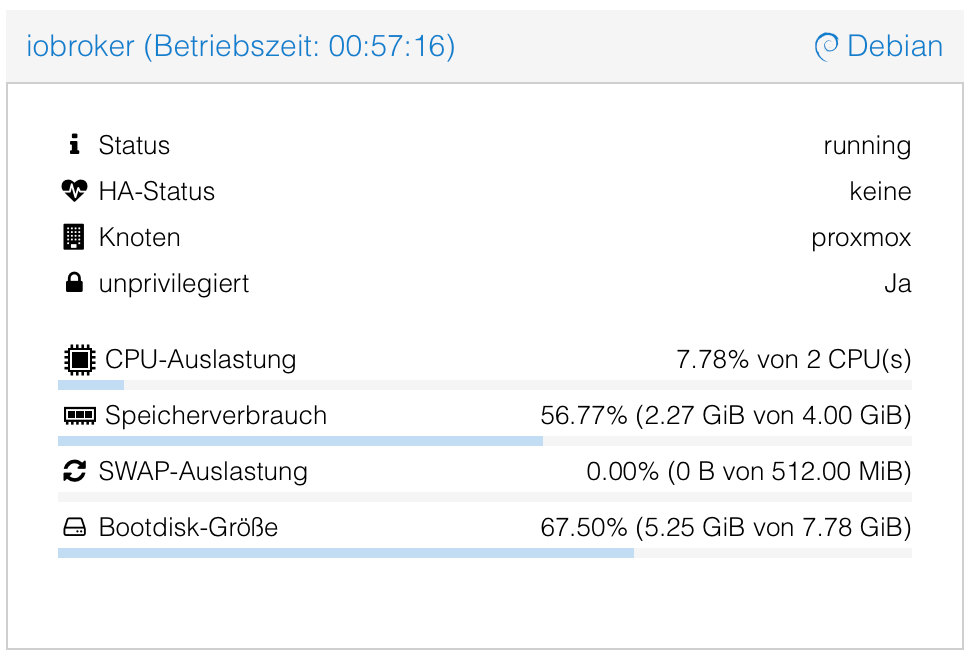
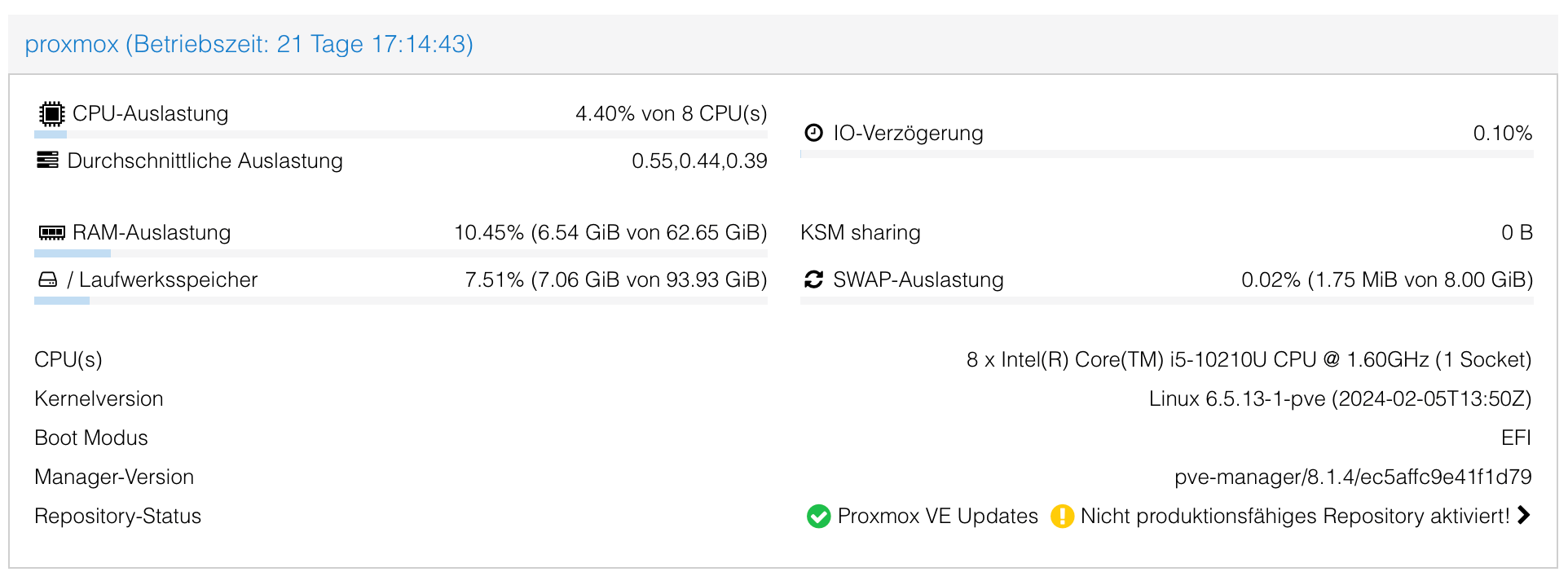
@guitardoc du darfst allen VMs /LXC in Summe nicht den gesamten verfügbaren Speicher zuweisen.
Die PVE braucht je nach Konfiguration selbst noch e7n gutes Häppchen.
Das gilt auch für den Festplattenplatz -
@guitardoc du darfst allen VMs /LXC in Summe nicht den gesamten verfügbaren Speicher zuweisen.
Die PVE braucht je nach Konfiguration selbst noch e7n gutes Häppchen.
Das gilt auch für den Festplattenplatz -
@australien Wieviele Objekte hat dein System? Welche Version des JavaScript-Adapters?
@haus-automatisierung
Hallo Matthias,Objekte: 39713, Zustände: 35313
JavaScript 7.8.0
Node.js: v18.19.1
NPM: 10.2.4
der Rest des Systems ist uptodate.ich konnte mittlerweile den Übeltäter ausforschen. Der Vaillant Adapter ab Version 0.4.0 bis 0.7.0
Gelöst wurde es meinerseits mit Versuchen von downgrade auf 0.1.2, dann funktionierte es wieder. Nach weiterer Suche, u.a. auf https://github.com/TA2k/ioBroker.vaillant, machte ich folgen des:- deinstall Vaillant Adapter komplett
- install der Version 0.7.0
seitdem ist alles wieder im Lot.
-
@haus-automatisierung
Hallo Matthias,Objekte: 39713, Zustände: 35313
JavaScript 7.8.0
Node.js: v18.19.1
NPM: 10.2.4
der Rest des Systems ist uptodate.ich konnte mittlerweile den Übeltäter ausforschen. Der Vaillant Adapter ab Version 0.4.0 bis 0.7.0
Gelöst wurde es meinerseits mit Versuchen von downgrade auf 0.1.2, dann funktionierte es wieder. Nach weiterer Suche, u.a. auf https://github.com/TA2k/ioBroker.vaillant, machte ich folgen des:- deinstall Vaillant Adapter komplett
- install der Version 0.7.0
seitdem ist alles wieder im Lot.
@australien sagte in javascript Adapter RAM wächst und CPU last 100%:
der Rest des Systems ist uptodate
na dann zeig mal bitte die Langfassung von
iob diagin Codetags posten - dann kann man besser helfen
-
@australien sagte in javascript Adapter RAM wächst und CPU last 100%:
der Rest des Systems ist uptodate
na dann zeig mal bitte die Langfassung von
iob diagin Codetags posten - dann kann man besser helfen
Skript v.2023-10-10 *** BASE SYSTEM *** Static hostname: iobroker Icon name: computer-container Chassis: container ☐ Virtualization: lxc Operating System: Debian GNU/Linux 12 (bookworm) Kernel: Linux 6.5.13-1-pve Architecture: x86-64 model name : Intel(R) Core(TM) i5-4590T CPU @ 2.00GHz Docker : false Virtualization : lxc Kernel : x86_64 Userland : amd64 Systemuptime and Load: 18:44:52 up 4 days, 8:02, 3 users, load average: 0.32, 0.36, 0.42 CPU threads: 2 *** Time and Time Zones *** Local time: Fri 2024-03-22 18:44:52 CET Universal time: Fri 2024-03-22 17:44:52 UTC RTC time: n/a Time zone: Europe/Vienna (CET, +0100) System clock synchronized: yes NTP service: inactive RTC in local TZ: no *** User and Groups *** robert /home/robert robert sudo users *** X-Server-Setup *** X-Server: false Desktop: Terminal: Boot Target: graphical.target *** MEMORY *** total used free shared buff/cache available Mem: 6.4G 3.5G 1.3G 118K 1.6G 2.8G Swap: 2.1G 0B 2.1G Total: 8.5G 3.5G 3.4G 6096 M total memory 3379 M used memory 3317 M active memory 1369 M inactive memory 1223 M free memory 0 M buffer memory 1492 M swap cache 2024 M total swap 0 M used swap 2024 M free swap *** FAILED SERVICES *** UNIT LOAD ACTIVE SUB DESCRIPTION 0 loaded units listed. *** FILESYSTEM *** Filesystem Type Size Used Avail Use% Mounted on /dev/mapper/pve-vm--100--disk--0 ext4 7.8G 5.0G 2.5G 67% / none tmpfs 492K 4.0K 488K 1% /dev tmpfs tmpfs 7.8G 0 7.8G 0% /dev/shm tmpfs tmpfs 3.1G 108K 3.1G 1% /run tmpfs tmpfs 5.0M 0 5.0M 0% /run/lock 10.68.0.77:/volume1/fhembackup/proxmox nfs4 3.6T 2.5T 1.2T 68% /opt/iobroker/backups Messages concerning ext4 filesystem in dmesg: [Fri Mar 8 14:05:23 2024] EXT4-fs (dm-1): mounted filesystem 7b5055a9-c1b9-4321-b699-9cbe3cc2c84d ro with ordered data mode. Quota mode: none. [Fri Mar 8 14:05:24 2024] EXT4-fs (dm-1): re-mounted 7b5055a9-c1b9-4321-b699-9cbe3cc2c84d r/w. Quota mode: none. [Fri Mar 8 14:05:34 2024] EXT4-fs (dm-7): mounted filesystem 5a09945b-a66b-463c-b079-9807db96e0f0 r/w with ordered data mode. Quota mode: none. [Fri Mar 8 14:05:36 2024] EXT4-fs (dm-6): mounted filesystem 01155889-4c62-4892-8113-e8b417f68e56 r/w with ordered data mode. Quota mode: none. [Fri Mar 8 14:05:39 2024] EXT4-fs (dm-8): mounted filesystem a9b4cfcd-3d16-496b-b272-1755ee3d4cee r/w with ordered data mode. Quota mode: none. [Fri Mar 8 14:05:42 2024] EXT4-fs (dm-10): mounted filesystem 315a4ea0-46c3-4c2a-83b4-5e8f5c2bd639 r/w with ordered data mode. Quota mode: none. [Fri Mar 8 14:05:46 2024] EXT4-fs (dm-11): mounted filesystem f5c43128-b411-4c5b-9872-53ae00c89369 r/w with ordered data mode. Quota mode: none. [Fri Mar 8 14:05:49 2024] EXT4-fs (dm-9): mounted filesystem 75db9238-7c5b-4366-92b2-0430db96e9dc r/w with ordered data mode. Quota mode: none. [Fri Mar 8 16:54:53 2024] EXT4-fs (dm-7): unmounting filesystem 5a09945b-a66b-463c-b079-9807db96e0f0. [Fri Mar 8 16:54:53 2024] EXT4-fs (dm-7): mounted filesystem 5a09945b-a66b-463c-b079-9807db96e0f0 r/w with ordered data mode. Quota mode: none. [Fri Mar 8 19:41:35 2024] EXT4-fs (dm-7): unmounting filesystem 5a09945b-a66b-463c-b079-9807db96e0f0. [Fri Mar 8 19:41:35 2024] EXT4-fs (dm-7): mounted filesystem 5a09945b-a66b-463c-b079-9807db96e0f0 r/w with ordered data mode. Quota mode: none. [Sat Mar 9 07:45:48 2024] EXT4-fs (dm-7): unmounting filesystem 5a09945b-a66b-463c-b079-9807db96e0f0. [Sat Mar 9 07:45:49 2024] EXT4-fs (dm-7): mounted filesystem 5a09945b-a66b-463c-b079-9807db96e0f0 r/w with ordered data mode. Quota mode: none. [Sat Mar 9 08:58:01 2024] EXT4-fs (dm-9): unmounting filesystem 75db9238-7c5b-4366-92b2-0430db96e9dc. [Sat Mar 9 08:58:02 2024] EXT4-fs (dm-9): mounted filesystem 75db9238-7c5b-4366-92b2-0430db96e9dc r/w with ordered data mode. Quota mode: none. [Sat Mar 9 13:05:58 2024] EXT4-fs (dm-7): unmounting filesystem 5a09945b-a66b-463c-b079-9807db96e0f0. [Sat Mar 9 13:05:59 2024] EXT4-fs (dm-7): mounted filesystem 5a09945b-a66b-463c-b079-9807db96e0f0 r/w with ordered data mode. Quota mode: none. [Sun Mar 10 20:09:39 2024] EXT4-fs (dm-7): unmounting filesystem 5a09945b-a66b-463c-b079-9807db96e0f0. [Sun Mar 10 20:09:40 2024] EXT4-fs (dm-7): mounted filesystem 5a09945b-a66b-463c-b079-9807db96e0f0 r/w with ordered data mode. Quota mode: none. [Mon Mar 11 09:17:27 2024] EXT4-fs (dm-7): unmounting filesystem 5a09945b-a66b-463c-b079-9807db96e0f0. [Mon Mar 11 09:17:28 2024] EXT4-fs (dm-7): mounted filesystem 5a09945b-a66b-463c-b079-9807db96e0f0 r/w with ordered data mode. Quota mode: none. [Mon Mar 11 09:19:28 2024] EXT4-fs (dm-7): unmounting filesystem 5a09945b-a66b-463c-b079-9807db96e0f0. [Mon Mar 11 09:19:29 2024] EXT4-fs (dm-7): mounted filesystem 5a09945b-a66b-463c-b079-9807db96e0f0 r/w with ordered data mode. Quota mode: none. [Mon Mar 18 10:01:12 2024] EXT4-fs (dm-11): unmounting filesystem f5c43128-b411-4c5b-9872-53ae00c89369. [Mon Mar 18 10:01:13 2024] EXT4-fs (dm-11): mounted filesystem f5c43128-b411-4c5b-9872-53ae00c89369 r/w with ordered data mode. Quota mode: none. [Mon Mar 18 10:42:41 2024] EXT4-fs (dm-7): unmounting filesystem 5a09945b-a66b-463c-b079-9807db96e0f0. [Mon Mar 18 10:42:42 2024] EXT4-fs (dm-7): mounted filesystem 5a09945b-a66b-463c-b079-9807db96e0f0 r/w with ordered data mode. Quota mode: none. Show mounted filesystems \(real ones only\): TARGET SOURCE FSTYPE OPTIONS / /dev/mapper/pve-vm--100--disk--0 ext4 rw,relatime,stripe=16 `-/opt/iobroker/backups 10.68.0.77:/volume1/fhembackup/proxmox nfs4 rw,relatime,vers=4.0,rsize=131072,wsize=131072,namlen=255,hard,proto=tcp,timeo=600,retrans=2,sec=sys,clientaddr=10.68.10.11,local_lock=none,addr=10.68.0.77 Files in neuralgic directories: /var: 551M /var/ 255M /var/cache 251M /var/cache/apt 175M /var/cache/apt/archives 150M /var/log/journal/eb946daf72cf4f5ebad0dae16554b71a Hint: You are currently not seeing messages from other users and the system. Users in groups 'adm', 'systemd-journal' can see all messages. Pass -q to turn off this notice. Archived and active journals take up 8.0M in the file system. /opt/iobroker/backups: 156M /opt/iobroker/backups/ /opt/iobroker/iobroker-data: 693M /opt/iobroker/iobroker-data/ 461M /opt/iobroker/iobroker-data/files 167M /opt/iobroker/iobroker-data/files/vis-2 142M /opt/iobroker/iobroker-data/backup-objects 81M /opt/iobroker/iobroker-data/files/vis-2/static The five largest files in iobroker-data are: find: Failed to change directory: /root: Permission denied find: Failed to change directory: /root: Permission denied find: Failed to change directory: /root: Permission denied find: Failed to change directory: /root: Permission denied find: Failed to change directory: /root: Permission denied find: Failed to restore initial working directory: /root: Permission denied USB-Devices by-id: USB-Sticks - Avoid direct links to /dev/* in your adapter setups, please always prefer the links 'by-id': find: Failed to restore initial working directory: /root: Permission denied *** NodeJS-Installation *** /usr/bin/nodejs v18.19.1 /usr/bin/node v18.19.1 /usr/bin/npm 10.2.4 /usr/bin/npx 10.2.4 /usr/bin/corepack 0.22.0 nodejs: Installed: 18.19.1-1nodesource1 Candidate: 18.19.1-1nodesource1 Version table: *** 18.19.1-1nodesource1 1001 500 https://deb.nodesource.com/node_18.x nodistro/main amd64 Packages 100 /var/lib/dpkg/status 18.19.0+dfsg-6~deb12u1 500 500 http://security.debian.org bookworm-security/main amd64 Packages 18.19.0-1nodesource1 1001 500 https://deb.nodesource.com/node_18.x nodistro/main amd64 Packages 18.18.2-1nodesource1 1001 500 https://deb.nodesource.com/node_18.x nodistro/main amd64 Packages 18.18.1-1nodesource1 1001 500 https://deb.nodesource.com/node_18.x nodistro/main amd64 Packages 18.18.0-1nodesource1 1001 500 https://deb.nodesource.com/node_18.x nodistro/main amd64 Packages 18.17.1-1nodesource1 1001 500 https://deb.nodesource.com/node_18.x nodistro/main amd64 Packages 18.17.0-1nodesource1 1001 500 https://deb.nodesource.com/node_18.x nodistro/main amd64 Packages 18.16.1-1nodesource1 1001 500 https://deb.nodesource.com/node_18.x nodistro/main amd64 Packages 18.16.0-1nodesource1 1001 500 https://deb.nodesource.com/node_18.x nodistro/main amd64 Packages 18.15.0-1nodesource1 1001 500 https://deb.nodesource.com/node_18.x nodistro/main amd64 Packages 18.14.2-1nodesource1 1001 500 https://deb.nodesource.com/node_18.x nodistro/main amd64 Packages 18.14.1-1nodesource1 1001 500 https://deb.nodesource.com/node_18.x nodistro/main amd64 Packages 18.14.0-1nodesource1 1001 500 https://deb.nodesource.com/node_18.x nodistro/main amd64 Packages 18.13.0+dfsg1-1 500 500 http://deb.debian.org/debian bookworm/main amd64 Packages 18.13.0-1nodesource1 1001 500 https://deb.nodesource.com/node_18.x nodistro/main amd64 Packages 18.12.0-1nodesource1 1001 500 https://deb.nodesource.com/node_18.x nodistro/main amd64 Packages 18.11.0-1nodesource1 1001 500 https://deb.nodesource.com/node_18.x nodistro/main amd64 Packages 18.10.0-1nodesource1 1001 500 https://deb.nodesource.com/node_18.x nodistro/main amd64 Packages 18.9.1-1nodesource1 1001 500 https://deb.nodesource.com/node_18.x nodistro/main amd64 Packages 18.9.0-1nodesource1 1001 500 https://deb.nodesource.com/node_18.x nodistro/main amd64 Packages 18.8.0-1nodesource1 1001 500 https://deb.nodesource.com/node_18.x nodistro/main amd64 Packages 18.7.0-1nodesource1 1001 500 https://deb.nodesource.com/node_18.x nodistro/main amd64 Packages 18.6.0-1nodesource1 1001 500 https://deb.nodesource.com/node_18.x nodistro/main amd64 Packages 18.5.0-1nodesource1 1001 500 https://deb.nodesource.com/node_18.x nodistro/main amd64 Packages 18.4.0-1nodesource1 1001 500 https://deb.nodesource.com/node_18.x nodistro/main amd64 Packages 18.3.0-1nodesource1 1001 500 https://deb.nodesource.com/node_18.x nodistro/main amd64 Packages 18.2.0-1nodesource1 1001 500 https://deb.nodesource.com/node_18.x nodistro/main amd64 Packages 18.1.0-1nodesource1 1001 500 https://deb.nodesource.com/node_18.x nodistro/main amd64 Packages 18.0.0-1nodesource1 1001 500 https://deb.nodesource.com/node_18.x nodistro/main amd64 Packages find: Failed to restore initial working directory: /root: Permission denied Temp directories causing npm8 problem: 0 No problems detected Errors in npm tree: npm ERR! code ELSPROBLEMS npm ERR! missing: aes-js@^3.1.2, required by iobroker.javascript@7.8.0 npm ERR! missing: csvjson@^5.1.0, required by iobroker.javascript@7.8.0 npm ERR! missing: dayjs@^1.11.10, required by iobroker.javascript@7.8.0 npm ERR! missing: fs@^0.0.1-security, required by iobroker.javascript@7.8.0 npm ERR! missing: moment-parseformat@^4.0.0, required by iobroker.javascript@7.8.0 npm ERR! invalid: moment@2.29.4 /opt/iobroker/node_modules/moment npm ERR! missing: request-promise-native@^1.0.9, required by iobroker.javascript@7.8.0 npm ERR! invalid: xml2js@0.4.23 /opt/iobroker/node_modules/xml2js npm ERR! A complete log of this run can be found in: /home/robert/.npm/_logs/2024-03-22T17_44_54_361Z-debug-0.log *** ioBroker-Installation *** ioBroker Status iobroker is running on this host. Objects type: jsonl States type: jsonl Core adapters versions js-controller: 5.0.19 admin: 6.13.16 javascript: 7.8.0 Adapters from github: 4 Adapter State + system.adapter.accuweather.0 : accuweather : iobroker - enabled + system.adapter.admin.0 : admin : iobroker - enabled, port: 8081, bind: 0.0.0.0, run as: admin system.adapter.alexa2.0 : alexa2 : iobroker - disabled system.adapter.alias-manager.0 : alias-manager : iobroker - disabled + system.adapter.backitup.0 : backitup : iobroker - enabled + system.adapter.cloud.0 : cloud : iobroker - enabled system.adapter.devices.0 : devices : iobroker - disabled system.adapter.discovery.0 : discovery : iobroker - disabled system.adapter.energiefluss.0 : energiefluss : iobroker - disabled + system.adapter.enigma2.0 : enigma2 : iobroker - enabled + system.adapter.fahrplan.0 : fahrplan : iobroker - enabled system.adapter.feiertage.0 : feiertage : iobroker - enabled + system.adapter.fhem.0 : fhem : iobroker - enabled, port: 7072 system.adapter.fuelpricemonitor.0 : fuelpricemonitor : iobroker - disabled system.adapter.ical.0 : ical : iobroker - enabled system.adapter.ical.1 : ical : iobroker - enabled system.adapter.ical.2 : ical : iobroker - enabled system.adapter.icons-mfd-svg.0 : icons-mfd-svg : iobroker - disabled + system.adapter.influxdb.0 : influxdb : iobroker - enabled, port: 8086 + system.adapter.javascript.0 : javascript : iobroker - enabled + system.adapter.mqtt.0 : mqtt : iobroker - enabled, port: 1886, bind: 0.0.0.0 + system.adapter.mqtt.1 : mqtt : iobroker - enabled, port: 1883, bind: 0.0.0.0 system.adapter.netatmo-crawler.0 : netatmo-crawler : iobroker - enabled + system.adapter.octoprint.0 : octoprint : iobroker - enabled + system.adapter.onkyo.0 : onkyo : iobroker - enabled system.adapter.openweathermap.0 : openweathermap : iobroker - enabled + system.adapter.parser.0 : parser : iobroker - enabled system.adapter.ping.0 : ping : iobroker - disabled + system.adapter.pvforecast.0 : pvforecast : iobroker - enabled system.adapter.samsung.0 : samsung : iobroker - disabled + system.adapter.shelly.0 : shelly : iobroker - enabled, port: 1882, bind: 0.0.0.0 system.adapter.shuttercontrol.0 : shuttercontrol : iobroker - disabled + system.adapter.sonoff.0 : sonoff : iobroker - enabled, port: 1884, bind: 0.0.0.0 + system.adapter.sonos.0 : sonos : iobroker - enabled + system.adapter.sourceanalytix.0 : sourceanalytix : iobroker - enabled system.adapter.spotify-premium.0 : spotify-premium : iobroker - disabled + system.adapter.telegram.0 : telegram : iobroker - enabled, port: 8443, bind: 0.0.0.0 + system.adapter.text2command.0 : text2command : iobroker - enabled + system.adapter.trashschedule.0 : trashschedule : iobroker - enabled + system.adapter.unifi.0 : unifi : iobroker - enabled + system.adapter.vaillant.0 : vaillant : iobroker - enabled system.adapter.vis-2-widgets-energy.0 : vis-2-widgets-energy : iobroker - disabled system.adapter.vis-2-widgets-gauges.0 : vis-2-widgets-gauges : iobroker - disabled system.adapter.vis-2-widgets-material.0 : vis-2-widgets-material: iobroker - disabled + system.adapter.vis-2.0 : vis-2 : iobroker - enabled system.adapter.vis-weather.0 : vis-weather : iobroker - disabled system.adapter.vis.0 : vis : iobroker - disabled + system.adapter.web.0 : web : iobroker - enabled, port: 8082, bind: 0.0.0.0, run as: admin system.adapter.wled.0 : wled : iobroker - disabled system.adapter.yr.0 : yr : iobroker - enabled + instance is alive Enabled adapters with bindings + system.adapter.admin.0 : admin : iobroker - enabled, port: 8081, bind: 0.0.0.0, run as: admin + system.adapter.fhem.0 : fhem : iobroker - enabled, port: 7072 + system.adapter.influxdb.0 : influxdb : iobroker - enabled, port: 8086 + system.adapter.mqtt.0 : mqtt : iobroker - enabled, port: 1886, bind: 0.0.0.0 + system.adapter.mqtt.1 : mqtt : iobroker - enabled, port: 1883, bind: 0.0.0.0 + system.adapter.shelly.0 : shelly : iobroker - enabled, port: 1882, bind: 0.0.0.0 + system.adapter.sonoff.0 : sonoff : iobroker - enabled, port: 1884, bind: 0.0.0.0 + system.adapter.telegram.0 : telegram : iobroker - enabled, port: 8443, bind: 0.0.0.0 + system.adapter.web.0 : web : iobroker - enabled, port: 8082, bind: 0.0.0.0, run as: admin ioBroker-Repositories stable : http://download.iobroker.net/sources-dist.json beta : http://download.iobroker.net/sources-dist-latest.json Active repo(s): stable Installed ioBroker-Instances Used repository: stable Adapter "accuweather" : 1.3.2 , installed 1.3.2 Adapter "admin" : 6.13.16 , installed 6.13.16 Adapter "alexa2" : 3.26.4 , installed 3.26.4 Adapter "alias-manager": 1.2.6 , installed 1.2.6 Adapter "backitup" : 2.10.11 , installed 2.10.11 Adapter "cloud" : 4.4.1 , installed 4.4.1 Adapter "devices" : 1.1.5 , installed 1.1.5 Adapter "discovery" : 4.4.0 , installed 4.4.0 Adapter "energiefluss" : 3.6.0 , installed 3.6.0 Adapter "enigma2" : 2.0.5 , installed 2.0.5 Adapter "fahrplan" : 1.2.3 , installed 1.2.3 Adapter "feiertage" : 1.1.4 , installed 1.1.4 Adapter "fhem" : 2.0.5 , installed 2.0.5 Adapter "fuelpricemonitor": 0.4.0 , installed 0.4.0 Adapter "ical" : 1.13.3 , installed 1.13.3 Adapter "icons-mfd-svg": 1.2.0 , installed 1.2.0 Adapter "influxdb" : 4.0.2 , installed 4.0.2 Adapter "javascript" : 7.8.0 , installed 7.8.0 Controller "js-controller": 5.0.19 , installed 5.0.19 Adapter "mqtt" : 5.2.0 , installed 5.2.0 Adapter "netatmo-crawler": 0.8.1 , installed 0.8.1 Adapter "octoprint" : 5.1.0 , installed 5.1.0 Adapter "onkyo" : 2.1.2 , installed 2.1.2 Adapter "openweathermap": 1.0.4 , installed 1.0.4 Adapter "parser" : 2.1.0 , installed 2.1.0 Adapter "ping" : 1.6.2 , installed 1.6.2 Adapter "pvforecast" : 2.9.1 , installed 2.9.1 Adapter "rpi2" : 1.3.2 , installed 1.3.2 Adapter "samsung" : 0.5.11 , installed 0.5.11 Adapter "shelly" : 6.6.1 , installed 6.6.1 Adapter "shuttercontrol": 1.7.0 , installed 1.7.0 Adapter "simple-api" : 2.7.2 , installed 2.7.2 Adapter "socketio" : 6.6.0 , installed 6.6.0 Adapter "sonoff" : 3.0.3 , installed 3.0.3 Adapter "sonos" : 3.0.0 , installed 3.0.0 Adapter "spotify-premium": 1.3.1 , installed 1.3.1 Adapter "telegram" : 3.1.0 , installed 3.1.0 Adapter "text2command" : 3.0.3 , installed 3.0.3 Adapter "trashschedule": 3.2.0 , installed 3.2.0 Adapter "unifi" : 0.6.7 , installed 0.6.7 Adapter "vaillant" : 0.1.2 , installed 0.7.0 Adapter "vis" : 1.5.4 , installed 1.5.4 Adapter "vis-2" : 2.9.32 , installed 2.9.32 Adapter "vis-2-widgets-energy": 0.3.9, installed 0.3.9 Adapter "vis-2-widgets-gauges": 1.0.2, installed 1.0.2 Adapter "vis-2-widgets-material": 1.3.18, installed 1.3.18 Adapter "vis-weather" : 2.5.9 , installed 2.5.9 Adapter "web" : 6.2.3 , installed 6.2.3 Adapter "wled" : 0.7.2 , installed 0.7.2 Adapter "ws" : 2.5.10 , installed 2.5.10 Adapter "yr" : 5.3.0 , installed 5.3.0 Objects and States Please stand by - This may take a while Objects: 39715 States: 35527 *** OS-Repositories and Updates *** Hit:1 http://deb.debian.org/debian bookworm InRelease Hit:2 http://security.debian.org bookworm-security InRelease Hit:3 http://deb.debian.org/debian bookworm-updates InRelease Hit:4 https://deb.nodesource.com/node_18.x nodistro InRelease Reading package lists... Pending Updates: 0 *** Listening Ports *** Active Internet connections (only servers) Proto Recv-Q Send-Q Local Address Foreign Address State User Inode PID/Program name tcp 0 0 127.0.0.1:25 0.0.0.0:* LISTEN 0 33615392 298/master tcp 0 0 127.0.0.1:9000 0.0.0.0:* LISTEN 1000 33613285 332/iobroker.js-con tcp 0 0 127.0.0.1:9001 0.0.0.0:* LISTEN 1000 33613281 332/iobroker.js-con tcp 0 0 0.0.0.0:111 0.0.0.0:* LISTEN 0 33613937 1/init tcp 0 0 0.0.0.0:1882 0.0.0.0:* LISTEN 1000 33700324 1601/io.shelly.0 tcp 0 0 0.0.0.0:1884 0.0.0.0:* LISTEN 1000 38380074 39456/io.sonoff.0 tcp 0 0 0.0.0.0:1886 0.0.0.0:* LISTEN 1000 33618018 528/io.mqtt.0 tcp 0 0 0.0.0.0:43441 0.0.0.0:* LISTEN 0 47561095 - tcp6 0 0 ::1:25 :::* LISTEN 0 33615393 298/master tcp6 0 0 :::8081 :::* LISTEN 1000 33614544 350/io.admin.0 tcp6 0 0 :::8082 :::* LISTEN 1000 33620723 828/io.web.0 tcp6 0 0 :::40071 :::* LISTEN 0 47561096 - tcp6 0 0 :::22 :::* LISTEN 0 33615101 1/init tcp6 0 0 :::111 :::* LISTEN 0 33613939 1/init tcp6 0 0 :::3500 :::* LISTEN 1000 33620157 618/io.sonos.0 udp 0 0 0.0.0.0:111 0.0.0.0:* 0 33613938 1/init udp6 0 0 :::111 :::* 0 33613940 1/init *** Log File - Last 25 Lines *** 2024-03-22 18:45:19.279 - info: fhem.0 (440) event FHEM: alle_Rollo_gleichzeitig_EG | structure alle_Rollo_gleichzeitig_EG undefined | state > fhem.0.alle_Rollo_gleichzeitig_EG.state undefined 2024-03-22 18:45:19.279 - info: fhem.0 (440) event FHEM: alle_Rollo_gleichzeitig_SE | structure alle_Rollo_gleichzeitig_SE 0 | state > fhem.0.alle_Rollo_gleichzeitig_SE.state 0 2024-03-22 18:45:19.280 - info: fhem.0 (440) event FHEM: alle_Rollo_gleichzeitig | structure alle_Rollo_gleichzeitig undefined | state > fhem.0.alle_Rollo_gleichzeitig.state undefined 2024-03-22 18:45:19.280 - info: fhem.0 (440) event FHEM: alle_Rollo_gleichzeitig_EG | structure alle_Rollo_gleichzeitig_EG undefined | state > fhem.0.alle_Rollo_gleichzeitig_EG.state undefined 2024-03-22 18:45:19.280 - info: fhem.0 (440) event FHEM: alle_Rollo_gleichzeitig_SE | structure alle_Rollo_gleichzeitig_SE 0 | state > fhem.0.alle_Rollo_gleichzeitig_SE.state 0 2024-03-22 18:45:19.280 - info: fhem.0 (440) event FHEM: alle_Rollo_gleichzeitig | structure alle_Rollo_gleichzeitig undefined | state > fhem.0.alle_Rollo_gleichzeitig.state undefined 2024-03-22 18:45:19.280 - info: fhem.0 (440) event FHEM: alle_Rollo_gleichzeitig_EG | structure alle_Rollo_gleichzeitig_EG undefined | state > fhem.0.alle_Rollo_gleichzeitig_EG.state undefined 2024-03-22 18:45:19.280 - info: fhem.0 (440) event FHEM: alle_Rollo_gleichzeitig_SE | structure alle_Rollo_gleichzeitig_SE 0 | state > fhem.0.alle_Rollo_gleichzeitig_SE.state 0 2024-03-22 18:45:19.596 - info: fhem.0 (440) event FHEM: alle_Rollo_gleichzeitig | structure alle_Rollo_gleichzeitig undefined | state > fhem.0.alle_Rollo_gleichzeitig.state undefined 2024-03-22 18:45:19.596 - info: fhem.0 (440) event FHEM: alle_Rollo_gleichzeitig_EG | structure alle_Rollo_gleichzeitig_EG undefined | state > fhem.0.alle_Rollo_gleichzeitig_EG.state undefined 2024-03-22 18:45:19.596 - info: fhem.0 (440) event FHEM: alle_Rollo_gleichzeitig_S | structure alle_Rollo_gleichzeitig_S undefined | state > fhem.0.alle_Rollo_gleichzeitig_S.state undefined 2024-03-22 18:45:19.597 - info: fhem.0 (440) event FHEM: alle_Rollo_gleichzeitig | structure alle_Rollo_gleichzeitig undefined | state > fhem.0.alle_Rollo_gleichzeitig.state undefined 2024-03-22 18:45:19.597 - info: fhem.0 (440) event FHEM: alle_Rollo_gleichzeitig_EG | structure alle_Rollo_gleichzeitig_EG undefined | state > fhem.0.alle_Rollo_gleichzeitig_EG.state undefined 2024-03-22 18:45:19.597 - info: fhem.0 (440) event FHEM: alle_Rollo_gleichzeitig_S | structure alle_Rollo_gleichzeitig_S undefined | state > fhem.0.alle_Rollo_gleichzeitig_S.state undefined 2024-03-22 18:45:23.783 - info: fhem.0 (440) event FHEM: MQTT2_shellyem3 | MQTT2_DEVICE MQTT2_shellyem3 off | state > fhem.0.MQTT2_shellyem3.state off 2024-03-22 18:45:23.783 - info: fhem.0 (440) event FHEM: MQTT2_shellyem3 | MQTT2_DEVICE MQTT2_shellyem3 off | switch > fhem.0.MQTT2_shellyem3.state_switch false 2024-03-22 18:45:24.826 - info: fhem.0 (440) event FHEM: alle_Rollo_gleichzeitig | structure alle_Rollo_gleichzeitig undefined | state > fhem.0.alle_Rollo_gleichzeitig.state undefined 2024-03-22 18:45:24.826 - info: fhem.0 (440) event FHEM: alle_Rollo_gleichzeitig_EG | structure alle_Rollo_gleichzeitig_EG undefined | state > fhem.0.alle_Rollo_gleichzeitig_EG.state undefined 2024-03-22 18:45:24.826 - info: fhem.0 (440) event FHEM: alle_Rollo_gleichzeitig_S | structure alle_Rollo_gleichzeitig_S undefined | state > fhem.0.alle_Rollo_gleichzeitig_S.state undefined 2024-03-22 18:45:24.826 - info: fhem.0 (440) event FHEM: alle_Rollo_gleichzeitig | structure alle_Rollo_gleichzeitig undefined | state > fhem.0.alle_Rollo_gleichzeitig.state undefined 2024-03-22 18:45:24.826 - info: fhem.0 (440) event FHEM: alle_Rollo_gleichzeitig_EG | structure alle_Rollo_gleichzeitig_EG undefined | state > fhem.0.alle_Rollo_gleichzeitig_EG.state undefined 2024-03-22 18:45:24.826 - info: fhem.0 (440) event FHEM: alle_Rollo_gleichzeitig_S | structure alle_Rollo_gleichzeitig_S undefined | state > fhem.0.alle_Rollo_gleichzeitig_S.state undefined 2024-03-22 18:45:24.826 - info: fhem.0 (440) event FHEM: alle_Rollo_gleichzeitig | structure alle_Rollo_gleichzeitig undefined | state > fhem.0.alle_Rollo_gleichzeitig.state undefined 2024-03-22 18:45:24.826 - info: fhem.0 (440) event FHEM: alle_Rollo_gleichzeitig_EG | structure alle_Rollo_gleichzeitig_EG undefined | state > fhem.0.alle_Rollo_gleichzeitig_EG.state undefined 2024-03-22 18:45:24.826 - info: fhem.0 (440) event FHEM: alle_Rollo_gleichzeitig_S | structure alle_Rollo_gleichzeitig_S undefined | state > fhem.0.alle_Rollo_gleichzeitig_S.state undefined======================= SUMMARY ======================= v.2023-10-10 Static hostname: iobroker Icon name: computer-container Chassis: container ☐ Virtualization: lxc Operating System: Debian GNU/Linux 12 (bookworm) Kernel: Linux 6.5.13-1-pve Architecture: x86-64 Installation: lxc Kernel: x86_64 Userland: amd64 Timezone: Europe/Vienna (CET, +0100) User-ID: 1001 X-Server: false Boot Target: graphical.target Pending OS-Updates: 0 Pending iob updates: 0 Nodejs-Installation: /usr/bin/nodejs v18.19.1 /usr/bin/node v18.19.1 /usr/bin/npm 10.2.4 /usr/bin/npx 10.2.4 /usr/bin/corepack 0.22.0 Recommended versions are nodejs 18.19.1 and npm 10.2.4 Your nodejs installation is correct MEMORY: total used free shared buff/cache available Mem: 6.4G 3.5G 1.3G 118K 1.6G 2.9G Swap: 2.1G 0B 2.1G Total: 8.5G 3.5G 3.4G Active iob-Instances: 27 Active repo(s): stable ioBroker Core: js-controller 5.0.19 admin 6.13.16 ioBroker Status: iobroker is running on this host. Objects type: jsonl States type: jsonl Status admin and web instance: + system.adapter.admin.0 : admin : iobroker - enabled, port: 8081, bind: 0.0.0.0, run as: admin + system.adapter.web.0 : web : iobroker - enabled, port: 8082, bind: 0.0.0.0, run as: admin Objects: 39726 States: 35528 Size of iob-Database: 63M /opt/iobroker/iobroker-data/objects.jsonl 17M /opt/iobroker/iobroker-data/states.jsonl =================== END OF SUMMARY ====================wie kann man das beheben?
Errors in npm tree: npm ERR! code ELSPROBLEMS npm ERR! missing: aes-js@^3.1.2, required by iobroker.javascript@7.8.0 npm ERR! missing: csvjson@^5.1.0, required by iobroker.javascript@7.8.0 npm ERR! missing: dayjs@^1.11.10, required by iobroker.javascript@7.8.0 npm ERR! missing: fs@^0.0.1-security, required by iobroker.javascript@7.8.0 npm ERR! missing: moment-parseformat@^4.0.0, required by iobroker.javascript@7.8.0 npm ERR! invalid: moment@2.29.4 /opt/iobroker/node_modules/moment npm ERR! missing: request-promise-native@^1.0.9, required by iobroker.javascript@7.8.0 npm ERR! invalid: xml2js@0.4.23 /opt/iobroker/node_modules/xml2js {1} npm ERR! A complete log of this run can be found in: /home/robert/.npm/_logs/2024-03-22T17_11_47_077Z-debug-0.log {1} -
Skript v.2023-10-10 *** BASE SYSTEM *** Static hostname: iobroker Icon name: computer-container Chassis: container ☐ Virtualization: lxc Operating System: Debian GNU/Linux 12 (bookworm) Kernel: Linux 6.5.13-1-pve Architecture: x86-64 model name : Intel(R) Core(TM) i5-4590T CPU @ 2.00GHz Docker : false Virtualization : lxc Kernel : x86_64 Userland : amd64 Systemuptime and Load: 18:44:52 up 4 days, 8:02, 3 users, load average: 0.32, 0.36, 0.42 CPU threads: 2 *** Time and Time Zones *** Local time: Fri 2024-03-22 18:44:52 CET Universal time: Fri 2024-03-22 17:44:52 UTC RTC time: n/a Time zone: Europe/Vienna (CET, +0100) System clock synchronized: yes NTP service: inactive RTC in local TZ: no *** User and Groups *** robert /home/robert robert sudo users *** X-Server-Setup *** X-Server: false Desktop: Terminal: Boot Target: graphical.target *** MEMORY *** total used free shared buff/cache available Mem: 6.4G 3.5G 1.3G 118K 1.6G 2.8G Swap: 2.1G 0B 2.1G Total: 8.5G 3.5G 3.4G 6096 M total memory 3379 M used memory 3317 M active memory 1369 M inactive memory 1223 M free memory 0 M buffer memory 1492 M swap cache 2024 M total swap 0 M used swap 2024 M free swap *** FAILED SERVICES *** UNIT LOAD ACTIVE SUB DESCRIPTION 0 loaded units listed. *** FILESYSTEM *** Filesystem Type Size Used Avail Use% Mounted on /dev/mapper/pve-vm--100--disk--0 ext4 7.8G 5.0G 2.5G 67% / none tmpfs 492K 4.0K 488K 1% /dev tmpfs tmpfs 7.8G 0 7.8G 0% /dev/shm tmpfs tmpfs 3.1G 108K 3.1G 1% /run tmpfs tmpfs 5.0M 0 5.0M 0% /run/lock 10.68.0.77:/volume1/fhembackup/proxmox nfs4 3.6T 2.5T 1.2T 68% /opt/iobroker/backups Messages concerning ext4 filesystem in dmesg: [Fri Mar 8 14:05:23 2024] EXT4-fs (dm-1): mounted filesystem 7b5055a9-c1b9-4321-b699-9cbe3cc2c84d ro with ordered data mode. Quota mode: none. [Fri Mar 8 14:05:24 2024] EXT4-fs (dm-1): re-mounted 7b5055a9-c1b9-4321-b699-9cbe3cc2c84d r/w. Quota mode: none. [Fri Mar 8 14:05:34 2024] EXT4-fs (dm-7): mounted filesystem 5a09945b-a66b-463c-b079-9807db96e0f0 r/w with ordered data mode. Quota mode: none. [Fri Mar 8 14:05:36 2024] EXT4-fs (dm-6): mounted filesystem 01155889-4c62-4892-8113-e8b417f68e56 r/w with ordered data mode. Quota mode: none. [Fri Mar 8 14:05:39 2024] EXT4-fs (dm-8): mounted filesystem a9b4cfcd-3d16-496b-b272-1755ee3d4cee r/w with ordered data mode. Quota mode: none. [Fri Mar 8 14:05:42 2024] EXT4-fs (dm-10): mounted filesystem 315a4ea0-46c3-4c2a-83b4-5e8f5c2bd639 r/w with ordered data mode. Quota mode: none. [Fri Mar 8 14:05:46 2024] EXT4-fs (dm-11): mounted filesystem f5c43128-b411-4c5b-9872-53ae00c89369 r/w with ordered data mode. Quota mode: none. [Fri Mar 8 14:05:49 2024] EXT4-fs (dm-9): mounted filesystem 75db9238-7c5b-4366-92b2-0430db96e9dc r/w with ordered data mode. Quota mode: none. [Fri Mar 8 16:54:53 2024] EXT4-fs (dm-7): unmounting filesystem 5a09945b-a66b-463c-b079-9807db96e0f0. [Fri Mar 8 16:54:53 2024] EXT4-fs (dm-7): mounted filesystem 5a09945b-a66b-463c-b079-9807db96e0f0 r/w with ordered data mode. Quota mode: none. [Fri Mar 8 19:41:35 2024] EXT4-fs (dm-7): unmounting filesystem 5a09945b-a66b-463c-b079-9807db96e0f0. [Fri Mar 8 19:41:35 2024] EXT4-fs (dm-7): mounted filesystem 5a09945b-a66b-463c-b079-9807db96e0f0 r/w with ordered data mode. Quota mode: none. [Sat Mar 9 07:45:48 2024] EXT4-fs (dm-7): unmounting filesystem 5a09945b-a66b-463c-b079-9807db96e0f0. [Sat Mar 9 07:45:49 2024] EXT4-fs (dm-7): mounted filesystem 5a09945b-a66b-463c-b079-9807db96e0f0 r/w with ordered data mode. Quota mode: none. [Sat Mar 9 08:58:01 2024] EXT4-fs (dm-9): unmounting filesystem 75db9238-7c5b-4366-92b2-0430db96e9dc. [Sat Mar 9 08:58:02 2024] EXT4-fs (dm-9): mounted filesystem 75db9238-7c5b-4366-92b2-0430db96e9dc r/w with ordered data mode. Quota mode: none. [Sat Mar 9 13:05:58 2024] EXT4-fs (dm-7): unmounting filesystem 5a09945b-a66b-463c-b079-9807db96e0f0. [Sat Mar 9 13:05:59 2024] EXT4-fs (dm-7): mounted filesystem 5a09945b-a66b-463c-b079-9807db96e0f0 r/w with ordered data mode. Quota mode: none. [Sun Mar 10 20:09:39 2024] EXT4-fs (dm-7): unmounting filesystem 5a09945b-a66b-463c-b079-9807db96e0f0. [Sun Mar 10 20:09:40 2024] EXT4-fs (dm-7): mounted filesystem 5a09945b-a66b-463c-b079-9807db96e0f0 r/w with ordered data mode. Quota mode: none. [Mon Mar 11 09:17:27 2024] EXT4-fs (dm-7): unmounting filesystem 5a09945b-a66b-463c-b079-9807db96e0f0. [Mon Mar 11 09:17:28 2024] EXT4-fs (dm-7): mounted filesystem 5a09945b-a66b-463c-b079-9807db96e0f0 r/w with ordered data mode. Quota mode: none. [Mon Mar 11 09:19:28 2024] EXT4-fs (dm-7): unmounting filesystem 5a09945b-a66b-463c-b079-9807db96e0f0. [Mon Mar 11 09:19:29 2024] EXT4-fs (dm-7): mounted filesystem 5a09945b-a66b-463c-b079-9807db96e0f0 r/w with ordered data mode. Quota mode: none. [Mon Mar 18 10:01:12 2024] EXT4-fs (dm-11): unmounting filesystem f5c43128-b411-4c5b-9872-53ae00c89369. [Mon Mar 18 10:01:13 2024] EXT4-fs (dm-11): mounted filesystem f5c43128-b411-4c5b-9872-53ae00c89369 r/w with ordered data mode. Quota mode: none. [Mon Mar 18 10:42:41 2024] EXT4-fs (dm-7): unmounting filesystem 5a09945b-a66b-463c-b079-9807db96e0f0. [Mon Mar 18 10:42:42 2024] EXT4-fs (dm-7): mounted filesystem 5a09945b-a66b-463c-b079-9807db96e0f0 r/w with ordered data mode. Quota mode: none. Show mounted filesystems \(real ones only\): TARGET SOURCE FSTYPE OPTIONS / /dev/mapper/pve-vm--100--disk--0 ext4 rw,relatime,stripe=16 `-/opt/iobroker/backups 10.68.0.77:/volume1/fhembackup/proxmox nfs4 rw,relatime,vers=4.0,rsize=131072,wsize=131072,namlen=255,hard,proto=tcp,timeo=600,retrans=2,sec=sys,clientaddr=10.68.10.11,local_lock=none,addr=10.68.0.77 Files in neuralgic directories: /var: 551M /var/ 255M /var/cache 251M /var/cache/apt 175M /var/cache/apt/archives 150M /var/log/journal/eb946daf72cf4f5ebad0dae16554b71a Hint: You are currently not seeing messages from other users and the system. Users in groups 'adm', 'systemd-journal' can see all messages. Pass -q to turn off this notice. Archived and active journals take up 8.0M in the file system. /opt/iobroker/backups: 156M /opt/iobroker/backups/ /opt/iobroker/iobroker-data: 693M /opt/iobroker/iobroker-data/ 461M /opt/iobroker/iobroker-data/files 167M /opt/iobroker/iobroker-data/files/vis-2 142M /opt/iobroker/iobroker-data/backup-objects 81M /opt/iobroker/iobroker-data/files/vis-2/static The five largest files in iobroker-data are: find: Failed to change directory: /root: Permission denied find: Failed to change directory: /root: Permission denied find: Failed to change directory: /root: Permission denied find: Failed to change directory: /root: Permission denied find: Failed to change directory: /root: Permission denied find: Failed to restore initial working directory: /root: Permission denied USB-Devices by-id: USB-Sticks - Avoid direct links to /dev/* in your adapter setups, please always prefer the links 'by-id': find: Failed to restore initial working directory: /root: Permission denied *** NodeJS-Installation *** /usr/bin/nodejs v18.19.1 /usr/bin/node v18.19.1 /usr/bin/npm 10.2.4 /usr/bin/npx 10.2.4 /usr/bin/corepack 0.22.0 nodejs: Installed: 18.19.1-1nodesource1 Candidate: 18.19.1-1nodesource1 Version table: *** 18.19.1-1nodesource1 1001 500 https://deb.nodesource.com/node_18.x nodistro/main amd64 Packages 100 /var/lib/dpkg/status 18.19.0+dfsg-6~deb12u1 500 500 http://security.debian.org bookworm-security/main amd64 Packages 18.19.0-1nodesource1 1001 500 https://deb.nodesource.com/node_18.x nodistro/main amd64 Packages 18.18.2-1nodesource1 1001 500 https://deb.nodesource.com/node_18.x nodistro/main amd64 Packages 18.18.1-1nodesource1 1001 500 https://deb.nodesource.com/node_18.x nodistro/main amd64 Packages 18.18.0-1nodesource1 1001 500 https://deb.nodesource.com/node_18.x nodistro/main amd64 Packages 18.17.1-1nodesource1 1001 500 https://deb.nodesource.com/node_18.x nodistro/main amd64 Packages 18.17.0-1nodesource1 1001 500 https://deb.nodesource.com/node_18.x nodistro/main amd64 Packages 18.16.1-1nodesource1 1001 500 https://deb.nodesource.com/node_18.x nodistro/main amd64 Packages 18.16.0-1nodesource1 1001 500 https://deb.nodesource.com/node_18.x nodistro/main amd64 Packages 18.15.0-1nodesource1 1001 500 https://deb.nodesource.com/node_18.x nodistro/main amd64 Packages 18.14.2-1nodesource1 1001 500 https://deb.nodesource.com/node_18.x nodistro/main amd64 Packages 18.14.1-1nodesource1 1001 500 https://deb.nodesource.com/node_18.x nodistro/main amd64 Packages 18.14.0-1nodesource1 1001 500 https://deb.nodesource.com/node_18.x nodistro/main amd64 Packages 18.13.0+dfsg1-1 500 500 http://deb.debian.org/debian bookworm/main amd64 Packages 18.13.0-1nodesource1 1001 500 https://deb.nodesource.com/node_18.x nodistro/main amd64 Packages 18.12.0-1nodesource1 1001 500 https://deb.nodesource.com/node_18.x nodistro/main amd64 Packages 18.11.0-1nodesource1 1001 500 https://deb.nodesource.com/node_18.x nodistro/main amd64 Packages 18.10.0-1nodesource1 1001 500 https://deb.nodesource.com/node_18.x nodistro/main amd64 Packages 18.9.1-1nodesource1 1001 500 https://deb.nodesource.com/node_18.x nodistro/main amd64 Packages 18.9.0-1nodesource1 1001 500 https://deb.nodesource.com/node_18.x nodistro/main amd64 Packages 18.8.0-1nodesource1 1001 500 https://deb.nodesource.com/node_18.x nodistro/main amd64 Packages 18.7.0-1nodesource1 1001 500 https://deb.nodesource.com/node_18.x nodistro/main amd64 Packages 18.6.0-1nodesource1 1001 500 https://deb.nodesource.com/node_18.x nodistro/main amd64 Packages 18.5.0-1nodesource1 1001 500 https://deb.nodesource.com/node_18.x nodistro/main amd64 Packages 18.4.0-1nodesource1 1001 500 https://deb.nodesource.com/node_18.x nodistro/main amd64 Packages 18.3.0-1nodesource1 1001 500 https://deb.nodesource.com/node_18.x nodistro/main amd64 Packages 18.2.0-1nodesource1 1001 500 https://deb.nodesource.com/node_18.x nodistro/main amd64 Packages 18.1.0-1nodesource1 1001 500 https://deb.nodesource.com/node_18.x nodistro/main amd64 Packages 18.0.0-1nodesource1 1001 500 https://deb.nodesource.com/node_18.x nodistro/main amd64 Packages find: Failed to restore initial working directory: /root: Permission denied Temp directories causing npm8 problem: 0 No problems detected Errors in npm tree: npm ERR! code ELSPROBLEMS npm ERR! missing: aes-js@^3.1.2, required by iobroker.javascript@7.8.0 npm ERR! missing: csvjson@^5.1.0, required by iobroker.javascript@7.8.0 npm ERR! missing: dayjs@^1.11.10, required by iobroker.javascript@7.8.0 npm ERR! missing: fs@^0.0.1-security, required by iobroker.javascript@7.8.0 npm ERR! missing: moment-parseformat@^4.0.0, required by iobroker.javascript@7.8.0 npm ERR! invalid: moment@2.29.4 /opt/iobroker/node_modules/moment npm ERR! missing: request-promise-native@^1.0.9, required by iobroker.javascript@7.8.0 npm ERR! invalid: xml2js@0.4.23 /opt/iobroker/node_modules/xml2js npm ERR! A complete log of this run can be found in: /home/robert/.npm/_logs/2024-03-22T17_44_54_361Z-debug-0.log *** ioBroker-Installation *** ioBroker Status iobroker is running on this host. Objects type: jsonl States type: jsonl Core adapters versions js-controller: 5.0.19 admin: 6.13.16 javascript: 7.8.0 Adapters from github: 4 Adapter State + system.adapter.accuweather.0 : accuweather : iobroker - enabled + system.adapter.admin.0 : admin : iobroker - enabled, port: 8081, bind: 0.0.0.0, run as: admin system.adapter.alexa2.0 : alexa2 : iobroker - disabled system.adapter.alias-manager.0 : alias-manager : iobroker - disabled + system.adapter.backitup.0 : backitup : iobroker - enabled + system.adapter.cloud.0 : cloud : iobroker - enabled system.adapter.devices.0 : devices : iobroker - disabled system.adapter.discovery.0 : discovery : iobroker - disabled system.adapter.energiefluss.0 : energiefluss : iobroker - disabled + system.adapter.enigma2.0 : enigma2 : iobroker - enabled + system.adapter.fahrplan.0 : fahrplan : iobroker - enabled system.adapter.feiertage.0 : feiertage : iobroker - enabled + system.adapter.fhem.0 : fhem : iobroker - enabled, port: 7072 system.adapter.fuelpricemonitor.0 : fuelpricemonitor : iobroker - disabled system.adapter.ical.0 : ical : iobroker - enabled system.adapter.ical.1 : ical : iobroker - enabled system.adapter.ical.2 : ical : iobroker - enabled system.adapter.icons-mfd-svg.0 : icons-mfd-svg : iobroker - disabled + system.adapter.influxdb.0 : influxdb : iobroker - enabled, port: 8086 + system.adapter.javascript.0 : javascript : iobroker - enabled + system.adapter.mqtt.0 : mqtt : iobroker - enabled, port: 1886, bind: 0.0.0.0 + system.adapter.mqtt.1 : mqtt : iobroker - enabled, port: 1883, bind: 0.0.0.0 system.adapter.netatmo-crawler.0 : netatmo-crawler : iobroker - enabled + system.adapter.octoprint.0 : octoprint : iobroker - enabled + system.adapter.onkyo.0 : onkyo : iobroker - enabled system.adapter.openweathermap.0 : openweathermap : iobroker - enabled + system.adapter.parser.0 : parser : iobroker - enabled system.adapter.ping.0 : ping : iobroker - disabled + system.adapter.pvforecast.0 : pvforecast : iobroker - enabled system.adapter.samsung.0 : samsung : iobroker - disabled + system.adapter.shelly.0 : shelly : iobroker - enabled, port: 1882, bind: 0.0.0.0 system.adapter.shuttercontrol.0 : shuttercontrol : iobroker - disabled + system.adapter.sonoff.0 : sonoff : iobroker - enabled, port: 1884, bind: 0.0.0.0 + system.adapter.sonos.0 : sonos : iobroker - enabled + system.adapter.sourceanalytix.0 : sourceanalytix : iobroker - enabled system.adapter.spotify-premium.0 : spotify-premium : iobroker - disabled + system.adapter.telegram.0 : telegram : iobroker - enabled, port: 8443, bind: 0.0.0.0 + system.adapter.text2command.0 : text2command : iobroker - enabled + system.adapter.trashschedule.0 : trashschedule : iobroker - enabled + system.adapter.unifi.0 : unifi : iobroker - enabled + system.adapter.vaillant.0 : vaillant : iobroker - enabled system.adapter.vis-2-widgets-energy.0 : vis-2-widgets-energy : iobroker - disabled system.adapter.vis-2-widgets-gauges.0 : vis-2-widgets-gauges : iobroker - disabled system.adapter.vis-2-widgets-material.0 : vis-2-widgets-material: iobroker - disabled + system.adapter.vis-2.0 : vis-2 : iobroker - enabled system.adapter.vis-weather.0 : vis-weather : iobroker - disabled system.adapter.vis.0 : vis : iobroker - disabled + system.adapter.web.0 : web : iobroker - enabled, port: 8082, bind: 0.0.0.0, run as: admin system.adapter.wled.0 : wled : iobroker - disabled system.adapter.yr.0 : yr : iobroker - enabled + instance is alive Enabled adapters with bindings + system.adapter.admin.0 : admin : iobroker - enabled, port: 8081, bind: 0.0.0.0, run as: admin + system.adapter.fhem.0 : fhem : iobroker - enabled, port: 7072 + system.adapter.influxdb.0 : influxdb : iobroker - enabled, port: 8086 + system.adapter.mqtt.0 : mqtt : iobroker - enabled, port: 1886, bind: 0.0.0.0 + system.adapter.mqtt.1 : mqtt : iobroker - enabled, port: 1883, bind: 0.0.0.0 + system.adapter.shelly.0 : shelly : iobroker - enabled, port: 1882, bind: 0.0.0.0 + system.adapter.sonoff.0 : sonoff : iobroker - enabled, port: 1884, bind: 0.0.0.0 + system.adapter.telegram.0 : telegram : iobroker - enabled, port: 8443, bind: 0.0.0.0 + system.adapter.web.0 : web : iobroker - enabled, port: 8082, bind: 0.0.0.0, run as: admin ioBroker-Repositories stable : http://download.iobroker.net/sources-dist.json beta : http://download.iobroker.net/sources-dist-latest.json Active repo(s): stable Installed ioBroker-Instances Used repository: stable Adapter "accuweather" : 1.3.2 , installed 1.3.2 Adapter "admin" : 6.13.16 , installed 6.13.16 Adapter "alexa2" : 3.26.4 , installed 3.26.4 Adapter "alias-manager": 1.2.6 , installed 1.2.6 Adapter "backitup" : 2.10.11 , installed 2.10.11 Adapter "cloud" : 4.4.1 , installed 4.4.1 Adapter "devices" : 1.1.5 , installed 1.1.5 Adapter "discovery" : 4.4.0 , installed 4.4.0 Adapter "energiefluss" : 3.6.0 , installed 3.6.0 Adapter "enigma2" : 2.0.5 , installed 2.0.5 Adapter "fahrplan" : 1.2.3 , installed 1.2.3 Adapter "feiertage" : 1.1.4 , installed 1.1.4 Adapter "fhem" : 2.0.5 , installed 2.0.5 Adapter "fuelpricemonitor": 0.4.0 , installed 0.4.0 Adapter "ical" : 1.13.3 , installed 1.13.3 Adapter "icons-mfd-svg": 1.2.0 , installed 1.2.0 Adapter "influxdb" : 4.0.2 , installed 4.0.2 Adapter "javascript" : 7.8.0 , installed 7.8.0 Controller "js-controller": 5.0.19 , installed 5.0.19 Adapter "mqtt" : 5.2.0 , installed 5.2.0 Adapter "netatmo-crawler": 0.8.1 , installed 0.8.1 Adapter "octoprint" : 5.1.0 , installed 5.1.0 Adapter "onkyo" : 2.1.2 , installed 2.1.2 Adapter "openweathermap": 1.0.4 , installed 1.0.4 Adapter "parser" : 2.1.0 , installed 2.1.0 Adapter "ping" : 1.6.2 , installed 1.6.2 Adapter "pvforecast" : 2.9.1 , installed 2.9.1 Adapter "rpi2" : 1.3.2 , installed 1.3.2 Adapter "samsung" : 0.5.11 , installed 0.5.11 Adapter "shelly" : 6.6.1 , installed 6.6.1 Adapter "shuttercontrol": 1.7.0 , installed 1.7.0 Adapter "simple-api" : 2.7.2 , installed 2.7.2 Adapter "socketio" : 6.6.0 , installed 6.6.0 Adapter "sonoff" : 3.0.3 , installed 3.0.3 Adapter "sonos" : 3.0.0 , installed 3.0.0 Adapter "spotify-premium": 1.3.1 , installed 1.3.1 Adapter "telegram" : 3.1.0 , installed 3.1.0 Adapter "text2command" : 3.0.3 , installed 3.0.3 Adapter "trashschedule": 3.2.0 , installed 3.2.0 Adapter "unifi" : 0.6.7 , installed 0.6.7 Adapter "vaillant" : 0.1.2 , installed 0.7.0 Adapter "vis" : 1.5.4 , installed 1.5.4 Adapter "vis-2" : 2.9.32 , installed 2.9.32 Adapter "vis-2-widgets-energy": 0.3.9, installed 0.3.9 Adapter "vis-2-widgets-gauges": 1.0.2, installed 1.0.2 Adapter "vis-2-widgets-material": 1.3.18, installed 1.3.18 Adapter "vis-weather" : 2.5.9 , installed 2.5.9 Adapter "web" : 6.2.3 , installed 6.2.3 Adapter "wled" : 0.7.2 , installed 0.7.2 Adapter "ws" : 2.5.10 , installed 2.5.10 Adapter "yr" : 5.3.0 , installed 5.3.0 Objects and States Please stand by - This may take a while Objects: 39715 States: 35527 *** OS-Repositories and Updates *** Hit:1 http://deb.debian.org/debian bookworm InRelease Hit:2 http://security.debian.org bookworm-security InRelease Hit:3 http://deb.debian.org/debian bookworm-updates InRelease Hit:4 https://deb.nodesource.com/node_18.x nodistro InRelease Reading package lists... Pending Updates: 0 *** Listening Ports *** Active Internet connections (only servers) Proto Recv-Q Send-Q Local Address Foreign Address State User Inode PID/Program name tcp 0 0 127.0.0.1:25 0.0.0.0:* LISTEN 0 33615392 298/master tcp 0 0 127.0.0.1:9000 0.0.0.0:* LISTEN 1000 33613285 332/iobroker.js-con tcp 0 0 127.0.0.1:9001 0.0.0.0:* LISTEN 1000 33613281 332/iobroker.js-con tcp 0 0 0.0.0.0:111 0.0.0.0:* LISTEN 0 33613937 1/init tcp 0 0 0.0.0.0:1882 0.0.0.0:* LISTEN 1000 33700324 1601/io.shelly.0 tcp 0 0 0.0.0.0:1884 0.0.0.0:* LISTEN 1000 38380074 39456/io.sonoff.0 tcp 0 0 0.0.0.0:1886 0.0.0.0:* LISTEN 1000 33618018 528/io.mqtt.0 tcp 0 0 0.0.0.0:43441 0.0.0.0:* LISTEN 0 47561095 - tcp6 0 0 ::1:25 :::* LISTEN 0 33615393 298/master tcp6 0 0 :::8081 :::* LISTEN 1000 33614544 350/io.admin.0 tcp6 0 0 :::8082 :::* LISTEN 1000 33620723 828/io.web.0 tcp6 0 0 :::40071 :::* LISTEN 0 47561096 - tcp6 0 0 :::22 :::* LISTEN 0 33615101 1/init tcp6 0 0 :::111 :::* LISTEN 0 33613939 1/init tcp6 0 0 :::3500 :::* LISTEN 1000 33620157 618/io.sonos.0 udp 0 0 0.0.0.0:111 0.0.0.0:* 0 33613938 1/init udp6 0 0 :::111 :::* 0 33613940 1/init *** Log File - Last 25 Lines *** 2024-03-22 18:45:19.279 - info: fhem.0 (440) event FHEM: alle_Rollo_gleichzeitig_EG | structure alle_Rollo_gleichzeitig_EG undefined | state > fhem.0.alle_Rollo_gleichzeitig_EG.state undefined 2024-03-22 18:45:19.279 - info: fhem.0 (440) event FHEM: alle_Rollo_gleichzeitig_SE | structure alle_Rollo_gleichzeitig_SE 0 | state > fhem.0.alle_Rollo_gleichzeitig_SE.state 0 2024-03-22 18:45:19.280 - info: fhem.0 (440) event FHEM: alle_Rollo_gleichzeitig | structure alle_Rollo_gleichzeitig undefined | state > fhem.0.alle_Rollo_gleichzeitig.state undefined 2024-03-22 18:45:19.280 - info: fhem.0 (440) event FHEM: alle_Rollo_gleichzeitig_EG | structure alle_Rollo_gleichzeitig_EG undefined | state > fhem.0.alle_Rollo_gleichzeitig_EG.state undefined 2024-03-22 18:45:19.280 - info: fhem.0 (440) event FHEM: alle_Rollo_gleichzeitig_SE | structure alle_Rollo_gleichzeitig_SE 0 | state > fhem.0.alle_Rollo_gleichzeitig_SE.state 0 2024-03-22 18:45:19.280 - info: fhem.0 (440) event FHEM: alle_Rollo_gleichzeitig | structure alle_Rollo_gleichzeitig undefined | state > fhem.0.alle_Rollo_gleichzeitig.state undefined 2024-03-22 18:45:19.280 - info: fhem.0 (440) event FHEM: alle_Rollo_gleichzeitig_EG | structure alle_Rollo_gleichzeitig_EG undefined | state > fhem.0.alle_Rollo_gleichzeitig_EG.state undefined 2024-03-22 18:45:19.280 - info: fhem.0 (440) event FHEM: alle_Rollo_gleichzeitig_SE | structure alle_Rollo_gleichzeitig_SE 0 | state > fhem.0.alle_Rollo_gleichzeitig_SE.state 0 2024-03-22 18:45:19.596 - info: fhem.0 (440) event FHEM: alle_Rollo_gleichzeitig | structure alle_Rollo_gleichzeitig undefined | state > fhem.0.alle_Rollo_gleichzeitig.state undefined 2024-03-22 18:45:19.596 - info: fhem.0 (440) event FHEM: alle_Rollo_gleichzeitig_EG | structure alle_Rollo_gleichzeitig_EG undefined | state > fhem.0.alle_Rollo_gleichzeitig_EG.state undefined 2024-03-22 18:45:19.596 - info: fhem.0 (440) event FHEM: alle_Rollo_gleichzeitig_S | structure alle_Rollo_gleichzeitig_S undefined | state > fhem.0.alle_Rollo_gleichzeitig_S.state undefined 2024-03-22 18:45:19.597 - info: fhem.0 (440) event FHEM: alle_Rollo_gleichzeitig | structure alle_Rollo_gleichzeitig undefined | state > fhem.0.alle_Rollo_gleichzeitig.state undefined 2024-03-22 18:45:19.597 - info: fhem.0 (440) event FHEM: alle_Rollo_gleichzeitig_EG | structure alle_Rollo_gleichzeitig_EG undefined | state > fhem.0.alle_Rollo_gleichzeitig_EG.state undefined 2024-03-22 18:45:19.597 - info: fhem.0 (440) event FHEM: alle_Rollo_gleichzeitig_S | structure alle_Rollo_gleichzeitig_S undefined | state > fhem.0.alle_Rollo_gleichzeitig_S.state undefined 2024-03-22 18:45:23.783 - info: fhem.0 (440) event FHEM: MQTT2_shellyem3 | MQTT2_DEVICE MQTT2_shellyem3 off | state > fhem.0.MQTT2_shellyem3.state off 2024-03-22 18:45:23.783 - info: fhem.0 (440) event FHEM: MQTT2_shellyem3 | MQTT2_DEVICE MQTT2_shellyem3 off | switch > fhem.0.MQTT2_shellyem3.state_switch false 2024-03-22 18:45:24.826 - info: fhem.0 (440) event FHEM: alle_Rollo_gleichzeitig | structure alle_Rollo_gleichzeitig undefined | state > fhem.0.alle_Rollo_gleichzeitig.state undefined 2024-03-22 18:45:24.826 - info: fhem.0 (440) event FHEM: alle_Rollo_gleichzeitig_EG | structure alle_Rollo_gleichzeitig_EG undefined | state > fhem.0.alle_Rollo_gleichzeitig_EG.state undefined 2024-03-22 18:45:24.826 - info: fhem.0 (440) event FHEM: alle_Rollo_gleichzeitig_S | structure alle_Rollo_gleichzeitig_S undefined | state > fhem.0.alle_Rollo_gleichzeitig_S.state undefined 2024-03-22 18:45:24.826 - info: fhem.0 (440) event FHEM: alle_Rollo_gleichzeitig | structure alle_Rollo_gleichzeitig undefined | state > fhem.0.alle_Rollo_gleichzeitig.state undefined 2024-03-22 18:45:24.826 - info: fhem.0 (440) event FHEM: alle_Rollo_gleichzeitig_EG | structure alle_Rollo_gleichzeitig_EG undefined | state > fhem.0.alle_Rollo_gleichzeitig_EG.state undefined 2024-03-22 18:45:24.826 - info: fhem.0 (440) event FHEM: alle_Rollo_gleichzeitig_S | structure alle_Rollo_gleichzeitig_S undefined | state > fhem.0.alle_Rollo_gleichzeitig_S.state undefined 2024-03-22 18:45:24.826 - info: fhem.0 (440) event FHEM: alle_Rollo_gleichzeitig | structure alle_Rollo_gleichzeitig undefined | state > fhem.0.alle_Rollo_gleichzeitig.state undefined 2024-03-22 18:45:24.826 - info: fhem.0 (440) event FHEM: alle_Rollo_gleichzeitig_EG | structure alle_Rollo_gleichzeitig_EG undefined | state > fhem.0.alle_Rollo_gleichzeitig_EG.state undefined 2024-03-22 18:45:24.826 - info: fhem.0 (440) event FHEM: alle_Rollo_gleichzeitig_S | structure alle_Rollo_gleichzeitig_S undefined | state > fhem.0.alle_Rollo_gleichzeitig_S.state undefined======================= SUMMARY ======================= v.2023-10-10 Static hostname: iobroker Icon name: computer-container Chassis: container ☐ Virtualization: lxc Operating System: Debian GNU/Linux 12 (bookworm) Kernel: Linux 6.5.13-1-pve Architecture: x86-64 Installation: lxc Kernel: x86_64 Userland: amd64 Timezone: Europe/Vienna (CET, +0100) User-ID: 1001 X-Server: false Boot Target: graphical.target Pending OS-Updates: 0 Pending iob updates: 0 Nodejs-Installation: /usr/bin/nodejs v18.19.1 /usr/bin/node v18.19.1 /usr/bin/npm 10.2.4 /usr/bin/npx 10.2.4 /usr/bin/corepack 0.22.0 Recommended versions are nodejs 18.19.1 and npm 10.2.4 Your nodejs installation is correct MEMORY: total used free shared buff/cache available Mem: 6.4G 3.5G 1.3G 118K 1.6G 2.9G Swap: 2.1G 0B 2.1G Total: 8.5G 3.5G 3.4G Active iob-Instances: 27 Active repo(s): stable ioBroker Core: js-controller 5.0.19 admin 6.13.16 ioBroker Status: iobroker is running on this host. Objects type: jsonl States type: jsonl Status admin and web instance: + system.adapter.admin.0 : admin : iobroker - enabled, port: 8081, bind: 0.0.0.0, run as: admin + system.adapter.web.0 : web : iobroker - enabled, port: 8082, bind: 0.0.0.0, run as: admin Objects: 39726 States: 35528 Size of iob-Database: 63M /opt/iobroker/iobroker-data/objects.jsonl 17M /opt/iobroker/iobroker-data/states.jsonl =================== END OF SUMMARY ====================wie kann man das beheben?
Errors in npm tree: npm ERR! code ELSPROBLEMS npm ERR! missing: aes-js@^3.1.2, required by iobroker.javascript@7.8.0 npm ERR! missing: csvjson@^5.1.0, required by iobroker.javascript@7.8.0 npm ERR! missing: dayjs@^1.11.10, required by iobroker.javascript@7.8.0 npm ERR! missing: fs@^0.0.1-security, required by iobroker.javascript@7.8.0 npm ERR! missing: moment-parseformat@^4.0.0, required by iobroker.javascript@7.8.0 npm ERR! invalid: moment@2.29.4 /opt/iobroker/node_modules/moment npm ERR! missing: request-promise-native@^1.0.9, required by iobroker.javascript@7.8.0 npm ERR! invalid: xml2js@0.4.23 /opt/iobroker/node_modules/xml2js {1} npm ERR! A complete log of this run can be found in: /home/robert/.npm/_logs/2024-03-22T17_11_47_077Z-debug-0.log {1}edit: erledigt
-
edit: erledigt
@meister-mopper musste noch editieren, dass meintest du nehme ich an.
-
@meister-mopper musste noch editieren, dass meintest du nehme ich an.
Ich muss noch mal das Thema aufwärmen... :-)
Hier mal nachdem der ioB einen Tag lang gelaufen ist:

Und hier nach dem Neustart des LXC und des ioB (alle Adapter auf Grün):

Wenn ich es richtig verstehe, dann hat der ioB über den einen Tag 1GB Speicher aufgebaut, denn wenn nur Linux den Speicher "gefressen" hätte, dann würde bei available ja ungefähr der gleiche Wert stehen, oder hab ich da was falsch verstanden?Wenn diese Annahme richtig ist und entsprechend htop alle Prozesse in dem LXC an Speicher zunehmen (hatte ich oben schon mal gepostet), dann würde das ja bedeuten, dass ein systemischer Fehler in ioB vorliegt, der nach einer Weile zum Absturz führt. Da dies aber offensichtlich nicht bei allen Usern so ist (sonst gäbe es dazu ja sicher mehr "Geschrei") bin ich immer noch etwas ratlos was das Problem bei mir (also ich meine meinem ioB-System) ist...
-
Ich muss noch mal das Thema aufwärmen... :-)
Hier mal nachdem der ioB einen Tag lang gelaufen ist:
Und hier nach dem Neustart des LXC und des ioB (alle Adapter auf Grün):
Wenn ich es richtig verstehe, dann hat der ioB über den einen Tag 1GB Speicher aufgebaut, denn wenn nur Linux den Speicher "gefressen" hätte, dann würde bei available ja ungefähr der gleiche Wert stehen, oder hab ich da was falsch verstanden?Wenn diese Annahme richtig ist und entsprechend htop alle Prozesse in dem LXC an Speicher zunehmen (hatte ich oben schon mal gepostet), dann würde das ja bedeuten, dass ein systemischer Fehler in ioB vorliegt, der nach einer Weile zum Absturz führt. Da dies aber offensichtlich nicht bei allen Usern so ist (sonst gäbe es dazu ja sicher mehr "Geschrei") bin ich immer noch etwas ratlos was das Problem bei mir (also ich meine meinem ioB-System) ist...
dann würde das ja bedeuten, dass ein systemischer Fehler in ioB vorliegt
Das muss (und wird) kein genereller Fehler im ioBroker sein, sondern hat mit ziemlicher Sicherheit eine andere Ursache.
Zum Beispiel Scripte mit Schleifen, Trigger in Trigger oder ähnliche Dinge.
Oder auch ein schlecht programmierter Adapter. -
dann würde das ja bedeuten, dass ein systemischer Fehler in ioB vorliegt
Das muss (und wird) kein genereller Fehler im ioBroker sein, sondern hat mit ziemlicher Sicherheit eine andere Ursache.
Zum Beispiel Scripte mit Schleifen, Trigger in Trigger oder ähnliche Dinge.
Oder auch ein schlecht programmierter Adapter.@codierknecht said in javascript Adapter RAM wächst und CPU last 100%:
Oder auch ein schlecht programmierter Adapter.
Das dachte ich ja auch erst, aber htop zeigt, dass alle Adapter über die Zeit mehr Speicher allokieren.
-
Ich muss noch mal das Thema aufwärmen... :-)
Hier mal nachdem der ioB einen Tag lang gelaufen ist:
Und hier nach dem Neustart des LXC und des ioB (alle Adapter auf Grün):
Wenn ich es richtig verstehe, dann hat der ioB über den einen Tag 1GB Speicher aufgebaut, denn wenn nur Linux den Speicher "gefressen" hätte, dann würde bei available ja ungefähr der gleiche Wert stehen, oder hab ich da was falsch verstanden?Wenn diese Annahme richtig ist und entsprechend htop alle Prozesse in dem LXC an Speicher zunehmen (hatte ich oben schon mal gepostet), dann würde das ja bedeuten, dass ein systemischer Fehler in ioB vorliegt, der nach einer Weile zum Absturz führt. Da dies aber offensichtlich nicht bei allen Usern so ist (sonst gäbe es dazu ja sicher mehr "Geschrei") bin ich immer noch etwas ratlos was das Problem bei mir (also ich meine meinem ioB-System) ist...
@guitardoc sagte in javascript Adapter RAM wächst und CPU last 100%:
dann würde das ja bedeuten, dass ein systemischer Fehler in ioB vorliegt
die Ursache muss nicht bei iob zu suchen sein, könnte u.a. auch in der Containerverwaltung liegen
@guitardoc sagte in javascript Adapter RAM wächst und CPU last 100%:
würde bei available ja ungefähr der gleiche Wert stehen,
leider wieder mal ein Screenshot aus dem man nichts zitieren kann

Wenn der Container gerade frisch gestartet wurde, sind bestimmt noch nicht alle scheduled Instanzen einmal gestartet worden.
Erst wenn diese alle einmal gelaufen sind wurde denen auch Speicher zugewiesen. -
@guitardoc sagte in javascript Adapter RAM wächst und CPU last 100%:
dann würde das ja bedeuten, dass ein systemischer Fehler in ioB vorliegt
die Ursache muss nicht bei iob zu suchen sein, könnte u.a. auch in der Containerverwaltung liegen
@guitardoc sagte in javascript Adapter RAM wächst und CPU last 100%:
würde bei available ja ungefähr der gleiche Wert stehen,
leider wieder mal ein Screenshot aus dem man nichts zitieren kann
Wenn der Container gerade frisch gestartet wurde, sind bestimmt noch nicht alle scheduled Instanzen einmal gestartet worden.
Erst wenn diese alle einmal gelaufen sind wurde denen auch Speicher zugewiesen.@homoran said in javascript Adapter RAM wächst und CPU last 100%:
leider wieder mal ein Screenshot aus dem man nichts zitieren kann
Sorry... Ist noch zu zeitig und ich habe die Augen noch halb zu und der körpereigene Prozessor ist noch im Schlafmodus... :-)
@homoran said in javascript Adapter RAM wächst und CPU last 100%:
Erst wenn diese alle einmal gelaufen sind wurde denen auch Speicher zugewiesen.
Ja, das stimmt natürlich. Ich dokumentiere mal über die nächsten Tage wie sich der Speicher entwickelt. Vielleicht ergibt sich dann ein klareres Bild.




Hey! Du scheinst an dieser Unterhaltung interessiert zu sein, hast aber noch kein Konto.
Hast du es satt, bei jedem Besuch durch die gleichen Beiträge zu scrollen? Wenn du dich für ein Konto anmeldest, kommst du immer genau dorthin zurück, wo du zuvor warst, und kannst dich über neue Antworten benachrichtigen lassen (entweder per E-Mail oder Push-Benachrichtigung). Du kannst auch Lesezeichen speichern und Beiträge positiv bewerten, um anderen Community-Mitgliedern deine Wertschätzung zu zeigen.
Mit deinem Input könnte dieser Beitrag noch besser werden 💗
Registrieren Anmelden260
Online33.0k
Benutzende83.7k
Themen1.3m
Beiträge