
NEWS




Fullybrowser 3.0
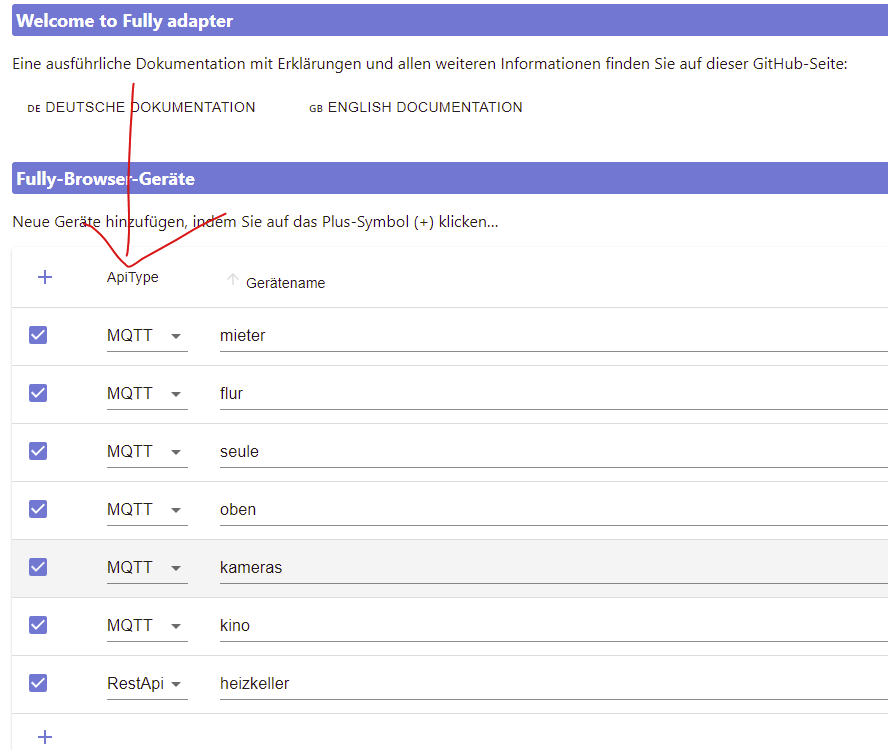
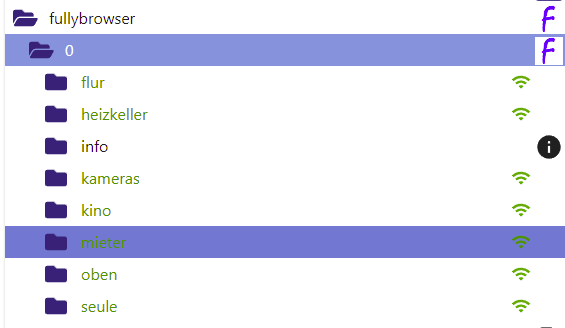
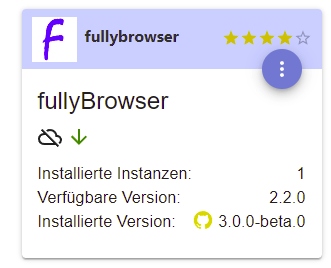
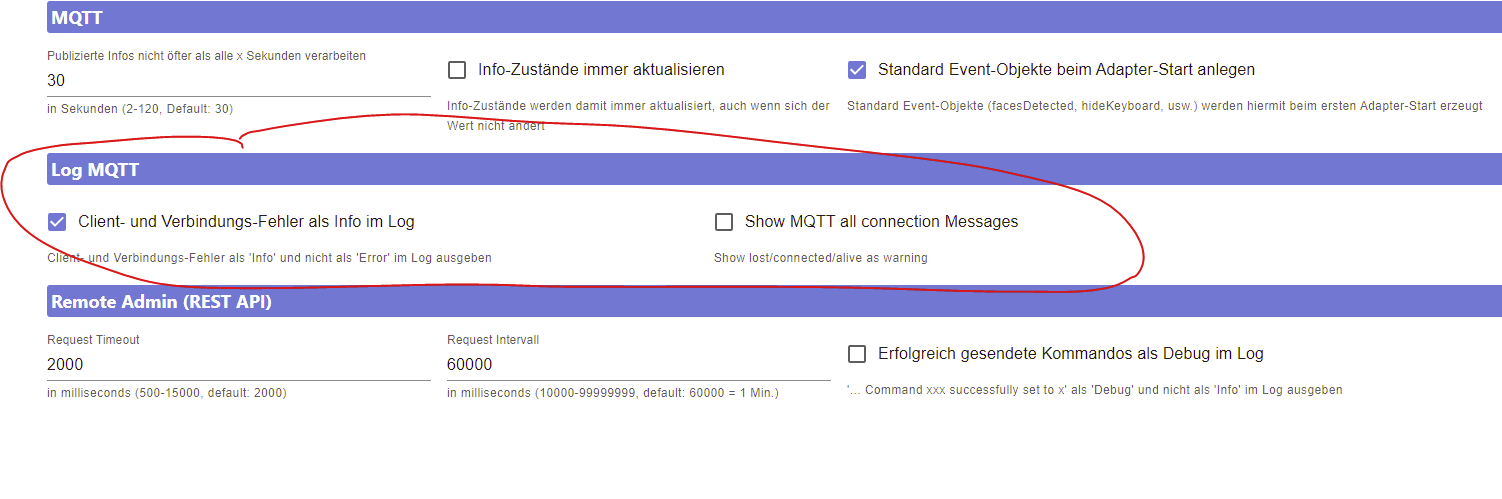
-
@djmarc75 Habe sowohl den Adapter als auch das Tablet neu gestartet aber der Adapter wird nicht grün und im Log kommt cannot start server - Port is already in use
-
@berny-k sagte in Fullybrowser 3.0:
Port is already in use
Na dann schau halt mal nach welcher Adapter noch diesen Port verwendet.
Und gib mal die Langfassung von
iob diagbekannt, aber bitte in Codetags ;)
-
@djmarc75 Hier jetzt das Ergebnis von iob diag in der Langform
Skript v.2023-10-10

*** BASE SYSTEM ***
   Static hostname: raspberrypi
         Icon name: computer
  Operating System: Raspbian GNU/Linux 11 (bullseye)
            Kernel: Linux 6.1.21-v7l+
      Architecture: arm

Model           : Raspberry Pi 4 Model B Rev 1.1
Docker          : false
Virtualization  : none
Kernel          : armv7l
Userland        : armhf

Systemuptime and Load:
 11:27:24 up 2 days, 22:39,  2 users,  load average: 0.20, 0.50, 0.57
CPU threads: 4


*** RASPBERRY THROTTLING ***
Current issues:
No throttling issues detected.

Previously detected issues:
No throttling issues detected.

*** Time and Time Zones ***
               Local time: Mon 2024-03-11 11:27:24 CET
           Universal time: Mon 2024-03-11 10:27:24 UTC
                 RTC time: n/a
                Time zone: Europe/Berlin (CET, +0100)
System clock synchronized: yes
              NTP service: active
          RTC in local TZ: no

*** User and Groups ***
pi
/home/pi
pi adm dialout cdrom sudo audio video plugdev games users input netdev gpio i2c spi iobroker

*** X-Server-Setup ***
X-Server:       false
Desktop:
Terminal:       tty
Boot Target:    graphical.target

*** MEMORY ***
               total        used        free      shared  buff/cache   available
Mem:            3.8G        1.8G        1.2G        0.0K        833M        2.0G
Swap:            99M         41M         58M
Total:          3.9G        1.8G        1.3G

         3837 M total memory
         1765 M used memory
          508 M active memory
         1952 M inactive memory
         1238 M free memory
          133 M buffer memory
          699 M swap cache
           99 M total swap
           41 M used swap
           58 M free swap

Raspberry only:
oom events: 0
lifetime oom required: 0 Mbytes
total time in oom handler: 0 ms
max time spent in oom handler: 0 ms

*** FAILED SERVICES ***

  UNIT LOAD ACTIVE SUB DESCRIPTION
0 loaded units listed.

*** FILESYSTEM ***
Filesystem     Type      Size  Used Avail Use% Mounted on
/dev/root      ext4      114G   12G   97G  12% /
devtmpfs       devtmpfs  1.7G     0  1.7G   0% /dev
tmpfs          tmpfs     1.9G     0  1.9G   0% /dev/shm
tmpfs          tmpfs     768M  888K  767M   1% /run
tmpfs          tmpfs     5.0M  4.0K  5.0M   1% /run/lock
/dev/sda1      vfat      253M   51M  202M  20% /boot
tmpfs          tmpfs     384M     0  384M   0% /run/user/1000

Messages concerning ext4 filesystem in dmesg:
[Fri Mar  8 12:48:10 2024] Kernel command line: coherent_pool=1M 8250.nr_uarts=1 snd_bcm2835.enable_headphones=0 snd_bcm2835.enable_headphones=1 snd_bcm2835.enable_hdmi=1 snd_bcm2835.enable_hdmi=0  smsc95xx.macaddr=DC:A6:32:5F:01:F9 vc_mem.mem_base=0x3eb00000 vc_mem.mem_size=0x3ff00000  console=tty1 root=PARTUUID=52bb65ab-02 rootfstype=ext4 elevator=deadline fsck.repair=yes rootwait
[Fri Mar  8 12:48:12 2024] EXT4-fs (sda2): mounted filesystem with ordered data mode. Quota mode: none.
[Fri Mar  8 12:48:12 2024] VFS: Mounted root (ext4 filesystem) readonly on device 8:2.
[Fri Mar  8 12:48:14 2024] EXT4-fs (sda2): re-mounted. Quota mode: none.
[Sat Mar  9 04:00:03 2024] EXT4-fs (loop0p2): mounted filesystem with ordered data mode. Quota mode: none.
[Sat Mar  9 04:01:53 2024] EXT4-fs (loop0p2): unmounting filesystem.
[Sun Mar 10 04:00:05 2024] EXT4-fs (loop0p2): mounted filesystem with ordered data mode. Quota mode: none.
[Sun Mar 10 04:01:50 2024] EXT4-fs (loop0p2): unmounting filesystem.
[Mon Mar 11 04:00:05 2024] EXT4-fs (loop0p2): mounted filesystem with ordered data mode. Quota mode: none.
[Mon Mar 11 04:01:50 2024] EXT4-fs (loop0p2): unmounting filesystem.

Show mounted filesystems \(real ones only\):
TARGET  SOURCE    FSTYPE OPTIONS
/       /dev/sda2 ext4   rw,noatime
`-/boot /dev/sda1 vfat   rw,relatime,fmask=0022,dmask=0022,codepage=437,iocharset=ascii,shortname=mixed,flush,errors=remount-ro

Files in neuralgic directories:

/var:
6.1G    /var/
3.5G    /var/cache
3.4G    /var/cache/apt/archives
3.4G    /var/cache/apt
1.8G    /var/log

Archived and active journals take up 168.0M in the file system.

/opt/iobroker/backups:
203M    /opt/iobroker/backups/

/opt/iobroker/iobroker-data:
602M    /opt/iobroker/iobroker-data/
454M    /opt/iobroker/iobroker-data/files
112M    /opt/iobroker/iobroker-data/backup-objects
89M     /opt/iobroker/iobroker-data/files/echarts.admin
78M     /opt/iobroker/iobroker-data/files/icons-open-icon-library-png

The five largest files in iobroker-data are:
35M     /opt/iobroker/iobroker-data/files/devices.admin/static/js/main.24f2bb56.js.map
24M     /opt/iobroker/iobroker-data/files/echarts/static/js/main.2b7495c2.js.map
24M     /opt/iobroker/iobroker-data/files/echarts.admin/chart/static/js/main.2b7495c2.js.map
23M     /opt/iobroker/iobroker-data/files/echarts.admin/static/js/main.245b61c0.js.map
22M     /opt/iobroker/iobroker-data/files/web.admin/static/js/main.c05ba1d3.js.map

USB-Devices by-id:
USB-Sticks -  Avoid direct links to /dev/* in your adapter setups, please always prefer the links 'by-id':

/dev/serial/by-id/usb-ITead_Sonoff_Zigbee_3.0_USB_Dongle_Plus_a85366accbc9eb119d8f8b4f1d69213e-if00-port0

*** NodeJS-Installation ***

/usr/bin/nodejs         v18.17.1
/usr/bin/node           v18.17.1
/usr/bin/npm            9.6.7
/usr/bin/npx            9.6.7
/usr/bin/corepack       0.18.0


nodejs:
  Installed: 18.17.1-deb-1nodesource1
  Candidate: 18.17.1-deb-1nodesource1
  Version table:
 *** 18.17.1-deb-1nodesource1 500
        500 https://deb.nodesource.com/node_18.x bullseye/main armhf Packages
        100 /var/lib/dpkg/status
     12.22.12~dfsg-1~deb11u4 500
        500 http://raspbian.raspberrypi.org/raspbian bullseye/main armhf Packages

Temp directories causing npm8 problem: 0
No problems detected

Errors in npm tree:

*** ioBroker-Installation ***

ioBroker Status
iobroker is running on this host.


Objects type: jsonl
States  type: jsonl

Core adapters versions
js-controller:  5.0.17
admin:          6.13.16
javascript:     7.8.0

Adapters from github:   0

Adapter State
+ system.adapter.admin.0                  : admin                 : raspberrypi                              -  enabled, port: 8081, bind: 0.0.0.0, run as: admin
+ system.adapter.alexa2.0                 : alexa2                : raspberrypi                              -  enabled
+ system.adapter.backitup.0               : backitup              : raspberrypi                              -  enabled
+ system.adapter.cloud.0                  : cloud                 : raspberrypi                              -  enabled
  system.adapter.devices.0                : devices               : raspberrypi                              - disabled
+ system.adapter.discovery.0              : discovery             : raspberrypi                              -  enabled
+ system.adapter.echarts.0                : echarts               : raspberrypi                              -  enabled
+ system.adapter.fullybrowser.0           : fullybrowser          : raspberrypi                              -  enabled
+ system.adapter.heatingcontrol.0         : heatingcontrol        : raspberrypi                              -  enabled
+ system.adapter.hm-rega.0                : hm-rega               : raspberrypi                              -  enabled
+ system.adapter.hm-rpc.0                 : hm-rpc                : raspberrypi                              -  enabled, port: 0
+ system.adapter.hm-rpc.1                 : hm-rpc                : raspberrypi                              -  enabled, port: 0
+ system.adapter.hm-rpc.2                 : hm-rpc                : raspberrypi                              -  enabled, port: 0
  system.adapter.icons-mfd-png.0          : icons-mfd-png         : raspberrypi                              -  enabled
  system.adapter.icons-open-icon-library-png.0: icons-open-icon-library-png: raspberrypi                              -  enabled
+ system.adapter.influxdb.0               : influxdb              : raspberrypi                              -  enabled, port: 8086
+ system.adapter.info.0                   : info                  : raspberrypi                              -  enabled
+ system.adapter.javascript.0             : javascript            : raspberrypi                              -  enabled
+ system.adapter.ping.0                   : ping                  : raspberrypi                              -  enabled
+ system.adapter.rpi2.0                   : rpi2                  : raspberrypi                              -  enabled
+ system.adapter.sonoff.0                 : sonoff                : raspberrypi                              -  enabled, port: 1884, bind: 0.0.0.0
+ system.adapter.synology.0               : synology              : raspberrypi                              -  enabled, port: 5000
+ system.adapter.telegram.0               : telegram              : raspberrypi                              -  enabled, port: 8443, bind: 0.0.0.0
  system.adapter.vis-icontwo.0            : vis-icontwo           : raspberrypi                              -  enabled
+ system.adapter.vis-inventwo.0           : vis-inventwo          : raspberrypi                              -  enabled
  system.adapter.vis-material-webfont.0   : vis-material-webfont  : raspberrypi                              -  enabled
  system.adapter.vis-materialdesign.0     : vis-materialdesign    : raspberrypi                              -  enabled
  system.adapter.vis.0                    : vis                   : raspberrypi                              -  enabled
+ system.adapter.web.1                    : web                   : raspberrypi                              -  enabled, port: 8082, bind: 0.0.0.0, run as: admin
+ system.adapter.zigbee.0                 : zigbee                : raspberrypi                              -  enabled, port: /dev/serial/by-id/usb-ITead_Sonoff_Zigbee_3.0_USB_Dongle_Plus_a85366accbc9eb119d8f8b4f1d69213e-if00-port0

+ instance is alive

Enabled adapters with bindings
+ system.adapter.admin.0                  : admin                 : raspberrypi                              -  enabled, port: 8081, bind: 0.0.0.0, run as: admin
+ system.adapter.hm-rpc.0                 : hm-rpc                : raspberrypi                              -  enabled, port: 0
+ system.adapter.hm-rpc.1                 : hm-rpc                : raspberrypi                              -  enabled, port: 0
+ system.adapter.hm-rpc.2                 : hm-rpc                : raspberrypi                              -  enabled, port: 0
+ system.adapter.influxdb.0               : influxdb              : raspberrypi                              -  enabled, port: 8086
+ system.adapter.sonoff.0                 : sonoff                : raspberrypi                              -  enabled, port: 1884, bind: 0.0.0.0
+ system.adapter.synology.0               : synology              : raspberrypi                              -  enabled, port: 5000
+ system.adapter.telegram.0               : telegram              : raspberrypi                              -  enabled, port: 8443, bind: 0.0.0.0
+ system.adapter.web.1                    : web                   : raspberrypi                              -  enabled, port: 8082, bind: 0.0.0.0, run as: admin
+ system.adapter.zigbee.0                 : zigbee                : raspberrypi                              -  enabled, port: /dev/serial/by-id/usb-ITead_Sonoff_Zigbee_3.0_USB_Dongle_Plus_a85366accbc9eb119d8f8b4f1d69213e-if00-port0

ioBroker-Repositories
stable        : http://download.iobroker.net/sources-dist.json
beta          : http://download.iobroker.net/sources-dist-latest.json

Active repo(s): stable

Installed ioBroker-Instances
Used repository: stable
Adapter    "admin"        : 6.13.16  , installed 6.13.16
Adapter    "alexa2"       : 3.26.4   , installed 3.26.4
Adapter    "backitup"     : 2.10.11  , installed 2.10.11
Adapter    "cloud"        : 4.4.1    , installed 4.4.1
Adapter    "devices"      : 1.1.5    , installed 1.1.5
Adapter    "discovery"    : 4.2.0    , installed 4.2.0
Adapter    "echarts"      : 1.7.2    , installed 1.7.2
Adapter    "fritzdect"    : 2.5.9    , installed 2.5.9
Adapter    "fullybrowser" : 3.0.11   , installed 3.0.11
Adapter    "heatingcontrol": 2.12.3  , installed 2.12.3
Adapter    "hm-rega"      : 4.0.0    , installed 4.0.0
Adapter    "hm-rpc"       : 1.16.0   , installed 1.16.0
Adapter    "homekit-controller": 0.5.10, installed 0.5.10
Adapter    "icons-mfd-png": 1.2.1    , installed 1.2.1
Adapter    "icons-open-icon-library-png": 0.1.2, installed 0.1.2
Adapter    "influxdb"     : 4.0.2    , installed 4.0.2
Adapter    "javascript"   : 7.8.0    , installed 7.8.0
Controller "js-controller": 5.0.19   , installed 5.0.17 [Updatable]
Adapter    "ping"         : 1.6.2    , installed 1.6.2
Adapter    "rpi2"         : 1.3.2    , installed 1.3.2
Adapter    "simple-api"   : 2.7.2    , installed 2.7.2
Adapter    "smartmeter"   : 3.4.0    , installed 3.4.0
Adapter    "socketio"     : 6.6.0    , installed 6.6.0
Adapter    "sonoff"       : 3.0.3    , installed 3.0.3
Adapter    "synology"     : 3.0.1    , installed 3.0.1
Adapter    "telegram"     : 3.1.0    , installed 3.1.0
Adapter    "tibberlink"   : 2.2.2    , installed 2.2.1  [Updatable]
Adapter    "vis"          : 1.5.4    , installed 1.5.4
Adapter    "vis-icontwo"  : 1.3.0    , installed 1.3.0
Adapter    "vis-inventwo" : 3.3.3    , installed 3.3.3
Adapter    "vis-materialdesign": 0.5.9, installed 0.5.9
Adapter    "web"          : 6.2.3    , installed 6.2.3
Adapter    "ws"           : 2.5.10   , installed 2.5.10
Adapter    "zigbee"       : 1.10.1   , installed 1.10.1

Objects and States
Please stand by - This may take a while
Objects:        4308
States:         3527

*** OS-Repositories and Updates ***
Hit:1 http://deb.debian.org/debian bullseye-backports InRelease
Hit:2 http://archive.raspberrypi.org/debian bullseye InRelease
Hit:3 http://raspbian.raspberrypi.org/raspbian bullseye InRelease
Hit:4 https://repos.influxdata.com/debian stable InRelease
Hit:5 https://repos.influxdata.com/debian stretch InRelease
Hit:6 https://apt.grafana.com stable InRelease
Hit:7 https://apt.pivccu.de/piVCCU stable InRelease
Get:8 https://deb.nodesource.com/node_18.x bullseye InRelease [4586 B]
Fetched 4586 B in 2s (2286 B/s)
Reading package lists...
Pending Updates: 1

*** Listening Ports ***
Active Internet connections (only servers)
Proto Recv-Q Send-Q Local Address           Foreign Address         State       User       Inode      PID/Program name
tcp        0      0 127.0.0.1:8088          0.0.0.0:*               LISTEN      109        14757      716/influxd
tcp        0      0 10.0.3.1:53             0.0.0.0:*               LISTEN      0          13808      809/dnsmasq
tcp        0      0 192.168.178.67:2001     0.0.0.0:*               LISTEN      1001       19481      1969/io.hm-rpc.0
tcp        0      0 192.168.178.67:2010     0.0.0.0:*               LISTEN      1001       17775      2061/io.hm-rpc.2
tcp        0      0 127.0.0.1:9001          0.0.0.0:*               LISTEN      1001       16881      919/iobroker.js-con
tcp        0      0 127.0.0.1:9000          0.0.0.0:*               LISTEN      1001       17475      919/iobroker.js-con
tcp        0      0 0.0.0.0:22              0.0.0.0:*               LISTEN      0          14751      779/sshd: /usr/sbin
tcp        0      0 192.168.178.67:9292     0.0.0.0:*               LISTEN      1001       20400      3068/io.hm-rpc.1
tcp        0      0 0.0.0.0:1884            0.0.0.0:*               LISTEN      1001       19635      2216/io.sonoff.0
tcp6       0      0 :::22                   :::*                    LISTEN      0          14753      779/sshd: /usr/sbin
tcp6       0      0 :::3000                 :::*                    LISTEN      110        14194      898/grafana
tcp6       0      0 :::8086                 :::*                    LISTEN      109        13892      716/influxd
tcp6       0      0 :::8081                 :::*                    LISTEN      1001       16986      1608/io.admin.0
tcp6       0      0 :::8082                 :::*                    LISTEN      1001       19016      2391/io.web.1
udp        0      0 0.0.0.0:41384           0.0.0.0:*                           108        13577      421/avahi-daemon: r
udp        0      0 10.0.3.1:53             0.0.0.0:*                           0          13807      809/dnsmasq
udp        0      0 0.0.0.0:67              0.0.0.0:*                           0          13804      809/dnsmasq
udp        0      0 0.0.0.0:68              0.0.0.0:*                           0          12767      639/dhclient
udp        0      0 0.0.0.0:5353            0.0.0.0:*                           108        13575      421/avahi-daemon: r
udp6       0      0 :::39115                :::*                                108        13578      421/avahi-daemon: r
udp6       0      0 :::5353                 :::*                                108        13576      421/avahi-daemon: r

*** Log File - Last 25 Lines ***

2024-03-11 10:31:59.106  - info: javascript.0 (1739) script.js.Überwachung_Auswertung.Überschussverbraucher-Steuerung: Verbraucher 2 zugeschaltet -> LVN -176
2024-03-11 10:32:29.107  - info: javascript.0 (1739) script.js.Überwachung_Auswertung.Überschussverbraucher-Steuerung: Verbraucher 3 zugeschaltet -> LVN -105
2024-03-11 10:32:34.219  - info: javascript.0 (1739) script.js.Überwachung_Auswertung.Überschussverbraucher-Steuerung: Verbraucher 3 abgeschaltet -> LVN 20
2024-03-11 10:33:30.102  - info: javascript.0 (1739) script.js.Überwachung_Auswertung.Überschussverbraucher-Steuerung: Verbraucher 2 abgeschaltet -> LVN 11
2024-03-11 10:34:30.202  - info: javascript.0 (1739) script.js.Überwachung_Auswertung.Überschussverbraucher-Steuerung: Verbraucher 3 zugeschaltet -> LVN -203
2024-03-11 10:35:46.200  - info: javascript.0 (1739) script.js.Überwachung_Auswertung.Überschussverbraucher-Steuerung: Verbraucher 1 zugeschaltet -> LVN -207
2024-03-11 10:35:54.104  - info: javascript.0 (1739) script.js.Überwachung_Auswertung.Überschussverbraucher-Steuerung: Verbraucher 3 abgeschaltet -> LVN 32
2024-03-11 10:36:48.101  - info: javascript.0 (1739) script.js.Überwachung_Auswertung.Überschussverbraucher-Steuerung: Verbraucher 1 abgeschaltet -> LVN 105
2024-03-11 10:38:02.099  - info: javascript.0 (1739) script.js.Überwachung_Auswertung.Überschussverbraucher-Steuerung: Verbraucher 2 zugeschaltet -> LVN -223
2024-03-11 10:40:34.562  - info: javascript.0 (1739) script.js.Überwachung_Auswertung.Überschussverbraucher-Steuerung: Verbraucher 3 zugeschaltet -> LVN -90
2024-03-11 10:40:39.099  - info: javascript.0 (1739) script.js.Überwachung_Auswertung.Überschussverbraucher-Steuerung: Verbraucher 3 abgeschaltet -> LVN 76
2024-03-11 10:40:50.094  - info: javascript.0 (1739) script.js.Überwachung_Auswertung.Überschussverbraucher-Steuerung: Verbraucher 2 abgeschaltet -> LVN 21
2024-03-11 10:49:53.082  - info: javascript.0 (1739) script.js.Überwachung_Auswertung.Überschussverbraucher-Steuerung: Verbraucher 1 zugeschaltet -> LVN -229
2024-03-11 11:02:43.062  - info: javascript.0 (1739) script.js.Überwachung_Auswertung.Überschussverbraucher-Steuerung: Verbraucher 1 abgeschaltet -> LVN 1333
2024-03-11 11:08:10.055  - info: javascript.0 (1739) script.js.Überwachung_Auswertung.Überschussverbraucher-Steuerung: Verbraucher 1 zugeschaltet -> LVN -239
2024-03-11 11:13:48.197  - info: admin.0 (1608) ==> Connected system.user.admin from ::ffff:192.168.178.22
2024-03-11 11:13:52.806  - info: javascript.0 (1739) script.js.Kamera-Überwachung.Start_HaustuerKamera_Auzeichnung: Bewegung Haustür erkannt
2024-03-11 11:14:34.642  - info: admin.0 (1608) <== Disconnect system.user.admin from ::ffff:192.168.178.22 admin
2024-03-11 11:14:41.046  - info: javascript.0 (1739) script.js.Überwachung_Auswertung.Überschussverbraucher-Steuerung: Verbraucher 1 abgeschaltet -> LVN 34
2024-03-11 11:14:57.078  - info: javascript.0 (1739) script.js.Überwachung_Auswertung.Überschussverbraucher-Steuerung: Verbraucher 3 zugeschaltet -> LVN -195
2024-03-11 11:15:35.044  - info: javascript.0 (1739) script.js.Überwachung_Auswertung.Überschussverbraucher-Steuerung: Verbraucher 3 abgeschaltet -> LVN 81
2024-03-11 11:17:13.056  - info: alexa2.0 (1984) Alexa-Push-Connection disconnected - retry: Retry Connection in 1s
2024-03-11 11:17:14.493  - info: alexa2.0 (1984) Alexa-Push-Connection (macDms = true) established. Disable Polling
2024-03-11 11:23:59.030  - info: web.1 (2391) <== Disconnect system.user.admin from ::ffff:192.168.178.100 vis.0
2024-03-11 11:24:11.879  - info: web.1 (2391) ==> Connected system.user.admin from ::ffff:192.168.178.100
und hier das Summary
Hier jetzt das Ergebnis von iob diag in der LangformSkript v.2023-10-10 *** BASE SYSTEM *** Static hostname: raspberrypi Icon name: computer Operating System: Raspbian GNU/Linux 11 (bullseye) Kernel: Linux 6.1.21-v7l+ Architecture: arm Model : Raspberry Pi 4 Model B Rev 1.1 Docker : false Virtualization : none Kernel : armv7l Userland : armhf Systemuptime and Load: 11:27:24 up 2 days, 22:39, 2 users, load average: 0.20, 0.50, 0.57 CPU threads: 4 *** RASPBERRY THROTTLING *** Current issues: No throttling issues detected. Previously detected issues: No throttling issues detected. *** Time and Time Zones *** Local time: Mon 2024-03-11 11:27:24 CET Universal time: Mon 2024-03-11 10:27:24 UTC RTC time: n/a Time zone: Europe/Berlin (CET, +0100) System clock synchronized: yes NTP service: active RTC in local TZ: no *** User and Groups *** pi /home/pi pi adm dialout cdrom sudo audio video plugdev games users input netdev gpio i2c spi iobroker *** X-Server-Setup *** X-Server: false Desktop: Terminal: tty Boot Target: graphical.target *** MEMORY *** total used free shared buff/cache available Mem: 3.8G 1.8G 1.2G 0.0K 833M 2.0G Swap: 99M 41M 58M Total: 3.9G 1.8G 1.3G 3837 M total memory 1765 M used memory 508 M active memory 1952 M inactive memory 1238 M free memory 133 M buffer memory 699 M swap cache 99 M total swap 41 M used swap 58 M free swap Raspberry only: oom events: 0 lifetime oom required: 0 Mbytes total time in oom handler: 0 ms max time spent in oom handler: 0 ms *** FAILED SERVICES *** UNIT LOAD ACTIVE SUB DESCRIPTION 0 loaded units listed. *** FILESYSTEM *** Filesystem Type Size Used Avail Use% Mounted on /dev/root ext4 114G 12G 97G 12% / devtmpfs devtmpfs 1.7G 0 1.7G 0% /dev tmpfs tmpfs 1.9G 0 1.9G 0% /dev/shm tmpfs tmpfs 768M 888K 767M 1% /run tmpfs tmpfs 5.0M 4.0K 5.0M 1% /run/lock /dev/sda1 vfat 253M 51M 202M 20% /boot tmpfs tmpfs 384M 0 384M 0% /run/user/1000 Messages concerning ext4 filesystem in dmesg: [Fri Mar 8 12:48:10 2024] Kernel command line: coherent_pool=1M 8250.nr_uarts=1 snd_bcm2835.enable_headphones=0 snd_bcm2835.enable_headphones=1 snd_bcm2835.enable_hdmi=1 snd_bcm2835.enable_hdmi=0 smsc95xx.macaddr=DC:A6:32:5F:01:F9 vc_mem.mem_base=0x3eb00000 vc_mem.mem_size=0x3ff00000 console=tty1 root=PARTUUID=52bb65ab-02 rootfstype=ext4 elevator=deadline fsck.repair=yes rootwait [Fri Mar 8 12:48:12 2024] EXT4-fs (sda2): mounted filesystem with ordered data mode. Quota mode: none. [Fri Mar 8 12:48:12 2024] VFS: Mounted root (ext4 filesystem) readonly on device 8:2. [Fri Mar 8 12:48:14 2024] EXT4-fs (sda2): re-mounted. Quota mode: none. [Sat Mar 9 04:00:03 2024] EXT4-fs (loop0p2): mounted filesystem with ordered data mode. Quota mode: none. [Sat Mar 9 04:01:53 2024] EXT4-fs (loop0p2): unmounting filesystem. [Sun Mar 10 04:00:05 2024] EXT4-fs (loop0p2): mounted filesystem with ordered data mode. Quota mode: none. [Sun Mar 10 04:01:50 2024] EXT4-fs (loop0p2): unmounting filesystem. [Mon Mar 11 04:00:05 2024] EXT4-fs (loop0p2): mounted filesystem with ordered data mode. Quota mode: none. [Mon Mar 11 04:01:50 2024] EXT4-fs (loop0p2): unmounting filesystem. Show mounted filesystems \(real ones only\): TARGET SOURCE FSTYPE OPTIONS / /dev/sda2 ext4 rw,noatime `-/boot /dev/sda1 vfat rw,relatime,fmask=0022,dmask=0022,codepage=437,iocharset=ascii,shortname=mixed,flush,errors=remount-ro Files in neuralgic directories: /var: 6.1G /var/ 3.5G /var/cache 3.4G /var/cache/apt/archives 3.4G /var/cache/apt 1.8G /var/log Archived and active journals take up 168.0M in the file system. /opt/iobroker/backups: 203M /opt/iobroker/backups/ /opt/iobroker/iobroker-data: 602M /opt/iobroker/iobroker-data/ 454M /opt/iobroker/iobroker-data/files 112M /opt/iobroker/iobroker-data/backup-objects 89M /opt/iobroker/iobroker-data/files/echarts.admin 78M /opt/iobroker/iobroker-data/files/icons-open-icon-library-png The five largest files in iobroker-data are: 35M /opt/iobroker/iobroker-data/files/devices.admin/static/js/main.24f2bb56.js.map 24M /opt/iobroker/iobroker-data/files/echarts/static/js/main.2b7495c2.js.map 24M /opt/iobroker/iobroker-data/files/echarts.admin/chart/static/js/main.2b7495c2.js.map 23M /opt/iobroker/iobroker-data/files/echarts.admin/static/js/main.245b61c0.js.map 22M /opt/iobroker/iobroker-data/files/web.admin/static/js/main.c05ba1d3.js.map USB-Devices by-id: USB-Sticks - Avoid direct links to /dev/* in your adapter setups, please always prefer the links 'by-id': /dev/serial/by-id/usb-ITead_Sonoff_Zigbee_3.0_USB_Dongle_Plus_a85366accbc9eb119d8f8b4f1d69213e-if00-port0 *** NodeJS-Installation *** /usr/bin/nodejs v18.17.1 /usr/bin/node v18.17.1 /usr/bin/npm 9.6.7 /usr/bin/npx 9.6.7 /usr/bin/corepack 0.18.0 nodejs: Installed: 18.17.1-deb-1nodesource1 Candidate: 18.17.1-deb-1nodesource1 Version table: *** 18.17.1-deb-1nodesource1 500 500 https://deb.nodesource.com/node_18.x bullseye/main armhf Packages 100 /var/lib/dpkg/status 12.22.12~dfsg-1~deb11u4 500 500 http://raspbian.raspberrypi.org/raspbian bullseye/main armhf Packages Temp directories causing npm8 problem: 0 No problems detected Errors in npm tree: *** ioBroker-Installation *** ioBroker Status iobroker is running on this host. Objects type: jsonl States type: jsonl Core adapters versions js-controller: 5.0.17 admin: 6.13.16 javascript: 7.8.0 Adapters from github: 0 Adapter State + system.adapter.admin.0 : admin : raspberrypi - enabled, port: 8081, bind: 0.0.0.0, run as: admin + system.adapter.alexa2.0 : alexa2 : raspberrypi - enabled + system.adapter.backitup.0 : backitup : raspberrypi - enabled + system.adapter.cloud.0 : cloud : raspberrypi - enabled system.adapter.devices.0 : devices : raspberrypi - disabled + system.adapter.discovery.0 : discovery : raspberrypi - enabled + system.adapter.echarts.0 : echarts : raspberrypi - enabled + system.adapter.fullybrowser.0 : fullybrowser : raspberrypi - enabled + system.adapter.heatingcontrol.0 : heatingcontrol : raspberrypi - enabled + system.adapter.hm-rega.0 : hm-rega : raspberrypi - enabled + system.adapter.hm-rpc.0 : hm-rpc : raspberrypi - enabled, port: 0 + system.adapter.hm-rpc.1 : hm-rpc : raspberrypi - enabled, port: 0 + system.adapter.hm-rpc.2 : hm-rpc : raspberrypi - enabled, port: 0 system.adapter.icons-mfd-png.0 : icons-mfd-png : raspberrypi - enabled system.adapter.icons-open-icon-library-png.0: icons-open-icon-library-png: raspberrypi - enabled + system.adapter.influxdb.0 : influxdb : raspberrypi - enabled, port: 8086 + system.adapter.info.0 : info : raspberrypi - enabled + system.adapter.javascript.0 : javascript : raspberrypi - enabled + system.adapter.ping.0 : ping : raspberrypi - enabled + system.adapter.rpi2.0 : rpi2 : raspberrypi - enabled + system.adapter.sonoff.0 : sonoff : raspberrypi - enabled, port: 1884, bind: 0.0.0.0 + system.adapter.synology.0 : synology : raspberrypi - enabled, port: 5000 + system.adapter.telegram.0 : telegram : raspberrypi - enabled, port: 8443, bind: 0.0.0.0 system.adapter.vis-icontwo.0 : vis-icontwo : raspberrypi - enabled + system.adapter.vis-inventwo.0 : vis-inventwo : raspberrypi - enabled system.adapter.vis-material-webfont.0 : vis-material-webfont : raspberrypi - enabled system.adapter.vis-materialdesign.0 : vis-materialdesign : raspberrypi - enabled system.adapter.vis.0 : vis : raspberrypi - enabled + system.adapter.web.1 : web : raspberrypi - enabled, port: 8082, bind: 0.0.0.0, run as: admin + system.adapter.zigbee.0 : zigbee : raspberrypi - enabled, port: /dev/serial/by-id/usb-ITead_Sonoff_Zigbee_3.0_USB_Dongle_Plus_a85366accbc9eb119d8f8b4f1d69213e-if00-port0 + instance is alive Enabled adapters with bindings + system.adapter.admin.0 : admin : raspberrypi - enabled, port: 8081, bind: 0.0.0.0, run as: admin + system.adapter.hm-rpc.0 : hm-rpc : raspberrypi - enabled, port: 0 + system.adapter.hm-rpc.1 : hm-rpc : raspberrypi - enabled, port: 0 + system.adapter.hm-rpc.2 : hm-rpc : raspberrypi - enabled, port: 0 + system.adapter.influxdb.0 : influxdb : raspberrypi - enabled, port: 8086 + system.adapter.sonoff.0 : sonoff : raspberrypi - enabled, port: 1884, bind: 0.0.0.0 + system.adapter.synology.0 : synology : raspberrypi - enabled, port: 5000 + system.adapter.telegram.0 : telegram : raspberrypi - enabled, port: 8443, bind: 0.0.0.0 + system.adapter.web.1 : web : raspberrypi - enabled, port: 8082, bind: 0.0.0.0, run as: admin + system.adapter.zigbee.0 : zigbee : raspberrypi - enabled, port: /dev/serial/by-id/usb-ITead_Sonoff_Zigbee_3.0_USB_Dongle_Plus_a85366accbc9eb119d8f8b4f1d69213e-if00-port0 ioBroker-Repositories stable : http://download.iobroker.net/sources-dist.json beta : http://download.iobroker.net/sources-dist-latest.json Active repo(s): stable Installed ioBroker-Instances Used repository: stable Adapter "admin" : 6.13.16 , installed 6.13.16 Adapter "alexa2" : 3.26.4 , installed 3.26.4 Adapter "backitup" : 2.10.11 , installed 2.10.11 Adapter "cloud" : 4.4.1 , installed 4.4.1 Adapter "devices" : 1.1.5 , installed 1.1.5 Adapter "discovery" : 4.2.0 , installed 4.2.0 Adapter "echarts" : 1.7.2 , installed 1.7.2 Adapter "fritzdect" : 2.5.9 , installed 2.5.9 Adapter "fullybrowser" : 3.0.11 , installed 3.0.11 Adapter "heatingcontrol": 2.12.3 , installed 2.12.3 Adapter "hm-rega" : 4.0.0 , installed 4.0.0 Adapter "hm-rpc" : 1.16.0 , installed 1.16.0 Adapter "homekit-controller": 0.5.10, installed 0.5.10 Adapter "icons-mfd-png": 1.2.1 , installed 1.2.1 Adapter "icons-open-icon-library-png": 0.1.2, installed 0.1.2 Adapter "influxdb" : 4.0.2 , installed 4.0.2 Adapter "javascript" : 7.8.0 , installed 7.8.0 Controller "js-controller": 5.0.19 , installed 5.0.17 [Updatable] Adapter "ping" : 1.6.2 , installed 1.6.2 Adapter "rpi2" : 1.3.2 , installed 1.3.2 Adapter "simple-api" : 2.7.2 , installed 2.7.2 Adapter "smartmeter" : 3.4.0 , installed 3.4.0 Adapter "socketio" : 6.6.0 , installed 6.6.0 Adapter "sonoff" : 3.0.3 , installed 3.0.3 Adapter "synology" : 3.0.1 , installed 3.0.1 Adapter "telegram" : 3.1.0 , installed 3.1.0 Adapter "tibberlink" : 2.2.2 , installed 2.2.1 [Updatable] Adapter "vis" : 1.5.4 , installed 1.5.4 Adapter "vis-icontwo" : 1.3.0 , installed 1.3.0 Adapter "vis-inventwo" : 3.3.3 , installed 3.3.3 Adapter "vis-materialdesign": 0.5.9, installed 0.5.9 Adapter "web" : 6.2.3 , installed 6.2.3 Adapter "ws" : 2.5.10 , installed 2.5.10 Adapter "zigbee" : 1.10.1 , installed 1.10.1 Objects and States Please stand by - This may take a while Objects: 4308 States: 3527 *** OS-Repositories and Updates *** Hit:1 http://deb.debian.org/debian bullseye-backports InRelease Hit:2 http://archive.raspberrypi.org/debian bullseye InRelease Hit:3 http://raspbian.raspberrypi.org/raspbian bullseye InRelease Hit:4 https://repos.influxdata.com/debian stable InRelease Hit:5 https://repos.influxdata.com/debian stretch InRelease Hit:6 https://apt.grafana.com stable InRelease Hit:7 https://apt.pivccu.de/piVCCU stable InRelease Get:8 https://deb.nodesource.com/node_18.x bullseye InRelease [4586 B] Fetched 4586 B in 2s (2286 B/s) Reading package lists... Pending Updates: 1 *** Listening Ports *** Active Internet connections (only servers) Proto Recv-Q Send-Q Local Address Foreign Address State User Inode PID/Program name tcp 0 0 127.0.0.1:8088 0.0.0.0:* LISTEN 109 14757 716/influxd tcp 0 0 10.0.3.1:53 0.0.0.0:* LISTEN 0 13808 809/dnsmasq tcp 0 0 192.168.178.67:2001 0.0.0.0:* LISTEN 1001 19481 1969/io.hm-rpc.0 tcp 0 0 192.168.178.67:2010 0.0.0.0:* LISTEN 1001 17775 2061/io.hm-rpc.2 tcp 0 0 127.0.0.1:9001 0.0.0.0:* LISTEN 1001 16881 919/iobroker.js-con tcp 0 0 127.0.0.1:9000 0.0.0.0:* LISTEN 1001 17475 919/iobroker.js-con tcp 0 0 0.0.0.0:22 0.0.0.0:* LISTEN 0 14751 779/sshd: /usr/sbin tcp 0 0 192.168.178.67:9292 0.0.0.0:* LISTEN 1001 20400 3068/io.hm-rpc.1 tcp 0 0 0.0.0.0:1884 0.0.0.0:* LISTEN 1001 19635 2216/io.sonoff.0 tcp6 0 0 :::22 :::* LISTEN 0 14753 779/sshd: /usr/sbin tcp6 0 0 :::3000 :::* LISTEN 110 14194 898/grafana tcp6 0 0 :::8086 :::* LISTEN 109 13892 716/influxd tcp6 0 0 :::8081 :::* LISTEN 1001 16986 1608/io.admin.0 tcp6 0 0 :::8082 :::* LISTEN 1001 19016 2391/io.web.1 udp 0 0 0.0.0.0:41384 0.0.0.0:* 108 13577 421/avahi-daemon: r udp 0 0 10.0.3.1:53 0.0.0.0:* 0 13807 809/dnsmasq udp 0 0 0.0.0.0:67 0.0.0.0:* 0 13804 809/dnsmasq udp 0 0 0.0.0.0:68 0.0.0.0:* 0 12767 639/dhclient udp 0 0 0.0.0.0:5353 0.0.0.0:* 108 13575 421/avahi-daemon: r udp6 0 0 :::39115 :::* 108 13578 421/avahi-daemon: r udp6 0 0 :::5353 :::* 108 13576 421/avahi-daemon: r *** Log File - Last 25 Lines *** 2024-03-11 10:31:59.106 - info: javascript.0 (1739) script.js.Überwachung_Auswertung.Überschussverbraucher-Steuerung: Verbraucher 2 zugeschaltet -> LVN -176 2024-03-11 10:32:29.107 - info: javascript.0 (1739) script.js.Überwachung_Auswertung.Überschussverbraucher-Steuerung: Verbraucher 3 zugeschaltet -> LVN -105 2024-03-11 10:32:34.219 - info: javascript.0 (1739) script.js.Überwachung_Auswertung.Überschussverbraucher-Steuerung: Verbraucher 3 abgeschaltet -> LVN 20 2024-03-11 10:33:30.102 - info: javascript.0 (1739) script.js.Überwachung_Auswertung.Überschussverbraucher-Steuerung: Verbraucher 2 abgeschaltet -> LVN 11 2024-03-11 10:34:30.202 - info: javascript.0 (1739) script.js.Überwachung_Auswertung.Überschussverbraucher-Steuerung: Verbraucher 3 zugeschaltet -> LVN -203 2024-03-11 10:35:46.200 - info: javascript.0 (1739) script.js.Überwachung_Auswertung.Überschussverbraucher-Steuerung: Verbraucher 1 zugeschaltet -> LVN -207 2024-03-11 10:35:54.104 - info: javascript.0 (1739) script.js.Überwachung_Auswertung.Überschussverbraucher-Steuerung: Verbraucher 3 abgeschaltet -> LVN 32 2024-03-11 10:36:48.101 - info: javascript.0 (1739) script.js.Überwachung_Auswertung.Überschussverbraucher-Steuerung: Verbraucher 1 abgeschaltet -> LVN 105 2024-03-11 10:38:02.099 - info: javascript.0 (1739) script.js.Überwachung_Auswertung.Überschussverbraucher-Steuerung: Verbraucher 2 zugeschaltet -> LVN -223 2024-03-11 10:40:34.562 - info: javascript.0 (1739) script.js.Überwachung_Auswertung.Überschussverbraucher-Steuerung: Verbraucher 3 zugeschaltet -> LVN -90 2024-03-11 10:40:39.099 - info: javascript.0 (1739) script.js.Überwachung_Auswertung.Überschussverbraucher-Steuerung: Verbraucher 3 abgeschaltet -> LVN 76 2024-03-11 10:40:50.094 - info: javascript.0 (1739) script.js.Überwachung_Auswertung.Überschussverbraucher-Steuerung: Verbraucher 2 abgeschaltet -> LVN 21 2024-03-11 10:49:53.082 - info: javascript.0 (1739) script.js.Überwachung_Auswertung.Überschussverbraucher-Steuerung: Verbraucher 1 zugeschaltet -> LVN -229 2024-03-11 11:02:43.062 - info: javascript.0 (1739) script.js.Überwachung_Auswertung.Überschussverbraucher-Steuerung: Verbraucher 1 abgeschaltet -> LVN 1333 2024-03-11 11:08:10.055 - info: javascript.0 (1739) script.js.Überwachung_Auswertung.Überschussverbraucher-Steuerung: Verbraucher 1 zugeschaltet -> LVN -239 2024-03-11 11:13:48.197 - info: admin.0 (1608) ==> Connected system.user.admin from ::ffff:192.168.178.22 2024-03-11 11:13:52.806 - info: javascript.0 (1739) script.js.Kamera-Überwachung.Start_HaustuerKamera_Auzeichnung: Bewegung Haustür erkannt 2024-03-11 11:14:34.642 - info: admin.0 (1608) <== Disconnect system.user.admin from ::ffff:192.168.178.22 admin 2024-03-11 11:14:41.046 - info: javascript.0 (1739) script.js.Überwachung_Auswertung.Überschussverbraucher-Steuerung: Verbraucher 1 abgeschaltet -> LVN 34 2024-03-11 11:14:57.078 - info: javascript.0 (1739) script.js.Überwachung_Auswertung.Überschussverbraucher-Steuerung: Verbraucher 3 zugeschaltet -> LVN -195 2024-03-11 11:15:35.044 - info: javascript.0 (1739) script.js.Überwachung_Auswertung.Überschussverbraucher-Steuerung: Verbraucher 3 abgeschaltet -> LVN 81 2024-03-11 11:17:13.056 - info: alexa2.0 (1984) Alexa-Push-Connection disconnected - retry: Retry Connection in 1s 2024-03-11 11:17:14.493 - info: alexa2.0 (1984) Alexa-Push-Connection (macDms = true) established. Disable Polling 2024-03-11 11:23:59.030 - info: web.1 (2391) <== Disconnect system.user.admin from ::ffff:192.168.178.100 vis.0 2024-03-11 11:24:11.879 - info: web.1 (2391) ==> Connected system.user.admin from ::ffff:192.168.178.100Vielen Dank im Voraus für die Unterstützung!
Ich habe die Adapter noch mal alle durchgeschaut, da finde ich keinen der den Port 3000 verwendet.
-
@djmarc75 Hier jetzt das Ergebnis von iob diag in der Langform
Skript v.2023-10-10 *** BASE SYSTEM *** Static hostname: raspberrypi Icon name: computer Operating System: Raspbian GNU/Linux 11 (bullseye) Kernel: Linux 6.1.21-v7l+ Architecture: arm Model : Raspberry Pi 4 Model B Rev 1.1 Docker : false Virtualization : none Kernel : armv7l Userland : armhf Systemuptime and Load: 11:27:24 up 2 days, 22:39, 2 users, load average: 0.20, 0.50, 0.57 CPU threads: 4 *** RASPBERRY THROTTLING *** Current issues: No throttling issues detected. Previously detected issues: No throttling issues detected. *** Time and Time Zones *** Local time: Mon 2024-03-11 11:27:24 CET Universal time: Mon 2024-03-11 10:27:24 UTC RTC time: n/a Time zone: Europe/Berlin (CET, +0100) System clock synchronized: yes NTP service: active RTC in local TZ: no *** User and Groups *** pi /home/pi pi adm dialout cdrom sudo audio video plugdev games users input netdev gpio i2c spi iobroker *** X-Server-Setup *** X-Server: false Desktop: Terminal: tty Boot Target: graphical.target *** MEMORY *** total used free shared buff/cache available Mem: 3.8G 1.8G 1.2G 0.0K 833M 2.0G Swap: 99M 41M 58M Total: 3.9G 1.8G 1.3G 3837 M total memory 1765 M used memory 508 M active memory 1952 M inactive memory 1238 M free memory 133 M buffer memory 699 M swap cache 99 M total swap 41 M used swap 58 M free swap Raspberry only: oom events: 0 lifetime oom required: 0 Mbytes total time in oom handler: 0 ms max time spent in oom handler: 0 ms *** FAILED SERVICES *** UNIT LOAD ACTIVE SUB DESCRIPTION 0 loaded units listed. *** FILESYSTEM *** Filesystem Type Size Used Avail Use% Mounted on /dev/root ext4 114G 12G 97G 12% / devtmpfs devtmpfs 1.7G 0 1.7G 0% /dev tmpfs tmpfs 1.9G 0 1.9G 0% /dev/shm tmpfs tmpfs 768M 888K 767M 1% /run tmpfs tmpfs 5.0M 4.0K 5.0M 1% /run/lock /dev/sda1 vfat 253M 51M 202M 20% /boot tmpfs tmpfs 384M 0 384M 0% /run/user/1000 Messages concerning ext4 filesystem in dmesg: [Fri Mar 8 12:48:10 2024] Kernel command line: coherent_pool=1M 8250.nr_uarts=1 snd_bcm2835.enable_headphones=0 snd_bcm2835.enable_headphones=1 snd_bcm2835.enable_hdmi=1 snd_bcm2835.enable_hdmi=0 smsc95xx.macaddr=DC:A6:32:5F:01:F9 vc_mem.mem_base=0x3eb00000 vc_mem.mem_size=0x3ff00000 console=tty1 root=PARTUUID=52bb65ab-02 rootfstype=ext4 elevator=deadline fsck.repair=yes rootwait [Fri Mar 8 12:48:12 2024] EXT4-fs (sda2): mounted filesystem with ordered data mode. Quota mode: none. [Fri Mar 8 12:48:12 2024] VFS: Mounted root (ext4 filesystem) readonly on device 8:2. [Fri Mar 8 12:48:14 2024] EXT4-fs (sda2): re-mounted. Quota mode: none. [Sat Mar 9 04:00:03 2024] EXT4-fs (loop0p2): mounted filesystem with ordered data mode. Quota mode: none. [Sat Mar 9 04:01:53 2024] EXT4-fs (loop0p2): unmounting filesystem. [Sun Mar 10 04:00:05 2024] EXT4-fs (loop0p2): mounted filesystem with ordered data mode. Quota mode: none. [Sun Mar 10 04:01:50 2024] EXT4-fs (loop0p2): unmounting filesystem. [Mon Mar 11 04:00:05 2024] EXT4-fs (loop0p2): mounted filesystem with ordered data mode. Quota mode: none. [Mon Mar 11 04:01:50 2024] EXT4-fs (loop0p2): unmounting filesystem. Show mounted filesystems \(real ones only\): TARGET SOURCE FSTYPE OPTIONS / /dev/sda2 ext4 rw,noatime `-/boot /dev/sda1 vfat rw,relatime,fmask=0022,dmask=0022,codepage=437,iocharset=ascii,shortname=mixed,flush,errors=remount-ro Files in neuralgic directories: /var: 6.1G /var/ 3.5G /var/cache 3.4G /var/cache/apt/archives 3.4G /var/cache/apt 1.8G /var/log Archived and active journals take up 168.0M in the file system. /opt/iobroker/backups: 203M /opt/iobroker/backups/ /opt/iobroker/iobroker-data: 602M /opt/iobroker/iobroker-data/ 454M /opt/iobroker/iobroker-data/files 112M /opt/iobroker/iobroker-data/backup-objects 89M /opt/iobroker/iobroker-data/files/echarts.admin 78M /opt/iobroker/iobroker-data/files/icons-open-icon-library-png The five largest files in iobroker-data are: 35M /opt/iobroker/iobroker-data/files/devices.admin/static/js/main.24f2bb56.js.map 24M /opt/iobroker/iobroker-data/files/echarts/static/js/main.2b7495c2.js.map 24M /opt/iobroker/iobroker-data/files/echarts.admin/chart/static/js/main.2b7495c2.js.map 23M /opt/iobroker/iobroker-data/files/echarts.admin/static/js/main.245b61c0.js.map 22M /opt/iobroker/iobroker-data/files/web.admin/static/js/main.c05ba1d3.js.map USB-Devices by-id: USB-Sticks - Avoid direct links to /dev/* in your adapter setups, please always prefer the links 'by-id': /dev/serial/by-id/usb-ITead_Sonoff_Zigbee_3.0_USB_Dongle_Plus_a85366accbc9eb119d8f8b4f1d69213e-if00-port0 *** NodeJS-Installation *** /usr/bin/nodejs v18.17.1 /usr/bin/node v18.17.1 /usr/bin/npm 9.6.7 /usr/bin/npx 9.6.7 /usr/bin/corepack 0.18.0 nodejs: Installed: 18.17.1-deb-1nodesource1 Candidate: 18.17.1-deb-1nodesource1 Version table: *** 18.17.1-deb-1nodesource1 500 500 https://deb.nodesource.com/node_18.x bullseye/main armhf Packages 100 /var/lib/dpkg/status 12.22.12~dfsg-1~deb11u4 500 500 http://raspbian.raspberrypi.org/raspbian bullseye/main armhf Packages Temp directories causing npm8 problem: 0 No problems detected Errors in npm tree: *** ioBroker-Installation *** ioBroker Status iobroker is running on this host. Objects type: jsonl States type: jsonl Core adapters versions js-controller: 5.0.17 admin: 6.13.16 javascript: 7.8.0 Adapters from github: 0 Adapter State + system.adapter.admin.0 : admin : raspberrypi - enabled, port: 8081, bind: 0.0.0.0, run as: admin + system.adapter.alexa2.0 : alexa2 : raspberrypi - enabled + system.adapter.backitup.0 : backitup : raspberrypi - enabled + system.adapter.cloud.0 : cloud : raspberrypi - enabled system.adapter.devices.0 : devices : raspberrypi - disabled + system.adapter.discovery.0 : discovery : raspberrypi - enabled + system.adapter.echarts.0 : echarts : raspberrypi - enabled + system.adapter.fullybrowser.0 : fullybrowser : raspberrypi - enabled + system.adapter.heatingcontrol.0 : heatingcontrol : raspberrypi - enabled + system.adapter.hm-rega.0 : hm-rega : raspberrypi - enabled + system.adapter.hm-rpc.0 : hm-rpc : raspberrypi - enabled, port: 0 + system.adapter.hm-rpc.1 : hm-rpc : raspberrypi - enabled, port: 0 + system.adapter.hm-rpc.2 : hm-rpc : raspberrypi - enabled, port: 0 system.adapter.icons-mfd-png.0 : icons-mfd-png : raspberrypi - enabled system.adapter.icons-open-icon-library-png.0: icons-open-icon-library-png: raspberrypi - enabled + system.adapter.influxdb.0 : influxdb : raspberrypi - enabled, port: 8086 + system.adapter.info.0 : info : raspberrypi - enabled + system.adapter.javascript.0 : javascript : raspberrypi - enabled + system.adapter.ping.0 : ping : raspberrypi - enabled + system.adapter.rpi2.0 : rpi2 : raspberrypi - enabled + system.adapter.sonoff.0 : sonoff : raspberrypi - enabled, port: 1884, bind: 0.0.0.0 + system.adapter.synology.0 : synology : raspberrypi - enabled, port: 5000 + system.adapter.telegram.0 : telegram : raspberrypi - enabled, port: 8443, bind: 0.0.0.0 system.adapter.vis-icontwo.0 : vis-icontwo : raspberrypi - enabled + system.adapter.vis-inventwo.0 : vis-inventwo : raspberrypi - enabled system.adapter.vis-material-webfont.0 : vis-material-webfont : raspberrypi - enabled system.adapter.vis-materialdesign.0 : vis-materialdesign : raspberrypi - enabled system.adapter.vis.0 : vis : raspberrypi - enabled + system.adapter.web.1 : web : raspberrypi - enabled, port: 8082, bind: 0.0.0.0, run as: admin + system.adapter.zigbee.0 : zigbee : raspberrypi - enabled, port: /dev/serial/by-id/usb-ITead_Sonoff_Zigbee_3.0_USB_Dongle_Plus_a85366accbc9eb119d8f8b4f1d69213e-if00-port0 + instance is alive Enabled adapters with bindings + system.adapter.admin.0 : admin : raspberrypi - enabled, port: 8081, bind: 0.0.0.0, run as: admin + system.adapter.hm-rpc.0 : hm-rpc : raspberrypi - enabled, port: 0 + system.adapter.hm-rpc.1 : hm-rpc : raspberrypi - enabled, port: 0 + system.adapter.hm-rpc.2 : hm-rpc : raspberrypi - enabled, port: 0 + system.adapter.influxdb.0 : influxdb : raspberrypi - enabled, port: 8086 + system.adapter.sonoff.0 : sonoff : raspberrypi - enabled, port: 1884, bind: 0.0.0.0 + system.adapter.synology.0 : synology : raspberrypi - enabled, port: 5000 + system.adapter.telegram.0 : telegram : raspberrypi - enabled, port: 8443, bind: 0.0.0.0 + system.adapter.web.1 : web : raspberrypi - enabled, port: 8082, bind: 0.0.0.0, run as: admin + system.adapter.zigbee.0 : zigbee : raspberrypi - enabled, port: /dev/serial/by-id/usb-ITead_Sonoff_Zigbee_3.0_USB_Dongle_Plus_a85366accbc9eb119d8f8b4f1d69213e-if00-port0 ioBroker-Repositories stable : http://download.iobroker.net/sources-dist.json beta : http://download.iobroker.net/sources-dist-latest.json Active repo(s): stable Installed ioBroker-Instances Used repository: stable Adapter "admin" : 6.13.16 , installed 6.13.16 Adapter "alexa2" : 3.26.4 , installed 3.26.4 Adapter "backitup" : 2.10.11 , installed 2.10.11 Adapter "cloud" : 4.4.1 , installed 4.4.1 Adapter "devices" : 1.1.5 , installed 1.1.5 Adapter "discovery" : 4.2.0 , installed 4.2.0 Adapter "echarts" : 1.7.2 , installed 1.7.2 Adapter "fritzdect" : 2.5.9 , installed 2.5.9 Adapter "fullybrowser" : 3.0.11 , installed 3.0.11 Adapter "heatingcontrol": 2.12.3 , installed 2.12.3 Adapter "hm-rega" : 4.0.0 , installed 4.0.0 Adapter "hm-rpc" : 1.16.0 , installed 1.16.0 Adapter "homekit-controller": 0.5.10, installed 0.5.10 Adapter "icons-mfd-png": 1.2.1 , installed 1.2.1 Adapter "icons-open-icon-library-png": 0.1.2, installed 0.1.2 Adapter "influxdb" : 4.0.2 , installed 4.0.2 Adapter "javascript" : 7.8.0 , installed 7.8.0 Controller "js-controller": 5.0.19 , installed 5.0.17 [Updatable] Adapter "ping" : 1.6.2 , installed 1.6.2 Adapter "rpi2" : 1.3.2 , installed 1.3.2 Adapter "simple-api" : 2.7.2 , installed 2.7.2 Adapter "smartmeter" : 3.4.0 , installed 3.4.0 Adapter "socketio" : 6.6.0 , installed 6.6.0 Adapter "sonoff" : 3.0.3 , installed 3.0.3 Adapter "synology" : 3.0.1 , installed 3.0.1 Adapter "telegram" : 3.1.0 , installed 3.1.0 Adapter "tibberlink" : 2.2.2 , installed 2.2.1 [Updatable] Adapter "vis" : 1.5.4 , installed 1.5.4 Adapter "vis-icontwo" : 1.3.0 , installed 1.3.0 Adapter "vis-inventwo" : 3.3.3 , installed 3.3.3 Adapter "vis-materialdesign": 0.5.9, installed 0.5.9 Adapter "web" : 6.2.3 , installed 6.2.3 Adapter "ws" : 2.5.10 , installed 2.5.10 Adapter "zigbee" : 1.10.1 , installed 1.10.1 Objects and States Please stand by - This may take a while Objects: 4308 States: 3527 *** OS-Repositories and Updates *** Hit:1 http://deb.debian.org/debian bullseye-backports InRelease Hit:2 http://archive.raspberrypi.org/debian bullseye InRelease Hit:3 http://raspbian.raspberrypi.org/raspbian bullseye InRelease Hit:4 https://repos.influxdata.com/debian stable InRelease Hit:5 https://repos.influxdata.com/debian stretch InRelease Hit:6 https://apt.grafana.com stable InRelease Hit:7 https://apt.pivccu.de/piVCCU stable InRelease Get:8 https://deb.nodesource.com/node_18.x bullseye InRelease [4586 B] Fetched 4586 B in 2s (2286 B/s) Reading package lists... Pending Updates: 1 *** Listening Ports *** Active Internet connections (only servers) Proto Recv-Q Send-Q Local Address Foreign Address State User Inode PID/Program name tcp 0 0 127.0.0.1:8088 0.0.0.0:* LISTEN 109 14757 716/influxd tcp 0 0 10.0.3.1:53 0.0.0.0:* LISTEN 0 13808 809/dnsmasq tcp 0 0 192.168.178.67:2001 0.0.0.0:* LISTEN 1001 19481 1969/io.hm-rpc.0 tcp 0 0 192.168.178.67:2010 0.0.0.0:* LISTEN 1001 17775 2061/io.hm-rpc.2 tcp 0 0 127.0.0.1:9001 0.0.0.0:* LISTEN 1001 16881 919/iobroker.js-con tcp 0 0 127.0.0.1:9000 0.0.0.0:* LISTEN 1001 17475 919/iobroker.js-con tcp 0 0 0.0.0.0:22 0.0.0.0:* LISTEN 0 14751 779/sshd: /usr/sbin tcp 0 0 192.168.178.67:9292 0.0.0.0:* LISTEN 1001 20400 3068/io.hm-rpc.1 tcp 0 0 0.0.0.0:1884 0.0.0.0:* LISTEN 1001 19635 2216/io.sonoff.0 tcp6 0 0 :::22 :::* LISTEN 0 14753 779/sshd: /usr/sbin tcp6 0 0 :::3000 :::* LISTEN 110 14194 898/grafana tcp6 0 0 :::8086 :::* LISTEN 109 13892 716/influxd tcp6 0 0 :::8081 :::* LISTEN 1001 16986 1608/io.admin.0 tcp6 0 0 :::8082 :::* LISTEN 1001 19016 2391/io.web.1 udp 0 0 0.0.0.0:41384 0.0.0.0:* 108 13577 421/avahi-daemon: r udp 0 0 10.0.3.1:53 0.0.0.0:* 0 13807 809/dnsmasq udp 0 0 0.0.0.0:67 0.0.0.0:* 0 13804 809/dnsmasq udp 0 0 0.0.0.0:68 0.0.0.0:* 0 12767 639/dhclient udp 0 0 0.0.0.0:5353 0.0.0.0:* 108 13575 421/avahi-daemon: r udp6 0 0 :::39115 :::* 108 13578 421/avahi-daemon: r udp6 0 0 :::5353 :::* 108 13576 421/avahi-daemon: r *** Log File - Last 25 Lines *** 2024-03-11 10:31:59.106 - info: javascript.0 (1739) script.js.Überwachung_Auswertung.Überschussverbraucher-Steuerung: Verbraucher 2 zugeschaltet -> LVN -176 2024-03-11 10:32:29.107 - info: javascript.0 (1739) script.js.Überwachung_Auswertung.Überschussverbraucher-Steuerung: Verbraucher 3 zugeschaltet -> LVN -105 2024-03-11 10:32:34.219 - info: javascript.0 (1739) script.js.Überwachung_Auswertung.Überschussverbraucher-Steuerung: Verbraucher 3 abgeschaltet -> LVN 20 2024-03-11 10:33:30.102 - info: javascript.0 (1739) script.js.Überwachung_Auswertung.Überschussverbraucher-Steuerung: Verbraucher 2 abgeschaltet -> LVN 11 2024-03-11 10:34:30.202 - info: javascript.0 (1739) script.js.Überwachung_Auswertung.Überschussverbraucher-Steuerung: Verbraucher 3 zugeschaltet -> LVN -203 2024-03-11 10:35:46.200 - info: javascript.0 (1739) script.js.Überwachung_Auswertung.Überschussverbraucher-Steuerung: Verbraucher 1 zugeschaltet -> LVN -207 2024-03-11 10:35:54.104 - info: javascript.0 (1739) script.js.Überwachung_Auswertung.Überschussverbraucher-Steuerung: Verbraucher 3 abgeschaltet -> LVN 32 2024-03-11 10:36:48.101 - info: javascript.0 (1739) script.js.Überwachung_Auswertung.Überschussverbraucher-Steuerung: Verbraucher 1 abgeschaltet -> LVN 105 2024-03-11 10:38:02.099 - info: javascript.0 (1739) script.js.Überwachung_Auswertung.Überschussverbraucher-Steuerung: Verbraucher 2 zugeschaltet -> LVN -223 2024-03-11 10:40:34.562 - info: javascript.0 (1739) script.js.Überwachung_Auswertung.Überschussverbraucher-Steuerung: Verbraucher 3 zugeschaltet -> LVN -90 2024-03-11 10:40:39.099 - info: javascript.0 (1739) script.js.Überwachung_Auswertung.Überschussverbraucher-Steuerung: Verbraucher 3 abgeschaltet -> LVN 76 2024-03-11 10:40:50.094 - info: javascript.0 (1739) script.js.Überwachung_Auswertung.Überschussverbraucher-Steuerung: Verbraucher 2 abgeschaltet -> LVN 21 2024-03-11 10:49:53.082 - info: javascript.0 (1739) script.js.Überwachung_Auswertung.Überschussverbraucher-Steuerung: Verbraucher 1 zugeschaltet -> LVN -229 2024-03-11 11:02:43.062 - info: javascript.0 (1739) script.js.Überwachung_Auswertung.Überschussverbraucher-Steuerung: Verbraucher 1 abgeschaltet -> LVN 1333 2024-03-11 11:08:10.055 - info: javascript.0 (1739) script.js.Überwachung_Auswertung.Überschussverbraucher-Steuerung: Verbraucher 1 zugeschaltet -> LVN -239 2024-03-11 11:13:48.197 - info: admin.0 (1608) ==> Connected system.user.admin from ::ffff:192.168.178.22 2024-03-11 11:13:52.806 - info: javascript.0 (1739) script.js.Kamera-Überwachung.Start_HaustuerKamera_Auzeichnung: Bewegung Haustür erkannt 2024-03-11 11:14:34.642 - info: admin.0 (1608) <== Disconnect system.user.admin from ::ffff:192.168.178.22 admin 2024-03-11 11:14:41.046 - info: javascript.0 (1739) script.js.Überwachung_Auswertung.Überschussverbraucher-Steuerung: Verbraucher 1 abgeschaltet -> LVN 34 2024-03-11 11:14:57.078 - info: javascript.0 (1739) script.js.Überwachung_Auswertung.Überschussverbraucher-Steuerung: Verbraucher 3 zugeschaltet -> LVN -195 2024-03-11 11:15:35.044 - info: javascript.0 (1739) script.js.Überwachung_Auswertung.Überschussverbraucher-Steuerung: Verbraucher 3 abgeschaltet -> LVN 81 2024-03-11 11:17:13.056 - info: alexa2.0 (1984) Alexa-Push-Connection disconnected - retry: Retry Connection in 1s 2024-03-11 11:17:14.493 - info: alexa2.0 (1984) Alexa-Push-Connection (macDms = true) established. Disable Polling 2024-03-11 11:23:59.030 - info: web.1 (2391) <== Disconnect system.user.admin from ::ffff:192.168.178.100 vis.0 2024-03-11 11:24:11.879 - info: web.1 (2391) ==> Connected system.user.admin from ::ffff:192.168.178.100und hier das Summary
Hier jetzt das Ergebnis von iob diag in der LangformSkript v.2023-10-10 *** BASE SYSTEM *** Static hostname: raspberrypi Icon name: computer Operating System: Raspbian GNU/Linux 11 (bullseye) Kernel: Linux 6.1.21-v7l+ Architecture: arm Model : Raspberry Pi 4 Model B Rev 1.1 Docker : false Virtualization : none Kernel : armv7l Userland : armhf Systemuptime and Load: 11:27:24 up 2 days, 22:39, 2 users, load average: 0.20, 0.50, 0.57 CPU threads: 4 *** RASPBERRY THROTTLING *** Current issues: No throttling issues detected. Previously detected issues: No throttling issues detected. *** Time and Time Zones *** Local time: Mon 2024-03-11 11:27:24 CET Universal time: Mon 2024-03-11 10:27:24 UTC RTC time: n/a Time zone: Europe/Berlin (CET, +0100) System clock synchronized: yes NTP service: active RTC in local TZ: no *** User and Groups *** pi /home/pi pi adm dialout cdrom sudo audio video plugdev games users input netdev gpio i2c spi iobroker *** X-Server-Setup *** X-Server: false Desktop: Terminal: tty Boot Target: graphical.target *** MEMORY *** total used free shared buff/cache available Mem: 3.8G 1.8G 1.2G 0.0K 833M 2.0G Swap: 99M 41M 58M Total: 3.9G 1.8G 1.3G 3837 M total memory 1765 M used memory 508 M active memory 1952 M inactive memory 1238 M free memory 133 M buffer memory 699 M swap cache 99 M total swap 41 M used swap 58 M free swap Raspberry only: oom events: 0 lifetime oom required: 0 Mbytes total time in oom handler: 0 ms max time spent in oom handler: 0 ms *** FAILED SERVICES *** UNIT LOAD ACTIVE SUB DESCRIPTION 0 loaded units listed. *** FILESYSTEM *** Filesystem Type Size Used Avail Use% Mounted on /dev/root ext4 114G 12G 97G 12% / devtmpfs devtmpfs 1.7G 0 1.7G 0% /dev tmpfs tmpfs 1.9G 0 1.9G 0% /dev/shm tmpfs tmpfs 768M 888K 767M 1% /run tmpfs tmpfs 5.0M 4.0K 5.0M 1% /run/lock /dev/sda1 vfat 253M 51M 202M 20% /boot tmpfs tmpfs 384M 0 384M 0% /run/user/1000 Messages concerning ext4 filesystem in dmesg: [Fri Mar 8 12:48:10 2024] Kernel command line: coherent_pool=1M 8250.nr_uarts=1 snd_bcm2835.enable_headphones=0 snd_bcm2835.enable_headphones=1 snd_bcm2835.enable_hdmi=1 snd_bcm2835.enable_hdmi=0 smsc95xx.macaddr=DC:A6:32:5F:01:F9 vc_mem.mem_base=0x3eb00000 vc_mem.mem_size=0x3ff00000 console=tty1 root=PARTUUID=52bb65ab-02 rootfstype=ext4 elevator=deadline fsck.repair=yes rootwait [Fri Mar 8 12:48:12 2024] EXT4-fs (sda2): mounted filesystem with ordered data mode. Quota mode: none. [Fri Mar 8 12:48:12 2024] VFS: Mounted root (ext4 filesystem) readonly on device 8:2. [Fri Mar 8 12:48:14 2024] EXT4-fs (sda2): re-mounted. Quota mode: none. [Sat Mar 9 04:00:03 2024] EXT4-fs (loop0p2): mounted filesystem with ordered data mode. Quota mode: none. [Sat Mar 9 04:01:53 2024] EXT4-fs (loop0p2): unmounting filesystem. [Sun Mar 10 04:00:05 2024] EXT4-fs (loop0p2): mounted filesystem with ordered data mode. Quota mode: none. [Sun Mar 10 04:01:50 2024] EXT4-fs (loop0p2): unmounting filesystem. [Mon Mar 11 04:00:05 2024] EXT4-fs (loop0p2): mounted filesystem with ordered data mode. Quota mode: none. [Mon Mar 11 04:01:50 2024] EXT4-fs (loop0p2): unmounting filesystem. Show mounted filesystems \(real ones only\): TARGET SOURCE FSTYPE OPTIONS / /dev/sda2 ext4 rw,noatime `-/boot /dev/sda1 vfat rw,relatime,fmask=0022,dmask=0022,codepage=437,iocharset=ascii,shortname=mixed,flush,errors=remount-ro Files in neuralgic directories: /var: 6.1G /var/ 3.5G /var/cache 3.4G /var/cache/apt/archives 3.4G /var/cache/apt 1.8G /var/log Archived and active journals take up 168.0M in the file system. /opt/iobroker/backups: 203M /opt/iobroker/backups/ /opt/iobroker/iobroker-data: 602M /opt/iobroker/iobroker-data/ 454M /opt/iobroker/iobroker-data/files 112M /opt/iobroker/iobroker-data/backup-objects 89M /opt/iobroker/iobroker-data/files/echarts.admin 78M /opt/iobroker/iobroker-data/files/icons-open-icon-library-png The five largest files in iobroker-data are: 35M /opt/iobroker/iobroker-data/files/devices.admin/static/js/main.24f2bb56.js.map 24M /opt/iobroker/iobroker-data/files/echarts/static/js/main.2b7495c2.js.map 24M /opt/iobroker/iobroker-data/files/echarts.admin/chart/static/js/main.2b7495c2.js.map 23M /opt/iobroker/iobroker-data/files/echarts.admin/static/js/main.245b61c0.js.map 22M /opt/iobroker/iobroker-data/files/web.admin/static/js/main.c05ba1d3.js.map USB-Devices by-id: USB-Sticks - Avoid direct links to /dev/* in your adapter setups, please always prefer the links 'by-id': /dev/serial/by-id/usb-ITead_Sonoff_Zigbee_3.0_USB_Dongle_Plus_a85366accbc9eb119d8f8b4f1d69213e-if00-port0 *** NodeJS-Installation *** /usr/bin/nodejs v18.17.1 /usr/bin/node v18.17.1 /usr/bin/npm 9.6.7 /usr/bin/npx 9.6.7 /usr/bin/corepack 0.18.0 nodejs: Installed: 18.17.1-deb-1nodesource1 Candidate: 18.17.1-deb-1nodesource1 Version table: *** 18.17.1-deb-1nodesource1 500 500 https://deb.nodesource.com/node_18.x bullseye/main armhf Packages 100 /var/lib/dpkg/status 12.22.12~dfsg-1~deb11u4 500 500 http://raspbian.raspberrypi.org/raspbian bullseye/main armhf Packages Temp directories causing npm8 problem: 0 No problems detected Errors in npm tree: *** ioBroker-Installation *** ioBroker Status iobroker is running on this host. Objects type: jsonl States type: jsonl Core adapters versions js-controller: 5.0.17 admin: 6.13.16 javascript: 7.8.0 Adapters from github: 0 Adapter State + system.adapter.admin.0 : admin : raspberrypi - enabled, port: 8081, bind: 0.0.0.0, run as: admin + system.adapter.alexa2.0 : alexa2 : raspberrypi - enabled + system.adapter.backitup.0 : backitup : raspberrypi - enabled + system.adapter.cloud.0 : cloud : raspberrypi - enabled system.adapter.devices.0 : devices : raspberrypi - disabled + system.adapter.discovery.0 : discovery : raspberrypi - enabled + system.adapter.echarts.0 : echarts : raspberrypi - enabled + system.adapter.fullybrowser.0 : fullybrowser : raspberrypi - enabled + system.adapter.heatingcontrol.0 : heatingcontrol : raspberrypi - enabled + system.adapter.hm-rega.0 : hm-rega : raspberrypi - enabled + system.adapter.hm-rpc.0 : hm-rpc : raspberrypi - enabled, port: 0 + system.adapter.hm-rpc.1 : hm-rpc : raspberrypi - enabled, port: 0 + system.adapter.hm-rpc.2 : hm-rpc : raspberrypi - enabled, port: 0 system.adapter.icons-mfd-png.0 : icons-mfd-png : raspberrypi - enabled system.adapter.icons-open-icon-library-png.0: icons-open-icon-library-png: raspberrypi - enabled + system.adapter.influxdb.0 : influxdb : raspberrypi - enabled, port: 8086 + system.adapter.info.0 : info : raspberrypi - enabled + system.adapter.javascript.0 : javascript : raspberrypi - enabled + system.adapter.ping.0 : ping : raspberrypi - enabled + system.adapter.rpi2.0 : rpi2 : raspberrypi - enabled + system.adapter.sonoff.0 : sonoff : raspberrypi - enabled, port: 1884, bind: 0.0.0.0 + system.adapter.synology.0 : synology : raspberrypi - enabled, port: 5000 + system.adapter.telegram.0 : telegram : raspberrypi - enabled, port: 8443, bind: 0.0.0.0 system.adapter.vis-icontwo.0 : vis-icontwo : raspberrypi - enabled + system.adapter.vis-inventwo.0 : vis-inventwo : raspberrypi - enabled system.adapter.vis-material-webfont.0 : vis-material-webfont : raspberrypi - enabled system.adapter.vis-materialdesign.0 : vis-materialdesign : raspberrypi - enabled system.adapter.vis.0 : vis : raspberrypi - enabled + system.adapter.web.1 : web : raspberrypi - enabled, port: 8082, bind: 0.0.0.0, run as: admin + system.adapter.zigbee.0 : zigbee : raspberrypi - enabled, port: /dev/serial/by-id/usb-ITead_Sonoff_Zigbee_3.0_USB_Dongle_Plus_a85366accbc9eb119d8f8b4f1d69213e-if00-port0 + instance is alive Enabled adapters with bindings + system.adapter.admin.0 : admin : raspberrypi - enabled, port: 8081, bind: 0.0.0.0, run as: admin + system.adapter.hm-rpc.0 : hm-rpc : raspberrypi - enabled, port: 0 + system.adapter.hm-rpc.1 : hm-rpc : raspberrypi - enabled, port: 0 + system.adapter.hm-rpc.2 : hm-rpc : raspberrypi - enabled, port: 0 + system.adapter.influxdb.0 : influxdb : raspberrypi - enabled, port: 8086 + system.adapter.sonoff.0 : sonoff : raspberrypi - enabled, port: 1884, bind: 0.0.0.0 + system.adapter.synology.0 : synology : raspberrypi - enabled, port: 5000 + system.adapter.telegram.0 : telegram : raspberrypi - enabled, port: 8443, bind: 0.0.0.0 + system.adapter.web.1 : web : raspberrypi - enabled, port: 8082, bind: 0.0.0.0, run as: admin + system.adapter.zigbee.0 : zigbee : raspberrypi - enabled, port: /dev/serial/by-id/usb-ITead_Sonoff_Zigbee_3.0_USB_Dongle_Plus_a85366accbc9eb119d8f8b4f1d69213e-if00-port0 ioBroker-Repositories stable : http://download.iobroker.net/sources-dist.json beta : http://download.iobroker.net/sources-dist-latest.json Active repo(s): stable Installed ioBroker-Instances Used repository: stable Adapter "admin" : 6.13.16 , installed 6.13.16 Adapter "alexa2" : 3.26.4 , installed 3.26.4 Adapter "backitup" : 2.10.11 , installed 2.10.11 Adapter "cloud" : 4.4.1 , installed 4.4.1 Adapter "devices" : 1.1.5 , installed 1.1.5 Adapter "discovery" : 4.2.0 , installed 4.2.0 Adapter "echarts" : 1.7.2 , installed 1.7.2 Adapter "fritzdect" : 2.5.9 , installed 2.5.9 Adapter "fullybrowser" : 3.0.11 , installed 3.0.11 Adapter "heatingcontrol": 2.12.3 , installed 2.12.3 Adapter "hm-rega" : 4.0.0 , installed 4.0.0 Adapter "hm-rpc" : 1.16.0 , installed 1.16.0 Adapter "homekit-controller": 0.5.10, installed 0.5.10 Adapter "icons-mfd-png": 1.2.1 , installed 1.2.1 Adapter "icons-open-icon-library-png": 0.1.2, installed 0.1.2 Adapter "influxdb" : 4.0.2 , installed 4.0.2 Adapter "javascript" : 7.8.0 , installed 7.8.0 Controller "js-controller": 5.0.19 , installed 5.0.17 [Updatable] Adapter "ping" : 1.6.2 , installed 1.6.2 Adapter "rpi2" : 1.3.2 , installed 1.3.2 Adapter "simple-api" : 2.7.2 , installed 2.7.2 Adapter "smartmeter" : 3.4.0 , installed 3.4.0 Adapter "socketio" : 6.6.0 , installed 6.6.0 Adapter "sonoff" : 3.0.3 , installed 3.0.3 Adapter "synology" : 3.0.1 , installed 3.0.1 Adapter "telegram" : 3.1.0 , installed 3.1.0 Adapter "tibberlink" : 2.2.2 , installed 2.2.1 [Updatable] Adapter "vis" : 1.5.4 , installed 1.5.4 Adapter "vis-icontwo" : 1.3.0 , installed 1.3.0 Adapter "vis-inventwo" : 3.3.3 , installed 3.3.3 Adapter "vis-materialdesign": 0.5.9, installed 0.5.9 Adapter "web" : 6.2.3 , installed 6.2.3 Adapter "ws" : 2.5.10 , installed 2.5.10 Adapter "zigbee" : 1.10.1 , installed 1.10.1 Objects and States Please stand by - This may take a while Objects: 4308 States: 3527 *** OS-Repositories and Updates *** Hit:1 http://deb.debian.org/debian bullseye-backports InRelease Hit:2 http://archive.raspberrypi.org/debian bullseye InRelease Hit:3 http://raspbian.raspberrypi.org/raspbian bullseye InRelease Hit:4 https://repos.influxdata.com/debian stable InRelease Hit:5 https://repos.influxdata.com/debian stretch InRelease Hit:6 https://apt.grafana.com stable InRelease Hit:7 https://apt.pivccu.de/piVCCU stable InRelease Get:8 https://deb.nodesource.com/node_18.x bullseye InRelease [4586 B] Fetched 4586 B in 2s (2286 B/s) Reading package lists... Pending Updates: 1 *** Listening Ports *** Active Internet connections (only servers) Proto Recv-Q Send-Q Local Address Foreign Address State User Inode PID/Program name tcp 0 0 127.0.0.1:8088 0.0.0.0:* LISTEN 109 14757 716/influxd tcp 0 0 10.0.3.1:53 0.0.0.0:* LISTEN 0 13808 809/dnsmasq tcp 0 0 192.168.178.67:2001 0.0.0.0:* LISTEN 1001 19481 1969/io.hm-rpc.0 tcp 0 0 192.168.178.67:2010 0.0.0.0:* LISTEN 1001 17775 2061/io.hm-rpc.2 tcp 0 0 127.0.0.1:9001 0.0.0.0:* LISTEN 1001 16881 919/iobroker.js-con tcp 0 0 127.0.0.1:9000 0.0.0.0:* LISTEN 1001 17475 919/iobroker.js-con tcp 0 0 0.0.0.0:22 0.0.0.0:* LISTEN 0 14751 779/sshd: /usr/sbin tcp 0 0 192.168.178.67:9292 0.0.0.0:* LISTEN 1001 20400 3068/io.hm-rpc.1 tcp 0 0 0.0.0.0:1884 0.0.0.0:* LISTEN 1001 19635 2216/io.sonoff.0 tcp6 0 0 :::22 :::* LISTEN 0 14753 779/sshd: /usr/sbin tcp6 0 0 :::3000 :::* LISTEN 110 14194 898/grafana tcp6 0 0 :::8086 :::* LISTEN 109 13892 716/influxd tcp6 0 0 :::8081 :::* LISTEN 1001 16986 1608/io.admin.0 tcp6 0 0 :::8082 :::* LISTEN 1001 19016 2391/io.web.1 udp 0 0 0.0.0.0:41384 0.0.0.0:* 108 13577 421/avahi-daemon: r udp 0 0 10.0.3.1:53 0.0.0.0:* 0 13807 809/dnsmasq udp 0 0 0.0.0.0:67 0.0.0.0:* 0 13804 809/dnsmasq udp 0 0 0.0.0.0:68 0.0.0.0:* 0 12767 639/dhclient udp 0 0 0.0.0.0:5353 0.0.0.0:* 108 13575 421/avahi-daemon: r udp6 0 0 :::39115 :::* 108 13578 421/avahi-daemon: r udp6 0 0 :::5353 :::* 108 13576 421/avahi-daemon: r *** Log File - Last 25 Lines *** 2024-03-11 10:31:59.106 - info: javascript.0 (1739) script.js.Überwachung_Auswertung.Überschussverbraucher-Steuerung: Verbraucher 2 zugeschaltet -> LVN -176 2024-03-11 10:32:29.107 - info: javascript.0 (1739) script.js.Überwachung_Auswertung.Überschussverbraucher-Steuerung: Verbraucher 3 zugeschaltet -> LVN -105 2024-03-11 10:32:34.219 - info: javascript.0 (1739) script.js.Überwachung_Auswertung.Überschussverbraucher-Steuerung: Verbraucher 3 abgeschaltet -> LVN 20 2024-03-11 10:33:30.102 - info: javascript.0 (1739) script.js.Überwachung_Auswertung.Überschussverbraucher-Steuerung: Verbraucher 2 abgeschaltet -> LVN 11 2024-03-11 10:34:30.202 - info: javascript.0 (1739) script.js.Überwachung_Auswertung.Überschussverbraucher-Steuerung: Verbraucher 3 zugeschaltet -> LVN -203 2024-03-11 10:35:46.200 - info: javascript.0 (1739) script.js.Überwachung_Auswertung.Überschussverbraucher-Steuerung: Verbraucher 1 zugeschaltet -> LVN -207 2024-03-11 10:35:54.104 - info: javascript.0 (1739) script.js.Überwachung_Auswertung.Überschussverbraucher-Steuerung: Verbraucher 3 abgeschaltet -> LVN 32 2024-03-11 10:36:48.101 - info: javascript.0 (1739) script.js.Überwachung_Auswertung.Überschussverbraucher-Steuerung: Verbraucher 1 abgeschaltet -> LVN 105 2024-03-11 10:38:02.099 - info: javascript.0 (1739) script.js.Überwachung_Auswertung.Überschussverbraucher-Steuerung: Verbraucher 2 zugeschaltet -> LVN -223 2024-03-11 10:40:34.562 - info: javascript.0 (1739) script.js.Überwachung_Auswertung.Überschussverbraucher-Steuerung: Verbraucher 3 zugeschaltet -> LVN -90 2024-03-11 10:40:39.099 - info: javascript.0 (1739) script.js.Überwachung_Auswertung.Überschussverbraucher-Steuerung: Verbraucher 3 abgeschaltet -> LVN 76 2024-03-11 10:40:50.094 - info: javascript.0 (1739) script.js.Überwachung_Auswertung.Überschussverbraucher-Steuerung: Verbraucher 2 abgeschaltet -> LVN 21 2024-03-11 10:49:53.082 - info: javascript.0 (1739) script.js.Überwachung_Auswertung.Überschussverbraucher-Steuerung: Verbraucher 1 zugeschaltet -> LVN -229 2024-03-11 11:02:43.062 - info: javascript.0 (1739) script.js.Überwachung_Auswertung.Überschussverbraucher-Steuerung: Verbraucher 1 abgeschaltet -> LVN 1333 2024-03-11 11:08:10.055 - info: javascript.0 (1739) script.js.Überwachung_Auswertung.Überschussverbraucher-Steuerung: Verbraucher 1 zugeschaltet -> LVN -239 2024-03-11 11:13:48.197 - info: admin.0 (1608) ==> Connected system.user.admin from ::ffff:192.168.178.22 2024-03-11 11:13:52.806 - info: javascript.0 (1739) script.js.Kamera-Überwachung.Start_HaustuerKamera_Auzeichnung: Bewegung Haustür erkannt 2024-03-11 11:14:34.642 - info: admin.0 (1608) <== Disconnect system.user.admin from ::ffff:192.168.178.22 admin 2024-03-11 11:14:41.046 - info: javascript.0 (1739) script.js.Überwachung_Auswertung.Überschussverbraucher-Steuerung: Verbraucher 1 abgeschaltet -> LVN 34 2024-03-11 11:14:57.078 - info: javascript.0 (1739) script.js.Überwachung_Auswertung.Überschussverbraucher-Steuerung: Verbraucher 3 zugeschaltet -> LVN -195 2024-03-11 11:15:35.044 - info: javascript.0 (1739) script.js.Überwachung_Auswertung.Überschussverbraucher-Steuerung: Verbraucher 3 abgeschaltet -> LVN 81 2024-03-11 11:17:13.056 - info: alexa2.0 (1984) Alexa-Push-Connection disconnected - retry: Retry Connection in 1s 2024-03-11 11:17:14.493 - info: alexa2.0 (1984) Alexa-Push-Connection (macDms = true) established. Disable Polling 2024-03-11 11:23:59.030 - info: web.1 (2391) <== Disconnect system.user.admin from ::ffff:192.168.178.100 vis.0 2024-03-11 11:24:11.879 - info: web.1 (2391) ==> Connected system.user.admin from ::ffff:192.168.178.100Vielen Dank im Voraus für die Unterstützung!
Ich habe die Adapter noch mal alle durchgeschaut, da finde ich keinen der den Port 3000 verwendet.
@berny-k sagte in Fullybrowser 3.0:
Kernel : armv7l
Bring das per NEUinstallation auf ein reines 64Bit-Lite-Bookworm / Raspberry OS 12
/usr/bin/nodejs v18.17.1
Nicht aktuell.
iob stop
iob fix
iob nodejs-update
iob start
Controller "js-controller": 5.0.19 , installed 5.0.17 [Updatable]
Ran da.
Repos:
Hit:1 http://deb.debian.org/debian bullseye-backports InRelease
Hit:5 https://repos.influxdata.com/debian stretch InReleaseBeide rauswerfen.
Ich habe die Adapter noch mal alle durchgeschaut, da finde ich keinen der den Port 3000 verwendet.
Grafana verwendet den über tcp6:
tcp6 0 0 :::3000 :::* LISTEN 110 14194 898/grafana -
@berny-k sagte in Fullybrowser 3.0:
Kernel : armv7l
Bring das per NEUinstallation auf ein reines 64Bit-Lite-Bookworm / Raspberry OS 12
/usr/bin/nodejs v18.17.1
Nicht aktuell.
iob stop
iob fix
iob nodejs-update
iob start
Controller "js-controller": 5.0.19 , installed 5.0.17 [Updatable]
Ran da.
Repos:
Hit:1 http://deb.debian.org/debian bullseye-backports InRelease
Hit:5 https://repos.influxdata.com/debian stretch InReleaseBeide rauswerfen.
Ich habe die Adapter noch mal alle durchgeschaut, da finde ich keinen der den Port 3000 verwendet.
Grafana verwendet den über tcp6:
tcp6 0 0 :::3000 :::* LISTEN 110 14194 898/grafana@thomas-braun Danke für die Infos!
Da müsste ich schauen ob für Grafana auch ein anderer Port geht oder ginge bei Fullybrowser MQTT auch ein anderer Port? -
@berny-k sagte in Fullybrowser 3.0:
Kernel : armv7l
Bring das per NEUinstallation auf ein reines 64Bit-Lite-Bookworm / Raspberry OS 12
/usr/bin/nodejs v18.17.1
Nicht aktuell.
iob stop
iob fix
iob nodejs-update
iob start
Controller "js-controller": 5.0.19 , installed 5.0.17 [Updatable]
Ran da.
Repos:
Hit:1 http://deb.debian.org/debian bullseye-backports InRelease
Hit:5 https://repos.influxdata.com/debian stretch InReleaseBeide rauswerfen.
Ich habe die Adapter noch mal alle durchgeschaut, da finde ich keinen der den Port 3000 verwendet.
Grafana verwendet den über tcp6:
tcp6 0 0 :::3000 :::* LISTEN 110 14194 898/grafana -
@thomas-braun die Repos aus Hit1 und Hit5 rauswerfen, wie geht das? Sorry ich bin da nicht so tief drin.
Vor der Neuinstallation habe ich ziemlich Respekt, muss ich dann alles wieder von Grund auf neu installieren, iob etc.?@berny-k sagte in Fullybrowser 3.0:
Vor der Neuinstallation habe ich ziemlich Respekt, muss ich dann alles wieder von Grund auf neu installieren, iob etc.?
Backup?
Bei einer Neuinstallation erübrigt sich auch das herauswerfen der Repos, die sind nämlich da nicht aktiv.
Um eine Neuinstallation kommst du nicht herum. Im Sommer läuft die Unterstützung von 'Debian 11 - Bullseye' aus und ein Dist-Upgrade auf 12 funktioniert nicht. -
@thomas-braun Danke für die Infos!
Da müsste ich schauen ob für Grafana auch ein anderer Port geht oder ginge bei Fullybrowser MQTT auch ein anderer Port?@berny-k sagte in Fullybrowser 3.0:
@thomas-braun Danke für die Infos!
Da müsste ich schauen ob für Grafana auch ein anderer Port geht oder ginge bei Fullybrowser MQTT auch ein anderer Port?Du kannst doch sowohl bei Grafana also auch bei MQTT eigene Ports waehlen... warum nimmst du fuer mqtt 3000?
macht doch gar kein sinn, normal ist das der 1883 oder so, je nachdem was du noch nutzt auf deinem System.Nochmal zu den Ports, normal ist bei Fullykiosk der 2323 der Port, der auf dem Tablet angesprochen wird, fuer die Remoteadmin/Restapi, den kannst du natuerlich auch aendern, legst du dann in den Settings auf dem Tablet in Fully fest.
Fuer mqtt, nimmst am besten einen freien, meist fuer mqtt 1883/4/5/6/7/8, der muss auf deinem Server mit iobroker vom Tablet erreichbar sein, denn dahin sendet das Tablet seine mqtt-requests.
Standard fuer mqtt ist fuer den Sonoff/mqtt Adapter meist 1883 oder 1886, schau, was du alles an Adapter, die mqtt verwenden, damit sich da nichts in die quere kommt.
-
@berny-k sagte in Fullybrowser 3.0:
@thomas-braun Danke für die Infos!
Da müsste ich schauen ob für Grafana auch ein anderer Port geht oder ginge bei Fullybrowser MQTT auch ein anderer Port?Du kannst doch sowohl bei Grafana also auch bei MQTT eigene Ports waehlen... warum nimmst du fuer mqtt 3000?
macht doch gar kein sinn, normal ist das der 1883 oder so, je nachdem was du noch nutzt auf deinem System.Nochmal zu den Ports, normal ist bei Fullykiosk der 2323 der Port, der auf dem Tablet angesprochen wird, fuer die Remoteadmin/Restapi, den kannst du natuerlich auch aendern, legst du dann in den Settings auf dem Tablet in Fully fest.
Fuer mqtt, nimmst am besten einen freien, meist fuer mqtt 1883/4/5/6/7/8, der muss auf deinem Server mit iobroker vom Tablet erreichbar sein, denn dahin sendet das Tablet seine mqtt-requests.
Standard fuer mqtt ist fuer den Sonoff/mqtt Adapter meist 1883 oder 1886, schau, was du alles an Adapter, die mqtt verwenden, damit sich da nichts in die quere kommt.
-
@berny-k sagte in Fullybrowser 3.0:
Vor der Neuinstallation habe ich ziemlich Respekt, muss ich dann alles wieder von Grund auf neu installieren, iob etc.?
Backup?
Bei einer Neuinstallation erübrigt sich auch das herauswerfen der Repos, die sind nämlich da nicht aktiv.
Um eine Neuinstallation kommst du nicht herum. Im Sommer läuft die Unterstützung von 'Debian 11 - Bullseye' aus und ein Dist-Upgrade auf 12 funktioniert nicht. -
@thomas-braun Danke für die Unterstützung
 !
!
Dann werde ich das mit der Neuinstallation mal einplanen müssen. Werde ich wohl erst Anfang Sommer dazu kommen, jetzt geht's dann erst mal 3 Monate auf Tour um die iberische Halbinsel
Bullseye wird wohl irgendwann in 07/24 abgekündigt werden.
Wobei Raspberry da wohl etwas anders als die Mutter-Distribution verfährt. Die haben immer die aktuelle stable und die Vorversion 'oldstable' im Support. -
Also die Frage kam jetzt ja schon öfter, aber es hat auch nie jemand geschrieben, dass es dann irgendwann funktioniert hat. Die RestAPI Abfrage funktioniert ohne Probleme, nur bei MQTT bleibt der Adapter gelb. Im Log steht nur, dass er den MQTT Server auf Port 3000 gestartet hat. ioBroker läuft bei mir im Docker, also habe ich Port 1885 an 3000 weitergeleitet.
  iobroker:
    container_name: iobroker
    image: buanet/iobroker:latest
    hostname: iobroker
    restart: unless-stopped
    ports:
      - "1880:1880"  #node-red
      - "1883:1883"  #mqtt
      - "1884:1884"  #sonoff
      - "8081:8081"  #iobroker admin
      - "1885:3000"  #fully kiosk mqtt
      - "8088:8088"  #terminal
      - "8284:8284"  #socketIO
      - "8070:8070"  #lovelace ui
dann im Adapter konfiguriert
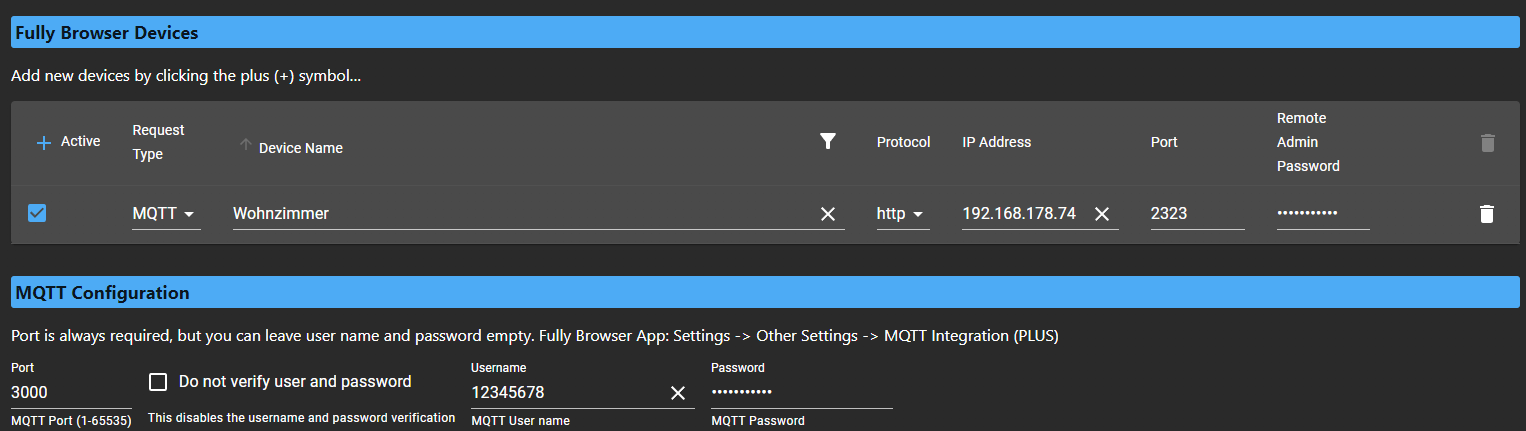
und dann auf dem Tablet
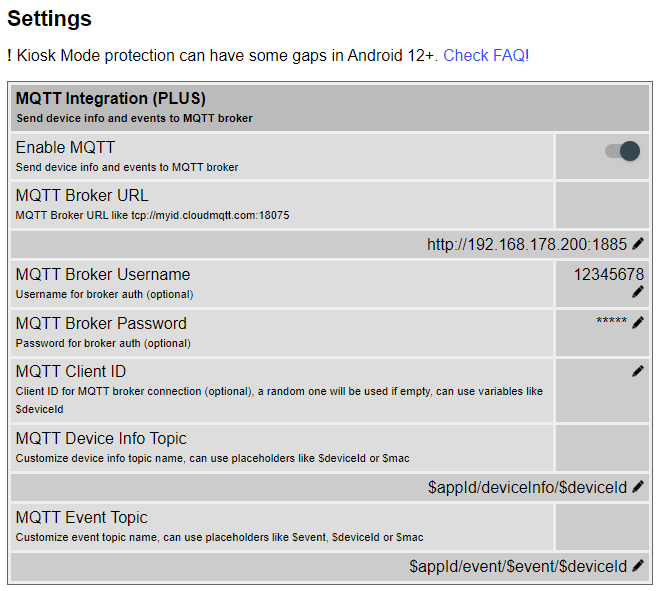
Mit oder ohne Passwort spielt keine Rolle. Habe auch mqtt:, http: und ohne Prefix probiert. Funktioniert alles nicht. Hat jemand eine Idee?
-
Also die Frage kam jetzt ja schon öfter, aber es hat auch nie jemand geschrieben, dass es dann irgendwann funktioniert hat. Die RestAPI Abfrage funktioniert ohne Probleme, nur bei MQTT bleibt der Adapter gelb. Im Log steht nur, dass er den MQTT Server auf Port 3000 gestartet hat. ioBroker läuft bei mir im Docker, also habe ich Port 1885 an 3000 weitergeleitet.
  iobroker:
    container_name: iobroker
    image: buanet/iobroker:latest
    hostname: iobroker
    restart: unless-stopped
    ports:
      - "1880:1880"  #node-red
      - "1883:1883"  #mqtt
      - "1884:1884"  #sonoff
      - "8081:8081"  #iobroker admin
      - "1885:3000"  #fully kiosk mqtt
      - "8088:8088"  #terminal
      - "8284:8284"  #socketIO
      - "8070:8070"  #lovelace ui
dann im Adapter konfiguriert
und dann auf dem Tablet
Mit oder ohne Passwort spielt keine Rolle. Habe auch mqtt:, http: und ohne Prefix probiert. Funktioniert alles nicht. Hat jemand eine Idee?
-
@arteck hab ich auch schon probiert, das geht auch nicht. Adapter bleibt gelb. Habe es eben auch noch mal getestet.
-
@arteck hab ich auch schon probiert, das geht auch nicht. Adapter bleibt gelb. Habe es eben auch noch mal getestet.
-
@arteck hab ich auch schon probiert, das geht auch nicht. Adapter bleibt gelb. Habe es eben auch noch mal getestet.
-
@theknut warum Port 3000? Nimm doch n anderen..
-
-
Hallo zusammen,
inzwischen habe ich die Umstellung auf MQTT auch soweit hin bekommen.
Lediglich die folgende Warnung im Log ist noch etwas störend:192.168.178.100 is not alive! (MQTT: client did not send message for more than 70 seconds)Obwohl ich inzwischen beim MQTT Timeout auf 90 Sek umgestellt habe ändert sich das nicht.

Jemand vielleicht ne Idee woran es liegen könnte, dass noch immer die Meldung mit 70 Sek kommt obwohl ich 90 Sek eingestellt habe?






Hey! Du scheinst an dieser Unterhaltung interessiert zu sein, hast aber noch kein Konto.
Hast du es satt, bei jedem Besuch durch die gleichen Beiträge zu scrollen? Wenn du dich für ein Konto anmeldest, kommst du immer genau dorthin zurück, wo du zuvor warst, und kannst dich über neue Antworten benachrichtigen lassen (entweder per E-Mail oder Push-Benachrichtigung). Du kannst auch Lesezeichen speichern und Beiträge positiv bewerten, um anderen Community-Mitgliedern deine Wertschätzung zu zeigen.
Mit deinem Input könnte dieser Beitrag noch besser werden 💗
Registrieren AnmeldenSupport us
207
Online33.1k
Benutzende83.7k
Themen1.3m
Beiträge