




Aufhängen RPi: Keine SSH, IOBrokerAPI ('lebt' (ping))


-
@thomas-braun : Ok. Das geht aber nur, wenn der RPi (SSH) lebt. Hab ich jetzt mal gemacht. Das ist aber eine Menge Zeugs ...
Skript v.2023-10-10

*** BASE SYSTEM ***
 Static hostname: myIOBroker
       Icon name: computer
Operating System: Debian GNU/Linux 12 (bookworm)
          Kernel: Linux 6.1.0-rpi7-rpi-v8
    Architecture: arm64

Model           : Raspberry Pi 4 Model B Rev 1.5
Docker          : false
Virtualization  : none
Kernel          : aarch64
Userland        : arm64

Systemuptime and Load:
 13:48:54 up 25 min,  5 users,  load average: 0.09, 0.12, 0.21
CPU threads: 4


*** RASPBERRY THROTTLING ***
Current issues:
No throttling issues detected.

Previously detected issues:
No throttling issues detected.

*** Time and Time Zones ***
               Local time: Thu 2024-01-18 13:48:54 CET
           Universal time: Thu 2024-01-18 12:48:54 UTC
                 RTC time: n/a
                Time zone: Europe/Berlin (CET, +0100)
System clock synchronized: yes
              NTP service: active
          RTC in local TZ: no

*** User and Groups ***
dieter
/home/dieter
dieter adm dialout cdrom sudo audio video plugdev games users input render netdev lpadmin gpio i2c spi iobroker

*** X-Server-Setup ***
X-Server:       false
Desktop:
Terminal:       tty
Boot Target:    graphical.target

*** MEMORY ***
               total        used        free      shared  buff/cache   available
Mem:            1.9G        1.5G        113M         15M        398M        426M
Swap:           104M        6.0M         98M
Total:          2.0G        1.5G        212M

         1848 M total memory
         1441 M used memory
         1288 M active memory
          306 M inactive memory
          108 M free memory
            9 M buffer memory
          370 M swap cache
           99 M total swap
            5 M used swap
           94 M free swap

Raspberry only:
oom events: 0
lifetime oom required: 0 Mbytes
total time in oom handler: 0 ms
max time spent in oom handler: 0 ms


*** FAILED SERVICES ***

  UNIT                               LOAD   ACTIVE SUB    DESCRIPTION
* NetworkManager-wait-online.service loaded failed failed Network Manager Wait Online

LOAD   = Reflects whether the unit definition was properly loaded.
ACTIVE = The high-level unit activation state, i.e. generalization of SUB.
SUB    = The low-level unit activation state, values depend on unit type.
1 loaded units listed.

*** FILESYSTEM ***
Filesystem     Type      Size  Used Avail Use% Mounted on
udev           devtmpfs  658M     0  658M   0% /dev
tmpfs          tmpfs     185M  1.3M  184M   1% /run
/dev/mmcblk0p2 ext4       29G  6.7G   21G  25% /
tmpfs          tmpfs     925M  148K  924M   1% /dev/shm
tmpfs          tmpfs     5.0M   16K  5.0M   1% /run/lock
/dev/mmcblk0p1 vfat      510M   73M  438M  15% /boot/firmware
tmpfs          tmpfs     185M   36K  185M   1% /run/user/1000

Messages concerning ext4 filesystem in dmesg:
[Thu Jan 18 13:23:45 2024] Kernel command line: coherent_pool=1M 8250.nr_uarts=0 snd_bcm2835.enable_headphones=0 snd_bcm2835.enable_headphones=1 snd_bcm2835.enable_hdmi=1 snd_bcm2835.enable_hdmi=0  smsc95xx.macaddr=D8:3A:DD:87:BF:19 vc_mem.mem_base=0x3ec00000 vc_mem.mem_size=0x40000000  console=ttyS0,115200 console=tty1 root=PARTUUID=2d278e7b-02 rootfstype=ext4 fsck.repair=yes rootwait quiet splash plymouth.ignore-serial-consoles cfg80211.ieee80211_regdom=DE
[Thu Jan 18 13:23:50 2024] EXT4-fs (mmcblk0p2): mounted filesystem with ordered data mode. Quota mode: none.
[Thu Jan 18 13:23:53 2024] EXT4-fs (mmcblk0p2): re-mounted. Quota mode: none.

Show mounted filesystems \(real ones only\):
TARGET               SOURCE         FSTYPE      OPTIONS
/                    /dev/mmcblk0p2 ext4        rw,noatime,commit=600
|-/run/user/1000/doc portal         fuse.portal rw,nosuid,nodev,relatime,user_id=1000,group_id=1000
`-/boot/firmware     /dev/mmcblk0p1 vfat        rw,relatime,fmask=0022,dmask=0022,codepage=437,iocharset=ascii,shortname=mixed,errors=remount-ro

Files in neuralgic directories:

/var:
651M    /var/
191M    /var/lib
186M    /var/cache
173M    /var/log
173M    /var/cache/apt

Archived and active journals take up 171.8M in the file system.

/opt/iobroker/backups:
55M     /opt/iobroker/backups/

/opt/iobroker/iobroker-data:
386M    /opt/iobroker/iobroker-data/
338M    /opt/iobroker/iobroker-data/files
90M     /opt/iobroker/iobroker-data/files/echarts.admin
67M     /opt/iobroker/iobroker-data/files/javascript.admin
58M     /opt/iobroker/iobroker-data/files/echarts

The five largest files in iobroker-data are:
33M     /opt/iobroker/iobroker-data/files/iot.admin/static/js/main.1797d034.js.map
24M     /opt/iobroker/iobroker-data/files/echarts/static/js/main.5f66c5d9.js.map
24M     /opt/iobroker/iobroker-data/files/echarts.admin/static/js/main.9f2a6569.js.map
24M     /opt/iobroker/iobroker-data/files/echarts.admin/chart/static/js/main.5f66c5d9.js.map
21M     /opt/iobroker/iobroker-data/files/web.admin/static/js/main.aaea95f8.js.map

USB-Devices by-id:
USB-Sticks -  Avoid direct links to /dev/* in your adapter setups, please always prefer the links 'by-id':

/dev/serial/by-id/usb-FTDI_FT230X_Basic_UART_DQ00LLBD-if00-port0
/dev/serial/by-id/usb-FTDI_FT230X_Basic_UART_D30IF43L-if00-port0

*** NodeJS-Installation ***

/usr/bin/nodejs         v18.19.0
/usr/bin/node           v18.19.0
/usr/bin/npm            10.2.3
/usr/bin/npx            10.2.3
/usr/bin/corepack       0.22.0


nodejs:
  Installed: 18.19.0-1nodesource1
  Candidate: 18.19.0+dfsg-6~deb12u1
  Version table:
     18.19.0+dfsg-6~deb12u1 500
        500 http://deb.debian.org/debian-security bookworm-security/main arm64 Packages
 *** 18.19.0-1nodesource1 500
        500 https://deb.nodesource.com/node_18.x nodistro/main arm64 Packages
        100 /var/lib/dpkg/status
     18.18.2-1nodesource1 500
        500 https://deb.nodesource.com/node_18.x nodistro/main arm64 Packages
     18.18.1-1nodesource1 500
        500 https://deb.nodesource.com/node_18.x nodistro/main arm64 Packages
     18.18.0-1nodesource1 500
        500 https://deb.nodesource.com/node_18.x nodistro/main arm64 Packages
     18.17.1-1nodesource1 500
        500 https://deb.nodesource.com/node_18.x nodistro/main arm64 Packages
     18.17.0-1nodesource1 500
        500 https://deb.nodesource.com/node_18.x nodistro/main arm64 Packages
     18.16.1-1nodesource1 500
        500 https://deb.nodesource.com/node_18.x nodistro/main arm64 Packages
     18.16.0-1nodesource1 500
        500 https://deb.nodesource.com/node_18.x nodistro/main arm64 Packages
     18.15.0-1nodesource1 500
        500 https://deb.nodesource.com/node_18.x nodistro/main arm64 Packages
     18.14.2-1nodesource1 500
        500 https://deb.nodesource.com/node_18.x nodistro/main arm64 Packages
     18.14.1-1nodesource1 500
        500 https://deb.nodesource.com/node_18.x nodistro/main arm64 Packages
     18.14.0-1nodesource1 500
        500 https://deb.nodesource.com/node_18.x nodistro/main arm64 Packages
     18.13.0+dfsg1-1 500
        500 http://deb.debian.org/debian bookworm/main arm64 Packages
     18.13.0-1nodesource1 500
        500 https://deb.nodesource.com/node_18.x nodistro/main arm64 Packages
     18.12.0-1nodesource1 500
        500 https://deb.nodesource.com/node_18.x nodistro/main arm64 Packages
     18.11.0-1nodesource1 500
        500 https://deb.nodesource.com/node_18.x nodistro/main arm64 Packages
     18.10.0-1nodesource1 500
        500 https://deb.nodesource.com/node_18.x nodistro/main arm64 Packages
     18.9.1-1nodesource1 500
        500 https://deb.nodesource.com/node_18.x nodistro/main arm64 Packages
     18.9.0-1nodesource1 500
        500 https://deb.nodesource.com/node_18.x nodistro/main arm64 Packages
     18.8.0-1nodesource1 500
        500 https://deb.nodesource.com/node_18.x nodistro/main arm64 Packages
     18.7.0-1nodesource1 500
        500 https://deb.nodesource.com/node_18.x nodistro/main arm64 Packages
     18.6.0-1nodesource1 500
        500 https://deb.nodesource.com/node_18.x nodistro/main arm64 Packages
     18.5.0-1nodesource1 500
        500 https://deb.nodesource.com/node_18.x nodistro/main arm64 Packages
     18.4.0-1nodesource1 500
        500 https://deb.nodesource.com/node_18.x nodistro/main arm64 Packages
     18.3.0-1nodesource1 500
        500 https://deb.nodesource.com/node_18.x nodistro/main arm64 Packages
     18.2.0-1nodesource1 500
        500 https://deb.nodesource.com/node_18.x nodistro/main arm64 Packages
     18.1.0-1nodesource1 500
        500 https://deb.nodesource.com/node_18.x nodistro/main arm64 Packages
     18.0.0-1nodesource1 500
        500 https://deb.nodesource.com/node_18.x nodistro/main arm64 Packages

Temp directories causing npm8 problem: 0
No problems detected

Errors in npm tree:

*** ioBroker-Installation ***

ioBroker Status
iobroker is running on this host.


Objects type: jsonl
States  type: jsonl

Core adapters versions
js-controller:  5.0.17
admin:          6.12.0
javascript:     7.1.6

Adapters from github:   0

Adapter State
+ system.adapter.admin.0                  : admin                 : myIOBroker                               -  enabled, port: 8081, bind: 0.0.0.0, run as: admin
+ system.adapter.backitup.0               : backitup              : myIOBroker                               -  enabled
+ system.adapter.chromecast.0             : chromecast            : myIOBroker                               -  enabled
+ system.adapter.cloud.0                  : cloud                 : myIOBroker                               -  enabled
+ system.adapter.discovery.0              : discovery             : myIOBroker                               -  enabled
+ system.adapter.echarts.0                : echarts               : myIOBroker                               -  enabled
+ system.adapter.email.0                  : email                 : myIOBroker                               -  enabled
  system.adapter.fritzdect.0              : fritzdect             : myIOBroker                               - disabled
+ system.adapter.hm-rega.0                : hm-rega               : myIOBroker                               -  enabled
+ system.adapter.hm-rpc.0                 : hm-rpc                : myIOBroker                               -  enabled, port: 18701
+ system.adapter.hm-rpc.1                 : hm-rpc                : myIOBroker                               -  enabled, port: 12001
+ system.adapter.hm-rpc.2                 : hm-rpc                : myIOBroker                               -  enabled, port: 12010
+ system.adapter.influxdb.0               : influxdb              : myIOBroker                               -  enabled, port: 8086
+ system.adapter.javascript.0             : javascript            : myIOBroker                               -  enabled
  system.adapter.net-tools.0              : net-tools             : myIOBroker                               - disabled
+ system.adapter.nuki-extended.0          : nuki-extended         : myIOBroker                               -  enabled
  system.adapter.ping.0                   : ping                  : myIOBroker                               - disabled
+ system.adapter.smartmeter.0             : smartmeter            : myIOBroker                               -  enabled
+ system.adapter.smartmeter.1             : smartmeter            : myIOBroker                               -  enabled
+ system.adapter.synology.0               : synology              : myIOBroker                               -  enabled, port: 5000
+ system.adapter.tr-064.0                 : tr-064                : myIOBroker                               -  enabled
+ system.adapter.tr-064.1                 : tr-064                : myIOBroker                               -  enabled
+ system.adapter.tr-064.2                 : tr-064                : myIOBroker                               -  enabled
  system.adapter.vis-hqwidgets.0          : vis-hqwidgets         : myIOBroker                               -  enabled
  system.adapter.vis-icontwo.0            : vis-icontwo           : myIOBroker                               -  enabled
  system.adapter.vis-jqui-mfd.0           : vis-jqui-mfd          : myIOBroker                               -  enabled
  system.adapter.vis-metro.0              : vis-metro             : myIOBroker                               -  enabled
  system.adapter.vis-timeandweather.0     : vis-timeandweather    : myIOBroker                               -  enabled
  system.adapter.vis.0                    : vis                   : myIOBroker                               -  enabled
+ system.adapter.web.0                    : web                   : myIOBroker                               -  enabled, port: 8082, bind: 0.0.0.0, run as: admin

+ instance is alive

Enabled adapters with bindings
+ system.adapter.admin.0                  : admin                 : myIOBroker                               -  enabled, port: 8081, bind: 0.0.0.0, run as: admin
+ system.adapter.hm-rpc.0                 : hm-rpc                : myIOBroker                               -  enabled, port: 18701
+ system.adapter.hm-rpc.1                 : hm-rpc                : myIOBroker                               -  enabled, port: 12001
+ system.adapter.hm-rpc.2                 : hm-rpc                : myIOBroker                               -  enabled, port: 12010
+ system.adapter.influxdb.0               : influxdb              : myIOBroker                               -  enabled, port: 8086
+ system.adapter.synology.0               : synology              : myIOBroker                               -  enabled, port: 5000
+ system.adapter.web.0                    : web                   : myIOBroker                               -  enabled, port: 8082, bind: 0.0.0.0, run as: admin

ioBroker-Repositories
stable        : http://download.iobroker.net/sources-dist.json
beta          : http://download.iobroker.net/sources-dist-latest.json

Active repo(s): stable

Installed ioBroker-Instances
Used repository: stable
Adapter    "admin"        : 6.12.0   , installed 6.12.0
Adapter    "backitup"     : 2.9.8    , installed 2.8.7  [Updatable]
Adapter    "chromecast"   : 3.0.3    , installed 3.0.3
Adapter    "cloud"        : 4.4.1    , installed 4.4.1
Adapter    "discovery"    : 4.2.0    , installed 4.2.0
Adapter    "echarts"      : 1.7.2    , installed 1.5.4  [Updatable]
Adapter    "email"        : 1.2.1    , installed 1.2.1
Adapter    "fritzdect"    : 2.5.9    , installed 2.5.9
Adapter    "hm-rega"      : 4.0.0    , installed 4.0.0
Adapter    "hm-rpc"       : 1.15.19  , installed 1.15.19
Adapter    "influxdb"     : 3.2.0    , installed 3.2.0
Adapter    "iot"          : 2.0.11   , installed 2.0.11
Adapter    "javascript"   : 7.1.6    , installed 7.1.6
Controller "js-controller": 5.0.17   , installed 5.0.17
Adapter    "net-tools"    : 0.2.0    , installed 0.2.0
Adapter    "nuki-extended": 2.6.5    , installed 2.6.5
Adapter    "ping"         : 1.6.2    , installed 1.6.2
Adapter    "simple-api"   : 2.7.2    , installed 2.7.2
Adapter    "smartmeter"   : 3.4.0    , installed 3.3.4  [Updatable]
Adapter    "socketio"     : 6.6.0    , installed 6.6.0
Adapter    "synology"     : 3.0.1    , installed 3.0.1
Adapter    "tr-064"       : 4.2.18   , installed 4.2.18
Adapter    "tuya"         : 3.15.0   , installed 3.14.2 [Updatable]
Adapter    "vis"          : 1.5.4    , installed 1.5.4
Adapter    "vis-hqwidgets": 1.4.0    , installed 1.4.0
Adapter    "vis-icontwo"  : 1.3.0    , installed 1.0.0  [Updatable]
Adapter    "vis-jqui-mfd" : 1.0.12   , installed 1.0.12
Adapter    "vis-metro"    : 1.2.0    , installed 1.2.0
Adapter    "vis-timeandweather": 1.2.2, installed 1.2.2
Adapter    "web"          : 6.1.10   , installed 6.1.10
Adapter    "ws"           : 2.5.8    , installed 2.5.8

Objects and States
Please stand by - This may take a while
Objects:        2822
States:         2298

*** OS-Repositories and Updates ***
Hit:1 http://archive.raspberrypi.com/debian bookworm InRelease
Hit:2 http://deb.debian.org/debian bookworm InRelease
Hit:3 http://deb.debian.org/debian-security bookworm-security InRelease
Hit:4 http://deb.debian.org/debian bookworm-updates InRelease
Hit:5 https://deb.nodesource.com/node_18.x nodistro InRelease
Reading package lists...
Pending Updates: 37

*** Listening Ports ***
Active Internet connections (only servers)
Proto Recv-Q Send-Q Local Address           Foreign Address         State       User       Inode      PID/Program name
tcp        0      0 192.168.178.152:18701   0.0.0.0:*               LISTEN      1001       20358      2275/io.hm-rpc.0
tcp        0      0 0.0.0.0:22              0.0.0.0:*               LISTEN      0          17673      822/sshd: /usr/sbin
tcp        0      0 127.0.0.1:9001          0.0.0.0:*               LISTEN      1001       17022      809/iobroker.js-con
tcp        0      0 127.0.0.1:9000          0.0.0.0:*               LISTEN      1001       18314      809/iobroker.js-con
tcp        0      0 127.0.0.1:631           0.0.0.0:*               LISTEN      0          17681      808/cupsd
tcp        0      0 192.168.178.152:12010   0.0.0.0:*               LISTEN      1001       20376      2290/io.hm-rpc.2
tcp        0      0 192.168.178.152:12001   0.0.0.0:*               LISTEN      1001       21977      2268/io.hm-rpc.1
tcp6       0      0 :::22                   :::*                    LISTEN      0          17675      822/sshd: /usr/sbin
tcp6       0      0 :::8082                 :::*                    LISTEN      1001       24596      2459/io.web.0
tcp6       0      0 :::8081                 :::*                    LISTEN      1001       20160      2016/io.admin.0
tcp6       0      0 ::1:631                 :::*                    LISTEN      0          17680      808/cupsd
udp        0      0 0.0.0.0:631             0.0.0.0:*                           0          19407      2009/cups-browsed
udp        0      0 0.0.0.0:38887           0.0.0.0:*                           104        16459      613/avahi-daemon: r
udp        0      0 0.0.0.0:5353            0.0.0.0:*                           1001       22778      2384/io.chromecast.
udp        0      0 0.0.0.0:5353            0.0.0.0:*                           104        16457      613/avahi-daemon: r
udp6       0      0 :::46066                :::*                                104        16460      613/avahi-daemon: r
udp6       0      0 :::5353                 :::*                                104        16458      613/avahi-daemon: r
udp6       0      0 fe80::17b2:afcf:15c:546 :::*                                0          13250      749/NetworkManager

*** Log File - Last 25 Lines ***

2024-01-18 13:49:35.682  - info: smartmeter.0 (2395) Received 13 values, 8 updated
2024-01-18 13:49:37.366  - info: smartmeter.1 (2410) Received 13 values, 8 updated
2024-01-18 13:49:41.720  - info: smartmeter.0 (2395) Received 13 values, 9 updated
2024-01-18 13:49:43.373  - info: smartmeter.1 (2410) Received 13 values, 9 updated
2024-01-18 13:49:47.699  - info: smartmeter.0 (2395) Received 13 values, 9 updated
2024-01-18 13:49:49.361  - info: smartmeter.1 (2410) Received 13 values, 9 updated
2024-01-18 13:49:53.688  - info: smartmeter.0 (2395) Received 13 values, 9 updated
2024-01-18 13:49:55.415  - info: smartmeter.1 (2410) Received 13 values, 9 updated
2024-01-18 13:49:59.676  - info: smartmeter.0 (2395) Received 13 values, 9 updated
2024-01-18 13:50:01.407  - info: smartmeter.1 (2410) Received 13 values, 9 updated
2024-01-18 13:50:05.679  - info: smartmeter.0 (2395) Received 13 values, 8 updated
2024-01-18 13:50:07.382  - info: smartmeter.1 (2410) Received 13 values, 8 updated
2024-01-18 13:50:11.702  - info: smartmeter.0 (2395) Received 13 values, 8 updated
2024-01-18 13:50:13.374  - info: smartmeter.1 (2410) Received 13 values, 8 updated
2024-01-18 13:50:17.705  - info: smartmeter.0 (2395) Received 13 values, 8 updated
2024-01-18 13:50:19.368  - info: smartmeter.1 (2410) Received 13 values, 8 updated
2024-01-18 13:50:25.005  - info: smartmeter.0 (2395) Received 13 values, 9 updated
2024-01-18 13:50:25.378  - info: smartmeter.1 (2410) Received 13 values, 9 updated
2024-01-18 13:50:29.715  - info: smartmeter.0 (2395) Received 13 values, 9 updated
2024-01-18 13:50:31.379  - info: smartmeter.1 (2410) Received 13 values, 8 updated
2024-01-18 13:50:35.677  - info: smartmeter.0 (2395) Received 13 values, 9 updated
2024-01-18 13:50:37.357  - info: smartmeter.1 (2410) Received 13 values, 7 updated
2024-01-18 13:50:41.736  - info: smartmeter.0 (2395) Received 13 values, 9 updated
2024-01-18 13:50:43.361  - info: smartmeter.1 (2410) Received 13 values, 8 updated
2024-01-18 13:50:47.702  - info: smartmeter.0 (2395) Received 13 values, 9 updated
Mir fällt auf:
*** FAILED SERVICES *** UNIT LOAD ACTIVE SUB DESCRIPTION * NetworkManager-wait-online.service loaded failed failed Network Manager Wait Online LOAD = Reflects whether the unit definition was properly loaded. ACTIVE = The high-level unit activation state, i.e. generalization of SUB. SUB = The low-level unit activation state, values depend on unit type. 1 loaded units listed.@kanzler1959
Mit ihren knapp 30 Instanzen dürfte die Kiste so ziemlich am Rand der Leistungsfähigkeit kratzen.
Insbesondere wenn da noch zusätzliche Dinge wie InfluxDb installiert sind oder backitup startet.
Discovery kannst Du eigentlich rauswerfen. Das braucht man nicht wirklich, wenn die Kiste einmal eingerichtet ist.
Wozu 3x tr-064?
Wozu 3x hm-rpc?
Wozu 2x smartmeter? -
@homoran : Mein Fehler - ist ein RPi4
@kanzler1959
Sollte vll auch noch beachtet werden dass bei einem RPI mit 2GB da definitiv zu viele Adapter drauf laufen.
Daraus wird mMn auch der "Absturz" um 2:07 Uhr führen weil Du (wahrscheinlich) Dein Backup um 2:05 Uhr laufen lässt.Lehrling seit 1975 !!!
Beitrag geholfen ? dann gerne ein upvote rechts unten im Beitrag klicken ;)
https://forum.iobroker.net/topic/51555/hinweise-für-gute-forenbeiträge -
sudo systemctl set-default multi-user.target
echo -e "Package: nodejs\nPin: origin deb.nodesource.com\nPin-Priority: 1001" | sudo tee /etc/apt/preferences.d/nodejs.pref
sudo apt update
sudo apt full-upgrade
sudo reboot
Wenn die Kiste wieder online ist:
iobroker update iobroker upgrade all@thomas-braun : Hallo - auch an die anderen
Ich werde jetzt brav alles abarbeiten ... und noch mal brav posten,Hätte nicht gedacht, das eine 'Standard-Installation' (ich habe ja den IOBroker beim ersten Start suchen lassen) schon zu einer Überlastung führt. Da werde ich dann wohl was rauswerfen müssen.
Raspberry Pi 4 Model B Rev 1.5 (IOBroker, SSD 128G)
Huawei Sun2000 WR & LUNA Speicher
HomeMatic CCU3 (mit allerlei ...)
Diverses (Sockets, Dallas via ESP, Shellys ...)
Visualisierrung via Grafana
Synology NAS
und einige Fritzboxen für die Abdeckung -
@kanzler1959
Sollte vll auch noch beachtet werden dass bei einem RPI mit 2GB da definitiv zu viele Adapter drauf laufen.
Daraus wird mMn auch der "Absturz" um 2:07 Uhr führen weil Du (wahrscheinlich) Dein Backup um 2:05 Uhr laufen lässt.@djmarc75 : Der Absturz war nach exakt einem Tag und zwei Minuten (02m07s). Das Backup läuft um 02:40 in der frühen Nacht. Ziel: FTP (NAS). Ich werde - auch weil das alle schreiben - die Adapter mal ausmisten. Sind halt alle 'automatisch' hinzugekommen.
-
@thomas-braun : Hallo - auch an die anderen
Ich werde jetzt brav alles abarbeiten ... und noch mal brav posten,Hätte nicht gedacht, das eine 'Standard-Installation' (ich habe ja den IOBroker beim ersten Start suchen lassen) schon zu einer Überlastung führt. Da werde ich dann wohl was rauswerfen müssen.
@kanzler1959 sagte in Aufhängen RPi: Keine SSH, IOBrokerAPI ('lebt' (ping)):
Hätte nicht gedacht, das eine 'Standard-Installation' (ich habe ja den IOBroker beim ersten Start suchen lassen) schon zu einer Überlastung führt.
Das hängt halt davon ab, welche Hardware die mit deiner 'Standard-Installation' zurecht kommen muss.
-
@codierknecht :
Ok - Nochmal ... ich habe 'einfach' alles suchen lassen, was es bei mir im Hause so gibt.- BackItUp ist drauf und startet um 02:40 in Richtung NAS.
- Ich habe halt drei FB (als Accesspoints verteilt). Da man von den Dingern aber sowieso nix vernüftiges bekommt fliegen Die nun raus. Danke soweit.
- Die drei hm-rpc wurden so initial erstellt, und beinhalten auch verschiedene Geräte - hat mich auch gewundert, warumn nicht alles in einer Instanz ist. Muss mal sehen ob ich alles brauche.
- zwei Smartmeter - ich habe halt zwei Zähler und damit zwei (USB) Adapter. Habe eine Wärmepumpe mit speziellen Tarif. Da ich nun auch noch 'Strom vom Dach' habe auch noch eine spezielle Verschaltung (Kaskadenschaltung (quasi beider Zähler hintereinander)).
--> bin schon mal auf 1.1G RAM runter
Raspberry Pi 4 Model B Rev 1.5 (IOBroker, SSD 128G)
Huawei Sun2000 WR & LUNA Speicher
HomeMatic CCU3 (mit allerlei ...)
Diverses (Sockets, Dallas via ESP, Shellys ...)
Visualisierrung via Grafana
Synology NAS
und einige Fritzboxen für die Abdeckung -
@thomas-braun : Hallo - auch an die anderen
Ich werde jetzt brav alles abarbeiten ... und noch mal brav posten,Hätte nicht gedacht, das eine 'Standard-Installation' (ich habe ja den IOBroker beim ersten Start suchen lassen) schon zu einer Überlastung führt. Da werde ich dann wohl was rauswerfen müssen.
@kanzler1959 sagte in Aufhängen RPi: Keine SSH, IOBrokerAPI ('lebt' (ping)):
Hätte nicht gedacht, das eine 'Standard-Installation' ... schon zu einer Überlastung führt.
naja
@homoran sagte in Aufhängen RPi: Keine SSH, IOBrokerAPI ('lebt' (ping)):
22 aktive Adapter bei 2 GB RAM ist auch schon sportlich.
und nicht Standard.
@kanzler1959 sagte in Aufhängen RPi: Keine SSH, IOBrokerAPI ('lebt' (ping)):
ich habe ja den IOBroker beim ersten Start suchen lassen
Und wahrscheinlich
@codierknecht sagte in Aufhängen RPi: Keine SSH, IOBrokerAPI ('lebt' (ping)):
Wozu 3x tr-064?
Wozu 3x hm-rpc?
Wozu 2x smartmeter?ohne Not mehrfach installiert ohne zu hinterfragen
@kanzler1959 sagte in Aufhängen RPi: Keine SSH, IOBrokerAPI ('lebt' (ping)):
Das Backup läuft um 02:40 in der frühen Nacht.
was allein für die Kompression massiv RAM benötigt
@homoran sagte in Aufhängen RPi: Keine SSH, IOBrokerAPI ('lebt' (ping)):
Wenn dann noch scheduled Adapters dazukommen, insbesondere Backitup, dann knallt's im MEM
kein Support per PN! - Fragen im Forum stellen - Benutzt das Voting rechts unten im Beitrag wenn er euch geholfen hat.
Das Forum freut sich über eine Spende. Benutzt dazu den Spendenbutton oben rechts. Danke!
der Installationsfixer: curl -fsL https://iobroker.net/fix.sh | bash - -
@kanzler1959 sagte in Aufhängen RPi: Keine SSH, IOBrokerAPI ('lebt' (ping)):
@homoran : Mein Fehler - ist ein RPi4
weiss ich

@kanzler1959 sagte in Aufhängen RPi: Keine SSH, IOBrokerAPI ('lebt' (ping)):
Model : Raspberry Pi 4 Model B Rev 1.5
@kanzler1959 sagte in Aufhängen RPi: Keine SSH, IOBrokerAPI ('lebt' (ping)):
Mir fällt auf:
und mir
@kanzler1959 sagte in Aufhängen RPi: Keine SSH, IOBrokerAPI ('lebt' (ping)):
Pending Updates: 37
im Betriebssystem und 5 Adapter
22 aktive Adapter bei 2 GB RAM ist auch sch8n sportlich.
Wenn dann noch scheduled Adapters dazukommen, insbesondere Backitup, dann knallt's im MEMund mir
@kanzler1959 sagte in Aufhängen RPi: Keine SSH, IOBrokerAPI ('lebt' (ping)):
Pending Updates: 37
im Betriebssystem und 5 Adapter
22 aktive Adapter bei 2 GB RAM ist auch sch8n sportlich.
Wenn dann noch scheduled Adapters dazukommen, insbesondere Backitup, dann knallt's im MEMOk. Ich habe ausgemistet. Bei manchen Adaptern bin ich mit aber nicht sicher, ob Ich Sie 'einfach' rauswerfen sollte. Nehmen Adapter ohne Instanz auch RAM weg? Kann man sehen, wieviel RAM ein Adapter / Instanz hat?
Raspberry Pi 4 Model B Rev 1.5 (IOBroker, SSD 128G)
Huawei Sun2000 WR & LUNA Speicher
HomeMatic CCU3 (mit allerlei ...)
Diverses (Sockets, Dallas via ESP, Shellys ...)
Visualisierrung via Grafana
Synology NAS
und einige Fritzboxen für die Abdeckung -
und mir
@kanzler1959 sagte in Aufhängen RPi: Keine SSH, IOBrokerAPI ('lebt' (ping)):
Pending Updates: 37
im Betriebssystem und 5 Adapter
22 aktive Adapter bei 2 GB RAM ist auch sch8n sportlich.
Wenn dann noch scheduled Adapters dazukommen, insbesondere Backitup, dann knallt's im MEMOk. Ich habe ausgemistet. Bei manchen Adaptern bin ich mit aber nicht sicher, ob Ich Sie 'einfach' rauswerfen sollte. Nehmen Adapter ohne Instanz auch RAM weg? Kann man sehen, wieviel RAM ein Adapter / Instanz hat?
Linux-Werkzeugkasten:
https://forum.iobroker.net/topic/42952/der-kleine-iobroker-linux-werkzeugkasten
NodeJS Fixer Skript:
https://forum.iobroker.net/topic/68035/iob-node-fix-skript
iob_diag: curl -sLf -o diag.sh https://iobroker.net/diag.sh && bash diag.sh -
@kanzler1959 sagte in Aufhängen RPi: Keine SSH, IOBrokerAPI ('lebt' (ping)):
Hätte nicht gedacht, das eine 'Standard-Installation' ... schon zu einer Überlastung führt.
naja
@homoran sagte in Aufhängen RPi: Keine SSH, IOBrokerAPI ('lebt' (ping)):
22 aktive Adapter bei 2 GB RAM ist auch schon sportlich.
und nicht Standard.
@kanzler1959 sagte in Aufhängen RPi: Keine SSH, IOBrokerAPI ('lebt' (ping)):
ich habe ja den IOBroker beim ersten Start suchen lassen
Und wahrscheinlich
@codierknecht sagte in Aufhängen RPi: Keine SSH, IOBrokerAPI ('lebt' (ping)):
Wozu 3x tr-064?
Wozu 3x hm-rpc?
Wozu 2x smartmeter?ohne Not mehrfach installiert ohne zu hinterfragen
@kanzler1959 sagte in Aufhängen RPi: Keine SSH, IOBrokerAPI ('lebt' (ping)):
Das Backup läuft um 02:40 in der frühen Nacht.
was allein für die Kompression massiv RAM benötigt
@homoran sagte in Aufhängen RPi: Keine SSH, IOBrokerAPI ('lebt' (ping)):
Wenn dann noch scheduled Adapters dazukommen, insbesondere Backitup, dann knallt's im MEM
@homoran sagte in Aufhängen RPi: Keine SSH, IOBrokerAPI ('lebt' (ping)):
22 aktive Adapter bei 2 GB RAM ist auch schon sportlich.
und nicht Standard.
==> Ich habe halt nur nach "Anleitung" gearbeitet. Dort (von verschiedenen Seiten) wurde halt gesagt "lass den IOBroker mal suchen" ... mag falsch sein. Habe aber nichts kompaktes 'für Dummies' gefunden.@codierknecht sagte in Aufhängen RPi: Keine SSH, IOBrokerAPI ('lebt' (ping)):
Wozu 3x tr-064?
Wozu 3x hm-rpc?
Wozu 2x smartmeter?ohne Not mehrfach installiert ohne zu hinterfragen
==> Nicht wirklich.
Nochmal: 3x tr-064 und 3x hm-rpc sind beim initialen Lauf entstanden
Und die zwei Instanzen des Smartmeters brauche ich ja, da es zwei Meter/Geber sind.
Oder geht das anders?@kanzler1959 sagte in Aufhängen RPi: Keine SSH, IOBrokerAPI ('lebt' (ping)):
Das Backup läuft um 02:40 in der frühen Nacht.
was allein für die Kompression massiv RAM benötigt
==> Aber eine sinnvolle Sache ist?!Bin jetzt auf gut 1G RAM runter:

Mit macht aber der SWAP Bereich noch Sorgen.Raspberry Pi 4 Model B Rev 1.5 (IOBroker, SSD 128G)
Huawei Sun2000 WR & LUNA Speicher
HomeMatic CCU3 (mit allerlei ...)
Diverses (Sockets, Dallas via ESP, Shellys ...)
Visualisierrung via Grafana
Synology NAS
und einige Fritzboxen für die Abdeckung -
@homoran sagte in Aufhängen RPi: Keine SSH, IOBrokerAPI ('lebt' (ping)):
22 aktive Adapter bei 2 GB RAM ist auch schon sportlich.
und nicht Standard.
==> Ich habe halt nur nach "Anleitung" gearbeitet. Dort (von verschiedenen Seiten) wurde halt gesagt "lass den IOBroker mal suchen" ... mag falsch sein. Habe aber nichts kompaktes 'für Dummies' gefunden.@codierknecht sagte in Aufhängen RPi: Keine SSH, IOBrokerAPI ('lebt' (ping)):
Wozu 3x tr-064?
Wozu 3x hm-rpc?
Wozu 2x smartmeter?ohne Not mehrfach installiert ohne zu hinterfragen
==> Nicht wirklich.
Nochmal: 3x tr-064 und 3x hm-rpc sind beim initialen Lauf entstanden
Und die zwei Instanzen des Smartmeters brauche ich ja, da es zwei Meter/Geber sind.
Oder geht das anders?@kanzler1959 sagte in Aufhängen RPi: Keine SSH, IOBrokerAPI ('lebt' (ping)):
Das Backup läuft um 02:40 in der frühen Nacht.
was allein für die Kompression massiv RAM benötigt
==> Aber eine sinnvolle Sache ist?!Bin jetzt auf gut 1G RAM runter:
Mit macht aber der SWAP Bereich noch Sorgen.Bitte keine Screenshots von Text. Dafür gibt es die CodeTags...
Und besser
free -ht --megaverwenden. Ist besser verständlich.
Linux-Werkzeugkasten:
https://forum.iobroker.net/topic/42952/der-kleine-iobroker-linux-werkzeugkasten
NodeJS Fixer Skript:
https://forum.iobroker.net/topic/68035/iob-node-fix-skript
iob_diag: curl -sLf -o diag.sh https://iobroker.net/diag.sh && bash diag.sh -
@thomas-braun said in Aufhängen RPi: Keine SSH, IOBrokerAPI ('lebt' (ping)):
Die obigen Maßnahmen durchgeacker?
Wie schaut
iob diagnun aus?
Immer langsam: Schritt für Schritt; Schön dokumentieren was man gemacht hat ...
Nun noch die Updates und dann werden wir sehen (in einem Monat im besten Falle ;-)Raspberry Pi 4 Model B Rev 1.5 (IOBroker, SSD 128G)
Huawei Sun2000 WR & LUNA Speicher
HomeMatic CCU3 (mit allerlei ...)
Diverses (Sockets, Dallas via ESP, Shellys ...)
Visualisierrung via Grafana
Synology NAS
und einige Fritzboxen für die Abdeckung -
Bitte keine Screenshots von Text. Dafür gibt es die CodeTags...
Und besser
free -ht --megaverwenden. Ist besser verständlich.
@thomas-braun said in Aufhängen RPi: Keine SSH, IOBrokerAPI ('lebt' (ping)):
Bitte keine Screenshots von Text. Dafür gibt es die CodeTags...
Und besser
free -ht --megaverwenden. Ist besser verständlich.
dieter@myIOBroker:~ $ free -ht --mega total used free shared buff/cache available Mem: 1.9G 1.3G 356M 15M 391M 661M Swap: 104M 104M 729K Total: 2.0G 1.4G 357M -
sudo systemctl set-default multi-user.target
echo -e "Package: nodejs\nPin: origin deb.nodesource.com\nPin-Priority: 1001" | sudo tee /etc/apt/preferences.d/nodejs.pref
sudo apt update
sudo apt full-upgrade
sudo reboot
Wenn die Kiste wieder online ist:
iobroker update iobroker upgrade all@thomas-braun said in Aufhängen RPi: Keine SSH, IOBrokerAPI ('lebt' (ping)):
sudo systemctl set-default multi-user.target
Was macht
sudo systemctl set-default multi-user.target"
echo -e "Package: nodejs\nPin: origin deb.nodesource.com\nPin-Priority: 1001" | sudo tee /etc/apt/preferences.d/nodejs.pref"
genau (damit ich was lerne)?
Und ich habe auch gesehen, das ich dann doch ein wenig mehr als jungfräulich war/bin. Insbesondere in der Visualisierung habe ich schon Experimente gemacht. Ich will ja am Ende auch sehen, was meine Verbräuche sind.
Und am Ende sind es doch wieder 1.3G - nachdem ich vor dem IOBroker Upgrade 0.9G hatte.
Wir werden sehen ...Raspberry Pi 4 Model B Rev 1.5 (IOBroker, SSD 128G)
Huawei Sun2000 WR & LUNA Speicher
HomeMatic CCU3 (mit allerlei ...)
Diverses (Sockets, Dallas via ESP, Shellys ...)
Visualisierrung via Grafana
Synology NAS
und einige Fritzboxen für die Abdeckung -
@thomas-braun said in Aufhängen RPi: Keine SSH, IOBrokerAPI ('lebt' (ping)):
sudo systemctl set-default multi-user.target
Was macht
sudo systemctl set-default multi-user.target"
echo -e "Package: nodejs\nPin: origin deb.nodesource.com\nPin-Priority: 1001" | sudo tee /etc/apt/preferences.d/nodejs.pref"
genau (damit ich was lerne)?
Und ich habe auch gesehen, das ich dann doch ein wenig mehr als jungfräulich war/bin. Insbesondere in der Visualisierung habe ich schon Experimente gemacht. Ich will ja am Ende auch sehen, was meine Verbräuche sind.
Und am Ende sind es doch wieder 1.3G - nachdem ich vor dem IOBroker Upgrade 0.9G hatte.
Wir werden sehen ...@kanzler1959 sagte in Aufhängen RPi: Keine SSH, IOBrokerAPI ('lebt' (ping)):
genau (damit ich was lerne)?
Zeile 1 setzt das System auf das boot-Target 'multi-user', d.h. ohne Desktop-Mumpitz.
Zeile 2 setzt die Installations-Priorität der 'nodesource'-Quelle auf 'nimm das immer von dort, egal wie hoch die Versionsnummern aus anderen Quellen ist'.
-
@thomas-braun said in Aufhängen RPi: Keine SSH, IOBrokerAPI ('lebt' (ping)):
Die obigen Maßnahmen durchgeacker?
Wie schaut
iob diagnun aus?
Immer langsam: Schritt für Schritt; Schön dokumentieren was man gemacht hat ...
Nun noch die Updates und dann werden wir sehen (in einem Monat im besten Falle ;-)@kanzler1959 said in Aufhängen RPi: Keine SSH, IOBrokerAPI ('lebt' (ping)):
@thomas-braun said in Aufhängen RPi: Keine SSH, IOBrokerAPI ('lebt' (ping)):
Die obigen Maßnahmen durchgeacker?
Wie schaut
iob diagnun aus?
Bitteschön:
Skript v.2023-10-10

*** BASE SYSTEM ***
 Static hostname: myIOBroker
       Icon name: computer
Operating System: Debian GNU/Linux 12 (bookworm)
          Kernel: Linux 6.1.0-rpi7-rpi-v8
    Architecture: arm64

Model           : Raspberry Pi 4 Model B Rev 1.5
Docker          : false
Virtualization  : none
Kernel          : aarch64
Userland        : arm64

Systemuptime and Load:
 16:02:36 up 21 min,  4 users,  load average: 0.12, 0.35, 0.60
CPU threads: 4


*** RASPBERRY THROTTLING ***
Current issues:
No throttling issues detected.

Previously detected issues:
No throttling issues detected.

*** Time and Time Zones ***
               Local time: Thu 2024-01-18 16:02:36 CET
           Universal time: Thu 2024-01-18 15:02:36 UTC
                 RTC time: n/a
                Time zone: Europe/Berlin (CET, +0100)
System clock synchronized: yes
              NTP service: active
          RTC in local TZ: no

*** User and Groups ***
dieter
/home/dieter
dieter adm dialout cdrom sudo audio video plugdev games users input render netdev lpadmin gpio i2c spi iobroker

*** X-Server-Setup ***
X-Server:       false
Desktop:
Terminal:       tty
Boot Target:    multi-user.target

*** MEMORY ***
               total        used        free      shared  buff/cache   available
Mem:            1.9G        1.2G        515M        1.3M        296M        738M
Swap:           104M          0B        104M
Total:          2.0G        1.2G        620M

         1848 M total memory
         1143 M used memory
         1213 M active memory
           13 M inactive memory
          491 M free memory
           11 M buffer memory
          271 M swap cache
           99 M total swap
            0 M used swap
           99 M free swap

Raspberry only:
oom events: 0
lifetime oom required: 0 Mbytes
total time in oom handler: 0 ms
max time spent in oom handler: 0 ms


*** FAILED SERVICES ***

  UNIT LOAD ACTIVE SUB DESCRIPTION
0 loaded units listed.

*** FILESYSTEM ***
Filesystem     Type      Size  Used Avail Use% Mounted on
udev           devtmpfs  658M     0  658M   0% /dev
tmpfs          tmpfs     185M  1.2M  184M   1% /run
/dev/mmcblk0p2 ext4       29G  6.7G   20G  26% /
tmpfs          tmpfs     925M  8.0K  925M   1% /dev/shm
tmpfs          tmpfs     5.0M   16K  5.0M   1% /run/lock
/dev/mmcblk0p1 vfat      510M   73M  438M  15% /boot/firmware
tmpfs          tmpfs     185M   32K  185M   1% /run/user/1000

Messages concerning ext4 filesystem in dmesg:
[Thu Jan 18 15:41:19 2024] Kernel command line: coherent_pool=1M 8250.nr_uarts=0 snd_bcm2835.enable_headphones=0 snd_bcm2835.enable_headphones=1 snd_bcm2835.enable_hdmi=1 snd_bcm2835.enable_hdmi=0  smsc95xx.macaddr=D8:3A:DD:87:BF:19 vc_mem.mem_base=0x3ec00000 vc_mem.mem_size=0x40000000  console=ttyS0,115200 console=tty1 root=PARTUUID=2d278e7b-02 rootfstype=ext4 fsck.repair=yes rootwait quiet splash plymouth.ignore-serial-consoles cfg80211.ieee80211_regdom=DE
[Thu Jan 18 15:41:22 2024] EXT4-fs (mmcblk0p2): mounted filesystem with ordered data mode. Quota mode: none.
[Thu Jan 18 15:41:25 2024] EXT4-fs (mmcblk0p2): re-mounted. Quota mode: none.

Show mounted filesystems \(real ones only\):
TARGET           SOURCE         FSTYPE OPTIONS
/                /dev/mmcblk0p2 ext4   rw,noatime,commit=600
`-/boot/firmware /dev/mmcblk0p1 vfat   rw,relatime,fmask=0022,dmask=0022,codepage=437,iocharset=ascii,shortname=mixed,errors=remount-ro

Files in neuralgic directories:

/var:
670M    /var/
192M    /var/log/journal/801820c1aba041bb835071924f157206
192M    /var/log/journal
192M    /var/log
191M    /var/lib

Archived and active journals take up 191.2M in the file system.

/opt/iobroker/backups:
55M     /opt/iobroker/backups/

/opt/iobroker/iobroker-data:
393M    /opt/iobroker/iobroker-data/
334M    /opt/iobroker/iobroker-data/files
89M     /opt/iobroker/iobroker-data/files/echarts.admin
67M     /opt/iobroker/iobroker-data/files/javascript.admin
57M     /opt/iobroker/iobroker-data/files/echarts

The five largest files in iobroker-data are:
33M     /opt/iobroker/iobroker-data/files/iot.admin/static/js/main.1797d034.js.map
24M     /opt/iobroker/iobroker-data/files/echarts/static/js/main.2b7495c2.js.map
24M     /opt/iobroker/iobroker-data/files/echarts.admin/chart/static/js/main.2b7495c2.js.map
23M     /opt/iobroker/iobroker-data/files/echarts.admin/static/js/main.245b61c0.js.map
21M     /opt/iobroker/iobroker-data/files/web.admin/static/js/main.aaea95f8.js.map

USB-Devices by-id:
USB-Sticks -  Avoid direct links to /dev/* in your adapter setups, please always prefer the links 'by-id':

/dev/serial/by-id/usb-FTDI_FT230X_Basic_UART_D30IF43L-if00-port0
/dev/serial/by-id/usb-FTDI_FT230X_Basic_UART_DQ00LLBD-if00-port0

*** NodeJS-Installation ***

/usr/bin/nodejs         v18.19.0
/usr/bin/node           v18.19.0
/usr/bin/npm            10.2.3
/usr/bin/npx            10.2.3
/usr/bin/corepack       0.22.0


nodejs:
  Installed: 18.19.0-1nodesource1
  Candidate: 18.19.0-1nodesource1
  Version table:
     18.19.0+dfsg-6~deb12u1 500
        500 http://deb.debian.org/debian-security bookworm-security/main arm64 Packages
 *** 18.19.0-1nodesource1 1001
        500 https://deb.nodesource.com/node_18.x nodistro/main arm64 Packages
        100 /var/lib/dpkg/status
     18.18.2-1nodesource1 1001
        500 https://deb.nodesource.com/node_18.x nodistro/main arm64 Packages
     18.18.1-1nodesource1 1001
        500 https://deb.nodesource.com/node_18.x nodistro/main arm64 Packages
     18.18.0-1nodesource1 1001
        500 https://deb.nodesource.com/node_18.x nodistro/main arm64 Packages
     18.17.1-1nodesource1 1001
        500 https://deb.nodesource.com/node_18.x nodistro/main arm64 Packages
     18.17.0-1nodesource1 1001
        500 https://deb.nodesource.com/node_18.x nodistro/main arm64 Packages
     18.16.1-1nodesource1 1001
        500 https://deb.nodesource.com/node_18.x nodistro/main arm64 Packages
     18.16.0-1nodesource1 1001
        500 https://deb.nodesource.com/node_18.x nodistro/main arm64 Packages
     18.15.0-1nodesource1 1001
        500 https://deb.nodesource.com/node_18.x nodistro/main arm64 Packages
     18.14.2-1nodesource1 1001
        500 https://deb.nodesource.com/node_18.x nodistro/main arm64 Packages
     18.14.1-1nodesource1 1001
        500 https://deb.nodesource.com/node_18.x nodistro/main arm64 Packages
     18.14.0-1nodesource1 1001
        500 https://deb.nodesource.com/node_18.x nodistro/main arm64 Packages
     18.13.0+dfsg1-1 500
        500 http://deb.debian.org/debian bookworm/main arm64 Packages
     18.13.0-1nodesource1 1001
        500 https://deb.nodesource.com/node_18.x nodistro/main arm64 Packages
     18.12.0-1nodesource1 1001
        500 https://deb.nodesource.com/node_18.x nodistro/main arm64 Packages
     18.11.0-1nodesource1 1001
        500 https://deb.nodesource.com/node_18.x nodistro/main arm64 Packages
     18.10.0-1nodesource1 1001
        500 https://deb.nodesource.com/node_18.x nodistro/main arm64 Packages
     18.9.1-1nodesource1 1001
        500 https://deb.nodesource.com/node_18.x nodistro/main arm64 Packages
     18.9.0-1nodesource1 1001
        500 https://deb.nodesource.com/node_18.x nodistro/main arm64 Packages
     18.8.0-1nodesource1 1001
        500 https://deb.nodesource.com/node_18.x nodistro/main arm64 Packages
     18.7.0-1nodesource1 1001
        500 https://deb.nodesource.com/node_18.x nodistro/main arm64 Packages
     18.6.0-1nodesource1 1001
        500 https://deb.nodesource.com/node_18.x nodistro/main arm64 Packages
     18.5.0-1nodesource1 1001
        500 https://deb.nodesource.com/node_18.x nodistro/main arm64 Packages
     18.4.0-1nodesource1 1001
        500 https://deb.nodesource.com/node_18.x nodistro/main arm64 Packages
     18.3.0-1nodesource1 1001
        500 https://deb.nodesource.com/node_18.x nodistro/main arm64 Packages
     18.2.0-1nodesource1 1001
        500 https://deb.nodesource.com/node_18.x nodistro/main arm64 Packages
     18.1.0-1nodesource1 1001
        500 https://deb.nodesource.com/node_18.x nodistro/main arm64 Packages
     18.0.0-1nodesource1 1001
        500 https://deb.nodesource.com/node_18.x nodistro/main arm64 Packages

Temp directories causing npm8 problem: 0
No problems detected

Errors in npm tree:

*** ioBroker-Installation ***

ioBroker Status
iobroker is running on this host.


Objects type: jsonl
States  type: jsonl

Core adapters versions
js-controller:  5.0.17
admin:          6.12.0
javascript:     7.1.6

Adapters from github:   0

Adapter State
+ system.adapter.admin.0                  : admin                 : myIOBroker                               -  enabled, port: 8081, bind: 0.0.0.0, run as: admin
+ system.adapter.backitup.0               : backitup              : myIOBroker                               -  enabled
+ system.adapter.cloud.0                  : cloud                 : myIOBroker                               -  enabled
+ system.adapter.echarts.0                : echarts               : myIOBroker                               -  enabled
+ system.adapter.email.0                  : email                 : myIOBroker                               -  enabled
+ system.adapter.hm-rega.0                : hm-rega               : myIOBroker                               -  enabled
+ system.adapter.hm-rpc.0                 : hm-rpc                : myIOBroker                               -  enabled, port: 18701
+ system.adapter.hm-rpc.1                 : hm-rpc                : myIOBroker                               -  enabled, port: 12001
+ system.adapter.hm-rpc.2                 : hm-rpc                : myIOBroker                               -  enabled, port: 12010
+ system.adapter.influxdb.0               : influxdb              : myIOBroker                               -  enabled, port: 8086
+ system.adapter.javascript.0             : javascript            : myIOBroker                               -  enabled
+ system.adapter.nuki-extended.0          : nuki-extended         : myIOBroker                               -  enabled
+ system.adapter.smartmeter.0             : smartmeter            : myIOBroker                               -  enabled
+ system.adapter.smartmeter.1             : smartmeter            : myIOBroker                               -  enabled
+ system.adapter.synology.0               : synology              : myIOBroker                               -  enabled, port: 5000
  system.adapter.vis-hqwidgets.0          : vis-hqwidgets         : myIOBroker                               -  enabled
  system.adapter.vis-icontwo.0            : vis-icontwo           : myIOBroker                               -  enabled
  system.adapter.vis-metro.0              : vis-metro             : myIOBroker                               -  enabled
  system.adapter.vis-timeandweather.0     : vis-timeandweather    : myIOBroker                               -  enabled
  system.adapter.vis.0                    : vis                   : myIOBroker                               -  enabled
+ system.adapter.web.0                    : web                   : myIOBroker                               -  enabled, port: 8082, bind: 0.0.0.0, run as: admin

+ instance is alive

Enabled adapters with bindings
+ system.adapter.admin.0                  : admin                 : myIOBroker                               -  enabled, port: 8081, bind: 0.0.0.0, run as: admin
+ system.adapter.hm-rpc.0                 : hm-rpc                : myIOBroker                               -  enabled, port: 18701
+ system.adapter.hm-rpc.1                 : hm-rpc                : myIOBroker                               -  enabled, port: 12001
+ system.adapter.hm-rpc.2                 : hm-rpc                : myIOBroker                               -  enabled, port: 12010
+ system.adapter.influxdb.0               : influxdb              : myIOBroker                               -  enabled, port: 8086
+ system.adapter.synology.0               : synology              : myIOBroker                               -  enabled, port: 5000
+ system.adapter.web.0                    : web                   : myIOBroker                               -  enabled, port: 8082, bind: 0.0.0.0, run as: admin

ioBroker-Repositories
stable        : http://download.iobroker.net/sources-dist.json
beta          : http://download.iobroker.net/sources-dist-latest.json

Active repo(s): stable

Installed ioBroker-Instances
Used repository: stable
Adapter    "admin"        : 6.12.0   , installed 6.12.0
Adapter    "backitup"     : 2.9.8    , installed 2.9.8
Adapter    "cloud"        : 4.4.1    , installed 4.4.1
Adapter    "echarts"      : 1.7.2    , installed 1.7.2
Adapter    "email"        : 1.2.1    , installed 1.2.1
Adapter    "hm-rega"      : 4.0.0    , installed 4.0.0
Adapter    "hm-rpc"       : 1.15.19  , installed 1.15.19
Adapter    "influxdb"     : 3.2.0    , installed 3.2.0
Adapter    "iot"          : 2.0.11   , installed 2.0.11
Adapter    "javascript"   : 7.1.6    , installed 7.1.6
Controller "js-controller": 5.0.17   , installed 5.0.17
Adapter    "nuki-extended": 2.6.5    , installed 2.6.5
Adapter    "ping"         : 1.6.2    , installed 1.6.2
Adapter    "simple-api"   : 2.7.2    , installed 2.7.2
Adapter    "smartmeter"   : 3.4.0    , installed 3.4.0
Adapter    "socketio"     : 6.6.0    , installed 6.6.0
Adapter    "synology"     : 3.0.1    , installed 3.0.1
Adapter    "tuya"         : 3.15.0   , installed 3.15.0
Adapter    "vis"          : 1.5.4    , installed 1.5.4
Adapter    "vis-hqwidgets": 1.4.0    , installed 1.4.0
Adapter    "vis-icontwo"  : 1.3.0    , installed 1.3.0
Adapter    "vis-metro"    : 1.2.0    , installed 1.2.0
Adapter    "vis-timeandweather": 1.2.2, installed 1.2.2
Adapter    "web"          : 6.1.10   , installed 6.1.10
Adapter    "ws"           : 2.5.8    , installed 2.5.8

Objects and States
Please stand by - This may take a while
Objects:        2702
States:         2207

*** OS-Repositories and Updates ***
Hit:1 http://deb.debian.org/debian bookworm InRelease
Hit:2 http://deb.debian.org/debian-security bookworm-security InRelease
Hit:3 http://deb.debian.org/debian bookworm-updates InRelease
Hit:4 http://archive.raspberrypi.com/debian bookworm InRelease
Hit:5 https://deb.nodesource.com/node_18.x nodistro InRelease
Reading package lists...
Pending Updates: 0

*** Listening Ports ***
Active Internet connections (only servers)
Proto Recv-Q Send-Q Local Address           Foreign Address         State       User       Inode      PID/Program name
tcp        0      0 0.0.0.0:22              0.0.0.0:*               LISTEN      0          16761      799/sshd: /usr/sbin
tcp        0      0 192.168.178.152:18701   0.0.0.0:*               LISTEN      1001       18488      995/io.hm-rpc.0
tcp        0      0 127.0.0.1:631           0.0.0.0:*               LISTEN      0          3867       790/cupsd
tcp        0      0 127.0.0.1:9001          0.0.0.0:*               LISTEN      1001       16822      791/iobroker.js-con
tcp        0      0 127.0.0.1:9000          0.0.0.0:*               LISTEN      1001       3924       791/iobroker.js-con
tcp        0      0 192.168.178.152:12001   0.0.0.0:*               LISTEN      1001       17807      1076/io.hm-rpc.1
tcp        0      0 192.168.178.152:12010   0.0.0.0:*               LISTEN      1001       17147      1091/io.hm-rpc.2
tcp6       0      0 :::22                   :::*                    LISTEN      0          16763      799/sshd: /usr/sbin
tcp6       0      0 :::8082                 :::*                    LISTEN      1001       17244      1181/io.web.0
tcp6       0      0 :::8081                 :::*                    LISTEN      1001       16847      878/io.admin.0
tcp6       0      0 ::1:631                 :::*                    LISTEN      0          3866       790/cupsd
udp        0      0 0.0.0.0:5353            0.0.0.0:*                           104        16676      605/avahi-daemon: r
udp        0      0 0.0.0.0:55669           0.0.0.0:*                           104        16678      605/avahi-daemon: r
udp        0      0 0.0.0.0:631             0.0.0.0:*                           0          17616      958/cups-browsed
udp6       0      0 :::5353                 :::*                                104        16677      605/avahi-daemon: r
udp6       0      0 fe80::17b2:afcf:15c:546 :::*                                0          3922       736/NetworkManager
udp6       0      0 :::35376                :::*                                104        16679      605/avahi-daemon: r

*** Log File - Last 25 Lines ***

2024-01-18 16:02:44.509  - info: smartmeter.0 (1436) Received 13 values, 8 updated
2024-01-18 16:02:50.266  - info: smartmeter.1 (1443) Received 13 values, 9 updated
2024-01-18 16:02:50.510  - info: smartmeter.0 (1436) Received 13 values, 9 updated
2024-01-18 16:02:56.278  - info: smartmeter.1 (1443) Received 13 values, 8 updated
2024-01-18 16:02:56.541  - info: smartmeter.0 (1436) Received 13 values, 9 updated
2024-01-18 16:03:02.271  - info: smartmeter.1 (1443) Received 13 values, 9 updated
2024-01-18 16:03:02.532  - info: smartmeter.0 (1436) Received 13 values, 9 updated
2024-01-18 16:03:08.299  - info: smartmeter.1 (1443) Received 13 values, 9 updated
2024-01-18 16:03:08.531  - info: smartmeter.0 (1436) Received 13 values, 9 updated
2024-01-18 16:03:14.264  - info: smartmeter.1 (1443) Received 13 values, 8 updated
2024-01-18 16:03:14.531  - info: smartmeter.0 (1436) Received 13 values, 9 updated
2024-01-18 16:03:20.262  - info: smartmeter.1 (1443) Received 13 values, 8 updated
2024-01-18 16:03:20.529  - info: smartmeter.0 (1436) Received 13 values, 9 updated
2024-01-18 16:03:26.258  - info: smartmeter.1 (1443) Received 13 values, 9 updated
2024-01-18 16:03:26.539  - info: smartmeter.0 (1436) Received 13 values, 9 updated
2024-01-18 16:03:32.259  - info: smartmeter.1 (1443) Received 13 values, 9 updated
2024-01-18 16:03:32.512  - info: smartmeter.0 (1436) Received 13 values, 8 updated
2024-01-18 16:03:38.268  - info: smartmeter.1 (1443) Received 13 values, 9 updated
2024-01-18 16:03:38.525  - info: smartmeter.0 (1436) Received 13 values, 9 updated
2024-01-18 16:03:44.273  - info: smartmeter.1 (1443) Received 13 values, 9 updated
2024-01-18 16:03:44.527  - info: smartmeter.0 (1436) Received 13 values, 8 updated
2024-01-18 16:03:50.292  - info: smartmeter.1 (1443) Received 13 values, 8 updated
2024-01-18 16:03:50.524  - info: smartmeter.0 (1436) Received 13 values, 9 updated
2024-01-18 16:03:56.269  - info: smartmeter.1 (1443) Received 13 values, 9 updated
2024-01-18 16:03:56.620  - info: smartmeter.0 (1436) Received 13 values, 9 updated
Raspberry Pi 4 Model B Rev 1.5 (IOBroker, SSD 128G)
Huawei Sun2000 WR & LUNA Speicher
HomeMatic CCU3 (mit allerlei ...)
Diverses (Sockets, Dallas via ESP, Shellys ...)
Visualisierrung via Grafana
Synology NAS
und einige Fritzboxen für die Abdeckung -
@kanzler1959 said in Aufhängen RPi: Keine SSH, IOBrokerAPI ('lebt' (ping)):
@thomas-braun said in Aufhängen RPi: Keine SSH, IOBrokerAPI ('lebt' (ping)):
Die obigen Maßnahmen durchgeacker?
Wie schaut
iob diagnun aus?
Bitteschön:
Skript v.2023-10-10 *** BASE SYSTEM *** Static hostname: myIOBroker Icon name: computer Operating System: Debian GNU/Linux 12 (bookworm) Kernel: Linux 6.1.0-rpi7-rpi-v8 Architecture: arm64 Model : Raspberry Pi 4 Model B Rev 1.5 Docker : false Virtualization : none Kernel : aarch64 Userland : arm64 Systemuptime and Load: 16:02:36 up 21 min, 4 users, load average: 0.12, 0.35, 0.60 CPU threads: 4 *** RASPBERRY THROTTLING *** Current issues: No throttling issues detected. Previously detected issues: No throttling issues detected. *** Time and Time Zones *** Local time: Thu 2024-01-18 16:02:36 CET Universal time: Thu 2024-01-18 15:02:36 UTC RTC time: n/a Time zone: Europe/Berlin (CET, +0100) System clock synchronized: yes NTP service: active RTC in local TZ: no *** User and Groups *** dieter /home/dieter dieter adm dialout cdrom sudo audio video plugdev games users input render netdev lpadmin gpio i2c spi iobroker *** X-Server-Setup *** X-Server: false Desktop: Terminal: tty Boot Target: multi-user.target *** MEMORY *** total used free shared buff/cache available Mem: 1.9G 1.2G 515M 1.3M 296M 738M Swap: 104M 0B 104M Total: 2.0G 1.2G 620M 1848 M total memory 1143 M used memory 1213 M active memory 13 M inactive memory 491 M free memory 11 M buffer memory 271 M swap cache 99 M total swap 0 M used swap 99 M free swap Raspberry only: oom events: 0 lifetime oom required: 0 Mbytes total time in oom handler: 0 ms max time spent in oom handler: 0 ms *** FAILED SERVICES *** UNIT LOAD ACTIVE SUB DESCRIPTION 0 loaded units listed. *** FILESYSTEM *** Filesystem Type Size Used Avail Use% Mounted on udev devtmpfs 658M 0 658M 0% /dev tmpfs tmpfs 185M 1.2M 184M 1% /run /dev/mmcblk0p2 ext4 29G 6.7G 20G 26% / tmpfs tmpfs 925M 8.0K 925M 1% /dev/shm tmpfs tmpfs 5.0M 16K 5.0M 1% /run/lock /dev/mmcblk0p1 vfat 510M 73M 438M 15% /boot/firmware tmpfs tmpfs 185M 32K 185M 1% /run/user/1000 Messages concerning ext4 filesystem in dmesg: [Thu Jan 18 15:41:19 2024] Kernel command line: coherent_pool=1M 8250.nr_uarts=0 snd_bcm2835.enable_headphones=0 snd_bcm2835.enable_headphones=1 snd_bcm2835.enable_hdmi=1 snd_bcm2835.enable_hdmi=0 smsc95xx.macaddr=D8:3A:DD:87:BF:19 vc_mem.mem_base=0x3ec00000 vc_mem.mem_size=0x40000000 console=ttyS0,115200 console=tty1 root=PARTUUID=2d278e7b-02 rootfstype=ext4 fsck.repair=yes rootwait quiet splash plymouth.ignore-serial-consoles cfg80211.ieee80211_regdom=DE [Thu Jan 18 15:41:22 2024] EXT4-fs (mmcblk0p2): mounted filesystem with ordered data mode. Quota mode: none. [Thu Jan 18 15:41:25 2024] EXT4-fs (mmcblk0p2): re-mounted. Quota mode: none. Show mounted filesystems \(real ones only\): TARGET SOURCE FSTYPE OPTIONS / /dev/mmcblk0p2 ext4 rw,noatime,commit=600 `-/boot/firmware /dev/mmcblk0p1 vfat rw,relatime,fmask=0022,dmask=0022,codepage=437,iocharset=ascii,shortname=mixed,errors=remount-ro Files in neuralgic directories: /var: 670M /var/ 192M /var/log/journal/801820c1aba041bb835071924f157206 192M /var/log/journal 192M /var/log 191M /var/lib Archived and active journals take up 191.2M in the file system. /opt/iobroker/backups: 55M /opt/iobroker/backups/ /opt/iobroker/iobroker-data: 393M /opt/iobroker/iobroker-data/ 334M /opt/iobroker/iobroker-data/files 89M /opt/iobroker/iobroker-data/files/echarts.admin 67M /opt/iobroker/iobroker-data/files/javascript.admin 57M /opt/iobroker/iobroker-data/files/echarts The five largest files in iobroker-data are: 33M /opt/iobroker/iobroker-data/files/iot.admin/static/js/main.1797d034.js.map 24M /opt/iobroker/iobroker-data/files/echarts/static/js/main.2b7495c2.js.map 24M /opt/iobroker/iobroker-data/files/echarts.admin/chart/static/js/main.2b7495c2.js.map 23M /opt/iobroker/iobroker-data/files/echarts.admin/static/js/main.245b61c0.js.map 21M /opt/iobroker/iobroker-data/files/web.admin/static/js/main.aaea95f8.js.map USB-Devices by-id: USB-Sticks - Avoid direct links to /dev/* in your adapter setups, please always prefer the links 'by-id': /dev/serial/by-id/usb-FTDI_FT230X_Basic_UART_D30IF43L-if00-port0 /dev/serial/by-id/usb-FTDI_FT230X_Basic_UART_DQ00LLBD-if00-port0 *** NodeJS-Installation *** /usr/bin/nodejs v18.19.0 /usr/bin/node v18.19.0 /usr/bin/npm 10.2.3 /usr/bin/npx 10.2.3 /usr/bin/corepack 0.22.0 nodejs: Installed: 18.19.0-1nodesource1 Candidate: 18.19.0-1nodesource1 Version table: 18.19.0+dfsg-6~deb12u1 500 500 http://deb.debian.org/debian-security bookworm-security/main arm64 Packages *** 18.19.0-1nodesource1 1001 500 https://deb.nodesource.com/node_18.x nodistro/main arm64 Packages 100 /var/lib/dpkg/status 18.18.2-1nodesource1 1001 500 https://deb.nodesource.com/node_18.x nodistro/main arm64 Packages 18.18.1-1nodesource1 1001 500 https://deb.nodesource.com/node_18.x nodistro/main arm64 Packages 18.18.0-1nodesource1 1001 500 https://deb.nodesource.com/node_18.x nodistro/main arm64 Packages 18.17.1-1nodesource1 1001 500 https://deb.nodesource.com/node_18.x nodistro/main arm64 Packages 18.17.0-1nodesource1 1001 500 https://deb.nodesource.com/node_18.x nodistro/main arm64 Packages 18.16.1-1nodesource1 1001 500 https://deb.nodesource.com/node_18.x nodistro/main arm64 Packages 18.16.0-1nodesource1 1001 500 https://deb.nodesource.com/node_18.x nodistro/main arm64 Packages 18.15.0-1nodesource1 1001 500 https://deb.nodesource.com/node_18.x nodistro/main arm64 Packages 18.14.2-1nodesource1 1001 500 https://deb.nodesource.com/node_18.x nodistro/main arm64 Packages 18.14.1-1nodesource1 1001 500 https://deb.nodesource.com/node_18.x nodistro/main arm64 Packages 18.14.0-1nodesource1 1001 500 https://deb.nodesource.com/node_18.x nodistro/main arm64 Packages 18.13.0+dfsg1-1 500 500 http://deb.debian.org/debian bookworm/main arm64 Packages 18.13.0-1nodesource1 1001 500 https://deb.nodesource.com/node_18.x nodistro/main arm64 Packages 18.12.0-1nodesource1 1001 500 https://deb.nodesource.com/node_18.x nodistro/main arm64 Packages 18.11.0-1nodesource1 1001 500 https://deb.nodesource.com/node_18.x nodistro/main arm64 Packages 18.10.0-1nodesource1 1001 500 https://deb.nodesource.com/node_18.x nodistro/main arm64 Packages 18.9.1-1nodesource1 1001 500 https://deb.nodesource.com/node_18.x nodistro/main arm64 Packages 18.9.0-1nodesource1 1001 500 https://deb.nodesource.com/node_18.x nodistro/main arm64 Packages 18.8.0-1nodesource1 1001 500 https://deb.nodesource.com/node_18.x nodistro/main arm64 Packages 18.7.0-1nodesource1 1001 500 https://deb.nodesource.com/node_18.x nodistro/main arm64 Packages 18.6.0-1nodesource1 1001 500 https://deb.nodesource.com/node_18.x nodistro/main arm64 Packages 18.5.0-1nodesource1 1001 500 https://deb.nodesource.com/node_18.x nodistro/main arm64 Packages 18.4.0-1nodesource1 1001 500 https://deb.nodesource.com/node_18.x nodistro/main arm64 Packages 18.3.0-1nodesource1 1001 500 https://deb.nodesource.com/node_18.x nodistro/main arm64 Packages 18.2.0-1nodesource1 1001 500 https://deb.nodesource.com/node_18.x nodistro/main arm64 Packages 18.1.0-1nodesource1 1001 500 https://deb.nodesource.com/node_18.x nodistro/main arm64 Packages 18.0.0-1nodesource1 1001 500 https://deb.nodesource.com/node_18.x nodistro/main arm64 Packages Temp directories causing npm8 problem: 0 No problems detected Errors in npm tree: *** ioBroker-Installation *** ioBroker Status iobroker is running on this host. Objects type: jsonl States type: jsonl Core adapters versions js-controller: 5.0.17 admin: 6.12.0 javascript: 7.1.6 Adapters from github: 0 Adapter State + system.adapter.admin.0 : admin : myIOBroker - enabled, port: 8081, bind: 0.0.0.0, run as: admin + system.adapter.backitup.0 : backitup : myIOBroker - enabled + system.adapter.cloud.0 : cloud : myIOBroker - enabled + system.adapter.echarts.0 : echarts : myIOBroker - enabled + system.adapter.email.0 : email : myIOBroker - enabled + system.adapter.hm-rega.0 : hm-rega : myIOBroker - enabled + system.adapter.hm-rpc.0 : hm-rpc : myIOBroker - enabled, port: 18701 + system.adapter.hm-rpc.1 : hm-rpc : myIOBroker - enabled, port: 12001 + system.adapter.hm-rpc.2 : hm-rpc : myIOBroker - enabled, port: 12010 + system.adapter.influxdb.0 : influxdb : myIOBroker - enabled, port: 8086 + system.adapter.javascript.0 : javascript : myIOBroker - enabled + system.adapter.nuki-extended.0 : nuki-extended : myIOBroker - enabled + system.adapter.smartmeter.0 : smartmeter : myIOBroker - enabled + system.adapter.smartmeter.1 : smartmeter : myIOBroker - enabled + system.adapter.synology.0 : synology : myIOBroker - enabled, port: 5000 system.adapter.vis-hqwidgets.0 : vis-hqwidgets : myIOBroker - enabled system.adapter.vis-icontwo.0 : vis-icontwo : myIOBroker - enabled system.adapter.vis-metro.0 : vis-metro : myIOBroker - enabled system.adapter.vis-timeandweather.0 : vis-timeandweather : myIOBroker - enabled system.adapter.vis.0 : vis : myIOBroker - enabled + system.adapter.web.0 : web : myIOBroker - enabled, port: 8082, bind: 0.0.0.0, run as: admin + instance is alive Enabled adapters with bindings + system.adapter.admin.0 : admin : myIOBroker - enabled, port: 8081, bind: 0.0.0.0, run as: admin + system.adapter.hm-rpc.0 : hm-rpc : myIOBroker - enabled, port: 18701 + system.adapter.hm-rpc.1 : hm-rpc : myIOBroker - enabled, port: 12001 + system.adapter.hm-rpc.2 : hm-rpc : myIOBroker - enabled, port: 12010 + system.adapter.influxdb.0 : influxdb : myIOBroker - enabled, port: 8086 + system.adapter.synology.0 : synology : myIOBroker - enabled, port: 5000 + system.adapter.web.0 : web : myIOBroker - enabled, port: 8082, bind: 0.0.0.0, run as: admin ioBroker-Repositories stable : http://download.iobroker.net/sources-dist.json beta : http://download.iobroker.net/sources-dist-latest.json Active repo(s): stable Installed ioBroker-Instances Used repository: stable Adapter "admin" : 6.12.0 , installed 6.12.0 Adapter "backitup" : 2.9.8 , installed 2.9.8 Adapter "cloud" : 4.4.1 , installed 4.4.1 Adapter "echarts" : 1.7.2 , installed 1.7.2 Adapter "email" : 1.2.1 , installed 1.2.1 Adapter "hm-rega" : 4.0.0 , installed 4.0.0 Adapter "hm-rpc" : 1.15.19 , installed 1.15.19 Adapter "influxdb" : 3.2.0 , installed 3.2.0 Adapter "iot" : 2.0.11 , installed 2.0.11 Adapter "javascript" : 7.1.6 , installed 7.1.6 Controller "js-controller": 5.0.17 , installed 5.0.17 Adapter "nuki-extended": 2.6.5 , installed 2.6.5 Adapter "ping" : 1.6.2 , installed 1.6.2 Adapter "simple-api" : 2.7.2 , installed 2.7.2 Adapter "smartmeter" : 3.4.0 , installed 3.4.0 Adapter "socketio" : 6.6.0 , installed 6.6.0 Adapter "synology" : 3.0.1 , installed 3.0.1 Adapter "tuya" : 3.15.0 , installed 3.15.0 Adapter "vis" : 1.5.4 , installed 1.5.4 Adapter "vis-hqwidgets": 1.4.0 , installed 1.4.0 Adapter "vis-icontwo" : 1.3.0 , installed 1.3.0 Adapter "vis-metro" : 1.2.0 , installed 1.2.0 Adapter "vis-timeandweather": 1.2.2, installed 1.2.2 Adapter "web" : 6.1.10 , installed 6.1.10 Adapter "ws" : 2.5.8 , installed 2.5.8 Objects and States Please stand by - This may take a while Objects: 2702 States: 2207 *** OS-Repositories and Updates *** Hit:1 http://deb.debian.org/debian bookworm InRelease Hit:2 http://deb.debian.org/debian-security bookworm-security InRelease Hit:3 http://deb.debian.org/debian bookworm-updates InRelease Hit:4 http://archive.raspberrypi.com/debian bookworm InRelease Hit:5 https://deb.nodesource.com/node_18.x nodistro InRelease Reading package lists... Pending Updates: 0 *** Listening Ports *** Active Internet connections (only servers) Proto Recv-Q Send-Q Local Address Foreign Address State User Inode PID/Program name tcp 0 0 0.0.0.0:22 0.0.0.0:* LISTEN 0 16761 799/sshd: /usr/sbin tcp 0 0 192.168.178.152:18701 0.0.0.0:* LISTEN 1001 18488 995/io.hm-rpc.0 tcp 0 0 127.0.0.1:631 0.0.0.0:* LISTEN 0 3867 790/cupsd tcp 0 0 127.0.0.1:9001 0.0.0.0:* LISTEN 1001 16822 791/iobroker.js-con tcp 0 0 127.0.0.1:9000 0.0.0.0:* LISTEN 1001 3924 791/iobroker.js-con tcp 0 0 192.168.178.152:12001 0.0.0.0:* LISTEN 1001 17807 1076/io.hm-rpc.1 tcp 0 0 192.168.178.152:12010 0.0.0.0:* LISTEN 1001 17147 1091/io.hm-rpc.2 tcp6 0 0 :::22 :::* LISTEN 0 16763 799/sshd: /usr/sbin tcp6 0 0 :::8082 :::* LISTEN 1001 17244 1181/io.web.0 tcp6 0 0 :::8081 :::* LISTEN 1001 16847 878/io.admin.0 tcp6 0 0 ::1:631 :::* LISTEN 0 3866 790/cupsd udp 0 0 0.0.0.0:5353 0.0.0.0:* 104 16676 605/avahi-daemon: r udp 0 0 0.0.0.0:55669 0.0.0.0:* 104 16678 605/avahi-daemon: r udp 0 0 0.0.0.0:631 0.0.0.0:* 0 17616 958/cups-browsed udp6 0 0 :::5353 :::* 104 16677 605/avahi-daemon: r udp6 0 0 fe80::17b2:afcf:15c:546 :::* 0 3922 736/NetworkManager udp6 0 0 :::35376 :::* 104 16679 605/avahi-daemon: r *** Log File - Last 25 Lines *** 2024-01-18 16:02:44.509 - info: smartmeter.0 (1436) Received 13 values, 8 updated 2024-01-18 16:02:50.266 - info: smartmeter.1 (1443) Received 13 values, 9 updated 2024-01-18 16:02:50.510 - info: smartmeter.0 (1436) Received 13 values, 9 updated 2024-01-18 16:02:56.278 - info: smartmeter.1 (1443) Received 13 values, 8 updated 2024-01-18 16:02:56.541 - info: smartmeter.0 (1436) Received 13 values, 9 updated 2024-01-18 16:03:02.271 - info: smartmeter.1 (1443) Received 13 values, 9 updated 2024-01-18 16:03:02.532 - info: smartmeter.0 (1436) Received 13 values, 9 updated 2024-01-18 16:03:08.299 - info: smartmeter.1 (1443) Received 13 values, 9 updated 2024-01-18 16:03:08.531 - info: smartmeter.0 (1436) Received 13 values, 9 updated 2024-01-18 16:03:14.264 - info: smartmeter.1 (1443) Received 13 values, 8 updated 2024-01-18 16:03:14.531 - info: smartmeter.0 (1436) Received 13 values, 9 updated 2024-01-18 16:03:20.262 - info: smartmeter.1 (1443) Received 13 values, 8 updated 2024-01-18 16:03:20.529 - info: smartmeter.0 (1436) Received 13 values, 9 updated 2024-01-18 16:03:26.258 - info: smartmeter.1 (1443) Received 13 values, 9 updated 2024-01-18 16:03:26.539 - info: smartmeter.0 (1436) Received 13 values, 9 updated 2024-01-18 16:03:32.259 - info: smartmeter.1 (1443) Received 13 values, 9 updated 2024-01-18 16:03:32.512 - info: smartmeter.0 (1436) Received 13 values, 8 updated 2024-01-18 16:03:38.268 - info: smartmeter.1 (1443) Received 13 values, 9 updated 2024-01-18 16:03:38.525 - info: smartmeter.0 (1436) Received 13 values, 9 updated 2024-01-18 16:03:44.273 - info: smartmeter.1 (1443) Received 13 values, 9 updated 2024-01-18 16:03:44.527 - info: smartmeter.0 (1436) Received 13 values, 8 updated 2024-01-18 16:03:50.292 - info: smartmeter.1 (1443) Received 13 values, 8 updated 2024-01-18 16:03:50.524 - info: smartmeter.0 (1436) Received 13 values, 9 updated 2024-01-18 16:03:56.269 - info: smartmeter.1 (1443) Received 13 values, 9 updated 2024-01-18 16:03:56.620 - info: smartmeter.0 (1436) Received 13 values, 9 updated@kanzler1959 sagte in Aufhängen RPi: Keine SSH, IOBrokerAPI ('lebt' (ping)):
Die beiden
smartmeter-Instanzen würde ich im LogLevel herabsetzen.
Und auch prüfen, ob die beide im Sekundentakt laufen müssen.Linux-Werkzeugkasten:
https://forum.iobroker.net/topic/42952/der-kleine-iobroker-linux-werkzeugkasten
NodeJS Fixer Skript:
https://forum.iobroker.net/topic/68035/iob-node-fix-skript
iob_diag: curl -sLf -o diag.sh https://iobroker.net/diag.sh && bash diag.sh -
@kanzler1959 sagte in Aufhängen RPi: Keine SSH, IOBrokerAPI ('lebt' (ping)):
Die beiden
smartmeter-Instanzen würde ich im LogLevel herabsetzen.
Und auch prüfen, ob die beide im Sekundentakt laufen müssen.@thomas-braun :
Ok. Bringt die Last runter.
Letzte Frage:
Wie ist das mit dem Speicher? Brauchen Adapter ohne Instanz RAM?Raspberry Pi 4 Model B Rev 1.5 (IOBroker, SSD 128G)
Huawei Sun2000 WR & LUNA Speicher
HomeMatic CCU3 (mit allerlei ...)
Diverses (Sockets, Dallas via ESP, Shellys ...)
Visualisierrung via Grafana
Synology NAS
und einige Fritzboxen für die Abdeckung -
@thomas-braun :
Ok. Bringt die Last runter.
Letzte Frage:
Wie ist das mit dem Speicher? Brauchen Adapter ohne Instanz RAM?@kanzler1959 sagte in Aufhängen RPi: Keine SSH, IOBrokerAPI ('lebt' (ping)):
Brauchen Adapter ohne Instanz RAM?
What you see is what you consume (wysiwyc).
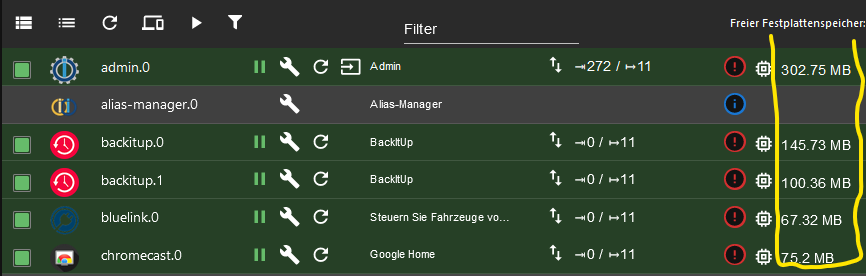
Proxmox und HA ...
Ich schreibe den Code nicht mehr selbst – ich schimpfe mit der KI, bis es funktioniert. -
@kanzler1959 sagte in Aufhängen RPi: Keine SSH, IOBrokerAPI ('lebt' (ping)):
Brauchen Adapter ohne Instanz RAM?
What you see is what you consume (wysiwyc).
@meister-mopper said in Aufhängen RPi: Keine SSH, IOBrokerAPI ('lebt' (ping)):
@kanzler1959 sagte in Aufhängen RPi: Keine SSH, IOBrokerAPI ('lebt' (ping)):
Brauchen Adapter ohne Instanz RAM?
What you see is what you consume (wysiwyc).
Was die Frage nicht (oder mit NEIN) beantwortet: Brauchen Adapter ohne Instanz RAM.
Im Bild sehe ich RAM per Instanz - das ist ja klar.
In C++ zum Beispiel benötigt die Klasse auch kein RAM (solange es Execute In Place ist). Erst durch die Instanziierung (-->Objekt) wird dann RAM benötigt. Da es hier aber ein Linux ist, das vermutlich im komplett ins RAM geladen wird, ist es sicher anders? Dahin geht die Frage. Ich hatte den Eindruck - beim Ausmisten - das es nichts bringt, die Adapter zu löschen?!Raspberry Pi 4 Model B Rev 1.5 (IOBroker, SSD 128G)
Huawei Sun2000 WR & LUNA Speicher
HomeMatic CCU3 (mit allerlei ...)
Diverses (Sockets, Dallas via ESP, Shellys ...)
Visualisierrung via Grafana
Synology NAS
und einige Fritzboxen für die Abdeckung





Hey! Du scheinst an dieser Unterhaltung interessiert zu sein, hast aber noch kein Konto.
Hast du es satt, bei jedem Besuch durch die gleichen Beiträge zu scrollen? Wenn du dich für ein Konto anmeldest, kommst du immer genau dorthin zurück, wo du zuvor warst, und kannst dich über neue Antworten benachrichtigen lassen (entweder per E-Mail oder Push-Benachrichtigung). Du kannst auch Lesezeichen speichern und Beiträge positiv bewerten, um anderen Community-Mitgliedern deine Wertschätzung zu zeigen.
Mit deinem Input könnte dieser Beitrag noch besser werden 💗
Registrieren Anmelden440
Online33.0k
Benutzende83.7k
Themen1.3m
Beiträge