




BackItUp kein WOL an Buffalo NAS LinkStation
-
@thomas-braun
ja schon, den diese NAS lässt sich aus dem Terminal Putty mit dem Befehl "sudo /usr/sbin/etherwake -i eth0 <Mac Adresse>" jederzeit starten.@tok
Die Mac ist aber nicht die IP. -
@tok
Die Mac ist aber nicht die IP.@thomas-braun
ist natürlich richtig - laut DEBUGLog sendet BackItUp ????
In der Konfig ist die entsprechende Mac hinterlegt:
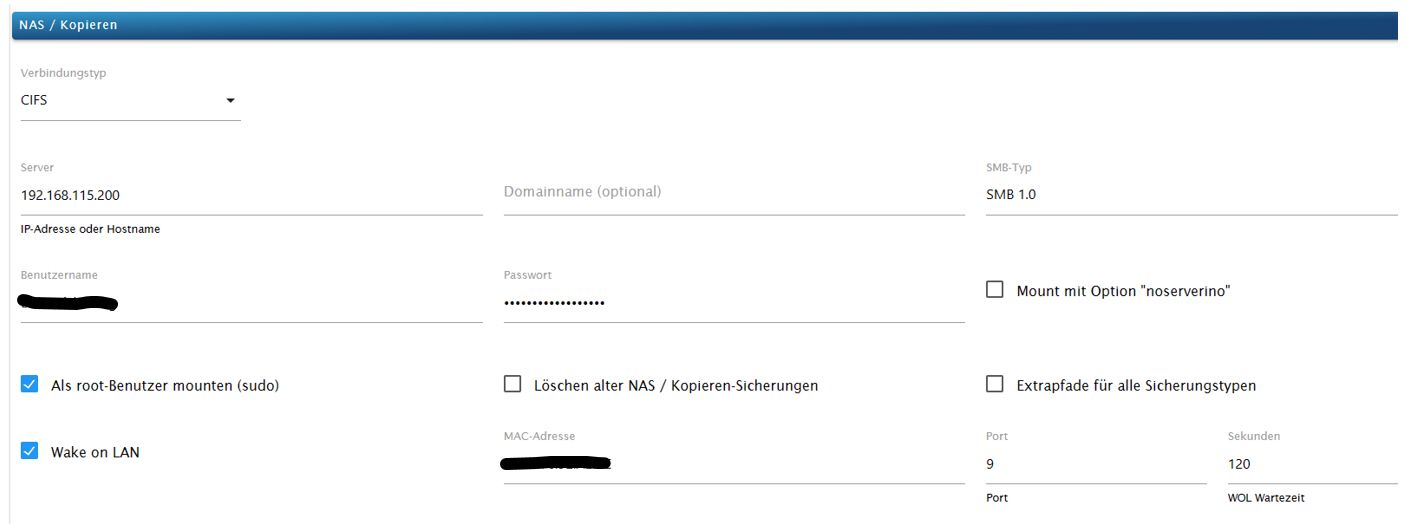
Der Befehl "sudo /usr/sbin/etherwake -i eth0 <Mac Adresse>" sendet definitiv die Mac Adresse.
-
@thomas-braun
ist natürlich richtig - laut DEBUGLog sendet BackItUp ????
In der Konfig ist die entsprechende Mac hinterlegt:
Der Befehl "sudo /usr/sbin/etherwake -i eth0 <Mac Adresse>" sendet definitiv die Mac Adresse.
-
@thomas-braun
ist natürlich richtig - laut DEBUGLog sendet BackItUp ????
In der Konfig ist die entsprechende Mac hinterlegt:
Der Befehl "sudo /usr/sbin/etherwake -i eth0 <Mac Adresse>" sendet definitiv die Mac Adresse.
SMB V1 wird hoffentlich nicht mehr verwendet.
-
ist natürlich richtig - laut DEBUGLog sendet BackItUp ????
das ist kein Debug Log
Stelle die Logstufe bei der Instanz auf DEBUG .
Dann nochmal ... und das Ergebnis hier posten.EDIT:
.
Bitte von unten nach oben lesen:
backitup.0
2023-10-09 19:19:00.381	error	[iobroker] Error: Command failed: sudo mount -t cifs -o username=Datensicherung,password=****,rw,uid=iobroker,gid=iobroker,file_mode=0777,dir_mode=0777 //192.168.115.200/Datensicherung/Raspberry /opt/iobroker/backupsmount error(113): could not connect to 192.168.115.200Unable to find suitable address.

backitup.0
2023-10-09 19:19:00.381	error	[iobroker/mount] mount error(113): could not connect to 192.168.115.200Unable to find suitable address.

backitup.0
2023-10-09 19:19:00.380	error	[iobroker/mount] Error: Command failed: sudo mount -t cifs -o username=Datensicherung,password=****,rw,uid=iobroker,gid=iobroker,file_mode=0777,dir_mode=0777 //192.168.115.200/Datensicherung/Raspberry /opt/iobroker/backups

backitup.0
2023-10-09 19:19:00.380	error	[iobroker/mount] mount error(113): could not connect to 192.168.115.200Unable to find suitable address.

backitup.0
2023-10-09 19:19:00.379	error	[iobroker/mount] [undefined Error: Command failed: sudo mount -t cifs -o username=Datensicherung,password=****,rw,uid=iobroker,gid=iobroker,file_mode=0777,dir_mode=0777 //192.168.115.200/Datensicherung/Raspberry /opt/iobroker/backups

backitup.0
2023-10-09 19:18:54.244	debug	[iobroker/mount] cifs-mount command: "sudo mount -t cifs -o username=Datensicherung,password=****,rw,uid=iobroker,gid=iobroker,file_mode=0777,dir_mode=0777 //192.168.115.200/Datensicherung/Raspberry /opt/iobroker/backups"

backitup.0
2023-10-09 19:18:54.242	debug	[iobroker/mount] first mount attempt with smb option failed. try next mount attempt without smb option ...

backitup.0
2023-10-09 19:18:48.054	debug	[iobroker/mount] cifs-mount command: "sudo mount -t cifs -o username=Datensicherung,password=****,rw,uid=iobroker,gid=iobroker,file_mode=0777,dir_mode=0777,vers=1.0 //192.168.115.200/Datensicherung/Raspberry /opt/iobroker/backups"

backitup.0
2023-10-09 19:18:48.054	debug	[iobroker/mount] noserverino option: false

backitup.0
2023-10-09 19:16:48.053	debug	Backup has started ...

backitup.0
2023-10-09 19:16:48.052	debug	[iobroker/mount] Wake on LAN wait 120 Seconds for NAS!
MOD-EDIT: Code in code-tags gesetzt!
-
Bitte von unten nach oben lesen:
backitup.0
2023-10-09 19:19:00.381	error	[iobroker] Error: Command failed: sudo mount -t cifs -o username=Datensicherung,password=****,rw,uid=iobroker,gid=iobroker,file_mode=0777,dir_mode=0777 //192.168.115.200/Datensicherung/Raspberry /opt/iobroker/backupsmount error(113): could not connect to 192.168.115.200Unable to find suitable address.

backitup.0
2023-10-09 19:19:00.381	error	[iobroker/mount] mount error(113): could not connect to 192.168.115.200Unable to find suitable address.

backitup.0
2023-10-09 19:19:00.380	error	[iobroker/mount] Error: Command failed: sudo mount -t cifs -o username=Datensicherung,password=****,rw,uid=iobroker,gid=iobroker,file_mode=0777,dir_mode=0777 //192.168.115.200/Datensicherung/Raspberry /opt/iobroker/backups

backitup.0
2023-10-09 19:19:00.380	error	[iobroker/mount] mount error(113): could not connect to 192.168.115.200Unable to find suitable address.

backitup.0
2023-10-09 19:19:00.379	error	[iobroker/mount] [undefined Error: Command failed: sudo mount -t cifs -o username=Datensicherung,password=****,rw,uid=iobroker,gid=iobroker,file_mode=0777,dir_mode=0777 //192.168.115.200/Datensicherung/Raspberry /opt/iobroker/backups

backitup.0
2023-10-09 19:18:54.244	debug	[iobroker/mount] cifs-mount command: "sudo mount -t cifs -o username=Datensicherung,password=****,rw,uid=iobroker,gid=iobroker,file_mode=0777,dir_mode=0777 //192.168.115.200/Datensicherung/Raspberry /opt/iobroker/backups"

backitup.0
2023-10-09 19:18:54.242	debug	[iobroker/mount] first mount attempt with smb option failed. try next mount attempt without smb option ...

backitup.0
2023-10-09 19:18:48.054	debug	[iobroker/mount] cifs-mount command: "sudo mount -t cifs -o username=Datensicherung,password=****,rw,uid=iobroker,gid=iobroker,file_mode=0777,dir_mode=0777,vers=1.0 //192.168.115.200/Datensicherung/Raspberry /opt/iobroker/backups"

backitup.0
2023-10-09 19:18:48.054	debug	[iobroker/mount] noserverino option: false

backitup.0
2023-10-09 19:16:48.053	debug	Backup has started ...

backitup.0
2023-10-09 19:16:48.052	debug	[iobroker/mount] Wake on LAN wait 120 Seconds for NAS!
MOD-EDIT: Code in code-tags gesetzt!
@tok sagte in BackItUp kein WOL an Buffalo NAS LinkStation:
Bitte von unten nach oben lesen:
Schau in das 'richtige' Log:
iob logs --watchUnd poste den Text in CodeTags eingebettet.
-
Bitte von unten nach oben lesen:
backitup.0
2023-10-09 19:19:00.381	error	[iobroker] Error: Command failed: sudo mount -t cifs -o username=Datensicherung,password=****,rw,uid=iobroker,gid=iobroker,file_mode=0777,dir_mode=0777 //192.168.115.200/Datensicherung/Raspberry /opt/iobroker/backupsmount error(113): could not connect to 192.168.115.200Unable to find suitable address.

backitup.0
2023-10-09 19:19:00.381	error	[iobroker/mount] mount error(113): could not connect to 192.168.115.200Unable to find suitable address.

backitup.0
2023-10-09 19:19:00.380	error	[iobroker/mount] Error: Command failed: sudo mount -t cifs -o username=Datensicherung,password=****,rw,uid=iobroker,gid=iobroker,file_mode=0777,dir_mode=0777 //192.168.115.200/Datensicherung/Raspberry /opt/iobroker/backups

backitup.0
2023-10-09 19:19:00.380	error	[iobroker/mount] mount error(113): could not connect to 192.168.115.200Unable to find suitable address.

backitup.0
2023-10-09 19:19:00.379	error	[iobroker/mount] [undefined Error: Command failed: sudo mount -t cifs -o username=Datensicherung,password=****,rw,uid=iobroker,gid=iobroker,file_mode=0777,dir_mode=0777 //192.168.115.200/Datensicherung/Raspberry /opt/iobroker/backups

backitup.0
2023-10-09 19:18:54.244	debug	[iobroker/mount] cifs-mount command: "sudo mount -t cifs -o username=Datensicherung,password=****,rw,uid=iobroker,gid=iobroker,file_mode=0777,dir_mode=0777 //192.168.115.200/Datensicherung/Raspberry /opt/iobroker/backups"

backitup.0
2023-10-09 19:18:54.242	debug	[iobroker/mount] first mount attempt with smb option failed. try next mount attempt without smb option ...

backitup.0
2023-10-09 19:18:48.054	debug	[iobroker/mount] cifs-mount command: "sudo mount -t cifs -o username=Datensicherung,password=****,rw,uid=iobroker,gid=iobroker,file_mode=0777,dir_mode=0777,vers=1.0 //192.168.115.200/Datensicherung/Raspberry /opt/iobroker/backups"

backitup.0
2023-10-09 19:18:48.054	debug	[iobroker/mount] noserverino option: false

backitup.0
2023-10-09 19:16:48.053	debug	Backup has started ...

backitup.0
2023-10-09 19:16:48.052	debug	[iobroker/mount] Wake on LAN wait 120 Seconds for NAS!
MOD-EDIT: Code in code-tags gesetzt!
-
Bitte von unten nach oben lesen:
backitup.0
2023-10-09 19:19:00.381	error	[iobroker] Error: Command failed: sudo mount -t cifs -o username=Datensicherung,password=****,rw,uid=iobroker,gid=iobroker,file_mode=0777,dir_mode=0777 //192.168.115.200/Datensicherung/Raspberry /opt/iobroker/backupsmount error(113): could not connect to 192.168.115.200Unable to find suitable address.

backitup.0
2023-10-09 19:19:00.381	error	[iobroker/mount] mount error(113): could not connect to 192.168.115.200Unable to find suitable address.

backitup.0
2023-10-09 19:19:00.380	error	[iobroker/mount] Error: Command failed: sudo mount -t cifs -o username=Datensicherung,password=****,rw,uid=iobroker,gid=iobroker,file_mode=0777,dir_mode=0777 //192.168.115.200/Datensicherung/Raspberry /opt/iobroker/backups

backitup.0
2023-10-09 19:19:00.380	error	[iobroker/mount] mount error(113): could not connect to 192.168.115.200Unable to find suitable address.

backitup.0
2023-10-09 19:19:00.379	error	[iobroker/mount] [undefined Error: Command failed: sudo mount -t cifs -o username=Datensicherung,password=****,rw,uid=iobroker,gid=iobroker,file_mode=0777,dir_mode=0777 //192.168.115.200/Datensicherung/Raspberry /opt/iobroker/backups

backitup.0
2023-10-09 19:18:54.244	debug	[iobroker/mount] cifs-mount command: "sudo mount -t cifs -o username=Datensicherung,password=****,rw,uid=iobroker,gid=iobroker,file_mode=0777,dir_mode=0777 //192.168.115.200/Datensicherung/Raspberry /opt/iobroker/backups"

backitup.0
2023-10-09 19:18:54.242	debug	[iobroker/mount] first mount attempt with smb option failed. try next mount attempt without smb option ...

backitup.0
2023-10-09 19:18:48.054	debug	[iobroker/mount] cifs-mount command: "sudo mount -t cifs -o username=Datensicherung,password=****,rw,uid=iobroker,gid=iobroker,file_mode=0777,dir_mode=0777,vers=1.0 //192.168.115.200/Datensicherung/Raspberry /opt/iobroker/backups"

backitup.0
2023-10-09 19:18:48.054	debug	[iobroker/mount] noserverino option: false

backitup.0
2023-10-09 19:16:48.053	debug	Backup has started ...

backitup.0
2023-10-09 19:16:48.052	debug	[iobroker/mount] Wake on LAN wait 120 Seconds for NAS!
MOD-EDIT: Code in code-tags gesetzt!
@tok sagte in BackItUp kein WOL an Buffalo NAS LinkStation:
192.168.115.200Unable to find suitable address.
Kannst du von ioBroker aus die IP anpingen !?
bzw.
was du nicht geschrieben hast , funktioniert das normale Backup , also NAS dauer an und dann ein Backup ohne die Option WOL -
2023-10-09 19:16:48.052 debug [iobroker/mount] Wake on LAN wait 120 Seconds for NAS!
was davor ist , ist Interessant
und jetzt Logstufe Silly
2023-10-09 19:14:52.022  - info: admin.0 (1017) <== Disconnect system.user.admin from ::ffff:192.168.115.1
2023-10-09 19:16:42.124  - info: admin.0 (1017) ==> Connected system.user.admin from ::ffff:192.168.115.1
2023-10-09 19:16:42.206  - debug: backitup.0 (94212) The local storage check was completed successfully. On the host "raspberrypi" are currently 236370 MB free space available!
2023-10-09 19:16:48.044  - debug: backitup.0 (94212) The local storage check was completed successfully. On the host "raspberrypi" are currently 236370 MB free space available!
2023-10-09 19:16:48.052  - debug: backitup.0 (94212) [iobroker/mount] Wake on LAN wait 120 Seconds for NAS!
2023-10-09 19:16:48.053  - debug: backitup.0 (94212) Backup has started ...
2023-10-09 19:18:48.054  - debug: backitup.0 (94212) [iobroker/mount] noserverino option: false
2023-10-09 19:18:48.054  - debug: backitup.0 (94212) [iobroker/mount] cifs-mount command: "sudo mount -t cifs -o username=Datensicherung,password=****,rw,uid=iobroker,gid=iobroker,file_mode=0777,dir_mode=0777,vers=1.0 //192.168.115.200/Datensicherung/Raspberry /opt/iobroker/backups"
2023-10-09 19:18:54.242  - debug: backitup.0 (94212) [iobroker/mount] first mount attempt with smb option failed. try next mount attempt without smb option ...
2023-10-09 19:18:54.244  - debug: backitup.0 (94212) [iobroker/mount] cifs-mount command: "sudo mount -t cifs -o username=Datensicherung,password=****,rw,uid=iobroker,gid=iobroker,file_mode=0777,dir_mode=0777 //192.168.115.200/Datensicherung/Raspberry /opt/iobroker/backups"
2023-10-09 19:19:00.379  - error: backitup.0 (94212) [iobroker/mount] [undefined Error: Command failed: sudo mount -t cifs -o username=Datensicherung,password=****,rw,uid=iobroker,gid=iobroker,file_mode=0777,dir_mode=0777 //192.168.115.200/Datensicherung/Raspberry /opt/iobroker/backups
2023-10-09 19:19:00.380  - error: backitup.0 (94212) [iobroker/mount] mount error(113): could not connect to 192.168.115.200Unable to find suitable address.
2023-10-09 19:19:00.380  - error: backitup.0 (94212) [iobroker/mount] Error: Command failed: sudo mount -t cifs -o username=Datensicherung,password=****,rw,uid=iobroker,gid=iobroker,file_mode=0777,dir_mode=0777 //192.168.115.200/Datensicherung/Raspberry /opt/iobroker/backups
2023-10-09 19:19:00.381  - error: backitup.0 (94212) [iobroker/mount] mount error(113): could not connect to 192.168.115.200Unable to find suitable address.
2023-10-09 19:19:00.381  - error: backitup.0 (94212) [iobroker] Error: Command failed: sudo mount -t cifs -o username=Datensicherung,password=****,rw,uid=iobroker,gid=iobroker,file_mode=0777,dir_mode=0777 //192.168.115.200/Datensicherung/Raspberry /opt/iobroker/backups
mount error(113): could not connect to 192.168.115.200Unable to find suitable address.
2023-10-09 19:19:18.000  - info: admin.0 (1017) <== Disconnect system.user.admin from ::ffff:192.168.115.1
die MAC Adresse sehe ich hier nicht
-
@tok sagte in BackItUp kein WOL an Buffalo NAS LinkStation:
192.168.115.200Unable to find suitable address.
Kannst du von ioBroker aus die IP anpingen !?
bzw.
was du nicht geschrieben hast , funktioniert das normale Backup , also NAS dauer an und dann ein Backup ohne die Option WOLwenn die NAS "schläft" kann ich sie nicht anpingen - wenn sie über "sudo /usr/sbin/etherwake -i eth0 <Mac Adresse>" läuft schon.
Das normale Backup funktioniert ohne WOL (bei laufender NAS) einwandfrei. -
2023-10-09 19:14:52.022  - info: admin.0 (1017) <== Disconnect system.user.admin from ::ffff:192.168.115.1
2023-10-09 19:16:42.124  - info: admin.0 (1017) ==> Connected system.user.admin from ::ffff:192.168.115.1
2023-10-09 19:16:42.206  - debug: backitup.0 (94212) The local storage check was completed successfully. On the host "raspberrypi" are currently 236370 MB free space available!
2023-10-09 19:16:48.044  - debug: backitup.0 (94212) The local storage check was completed successfully. On the host "raspberrypi" are currently 236370 MB free space available!
2023-10-09 19:16:48.052  - debug: backitup.0 (94212) [iobroker/mount] Wake on LAN wait 120 Seconds for NAS!
2023-10-09 19:16:48.053  - debug: backitup.0 (94212) Backup has started ...
2023-10-09 19:18:48.054  - debug: backitup.0 (94212) [iobroker/mount] noserverino option: false
2023-10-09 19:18:48.054  - debug: backitup.0 (94212) [iobroker/mount] cifs-mount command: "sudo mount -t cifs -o username=Datensicherung,password=****,rw,uid=iobroker,gid=iobroker,file_mode=0777,dir_mode=0777,vers=1.0 //192.168.115.200/Datensicherung/Raspberry /opt/iobroker/backups"
2023-10-09 19:18:54.242  - debug: backitup.0 (94212) [iobroker/mount] first mount attempt with smb option failed. try next mount attempt without smb option ...
2023-10-09 19:18:54.244  - debug: backitup.0 (94212) [iobroker/mount] cifs-mount command: "sudo mount -t cifs -o username=Datensicherung,password=****,rw,uid=iobroker,gid=iobroker,file_mode=0777,dir_mode=0777 //192.168.115.200/Datensicherung/Raspberry /opt/iobroker/backups"
2023-10-09 19:19:00.379  - error: backitup.0 (94212) [iobroker/mount] [undefined Error: Command failed: sudo mount -t cifs -o username=Datensicherung,password=****,rw,uid=iobroker,gid=iobroker,file_mode=0777,dir_mode=0777 //192.168.115.200/Datensicherung/Raspberry /opt/iobroker/backups
2023-10-09 19:19:00.380  - error: backitup.0 (94212) [iobroker/mount] mount error(113): could not connect to 192.168.115.200Unable to find suitable address.
2023-10-09 19:19:00.380  - error: backitup.0 (94212) [iobroker/mount] Error: Command failed: sudo mount -t cifs -o username=Datensicherung,password=****,rw,uid=iobroker,gid=iobroker,file_mode=0777,dir_mode=0777 //192.168.115.200/Datensicherung/Raspberry /opt/iobroker/backups
2023-10-09 19:19:00.381  - error: backitup.0 (94212) [iobroker/mount] mount error(113): could not connect to 192.168.115.200Unable to find suitable address.
2023-10-09 19:19:00.381  - error: backitup.0 (94212) [iobroker] Error: Command failed: sudo mount -t cifs -o username=Datensicherung,password=****,rw,uid=iobroker,gid=iobroker,file_mode=0777,dir_mode=0777 //192.168.115.200/Datensicherung/Raspberry /opt/iobroker/backups
mount error(113): could not connect to 192.168.115.200Unable to find suitable address.
2023-10-09 19:19:18.000  - info: admin.0 (1017) <== Disconnect system.user.admin from ::ffff:192.168.115.1
die MAC Adresse sehe ich hier nicht
@tok sagte in BackItUp kein WOL an Buffalo NAS LinkStation:
die MAC Adresse sehe ich hier nicht
wieso auch?
ich frage mich sowieso schon die ganze Zeit warum du dauernd die MAC Adresse ins Spiel bringst.
kein Support per PN! - Fragen im Forum stellen - Benutzt das Voting rechts unten im Beitrag wenn er euch geholfen hat.
Das Forum freut sich über eine Spende. Benutzt dazu den Spendenbutton oben rechts. Danke!
der Installationsfixer: curl -fsL https://iobroker.net/fix.sh | bash - -
@tok sagte in BackItUp kein WOL an Buffalo NAS LinkStation:
die MAC Adresse sehe ich hier nicht
wieso auch?
ich frage mich sowieso schon die ganze Zeit warum du dauernd die MAC Adresse ins Spiel bringst.
@homoran sagte in BackItUp kein WOL an Buffalo NAS LinkStation:
ich frage mich sowieso schon die ganze Zeit warum du dauernd die MAC Adresse ins Spiel bringst.
Weil das 'magic packet' an die MAC-Adresse gesendet wird, weil der Host ja schläft.
-
@homoran sagte in BackItUp kein WOL an Buffalo NAS LinkStation:
ich frage mich sowieso schon die ganze Zeit warum du dauernd die MAC Adresse ins Spiel bringst.
Weil das 'magic packet' an die MAC-Adresse gesendet wird, weil der Host ja schläft.
ja genau ....
-
@homoran sagte in BackItUp kein WOL an Buffalo NAS LinkStation:
ich frage mich sowieso schon die ganze Zeit warum du dauernd die MAC Adresse ins Spiel bringst.
Weil das 'magic packet' an die MAC-Adresse gesendet wird, weil der Host ja schläft.
@thomas-braun sagte in BackItUp kein WOL an Buffalo NAS LinkStation:
@homoran sagte in BackItUp kein WOL an Buffalo NAS LinkStation:
ich frage mich sowieso schon die ganze Zeit warum du dauernd die MAC Adresse ins Spiel bringst.
Weil das 'magic packet' an die MAC-Adresse gesendet wird, weil der Host ja schläft.
macht das nicht der Router?
-
@thomas-braun sagte in BackItUp kein WOL an Buffalo NAS LinkStation:
@homoran sagte in BackItUp kein WOL an Buffalo NAS LinkStation:
ich frage mich sowieso schon die ganze Zeit warum du dauernd die MAC Adresse ins Spiel bringst.
Weil das 'magic packet' an die MAC-Adresse gesendet wird, weil der Host ja schläft.
macht das nicht der Router?
@homoran said in BackItUp kein WOL an Buffalo NAS LinkStation:
@thomas-braun sagte in BackItUp kein WOL an Buffalo NAS LinkStation:
@homoran sagte in BackItUp kein WOL an Buffalo NAS LinkStation:
ich frage mich sowieso schon die ganze Zeit warum du dauernd die MAC Adresse ins Spiel bringst.
Weil das 'magic packet' an die MAC-Adresse gesendet wird, weil der Host ja schläft.
macht das nicht der Router?
Als Router wird eine FritzBox 7590 verwendet
-
@homoran said in BackItUp kein WOL an Buffalo NAS LinkStation:
@thomas-braun sagte in BackItUp kein WOL an Buffalo NAS LinkStation:
@homoran sagte in BackItUp kein WOL an Buffalo NAS LinkStation:
ich frage mich sowieso schon die ganze Zeit warum du dauernd die MAC Adresse ins Spiel bringst.
Weil das 'magic packet' an die MAC-Adresse gesendet wird, weil der Host ja schläft.
macht das nicht der Router?
Als Router wird eine FritzBox 7590 verwendet
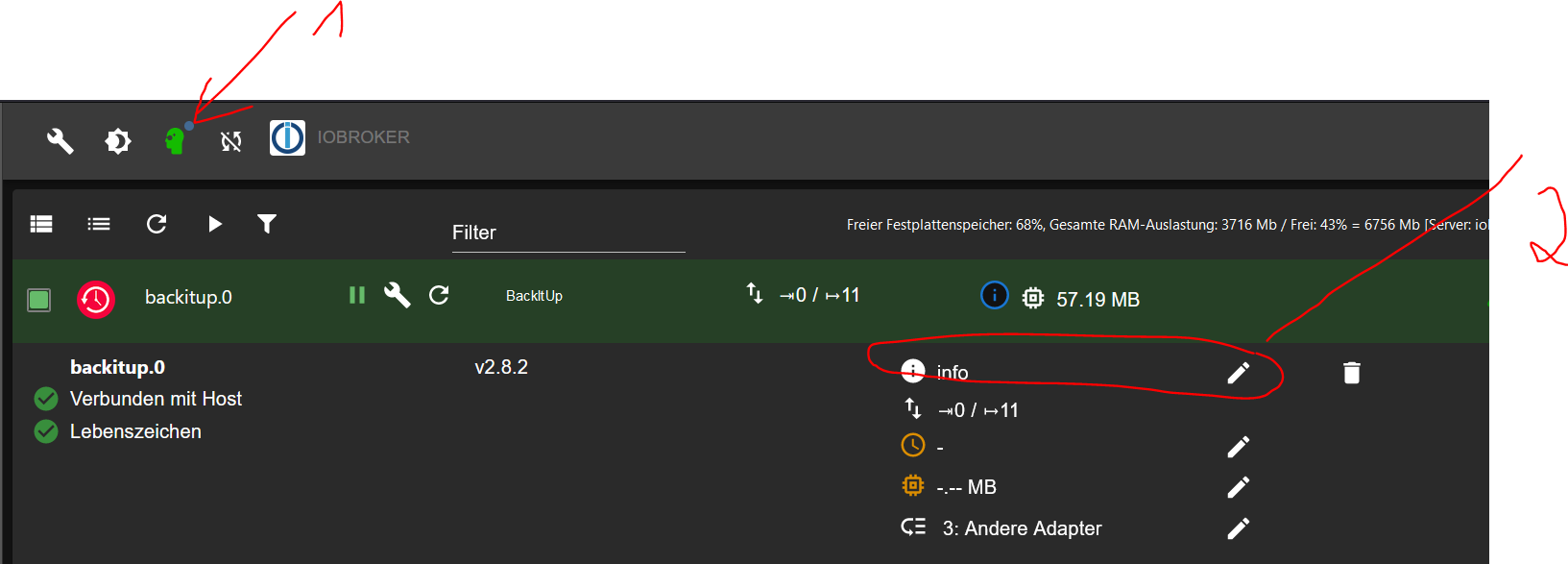
Keine Ahnung ob das noch relevant ist:
-
@homoran said in BackItUp kein WOL an Buffalo NAS LinkStation:
@thomas-braun sagte in BackItUp kein WOL an Buffalo NAS LinkStation:
@homoran sagte in BackItUp kein WOL an Buffalo NAS LinkStation:
ich frage mich sowieso schon die ganze Zeit warum du dauernd die MAC Adresse ins Spiel bringst.
Weil das 'magic packet' an die MAC-Adresse gesendet wird, weil der Host ja schläft.
macht das nicht der Router?
Als Router wird eine FritzBox 7590 verwendet
Kannst du das mal testen
sudo -H -u iobroker /usr/sbin/etherwake -i eth0 <Mac Adresse>@Thomas-Braun
Welche Rechte braucht dann/usr/sbin/etherwake -i eth0
Synology 918+ 16GB - ioBroker in Docker v9 , VISO auf Trekstor Primebook C13 13,3" , Hikvision Domkameras mit Surveillance Station .. CCU RaspberryMatic in Synology VM .. Zigbee CC2538+CC2592 .. Sonoff .. KNX .. Modbus ..
-
Kannst du das mal testen
sudo -H -u iobroker /usr/sbin/etherwake -i eth0 <Mac Adresse>@Thomas-Braun
Welche Rechte braucht dann/usr/sbin/etherwake -i eth0
@glasfaser sagte in BackItUp kein WOL an Buffalo NAS LinkStation:
@Thomas-Braun
Welche Rechte braucht dann/usr/sbin/etherwake -i eth0
Keine Ahnung, denn:
echad@chet:/opt/iobroker $ type -p etherwake echad@chet:/opt/iobroker $ -
Kannst du das mal testen
sudo -H -u iobroker /usr/sbin/etherwake -i eth0 <Mac Adresse>@Thomas-Braun
Welche Rechte braucht dann/usr/sbin/etherwake -i eth0
@glasfaser said in BackItUp kein WOL an Buffalo NAS LinkStation:
Kannst du das mal testen
sudo -H -u iobroker /usr/sbin/etherwake -i eth0 <Mac Adresse>@Thomas-Braun
Welche Rechte braucht dann/usr/sbin/etherwake -i eth0

-
@glasfaser sagte in BackItUp kein WOL an Buffalo NAS LinkStation:
@Thomas-Braun
Welche Rechte braucht dann/usr/sbin/etherwake -i eth0
Keine Ahnung, denn:
echad@chet:/opt/iobroker $ type -p etherwake echad@chet:/opt/iobroker $@thomas-braun sagte in BackItUp kein WOL an Buffalo NAS LinkStation:
etherwake
Das ist mit diesem NPM Paket !?
Synology 918+ 16GB - ioBroker in Docker v9 , VISO auf Trekstor Primebook C13 13,3" , Hikvision Domkameras mit Surveillance Station .. CCU RaspberryMatic in Synology VM .. Zigbee CC2538+CC2592 .. Sonoff .. KNX .. Modbus ..


Hey! Du scheinst an dieser Unterhaltung interessiert zu sein, hast aber noch kein Konto.
Hast du es satt, bei jedem Besuch durch die gleichen Beiträge zu scrollen? Wenn du dich für ein Konto anmeldest, kommst du immer genau dorthin zurück, wo du zuvor warst, und kannst dich über neue Antworten benachrichtigen lassen (entweder per E-Mail oder Push-Benachrichtigung). Du kannst auch Lesezeichen speichern und Beiträge positiv bewerten, um anderen Community-Mitgliedern deine Wertschätzung zu zeigen.
Mit deinem Input könnte dieser Beitrag noch besser werden 💗
Registrieren Anmelden289
Online33.0k
Benutzer83.6k
Themen1.3m
Beiträge