




Performance Probleme durch Shelly Adapter?
-
@djmarc75 said in Performance Probleme durch Shelly Adapter?:
ich glaube immernoch an diesen dubiosen JDownloader2-Container - laut google ist das ein reines Buggy, will das aber nicht nachstellen
Habe den JDownloader Container beendet um 10:55
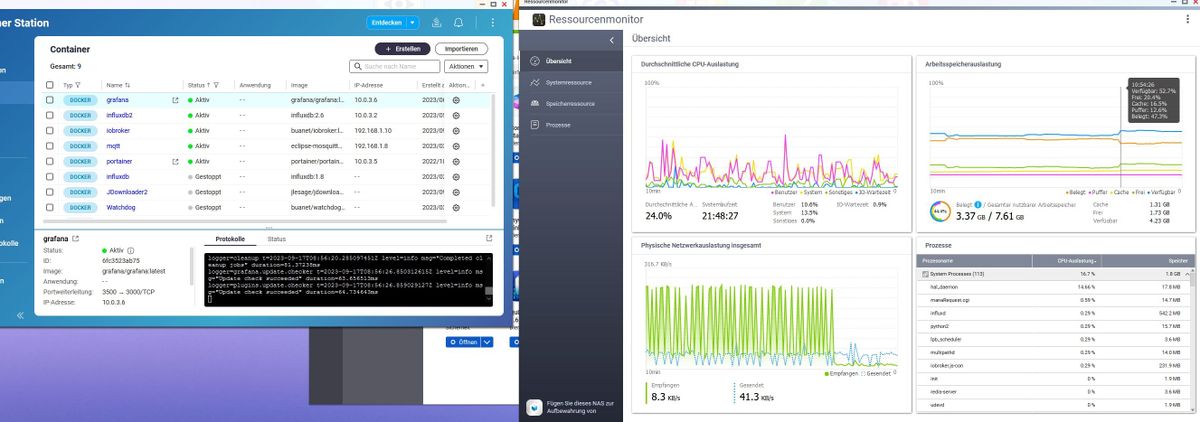
topca. 5 Minunten später:
top - 10:59:52 up 21:51, 0 users, load average: 2,94, 3,58, 4,18 Tasks: 6 total, 1 running, 5 sleeping, 0 stopped, 0 zombie %Cpu(s): 27,0 us, 23,3 sy, 3,2 ni, 46,4 id, 0,0 wa, 0,0 hi, 0,2 si, 0,0 st MiB Mem : 7792,2 total, 1840,3 free, 3137,8 used, 2814,1 buff/cache MiB Swap: 23447,2 total, 22914,9 free, 532,3 used. 3856,3 avail Mem PID USER PR NI VIRT RES SHR S %CPU %MEM TIME+ COMMAND 198 iobroker 20 0 10,7g 90472 46904 S 1,0 1,1 0:03.12 io.backitup.0 142 iobroker 20 0 10,9g 238508 41744 S 0,3 3,0 0:19.44 iobroker.js-con 1 root 20 0 7372 3512 3172 S 0,0 0,0 0:00.07 bash 163 iobroker 20 0 992388 138332 46892 S 0,0 1,7 0:05.09 io.admin.0 836 root 20 0 7504 3992 3472 S 0,0 0,1 0:00.03 bash 843 root 20 0 10308 3724 3248 R 0,0 0,0 0:00.23 top@schtallone sagte in Performance Probleme durch Shelly Adapter?:
ca. 5 Minunten später:
@schtallone sagte in Performance Probleme durch Shelly Adapter?:
load average: 2,94, 3,58, 4,18
geht die load lansam runter ( 1Minute 2.9, 5Minuten 3.5 und über 10 Minuten noch 4.2)
-
@crunchip sagte in Performance Probleme durch Shelly Adapter?:
@schtallone da kann doch etwas nicht stimmen
bei 2 Adapter einen Ram Verbrauch von 3429,6 und nen load von fast 4
dazu kommt, dass auch SWAP genutzt wurde
warum ist der swap überhaupt so großzügig eingestellt
wenn die Kiste nur 8GB Ram Gesamt hat, macht es auch keinen Sinn, dem einzelnen Container alles zur Verfügung zu stellenLeute, ihr habt da aus meiner Sicht einen Verständnisfehler. Wenn man innerhalb eines Containers "top" aufruft, bekommt man immer die Daten des Hosts.
Es ist halt ein Container und keine VM.@marc-berg sagte in Performance Probleme durch Shelly Adapter?:
Es ist halt ein Container
mit so was dubiosem arbeite ich doch gar nicht. Daher muss man mir das auch sagen
-
@crunchip sagte in Performance Probleme durch Shelly Adapter?:
@schtallone da kann doch etwas nicht stimmen
bei 2 Adapter einen Ram Verbrauch von 3429,6 und nen load von fast 4
dazu kommt, dass auch SWAP genutzt wurde
warum ist der swap überhaupt so großzügig eingestellt
wenn die Kiste nur 8GB Ram Gesamt hat, macht es auch keinen Sinn, dem einzelnen Container alles zur Verfügung zu stellenLeute, ihr habt da aus meiner Sicht einen Verständnisfehler. Wenn man innerhalb eines Containers "top" aufruft, bekommt man immer die Daten des Hosts.
Es ist halt ein Container und keine VM.@marc-berg sagte in Performance Probleme durch Shelly Adapter?:
Wenn man innerhalb eines Containers "top" aufruft, bekommt man immer die Ergebnisse des Hosts.
das wusste ich nicht,
wenn ich in Proxmox einen LXC aufrufe und mit TOP abfrage, bekomm ich die Daten vom LXC und nicht vom Host
aber wie bereits geschrieben, ich hab kein NAS und auch noch nie etwas damit zu tun gehabt -
@schtallone sagte in Performance Probleme durch Shelly Adapter?:
ca. 5 Minunten später:
@schtallone sagte in Performance Probleme durch Shelly Adapter?:
load average: 2,94, 3,58, 4,18
geht die load lansam runter ( 1Minute 2.9, 5Minuten 3.5 und über 10 Minuten noch 4.2)
@homoran das schwankt aber auch wieder richtung 4-5
-
@schtallone da kann doch etwas nicht stimmen
- bei 2 Adapter einen Ram Verbrauch von 3429,6 und nen load von fast 4
- dazu kommt, dass auch SWAP genutzt wurde
- warum ist der swap überhaupt so großzügig eingestellt
- wenn die Kiste nur 8GB Ram Gesamt hat, macht es auch keinen Sinn, dem einzelnen Container alles zur Verfügung zu stellen
@crunchip sagte in Performance Probleme durch Shelly Adapter?:
wenn die Kiste nur 8GB Ram Gesamt hat, macht es auch keinen Sinn, dem einzelnen Container alles zur Verfügung zu stellen
Moin,
das verhält sich so, dass Docker als Zwischenschicht auf dem NAS Betriebssystem läuft, Docker bekommt erst einmal die ganzen Ressourcen zu sehen, man kann dann aber beim Erstellen, festlegen, ob der Container alles sieht oder ob die Ressourcen eingeschränkt werden, auch ob der Container privilegiert / unprivilegiert erstellt wird.
Auf meiner Syno, laufen die alle ohne Beschränkung, das hat ja eigentlich den Vorteil, da dynamisch, bei Ressourcenknappheit, umverteilt werden kann.VG
Bernd -
@schtallone sagte in Performance Probleme durch Shelly Adapter?:
bitte einmal kurz "SWAP" erläutern... DANKE
swap ist der Notfallüberlauf für ein nicht ausreichendes RAM.
dann wird überschüssiges auf die Festplatte ausgelagert und immer langsam hin und her kopiert, anstelle im schnellen RAM verarbeitet zu werden@homoran said in Performance Probleme durch Shelly Adapter?:
@schtallone sagte in Performance Probleme durch Shelly Adapter?:
bitte einmal kurz "SWAP" erläutern... DANKE
swap ist der Notfallüberlauf für ein nicht ausreichendes RAM.
dann wird überschüssiges auf die Festplatte ausgelagert und immer langsam hin und her kopiert, anstelle im schnellen RAM verarbeitet zu werdenDanke für die Erläuterung. ICh lasse gerade eine Speicher(RAM)-Bereinigung auf dem NAS laufen, anschhließend berichte ich wieder "top"
Hier "top":
top - 11:14:42 up 22:05, 0 users, load average: 4,64, 4,72, 4,74 Tasks: 6 total, 1 running, 5 sleeping, 0 stopped, 0 zombie %Cpu(s): 34,1 us, 35,2 sy, 2,5 ni, 27,9 id, 0,0 wa, 0,0 hi, 0,3 si, 0,0 st MiB Mem : 7792,2 total, 2801,2 free, 3285,9 used, 1705,1 buff/cache MiB Swap: 23447,2 total, 23447,2 free, 0,0 used. 3565,9 avail Mem PID USER PR NI VIRT RES SHR S %CPU %MEM TIME+ COMMAND 142 iobroker 20 0 10,9g 239280 41744 S 1,3 3,0 0:25.58 iobroker.js-con 1 root 20 0 7372 3512 3172 S 0,0 0,0 0:00.07 bash 163 iobroker 20 0 992388 139368 46892 S 0,0 1,7 0:05.69 io.admin.0 198 iobroker 20 0 10,7g 90384 46904 S 0,0 1,1 0:03.54 io.backitup.0 836 root 20 0 7504 3992 3472 S 0,0 0,1 0:00.03 bash 843 root 20 0 10308 3724 3248 R 0,0 0,0 0:00.51 top -
@diamand2k22
Guten morgen,ich werde dies so machen. Will ja eh heute morgen alles an Adaptern stoppen und die Performance beobachten.
Ja ich hatte den selber Fehler mit dem Mqqt Präfix, das hat mein ganzes System lahm gelegt. Mach es mal so wie ich geschrieben habe!
Gruß
-
Ja ich hatte den selber Fehler mit dem Mqqt Präfix, das hat mein ganzes System lahm gelegt. Mach es mal so wie ich geschrieben habe!
Gruß
@diamand2k22 said in Performance Probleme durch Shelly Adapter?:
Ja ich hatte den selber Fehler mit dem Mqqt Präfix, das hat mein ganzes System lahm gelegt. Mach es mal so wie ich geschrieben habe!
Gruß
Habe den Adapter (in V. 5.3.2) wieder am laufen, alle Shellys sind da und online. Alle Aliase sind auch ok. Ich berichte nach 10 Minuten...
-
@crunchip
Hallo,bitte einmal kurz "SWAP" erläutern... DANKE
@schtallone sagte in Performance Probleme durch Shelly Adapter?:
bitte einmal kurz "SWAP" erläutern... DANKE
Moin,
es gibt vereinfacht gesagt, verschiedene Arten von Speicher
- Memory
- SSD/HDD
Beim Aufsetzen eines Rechners, kann man angeben, ob ein gewisser Anteil, entweder aus dem Memory oder auf der SSD/HDD für den sogenannten
Auslagerungsspeicherverwendet werden soll. DieserAuslagerungsspeicherwar/ist in manchen Situationen wichtig, um das System am Leben zu halten, gerade wenn wenig Speicher vorhanden ist. Sollte es einmal zu einem Engpass kommen, dann werden Prozesse, die gerade nicht gebraucht werden, ausgelagert. Kommt der Prozess aber wieder nach oben, dann muss er erst wieder aus demAuslagerungsspeicherins Memory kopiert werden, das verbraucht Zeit und CPU.
Es war ein gewisser Auslagerungsspeicher auch wichtig, wenn man den Rechner schlafen legen wollte, da gibt es zum einenSuspend to RAModerSuspend to Diskdafür wurde dann einSWAPauf Disk angelegt, wo ein Memory-Abbild beim Herunterfahren auf die Platte gelegt wurde, das beim Starten, dann schneller wieder gestartet war als komplett zu Booten.Mal ganz allgemein und in meinen Worten, da gibt es aber so viel im WWW, da solltest Du mal Zeit investieren und selbst lesen.
VG
Bernd -
@schtallone sagte in Performance Probleme durch Shelly Adapter?:
bitte einmal kurz "SWAP" erläutern... DANKE
Moin,
es gibt vereinfacht gesagt, verschiedene Arten von Speicher
- Memory
- SSD/HDD
Beim Aufsetzen eines Rechners, kann man angeben, ob ein gewisser Anteil, entweder aus dem Memory oder auf der SSD/HDD für den sogenannten
Auslagerungsspeicherverwendet werden soll. DieserAuslagerungsspeicherwar/ist in manchen Situationen wichtig, um das System am Leben zu halten, gerade wenn wenig Speicher vorhanden ist. Sollte es einmal zu einem Engpass kommen, dann werden Prozesse, die gerade nicht gebraucht werden, ausgelagert. Kommt der Prozess aber wieder nach oben, dann muss er erst wieder aus demAuslagerungsspeicherins Memory kopiert werden, das verbraucht Zeit und CPU.
Es war ein gewisser Auslagerungsspeicher auch wichtig, wenn man den Rechner schlafen legen wollte, da gibt es zum einenSuspend to RAModerSuspend to Diskdafür wurde dann einSWAPauf Disk angelegt, wo ein Memory-Abbild beim Herunterfahren auf die Platte gelegt wurde, das beim Starten, dann schneller wieder gestartet war als komplett zu Booten.Mal ganz allgemein und in meinen Worten, da gibt es aber so viel im WWW, da solltest Du mal Zeit investieren und selbst lesen.
VG
Bernd@dp20eic
Danke dafür. Soweit verstanden. Ich habe keine Einstellung auf die schnelle im NAS gefunden, dies zu begrenzen oder ähnliches. Aber die vorher benannte Speicherbereichnigung hat den SWAP geleert. -
@diamand2k22 said in Performance Probleme durch Shelly Adapter?:
Ja ich hatte den selber Fehler mit dem Mqqt Präfix, das hat mein ganzes System lahm gelegt. Mach es mal so wie ich geschrieben habe!
Gruß
Habe den Adapter (in V. 5.3.2) wieder am laufen, alle Shellys sind da und online. Alle Aliase sind auch ok. Ich berichte nach 10 Minuten...
@schtallone said in Performance Probleme durch Shelly Adapter?:
@diamand2k22 said in Performance Probleme durch Shelly Adapter?:
Ja ich hatte den selber Fehler mit dem Mqqt Präfix, das hat mein ganzes System lahm gelegt. Mach es mal so wie ich geschrieben habe!
Gruß
Habe den Adapter (in V. 5.3.2) wieder am laufen, alle Shellys sind da und online. Alle Aliase sind auch ok. Ich berichte nach 10 Minuten...
top - 11:38:51 up 22:30,  0 users,  load average: 3,95, 4,01, 4,15
Tasks:  10 total,   1 running,   9 sleeping,   0 stopped,   0 zombie
%Cpu(s): 33,6 us, 30,6 sy,  1,7 ni, 34,0 id,  0,0 wa,  0,0 hi,  0,2 si,  0,0 st
MiB Mem :   7792,2 total,   3109,9 free,   3531,4 used,   1150,8 buff/cache
MiB Swap:  23447,2 total,  23447,2 free,      0,0 used.   3392,0 avail Mem

  PID USER      PR  NI    VIRT    RES    SHR S  %CPU  %MEM     TIME+ COMMAND                                                                                                                                                                                                                                                                            2644 iobroker  20   0  712300  79676   8656 S   2,3   1,0   0:30.25 io.shelly.0                                                                                                                                                                                                                                                                         142 iobroker  20   0   11,0g 229816  10096 S   1,3   2,9   1:09.76 iobroker.js-con                                                                                                                                                                                                                                                                     198 iobroker  20   0   10,7g  52016   8016 S   0,3   0,7   0:04.17 io.backitup.0                                                                                                                                                                                                                                                                         1 root      20   0    7372    732    392 S   0,0   0,0   0:00.07 bash                                                                                                                                                                                                                                                                                163 iobroker  20   0 1038376 137704  12920 S   0,0   1,7   0:13.57 io.admin.0
  836 root      20   0    7504    920    400 S   0,0   0,0   0:00.03 bash
  843 root      20   0   10308    948    472 R   0,0   0,0   0:01.06 top
 2503 root      20   0    7504    824    380 S   0,0   0,0   0:00.04 bash
 2509 root      20   0    7240    564    332 S   0,0   0,0   0:00.00 iob
 2510 iobroker  20   0  921676  35672   7864 S   0,0   0,4   0:01.67 node
2023-09-17 11:25:20.498 - info: host.iobroker "system.adapter.shelly.0" enabled 2023-09-17 11:25:20.806 - info: host.iobroker instance system.adapter.shelly.0 started with pid 2644 2023-09-17 11:25:24.926 - info: shelly.0 (2644) starting. Version 5.3.2 in /opt/iobroker/node_modules/iobroker.shelly, node: v18.17.1, js-controller: 5.0.12 2023-09-17 11:25:24.994 - info: shelly.0 (2644) Starting in MQTT mode. Listening on 0.0.0.0:1882 2023-09-17 11:25:26.746 - info: shelly.0 (2644) [MQTT] Device 192.168.1.62 (shellyplus2pm / shellyplus2pm-b8d61a8b94fc / shellyplus2pm#b8d61a8b94fc#1) connected! Polltime set to 15 sec. 2023-09-17 11:25:30.584 - info: shelly.0 (2644) [MQTT] Device 192.168.1.16 (shellyplus1pm / shellyplus1pm-a8032abc230c / shellyplus1pm#a8032abc230c#1) connected! Polltime set to 15 sec. 2023-09-17 11:25:41.763 - info: shelly.0 (2644) [MQTT] Device 192.168.1.18 (shellyplus1pm / shellyplus1pm-a8032ab96370 / shellyplus1pm#a8032ab96370#1) connected! Polltime set to 15 sec. 2023-09-17 11:25:42.276 - info: shelly.0 (2644) [MQTT] Device 192.168.1.27 (shellyplus1 / shellyplus1-441793a820f4 / shellyplus1#441793a820f4#1) connected! Polltime set to 15 sec. 2023-09-17 11:25:43.629 - info: shelly.0 (2644) [MQTT] Device 192.168.1.50 (shellyplus2pm / shellyplus2pm-485519a2a5d4 / shellyplus2pm#485519a2a5d4#1) connected! Polltime set to 15 sec. 2023-09-17 11:25:45.802 - info: shelly.0 (2644) [MQTT] Device 192.168.1.56 (shellyplus2pm / shellyplus2pm-5443b23e5f74 / shellyplus2pm#5443b23e5f74#1) connected! Polltime set to 15 sec. 2023-09-17 11:25:47.014 - info: shelly.0 (2644) [MQTT] Device 192.168.1.17 (shellyplus1pm / shellyplus1pm-a8032ab96980 / shellyplus1pm#a8032ab96980#1) connected! Polltime set to 15 sec. 2023-09-17 11:25:47.718 - info: shelly.0 (2644) [MQTT] Device 192.168.1.52 (shellyplus2pm / shellyplus2pm-5443b23ecce4 / shellyplus2pm#5443b23ecce4#1) connected! Polltime set to 15 sec. 2023-09-17 11:25:48.160 - info: shelly.0 (2644) [MQTT] Device 192.168.1.49 (shellyplusi4 / shellyplusi4-c049ef89b85c / shellyplusi4#c049ef89b85c#1) connected! Polltime set to 15 sec. 2023-09-17 11:25:49.989 - info: shelly.0 (2644) [MQTT] Device 192.168.1.12 (shellyplus1pm / shellyplus1pm-7c87ce65d970 / shellyplus1pm#7c87ce65d970#1) connected! Polltime set to 15 sec. 2023-09-17 11:25:50.030 - info: shelly.0 (2644) [MQTT] Device 192.168.1.26 (shellyplus1 / shellyplus1-441793ab9088 / shellyplus1#441793ab9088#1) connected! Polltime set to 15 sec. 2023-09-17 11:25:50.572 - info: shelly.0 (2644) [MQTT] Device 192.168.1.15 (shellyplus1pm / shellyplus1pm-3c610579df44 / shellyplus1pm#3c610579df44#1) connected! Polltime set to 15 sec. 2023-09-17 11:25:56.423 - info: shelly.0 (2644) [MQTT] Device 192.168.1.14 (shellyplus1pm / shellyplus1pm-7c87ce65d794 / shellyplus1pm#7c87ce65d794#1) connected! Polltime set to 15 sec. 2023-09-17 11:26:00.854 - info: shelly.0 (2644) [MQTT] Device 192.168.1.53 (shellyplus2pm / shellyplus2pm-b8d61a863524 / shellyplus2pm#b8d61a863524#1) connected! Polltime set to 15 sec. 2023-09-17 11:26:01.275 - info: shelly.0 (2644) [MQTT] Device 192.168.1.19 (shellyplug-s / shellyplug-s-4022D8897556 / SHPLG-S#4022D8897556#1) connected! Polltime set to 15 sec. 2023-09-17 11:26:04.593 - info: shelly.0 (2644) [MQTT] Device 192.168.1.51 (shellyplus2pm / shellyplus2pm-441793acae2c / shellyplus2pm#441793acae2c#1) connected! Polltime set to 15 sec. 2023-09-17 11:26:05.722 - info: shelly.0 (2644) [MQTT] Device 192.168.1.59 (shellyplus2pm / shellyplus2pm-5443b23d6114 / shellyplus2pm#5443b23d6114#1) connected! Polltime set to 15 sec. 2023-09-17 11:26:05.894 - info: shelly.0 (2644) [MQTT] Device 192.168.1.60 (shellyplus2pm / shellyplus2pm-5443b23e1a90 / shellyplus2pm#5443b23e1a90#1) connected! Polltime set to 15 sec. 2023-09-17 11:26:07.658 - info: shelly.0 (2644) [MQTT] Device 192.168.1.63 (shellyplus2pm / shellyplus2pm-4022d8da969c / shellyplus2pm#4022d8da969c#1) connected! Polltime set to 15 sec. 2023-09-17 11:26:07.673 - info: shelly.0 (2644) [MQTT] Device 192.168.1.55 (shellyplus2pm / shellyplus2pm-4022d8dbe474 / shellyplus2pm#4022d8dbe474#1) connected! Polltime set to 15 sec. 2023-09-17 11:26:09.633 - info: shelly.0 (2644) [MQTT] Device 192.168.1.58 (shellyplus2pm / shellyplus2pm-b8d61a8abb7c / shellyplus2pm#b8d61a8abb7c#1) connected! Polltime set to 15 sec. 2023-09-17 11:26:10.093 - info: shelly.0 (2644) [MQTT] Device 192.168.1.20 (shellyplug-s / shellyplug-s-4022D8897200 / SHPLG-S#4022D8897200#1) connected! Polltime set to 15 sec. 2023-09-17 11:26:12.710 - info: shelly.0 (2644) [MQTT] Device 192.168.1.57 (shellyplus2pm / shellyplus2pm-b8d61a876248 / shellyplus2pm#b8d61a876248#1) connected! Polltime set to 15 sec. 2023-09-17 11:26:14.130 - info: shelly.0 (2644) [MQTT] Device 192.168.1.22 (shellyplus1pm / shellyplus1pm-a8032ab94e10 / shellyplus1pm#a8032ab94e10#1) connected! Polltime set to 15 sec. 2023-09-17 11:26:15.531 - info: shelly.0 (2644) [MQTT] Device 192.168.1.54 (shellyplus2pm / shellyplus2pm-b8d61a8bf730 / shellyplus2pm#b8d61a8bf730#1) connected! Polltime set to 15 sec. 2023-09-17 11:26:19.453 - info: shelly.0 (2644) [MQTT] Device 192.168.1.61 (shellyplus2pm / shellyplus2pm-5443b23fd3dc / shellyplus2pm#5443b23fd3dc#1) connected! Polltime set to 15 sec. 2023-09-17 11:26:19.515 - info: shelly.0 (2644) [MQTT] Device 192.168.1.13 (shellyplus1pm / shellyplus1pm-3c610579bd34 / shellyplus1pm#3c610579bd34#1) connected! Polltime set to 15 sec. 2023-09-17 11:26:22.667 - info: shelly.0 (2644) [MQTT] Device 192.168.1.23 (shellyplus1pm / shellyplus1pm-4855199a5d7c / shellyplus1pm#4855199a5d7c#1) connected! Polltime set to 15 sec.SEHR ruhig im log....
-
@dp20eic
Danke dafür. Soweit verstanden. Ich habe keine Einstellung auf die schnelle im NAS gefunden, dies zu begrenzen oder ähnliches. Aber die vorher benannte Speicherbereichnigung hat den SWAP geleert.@schtallone sagte in Performance Probleme durch Shelly Adapter?:
benannte Speicherbereichnigung hat den SWAP geleert.
Moin,
mal was anderes, ist die QNAP denn auf dem neusten Stand, alle Updates von QNAP eingespielt und auch sonstige Applikationen, auf dem NAS, sind aktuell?
VG
Bernd -
@schtallone said in Performance Probleme durch Shelly Adapter?:
@diamand2k22 said in Performance Probleme durch Shelly Adapter?:
Ja ich hatte den selber Fehler mit dem Mqqt Präfix, das hat mein ganzes System lahm gelegt. Mach es mal so wie ich geschrieben habe!
Gruß
Habe den Adapter (in V. 5.3.2) wieder am laufen, alle Shellys sind da und online. Alle Aliase sind auch ok. Ich berichte nach 10 Minuten...
top - 11:38:51 up 22:30,  0 users,  load average: 3,95, 4,01, 4,15
Tasks:  10 total,   1 running,   9 sleeping,   0 stopped,   0 zombie
%Cpu(s): 33,6 us, 30,6 sy,  1,7 ni, 34,0 id,  0,0 wa,  0,0 hi,  0,2 si,  0,0 st
MiB Mem :   7792,2 total,   3109,9 free,   3531,4 used,   1150,8 buff/cache
MiB Swap:  23447,2 total,  23447,2 free,      0,0 used.   3392,0 avail Mem

  PID USER      PR  NI    VIRT    RES    SHR S  %CPU  %MEM     TIME+ COMMAND                                                                                                                                                                                                                                                                            2644 iobroker  20   0  712300  79676   8656 S   2,3   1,0   0:30.25 io.shelly.0                                                                                                                                                                                                                                                                         142 iobroker  20   0   11,0g 229816  10096 S   1,3   2,9   1:09.76 iobroker.js-con                                                                                                                                                                                                                                                                     198 iobroker  20   0   10,7g  52016   8016 S   0,3   0,7   0:04.17 io.backitup.0                                                                                                                                                                                                                                                                         1 root      20   0    7372    732    392 S   0,0   0,0   0:00.07 bash                                                                                                                                                                                                                                                                                163 iobroker  20   0 1038376 137704  12920 S   0,0   1,7   0:13.57 io.admin.0
  836 root      20   0    7504    920    400 S   0,0   0,0   0:00.03 bash
  843 root      20   0   10308    948    472 R   0,0   0,0   0:01.06 top
 2503 root      20   0    7504    824    380 S   0,0   0,0   0:00.04 bash
 2509 root      20   0    7240    564    332 S   0,0   0,0   0:00.00 iob
 2510 iobroker  20   0  921676  35672   7864 S   0,0   0,4   0:01.67 node
2023-09-17 11:25:20.498 - info: host.iobroker "system.adapter.shelly.0" enabled 2023-09-17 11:25:20.806 - info: host.iobroker instance system.adapter.shelly.0 started with pid 2644 2023-09-17 11:25:24.926 - info: shelly.0 (2644) starting. Version 5.3.2 in /opt/iobroker/node_modules/iobroker.shelly, node: v18.17.1, js-controller: 5.0.12 2023-09-17 11:25:24.994 - info: shelly.0 (2644) Starting in MQTT mode. Listening on 0.0.0.0:1882 2023-09-17 11:25:26.746 - info: shelly.0 (2644) [MQTT] Device 192.168.1.62 (shellyplus2pm / shellyplus2pm-b8d61a8b94fc / shellyplus2pm#b8d61a8b94fc#1) connected! Polltime set to 15 sec. 2023-09-17 11:25:30.584 - info: shelly.0 (2644) [MQTT] Device 192.168.1.16 (shellyplus1pm / shellyplus1pm-a8032abc230c / shellyplus1pm#a8032abc230c#1) connected! Polltime set to 15 sec. 2023-09-17 11:25:41.763 - info: shelly.0 (2644) [MQTT] Device 192.168.1.18 (shellyplus1pm / shellyplus1pm-a8032ab96370 / shellyplus1pm#a8032ab96370#1) connected! Polltime set to 15 sec. 2023-09-17 11:25:42.276 - info: shelly.0 (2644) [MQTT] Device 192.168.1.27 (shellyplus1 / shellyplus1-441793a820f4 / shellyplus1#441793a820f4#1) connected! Polltime set to 15 sec. 2023-09-17 11:25:43.629 - info: shelly.0 (2644) [MQTT] Device 192.168.1.50 (shellyplus2pm / shellyplus2pm-485519a2a5d4 / shellyplus2pm#485519a2a5d4#1) connected! Polltime set to 15 sec. 2023-09-17 11:25:45.802 - info: shelly.0 (2644) [MQTT] Device 192.168.1.56 (shellyplus2pm / shellyplus2pm-5443b23e5f74 / shellyplus2pm#5443b23e5f74#1) connected! Polltime set to 15 sec. 2023-09-17 11:25:47.014 - info: shelly.0 (2644) [MQTT] Device 192.168.1.17 (shellyplus1pm / shellyplus1pm-a8032ab96980 / shellyplus1pm#a8032ab96980#1) connected! Polltime set to 15 sec. 2023-09-17 11:25:47.718 - info: shelly.0 (2644) [MQTT] Device 192.168.1.52 (shellyplus2pm / shellyplus2pm-5443b23ecce4 / shellyplus2pm#5443b23ecce4#1) connected! Polltime set to 15 sec. 2023-09-17 11:25:48.160 - info: shelly.0 (2644) [MQTT] Device 192.168.1.49 (shellyplusi4 / shellyplusi4-c049ef89b85c / shellyplusi4#c049ef89b85c#1) connected! Polltime set to 15 sec. 2023-09-17 11:25:49.989 - info: shelly.0 (2644) [MQTT] Device 192.168.1.12 (shellyplus1pm / shellyplus1pm-7c87ce65d970 / shellyplus1pm#7c87ce65d970#1) connected! Polltime set to 15 sec. 2023-09-17 11:25:50.030 - info: shelly.0 (2644) [MQTT] Device 192.168.1.26 (shellyplus1 / shellyplus1-441793ab9088 / shellyplus1#441793ab9088#1) connected! Polltime set to 15 sec. 2023-09-17 11:25:50.572 - info: shelly.0 (2644) [MQTT] Device 192.168.1.15 (shellyplus1pm / shellyplus1pm-3c610579df44 / shellyplus1pm#3c610579df44#1) connected! Polltime set to 15 sec. 2023-09-17 11:25:56.423 - info: shelly.0 (2644) [MQTT] Device 192.168.1.14 (shellyplus1pm / shellyplus1pm-7c87ce65d794 / shellyplus1pm#7c87ce65d794#1) connected! Polltime set to 15 sec. 2023-09-17 11:26:00.854 - info: shelly.0 (2644) [MQTT] Device 192.168.1.53 (shellyplus2pm / shellyplus2pm-b8d61a863524 / shellyplus2pm#b8d61a863524#1) connected! Polltime set to 15 sec. 2023-09-17 11:26:01.275 - info: shelly.0 (2644) [MQTT] Device 192.168.1.19 (shellyplug-s / shellyplug-s-4022D8897556 / SHPLG-S#4022D8897556#1) connected! Polltime set to 15 sec. 2023-09-17 11:26:04.593 - info: shelly.0 (2644) [MQTT] Device 192.168.1.51 (shellyplus2pm / shellyplus2pm-441793acae2c / shellyplus2pm#441793acae2c#1) connected! Polltime set to 15 sec. 2023-09-17 11:26:05.722 - info: shelly.0 (2644) [MQTT] Device 192.168.1.59 (shellyplus2pm / shellyplus2pm-5443b23d6114 / shellyplus2pm#5443b23d6114#1) connected! Polltime set to 15 sec. 2023-09-17 11:26:05.894 - info: shelly.0 (2644) [MQTT] Device 192.168.1.60 (shellyplus2pm / shellyplus2pm-5443b23e1a90 / shellyplus2pm#5443b23e1a90#1) connected! Polltime set to 15 sec. 2023-09-17 11:26:07.658 - info: shelly.0 (2644) [MQTT] Device 192.168.1.63 (shellyplus2pm / shellyplus2pm-4022d8da969c / shellyplus2pm#4022d8da969c#1) connected! Polltime set to 15 sec. 2023-09-17 11:26:07.673 - info: shelly.0 (2644) [MQTT] Device 192.168.1.55 (shellyplus2pm / shellyplus2pm-4022d8dbe474 / shellyplus2pm#4022d8dbe474#1) connected! Polltime set to 15 sec. 2023-09-17 11:26:09.633 - info: shelly.0 (2644) [MQTT] Device 192.168.1.58 (shellyplus2pm / shellyplus2pm-b8d61a8abb7c / shellyplus2pm#b8d61a8abb7c#1) connected! Polltime set to 15 sec. 2023-09-17 11:26:10.093 - info: shelly.0 (2644) [MQTT] Device 192.168.1.20 (shellyplug-s / shellyplug-s-4022D8897200 / SHPLG-S#4022D8897200#1) connected! Polltime set to 15 sec. 2023-09-17 11:26:12.710 - info: shelly.0 (2644) [MQTT] Device 192.168.1.57 (shellyplus2pm / shellyplus2pm-b8d61a876248 / shellyplus2pm#b8d61a876248#1) connected! Polltime set to 15 sec. 2023-09-17 11:26:14.130 - info: shelly.0 (2644) [MQTT] Device 192.168.1.22 (shellyplus1pm / shellyplus1pm-a8032ab94e10 / shellyplus1pm#a8032ab94e10#1) connected! Polltime set to 15 sec. 2023-09-17 11:26:15.531 - info: shelly.0 (2644) [MQTT] Device 192.168.1.54 (shellyplus2pm / shellyplus2pm-b8d61a8bf730 / shellyplus2pm#b8d61a8bf730#1) connected! Polltime set to 15 sec. 2023-09-17 11:26:19.453 - info: shelly.0 (2644) [MQTT] Device 192.168.1.61 (shellyplus2pm / shellyplus2pm-5443b23fd3dc / shellyplus2pm#5443b23fd3dc#1) connected! Polltime set to 15 sec. 2023-09-17 11:26:19.515 - info: shelly.0 (2644) [MQTT] Device 192.168.1.13 (shellyplus1pm / shellyplus1pm-3c610579bd34 / shellyplus1pm#3c610579bd34#1) connected! Polltime set to 15 sec. 2023-09-17 11:26:22.667 - info: shelly.0 (2644) [MQTT] Device 192.168.1.23 (shellyplus1pm / shellyplus1pm-4855199a5d7c / shellyplus1pm#4855199a5d7c#1) connected! Polltime set to 15 sec.SEHR ruhig im log....
@schtallone Dein Load ist immer noch zu hoch. Wie vorher schon geschrieben liegt die Vermutung nahe, dass es nicht der iobroker Container ist, der das verursacht. Ich würde grundlegender anfangen und alle Container deaktivieren, Load für ein paar Minuten anzeigen lassen und sukzessive Container aktivieren und den Load betrachten. Sonst kommst Du denke ich nie an die eigentliche Ursache.
-
@schtallone sagte in Performance Probleme durch Shelly Adapter?:
benannte Speicherbereichnigung hat den SWAP geleert.
Moin,
mal was anderes, ist die QNAP denn auf dem neusten Stand, alle Updates von QNAP eingespielt und auch sonstige Applikationen, auf dem NAS, sind aktuell?
VG
Bernd -
@schtallone said in Performance Probleme durch Shelly Adapter?:
@diamand2k22 said in Performance Probleme durch Shelly Adapter?:
Ja ich hatte den selber Fehler mit dem Mqqt Präfix, das hat mein ganzes System lahm gelegt. Mach es mal so wie ich geschrieben habe!
Gruß
Habe den Adapter (in V. 5.3.2) wieder am laufen, alle Shellys sind da und online. Alle Aliase sind auch ok. Ich berichte nach 10 Minuten...
top - 11:38:51 up 22:30,  0 users,  load average: 3,95, 4,01, 4,15
Tasks:  10 total,   1 running,   9 sleeping,   0 stopped,   0 zombie
%Cpu(s): 33,6 us, 30,6 sy,  1,7 ni, 34,0 id,  0,0 wa,  0,0 hi,  0,2 si,  0,0 st
MiB Mem :   7792,2 total,   3109,9 free,   3531,4 used,   1150,8 buff/cache
MiB Swap:  23447,2 total,  23447,2 free,      0,0 used.   3392,0 avail Mem

  PID USER      PR  NI    VIRT    RES    SHR S  %CPU  %MEM     TIME+ COMMAND                                                                                                                                                                                                                                                                            2644 iobroker  20   0  712300  79676   8656 S   2,3   1,0   0:30.25 io.shelly.0                                                                                                                                                                                                                                                                         142 iobroker  20   0   11,0g 229816  10096 S   1,3   2,9   1:09.76 iobroker.js-con                                                                                                                                                                                                                                                                     198 iobroker  20   0   10,7g  52016   8016 S   0,3   0,7   0:04.17 io.backitup.0                                                                                                                                                                                                                                                                         1 root      20   0    7372    732    392 S   0,0   0,0   0:00.07 bash                                                                                                                                                                                                                                                                                163 iobroker  20   0 1038376 137704  12920 S   0,0   1,7   0:13.57 io.admin.0
  836 root      20   0    7504    920    400 S   0,0   0,0   0:00.03 bash
  843 root      20   0   10308    948    472 R   0,0   0,0   0:01.06 top
 2503 root      20   0    7504    824    380 S   0,0   0,0   0:00.04 bash
 2509 root      20   0    7240    564    332 S   0,0   0,0   0:00.00 iob
 2510 iobroker  20   0  921676  35672   7864 S   0,0   0,4   0:01.67 node
2023-09-17 11:25:20.498 - info: host.iobroker "system.adapter.shelly.0" enabled 2023-09-17 11:25:20.806 - info: host.iobroker instance system.adapter.shelly.0 started with pid 2644 2023-09-17 11:25:24.926 - info: shelly.0 (2644) starting. Version 5.3.2 in /opt/iobroker/node_modules/iobroker.shelly, node: v18.17.1, js-controller: 5.0.12 2023-09-17 11:25:24.994 - info: shelly.0 (2644) Starting in MQTT mode. Listening on 0.0.0.0:1882 2023-09-17 11:25:26.746 - info: shelly.0 (2644) [MQTT] Device 192.168.1.62 (shellyplus2pm / shellyplus2pm-b8d61a8b94fc / shellyplus2pm#b8d61a8b94fc#1) connected! Polltime set to 15 sec. 2023-09-17 11:25:30.584 - info: shelly.0 (2644) [MQTT] Device 192.168.1.16 (shellyplus1pm / shellyplus1pm-a8032abc230c / shellyplus1pm#a8032abc230c#1) connected! Polltime set to 15 sec. 2023-09-17 11:25:41.763 - info: shelly.0 (2644) [MQTT] Device 192.168.1.18 (shellyplus1pm / shellyplus1pm-a8032ab96370 / shellyplus1pm#a8032ab96370#1) connected! Polltime set to 15 sec. 2023-09-17 11:25:42.276 - info: shelly.0 (2644) [MQTT] Device 192.168.1.27 (shellyplus1 / shellyplus1-441793a820f4 / shellyplus1#441793a820f4#1) connected! Polltime set to 15 sec. 2023-09-17 11:25:43.629 - info: shelly.0 (2644) [MQTT] Device 192.168.1.50 (shellyplus2pm / shellyplus2pm-485519a2a5d4 / shellyplus2pm#485519a2a5d4#1) connected! Polltime set to 15 sec. 2023-09-17 11:25:45.802 - info: shelly.0 (2644) [MQTT] Device 192.168.1.56 (shellyplus2pm / shellyplus2pm-5443b23e5f74 / shellyplus2pm#5443b23e5f74#1) connected! Polltime set to 15 sec. 2023-09-17 11:25:47.014 - info: shelly.0 (2644) [MQTT] Device 192.168.1.17 (shellyplus1pm / shellyplus1pm-a8032ab96980 / shellyplus1pm#a8032ab96980#1) connected! Polltime set to 15 sec. 2023-09-17 11:25:47.718 - info: shelly.0 (2644) [MQTT] Device 192.168.1.52 (shellyplus2pm / shellyplus2pm-5443b23ecce4 / shellyplus2pm#5443b23ecce4#1) connected! Polltime set to 15 sec. 2023-09-17 11:25:48.160 - info: shelly.0 (2644) [MQTT] Device 192.168.1.49 (shellyplusi4 / shellyplusi4-c049ef89b85c / shellyplusi4#c049ef89b85c#1) connected! Polltime set to 15 sec. 2023-09-17 11:25:49.989 - info: shelly.0 (2644) [MQTT] Device 192.168.1.12 (shellyplus1pm / shellyplus1pm-7c87ce65d970 / shellyplus1pm#7c87ce65d970#1) connected! Polltime set to 15 sec. 2023-09-17 11:25:50.030 - info: shelly.0 (2644) [MQTT] Device 192.168.1.26 (shellyplus1 / shellyplus1-441793ab9088 / shellyplus1#441793ab9088#1) connected! Polltime set to 15 sec. 2023-09-17 11:25:50.572 - info: shelly.0 (2644) [MQTT] Device 192.168.1.15 (shellyplus1pm / shellyplus1pm-3c610579df44 / shellyplus1pm#3c610579df44#1) connected! Polltime set to 15 sec. 2023-09-17 11:25:56.423 - info: shelly.0 (2644) [MQTT] Device 192.168.1.14 (shellyplus1pm / shellyplus1pm-7c87ce65d794 / shellyplus1pm#7c87ce65d794#1) connected! Polltime set to 15 sec. 2023-09-17 11:26:00.854 - info: shelly.0 (2644) [MQTT] Device 192.168.1.53 (shellyplus2pm / shellyplus2pm-b8d61a863524 / shellyplus2pm#b8d61a863524#1) connected! Polltime set to 15 sec. 2023-09-17 11:26:01.275 - info: shelly.0 (2644) [MQTT] Device 192.168.1.19 (shellyplug-s / shellyplug-s-4022D8897556 / SHPLG-S#4022D8897556#1) connected! Polltime set to 15 sec. 2023-09-17 11:26:04.593 - info: shelly.0 (2644) [MQTT] Device 192.168.1.51 (shellyplus2pm / shellyplus2pm-441793acae2c / shellyplus2pm#441793acae2c#1) connected! Polltime set to 15 sec. 2023-09-17 11:26:05.722 - info: shelly.0 (2644) [MQTT] Device 192.168.1.59 (shellyplus2pm / shellyplus2pm-5443b23d6114 / shellyplus2pm#5443b23d6114#1) connected! Polltime set to 15 sec. 2023-09-17 11:26:05.894 - info: shelly.0 (2644) [MQTT] Device 192.168.1.60 (shellyplus2pm / shellyplus2pm-5443b23e1a90 / shellyplus2pm#5443b23e1a90#1) connected! Polltime set to 15 sec. 2023-09-17 11:26:07.658 - info: shelly.0 (2644) [MQTT] Device 192.168.1.63 (shellyplus2pm / shellyplus2pm-4022d8da969c / shellyplus2pm#4022d8da969c#1) connected! Polltime set to 15 sec. 2023-09-17 11:26:07.673 - info: shelly.0 (2644) [MQTT] Device 192.168.1.55 (shellyplus2pm / shellyplus2pm-4022d8dbe474 / shellyplus2pm#4022d8dbe474#1) connected! Polltime set to 15 sec. 2023-09-17 11:26:09.633 - info: shelly.0 (2644) [MQTT] Device 192.168.1.58 (shellyplus2pm / shellyplus2pm-b8d61a8abb7c / shellyplus2pm#b8d61a8abb7c#1) connected! Polltime set to 15 sec. 2023-09-17 11:26:10.093 - info: shelly.0 (2644) [MQTT] Device 192.168.1.20 (shellyplug-s / shellyplug-s-4022D8897200 / SHPLG-S#4022D8897200#1) connected! Polltime set to 15 sec. 2023-09-17 11:26:12.710 - info: shelly.0 (2644) [MQTT] Device 192.168.1.57 (shellyplus2pm / shellyplus2pm-b8d61a876248 / shellyplus2pm#b8d61a876248#1) connected! Polltime set to 15 sec. 2023-09-17 11:26:14.130 - info: shelly.0 (2644) [MQTT] Device 192.168.1.22 (shellyplus1pm / shellyplus1pm-a8032ab94e10 / shellyplus1pm#a8032ab94e10#1) connected! Polltime set to 15 sec. 2023-09-17 11:26:15.531 - info: shelly.0 (2644) [MQTT] Device 192.168.1.54 (shellyplus2pm / shellyplus2pm-b8d61a8bf730 / shellyplus2pm#b8d61a8bf730#1) connected! Polltime set to 15 sec. 2023-09-17 11:26:19.453 - info: shelly.0 (2644) [MQTT] Device 192.168.1.61 (shellyplus2pm / shellyplus2pm-5443b23fd3dc / shellyplus2pm#5443b23fd3dc#1) connected! Polltime set to 15 sec. 2023-09-17 11:26:19.515 - info: shelly.0 (2644) [MQTT] Device 192.168.1.13 (shellyplus1pm / shellyplus1pm-3c610579bd34 / shellyplus1pm#3c610579bd34#1) connected! Polltime set to 15 sec. 2023-09-17 11:26:22.667 - info: shelly.0 (2644) [MQTT] Device 192.168.1.23 (shellyplus1pm / shellyplus1pm-4855199a5d7c / shellyplus1pm#4855199a5d7c#1) connected! Polltime set to 15 sec.SEHR ruhig im log....
@schtallone sagte in Performance Probleme durch Shelly Adapter?:
top - 11:38:51 up 22:30, 0 users, load average: 3,95, 4,01, 4,15
Moin,
kannst Du mal Docker stoppen und schauen, ob der
load avarageauf ein normales maß fällt?
Kannst Du Dich auf die QNAP auch perssheinloggen, dann kannst Du da auch TOP nutzen.VG
Bernd -
@dp20eic ja, alles aktuell
@schtallone hast Du den dubiosen JD2 Container immernoch aus ? ;)
-
@schtallone hast Du den dubiosen JD2 Container immernoch aus ? ;)
@djmarc75 ja
-
@schtallone sagte in Performance Probleme durch Shelly Adapter?:
top - 11:38:51 up 22:30, 0 users, load average: 3,95, 4,01, 4,15
Moin,
kannst Du mal Docker stoppen und schauen, ob der
load avarageauf ein normales maß fällt?
Kannst Du Dich auf die QNAP auch perssheinloggen, dann kannst Du da auch TOP nutzen.VG
Bernd@dp20eic said in Performance Probleme durch Shelly Adapter?:
@schtallone sagte in Performance Probleme durch Shelly Adapter?:
top - 11:38:51 up 22:30, 0 users, load average: 3,95, 4,01, 4,15
Moin,
kannst Du mal Docker stoppen und schauen, ob der
load avarageauf ein normales maß fällt?
Kannst Du Dich auf die QNAP auch perssheinloggen, dann kannst Du da auch TOP nutzen.VG
BerndMittel SSH (Putty) und top
Vor dem Stop der Container-Station:
Mem: 4056084K used, 3923148K free, 399060K shrd, 462308K buff, 898664K cached
CPU:  0.0% usr 50.0% sys  0.0% nic 50.0% idle  0.0% io  0.0% irq  0.0% sirq
Load average: 4.20 4.25 4.16 6/1289 29424
  PID  PPID USER     STAT   VSZ %VSZ CPU %CPU COMMAND
    1     0 admin    S     7756  0.1   0  0.0 init
    2     0 admin    SW       0  0.0   0  0.0 [kthreadd]
    3     2 admin    IW<      0  0.0   0  0.0 [rcu_gp]
    4     2 admin    IW<      0  0.0   0  0.0 [rcu_par_gp]
    8     2 admin    IWN      0  0.0   0  0.0 [mm_percpu_wq]
    9     2 admin    SW       0  0.0   0  0.0 [ksoftirqd/0]
   10     2 admin    IW       0  0.0   0  0.0 [rcu_sched]
   11     2 admin    SW       0  0.0   0  0.0 [migration/0]
   13     2 admin    SWN      0  0.0   0  0.0 [cpuhp/0]
   14     2 admin    SWN      0  0.0   1  0.0 [cpuhp/1]
   15     2 admin    SW       0  0.0   1  0.0 [migration/1]
   16     2 admin    SW       0  0.0   1  0.0 [ksoftirqd/1]
   19     2 admin    SW       0  0.0   0  0.0 [kdevtmpfs]
   20     2 admin    IW<      0  0.0   1  0.0 [netns]
   25     2 admin    SW       0  0.0   0  0.0 [kauditd]
  586     2 admin    SW       0  0.0   1  0.0 [khungtaskd]
  587     2 admin    SW       0  0.0   0  0.0 [oom_reaper]
  588     2 admin    IW<      0  0.0   1  0.0 [writeback]
  590     2 admin    SW       0  0.0   0  0.0 [kcompactd0]
  591     2 admin    SWN      0  0.0   0  0.0 [ksmd]
  605     2 admin    IW<      0  0.0   0  0.0 [cryptd]
  632     2 admin    IW<      0  0.0   1  0.0 [kintegrityd]
  633     2 admin    IW<      0  0.0   0  0.0 [kblockd]
  634     2 admin    IW<      0  0.0   1  0.0 [blkcg_punt_bio]
  760     1 admin    S     165m  2.1   0  0.0 python /usr/local/network/nmd/nmd.pyc
  775     1 admin    S    23040  0.2   1  0.0 {qmmsd} python /usr/local/network/nmd/nmd.pyc
  853     2 admin    IW<      0  0.0   0  0.0 [tifm]
  860     2 admin    IW<      0  0.0   1  0.0 [ata_sff]
  880     2 admin    IW<      0  0.0   0  0.0 [md]
  899     2 admin    SW       0  0.0   0  0.0 [watchdogd]
  955     1 admin    S     147m  1.8   1  0.0 ./Plex Media Server
  998     2 admin    IW<      0  0.0   0  0.0 [rpciod]
  999     2 admin    IW<      0  0.0   0  0.0 [kworker/u9:0-i9]
 1000     2 admin    IW<      0  0.0   0  0.0 [xprtiod]
 1037     2 admin    SW       0  0.0   1  0.0 [kswapd0]
 1038     2 admin    SW       0  0.0   0  0.0 [ecryptfs-kthrea]
 1041     2 admin    IW<      0  0.0   1  0.0 [nfsiod]
 1042     2 admin    IW<      0  0.0   0  0.0 [cifsiod]
 1043     2 admin    IW<      0  0.0   0  0.0 [smb3decryptd]
 1044     2 admin    IW<      0  0.0   0  0.0 [cifsfileinfoput]
 1045     2 admin    IW<      0  0.0   0  0.0 [cifsoplockd]
 1050     2 admin    IW<      0  0.0   0  0.0 [kthrotld]
 1114     2 admin    SW       0  0.0   1  0.0 [card0-crtc0]
 1115     2 admin    SW       0  0.0   0  0.0 [card0-crtc1]
 1116     2 admin    SW       0  0.0   0  0.0 [card0-crtc2]
 1127   955 admin    S N  64540  0.8   0  0.0 {Plex Script Hos} Plex Plug-in [com.plexapp.system] /share/CACHEDEV1_DATA/.qpkg/PlexMediaServer/Resources/Plug-ins-02189b09f/Framework.bundle/Contents/Resources/Versions/2/Python/bootstrap.py --server-version 1.31.0.6654-02189b09f /share/CACHEDEV1_DATA/.qpkg/PlexMediaServer/Resources/Plug-ins-02189b09f/System.bundle
 1725     2 admin    IW<      0  0.0   0  0.0 [kmpath_rdacd]
 1732     2 admin    IW<      0  0.0   0  0.0 [nvme-wq]
 1734     2 admin    IW<      0  0.0   0  0.0 [nvme-reset-wq]
 1736     2 admin    IW<      0  0.0   0  0.0 [nvme-delete-wq]
 1747     2 admin    SW       0  0.0   1  0.0 [scsi_eh_0]
 1748     2 admin    IW<      0  0.0   0  0.0 [scsi_tmf_0]
 1752     2 admin    SW       0  0.0   0  0.0 [scsi_eh_1]
 1753     2 admin    IW<      0  0.0   0  0.0 [scsi_tmf_1]
 1796     2 admin    SW       0  0.0   0  0.0 [rc0]
 1801     2 admin    IW<      0  0.0   1  0.0 [raid5wq]
 1803     2 admin    IW<      0  0.0   0  0.0 [dm-block-clone]
 1805     2 admin    IW<      0  0.0   1  0.0 [dm_bufio_cache]
 1806     2 admin    IW<      0  0.0   0  0.0 [kmpathd]
 1807     2 admin    IW<      0  0.0   0  0.0 [kmpath_handlerd]
 1813     2 admin    IW<      0  0.0   1  0.0 [sdhci]
 1814     2 admin    SW       0  0.0   0  0.0 [irq/39-mmc0]
 1871     2 admin    IW<      0  0.0   1  0.0 [zswap-shrink]
 1873     2 admin    IW<      0  0.0   1  0.0 [mmc_complete]
 1997     2 admin    IW<      0  0.0   1  0.0 [uas]
 2200     1 admin    S     698m  8.9   0  0.0 container-station/supervisord -c /share/CACHEDEV1_DATA/.qpkg/container-station/etc/supervisord.conf -d
 2274  2200 admin    S    38792  0.4   0  0.0 container-station/redis-server *:0
 2289     2 admin    IW<      0  0.0   0  0.0 [kcopyd]
 2290     2 admin    IW<      0  0.0   1  0.0 [kcopyd_tracked]
 2302     2 admin    IW<      0  0.0   0  0.0 [drbd-reissue]
 2466     1 admin    S    15124  0.1   1  0.0 udevd --daemon
 2843  2200 admin    S    1385m 17.7   0  0.0 container-station/dockerd -H unix:///var/run/system-docker.sock --bridge=docker0 --storage-driver=overlay2 --dns 10.0.5.1 --data-root=/var/lib/system-docker --exec-root=/var/run/system-docker --pidfile=/var/run/system-docker.pid -D --userland-proxy=false --config-file /share/CACHEDEV1_DATA/.qpkg/container-station/etc/system-docker.json
 2873  2843 admin    S    1302m 16.6   1  0.0 container-station/containerd --config /var/run/system-docker/containerd/containerd.toml --log-level debug
 2887  2200 admin    S    4362m 55.8   1  0.0 /share/CACHEDEV1_DATA/.qpkg/container-station/etc/../bin/container-station
 3052  2200 admin    S    1911m 24.4   0  0.0 container-station/dockerd -H tcp://0.0.0.0:2376 -H unix:///var/run/docker.sock --bridge=lxcbr0 --tlsverify --tlscacert=/etc/docker/tls/ca.pem --tlscert=/etc/docker/tls/server.pem --tlskey=/etc/docker/tls/server-key.pem --storage-driver=overlay2 --dns 10.0.3.1 --data-root=/var/lib/docker --exec-root=/var/run/docker --pidfile=/var/run/docker.pid -D --userland-proxy=false --config-
 3100  2200 admin    S    1499m 19.1   1  0.0 container-station/lxd
 3101  3052 admin    S    1375m 17.5   1  0.0 container-station/containerd --config /var/run/docker/containerd/containerd.toml --log-level debug
 3215     2 admin    SW       0  0.0   0  0.0 [md9_raid1]
 3228     2 admin    SW       0  0.0   0  0.0 [jbd2/md9-8]
 3229     2 admin    IW<      0  0.0   1  0.0 [ext4-rsv-conver]
 3237   955 admin    S    41212  0.5   1  0.0 /share/CACHEDEV1_DATA/.qpkg/PlexMediaServer/Plex Tuner Service /share/CACHEDEV1_DATA/.qpkg/PlexMediaServer/Resources/Tuner/Private /share/CACHEDEV1_DATA/.qpkg/PlexMediaServer/Resources/Tuner/Shared 1.31.0.6654-02189b09f 32600
 3239     2 admin    SW       0  0.0   1  0.0 [md13_raid1]
NAch Stop der Container-Station
Mem: 4409348K used, 3569884K free, 399108K shrd, 1484984K buff, 545384K cached CPU: 20.0% usr 19.2% sys 1.2% nic 59.3% idle 0.0% io 0.0% irq 0.0% sirq Load average: 2.14 3.08 3.78 9/1123 11343 PID PPID USER STAT VSZ %VSZ CPU %CPU COMMAND 5479 2 admin RW 0 0.0 1 5.0 [notify thread] 3441 1 admin S 1326m 16.9 0 2.6 /sbin/hal_daemon -f 32076 2 admin IW 0 0.0 0 1.4 [kworker/0:0-kac] 8632 2 admin IW 0 0.0 1 1.1 [kworker/1:5-fno] 31533 2 admin IW 0 0.0 1 0.8 [kworker/1:0-eve] 15037 2 admin DW 0 0.0 0 0.6 [kworker/0:75+pm] 15069 2 admin IW 0 0.0 0 0.4 [kworker/0:95-ka] 13304 1 admin S 424m 5.4 1 0.2 /share/CACHEDEV1_DATA/.qpkg/CloudLink/tutk/bin/tutk_agent -d 4 10394 1 admin S 222m 2.8 0 0.2 /mnt/ext/opt/Python/bin/python2 /sbin/wsd.py 7597 1 admin S 41708 0.5 0 0.2 /mnt/ext/opt/netmgr/util/redis/redis-server *:0 6268 18618 admin S < 2189m 28.0 0 0.1 /usr/local/apache/bin/apache_proxy -k start -f /etc/apache-sys-proxy.conf 14488 1 admin S 1397m 17.8 1 0.1 {cc3-fastcgi} python /share/CACHEDEV1_DATA/.qpkg/HybridBackup/CloudConnector3/python/bin/cc3-fastcgi -w /share/CACHEDEV1_DATA/.qpkg/HybridBackup/CloudConnector3 start 12222 11744 admin S 882m 11.2 1 0.1 /usr/local/mariadb/bin/mysqld --defaults-file=/usr/local/mariadb/my-mariadb.cnf --basedir=/usr/local/mariadb --datadir=/share/CACHEDEV1_DATA/.system/data --plugin-dir=/usr/local/mariadb/lib/plugin --user=admin --default-storage-engine=MyISAM --wait-timeout=2628000 --tmpdir=/share/CACHEDEV1_DATA/.system/tmp --log-error=/share/CACHEDEV1_DATA/.system/data/QNAP-TS251D.err --pid-file 7559 1 admin S 559m 7.1 0 0.1 /mnt/ext/opt/Python/bin/python ./manage.pyc runfcgi method=threaded socket=/tmp/netmgr.sock pidfile=/tmp/netmgr.pid errlog=/tmp/nvs-django-e.log outlog=/tmp/nvs-django-o.log 16003 1 admin S 382m 4.9 0 0.1 /mnt/ext/opt/Python/bin/python /share/CACHEDEV1_DATA/.qpkg/qufirewall/app qufirewall-monitor start 4487 1 admin S 239m 3.0 1 0.1 /sbin/lvmetad 8545 8463 admin S 222m 2.8 0 0.1 {gwd} python /usr/local/network/nmd/nmd.pyc 8493 8463 admin S 219m 2.8 0 0.1 {ncaas} python /usr/local/network/nmd/nmd.pyc 10072 22367 admin S 176m 2.2 0 0.1 my_qmonitor -pid:22367 -client:mymediadbserver -reg:/share/CACHEDEV1_DATA/Bilder/Bilder Unsortiert/ -filter:0x400 -root_event -dbdir:/share/CACHEDEV1_DATA/.system/qmonitor/dbdir 32102 1 admin S 114m 1.4 0 0.1 /usr/local/bin/qsyncsrv_monitor -pid:32091 -reg:/share/CACHEDEV1_DATA/.team_folder -expath:/@Recently-Snapshot -client:qbox -filter:0x6763 -b 21706 20140 admin S 88172 1.1 0 0.1 sshd: admin@pts/1 22664 1 admin S 84952 1.0 0 0.1 /sbin/rfsd -i -f /etc/rfsd.conf 11426 1 admin S 74752 0.9 1 0.1 /sbin/vdd_control -d 3237 955 admin S 41212 0.5 0 0.1 /share/CACHEDEV1_DATA/.qpkg/PlexMediaServer/Plex Tuner Service /share/CACHEDEV1_DATA/.qpkg/PlexMediaServer/Resources/Tuner/Private /share/CACHEDEV1_DATA/.qpkg/PlexMediaServer/Resources/Tuner/Shared 1.31.0.6654-02189b09f 32600 29203 1 admin S 20692 0.2 1 0.1 {qdesk_soldier} /bin/sh /sbin/qdesk_soldier 10947 24645 admin R 16180 0.2 1 0.1 top 21295 21014 admin S 2463m 31.5 1 0.0 /share/CACHEDEV1_DATA/.qpkg/MultimediaConsole/mariadb10/bin/mariadbd --defaults-file=/share/CACHEDEV1_DATA/.qpkg/MultimediaConsole/my.cnf --basedir=/share/CACHEDEV1_DATA/.qpkg/MultimediaConsole/mariadb10 --datadir=/share/CACHEDEV1_DATA/.system/data.m10 --plugin-dir=/share/CACHEDEV1_DATA/.qpkg/MultimediaConsole/mariadb10/lib/plugin --user=admin --tmpdir=/share/CACHEDEV1_DATA/.sys 17255 16150 httpdusr S 2180m 27.8 1 0.0 /usr/local/apache/bin/apache -k start -c PidFile /var/lock/apache.pid -f /etc/config/apache/apache.conf 6809 20178 admin S 1360m 17.4 0 0.0 /usr/local/apache/bin/apache_proxys -k start -f /etc/apache-sys-proxy-ssl.conf 14539 14537 admin S 1212m 15.5 1 0.0 /usr/local/sbin/ncd 13710 1 admin S 1196m 15.3 1 0.0 /usr/local/sbin/qulogdb --defaults-file=/mnt/ext/opt/QuLog/etc/qulog-mariadb.conf 26954 26952 admin S 1051m 13.4 0 0.0 /usr/bin/qDmcd 31913 31423 admin S 865m 11.0 1 0.0 /usr/local/mariadb/bin/mysqld --defaults-file=/etc/qbox-mariadb.cnf --basedir=/usr/local/mariadb --datadir=/share/CACHEDEV1_DATA/.qbox/mysql/data --plugin-dir=/usr/local/mariadb/lib/plugin --user=admin --default-storage-engine=MyISAM --wait-timeout=2628000 --tmpdir=/share/CACHEDEV1_DATA/.qbox/mysql/tmp --log-error=/share/CACHEDEV1_DATA/.qbox/mysql/data/QNAP-TS251D.err --pid-file 26094 25688 admin S 857m 10.9 1 0.0 /usr/local/mariadb/bin/mysqld --defaults-file=/etc/qcoolie-mariadb.cnf --basedir=/usr/local/mariadb --datadir=/share/CACHEDEV1_DATA/.qcoolie/mysql/data --plugin-dir=/usr/local/mariadb/lib/plugin --user=admin --default-storage-engine=MyISAM --wait-timeout=2628000 --tmpdir=/share/CACHEDEV1_DATA/.qcoolie/mysql/tmp --log-error=/share/CACHEDEV1_DATA/.qcoolie/mysql/data/QNAP-TS251D.er 29133 1 admin S N 830m 10.6 0 0.0 /usr/local/medialibrary/bin/myidbserver -d 22367 1 admin S 766m 9.8 0 0.0 /usr/local/medialibrary/bin/mymediadbserver -t -d -i -1 10610 1 admin S 704m 9.0 0 0.0 /share/CACHEDEV1_DATA/.qpkg/CloudLink/bin/p2pagent run-answer --socket-addr /share/CACHEDEV1_DATA/.qpkg/CloudLink/tmp/p2p.sock --log-file /tmp/.p2pagent.log -R 8080 10603 1 admin S 704m 9.0 1 0.0 /share/CACHEDEV1_DATA/.qpkg/CloudLink/bin/p2pagent run-answer --socket-addr /share/CACHEDEV1_DATA/.qpkg/CloudLink/tmp/p2p.sock --log-file /tmp/.p2pagent.log -R 8080 22489 1 admin S 549m 7.0 1 0.0 /sbin/upnpd br0 br0 14499 1 admin S 507m 6.5 0 0.0 /usr/local/sbin/ncdb --defaults-file=/mnt/ext/opt/NotificationCenter/etc/nc-mariadb.conf 9830 1 admin S 440m 5.6 0 0.0 /mnt/ext/opt/Python/bin/python /mnt/ext/opt/netmgr/api service ip_monitor start 19033 19030 admin S 431m 5.5 1 0.0 /usr/local/medialibrary/bin/mytranscodesvr -debug -db /share/CACHEDEV1_DATA/ 17787 1 admin S 401m 5.1 1 0.0 /mnt/ext/opt/Python/bin/python /share/CACHEDEV1_DATA/.qpkg/qufirewall/app api start 28520 17710 Peter Pa S 383m 4.9 0 0.0 /usr/local/samba/sbin/smbd -l /var/log -D -s /etc/config/smb.conf 7232 1 admin S 360m 4.6 1 0.0 {php-fpm-proxy} php-fpm: master process (/etc/php-fpm-sys-proxy.conf) 7236 7232 admin S 360m 4.6 0 0.0 {php-fpm-proxy} php-fpm: pool www 7237 7232 admin S 360m 4.6 1 0.0 {php-fpm-proxy} php-fpm: pool www 16091 1 admin S 360m 4.6 0 0.0 {php-fpm-qweb} php-fpm: master process (/etc/config/apache/php-fpm-qweb.conf) 16092 16091 httpdusr S 360m 4.6 1 0.0 {php-fpm-qweb} php-fpm: pool www 16093 16091 httpdusr S 360m 4.6 1 0.0 {php-fpm-qweb} php-fpm: pool www 7158 1 admin S 359m 4.6 1 0.0 {qumagie-php-fpm} php-fpm: master process (/share/CACHEDEV1_DATA/.qpkg/qumagie/v2.1.2/php-fpm-qumagie.conf) 17720 17710 admin S 355m 4.5 1 0.0 /usr/local/samba/sbin/smbd -l /var/log -D -s /etc/config/smb.conf 17710 1 admin S 350m 4.4 0 0.0 /usr/local/samba/sbin/smbd -l /var/log -D -s /etc/config/smb.conf 17718 17710 admin S 349m 4.4 1 0.0 {cleanupd} /usr/local/samba/sbin/smbd -l /var/log -D -s /etc/config/smb.conf 17717 17710 admin S 349m 4.4 1 0.0 {smbd-notifyd} /usr/local/samba/sbin/smbd -l /var/log -D -s /etc/config/smb.conf 13801 13794 admin S 341m 4.3 0 0.0 /usr/local/sbin/qulogd 26414 1 admin S 336m 4.3 0 0.0 /usr/local/sbin/pp_qcoolied -f /etc/config/pp_qcoolie/qcoolie.conf 28267 1 admin S 336m 4.3 0 0.0 tunnelagent 26936 26934 admin S 325m 4.1 1 0.0 /usr/local/medialibrary/bin/myupnpmediasvr 17648 17621 admin S < 316m 4.0 1 0.0 /usr/local/samba/sbin/winbindd -s /etc/config/smb.conf 5756 1 admin S 312m 4.0 0 0.0 /sbin/cs_qdaemon 17621 1 admin S < 308m 3.9 1 0.0 /usr/local/samba/sbin/winbindd -s /etc/config/smb.conf 17719 17621 admin S < 308m 3.9 0 0.0 /usr/local/samba/sbin/winbindd -s /etc/config/smb.conf 32137 1 admin S 306m 3.9 1 0.0 /usr/local/bin/qsyncsrv_monitor -pid:32132 -reg:/share/homes -expath:/@Recently-Snapshot -client:qbox -filter:0x6763 -b 19516 1 admin S 302m 3.8 1 0.0 /sbin/multipathd 8494 8463 admin S 293m 3.7 1 0.0 {qserviced} python /usr/local/network/nmd/nmd.pyc 32046 1 admin S 280m 3.5 1 0.0 /sbin/qsyncsrv_dbm -b 17751 1 admin S 252m 3.2 1 0.0 /usr/local/samba/sbin/nmbd -l /var/log -D -s /etc/config/smb.conf 22937 1 admin S 237m 3.0 1 0.0 /usr/sbin/rsyslogd -f /etc/rsyslog_only_klog.conf -c4 -M /usr/local/lib/rsyslog/ 23781 1 admin S 227m 2.9 0 0.0 /sbin/qShield 22703 1 admin S 226m 2.9 0 0.0 /usr/local/bin/rfsd_qmonitor -f:/tmp/rfsd_qmonitor.conf 8547 8463 admin S 219m 2.8 0 0.0 {ressd} python /usr/local/network/nmd/nmd.pyc 23772 1 admin S 219m 2.8 1 0.0 qLogEngined: Write log is enabled... 19499 1 admin S 211m 2.7 0 0.0 /usr/local/medialibrary/bin/myconvertserver -d 6264 6082 admin S < 207m 2.6 1 0.0 /home/httpd/cgi-bin/qsync/qsyncsrv.fcgi 6578 6576 admin S 207m 2.6 0 0.0 /home/httpd/cgi-bin/qsync/qsyncsrv.fcgi 6084 6082 admin S < 207m 2.6 0 0.0 /home/httpd/cgi-bin/qsync/qsyncsrv.fcgi 6759 6082 admin S < 207m 2.6 1 0.0 /home/httpd/cgi-bin/qsync/qsyncsrv.fcgi 6803 6576 admin S 207m 2.6 0 0.0 /home/httpd/cgi-bin/qsync/qsyncsrv.fcgi 6962 6082 admin S < 207m 2.6 0 0.0 /home/httpd/cgi-bin/qsync/qsyncsrv.fcgi 7060 6576 admin S 207m 2.6 1 0.0 /home/httpd/cgi-bin/qsync/qsyncsrv.fcgi 7220 6576 admin S 207m 2.6 0 0.0 /home/httpd/cgi-bin/qsync/qsyncsrv.fcgi -
@dp20eic said in Performance Probleme durch Shelly Adapter?:
@schtallone sagte in Performance Probleme durch Shelly Adapter?:
top - 11:38:51 up 22:30, 0 users, load average: 3,95, 4,01, 4,15
Moin,
kannst Du mal Docker stoppen und schauen, ob der
load avarageauf ein normales maß fällt?
Kannst Du Dich auf die QNAP auch perssheinloggen, dann kannst Du da auch TOP nutzen.VG
BerndMittel SSH (Putty) und top
Vor dem Stop der Container-Station:
Mem: 4056084K used, 3923148K free, 399060K shrd, 462308K buff, 898664K cached
CPU:  0.0% usr 50.0% sys  0.0% nic 50.0% idle  0.0% io  0.0% irq  0.0% sirq
Load average: 4.20 4.25 4.16 6/1289 29424
  PID  PPID USER     STAT   VSZ %VSZ CPU %CPU COMMAND
    1     0 admin    S     7756  0.1   0  0.0 init
    2     0 admin    SW       0  0.0   0  0.0 [kthreadd]
    3     2 admin    IW<      0  0.0   0  0.0 [rcu_gp]
    4     2 admin    IW<      0  0.0   0  0.0 [rcu_par_gp]
    8     2 admin    IWN      0  0.0   0  0.0 [mm_percpu_wq]
    9     2 admin    SW       0  0.0   0  0.0 [ksoftirqd/0]
   10     2 admin    IW       0  0.0   0  0.0 [rcu_sched]
   11     2 admin    SW       0  0.0   0  0.0 [migration/0]
   13     2 admin    SWN      0  0.0   0  0.0 [cpuhp/0]
   14     2 admin    SWN      0  0.0   1  0.0 [cpuhp/1]
   15     2 admin    SW       0  0.0   1  0.0 [migration/1]
   16     2 admin    SW       0  0.0   1  0.0 [ksoftirqd/1]
   19     2 admin    SW       0  0.0   0  0.0 [kdevtmpfs]
   20     2 admin    IW<      0  0.0   1  0.0 [netns]
   25     2 admin    SW       0  0.0   0  0.0 [kauditd]
  586     2 admin    SW       0  0.0   1  0.0 [khungtaskd]
  587     2 admin    SW       0  0.0   0  0.0 [oom_reaper]
  588     2 admin    IW<      0  0.0   1  0.0 [writeback]
  590     2 admin    SW       0  0.0   0  0.0 [kcompactd0]
  591     2 admin    SWN      0  0.0   0  0.0 [ksmd]
  605     2 admin    IW<      0  0.0   0  0.0 [cryptd]
  632     2 admin    IW<      0  0.0   1  0.0 [kintegrityd]
  633     2 admin    IW<      0  0.0   0  0.0 [kblockd]
  634     2 admin    IW<      0  0.0   1  0.0 [blkcg_punt_bio]
  760     1 admin    S     165m  2.1   0  0.0 python /usr/local/network/nmd/nmd.pyc
  775     1 admin    S    23040  0.2   1  0.0 {qmmsd} python /usr/local/network/nmd/nmd.pyc
  853     2 admin    IW<      0  0.0   0  0.0 [tifm]
  860     2 admin    IW<      0  0.0   1  0.0 [ata_sff]
  880     2 admin    IW<      0  0.0   0  0.0 [md]
  899     2 admin    SW       0  0.0   0  0.0 [watchdogd]
  955     1 admin    S     147m  1.8   1  0.0 ./Plex Media Server
  998     2 admin    IW<      0  0.0   0  0.0 [rpciod]
  999     2 admin    IW<      0  0.0   0  0.0 [kworker/u9:0-i9]
 1000     2 admin    IW<      0  0.0   0  0.0 [xprtiod]
 1037     2 admin    SW       0  0.0   1  0.0 [kswapd0]
 1038     2 admin    SW       0  0.0   0  0.0 [ecryptfs-kthrea]
 1041     2 admin    IW<      0  0.0   1  0.0 [nfsiod]
 1042     2 admin    IW<      0  0.0   0  0.0 [cifsiod]
 1043     2 admin    IW<      0  0.0   0  0.0 [smb3decryptd]
 1044     2 admin    IW<      0  0.0   0  0.0 [cifsfileinfoput]
 1045     2 admin    IW<      0  0.0   0  0.0 [cifsoplockd]
 1050     2 admin    IW<      0  0.0   0  0.0 [kthrotld]
 1114     2 admin    SW       0  0.0   1  0.0 [card0-crtc0]
 1115     2 admin    SW       0  0.0   0  0.0 [card0-crtc1]
 1116     2 admin    SW       0  0.0   0  0.0 [card0-crtc2]
 1127   955 admin    S N  64540  0.8   0  0.0 {Plex Script Hos} Plex Plug-in [com.plexapp.system] /share/CACHEDEV1_DATA/.qpkg/PlexMediaServer/Resources/Plug-ins-02189b09f/Framework.bundle/Contents/Resources/Versions/2/Python/bootstrap.py --server-version 1.31.0.6654-02189b09f /share/CACHEDEV1_DATA/.qpkg/PlexMediaServer/Resources/Plug-ins-02189b09f/System.bundle
 1725     2 admin    IW<      0  0.0   0  0.0 [kmpath_rdacd]
 1732     2 admin    IW<      0  0.0   0  0.0 [nvme-wq]
 1734     2 admin    IW<      0  0.0   0  0.0 [nvme-reset-wq]
 1736     2 admin    IW<      0  0.0   0  0.0 [nvme-delete-wq]
 1747     2 admin    SW       0  0.0   1  0.0 [scsi_eh_0]
 1748     2 admin    IW<      0  0.0   0  0.0 [scsi_tmf_0]
 1752     2 admin    SW       0  0.0   0  0.0 [scsi_eh_1]
 1753     2 admin    IW<      0  0.0   0  0.0 [scsi_tmf_1]
 1796     2 admin    SW       0  0.0   0  0.0 [rc0]
 1801     2 admin    IW<      0  0.0   1  0.0 [raid5wq]
 1803     2 admin    IW<      0  0.0   0  0.0 [dm-block-clone]
 1805     2 admin    IW<      0  0.0   1  0.0 [dm_bufio_cache]
 1806     2 admin    IW<      0  0.0   0  0.0 [kmpathd]
 1807     2 admin    IW<      0  0.0   0  0.0 [kmpath_handlerd]
 1813     2 admin    IW<      0  0.0   1  0.0 [sdhci]
 1814     2 admin    SW       0  0.0   0  0.0 [irq/39-mmc0]
 1871     2 admin    IW<      0  0.0   1  0.0 [zswap-shrink]
 1873     2 admin    IW<      0  0.0   1  0.0 [mmc_complete]
 1997     2 admin    IW<      0  0.0   1  0.0 [uas]
 2200     1 admin    S     698m  8.9   0  0.0 container-station/supervisord -c /share/CACHEDEV1_DATA/.qpkg/container-station/etc/supervisord.conf -d
 2274  2200 admin    S    38792  0.4   0  0.0 container-station/redis-server *:0
 2289     2 admin    IW<      0  0.0   0  0.0 [kcopyd]
 2290     2 admin    IW<      0  0.0   1  0.0 [kcopyd_tracked]
 2302     2 admin    IW<      0  0.0   0  0.0 [drbd-reissue]
 2466     1 admin    S    15124  0.1   1  0.0 udevd --daemon
 2843  2200 admin    S    1385m 17.7   0  0.0 container-station/dockerd -H unix:///var/run/system-docker.sock --bridge=docker0 --storage-driver=overlay2 --dns 10.0.5.1 --data-root=/var/lib/system-docker --exec-root=/var/run/system-docker --pidfile=/var/run/system-docker.pid -D --userland-proxy=false --config-file /share/CACHEDEV1_DATA/.qpkg/container-station/etc/system-docker.json
 2873  2843 admin    S    1302m 16.6   1  0.0 container-station/containerd --config /var/run/system-docker/containerd/containerd.toml --log-level debug
 2887  2200 admin    S    4362m 55.8   1  0.0 /share/CACHEDEV1_DATA/.qpkg/container-station/etc/../bin/container-station
 3052  2200 admin    S    1911m 24.4   0  0.0 container-station/dockerd -H tcp://0.0.0.0:2376 -H unix:///var/run/docker.sock --bridge=lxcbr0 --tlsverify --tlscacert=/etc/docker/tls/ca.pem --tlscert=/etc/docker/tls/server.pem --tlskey=/etc/docker/tls/server-key.pem --storage-driver=overlay2 --dns 10.0.3.1 --data-root=/var/lib/docker --exec-root=/var/run/docker --pidfile=/var/run/docker.pid -D --userland-proxy=false --config-
 3100  2200 admin    S    1499m 19.1   1  0.0 container-station/lxd
 3101  3052 admin    S    1375m 17.5   1  0.0 container-station/containerd --config /var/run/docker/containerd/containerd.toml --log-level debug
 3215     2 admin    SW       0  0.0   0  0.0 [md9_raid1]
 3228     2 admin    SW       0  0.0   0  0.0 [jbd2/md9-8]
 3229     2 admin    IW<      0  0.0   1  0.0 [ext4-rsv-conver]
 3237   955 admin    S    41212  0.5   1  0.0 /share/CACHEDEV1_DATA/.qpkg/PlexMediaServer/Plex Tuner Service /share/CACHEDEV1_DATA/.qpkg/PlexMediaServer/Resources/Tuner/Private /share/CACHEDEV1_DATA/.qpkg/PlexMediaServer/Resources/Tuner/Shared 1.31.0.6654-02189b09f 32600
 3239     2 admin    SW       0  0.0   1  0.0 [md13_raid1]
NAch Stop der Container-Station
Mem: 4409348K used, 3569884K free, 399108K shrd, 1484984K buff, 545384K cached CPU: 20.0% usr 19.2% sys 1.2% nic 59.3% idle 0.0% io 0.0% irq 0.0% sirq Load average: 2.14 3.08 3.78 9/1123 11343 PID PPID USER STAT VSZ %VSZ CPU %CPU COMMAND 5479 2 admin RW 0 0.0 1 5.0 [notify thread] 3441 1 admin S 1326m 16.9 0 2.6 /sbin/hal_daemon -f 32076 2 admin IW 0 0.0 0 1.4 [kworker/0:0-kac] 8632 2 admin IW 0 0.0 1 1.1 [kworker/1:5-fno] 31533 2 admin IW 0 0.0 1 0.8 [kworker/1:0-eve] 15037 2 admin DW 0 0.0 0 0.6 [kworker/0:75+pm] 15069 2 admin IW 0 0.0 0 0.4 [kworker/0:95-ka] 13304 1 admin S 424m 5.4 1 0.2 /share/CACHEDEV1_DATA/.qpkg/CloudLink/tutk/bin/tutk_agent -d 4 10394 1 admin S 222m 2.8 0 0.2 /mnt/ext/opt/Python/bin/python2 /sbin/wsd.py 7597 1 admin S 41708 0.5 0 0.2 /mnt/ext/opt/netmgr/util/redis/redis-server *:0 6268 18618 admin S < 2189m 28.0 0 0.1 /usr/local/apache/bin/apache_proxy -k start -f /etc/apache-sys-proxy.conf 14488 1 admin S 1397m 17.8 1 0.1 {cc3-fastcgi} python /share/CACHEDEV1_DATA/.qpkg/HybridBackup/CloudConnector3/python/bin/cc3-fastcgi -w /share/CACHEDEV1_DATA/.qpkg/HybridBackup/CloudConnector3 start 12222 11744 admin S 882m 11.2 1 0.1 /usr/local/mariadb/bin/mysqld --defaults-file=/usr/local/mariadb/my-mariadb.cnf --basedir=/usr/local/mariadb --datadir=/share/CACHEDEV1_DATA/.system/data --plugin-dir=/usr/local/mariadb/lib/plugin --user=admin --default-storage-engine=MyISAM --wait-timeout=2628000 --tmpdir=/share/CACHEDEV1_DATA/.system/tmp --log-error=/share/CACHEDEV1_DATA/.system/data/QNAP-TS251D.err --pid-file 7559 1 admin S 559m 7.1 0 0.1 /mnt/ext/opt/Python/bin/python ./manage.pyc runfcgi method=threaded socket=/tmp/netmgr.sock pidfile=/tmp/netmgr.pid errlog=/tmp/nvs-django-e.log outlog=/tmp/nvs-django-o.log 16003 1 admin S 382m 4.9 0 0.1 /mnt/ext/opt/Python/bin/python /share/CACHEDEV1_DATA/.qpkg/qufirewall/app qufirewall-monitor start 4487 1 admin S 239m 3.0 1 0.1 /sbin/lvmetad 8545 8463 admin S 222m 2.8 0 0.1 {gwd} python /usr/local/network/nmd/nmd.pyc 8493 8463 admin S 219m 2.8 0 0.1 {ncaas} python /usr/local/network/nmd/nmd.pyc 10072 22367 admin S 176m 2.2 0 0.1 my_qmonitor -pid:22367 -client:mymediadbserver -reg:/share/CACHEDEV1_DATA/Bilder/Bilder Unsortiert/ -filter:0x400 -root_event -dbdir:/share/CACHEDEV1_DATA/.system/qmonitor/dbdir 32102 1 admin S 114m 1.4 0 0.1 /usr/local/bin/qsyncsrv_monitor -pid:32091 -reg:/share/CACHEDEV1_DATA/.team_folder -expath:/@Recently-Snapshot -client:qbox -filter:0x6763 -b 21706 20140 admin S 88172 1.1 0 0.1 sshd: admin@pts/1 22664 1 admin S 84952 1.0 0 0.1 /sbin/rfsd -i -f /etc/rfsd.conf 11426 1 admin S 74752 0.9 1 0.1 /sbin/vdd_control -d 3237 955 admin S 41212 0.5 0 0.1 /share/CACHEDEV1_DATA/.qpkg/PlexMediaServer/Plex Tuner Service /share/CACHEDEV1_DATA/.qpkg/PlexMediaServer/Resources/Tuner/Private /share/CACHEDEV1_DATA/.qpkg/PlexMediaServer/Resources/Tuner/Shared 1.31.0.6654-02189b09f 32600 29203 1 admin S 20692 0.2 1 0.1 {qdesk_soldier} /bin/sh /sbin/qdesk_soldier 10947 24645 admin R 16180 0.2 1 0.1 top 21295 21014 admin S 2463m 31.5 1 0.0 /share/CACHEDEV1_DATA/.qpkg/MultimediaConsole/mariadb10/bin/mariadbd --defaults-file=/share/CACHEDEV1_DATA/.qpkg/MultimediaConsole/my.cnf --basedir=/share/CACHEDEV1_DATA/.qpkg/MultimediaConsole/mariadb10 --datadir=/share/CACHEDEV1_DATA/.system/data.m10 --plugin-dir=/share/CACHEDEV1_DATA/.qpkg/MultimediaConsole/mariadb10/lib/plugin --user=admin --tmpdir=/share/CACHEDEV1_DATA/.sys 17255 16150 httpdusr S 2180m 27.8 1 0.0 /usr/local/apache/bin/apache -k start -c PidFile /var/lock/apache.pid -f /etc/config/apache/apache.conf 6809 20178 admin S 1360m 17.4 0 0.0 /usr/local/apache/bin/apache_proxys -k start -f /etc/apache-sys-proxy-ssl.conf 14539 14537 admin S 1212m 15.5 1 0.0 /usr/local/sbin/ncd 13710 1 admin S 1196m 15.3 1 0.0 /usr/local/sbin/qulogdb --defaults-file=/mnt/ext/opt/QuLog/etc/qulog-mariadb.conf 26954 26952 admin S 1051m 13.4 0 0.0 /usr/bin/qDmcd 31913 31423 admin S 865m 11.0 1 0.0 /usr/local/mariadb/bin/mysqld --defaults-file=/etc/qbox-mariadb.cnf --basedir=/usr/local/mariadb --datadir=/share/CACHEDEV1_DATA/.qbox/mysql/data --plugin-dir=/usr/local/mariadb/lib/plugin --user=admin --default-storage-engine=MyISAM --wait-timeout=2628000 --tmpdir=/share/CACHEDEV1_DATA/.qbox/mysql/tmp --log-error=/share/CACHEDEV1_DATA/.qbox/mysql/data/QNAP-TS251D.err --pid-file 26094 25688 admin S 857m 10.9 1 0.0 /usr/local/mariadb/bin/mysqld --defaults-file=/etc/qcoolie-mariadb.cnf --basedir=/usr/local/mariadb --datadir=/share/CACHEDEV1_DATA/.qcoolie/mysql/data --plugin-dir=/usr/local/mariadb/lib/plugin --user=admin --default-storage-engine=MyISAM --wait-timeout=2628000 --tmpdir=/share/CACHEDEV1_DATA/.qcoolie/mysql/tmp --log-error=/share/CACHEDEV1_DATA/.qcoolie/mysql/data/QNAP-TS251D.er 29133 1 admin S N 830m 10.6 0 0.0 /usr/local/medialibrary/bin/myidbserver -d 22367 1 admin S 766m 9.8 0 0.0 /usr/local/medialibrary/bin/mymediadbserver -t -d -i -1 10610 1 admin S 704m 9.0 0 0.0 /share/CACHEDEV1_DATA/.qpkg/CloudLink/bin/p2pagent run-answer --socket-addr /share/CACHEDEV1_DATA/.qpkg/CloudLink/tmp/p2p.sock --log-file /tmp/.p2pagent.log -R 8080 10603 1 admin S 704m 9.0 1 0.0 /share/CACHEDEV1_DATA/.qpkg/CloudLink/bin/p2pagent run-answer --socket-addr /share/CACHEDEV1_DATA/.qpkg/CloudLink/tmp/p2p.sock --log-file /tmp/.p2pagent.log -R 8080 22489 1 admin S 549m 7.0 1 0.0 /sbin/upnpd br0 br0 14499 1 admin S 507m 6.5 0 0.0 /usr/local/sbin/ncdb --defaults-file=/mnt/ext/opt/NotificationCenter/etc/nc-mariadb.conf 9830 1 admin S 440m 5.6 0 0.0 /mnt/ext/opt/Python/bin/python /mnt/ext/opt/netmgr/api service ip_monitor start 19033 19030 admin S 431m 5.5 1 0.0 /usr/local/medialibrary/bin/mytranscodesvr -debug -db /share/CACHEDEV1_DATA/ 17787 1 admin S 401m 5.1 1 0.0 /mnt/ext/opt/Python/bin/python /share/CACHEDEV1_DATA/.qpkg/qufirewall/app api start 28520 17710 Peter Pa S 383m 4.9 0 0.0 /usr/local/samba/sbin/smbd -l /var/log -D -s /etc/config/smb.conf 7232 1 admin S 360m 4.6 1 0.0 {php-fpm-proxy} php-fpm: master process (/etc/php-fpm-sys-proxy.conf) 7236 7232 admin S 360m 4.6 0 0.0 {php-fpm-proxy} php-fpm: pool www 7237 7232 admin S 360m 4.6 1 0.0 {php-fpm-proxy} php-fpm: pool www 16091 1 admin S 360m 4.6 0 0.0 {php-fpm-qweb} php-fpm: master process (/etc/config/apache/php-fpm-qweb.conf) 16092 16091 httpdusr S 360m 4.6 1 0.0 {php-fpm-qweb} php-fpm: pool www 16093 16091 httpdusr S 360m 4.6 1 0.0 {php-fpm-qweb} php-fpm: pool www 7158 1 admin S 359m 4.6 1 0.0 {qumagie-php-fpm} php-fpm: master process (/share/CACHEDEV1_DATA/.qpkg/qumagie/v2.1.2/php-fpm-qumagie.conf) 17720 17710 admin S 355m 4.5 1 0.0 /usr/local/samba/sbin/smbd -l /var/log -D -s /etc/config/smb.conf 17710 1 admin S 350m 4.4 0 0.0 /usr/local/samba/sbin/smbd -l /var/log -D -s /etc/config/smb.conf 17718 17710 admin S 349m 4.4 1 0.0 {cleanupd} /usr/local/samba/sbin/smbd -l /var/log -D -s /etc/config/smb.conf 17717 17710 admin S 349m 4.4 1 0.0 {smbd-notifyd} /usr/local/samba/sbin/smbd -l /var/log -D -s /etc/config/smb.conf 13801 13794 admin S 341m 4.3 0 0.0 /usr/local/sbin/qulogd 26414 1 admin S 336m 4.3 0 0.0 /usr/local/sbin/pp_qcoolied -f /etc/config/pp_qcoolie/qcoolie.conf 28267 1 admin S 336m 4.3 0 0.0 tunnelagent 26936 26934 admin S 325m 4.1 1 0.0 /usr/local/medialibrary/bin/myupnpmediasvr 17648 17621 admin S < 316m 4.0 1 0.0 /usr/local/samba/sbin/winbindd -s /etc/config/smb.conf 5756 1 admin S 312m 4.0 0 0.0 /sbin/cs_qdaemon 17621 1 admin S < 308m 3.9 1 0.0 /usr/local/samba/sbin/winbindd -s /etc/config/smb.conf 17719 17621 admin S < 308m 3.9 0 0.0 /usr/local/samba/sbin/winbindd -s /etc/config/smb.conf 32137 1 admin S 306m 3.9 1 0.0 /usr/local/bin/qsyncsrv_monitor -pid:32132 -reg:/share/homes -expath:/@Recently-Snapshot -client:qbox -filter:0x6763 -b 19516 1 admin S 302m 3.8 1 0.0 /sbin/multipathd 8494 8463 admin S 293m 3.7 1 0.0 {qserviced} python /usr/local/network/nmd/nmd.pyc 32046 1 admin S 280m 3.5 1 0.0 /sbin/qsyncsrv_dbm -b 17751 1 admin S 252m 3.2 1 0.0 /usr/local/samba/sbin/nmbd -l /var/log -D -s /etc/config/smb.conf 22937 1 admin S 237m 3.0 1 0.0 /usr/sbin/rsyslogd -f /etc/rsyslog_only_klog.conf -c4 -M /usr/local/lib/rsyslog/ 23781 1 admin S 227m 2.9 0 0.0 /sbin/qShield 22703 1 admin S 226m 2.9 0 0.0 /usr/local/bin/rfsd_qmonitor -f:/tmp/rfsd_qmonitor.conf 8547 8463 admin S 219m 2.8 0 0.0 {ressd} python /usr/local/network/nmd/nmd.pyc 23772 1 admin S 219m 2.8 1 0.0 qLogEngined: Write log is enabled... 19499 1 admin S 211m 2.7 0 0.0 /usr/local/medialibrary/bin/myconvertserver -d 6264 6082 admin S < 207m 2.6 1 0.0 /home/httpd/cgi-bin/qsync/qsyncsrv.fcgi 6578 6576 admin S 207m 2.6 0 0.0 /home/httpd/cgi-bin/qsync/qsyncsrv.fcgi 6084 6082 admin S < 207m 2.6 0 0.0 /home/httpd/cgi-bin/qsync/qsyncsrv.fcgi 6759 6082 admin S < 207m 2.6 1 0.0 /home/httpd/cgi-bin/qsync/qsyncsrv.fcgi 6803 6576 admin S 207m 2.6 0 0.0 /home/httpd/cgi-bin/qsync/qsyncsrv.fcgi 6962 6082 admin S < 207m 2.6 0 0.0 /home/httpd/cgi-bin/qsync/qsyncsrv.fcgi 7060 6576 admin S 207m 2.6 1 0.0 /home/httpd/cgi-bin/qsync/qsyncsrv.fcgi 7220 6576 admin S 207m 2.6 0 0.0 /home/httpd/cgi-bin/qsync/qsyncsrv.fcgi@schtallone sagte in Performance Probleme durch Shelly Adapter?:
CPU: 0.0% usr 50.0% sys 0.0% nic 50.0%
Moin,
User Prozesse nutzen 50 % und NIC 50 %
Da läuft was ganz Seltsames.Bei mir sieht das so aus
%Cpu(s):
8.9 usr,
5.9 sys,
0.0 nic,
84.7 idel,
0.5 wait,@schtallone sagte in Performance Probleme durch Shelly Adapter?:
CPU: 20.0% usr 19.2% sys 1.2% nic 59.3% idle 0.0%
Jetzt kommt da mal Ruhe rein, wobei mich das mit
NIC~60 % immer noch stutzig macht und das die Maschine nicht in denIdelkommt, da ist in der Grundinstallation was schräg.Wann wurde die QNAP das letzte Mal sauber heruntergefahren und neu gestartet?
VG
BerndP.S.: redis? Mal die Ausgabe nach CPU sortieren.
-
@schtallone sagte in Performance Probleme durch Shelly Adapter?:
CPU: 0.0% usr 50.0% sys 0.0% nic 50.0%
Moin,
User Prozesse nutzen 50 % und NIC 50 %
Da läuft was ganz Seltsames.Bei mir sieht das so aus
%Cpu(s):
8.9 usr,
5.9 sys,
0.0 nic,
84.7 idel,
0.5 wait,@schtallone sagte in Performance Probleme durch Shelly Adapter?:
CPU: 20.0% usr 19.2% sys 1.2% nic 59.3% idle 0.0%
Jetzt kommt da mal Ruhe rein, wobei mich das mit
NIC~60 % immer noch stutzig macht und das die Maschine nicht in denIdelkommt, da ist in der Grundinstallation was schräg.Wann wurde die QNAP das letzte Mal sauber heruntergefahren und neu gestartet?
VG
BerndP.S.: redis? Mal die Ausgabe nach CPU sortieren.
@dp20eic said in Performance Probleme durch Shelly Adapter?:
@schtallone sagte in Performance Probleme durch Shelly Adapter?:
CPU: 0.0% usr 50.0% sys 0.0% nic 50.0%
das ist ja eine Momentaufnahme und kein average Wert, oder?
Moin,
User Prozesse nutzen 50 % und NIC 50 %
Da läuft was ganz Seltsames.Bei mir sieht das so aus
%Cpu(s):
8.9 usr,
5.9 sys,
0.0 nic,
84.7 idel,
0.5 wait,@schtallone sagte in Performance Probleme durch Shelly Adapter?:
CPU: 20.0% usr 19.2% sys 1.2% nic 59.3% idle 0.0%
Jetzt kommt da mal ruhe rein, wobei mich das mit
NIC~60 % immer noch stutzig macht und das die Maschine nicht in denIdelkommt, da ist in der Grundinstallation was schräg.Wann wurde die QNAP das letzte Mal sauber heruntergefahren und neu gestartet?
gestern
VG
Bernd




Hey! Du scheinst an dieser Unterhaltung interessiert zu sein, hast aber noch kein Konto.
Hast du es satt, bei jedem Besuch durch die gleichen Beiträge zu scrollen? Wenn du dich für ein Konto anmeldest, kommst du immer genau dorthin zurück, wo du zuvor warst, und kannst dich über neue Antworten benachrichtigen lassen (entweder per E-Mail oder Push-Benachrichtigung). Du kannst auch Lesezeichen speichern und Beiträge positiv bewerten, um anderen Community-Mitgliedern deine Wertschätzung zu zeigen.
Mit deinem Input könnte dieser Beitrag noch besser werden 💗
Registrieren Anmelden439
Online33.0k
Benutzer83.5k
Themen1.3m
Beiträge