




Probleme mit deconz Adabter
-
hi,
läuft bei dir deconz oder deconz-gui ?systemctl status deconzsystemctl status deconz ● deconz.service - deCONZ: ZigBee gateway -- REST API Loaded: loaded (/lib/systemd/system/deconz.service; enabled; preset: enabled) Drop-In: /etc/systemd/system/deconz.service.d └─override.conf Active: activating (auto-restart) (Result: exit-code) since Thu 2026-07-23 13:35:42 CEST; 29s ago Process: 24355 ExecStart=/usr/bin/deCONZ -platform minimal --http-port=80 (code=exited, status=203/EXEC) Main PID: 24355 (code=exited, status=203/EXEC) CPU: 2ms Jul 23 13:35:42 evccpi (deCONZ)[24355]: deconz.service: Failed at step EXEC spawning /usr/bin/deCONZ: No such file or directory Jul 23 13:35:42 evccpi systemd[1]: deconz.service: Main process exited, code=exited, status=203/EXEC Jul 23 13:35:42 evccpi systemd[1]: deconz.service: Failed with result 'exit-code'. Jul 23 13:36:12 evccpi systemd[1]: /etc/systemd/system/deconz.service.d/override.conf:1: Assignment outside of section. Ignoring./usr/bin/deCONZ: No such file or directory
Schaut mal, wie die Datei richtig heißt. Groß/Kleinschreibung beachten!
-
Ok… Dankeschön…
Kann man die Änderung dann in der Usr/lib/systemd/system/deconz.service kontrollieren?Kann man die Änderung dann in der Usr/lib/systemd/system/deconz.service kontrollieren?
Da siehst du keine individuellen Einträge, da stehen immer die defaults drin.
-
Kann man die Änderung dann in der Usr/lib/systemd/system/deconz.service kontrollieren?
Da siehst du keine individuellen Einträge, da stehen immer die defaults drin.
### Editing /etc/systemd/system/deconz.service.d/override.conf
### Anything between here and the comment below will become the new contents of the file

[Service]
ExecStart=/usr/bin/deCONZ -platform minimal --http-port=80 --https-port=0 --ws-port=441

### Lines below this comment will be discarded

### /lib/systemd/system/deconz.service
# [Unit]
# Description=deCONZ: ZigBee gateway -- REST API
# Wants=deconz-init.service
# StartLimitIntervalSec=0
#
# [Service]
# User=1000
# ExecStart=/usr/bin/deCONZ -platform minimal --http-port=80
# Restart=on-failure
# RestartSec=30
# AmbientCapabilities=CAP_NET_BIND_SERVICE CAP_KILL CAP_SYS_BOOT CAP_SYS_TIME
#
# [Install]
# WantedBy=multi-user.target
sudo systemctl restart deconz
Failed to restart deconz.service: Unit deconz.service has a bad unit file setting.
See system logs and 'systemctl status deconz.service' for details.systemctl status deconz Warning: The unit file, source configuration file or drop-ins of deconz.service changed on disk. Run 'systemctl daemon-reload' to reload units. × deconz.service - deCONZ: ZigBee gateway -- REST API Loaded: bad-setting (Reason: Unit deconz.service has a bad unit file setting.) Drop-In: /etc/systemd/system/deconz.service.d └─override.conf Active: failed (Result: exit-code) since Thu 2026-07-23 13:51:20 CEST; 2min 50s ago Duration: 4ms Main PID: 25186 (code=exited, status=203/EXEC) CPU: 3ms Jul 23 13:51:02 evccpi systemd[1]: deconz.service: Service has more than one ExecStart= setting, which is only allowed for Type=oneshot services. Refusing. Jul 23 13:51:20 evccpi systemd[1]: deconz.service: Failed to schedule restart job: Unit deconz.service has a bad unit file setting. Jul 23 13:51:20 evccpi systemd[1]: deconz.service: Failed with result 'exit-code'. Jul 23 13:52:49 evccpi systemd[1]: deconz.service: Service has more than one ExecStart= setting, which is only allowed for Type=oneshot services. Refusing. Jul 23 13:53:44 evccpi systemd[1]: deconz.service: Service has more than one ExecStart= setting, which is only allowed for Type=oneshot services. Refusing. -
### Editing /etc/systemd/system/deconz.service.d/override.conf
### Anything between here and the comment below will become the new contents of the file

[Service]
ExecStart=/usr/bin/deCONZ -platform minimal --http-port=80 --https-port=0 --ws-port=441

### Lines below this comment will be discarded

### /lib/systemd/system/deconz.service
# [Unit]
# Description=deCONZ: ZigBee gateway -- REST API
# Wants=deconz-init.service
# StartLimitIntervalSec=0
#
# [Service]
# User=1000
# ExecStart=/usr/bin/deCONZ -platform minimal --http-port=80
# Restart=on-failure
# RestartSec=30
# AmbientCapabilities=CAP_NET_BIND_SERVICE CAP_KILL CAP_SYS_BOOT CAP_SYS_TIME
#
# [Install]
# WantedBy=multi-user.target
sudo systemctl restart deconz
Failed to restart deconz.service: Unit deconz.service has a bad unit file setting.
See system logs and 'systemctl status deconz.service' for details.systemctl status deconz Warning: The unit file, source configuration file or drop-ins of deconz.service changed on disk. Run 'systemctl daemon-reload' to reload units. × deconz.service - deCONZ: ZigBee gateway -- REST API Loaded: bad-setting (Reason: Unit deconz.service has a bad unit file setting.) Drop-In: /etc/systemd/system/deconz.service.d └─override.conf Active: failed (Result: exit-code) since Thu 2026-07-23 13:51:20 CEST; 2min 50s ago Duration: 4ms Main PID: 25186 (code=exited, status=203/EXEC) CPU: 3ms Jul 23 13:51:02 evccpi systemd[1]: deconz.service: Service has more than one ExecStart= setting, which is only allowed for Type=oneshot services. Refusing. Jul 23 13:51:20 evccpi systemd[1]: deconz.service: Failed to schedule restart job: Unit deconz.service has a bad unit file setting. Jul 23 13:51:20 evccpi systemd[1]: deconz.service: Failed with result 'exit-code'. Jul 23 13:52:49 evccpi systemd[1]: deconz.service: Service has more than one ExecStart= setting, which is only allowed for Type=oneshot services. Refusing. Jul 23 13:53:44 evccpi systemd[1]: deconz.service: Service has more than one ExecStart= setting, which is only allowed for Type=oneshot services. Refusing.Run 'systemctl daemon-reload' to reload units.
-
ExecStart=/usr/bin/deCONZ -platform minimal --http-port=80 --https-port=0 --ws-port=441Vielleicht das --https-port=0 rausnehmen. Das hab ich bei mir mal eingetragen da es mit dem Https port 443 Probleme gab
-
Sorry @thomas-braun und @michael-schmitt
ich bin wohl zu doof für diese Welt...nach dem daemon-reload
sudo systemctl restart deconz
Failed to restart deconz.service: Unit deconz.service has a bad unit file setting
see system logs an ´systemctl status deconz.service´sudo systemctl status deconz.service Warning: The unit file, source configuration file or drop-ins of deconz.service changed on disk. Run 'systemctl daemon-reload' to reload units. × deconz.service - deCONZ: ZigBee gateway -- REST API Loaded: bad-setting (Reason: Unit deconz.service has a bad unit file setting.) Drop-In: /etc/systemd/system/deconz.service.d └─override.conf Active: failed (Result: exit-code) since Thu 2026-07-23 13:51:20 CEST; 42min ago Duration: 4ms Main PID: 25186 (code=exited, status=203/EXEC) CPU: 3ms Jul 23 13:51:02 evccpi systemd[1]: deconz.service: Service has more than one ExecStart= setting, which is only allowed for Type=oneshot services. Refusing. Jul 23 13:51:20 evccpi systemd[1]: deconz.service: Failed to schedule restart job: Unit deconz.service has a bad unit file setting. Jul 23 13:51:20 evccpi systemd[1]: deconz.service: Failed with result 'exit-code'. Jul 23 13:52:49 evccpi systemd[1]: deconz.service: Service has more than one ExecStart= setting, which is only allowed for Type=oneshot services. Refusing. Jul 23 13:53:44 evccpi systemd[1]: deconz.service: Service has more than one ExecStart= setting, which is only allowed for Type=oneshot services. Refusing. Jul 23 13:55:00 evccpi systemd[1]: deconz.service: Service has more than one ExecStart= setting, which is only allowed for Type=oneshot services. Refusing. Jul 23 13:55:14 evccpi systemd[1]: deconz.service: Service has more than one ExecStart= setting, which is only allowed for Type=oneshot services. Refusing. Jul 23 14:11:56 evccpi systemd[1]: deconz.service: Service has more than one ExecStart= setting, which is only allowed for Type=oneshot services. Refusing. Jul 23 14:17:22 evccpi systemd[1]: deconz.service: Service has more than one ExecStart= setting, which is only allowed for Type=oneshot services. Refusing. Jul 23 14:17:35 evccpi systemd[1]: deconz.service: Service has more than one ExecStart= setting, which is only allowed for Type=oneshot services. Refusing.dazukommt nach dem edit
sudo systemctl edit deconz.service Editing "/etc/systemd/system/deconz.service.d/override.conf" canceled: temporary file is empty. -
Sorry @thomas-braun und @michael-schmitt
ich bin wohl zu doof für diese Welt...nach dem daemon-reload
sudo systemctl restart deconz
Failed to restart deconz.service: Unit deconz.service has a bad unit file setting
see system logs an ´systemctl status deconz.service´sudo systemctl status deconz.service Warning: The unit file, source configuration file or drop-ins of deconz.service changed on disk. Run 'systemctl daemon-reload' to reload units. × deconz.service - deCONZ: ZigBee gateway -- REST API Loaded: bad-setting (Reason: Unit deconz.service has a bad unit file setting.) Drop-In: /etc/systemd/system/deconz.service.d └─override.conf Active: failed (Result: exit-code) since Thu 2026-07-23 13:51:20 CEST; 42min ago Duration: 4ms Main PID: 25186 (code=exited, status=203/EXEC) CPU: 3ms Jul 23 13:51:02 evccpi systemd[1]: deconz.service: Service has more than one ExecStart= setting, which is only allowed for Type=oneshot services. Refusing. Jul 23 13:51:20 evccpi systemd[1]: deconz.service: Failed to schedule restart job: Unit deconz.service has a bad unit file setting. Jul 23 13:51:20 evccpi systemd[1]: deconz.service: Failed with result 'exit-code'. Jul 23 13:52:49 evccpi systemd[1]: deconz.service: Service has more than one ExecStart= setting, which is only allowed for Type=oneshot services. Refusing. Jul 23 13:53:44 evccpi systemd[1]: deconz.service: Service has more than one ExecStart= setting, which is only allowed for Type=oneshot services. Refusing. Jul 23 13:55:00 evccpi systemd[1]: deconz.service: Service has more than one ExecStart= setting, which is only allowed for Type=oneshot services. Refusing. Jul 23 13:55:14 evccpi systemd[1]: deconz.service: Service has more than one ExecStart= setting, which is only allowed for Type=oneshot services. Refusing. Jul 23 14:11:56 evccpi systemd[1]: deconz.service: Service has more than one ExecStart= setting, which is only allowed for Type=oneshot services. Refusing. Jul 23 14:17:22 evccpi systemd[1]: deconz.service: Service has more than one ExecStart= setting, which is only allowed for Type=oneshot services. Refusing. Jul 23 14:17:35 evccpi systemd[1]: deconz.service: Service has more than one ExecStart= setting, which is only allowed for Type=oneshot services. Refusing.dazukommt nach dem edit
sudo systemctl edit deconz.service Editing "/etc/systemd/system/deconz.service.d/override.conf" canceled: temporary file is empty.Service has more than one ExecStart= setting, which is only allowed for Type=oneshot services. Refusing.
Musste ich jetzt auch extern nachschauen:
How to Fix It:
Clear the old value:
Add an empty ExecStart= line before your new ExecStart= line in your override/drop-in file to wipe previous definitions.Inspect the unit file: Run systemctl cat <service-name> to see the combined configuration and find where the extra line is coming from.
Check drop-in overrides: Look inside /etc/systemd/system/<service-name>.service.d/ for conflicting override files.
Reload systemd: Run sudo systemctl daemon-reload and then restart your service with sudo systemctl restart <service-name>.
-
Service has more than one ExecStart= setting, which is only allowed for Type=oneshot services. Refusing.
Musste ich jetzt auch extern nachschauen:
How to Fix It:
Clear the old value:
Add an empty ExecStart= line before your new ExecStart= line in your override/drop-in file to wipe previous definitions.Inspect the unit file: Run systemctl cat <service-name> to see the combined configuration and find where the extra line is coming from.
Check drop-in overrides: Look inside /etc/systemd/system/<service-name>.service.d/ for conflicting override files.
Reload systemd: Run sudo systemctl daemon-reload and then restart your service with sudo systemctl restart <service-name>.
sudo systemctl cat deconz.service
# Warning: deconz.service changed on disk, the version systemd has loaded is outdated.
# This output shows the current version of the unit's original fragment and drop-in files.
# If fragments or drop-ins were added or removed, they are not properly reflected in this output.
# Run 'systemctl daemon-reload' to reload units.
# /lib/systemd/system/deconz.service
[Unit]
Description=deCONZ: ZigBee gateway -- REST API
Wants=deconz-init.service
StartLimitIntervalSec=0

[Service]
User=1000
ExecStart=/usr/bin/deCONZ -platform minimal --http-port=80
Restart=on-failure
RestartSec=30
AmbientCapabilities=CAP_NET_BIND_SERVICE CAP_KILL CAP_SYS_BOOT CAP_SYS_TIME

[Install]
WantedBy=multi-user.target

# /etc/systemd/system/deconz.service.d/override.conf
[Service]
ExecStart=/usr/bin/deCONZ -platform minimal --http-port=80 --ws-port=441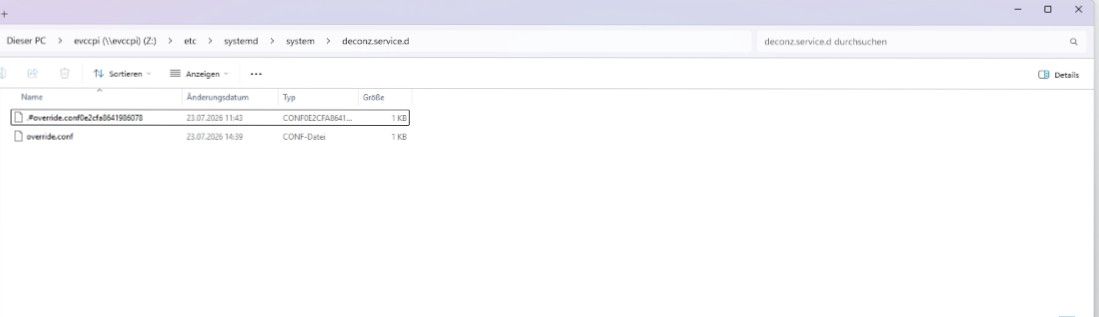
-
Mal ne Gegenfrage... kann ich mit dem conbee2 auch auf den zigbee adapter gehen?
-
sudo systemctl cat deconz.service # Warning: deconz.service changed on disk, the version systemd has loaded is outdated. # This output shows the current version of the unit's original fragment and drop-in files. # If fragments or drop-ins were added or removed, they are not properly reflected in this output. # Run 'systemctl daemon-reload' to reload units. # /lib/systemd/system/deconz.service [Unit] Description=deCONZ: ZigBee gateway -- REST API Wants=deconz-init.service StartLimitIntervalSec=0 [Service] User=1000 ExecStart=/usr/bin/deCONZ -platform minimal --http-port=80 Restart=on-failure RestartSec=30 AmbientCapabilities=CAP_NET_BIND_SERVICE CAP_KILL CAP_SYS_BOOT CAP_SYS_TIME [Install] WantedBy=multi-user.target # /etc/systemd/system/deconz.service.d/override.conf [Service] ExecStart=/usr/bin/deCONZ -platform minimal --http-port=80 --ws-port=441Warning: deconz.service changed on disk, the version systemd has loaded is outdated.
Starte die Kiste mal komplett durch.
kann ich mit dem conbee2 auch auf den zigbee adapter gehen?
Ja.
-
Warning: deconz.service changed on disk, the version systemd has loaded is outdated.
Starte die Kiste mal komplett durch.
kann ich mit dem conbee2 auch auf den zigbee adapter gehen?
Ja.
@Thomas-Braun
reboot läuft...keine Veränderung...
sudo systemctl status deconz.service Warning: The unit file, source configuration file or drop-ins of deconz.service changed on disk. Run 'systemctl daemon-reload' to reload units. ○ deconz.service - deCONZ: ZigBee gateway -- REST API Loaded: bad-setting (Reason: Unit deconz.service has a bad unit file setting.) Drop-In: /etc/systemd/system/deconz.service.d └─override.conf Active: inactive (dead) Jul 23 15:13:32 evccpi systemd[1]: /etc/systemd/system/deconz.service.d/override.conf:1: Assignment outside of section. Ignoring. Jul 23 15:13:32 evccpi systemd[1]: deconz.service: Service has more than one ExecStart= setting, which is only allowed for Type=oneshot services. Refusing. Jul 23 15:13:37 evccpi systemd[1]: /etc/systemd/system/deconz.service.d/override.conf:1: Assignment outside of section. Ignoring. Jul 23 15:13:53 evccpi systemd[1]: /etc/systemd/system/deconz.service.d/override.conf:1: Assignment outside of section. Ignoring. Jul 23 15:13:53 evccpi systemd[1]: deconz.service: Service has more than one ExecStart= setting, which is only allowed for Type=oneshot services. Refusing. Jul 23 15:13:56 evccpi systemd[1]: /etc/systemd/system/deconz.service.d/override.conf:1: Assignment outside of section. Ignoring. -
@Thomas-Braun
reboot läuft...keine Veränderung...
sudo systemctl status deconz.service Warning: The unit file, source configuration file or drop-ins of deconz.service changed on disk. Run 'systemctl daemon-reload' to reload units. ○ deconz.service - deCONZ: ZigBee gateway -- REST API Loaded: bad-setting (Reason: Unit deconz.service has a bad unit file setting.) Drop-In: /etc/systemd/system/deconz.service.d └─override.conf Active: inactive (dead) Jul 23 15:13:32 evccpi systemd[1]: /etc/systemd/system/deconz.service.d/override.conf:1: Assignment outside of section. Ignoring. Jul 23 15:13:32 evccpi systemd[1]: deconz.service: Service has more than one ExecStart= setting, which is only allowed for Type=oneshot services. Refusing. Jul 23 15:13:37 evccpi systemd[1]: /etc/systemd/system/deconz.service.d/override.conf:1: Assignment outside of section. Ignoring. Jul 23 15:13:53 evccpi systemd[1]: /etc/systemd/system/deconz.service.d/override.conf:1: Assignment outside of section. Ignoring. Jul 23 15:13:53 evccpi systemd[1]: deconz.service: Service has more than one ExecStart= setting, which is only allowed for Type=oneshot services. Refusing. Jul 23 15:13:56 evccpi systemd[1]: /etc/systemd/system/deconz.service.d/override.conf:1: Assignment outside of section. Ignoring./etc/systemd/system/deconz.service.d/override.conf
Was steht denn jetzt da drin?
-
@thomas-braun sorry.. muss ich später machen, der PI startet grad nicht mehr und ich bin nicht zu Hause
-
gerade gefunden kann da was dran sein.
sudo systemctl edit deconz.service[Service] ExecStart= ExecStart=/usr/bin/deCONZ -platform minimal --http-port=80 --https-port=0 --ws-port=441Wichtig: Die erste leere Zeile ExecStart= ist notwendig, um den alten Startbefehl des Systems zu löschen, bevor dein neuer Befehl greift).
Speichere die Datei im Editor ab (bei nano: Strg + O, Enter und danach Strg + X zum Beenden).
Danach sollte die override.conf in
/etc/systemd/system/deconz.service.d/override.conf
erstellt werden.sudo systemctl daemon-reloadsudo systemctl restart deconzStimmt das so @thomas-braun ?
-
gerade gefunden kann da was dran sein.
sudo systemctl edit deconz.service[Service] ExecStart= ExecStart=/usr/bin/deCONZ -platform minimal --http-port=80 --https-port=0 --ws-port=441Wichtig: Die erste leere Zeile ExecStart= ist notwendig, um den alten Startbefehl des Systems zu löschen, bevor dein neuer Befehl greift).
Speichere die Datei im Editor ab (bei nano: Strg + O, Enter und danach Strg + X zum Beenden).
Danach sollte die override.conf in
/etc/systemd/system/deconz.service.d/override.conf
erstellt werden.sudo systemctl daemon-reloadsudo systemctl restart deconzStimmt das so @thomas-braun ?
Ja, das hatte ich ja oben auch schon so gefunden:
How to Fix It:
Clear the old value:
Add an empty ExecStart= line before your new ExecStart= line in your override/drop-in file to wipe previous definitions. -
Mal ne Gegenfrage... kann ich mit dem conbee2 auch auf den zigbee adapter gehen?
Mal ne Gegenfrage... kann ich mit dem conbee2 auch auf den zigbee adapter gehen?
Ja, kannst du. Habe ich auch gemacht. Musst aber alle Service von Deconz zuvor komplett deaktivieren oder deinstallieren - sonst geht es mit dem Zigbee-Adapter nicht.
Ro75.
SERVER = Beelink U59 16GB DDR4 RAM 512GB SSD, FB 7490, FritzDect 200+301+440, ConBee II, Zigbee Aqara Sensoren + NOUS A1Z, NOUS A1T, Philips Hue ** ioBroker, REDIS, influxdb2, Grafana, PiHole, Plex-Mediaserver, paperless-ngx (Docker), MariaDB + phpmyadmin *** VIS-Runtime = Intel NUC 8GB RAM 128GB SSD + 24" Touchscreen
-
Mal ne Gegenfrage... kann ich mit dem conbee2 auch auf den zigbee adapter gehen?
Ja, kannst du. Habe ich auch gemacht. Musst aber alle Service von Deconz zuvor komplett deaktivieren oder deinstallieren - sonst geht es mit dem Zigbee-Adapter nicht.
Ro75.
Mal ne Gegenfrage... kann ich mit dem conbee2 auch auf den zigbee adapter gehen?
Ja, kannst du. Habe ich auch gemacht. Musst aber alle Service von Deconz zuvor komplett deaktivieren oder deinstallieren - sonst geht es mit dem Zigbee-Adapter nicht.
Ro75.
Hi,
nicht zu vergessen = alle Geräte neu anlernen
-
Kleiner Nachtrag… musste komplett neu einrichten den PI. Da wir in Urlaub wollten hab ,ich erstmal mit dem Zigbee Adapter beschäftigten die wichtigsten Sensoren dort angelernt…das klappte alles bestens … der Rest dann nach dem Urlaub
-
@thomas-braun hab das nun mal gemacht
systemctl cat deconz=
marvman67@Raspberry:~ $ systemctl cat deconz
# /usr/lib/systemd/system/deconz.service
[Unit]
Description=deCONZ: ZigBee gateway -- REST API
Wants=deconz-init.service
StartLimitIntervalSec=0

[Service]
User=1000
ExecStart=/usr/bin/deCONZ -platform minimal --http-port=80 --https-port=0 --ws-port=441
Restart=on-failure
RestartSec=30
AmbientCapabilities=CAP_NET_BIND_SERVICE CAP_KILL CAP_SYS_BOOT CAP_SYS_TIME

[Install]
WantedBy=multi-user.target

# /etc/systemd/system/deconz.service.d/override.conf
[Service]
ExecStart=
ExecStart=/usr/bin/deCONZ -platform minimal --http-port=80 --https-port=0 --ws-port=441
marvman67@Raspberry:~ $
ich hoffe das stimmt so alles und das nun nach einem Deconz update die Werte nicht wieder nachträglich geändert werden müßen.
-
@thomas-braun hab das nun mal gemacht
systemctl cat deconz=
marvman67@Raspberry:~ $ systemctl cat deconz
# /usr/lib/systemd/system/deconz.service
[Unit]
Description=deCONZ: ZigBee gateway -- REST API
Wants=deconz-init.service
StartLimitIntervalSec=0

[Service]
User=1000
ExecStart=/usr/bin/deCONZ -platform minimal --http-port=80 --https-port=0 --ws-port=441
Restart=on-failure
RestartSec=30
AmbientCapabilities=CAP_NET_BIND_SERVICE CAP_KILL CAP_SYS_BOOT CAP_SYS_TIME

[Install]
WantedBy=multi-user.target

# /etc/systemd/system/deconz.service.d/override.conf
[Service]
ExecStart=
ExecStart=/usr/bin/deCONZ -platform minimal --http-port=80 --https-port=0 --ws-port=441
marvman67@Raspberry:~ $
ich hoffe das stimmt so alles und das nun nach einem Deconz update die Werte nicht wieder nachträglich geändert werden müßen.
nun nach einem Deconz update
Kannste ja ausprobieren. Einfach par apt eine der Vorversionen installieren und dann wieder upgraden.



Hey! Du scheinst an dieser Unterhaltung interessiert zu sein, hast aber noch kein Konto.
Hast du es satt, bei jedem Besuch durch die gleichen Beiträge zu scrollen? Wenn du dich für ein Konto anmeldest, kommst du immer genau dorthin zurück, wo du zuvor warst, und kannst dich über neue Antworten benachrichtigen lassen (entweder per E-Mail oder Push-Benachrichtigung). Du kannst auch Lesezeichen speichern und Beiträge positiv bewerten, um anderen Community-Mitgliedern deine Wertschätzung zu zeigen.
Mit deinem Input könnte dieser Beitrag noch besser werden 💗
Registrieren AnmeldenSupport us
266
Online33.0k
Benutzer83.7k
Themen1.3m
Beiträge