Weiter zum Inhalt
  • Home
  • Aktuell
  • Tags
  • 0 Ungelesen 0
  • Kategorien
  • Unreplied
  • Beliebt
  • GitHub
  • Docu
  • Hilfe
Skins
  • Hell
  • Brite
  • Cerulean
  • Cosmo
  • Flatly
  • Journal
  • Litera
  • Lumen
  • Lux
  • Materia
  • Minty
  • Morph
  • Pulse
  • Sandstone
  • Simplex
  • Sketchy
  • Spacelab
  • United
  • Yeti
  • Zephyr
  • Dunkel
  • Cyborg
  • Darkly
  • Quartz
  • Slate
  • Solar
  • Superhero
  • Vapor

  • Standard: (Kein Skin)
  • Kein Skin
Einklappen
ioBroker Logo

Community Forum

donate donate
  1. ioBroker Community Home
  2. Deutsch
  3. Hardware
  4. Probleme mit deconz Adabter

NEWS

  • Der neue Monatsrückblick für Mai und Juni 2026 ist online!
    BluefoxB
    Bluefox
    8
    1
    617

  • wichtiges UPDATE für controller 7.2.2 im stable
    HomoranH
    Homoran
    10
    1
    3.3k

  • Neues YouTube-Video: Visualisierung im Devices-Adapter
    BluefoxB
    Bluefox
    16
    1
    5.2k

Probleme mit deconz Adabter

Geplant Angeheftet Gesperrt Verschoben Hardware
33 Beiträge 5 Kommentatoren 295 Aufrufe 4 Beobachtet
  • Älteste zuerst
  • Neuste zuerst
  • Meiste Stimmen
Antworten
  • In einem neuen Thema antworten
Anmelden zum Antworten
Dieses Thema wurde gelöscht. Nur Nutzer mit entsprechenden Rechten können es sehen.
  • Michael SchmittM Michael Schmitt

    @Thomas-Braun sagte:

    @docsnyder7
    Verwende edit dafür und schreib da nicht direkt in den Dateien herum.
    Also

    sudo systemctl edit deconz.service
    

    oder ähnlich. In /usr/ packst du gar nichts an, das Verzeichnis gehört dem System.

    Hi,
    hab da mal reingeschaut.Das sieht so aus.

    ### Editing /etc/systemd/system/deconz.service.d/override.conf
    ### Anything between here and the comment below will become the contents of the drop-in file


    ### Edits below this comment will be discarded
    
    
    ### /usr/lib/systemd/system/deconz.service
    # [Unit]
    # Description=deCONZ: ZigBee gateway -- REST API
    # Wants=deconz-init.service
    # StartLimitIntervalSec=0
    #
    # [Service]
    # User=1000
    # ExecStart=/usr/bin/deCONZ -platform minimal --http-port=80 --https-port=0 --ws-port=441
    # Restart=on-failure
    # RestartSec=30
    # AmbientCapabilities=CAP_NET_BIND_SERVICE CAP_KILL CAP_SYS_BOOT CAP_SYS_TIME
    #
    # [Install]
    # WantedBy=multi-user.target


    aber das ist ja alles auskommentiert ? Muß das so sein ?

    Thomas BraunT Online
    Thomas BraunT Online
    Thomas Braun
    Most Active
    schrieb zuletzt editiert von Thomas Braun
    #9

    @Michael-Schmitt sagte:

    aber das ist ja alles auskommentiert ? Muß das so sein ?

    Ja, wenn du dort Dinge 'scharf' schaltest greifen die dann vor den 'Werkseinstellungen'.
    Deswegen gibt es ja die Overrides/drop-in-files:
    /etc/systemd/system/deconz.service.d/override.conf

    Systemd klappert bestimmte Verzeichnisse in einer festgelegten Reihenfolge ab. Und die zuerst gefundenen Einstellungen greifen dann auch zuerst.

    Die auskommentierten Zeilen dienen dir nur als Hinweis, was da die Voreinstellung (hier in der /usr/lib/systemd/system/deconz.service) ist. Deine Änderungen müssen in das freie Feld darüber eingetragen werden:

    ### Anything between here and the comment below will become the contents of the drop-in file
     HIER_DEINE_EINTRÄGE=DEINE_WERTE 
    ### Edits below this comment will be discarded
    

    Linux-Werkzeugkasten:
    https://forum.iobroker.net/topic/42952/der-kleine-iobroker-linux-werkzeugkasten
    NodeJS Fixer Skript:
    https://forum.iobroker.net/topic/68035/iob-node-fix-skript
    iob_diag: curl -sLf -o diag.sh https://iobroker.net/diag.sh && bash diag.sh

    D Michael SchmittM 2 Antworten Letzte Antwort
    0
    • Thomas BraunT Thomas Braun

      @Michael-Schmitt sagte:

      aber das ist ja alles auskommentiert ? Muß das so sein ?

      Ja, wenn du dort Dinge 'scharf' schaltest greifen die dann vor den 'Werkseinstellungen'.
      Deswegen gibt es ja die Overrides/drop-in-files:
      /etc/systemd/system/deconz.service.d/override.conf

      Systemd klappert bestimmte Verzeichnisse in einer festgelegten Reihenfolge ab. Und die zuerst gefundenen Einstellungen greifen dann auch zuerst.

      Die auskommentierten Zeilen dienen dir nur als Hinweis, was da die Voreinstellung (hier in der /usr/lib/systemd/system/deconz.service) ist. Deine Änderungen müssen in das freie Feld darüber eingetragen werden:

      ### Anything between here and the comment below will become the contents of the drop-in file
       HIER_DEINE_EINTRÄGE=DEINE_WERTE 
      ### Edits below this comment will be discarded
      
      D Offline
      D Offline
      docsnyder7
      schrieb zuletzt editiert von
      #10

      @thomas-braun dh wenn ich die Zeile mit dem http-port=80 um den Eintrag ws-port=441 ergämzen möchte, dann muss ich die komplette Zeile dort einfügen?

      1 Antwort Letzte Antwort
      0
      • Thomas BraunT Thomas Braun

        @Michael-Schmitt sagte:

        aber das ist ja alles auskommentiert ? Muß das so sein ?

        Ja, wenn du dort Dinge 'scharf' schaltest greifen die dann vor den 'Werkseinstellungen'.
        Deswegen gibt es ja die Overrides/drop-in-files:
        /etc/systemd/system/deconz.service.d/override.conf

        Systemd klappert bestimmte Verzeichnisse in einer festgelegten Reihenfolge ab. Und die zuerst gefundenen Einstellungen greifen dann auch zuerst.

        Die auskommentierten Zeilen dienen dir nur als Hinweis, was da die Voreinstellung (hier in der /usr/lib/systemd/system/deconz.service) ist. Deine Änderungen müssen in das freie Feld darüber eingetragen werden:

        ### Anything between here and the comment below will become the contents of the drop-in file
         HIER_DEINE_EINTRÄGE=DEINE_WERTE 
        ### Edits below this comment will be discarded
        
        Michael SchmittM Online
        Michael SchmittM Online
        Michael Schmitt
        schrieb zuletzt editiert von Michael Schmitt
        #11

        @Thomas-Braun war deswegen wohl auch nach einem update von Deconz meine Einstellungen weg ?

        ### Editing /etc/systemd/system/deconz.service.d/override.conf
        ### Anything between here and the comment below will become the contents of the drop-in file
         
        ExecStart=/usr/bin/deCONZ -platform minimal --http-port=80 --https-port=0 --ws-port=441
        ### Edits below this comment will be discarded
        

        müssen da alle Einstellungen rein oder reicht es nur die an denen was geändert wurd ?

        Thomas BraunT 2 Antworten Letzte Antwort
        0
        • Michael SchmittM Michael Schmitt

          @Thomas-Braun war deswegen wohl auch nach einem update von Deconz meine Einstellungen weg ?

          ### Editing /etc/systemd/system/deconz.service.d/override.conf
          ### Anything between here and the comment below will become the contents of the drop-in file
           
          ExecStart=/usr/bin/deCONZ -platform minimal --http-port=80 --https-port=0 --ws-port=441
          ### Edits below this comment will be discarded
          

          müssen da alle Einstellungen rein oder reicht es nur die an denen was geändert wurd ?

          Thomas BraunT Online
          Thomas BraunT Online
          Thomas Braun
          Most Active
          schrieb zuletzt editiert von Thomas Braun
          #12

          @Michael-Schmitt
          Nur deine Änderungen/Anpassungen. Die weiteren Einstellungen zieht sich systemd dann aus den anderen Dateien.
          Diese drop-in-files legen sich nur wie eine Maske über die Voreinstellungen aus dem Paket wie sie vom Packager vorgesehen worden sind.

          Linux-Werkzeugkasten:
          https://forum.iobroker.net/topic/42952/der-kleine-iobroker-linux-werkzeugkasten
          NodeJS Fixer Skript:
          https://forum.iobroker.net/topic/68035/iob-node-fix-skript
          iob_diag: curl -sLf -o diag.sh https://iobroker.net/diag.sh && bash diag.sh

          1 Antwort Letzte Antwort
          1
          • Michael SchmittM Online
            Michael SchmittM Online
            Michael Schmitt
            schrieb zuletzt editiert von
            #13

            dann werd ich das das nächste mal testen, muß eh paar updates einspielen

            1 Antwort Letzte Antwort
            0
            • Michael SchmittM Michael Schmitt

              @Thomas-Braun war deswegen wohl auch nach einem update von Deconz meine Einstellungen weg ?

              ### Editing /etc/systemd/system/deconz.service.d/override.conf
              ### Anything between here and the comment below will become the contents of the drop-in file
               
              ExecStart=/usr/bin/deCONZ -platform minimal --http-port=80 --https-port=0 --ws-port=441
              ### Edits below this comment will be discarded
              

              müssen da alle Einstellungen rein oder reicht es nur die an denen was geändert wurd ?

              Thomas BraunT Online
              Thomas BraunT Online
              Thomas Braun
              Most Active
              schrieb zuletzt editiert von Thomas Braun
              #14

              @Michael-Schmitt sagte:

              war deswegen wohl auch nach einem update von Deconz meine Einstellungen weg ?

              Wenn du die direkt in /usr/lib/systemd/system/deconz.service getätigt hast, dann ja. Denn diese Datei ist im deconz-Paket enthalten und wird daher bei einem Update mit den Voreinstellungen aus dem Paket überschrieben.
              Die 'drop-in-files' mit deinen individuellen Einstellungen bleiben aber stehen.

              Linux-Werkzeugkasten:
              https://forum.iobroker.net/topic/42952/der-kleine-iobroker-linux-werkzeugkasten
              NodeJS Fixer Skript:
              https://forum.iobroker.net/topic/68035/iob-node-fix-skript
              iob_diag: curl -sLf -o diag.sh https://iobroker.net/diag.sh && bash diag.sh

              1 Antwort Letzte Antwort
              1
              • D Offline
                D Offline
                docsnyder7
                schrieb zuletzt editiert von
                #15

                sollte man vorher den Dienst stoppen?
                @thomas-braun also nur "--ws-port=441" in die Zeile

                Thomas BraunT 1 Antwort Letzte Antwort
                0
                • Michael SchmittM Michael Schmitt

                  hi,
                  läuft bei dir deconz oder deconz-gui ?

                  systemctl status deconz
                  
                  D Offline
                  D Offline
                  docsnyder7
                  schrieb zuletzt editiert von
                  #16

                  @Michael-Schmitt sagte:

                  hi,
                  läuft bei dir deconz oder deconz-gui ?

                  systemctl status deconz
                  
                  systemctl status deconz
                  ● deconz.service - deCONZ: ZigBee gateway -- REST API
                       Loaded: loaded (/lib/systemd/system/deconz.service; enabled; preset: enabled)
                      Drop-In: /etc/systemd/system/deconz.service.d
                               └─override.conf
                       Active: activating (auto-restart) (Result: exit-code) since Thu 2026-07-23 13:35:42 CEST; 29s ago
                      Process: 24355 ExecStart=/usr/bin/deCONZ -platform minimal --http-port=80 (code=exited, status=203/EXEC)
                     Main PID: 24355 (code=exited, status=203/EXEC)
                          CPU: 2ms
                  
                  Jul 23 13:35:42 evccpi (deCONZ)[24355]: deconz.service: Failed at step EXEC spawning /usr/bin/deCONZ: No such file or directory
                  Jul 23 13:35:42 evccpi systemd[1]: deconz.service: Main process exited, code=exited, status=203/EXEC
                  Jul 23 13:35:42 evccpi systemd[1]: deconz.service: Failed with result 'exit-code'.
                  Jul 23 13:36:12 evccpi systemd[1]: /etc/systemd/system/deconz.service.d/override.conf:1: Assignment outside of section. Ignoring.
                  
                  Thomas BraunT 1 Antwort Letzte Antwort
                  0
                  • D docsnyder7

                    sollte man vorher den Dienst stoppen?
                    @thomas-braun also nur "--ws-port=441" in die Zeile

                    Thomas BraunT Online
                    Thomas BraunT Online
                    Thomas Braun
                    Most Active
                    schrieb zuletzt editiert von Thomas Braun
                    #17

                    @docsnyder7 sagte:

                    sollte man vorher den Dienst stoppen?

                    Service neustarten reicht, dann werden die config-Dateien mit deinen Änderungen frisch eingelesen.

                    sudo systemctl restart deconz
                    

                    wird wohl ausreichen.

                    @thomas-braun also nur "--ws-port=441" in die Zeile

                    Nein, die vollständige, korrekte Syntax muss da eingetragen werden.
                    Vermutlich also eher

                    [Service]
                    ExecStart=/usr/bin/deCONZ -platform minimal --http-port=80 --https-port=0 --ws-port=441
                    

                    Edit: Die Section muss auch gesetzt werden. Sonst kommt:
                    Assignment outside of section. Ignoring.

                    Linux-Werkzeugkasten:
                    https://forum.iobroker.net/topic/42952/der-kleine-iobroker-linux-werkzeugkasten
                    NodeJS Fixer Skript:
                    https://forum.iobroker.net/topic/68035/iob-node-fix-skript
                    iob_diag: curl -sLf -o diag.sh https://iobroker.net/diag.sh && bash diag.sh

                    1 Antwort Letzte Antwort
                    0
                    • D Offline
                      D Offline
                      docsnyder7
                      schrieb zuletzt editiert von
                      #18

                      Ok… Dankeschön…
                      Kann man die Änderung dann in der Usr/lib/systemd/system/deconz.service kontrollieren?

                      Thomas BraunT 1 Antwort Letzte Antwort
                      0
                      • D docsnyder7

                        @Michael-Schmitt sagte:

                        hi,
                        läuft bei dir deconz oder deconz-gui ?

                        systemctl status deconz
                        
                        systemctl status deconz
                        ● deconz.service - deCONZ: ZigBee gateway -- REST API
                             Loaded: loaded (/lib/systemd/system/deconz.service; enabled; preset: enabled)
                            Drop-In: /etc/systemd/system/deconz.service.d
                                     └─override.conf
                             Active: activating (auto-restart) (Result: exit-code) since Thu 2026-07-23 13:35:42 CEST; 29s ago
                            Process: 24355 ExecStart=/usr/bin/deCONZ -platform minimal --http-port=80 (code=exited, status=203/EXEC)
                           Main PID: 24355 (code=exited, status=203/EXEC)
                                CPU: 2ms
                        
                        Jul 23 13:35:42 evccpi (deCONZ)[24355]: deconz.service: Failed at step EXEC spawning /usr/bin/deCONZ: No such file or directory
                        Jul 23 13:35:42 evccpi systemd[1]: deconz.service: Main process exited, code=exited, status=203/EXEC
                        Jul 23 13:35:42 evccpi systemd[1]: deconz.service: Failed with result 'exit-code'.
                        Jul 23 13:36:12 evccpi systemd[1]: /etc/systemd/system/deconz.service.d/override.conf:1: Assignment outside of section. Ignoring.
                        
                        Thomas BraunT Online
                        Thomas BraunT Online
                        Thomas Braun
                        Most Active
                        schrieb zuletzt editiert von
                        #19

                        @docsnyder7 sagte:

                        /usr/bin/deCONZ: No such file or directory

                        Schaut mal, wie die Datei richtig heißt. Groß/Kleinschreibung beachten!

                        Linux-Werkzeugkasten:
                        https://forum.iobroker.net/topic/42952/der-kleine-iobroker-linux-werkzeugkasten
                        NodeJS Fixer Skript:
                        https://forum.iobroker.net/topic/68035/iob-node-fix-skript
                        iob_diag: curl -sLf -o diag.sh https://iobroker.net/diag.sh && bash diag.sh

                        1 Antwort Letzte Antwort
                        0
                        • D docsnyder7

                          Ok… Dankeschön…
                          Kann man die Änderung dann in der Usr/lib/systemd/system/deconz.service kontrollieren?

                          Thomas BraunT Online
                          Thomas BraunT Online
                          Thomas Braun
                          Most Active
                          schrieb zuletzt editiert von Thomas Braun
                          #20

                          @docsnyder7 sagte:

                          Kann man die Änderung dann in der Usr/lib/systemd/system/deconz.service kontrollieren?

                          Da siehst du keine individuellen Einträge, da stehen immer die defaults drin.

                          Linux-Werkzeugkasten:
                          https://forum.iobroker.net/topic/42952/der-kleine-iobroker-linux-werkzeugkasten
                          NodeJS Fixer Skript:
                          https://forum.iobroker.net/topic/68035/iob-node-fix-skript
                          iob_diag: curl -sLf -o diag.sh https://iobroker.net/diag.sh && bash diag.sh

                          D 1 Antwort Letzte Antwort
                          0
                          • Thomas BraunT Thomas Braun

                            @docsnyder7 sagte:

                            Kann man die Änderung dann in der Usr/lib/systemd/system/deconz.service kontrollieren?

                            Da siehst du keine individuellen Einträge, da stehen immer die defaults drin.

                            D Offline
                            D Offline
                            docsnyder7
                            schrieb zuletzt editiert von
                            #21

                            @Thomas-Braun

                            ### Editing /etc/systemd/system/deconz.service.d/override.conf
                            ### Anything between here and the comment below will become the new contents of the file
                            
                            [Service]
                            ExecStart=/usr/bin/deCONZ -platform minimal --http-port=80 --https-port=0 --ws-port=441
                            
                            ### Lines below this comment will be discarded
                            
                            ### /lib/systemd/system/deconz.service
                            # [Unit]
                            # Description=deCONZ: ZigBee gateway -- REST API
                            # Wants=deconz-init.service
                            # StartLimitIntervalSec=0
                            #
                            # [Service]
                            # User=1000
                            # ExecStart=/usr/bin/deCONZ -platform minimal --http-port=80
                            # Restart=on-failure
                            # RestartSec=30
                            # AmbientCapabilities=CAP_NET_BIND_SERVICE CAP_KILL CAP_SYS_BOOT CAP_SYS_TIME
                            #
                            # [Install]
                            # WantedBy=multi-user.target
                            

                            sudo systemctl restart deconz
                            Failed to restart deconz.service: Unit deconz.service has a bad unit file setting.
                            See system logs and 'systemctl status deconz.service' for details.

                            systemctl status deconz
                            Warning: The unit file, source configuration file or drop-ins of deconz.service changed on disk. Run 'systemctl daemon-reload' to reload units.
                            × deconz.service - deCONZ: ZigBee gateway -- REST API
                                 Loaded: bad-setting (Reason: Unit deconz.service has a bad unit file setting.)
                                Drop-In: /etc/systemd/system/deconz.service.d
                                         └─override.conf
                                 Active: failed (Result: exit-code) since Thu 2026-07-23 13:51:20 CEST; 2min 50s ago
                               Duration: 4ms
                               Main PID: 25186 (code=exited, status=203/EXEC)
                                    CPU: 3ms
                            
                            Jul 23 13:51:02 evccpi systemd[1]: deconz.service: Service has more than one ExecStart= setting, which is only allowed for Type=oneshot services. Refusing.
                            Jul 23 13:51:20 evccpi systemd[1]: deconz.service: Failed to schedule restart job: Unit deconz.service has a bad unit file setting.
                            Jul 23 13:51:20 evccpi systemd[1]: deconz.service: Failed with result 'exit-code'.
                            Jul 23 13:52:49 evccpi systemd[1]: deconz.service: Service has more than one ExecStart= setting, which is only allowed for Type=oneshot services. Refusing.
                            Jul 23 13:53:44 evccpi systemd[1]: deconz.service: Service has more than one ExecStart= setting, which is only allowed for Type=oneshot services. Refusing.
                            
                            Thomas BraunT 1 Antwort Letzte Antwort
                            0
                            • D docsnyder7

                              @Thomas-Braun

                              ### Editing /etc/systemd/system/deconz.service.d/override.conf
                              ### Anything between here and the comment below will become the new contents of the file
                              
                              [Service]
                              ExecStart=/usr/bin/deCONZ -platform minimal --http-port=80 --https-port=0 --ws-port=441
                              
                              ### Lines below this comment will be discarded
                              
                              ### /lib/systemd/system/deconz.service
                              # [Unit]
                              # Description=deCONZ: ZigBee gateway -- REST API
                              # Wants=deconz-init.service
                              # StartLimitIntervalSec=0
                              #
                              # [Service]
                              # User=1000
                              # ExecStart=/usr/bin/deCONZ -platform minimal --http-port=80
                              # Restart=on-failure
                              # RestartSec=30
                              # AmbientCapabilities=CAP_NET_BIND_SERVICE CAP_KILL CAP_SYS_BOOT CAP_SYS_TIME
                              #
                              # [Install]
                              # WantedBy=multi-user.target
                              

                              sudo systemctl restart deconz
                              Failed to restart deconz.service: Unit deconz.service has a bad unit file setting.
                              See system logs and 'systemctl status deconz.service' for details.

                              systemctl status deconz
                              Warning: The unit file, source configuration file or drop-ins of deconz.service changed on disk. Run 'systemctl daemon-reload' to reload units.
                              × deconz.service - deCONZ: ZigBee gateway -- REST API
                                   Loaded: bad-setting (Reason: Unit deconz.service has a bad unit file setting.)
                                  Drop-In: /etc/systemd/system/deconz.service.d
                                           └─override.conf
                                   Active: failed (Result: exit-code) since Thu 2026-07-23 13:51:20 CEST; 2min 50s ago
                                 Duration: 4ms
                                 Main PID: 25186 (code=exited, status=203/EXEC)
                                      CPU: 3ms
                              
                              Jul 23 13:51:02 evccpi systemd[1]: deconz.service: Service has more than one ExecStart= setting, which is only allowed for Type=oneshot services. Refusing.
                              Jul 23 13:51:20 evccpi systemd[1]: deconz.service: Failed to schedule restart job: Unit deconz.service has a bad unit file setting.
                              Jul 23 13:51:20 evccpi systemd[1]: deconz.service: Failed with result 'exit-code'.
                              Jul 23 13:52:49 evccpi systemd[1]: deconz.service: Service has more than one ExecStart= setting, which is only allowed for Type=oneshot services. Refusing.
                              Jul 23 13:53:44 evccpi systemd[1]: deconz.service: Service has more than one ExecStart= setting, which is only allowed for Type=oneshot services. Refusing.
                              
                              Thomas BraunT Online
                              Thomas BraunT Online
                              Thomas Braun
                              Most Active
                              schrieb zuletzt editiert von
                              #22

                              @docsnyder7 sagte:

                              Run 'systemctl daemon-reload' to reload units.

                              Linux-Werkzeugkasten:
                              https://forum.iobroker.net/topic/42952/der-kleine-iobroker-linux-werkzeugkasten
                              NodeJS Fixer Skript:
                              https://forum.iobroker.net/topic/68035/iob-node-fix-skript
                              iob_diag: curl -sLf -o diag.sh https://iobroker.net/diag.sh && bash diag.sh

                              1 Antwort Letzte Antwort
                              0
                              • Michael SchmittM Online
                                Michael SchmittM Online
                                Michael Schmitt
                                schrieb zuletzt editiert von
                                #23
                                ExecStart=/usr/bin/deCONZ -platform minimal --http-port=80 --https-port=0 --ws-port=441
                                

                                Vielleicht das --https-port=0 rausnehmen. Das hab ich bei mir mal eingetragen da es mit dem Https port 443 Probleme gab

                                1 Antwort Letzte Antwort
                                0
                                • D Offline
                                  D Offline
                                  docsnyder7
                                  schrieb zuletzt editiert von docsnyder7
                                  #24

                                  Sorry @thomas-braun und @michael-schmitt
                                  ich bin wohl zu doof für diese Welt...

                                  nach dem daemon-reload
                                  sudo systemctl restart deconz
                                  Failed to restart deconz.service: Unit deconz.service has a bad unit file setting
                                  see system logs an ´systemctl status deconz.service´

                                  sudo systemctl status deconz.service
                                  Warning: The unit file, source configuration file or drop-ins of deconz.service changed on disk. Run 'systemctl daemon-reload' to reload units.
                                  × deconz.service - deCONZ: ZigBee gateway -- REST API
                                       Loaded: bad-setting (Reason: Unit deconz.service has a bad unit file setting.)
                                      Drop-In: /etc/systemd/system/deconz.service.d
                                               └─override.conf
                                       Active: failed (Result: exit-code) since Thu 2026-07-23 13:51:20 CEST; 42min ago
                                     Duration: 4ms
                                     Main PID: 25186 (code=exited, status=203/EXEC)
                                          CPU: 3ms
                                  
                                  Jul 23 13:51:02 evccpi systemd[1]: deconz.service: Service has more than one ExecStart= setting, which is only allowed for Type=oneshot services. Refusing.
                                  Jul 23 13:51:20 evccpi systemd[1]: deconz.service: Failed to schedule restart job: Unit deconz.service has a bad unit file setting.
                                  Jul 23 13:51:20 evccpi systemd[1]: deconz.service: Failed with result 'exit-code'.
                                  Jul 23 13:52:49 evccpi systemd[1]: deconz.service: Service has more than one ExecStart= setting, which is only allowed for Type=oneshot services. Refusing.
                                  Jul 23 13:53:44 evccpi systemd[1]: deconz.service: Service has more than one ExecStart= setting, which is only allowed for Type=oneshot services. Refusing.
                                  Jul 23 13:55:00 evccpi systemd[1]: deconz.service: Service has more than one ExecStart= setting, which is only allowed for Type=oneshot services. Refusing.
                                  Jul 23 13:55:14 evccpi systemd[1]: deconz.service: Service has more than one ExecStart= setting, which is only allowed for Type=oneshot services. Refusing.
                                  Jul 23 14:11:56 evccpi systemd[1]: deconz.service: Service has more than one ExecStart= setting, which is only allowed for Type=oneshot services. Refusing.
                                  Jul 23 14:17:22 evccpi systemd[1]: deconz.service: Service has more than one ExecStart= setting, which is only allowed for Type=oneshot services. Refusing.
                                  Jul 23 14:17:35 evccpi systemd[1]: deconz.service: Service has more than one ExecStart= setting, which is only allowed for Type=oneshot services. Refusing.
                                  

                                  dazukommt nach dem edit

                                  sudo systemctl edit deconz.service
                                  Editing "/etc/systemd/system/deconz.service.d/override.conf" canceled: temporary file is empty.
                                  
                                  Thomas BraunT 1 Antwort Letzte Antwort
                                  0
                                  • D docsnyder7

                                    Sorry @thomas-braun und @michael-schmitt
                                    ich bin wohl zu doof für diese Welt...

                                    nach dem daemon-reload
                                    sudo systemctl restart deconz
                                    Failed to restart deconz.service: Unit deconz.service has a bad unit file setting
                                    see system logs an ´systemctl status deconz.service´

                                    sudo systemctl status deconz.service
                                    Warning: The unit file, source configuration file or drop-ins of deconz.service changed on disk. Run 'systemctl daemon-reload' to reload units.
                                    × deconz.service - deCONZ: ZigBee gateway -- REST API
                                         Loaded: bad-setting (Reason: Unit deconz.service has a bad unit file setting.)
                                        Drop-In: /etc/systemd/system/deconz.service.d
                                                 └─override.conf
                                         Active: failed (Result: exit-code) since Thu 2026-07-23 13:51:20 CEST; 42min ago
                                       Duration: 4ms
                                       Main PID: 25186 (code=exited, status=203/EXEC)
                                            CPU: 3ms
                                    
                                    Jul 23 13:51:02 evccpi systemd[1]: deconz.service: Service has more than one ExecStart= setting, which is only allowed for Type=oneshot services. Refusing.
                                    Jul 23 13:51:20 evccpi systemd[1]: deconz.service: Failed to schedule restart job: Unit deconz.service has a bad unit file setting.
                                    Jul 23 13:51:20 evccpi systemd[1]: deconz.service: Failed with result 'exit-code'.
                                    Jul 23 13:52:49 evccpi systemd[1]: deconz.service: Service has more than one ExecStart= setting, which is only allowed for Type=oneshot services. Refusing.
                                    Jul 23 13:53:44 evccpi systemd[1]: deconz.service: Service has more than one ExecStart= setting, which is only allowed for Type=oneshot services. Refusing.
                                    Jul 23 13:55:00 evccpi systemd[1]: deconz.service: Service has more than one ExecStart= setting, which is only allowed for Type=oneshot services. Refusing.
                                    Jul 23 13:55:14 evccpi systemd[1]: deconz.service: Service has more than one ExecStart= setting, which is only allowed for Type=oneshot services. Refusing.
                                    Jul 23 14:11:56 evccpi systemd[1]: deconz.service: Service has more than one ExecStart= setting, which is only allowed for Type=oneshot services. Refusing.
                                    Jul 23 14:17:22 evccpi systemd[1]: deconz.service: Service has more than one ExecStart= setting, which is only allowed for Type=oneshot services. Refusing.
                                    Jul 23 14:17:35 evccpi systemd[1]: deconz.service: Service has more than one ExecStart= setting, which is only allowed for Type=oneshot services. Refusing.
                                    

                                    dazukommt nach dem edit

                                    sudo systemctl edit deconz.service
                                    Editing "/etc/systemd/system/deconz.service.d/override.conf" canceled: temporary file is empty.
                                    
                                    Thomas BraunT Online
                                    Thomas BraunT Online
                                    Thomas Braun
                                    Most Active
                                    schrieb zuletzt editiert von
                                    #25

                                    @docsnyder7 sagte:

                                    Service has more than one ExecStart= setting, which is only allowed for Type=oneshot services. Refusing.

                                    Musste ich jetzt auch extern nachschauen:

                                    How to Fix It:
                                    Clear the old value:
                                    Add an empty ExecStart= line before your new ExecStart= line in your override/drop-in file to wipe previous definitions.

                                    Inspect the unit file: Run systemctl cat <service-name> to see the combined configuration and find where the extra line is coming from.

                                    Check drop-in overrides: Look inside /etc/systemd/system/<service-name>.service.d/ for conflicting override files.

                                    Reload systemd: Run sudo systemctl daemon-reload and then restart your service with sudo systemctl restart <service-name>.

                                    Linux-Werkzeugkasten:
                                    https://forum.iobroker.net/topic/42952/der-kleine-iobroker-linux-werkzeugkasten
                                    NodeJS Fixer Skript:
                                    https://forum.iobroker.net/topic/68035/iob-node-fix-skript
                                    iob_diag: curl -sLf -o diag.sh https://iobroker.net/diag.sh && bash diag.sh

                                    D 1 Antwort Letzte Antwort
                                    1
                                    • Thomas BraunT Thomas Braun

                                      @docsnyder7 sagte:

                                      Service has more than one ExecStart= setting, which is only allowed for Type=oneshot services. Refusing.

                                      Musste ich jetzt auch extern nachschauen:

                                      How to Fix It:
                                      Clear the old value:
                                      Add an empty ExecStart= line before your new ExecStart= line in your override/drop-in file to wipe previous definitions.

                                      Inspect the unit file: Run systemctl cat <service-name> to see the combined configuration and find where the extra line is coming from.

                                      Check drop-in overrides: Look inside /etc/systemd/system/<service-name>.service.d/ for conflicting override files.

                                      Reload systemd: Run sudo systemctl daemon-reload and then restart your service with sudo systemctl restart <service-name>.

                                      D Offline
                                      D Offline
                                      docsnyder7
                                      schrieb zuletzt editiert von docsnyder7
                                      #26

                                      @Thomas-Braun

                                      sudo systemctl cat deconz.service
                                      # Warning: deconz.service changed on disk, the version systemd has loaded is outdated.
                                      # This output shows the current version of the unit's original fragment and drop-in files.
                                      # If fragments or drop-ins were added or removed, they are not properly reflected in this output.
                                      # Run 'systemctl daemon-reload' to reload units.
                                      # /lib/systemd/system/deconz.service
                                      [Unit]
                                      Description=deCONZ: ZigBee gateway -- REST API
                                      Wants=deconz-init.service
                                      StartLimitIntervalSec=0
                                      
                                      [Service]
                                      User=1000
                                      ExecStart=/usr/bin/deCONZ -platform minimal --http-port=80
                                      Restart=on-failure
                                      RestartSec=30
                                      AmbientCapabilities=CAP_NET_BIND_SERVICE CAP_KILL CAP_SYS_BOOT CAP_SYS_TIME
                                      
                                      [Install]
                                      WantedBy=multi-user.target
                                      
                                      # /etc/systemd/system/deconz.service.d/override.conf
                                      [Service]
                                      ExecStart=/usr/bin/deCONZ -platform minimal --http-port=80 --ws-port=441
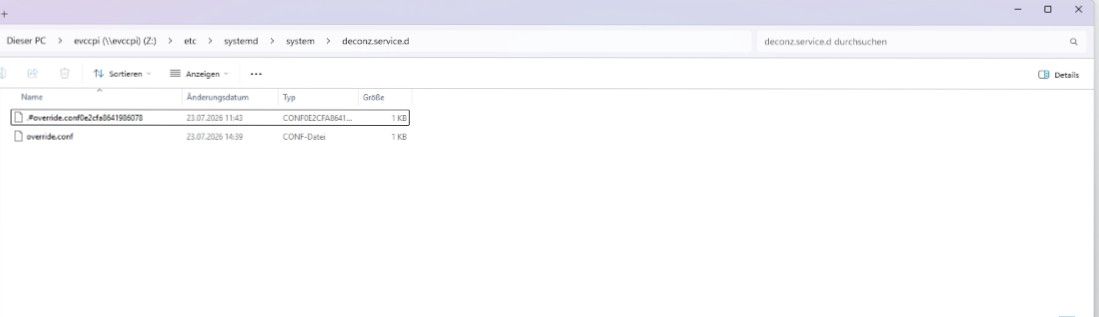
                                      

                                      ordner.jpg

                                      Thomas BraunT 1 Antwort Letzte Antwort
                                      0
                                      • D Offline
                                        D Offline
                                        docsnyder7
                                        schrieb zuletzt editiert von
                                        #27

                                        Mal ne Gegenfrage... kann ich mit dem conbee2 auch auf den zigbee adapter gehen?

                                        1 Antwort Letzte Antwort
                                        0
                                        • D docsnyder7

                                          @Thomas-Braun

                                          sudo systemctl cat deconz.service
                                          # Warning: deconz.service changed on disk, the version systemd has loaded is outdated.
                                          # This output shows the current version of the unit's original fragment and drop-in files.
                                          # If fragments or drop-ins were added or removed, they are not properly reflected in this output.
                                          # Run 'systemctl daemon-reload' to reload units.
                                          # /lib/systemd/system/deconz.service
                                          [Unit]
                                          Description=deCONZ: ZigBee gateway -- REST API
                                          Wants=deconz-init.service
                                          StartLimitIntervalSec=0
                                          
                                          [Service]
                                          User=1000
                                          ExecStart=/usr/bin/deCONZ -platform minimal --http-port=80
                                          Restart=on-failure
                                          RestartSec=30
                                          AmbientCapabilities=CAP_NET_BIND_SERVICE CAP_KILL CAP_SYS_BOOT CAP_SYS_TIME
                                          
                                          [Install]
                                          WantedBy=multi-user.target
                                          
                                          # /etc/systemd/system/deconz.service.d/override.conf
                                          [Service]
                                          ExecStart=/usr/bin/deCONZ -platform minimal --http-port=80 --ws-port=441
                                          

                                          ordner.jpg

                                          Thomas BraunT Online
                                          Thomas BraunT Online
                                          Thomas Braun
                                          Most Active
                                          schrieb zuletzt editiert von
                                          #28

                                          @docsnyder7 sagte:

                                          Warning: deconz.service changed on disk, the version systemd has loaded is outdated.

                                          Starte die Kiste mal komplett durch.

                                          kann ich mit dem conbee2 auch auf den zigbee adapter gehen?

                                          Ja.

                                          Linux-Werkzeugkasten:
                                          https://forum.iobroker.net/topic/42952/der-kleine-iobroker-linux-werkzeugkasten
                                          NodeJS Fixer Skript:
                                          https://forum.iobroker.net/topic/68035/iob-node-fix-skript
                                          iob_diag: curl -sLf -o diag.sh https://iobroker.net/diag.sh && bash diag.sh

                                          D 1 Antwort Letzte Antwort
                                          1

                                          Hey! Du scheinst an dieser Unterhaltung interessiert zu sein, hast aber noch kein Konto.

                                          Hast du es satt, bei jedem Besuch durch die gleichen Beiträge zu scrollen? Wenn du dich für ein Konto anmeldest, kommst du immer genau dorthin zurück, wo du zuvor warst, und kannst dich über neue Antworten benachrichtigen lassen (entweder per E-Mail oder Push-Benachrichtigung). Du kannst auch Lesezeichen speichern und Beiträge positiv bewerten, um anderen Community-Mitgliedern deine Wertschätzung zu zeigen.

                                          Mit deinem Input könnte dieser Beitrag noch besser werden 💗

                                          Registrieren Anmelden
                                          Antworten
                                          • In einem neuen Thema antworten
                                          Anmelden zum Antworten
                                          • Älteste zuerst
                                          • Neuste zuerst
                                          • Meiste Stimmen


                                          Support us

                                          ioBroker
                                          Community Adapters
                                          Donate

                                          435

                                          Online

                                          33.0k

                                          Benutzer

                                          83.5k

                                          Themen

                                          1.3m

                                          Beiträge
                                          Community
                                          Impressum | Datenschutz-Bestimmungen | Nutzungsbedingungen | Einwilligungseinstellungen
                                          ioBroker Community 2014-2026
                                          logo
                                          • Anmelden

                                          • Du hast noch kein Konto? Registrieren

                                          • Anmelden oder registrieren, um zu suchen
                                          • Erster Beitrag
                                            Letzter Beitrag
                                          0
                                          • Home
                                          • Aktuell
                                          • Tags
                                          • Ungelesen 0
                                          • Kategorien
                                          • Unreplied
                                          • Beliebt
                                          • GitHub
                                          • Docu
                                          • Hilfe