




Hilfe bei Blockly

-
-
wie bekomme ich die jetzt installiert, wenn ich nach Sourceanalytix suche, wird nichts angezeigt?
Zuerst bringst du die Großbaustelle auf den aktuellen Stand.
-
Zuerst bringst du die Großbaustelle auf den aktuellen Stand.
Zuerst bringst du die Großbaustelle auf den aktuellen Stand.
Wenn ich das mache, weiß ich zu 100 Prozent, dass dann gar nichts mehr läuft, und ich dann eine Woche brauche bis alles wieder läuft, sind Erfahrungen die ich leider machen musste. Aktualisiere ich eine Instanz, funktioniert danach nichts mehr, wie gerade bei einem User hier, der Lovelace aktualisiert hat, und danach liefen seine BubbleCards nicht mehr. Kannst Du mir bitte ohne Aktualisierung der der Adapter helfen?
Für heute muss ich erstmal abbrechen, morgen kann ich wieder weitermachen, trotzdem erstmal vielen Dank!!!Raspberry Pi 4 8gb
-
Zuerst bringst du die Großbaustelle auf den aktuellen Stand.
Wenn ich das mache, weiß ich zu 100 Prozent, dass dann gar nichts mehr läuft, und ich dann eine Woche brauche bis alles wieder läuft, sind Erfahrungen die ich leider machen musste. Aktualisiere ich eine Instanz, funktioniert danach nichts mehr, wie gerade bei einem User hier, der Lovelace aktualisiert hat, und danach liefen seine BubbleCards nicht mehr. Kannst Du mir bitte ohne Aktualisierung der der Adapter helfen?
Für heute muss ich erstmal abbrechen, morgen kann ich wieder weitermachen, trotzdem erstmal vielen Dank!!! -
Bitte nicht meckern wegen fehlender Updates, das hat einen besonderen Grund 🙊
========== Start marking the full check here ===========
Script v.2026-06-01 *** BASE SYSTEM *** Operating System: Debian GNU/Linux 12 (bookworm) Static hostname: raspberrypi Icon name: computer Kernel: Linux 6.12.25+rpt-rpi-v8 Architecture: arm64 OS is similar to: Model : Raspberry Pi 4 Model B Rev 1.4 Docker : false Virtualization : none Kernel : aarch64 Userland : 64bit System was installed 387 days ago (on 2025-05-13). Systemuptime and Load: 18:11:03 up 17 min, 2 users, load average: 0.69, 0.87, 1.04 CPU threads : 4 *** LIFE CYCLE STATUS *** Operating System is the current Debian stable version codenamed 'bookworm'! *** RASPBERRY THROTTLING *** Current issues: No throttling issues detected. Previously detected issues: ~ Under-voltage has occurred ~ Arm frequency capping has occurred ~ Throttling has occurred ~ Soft temperature limit has occurred *** TIME AND TIMEZONES *** Local time: Thu 2026-06-04 18:11:03 CEST Universal time: Thu 2026-06-04 16:11:03 UTC RTC time: n/a Time zone: Europe/Berlin (CEST, +0200) System clock synchronized: yes NTP service: active RTC in local TZ: no *** Users and Groups *** User that called 'iob diag': pi HOME=/home/pi GROUPS=pi adm dialout cdrom sudo audio plugdev games users input netdev lpadmin gpio i2c spi iobroker User that is running 'js-controller': iobroker HOME=/home/iobroker GROUPS=iobroker tty dialout audio video plugdev bluetooth gpio i2c *** DISPLAY-SERVER SETUP *** Display-Server: X11 Display-Manager: * lightdm.service - Light Display Manager Desktop: LXDE-pi Session: x11 Boot Target: multi-user.target *** MEMORY *** total used free shared buff/cache available Mem: 8.2G 2.5G 4.9G 35M 949M 5.7G Swap: 536M 0B 536M Total: 8.7G 2.5G 5.4G Active iob-Instances: 29 7809 M total memory 2412 M used memory 2517 M active memory 493 M inactive memory 4645 M free memory 62 M buffer memory 843 M swap cache 511 M total swap 0 M used swap 511 M free swap *** top - Table Of Processes *** top - 18:11:04 up 17 min, 2 users, load average: 0.69, 0.87, 1.04 Tasks: 243 total, 1 running, 242 sleeping, 0 stopped, 0 zombie %Cpu(s): 12.5 us, 12.5 sy, 0.0 ni, 75.0 id, 0.0 wa, 0.0 hi, 0.0 si, 0.0 st MiB Mem : 7809.4 total, 4644.5 free, 2413.1 used, 905.5 buff/cache MiB Swap: 512.0 total, 512.0 free, 0.0 used. 5396.3 avail Mem *** FAILED SERVICES *** UNIT LOAD ACTIVE SUB DESCRIPTION * session-1.scope loaded failed failed Session 1 of User pi LOAD = Reflects whether the unit definition was properly loaded. ACTIVE = The high-level unit activation state, i.e. generalization of SUB. SUB = The low-level unit activation state, values depend on unit type. 1 loaded units listed. *** DMESG CRITICAL ERRORS *** No critical errors detected *** FILESYSTEM *** Filesystem Type Size Used Avail Use% Mounted on udev devtmpfs 3.6G 0 3.6G 0% /dev tmpfs tmpfs 781M 9.3M 772M 2% /run /dev/mmcblk0p2 ext4 58G 9.1G 46G 17% / tmpfs tmpfs 3.9G 8.0K 3.9G 1% /dev/shm tmpfs tmpfs 5.0M 16K 5.0M 1% /run/lock /dev/mmcblk0p1 vfat 510M 68M 443M 14% /boot/firmware tmpfs tmpfs 781M 44K 781M 1% /run/user/1000 Messages concerning filesystems in dmesg: [Thu Jun 4 17:53:21 2026] EXT4-fs (mmcblk0p2): mounted filesystem d6ecfcd5-2703-41bf-9301-10c403b6fb0c ro with ordered data mode. Quota mode: none. [Thu Jun 4 17:53:22 2026] EXT4-fs (mmcblk0p2): re-mounted d6ecfcd5-2703-41bf-9301-10c403b6fb0c r/w. Quota mode: none. Show mounted filesystems: TARGET SOURCE FSTYPE OPTIONS / /dev/mmcblk0p2 ext4 rw,noatime |-/boot/firmware /dev/mmcblk0p1 vfat rw,relatime,fmask=0022,dmask=0022,codepage=437,iocharset=ascii,shortname=mixed,errors=remount-ro `-/home/pi/thinclient_drives xrdp-chansrv fuse.xrdp-chansrv rw,nosuid,nodev,relatime,user_id=1000,group_id=1000 Files in neuralgic directories: /var: 888M /var/ 204M /var/lib 170M /var/cache 161M /var/cache/apt 144M /var/lib/apt/lists Archived and active journals take up 8.0M in the file system. /opt/iobroker/backups: 376M /opt/iobroker/backups/ /opt/iobroker/iobroker-data: 581M /opt/iobroker/iobroker-data/ 420M /opt/iobroker/iobroker-data/files 156M /opt/iobroker/iobroker-data/files/vis-2 129M /opt/iobroker/iobroker-data/backup-objects 89M /opt/iobroker/iobroker-data/files/vis-2/static The five largest files in iobroker-data are: 38M /opt/iobroker/iobroker-data/files/iot.admin/static/js/main.d3d286bd.js.map 24M /opt/iobroker/iobroker-data/files/vis-2/static/js/main.f305bc29.js.map 24M /opt/iobroker/iobroker-data/files/vis-2/static/js/main.8e80ccb0.js.map 24M /opt/iobroker/iobroker-data/files/vis-2/customWidgets.js.map 21M /opt/iobroker/iobroker-data/objects.jsonl USB-Devices by-id: USB-Sticks - Avoid direct links to /dev/tty* in your adapter setups, please always prefer the links 'by-id': /dev/serial/by-id/usb-Texas_Instruments_TI_CC2531_USB_CDC___0X00124B001CDD4A3A-if00 *** ZigBee Settings *** â Your zigbee.0 COM-Port is matching 'by-id'. Very good! Zigbee Network Settings on your coordinator / in nvbackup are: zigbee.X Extended Pan ID: *** MASKED *** Pan ID: *** MASKED *** Channel: *** MASKED *** Network Key: *** MASKED *** To unmask the settings run 'iob diag --unmask' === ZigBee Port Overview === Instance Configured Port Available by-id Port Status -------- ---------------------------- ---------------------------- ------ zigbee.0 ...__0X00124B001CDD4A3A-if00 ...__0X00124B001CDD4A3A-if00 â Matching *** NodeJS-Installation *** /usr/bin/nodejs v20.19.2 /usr/bin/node v20.19.2 /usr/bin/npm 10.8.2 /usr/bin/npx 10.8.2 â Node.js installation is correct nodejs: Installed: 20.19.2-1nodesource1 Candidate: 20.20.2-1nodesource1 Version table: 20.20.2-1nodesource1 600 500 https://deb.nodesource.com/node_20.x nodistro/main arm64 Packages 20.20.1-1nodesource1 600 500 https://deb.nodesource.com/node_20.x nodistro/main arm64 Packages 20.20.0-1nodesource1 600 500 https://deb.nodesource.com/node_20.x nodistro/main arm64 Packages 20.19.6-1nodesource1 600 500 https://deb.nodesource.com/node_20.x nodistro/main arm64 Packages 20.19.5-1nodesource1 600 500 https://deb.nodesource.com/node_20.x nodistro/main arm64 Packages 20.19.4-1nodesource1 600 500 https://deb.nodesource.com/node_20.x nodistro/main arm64 Packages 20.19.3-1nodesource1 600 500 https://deb.nodesource.com/node_20.x nodistro/main arm64 Packages *** 20.19.2-1nodesource1 600 500 https://deb.nodesource.com/node_20.x nodistro/main arm64 Packages 100 /var/lib/dpkg/status 20.19.1-1nodesource1 600 500 https://deb.nodesource.com/node_20.x nodistro/main arm64 Packages 20.19.0-1nodesource1 600 500 https://deb.nodesource.com/node_20.x nodistro/main arm64 Packages 20.18.3-1nodesource1 600 500 https://deb.nodesource.com/node_20.x nodistro/main arm64 Packages 20.18.2-1nodesource1 600 500 https://deb.nodesource.com/node_20.x nodistro/main arm64 Packages 20.18.1-1nodesource1 600 500 https://deb.nodesource.com/node_20.x nodistro/main arm64 Packages 20.18.0-1nodesource1 600 500 https://deb.nodesource.com/node_20.x nodistro/main arm64 Packages 20.17.0-1nodesource1 600 500 https://deb.nodesource.com/node_20.x nodistro/main arm64 Packages 20.16.0-1nodesource1 600 500 https://deb.nodesource.com/node_20.x nodistro/main arm64 Packages 20.15.1-1nodesource1 600 500 https://deb.nodesource.com/node_20.x nodistro/main arm64 Packages 20.15.0-1nodesource1 600 500 https://deb.nodesource.com/node_20.x nodistro/main arm64 Packages 20.14.0-1nodesource1 600 500 https://deb.nodesource.com/node_20.x nodistro/main arm64 Packages 20.13.1-1nodesource1 600 500 https://deb.nodesource.com/node_20.x nodistro/main arm64 Packages 20.13.0-1nodesource1 600 500 https://deb.nodesource.com/node_20.x nodistro/main arm64 Packages 20.12.2-1nodesource1 600 500 https://deb.nodesource.com/node_20.x nodistro/main arm64 Packages 20.12.1-1nodesource1 600 500 https://deb.nodesource.com/node_20.x nodistro/main arm64 Packages 20.12.0-1nodesource1 600 500 https://deb.nodesource.com/node_20.x nodistro/main arm64 Packages 20.11.1-1nodesource1 600 500 https://deb.nodesource.com/node_20.x nodistro/main arm64 Packages 20.11.0-1nodesource1 600 500 https://deb.nodesource.com/node_20.x nodistro/main arm64 Packages 20.10.0-1nodesource1 600 500 https://deb.nodesource.com/node_20.x nodistro/main arm64 Packages 20.9.0-1nodesource1 600 500 https://deb.nodesource.com/node_20.x nodistro/main arm64 Packages 20.8.1-1nodesource1 600 500 https://deb.nodesource.com/node_20.x nodistro/main arm64 Packages 20.8.0-1nodesource1 600 500 https://deb.nodesource.com/node_20.x nodistro/main arm64 Packages 20.7.0-1nodesource1 600 500 https://deb.nodesource.com/node_20.x nodistro/main arm64 Packages 20.6.1-1nodesource1 600 500 https://deb.nodesource.com/node_20.x nodistro/main arm64 Packages 20.6.0-1nodesource1 600 500 https://deb.nodesource.com/node_20.x nodistro/main arm64 Packages 20.5.1-1nodesource1 600 500 https://deb.nodesource.com/node_20.x nodistro/main arm64 Packages 20.5.0-1nodesource1 600 500 https://deb.nodesource.com/node_20.x nodistro/main arm64 Packages 20.4.0-1nodesource1 600 500 https://deb.nodesource.com/node_20.x nodistro/main arm64 Packages 20.3.1-1nodesource1 600 500 https://deb.nodesource.com/node_20.x nodistro/main arm64 Packages 20.3.0-1nodesource1 600 500 https://deb.nodesource.com/node_20.x nodistro/main arm64 Packages 20.2.0-1nodesource1 600 500 https://deb.nodesource.com/node_20.x nodistro/main arm64 Packages 20.1.0-1nodesource1 600 500 https://deb.nodesource.com/node_20.x nodistro/main arm64 Packages 20.0.0-1nodesource1 600 500 https://deb.nodesource.com/node_20.x nodistro/main arm64 Packages 18.20.4+dfsg-1~deb12u2 500 500 http://deb.debian.org/debian-security bookworm-security/main arm64 Packages 18.20.4+dfsg-1~deb12u1 500 500 http://deb.debian.org/debian bookworm/main arm64 Packages Temp directories causing deletion problem: 0 No problems detected Errors in npm tree: 0 No problems detected Checking for nodejs vulnerability: Vulnerabilities detected in the Node.js version! node:fs:2368 return binding.writeFileUtf8( ^ Error: EACCES: permission denied, open '/home/iobroker/node_modules/is-my-node-vulnerable/schedule.etag' at Object.writeFileSync (node:fs:2368:20) at ClientRequest.<anonymous> (/home/iobroker/node_modules/is-my-node-vulnerable/is-vulnerable.js:82:12) at Object.onceWrapper (node:events:639:26) at ClientRequest.emit (node:events:524:28) at HTTPParser.parserOnIncomingClient [as onIncoming] (node:_http_client:702:27) at HTTPParser.parserOnHeadersComplete (node:_http_common:118:17) at TLSSocket.socketOnData (node:_http_client:544:22) at TLSSocket.emit (node:events:524:28) at addChunk (node:internal/streams/readable:561:12) at readableAddChunkPushByteMode (node:internal/streams/readable:512:3) { errno: -13, code: 'EACCES', syscall: 'open', path: '/home/iobroker/node_modules/is-my-node-vulnerable/schedule.etag' } Node.js v20.19.2 npm notice npm notice New major version of npm available! 10.8.2 -> 11.16.0 npm notice Changelog: https://github.com/npm/cli/releases/tag/v11.16.0 npm notice To update run: npm install -g npm@11.16.0 npm notice *** ioBroker-Installation *** ioBroker Status iobroker is running on this host. Objects type: jsonl States type: jsonl Hosts: raspberrypi raspberrypi (version: 7.0.6, hostname: raspberrypi , alive, uptime: 1043) Core adapters versions js-controller: 7.0.6 admin: 7.6.17 javascript: 8.9.2 nodejs modules from github: 0 Adapter State + system.adapter.admin.0 : admin : raspberrypi - enabled, port: 8081, bind: 0.0.0.0, run as: admin + system.adapter.alexa2.0 : alexa2 : raspberrypi - enabled + system.adapter.backitup.0 : backitup : raspberrypi - enabled + system.adapter.cloud.0 : cloud : raspberrypi - enabled system.adapter.devices.0 : devices : raspberrypi - disabled + system.adapter.discovery.0 : discovery : raspberrypi - enabled + system.adapter.eusec.0 : eusec : raspberrypi - enabled + system.adapter.fullybrowser.0 : fullybrowser : raspberrypi - enabled + system.adapter.govee-local.0 : govee-local : raspberrypi - enabled + system.adapter.history.0 : history : raspberrypi - enabled system.adapter.ical.0 : ical : raspberrypi - enabled system.adapter.icons-mfd-svg.0 : icons-mfd-svg : raspberrypi - disabled + system.adapter.javascript.0 : javascript : raspberrypi - enabled + system.adapter.lovelace.0 : lovelace : raspberrypi - enabled, port: 8091, bind: 0.0.0.0, run as: admin + system.adapter.meross.0 : meross : raspberrypi - enabled + system.adapter.mqtt.0 : mqtt : raspberrypi - enabled, port: 1883, bind: 0.0.0.0 + system.adapter.scenes.0 : scenes : raspberrypi - enabled + system.adapter.shelly.0 : shelly : raspberrypi - enabled, port: 8081, bind: 0.0.0.0 + system.adapter.shelly.1 : shelly : raspberrypi - enabled, port: 1882, bind: 0.0.0.0 + system.adapter.shelly.2 : shelly : raspberrypi - enabled, port: 1881, bind: 0.0.0.0 + system.adapter.sonoff.0 : sonoff : raspberrypi - enabled, port: 1883, bind: 0.0.0.0 system.adapter.sourceanalytix.0 : sourceanalytix : raspberrypi - enabled + system.adapter.spotify-premium.0 : spotify-premium : raspberrypi - enabled + system.adapter.telegram.0 : telegram : raspberrypi - enabled, port: 8443, bind: 0.0.0.0 + system.adapter.tr-064.1 : tr-064 : raspberrypi - enabled + system.adapter.trashschedule.0 : trashschedule : raspberrypi - enabled + system.adapter.tuya.0 : tuya : raspberrypi - enabled system.adapter.weatherunderground.0 : weatherunderground : raspberrypi - enabled + system.adapter.web.0 : web : raspberrypi - enabled, port: 8082, bind: 0.0.0.0, run as: admin + system.adapter.wifilight.0 : wifilight : raspberrypi - enabled + system.adapter.yeelight-2.0 : yeelight-2 : raspberrypi - enabled + system.adapter.zigbee.0 : zigbee : raspberrypi - enabled, port: /dev/serial/by-id/usb-Texas_Instruments_TI_CC2531_USB_CDC___0X00124B001CDD4A3A-if00 + instance is alive Enabled adapters with bindings + system.adapter.admin.0 : admin : raspberrypi - enabled, port: 8081, bind: 0.0.0.0, run as: admin + system.adapter.lovelace.0 : lovelace : raspberrypi - enabled, port: 8091, bind: 0.0.0.0, run as: admin + system.adapter.mqtt.0 : mqtt : raspberrypi - enabled, port: 1883, bind: 0.0.0.0 + system.adapter.shelly.0 : shelly : raspberrypi - enabled, port: 8081, bind: 0.0.0.0 + system.adapter.shelly.1 : shelly : raspberrypi - enabled, port: 1882, bind: 0.0.0.0 + system.adapter.shelly.2 : shelly : raspberrypi - enabled, port: 1881, bind: 0.0.0.0 + system.adapter.sonoff.0 : sonoff : raspberrypi - enabled, port: 1883, bind: 0.0.0.0 + system.adapter.telegram.0 : telegram : raspberrypi - enabled, port: 8443, bind: 0.0.0.0 + system.adapter.web.0 : web : raspberrypi - enabled, port: 8082, bind: 0.0.0.0, run as: admin + system.adapter.zigbee.0 : zigbee : raspberrypi - enabled, port: /dev/serial/by-id/usb-Texas_Instruments_TI_CC2531_USB_CDC___0X00124B001CDD4A3A-if00 ioBroker-Repositories âââââââââââ¬âââââââââââ¬ââââââââââââââââââââââââââââââââââââââââââââââââââââââââââ¬âââââââââââââââ (index) â name â url â auto upgrade â âââââââââââ¼âââââââââââ¼ââââââââââââââââââââââââââââââââââââââââââââââââââââââââââ¼ââââââââââââââ⤠â 0 â 'stable' â 'http://download.iobroker.net/sources-dist.json' â false â â 1 â 'beta' â 'http://download.iobroker.net/sources-dist-latest.json' â false â âââââââââââ´âââââââââââ´ââââââââââââââââââââââââââââââââââââââââââââââââââââââââââ´âââââââââââââââInstalled ioBroker-Adapters âââââââââââ¬ââââââââââââââââââââââââââââââââââââââ¬âââââââââââââââââââââââ¬âââââââââââ¬âââââââââââââââââ (index) â id â name â version â upgrade policy â âââââââââââ¼ââââââââââââââââââââââââââââââââââââââ¼âââââââââââââââââââââââ¼âââââââââââ¼ââââââââââââââââ⤠â 0 â 'system.adapter.admin' â 'admin' â '7.6.17' â 'none' â â 1 â 'system.adapter.alexa2' â 'alexa2' â '3.27.4' â 'none' â â 2 â 'system.adapter.backitup' â 'backitup' â '3.2.2' â 'none' â â 3 â 'system.adapter.cloud' â 'cloud' â '5.0.1' â 'none' â â 4 â 'system.adapter.daswetter' â 'daswetter' â '3.2.3' â 'none' â â 5 â 'system.adapter.devices' â 'devices' â '1.2.9' â 'none' â â 6 â 'system.adapter.discovery' â 'discovery' â '5.0.0' â 'none' â â 7 â 'system.adapter.eusec' â 'eusec' â '1.3.3' â 'none' â â 8 â 'system.adapter.fullybrowser' â 'fullybrowser' â '3.1.5' â 'none' â â 9 â 'system.adapter.govee-local' â 'govee-local' â '0.2.8' â 'none' â â 10 â 'system.adapter.history' â 'history' â '3.0.1' â 'none' â â 11 â 'system.adapter.ical' â 'ical' â '1.16.1' â 'none' â â 12 â 'system.adapter.icons-mfd-svg' â 'icons-mfd-svg' â '1.0.2' â 'none' â â 13 â 'system.adapter.javascript' â 'javascript' â '8.9.2' â 'none' â â 14 â 'system.adapter.lovelace' â 'lovelace' â '4.1.15' â 'none' â â 15 â 'system.adapter.meross' â 'meross' â '1.17.0' â 'none' â â 16 â 'system.adapter.mqtt' â 'mqtt' â '6.1.2' â 'none' â â 17 â 'system.adapter.mqtt-client' â 'mqtt-client' â '1.7.0' â 'none' â â 18 â 'system.adapter.scenes' â 'scenes' â '4.0.4' â 'none' â â 19 â 'system.adapter.shelly' â 'shelly' â '9.5.1' â 'none' â â 20 â 'system.adapter.socketio' â 'socketio' â '6.7.1' â 'none' â â 21 â 'system.adapter.sonoff' â 'sonoff' â '3.0.3' â 'none' â â 22 â 'system.adapter.sourceanalytix' â 'sourceanalytix' â '0.4.14' â 'none' â â 23 â 'system.adapter.spotify-premium' â 'spotify-premium' â '1.5.3' â 'none' â â 24 â 'system.adapter.telegram' â 'telegram' â '4.1.0' â 'none' â â 25 â 'system.adapter.tr-064' â 'tr-064' â '4.3.0' â 'none' â â 26 â 'system.adapter.trashschedule' â 'trashschedule' â '3.3.0' â 'none' â â 27 â 'system.adapter.tuya' â 'tuya' â '3.17.0' â 'none' â â 28 â 'system.adapter.weatherunderground' â 'weatherunderground' â '3.7.0' â 'none' â â 29 â 'system.adapter.web' â 'web' â '6.1.10' â 'none' â â 30 â 'system.adapter.wifilight' â 'wifilight' â '2.0.3' â 'none' â â 31 â 'system.adapter.ws' â 'ws' â '2.6.2' â 'none' â â 32 â 'system.adapter.yeelight-2' â 'yeelight-2' â '1.4.0' â 'none' â â 33 â 'system.adapter.zigbee' â 'zigbee' â '3.4.1' â 'none' â âââââââââââ´ââââââââââââââââââââââââââââââââââââââ´âââââââââââââââââââââââ´âââââââââââ´âââââââââââââââââioBroker-Adapter Versions and update status Used repository: stable Adapter "admin" : 7.8.23 , installed 7.6.17 [Updatable] Adapter "alexa2" : 3.27.4 , installed 3.27.4 Adapter "backitup" : 3.3.14 , installed 3.2.2 [Updatable] Adapter "cloud" : 6.0.1 , installed 5.0.1 [Updatable] Adapter "devices" : 1.2.14 , installed 1.2.9 [Updatable] Adapter "discovery" : 5.0.0 , installed 5.0.0 Adapter "eusec" : 2.0.3 , installed 1.3.3 [Updatable] Adapter "fullybrowser" : 3.1.2 , installed 3.1.5 Adapter "govee-local" : 0.4.5 , installed 0.2.8 [Updatable] Adapter "history" : 4.0.0 , installed 3.0.1 [Updatable] Adapter "ical" : 1.20.0 , installed 1.16.1 [Updatable] Adapter "icons-mfd-svg": 1.2.0 , installed 1.0.2 [Updatable] Adapter "javascript" : 9.0.18 , installed 8.9.2 [Updatable] Controller "js-controller": 7.0.7 , installed 7.0.6 [Updatable] Adapter "lovelace" : 5.0.5 , installed 4.1.15 [Updatable] Adapter "meross" : 1.17.0 , installed 1.17.0 Adapter "mqtt" : 6.1.4 , installed 6.1.2 [Updatable] Adapter "scenes" : 4.0.4 , installed 4.0.4 Adapter "shelly" : 10.6.1 , installed 9.5.1 [Updatable] Adapter "simple-api" : 3.0.7 , installed 2.8.0 [Updatable] Adapter "socketio" : 7.1.3 , installed 6.6.0 [Updatable] Adapter "sonoff" : 3.3.0 , installed 3.0.3 [Updatable] Adapter "spotify-premium": 2.0.3 , installed 1.5.3 [Updatable] Adapter "telegram" : 4.1.0 , installed 4.1.0 Adapter "tr-064" : 4.3.0 , installed 4.3.0 Adapter "trashschedule": 5.3.0 , installed 3.3.0 [Updatable] Adapter "tuya" : 3.17.0 , installed 3.17.0 Adapter "weatherunderground": 3.7.0, installed 3.7.0 Adapter "web" : 8.0.0 , installed 6.1.10 [Updatable] Adapter "wifilight" : 2.0.3 , installed 2.0.3 Adapter "ws" : 4.0.0 , installed 2.5.8 [Updatable] Adapter "yeelight-2" : 1.5.2 , installed 1.4.0 [Updatable] Adapter "zigbee" : 3.3.5 , installed 3.4.1 Objects and States Please stand by - This may take a while Objects: 9137 States: 7370 *** OS-Repositories and Updates *** Hit:1 http://deb.debian.org/debian bookworm InRelease Hit:2 http://deb.debian.org/debian-security bookworm-security InRelease Hit:3 http://deb.debian.org/debian bookworm-updates InRelease Hit:4 https://deb.nodesource.com/node_20.x nodistro InRelease Hit:5 http://archive.raspberrypi.com/debian bookworm InRelease Reading package lists... Pending systemupdates: 300 *** Listening Ports *** Netid State Recv-Q Send-Q Local Address:Port Peer Address:PortProcess udp UNCONN 0 0 0.0.0.0:56718 0.0.0.0:* users:(("avahi-daemon",pid=481,fd=14)) udp UNCONN 0 0 0.0.0.0:4002 0.0.0.0:* users:(("io.govee-local.",pid=1508,fd=32)) udp UNCONN 0 0 0.0.0.0:32938 0.0.0.0:* users:(("io.eusec.0",pid=1485,fd=31)) udp UNCONN 0 0 192.168.178.76:mdns 0.0.0.0:* users:(("io.tr-064.1",pid=2072,fd=28)) udp UNCONN 0 0 192.168.178.75:mdns 0.0.0.0:* users:(("io.tr-064.1",pid=2072,fd=27)) udp UNCONN 0 0 0.0.0.0:mdns 0.0.0.0:* users:(("avahi-daemon",pid=481,fd=12)) udp UNCONN 0 0 0.0.0.0:5683 0.0.0.0:* users:(("io.shelly.0",pid=1978,fd=28)) udp UNCONN 0 0 0.0.0.0:6666 0.0.0.0:* users:(("io.tuya.0",pid=2087,fd=33)) udp UNCONN 0 0 0.0.0.0:6667 0.0.0.0:* users:(("io.tuya.0",pid=2087,fd=34)) udp UNCONN 0 0 *:36824 *:* users:(("avahi-daemon",pid=481,fd=15)) udp UNCONN 0 0 *:8555 *:* users:(("go2rtc",pid=1966,fd=9)) udp UNCONN 0 0 [fe80::416b:2ff3:8143:a968]:dhcpv6-client *:* users:(("NetworkManager",pid=589,fd=38)) udp UNCONN 0 0 [fe80::4f85:77ac:fa1b:1b20]:dhcpv6-client *:* users:(("NetworkManager",pid=589,fd=36)) udp UNCONN 0 0 *:mdns *:* users:(("avahi-daemon",pid=481,fd=13)) tcp LISTEN 0 511 127.0.0.1:9000 0.0.0.0:* users:(("iobroker.js-con",pid=649,fd=25)) tcp LISTEN 0 511 127.0.0.1:9001 0.0.0.0:* users:(("iobroker.js-con",pid=649,fd=19)) tcp LISTEN 0 128 0.0.0.0:ssh 0.0.0.0:* users:(("sshd",pid=671,fd=3)) tcp LISTEN 0 128 127.0.0.1:ipp 0.0.0.0:* users:(("cupsd",pid=648,fd=7)) tcp LISTEN 0 511 0.0.0.0:1881 0.0.0.0:* users:(("io.shelly.2",pid=2023,fd=31)) tcp LISTEN 0 511 0.0.0.0:1883 0.0.0.0:* users:(("io.sonoff.0",pid=2042,fd=32)) tcp LISTEN 0 511 0.0.0.0:1882 0.0.0.0:* users:(("io.shelly.1",pid=2000,fd=29)) tcp LISTEN 0 511 0.0.0.0:38965 0.0.0.0:* users:(("io.alexa2.0",pid=1394,fd=29)) tcp LISTEN 0 2 [::1]:3350 [::]:* users:(("xrdp-sesman",pid=660,fd=11)) tcp LISTEN 0 128 [::]:ssh [::]:* users:(("sshd",pid=671,fd=4)) tcp LISTEN 0 4096 *:8555 *:* users:(("go2rtc",pid=1966,fd=8)) tcp LISTEN 0 4096 *:8554 *:* users:(("go2rtc",pid=1966,fd=7)) tcp LISTEN 0 4096 *:1984 *:* users:(("go2rtc",pid=1966,fd=6)) tcp LISTEN 0 2 *:ms-wbt-server *:* users:(("xrdp",pid=678,fd=11)) tcp LISTEN 0 511 *:tproxy *:* users:(("io.admin.0",pid=901,fd=30)) tcp LISTEN 0 511 *:8082 *:* users:(("io.web.0",pid=2219,fd=27)) tcp LISTEN 0 511 *:8091 *:* users:(("io.lovelace.0",pid=2173,fd=26)) tcp LISTEN 0 128 [::1]:ipp [::]:* users:(("cupsd",pid=648,fd=6)) *** Log File - Last 25 Lines *** 2026-06-04 18:08:23.253 - info: host.raspberrypi instance system.adapter.weatherunderground.0 having pid 2446 terminated with code 0 (NO_ERROR) 2026-06-04 18:09:15.021 - info: host.raspberrypi instance system.adapter.weatherunderground.0 in version "3.7.0" started with pid 2464 2026-06-04 18:09:17.681 - info: weatherunderground.0 (2464) starting. Version 3.7.0 in /opt/iobroker/node_modules/iobroker.weatherunderground, node: v20.19.2, js-controller: 7.0.6 2026-06-04 18:09:47.196 - info: weatherunderground.0 (2464) Terminated (NO_ERROR): Without reason 2026-06-04 18:09:47.740 - info: host.raspberrypi instance system.adapter.weatherunderground.0 having pid 2464 terminated with code 0 (NO_ERROR) 2026-06-04 18:10:15.025 - info: host.raspberrypi instance system.adapter.weatherunderground.0 in version "3.7.0" started with pid 2479 2026-06-04 18:10:17.560 - info: weatherunderground.0 (2479) starting. Version 3.7.0 in /opt/iobroker/node_modules/iobroker.weatherunderground, node: v20.19.2, js-controller: 7.0.6 2026-06-04 18:10:46.842 - info: weatherunderground.0 (2479) Terminated (NO_ERROR): Without reason 2026-06-04 18:10:47.382 - info: host.raspberrypi instance system.adapter.weatherunderground.0 having pid 2479 terminated with code 0 (NO_ERROR) 2026-06-04 18:11:15.066 - info: host.raspberrypi instance system.adapter.weatherunderground.0 in version "3.7.0" started with pid 2828 2026-06-04 18:11:18.304 - info: weatherunderground.0 (2828) starting. Version 3.7.0 in /opt/iobroker/node_modules/iobroker.weatherunderground, node: v20.19.2, js-controller: 7.0.6 2026-06-04 18:11:50.491 - info: weatherunderground.0 (2828) Terminated (NO_ERROR): Without reason 2026-06-04 18:11:51.321 - warn: weatherunderground.0 (2828) get state error: Connection is closed. 2026-06-04 18:11:51.459 - info: host.raspberrypi instance system.adapter.weatherunderground.0 having pid 2828 terminated with code 0 (NO_ERROR) 2026-06-04 18:12:15.065 - info: host.raspberrypi instance system.adapter.weatherunderground.0 in version "3.7.0" started with pid 3848 2026-06-04 18:12:17.447 - info: sonoff.0 (2042) Client [raspberrypi.mqtt.0] connection closed: timeout 2026-06-04 18:12:17.456 - info: mqtt.0 (1947) Disconnected from 127.0.0.1: undefined 2026-06-04 18:12:18.501 - info: weatherunderground.0 (3848) starting. Version 3.7.0 in /opt/iobroker/node_modules/iobroker.weatherunderground, node: v20.19.2, js-controller: 7.0.6 2026-06-04 18:12:27.456 - info: mqtt.0 (1947) Reconnected to 127.0.0.1 2026-06-04 18:12:27.462 - info: sonoff.0 (2042) Client [raspberrypi.mqtt.0] connected with secret 1780589547460_63 2026-06-04 18:12:27.466 - info: mqtt.0 (1947) Connected to 127.0.0.1 2026-06-04 18:12:27.471 - info: mqtt.0 (1947) Subscribe on "#" 2026-06-04 18:12:27.471 - info: mqtt.0 (1947) Publishing state mqtt.0.info.connection 2026-06-04 18:12:27.472 - info: mqtt.0 (1947) Publishing state mqtt.0.info.lastSession 2026-06-04 18:12:27.481 - info: mqtt.0 (1947) All states published============= Mark until here for C&P =============
iob diag has finished.
pi@raspberrypi:~ $
Du hast einen
Raspberry Pi 4 Model B Rev 1.4
Besorg dir eine neue SD Karte, schreibe darauf das aktuelle RaspberryPi OS LITE,
Fahre den Pi sauber herunter
Tausche beide Karten
Installiere iobroker über den Einzeiler auf der neuen Karte und schiebe das letzte Backup drauf!Dann sollte alles sauber laufen.
Für den eigentlich nicht existierenden Fall dass nicht, hast du noch die alte Karte
-
System läuft jetzt wieder sauber.
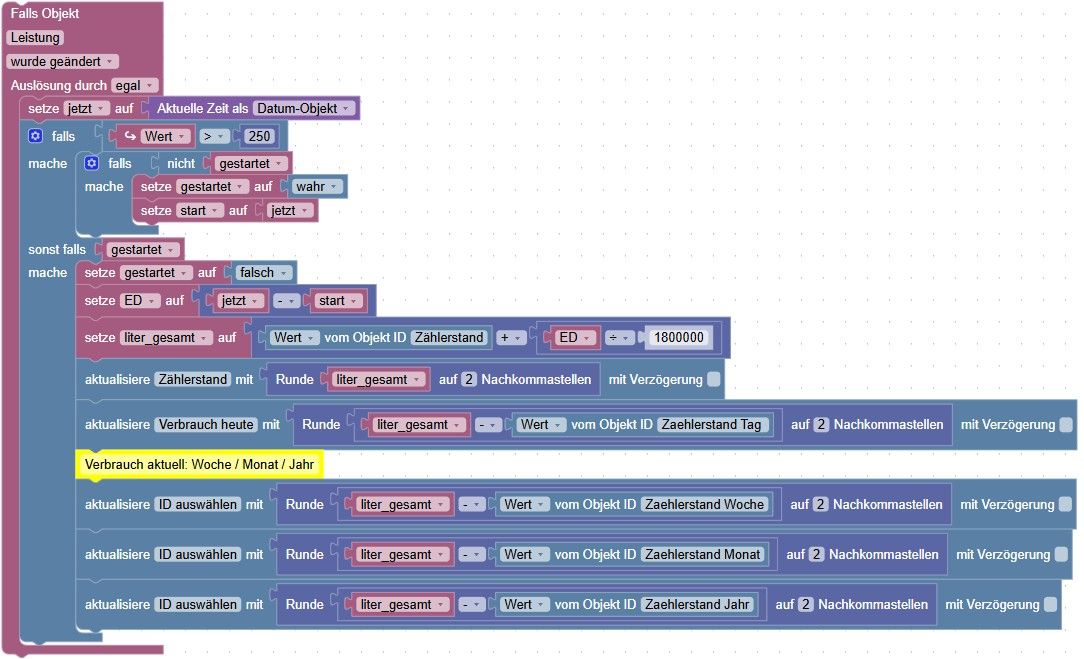
Ich habe aber diesen empfindlichen Sourceanalytix Adapter nicht mehr installiert, stattdessen versuche ich gerade das ganze über ein Blockly zu lösen. Könnt ihr mal drüber schauen ob das so funktionieren kann.
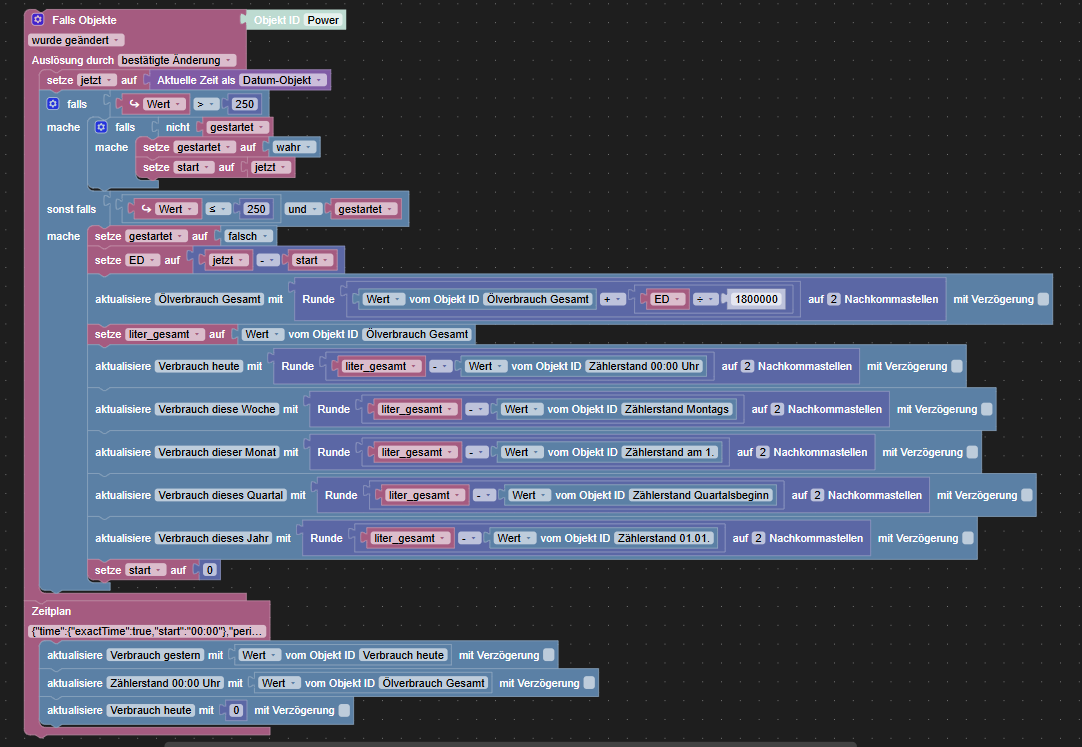
Raspberry Pi 4 8gb
-
System läuft jetzt wieder sauber.
Ich habe aber diesen empfindlichen Sourceanalytix Adapter nicht mehr installiert, stattdessen versuche ich gerade das ganze über ein Blockly zu lösen. Könnt ihr mal drüber schauen ob das so funktionieren kann.
@tiobb [sagte]: ob das so funktionieren könnte.
Man kann nicht unmittelbar nach dem Schreiben eines Wertes in einen DP ("Ölverbrauch gesamt") den Wert einlesen, da "aktualisiere" asynchron ausgeführt wird. Erst den Wert für die Variable berechnen und danach den Variablenwert gerundet in den DP schreiben.
Wo werden die Zählerstände für Woche / Monat / Quartal / Jahr geschrieben?
Prinzip für Periodenwerte: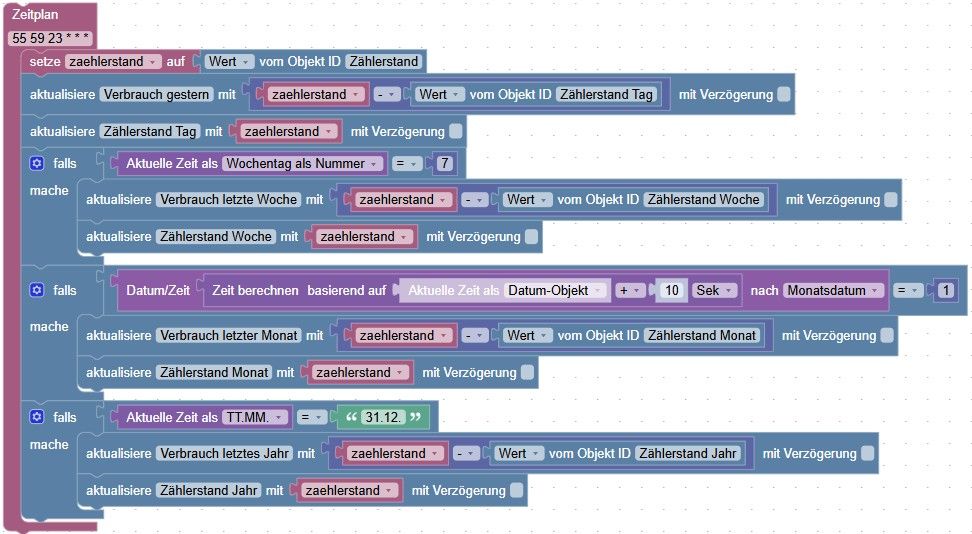
-
System läuft jetzt wieder sauber.
Ich habe aber diesen empfindlichen Sourceanalytix Adapter nicht mehr installiert, stattdessen versuche ich gerade das ganze über ein Blockly zu lösen. Könnt ihr mal drüber schauen ob das so funktionieren kann.
-
-
Oh je, sieht ja mal komplett anders aus wie meins 🫣
Wo werden die Zählerstände für Woche / Monat / Quartal / Jahr geschrieben?
Prinzip für Periodenwerte: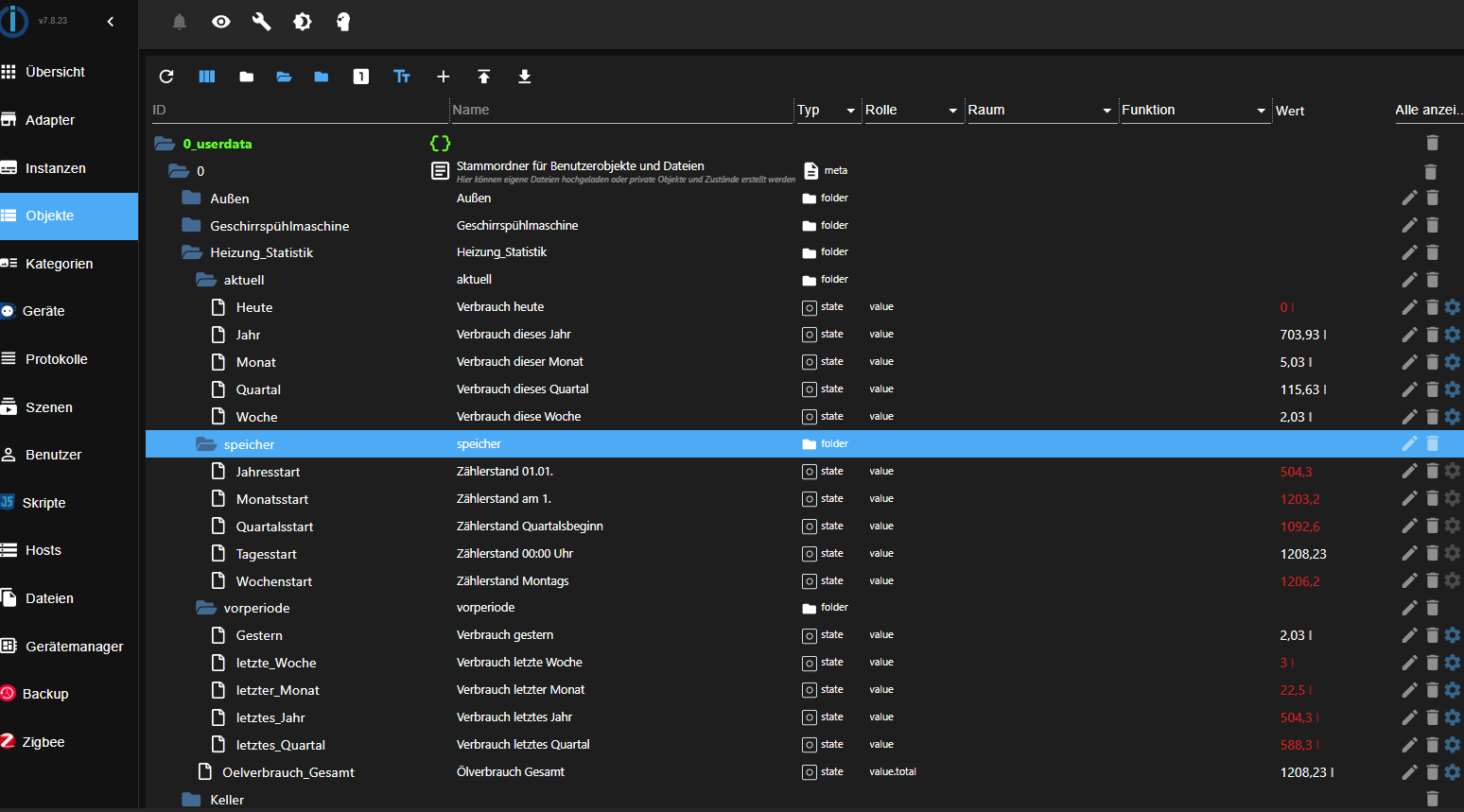
Hast du alles aktualisiert?
Jep
-
Genau, ich trigger auf power, wenn die Leistung im Heizungskeller über 250W liegt, läuft der Brenner, darunter ist er aus und es wird kein Öl verbraucht
-
So, hat etwas gedauert, sieht jetzt so aus. Wird mir in Lovelace um 00.01 Uhr Wert für den Tag 0 angezeigt? Wenn ich das richtig verstehe wird der Wert vom Vortag mit in den nächsten Tag übernommen und erst geändert wenn die Heizung wieder läuft?
Die Verzögerung habe ich raus genommem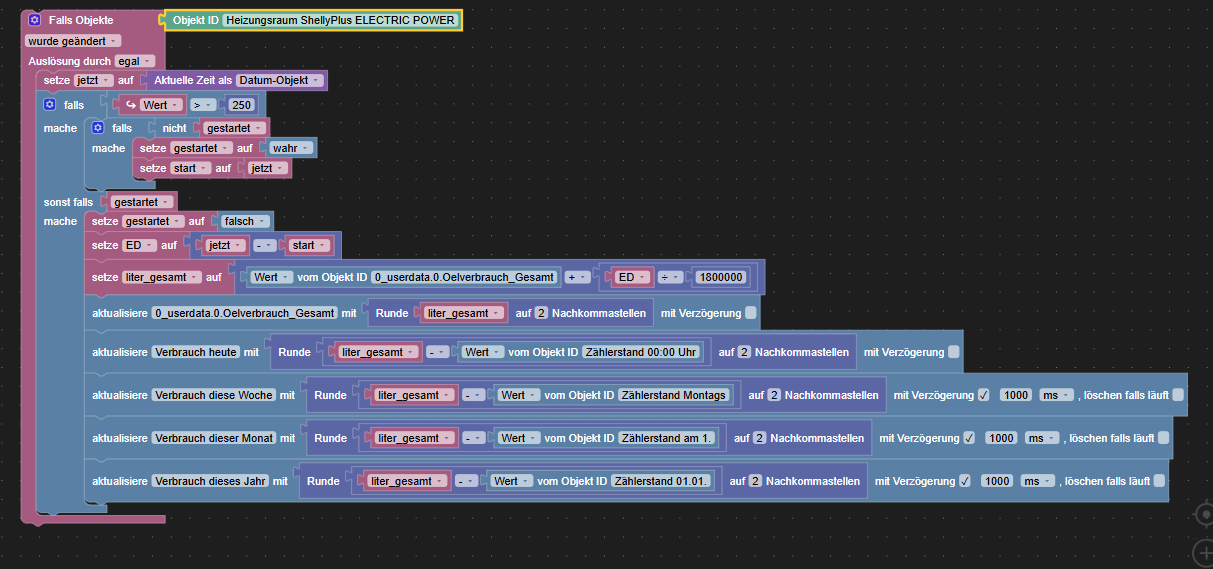
Raspberry Pi 4 8gb
-
So, hat etwas gedauert, sieht jetzt so aus. Wird mir in Lovelace um 00.01 Uhr Wert für den Tag 0 angezeigt? Wenn ich das richtig verstehe wird der Wert vom Vortag mit in den nächsten Tag übernommen und erst geändert wenn die Heizung wieder läuft?
Die Verzögerung habe ich raus genommem@tiobb [sagte]: erst geändert wenn die Heizung wieder läuft?
Die aktuellen Werte werden geschrieben, wenn der Brenner ausschaltet.
Die vorherigen Werte sollte man kurz vor Mitternacht (23:59:55) schreiben damit das Datum im Zeitstempel stimmt. -
Das heißt ich muss noch den ganzen Zeit Block von weiter oben über das aktuelle Blockly setzen?
@tiobb [sagte]: Zeit Block von weiter oben über das aktuelle Blockly setzen?
Es kann auch ein eigenes Skript sein, da der Stand ("Oelverbrauch_Gesamt") um 23:59:55 Uhr in eine Variable eingelesen wird.
Bitte verzichtet auf Chat-Nachrichten, denn die Handhabung ist grauenhaft !
Produktiv: Asus PN 42 / N100 / 8 GB / 500 GB; Proxmox mit 2 VM (iob / openCCU) -
@tiobb [sagte]: Zeit Block von weiter oben über das aktuelle Blockly setzen?
Es kann auch ein eigenes Skript sein, da der Stand ("Oelverbrauch_Gesamt") um 23:59:55 Uhr in eine Variable eingelesen wird.
@tiobb [sagte]: Zeit Block von weiter oben über das aktuelle Blockly setzen?
Es kann auch ein eigenes Skript sein, da der Stand ("Oelverbrauch_Gesamt") um 23:59:55 Uhr in eine Variable eingelesen wird.
Übersichtlicher wäre es, für mich, alles in einem Script/Blockly zu haben.
Diese Lücke im zweiten falls Block bekomme ich nicht nachgebaut 🤷♂️
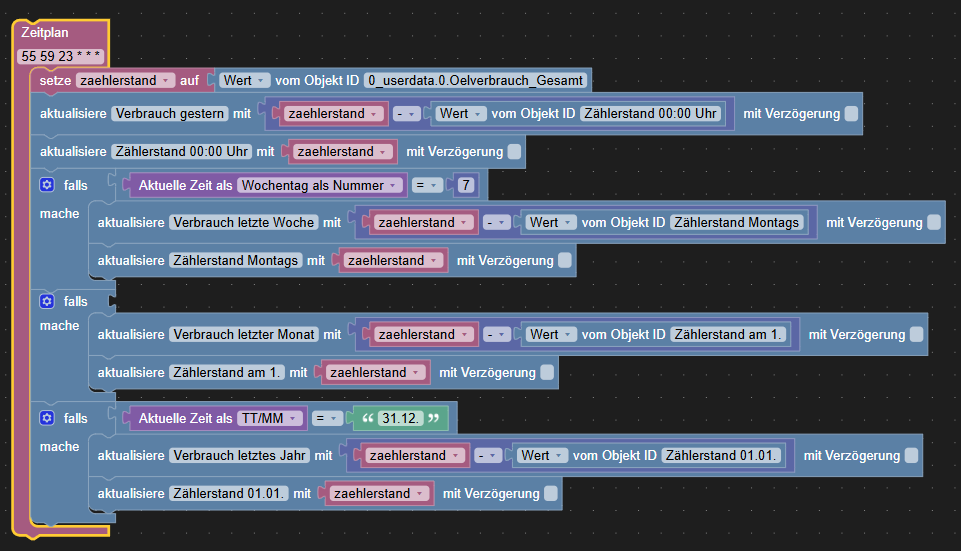
Raspberry Pi 4 8gb
-
@tiobb [sagte]: Zeit Block von weiter oben über das aktuelle Blockly setzen?
Es kann auch ein eigenes Skript sein, da der Stand ("Oelverbrauch_Gesamt") um 23:59:55 Uhr in eine Variable eingelesen wird.
Übersichtlicher wäre es, für mich, alles in einem Script/Blockly zu haben.
Diese Lücke im zweiten falls Block bekomme ich nicht nachgebaut 🤷♂️
-
Guten Morgen,
vielen Dank, ich habe die XML Datei importiert und entsprechend eingebaut, und auch das Zeitformat angepasst. Ich hatte gestern mal für eine Minute die Heizung laufen, aber die Tageswerte, sowie alle dazugehörigen Daten wurden nicht aktualisiert, und heute nach Mitternacht ist dann das Passiert, ein Minusverbrauch von 1208 Litern. Oberer Screenshot noch von gestern, unterer von heute. Was ist denn da passiert, hast Du eine Idee?
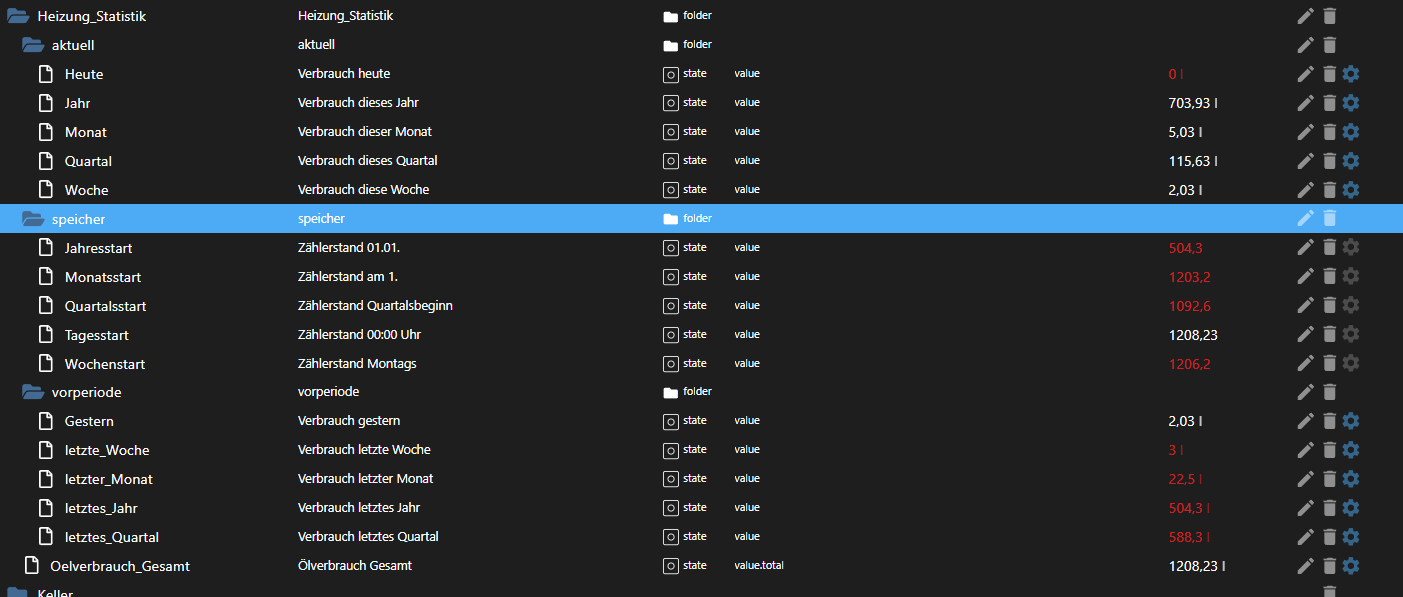
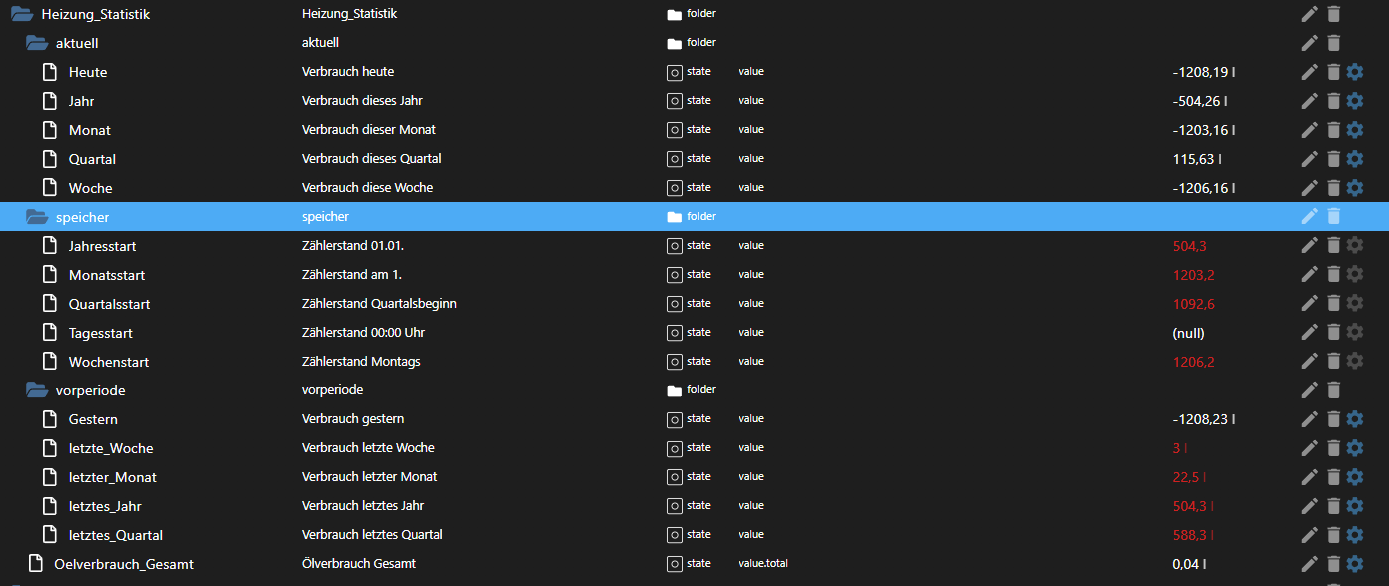
Raspberry Pi 4 8gb






Hey! Du scheinst an dieser Unterhaltung interessiert zu sein, hast aber noch kein Konto.
Hast du es satt, bei jedem Besuch durch die gleichen Beiträge zu scrollen? Wenn du dich für ein Konto anmeldest, kommst du immer genau dorthin zurück, wo du zuvor warst, und kannst dich über neue Antworten benachrichtigen lassen (entweder per E-Mail oder Push-Benachrichtigung). Du kannst auch Lesezeichen speichern und Beiträge positiv bewerten, um anderen Community-Mitgliedern deine Wertschätzung zu zeigen.
Mit deinem Input könnte dieser Beitrag noch besser werden 💗
Registrieren AnmeldenSupport us
453
Online33.0k
Benutzer83.6k
Themen1.3m
Beiträge