




Shelly Adapter - genereller Support
-
Habe einen shelly1minigen3 den ich mit Hilfe der Shelly app angelernt habe. Leider funktioniert die Integration in den IOBroker nicht. Ich bekomme die folgenden Meldungen:
2025-12-01 16:30:18.347 - error: shelly.0 (1663) [MQTT] Wrong MQTT authentication of client "shelly1minig3-e4b32326f7a8": Incorrect username (expected "shelly_Plugs")
2025-12-01 16:30:18.372 - info: shelly.0 (1663) [MQTT] Client Close: (shelly1minig3 / shelly1minig3-e4b32326f7a8 / shelly1minig3#e4b32326f7a8#1) (false)
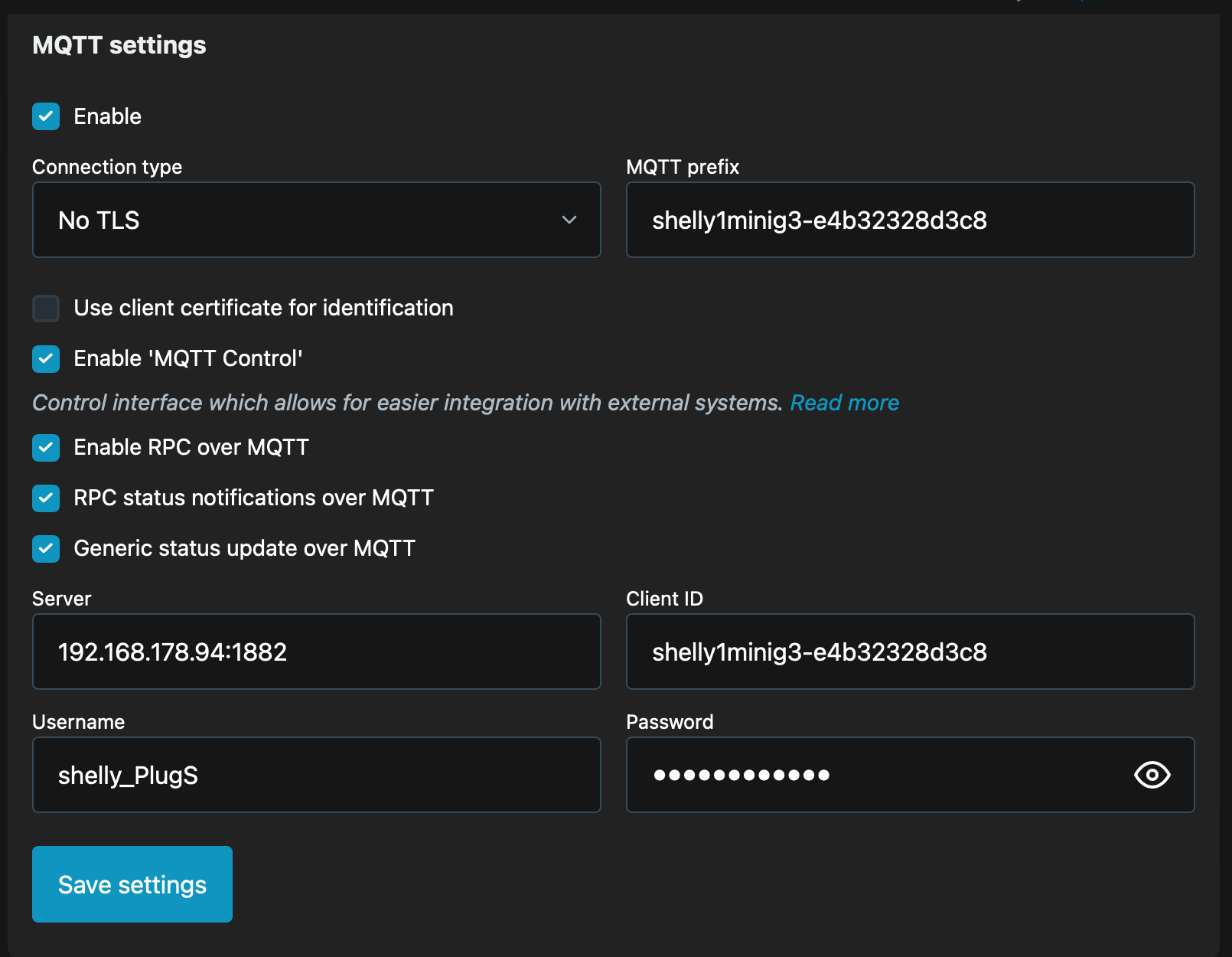
Ich hatte bisher immer alle Shelly Geräte mit dem selben MQTT User Name "shelly_Plugs"und Passwort definiert. Muss man das bei dem Gerät anders machen? In der Meldung sagt er es wäre der falsche Username. Habe den Shelly Adapter v10.4.
@Peter-c sagte in Integration von shelly1minigen3:
Hi Peter,
alle Shelly Geräte mit dem selben MQTT User Name "shelly_Plugs"und Passwort definiert
Das passt ja. Jedoch brauchen alle Shellies in den Settings - Authentication auch ein gleichlautendes Passwort:
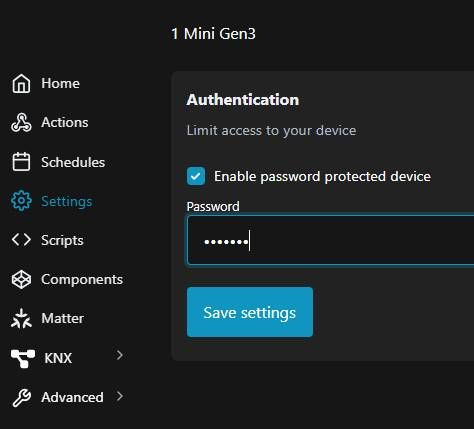
-
Der Adapter verwendet keine Cloud.
Lt. Shelly funktioniert ein Gen 1 nicht mit der Cloud wenn mqtt aktiviert wird.
Siehe https://shelly-api-docs.shelly.cloud/gen1/#mqtt-configuration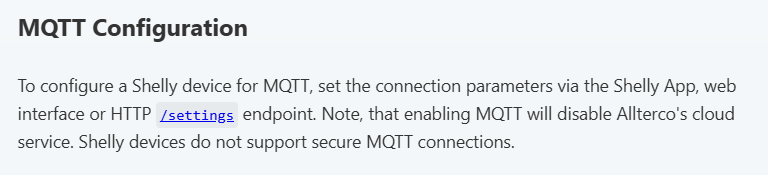
Die Bedienung der Shellies via Cloud ist aber ein anderes Thema das du ggF im Shelly Forum ansprechen kannst.
Sollte die obige Aussage von Shelly nicht mehr stimmen solls mir auch recht sein.
Hallo Martin,
ich teste auch gerade deine Shelly-Adapterversion 10.5.0-alpha.2 mit meinen Geräten:
- 1G4 inkl. AddOn mit 4 x DS18B20-Temperaturfühlern
- 1MiniG3
- PlusI4DC
- PlusPlugS
- Pro0110PM 2x
Alle Werte und Funktionen passen. Danke für dein Werken! Gruß, hf
-
Der Adapter verwendet keine Cloud.
Lt. Shelly funktioniert ein Gen 1 nicht mit der Cloud wenn mqtt aktiviert wird.
Siehe https://shelly-api-docs.shelly.cloud/gen1/#mqtt-configurationDie Bedienung der Shellies via Cloud ist aber ein anderes Thema das du ggF im Shelly Forum ansprechen kannst.
Sollte die obige Aussage von Shelly nicht mehr stimmen solls mir auch recht sein.
-
ja, du kannst subtrees jederzeit löschen. Beim Verbindungsaufbau eines Shellies werden fehlende Trees / Objekte jedenfalls angelegt.
Der Adapter löscht nie ga ze Geräte da er nicht beurteilen kann ob ein Gerät ev. nur temporär offline ist. -
Die Meldung
error: shelly.0 (1663) [MQTT] Wrong MQTT authentication of client "shelly1minig3-e4b32326f7a8": Incorrect username (expected "shelly_Plugs")
besagt, dass der Username den du im Shelly bei den MQTT Paramatern (!) eingegeben hast nicht dem Usernamen den du im Adapter als mqtt Usernamen eingegeben hast üebreinstimmt. Bitte beachte, dass der Shelly bei JEDER Änderund der MQTT Paramater eine neuerliche Eingabe des Passworts, ein Speichern und auch ein Reboot erfordert.
-
Die Meldung
error: shelly.0 (1663) [MQTT] Wrong MQTT authentication of client "shelly1minig3-e4b32326f7a8": Incorrect username (expected "shelly_Plugs")
besagt, dass der Username den du im Shelly bei den MQTT Paramatern (!) eingegeben hast nicht dem Usernamen den du im Adapter als mqtt Usernamen eingegeben hast üebreinstimmt. Bitte beachte, dass der Shelly bei JEDER Änderund der MQTT Paramater eine neuerliche Eingabe des Passworts, ein Speichern und auch ein Reboot erfordert.
-
Die Meldung
error: shelly.0 (1663) [MQTT] Wrong MQTT authentication of client "shelly1minig3-e4b32326f7a8": Incorrect username (expected "shelly_Plugs")
besagt, dass der Username den du im Shelly bei den MQTT Paramatern (!) eingegeben hast nicht dem Usernamen den du im Adapter als mqtt Usernamen eingegeben hast üebreinstimmt. Bitte beachte, dass der Shelly bei JEDER Änderund der MQTT Paramater eine neuerliche Eingabe des Passworts, ein Speichern und auch ein Reboot erfordert.
@mcm1957 Habe nun das PW im Adapter geprüft und beim shelly 1mini gen3 erneut eingegeben, neu gebootet. Dann die Shelly Instanz neu gestartet. Und dass ist dann protokolliert worden.
2025-12-02 13:53:50.335 - error: shelly.0 (28807) [MQTT] Wrong MQTT authentication of client "shelly1minig3-e4b32328d3c8": Incorrect username (expected "shelly_Plugs") 2025-12-02 13:53:50.357 - info: shelly.0 (28807) [MQTT] Client Close: (shelly1minig3 / shelly1minig3-e4b32328d3c8 / shelly1minig3#e4b32328d3c8#1) (false) 2025-12-02 13:54:15.176 - info: host.iobroker stopInstance system.adapter.shelly.0 (force=false, process=true) 2025-12-02 13:54:15.186 - info: shelly.0 (28807) Got terminate signal TERMINATE_YOURSELF 2025-12-02 13:54:15.193 - info: shelly.0 (28807) terminating 2025-12-02 13:54:15.195 - info: shelly.0 (28807) Terminated (ADAPTER_REQUESTED_TERMINATION): Without reason 2025-12-02 13:54:15.236 - info: host.iobroker stopInstance system.adapter.shelly.0 send kill signal 2025-12-02 13:54:15.697 - info: shelly.0 (28807) terminating 2025-12-02 13:54:15.796 - info: host.iobroker instance system.adapter.shelly.0 terminated with code 11 (ADAPTER_REQUESTED_TERMINATION) 2025-12-02 13:54:19.382 - info: host.iobroker instance system.adapter.shelly.0 in version "10.4.1" started with pid 29166 2025-12-02 13:54:23.291 - info: shelly.0 (29166) starting. Version 10.4.1 in /opt/iobroker/node_modules/iobroker.shelly, node: v20.19.1, js-controller: 7.0.7 2025-12-02 13:54:23.889 - info: shelly.0 (29166) [firmwareUpdate] Auto-Update enabled - devices will be updated automatically 2025-12-02 13:54:23.890 - info: shelly.0 (29166) Starting in MQTT mode. Listening on 0.0.0.0:1882 (QoS 0) 2025-12-02 13:54:29.587 - info: shelly.0 (29166) [MQTT] Device with client id "shellyplusplugs-80646fe770c4" connected from 192.168.178.126! 2025-12-02 13:54:29.598 - info: shelly.0 (29166) [MQTT] Device with client id "shellyplusplugs-a0a3b3e84258" connected from 192.168.178.199! 2025-12-02 13:54:29.603 - info: shelly.0 (29166) [MQTT] Device with client id "shellyplusplugs-d4d4da7c3fdc" connected from 192.168.178.98! 2025-12-02 13:54:29.968 - info: shelly.0 (29166) [MQTT] Device with client id "shellyplusplugs-d48afc56889c" connected from 192.168.178.105! 2025-12-02 13:54:30.194 - info: shelly.0 (29166) [MQTT] Device with client id "shellyplusplugs-a0a3b3e82c7c" connected from 192.168.178.106! 2025-12-02 13:54:30.524 - info: shelly.0 (29166) [MQTT] Device with client id "shellyplusplugs-e465b843483c" connected from 192.168.178.130! 2025-12-02 13:54:32.182 - info: shelly.0 (29166) [MQTT] Device with client id "shellyplusplugs-d48afc560ac0" connected from 192.168.178.116! 2025-12-02 13:54:45.190 - error: shelly.0 (29166) [MQTT] Wrong MQTT authentication of client "shelly1minig3-e4b32328d3c8": Incorrect username (expected "shelly_Plugs") 2025-12-02 13:54:45.219 - info: shelly.0 (29166) [MQTT] Client Close: (shelly1minig3 / shelly1minig3-e4b32328d3c8 / shelly1minig3#e4b32328d3c8#1) (false) -
@Peter-c sagte in Integration von shelly1minigen3:
Hi Peter,
alle Shelly Geräte mit dem selben MQTT User Name "shelly_Plugs"und Passwort definiert
Das passt ja. Jedoch brauchen alle Shellies in den Settings - Authentication auch ein gleichlautendes Passwort:
@fuzzy1955 Das hab ich mal probiert, bringt aber keine Änderung. Ist bei den anderen Shellys die ich habe nicht eingetragen.
-
@mcm1957 Habe nun das PW im Adapter geprüft und beim shelly 1mini gen3 erneut eingegeben, neu gebootet. Dann die Shelly Instanz neu gestartet. Und dass ist dann protokolliert worden.
2025-12-02 13:53:50.335 - error: shelly.0 (28807) [MQTT] Wrong MQTT authentication of client "shelly1minig3-e4b32328d3c8": Incorrect username (expected "shelly_Plugs") 2025-12-02 13:53:50.357 - info: shelly.0 (28807) [MQTT] Client Close: (shelly1minig3 / shelly1minig3-e4b32328d3c8 / shelly1minig3#e4b32328d3c8#1) (false) 2025-12-02 13:54:15.176 - info: host.iobroker stopInstance system.adapter.shelly.0 (force=false, process=true) 2025-12-02 13:54:15.186 - info: shelly.0 (28807) Got terminate signal TERMINATE_YOURSELF 2025-12-02 13:54:15.193 - info: shelly.0 (28807) terminating 2025-12-02 13:54:15.195 - info: shelly.0 (28807) Terminated (ADAPTER_REQUESTED_TERMINATION): Without reason 2025-12-02 13:54:15.236 - info: host.iobroker stopInstance system.adapter.shelly.0 send kill signal 2025-12-02 13:54:15.697 - info: shelly.0 (28807) terminating 2025-12-02 13:54:15.796 - info: host.iobroker instance system.adapter.shelly.0 terminated with code 11 (ADAPTER_REQUESTED_TERMINATION) 2025-12-02 13:54:19.382 - info: host.iobroker instance system.adapter.shelly.0 in version "10.4.1" started with pid 29166 2025-12-02 13:54:23.291 - info: shelly.0 (29166) starting. Version 10.4.1 in /opt/iobroker/node_modules/iobroker.shelly, node: v20.19.1, js-controller: 7.0.7 2025-12-02 13:54:23.889 - info: shelly.0 (29166) [firmwareUpdate] Auto-Update enabled - devices will be updated automatically 2025-12-02 13:54:23.890 - info: shelly.0 (29166) Starting in MQTT mode. Listening on 0.0.0.0:1882 (QoS 0) 2025-12-02 13:54:29.587 - info: shelly.0 (29166) [MQTT] Device with client id "shellyplusplugs-80646fe770c4" connected from 192.168.178.126! 2025-12-02 13:54:29.598 - info: shelly.0 (29166) [MQTT] Device with client id "shellyplusplugs-a0a3b3e84258" connected from 192.168.178.199! 2025-12-02 13:54:29.603 - info: shelly.0 (29166) [MQTT] Device with client id "shellyplusplugs-d4d4da7c3fdc" connected from 192.168.178.98! 2025-12-02 13:54:29.968 - info: shelly.0 (29166) [MQTT] Device with client id "shellyplusplugs-d48afc56889c" connected from 192.168.178.105! 2025-12-02 13:54:30.194 - info: shelly.0 (29166) [MQTT] Device with client id "shellyplusplugs-a0a3b3e82c7c" connected from 192.168.178.106! 2025-12-02 13:54:30.524 - info: shelly.0 (29166) [MQTT] Device with client id "shellyplusplugs-e465b843483c" connected from 192.168.178.130! 2025-12-02 13:54:32.182 - info: shelly.0 (29166) [MQTT] Device with client id "shellyplusplugs-d48afc560ac0" connected from 192.168.178.116! 2025-12-02 13:54:45.190 - error: shelly.0 (29166) [MQTT] Wrong MQTT authentication of client "shelly1minig3-e4b32328d3c8": Incorrect username (expected "shelly_Plugs") 2025-12-02 13:54:45.219 - info: shelly.0 (29166) [MQTT] Client Close: (shelly1minig3 / shelly1minig3-e4b32328d3c8 / shelly1minig3#e4b32328d3c8#1) (false)@Peter-c sagte in Shelly Adapter - genereller Support:
Incorrect username (expected "shelly_Plugs"
...und nicht shelly_PlugS
-
@Peter-c sagte in Shelly Adapter - genereller Support:
Incorrect username (expected "shelly_Plugs"
...und nicht shelly_PlugS
-
@mcm1957 Habe nun das PW im Adapter geprüft und beim shelly 1mini gen3 erneut eingegeben, neu gebootet. Dann die Shelly Instanz neu gestartet. Und dass ist dann protokolliert worden.
2025-12-02 13:53:50.335 - error: shelly.0 (28807) [MQTT] Wrong MQTT authentication of client "shelly1minig3-e4b32328d3c8": Incorrect username (expected "shelly_Plugs") 2025-12-02 13:53:50.357 - info: shelly.0 (28807) [MQTT] Client Close: (shelly1minig3 / shelly1minig3-e4b32328d3c8 / shelly1minig3#e4b32328d3c8#1) (false) 2025-12-02 13:54:15.176 - info: host.iobroker stopInstance system.adapter.shelly.0 (force=false, process=true) 2025-12-02 13:54:15.186 - info: shelly.0 (28807) Got terminate signal TERMINATE_YOURSELF 2025-12-02 13:54:15.193 - info: shelly.0 (28807) terminating 2025-12-02 13:54:15.195 - info: shelly.0 (28807) Terminated (ADAPTER_REQUESTED_TERMINATION): Without reason 2025-12-02 13:54:15.236 - info: host.iobroker stopInstance system.adapter.shelly.0 send kill signal 2025-12-02 13:54:15.697 - info: shelly.0 (28807) terminating 2025-12-02 13:54:15.796 - info: host.iobroker instance system.adapter.shelly.0 terminated with code 11 (ADAPTER_REQUESTED_TERMINATION) 2025-12-02 13:54:19.382 - info: host.iobroker instance system.adapter.shelly.0 in version "10.4.1" started with pid 29166 2025-12-02 13:54:23.291 - info: shelly.0 (29166) starting. Version 10.4.1 in /opt/iobroker/node_modules/iobroker.shelly, node: v20.19.1, js-controller: 7.0.7 2025-12-02 13:54:23.889 - info: shelly.0 (29166) [firmwareUpdate] Auto-Update enabled - devices will be updated automatically 2025-12-02 13:54:23.890 - info: shelly.0 (29166) Starting in MQTT mode. Listening on 0.0.0.0:1882 (QoS 0) 2025-12-02 13:54:29.587 - info: shelly.0 (29166) [MQTT] Device with client id "shellyplusplugs-80646fe770c4" connected from 192.168.178.126! 2025-12-02 13:54:29.598 - info: shelly.0 (29166) [MQTT] Device with client id "shellyplusplugs-a0a3b3e84258" connected from 192.168.178.199! 2025-12-02 13:54:29.603 - info: shelly.0 (29166) [MQTT] Device with client id "shellyplusplugs-d4d4da7c3fdc" connected from 192.168.178.98! 2025-12-02 13:54:29.968 - info: shelly.0 (29166) [MQTT] Device with client id "shellyplusplugs-d48afc56889c" connected from 192.168.178.105! 2025-12-02 13:54:30.194 - info: shelly.0 (29166) [MQTT] Device with client id "shellyplusplugs-a0a3b3e82c7c" connected from 192.168.178.106! 2025-12-02 13:54:30.524 - info: shelly.0 (29166) [MQTT] Device with client id "shellyplusplugs-e465b843483c" connected from 192.168.178.130! 2025-12-02 13:54:32.182 - info: shelly.0 (29166) [MQTT] Device with client id "shellyplusplugs-d48afc560ac0" connected from 192.168.178.116! 2025-12-02 13:54:45.190 - error: shelly.0 (29166) [MQTT] Wrong MQTT authentication of client "shelly1minig3-e4b32328d3c8": Incorrect username (expected "shelly_Plugs") 2025-12-02 13:54:45.219 - info: shelly.0 (29166) [MQTT] Client Close: (shelly1minig3 / shelly1minig3-e4b32328d3c8 / shelly1minig3#e4b32328d3c8#1) (false)@Peter-c sagte in Shelly Adapter - genereller Support:
@mcm1957 Habe nun das PW im Adapter geprüft und beim shelly 1mini gen3 erneut eingegeben, neu gebootet. Dann die Shelly Instanz neu gestartet. Und dass ist dann protokolliert worden.
2025-12-02 13:53:50.335 - error: shelly.0 (28807) [MQTT] Wrong MQTT authentication of client "shelly1minig3-e4b32328d3c8": **Incorrect username** (expected "shelly_Plugs")Auch wenns schon gelöst ist - als Info für die Zukunft:
Die Fehlermeldung sagt EINDEUTIG dass der Username nicht passt. Bei falschem Passwort würde die Meldung anders lauten und auf das falsche Kennwort hindeuten. Allerdinsg wird weder das falsche noch das erwartetet Passwort in diesem Fall gelogged :-) -
ich habe ein problem mit einem shelly Dimmer2 gen1 der im adapter nicht auftaucht. iobroker auf raspi alle adapter und js aktuell.
Das Problem: ich habe den iobroker in netzwerk1 . shelly1/GEN1 Shelly Dimmer2/Gen1 in netzwerk2 Verbindung der Netzwerke über VPN. Shellys in Netzwerk2 coap/http aktiviert und in shelly cloud aktiviert.
Der shelly1 taucht im Netzwerk1 im Adapter auf der Dimmer nicht. beide Shellys von Netzwerk 1 über ip erreichbar. Wie kann ich den Adapter überreden den Dimmer anzunehmen? Alles mehrfach neu gestartet.
Ich hoffe ich habe mich einigermaßen verständlich ausgedrückt. -
Shelly cloud spielt mal nicht mit. Der Adapter benutzt die Cloud nicht.
Sofern die beiden Netzte via vpn OHNE NAT verbunden sind sollte es prinzipiell gehen.
Hast du beim Dimmer COAP UNICAST eingestellt? Siehe Doku https://github.com/iobroker-community-adapters/ioBroker.shelly/blob/master/docs/de/protocol-coap.md
Falls eine Firmware-Version größer als 1.9.4 verwendet wird, musst ein CoIoT-Server auf den Shelly-Geräten konfiguriert werden (unicast).
-
Hallo,
ich habe einen Shelly H&T G3 in iobroker mittels MQTT eingebunden. Das funktioniert auch soweit, das entsprechende Objekt wird unter "Shelly" aufgelistet. Nur sehe ich das Problem, dass das Gerät, um Energie zu sparen, ja immer nur kurz sendet und dann wieder in den Deep-sleep-mode fällt. Entsprechend dieses Verhaltens sehe ich in dem entsprechenden Shelly-Objekt im iobroker auch, dass eben keine Verbindung zum Gerät in diesen deep-sleep-Phasen existiert. Das wäre ja nicht tragisch, jedoch sehe ich auch nach längerem Zeitraum, in der das Gerät jetzt im iobroker existiert, keine entsprechenden sich ändernden Messwerte im Verlaufsdiagramm z.b. der Temperatur. Kriegt iobroker die kurzen "Wachphasen" einfach nicht mit?
Hat einer einen Lösungsvorschlag? -
Sobald der H&T sendet bekommt das ioBroker mit.
Welche Adapterversion verwendest du?
Was steht im Log? Schalt ggF das DEBUG Log ein . dann solltest du sehen ob bzw. was der H&T sendet.
In den Stateattributen siehst du auch wann sie zuletzt aktualisisiert wurden.Sieht eigentlich eher so aus als würde der H&T gar keine Verbindung mit ioBroker aufnehmen. Check mal die MQTT Einstellung, insbesondere ob die IP Addressen des Hosts passen und ob die MQTT Optionen alle angehakt sind. (Sihe Dokumentation)
-
Hallo,
ich habe einen Shelly H&T G3 in iobroker mittels MQTT eingebunden. Das funktioniert auch soweit, das entsprechende Objekt wird unter "Shelly" aufgelistet. Nur sehe ich das Problem, dass das Gerät, um Energie zu sparen, ja immer nur kurz sendet und dann wieder in den Deep-sleep-mode fällt. Entsprechend dieses Verhaltens sehe ich in dem entsprechenden Shelly-Objekt im iobroker auch, dass eben keine Verbindung zum Gerät in diesen deep-sleep-Phasen existiert. Das wäre ja nicht tragisch, jedoch sehe ich auch nach längerem Zeitraum, in der das Gerät jetzt im iobroker existiert, keine entsprechenden sich ändernden Messwerte im Verlaufsdiagramm z.b. der Temperatur. Kriegt iobroker die kurzen "Wachphasen" einfach nicht mit?
Hat einer einen Lösungsvorschlag?@musicnrw sagte in Shelly Adapter - genereller Support:
Kriegt iobroker die kurzen "Wachphasen" einfach nicht mit?
...ja, das bekommt er mit und funktioniert einwandfrei. Ich habe über zehn der HT eingebunden.
Da könnte bei dir evtl. was falsch eingestellt sein.
Grüße
Fabio -
Hallo,
ich habe einen Shelly H&T G3 in iobroker mittels MQTT eingebunden. Das funktioniert auch soweit, das entsprechende Objekt wird unter "Shelly" aufgelistet. Nur sehe ich das Problem, dass das Gerät, um Energie zu sparen, ja immer nur kurz sendet und dann wieder in den Deep-sleep-mode fällt. Entsprechend dieses Verhaltens sehe ich in dem entsprechenden Shelly-Objekt im iobroker auch, dass eben keine Verbindung zum Gerät in diesen deep-sleep-Phasen existiert. Das wäre ja nicht tragisch, jedoch sehe ich auch nach längerem Zeitraum, in der das Gerät jetzt im iobroker existiert, keine entsprechenden sich ändernden Messwerte im Verlaufsdiagramm z.b. der Temperatur. Kriegt iobroker die kurzen "Wachphasen" einfach nicht mit?
Hat einer einen Lösungsvorschlag?@musicnrw sagte in Shelly Adapter - genereller Support:
Hat einer einen Lösungsvorschlag?
Check das mal (https://github.com/iobroker-community-adapters/ioBroker.shelly/blob/master/docs/de/protocol-mqtt.md)
Vor allem die RPC Einstellungen und die IP incl. Port
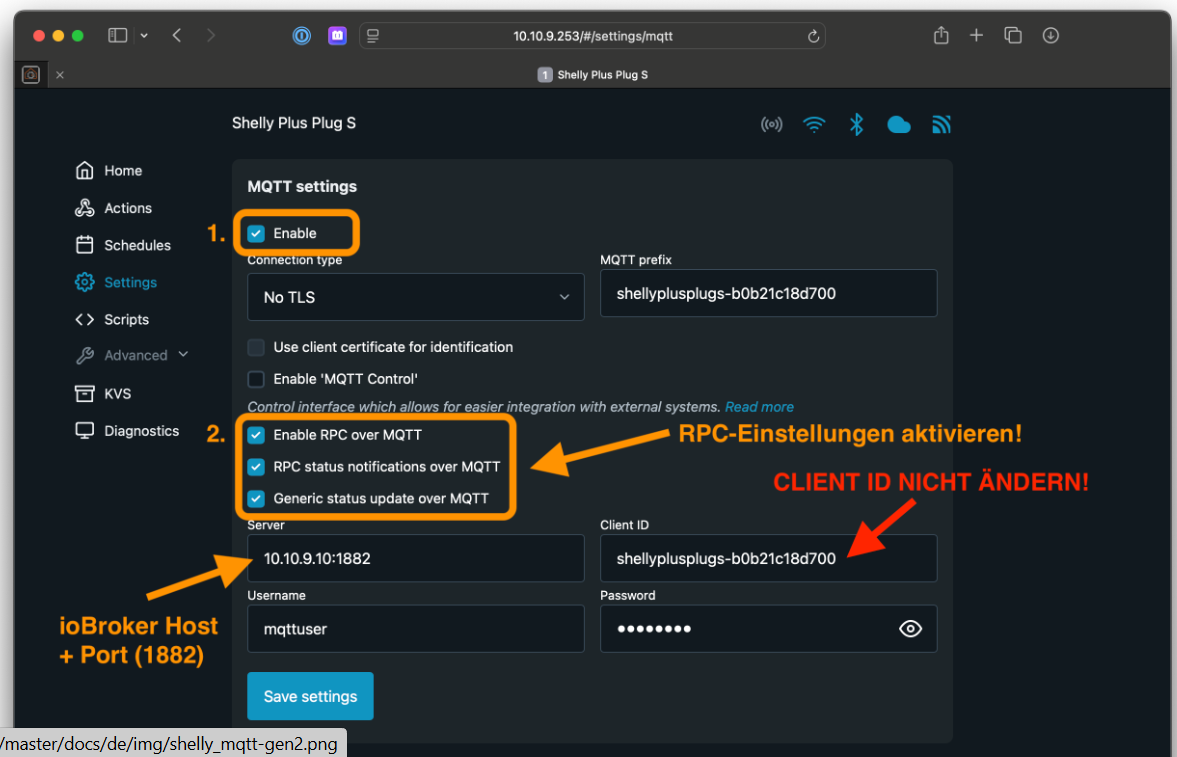
-
@musicnrw sagte in Shelly Adapter - genereller Support:
Hat einer einen Lösungsvorschlag?
Check das mal (https://github.com/iobroker-community-adapters/ioBroker.shelly/blob/master/docs/de/protocol-mqtt.md)
Vor allem die RPC Einstellungen und die IP incl. Port
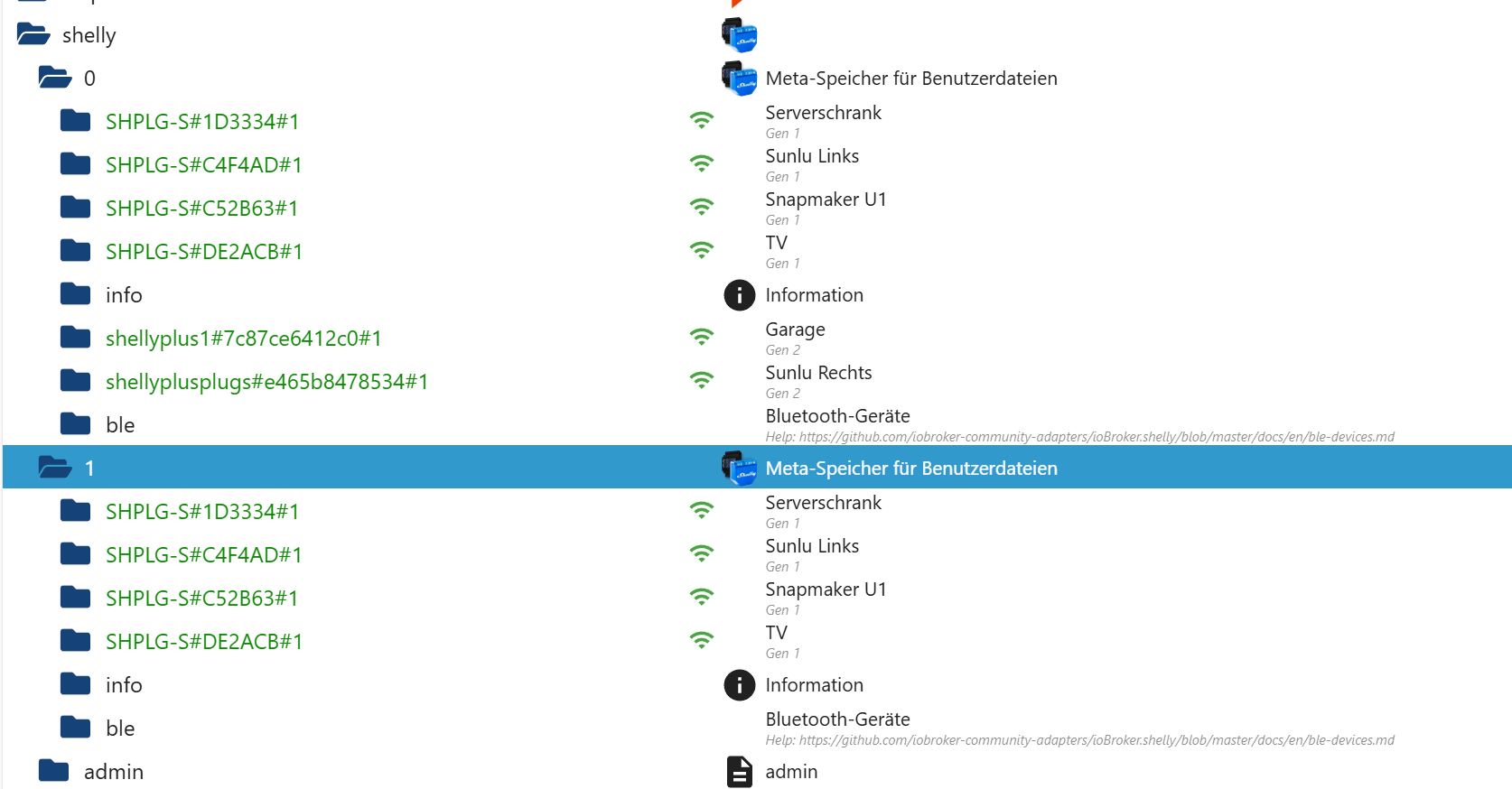
@mcm1957, genau die Einstellungen habe ich umgesetzt. Wenn ich am Shelly den Knopf (Reset-Button) kurz drücke, dmit er aufwacht, sehe ich das Gerät mit aktivem WLAN im iobroker. Aber das bleibt eben nur für die kurze Zeit, bis er wieder in den deep-sleep-Modus geht. Es kommen in der "wachen" Zeit leider auch keine Messwerte rein.




Hey! Du scheinst an dieser Unterhaltung interessiert zu sein, hast aber noch kein Konto.
Hast du es satt, bei jedem Besuch durch die gleichen Beiträge zu scrollen? Wenn du dich für ein Konto anmeldest, kommst du immer genau dorthin zurück, wo du zuvor warst, und kannst dich über neue Antworten benachrichtigen lassen (entweder per E-Mail oder Push-Benachrichtigung). Du kannst auch Lesezeichen speichern und Beiträge positiv bewerten, um anderen Community-Mitgliedern deine Wertschätzung zu zeigen.
Mit deinem Input könnte dieser Beitrag noch besser werden 💗
Registrieren Anmelden469
Online33.0k
Benutzer83.6k
Themen1.3m
Beiträge