Skip to content
  • Home
  • Recent
  • Tags
  • 0 Unread 0
  • Categories
  • Unreplied
  • Popular
  • GitHub
  • Docu
  • Hilfe
Skins
  • Light
  • Brite
  • Cerulean
  • Cosmo
  • Flatly
  • Journal
  • Litera
  • Lumen
  • Lux
  • Materia
  • Minty
  • Morph
  • Pulse
  • Sandstone
  • Simplex
  • Sketchy
  • Spacelab
  • United
  • Yeti
  • Zephyr
  • Dark
  • Cyborg
  • Darkly
  • Quartz
  • Slate
  • Solar
  • Superhero
  • Vapor

  • Default (No Skin)
  • No Skin
Collapse
ioBroker Logo

Community Forum

donate donate
  1. ioBroker Community Home
  2. Deutsch
  3. ioBroker Allgemein
  4. Richtig Host und Client updaten

NEWS

  • Weihnachtsangebot 2025! 🎄
    BluefoxB
    Bluefox
    21
    1
    835

  • UPDATE 31.10.: Amazon Alexa - ioBroker Skill läuft aus ?
    apollon77A
    apollon77
    48
    3
    9.0k

  • Monatsrückblick – September 2025
    BluefoxB
    Bluefox
    13
    1
    2.3k

Richtig Host und Client updaten

Scheduled Pinned Locked Moved ioBroker Allgemein
82 Posts 6 Posters 8.8k Views 4 Watching
  • Oldest to Newest
  • Newest to Oldest
  • Most Votes
Reply
  • Reply as topic
Log in to reply
This topic has been deleted. Only users with topic management privileges can see it.
  • Thomas BraunT Thomas Braun

    @kusselin sagte in Richtig Host und Client updaten:

    O.K. sudo ist das halt das ich alles verschieben udn löschen könnte..

    Nochmal:
    IOBROKER-BEFEHLE WERDEN NIE PER SUDO EINGELEITET

    nichts kann mal durchlaufen.....jetzt brauch ich auch nicht mehr die alte karte reinschieben.....

    Wenn du es halt auch falsch machst? Was erwartest du?

    Fix die BEIDEN Installationen per

    iob stop 
    iob fix
    iob start
    
    KusselinK Offline
    KusselinK Offline
    Kusselin
    wrote on last edited by Kusselin
    #45

    @thomas-braun Leuts....woher soll ich das wissen....so weit drin bin ich nicht in der Materie

    so jetzt habe ich auf beiden System den Fix erfolgreich durchgeführt....

    muss ich jetzt nochmal connecten also die Befehle abgeben in putty füer den Slave?

    der Slave ist nicht als verbunden im Masetr angezeigt............nachdem ich auf beiden geräten iob start gemacht habe udn auf dem Slave dann den befehl abgesetzt habe, kommt das wieder:

    iobroker multihost browse
    No Multihost server found. Make sure iobroker is running on the host where you enabled multihost discovery (and it is not this host)!


    Sorry...ohne eure hilfe komme ich da nicht weiter....

    Thomas BraunT 2 Replies Last reply
    0
    • KusselinK Kusselin

      @thomas-braun Leuts....woher soll ich das wissen....so weit drin bin ich nicht in der Materie

      so jetzt habe ich auf beiden System den Fix erfolgreich durchgeführt....

      muss ich jetzt nochmal connecten also die Befehle abgeben in putty füer den Slave?

      der Slave ist nicht als verbunden im Masetr angezeigt............nachdem ich auf beiden geräten iob start gemacht habe udn auf dem Slave dann den befehl abgesetzt habe, kommt das wieder:

      iobroker multihost browse
      No Multihost server found. Make sure iobroker is running on the host where you enabled multihost discovery (and it is not this host)!


      Sorry...ohne eure hilfe komme ich da nicht weiter....

      Thomas BraunT Online
      Thomas BraunT Online
      Thomas Braun
      Most Active
      wrote on last edited by
      #46

      @kusselin

      Bei 1,4K Beiträgen und seit 2017 im Forum aktiv könnte man davon schon mal was mitbekommen haben...

      Linux-Werkzeugkasten:
      https://forum.iobroker.net/topic/42952/der-kleine-iobroker-linux-werkzeugkasten
      NodeJS Fixer Skript:
      https://forum.iobroker.net/topic/68035/iob-node-fix-skript
      iob_diag: curl -sLf -o diag.sh https://iobroker.net/diag.sh && bash diag.sh

      KusselinK 1 Reply Last reply
      0
      • KusselinK Kusselin

        @thomas-braun Leuts....woher soll ich das wissen....so weit drin bin ich nicht in der Materie

        so jetzt habe ich auf beiden System den Fix erfolgreich durchgeführt....

        muss ich jetzt nochmal connecten also die Befehle abgeben in putty füer den Slave?

        der Slave ist nicht als verbunden im Masetr angezeigt............nachdem ich auf beiden geräten iob start gemacht habe udn auf dem Slave dann den befehl abgesetzt habe, kommt das wieder:

        iobroker multihost browse
        No Multihost server found. Make sure iobroker is running on the host where you enabled multihost discovery (and it is not this host)!


        Sorry...ohne eure hilfe komme ich da nicht weiter....

        Thomas BraunT Online
        Thomas BraunT Online
        Thomas Braun
        Most Active
        wrote on last edited by
        #47

        @kusselin sagte in Richtig Host und Client updaten:

        nachdem ich auf beiden geräten iob start gemacht habe udn auf dem Slave dann den befehl abgesetzt habe, kommt das wieder:

        Zuerst muss auf dem Master auch Multihost aktiviert werden, sodass der auch gefunden werden kann.

        Linux-Werkzeugkasten:
        https://forum.iobroker.net/topic/42952/der-kleine-iobroker-linux-werkzeugkasten
        NodeJS Fixer Skript:
        https://forum.iobroker.net/topic/68035/iob-node-fix-skript
        iob_diag: curl -sLf -o diag.sh https://iobroker.net/diag.sh && bash diag.sh

        KusselinK 1 Reply Last reply
        0
        • Thomas BraunT Thomas Braun

          @kusselin

          Bei 1,4K Beiträgen und seit 2017 im Forum aktiv könnte man davon schon mal was mitbekommen haben...

          KusselinK Offline
          KusselinK Offline
          Kusselin
          wrote on last edited by
          #48

          @thomas-braun nee sorry....wenn ich was poste kpmmt doch eh nur schr...raus..merke ich doch hier,,,und ich habe ach nicht die zeit....will aber ein funktionierendes System....

          tja...was geht jetzt?

          HomoranH 1 Reply Last reply
          0
          • KusselinK Kusselin

            @thomas-braun nee sorry....wenn ich was poste kpmmt doch eh nur schr...raus..merke ich doch hier,,,und ich habe ach nicht die zeit....will aber ein funktionierendes System....

            tja...was geht jetzt?

            HomoranH Do not disturb
            HomoranH Do not disturb
            Homoran
            Global Moderator Administrators
            wrote on last edited by
            #49

            @kusselin sagte in Richtig Host und Client updaten:

            was geht jetzt?

            sag du es uns!
            wir sitzen nicht an deinem Rechner.

            Was läuft jetzt?
            was sagt iob setup custom? auf master und auf host?

            kein Support per PN! - Fragen im Forum stellen - es gibt fast nichts, was nicht auch für andere interessant ist.

            Benutzt das Voting rechts unten im Beitrag wenn er euch geholfen hat.

            der Installationsfixer: curl -fsL https://iobroker.net/fix.sh | bash -

            KusselinK 1 Reply Last reply
            0
            • Thomas BraunT Thomas Braun

              @kusselin sagte in Richtig Host und Client updaten:

              nachdem ich auf beiden geräten iob start gemacht habe udn auf dem Slave dann den befehl abgesetzt habe, kommt das wieder:

              Zuerst muss auf dem Master auch Multihost aktiviert werden, sodass der auch gefunden werden kann.

              KusselinK Offline
              KusselinK Offline
              Kusselin
              wrote on last edited by
              #50

              @thomas-braun sagte in Richtig Host und Client updaten:

              @kusselin sagte in Richtig Host und Client updaten:

              nachdem ich auf beiden geräten iob start gemacht habe udn auf dem Slave dann den befehl abgesetzt habe, kommt das wieder:

              Zuerst muss auf dem Master auch Multihost aktiviert werden, sodass der auch gefunden werden kann.

              Das jetzt aufm Host gemacht:

               iobroker multihost enable
              Please check the binding of the configured jsonl server to allow remote connections.
              No configuration change needed.
              
              
              Multihost discovery server: enabled
              Discovery authentication:   enabled
              Persistent activation:      disabled
              Objects:                    jsonl on 0.0.0.0
              States:                     jsonl on 0.0.0.0


              dann auf den Slave das eingegeben:

               iobroker multihost browse
              1 |       192.168.200.38 |  host |       192.168.200.38 | "authentication required"


              dann das abgesetzt:

               iobroker multihost connect
              1 |       192.168.200.38 |  host |       192.168.200.38 | "authentication required"
              Please select host [1]: 1
              Enter secret phrase for connection: ********
              
              Error: No configuration received!
                  at file:///opt/iobroker/node_modules/@iobroker/js-controller-cli/src/lib/setup/setupMultihost.ts:339:26
                  at onFinished (file:///opt/iobroker/node_modules/@iobroker/js-controller-cli/src/lib/setup/multihostClient.ts:267:21)
                  at Timeout.<anonymous> (file:///opt/iobroker/node_modules/@iobroker/js-controller-cli/src/lib/setup/multihostClient.ts:98:17)
                  at listOnTimeout (node:internal/timers:581:17)
                  at processTimers (node:internal/timers:519:7)


              Beim Host kommt noch die Meldung..ist auch ioben zu sehen:

              Please check the binding of the configured jsonl server to allow remote connections.
              

              Ich weiss nicht was da ist...??

              HomoranH Thomas BraunT 2 Replies Last reply
              0
              • HomoranH Homoran

                @kusselin sagte in Richtig Host und Client updaten:

                was geht jetzt?

                sag du es uns!
                wir sitzen nicht an deinem Rechner.

                Was läuft jetzt?
                was sagt iob setup custom? auf master und auf host?

                KusselinK Offline
                KusselinK Offline
                Kusselin
                wrote on last edited by
                #51

                @homoran sagte in Richtig Host und Client updaten:

                iob setup custom

                 iob setup custom
                Current configuration:
                - Objects database:
                  - Type: jsonl
                  - Host/Unix Socket: 0.0.0.0
                  - Port: 9001
                - States database:
                  - Type: jsonl
                  - Host/Unix Socket: 0.0.0.0
                  - Port: 9000
                - Data Directory: ../../iobroker-data/
                
                Type of objects DB [(j)sonl, (f)ile, (r)edis, ...], default [jsonl]:
                

                slave:

                 iob setup custom
                Current configuration:
                - Objects database:
                  - Type: jsonl
                  - Host/Unix Socket: 0.0.0.0
                  - Port: 9001
                - States database:
                  - Type: jsonl
                  - Host/Unix Socket: 0.0.0.0
                  - Port: 9000
                - Data Directory: ../../iobroker-data/
                
                Type of objects DB [(j)sonl, (f)ile, (r)edis, ...], default [jsonl]:
                

                ich raff das nicht was man da jetzt eingeben muss?

                1 Reply Last reply
                0
                • KusselinK Kusselin

                  @thomas-braun sagte in Richtig Host und Client updaten:

                  @kusselin sagte in Richtig Host und Client updaten:

                  nachdem ich auf beiden geräten iob start gemacht habe udn auf dem Slave dann den befehl abgesetzt habe, kommt das wieder:

                  Zuerst muss auf dem Master auch Multihost aktiviert werden, sodass der auch gefunden werden kann.

                  Das jetzt aufm Host gemacht:

                   iobroker multihost enable
                  Please check the binding of the configured jsonl server to allow remote connections.
                  No configuration change needed.
                  
                  
                  Multihost discovery server: enabled
                  Discovery authentication:   enabled
                  Persistent activation:      disabled
                  Objects:                    jsonl on 0.0.0.0
                  States:                     jsonl on 0.0.0.0


                  dann auf den Slave das eingegeben:

                   iobroker multihost browse
                  1 |       192.168.200.38 |  host |       192.168.200.38 | "authentication required"


                  dann das abgesetzt:

                   iobroker multihost connect
                  1 |       192.168.200.38 |  host |       192.168.200.38 | "authentication required"
                  Please select host [1]: 1
                  Enter secret phrase for connection: ********
                  
                  Error: No configuration received!
                      at file:///opt/iobroker/node_modules/@iobroker/js-controller-cli/src/lib/setup/setupMultihost.ts:339:26
                      at onFinished (file:///opt/iobroker/node_modules/@iobroker/js-controller-cli/src/lib/setup/multihostClient.ts:267:21)
                      at Timeout.<anonymous> (file:///opt/iobroker/node_modules/@iobroker/js-controller-cli/src/lib/setup/multihostClient.ts:98:17)
                      at listOnTimeout (node:internal/timers:581:17)
                      at processTimers (node:internal/timers:519:7)


                  Beim Host kommt noch die Meldung..ist auch ioben zu sehen:

                  Please check the binding of the configured jsonl server to allow remote connections.
                  

                  Ich weiss nicht was da ist...??

                  HomoranH Do not disturb
                  HomoranH Do not disturb
                  Homoran
                  Global Moderator Administrators
                  wrote on last edited by
                  #52

                  @kusselin sagte in Richtig Host und Client updaten:

                  Das jetzt aufm Host gemacht:

                  auf welchem?
                  ist ja ein MULTI HOST!!

                  kein Support per PN! - Fragen im Forum stellen - es gibt fast nichts, was nicht auch für andere interessant ist.

                  Benutzt das Voting rechts unten im Beitrag wenn er euch geholfen hat.

                  der Installationsfixer: curl -fsL https://iobroker.net/fix.sh | bash -

                  1 Reply Last reply
                  0
                  • KusselinK Kusselin

                    @thomas-braun sagte in Richtig Host und Client updaten:

                    @kusselin sagte in Richtig Host und Client updaten:

                    nachdem ich auf beiden geräten iob start gemacht habe udn auf dem Slave dann den befehl abgesetzt habe, kommt das wieder:

                    Zuerst muss auf dem Master auch Multihost aktiviert werden, sodass der auch gefunden werden kann.

                    Das jetzt aufm Host gemacht:

                     iobroker multihost enable
                    Please check the binding of the configured jsonl server to allow remote connections.
                    No configuration change needed.
                    
                    
                    Multihost discovery server: enabled
                    Discovery authentication:   enabled
                    Persistent activation:      disabled
                    Objects:                    jsonl on 0.0.0.0
                    States:                     jsonl on 0.0.0.0


                    dann auf den Slave das eingegeben:

                     iobroker multihost browse
                    1 |       192.168.200.38 |  host |       192.168.200.38 | "authentication required"


                    dann das abgesetzt:

                     iobroker multihost connect
                    1 |       192.168.200.38 |  host |       192.168.200.38 | "authentication required"
                    Please select host [1]: 1
                    Enter secret phrase for connection: ********
                    
                    Error: No configuration received!
                        at file:///opt/iobroker/node_modules/@iobroker/js-controller-cli/src/lib/setup/setupMultihost.ts:339:26
                        at onFinished (file:///opt/iobroker/node_modules/@iobroker/js-controller-cli/src/lib/setup/multihostClient.ts:267:21)
                        at Timeout.<anonymous> (file:///opt/iobroker/node_modules/@iobroker/js-controller-cli/src/lib/setup/multihostClient.ts:98:17)
                        at listOnTimeout (node:internal/timers:581:17)
                        at processTimers (node:internal/timers:519:7)


                    Beim Host kommt noch die Meldung..ist auch ioben zu sehen:

                    Please check the binding of the configured jsonl server to allow remote connections.
                    

                    Ich weiss nicht was da ist...??

                    Thomas BraunT Online
                    Thomas BraunT Online
                    Thomas Braun
                    Most Active
                    wrote on last edited by
                    #53

                    @kusselin sagte in Richtig Host und Client updaten:

                    Ich weiss nicht was da ist...??

                    Ich auch nicht. Hab mit MultiHost auch nicht viel am Hut.

                    Linux-Werkzeugkasten:
                    https://forum.iobroker.net/topic/42952/der-kleine-iobroker-linux-werkzeugkasten
                    NodeJS Fixer Skript:
                    https://forum.iobroker.net/topic/68035/iob-node-fix-skript
                    iob_diag: curl -sLf -o diag.sh https://iobroker.net/diag.sh && bash diag.sh

                    1 Reply Last reply
                    0
                    • KusselinK Offline
                      KusselinK Offline
                      Kusselin
                      wrote on last edited by
                      #54

                      Alter Schalter was ne Geburt...

                      also zu,m Verständnis.....jetzt nochmal wie folgt vorgegangen:

                      Master:

                       iob setup custom
                      Current configuration:
                      - Objects database:
                        - Type: jsonl
                        - Host/Unix Socket: 0.0.0.0
                        - Port: 9001
                      - States database:
                        - Type: jsonl
                        - Host/Unix Socket: 0.0.0.0
                        - Port: 9000
                      - Data Directory: ../../iobroker-data/
                      
                      Type of objects DB [(j)sonl, (f)ile, (r)edis, ...], default [jsonl]:
                      Host / Unix Socket of objects DB(jsonl), default[0.0.0.0]:
                      Port of objects DB(jsonl), default[9001]:
                      Type of states DB [(j)sonl, (f)file, (r)edis, ...], default [jsonl]:
                      Host / Unix Socket of states DB (jsonl), default[0.0.0.0]:
                      Port of states DB (jsonl), default[9000]:
                      Data directory (file), default[../../iobroker-data/]:
                      Host name of this machine [iobroker-live]:
                      updating conf/iobroker.json
                      root@iobroker-live:/opt/iobroker#
                      

                      dann auf dem Slave:

                       iob setup custom
                      Current configuration:
                      - Objects database:
                        - Type: jsonl
                        - Host/Unix Socket: 192.168.200.38
                        - Port: 9001
                      - States database:
                        - Type: jsonl
                        - Host/Unix Socket: 192.168.200.38
                        - Port: 9000
                      - Data Directory: ../../iobroker-data/
                      
                      Type of objects DB [(j)sonl, (f)ile, (r)edis, ...], default [jsonl]:
                      Host / Unix Socket of objects DB(jsonl), default[192.168.200.38]: 192.168.200.38
                      Port of objects DB(jsonl), default[9001]:
                      Type of states DB [(j)sonl, (f)file, (r)edis, ...], default [jsonl]:
                      Host / Unix Socket of states DB (jsonl), default[192.168.200.38]: 192.168.200.38
                      Port of states DB (jsonl), default[9000]:
                      Host name of this machine [raspi2-unterverteilung]:
                      updating conf/iobroker.json
                      

                      so dann noch ein restart vpm Slave pi udn jetzt ist der Slave wieder grün......hab ichs jetzt endlich geschafft?

                      Ich schreibe mir ne Anleitung :-(

                      Danke an alle

                      Aber trotzdem jetzt passt alles oder
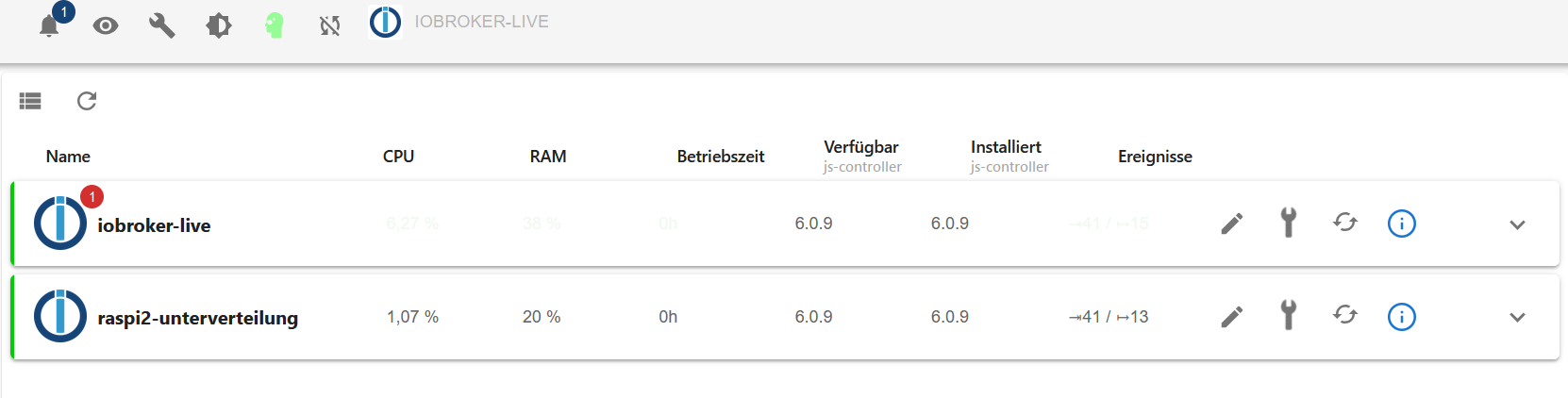
                      Image 003.png

                      Eine Frage noch ....

                      Wie bekomme ich die Meldung per Update weg? wie bzw. wo muss ich hier updaten?
                      Den Container habe ich geupdatet udn neu gestartet...kommt aber trotzdem die Meldung...Bitte eine Info so das ich damit klar komme...
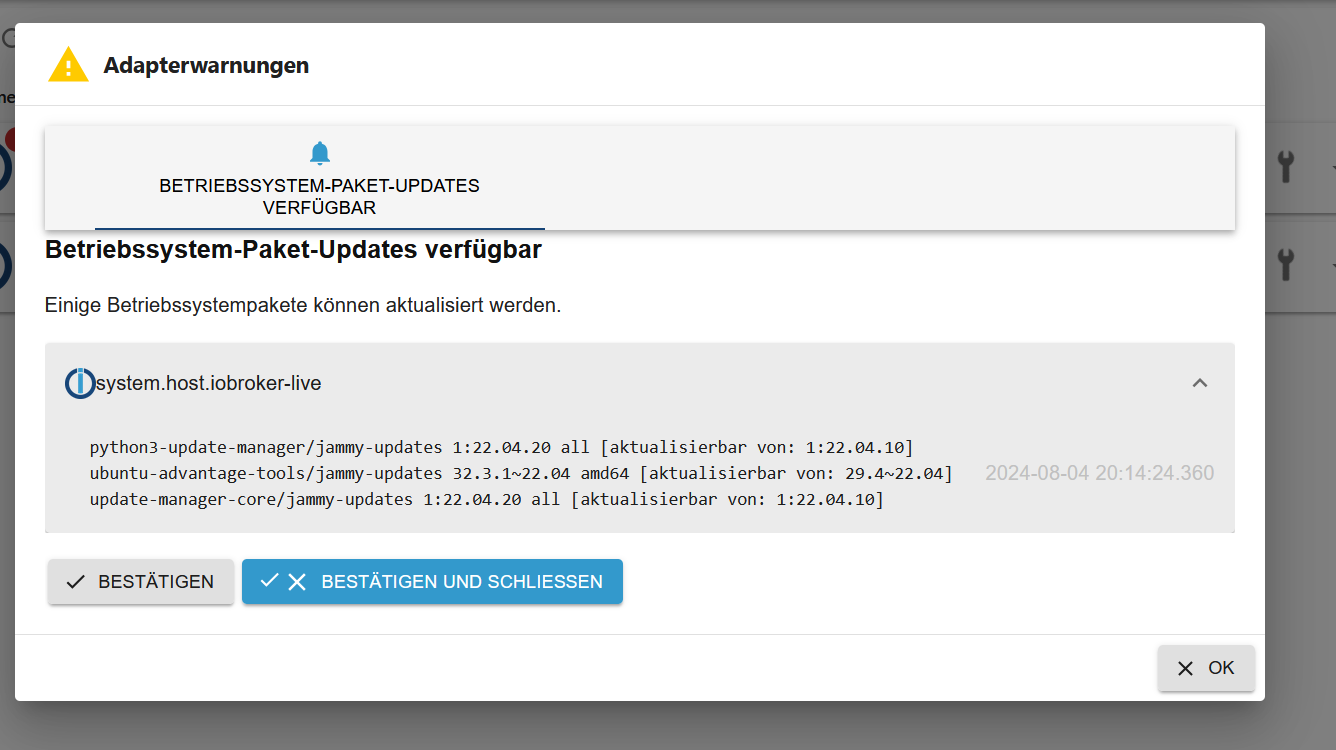
                      Image 004.png

                      Dannke udn Gruss an alle hier die mir mal wieder geholfen haben....

                      Thomas BraunT haselchenH 2 Replies Last reply
                      0
                      • KusselinK Kusselin

                        Alter Schalter was ne Geburt...

                        also zu,m Verständnis.....jetzt nochmal wie folgt vorgegangen:

                        Master:

                         iob setup custom
                        Current configuration:
                        - Objects database:
                          - Type: jsonl
                          - Host/Unix Socket: 0.0.0.0
                          - Port: 9001
                        - States database:
                          - Type: jsonl
                          - Host/Unix Socket: 0.0.0.0
                          - Port: 9000
                        - Data Directory: ../../iobroker-data/
                        
                        Type of objects DB [(j)sonl, (f)ile, (r)edis, ...], default [jsonl]:
                        Host / Unix Socket of objects DB(jsonl), default[0.0.0.0]:
                        Port of objects DB(jsonl), default[9001]:
                        Type of states DB [(j)sonl, (f)file, (r)edis, ...], default [jsonl]:
                        Host / Unix Socket of states DB (jsonl), default[0.0.0.0]:
                        Port of states DB (jsonl), default[9000]:
                        Data directory (file), default[../../iobroker-data/]:
                        Host name of this machine [iobroker-live]:
                        updating conf/iobroker.json
                        root@iobroker-live:/opt/iobroker#
                        

                        dann auf dem Slave:

                         iob setup custom
                        Current configuration:
                        - Objects database:
                          - Type: jsonl
                          - Host/Unix Socket: 192.168.200.38
                          - Port: 9001
                        - States database:
                          - Type: jsonl
                          - Host/Unix Socket: 192.168.200.38
                          - Port: 9000
                        - Data Directory: ../../iobroker-data/
                        
                        Type of objects DB [(j)sonl, (f)ile, (r)edis, ...], default [jsonl]:
                        Host / Unix Socket of objects DB(jsonl), default[192.168.200.38]: 192.168.200.38
                        Port of objects DB(jsonl), default[9001]:
                        Type of states DB [(j)sonl, (f)file, (r)edis, ...], default [jsonl]:
                        Host / Unix Socket of states DB (jsonl), default[192.168.200.38]: 192.168.200.38
                        Port of states DB (jsonl), default[9000]:
                        Host name of this machine [raspi2-unterverteilung]:
                        updating conf/iobroker.json
                        

                        so dann noch ein restart vpm Slave pi udn jetzt ist der Slave wieder grün......hab ichs jetzt endlich geschafft?

                        Ich schreibe mir ne Anleitung :-(

                        Danke an alle

                        Aber trotzdem jetzt passt alles oder

                        Image 003.png

                        Eine Frage noch ....

                        Wie bekomme ich die Meldung per Update weg? wie bzw. wo muss ich hier updaten?
                        Den Container habe ich geupdatet udn neu gestartet...kommt aber trotzdem die Meldung...Bitte eine Info so das ich damit klar komme...

                        Image 004.png

                        Dannke udn Gruss an alle hier die mir mal wieder geholfen haben....

                        Thomas BraunT Online
                        Thomas BraunT Online
                        Thomas Braun
                        Most Active
                        wrote on last edited by
                        #55

                        @kusselin

                        Das sind Phased Updates.
                        https://wiki.ubuntuusers.de/Aktualisierungen/phased_update/

                        Linux-Werkzeugkasten:
                        https://forum.iobroker.net/topic/42952/der-kleine-iobroker-linux-werkzeugkasten
                        NodeJS Fixer Skript:
                        https://forum.iobroker.net/topic/68035/iob-node-fix-skript
                        iob_diag: curl -sLf -o diag.sh https://iobroker.net/diag.sh && bash diag.sh

                        1 Reply Last reply
                        1
                        • KusselinK Kusselin

                          Alter Schalter was ne Geburt...

                          also zu,m Verständnis.....jetzt nochmal wie folgt vorgegangen:

                          Master:

                           iob setup custom
                          Current configuration:
                          - Objects database:
                            - Type: jsonl
                            - Host/Unix Socket: 0.0.0.0
                            - Port: 9001
                          - States database:
                            - Type: jsonl
                            - Host/Unix Socket: 0.0.0.0
                            - Port: 9000
                          - Data Directory: ../../iobroker-data/
                          
                          Type of objects DB [(j)sonl, (f)ile, (r)edis, ...], default [jsonl]:
                          Host / Unix Socket of objects DB(jsonl), default[0.0.0.0]:
                          Port of objects DB(jsonl), default[9001]:
                          Type of states DB [(j)sonl, (f)file, (r)edis, ...], default [jsonl]:
                          Host / Unix Socket of states DB (jsonl), default[0.0.0.0]:
                          Port of states DB (jsonl), default[9000]:
                          Data directory (file), default[../../iobroker-data/]:
                          Host name of this machine [iobroker-live]:
                          updating conf/iobroker.json
                          root@iobroker-live:/opt/iobroker#
                          

                          dann auf dem Slave:

                           iob setup custom
                          Current configuration:
                          - Objects database:
                            - Type: jsonl
                            - Host/Unix Socket: 192.168.200.38
                            - Port: 9001
                          - States database:
                            - Type: jsonl
                            - Host/Unix Socket: 192.168.200.38
                            - Port: 9000
                          - Data Directory: ../../iobroker-data/
                          
                          Type of objects DB [(j)sonl, (f)ile, (r)edis, ...], default [jsonl]:
                          Host / Unix Socket of objects DB(jsonl), default[192.168.200.38]: 192.168.200.38
                          Port of objects DB(jsonl), default[9001]:
                          Type of states DB [(j)sonl, (f)file, (r)edis, ...], default [jsonl]:
                          Host / Unix Socket of states DB (jsonl), default[192.168.200.38]: 192.168.200.38
                          Port of states DB (jsonl), default[9000]:
                          Host name of this machine [raspi2-unterverteilung]:
                          updating conf/iobroker.json
                          

                          so dann noch ein restart vpm Slave pi udn jetzt ist der Slave wieder grün......hab ichs jetzt endlich geschafft?

                          Ich schreibe mir ne Anleitung :-(

                          Danke an alle

                          Aber trotzdem jetzt passt alles oder

                          Image 003.png

                          Eine Frage noch ....

                          Wie bekomme ich die Meldung per Update weg? wie bzw. wo muss ich hier updaten?
                          Den Container habe ich geupdatet udn neu gestartet...kommt aber trotzdem die Meldung...Bitte eine Info so das ich damit klar komme...

                          Image 004.png

                          Dannke udn Gruss an alle hier die mir mal wieder geholfen haben....

                          haselchenH Offline
                          haselchenH Offline
                          haselchen
                          Most Active
                          wrote on last edited by
                          #56

                          @kusselin

                          Was ist mit Deinem Master?
                          Was sagt das Log zur roten 1?

                          Synology DS218+ & 2 x Fujitsu Esprimo (VM/Container) + FritzBox7590 + 2 AVM 3000 Repeater & Homematic & HUE & Osram & Xiaomi, NPM 10.9.4, Nodejs 22.21.0 ,JS Controller 7.0.7 ,Admin 7.7.19

                          1 Reply Last reply
                          0
                          • HomoranH Homoran

                            @kusselin sagte in Richtig Host und Client updaten:

                            Ich hab echt Bammel das ich mir jetzt alles zerschiese.......

                            warum?

                            nimm ne neue Karte, schlimmstenfalls steckst du die alte wieder rein.

                            Installier Raspberrypi OS lite drauf!
                            gleichen Hostnamen wie bisherverwenden!!!

                            installier iob mit dem Einzeiler
                            lösch alle Adapter

                            Dann über iob setup custom die Verbindungsparameter zum Master eingeben.

                            fertig

                            KusselinK Offline
                            KusselinK Offline
                            Kusselin
                            wrote on last edited by
                            #57

                            @homoran sagte in Richtig Host und Client updaten:

                            @kusselin sagte in Richtig Host und Client updaten:

                            Ich hab echt Bammel das ich mir jetzt alles zerschiese.......

                            warum?

                            nimm ne neue Karte, schlimmstenfalls steckst du die alte wieder rein.

                            Installier Raspberrypi OS lite drauf!
                            gleichen Hostnamen wie bisherverwenden!!!

                            installier iob mit dem Einzeiler
                            lösch alle Adapter

                            Dann über iob setup custom die Verbindungsparameter zum Master eingeben.

                            fertig

                            Homoran du schreibst "Lösche alle Adapter" -> Alle heisst auch Admin
                            bei ner frischen Installation ist discovery backitup udn der admin installiert...alle deinstallieren richtig auch den Admin?

                            Thomas BraunT HomoranH 2 Replies Last reply
                            0
                            • KusselinK Kusselin

                              @homoran sagte in Richtig Host und Client updaten:

                              @kusselin sagte in Richtig Host und Client updaten:

                              Ich hab echt Bammel das ich mir jetzt alles zerschiese.......

                              warum?

                              nimm ne neue Karte, schlimmstenfalls steckst du die alte wieder rein.

                              Installier Raspberrypi OS lite drauf!
                              gleichen Hostnamen wie bisherverwenden!!!

                              installier iob mit dem Einzeiler
                              lösch alle Adapter

                              Dann über iob setup custom die Verbindungsparameter zum Master eingeben.

                              fertig

                              Homoran du schreibst "Lösche alle Adapter" -> Alle heisst auch Admin
                              bei ner frischen Installation ist discovery backitup udn der admin installiert...alle deinstallieren richtig auch den Admin?

                              Thomas BraunT Online
                              Thomas BraunT Online
                              Thomas Braun
                              Most Active
                              wrote on last edited by Thomas Braun
                              #58

                              @kusselin sagte in Richtig Host und Client updaten:

                              Homoran du schreibst "Lösche alle Adapter" -> Alle heisst auch Admin
                              bei ner frischen Installation ist discovery backitup udn der admin installiert...alle deinstallieren richtig auch den Admin?

                              Ja, die Adapter/Instanzen werden zentral vom Master verwaltet, daher braucht es keine zwei Installationen des Admin.
                              Der Slave wird also 'leer' angebunden.

                              Linux-Werkzeugkasten:
                              https://forum.iobroker.net/topic/42952/der-kleine-iobroker-linux-werkzeugkasten
                              NodeJS Fixer Skript:
                              https://forum.iobroker.net/topic/68035/iob-node-fix-skript
                              iob_diag: curl -sLf -o diag.sh https://iobroker.net/diag.sh && bash diag.sh

                              haselchenH 1 Reply Last reply
                              1
                              • KusselinK Kusselin

                                @homoran sagte in Richtig Host und Client updaten:

                                @kusselin sagte in Richtig Host und Client updaten:

                                Ich hab echt Bammel das ich mir jetzt alles zerschiese.......

                                warum?

                                nimm ne neue Karte, schlimmstenfalls steckst du die alte wieder rein.

                                Installier Raspberrypi OS lite drauf!
                                gleichen Hostnamen wie bisherverwenden!!!

                                installier iob mit dem Einzeiler
                                lösch alle Adapter

                                Dann über iob setup custom die Verbindungsparameter zum Master eingeben.

                                fertig

                                Homoran du schreibst "Lösche alle Adapter" -> Alle heisst auch Admin
                                bei ner frischen Installation ist discovery backitup udn der admin installiert...alle deinstallieren richtig auch den Admin?

                                HomoranH Do not disturb
                                HomoranH Do not disturb
                                Homoran
                                Global Moderator Administrators
                                wrote on last edited by
                                #59

                                @kusselin sagte in Richtig Host und Client updaten:

                                alle deinstallieren richtig auch den Admin?

                                ja, alles Löschen!

                                VOR der Kopplung mit dem Master!!!

                                auf keinen Fall danach!

                                kein Support per PN! - Fragen im Forum stellen - es gibt fast nichts, was nicht auch für andere interessant ist.

                                Benutzt das Voting rechts unten im Beitrag wenn er euch geholfen hat.

                                der Installationsfixer: curl -fsL https://iobroker.net/fix.sh | bash -

                                KusselinK 1 Reply Last reply
                                1
                                • Thomas BraunT Thomas Braun

                                  @kusselin sagte in Richtig Host und Client updaten:

                                  Homoran du schreibst "Lösche alle Adapter" -> Alle heisst auch Admin
                                  bei ner frischen Installation ist discovery backitup udn der admin installiert...alle deinstallieren richtig auch den Admin?

                                  Ja, die Adapter/Instanzen werden zentral vom Master verwaltet, daher braucht es keine zwei Installationen des Admin.
                                  Der Slave wird also 'leer' angebunden.

                                  haselchenH Offline
                                  haselchenH Offline
                                  haselchen
                                  Most Active
                                  wrote on last edited by
                                  #60

                                  @thomas-braun

                                  Was ist mit dem Backitup?
                                  Da verlangt der Adapter auf dem Master eine Slave Instanz.

                                  Synology DS218+ & 2 x Fujitsu Esprimo (VM/Container) + FritzBox7590 + 2 AVM 3000 Repeater & Homematic & HUE & Osram & Xiaomi, NPM 10.9.4, Nodejs 22.21.0 ,JS Controller 7.0.7 ,Admin 7.7.19

                                  HomoranH 1 Reply Last reply
                                  0
                                  • haselchenH haselchen

                                    @thomas-braun

                                    Was ist mit dem Backitup?
                                    Da verlangt der Adapter auf dem Master eine Slave Instanz.

                                    HomoranH Do not disturb
                                    HomoranH Do not disturb
                                    Homoran
                                    Global Moderator Administrators
                                    wrote on last edited by
                                    #61

                                    @haselchen sagte in Richtig Host und Client updaten:

                                    @thomas-braun

                                    Was ist mit dem Backitup?
                                    Da verlangt der Adapter auf dem Master eine Slave Instanz.

                                    ???
                                    Check ich net!

                                    wer verlangt was?

                                    kein Support per PN! - Fragen im Forum stellen - es gibt fast nichts, was nicht auch für andere interessant ist.

                                    Benutzt das Voting rechts unten im Beitrag wenn er euch geholfen hat.

                                    der Installationsfixer: curl -fsL https://iobroker.net/fix.sh | bash -

                                    haselchenH 1 Reply Last reply
                                    0
                                    • HomoranH Homoran

                                      @haselchen sagte in Richtig Host und Client updaten:

                                      @thomas-braun

                                      Was ist mit dem Backitup?
                                      Da verlangt der Adapter auf dem Master eine Slave Instanz.

                                      ???
                                      Check ich net!

                                      wer verlangt was?

                                      haselchenH Offline
                                      haselchenH Offline
                                      haselchen
                                      Most Active
                                      wrote on last edited by haselchen
                                      #62

                                      @homoran

                                      Weil ihr rät alle Adapter zu löschen.
                                      Ich hab auch Master Slave.
                                      Und da muss ich im Backitup auf dem Master die Slave Instanz angeben.
                                      Also Backitup.0 auf Master und Backitup.1 auf dem Slave.

                                      Synology DS218+ & 2 x Fujitsu Esprimo (VM/Container) + FritzBox7590 + 2 AVM 3000 Repeater & Homematic & HUE & Osram & Xiaomi, NPM 10.9.4, Nodejs 22.21.0 ,JS Controller 7.0.7 ,Admin 7.7.19

                                      Thomas BraunT HomoranH 2 Replies Last reply
                                      0
                                      • HomoranH Homoran

                                        @kusselin sagte in Richtig Host und Client updaten:

                                        alle deinstallieren richtig auch den Admin?

                                        ja, alles Löschen!

                                        VOR der Kopplung mit dem Master!!!

                                        auf keinen Fall danach!

                                        KusselinK Offline
                                        KusselinK Offline
                                        Kusselin
                                        wrote on last edited by Kusselin
                                        #63

                                        @homoran sagte in Richtig Host und Client updaten:

                                        @kusselin sagte in Richtig Host und Client updaten:

                                        alle deinstallieren richtig auch den Admin?

                                        ja, alles Löschen!

                                        VOR der Kopplung mit dem Master!!!

                                        auf keinen Fall danach!

                                        nur als Info...wenn man diese Adpater nicht löschen tut? wird das slave system halt zugemüllt also das log richtig?

                                        KusselinK HomoranH 2 Replies Last reply
                                        0
                                        • haselchenH haselchen

                                          @homoran

                                          Weil ihr rät alle Adapter zu löschen.
                                          Ich hab auch Master Slave.
                                          Und da muss ich im Backitup auf dem Master die Slave Instanz angeben.
                                          Also Backitup.0 auf Master und Backitup.1 auf dem Slave.

                                          Thomas BraunT Online
                                          Thomas BraunT Online
                                          Thomas Braun
                                          Most Active
                                          wrote on last edited by
                                          #64

                                          @haselchen

                                          Kann sein. Dürfte aber nur Dienste betreffen, die dann lokal auf dem Slave laufen.

                                          Linux-Werkzeugkasten:
                                          https://forum.iobroker.net/topic/42952/der-kleine-iobroker-linux-werkzeugkasten
                                          NodeJS Fixer Skript:
                                          https://forum.iobroker.net/topic/68035/iob-node-fix-skript
                                          iob_diag: curl -sLf -o diag.sh https://iobroker.net/diag.sh && bash diag.sh

                                          1 Reply Last reply
                                          0
                                          Reply
                                          • Reply as topic
                                          Log in to reply
                                          • Oldest to Newest
                                          • Newest to Oldest
                                          • Most Votes


                                          Support us

                                          ioBroker
                                          Community Adapters
                                          Donate
                                          FAQ Cloud / IOT
                                          HowTo: Node.js-Update
                                          HowTo: Backup/Restore
                                          Downloads
                                          BLOG

                                          514

                                          Online

                                          32.5k

                                          Users

                                          81.6k

                                          Topics

                                          1.3m

                                          Posts
                                          Community
                                          Impressum | Datenschutz-Bestimmungen | Nutzungsbedingungen | Einwilligungseinstellungen
                                          ioBroker Community 2014-2025
                                          logo
                                          • Login

                                          • Don't have an account? Register

                                          • Login or register to search.
                                          • First post
                                            Last post
                                          0
                                          • Home
                                          • Recent
                                          • Tags
                                          • Unread 0
                                          • Categories
                                          • Unreplied
                                          • Popular
                                          • GitHub
                                          • Docu
                                          • Hilfe