
NEWS




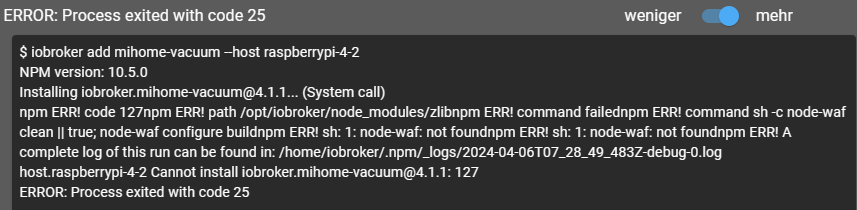
npm Error bei mihome-vacuum Adapter Installation
-
Ich habe gerade das Update auf die 4.2.0 und habe das Problem, dass die Installation offenbar sauber durchläuft, der Adapter aber nicht mehr startet ("Verbunden mit Gerät oder Dienst" ist grün, der Rest rot)
iob update und iob upgrade hab ich probiert, keine Resultate:
C:\ioBroker>iob update
Used repository: stable
Adapter    "admin"        : 6.13.16  , installed 6.13.16
Adapter    "backitup"     : 2.11.0   , installed 2.11.0
Adapter    "bring"        : 1.8.4    , installed 1.8.4
Adapter    "daswetter"    : 3.1.13   , installed 3.1.13
Adapter    "deconz"       : 1.4.0    , installed 1.4.0
Adapter    "discovery"    : 4.4.0    , installed 4.4.0
Adapter    "echarts"      : 1.7.2    , installed 1.7.2
Adapter    "email"        : 1.2.2    , installed 1.2.2
Adapter    "fb-checkpresence": 1.2.4 , installed 1.2.4
Adapter    "history"      : 3.0.1    , installed 3.0.1
Adapter    "homeconnect"  : 1.3.0    , installed 1.3.0
Adapter    "ical"         : 1.14.3   , installed 1.14.3
Adapter    "icons-icons8" : 0.0.1    , installed 0.0.1
Adapter    "javascript"   : 7.8.0    , installed 7.8.0
Controller "js-controller": 5.0.19   , installed 5.0.19
Adapter    "mihome-vacuum": 4.2.0    , installed 4.2.0
Adapter    "nina"         : 0.0.25   , installed 0.0.25
Adapter    "rssfeed"      : 2.6.1    , installed 2.6.1
Adapter    "sayit"        : 3.0.5    , installed 3.0.5
Adapter    "simple-api"   : 2.7.2    , installed 2.7.2
Adapter    "socketio"     : 6.6.1    , installed 6.6.1
Adapter    "tr-064"       : 4.2.18   , installed 4.2.18
Adapter    "trashschedule": 3.2.0    , installed 3.2.0
Adapter    "vis"          : 1.5.4    , installed 1.5.1  [Updatable]
Adapter    "vis-inventwo" : 3.3.3    , installed 3.3.3
Adapter    "vis-players"  : 0.1.6    , installed 0.1.6
Adapter    "vis-timeandweather": 1.2.2, installed 1.2.2
Adapter    "weatherunderground": 3.6.0, installed 3.6.0
Adapter    "web"          : 6.2.5    , installed 6.2.5
Adapter    "whatsapp-cmb" : 0.2.3    , installed 0.2.3
Adapter    "ws"           : 2.5.11   , installed 2.5.11
C:\ioBroker>iob upgrade This upgrade of "vis" will introduce the following changes: ========================================================================== -> 1.5.4: added the new binding operation for getting property of JSON or object Checked the initialization of the `local_` variables fixed subscribeOidAtRuntime Added dynamic web manifest Optimization for basic-view in widget8 Changed binding regex to accept umlauts Corrected first installation of vis ========================================================================== Would you like to upgrade vis from @1.5.1 to @1.5.4 now? [(y)es, (n)o]: n No upgrade of "vis" desired.Vis habe ich aus Gründen nicht aktualisiert, weil ansonsten einige ältere Tablets nicht mehr klarkommen.
Ein "Iob fix" bringt:
Need to install the following packages:
  @iobroker/fix@5.0.0
Ok to proceed? (y) y
"(" kann syntaktisch an dieser Stelle nicht verarbeitet werden.
npm notice
npm notice New major version of npm available! 9.5.0 -> 10.5.2
npm notice Changelog: https://github.com/npm/cli/releases/tag/v10.5.2
npm notice Run npm install -g npm@10.5.2 to update!
npm notice
Hat das Eine mit dem Anderen zu tun?
@wintermute sagte in npm Error bei mihome-vacuum Adapter Installation:
Ich habe gerade das Update auf die 4.2.0 und habe das Problem, dass die Installation offenbar sauber durchläuft, der Adapter aber nicht mehr startet ("Verbunden mit Gerät oder Dienst" ist grün, der Rest rot)
iob update und iob upgrade hab ich probiert, keine Resultate:
C:\ioBroker>iob update
Used repository: stable
Adapter    "admin"        : 6.13.16  , installed 6.13.16
Adapter    "backitup"     : 2.11.0   , installed 2.11.0
Adapter    "bring"        : 1.8.4    , installed 1.8.4
Adapter    "daswetter"    : 3.1.13   , installed 3.1.13
Adapter    "deconz"       : 1.4.0    , installed 1.4.0
Adapter    "discovery"    : 4.4.0    , installed 4.4.0
Adapter    "echarts"      : 1.7.2    , installed 1.7.2
Adapter    "email"        : 1.2.2    , installed 1.2.2
Adapter    "fb-checkpresence": 1.2.4 , installed 1.2.4
Adapter    "history"      : 3.0.1    , installed 3.0.1
Adapter    "homeconnect"  : 1.3.0    , installed 1.3.0
Adapter    "ical"         : 1.14.3   , installed 1.14.3
Adapter    "icons-icons8" : 0.0.1    , installed 0.0.1
Adapter    "javascript"   : 7.8.0    , installed 7.8.0
Controller "js-controller": 5.0.19   , installed 5.0.19
Adapter    "mihome-vacuum": 4.2.0    , installed 4.2.0
Adapter    "nina"         : 0.0.25   , installed 0.0.25
Adapter    "rssfeed"      : 2.6.1    , installed 2.6.1
Adapter    "sayit"        : 3.0.5    , installed 3.0.5
Adapter    "simple-api"   : 2.7.2    , installed 2.7.2
Adapter    "socketio"     : 6.6.1    , installed 6.6.1
Adapter    "tr-064"       : 4.2.18   , installed 4.2.18
Adapter    "trashschedule": 3.2.0    , installed 3.2.0
Adapter    "vis"          : 1.5.4    , installed 1.5.1  [Updatable]
Adapter    "vis-inventwo" : 3.3.3    , installed 3.3.3
Adapter    "vis-players"  : 0.1.6    , installed 0.1.6
Adapter    "vis-timeandweather": 1.2.2, installed 1.2.2
Adapter    "weatherunderground": 3.6.0, installed 3.6.0
Adapter    "web"          : 6.2.5    , installed 6.2.5
Adapter    "whatsapp-cmb" : 0.2.3    , installed 0.2.3
Adapter    "ws"           : 2.5.11   , installed 2.5.11
C:\ioBroker>iob upgrade This upgrade of "vis" will introduce the following changes: ========================================================================== -> 1.5.4: added the new binding operation for getting property of JSON or object Checked the initialization of the `local_` variables fixed subscribeOidAtRuntime Added dynamic web manifest Optimization for basic-view in widget8 Changed binding regex to accept umlauts Corrected first installation of vis ========================================================================== Would you like to upgrade vis from @1.5.1 to @1.5.4 now? [(y)es, (n)o]: n No upgrade of "vis" desired.Vis habe ich aus Gründen nicht aktualisiert, weil ansonsten einige ältere Tablets nicht mehr klarkommen.
Ein "Iob fix" bringt:
Need to install the following packages:
  @iobroker/fix@5.0.0
Ok to proceed? (y) y
"(" kann syntaktisch an dieser Stelle nicht verarbeitet werden.
npm notice
npm notice New major version of npm available! 9.5.0 -> 10.5.2
npm notice Changelog: https://github.com/npm/cli/releases/tag/v10.5.2
npm notice Run npm install -g npm@10.5.2 to update!
npm notice
Hat das Eine mit dem Anderen zu tun?
Zusätzlich noch "iob info":
C:\ioBroker>iob info Cannot get disk information: Command failed: df -k / Der Befehl "df" ist entweder falsch geschrieben oder konnte nicht gefunden werden. Platform : Windows os : win64 Architecture : x64 CPUs : 2 Model : Intel(R) Xeon(R) CPU 8460Y+ @ 2.0 GHz RAM : 126 GB System uptime : 2d. 20:25:52 Node.js : v18.15.0 time : 1713536349613 timeOffset : -120 NPM : 9.5.0 adapters count : 538 -
ich habe das gleiche Problem seit dem Update auf die neue Version
host.iobroker
	2024-04-19 16:31:31.427	error	instance system.adapter.mihome-vacuum.0 terminated with code 1 (JS_CONTROLLER_STOPPED)
host.iobroker
	2024-04-19 16:31:31.426	error	Caught by controller[1]: Node.js v20.12.2
host.iobroker
	2024-04-19 16:31:31.426	error	Caught by controller[0]: }
host.iobroker
	2024-04-19 16:31:31.425	error	Caught by controller[0]: code: 'ERR_INVALID_ARG_VALUE'
host.iobroker
	2024-04-19 16:31:31.425	error	Caught by controller[0]: at Module._compile (node:internal/modules/cjs/loader:1369:14) {
host.iobroker
	2024-04-19 16:31:31.425	error	Caught by controller[0]: at Object.<anonymous> (/opt/iobroker/node_modules/iobroker.mihome-vacuum/node_modules/@iobroker/adapter-core/build/cjs/controllerTools.js:34:22)
host.iobroker
	2024-04-19 16:31:31.424	error	Caught by controller[0]: at require (node:internal/modules/helpers:179:18)
host.iobroker
	2024-04-19 16:31:31.424	error	Caught by controller[0]: at Module.require (node:internal/modules/cjs/loader:1231:19)
host.iobroker
	2024-04-19 16:31:31.424	error	Caught by controller[0]: at Module._load (node:internal/modules/cjs/loader:1022:12)
host.iobroker
	2024-04-19 16:31:31.424	error	Caught by controller[0]: at Module.load (node:internal/modules/cjs/loader:1206:32)
host.iobroker
	2024-04-19 16:31:31.423	error	Caught by controller[0]: at Module._extensions..js (node:internal/modules/cjs/loader:1427:10)
host.iobroker
	2024-04-19 16:31:31.423	error	Caught by controller[0]: at Module._compile (node:internal/modules/cjs/loader:1369:14)
host.iobroker
	2024-04-19 16:31:31.418	error	Caught by controller[0]: at Object.<anonymous> (/opt/iobroker/node_modules/iobroker.mihome-vacuum/node_modules/@iobroker/adapter-core/build/cjs/helpers.js:36:53)
host.iobroker
	2024-04-19 16:31:31.418	error	Caught by controller[0]: at createRequire (node:internal/modules/cjs/loader:1506:13)
host.iobroker
	2024-04-19 16:31:31.418	error	Caught by controller[0]: TypeError [ERR_INVALID_ARG_VALUE]: The argument 'filename' must be a file URL object, file URL string, or absolute path string. Received 'file:// /opt/iobroker/node_modules/iobroker.mihome-vacuum/node_modules/@iobroker/adapter-core/build/cjs/helpers.js'
host.iobroker
	2024-04-19 16:31:31.417	error	Caught by controller[0]: ^
host.iobroker
	2024-04-19 16:31:31.417	error	Caught by controller[0]: throw new ERR_INVALID_ARG_VALUE('filename', filename,
host.iobroker
	2024-04-19 16:31:31.416	error	Caught by controller[0]: node:internal/modules/cjs/loader:1506
Hat jemand eine Idee wo man schauen muss um das zu korrigieren ?
Danke! -
Ich habe gerade das Update auf die 4.2.0 und habe das Problem, dass die Installation offenbar sauber durchläuft, der Adapter aber nicht mehr startet ("Verbunden mit Gerät oder Dienst" ist grün, der Rest rot)
iob update und iob upgrade hab ich probiert, keine Resultate:
C:\ioBroker>iob update
Used repository: stable
Adapter    "admin"        : 6.13.16  , installed 6.13.16
Adapter    "backitup"     : 2.11.0   , installed 2.11.0
Adapter    "bring"        : 1.8.4    , installed 1.8.4
Adapter    "daswetter"    : 3.1.13   , installed 3.1.13
Adapter    "deconz"       : 1.4.0    , installed 1.4.0
Adapter    "discovery"    : 4.4.0    , installed 4.4.0
Adapter    "echarts"      : 1.7.2    , installed 1.7.2
Adapter    "email"        : 1.2.2    , installed 1.2.2
Adapter    "fb-checkpresence": 1.2.4 , installed 1.2.4
Adapter    "history"      : 3.0.1    , installed 3.0.1
Adapter    "homeconnect"  : 1.3.0    , installed 1.3.0
Adapter    "ical"         : 1.14.3   , installed 1.14.3
Adapter    "icons-icons8" : 0.0.1    , installed 0.0.1
Adapter    "javascript"   : 7.8.0    , installed 7.8.0
Controller "js-controller": 5.0.19   , installed 5.0.19
Adapter    "mihome-vacuum": 4.2.0    , installed 4.2.0
Adapter    "nina"         : 0.0.25   , installed 0.0.25
Adapter    "rssfeed"      : 2.6.1    , installed 2.6.1
Adapter    "sayit"        : 3.0.5    , installed 3.0.5
Adapter    "simple-api"   : 2.7.2    , installed 2.7.2
Adapter    "socketio"     : 6.6.1    , installed 6.6.1
Adapter    "tr-064"       : 4.2.18   , installed 4.2.18
Adapter    "trashschedule": 3.2.0    , installed 3.2.0
Adapter    "vis"          : 1.5.4    , installed 1.5.1  [Updatable]
Adapter    "vis-inventwo" : 3.3.3    , installed 3.3.3
Adapter    "vis-players"  : 0.1.6    , installed 0.1.6
Adapter    "vis-timeandweather": 1.2.2, installed 1.2.2
Adapter    "weatherunderground": 3.6.0, installed 3.6.0
Adapter    "web"          : 6.2.5    , installed 6.2.5
Adapter    "whatsapp-cmb" : 0.2.3    , installed 0.2.3
Adapter    "ws"           : 2.5.11   , installed 2.5.11
C:\ioBroker>iob upgrade This upgrade of "vis" will introduce the following changes: ========================================================================== -> 1.5.4: added the new binding operation for getting property of JSON or object Checked the initialization of the `local_` variables fixed subscribeOidAtRuntime Added dynamic web manifest Optimization for basic-view in widget8 Changed binding regex to accept umlauts Corrected first installation of vis ========================================================================== Would you like to upgrade vis from @1.5.1 to @1.5.4 now? [(y)es, (n)o]: n No upgrade of "vis" desired.Vis habe ich aus Gründen nicht aktualisiert, weil ansonsten einige ältere Tablets nicht mehr klarkommen.
Ein "Iob fix" bringt:
Need to install the following packages:
  @iobroker/fix@5.0.0
Ok to proceed? (y) y
"(" kann syntaktisch an dieser Stelle nicht verarbeitet werden.
npm notice
npm notice New major version of npm available! 9.5.0 -> 10.5.2
npm notice Changelog: https://github.com/npm/cli/releases/tag/v10.5.2
npm notice Run npm install -g npm@10.5.2 to update!
npm notice
Hat das Eine mit dem Anderen zu tun?
bei Windows bin ich raus..
-
ich habe das gleiche Problem seit dem Update auf die neue Version
host.iobroker
	2024-04-19 16:31:31.427	error	instance system.adapter.mihome-vacuum.0 terminated with code 1 (JS_CONTROLLER_STOPPED)
host.iobroker
	2024-04-19 16:31:31.426	error	Caught by controller[1]: Node.js v20.12.2
host.iobroker
	2024-04-19 16:31:31.426	error	Caught by controller[0]: }
host.iobroker
	2024-04-19 16:31:31.425	error	Caught by controller[0]: code: 'ERR_INVALID_ARG_VALUE'
host.iobroker
	2024-04-19 16:31:31.425	error	Caught by controller[0]: at Module._compile (node:internal/modules/cjs/loader:1369:14) {
host.iobroker
	2024-04-19 16:31:31.425	error	Caught by controller[0]: at Object.<anonymous> (/opt/iobroker/node_modules/iobroker.mihome-vacuum/node_modules/@iobroker/adapter-core/build/cjs/controllerTools.js:34:22)
host.iobroker
	2024-04-19 16:31:31.424	error	Caught by controller[0]: at require (node:internal/modules/helpers:179:18)
host.iobroker
	2024-04-19 16:31:31.424	error	Caught by controller[0]: at Module.require (node:internal/modules/cjs/loader:1231:19)
host.iobroker
	2024-04-19 16:31:31.424	error	Caught by controller[0]: at Module._load (node:internal/modules/cjs/loader:1022:12)
host.iobroker
	2024-04-19 16:31:31.424	error	Caught by controller[0]: at Module.load (node:internal/modules/cjs/loader:1206:32)
host.iobroker
	2024-04-19 16:31:31.423	error	Caught by controller[0]: at Module._extensions..js (node:internal/modules/cjs/loader:1427:10)
host.iobroker
	2024-04-19 16:31:31.423	error	Caught by controller[0]: at Module._compile (node:internal/modules/cjs/loader:1369:14)
host.iobroker
	2024-04-19 16:31:31.418	error	Caught by controller[0]: at Object.<anonymous> (/opt/iobroker/node_modules/iobroker.mihome-vacuum/node_modules/@iobroker/adapter-core/build/cjs/helpers.js:36:53)
host.iobroker
	2024-04-19 16:31:31.418	error	Caught by controller[0]: at createRequire (node:internal/modules/cjs/loader:1506:13)
host.iobroker
	2024-04-19 16:31:31.418	error	Caught by controller[0]: TypeError [ERR_INVALID_ARG_VALUE]: The argument 'filename' must be a file URL object, file URL string, or absolute path string. Received 'file:// /opt/iobroker/node_modules/iobroker.mihome-vacuum/node_modules/@iobroker/adapter-core/build/cjs/helpers.js'
host.iobroker
	2024-04-19 16:31:31.417	error	Caught by controller[0]: ^
host.iobroker
	2024-04-19 16:31:31.417	error	Caught by controller[0]: throw new ERR_INVALID_ARG_VALUE('filename', filename,
host.iobroker
	2024-04-19 16:31:31.416	error	Caught by controller[0]: node:internal/modules/cjs/loader:1506
Hat jemand eine Idee wo man schauen muss um das zu korrigieren ?
Danke!ist nicht der gleiche Fehler, wie der TE hat, aber irgendein script scheint filename falsch deklariert zu haben.. sofern ich den Fehler richtig verstehe.. ist ja nur n Auschschnitt vom Ende des Fehlers.. man muesste da halt mal wissen:
welches System?
welche Version?
Logfile von Begin an, wenn der Adapter startet...Dann natuerlich noch die Grundsaetzlichen infos aus iob diag.
-
ist nicht der gleiche Fehler, wie der TE hat, aber irgendein script scheint filename falsch deklariert zu haben.. sofern ich den Fehler richtig verstehe.. ist ja nur n Auschschnitt vom Ende des Fehlers.. man muesste da halt mal wissen:
welches System?
welche Version?
Logfile von Begin an, wenn der Adapter startet...Dann natuerlich noch die Grundsaetzlichen infos aus iob diag.
@ilovegym
Danke für Deine Rückmeldung!======================= SUMMARY ======================= v.2023-10-10 model name : Intel(R) Celeron(R) CPU J3455 @ 1.50GHz Kernel : x86_64 Userland : amd64 Docker : v9.1.2 Installation: Docker Kernel: x86_64 Userland: amd64 Timezone: Etc/UTC User-ID: 0 X-Server: false Pending OS-Updates: 0 Pending iob updates: 0 Nodejs-Installation: /usr/bin/nodejs v20.12.2 /usr/bin/node v20.12.2 /usr/bin/npm 10.5.0 /usr/bin/npx 10.5.0 /usr/bin/corepack 0.25.2 Recommended versions are nodejs 18.20.2 and npm 10.5.0 Your nodejs installation is correct MEMORY: total used free shared buff/cache available Mem: 12G 6.7G 822M 188M 5.4G 5.7G Swap: 9.6G 60M 9.5G Total: 21G 6.8G 10G Active iob-Instances: 26 Active repo(s): stable ioBroker Core: js-controller 5.0.19 admin 6.13.16 ioBroker Status: iobroker is running on this host. Objects type: jsonl States type: redis Status admin and web instance: + system.adapter.admin.0 : admin : iobroker - enabled, port: 8081, bind: 0.0.0.0 (SSL), run as: admin + system.adapter.web.0 : web : iobroker - enabled, port: 8082, bind: 0.0.0.0, run as: admin Objects: 15173 States: 11749 Size of iob-Database: 16M /opt/iobroker/iobroker-data/objects.jsonl 13M /opt/iobroker/iobroker-data/objects.json.migrated 13M /opt/iobroker/iobroker-data/objects.json.bak.migrated 3.5M /opt/iobroker/iobroker-data/states.json.bak 3.5M /opt/iobroker/iobroker-data/states.json =================== END OF SUMMARY ====================Adapter Log:
host.iobroker
	2024-04-19 17:08:23.959	info	Restart adapter system.adapter.mihome-vacuum.0 because enabled
host.iobroker
	2024-04-19 17:08:23.959	error	instance system.adapter.mihome-vacuum.0 terminated with code 1 (JS_CONTROLLER_STOPPED)
host.iobroker
	2024-04-19 17:08:23.959	error	Caught by controller[0]: Node.js v20.12.2
host.iobroker
	2024-04-19 17:08:23.959	error	Caught by controller[0]: }
host.iobroker
	2024-04-19 17:08:23.958	error	Caught by controller[0]: code: 'ERR_INVALID_ARG_VALUE'
host.iobroker
	2024-04-19 17:08:23.958	error	Caught by controller[0]: at Module._compile (node:internal/modules/cjs/loader:1369:14) {
host.iobroker
	2024-04-19 17:08:23.958	error	Caught by controller[0]: at Object.<anonymous> (/opt/iobroker/node_modules/iobroker.mihome-vacuum/node_modules/@iobroker/adapter-core/build/cjs/controllerTools.js:34:22)
host.iobroker
	2024-04-19 17:08:23.958	error	Caught by controller[0]: at require (node:internal/modules/helpers:179:18)
host.iobroker
	2024-04-19 17:08:23.958	error	Caught by controller[0]: at Module.require (node:internal/modules/cjs/loader:1231:19)
host.iobroker
	2024-04-19 17:08:23.957	error	Caught by controller[0]: at Module._load (node:internal/modules/cjs/loader:1022:12)
host.iobroker
	2024-04-19 17:08:23.957	error	Caught by controller[0]: at Module.load (node:internal/modules/cjs/loader:1206:32)
host.iobroker
	2024-04-19 17:08:23.957	error	Caught by controller[0]: at Module._extensions..js (node:internal/modules/cjs/loader:1427:10)
host.iobroker
	2024-04-19 17:08:23.957	error	Caught by controller[0]: at Module._compile (node:internal/modules/cjs/loader:1369:14)
host.iobroker
	2024-04-19 17:08:23.956	error	Caught by controller[0]: at Object.<anonymous> (/opt/iobroker/node_modules/iobroker.mihome-vacuum/node_modules/@iobroker/adapter-core/build/cjs/helpers.js:36:53)
host.iobroker
	2024-04-19 17:08:23.956	error	Caught by controller[0]: at createRequire (node:internal/modules/cjs/loader:1506:13)
host.iobroker
	2024-04-19 17:08:23.956	error	Caught by controller[0]: TypeError [ERR_INVALID_ARG_VALUE]: The argument 'filename' must be a file URL object, file URL string, or absolute path string. Received 'file:// /opt/iobroker/node_modules/iobroker.mihome-vacuum/node_modules/@iobroker/adapter-core/build/cjs/helpers.js'
host.iobroker
	2024-04-19 17:08:23.956	error	Caught by controller[0]: ^
host.iobroker
	2024-04-19 17:08:23.955	error	Caught by controller[0]: throw new ERR_INVALID_ARG_VALUE('filename', filename,
host.iobroker
	2024-04-19 17:08:23.954	error	Caught by controller[0]: node:internal/modules/cjs/loader:1506
host.iobroker
	2024-04-19 17:08:23.723	info	instance system.adapter.mihome-vacuum.0 started with pid 5691
Mehr log habe ich bzw. wo kann ich mehr log des Adapters finden ?
-
@ilovegym
Danke für Deine Rückmeldung!======================= SUMMARY ======================= v.2023-10-10 model name : Intel(R) Celeron(R) CPU J3455 @ 1.50GHz Kernel : x86_64 Userland : amd64 Docker : v9.1.2 Installation: Docker Kernel: x86_64 Userland: amd64 Timezone: Etc/UTC User-ID: 0 X-Server: false Pending OS-Updates: 0 Pending iob updates: 0 Nodejs-Installation: /usr/bin/nodejs v20.12.2 /usr/bin/node v20.12.2 /usr/bin/npm 10.5.0 /usr/bin/npx 10.5.0 /usr/bin/corepack 0.25.2 Recommended versions are nodejs 18.20.2 and npm 10.5.0 Your nodejs installation is correct MEMORY: total used free shared buff/cache available Mem: 12G 6.7G 822M 188M 5.4G 5.7G Swap: 9.6G 60M 9.5G Total: 21G 6.8G 10G Active iob-Instances: 26 Active repo(s): stable ioBroker Core: js-controller 5.0.19 admin 6.13.16 ioBroker Status: iobroker is running on this host. Objects type: jsonl States type: redis Status admin and web instance: + system.adapter.admin.0 : admin : iobroker - enabled, port: 8081, bind: 0.0.0.0 (SSL), run as: admin + system.adapter.web.0 : web : iobroker - enabled, port: 8082, bind: 0.0.0.0, run as: admin Objects: 15173 States: 11749 Size of iob-Database: 16M /opt/iobroker/iobroker-data/objects.jsonl 13M /opt/iobroker/iobroker-data/objects.json.migrated 13M /opt/iobroker/iobroker-data/objects.json.bak.migrated 3.5M /opt/iobroker/iobroker-data/states.json.bak 3.5M /opt/iobroker/iobroker-data/states.json =================== END OF SUMMARY ====================Adapter Log:
host.iobroker
	2024-04-19 17:08:23.959	info	Restart adapter system.adapter.mihome-vacuum.0 because enabled
host.iobroker
	2024-04-19 17:08:23.959	error	instance system.adapter.mihome-vacuum.0 terminated with code 1 (JS_CONTROLLER_STOPPED)
host.iobroker
	2024-04-19 17:08:23.959	error	Caught by controller[0]: Node.js v20.12.2
host.iobroker
	2024-04-19 17:08:23.959	error	Caught by controller[0]: }
host.iobroker
	2024-04-19 17:08:23.958	error	Caught by controller[0]: code: 'ERR_INVALID_ARG_VALUE'
host.iobroker
	2024-04-19 17:08:23.958	error	Caught by controller[0]: at Module._compile (node:internal/modules/cjs/loader:1369:14) {
host.iobroker
	2024-04-19 17:08:23.958	error	Caught by controller[0]: at Object.<anonymous> (/opt/iobroker/node_modules/iobroker.mihome-vacuum/node_modules/@iobroker/adapter-core/build/cjs/controllerTools.js:34:22)
host.iobroker
	2024-04-19 17:08:23.958	error	Caught by controller[0]: at require (node:internal/modules/helpers:179:18)
host.iobroker
	2024-04-19 17:08:23.958	error	Caught by controller[0]: at Module.require (node:internal/modules/cjs/loader:1231:19)
host.iobroker
	2024-04-19 17:08:23.957	error	Caught by controller[0]: at Module._load (node:internal/modules/cjs/loader:1022:12)
host.iobroker
	2024-04-19 17:08:23.957	error	Caught by controller[0]: at Module.load (node:internal/modules/cjs/loader:1206:32)
host.iobroker
	2024-04-19 17:08:23.957	error	Caught by controller[0]: at Module._extensions..js (node:internal/modules/cjs/loader:1427:10)
host.iobroker
	2024-04-19 17:08:23.957	error	Caught by controller[0]: at Module._compile (node:internal/modules/cjs/loader:1369:14)
host.iobroker
	2024-04-19 17:08:23.956	error	Caught by controller[0]: at Object.<anonymous> (/opt/iobroker/node_modules/iobroker.mihome-vacuum/node_modules/@iobroker/adapter-core/build/cjs/helpers.js:36:53)
host.iobroker
	2024-04-19 17:08:23.956	error	Caught by controller[0]: at createRequire (node:internal/modules/cjs/loader:1506:13)
host.iobroker
	2024-04-19 17:08:23.956	error	Caught by controller[0]: TypeError [ERR_INVALID_ARG_VALUE]: The argument 'filename' must be a file URL object, file URL string, or absolute path string. Received 'file:// /opt/iobroker/node_modules/iobroker.mihome-vacuum/node_modules/@iobroker/adapter-core/build/cjs/helpers.js'
host.iobroker
	2024-04-19 17:08:23.956	error	Caught by controller[0]: ^
host.iobroker
	2024-04-19 17:08:23.955	error	Caught by controller[0]: throw new ERR_INVALID_ARG_VALUE('filename', filename,
host.iobroker
	2024-04-19 17:08:23.954	error	Caught by controller[0]: node:internal/modules/cjs/loader:1506
host.iobroker
	2024-04-19 17:08:23.723	info	instance system.adapter.mihome-vacuum.0 started with pid 5691
Mehr log habe ich bzw. wo kann ich mehr log des Adapters finden ?
mach mal in der Konsole des iobroker dockers ein "iob upload mihome-vacuum" und starte dann den Adapter nochmal.
In die Konsole des Dockers kommst du im Terminal des Hosts (Synology? Proxmox? ) mit dem command
sudo docker exec -tiu username containername /bin/bashbei mir ist das als user iobroker und der container heisst auch iobroker dann ein
sudo docker exec -tiu iobroker iobroker /bin/bashdanach bist du in /opt/iobroker und kannst als user iobroker die iob commands ausfuehren, ausser diejenigen, die ein iob maintenance brauchen..
Ich gehe davon aus, dass du das buanet-docker-Image benutzt?edit:
das Logfile bekommt man am schoensten, finde ich, in der Konsole mit dem command
iob logs --watch -
mach mal in der Konsole des iobroker dockers ein "iob upload mihome-vacuum" und starte dann den Adapter nochmal.
In die Konsole des Dockers kommst du im Terminal des Hosts (Synology? Proxmox? ) mit dem command
sudo docker exec -tiu username containername /bin/bashbei mir ist das als user iobroker und der container heisst auch iobroker dann ein
sudo docker exec -tiu iobroker iobroker /bin/bashdanach bist du in /opt/iobroker und kannst als user iobroker die iob commands ausfuehren, ausser diejenigen, die ein iob maintenance brauchen..
Ich gehe davon aus, dass du das buanet-docker-Image benutzt?edit:
das Logfile bekommt man am schoensten, finde ich, in der Konsole mit dem command
iob logs --watch@ilovegym said in npm Error bei mihome-vacuum Adapter Installation:
iob upload mihome-vacuum
Das hatte ich schon gemacht, leider auch ohne Erfolg. Ich konnte es mit
npm install iobroker/adapter-corekorrigieren, danach lässt sich der Adapter wieder starten!
Schönes Wochenende! -
bei Windows bin ich raus..
@ilovegym ...und ich bei Linux :grinning:
Alle Reparaturversuche sind fehlgeschlagen - Einspielen des Updates von letzter Nacht hat meinem Iobroker und meinem Staubsauger aber wieder auf die Beine geholfen. Das Update auf die 4.2.0 werde ich dann mal besser auslassen...
Iobroker als Windows-VM auf einem Supermicro-Server
-
@ilovegym ...und ich bei Linux :grinning:
Alle Reparaturversuche sind fehlgeschlagen - Einspielen des Updates von letzter Nacht hat meinem Iobroker und meinem Staubsauger aber wieder auf die Beine geholfen. Das Update auf die 4.2.0 werde ich dann mal besser auslassen...
Adapter "mihome-vacuum": 4.2.0 , installed 4.2.0Läuft.
-
Adapter "mihome-vacuum": 4.2.0 , installed 4.2.0Läuft.
@thomas-braun sagte in npm Error bei mihome-vacuum Adapter Installation:
Adapter "mihome-vacuum": 4.2.0 , installed 4.2.0Läuft.
Auf einem Windows-System? Hast Du irgendwelche Verrenkungen gemacht, damit der Adapter läuft?
Iobroker als Windows-VM auf einem Supermicro-Server
-
@thomas-braun sagte in npm Error bei mihome-vacuum Adapter Installation:
Adapter "mihome-vacuum": 4.2.0 , installed 4.2.0Läuft.
Auf einem Windows-System? Hast Du irgendwelche Verrenkungen gemacht, damit der Adapter läuft?
Läuft natürlich auf einem Betriebssystem.
Gerade nochmal durchgestartet:2024-04-19 18:46:09.700 - info: mihome-vacuum.0 (1232) Got terminate signal TERMINATE_YOURSELF 2024-04-19 18:46:09.727 - error: mihome-vacuum.0 (1232) Socket Close 2024-04-19 18:46:09.731 - info: mihome-vacuum.0 (1232) terminating 2024-04-19 18:46:09.734 - info: mihome-vacuum.0 (1232) Terminated (ADAPTER_REQUESTED_TERMINATION): Without reason 2024-04-19 18:46:10.221 - info: mihome-vacuum.0 (1232) terminating 2024-04-19 18:46:15.796 - info: mihome-vacuum.0 (680497) starting. Version 4.2.0 in /opt/iobroker/node_modules/iobroker.mihome-vacuum, node: v21.7.3, js-controller: 5.0.19 2024-04-19 18:46:15.867 - info: mihome-vacuum.0 (680497) IOT enabled, create state 2024-04-19 18:46:16.017 - info: mihome-vacuum.0 (680497) select standard vacuum protocol.... 2024-04-19 18:46:16.494 - info: mihome-vacuum.0 (680497) create state for carpet_mode 2024-04-19 18:46:16.649 - info: mihome-vacuum.0 (680497) settest next timer: not availableKein Ding, kommt sofort wieder hoch.
-
Läuft natürlich auf einem Betriebssystem.
Gerade nochmal durchgestartet:2024-04-19 18:46:09.700 - info: mihome-vacuum.0 (1232) Got terminate signal TERMINATE_YOURSELF 2024-04-19 18:46:09.727 - error: mihome-vacuum.0 (1232) Socket Close 2024-04-19 18:46:09.731 - info: mihome-vacuum.0 (1232) terminating 2024-04-19 18:46:09.734 - info: mihome-vacuum.0 (1232) Terminated (ADAPTER_REQUESTED_TERMINATION): Without reason 2024-04-19 18:46:10.221 - info: mihome-vacuum.0 (1232) terminating 2024-04-19 18:46:15.796 - info: mihome-vacuum.0 (680497) starting. Version 4.2.0 in /opt/iobroker/node_modules/iobroker.mihome-vacuum, node: v21.7.3, js-controller: 5.0.19 2024-04-19 18:46:15.867 - info: mihome-vacuum.0 (680497) IOT enabled, create state 2024-04-19 18:46:16.017 - info: mihome-vacuum.0 (680497) select standard vacuum protocol.... 2024-04-19 18:46:16.494 - info: mihome-vacuum.0 (680497) create state for carpet_mode 2024-04-19 18:46:16.649 - info: mihome-vacuum.0 (680497) settest next timer: not availableKein Ding, kommt sofort wieder hoch.
@thomas-braun sagte in npm Error bei mihome-vacuum Adapter Installation:
Läuft natürlich auf einem Betriebssystem.
Da bin ich mir sicher, dass es auf einem Betriebssystem läuft ;-)
Aber läuft es auch auf Meinem Betriebssystem?Iobroker als Windows-VM auf einem Supermicro-Server
-
@thomas-braun sagte in npm Error bei mihome-vacuum Adapter Installation:
Läuft natürlich auf einem Betriebssystem.
Da bin ich mir sicher, dass es auf einem Betriebssystem läuft ;-)
Aber läuft es auch auf Meinem Betriebssystem?Natürlich nicht.
-
@ilovegym
Danke für Deine Rückmeldung!======================= SUMMARY ======================= v.2023-10-10 model name : Intel(R) Celeron(R) CPU J3455 @ 1.50GHz Kernel : x86_64 Userland : amd64 Docker : v9.1.2 Installation: Docker Kernel: x86_64 Userland: amd64 Timezone: Etc/UTC User-ID: 0 X-Server: false Pending OS-Updates: 0 Pending iob updates: 0 Nodejs-Installation: /usr/bin/nodejs v20.12.2 /usr/bin/node v20.12.2 /usr/bin/npm 10.5.0 /usr/bin/npx 10.5.0 /usr/bin/corepack 0.25.2 Recommended versions are nodejs 18.20.2 and npm 10.5.0 Your nodejs installation is correct MEMORY: total used free shared buff/cache available Mem: 12G 6.7G 822M 188M 5.4G 5.7G Swap: 9.6G 60M 9.5G Total: 21G 6.8G 10G Active iob-Instances: 26 Active repo(s): stable ioBroker Core: js-controller 5.0.19 admin 6.13.16 ioBroker Status: iobroker is running on this host. Objects type: jsonl States type: redis Status admin and web instance: + system.adapter.admin.0 : admin : iobroker - enabled, port: 8081, bind: 0.0.0.0 (SSL), run as: admin + system.adapter.web.0 : web : iobroker - enabled, port: 8082, bind: 0.0.0.0, run as: admin Objects: 15173 States: 11749 Size of iob-Database: 16M /opt/iobroker/iobroker-data/objects.jsonl 13M /opt/iobroker/iobroker-data/objects.json.migrated 13M /opt/iobroker/iobroker-data/objects.json.bak.migrated 3.5M /opt/iobroker/iobroker-data/states.json.bak 3.5M /opt/iobroker/iobroker-data/states.json =================== END OF SUMMARY ====================Adapter Log:
host.iobroker
	2024-04-19 17:08:23.959	info	Restart adapter system.adapter.mihome-vacuum.0 because enabled
host.iobroker
	2024-04-19 17:08:23.959	error	instance system.adapter.mihome-vacuum.0 terminated with code 1 (JS_CONTROLLER_STOPPED)
host.iobroker
	2024-04-19 17:08:23.959	error	Caught by controller[0]: Node.js v20.12.2
host.iobroker
	2024-04-19 17:08:23.959	error	Caught by controller[0]: }
host.iobroker
	2024-04-19 17:08:23.958	error	Caught by controller[0]: code: 'ERR_INVALID_ARG_VALUE'
host.iobroker
	2024-04-19 17:08:23.958	error	Caught by controller[0]: at Module._compile (node:internal/modules/cjs/loader:1369:14) {
host.iobroker
	2024-04-19 17:08:23.958	error	Caught by controller[0]: at Object.<anonymous> (/opt/iobroker/node_modules/iobroker.mihome-vacuum/node_modules/@iobroker/adapter-core/build/cjs/controllerTools.js:34:22)
host.iobroker
	2024-04-19 17:08:23.958	error	Caught by controller[0]: at require (node:internal/modules/helpers:179:18)
host.iobroker
	2024-04-19 17:08:23.958	error	Caught by controller[0]: at Module.require (node:internal/modules/cjs/loader:1231:19)
host.iobroker
	2024-04-19 17:08:23.957	error	Caught by controller[0]: at Module._load (node:internal/modules/cjs/loader:1022:12)
host.iobroker
	2024-04-19 17:08:23.957	error	Caught by controller[0]: at Module.load (node:internal/modules/cjs/loader:1206:32)
host.iobroker
	2024-04-19 17:08:23.957	error	Caught by controller[0]: at Module._extensions..js (node:internal/modules/cjs/loader:1427:10)
host.iobroker
	2024-04-19 17:08:23.957	error	Caught by controller[0]: at Module._compile (node:internal/modules/cjs/loader:1369:14)
host.iobroker
	2024-04-19 17:08:23.956	error	Caught by controller[0]: at Object.<anonymous> (/opt/iobroker/node_modules/iobroker.mihome-vacuum/node_modules/@iobroker/adapter-core/build/cjs/helpers.js:36:53)
host.iobroker
	2024-04-19 17:08:23.956	error	Caught by controller[0]: at createRequire (node:internal/modules/cjs/loader:1506:13)
host.iobroker
	2024-04-19 17:08:23.956	error	Caught by controller[0]: TypeError [ERR_INVALID_ARG_VALUE]: The argument 'filename' must be a file URL object, file URL string, or absolute path string. Received 'file:// /opt/iobroker/node_modules/iobroker.mihome-vacuum/node_modules/@iobroker/adapter-core/build/cjs/helpers.js'
host.iobroker
	2024-04-19 17:08:23.956	error	Caught by controller[0]: ^
host.iobroker
	2024-04-19 17:08:23.955	error	Caught by controller[0]: throw new ERR_INVALID_ARG_VALUE('filename', filename,
host.iobroker
	2024-04-19 17:08:23.954	error	Caught by controller[0]: node:internal/modules/cjs/loader:1506
host.iobroker
	2024-04-19 17:08:23.723	info	instance system.adapter.mihome-vacuum.0 started with pid 5691
Mehr log habe ich bzw. wo kann ich mehr log des Adapters finden ?
Entwicklung u Betreuung: envertech-pv, hoymiles-ms, ns-client, pid, snmp Adapter;
Support Repositoryverwaltung.Wer Danke sagen will, kann nen Kaffee spendieren: https://paypal.me/mcm1957atiobroker
-



433
Online32.7k
Users82.3k
Topics1.3m
Posts