




Backitup Adapter Backups ausserhalb Zeit ( gelöst )
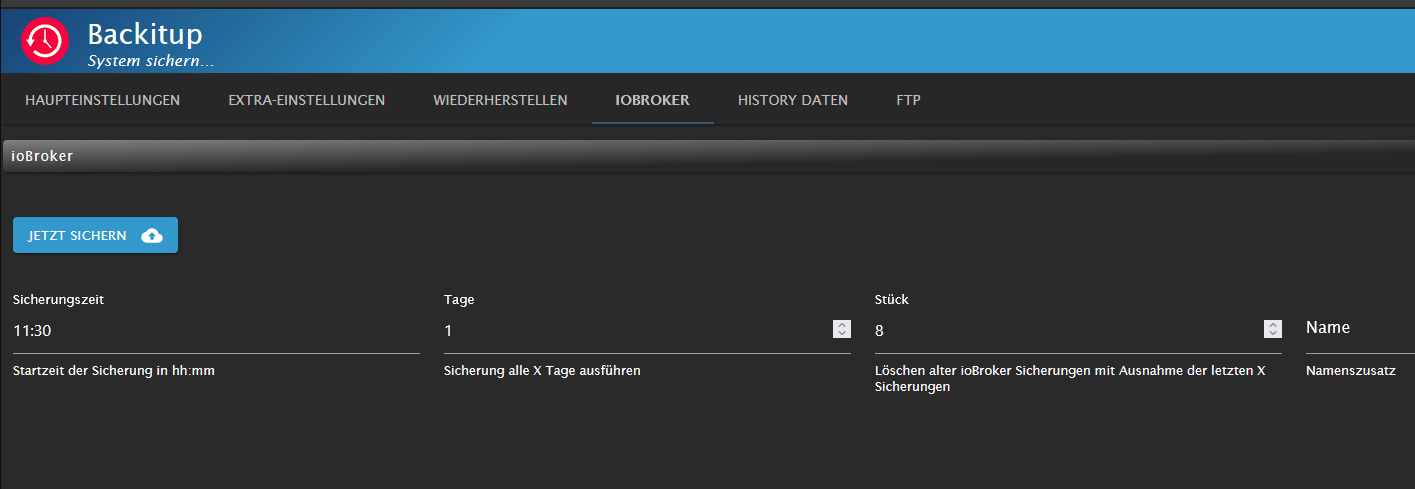
-
@stefu87_ch sagte in Backitup Adapter Backups ausserhalb Zeit:
2024-02-15 11:30:13.650 - debug: backitup.0 (4150663) [iobroker/iobroker] host.Iobroker 24983 states saved
ich sehe du hast die Logstufe DEBUG .
was mich dann immer noch wundert , warum hast du nur zwei Einträge mit error bei der Uhrzeit X und kein debug vom Adapter .
Hast du dein System mal neu gestartet um den Fehler einzugrenzen !
Zeige mal die * Full * Ausgabe von
iob diag@glasfaser Nein das System läuft seit 29 Tagen ohne Unterbruch.
Skript v.2023-10-10 *** BASE SYSTEM *** Static hostname: Iobroker Icon name: computer-container Chassis: container Virtualization: lxc Operating System: Ubuntu 22.04.3 LTS Kernel: Linux 6.5.11-7-pve Architecture: x86-64 model name : Intel(R) Core(TM) i5-6260U CPU @ 1.80GHz Docker : false Virtualization : lxc Kernel : x86_64 Userland : amd64 Systemuptime and Load: 20:56:07 up 30 days, 5 min, 3 users, load average: 0.52, 1.41, 1.89 CPU threads: 4 *** Time and Time Zones *** Local time: Thu 2024-02-15 20:56:07 CET Universal time: Thu 2024-02-15 19:56:07 UTC RTC time: n/a Time zone: Europe/Zurich (CET, +0100) System clock synchronized: yes NTP service: inactive RTC in local TZ: no *** User and Groups *** admin /home/admin admin sudo iobroker *** X-Server-Setup *** X-Server: false Desktop: Terminal: tty Boot Target: graphical.target *** MEMORY *** total used free shared buff/cache available Mem: 8.2G 3.7G 3.9G 0.0K 646M 4.5G Swap: 4.1G 709M 3.4G Total: 12G 4.4G 7.2G 8240 M total memory 3713 M used memory 3183 M active memory 903 M inactive memory 3880 M free memory 0 M buffer memory 646 M swap cache 4072 M total swap 709 M used swap 3362 M free swap *** FAILED SERVICES *** UNIT LOAD ACTIVE SUB DESCRIPTION * run-rpc_pipefs.mount loaded failed failed RPC Pipe File System LOAD = Reflects whether the unit definition was properly loaded. ACTIVE = The high-level unit activation state, i.e. generalization of SUB. SUB = The low-level unit activation state, values depend on unit type. 1 loaded units listed. *** FILESYSTEM *** Filesystem Type Size Used Avail Use% Mounted on /dev/mapper/pve-vm--250--disk--0 ext4 30G 12G 17G 41% / none tmpfs 492K 4.0K 488K 1% /dev efivarfs efivarfs 128K 95K 29K 77% /sys/firmware/efi/efivars tmpfs tmpfs 5.8G 0 5.8G 0% /dev/shm tmpfs tmpfs 2.4G 132K 2.4G 1% /run tmpfs tmpfs 5.0M 0 5.0M 0% /run/lock tmpfs tmpfs 1.2G 0 1.2G 0% /run/user/1001 Messages concerning ext4 filesystem in dmesg: dmesg: read kernel buffer failed: Operation not permitted Show mounted filesystems \(real ones only\): TARGET SOURCE FSTYPE OPTIONS / /dev/mapper/pve-vm--250--disk--0 ext4 rw,relatime,stripe=16 Files in neuralgic directories: /var: 2.0G /var/ 1.1G /var/log/journal/b5779ef4ecb1454181531104045f6b14 1.1G /var/log/journal 1.1G /var/log 568M /var/cache Hint: You are currently not seeing messages from other users and the system. Users in groups 'adm', 'systemd-journal' can see all messages. Pass -q to turn off this notice. Archived and active journals take up 144.0M in the file system. /opt/iobroker/backups: 872M /opt/iobroker/backups/ /opt/iobroker/iobroker-data: 1.2G /opt/iobroker/iobroker-data/ 735M /opt/iobroker/iobroker-data/files 278M /opt/iobroker/iobroker-data/history 162M /opt/iobroker/iobroker-data/files/vis-2 110M /opt/iobroker/iobroker-data/backup-objects The five largest files in iobroker-data are: 40M /opt/iobroker/iobroker-data/objects.jsonl 36M /opt/iobroker/iobroker-data/files/telegram-menu.admin/build/index.js.map 35M /opt/iobroker/iobroker-data/files/devices.admin/static/js/main.24f2bb56.js.map 33M /opt/iobroker/iobroker-data/files/iot.admin/static/js/main.1797d034.js.map 22M /opt/iobroker/iobroker-data/files/web.admin/static/js/main.c05ba1d3.js.map USB-Devices by-id: USB-Sticks - Avoid direct links to /dev/* in your adapter setups, please always prefer the links 'by-id': /dev/serial/by-id/usb-Texas_Instruments_TI_CC2531_USB_CDC___0X00124B001CDD3CA3-if00 /dev/serial/by-id/usb-ITEAD_SONOFF_Zigbee_3.0_USB_Dongle_Plus_V2_20230218155837-if00 *** NodeJS-Installation *** /usr/bin/nodejs v18.19.0 /usr/bin/node v18.19.0 /usr/bin/npm 10.2.3 /usr/bin/npx 10.2.3 /usr/bin/corepack 0.22.0 nodejs: Installed: 18.19.0-1nodesource1 Candidate: 18.19.1-1nodesource1 Version table: 18.19.1-1nodesource1 1001 500 https://deb.nodesource.com/node_18.x nodistro/main amd64 Packages *** 18.19.0-1nodesource1 1001 500 https://deb.nodesource.com/node_18.x nodistro/main amd64 Packages 100 /var/lib/dpkg/status 18.18.2-1nodesource1 1001 500 https://deb.nodesource.com/node_18.x nodistro/main amd64 Packages 18.18.1-1nodesource1 1001 500 https://deb.nodesource.com/node_18.x nodistro/main amd64 Packages 18.18.0-1nodesource1 1001 500 https://deb.nodesource.com/node_18.x nodistro/main amd64 Packages 18.17.1-1nodesource1 1001 500 https://deb.nodesource.com/node_18.x nodistro/main amd64 Packages 18.17.0-1nodesource1 1001 500 https://deb.nodesource.com/node_18.x nodistro/main amd64 Packages 18.16.1-1nodesource1 1001 500 https://deb.nodesource.com/node_18.x nodistro/main amd64 Packages 18.16.0-1nodesource1 1001 500 https://deb.nodesource.com/node_18.x nodistro/main amd64 Packages 18.15.0-1nodesource1 1001 500 https://deb.nodesource.com/node_18.x nodistro/main amd64 Packages 18.14.2-1nodesource1 1001 500 https://deb.nodesource.com/node_18.x nodistro/main amd64 Packages 18.14.1-1nodesource1 1001 500 https://deb.nodesource.com/node_18.x nodistro/main amd64 Packages 18.14.0-1nodesource1 1001 500 https://deb.nodesource.com/node_18.x nodistro/main amd64 Packages 18.13.0-1nodesource1 1001 500 https://deb.nodesource.com/node_18.x nodistro/main amd64 Packages 18.12.0-1nodesource1 1001 500 https://deb.nodesource.com/node_18.x nodistro/main amd64 Packages 18.11.0-1nodesource1 1001 500 https://deb.nodesource.com/node_18.x nodistro/main amd64 Packages 18.10.0-1nodesource1 1001 500 https://deb.nodesource.com/node_18.x nodistro/main amd64 Packages 18.9.1-1nodesource1 1001 500 https://deb.nodesource.com/node_18.x nodistro/main amd64 Packages 18.9.0-1nodesource1 1001 500 https://deb.nodesource.com/node_18.x nodistro/main amd64 Packages 18.8.0-1nodesource1 1001 500 https://deb.nodesource.com/node_18.x nodistro/main amd64 Packages 18.7.0-1nodesource1 1001 500 https://deb.nodesource.com/node_18.x nodistro/main amd64 Packages 18.6.0-1nodesource1 1001 500 https://deb.nodesource.com/node_18.x nodistro/main amd64 Packages 18.5.0-1nodesource1 1001 500 https://deb.nodesource.com/node_18.x nodistro/main amd64 Packages 18.4.0-1nodesource1 1001 500 https://deb.nodesource.com/node_18.x nodistro/main amd64 Packages 18.3.0-1nodesource1 1001 500 https://deb.nodesource.com/node_18.x nodistro/main amd64 Packages 18.2.0-1nodesource1 1001 500 https://deb.nodesource.com/node_18.x nodistro/main amd64 Packages 18.1.0-1nodesource1 1001 500 https://deb.nodesource.com/node_18.x nodistro/main amd64 Packages 18.0.0-1nodesource1 1001 500 https://deb.nodesource.com/node_18.x nodistro/main amd64 Packages 12.22.9~dfsg-1ubuntu3.3 500 500 http://archive.ubuntu.com/ubuntu jammy-updates/universe amd64 Packages 500 http://archive.ubuntu.com/ubuntu jammy-security/universe amd64 Packages 12.22.9~dfsg-1ubuntu3 500 500 http://archive.ubuntu.com/ubuntu jammy/universe amd64 Packages Temp directories causing npm8 problem: 0 No problems detected Errors in npm tree: *** ioBroker-Installation *** ioBroker Status iobroker is running on this host. Objects type: jsonl States type: jsonl Core adapters versions js-controller: 5.0.17 admin: 6.13.16 javascript: 7.8.0 Adapters from github: 10 Adapter State + system.adapter.admin.0 : admin : Iobroker - enabled, port: 8081, bind: 0.0.0.0, run as: admin + system.adapter.alexa-timer-vis.0 : alexa-timer-vis : Iobroker - enabled + system.adapter.alexa2.0 : alexa2 : Iobroker - enabled system.adapter.alias-manager.0 : alias-manager : Iobroker - enabled + system.adapter.backitup.0 : backitup : Iobroker - enabled system.adapter.birthdays.0 : birthdays : Iobroker - enabled system.adapter.birthdays.1 : birthdays : Iobroker - enabled + system.adapter.bring.0 : bring : Iobroker - enabled + system.adapter.cloud.0 : cloud : Iobroker - enabled + system.adapter.countdown.0 : countdown : Iobroker - enabled system.adapter.daswetter.0 : daswetter : Iobroker - enabled system.adapter.daswetter.1 : daswetter : Iobroker - enabled + system.adapter.device-watcher.0 : device-watcher : Iobroker - enabled system.adapter.devices.0 : devices : Iobroker - enabled + system.adapter.discovery.0 : discovery : Iobroker - enabled + system.adapter.email.0 : email : Iobroker - enabled + system.adapter.eventlist.0 : eventlist : Iobroker - enabled system.adapter.feiertage.0 : feiertage : Iobroker - enabled system.adapter.flot.0 : flot : Iobroker - enabled system.adapter.fullybrowser.0 : fullybrowser : Iobroker - disabled system.adapter.habpanel.0 : habpanel : Iobroker - enabled + system.adapter.history.0 : history : Iobroker - enabled system.adapter.ical.0 : ical : Iobroker - enabled system.adapter.ical.1 : ical : Iobroker - enabled system.adapter.ical.2 : ical : Iobroker - enabled system.adapter.ical.3 : ical : Iobroker - enabled system.adapter.icons-icons8.0 : icons-icons8 : Iobroker - enabled system.adapter.icons-material-svg.0 : icons-material-svg : Iobroker - enabled system.adapter.icons-mfd-png.0 : icons-mfd-png : Iobroker - enabled system.adapter.icons-mfd-svg.0 : icons-mfd-svg : Iobroker - enabled system.adapter.icons-ultimate-png.0 : icons-ultimate-png : Iobroker - enabled + system.adapter.influxdb.1 : influxdb : Iobroker - enabled, port: 8086 + system.adapter.info.0 : info : Iobroker - enabled + system.adapter.iot.0 : iot : Iobroker - enabled + system.adapter.javascript.0 : javascript : Iobroker - enabled system.adapter.life360.0 : life360 : Iobroker - disabled + system.adapter.mihome-vacuum.0 : mihome-vacuum : Iobroker - enabled, port: 54321 + system.adapter.mytime.0 : mytime : Iobroker - enabled + system.adapter.nuki-extended.0 : nuki-extended : Iobroker - enabled system.adapter.nut.0 : nut : Iobroker - disabled + system.adapter.octoprint.0 : octoprint : Iobroker - enabled + system.adapter.parser.0 : parser : Iobroker - enabled + system.adapter.ping.0 : ping : Iobroker - enabled + system.adapter.proxmox.0 : proxmox : Iobroker - enabled, port: 8006 + system.adapter.pushover.0 : pushover : Iobroker - enabled system.adapter.reolink.0 : reolink : Iobroker - disabled + system.adapter.sainlogic.0 : sainlogic : Iobroker - enabled, port: 45000, bind: 0.0.0.0 + system.adapter.scenes.0 : scenes : Iobroker - enabled + system.adapter.shelly.0 : shelly : Iobroker - enabled, port: 1883, bind: 0.0.0.0 system.adapter.shelly.1 : shelly : Iobroker - disabled, port: 1883, bind: 0.0.0.0 + system.adapter.snmp.0 : snmp : Iobroker - enabled + system.adapter.socketio.0 : socketio : Iobroker - enabled, port: 8084, bind: 0.0.0.0, run as: admin system.adapter.spotify-premium.0 : spotify-premium : Iobroker - disabled + system.adapter.sql.0 : sql : Iobroker - enabled + system.adapter.telegram-menu.0 : telegram-menu : Iobroker - enabled + system.adapter.telegram.0 : telegram : Iobroker - enabled, port: 8443, bind: 0.0.0.0 + system.adapter.trashschedule.0 : trashschedule : Iobroker - enabled + system.adapter.unifi.0 : unifi : Iobroker - enabled + system.adapter.vis-2.0 : vis-2 : Iobroker - enabled system.adapter.vis-bars.0 : vis-bars : Iobroker - enabled system.adapter.vis-canvas-gauges.0 : vis-canvas-gauges : Iobroker - enabled system.adapter.vis-hqwidgets.0 : vis-hqwidgets : Iobroker - enabled system.adapter.vis-icontwo.0 : vis-icontwo : Iobroker - enabled + system.adapter.vis-inventwo.0 : vis-inventwo : Iobroker - enabled system.adapter.vis-jqui-mfd.0 : vis-jqui-mfd : Iobroker - enabled system.adapter.vis-justgage.0 : vis-justgage : Iobroker - enabled system.adapter.vis-map.0 : vis-map : Iobroker - enabled system.adapter.vis-material-advanced.0 : vis-material-advanced : Iobroker - enabled system.adapter.vis-material.0 : vis-material : Iobroker - enabled system.adapter.vis-materialdesign.0 : vis-materialdesign : Iobroker - enabled system.adapter.vis-metro.0 : vis-metro : Iobroker - enabled system.adapter.vis-timeandweather.0 : vis-timeandweather : Iobroker - enabled system.adapter.vis.0 : vis : Iobroker - enabled + system.adapter.vw-connect.0 : vw-connect : Iobroker - enabled system.adapter.weatherunderground.0 : weatherunderground : Iobroker - enabled system.adapter.weatherunderground.1 : weatherunderground : Iobroker - enabled + system.adapter.web.0 : web : Iobroker - enabled, port: 8082, bind: 0.0.0.0, run as: admin + system.adapter.whatsapp-cmb.0 : whatsapp-cmb : Iobroker - enabled + system.adapter.whatsapp-cmb.1 : whatsapp-cmb : Iobroker - enabled system.adapter.ws.0 : ws : Iobroker - disabled, port: 8084, bind: 0.0.0.0, run as: admin + system.adapter.xterm.0 : xterm : Iobroker - enabled, port: 8099, bind: 0.0.0.0 + system.adapter.zigbee.0 : zigbee : Iobroker - enabled, port: /dev/ttyACM0 + instance is alive Enabled adapters with bindings + system.adapter.admin.0 : admin : Iobroker - enabled, port: 8081, bind: 0.0.0.0, run as: admin + system.adapter.influxdb.1 : influxdb : Iobroker - enabled, port: 8086 + system.adapter.mihome-vacuum.0 : mihome-vacuum : Iobroker - enabled, port: 54321 + system.adapter.proxmox.0 : proxmox : Iobroker - enabled, port: 8006 + system.adapter.sainlogic.0 : sainlogic : Iobroker - enabled, port: 45000, bind: 0.0.0.0 + system.adapter.shelly.0 : shelly : Iobroker - enabled, port: 1883, bind: 0.0.0.0 + system.adapter.socketio.0 : socketio : Iobroker - enabled, port: 8084, bind: 0.0.0.0, run as: admin + system.adapter.telegram.0 : telegram : Iobroker - enabled, port: 8443, bind: 0.0.0.0 + system.adapter.web.0 : web : Iobroker - enabled, port: 8082, bind: 0.0.0.0, run as: admin + system.adapter.xterm.0 : xterm : Iobroker - enabled, port: 8099, bind: 0.0.0.0 + system.adapter.zigbee.0 : zigbee : Iobroker - enabled, port: /dev/ttyACM0 ioBroker-Repositories stable : http://download.iobroker.net/sources-dist.json beta : http://download.iobroker.net/sources-dist-latest.json Active repo(s): stable Installed ioBroker-Instances Used repository: stable Adapter "admin" : 6.13.16 , installed 6.13.16 Adapter "alexa-timer-vis": 0.3.0 , installed 0.3.0 Adapter "alexa2" : 3.26.4 , installed 3.26.4 Adapter "alias-manager": 1.2.6 , installed 1.2.6 Adapter "backitup" : 2.9.8 , installed 2.9.8 Adapter "birthdays" : 2.4.1 , installed 2.4.1 Adapter "bring" : 1.8.4 , installed 1.8.4 Adapter "cloud" : 4.4.1 , installed 4.4.1 Adapter "countdown" : 2.2.0 , installed 2.2.0 Adapter "daswetter" : 3.1.13 , installed 3.1.13 Adapter "device-watcher": 2.9.6 , installed 2.9.6 Adapter "devices" : 1.1.5 , installed 1.1.5 Adapter "discovery" : 4.2.0 , installed 4.2.0 Adapter "email" : 1.2.2 , installed 1.2.2 Adapter "eventlist" : 2.0.0 , installed 2.0.0 Adapter "feiertage" : 1.1.4 , installed 1.1.4 Adapter "flot" : 1.12.0 , installed 1.12.0 Adapter "fullybrowser" : 3.0.9 , installed 3.0.9 Adapter "habpanel" : 0.5.0 , installed 0.5.0 Adapter "history" : 3.0.1 , installed 3.0.1 Adapter "ical" : 1.13.3 , installed 1.13.6 Adapter "icons-icons8" : 0.0.1 , installed 0.0.1 Adapter "icons-material-svg": 0.1.0, installed 0.1.0 Adapter "icons-mfd-png": 1.2.1 , installed 1.2.1 Adapter "icons-mfd-svg": 1.2.0 , installed 1.2.0 Adapter "icons-ultimate-png": 1.0.1, installed 1.0.1 Adapter "influxdb" : 4.0.2 , installed 4.0.2 Adapter "iot" : 2.0.11 , installed 2.0.11 Adapter "javascript" : 7.8.0 , installed 7.8.0 Controller "js-controller": 5.0.17 , installed 5.0.17 Adapter "mihome-vacuum": 4.1.1 , installed 4.1.1 Adapter "nuki-extended": 2.6.5 , installed 2.6.5 Adapter "nut" : 1.6.0 , installed 1.6.0 Adapter "octoprint" : 5.1.0 , installed 5.1.0 Adapter "parser" : 2.1.0 , installed 2.1.0 Adapter "ping" : 1.6.2 , installed 1.6.2 Adapter "proxmox" : 2.2.2 , installed 2.2.2 Adapter "pushover" : 3.0.6 , installed 3.0.6 Adapter "reolink" : 1.0.3 , installed 1.0.3 Adapter "sainlogic" : 0.10.5 , installed 0.10.5 Adapter "scenes" : 2.3.9 , installed 2.3.9 Adapter "shelly" : 6.6.1 , installed 6.6.1 Adapter "simple-api" : 2.7.2 , installed 2.7.2 Adapter "snmp" : 3.1.0 , installed 3.1.0 Adapter "socketio" : 6.6.0 , installed 6.6.0 Adapter "spotify-premium": 1.3.1 , installed 1.3.1 Adapter "sql" : 2.2.0 , installed 2.2.0 Adapter "telegram" : 3.0.1 , installed 3.0.1 Adapter "telegram-menu": 1.5.1 , installed 1.6.1 Adapter "trashschedule": 2.3.0 , installed 2.3.0 Adapter "unifi" : 0.6.7 , installed 0.6.7 Adapter "vis" : 1.5.4 , installed 1.5.4 Adapter "vis-2" : 2.9.11 , installed 2.9.11 Adapter "vis-bars" : 0.1.4 , installed 0.1.4 Adapter "vis-canvas-gauges": 1.0.1, installed 1.0.1 Adapter "vis-hqwidgets": 1.4.0 , installed 1.4.0 Adapter "vis-icontwo" : 1.3.0 , installed 1.3.0 Adapter "vis-inventwo" : 3.3.3 , installed 3.3.3 Adapter "vis-jqui-mfd" : 1.0.12 , installed 1.0.12 Adapter "vis-justgage" : 2.1.0 , installed 2.1.0 Adapter "vis-map" : 1.0.4 , installed 1.0.4 Adapter "vis-material" : 0.1.3 , installed 0.1.3 Adapter "vis-material-advanced": 1.7.4, installed 1.7.4 Adapter "vis-materialdesign": 0.5.9, installed 0.5.94 Adapter "vis-metro" : 1.2.0 , installed 1.2.0 Adapter "vis-timeandweather": 1.2.2, installed 1.2.2 Adapter "vw-connect" : 0.0.67 , installed 0.5.1 Adapter "weatherunderground": 3.6.0, installed 3.6.0 Adapter "web" : 6.2.3 , installed 6.2.3 Adapter "whatsapp-cmb" : 0.2.3 , installed 0.2.3 Adapter "ws" : 2.5.10 , installed 2.5.10 Adapter "xterm" : 2.0.1 , installed 2.0.1 Adapter "zigbee" : 1.10.1 , installed 1.10.1 Objects and States Please stand by - This may take a while Objects: 28018 States: 24947 *** OS-Repositories and Updates *** Hit:1 https://deb.nodesource.com/node_18.x nodistro InRelease Hit:2 http://archive.ubuntu.com/ubuntu jammy InRelease Hit:3 http://archive.ubuntu.com/ubuntu jammy-updates InRelease Hit:4 http://archive.ubuntu.com/ubuntu jammy-security InRelease Reading package lists... Pending Updates: 12 *** Listening Ports *** Active Internet connections (only servers) Proto Recv-Q Send-Q Local Address Foreign Address State User Inode PID/Program name tcp 0 0 0.0.0.0:45000 0.0.0.0:* LISTEN 1000 67309 1716/io.sainlogic.0 tcp 0 0 0.0.0.0:111 0.0.0.0:* LISTEN 0 28187 1/systemd tcp 0 0 127.0.0.1:25 0.0.0.0:* LISTEN 0 319235093 2834318/master tcp 0 0 127.0.0.53:53 0.0.0.0:* LISTEN 106 319234138 2833731/systemd-res tcp 0 0 127.0.0.1:9000 0.0.0.0:* LISTEN 1000 31080 113/iobroker.js-con tcp 0 0 127.0.0.1:9001 0.0.0.0:* LISTEN 1000 28411 113/iobroker.js-con tcp6 0 0 :::51989 :::* LISTEN 1000 45099663 1556699/io.nuki-ext tcp6 0 0 :::111 :::* LISTEN 0 28189 1/systemd tcp6 0 0 :::22 :::* LISTEN 0 27627 1/systemd tcp6 0 0 ::1:25 :::* LISTEN 0 319235094 2834318/master tcp6 0 0 :::8099 :::* LISTEN 1000 356349969 4146232/io.xterm.0 tcp6 0 0 :::8084 :::* LISTEN 1000 70723 1776/io.socketio.0 tcp6 0 0 :::8081 :::* LISTEN 1000 244051598 158142/io.admin.0 tcp6 0 0 :::8082 :::* LISTEN 1000 183455193 2209668/io.web.0 udp 0 0 0.0.0.0:35525 0.0.0.0:* 1000 68576 1733/io.snmp.0 udp 0 0 0.0.0.0:53421 0.0.0.0:* 1000 98105586 3401966/io.mihome-v udp 0 0 0.0.0.0:5683 0.0.0.0:* 1000 50083 607/io.shelly.0 udp 0 0 127.0.0.53:53 0.0.0.0:* 106 319234137 2833731/systemd-res udp 0 0 0.0.0.0:111 0.0.0.0:* 0 28188 1/systemd udp6 0 0 :::111 :::* 0 28190 1/systemd *** Log File - Last 25 Lines *** 2024-02-15 20:53:00.022 - info: host.Iobroker instance system.adapter.weatherunderground.1 started with pid 395011 2024-02-15 20:53:00.966 - info: weatherunderground.1 (395011) starting. Version 3.6.0 in /opt/iobroker/node_modules/iobroker.weatherunderground, node: v18.19.0, js-controller: 5.0.17 2024-02-15 20:53:05.122 - info: info.0 (1131) Reading/updating systemdata. 2024-02-15 20:53:05.350 - info: info.0 (1131) cpu Temp res = {"main":68,"cores":[69,70],"max":70,"socket":[],"chipset":null} 2024-02-15 20:53:23.212 - info: weatherunderground.1 (395011) Terminated (NO_ERROR): Without reason 2024-02-15 20:53:23.735 - info: host.Iobroker instance system.adapter.weatherunderground.1 terminated with code 0 (NO_ERROR) -
======================= SUMMARY =======================
                        v.2023-10-10


 Static hostname: Iobroker
       Icon name: computer-container
         Chassis: container
  Virtualization: lxc
Operating System: Ubuntu 22.04.3 LTS
          Kernel: Linux 6.5.11-7-pve
    Architecture: x86-64

Installation:           lxc
Kernel:                 x86_64
Userland:               amd64
Timezone:               Europe/Zurich (CET, +0100)
User-ID:                1001
X-Server:               false
Boot Target:            graphical.target

Pending OS-Updates:     12
Pending iob updates:    0

Nodejs-Installation:    /usr/bin/nodejs         v18.19.0
                        /usr/bin/node           v18.19.0
                        /usr/bin/npm            10.2.3
                        /usr/bin/npx            10.2.3
                        /usr/bin/corepack       0.22.0

Recommended versions are nodejs 18.19.1 and npm 10.2.4
Your nodejs installation is correct

MEMORY:
               total        used        free      shared  buff/cache   available
Mem:            8.2G        3.7G        3.9G        0.0K        647M        4.6G
Swap:           4.1G        709M        3.4G
Total:           12G        4.4G        7.3G

Active iob-Instances:   43
Active repo(s): stable

ioBroker Core:          js-controller           5.0.17
                        admin                   6.13.16

ioBroker Status:        iobroker is running on this host.


Objects type: jsonl
States  type: jsonl

Status admin and web instance:
+ system.adapter.admin.0                  : admin                 : Iobroker                                 -  enabled, port: 8081, bind: 0.0.0.0, run as: admin
+ system.adapter.web.0                    : web                   : Iobroker                                 -  enabled, port: 8082, bind: 0.0.0.0, run as: admin

Objects:                28018
States:                 24947

Size of iob-Database:

40M     /opt/iobroker/iobroker-data/objects.jsonl
14M     /opt/iobroker/iobroker-data/states.jsonl


=================== END OF SUMMARY ====================
Starte jetzt mal das System neu und schaue was passiert.
Model : AMD Ryzen 7 8745HS w/ Radeon 780M Graphics
Cores: 1 × 8 = 8 cores
Threads: 16
mit Proxmox
LXC Container mit Iobroker -
======================= SUMMARY =======================
                        v.2023-10-10


 Static hostname: Iobroker
       Icon name: computer-container
         Chassis: container
  Virtualization: lxc
Operating System: Ubuntu 22.04.3 LTS
          Kernel: Linux 6.5.11-7-pve
    Architecture: x86-64

Installation:           lxc
Kernel:                 x86_64
Userland:               amd64
Timezone:               Europe/Zurich (CET, +0100)
User-ID:                1001
X-Server:               false
Boot Target:            graphical.target

Pending OS-Updates:     12
Pending iob updates:    0

Nodejs-Installation:    /usr/bin/nodejs         v18.19.0
                        /usr/bin/node           v18.19.0
                        /usr/bin/npm            10.2.3
                        /usr/bin/npx            10.2.3
                        /usr/bin/corepack       0.22.0

Recommended versions are nodejs 18.19.1 and npm 10.2.4
Your nodejs installation is correct

MEMORY:
               total        used        free      shared  buff/cache   available
Mem:            8.2G        3.7G        3.9G        0.0K        647M        4.6G
Swap:           4.1G        709M        3.4G
Total:           12G        4.4G        7.3G

Active iob-Instances:   43
Active repo(s): stable

ioBroker Core:          js-controller           5.0.17
                        admin                   6.13.16

ioBroker Status:        iobroker is running on this host.


Objects type: jsonl
States  type: jsonl

Status admin and web instance:
+ system.adapter.admin.0                  : admin                 : Iobroker                                 -  enabled, port: 8081, bind: 0.0.0.0, run as: admin
+ system.adapter.web.0                    : web                   : Iobroker                                 -  enabled, port: 8082, bind: 0.0.0.0, run as: admin

Objects:                28018
States:                 24947

Size of iob-Database:

40M     /opt/iobroker/iobroker-data/objects.jsonl
14M     /opt/iobroker/iobroker-data/states.jsonl


=================== END OF SUMMARY ====================
Starte jetzt mal das System neu und schaue was passiert.
@stefu87_ch sagte in Backitup Adapter Backups ausserhalb Zeit:
Pending OS-Updates: 12
Einspielen, reboot.
Linux-Werkzeugkasten:
https://forum.iobroker.net/topic/42952/der-kleine-iobroker-linux-werkzeugkasten
NodeJS Fixer Skript:
https://forum.iobroker.net/topic/68035/iob-node-fix-skript
iob_diag: curl -sLf -o diag.sh https://iobroker.net/diag.sh && bash diag.sh -
@stefu87_ch sagte in Backitup Adapter Backups ausserhalb Zeit:
Pending OS-Updates: 12
Einspielen, reboot.
@thomas-braun mit welchem Befehl machi das richtig?
Model : AMD Ryzen 7 8745HS w/ Radeon 780M Graphics
Cores: 1 × 8 = 8 cores
Threads: 16
mit Proxmox
LXC Container mit Iobroker -
@thomas-braun mit welchem Befehl machi das richtig?
sudo apt update
iob stop
sudo apt full-upgrade
sudo reboot
Es sei denn, da ist diese schnubbibuntu-snap-Krempel am Werk. Da mag es ggfls. anders funktionieren.
Linux-Werkzeugkasten:
https://forum.iobroker.net/topic/42952/der-kleine-iobroker-linux-werkzeugkasten
NodeJS Fixer Skript:
https://forum.iobroker.net/topic/68035/iob-node-fix-skript
iob_diag: curl -sLf -o diag.sh https://iobroker.net/diag.sh && bash diag.sh -
@thomas-braun mit welchem Befehl machi das richtig?
Und weil ich es gerade gesehen habe:
Statt+ system.adapter.zigbee.0 : zigbee : Iobroker - enabled, port: /dev/ttyACM0Besser
/dev/serial/by-id/usb-ITEAD_SONOFF_Zigbee_3.0_USB_Dongle_Plus_V2_20230218155837-if00als Gerät in den Zigbee-Adapter eintragen.
Linux-Werkzeugkasten:
https://forum.iobroker.net/topic/42952/der-kleine-iobroker-linux-werkzeugkasten
NodeJS Fixer Skript:
https://forum.iobroker.net/topic/68035/iob-node-fix-skript
iob_diag: curl -sLf -o diag.sh https://iobroker.net/diag.sh && bash diag.sh -
Und weil ich es gerade gesehen habe:
Statt+ system.adapter.zigbee.0 : zigbee : Iobroker - enabled, port: /dev/ttyACM0Besser
/dev/serial/by-id/usb-ITEAD_SONOFF_Zigbee_3.0_USB_Dongle_Plus_V2_20230218155837-if00als Gerät in den Zigbee-Adapter eintragen.
@thomas-braun sagte in Backitup Adapter Backups ausserhalb Zeit:
Und weil ich es gerade gesehen habe:
Statt+ system.adapter.zigbee.0 : zigbee : Iobroker - enabled, port: /dev/ttyACM0Besser
/dev/serial/by-id/usb-ITEAD_SONOFF_Zigbee_3.0_USB_Dongle_Plus_V2_20230218155837-if00als Gerät in den Zigbee-Adapter eintragen.
Habe das anhand einer Video anleitung gemacht.
Model : AMD Ryzen 7 8745HS w/ Radeon 780M Graphics
Cores: 1 × 8 = 8 cores
Threads: 16
mit Proxmox
LXC Container mit Iobroker -
sudo apt update
iob stop
sudo apt full-upgrade
sudo reboot
Es sei denn, da ist diese schnubbibuntu-snap-Krempel am Werk. Da mag es ggfls. anders funktionieren.
@thomas-braun sagte in Backitup Adapter Backups ausserhalb Zeit:
sudo apt update
iob stop
sudo apt full-upgrade
sudo reboot
Es sei denn, da ist diese schnubbibuntu-snap-Krempel am Werk. Da mag es ggfls. anders funktionieren.
Hat funktioniert. Habe keinen Eintrag mehr bei OS-Updates
Model : AMD Ryzen 7 8745HS w/ Radeon 780M Graphics
Cores: 1 × 8 = 8 cores
Threads: 16
mit Proxmox
LXC Container mit Iobroker -
@thomas-braun sagte in Backitup Adapter Backups ausserhalb Zeit:
sudo apt update
iob stop
sudo apt full-upgrade
sudo reboot
Es sei denn, da ist diese schnubbibuntu-snap-Krempel am Werk. Da mag es ggfls. anders funktionieren.
Hat funktioniert. Habe keinen Eintrag mehr bei OS-Updates
@stefu87_ch sagte in Backitup Adapter Backups ausserhalb Zeit:
sudo reboot
.................Hat funktioniert.
dann mal heute ... morgen beobachten ob es nochmal auftritt .. dein Ghost Backup !
Synology 918+ 16GB - ioBroker in Docker v9 , VISO auf Trekstor Primebook C13 13,3" , Hikvision Domkameras mit Surveillance Station .. CCU RaspberryMatic in Synology VM .. Zigbee CC2538+CC2592 .. Sonoff .. KNX .. Modbus ..
-
@thomas-braun sagte in Backitup Adapter Backups ausserhalb Zeit:
Und weil ich es gerade gesehen habe:
Statt+ system.adapter.zigbee.0 : zigbee : Iobroker - enabled, port: /dev/ttyACM0Besser
/dev/serial/by-id/usb-ITEAD_SONOFF_Zigbee_3.0_USB_Dongle_Plus_V2_20230218155837-if00als Gerät in den Zigbee-Adapter eintragen.
Habe das anhand einer Video anleitung gemacht.
@stefu87_ch sagte in Backitup Adapter Backups ausserhalb Zeit:
Habe das anhand einer Video anleitung gemacht.
Und nun? Ist trotzdem ungünstig, Videofilmchen hin- oder her.
Linux-Werkzeugkasten:
https://forum.iobroker.net/topic/42952/der-kleine-iobroker-linux-werkzeugkasten
NodeJS Fixer Skript:
https://forum.iobroker.net/topic/68035/iob-node-fix-skript
iob_diag: curl -sLf -o diag.sh https://iobroker.net/diag.sh && bash diag.sh -
@stefu87_ch sagte in Backitup Adapter Backups ausserhalb Zeit:
Habe das anhand einer Video anleitung gemacht.
Und nun? Ist trotzdem ungünstig, Videofilmchen hin- oder her.
@thomas-braun muss ich den einfach deine Vorgabe einfach in die Konsole schreiben oder muss ich da speziell vorgehen?
Model : AMD Ryzen 7 8745HS w/ Radeon 780M Graphics
Cores: 1 × 8 = 8 cores
Threads: 16
mit Proxmox
LXC Container mit Iobroker -
@thomas-braun muss ich den einfach deine Vorgabe einfach in die Konsole schreiben oder muss ich da speziell vorgehen?
@stefu87_ch
Nein, du sollst das dort eintragen: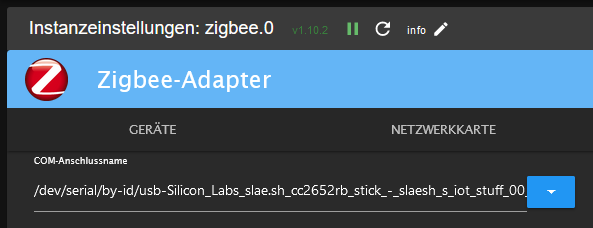
Linux-Werkzeugkasten:
https://forum.iobroker.net/topic/42952/der-kleine-iobroker-linux-werkzeugkasten
NodeJS Fixer Skript:
https://forum.iobroker.net/topic/68035/iob-node-fix-skript
iob_diag: curl -sLf -o diag.sh https://iobroker.net/diag.sh && bash diag.sh -
@stefu87_ch
Nein, du sollst das dort eintragen:@thomas-braun ok schaue mir das morgen an. Danke für den Hinweis
-
@stefu87_ch sagte in Backitup Adapter Backups ausserhalb Zeit:
sudo reboot
.................Hat funktioniert.
dann mal heute ... morgen beobachten ob es nochmal auftritt .. dein Ghost Backup !
@glasfaser Und gerade eben ist es wieder aufgetaucht.
2024-02-17 20:37:04.105 - error: backitup.0 (1774) [iobroker/ftp] Error: read ECONNRESET
2024-02-17 20:37:04.106 - error: backitup.0 (1774) [iobroker] Error: read ECONNRESET
System wurde vorgestern neu gestartet
Edit: Habe aber jetzt gerade was entdeckt, was eventuell die Ursache sein könnte. Und zwar hat er sich genau um diese Uhrzeit von der FTP Verbindung abgemeldet.
Model : AMD Ryzen 7 8745HS w/ Radeon 780M Graphics
Cores: 1 × 8 = 8 cores
Threads: 16
mit Proxmox
LXC Container mit Iobroker -
@glasfaser Und gerade eben ist es wieder aufgetaucht.
2024-02-17 20:37:04.105 - error: backitup.0 (1774) [iobroker/ftp] Error: read ECONNRESET
2024-02-17 20:37:04.106 - error: backitup.0 (1774) [iobroker] Error: read ECONNRESET
System wurde vorgestern neu gestartet
Edit: Habe aber jetzt gerade was entdeckt, was eventuell die Ursache sein könnte. Und zwar hat er sich genau um diese Uhrzeit von der FTP Verbindung abgemeldet.
Kannst du mal absichtlich die NAS / FTP Verbindung kappen , kommt dann auch diese Meldung
-
@glasfaser Und gerade eben ist es wieder aufgetaucht.
2024-02-17 20:37:04.105 - error: backitup.0 (1774) [iobroker/ftp] Error: read ECONNRESET
2024-02-17 20:37:04.106 - error: backitup.0 (1774) [iobroker] Error: read ECONNRESET
System wurde vorgestern neu gestartet
Edit: Habe aber jetzt gerade was entdeckt, was eventuell die Ursache sein könnte. Und zwar hat er sich genau um diese Uhrzeit von der FTP Verbindung abgemeldet.
@stefu87_ch sagte in Backitup Adapter Backups ausserhalb Zeit:
Und zwar hat er sich genau um diese Uhrzeit von der FTP Verbindung abgemeldet.
Ahh .. du hast ein EDIT gemacht .
Dann würde ich dort mal weiter schauen
Synology 918+ 16GB - ioBroker in Docker v9 , VISO auf Trekstor Primebook C13 13,3" , Hikvision Domkameras mit Surveillance Station .. CCU RaspberryMatic in Synology VM .. Zigbee CC2538+CC2592 .. Sonoff .. KNX .. Modbus ..
-
@stefu87_ch sagte in Backitup Adapter Backups ausserhalb Zeit:
Und zwar hat er sich genau um diese Uhrzeit von der FTP Verbindung abgemeldet.
Ahh .. du hast ein EDIT gemacht .
Dann würde ich dort mal weiter schauen
@glasfaser Schaue morgen nochmals rein, ob da wieder das gleiche passiert. Habe jetzt mal beim FTP Dienst was angepasst.
-
Danke an alle für die Unterstützung.
Der Fehler lag am FTP-Server, da wurde die Verbindung aus nicht bekannten Gründen immer sehr spät getrennt, was zum Fehler führte. Jetzt wird immer direkt nach dem Beenden des Backup's die Verbindung zum FTP- Dienst beendet.



Hey! Du scheinst an dieser Unterhaltung interessiert zu sein, hast aber noch kein Konto.
Hast du es satt, bei jedem Besuch durch die gleichen Beiträge zu scrollen? Wenn du dich für ein Konto anmeldest, kommst du immer genau dorthin zurück, wo du zuvor warst, und kannst dich über neue Antworten benachrichtigen lassen (entweder per E-Mail oder Push-Benachrichtigung). Du kannst auch Lesezeichen speichern und Beiträge positiv bewerten, um anderen Community-Mitgliedern deine Wertschätzung zu zeigen.
Mit deinem Input könnte dieser Beitrag noch besser werden 💗
Registrieren Anmelden304
Online33.0k
Benutzende83.7k
Themen1.3m
Beiträge