



Skip to content
  • Home
  • Recent
  • Tags
  • 0 Unread 0
  • Categories
  • Unreplied
  • Popular
  • GitHub
  • Docu
  • Hilfe
Skins
  • Light
  • Brite
  • Cerulean
  • Cosmo
  • Flatly
  • Journal
  • Litera
  • Lumen
  • Lux
  • Materia
  • Minty
  • Morph
  • Pulse
  • Sandstone
  • Simplex
  • Sketchy
  • Spacelab
  • United
  • Yeti
  • Zephyr
  • Dark
  • Cyborg
  • Darkly
  • Quartz
  • Slate
  • Solar
  • Superhero
  • Vapor

  • Default (No Skin)
  • No Skin
Collapse
ioBroker Logo

Community Forum

donate donate
  1. ioBroker Community Home
  2. Deutsch
  3. Off Topic
  4. InfluxDB
  5. Keinen zugriff auf Influx DB

NEWS

  • Jahresrückblick 2025 – unser neuer Blogbeitrag ist online! ✨
    BluefoxB
    Bluefox
    17
    1
    3.0k

  • Neuer Blogbeitrag: Monatsrückblick - Dezember 2025 🎄
    BluefoxB
    Bluefox
    13
    1
    1.1k

  • Weihnachtsangebot 2025! 🎄
    BluefoxB
    Bluefox
    25
    1
    2.4k

Keinen zugriff auf Influx DB

Scheduled Pinned Locked Moved InfluxDB
33 Posts 4 Posters 2.7k Views 4 Watching
  • Oldest to Newest
  • Newest to Oldest
  • Most Votes
Reply
  • Reply as topic
Log in to reply
This topic has been deleted. Only users with topic management privileges can see it.
  • Thomas BraunT Thomas Braun

    @herrx

    systemctl status grafana
    
    H Offline
    H Offline
    Herrx
    wrote on last edited by Herrx
    #23

    @thomas-braun said in Keinen zugriff auf Influx DB:

    systemctl status grafana

    pi@raspberrypi:~ $ systemctl status grafana
    Unit grafana.service could not be found.
    pi@raspberrypi:~ $ 
    

    ?? Aber die Installation war doch ohne Probleme ?

    Thomas BraunT 1 Reply Last reply
    0
    • H Herrx

      @thomas-braun said in Keinen zugriff auf Influx DB:

      systemctl status grafana

      pi@raspberrypi:~ $ systemctl status grafana
      Unit grafana.service could not be found.
      pi@raspberrypi:~ $ 
      

      ?? Aber die Installation war doch ohne Probleme ?

      Thomas BraunT Online
      Thomas BraunT Online
      Thomas Braun
      Most Active
      wrote on last edited by
      #24

      @herrx

      systemctl status grafana*
      

      Linux-Werkzeugkasten:
      https://forum.iobroker.net/topic/42952/der-kleine-iobroker-linux-werkzeugkasten
      NodeJS Fixer Skript:
      https://forum.iobroker.net/topic/68035/iob-node-fix-skript
      iob_diag: curl -sLf -o diag.sh https://iobroker.net/diag.sh && bash diag.sh

      H 1 Reply Last reply
      0
      • Thomas BraunT Thomas Braun

        @herrx

        systemctl status grafana*
        
        H Offline
        H Offline
        Herrx
        wrote on last edited by
        #25

        @thomas-braun said in Keinen zugriff auf Influx DB:

        systemctl status grafana*

        pi@raspberrypi:~ $ systemctl status grafana*
        pi@raspberrypi:~ $ systemctl status grafana
        Unit grafana.service could not be found.
        pi@raspberrypi:~ $ systemctl status grafana*
        pi@raspberrypi:~ $ 
        
        
        Thomas BraunT 2 Replies Last reply
        0
        • H Herrx

          @thomas-braun said in Keinen zugriff auf Influx DB:

          systemctl status grafana*

          pi@raspberrypi:~ $ systemctl status grafana*
          pi@raspberrypi:~ $ systemctl status grafana
          Unit grafana.service could not be found.
          pi@raspberrypi:~ $ systemctl status grafana*
          pi@raspberrypi:~ $ 
          
          
          Thomas BraunT Online
          Thomas BraunT Online
          Thomas Braun
          Most Active
          wrote on last edited by
          #26

          @herrx

          sudo apt update
          apt policy grafana*
          

          Linux-Werkzeugkasten:
          https://forum.iobroker.net/topic/42952/der-kleine-iobroker-linux-werkzeugkasten
          NodeJS Fixer Skript:
          https://forum.iobroker.net/topic/68035/iob-node-fix-skript
          iob_diag: curl -sLf -o diag.sh https://iobroker.net/diag.sh && bash diag.sh

          1 Reply Last reply
          0
          • H Herrx

            @thomas-braun said in Keinen zugriff auf Influx DB:

            systemctl status grafana*

            pi@raspberrypi:~ $ systemctl status grafana*
            pi@raspberrypi:~ $ systemctl status grafana
            Unit grafana.service could not be found.
            pi@raspberrypi:~ $ systemctl status grafana*
            pi@raspberrypi:~ $ 
            
            
            Thomas BraunT Online
            Thomas BraunT Online
            Thomas Braun
            Most Active
            wrote on last edited by
            #27

            @herrx

            Bzw:

            sudo systemctl daemon-reload
            sudo systemctl start grafana-server
            sudo systemctl status grafana-server
            

            Linux-Werkzeugkasten:
            https://forum.iobroker.net/topic/42952/der-kleine-iobroker-linux-werkzeugkasten
            NodeJS Fixer Skript:
            https://forum.iobroker.net/topic/68035/iob-node-fix-skript
            iob_diag: curl -sLf -o diag.sh https://iobroker.net/diag.sh && bash diag.sh

            H 1 Reply Last reply
            0
            • Thomas BraunT Thomas Braun

              @herrx

              Bzw:

              sudo systemctl daemon-reload
              sudo systemctl start grafana-server
              sudo systemctl status grafana-server
              
              H Offline
              H Offline
              Herrx
              wrote on last edited by Herrx
              #28

              @thomas-braun

              pi@raspberrypi:~ $ systemctl status grafana*
              ● grafana-server.service - Grafana instance
                   Loaded: loaded (/lib/systemd/system/grafana-server.service; disabled; preset: enabled)
                   Active: active (running) since Tue 2024-01-23 00:04:49 CET; 34s ago
                     Docs: http://docs.grafana.org
                 Main PID: 19823 (grafana)
                    Tasks: 15 (limit: 457)
                      CPU: 9.853s
                   CGroup: /system.slice/grafana-server.service
                           └─19823 /usr/share/grafana/bin/grafana server --config=/etc/grafana/grafana.ini --pidfile=/run/grafana/grafana-server.pid --packaging=deb cfg:default.pat>
              
              Jan 23 00:05:10 raspberrypi grafana[19823]: logger=provisioning.alerting t=2024-01-23T00:05:10.484274781+01:00 level=info msg="finished to provision alerting"
              Jan 23 00:05:10 raspberrypi grafana[19823]: logger=ngalert.state.manager t=2024-01-23T00:05:10.487621618+01:00 level=info msg="Warming state cache for startup"
              Jan 23 00:05:10 raspberrypi grafana[19823]: logger=ngalert.state.manager t=2024-01-23T00:05:10.489519141+01:00 level=info msg="State cache has been initialized" state>
              Jan 23 00:05:10 raspberrypi grafana[19823]: logger=ngalert.scheduler t=2024-01-23T00:05:10.489682063+01:00 level=info msg="Starting scheduler" tickInterval=10s
              Jan 23 00:05:10 raspberrypi grafana[19823]: logger=ticker t=2024-01-23T00:05:10.498451052+01:00 level=info msg=starting first_tick=2024-01-23T00:05:20+01:00
              Jan 23 00:05:10 raspberrypi grafana[19823]: logger=ngalert.multiorg.alertmanager t=2024-01-23T00:05:10.498873707+01:00 level=info msg="Starting MultiOrg Alertmanager"
              Jan 23 00:05:10 raspberrypi grafana[19823]: logger=grafanaStorageLogger t=2024-01-23T00:05:10.505991925+01:00 level=info msg="Storage starting"
              Jan 23 00:05:10 raspberrypi grafana[19823]: logger=http.server t=2024-01-23T00:05:10.531073444+01:00 level=info msg="HTTP Server Listen" address=[::]:3000 protocol=ht>
              Jan 23 00:05:10 raspberrypi grafana[19823]: logger=grafana.update.checker t=2024-01-23T00:05:10.849257594+01:00 level=info msg="Update check succeeded" duration=342.5>
              Jan 23 00:05:10 raspberrypi grafana[19823]: logger=plugins.update.checker t=2024-01-23T00:05:10.868909627+01:00 level=info msg="Update check succeeded" d
              

              Sehr cool danke. Jetzt geht es.

              1 Reply Last reply
              0
              • Thomas BraunT Online
                Thomas BraunT Online
                Thomas Braun
                Most Active
                wrote on last edited by
                #29

                @herrx
                Schau mal ob der auch nach einem Neustart auf die Beine kommt.

                Linux-Werkzeugkasten:
                https://forum.iobroker.net/topic/42952/der-kleine-iobroker-linux-werkzeugkasten
                NodeJS Fixer Skript:
                https://forum.iobroker.net/topic/68035/iob-node-fix-skript
                iob_diag: curl -sLf -o diag.sh https://iobroker.net/diag.sh && bash diag.sh

                H 1 Reply Last reply
                0
                • Thomas BraunT Thomas Braun

                  @herrx
                  Schau mal ob der auch nach einem Neustart auf die Beine kommt.

                  H Offline
                  H Offline
                  Herrx
                  wrote on last edited by
                  #30

                  @thomas-braun ok da kommt mein Grafana nicht wieder auf die Beine

                  Thomas BraunT 1 Reply Last reply
                  0
                  • H Herrx

                    @thomas-braun ok da kommt mein Grafana nicht wieder auf die Beine

                    Thomas BraunT Online
                    Thomas BraunT Online
                    Thomas Braun
                    Most Active
                    wrote on last edited by
                    #31

                    @herrx

                    sudo systemctl enable grafana-server.service
                    sudo systemctl start grafana-server.service
                    

                    Linux-Werkzeugkasten:
                    https://forum.iobroker.net/topic/42952/der-kleine-iobroker-linux-werkzeugkasten
                    NodeJS Fixer Skript:
                    https://forum.iobroker.net/topic/68035/iob-node-fix-skript
                    iob_diag: curl -sLf -o diag.sh https://iobroker.net/diag.sh && bash diag.sh

                    H 1 Reply Last reply
                    0
                    • Thomas BraunT Thomas Braun

                      @herrx

                      sudo systemctl enable grafana-server.service
                      sudo systemctl start grafana-server.service
                      
                      H Offline
                      H Offline
                      Herrx
                      wrote on last edited by
                      #32

                      @thomas-braun Super Danke das hat geholfen. Muss ich das nach jedem reboot wieder eingeben?

                      jetzt habe ich die Grafana anzeige wieder. Allerdings gibt mir mein Solarman nur alle 6min den aktuellen Leistungswert. Kann ich die Punkte dazwischen interpolieren? oder zumindest die Punkte verbinden?
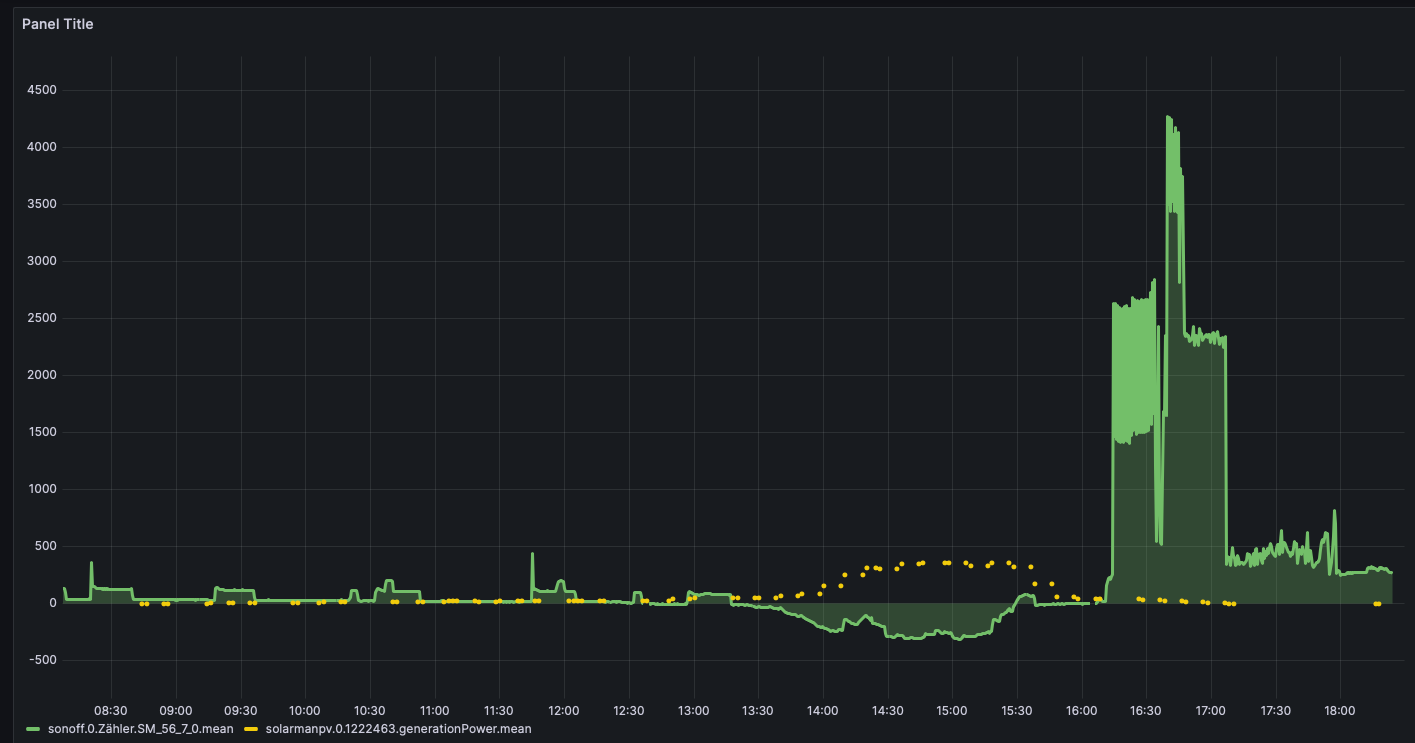
                      Bildschirmfoto 2024-01-27 um 18.26.18.png

                      Thomas BraunT 1 Reply Last reply
                      0
                      • H Herrx

                        @thomas-braun Super Danke das hat geholfen. Muss ich das nach jedem reboot wieder eingeben?

                        jetzt habe ich die Grafana anzeige wieder. Allerdings gibt mir mein Solarman nur alle 6min den aktuellen Leistungswert. Kann ich die Punkte dazwischen interpolieren? oder zumindest die Punkte verbinden?

                        Bildschirmfoto 2024-01-27 um 18.26.18.png

                        Thomas BraunT Online
                        Thomas BraunT Online
                        Thomas Braun
                        Most Active
                        wrote on last edited by
                        #33

                        @herrx sagte in Keinen zugriff auf Influx DB:

                        Muss ich das nach jedem reboot wieder eingeben?

                        Nein, der Service sollte nun beim booten gestartet werden.

                        Linux-Werkzeugkasten:
                        https://forum.iobroker.net/topic/42952/der-kleine-iobroker-linux-werkzeugkasten
                        NodeJS Fixer Skript:
                        https://forum.iobroker.net/topic/68035/iob-node-fix-skript
                        iob_diag: curl -sLf -o diag.sh https://iobroker.net/diag.sh && bash diag.sh

                        1 Reply Last reply
                        0
                        Reply
                        • Reply as topic
                        Log in to reply
                        • Oldest to Newest
                        • Newest to Oldest
                        • Most Votes


                        Support us

                        ioBroker
                        Community Adapters
                        Donate

                        341

                        Online

                        32.6k

                        Users

                        82.3k

                        Topics

                        1.3m

                        Posts
                        Community
                        Impressum | Datenschutz-Bestimmungen | Nutzungsbedingungen | Einwilligungseinstellungen
                        ioBroker Community 2014-2025
                        logo
                        • Login

                        • Don't have an account? Register

                        • Login or register to search.
                        • First post
                          Last post
                        0
                        • Home
                        • Recent
                        • Tags
                        • Unread 0
                        • Categories
                        • Unreplied
                        • Popular
                        • GitHub
                        • Docu
                        • Hilfe