Skip to content
  • Home
  • Aktuell
  • Tags
  • 0 Ungelesen 0
  • Kategorien
  • Unreplied
  • Beliebt
  • GitHub
  • Docu
  • Hilfe
Skins
  • Light
  • Brite
  • Cerulean
  • Cosmo
  • Flatly
  • Journal
  • Litera
  • Lumen
  • Lux
  • Materia
  • Minty
  • Morph
  • Pulse
  • Sandstone
  • Simplex
  • Sketchy
  • Spacelab
  • United
  • Yeti
  • Zephyr
  • Dark
  • Cyborg
  • Darkly
  • Quartz
  • Slate
  • Solar
  • Superhero
  • Vapor

  • Standard: (Kein Skin)
  • Kein Skin
Einklappen
ioBroker Logo

Community Forum

donate donate
  1. ioBroker Community Home
  2. Deutsch
  3. Visualisierung
  4. Probleme mit VIS Nach js-controller Update

NEWS

  • Jahresrückblick 2025 – unser neuer Blogbeitrag ist online! ✨
    BluefoxB
    Bluefox
    16
    1
    1.6k

  • Neuer Blogbeitrag: Monatsrückblick - Dezember 2025 🎄
    BluefoxB
    Bluefox
    13
    1
    848

  • Weihnachtsangebot 2025! 🎄
    BluefoxB
    Bluefox
    25
    1
    2.1k

Probleme mit VIS Nach js-controller Update

Geplant Angeheftet Gesperrt Verschoben Visualisierung
37 Beiträge 6 Kommentatoren 1.3k Aufrufe 2 Watching
  • Älteste zuerst
  • Neuste zuerst
  • Meiste Stimmen
Antworten
  • In einem neuen Thema antworten
Anmelden zum Antworten
Dieses Thema wurde gelöscht. Nur Nutzer mit entsprechenden Rechten können es sehen.
  • hg6806H hg6806

    @homoran

    Schon mal das hier:

    4b40b21c-798a-43b3-a67f-a8caee70789c-image.png

    Und das hier:

    c6821cbd-5fb5-4d13-9a7e-e68174975a00-image.png

    Wie kann man die SVG Widgets neu laden?

    crunchipC Offline
    crunchipC Offline
    crunchip
    Forum Testing Most Active
    schrieb am zuletzt editiert von
    #13

    @hg6806 mach mal ein
    iob upload all

    umgestiegen von Proxmox auf Unraid

    1 Antwort Letzte Antwort
    0
    • hg6806H Offline
      hg6806H Offline
      hg6806
      Most Active
      schrieb am zuletzt editiert von
      #14

      Trotz Upload und Neuinstallation des Widget Sets noch immer die Fehler:
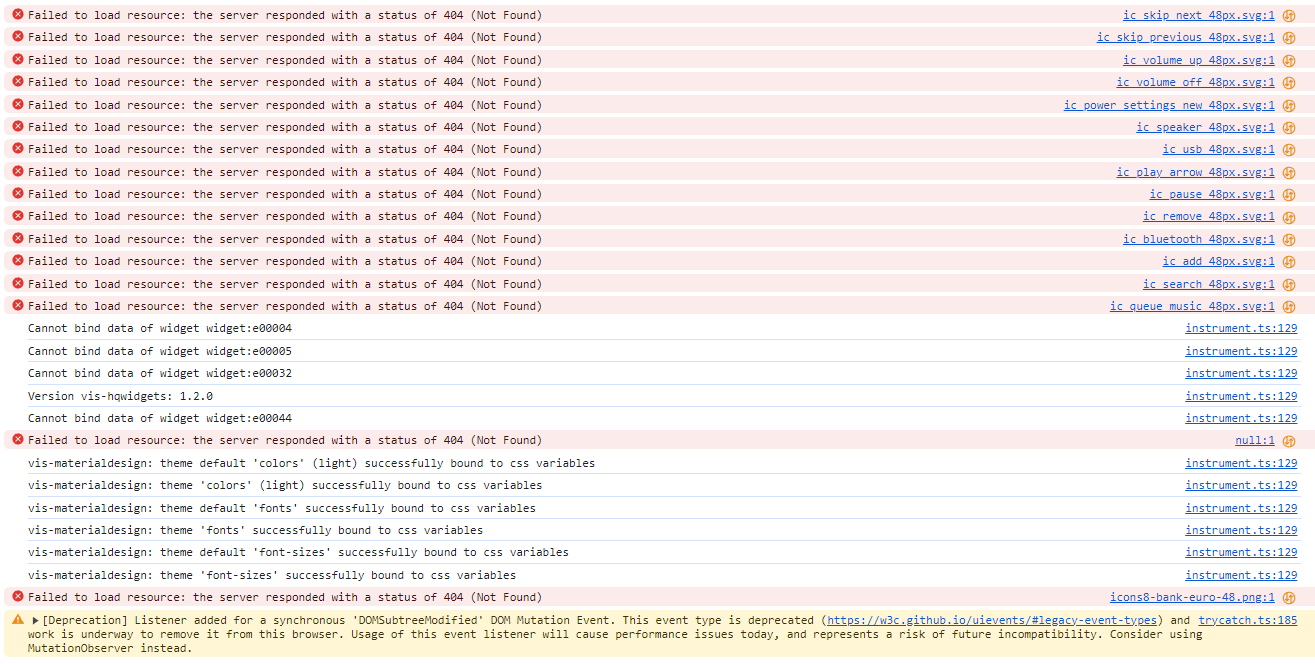
      134504e3-6c1d-4f91-abe4-31225ade4d5c-image.png

      1 Antwort Letzte Antwort
      0
      • hg6806H Offline
        hg6806H Offline
        hg6806
        Most Active
        schrieb am zuletzt editiert von
        #15

        Ich hatte jetzt von meiner Hauptseite alle Widgets exportiert, ein neuen Projekt erstellt und ein View indem ich dann die Widgets wieder importiert habe.
        Hier ist der Fehler auch wieder drin.

        Scheint also nach an den Views zu liegen sondern eher am System
        Aber das hatte ich ja neu aufgesetzt.

        Einen Fehler habe ich bei Javascript.
        Und zwar habe ich ganz übergeordnet einen Folder. Den möchte ich löschen, geht aber nicht. Es gibt folgende Fehlemeldung:

        "The id "script.js." is invalid. Ids are not allowed to end in ".""

        Wie kann ich den löschen?

        1 Antwort Letzte Antwort
        0
        • crunchipC Offline
          crunchipC Offline
          crunchip
          Forum Testing Most Active
          schrieb am zuletzt editiert von
          #16

          @hg6806
          https://forum.iobroker.net/post/571138

          @hg6806 sagte in Probleme mit VIS Nach js-controller Update:

          "The id "script.js." is invalid. Ids are not allowed to end in ".""

          umgestiegen von Proxmox auf Unraid

          1 Antwort Letzte Antwort
          0
          • hg6806H Offline
            hg6806H Offline
            hg6806
            Most Active
            schrieb am zuletzt editiert von
            #17

            Nachdem das Problem auch auf einem nochmals neu aufgesetztem System mit Raspberry Pi5 und 8GB besteht, muss hier endlich was gefixt werden.

            Ich habe ganz rudimentär das System ohne Backup installiert, die wichtigsten Adapter für VIS und ein Projekt Export/Import vom alten System gemacht.
            Das läuft soweit.

            Jetzt fehlen mir jedoch noch Adapter + Einstellungen und die ganzen Variablen/Datenpunkte und die Javascript Programme.
            Wie bekomme ich alles nun "rüber"?

            Thomas BraunT 1 Antwort Letzte Antwort
            0
            • hg6806H hg6806

              Nachdem das Problem auch auf einem nochmals neu aufgesetztem System mit Raspberry Pi5 und 8GB besteht, muss hier endlich was gefixt werden.

              Ich habe ganz rudimentär das System ohne Backup installiert, die wichtigsten Adapter für VIS und ein Projekt Export/Import vom alten System gemacht.
              Das läuft soweit.

              Jetzt fehlen mir jedoch noch Adapter + Einstellungen und die ganzen Variablen/Datenpunkte und die Javascript Programme.
              Wie bekomme ich alles nun "rüber"?

              Thomas BraunT Online
              Thomas BraunT Online
              Thomas Braun
              Most Active
              schrieb am zuletzt editiert von
              #18

              @hg6806 sagte in Probleme mit VIS Nach js-controller Update:

              Wie bekomme ich alles nun "rüber"?

              Mit einem Backup?

              Linux-Werkzeugkasten:
              https://forum.iobroker.net/topic/42952/der-kleine-iobroker-linux-werkzeugkasten
              NodeJS Fixer Skript:
              https://forum.iobroker.net/topic/68035/iob-node-fix-skript
              iob_diag: curl -sLf -o diag.sh https://iobroker.net/diag.sh && bash diag.sh

              hg6806H 1 Antwort Letzte Antwort
              0
              • Thomas BraunT Thomas Braun

                @hg6806 sagte in Probleme mit VIS Nach js-controller Update:

                Wie bekomme ich alles nun "rüber"?

                Mit einem Backup?

                hg6806H Offline
                hg6806H Offline
                hg6806
                Most Active
                schrieb am zuletzt editiert von
                #19

                @thomas-braun

                Genau mit dem Backup bekomme ich aber die Fehler rein.
                Und in dem Backup ist eben neben den Views bzw. Projekten alles in "backup.json" vergraben

                1 Antwort Letzte Antwort
                0
                • GlasfaserG Offline
                  GlasfaserG Offline
                  Glasfaser
                  schrieb am zuletzt editiert von
                  #20

                  @hg6806

                  Test bitte mit einem Browser mit dem du noch nie ioBroker / VIS geöffnet hast .

                  also auch zusätzlich Browser Cache löschen und auch die Cookies .

                  Synology 918+ 16GB - ioBroker in Docker v9 , VISO auf Trekstor Primebook C13 13,3" , Hikvision Domkameras mit Surveillance Station .. CCU RaspberryMatic in Synology VM .. Zigbee CC2538+CC2592 .. Sonoff .. KNX .. Modbus ..

                  1 Antwort Letzte Antwort
                  0
                  • hg6806H Offline
                    hg6806H Offline
                    hg6806
                    Most Active
                    schrieb am zuletzt editiert von
                    #21

                    Gerade mal mit Edge probiert, damit hatte ich es noch nie geöffnet.
                    Die gleichen Fehler. Auch mit meinem Chrome mal alle Browserdaten gelöscht.

                    Ich befürchte, ich muss alles ganz neu und einzeln aufsetzen. Das kann Stunden/Tage dauern.

                    Bei Javascript gibt es ja eine Export Funktion.
                    Kann man irgendwie die Datenpunkte vom alten ins neue System kopieren?

                    1 Antwort Letzte Antwort
                    0
                    • GlasfaserG Offline
                      GlasfaserG Offline
                      Glasfaser
                      schrieb am zuletzt editiert von Glasfaser
                      #22

                      @hg6806 sagte in Probleme mit VIS Nach js-controller Update:

                      system.adapter.icons-material-png.0 : icons-material-png : RPI4-iobroker-18 - disabled

                      Du hast nur den Adapter für png !

                      Laut deinem iob diag , fehlt der Adapter svg !

                      ef6e5695-752a-4c7b-b689-ee66a4b78d4b-grafik.png

                      Bitte die Logs auch in Code_Tags .... so ist das Käse !

                      Synology 918+ 16GB - ioBroker in Docker v9 , VISO auf Trekstor Primebook C13 13,3" , Hikvision Domkameras mit Surveillance Station .. CCU RaspberryMatic in Synology VM .. Zigbee CC2538+CC2592 .. Sonoff .. KNX .. Modbus ..

                      1 Antwort Letzte Antwort
                      0
                      • GlasfaserG Offline
                        GlasfaserG Offline
                        Glasfaser
                        schrieb am zuletzt editiert von
                        #23

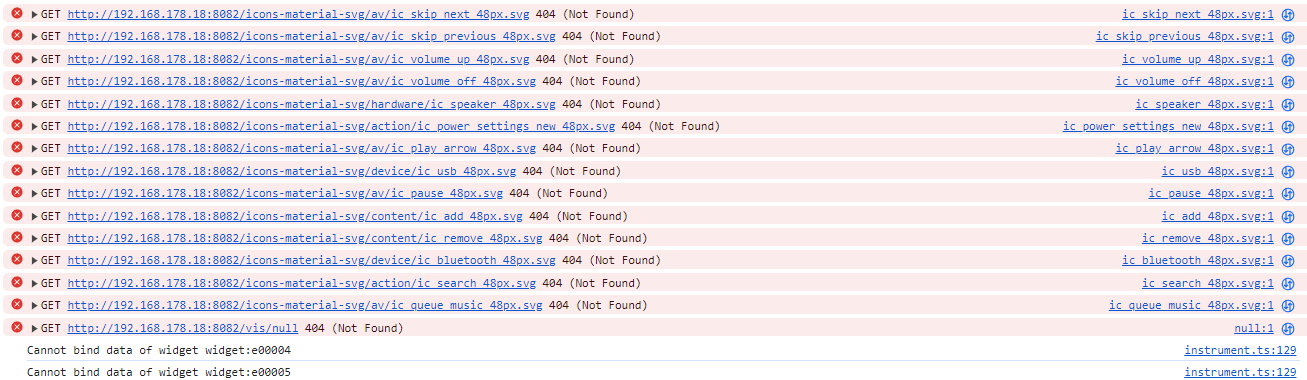
                        @hg6806 sagte in Probleme mit VIS Nach js-controller Update:

                        Und das hier auch noch:

                        2fbb45e8-24f3-483d-95b5-d2da7487e87d-image.png

                        /vis/null das gibt es nicht .. keine Ahnung warum er es angemekert ... klappe den Pfeil " vor GET " auf dann sieht man mehr dazu .

                        Das andere ist von deinem erstellten Projekt " Tablet " , da hast du mal ein Widget hinterlegt was nicht mehr vorhanden ist

                        Synology 918+ 16GB - ioBroker in Docker v9 , VISO auf Trekstor Primebook C13 13,3" , Hikvision Domkameras mit Surveillance Station .. CCU RaspberryMatic in Synology VM .. Zigbee CC2538+CC2592 .. Sonoff .. KNX .. Modbus ..

                        1 Antwort Letzte Antwort
                        0
                        • hg6806H Offline
                          hg6806H Offline
                          hg6806
                          Most Active
                          schrieb am zuletzt editiert von
                          #24

                          @glasfaser

                          Danke für die Hilfe.

                          Material SVG installiert.

                          Die beiden "Get" Fehler sehe ich nicht mehr.

                          Hier die aktuellen Fehler:

                          instrument.ts:129 Error in eval[value]: {pid:heos.0.players.123456789.group_leader_pid;pidToRgbColor(pid)}
                          (anonym) @ instrument.ts:129
                          instrument.ts:129 Error in eval[script]: var pid = "undefined";return pidToRgbColor(pid);
                          (anonym) @ instrument.ts:129
                          instrument.ts:129 Error in eval[error]: ReferenceError: pidToRgbColor is not defined
                          (anonym) @ instrument.ts:129
                          instrument.ts:129 Error in eval[value]: {pid:heos.0.players.123456789.group_leader_pid;pidToRgbColor(pid)}
                          (anonym) @ instrument.ts:129
                          instrument.ts:129 Error in eval[script]: var pid = "undefined";return pidToRgbColor(pid);
                          (anonym) @ instrument.ts:129
                          instrument.ts:129 Error in eval[error]: ReferenceError: pidToRgbColor is not defined
                          (anonym) @ instrument.ts:129
                          instrument.ts:129 Create inner vis object heos.0.players.123456789.current_source_image_url
                          instrument.ts:129 Create inner vis object heos.0.players.123456789.current_audio_format
                          instrument.ts:129 Create inner vis object heos.0.players.123456789.current_bitrate
                          instrument.ts:129 Create inner vis object heos.0.players.123456789.current_sample_rate
                          instrument.ts:129 Create inner vis object heos.0.players.123456789.current_bitdepth
                          instrument.ts:129 Create inner vis object heos.0.players.123456789.current_image_color_background
                          instrument.ts:129 Create inner vis object mqtt.1.openWB.config.get.pv.minCurrentMinPv
                          instrument.ts:129 Create inner vis object mqtt.1.openWB.config.get.sofort.lp.1.socToChargeTo
                          instrument.ts:129 Create inner vis object mqtt.1.openWB.config.set.pv.lp.1.maxSocToChargeTo
                          instrument.ts:129 Create inner vis object mqtt.1.openWB.config.get.sofort.lp.1.current
                          null:1 
                                  
                                  
                                 Failed to load resource: the server responded with a status of 404 (Not Found)
                          instrument.ts:129 Version vis-hqwidgets: 1.2.0
                          instrument.ts:129 vis-materialdesign: theme default 'colors' (light) successfully bound to css variables
                          instrument.ts:129 vis-materialdesign: theme 'colors' (light) successfully bound to css variables
                          instrument.ts:129 vis-materialdesign: theme default 'fonts' successfully bound to css variables
                          instrument.ts:129 vis-materialdesign: theme 'fonts' successfully bound to css variables
                          instrument.ts:129 vis-materialdesign: theme default 'font-sizes' successfully bound to css variables
                          instrument.ts:129 vis-materialdesign: theme 'font-sizes' successfully bound to css variables
                          null:1 
                                  
                                  
                                 Failed to load resource: the server responded with a status of 404 (Not Found)
                          icons8-bank-euro-48.png:1 
                                  
                                  
                                 Failed to load resource: the server responded with a status of 404 (Not Found)
                          Quick%20Mode%20On%20Filled.png:1 
                                  
                                  
                                 Failed to load resource: the server responded with a status of 404 (Not Found)
                          trycatch.ts:185 [Deprecation] Listener added for a synchronous 'DOMSubtreeModified' DOM Mutation Event. This event type is deprecated (https://w3c.github.io/uievents/#legacy-event-types) and work is underway to remove it from this browser. Usage of this event listener will cause performance issues today, and represents a risk of future incompatibility. Consider using MutationObserver instead.
                          (anonym) @ trycatch.ts:185
                          

                          Gibt's einen Trick wie man das ordentlich kopiert?

                          GlasfaserG 1 Antwort Letzte Antwort
                          0
                          • hg6806H hg6806

                            @glasfaser

                            Danke für die Hilfe.

                            Material SVG installiert.

                            Die beiden "Get" Fehler sehe ich nicht mehr.

                            Hier die aktuellen Fehler:

                            instrument.ts:129 Error in eval[value]: {pid:heos.0.players.123456789.group_leader_pid;pidToRgbColor(pid)}
                            (anonym) @ instrument.ts:129
                            instrument.ts:129 Error in eval[script]: var pid = "undefined";return pidToRgbColor(pid);
                            (anonym) @ instrument.ts:129
                            instrument.ts:129 Error in eval[error]: ReferenceError: pidToRgbColor is not defined
                            (anonym) @ instrument.ts:129
                            instrument.ts:129 Error in eval[value]: {pid:heos.0.players.123456789.group_leader_pid;pidToRgbColor(pid)}
                            (anonym) @ instrument.ts:129
                            instrument.ts:129 Error in eval[script]: var pid = "undefined";return pidToRgbColor(pid);
                            (anonym) @ instrument.ts:129
                            instrument.ts:129 Error in eval[error]: ReferenceError: pidToRgbColor is not defined
                            (anonym) @ instrument.ts:129
                            instrument.ts:129 Create inner vis object heos.0.players.123456789.current_source_image_url
                            instrument.ts:129 Create inner vis object heos.0.players.123456789.current_audio_format
                            instrument.ts:129 Create inner vis object heos.0.players.123456789.current_bitrate
                            instrument.ts:129 Create inner vis object heos.0.players.123456789.current_sample_rate
                            instrument.ts:129 Create inner vis object heos.0.players.123456789.current_bitdepth
                            instrument.ts:129 Create inner vis object heos.0.players.123456789.current_image_color_background
                            instrument.ts:129 Create inner vis object mqtt.1.openWB.config.get.pv.minCurrentMinPv
                            instrument.ts:129 Create inner vis object mqtt.1.openWB.config.get.sofort.lp.1.socToChargeTo
                            instrument.ts:129 Create inner vis object mqtt.1.openWB.config.set.pv.lp.1.maxSocToChargeTo
                            instrument.ts:129 Create inner vis object mqtt.1.openWB.config.get.sofort.lp.1.current
                            null:1 
                                    
                                    
                                   Failed to load resource: the server responded with a status of 404 (Not Found)
                            instrument.ts:129 Version vis-hqwidgets: 1.2.0
                            instrument.ts:129 vis-materialdesign: theme default 'colors' (light) successfully bound to css variables
                            instrument.ts:129 vis-materialdesign: theme 'colors' (light) successfully bound to css variables
                            instrument.ts:129 vis-materialdesign: theme default 'fonts' successfully bound to css variables
                            instrument.ts:129 vis-materialdesign: theme 'fonts' successfully bound to css variables
                            instrument.ts:129 vis-materialdesign: theme default 'font-sizes' successfully bound to css variables
                            instrument.ts:129 vis-materialdesign: theme 'font-sizes' successfully bound to css variables
                            null:1 
                                    
                                    
                                   Failed to load resource: the server responded with a status of 404 (Not Found)
                            icons8-bank-euro-48.png:1 
                                    
                                    
                                   Failed to load resource: the server responded with a status of 404 (Not Found)
                            Quick%20Mode%20On%20Filled.png:1 
                                    
                                    
                                   Failed to load resource: the server responded with a status of 404 (Not Found)
                            trycatch.ts:185 [Deprecation] Listener added for a synchronous 'DOMSubtreeModified' DOM Mutation Event. This event type is deprecated (https://w3c.github.io/uievents/#legacy-event-types) and work is underway to remove it from this browser. Usage of this event listener will cause performance issues today, and represents a risk of future incompatibility. Consider using MutationObserver instead.
                            (anonym) @ trycatch.ts:185
                            

                            Gibt's einen Trick wie man das ordentlich kopiert?

                            GlasfaserG Offline
                            GlasfaserG Offline
                            Glasfaser
                            schrieb am zuletzt editiert von
                            #25

                            @hg6806 sagte in Probleme mit VIS Nach js-controller Update:

                            {pid:heos.0.players.123456789.group_leader_pid;pidToRgbColor(pid)}

                            ... var pid = "undefined";return pidToRgbColor(pid);

                            kommt vom Adapter heos.0

                            Synology 918+ 16GB - ioBroker in Docker v9 , VISO auf Trekstor Primebook C13 13,3" , Hikvision Domkameras mit Surveillance Station .. CCU RaspberryMatic in Synology VM .. Zigbee CC2538+CC2592 .. Sonoff .. KNX .. Modbus ..

                            1 Antwort Letzte Antwort
                            0
                            • hg6806H hg6806

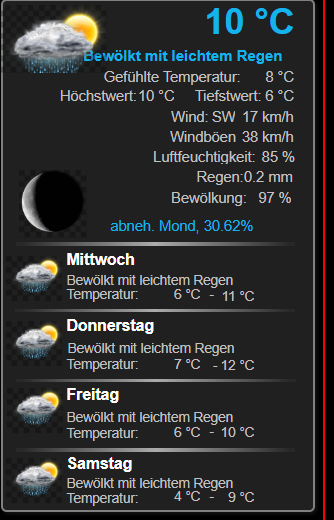
                              Hier mal ein Beispiel des Fehlers:

                              Wetter-Info in VIS:

                              49e091bf-ead4-4d17-b58c-02d326b731c5-image.png

                              Und aus dem Editor:
                              bd52224f-63be-416c-87dc-7fbd41df8364-image.png

                              GlasfaserG Offline
                              GlasfaserG Offline
                              Glasfaser
                              schrieb am zuletzt editiert von
                              #26

                              @hg6806 sagte in Probleme mit VIS Nach js-controller Update:

                              Hier mal ein Beispiel des Fehlers:

                              Wetter-Info in VIS:

                              49e091bf-ead4-4d17-b58c-02d326b731c5-image.png

                              Und aus dem Editor:
                              bd52224f-63be-416c-87dc-7fbd41df8364-image.png

                              Erstelle ein neues Projekt , dann nur diese Widgets komplett in eine neue View kopieren , was ist dann mit der Ladezeit im neuen Projekt .

                              Synology 918+ 16GB - ioBroker in Docker v9 , VISO auf Trekstor Primebook C13 13,3" , Hikvision Domkameras mit Surveillance Station .. CCU RaspberryMatic in Synology VM .. Zigbee CC2538+CC2592 .. Sonoff .. KNX .. Modbus ..

                              hg6806H 1 Antwort Letzte Antwort
                              0
                              • GlasfaserG Glasfaser

                                @hg6806 sagte in Probleme mit VIS Nach js-controller Update:

                                Hier mal ein Beispiel des Fehlers:

                                Wetter-Info in VIS:

                                49e091bf-ead4-4d17-b58c-02d326b731c5-image.png

                                Und aus dem Editor:
                                bd52224f-63be-416c-87dc-7fbd41df8364-image.png

                                Erstelle ein neues Projekt , dann nur diese Widgets komplett in eine neue View kopieren , was ist dann mit der Ladezeit im neuen Projekt .

                                hg6806H Offline
                                hg6806H Offline
                                hg6806
                                Most Active
                                schrieb am zuletzt editiert von
                                #27

                                @glasfaser

                                Das geht sofort.
                                Neues Projekt, View ist aber DemoView. Bevor ich die Wetter Widgets reinkopiert hatte, hatte ich den DemoKram rausgelöscht.

                                GlasfaserG 1 Antwort Letzte Antwort
                                0
                                • hg6806H hg6806

                                  @glasfaser

                                  Das geht sofort.
                                  Neues Projekt, View ist aber DemoView. Bevor ich die Wetter Widgets reinkopiert hatte, hatte ich den DemoKram rausgelöscht.

                                  GlasfaserG Offline
                                  GlasfaserG Offline
                                  Glasfaser
                                  schrieb am zuletzt editiert von
                                  #28

                                  @hg6806 sagte in Probleme mit VIS Nach js-controller Update:

                                  Das geht sofort.

                                  Dann ist etwas in deinen View´s vorhanden was den ... Timeout ... verursacht .

                                  Du kannst nach und nach deine vorhanden Views Seiten exportieren und ins neue Projekt kopieren .. dann in den Runtime .. dann schauen ab wann es zusammenbricht !

                                  Synology 918+ 16GB - ioBroker in Docker v9 , VISO auf Trekstor Primebook C13 13,3" , Hikvision Domkameras mit Surveillance Station .. CCU RaspberryMatic in Synology VM .. Zigbee CC2538+CC2592 .. Sonoff .. KNX .. Modbus ..

                                  hg6806H 1 Antwort Letzte Antwort
                                  0
                                  • GlasfaserG Glasfaser

                                    @hg6806 sagte in Probleme mit VIS Nach js-controller Update:

                                    Das geht sofort.

                                    Dann ist etwas in deinen View´s vorhanden was den ... Timeout ... verursacht .

                                    Du kannst nach und nach deine vorhanden Views Seiten exportieren und ins neue Projekt kopieren .. dann in den Runtime .. dann schauen ab wann es zusammenbricht !

                                    hg6806H Offline
                                    hg6806H Offline
                                    hg6806
                                    Most Active
                                    schrieb am zuletzt editiert von
                                    #29

                                    @glasfaser

                                    OK, Thanx.
                                    Ich versuche es mal und berichte!

                                    GlasfaserG 1 Antwort Letzte Antwort
                                    0
                                    • hg6806H hg6806

                                      @glasfaser

                                      OK, Thanx.
                                      Ich versuche es mal und berichte!

                                      GlasfaserG Offline
                                      GlasfaserG Offline
                                      Glasfaser
                                      schrieb am zuletzt editiert von
                                      #30

                                      @hg6806 sagte in Probleme mit VIS Nach js-controller Update:

                                      Ich versuche es mal und berichte!

                                      oder ... lösche die View´s in deinem vorhanden Projekt einzeln

                                      vorher dein Projekt exportieren !

                                      Synology 918+ 16GB - ioBroker in Docker v9 , VISO auf Trekstor Primebook C13 13,3" , Hikvision Domkameras mit Surveillance Station .. CCU RaspberryMatic in Synology VM .. Zigbee CC2538+CC2592 .. Sonoff .. KNX .. Modbus ..

                                      hg6806H 1 Antwort Letzte Antwort
                                      0
                                      • GlasfaserG Glasfaser

                                        @hg6806 sagte in Probleme mit VIS Nach js-controller Update:

                                        Ich versuche es mal und berichte!

                                        oder ... lösche die View´s in deinem vorhanden Projekt einzeln

                                        vorher dein Projekt exportieren !

                                        hg6806H Offline
                                        hg6806H Offline
                                        hg6806
                                        Most Active
                                        schrieb am zuletzt editiert von hg6806
                                        #31

                                        @glasfaser

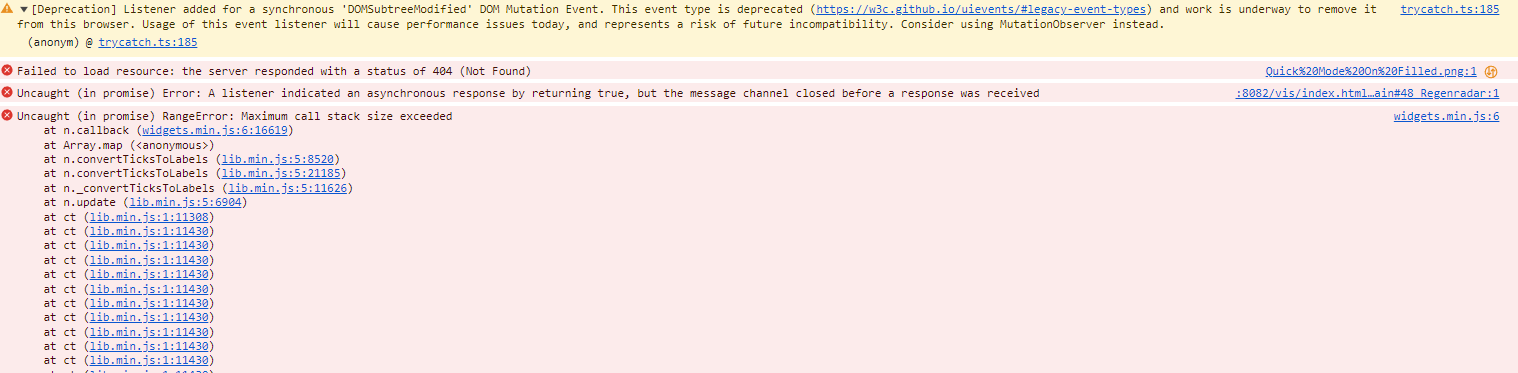
                                        Moin, ich habe jetzt zwar einige Widgets entlarvt, so ganz flüssig läuft es aber nicht nicht.
                                        Irgendwo ist noch was versteckt und die Fehler verstehe ich auch nicht:

                                        Deprecation] Listener added for a synchronous 'DOMSubtreeModified' DOM Mutation Event. This event type is deprecated (https://w3c.github.io/uievents/#legacy-event-types) and work is underway to remove it from this browser. Usage of this event listener will cause performance issues today, and represents a risk of future incompatibility. Consider using MutationObserver instead.
                                        (anonym) @ trycatch.ts:185
                                        Quick%20Mode%20On%20Filled.png:1 
                                                
                                                
                                               Failed to load resource: the server responded with a status of 404 (Not Found)
                                        :8082/vis/index.html…ain#48_Regenradar:1 Uncaught (in promise) Error: A listener indicated an asynchronous response by returning true, but the message channel closed before a response was received
                                        widgets.min.js:6 Uncaught (in promise) RangeError: Maximum call stack size exceeded
                                            at n.callback (widgets.min.js:6:16619)
                                            at Array.map (<anonymous>)
                                            at n.convertTicksToLabels (lib.min.js:5:8520)
                                            at n.convertTicksToLabels (lib.min.js:5:21185)
                                            at n._convertTicksToLabels (lib.min.js:5:11626)
                                            at n.update (lib.min.js:5:6904)
                                            at ct (lib.min.js:1:11308)
                                            at ct (lib.min.js:1:11430)
                                            at ct (lib.min.js:1:11430)
                                            at ct (lib.min.js:1:11430)
                                            at ct (lib.min.js:1:11430)
                                            at ct (lib.min.js:1:11430)
                                            at ct (lib.min.js:1:11430)
                                            at ct (lib.min.js:1:11430)
                                            at ct (lib.min.js:1:11430)
                                            at ct (lib.min.js:1:11430)
                                            at ct (lib.min.js:1:11430)
                                        

                                        8ed79fa1-dfb2-4177-a0fd-00cd96bbaefc-image.png

                                        GlasfaserG 1 Antwort Letzte Antwort
                                        0
                                        • hg6806H hg6806

                                          @glasfaser

                                          Moin, ich habe jetzt zwar einige Widgets entlarvt, so ganz flüssig läuft es aber nicht nicht.
                                          Irgendwo ist noch was versteckt und die Fehler verstehe ich auch nicht:

                                          Deprecation] Listener added for a synchronous 'DOMSubtreeModified' DOM Mutation Event. This event type is deprecated (https://w3c.github.io/uievents/#legacy-event-types) and work is underway to remove it from this browser. Usage of this event listener will cause performance issues today, and represents a risk of future incompatibility. Consider using MutationObserver instead.
                                          (anonym) @ trycatch.ts:185
                                          Quick%20Mode%20On%20Filled.png:1 
                                                  
                                                  
                                                 Failed to load resource: the server responded with a status of 404 (Not Found)
                                          :8082/vis/index.html…ain#48_Regenradar:1 Uncaught (in promise) Error: A listener indicated an asynchronous response by returning true, but the message channel closed before a response was received
                                          widgets.min.js:6 Uncaught (in promise) RangeError: Maximum call stack size exceeded
                                              at n.callback (widgets.min.js:6:16619)
                                              at Array.map (<anonymous>)
                                              at n.convertTicksToLabels (lib.min.js:5:8520)
                                              at n.convertTicksToLabels (lib.min.js:5:21185)
                                              at n._convertTicksToLabels (lib.min.js:5:11626)
                                              at n.update (lib.min.js:5:6904)
                                              at ct (lib.min.js:1:11308)
                                              at ct (lib.min.js:1:11430)
                                              at ct (lib.min.js:1:11430)
                                              at ct (lib.min.js:1:11430)
                                              at ct (lib.min.js:1:11430)
                                              at ct (lib.min.js:1:11430)
                                              at ct (lib.min.js:1:11430)
                                              at ct (lib.min.js:1:11430)
                                              at ct (lib.min.js:1:11430)
                                              at ct (lib.min.js:1:11430)
                                              at ct (lib.min.js:1:11430)
                                          

                                          8ed79fa1-dfb2-4177-a0fd-00cd96bbaefc-image.png

                                          GlasfaserG Offline
                                          GlasfaserG Offline
                                          Glasfaser
                                          schrieb am zuletzt editiert von
                                          #32

                                          @hg6806 sagte in Probleme mit VIS Nach js-controller Update:

                                          48_Regenradar

                                          in deiner View .. ist irgendetwas drin , was dieses verursacht :

                                          RangeError: Maximum call stack size exceeded

                                          Wenn du diese View in eine neues Projekt importierst was ist dann ...

                                          bzw. was hast du jetzt gemacht , einzelne gelöscht oder diese in einem neuen Projekt importiert !?

                                          Synology 918+ 16GB - ioBroker in Docker v9 , VISO auf Trekstor Primebook C13 13,3" , Hikvision Domkameras mit Surveillance Station .. CCU RaspberryMatic in Synology VM .. Zigbee CC2538+CC2592 .. Sonoff .. KNX .. Modbus ..


                                          hg6806H 1 Antwort Letzte Antwort
                                          0
                                          Antworten
                                          • In einem neuen Thema antworten
                                          Anmelden zum Antworten
                                          • Älteste zuerst
                                          • Neuste zuerst
                                          • Meiste Stimmen


                                          Support us

                                          ioBroker
                                          Community Adapters
                                          Donate

                                          790

                                          Online

                                          32.6k

                                          Benutzer

                                          82.1k

                                          Themen

                                          1.3m

                                          Beiträge
                                          Community
                                          Impressum | Datenschutz-Bestimmungen | Nutzungsbedingungen | Einwilligungseinstellungen
                                          ioBroker Community 2014-2025
                                          logo
                                          • Anmelden

                                          • Du hast noch kein Konto? Registrieren

                                          • Anmelden oder registrieren, um zu suchen
                                          • Erster Beitrag
                                            Letzter Beitrag
                                          0
                                          • Home
                                          • Aktuell
                                          • Tags
                                          • Ungelesen 0
                                          • Kategorien
                                          • Unreplied
                                          • Beliebt
                                          • GitHub
                                          • Docu
                                          • Hilfe