Skip to content
  • Home
  • Aktuell
  • Tags
  • 0 Ungelesen 0
  • Kategorien
  • Unreplied
  • Beliebt
  • GitHub
  • Docu
  • Hilfe
Skins
  • Light
  • Brite
  • Cerulean
  • Cosmo
  • Flatly
  • Journal
  • Litera
  • Lumen
  • Lux
  • Materia
  • Minty
  • Morph
  • Pulse
  • Sandstone
  • Simplex
  • Sketchy
  • Spacelab
  • United
  • Yeti
  • Zephyr
  • Dark
  • Cyborg
  • Darkly
  • Quartz
  • Slate
  • Solar
  • Superhero
  • Vapor

  • Standard: (Kein Skin)
  • Kein Skin
Einklappen
ioBroker Logo

Community Forum

donate donate
  1. ioBroker Community Home
  2. Deutsch
  3. Visualisierung
  4. Probleme mit VIS Nach js-controller Update

NEWS

  • Jahresrückblick 2025 – unser neuer Blogbeitrag ist online! ✨
    BluefoxB
    Bluefox
    16
    1
    1.5k

  • Neuer Blogbeitrag: Monatsrückblick - Dezember 2025 🎄
    BluefoxB
    Bluefox
    13
    1
    844

  • Weihnachtsangebot 2025! 🎄
    BluefoxB
    Bluefox
    25
    1
    2.1k

Probleme mit VIS Nach js-controller Update

Geplant Angeheftet Gesperrt Verschoben Visualisierung
37 Beiträge 6 Kommentatoren 1.3k Aufrufe 2 Watching
  • Älteste zuerst
  • Neuste zuerst
  • Meiste Stimmen
Antworten
  • In einem neuen Thema antworten
Anmelden zum Antworten
Dieses Thema wurde gelöscht. Nur Nutzer mit entsprechenden Rechten können es sehen.
  • hg6806H hg6806

    @crunchip

    Naja, ich hatte den X Server ausgeschaltet und die OS Updates eingespielt. Hätte ja doch was ändern können.

    Übrigens ist die CPU Last nicht sonderlich hoch. Um die 1, was der RPi Adapter ausspuckt.
    RAM ist schon an der Grenze. Bookworm hatte ich mit Desktop installiert, das hat ganz schön gefressen.
    Deshalb hatte ich auch Swap auf 2GByte hochgesetzt.

    Thomas BraunT Online
    Thomas BraunT Online
    Thomas Braun
    Most Active
    schrieb am zuletzt editiert von
    #6

    @hg6806

    Was läuft denn da sonst noch mit?

    Schau per

    top
    

    oder

    htop 
    

    danach.

    Linux-Werkzeugkasten:
    https://forum.iobroker.net/topic/42952/der-kleine-iobroker-linux-werkzeugkasten
    NodeJS Fixer Skript:
    https://forum.iobroker.net/topic/68035/iob-node-fix-skript
    iob_diag: curl -sLf -o diag.sh https://iobroker.net/diag.sh && bash diag.sh

    hg6806H 1 Antwort Letzte Antwort
    0
    • hg6806H hg6806

      @crunchip

      Naja, ich hatte den X Server ausgeschaltet und die OS Updates eingespielt. Hätte ja doch was ändern können.

      Übrigens ist die CPU Last nicht sonderlich hoch. Um die 1, was der RPi Adapter ausspuckt.
      RAM ist schon an der Grenze. Bookworm hatte ich mit Desktop installiert, das hat ganz schön gefressen.
      Deshalb hatte ich auch Swap auf 2GByte hochgesetzt.

      crunchipC Abwesend
      crunchipC Abwesend
      crunchip
      Forum Testing Most Active
      schrieb am zuletzt editiert von
      #7

      @hg6806 sagte in Probleme mit VIS Nach js-controller Update:

      Deshalb hatte ich auch Swap auf 2GByte hochgesetzt.

      Nutzt dir aber nix, wirkt sich nur negativ aus

      umgestiegen von Proxmox auf Unraid

      1 Antwort Letzte Antwort
      0
      • Thomas BraunT Thomas Braun

        @hg6806

        Was läuft denn da sonst noch mit?

        Schau per

        top
        

        oder

        htop 
        

        danach.

        hg6806H Offline
        hg6806H Offline
        hg6806
        Most Active
        schrieb am zuletzt editiert von
        #8

        @thomas-braun sagte in Probleme mit VIS Nach js-controller Update:

        top

        Hier eine Momentaufnahme. Bei htop kann ich nichts kopieren.

        top - 13:27:33 up  1:20,  2 users,  load average: 1.16, 1.13, 1.31
        Tasks: 197 total,   1 running, 196 sleeping,   0 stopped,   0 zombie
        %Cpu(s):  8.9 us,  2.6 sy,  0.0 ni, 87.6 id,  0.2 wa,  0.0 hi,  0.8 si,  0.0 st
        MiB Mem :   3793.2 total,    346.1 free,   2910.6 used,    660.8 buff/cache
        MiB Swap:   2000.0 total,   2000.0 free,      0.0 used.    882.6 avail Mem
        
            PID USER      PR  NI    VIRT    RES    SHR S  %CPU  %MEM     TIME+ COMMAND
            945 iobroker  20   0 1019484 463508  41792 S  18.6  11.9  31:52.51 iobroker.js-con
           1405 iobroker  20   0  957012  90764  37796 S   6.3   2.3   3:28.95 io.smartmeter.0
           1172 iobroker  20   0 1103944 332324  42332 S   4.0   8.6  11:13.94 io.javascript.0
           1157 iobroker  20   0  763648  95108  36876 S   3.0   2.4   4:28.72 io.history.0
           1390 iobroker  20   0  977532 117740  36992 S   2.0   3.0   3:41.11 io.shelly.0
           1122 iobroker  20   0 1021416 166472  43352 S   1.7   4.3   1:33.06 io.admin.0
           1279 iobroker  20   0  695156  89896  37092 S   1.7   2.3   1:24.22 io.modbus.1
           1596 iobroker  20   0  599868  51352  36412 S   1.3   1.3   1:00.80 node
           1619 iobroker  20   0  676392 101544  37072 S   1.0   2.6   2:47.73 io.enigma2.0
           1671 iobroker  20   0  951868  85724  37068 S   1.0   2.2   0:27.51 io.fullybrowser
           1791 iobroker  20   0  694948  92460  37052 S   1.0   2.4   1:43.04 io.sourceanalyt
           1215 iobroker  20   0  685904  83712  37020 S   0.7   2.2   0:24.85 io.hm-rega.0
           1324 iobroker  20   0  699212  92496  36916 S   0.7   2.4   0:36.64 io.mqtt.0
           1339 iobroker  20   0  704768 100220  36904 S   0.7   2.6   0:41.87 io.mqtt.1
           1496 iobroker  20   0  924480 133512  43828 S   0.7   3.4   0:23.99 io.zigbee.0
           1631 iobroker  20   0  682140  74344  36984 S   0.7   1.9   0:31.09 io.denon.0
           1663 iobroker  20   0  693892  89116  37112 S   0.7   2.3   0:34.31 io.eventlist.0
           7945 iobroker  20   0  953048  94860  43428 S   0.7   2.4   0:21.56 io.parser.0
           1234 iobroker  20   0  696268  87764  36932 S   0.3   2.3   0:27.63 io.hm-rpc.0
           1313 iobroker  20   0  686068  79080  37108 S   0.3   2.0   0:18.70 io.modbus.3
           1354 iobroker  20   0  688700  80728  36916 S   0.3   2.1   0:41.21 io.ping.0
           1526 iobroker  20   0  994524 122344  37756 S   0.3   3.1   1:19.67 io.web.0
           1557 iobroker  20   0  685436  79220  36976 S   0.3   2.0   0:42.52 io.ble.0
           1642 pi        20   0   19720   6716   4828 S   0.3   0.2   0:00.40 sshd
           1697 iobroker  20   0  945356  99200  37812 S   0.3   2.6   1:10.54 io.niu.0
           1812 iobroker  20   0  760488  94500  42408 S   0.3   2.4   2:12.35 io.statistics.0
           1854 iobroker  20   0  690592  87136  37132 S   0.3   2.2   0:21.93 io.wled.0
           8499 root       0 -20       0      0      0 I   0.3   0.0   0:02.05 kworker/0:2H-mmc_complete
           9437 root      20   0       0      0      0 I   0.3   0.0   0:02.38 kworker/u8:3-writeback
          11458 pi        20   0   11728   4992   2832 R   0.3   0.1   0:00.26 top
              1 root      20   0  168644  11956   8588 S   0.0   0.3   0:03.33 systemd
              2 root      20   0       0      0      0 S   0.0   0.0   0:00.03 kthreadd
              3 root       0 -20       0      0      0 I   0.0   0.0   0:00.00 rcu_gp
              4 root       0 -20       0      0      0 I   0.0   0.0   0:00.00 rcu_par_gp
              5 root       0 -20       0      0      0 I   0.0   0.0   0:00.00 slub_flushwq
              6 root       0 -20       0      0      0 I   0.0   0.0   0:00.00 netns
             10 root       0 -20       0      0      0 I   0.0   0.0   0:00.00 mm_percpu_wq
             11 root      20   0       0      0      0 I   0.0   0.0   0:00.00 rcu_tasks_kthread
             12 root      20   0       0      0      0 I   0.0   0.0   0:00.00 rcu_tasks_rude_kthread
             13 root      20   0       0      0      0 I   0.0   0.0   0:00.00 rcu_tasks_trace_kthread
             14 root      20   0       0      0      0 S   0.0   0.0   0:01.94 ksoftirqd/0
             15 root      20   0       0      0      0 I   0.0   0.0   0:11.97 rcu_preempt


        Meines Erachtens alles recht unauffällig.

        1 Antwort Letzte Antwort
        0
        • hg6806H Offline
          hg6806H Offline
          hg6806
          Most Active
          schrieb am zuletzt editiert von
          #9

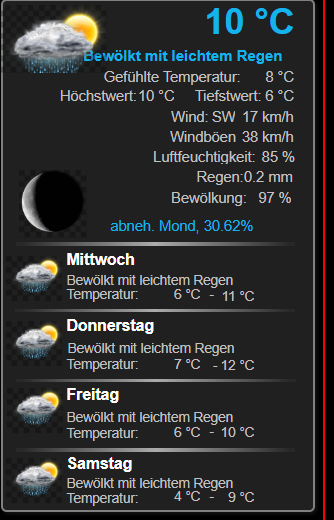
          Hier mal ein Beispiel des Fehlers:

          Wetter-Info in VIS:

          49e091bf-ead4-4d17-b58c-02d326b731c5-image.png

          Und aus dem Editor:
          bd52224f-63be-416c-87dc-7fbd41df8364-image.png

          HomoranH GlasfaserG 2 Antworten Letzte Antwort
          0
          • hg6806H hg6806

            Hier mal ein Beispiel des Fehlers:

            Wetter-Info in VIS:

            49e091bf-ead4-4d17-b58c-02d326b731c5-image.png

            Und aus dem Editor:
            bd52224f-63be-416c-87dc-7fbd41df8364-image.png

            HomoranH Nicht stören
            HomoranH Nicht stören
            Homoran
            Global Moderator Administrators
            schrieb am zuletzt editiert von
            #10

            @hg6806 sagte in Probleme mit VIS Nach js-controller Update:

            Hier mal ein Beispiel des Fehlers:

            was sagt die Browserkonsole dazu?

            kein Support per PN! - Fragen im Forum stellen - es gibt fast nichts, was nicht auch für andere interessant ist.

            Benutzt das Voting rechts unten im Beitrag wenn er euch geholfen hat.

            der Installationsfixer: curl -fsL https://iobroker.net/fix.sh | bash -

            hg6806H 1 Antwort Letzte Antwort
            0
            • HomoranH Homoran

              @hg6806 sagte in Probleme mit VIS Nach js-controller Update:

              Hier mal ein Beispiel des Fehlers:

              was sagt die Browserkonsole dazu?

              hg6806H Offline
              hg6806H Offline
              hg6806
              Most Active
              schrieb am zuletzt editiert von
              #11

              @homoran

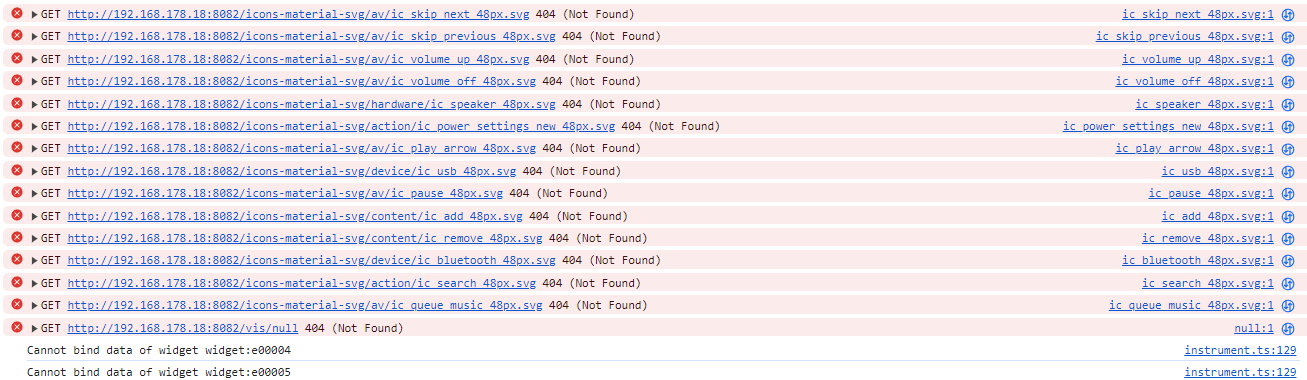
              Schon mal das hier:

              4b40b21c-798a-43b3-a67f-a8caee70789c-image.png

              Und das hier:

              c6821cbd-5fb5-4d13-9a7e-e68174975a00-image.png

              Wie kann man die SVG Widgets neu laden?

              crunchipC 1 Antwort Letzte Antwort
              0
              • hg6806H Offline
                hg6806H Offline
                hg6806
                Most Active
                schrieb am zuletzt editiert von
                #12

                Und das hier auch noch:

                2fbb45e8-24f3-483d-95b5-d2da7487e87d-image.png

                1 Antwort Letzte Antwort
                0
                • hg6806H hg6806

                  @homoran

                  Schon mal das hier:

                  4b40b21c-798a-43b3-a67f-a8caee70789c-image.png

                  Und das hier:

                  c6821cbd-5fb5-4d13-9a7e-e68174975a00-image.png

                  Wie kann man die SVG Widgets neu laden?

                  crunchipC Abwesend
                  crunchipC Abwesend
                  crunchip
                  Forum Testing Most Active
                  schrieb am zuletzt editiert von
                  #13

                  @hg6806 mach mal ein
                  iob upload all

                  umgestiegen von Proxmox auf Unraid

                  1 Antwort Letzte Antwort
                  0
                  • hg6806H Offline
                    hg6806H Offline
                    hg6806
                    Most Active
                    schrieb am zuletzt editiert von
                    #14

                    Trotz Upload und Neuinstallation des Widget Sets noch immer die Fehler:
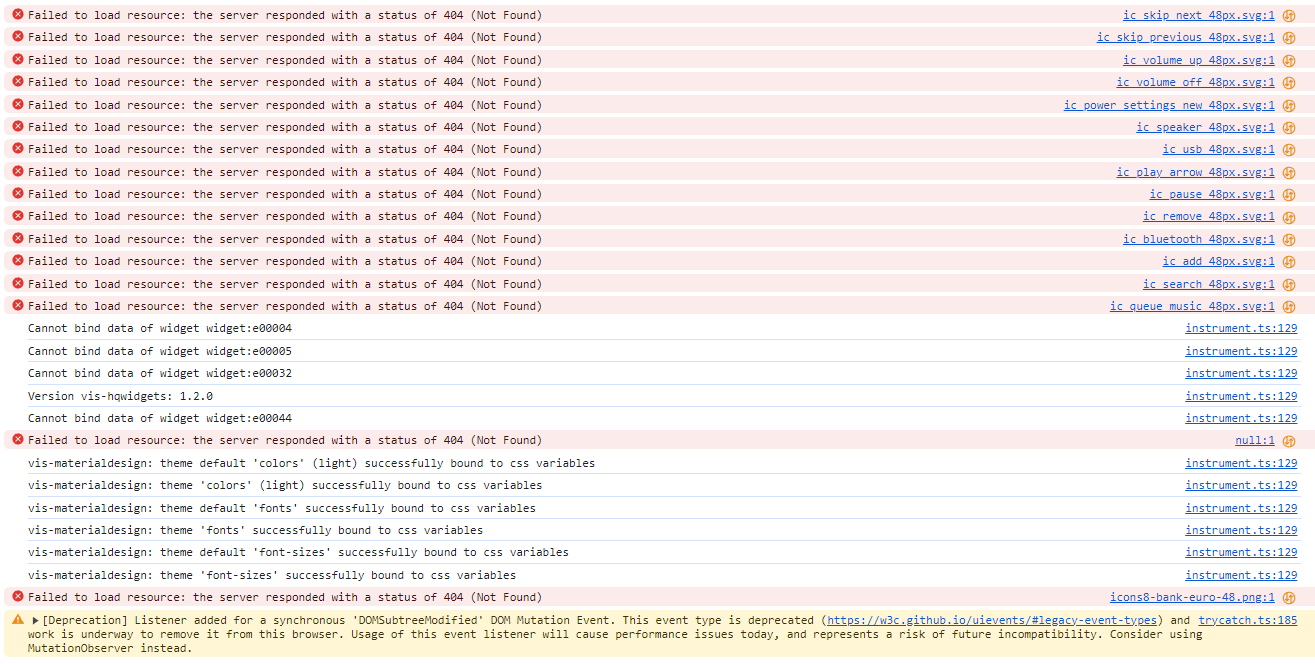
                    134504e3-6c1d-4f91-abe4-31225ade4d5c-image.png

                    1 Antwort Letzte Antwort
                    0
                    • hg6806H Offline
                      hg6806H Offline
                      hg6806
                      Most Active
                      schrieb am zuletzt editiert von
                      #15

                      Ich hatte jetzt von meiner Hauptseite alle Widgets exportiert, ein neuen Projekt erstellt und ein View indem ich dann die Widgets wieder importiert habe.
                      Hier ist der Fehler auch wieder drin.

                      Scheint also nach an den Views zu liegen sondern eher am System
                      Aber das hatte ich ja neu aufgesetzt.

                      Einen Fehler habe ich bei Javascript.
                      Und zwar habe ich ganz übergeordnet einen Folder. Den möchte ich löschen, geht aber nicht. Es gibt folgende Fehlemeldung:

                      "The id "script.js." is invalid. Ids are not allowed to end in ".""

                      Wie kann ich den löschen?

                      1 Antwort Letzte Antwort
                      0
                      • crunchipC Abwesend
                        crunchipC Abwesend
                        crunchip
                        Forum Testing Most Active
                        schrieb am zuletzt editiert von
                        #16

                        @hg6806
                        https://forum.iobroker.net/post/571138

                        @hg6806 sagte in Probleme mit VIS Nach js-controller Update:

                        "The id "script.js." is invalid. Ids are not allowed to end in ".""

                        umgestiegen von Proxmox auf Unraid

                        1 Antwort Letzte Antwort
                        0
                        • hg6806H Offline
                          hg6806H Offline
                          hg6806
                          Most Active
                          schrieb am zuletzt editiert von
                          #17

                          Nachdem das Problem auch auf einem nochmals neu aufgesetztem System mit Raspberry Pi5 und 8GB besteht, muss hier endlich was gefixt werden.

                          Ich habe ganz rudimentär das System ohne Backup installiert, die wichtigsten Adapter für VIS und ein Projekt Export/Import vom alten System gemacht.
                          Das läuft soweit.

                          Jetzt fehlen mir jedoch noch Adapter + Einstellungen und die ganzen Variablen/Datenpunkte und die Javascript Programme.
                          Wie bekomme ich alles nun "rüber"?

                          Thomas BraunT 1 Antwort Letzte Antwort
                          0
                          • hg6806H hg6806

                            Nachdem das Problem auch auf einem nochmals neu aufgesetztem System mit Raspberry Pi5 und 8GB besteht, muss hier endlich was gefixt werden.

                            Ich habe ganz rudimentär das System ohne Backup installiert, die wichtigsten Adapter für VIS und ein Projekt Export/Import vom alten System gemacht.
                            Das läuft soweit.

                            Jetzt fehlen mir jedoch noch Adapter + Einstellungen und die ganzen Variablen/Datenpunkte und die Javascript Programme.
                            Wie bekomme ich alles nun "rüber"?

                            Thomas BraunT Online
                            Thomas BraunT Online
                            Thomas Braun
                            Most Active
                            schrieb am zuletzt editiert von
                            #18

                            @hg6806 sagte in Probleme mit VIS Nach js-controller Update:

                            Wie bekomme ich alles nun "rüber"?

                            Mit einem Backup?

                            Linux-Werkzeugkasten:
                            https://forum.iobroker.net/topic/42952/der-kleine-iobroker-linux-werkzeugkasten
                            NodeJS Fixer Skript:
                            https://forum.iobroker.net/topic/68035/iob-node-fix-skript
                            iob_diag: curl -sLf -o diag.sh https://iobroker.net/diag.sh && bash diag.sh

                            hg6806H 1 Antwort Letzte Antwort
                            0
                            • Thomas BraunT Thomas Braun

                              @hg6806 sagte in Probleme mit VIS Nach js-controller Update:

                              Wie bekomme ich alles nun "rüber"?

                              Mit einem Backup?

                              hg6806H Offline
                              hg6806H Offline
                              hg6806
                              Most Active
                              schrieb am zuletzt editiert von
                              #19

                              @thomas-braun

                              Genau mit dem Backup bekomme ich aber die Fehler rein.
                              Und in dem Backup ist eben neben den Views bzw. Projekten alles in "backup.json" vergraben

                              1 Antwort Letzte Antwort
                              0
                              • GlasfaserG Offline
                                GlasfaserG Offline
                                Glasfaser
                                schrieb am zuletzt editiert von
                                #20

                                @hg6806

                                Test bitte mit einem Browser mit dem du noch nie ioBroker / VIS geöffnet hast .

                                also auch zusätzlich Browser Cache löschen und auch die Cookies .

                                Synology 918+ 16GB - ioBroker in Docker v9 , VISO auf Trekstor Primebook C13 13,3" , Hikvision Domkameras mit Surveillance Station .. CCU RaspberryMatic in Synology VM .. Zigbee CC2538+CC2592 .. Sonoff .. KNX .. Modbus ..

                                1 Antwort Letzte Antwort
                                0
                                • hg6806H Offline
                                  hg6806H Offline
                                  hg6806
                                  Most Active
                                  schrieb am zuletzt editiert von
                                  #21

                                  Gerade mal mit Edge probiert, damit hatte ich es noch nie geöffnet.
                                  Die gleichen Fehler. Auch mit meinem Chrome mal alle Browserdaten gelöscht.

                                  Ich befürchte, ich muss alles ganz neu und einzeln aufsetzen. Das kann Stunden/Tage dauern.

                                  Bei Javascript gibt es ja eine Export Funktion.
                                  Kann man irgendwie die Datenpunkte vom alten ins neue System kopieren?

                                  1 Antwort Letzte Antwort
                                  0
                                  • GlasfaserG Offline
                                    GlasfaserG Offline
                                    Glasfaser
                                    schrieb am zuletzt editiert von Glasfaser
                                    #22

                                    @hg6806 sagte in Probleme mit VIS Nach js-controller Update:

                                    system.adapter.icons-material-png.0 : icons-material-png : RPI4-iobroker-18 - disabled

                                    Du hast nur den Adapter für png !

                                    Laut deinem iob diag , fehlt der Adapter svg !

                                    ef6e5695-752a-4c7b-b689-ee66a4b78d4b-grafik.png

                                    Bitte die Logs auch in Code_Tags .... so ist das Käse !

                                    Synology 918+ 16GB - ioBroker in Docker v9 , VISO auf Trekstor Primebook C13 13,3" , Hikvision Domkameras mit Surveillance Station .. CCU RaspberryMatic in Synology VM .. Zigbee CC2538+CC2592 .. Sonoff .. KNX .. Modbus ..

                                    1 Antwort Letzte Antwort
                                    0
                                    • GlasfaserG Offline
                                      GlasfaserG Offline
                                      Glasfaser
                                      schrieb am zuletzt editiert von
                                      #23

                                      @hg6806 sagte in Probleme mit VIS Nach js-controller Update:

                                      Und das hier auch noch:

                                      2fbb45e8-24f3-483d-95b5-d2da7487e87d-image.png

                                      /vis/null das gibt es nicht .. keine Ahnung warum er es angemekert ... klappe den Pfeil " vor GET " auf dann sieht man mehr dazu .

                                      Das andere ist von deinem erstellten Projekt " Tablet " , da hast du mal ein Widget hinterlegt was nicht mehr vorhanden ist

                                      Synology 918+ 16GB - ioBroker in Docker v9 , VISO auf Trekstor Primebook C13 13,3" , Hikvision Domkameras mit Surveillance Station .. CCU RaspberryMatic in Synology VM .. Zigbee CC2538+CC2592 .. Sonoff .. KNX .. Modbus ..

                                      1 Antwort Letzte Antwort
                                      0
                                      • hg6806H Offline
                                        hg6806H Offline
                                        hg6806
                                        Most Active
                                        schrieb am zuletzt editiert von
                                        #24

                                        @glasfaser

                                        Danke für die Hilfe.

                                        Material SVG installiert.

                                        Die beiden "Get" Fehler sehe ich nicht mehr.

                                        Hier die aktuellen Fehler:

                                        instrument.ts:129 Error in eval[value]: {pid:heos.0.players.123456789.group_leader_pid;pidToRgbColor(pid)}
                                        (anonym) @ instrument.ts:129
                                        instrument.ts:129 Error in eval[script]: var pid = "undefined";return pidToRgbColor(pid);
                                        (anonym) @ instrument.ts:129
                                        instrument.ts:129 Error in eval[error]: ReferenceError: pidToRgbColor is not defined
                                        (anonym) @ instrument.ts:129
                                        instrument.ts:129 Error in eval[value]: {pid:heos.0.players.123456789.group_leader_pid;pidToRgbColor(pid)}
                                        (anonym) @ instrument.ts:129
                                        instrument.ts:129 Error in eval[script]: var pid = "undefined";return pidToRgbColor(pid);
                                        (anonym) @ instrument.ts:129
                                        instrument.ts:129 Error in eval[error]: ReferenceError: pidToRgbColor is not defined
                                        (anonym) @ instrument.ts:129
                                        instrument.ts:129 Create inner vis object heos.0.players.123456789.current_source_image_url
                                        instrument.ts:129 Create inner vis object heos.0.players.123456789.current_audio_format
                                        instrument.ts:129 Create inner vis object heos.0.players.123456789.current_bitrate
                                        instrument.ts:129 Create inner vis object heos.0.players.123456789.current_sample_rate
                                        instrument.ts:129 Create inner vis object heos.0.players.123456789.current_bitdepth
                                        instrument.ts:129 Create inner vis object heos.0.players.123456789.current_image_color_background
                                        instrument.ts:129 Create inner vis object mqtt.1.openWB.config.get.pv.minCurrentMinPv
                                        instrument.ts:129 Create inner vis object mqtt.1.openWB.config.get.sofort.lp.1.socToChargeTo
                                        instrument.ts:129 Create inner vis object mqtt.1.openWB.config.set.pv.lp.1.maxSocToChargeTo
                                        instrument.ts:129 Create inner vis object mqtt.1.openWB.config.get.sofort.lp.1.current
                                        null:1 
                                                
                                                
                                               Failed to load resource: the server responded with a status of 404 (Not Found)
                                        instrument.ts:129 Version vis-hqwidgets: 1.2.0
                                        instrument.ts:129 vis-materialdesign: theme default 'colors' (light) successfully bound to css variables
                                        instrument.ts:129 vis-materialdesign: theme 'colors' (light) successfully bound to css variables
                                        instrument.ts:129 vis-materialdesign: theme default 'fonts' successfully bound to css variables
                                        instrument.ts:129 vis-materialdesign: theme 'fonts' successfully bound to css variables
                                        instrument.ts:129 vis-materialdesign: theme default 'font-sizes' successfully bound to css variables
                                        instrument.ts:129 vis-materialdesign: theme 'font-sizes' successfully bound to css variables
                                        null:1 
                                                
                                                
                                               Failed to load resource: the server responded with a status of 404 (Not Found)
                                        icons8-bank-euro-48.png:1 
                                                
                                                
                                               Failed to load resource: the server responded with a status of 404 (Not Found)
                                        Quick%20Mode%20On%20Filled.png:1 
                                                
                                                
                                               Failed to load resource: the server responded with a status of 404 (Not Found)
                                        trycatch.ts:185 [Deprecation] Listener added for a synchronous 'DOMSubtreeModified' DOM Mutation Event. This event type is deprecated (https://w3c.github.io/uievents/#legacy-event-types) and work is underway to remove it from this browser. Usage of this event listener will cause performance issues today, and represents a risk of future incompatibility. Consider using MutationObserver instead.
                                        (anonym) @ trycatch.ts:185
                                        

                                        Gibt's einen Trick wie man das ordentlich kopiert?

                                        GlasfaserG 1 Antwort Letzte Antwort
                                        0
                                        • hg6806H hg6806

                                          @glasfaser

                                          Danke für die Hilfe.

                                          Material SVG installiert.

                                          Die beiden "Get" Fehler sehe ich nicht mehr.

                                          Hier die aktuellen Fehler:

                                          instrument.ts:129 Error in eval[value]: {pid:heos.0.players.123456789.group_leader_pid;pidToRgbColor(pid)}
                                          (anonym) @ instrument.ts:129
                                          instrument.ts:129 Error in eval[script]: var pid = "undefined";return pidToRgbColor(pid);
                                          (anonym) @ instrument.ts:129
                                          instrument.ts:129 Error in eval[error]: ReferenceError: pidToRgbColor is not defined
                                          (anonym) @ instrument.ts:129
                                          instrument.ts:129 Error in eval[value]: {pid:heos.0.players.123456789.group_leader_pid;pidToRgbColor(pid)}
                                          (anonym) @ instrument.ts:129
                                          instrument.ts:129 Error in eval[script]: var pid = "undefined";return pidToRgbColor(pid);
                                          (anonym) @ instrument.ts:129
                                          instrument.ts:129 Error in eval[error]: ReferenceError: pidToRgbColor is not defined
                                          (anonym) @ instrument.ts:129
                                          instrument.ts:129 Create inner vis object heos.0.players.123456789.current_source_image_url
                                          instrument.ts:129 Create inner vis object heos.0.players.123456789.current_audio_format
                                          instrument.ts:129 Create inner vis object heos.0.players.123456789.current_bitrate
                                          instrument.ts:129 Create inner vis object heos.0.players.123456789.current_sample_rate
                                          instrument.ts:129 Create inner vis object heos.0.players.123456789.current_bitdepth
                                          instrument.ts:129 Create inner vis object heos.0.players.123456789.current_image_color_background
                                          instrument.ts:129 Create inner vis object mqtt.1.openWB.config.get.pv.minCurrentMinPv
                                          instrument.ts:129 Create inner vis object mqtt.1.openWB.config.get.sofort.lp.1.socToChargeTo
                                          instrument.ts:129 Create inner vis object mqtt.1.openWB.config.set.pv.lp.1.maxSocToChargeTo
                                          instrument.ts:129 Create inner vis object mqtt.1.openWB.config.get.sofort.lp.1.current
                                          null:1 
                                                  
                                                  
                                                 Failed to load resource: the server responded with a status of 404 (Not Found)
                                          instrument.ts:129 Version vis-hqwidgets: 1.2.0
                                          instrument.ts:129 vis-materialdesign: theme default 'colors' (light) successfully bound to css variables
                                          instrument.ts:129 vis-materialdesign: theme 'colors' (light) successfully bound to css variables
                                          instrument.ts:129 vis-materialdesign: theme default 'fonts' successfully bound to css variables
                                          instrument.ts:129 vis-materialdesign: theme 'fonts' successfully bound to css variables
                                          instrument.ts:129 vis-materialdesign: theme default 'font-sizes' successfully bound to css variables
                                          instrument.ts:129 vis-materialdesign: theme 'font-sizes' successfully bound to css variables
                                          null:1 
                                                  
                                                  
                                                 Failed to load resource: the server responded with a status of 404 (Not Found)
                                          icons8-bank-euro-48.png:1 
                                                  
                                                  
                                                 Failed to load resource: the server responded with a status of 404 (Not Found)
                                          Quick%20Mode%20On%20Filled.png:1 
                                                  
                                                  
                                                 Failed to load resource: the server responded with a status of 404 (Not Found)
                                          trycatch.ts:185 [Deprecation] Listener added for a synchronous 'DOMSubtreeModified' DOM Mutation Event. This event type is deprecated (https://w3c.github.io/uievents/#legacy-event-types) and work is underway to remove it from this browser. Usage of this event listener will cause performance issues today, and represents a risk of future incompatibility. Consider using MutationObserver instead.
                                          (anonym) @ trycatch.ts:185
                                          

                                          Gibt's einen Trick wie man das ordentlich kopiert?

                                          GlasfaserG Offline
                                          GlasfaserG Offline
                                          Glasfaser
                                          schrieb am zuletzt editiert von
                                          #25

                                          @hg6806 sagte in Probleme mit VIS Nach js-controller Update:

                                          {pid:heos.0.players.123456789.group_leader_pid;pidToRgbColor(pid)}

                                          ... var pid = "undefined";return pidToRgbColor(pid);

                                          kommt vom Adapter heos.0

                                          Synology 918+ 16GB - ioBroker in Docker v9 , VISO auf Trekstor Primebook C13 13,3" , Hikvision Domkameras mit Surveillance Station .. CCU RaspberryMatic in Synology VM .. Zigbee CC2538+CC2592 .. Sonoff .. KNX .. Modbus ..

                                          1 Antwort Letzte Antwort
                                          0
                                          Antworten
                                          • In einem neuen Thema antworten
                                          Anmelden zum Antworten
                                          • Älteste zuerst
                                          • Neuste zuerst
                                          • Meiste Stimmen


                                          Support us

                                          ioBroker
                                          Community Adapters
                                          Donate

                                          674

                                          Online

                                          32.6k

                                          Benutzer

                                          82.1k

                                          Themen

                                          1.3m

                                          Beiträge
                                          Community
                                          Impressum | Datenschutz-Bestimmungen | Nutzungsbedingungen | Einwilligungseinstellungen
                                          ioBroker Community 2014-2025
                                          logo
                                          • Anmelden

                                          • Du hast noch kein Konto? Registrieren

                                          • Anmelden oder registrieren, um zu suchen
                                          • Erster Beitrag
                                            Letzter Beitrag
                                          0
                                          • Home
                                          • Aktuell
                                          • Tags
                                          • Ungelesen 0
                                          • Kategorien
                                          • Unreplied
                                          • Beliebt
                                          • GitHub
                                          • Docu
                                          • Hilfe