




Probleme mit VIS Nach js-controller Update
-
@thomas-braun sagte in Probleme mit VIS Nach js-controller Update:
iob diag
Alles ausgeführt.
Leider noch immer die gleichen Probleme.
Hier die lange Version:======== Start marking the full check here ========= Skript v.2023-10-10 *** BASE SYSTEM *** Static hostname: RPI4-iobroker-18 Icon name: computer Operating System: Debian GNU/Linux 12 (bookworm) Kernel: Linux 6.1.0-rpi6-rpi-v8 Architecture: arm64 Model : Raspberry Pi 4 Model B Rev 1.2 Docker : false Virtualization : none Kernel : aarch64 Userland : arm64 Systemuptime and Load: 13:03:24 up 56 min, 3 users, load average: 1.07, 1.50, 1.76 CPU threads: 4 *** RASPBERRY THROTTLING *** Current issues: No throttling issues detected. Previously detected issues: No throttling issues detected. *** Time and Time Zones *** Local time: Tue 2023-11-07 13:03:25 CET Universal time: Tue 2023-11-07 12:03:25 UTC RTC time: n/a Time zone: Europe/Berlin (CET, +0100) System clock synchronized: yes NTP service: active RTC in local TZ: no *** User and Groups *** pi /home/pi pi adm dialout cdrom sudo audio video plugdev games users input render netdev lpadmin gpio i2c spi iobroker *** X-Server-Setup *** X-Server: false Desktop: Terminal: tty Boot Target: multi-user.target *** MEMORY *** total used free shared buff/cache available Mem: 4.0G 3.1G 248M 1.4M 748M 857M Swap: 2.1G 0B 2.1G Total: 6.1G 3.1G 2.3G 3793 M total memory 2975 M used memory 2960 M active memory 380 M inactive memory 236 M free memory 79 M buffer memory 634 M swap cache 1999 M total swap 0 M used swap 1999 M free swap Raspberry only: oom events: 0 lifetime oom required: 0 Mbytes total time in oom handler: 0 ms max time spent in oom handler: 0 ms *** FAILED SERVICES *** UNIT LOAD ACTIVE SUB DESCRIPTION 0 loaded units listed. *** FILESYSTEM *** Filesystem Type Size Used Avail Use% Mounted on udev devtmpfs 1.6G 0 1.6G 0% /dev tmpfs tmpfs 380M 1.3M 379M 1% /run /dev/mmcblk0p2 ext4 29G 11G 17G 40% / tmpfs tmpfs 1.9G 8.0K 1.9G 1% /dev/shm tmpfs tmpfs 5.0M 16K 5.0M 1% /run/lock /dev/mmcblk0p1 vfat 510M 73M 438M 15% /boot/firmware tmpfs tmpfs 380M 32K 380M 1% /run/user/1000 Messages concerning ext4 filesystem in dmesg: [Tue Nov 7 12:07:09 2023] Kernel command line: coherent_pool=1M 8250.nr_uarts=1 snd_bcm2835.enable_headphones=0 snd_bcm2835.enable_headphones=1 snd_bcm2835.enable_hdmi=1 snd_bcm2835.enable_hdmi=0 smsc95xx.macaddr=E4:5F:01:05:FC:ED vc_mem.mem_base=0x3ec00000 vc_mem.mem_size=0x40000000 console=ttyAMA0,115200 console=tty1 root=PARTUUID=17f3365a-02 rootfstype=ext4 fsck.repair=yes rootwait quiet splash plymouth.ignore-serial-consoles [Tue Nov 7 12:07:14 2023] EXT4-fs (mmcblk0p2): mounted filesystem with ordered data mode. Quota mode: none. [Tue Nov 7 12:07:16 2023] EXT4-fs (mmcblk0p2): re-mounted. Quota mode: none. Show mounted filesystems \(real ones only\): TARGET SOURCE FSTYPE OPTIONS / /dev/mmcblk0p2 ext4 rw,noatime `-/boot/firmware /dev/mmcblk0p1 vfat rw,relatime,fmask=0022,dmask=0022,codepage=437,iocharset=ascii,shortname=mixed,errors=remount-ro Files in neuralgic directories: /var: 2.6G /var/ 289M /var/cache 282M /var/cache/apt 193M /var/lib 170M /var/cache/apt/archives Archived and active journals take up 160.0M in the file system. /opt/iobroker/backups: 42M /opt/iobroker/backups/ /opt/iobroker/iobroker-data: 1.7G /opt/iobroker/iobroker-data/ 1.1G /opt/iobroker/iobroker-data/history 560M /opt/iobroker/iobroker-data/files 80M /opt/iobroker/iobroker-data/backup-objects 78M /opt/iobroker/iobroker-data/files/icons-open-icon-library-png The five largest files in iobroker-data are: 35M /opt/iobroker/iobroker-data/files/devices.admin/static/js/main.24f2bb56.js.map 33M /opt/iobroker/iobroker-data/files/iot.admin/static/js/main.1797d034.js.map 31M /opt/iobroker/iobroker-data/objects.jsonl 22M /opt/iobroker/iobroker-data/files/modbus.admin/static/js/main.b5f6766c.js.map 21M /opt/iobroker/iobroker-data/files/web.admin/static/js/main.eafddf6f.js.map USB-Devices by-id: USB-Sticks - Avoid direct links to /dev/* in your adapter setups, please always prefer the links 'by-id': /dev/serial/by-id/usb-Silicon_Labs_CP2104_USB_to_UART_Bridge_Controller_01304FAA-if00-port0 /dev/serial/by-id/usb-Silicon_Labs_CP2104_USB_to_UART_Bridge_Controller_01304FAE-if00-port0 /dev/serial/by-id/usb-ITead_Sonoff_Zigbee_3.0_USB_Dongle_Plus_1822e12f0e86ec119a07641719c2d21c-if00-port0 /dev/serial/by-id/usb-SHA_CUL868-if00 *** NodeJS-Installation *** /usr/bin/nodejs v18.18.2 /usr/bin/node v18.18.2 /usr/bin/npm 9.8.1 /usr/bin/npx 9.8.1 /usr/bin/corepack 0.19.0 nodejs: Installed: 18.18.2-1nodesource1 Candidate: 18.18.2-1nodesource1 Version table: *** 18.18.2-1nodesource1 500 500 https://deb.nodesource.com/node_18.x nodistro/main arm64 Packages 100 /var/lib/dpkg/status 18.18.1-1nodesource1 500 500 https://deb.nodesource.com/node_18.x nodistro/main arm64 Packages 18.18.0-1nodesource1 500 500 https://deb.nodesource.com/node_18.x nodistro/main arm64 Packages 18.17.1-1nodesource1 500 500 https://deb.nodesource.com/node_18.x nodistro/main arm64 Packages 18.17.0-1nodesource1 500 500 https://deb.nodesource.com/node_18.x nodistro/main arm64 Packages 18.16.1-1nodesource1 500 500 https://deb.nodesource.com/node_18.x nodistro/main arm64 Packages 18.16.0-1nodesource1 500 500 https://deb.nodesource.com/node_18.x nodistro/main arm64 Packages 18.15.0-1nodesource1 500 500 https://deb.nodesource.com/node_18.x nodistro/main arm64 Packages 18.14.2-1nodesource1 500 500 https://deb.nodesource.com/node_18.x nodistro/main arm64 Packages 18.14.1-1nodesource1 500 500 https://deb.nodesource.com/node_18.x nodistro/main arm64 Packages 18.14.0-1nodesource1 500 500 https://deb.nodesource.com/node_18.x nodistro/main arm64 Packages 18.13.0+dfsg1-1 500 500 http://deb.debian.org/debian bookworm/main arm64 Packages 18.13.0-1nodesource1 500 500 https://deb.nodesource.com/node_18.x nodistro/main arm64 Packages 18.12.0-1nodesource1 500 500 https://deb.nodesource.com/node_18.x nodistro/main arm64 Packages 18.11.0-1nodesource1 500 500 https://deb.nodesource.com/node_18.x nodistro/main arm64 Packages 18.10.0-1nodesource1 500 500 https://deb.nodesource.com/node_18.x nodistro/main arm64 Packages 18.9.1-1nodesource1 500 500 https://deb.nodesource.com/node_18.x nodistro/main arm64 Packages 18.9.0-1nodesource1 500 500 https://deb.nodesource.com/node_18.x nodistro/main arm64 Packages 18.8.0-1nodesource1 500 500 https://deb.nodesource.com/node_18.x nodistro/main arm64 Packages 18.7.0-1nodesource1 500 500 https://deb.nodesource.com/node_18.x nodistro/main arm64 Packages 18.6.0-1nodesource1 500 500 https://deb.nodesource.com/node_18.x nodistro/main arm64 Packages 18.5.0-1nodesource1 500 500 https://deb.nodesource.com/node_18.x nodistro/main arm64 Packages 18.4.0-1nodesource1 500 500 https://deb.nodesource.com/node_18.x nodistro/main arm64 Packages 18.3.0-1nodesource1 500 500 https://deb.nodesource.com/node_18.x nodistro/main arm64 Packages 18.2.0-1nodesource1 500 500 https://deb.nodesource.com/node_18.x nodistro/main arm64 Packages 18.1.0-1nodesource1 500 500 https://deb.nodesource.com/node_18.x nodistro/main arm64 Packages 18.0.0-1nodesource1 500 500 https://deb.nodesource.com/node_18.x nodistro/main arm64 Packages Temp directories causing npm8 problem: 0 No problems detected Errors in npm tree: *** ioBroker-Installation *** ioBroker Status iobroker is running on this host. Objects type: jsonl States type: jsonl Core adapters versions js-controller: 5.0.16 admin: 6.12.2 javascript: 7.1.6 Adapters from github: 4 Adapter State + system.adapter.admin.0 : admin : RPI4-iobroker-18 - enabled, port: 8081, bind: 0.0.0.0, run as: admin system.adapter.alarm.0 : alarm : RPI4-iobroker-18 - disabled system.adapter.alias-manager.0 : alias-manager : RPI4-iobroker-18 - disabled system.adapter.backitup.0 : backitup : RPI4-iobroker-18 - disabled + system.adapter.ble.0 : ble : RPI4-iobroker-18 - enabled + system.adapter.canbus.0 : canbus : RPI4-iobroker-18 - enabled system.adapter.cloud.0 : cloud : RPI4-iobroker-18 - disabled system.adapter.daswetter.0 : daswetter : RPI4-iobroker-18 - enabled + system.adapter.denon.0 : denon : RPI4-iobroker-18 - enabled system.adapter.device-watcher.0 : device-watcher : RPI4-iobroker-18 - disabled system.adapter.devices.0 : devices : RPI4-iobroker-18 - disabled system.adapter.discovery.0 : discovery : RPI4-iobroker-18 - disabled + system.adapter.email.0 : email : RPI4-iobroker-18 - enabled + system.adapter.enigma2.0 : enigma2 : RPI4-iobroker-18 - enabled + system.adapter.eventlist.0 : eventlist : RPI4-iobroker-18 - enabled + system.adapter.fullybrowser.0 : fullybrowser : RPI4-iobroker-18 - enabled + system.adapter.heos.0 : heos : RPI4-iobroker-18 - enabled + system.adapter.history.0 : history : RPI4-iobroker-18 - enabled + system.adapter.hm-rega.0 : hm-rega : RPI4-iobroker-18 - enabled + system.adapter.hm-rpc.0 : hm-rpc : RPI4-iobroker-18 - enabled, port: 0 system.adapter.ical.0 : ical : RPI4-iobroker-18 - enabled system.adapter.icons-icons8.0 : icons-icons8 : RPI4-iobroker-18 - disabled system.adapter.icons-material-png.0 : icons-material-png : RPI4-iobroker-18 - disabled system.adapter.icons-mfd-png.0 : icons-mfd-png : RPI4-iobroker-18 - disabled system.adapter.icons-mfd-svg.0 : icons-mfd-svg : RPI4-iobroker-18 - disabled system.adapter.icons-open-icon-library-png.0: icons-open-icon-library-png: RPI4-iobroker-18 - disabled system.adapter.info.0 : info : RPI4-iobroker-18 - disabled system.adapter.iot.0 : iot : RPI4-iobroker-18 - disabled + system.adapter.javascript.0 : javascript : RPI4-iobroker-18 - enabled system.adapter.landroid.0 : landroid : RPI4-iobroker-18 - disabled + system.adapter.modbus.0 : modbus : RPI4-iobroker-18 - enabled + system.adapter.modbus.1 : modbus : RPI4-iobroker-18 - enabled + system.adapter.modbus.2 : modbus : RPI4-iobroker-18 - enabled + system.adapter.modbus.3 : modbus : RPI4-iobroker-18 - enabled + system.adapter.mqtt.0 : mqtt : RPI4-iobroker-18 - enabled, port: 1883, bind: 0.0.0.0 + system.adapter.mqtt.1 : mqtt : RPI4-iobroker-18 - enabled, port: 1883, bind: 0.0.0.0 + system.adapter.niu.0 : niu : RPI4-iobroker-18 - enabled + system.adapter.parser.0 : parser : RPI4-iobroker-18 - enabled + system.adapter.ping.0 : ping : RPI4-iobroker-18 - enabled system.adapter.proxy.0 : proxy : RPI4-iobroker-18 - disabled + system.adapter.psa.0 : psa : RPI4-iobroker-18 - enabled + system.adapter.rpi2.0 : rpi2 : RPI4-iobroker-18 - enabled + system.adapter.scenes.0 : scenes : RPI4-iobroker-18 - enabled + system.adapter.shelly.0 : shelly : RPI4-iobroker-18 - enabled, port: 1882, bind: 0.0.0.0 + system.adapter.simple-api.0 : simple-api : RPI4-iobroker-18 - enabled, port: 8087, bind: 0.0.0.0, run as: admin + system.adapter.smartmeter.0 : smartmeter : RPI4-iobroker-18 - enabled + system.adapter.smartmeter.1 : smartmeter : RPI4-iobroker-18 - enabled + system.adapter.sonoff.0 : sonoff : RPI4-iobroker-18 - enabled, port: 1885, bind: 0.0.0.0 + system.adapter.sourceanalytix.0 : sourceanalytix : RPI4-iobroker-18 - enabled + system.adapter.statistics.0 : statistics : RPI4-iobroker-18 - enabled system.adapter.sunnyportal.0 : sunnyportal : RPI4-iobroker-18 - disabled system.adapter.tankerkoenig.0 : tankerkoenig : RPI4-iobroker-18 - disabled + system.adapter.telegram.0 : telegram : RPI4-iobroker-18 - enabled, port: 8443, bind: 0.0.0.0 system.adapter.tuya.0 : tuya : RPI4-iobroker-18 - disabled system.adapter.tvspielfilm.0 : tvspielfilm : RPI4-iobroker-18 - disabled system.adapter.vedirect.0 : vedirect : RPI4-iobroker-18 - disabled system.adapter.vis-colorpicker.0 : vis-colorpicker : RPI4-iobroker-18 - disabled system.adapter.vis-google-fonts.0 : vis-google-fonts : RPI4-iobroker-18 - disabled system.adapter.vis-history.0 : vis-history : RPI4-iobroker-18 - disabled system.adapter.vis-hqwidgets.0 : vis-hqwidgets : RPI4-iobroker-18 - disabled system.adapter.vis-jqui-mfd.0 : vis-jqui-mfd : RPI4-iobroker-18 - disabled system.adapter.vis-map.0 : vis-map : RPI4-iobroker-18 - disabled system.adapter.vis-materialdesign.0 : vis-materialdesign : RPI4-iobroker-18 - disabled system.adapter.vis-rgraph.0 : vis-rgraph : RPI4-iobroker-18 - disabled system.adapter.vis-timeandweather.0 : vis-timeandweather : RPI4-iobroker-18 - disabled system.adapter.vis.0 : vis : RPI4-iobroker-18 - enabled system.adapter.vr200.0 : vr200 : RPI4-iobroker-18 - disabled + system.adapter.web.0 : web : RPI4-iobroker-18 - enabled, port: 8082, bind: 0.0.0.0, run as: admin + system.adapter.wireless-mbus.0 : wireless-mbus : RPI4-iobroker-18 - enabled system.adapter.wlanthermo-nano.0 : wlanthermo-nano : RPI4-iobroker-18 - disabled + system.adapter.wled.0 : wled : RPI4-iobroker-18 - enabled + system.adapter.worx.0 : worx : RPI4-iobroker-18 - enabled system.adapter.yahoo-stock-market.0 : yahoo-stock-market : RPI4-iobroker-18 - disabled + system.adapter.zigbee.0 : zigbee : RPI4-iobroker-18 - enabled, port: /dev/ttyUSB2 + instance is alive Enabled adapters with bindings + system.adapter.admin.0 : admin : RPI4-iobroker-18 - enabled, port: 8081, bind: 0.0.0.0, run as: admin + system.adapter.hm-rpc.0 : hm-rpc : RPI4-iobroker-18 - enabled, port: 0 + system.adapter.mqtt.0 : mqtt : RPI4-iobroker-18 - enabled, port: 1883, bind: 0.0.0.0 + system.adapter.mqtt.1 : mqtt : RPI4-iobroker-18 - enabled, port: 1883, bind: 0.0.0.0 + system.adapter.shelly.0 : shelly : RPI4-iobroker-18 - enabled, port: 1882, bind: 0.0.0.0 + system.adapter.simple-api.0 : simple-api : RPI4-iobroker-18 - enabled, port: 8087, bind: 0.0.0.0, run as: admin + system.adapter.sonoff.0 : sonoff : RPI4-iobroker-18 - enabled, port: 1885, bind: 0.0.0.0 + system.adapter.telegram.0 : telegram : RPI4-iobroker-18 - enabled, port: 8443, bind: 0.0.0.0 + system.adapter.web.0 : web : RPI4-iobroker-18 - enabled, port: 8082, bind: 0.0.0.0, run as: admin + system.adapter.zigbee.0 : zigbee : RPI4-iobroker-18 - enabled, port: /dev/ttyUSB2 ioBroker-Repositories stable : http://download.iobroker.net/sources-dist.json beta : http://download.iobroker.net/sources-dist-latest.json Active repo(s): stable Installed ioBroker-Instances Used repository: stable Adapter "admin" : 6.12.0 , installed 6.12.2 Adapter "alarm" : 3.4.0 , installed 3.4.3 Adapter "alias-manager": 1.2.6 , installed 1.2.6 Adapter "backitup" : 2.8.7 , installed 2.9.1 Adapter "ble" : 0.13.4 , installed 0.13.4 Adapter "canbus" : 1.3.1 , installed 1.3.1 Adapter "cloud" : 4.4.1 , installed 4.4.1 Adapter "daswetter" : 3.1.10 , installed 3.1.10 Adapter "denon" : 1.15.4 , installed 1.15.4 Adapter "device-watcher": 2.9.4 , installed 2.9.5 Adapter "devices" : 1.1.5 , installed 1.1.5 Adapter "discovery" : 3.1.0 , installed 4.2.0 Adapter "email" : 1.2.0 , installed 1.2.0 Adapter "eventlist" : 1.2.3 , installed 2.0.0 Adapter "fullybrowser" : 2.2.0 , installed 3.0.4 Adapter "heos" : 2.1.0 , installed 2.1.0 Adapter "history" : 3.0.1 , installed 3.0.1 Adapter "hm-rega" : 3.0.47 , installed 4.0.0 Adapter "hm-rpc" : 1.15.19 , installed 1.15.19 Adapter "ical" : 1.13.3 , installed 1.13.3 Adapter "icons-icons8" : 0.0.1 , installed 0.0.1 Adapter "icons-material-png": 0.1.0, installed 0.1.0 Adapter "icons-mfd-png": 1.1.0 , installed 1.1.0 Adapter "icons-mfd-svg": 1.1.0 , installed 1.1.0 Adapter "icons-open-icon-library-png": 0.1.2, installed 0.1.3 Adapter "info" : 2.0.0 , installed 2.0.0 Adapter "iot" : 1.14.5 , installed 2.0.11 Adapter "javascript" : 7.1.4 , installed 7.1.6 Controller "js-controller": 5.0.12 , installed 5.0.16 Adapter "landroid" : 1.0.3 , installed 1.0.3 Adapter "modbus" : 5.0.11 , installed 6.0.1 Adapter "mqtt" : 4.1.1 , installed 5.1.0 Adapter "niu" : 0.0.3 , installed 0.0.3 Adapter "parser" : 1.3.2 , installed 2.0.7 Adapter "ping" : 1.6.2 , installed 1.6.2 Adapter "proxy" : 1.3.2 , installed 1.3.2 Adapter "psa" : 0.0.11 , installed 0.0.12 Adapter "rpi2" : 1.3.2 , installed 1.3.2 Adapter "scenes" : 2.3.9 , installed 2.3.9 Adapter "shelly" : 6.4.5 , installed 6.6.1 Adapter "simple-api" : 2.7.2 , installed 2.7.2 Adapter "smartmeter" : 3.3.4 , installed 3.3.4 Adapter "socketio" : 6.5.5 , installed 6.5.5 Adapter "sonoff" : 2.5.3 , installed 3.0.3 Adapter "statistics" : 2.3.0 , installed 2.4.0 Adapter "tankerkoenig" : 3.3.7 , installed 3.3.7 Adapter "telegram" : 2.0.1 , installed 3.0.0 Adapter "tuya" : 3.14.2 , installed 3.14.2 Adapter "tvspielfilm" : 2.0.5 , installed 2.0.5 Adapter "vis" : 1.4.16 , installed 1.4.16 Adapter "vis-colorpicker": 2.0.3 , installed 2.0.3 Adapter "vis-google-fonts": 1.0.4 , installed 1.0.4 Adapter "vis-history" : 1.0.0 , installed 1.0.0 Adapter "vis-hqwidgets": 1.4.0 , installed 1.4.0 Adapter "vis-jqui-mfd" : 1.0.12 , installed 1.0.12 Adapter "vis-map" : 1.0.4 , installed 1.0.4 Adapter "vis-rgraph" : 0.0.2 , installed 0.0.2 Adapter "vis-timeandweather": 1.2.2, installed 1.2.2 Adapter "vr200" : 1.0.0 , installed 1.1.0 Adapter "web" : 6.1.4 , installed 6.1.4 Adapter "wireless-mbus": 0.9.1 , installed 0.9.1 Adapter "wlanthermo-nano": 0.2.1 , installed 0.2.1 Adapter "wled" : 0.7.1 , installed 0.7.2 Adapter "worx" : 2.3.4 , installed 2.3.4 Adapter "ws" : 2.5.5 , installed 2.5.5 Adapter "yahoo-stock-market": 0.0.5, installed 0.0.5 Adapter "zigbee" : 1.8.23 , installed 1.8.24 Objects and States Please stand by - This may take a while Objects: 26334 States: 25123 *** OS-Repositories and Updates *** Hit:1 http://deb.debian.org/debian bookworm InRelease Hit:2 http://deb.debian.org/debian-security bookworm-security InRelease Hit:3 http://deb.debian.org/debian bookworm-updates InRelease Hit:4 http://archive.raspberrypi.com/debian bookworm InRelease Hit:5 https://deb.nodesource.com/node_18.x nodistro InRelease Reading package lists... Pending Updates: 0 *** Listening Ports *** Active Internet connections (only servers) Proto Recv-Q Send-Q Local Address Foreign Address State User Inode PID/Program name tcp 0 0 0.0.0.0:22 0.0.0.0:* LISTEN 0 15825 951/sshd: /usr/sbin tcp 0 0 192.168.178.18:2001 0.0.0.0:* LISTEN 1001 16230 1234/io.hm-rpc.0 tcp 0 0 127.0.0.1:631 0.0.0.0:* LISTEN 0 14883 944/cupsd tcp 0 0 127.0.0.1:9000 0.0.0.0:* LISTEN 1001 15104 945/iobroker.js-con tcp 0 0 127.0.0.1:9001 0.0.0.0:* LISTEN 1001 16017 945/iobroker.js-con tcp 0 0 0.0.0.0:1882 0.0.0.0:* LISTEN 1001 20531 1390/io.shelly.0 tcp 0 0 0.0.0.0:1883 0.0.0.0:* LISTEN 1001 18250 1324/io.mqtt.0 tcp 0 0 0.0.0.0:1885 0.0.0.0:* LISTEN 1001 21678 1480/io.sonoff.0 tcp6 0 0 :::22 :::* LISTEN 0 17799 951/sshd: /usr/sbin tcp6 0 0 :::8082 :::* LISTEN 1001 21705 1526/io.web.0 tcp6 0 0 :::8081 :::* LISTEN 1001 16107 1122/io.admin.0 tcp6 0 0 :::8087 :::* LISTEN 1001 22561 1771/io.simple-api. tcp6 0 0 ::1:631 :::* LISTEN 0 14882 944/cupsd udp 0 0 0.0.0.0:46983 0.0.0.0:* 104 14685 514/avahi-daemon: r udp 0 0 0.0.0.0:631 0.0.0.0:* 0 18454 965/cups-browsed udp 0 0 0.0.0.0:33838 0.0.0.0:* 1001 22170 1679/io.heos.0 udp 0 0 0.0.0.0:5353 0.0.0.0:* 1001 22152 1854/io.wled.0 udp 0 0 0.0.0.0:5353 0.0.0.0:* 104 14683 514/avahi-daemon: r udp6 0 0 fe80::af35:bc78:d11:546 :::* 0 17893 634/NetworkManager udp6 0 0 :::5353 :::* 104 14684 514/avahi-daemon: r udp6 0 0 :::58940 :::* 104 14686 514/avahi-daemon: r *** Log File - Last 25 Lines *** 2023-11-07 13:04:05.248 - info: smartmeter.0 (1405) Received 10 values, 3 updated 2023-11-07 13:04:05.537 - info: smartmeter.1 (1452) Received 10 values, 3 updated 2023-11-07 13:04:11.187 - info: smartmeter.0 (1405) Received 10 values, 3 updated 2023-11-07 13:04:11.942 - info: smartmeter.1 (1452) Received 10 values, 3 updated 2023-11-07 13:04:18.000 - info: smartmeter.0 (1405) Received 10 values, 3 updated 2023-11-07 13:04:18.324 - info: smartmeter.1 (1452) Received 10 values, 3 updated 2023-11-07 13:04:23.801 - info: smartmeter.0 (1405) Received 10 values, 3 updated 2023-11-07 13:04:24.917 - info: smartmeter.1 (1452) Received 10 values, 3 updated 2023-11-07 13:04:25.478 - info: niu.0 (1697) State value to set for "niu.0.NA2L4A11702NAXL1.scooter_info.shakingValue" has to be type "number" but received type "string" 2023-11-07 13:04:29.676 - info: smartmeter.0 (1405) Received 10 values, 3 updated 2023-11-07 13:04:32.910 - info: smartmeter.1 (1452) Received 10 values, 3 updated 2023-11-07 13:04:35.412 - info: smartmeter.0 (1405) Received 10 values, 3 updated 2023-11-07 13:04:37.447 - info: smartmeter.1 (1452) Received 10 values, 3 updated 2023-11-07 13:04:42.163 - info: smartmeter.0 (1405) Received 10 values, 3 updated 2023-11-07 13:04:43.060 - info: smartmeter.1 (1452) Received 10 values, 3 updated 2023-11-07 13:04:47.956 - info: smartmeter.0 (1405) Received 10 values, 3 updated 2023-11-07 13:04:48.422 - info: smartmeter.1 (1452) Received 10 values, 3 updated 2023-11-07 13:04:54.740 - error: rpi2.0 (1373) Cannot evaluate: Filesystem 1K-blocks Used Available Use% Mounted on /dev/mmcblk0p2 30179132 11108872 17517284 39% / /1024 2023-11-07 13:04:54.743 - error: rpi2.0 (1373) Cannot evaluate: Filesystem 1K-blocks Used Available Use% Mounted on /dev/mmcblk0p2 30179132 11108872 17517284 39% / /1024 2023-11-07 13:04:55.117 - info: smartmeter.0 (1405) Received 10 values, 3 updated 2023-11-07 13:04:55.170 - info: smartmeter.1 (1452) Received 10 values, 3 updated ============ Mark until here for C&P =============@hg6806 sagte in Probleme mit VIS Nach js-controller Update:
Alles ausgeführt.
Leider noch immer die gleichen ProblemeÄndert ja nix an deinem System, sondern zeigt nur den Iststand und der zeigt das dein Ram aussgeht
umgestiegen von Proxmox auf Unraid
-
@hg6806 sagte in Probleme mit VIS Nach js-controller Update:
Alles ausgeführt.
Leider noch immer die gleichen ProblemeÄndert ja nix an deinem System, sondern zeigt nur den Iststand und der zeigt das dein Ram aussgeht
Naja, ich hatte den X Server ausgeschaltet und die OS Updates eingespielt. Hätte ja doch was ändern können.
Übrigens ist die CPU Last nicht sonderlich hoch. Um die 1, was der RPi Adapter ausspuckt.
RAM ist schon an der Grenze. Bookworm hatte ich mit Desktop installiert, das hat ganz schön gefressen.
Deshalb hatte ich auch Swap auf 2GByte hochgesetzt. -
Naja, ich hatte den X Server ausgeschaltet und die OS Updates eingespielt. Hätte ja doch was ändern können.
Übrigens ist die CPU Last nicht sonderlich hoch. Um die 1, was der RPi Adapter ausspuckt.
RAM ist schon an der Grenze. Bookworm hatte ich mit Desktop installiert, das hat ganz schön gefressen.
Deshalb hatte ich auch Swap auf 2GByte hochgesetzt. -
Naja, ich hatte den X Server ausgeschaltet und die OS Updates eingespielt. Hätte ja doch was ändern können.
Übrigens ist die CPU Last nicht sonderlich hoch. Um die 1, was der RPi Adapter ausspuckt.
RAM ist schon an der Grenze. Bookworm hatte ich mit Desktop installiert, das hat ganz schön gefressen.
Deshalb hatte ich auch Swap auf 2GByte hochgesetzt.@hg6806 sagte in Probleme mit VIS Nach js-controller Update:
Deshalb hatte ich auch Swap auf 2GByte hochgesetzt.
Nutzt dir aber nix, wirkt sich nur negativ aus
-
@thomas-braun sagte in Probleme mit VIS Nach js-controller Update:
top
Hier eine Momentaufnahme. Bei htop kann ich nichts kopieren.
top - 13:27:33 up  1:20,  2 users,  load average: 1.16, 1.13, 1.31
Tasks: 197 total,   1 running, 196 sleeping,   0 stopped,   0 zombie
%Cpu(s):  8.9 us,  2.6 sy,  0.0 ni, 87.6 id,  0.2 wa,  0.0 hi,  0.8 si,  0.0 st
MiB Mem :   3793.2 total,    346.1 free,   2910.6 used,    660.8 buff/cache
MiB Swap:   2000.0 total,   2000.0 free,      0.0 used.    882.6 avail Mem

    PID USER      PR  NI    VIRT    RES    SHR S  %CPU  %MEM     TIME+ COMMAND
    945 iobroker  20   0 1019484 463508  41792 S  18.6  11.9  31:52.51 iobroker.js-con
   1405 iobroker  20   0  957012  90764  37796 S   6.3   2.3   3:28.95 io.smartmeter.0
   1172 iobroker  20   0 1103944 332324  42332 S   4.0   8.6  11:13.94 io.javascript.0
   1157 iobroker  20   0  763648  95108  36876 S   3.0   2.4   4:28.72 io.history.0
   1390 iobroker  20   0  977532 117740  36992 S   2.0   3.0   3:41.11 io.shelly.0
   1122 iobroker  20   0 1021416 166472  43352 S   1.7   4.3   1:33.06 io.admin.0
   1279 iobroker  20   0  695156  89896  37092 S   1.7   2.3   1:24.22 io.modbus.1
   1596 iobroker  20   0  599868  51352  36412 S   1.3   1.3   1:00.80 node
   1619 iobroker  20   0  676392 101544  37072 S   1.0   2.6   2:47.73 io.enigma2.0
   1671 iobroker  20   0  951868  85724  37068 S   1.0   2.2   0:27.51 io.fullybrowser
   1791 iobroker  20   0  694948  92460  37052 S   1.0   2.4   1:43.04 io.sourceanalyt
   1215 iobroker  20   0  685904  83712  37020 S   0.7   2.2   0:24.85 io.hm-rega.0
   1324 iobroker  20   0  699212  92496  36916 S   0.7   2.4   0:36.64 io.mqtt.0
   1339 iobroker  20   0  704768 100220  36904 S   0.7   2.6   0:41.87 io.mqtt.1
   1496 iobroker  20   0  924480 133512  43828 S   0.7   3.4   0:23.99 io.zigbee.0
   1631 iobroker  20   0  682140  74344  36984 S   0.7   1.9   0:31.09 io.denon.0
   1663 iobroker  20   0  693892  89116  37112 S   0.7   2.3   0:34.31 io.eventlist.0
   7945 iobroker  20   0  953048  94860  43428 S   0.7   2.4   0:21.56 io.parser.0
   1234 iobroker  20   0  696268  87764  36932 S   0.3   2.3   0:27.63 io.hm-rpc.0
   1313 iobroker  20   0  686068  79080  37108 S   0.3   2.0   0:18.70 io.modbus.3
   1354 iobroker  20   0  688700  80728  36916 S   0.3   2.1   0:41.21 io.ping.0
   1526 iobroker  20   0  994524 122344  37756 S   0.3   3.1   1:19.67 io.web.0
   1557 iobroker  20   0  685436  79220  36976 S   0.3   2.0   0:42.52 io.ble.0
   1642 pi        20   0   19720   6716   4828 S   0.3   0.2   0:00.40 sshd
   1697 iobroker  20   0  945356  99200  37812 S   0.3   2.6   1:10.54 io.niu.0
   1812 iobroker  20   0  760488  94500  42408 S   0.3   2.4   2:12.35 io.statistics.0
   1854 iobroker  20   0  690592  87136  37132 S   0.3   2.2   0:21.93 io.wled.0
   8499 root       0 -20       0      0      0 I   0.3   0.0   0:02.05 kworker/0:2H-mmc_complete
   9437 root      20   0       0      0      0 I   0.3   0.0   0:02.38 kworker/u8:3-writeback
  11458 pi        20   0   11728   4992   2832 R   0.3   0.1   0:00.26 top
      1 root      20   0  168644  11956   8588 S   0.0   0.3   0:03.33 systemd
      2 root      20   0       0      0      0 S   0.0   0.0   0:00.03 kthreadd
      3 root       0 -20       0      0      0 I   0.0   0.0   0:00.00 rcu_gp
      4 root       0 -20       0      0      0 I   0.0   0.0   0:00.00 rcu_par_gp
      5 root       0 -20       0      0      0 I   0.0   0.0   0:00.00 slub_flushwq
      6 root       0 -20       0      0      0 I   0.0   0.0   0:00.00 netns
     10 root       0 -20       0      0      0 I   0.0   0.0   0:00.00 mm_percpu_wq
     11 root      20   0       0      0      0 I   0.0   0.0   0:00.00 rcu_tasks_kthread
     12 root      20   0       0      0      0 I   0.0   0.0   0:00.00 rcu_tasks_rude_kthread
     13 root      20   0       0      0      0 I   0.0   0.0   0:00.00 rcu_tasks_trace_kthread
     14 root      20   0       0      0      0 S   0.0   0.0   0:01.94 ksoftirqd/0
     15 root      20   0       0      0      0 I   0.0   0.0   0:11.97 rcu_preempt
Meines Erachtens alles recht unauffällig.
-
Hier mal ein Beispiel des Fehlers:
Wetter-Info in VIS:

Und aus dem Editor:
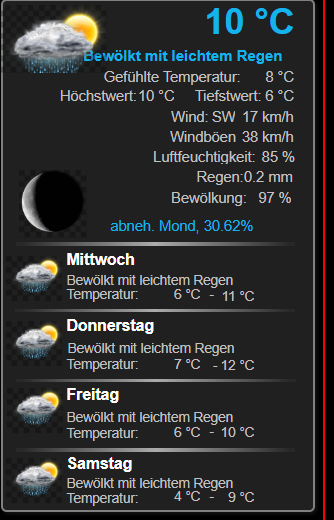
-
@hg6806 sagte in Probleme mit VIS Nach js-controller Update:
Hier mal ein Beispiel des Fehlers:
was sagt die Browserkonsole dazu?
kein Support per PN! - Fragen im Forum stellen -
Benutzt das Voting rechts unten im Beitrag wenn er euch geholfen hat.
Das Forum freut sich über eine Spende. Benutzt dazu den Spendenbutton oben rechts. Danke!
der Installationsfixer: curl -fsL https://iobroker.net/fix.sh | bash - -
@hg6806 sagte in Probleme mit VIS Nach js-controller Update:
Hier mal ein Beispiel des Fehlers:
was sagt die Browserkonsole dazu?
-
Und das hier auch noch:

-
@hg6806 mach mal ein
iob upload all -
Trotz Upload und Neuinstallation des Widget Sets noch immer die Fehler:
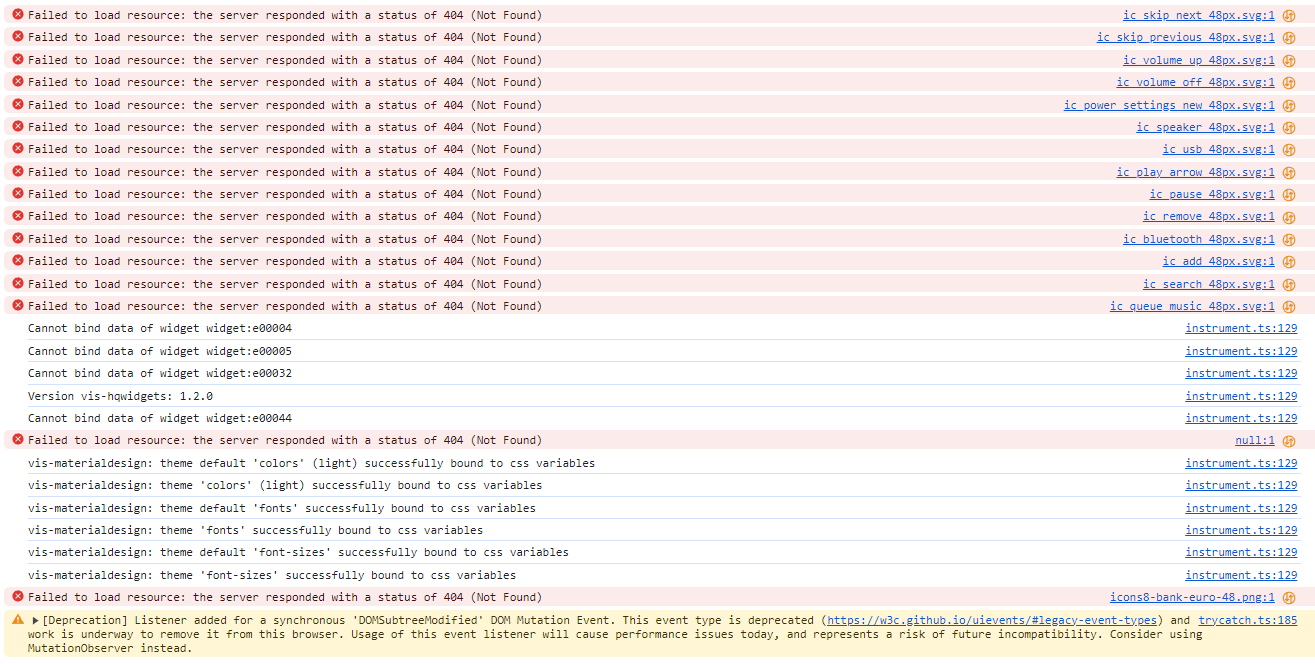
-
Ich hatte jetzt von meiner Hauptseite alle Widgets exportiert, ein neuen Projekt erstellt und ein View indem ich dann die Widgets wieder importiert habe.
Hier ist der Fehler auch wieder drin.Scheint also nach an den Views zu liegen sondern eher am System
Aber das hatte ich ja neu aufgesetzt.Einen Fehler habe ich bei Javascript.
Und zwar habe ich ganz übergeordnet einen Folder. Den möchte ich löschen, geht aber nicht. Es gibt folgende Fehlemeldung:"The id "script.js." is invalid. Ids are not allowed to end in ".""
Wie kann ich den löschen?
-
@hg6806
https://forum.iobroker.net/post/571138@hg6806 sagte in Probleme mit VIS Nach js-controller Update:
"The id "script.js." is invalid. Ids are not allowed to end in ".""
-
Nachdem das Problem auch auf einem nochmals neu aufgesetztem System mit Raspberry Pi5 und 8GB besteht, muss hier endlich was gefixt werden.
Ich habe ganz rudimentär das System ohne Backup installiert, die wichtigsten Adapter für VIS und ein Projekt Export/Import vom alten System gemacht.
Das läuft soweit.Jetzt fehlen mir jedoch noch Adapter + Einstellungen und die ganzen Variablen/Datenpunkte und die Javascript Programme.
Wie bekomme ich alles nun "rüber"? -
Nachdem das Problem auch auf einem nochmals neu aufgesetztem System mit Raspberry Pi5 und 8GB besteht, muss hier endlich was gefixt werden.
Ich habe ganz rudimentär das System ohne Backup installiert, die wichtigsten Adapter für VIS und ein Projekt Export/Import vom alten System gemacht.
Das läuft soweit.Jetzt fehlen mir jedoch noch Adapter + Einstellungen und die ganzen Variablen/Datenpunkte und die Javascript Programme.
Wie bekomme ich alles nun "rüber"?@hg6806 sagte in Probleme mit VIS Nach js-controller Update:
Wie bekomme ich alles nun "rüber"?
Mit einem Backup?
-
@hg6806 sagte in Probleme mit VIS Nach js-controller Update:
Wie bekomme ich alles nun "rüber"?
Mit einem Backup?
Genau mit dem Backup bekomme ich aber die Fehler rein.
Und in dem Backup ist eben neben den Views bzw. Projekten alles in "backup.json" vergraben -
Gerade mal mit Edge probiert, damit hatte ich es noch nie geöffnet.
Die gleichen Fehler. Auch mit meinem Chrome mal alle Browserdaten gelöscht.Ich befürchte, ich muss alles ganz neu und einzeln aufsetzen. Das kann Stunden/Tage dauern.
Bei Javascript gibt es ja eine Export Funktion.
Kann man irgendwie die Datenpunkte vom alten ins neue System kopieren? -
@hg6806 sagte in Probleme mit VIS Nach js-controller Update:
system.adapter.icons-material-png.0 : icons-material-png : RPI4-iobroker-18 - disabled
Du hast nur den Adapter für png !
Laut deinem iob diag , fehlt der Adapter svg !

Bitte die Logs auch in Code_Tags .... so ist das Käse !
-
@hg6806 sagte in Probleme mit VIS Nach js-controller Update:
Und das hier auch noch:
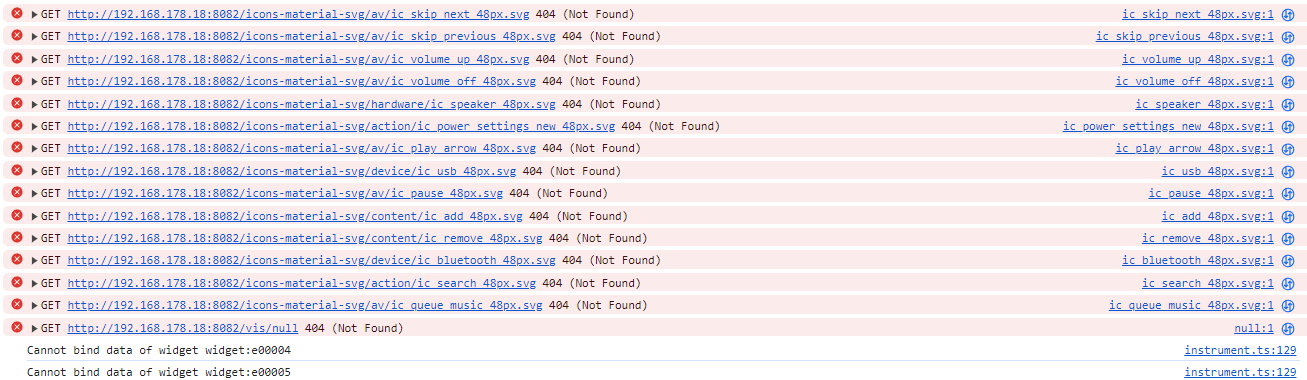
/vis/null das gibt es nicht .. keine Ahnung warum er es angemekert ... klappe den Pfeil " vor GET " auf dann sieht man mehr dazu .
Das andere ist von deinem erstellten Projekt " Tablet " , da hast du mal ein Widget hinterlegt was nicht mehr vorhanden ist





Hey! Du scheinst an dieser Unterhaltung interessiert zu sein, hast aber noch kein Konto.
Hast du es satt, bei jedem Besuch durch die gleichen Beiträge zu scrollen? Wenn du dich für ein Konto anmeldest, kommst du immer genau dorthin zurück, wo du zuvor warst, und kannst dich über neue Antworten benachrichtigen lassen (entweder per E-Mail oder Push-Benachrichtigung). Du kannst auch Lesezeichen speichern und Beiträge positiv bewerten, um anderen Community-Mitgliedern deine Wertschätzung zu zeigen.
Mit deinem Input könnte dieser Beitrag noch besser werden 💗
Registrieren AnmeldenSupport us
601
Online33.0k
Benutzer83.3k
Themen1.3m
Beiträge