



Skip to content
  • Home
  • Recent
  • Tags
  • 0 Unread 0
  • Categories
  • Unreplied
  • Popular
  • GitHub
  • Docu
  • Hilfe
Skins
  • Light
  • Brite
  • Cerulean
  • Cosmo
  • Flatly
  • Journal
  • Litera
  • Lumen
  • Lux
  • Materia
  • Minty
  • Morph
  • Pulse
  • Sandstone
  • Simplex
  • Sketchy
  • Spacelab
  • United
  • Yeti
  • Zephyr
  • Dark
  • Cyborg
  • Darkly
  • Quartz
  • Slate
  • Solar
  • Superhero
  • Vapor

  • Default (No Skin)
  • No Skin
Collapse
ioBroker Logo

Community Forum

donate donate
  1. ioBroker Community Home
  2. Deutsch
  3. Einsteigerfragen
  4. ioBroker auf neuer Maschine aufgesetzt und Adapter Probleme

NEWS

  • Monatsrückblick Januar/Februar 2026 ist online!
    BluefoxB
    Bluefox
    18
    1
    795

  • Jahresrückblick 2025 – unser neuer Blogbeitrag ist online! ✨
    BluefoxB
    Bluefox
    18
    1
    6.2k

  • Neuer Blogbeitrag: Monatsrückblick - Dezember 2025 🎄
    BluefoxB
    Bluefox
    13
    1
    1.6k

ioBroker auf neuer Maschine aufgesetzt und Adapter Probleme

Scheduled Pinned Locked Moved Einsteigerfragen
267 Posts 8 Posters 44.9k Views 8 Watching
  • Oldest to Newest
  • Newest to Oldest
  • Most Votes
Reply
  • Reply as topic
Log in to reply
This topic has been deleted. Only users with topic management privileges can see it.
  • G Gismoh

    Nun kommt aber immer noch bei :

    sudo nano /opt/iobroker/node_modules/node-gyp/gyp/pylib/gyp/input.py
    
    Verzeichnis „/opt/iobroker/node_modules/node-gyp/gyp/pylib/gyp“ existiert nicht
    
    Thomas BraunT Online
    Thomas BraunT Online
    Thomas Braun
    Most Active
    wrote on last edited by
    #93

    @gismoh sagte in ioBroker auf neuer Maschine aufgesetzt und Adapter Probleme:

    sudo nano

    Du sollst nicht ohne Not jetzt vor jeden Befehl sudo setzen. Das wird nur unter besonderen Umständen benötigt. Für Aktionen in /opt/iobroker werden keine root-Rechte benötigt (in einer gesunden Installation).

    Das Verzeichnis gibt es auf meiner Machine auch nicht.

    sudo nano /usr/lib/node_modules/npm/node_modules/node-gyp/gyp/pylib/gyp/input.py
    

    funktioniert?

    Linux-Werkzeugkasten:
    https://forum.iobroker.net/topic/42952/der-kleine-iobroker-linux-werkzeugkasten
    NodeJS Fixer Skript:
    https://forum.iobroker.net/topic/68035/iob-node-fix-skript
    iob_diag: curl -sLf -o diag.sh https://iobroker.net/diag.sh && bash diag.sh

    G 1 Reply Last reply
    0
    • Thomas BraunT Thomas Braun

      @gismoh sagte in ioBroker auf neuer Maschine aufgesetzt und Adapter Probleme:

      sudo nano

      Du sollst nicht ohne Not jetzt vor jeden Befehl sudo setzen. Das wird nur unter besonderen Umständen benötigt. Für Aktionen in /opt/iobroker werden keine root-Rechte benötigt (in einer gesunden Installation).

      Das Verzeichnis gibt es auf meiner Machine auch nicht.

      sudo nano /usr/lib/node_modules/npm/node_modules/node-gyp/gyp/pylib/gyp/input.py
      

      funktioniert?

      G Offline
      G Offline
      Gismoh
      wrote on last edited by
      #94

      @thomas-braun
      ja, dies funktioniert ;)

      ioBroker auf: Lenovo ThinkCentre M910Q Tiny i5-7500T 16 GB mit proxmox in VM (Bookworm)

      Thomas BraunT 1 Reply Last reply
      0
      • G Gismoh

        @thomas-braun
        ja, dies funktioniert ;)

        Thomas BraunT Online
        Thomas BraunT Online
        Thomas Braun
        Most Active
        wrote on last edited by Thomas Braun
        #95

        @gismoh

        Dann schau da mal nach dem Eintrag, den crunchip oben genannt hat.

        Ich vermute aber, der ist da so gar nicht mehr drin.

        In meiner Version steht da nämlich:

            if os.path.exists(build_file_path):
                build_file_contents = open(build_file_path, encoding='utf-8').read()
            else:
                raise GypError(f"{build_file_path} not found (cwd: {os.getcwd()})")
        
            build_file_data = None
        

        Linux-Werkzeugkasten:
        https://forum.iobroker.net/topic/42952/der-kleine-iobroker-linux-werkzeugkasten
        NodeJS Fixer Skript:
        https://forum.iobroker.net/topic/68035/iob-node-fix-skript
        iob_diag: curl -sLf -o diag.sh https://iobroker.net/diag.sh && bash diag.sh

        G crunchipC 2 Replies Last reply
        1
        • Thomas BraunT Thomas Braun

          @gismoh

          Dann schau da mal nach dem Eintrag, den crunchip oben genannt hat.

          Ich vermute aber, der ist da so gar nicht mehr drin.

          In meiner Version steht da nämlich:

              if os.path.exists(build_file_path):
                  build_file_contents = open(build_file_path, encoding='utf-8').read()
              else:
                  raise GypError(f"{build_file_path} not found (cwd: {os.getcwd()})")
          
              build_file_data = None
          
          G Offline
          G Offline
          Gismoh
          wrote on last edited by
          #96

          @thomas-braun
          kann man auch den inhalt der Datei in die Zwischenablage holen, um besser danach suchen zu können?

          ioBroker auf: Lenovo ThinkCentre M910Q Tiny i5-7500T 16 GB mit proxmox in VM (Bookworm)

          Thomas BraunT 1 Reply Last reply
          0
          • G Gismoh

            @thomas-braun
            kann man auch den inhalt der Datei in die Zwischenablage holen, um besser danach suchen zu können?

            Thomas BraunT Online
            Thomas BraunT Online
            Thomas Braun
            Most Active
            wrote on last edited by
            #97

            @gismoh sagte in ioBroker auf neuer Maschine aufgesetzt und Adapter Probleme:

            um besser danach suchen zu können?

            Mit Strg-W sucht man in nano

            Linux-Werkzeugkasten:
            https://forum.iobroker.net/topic/42952/der-kleine-iobroker-linux-werkzeugkasten
            NodeJS Fixer Skript:
            https://forum.iobroker.net/topic/68035/iob-node-fix-skript
            iob_diag: curl -sLf -o diag.sh https://iobroker.net/diag.sh && bash diag.sh

            G 1 Reply Last reply
            0
            • Thomas BraunT Thomas Braun

              @gismoh sagte in ioBroker auf neuer Maschine aufgesetzt und Adapter Probleme:

              um besser danach suchen zu können?

              Mit Strg-W sucht man in nano

              G Offline
              G Offline
              Gismoh
              wrote on last edited by
              #98

              @thomas-braun
              denke, das ist es?

              def LoadOneBuildFile(build_file_path, data, aux_data, includes, is_target, chec>
                  if build_file_path in data:
                      return data[build_file_path]
              
                  if os.path.exists(build_file_path):
                      build_file_contents = open(build_file_path, encoding='utf-8').read()
                  else:
                      raise GypError(f"{build_file_path} not found (cwd: {os.getcwd()})")
              
                  build_file_data = None
                  try:
                      if check:
                          build_file_data = CheckedEval(build_file_contents)
              

              ioBroker auf: Lenovo ThinkCentre M910Q Tiny i5-7500T 16 GB mit proxmox in VM (Bookworm)

              Thomas BraunT 1 Reply Last reply
              0
              • G Gismoh

                @thomas-braun
                denke, das ist es?

                def LoadOneBuildFile(build_file_path, data, aux_data, includes, is_target, chec>
                    if build_file_path in data:
                        return data[build_file_path]
                
                    if os.path.exists(build_file_path):
                        build_file_contents = open(build_file_path, encoding='utf-8').read()
                    else:
                        raise GypError(f"{build_file_path} not found (cwd: {os.getcwd()})")
                
                    build_file_data = None
                    try:
                        if check:
                            build_file_data = CheckedEval(build_file_contents)
                
                Thomas BraunT Online
                Thomas BraunT Online
                Thomas Braun
                Most Active
                wrote on last edited by
                #99

                @gismoh

                Zeile 228 müsste das sein.

                Linux-Werkzeugkasten:
                https://forum.iobroker.net/topic/42952/der-kleine-iobroker-linux-werkzeugkasten
                NodeJS Fixer Skript:
                https://forum.iobroker.net/topic/68035/iob-node-fix-skript
                iob_diag: curl -sLf -o diag.sh https://iobroker.net/diag.sh && bash diag.sh

                G 1 Reply Last reply
                0
                • Thomas BraunT Thomas Braun

                  @gismoh

                  Zeile 228 müsste das sein.

                  G Offline
                  G Offline
                  Gismoh
                  wrote on last edited by Gismoh
                  #100

                  @thomas-braun
                  Zeilennummern sehe ich nicht, aber ist es nicht das, was ich oben gepostet habe?

                  ioBroker auf: Lenovo ThinkCentre M910Q Tiny i5-7500T 16 GB mit proxmox in VM (Bookworm)

                  Thomas BraunT 1 Reply Last reply
                  0
                  • G Gismoh

                    @thomas-braun
                    Zeilennummern sehe ich nicht, aber ist es nicht das, was ich oben gepostet habe?

                    Thomas BraunT Online
                    Thomas BraunT Online
                    Thomas Braun
                    Most Active
                    wrote on last edited by
                    #101

                    @gismoh

                    Strg-C zeigt die aktuelle Zeile.
                    Aber das passt wohl bei dir dann.

                    Linux-Werkzeugkasten:
                    https://forum.iobroker.net/topic/42952/der-kleine-iobroker-linux-werkzeugkasten
                    NodeJS Fixer Skript:
                    https://forum.iobroker.net/topic/68035/iob-node-fix-skript
                    iob_diag: curl -sLf -o diag.sh https://iobroker.net/diag.sh && bash diag.sh

                    G 1 Reply Last reply
                    1
                    • Thomas BraunT Thomas Braun

                      @gismoh

                      Strg-C zeigt die aktuelle Zeile.
                      Aber das passt wohl bei dir dann.

                      G Offline
                      G Offline
                      Gismoh
                      wrote on last edited by
                      #102

                      @thomas-braun
                      Merci - ist dann aber wohl kein gutes Zeichen, weil ich immer noch nicht den ble zum laufen bekomme nach Backitup rückspielung. 😰

                      ioBroker auf: Lenovo ThinkCentre M910Q Tiny i5-7500T 16 GB mit proxmox in VM (Bookworm)

                      Thomas BraunT 1 Reply Last reply
                      0
                      • G Gismoh

                        @thomas-braun
                        Merci - ist dann aber wohl kein gutes Zeichen, weil ich immer noch nicht den ble zum laufen bekomme nach Backitup rückspielung. 😰

                        Thomas BraunT Online
                        Thomas BraunT Online
                        Thomas Braun
                        Most Active
                        wrote on last edited by
                        #103

                        @gismoh

                        iob stop
                        iob fix
                        cd /home/iobroker
                        sudo -u iobroker npm cache clear --force
                        cd
                        iobroker upgrade ble@0.13.4
                        

                        Linux-Werkzeugkasten:
                        https://forum.iobroker.net/topic/42952/der-kleine-iobroker-linux-werkzeugkasten
                        NodeJS Fixer Skript:
                        https://forum.iobroker.net/topic/68035/iob-node-fix-skript
                        iob_diag: curl -sLf -o diag.sh https://iobroker.net/diag.sh && bash diag.sh

                        G 1 Reply Last reply
                        0
                        • Thomas BraunT Thomas Braun

                          @gismoh

                          Dann schau da mal nach dem Eintrag, den crunchip oben genannt hat.

                          Ich vermute aber, der ist da so gar nicht mehr drin.

                          In meiner Version steht da nämlich:

                              if os.path.exists(build_file_path):
                                  build_file_contents = open(build_file_path, encoding='utf-8').read()
                              else:
                                  raise GypError(f"{build_file_path} not found (cwd: {os.getcwd()})")
                          
                              build_file_data = None
                          
                          crunchipC Away
                          crunchipC Away
                          crunchip
                          Forum Testing Most Active Developer
                          wrote on last edited by
                          #104

                          @thomas-braun sagte in ioBroker auf neuer Maschine aufgesetzt und Adapter Probleme:

                          In meiner Version steht da nämlich:

                          in der einen ja, ich hab da beide
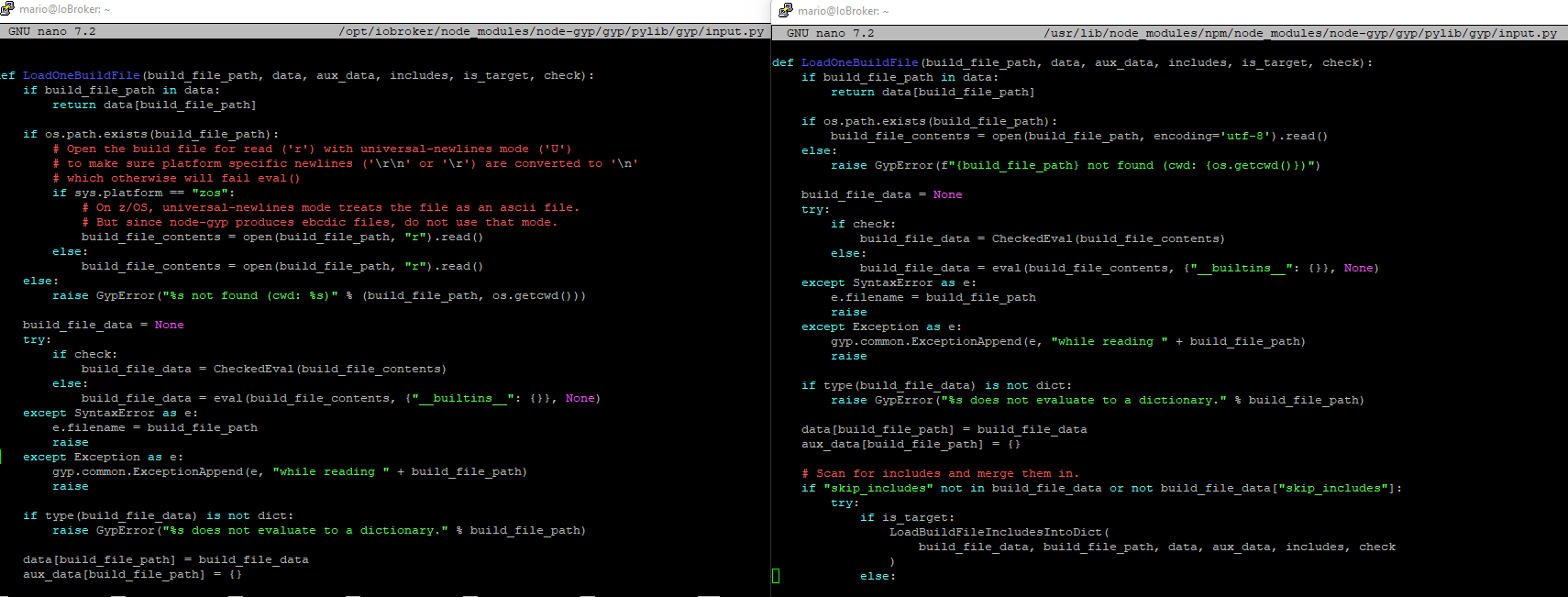
                          7cebbb7b-504a-469c-873a-c9e26d7638b4-image.png

                          und die Fehlermeldung spuckt ja auch aus

                          npm ERR!   File "/opt/iobroker/node_modules/node-gyp/gyp/pylib/gyp/input.py", line 239, in LoadOneBuildFile
                          npm ERR!     build_file_contents = open(build_file_path, "rU").read()
                          npm ERR!                           ^^^^^^^^^^^^^^^^^^^^^^^^^^^
                          npm ERR! ValueError: invalid mode: 'rU' while trying to load binding.gyp
                          

                          umgestiegen von Proxmox auf Unraid

                          1 Reply Last reply
                          1
                          • Thomas BraunT Thomas Braun

                            @gismoh

                            iob stop
                            iob fix
                            cd /home/iobroker
                            sudo -u iobroker npm cache clear --force
                            cd
                            iobroker upgrade ble@0.13.4
                            
                            G Offline
                            G Offline
                            Gismoh
                            wrote on last edited by
                            #105

                            @thomas-braun

                            idash@ioBrokerVM:/home/iobroker$ sudo -u iobroker npm cache clear --force
                            npm WARN using --force Recommended protections disabled.
                            npm ERR! code ENOTEMPTY
                            npm ERR! syscall rmdir
                            npm ERR! path /home/iobroker/.npm/_cacache
                            npm ERR! errno -39
                            npm ERR! ENOTEMPTY: directory not empty, rmdir '/home/iobroker/.npm/_cacache'
                            
                            npm ERR! A complete log of this run can be found in: /home/iobroker/.npm/_logs/2023-11-08T22_45_40_333Z-debug-0.log
                            

                            denke, es sollte anders aussehen?

                            ioBroker auf: Lenovo ThinkCentre M910Q Tiny i5-7500T 16 GB mit proxmox in VM (Bookworm)

                            Thomas BraunT 1 Reply Last reply
                            0
                            • G Gismoh

                              @thomas-braun

                              idash@ioBrokerVM:/home/iobroker$ sudo -u iobroker npm cache clear --force
                              npm WARN using --force Recommended protections disabled.
                              npm ERR! code ENOTEMPTY
                              npm ERR! syscall rmdir
                              npm ERR! path /home/iobroker/.npm/_cacache
                              npm ERR! errno -39
                              npm ERR! ENOTEMPTY: directory not empty, rmdir '/home/iobroker/.npm/_cacache'
                              
                              npm ERR! A complete log of this run can be found in: /home/iobroker/.npm/_logs/2023-11-08T22_45_40_333Z-debug-0.log
                              

                              denke, es sollte anders aussehen?

                              Thomas BraunT Online
                              Thomas BraunT Online
                              Thomas Braun
                              Most Active
                              wrote on last edited by
                              #106

                              @gismoh

                              Ja, das sollte so aussehen:

                              echad@chet:/home/iobroker $ sudo -u iobroker npm cache clear --force
                              npm WARN using --force Recommended protections disabled.
                              echad@chet:/home/iobroker $
                              
                              ls -lah /home/iobroker/.npm/_cacache
                              

                              sagt?

                              Linux-Werkzeugkasten:
                              https://forum.iobroker.net/topic/42952/der-kleine-iobroker-linux-werkzeugkasten
                              NodeJS Fixer Skript:
                              https://forum.iobroker.net/topic/68035/iob-node-fix-skript
                              iob_diag: curl -sLf -o diag.sh https://iobroker.net/diag.sh && bash diag.sh

                              G 1 Reply Last reply
                              0
                              • Thomas BraunT Thomas Braun

                                @gismoh

                                Ja, das sollte so aussehen:

                                echad@chet:/home/iobroker $ sudo -u iobroker npm cache clear --force
                                npm WARN using --force Recommended protections disabled.
                                echad@chet:/home/iobroker $
                                
                                ls -lah /home/iobroker/.npm/_cacache
                                

                                sagt?

                                G Offline
                                G Offline
                                Gismoh
                                wrote on last edited by
                                #107

                                @thomas-braun

                                idash@ioBrokerVM:/home/iobroker$ ls -lah /home/iobroker/.npm/_cacache
                                insgesamt 12K
                                drwxr-xr-x 3 iobroker iobroker 4,0K  8. Nov 23:45 .
                                drwxr-xr-x 7 iobroker iobroker 4,0K  8. Nov 22:10 ..
                                drwxr-xr-x 2 iobroker iobroker 4,0K  8. Nov 23:45 tmp
                                

                                ioBroker auf: Lenovo ThinkCentre M910Q Tiny i5-7500T 16 GB mit proxmox in VM (Bookworm)

                                Thomas BraunT 1 Reply Last reply
                                0
                                • G Gismoh

                                  @thomas-braun

                                  idash@ioBrokerVM:/home/iobroker$ ls -lah /home/iobroker/.npm/_cacache
                                  insgesamt 12K
                                  drwxr-xr-x 3 iobroker iobroker 4,0K  8. Nov 23:45 .
                                  drwxr-xr-x 7 iobroker iobroker 4,0K  8. Nov 22:10 ..
                                  drwxr-xr-x 2 iobroker iobroker 4,0K  8. Nov 23:45 tmp
                                  
                                  Thomas BraunT Online
                                  Thomas BraunT Online
                                  Thomas Braun
                                  Most Active
                                  wrote on last edited by
                                  #108

                                  @gismoh sagte in ioBroker auf neuer Maschine aufgesetzt und Adapter Probleme:

                                  rm -rf /home/iobroker/.npm/_cacache/tmp
                                  

                                  Linux-Werkzeugkasten:
                                  https://forum.iobroker.net/topic/42952/der-kleine-iobroker-linux-werkzeugkasten
                                  NodeJS Fixer Skript:
                                  https://forum.iobroker.net/topic/68035/iob-node-fix-skript
                                  iob_diag: curl -sLf -o diag.sh https://iobroker.net/diag.sh && bash diag.sh

                                  G 1 Reply Last reply
                                  0
                                  • Thomas BraunT Thomas Braun

                                    @gismoh sagte in ioBroker auf neuer Maschine aufgesetzt und Adapter Probleme:

                                    rm -rf /home/iobroker/.npm/_cacache/tmp
                                    
                                    G Offline
                                    G Offline
                                    Gismoh
                                    wrote on last edited by
                                    #109

                                    @thomas-braun

                                    rm: das Entfernen von '/home/iobroker/.npm/_cacache/tmp/d411385f' ist nicht möglich: Keine Berechtigung
                                    

                                    ioBroker auf: Lenovo ThinkCentre M910Q Tiny i5-7500T 16 GB mit proxmox in VM (Bookworm)

                                    Thomas BraunT 1 Reply Last reply
                                    0
                                    • G Gismoh

                                      @thomas-braun

                                      rm: das Entfernen von '/home/iobroker/.npm/_cacache/tmp/d411385f' ist nicht möglich: Keine Berechtigung
                                      
                                      Thomas BraunT Online
                                      Thomas BraunT Online
                                      Thomas Braun
                                      Most Active
                                      wrote on last edited by
                                      #110

                                      @gismoh

                                      sudo -u iobroker rm -rf /home/iobroker/.npm/_cacache/tmp
                                      

                                      Linux-Werkzeugkasten:
                                      https://forum.iobroker.net/topic/42952/der-kleine-iobroker-linux-werkzeugkasten
                                      NodeJS Fixer Skript:
                                      https://forum.iobroker.net/topic/68035/iob-node-fix-skript
                                      iob_diag: curl -sLf -o diag.sh https://iobroker.net/diag.sh && bash diag.sh

                                      G 1 Reply Last reply
                                      0
                                      • Thomas BraunT Thomas Braun

                                        @gismoh

                                        sudo -u iobroker rm -rf /home/iobroker/.npm/_cacache/tmp
                                        
                                        G Offline
                                        G Offline
                                        Gismoh
                                        wrote on last edited by
                                        #111

                                        @thomas-braun

                                        idash@ioBrokerVM:/home/iobroker$ sudo -u iobroker npm cache clear --force
                                        npm WARN using --force Recommended protections disabled.
                                        idash@ioBrokerVM:/home/iobroker$ cd
                                        idash@ioBrokerVM:~$ iobroker upgrade ble@0.13.4
                                        Adapter "ble"            is not installed.
                                        

                                        ioBroker auf: Lenovo ThinkCentre M910Q Tiny i5-7500T 16 GB mit proxmox in VM (Bookworm)

                                        Thomas BraunT 1 Reply Last reply
                                        0
                                        • G Gismoh

                                          @thomas-braun

                                          idash@ioBrokerVM:/home/iobroker$ sudo -u iobroker npm cache clear --force
                                          npm WARN using --force Recommended protections disabled.
                                          idash@ioBrokerVM:/home/iobroker$ cd
                                          idash@ioBrokerVM:~$ iobroker upgrade ble@0.13.4
                                          Adapter "ble"            is not installed.
                                          
                                          Thomas BraunT Online
                                          Thomas BraunT Online
                                          Thomas Braun
                                          Most Active
                                          wrote on last edited by
                                          #112

                                          @gismoh sagte in ioBroker auf neuer Maschine aufgesetzt und Adapter Probleme:

                                          iobroker add ble@0.13.4 --debug
                                          

                                          Linux-Werkzeugkasten:
                                          https://forum.iobroker.net/topic/42952/der-kleine-iobroker-linux-werkzeugkasten
                                          NodeJS Fixer Skript:
                                          https://forum.iobroker.net/topic/68035/iob-node-fix-skript
                                          iob_diag: curl -sLf -o diag.sh https://iobroker.net/diag.sh && bash diag.sh

                                          G 1 Reply Last reply
                                          0

                                          Hello! It looks like you're interested in this conversation, but you don't have an account yet.

                                          Getting fed up of having to scroll through the same posts each visit? When you register for an account, you'll always come back to exactly where you were before, and choose to be notified of new replies (either via email, or push notification). You'll also be able to save bookmarks and upvote posts to show your appreciation to other community members.

                                          With your input, this post could be even better 💗

                                          Register Login
                                          Reply
                                          • Reply as topic
                                          Log in to reply
                                          • Oldest to Newest
                                          • Newest to Oldest
                                          • Most Votes


                                          Support us

                                          ioBroker
                                          Community Adapters
                                          Donate

                                          460

                                          Online

                                          32.8k

                                          Users

                                          82.7k

                                          Topics

                                          1.3m

                                          Posts
                                          Community
                                          Impressum | Datenschutz-Bestimmungen | Nutzungsbedingungen | Einwilligungseinstellungen
                                          ioBroker Community 2014-2025
                                          logo
                                          • Login

                                          • Don't have an account? Register

                                          • Login or register to search.
                                          • First post
                                            Last post
                                          0
                                          • Home
                                          • Recent
                                          • Tags
                                          • Unread 0
                                          • Categories
                                          • Unreplied
                                          • Popular
                                          • GitHub
                                          • Docu
                                          • Hilfe
