Skip to content
  • Home
  • Aktuell
  • Tags
  • 0 Ungelesen 0
  • Kategorien
  • Unreplied
  • Beliebt
  • GitHub
  • Docu
  • Hilfe
Skins
  • Light
  • Brite
  • Cerulean
  • Cosmo
  • Flatly
  • Journal
  • Litera
  • Lumen
  • Lux
  • Materia
  • Minty
  • Morph
  • Pulse
  • Sandstone
  • Simplex
  • Sketchy
  • Spacelab
  • United
  • Yeti
  • Zephyr
  • Dark
  • Cyborg
  • Darkly
  • Quartz
  • Slate
  • Solar
  • Superhero
  • Vapor

  • Standard: (Kein Skin)
  • Kein Skin
Einklappen
ioBroker Logo

Community Forum

donate donate
  1. ioBroker Community Home
  2. Deutsch
  3. ioBroker Allgemein
  4. Multihost zusamen führen ** gelöst **

NEWS

  • Monatsrückblick Januar/Februar 2026 ist online!
    BluefoxB
    Bluefox
    17
    1
    509

  • Jahresrückblick 2025 – unser neuer Blogbeitrag ist online! ✨
    BluefoxB
    Bluefox
    17
    1
    5.3k

  • Neuer Blogbeitrag: Monatsrückblick - Dezember 2025 🎄
    BluefoxB
    Bluefox
    13
    1
    1.4k

Multihost zusamen führen ** gelöst **

Geplant Angeheftet Gesperrt Verschoben ioBroker Allgemein
28 Beiträge 7 Kommentatoren 1.1k Aufrufe 5 Watching
  • Älteste zuerst
  • Neuste zuerst
  • Meiste Stimmen
Antworten
  • In einem neuen Thema antworten
Anmelden zum Antworten
Dieses Thema wurde gelöscht. Nur Nutzer mit entsprechenden Rechten können es sehen.
  • HomoranH Homoran

    @horst-böttcher bitte mehr Infosxwas du da machst!
    https://forum.iobroker.net/topic/51555/hinweise-für-gute-forenbeiträge/1

    Horst BöttcherH Offline
    Horst BöttcherH Offline
    Horst Böttcher
    schrieb am zuletzt editiert von Horst Böttcher
    #3

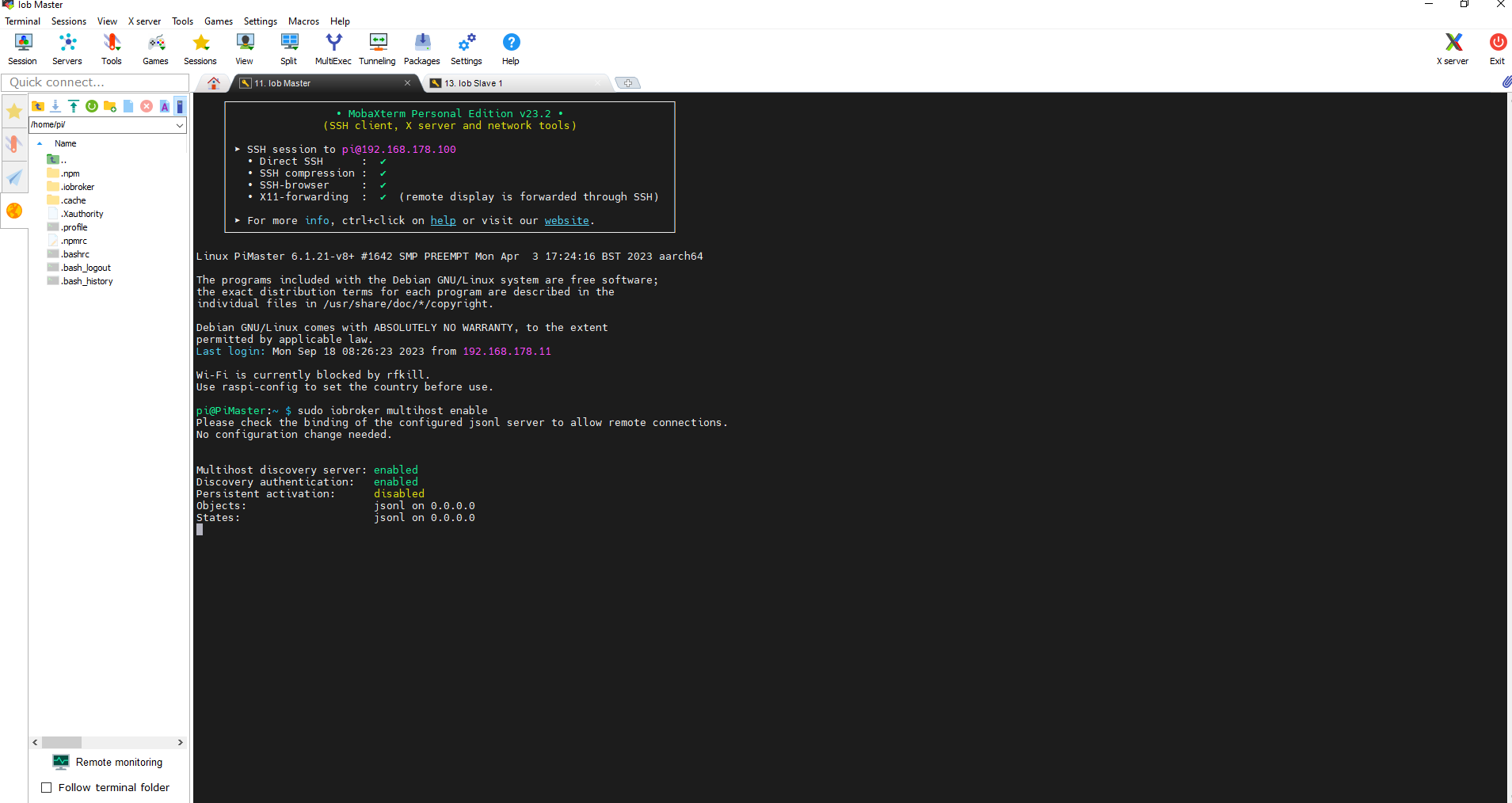
    @homoran master
    8c9a2ce7-5dca-48d2-99bb-087a07f82397-image.png

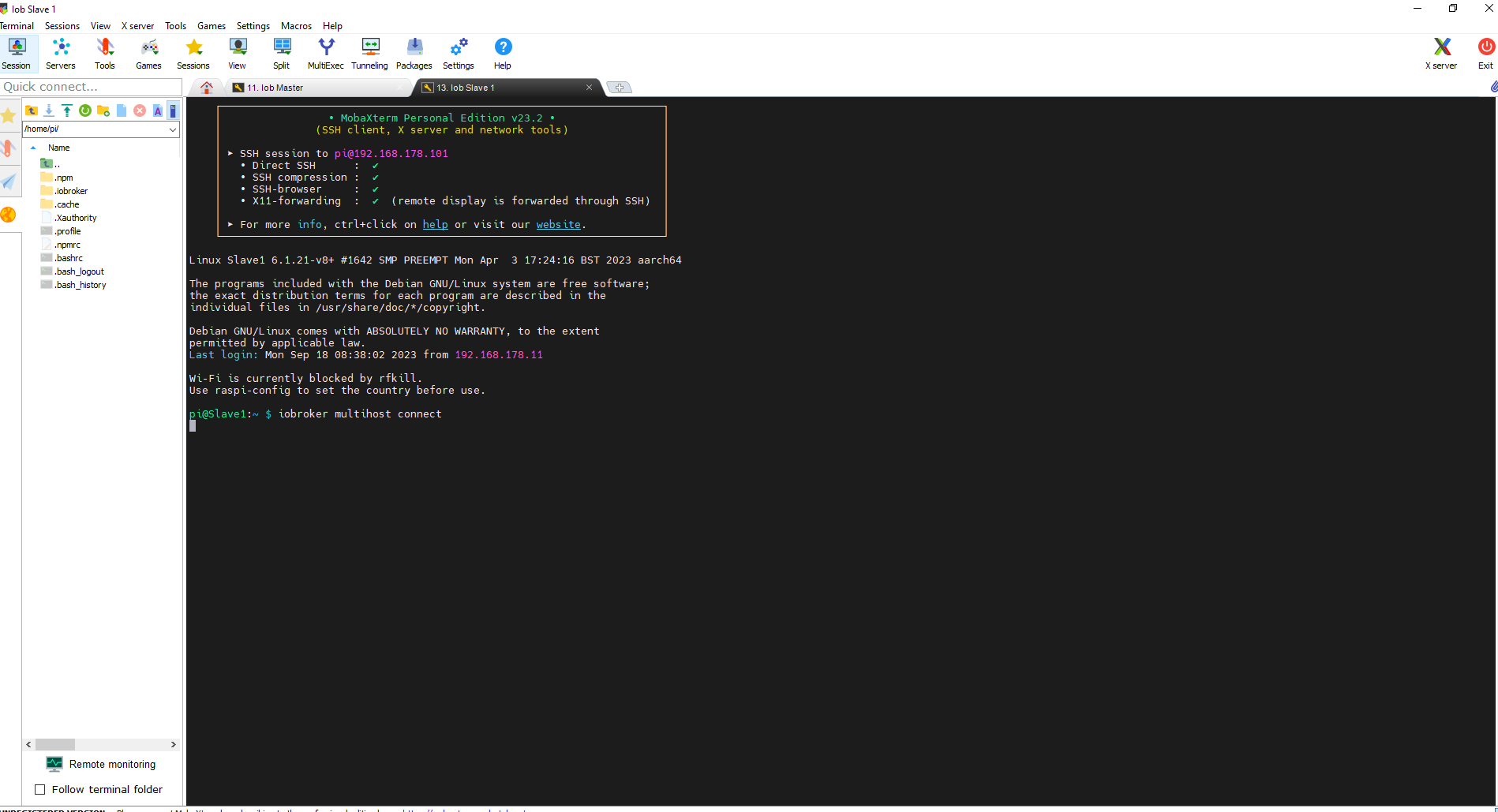
    im salve
    e8436a4c-403b-4fdf-b655-3c8084999869-image.png

    so sieht es leider schon seid 8 Stunden aus

    ioBroker auf Proxmox (Debian) auf LENOVO PC Thinkcentre als Produktivsystem

    HomoranH haselchenH Thomas BraunT 3 Antworten Letzte Antwort
    0
    • Horst BöttcherH Horst Böttcher

      @homoran master
      8c9a2ce7-5dca-48d2-99bb-087a07f82397-image.png

      im salve
      e8436a4c-403b-4fdf-b655-3c8084999869-image.png

      so sieht es leider schon seid 8 Stunden aus

      HomoranH Nicht stören
      HomoranH Nicht stören
      Homoran
      Global Moderator Administrators
      schrieb am zuletzt editiert von
      #4

      @horst-böttcher bitte als Text in code-tags posten!
      https://forum.iobroker.net/topic/51555/hinweise-für-gute-forenbeiträge/1

      das ist nicht zu entziffern
      Screenshot_20230918-170630_Firefox.jpg

      kein Support per PN! - Fragen im Forum stellen -
      Benutzt das Voting rechts unten im Beitrag wenn er euch geholfen hat.
      Das Forum freut sich über eine Spende. Benutzt dazu den Spendenbutton im Header. Danke!
      der Installationsfixer: curl -fsL https://iobroker.net/fix.sh | bash -

      Horst BöttcherH 1 Antwort Letzte Antwort
      1
      • Horst BöttcherH Horst Böttcher

        @homoran master
        8c9a2ce7-5dca-48d2-99bb-087a07f82397-image.png

        im salve
        e8436a4c-403b-4fdf-b655-3c8084999869-image.png

        so sieht es leider schon seid 8 Stunden aus

        haselchenH Offline
        haselchenH Offline
        haselchen
        Most Active
        schrieb am zuletzt editiert von haselchen
        #5

        @horst-böttcher

        Wie soll er sich connecten wenn Wifi nicht aktiv ist?
        Steht doch fett in deinem Screenshot!

        „Wifi is blocked….“

        Synology DS218+ & 2 x Fujitsu Esprimo (VM/Container) + FritzBox7590 + 2 AVM 3000 Repeater & Homematic & HUE & Osram & Xiaomi, NPM 10.9.4, Nodejs 22.21.0 ,JS Controller 7.0.7 ,Admin 7.7.19

        Thomas BraunT Horst BöttcherH 2 Antworten Letzte Antwort
        0
        • HomoranH Homoran

          @horst-böttcher bitte als Text in code-tags posten!
          https://forum.iobroker.net/topic/51555/hinweise-für-gute-forenbeiträge/1

          das ist nicht zu entziffern
          Screenshot_20230918-170630_Firefox.jpg

          Horst BöttcherH Offline
          Horst BöttcherH Offline
          Horst Böttcher
          schrieb am zuletzt editiert von
          #6

          @homoran
          ich habe die anleitung von https://www.iobroker.net/#de/documentation/config/multihost.md genutzt
          laut Maser ist auch multihost aktive
          nur findet der slave seid über 8 stunden nix mit iobroker multihost connect

          ioBroker auf Proxmox (Debian) auf LENOVO PC Thinkcentre als Produktivsystem

          haselchenH 1 Antwort Letzte Antwort
          0
          • Horst BöttcherH Horst Böttcher

            @homoran
            ich habe die anleitung von https://www.iobroker.net/#de/documentation/config/multihost.md genutzt
            laut Maser ist auch multihost aktive
            nur findet der slave seid über 8 stunden nix mit iobroker multihost connect

            haselchenH Offline
            haselchenH Offline
            haselchen
            Most Active
            schrieb am zuletzt editiert von
            #7

            @horst-böttcher

            Lies über Dir!
            Hättest dir 8 Stunden Lebenszeit gespart.

            Synology DS218+ & 2 x Fujitsu Esprimo (VM/Container) + FritzBox7590 + 2 AVM 3000 Repeater & Homematic & HUE & Osram & Xiaomi, NPM 10.9.4, Nodejs 22.21.0 ,JS Controller 7.0.7 ,Admin 7.7.19

            1 Antwort Letzte Antwort
            0
            • Horst BöttcherH Horst Böttcher

              @homoran master
              8c9a2ce7-5dca-48d2-99bb-087a07f82397-image.png

              im salve
              e8436a4c-403b-4fdf-b655-3c8084999869-image.png

              so sieht es leider schon seid 8 Stunden aus

              Thomas BraunT Online
              Thomas BraunT Online
              Thomas Braun
              Most Active
              schrieb am zuletzt editiert von
              #8

              @horst-böttcher

              Und es wurde dir mit Sicherheit schon mehr als einmal gesagt, dass der Befehl iobroker NIE NIE NIE NIEMALS mittels 'sudo' eingeleitet wird.

              Jag den

              iob fix
              

              über beide Systeme drüber.

              Linux-Werkzeugkasten:
              https://forum.iobroker.net/topic/42952/der-kleine-iobroker-linux-werkzeugkasten
              NodeJS Fixer Skript:
              https://forum.iobroker.net/topic/68035/iob-node-fix-skript
              iob_diag: curl -sLf -o diag.sh https://iobroker.net/diag.sh && bash diag.sh

              1 Antwort Letzte Antwort
              1
              • haselchenH haselchen

                @horst-böttcher

                Wie soll er sich connecten wenn Wifi nicht aktiv ist?
                Steht doch fett in deinem Screenshot!

                „Wifi is blocked….“

                Thomas BraunT Online
                Thomas BraunT Online
                Thomas Braun
                Most Active
                schrieb am zuletzt editiert von
                #9

                @haselchen sagte in Multihost zusamen führen:

                Wie soll er sich connecten wenn Wifi nicht aktiv ist?

                Per LAN-Kabel?

                Linux-Werkzeugkasten:
                https://forum.iobroker.net/topic/42952/der-kleine-iobroker-linux-werkzeugkasten
                NodeJS Fixer Skript:
                https://forum.iobroker.net/topic/68035/iob-node-fix-skript
                iob_diag: curl -sLf -o diag.sh https://iobroker.net/diag.sh && bash diag.sh

                haselchenH 1 Antwort Letzte Antwort
                1
                • haselchenH haselchen

                  @horst-böttcher

                  Wie soll er sich connecten wenn Wifi nicht aktiv ist?
                  Steht doch fett in deinem Screenshot!

                  „Wifi is blocked….“

                  Horst BöttcherH Offline
                  Horst BöttcherH Offline
                  Horst Böttcher
                  schrieb am zuletzt editiert von
                  #10

                  @haselchen beider sind über lan angeschossen :imp:

                  ioBroker auf Proxmox (Debian) auf LENOVO PC Thinkcentre als Produktivsystem

                  bahnuhrB 1 Antwort Letzte Antwort
                  0
                  • Thomas BraunT Thomas Braun

                    @haselchen sagte in Multihost zusamen führen:

                    Wie soll er sich connecten wenn Wifi nicht aktiv ist?

                    Per LAN-Kabel?

                    haselchenH Offline
                    haselchenH Offline
                    haselchen
                    Most Active
                    schrieb am zuletzt editiert von haselchen
                    #11

                    @thomas-braun

                    Ich lehne mich mal aus dem Fenster …. Ist vermutlich nicht per LAN angeschlossen 😉
                    Wenn doch , Asche auf mein Haupt

                    Edit: Dann Asche …..

                    Aber ich denke dann ist es falsch konfiguriert und es liegt an den Netzwerkeinstellungen

                    Synology DS218+ & 2 x Fujitsu Esprimo (VM/Container) + FritzBox7590 + 2 AVM 3000 Repeater & Homematic & HUE & Osram & Xiaomi, NPM 10.9.4, Nodejs 22.21.0 ,JS Controller 7.0.7 ,Admin 7.7.19

                    1 Antwort Letzte Antwort
                    0
                    • Horst BöttcherH Horst Böttcher

                      @haselchen beider sind über lan angeschossen :imp:

                      bahnuhrB Online
                      bahnuhrB Online
                      bahnuhr
                      Forum Testing Most Active
                      schrieb am zuletzt editiert von
                      #12

                      @horst-böttcher
                      mach mal copy von deinen setup custom eingaben.


                      Wenn ich helfen konnte, dann Daumen hoch (Pfeil nach oben)!
                      Danke.
                      gute Forenbeiträge: https://forum.iobroker.net/topic/51555/hinweise-f%C3%BCr-gute-forenbeitr%C3%A4ge
                      ScreenToGif :https://www.screentogif.com/downloads.html

                      Horst BöttcherH 1 Antwort Letzte Antwort
                      0
                      • bahnuhrB bahnuhr

                        @horst-böttcher
                        mach mal copy von deinen setup custom eingaben.

                        Horst BöttcherH Offline
                        Horst BöttcherH Offline
                        Horst Böttcher
                        schrieb am zuletzt editiert von Horst Böttcher
                        #13

                        @bahnuhr

                        pi@PiMaster:~ $ sudo iobroker setup custom
                        Current configuration:
                        - Objects database:
                         - Type: jsonl
                         - Host/Unix Socket: 0.0.0.0
                         - Port: 9001
                        - States database:
                         - Type: jsonl
                         - Host/Unix Socket: 0.0.0.0
                         - Port: 9000
                        - Data Directory: ../../iobroker-data/
                        
                        Type of objects DB [(j)sonl, (f)ile, (r)edis, ...], default [jsonl]:
                        Host / Unix Socket of objects DB(jsonl), default[0.0.0.0]:
                        Port of objects DB(jsonl), default[9001]:
                        Type of states DB [(j)sonl, (f)file, (r)edis, ...], default [jsonl]:
                        Host / Unix Socket of states DB (jsonl), default[0.0.0.0]:
                        Port of states DB (jsonl), default[9000]:
                        Data directory (file), default[../../iobroker-data/]:
                        Host name of this machine [PiMaster]:
                        updating conf/iobroker.json
                        pi@PiMaster:~ $


                        Slave

                        pi@Slave1:/opt/iobroker $ sudo iobroker setup custom
                        Current configuration:
                        - Objects database:
                          - Type: jsonl
                          - Host/Unix Socket: 192.168.178.100
                          - Port: 9001
                        - States database:
                          - Type: jsonl
                          - Host/Unix Socket: 192.168.178.100
                          - Port: 9000
                        - Data Directory: ../../iobroker-data/
                        
                        Type of objects DB [(j)sonl, (f)ile, (r)edis, ...], default [jsonl]:
                        Host / Unix Socket of objects DB(jsonl), default[192.168.178.100]: 192.168.178.100
                        Port of objects DB(jsonl), default[9001]:
                        Type of states DB [(j)sonl, (f)file, (r)edis, ...], default [jsonl]:
                        Host / Unix Socket of states DB (jsonl), default[192.168.178.100]: 192.168.178.100
                        Port of states DB (jsonl), default[9000]:
                        Host name of this machine [Slave1]: Slave1
                        updating conf/iobroker.json
                        pi@Slave1:/opt/iobroker $


                        dann

                        
                        pi@PiMaster:~ $ iobroker multihost enable
                        Multihost discovery server activated on this host. If iobroker is currently not running please start befeore trying to discover this host.
                        Important: Multihost discovery works with UDP packets. Make sure they are routed correctly in your network. If you use Docker you also need to configure this correctly.
                        Multihost discovery will be automatically deactivated after 15 minutes. If you want to activate it permanently use the --persist flag
                        Discovery authentication activated.
                        Enter secret phrase for connection:
                        Repeat secret phrase for connection:
                        Please check the binding of the configured jsonl server to allow remote connections.
                        Please restart ioBroker for the changes to take effect: "iobroker restart"
                        
                        
                        Multihost discovery server: enabled
                        Discovery authentication:   enabled
                        Persistent activation:      disabled
                        Objects:                    jsonl on 0.0.0.0
                        States:                     jsonl on 0.0.0.0
                        ^C
                        pi@PiMaster:~ $


                        und iob restart

                        beim Slave

                        iobroker multihost browse
                        
                        
                        ``` oder iobroker multihost browse
                        

                        und es kommt nix

                        ich weiss nicht ob intressant log

                        host.PiMaster
                        2023-09-18 18:36:55.644	info	instance system.adapter.backitup.0 started with pid 17093
                        host.PiMaster
                        2023-09-18 18:36:51.364	info	instance system.adapter.discovery.0 started with pid 17075
                        host.PiMaster
                        2023-09-18 18:36:50.889	info	Updating repository "stable" under "http://download.iobroker.net/sources-dist.json"
                        host.PiMaster
                        2023-09-18 18:36:47.390	info	instance system.adapter.zigbee.0 started with pid 17052
                        host.PiMaster
                        2023-09-18 18:36:43.610	info	Some obsolete host states deleted.
                        host.PiMaster
                        2023-09-18 18:36:43.590	info	Delete state "system.host.PiMaster.versions.npmNewestNext"
                        host.PiMaster
                        2023-09-18 18:36:43.530	info	Delete state "system.host.PiMaster.versions.npmNewest"
                        host.PiMaster
                        2023-09-18 18:36:43.504	info	Delete state "system.host.PiMaster.versions.npmCurrent"
                        host.PiMaster
                        2023-09-18 18:36:43.483	info	instance system.adapter.admin.0 started with pid 17041
                        host.PiMaster
                        2023-09-18 18:36:43.440	info	Delete state "system.host.PiMaster.versions.nodeNewestNext"
                        host.PiMaster
                        2023-09-18 18:36:43.404	info	Delete state "system.host.PiMaster.versions.nodeNewest"
                        host.PiMaster
                        2023-09-18 18:36:43.303	info	starting 4 instances
                        host.PiMaster
                        2023-09-18 18:36:43.276	info	4 instances found
                        host.PiMaster
                        2023-09-18 18:36:43.250	info	Delete state "system.host.PiMaster.versions.nodeCurrent"
                        host.PiMaster
                        2023-09-18 18:36:42.278	info	added notifications configuration of host
                        host.PiMaster
                        2023-09-18 18:36:42.250	info	connected to Objects and States
                        host.PiMaster
                        2023-09-18 18:36:41.499	info	ip addresses: 192.168.178.100 2001:9e8:1ec:af00:d975:3f8a:fb83:7a0e fe80::b476:adb:eade:b907
                        host.PiMaster
                        2023-09-18 18:36:41.498	info	hostname: PiMaster, node: v18.17.1
                        host.PiMaster
                        2023-09-18 18:36:41.496	info	Copyright (c) 2014-2023 bluefox, 2014 hobbyquaker
                        host.PiMaster
                        2023-09-18 18:36:41.489	info	iobroker.js-controller version 5.0.12 js-controller starting
                        host.PiMaster
                        2023-09-18 18:36:36.948	info	terminated
                        host.PiMaster
                        2023-09-18 18:36:36.832	info	All instances are stopped.
                        host.PiMaster
                        2023-09-18 18:36:36.831	info	instance system.adapter.zigbee.0 terminated with code 0 (NO_ERROR)
                        host.PiMaster
                        2023-09-18 18:36:36.795	info	instance system.adapter.admin.0 terminated with code 0 (NO_ERROR)
                        host.PiMaster
                        2023-09-18 18:36:36.781	info	instance system.adapter.backitup.0 terminated with code 0 (NO_ERROR)
                        host.PiMaster
                        2023-09-18 18:36:36.780	info	instance system.adapter.discovery.0 terminated with code 0 (NO_ERROR)
                        host.PiMaster
                        2023-09-18 18:36:36.108	info	stopInstance system.adapter.backitup.0 send kill signal
                        host.PiMaster
                        2023-09-18 18:36:36.107	info	stopInstance system.adapter.discovery.0 send kill signal
                        host.PiMaster
                        2023-09-18 18:36:36.106	info	stopInstance system.adapter.zigbee.0 send kill signal
                        host.PiMaster
                        2023-09-18 18:36:36.103	info	stopInstance system.adapter.admin.0 send kill signal
                        host.PiMaster
                        2023-09-18 18:36:36.079	info	stopInstance system.adapter.backitup.0 (force=false, process=true)
                        host.PiMaster
                        2023-09-18 18:36:36.078	info	stopInstance system.adapter.discovery.0 (force=false, process=true)
                        host.PiMaster
                        2023-09-18 18:36:36.077	info	stopInstance system.adapter.zigbee.0 (force=false, process=true)
                        host.PiMaster
                        2023-09-18 18:36:36.063	info	stopInstance system.adapter.admin.0 (force=false, process=true)
                        host.PiMaster
                        2023-09-18 18:36:36.056	info	received SIGTERM
                        host.PiMaster
                        2023-09-18 18:15:06.462	info	Multihost discovery server stopped after 15 minutes, because only temporarily activated
                        host.PiMaster
                        2023-09-18 18:00:06.462	info	Multi-host discovery server: service started on 0.0.0.0:50005
                        host.PiMaster
                        2023-09-18 17:37:56.931	info	Multihost discovery server stopped after 15 minutes, because only temporarily activated
                        host.PiMaster
                        2023-09-18 17:22:56.932	info	Multi-host discovery server: service started on 0.0.0.0:50005


                        ioBroker auf Proxmox (Debian) auf LENOVO PC Thinkcentre als Produktivsystem

                        ? HomoranH 2 Antworten Letzte Antwort
                        0
                        • Horst BöttcherH Horst Böttcher

                          @bahnuhr

                          pi@PiMaster:~ $ sudo iobroker setup custom
                          Current configuration:
                          - Objects database:
                           - Type: jsonl
                           - Host/Unix Socket: 0.0.0.0
                           - Port: 9001
                          - States database:
                           - Type: jsonl
                           - Host/Unix Socket: 0.0.0.0
                           - Port: 9000
                          - Data Directory: ../../iobroker-data/
                          
                          Type of objects DB [(j)sonl, (f)ile, (r)edis, ...], default [jsonl]:
                          Host / Unix Socket of objects DB(jsonl), default[0.0.0.0]:
                          Port of objects DB(jsonl), default[9001]:
                          Type of states DB [(j)sonl, (f)file, (r)edis, ...], default [jsonl]:
                          Host / Unix Socket of states DB (jsonl), default[0.0.0.0]:
                          Port of states DB (jsonl), default[9000]:
                          Data directory (file), default[../../iobroker-data/]:
                          Host name of this machine [PiMaster]:
                          updating conf/iobroker.json
                          pi@PiMaster:~ $


                          Slave

                          pi@Slave1:/opt/iobroker $ sudo iobroker setup custom
                          Current configuration:
                          - Objects database:
                            - Type: jsonl
                            - Host/Unix Socket: 192.168.178.100
                            - Port: 9001
                          - States database:
                            - Type: jsonl
                            - Host/Unix Socket: 192.168.178.100
                            - Port: 9000
                          - Data Directory: ../../iobroker-data/
                          
                          Type of objects DB [(j)sonl, (f)ile, (r)edis, ...], default [jsonl]:
                          Host / Unix Socket of objects DB(jsonl), default[192.168.178.100]: 192.168.178.100
                          Port of objects DB(jsonl), default[9001]:
                          Type of states DB [(j)sonl, (f)file, (r)edis, ...], default [jsonl]:
                          Host / Unix Socket of states DB (jsonl), default[192.168.178.100]: 192.168.178.100
                          Port of states DB (jsonl), default[9000]:
                          Host name of this machine [Slave1]: Slave1
                          updating conf/iobroker.json
                          pi@Slave1:/opt/iobroker $


                          dann

                          
                          pi@PiMaster:~ $ iobroker multihost enable
                          Multihost discovery server activated on this host. If iobroker is currently not running please start befeore trying to discover this host.
                          Important: Multihost discovery works with UDP packets. Make sure they are routed correctly in your network. If you use Docker you also need to configure this correctly.
                          Multihost discovery will be automatically deactivated after 15 minutes. If you want to activate it permanently use the --persist flag
                          Discovery authentication activated.
                          Enter secret phrase for connection:
                          Repeat secret phrase for connection:
                          Please check the binding of the configured jsonl server to allow remote connections.
                          Please restart ioBroker for the changes to take effect: "iobroker restart"
                          
                          
                          Multihost discovery server: enabled
                          Discovery authentication:   enabled
                          Persistent activation:      disabled
                          Objects:                    jsonl on 0.0.0.0
                          States:                     jsonl on 0.0.0.0
                          ^C
                          pi@PiMaster:~ $


                          und iob restart

                          beim Slave

                          iobroker multihost browse
                          
                          
                          ``` oder iobroker multihost browse
                          

                          und es kommt nix

                          ich weiss nicht ob intressant log

                          host.PiMaster
                          2023-09-18 18:36:55.644	info	instance system.adapter.backitup.0 started with pid 17093
                          host.PiMaster
                          2023-09-18 18:36:51.364	info	instance system.adapter.discovery.0 started with pid 17075
                          host.PiMaster
                          2023-09-18 18:36:50.889	info	Updating repository "stable" under "http://download.iobroker.net/sources-dist.json"
                          host.PiMaster
                          2023-09-18 18:36:47.390	info	instance system.adapter.zigbee.0 started with pid 17052
                          host.PiMaster
                          2023-09-18 18:36:43.610	info	Some obsolete host states deleted.
                          host.PiMaster
                          2023-09-18 18:36:43.590	info	Delete state "system.host.PiMaster.versions.npmNewestNext"
                          host.PiMaster
                          2023-09-18 18:36:43.530	info	Delete state "system.host.PiMaster.versions.npmNewest"
                          host.PiMaster
                          2023-09-18 18:36:43.504	info	Delete state "system.host.PiMaster.versions.npmCurrent"
                          host.PiMaster
                          2023-09-18 18:36:43.483	info	instance system.adapter.admin.0 started with pid 17041
                          host.PiMaster
                          2023-09-18 18:36:43.440	info	Delete state "system.host.PiMaster.versions.nodeNewestNext"
                          host.PiMaster
                          2023-09-18 18:36:43.404	info	Delete state "system.host.PiMaster.versions.nodeNewest"
                          host.PiMaster
                          2023-09-18 18:36:43.303	info	starting 4 instances
                          host.PiMaster
                          2023-09-18 18:36:43.276	info	4 instances found
                          host.PiMaster
                          2023-09-18 18:36:43.250	info	Delete state "system.host.PiMaster.versions.nodeCurrent"
                          host.PiMaster
                          2023-09-18 18:36:42.278	info	added notifications configuration of host
                          host.PiMaster
                          2023-09-18 18:36:42.250	info	connected to Objects and States
                          host.PiMaster
                          2023-09-18 18:36:41.499	info	ip addresses: 192.168.178.100 2001:9e8:1ec:af00:d975:3f8a:fb83:7a0e fe80::b476:adb:eade:b907
                          host.PiMaster
                          2023-09-18 18:36:41.498	info	hostname: PiMaster, node: v18.17.1
                          host.PiMaster
                          2023-09-18 18:36:41.496	info	Copyright (c) 2014-2023 bluefox, 2014 hobbyquaker
                          host.PiMaster
                          2023-09-18 18:36:41.489	info	iobroker.js-controller version 5.0.12 js-controller starting
                          host.PiMaster
                          2023-09-18 18:36:36.948	info	terminated
                          host.PiMaster
                          2023-09-18 18:36:36.832	info	All instances are stopped.
                          host.PiMaster
                          2023-09-18 18:36:36.831	info	instance system.adapter.zigbee.0 terminated with code 0 (NO_ERROR)
                          host.PiMaster
                          2023-09-18 18:36:36.795	info	instance system.adapter.admin.0 terminated with code 0 (NO_ERROR)
                          host.PiMaster
                          2023-09-18 18:36:36.781	info	instance system.adapter.backitup.0 terminated with code 0 (NO_ERROR)
                          host.PiMaster
                          2023-09-18 18:36:36.780	info	instance system.adapter.discovery.0 terminated with code 0 (NO_ERROR)
                          host.PiMaster
                          2023-09-18 18:36:36.108	info	stopInstance system.adapter.backitup.0 send kill signal
                          host.PiMaster
                          2023-09-18 18:36:36.107	info	stopInstance system.adapter.discovery.0 send kill signal
                          host.PiMaster
                          2023-09-18 18:36:36.106	info	stopInstance system.adapter.zigbee.0 send kill signal
                          host.PiMaster
                          2023-09-18 18:36:36.103	info	stopInstance system.adapter.admin.0 send kill signal
                          host.PiMaster
                          2023-09-18 18:36:36.079	info	stopInstance system.adapter.backitup.0 (force=false, process=true)
                          host.PiMaster
                          2023-09-18 18:36:36.078	info	stopInstance system.adapter.discovery.0 (force=false, process=true)
                          host.PiMaster
                          2023-09-18 18:36:36.077	info	stopInstance system.adapter.zigbee.0 (force=false, process=true)
                          host.PiMaster
                          2023-09-18 18:36:36.063	info	stopInstance system.adapter.admin.0 (force=false, process=true)
                          host.PiMaster
                          2023-09-18 18:36:36.056	info	received SIGTERM
                          host.PiMaster
                          2023-09-18 18:15:06.462	info	Multihost discovery server stopped after 15 minutes, because only temporarily activated
                          host.PiMaster
                          2023-09-18 18:00:06.462	info	Multi-host discovery server: service started on 0.0.0.0:50005
                          host.PiMaster
                          2023-09-18 17:37:56.931	info	Multihost discovery server stopped after 15 minutes, because only temporarily activated
                          host.PiMaster
                          2023-09-18 17:22:56.932	info	Multi-host discovery server: service started on 0.0.0.0:50005
                          
                          
                          ? Offline
                          ? Offline
                          Ein ehemaliger Benutzer
                          schrieb am zuletzt editiert von
                          #14

                          @horst-böttcher sagte in Multihost zusamen führen:

                          pi@PiMaster:~ $ sudo iobroker setup custom

                          Moin,

                          @Thomas-Braun hat Dir hier -> https://forum.iobroker.net/topic/68401/multihost-zusamen-führen/9 doch schon gesagt, dass Du iob/iobroker nicht mit sudo ausführen sollst.

                          VG
                          Bernd

                          Horst BöttcherH 1 Antwort Letzte Antwort
                          1
                          • ? Ein ehemaliger Benutzer

                            @horst-böttcher sagte in Multihost zusamen führen:

                            pi@PiMaster:~ $ sudo iobroker setup custom

                            Moin,

                            @Thomas-Braun hat Dir hier -> https://forum.iobroker.net/topic/68401/multihost-zusamen-führen/9 doch schon gesagt, dass Du iob/iobroker nicht mit sudo ausführen sollst.

                            VG
                            Bernd

                            Horst BöttcherH Offline
                            Horst BöttcherH Offline
                            Horst Böttcher
                            schrieb am zuletzt editiert von
                            #15

                            @dp20eic ja hatte mich verschreiben hab es ohne sudo gemacht

                            ioBroker auf Proxmox (Debian) auf LENOVO PC Thinkcentre als Produktivsystem

                            DJMarc75D ? 2 Antworten Letzte Antwort
                            0
                            • Horst BöttcherH Horst Böttcher

                              @dp20eic ja hatte mich verschreiben hab es ohne sudo gemacht

                              DJMarc75D Offline
                              DJMarc75D Offline
                              DJMarc75
                              schrieb am zuletzt editiert von
                              #16

                              @horst-böttcher sagte in Multihost zusamen führen:

                              hab es ohne sudo gemacht

                              nö

                              @horst-böttcher sagte in Multihost zusamen führen:

                              sudo iobroker setup custom

                              Lehrling seit 1975 !!!
                              Beitrag geholfen ? dann gerne ein upvote rechts unten im Beitrag klicken ;)
                              https://forum.iobroker.net/topic/51555/hinweise-f%C3%BCr-gute-forenbeitr%C3%A4ge

                              1 Antwort Letzte Antwort
                              1
                              • Horst BöttcherH Horst Böttcher

                                @dp20eic ja hatte mich verschreiben hab es ohne sudo gemacht

                                ? Offline
                                ? Offline
                                Ein ehemaliger Benutzer
                                schrieb am zuletzt editiert von
                                #17

                                @horst-böttcher sagte in Multihost zusamen führen:

                                @dp20eic ja hatte mich verschreiben hab es ohne sudo gemacht

                                Moin,

                                wirklich?
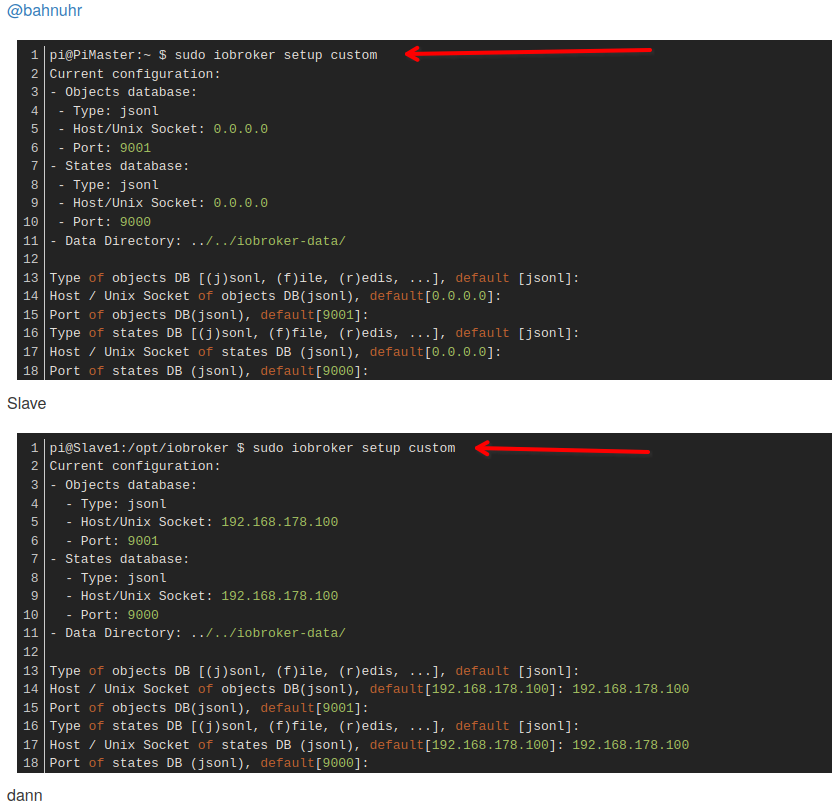
                                cc67a658-95c0-4250-b5cb-cb794c6781b5-grafik.png

                                VG
                                Bernd

                                haselchenH 1 Antwort Letzte Antwort
                                1
                                • ? Ein ehemaliger Benutzer

                                  @horst-böttcher sagte in Multihost zusamen führen:

                                  @dp20eic ja hatte mich verschreiben hab es ohne sudo gemacht

                                  Moin,

                                  wirklich?
                                  cc67a658-95c0-4250-b5cb-cb794c6781b5-grafik.png

                                  VG
                                  Bernd

                                  haselchenH Offline
                                  haselchenH Offline
                                  haselchen
                                  Most Active
                                  schrieb am zuletzt editiert von
                                  #18

                                  @dp20eic

                                  Zur Verteidigung muss man sagen, dass es so eine Anleitung im Netz gibt.

                                  https://www.iobroker.net/docu/index-24.htm?page_id=3068&lang=de

                                  Ab der Version des js-controller v1.1.3 wird die Einrichtung eines Multihost-Systems noch weiter vereinfacht.
                                  
                                  Man gibt beim Master nur noch ein: sudo iobroker multihost enable
                                  
                                  Anschließend auf dem slave: sudo iobroker multihost browse
                                  
                                  Jetzt müssten vorhandene Master angezeigt werden.
                                  
                                  Daraufhin wird mit sudo iobroker multihost connect der entsprechenden Master ausgewählt
                                  
                                  Damit ist die Multihost-Verbindung fertig.
                                  

                                  Synology DS218+ & 2 x Fujitsu Esprimo (VM/Container) + FritzBox7590 + 2 AVM 3000 Repeater & Homematic & HUE & Osram & Xiaomi, NPM 10.9.4, Nodejs 22.21.0 ,JS Controller 7.0.7 ,Admin 7.7.19

                                  Thomas BraunT 1 Antwort Letzte Antwort
                                  0
                                  • haselchenH haselchen

                                    @dp20eic

                                    Zur Verteidigung muss man sagen, dass es so eine Anleitung im Netz gibt.

                                    https://www.iobroker.net/docu/index-24.htm?page_id=3068&lang=de

                                    Ab der Version des js-controller v1.1.3 wird die Einrichtung eines Multihost-Systems noch weiter vereinfacht.
                                    
                                    Man gibt beim Master nur noch ein: sudo iobroker multihost enable
                                    
                                    Anschließend auf dem slave: sudo iobroker multihost browse
                                    
                                    Jetzt müssten vorhandene Master angezeigt werden.
                                    
                                    Daraufhin wird mit sudo iobroker multihost connect der entsprechenden Master ausgewählt
                                    
                                    Damit ist die Multihost-Verbindung fertig.
                                    
                                    Thomas BraunT Online
                                    Thomas BraunT Online
                                    Thomas Braun
                                    Most Active
                                    schrieb am zuletzt editiert von
                                    #19

                                    @haselchen

                                    Im Netz findet man viel veralteten Kram. So wie den von dir verlinkten.
                                    Die aktuelle Doku ist jedenfalls korrekt ohne sudo:

                                    https://www.iobroker.net/#de/documentation/config/multihost.md

                                    Linux-Werkzeugkasten:
                                    https://forum.iobroker.net/topic/42952/der-kleine-iobroker-linux-werkzeugkasten
                                    NodeJS Fixer Skript:
                                    https://forum.iobroker.net/topic/68035/iob-node-fix-skript
                                    iob_diag: curl -sLf -o diag.sh https://iobroker.net/diag.sh && bash diag.sh

                                    haselchenH 1 Antwort Letzte Antwort
                                    1
                                    • Thomas BraunT Thomas Braun

                                      @haselchen

                                      Im Netz findet man viel veralteten Kram. So wie den von dir verlinkten.
                                      Die aktuelle Doku ist jedenfalls korrekt ohne sudo:

                                      https://www.iobroker.net/#de/documentation/config/multihost.md

                                      haselchenH Offline
                                      haselchenH Offline
                                      haselchen
                                      Most Active
                                      schrieb am zuletzt editiert von
                                      #20

                                      @thomas-braun

                                      Da beides unter iobroker.net läuft , woher soll ein , sagen wir Neuling , das dann unterscheiden?
                                      Wäre ja evtl.sinnvoll den alten Krams dann vom Netz zu nehmen.

                                      Synology DS218+ & 2 x Fujitsu Esprimo (VM/Container) + FritzBox7590 + 2 AVM 3000 Repeater & Homematic & HUE & Osram & Xiaomi, NPM 10.9.4, Nodejs 22.21.0 ,JS Controller 7.0.7 ,Admin 7.7.19

                                      Thomas BraunT HomoranH 2 Antworten Letzte Antwort
                                      0
                                      • haselchenH haselchen

                                        @thomas-braun

                                        Da beides unter iobroker.net läuft , woher soll ein , sagen wir Neuling , das dann unterscheiden?
                                        Wäre ja evtl.sinnvoll den alten Krams dann vom Netz zu nehmen.

                                        Thomas BraunT Online
                                        Thomas BraunT Online
                                        Thomas Braun
                                        Most Active
                                        schrieb am zuletzt editiert von
                                        #21

                                        @haselchen sagte in Multihost zusamen führen:

                                        Wäre ja evtl.sinnvoll den alten Krams dann vom Netz zu nehmen.

                                        @Homoran

                                        Linux-Werkzeugkasten:
                                        https://forum.iobroker.net/topic/42952/der-kleine-iobroker-linux-werkzeugkasten
                                        NodeJS Fixer Skript:
                                        https://forum.iobroker.net/topic/68035/iob-node-fix-skript
                                        iob_diag: curl -sLf -o diag.sh https://iobroker.net/diag.sh && bash diag.sh

                                        1 Antwort Letzte Antwort
                                        1
                                        • Horst BöttcherH Horst Böttcher

                                          @bahnuhr

                                          pi@PiMaster:~ $ sudo iobroker setup custom
                                          Current configuration:
                                          - Objects database:
                                           - Type: jsonl
                                           - Host/Unix Socket: 0.0.0.0
                                           - Port: 9001
                                          - States database:
                                           - Type: jsonl
                                           - Host/Unix Socket: 0.0.0.0
                                           - Port: 9000
                                          - Data Directory: ../../iobroker-data/
                                          
                                          Type of objects DB [(j)sonl, (f)ile, (r)edis, ...], default [jsonl]:
                                          Host / Unix Socket of objects DB(jsonl), default[0.0.0.0]:
                                          Port of objects DB(jsonl), default[9001]:
                                          Type of states DB [(j)sonl, (f)file, (r)edis, ...], default [jsonl]:
                                          Host / Unix Socket of states DB (jsonl), default[0.0.0.0]:
                                          Port of states DB (jsonl), default[9000]:
                                          Data directory (file), default[../../iobroker-data/]:
                                          Host name of this machine [PiMaster]:
                                          updating conf/iobroker.json
                                          pi@PiMaster:~ $


                                          Slave

                                          pi@Slave1:/opt/iobroker $ sudo iobroker setup custom
                                          Current configuration:
                                          - Objects database:
                                            - Type: jsonl
                                            - Host/Unix Socket: 192.168.178.100
                                            - Port: 9001
                                          - States database:
                                            - Type: jsonl
                                            - Host/Unix Socket: 192.168.178.100
                                            - Port: 9000
                                          - Data Directory: ../../iobroker-data/
                                          
                                          Type of objects DB [(j)sonl, (f)ile, (r)edis, ...], default [jsonl]:
                                          Host / Unix Socket of objects DB(jsonl), default[192.168.178.100]: 192.168.178.100
                                          Port of objects DB(jsonl), default[9001]:
                                          Type of states DB [(j)sonl, (f)file, (r)edis, ...], default [jsonl]:
                                          Host / Unix Socket of states DB (jsonl), default[192.168.178.100]: 192.168.178.100
                                          Port of states DB (jsonl), default[9000]:
                                          Host name of this machine [Slave1]: Slave1
                                          updating conf/iobroker.json
                                          pi@Slave1:/opt/iobroker $


                                          dann

                                          
                                          pi@PiMaster:~ $ iobroker multihost enable
                                          Multihost discovery server activated on this host. If iobroker is currently not running please start befeore trying to discover this host.
                                          Important: Multihost discovery works with UDP packets. Make sure they are routed correctly in your network. If you use Docker you also need to configure this correctly.
                                          Multihost discovery will be automatically deactivated after 15 minutes. If you want to activate it permanently use the --persist flag
                                          Discovery authentication activated.
                                          Enter secret phrase for connection:
                                          Repeat secret phrase for connection:
                                          Please check the binding of the configured jsonl server to allow remote connections.
                                          Please restart ioBroker for the changes to take effect: "iobroker restart"
                                          
                                          
                                          Multihost discovery server: enabled
                                          Discovery authentication:   enabled
                                          Persistent activation:      disabled
                                          Objects:                    jsonl on 0.0.0.0
                                          States:                     jsonl on 0.0.0.0
                                          ^C
                                          pi@PiMaster:~ $


                                          und iob restart

                                          beim Slave

                                          iobroker multihost browse
                                          
                                          
                                          ``` oder iobroker multihost browse
                                          

                                          und es kommt nix

                                          ich weiss nicht ob intressant log

                                          host.PiMaster
                                          2023-09-18 18:36:55.644	info	instance system.adapter.backitup.0 started with pid 17093
                                          host.PiMaster
                                          2023-09-18 18:36:51.364	info	instance system.adapter.discovery.0 started with pid 17075
                                          host.PiMaster
                                          2023-09-18 18:36:50.889	info	Updating repository "stable" under "http://download.iobroker.net/sources-dist.json"
                                          host.PiMaster
                                          2023-09-18 18:36:47.390	info	instance system.adapter.zigbee.0 started with pid 17052
                                          host.PiMaster
                                          2023-09-18 18:36:43.610	info	Some obsolete host states deleted.
                                          host.PiMaster
                                          2023-09-18 18:36:43.590	info	Delete state "system.host.PiMaster.versions.npmNewestNext"
                                          host.PiMaster
                                          2023-09-18 18:36:43.530	info	Delete state "system.host.PiMaster.versions.npmNewest"
                                          host.PiMaster
                                          2023-09-18 18:36:43.504	info	Delete state "system.host.PiMaster.versions.npmCurrent"
                                          host.PiMaster
                                          2023-09-18 18:36:43.483	info	instance system.adapter.admin.0 started with pid 17041
                                          host.PiMaster
                                          2023-09-18 18:36:43.440	info	Delete state "system.host.PiMaster.versions.nodeNewestNext"
                                          host.PiMaster
                                          2023-09-18 18:36:43.404	info	Delete state "system.host.PiMaster.versions.nodeNewest"
                                          host.PiMaster
                                          2023-09-18 18:36:43.303	info	starting 4 instances
                                          host.PiMaster
                                          2023-09-18 18:36:43.276	info	4 instances found
                                          host.PiMaster
                                          2023-09-18 18:36:43.250	info	Delete state "system.host.PiMaster.versions.nodeCurrent"
                                          host.PiMaster
                                          2023-09-18 18:36:42.278	info	added notifications configuration of host
                                          host.PiMaster
                                          2023-09-18 18:36:42.250	info	connected to Objects and States
                                          host.PiMaster
                                          2023-09-18 18:36:41.499	info	ip addresses: 192.168.178.100 2001:9e8:1ec:af00:d975:3f8a:fb83:7a0e fe80::b476:adb:eade:b907
                                          host.PiMaster
                                          2023-09-18 18:36:41.498	info	hostname: PiMaster, node: v18.17.1
                                          host.PiMaster
                                          2023-09-18 18:36:41.496	info	Copyright (c) 2014-2023 bluefox, 2014 hobbyquaker
                                          host.PiMaster
                                          2023-09-18 18:36:41.489	info	iobroker.js-controller version 5.0.12 js-controller starting
                                          host.PiMaster
                                          2023-09-18 18:36:36.948	info	terminated
                                          host.PiMaster
                                          2023-09-18 18:36:36.832	info	All instances are stopped.
                                          host.PiMaster
                                          2023-09-18 18:36:36.831	info	instance system.adapter.zigbee.0 terminated with code 0 (NO_ERROR)
                                          host.PiMaster
                                          2023-09-18 18:36:36.795	info	instance system.adapter.admin.0 terminated with code 0 (NO_ERROR)
                                          host.PiMaster
                                          2023-09-18 18:36:36.781	info	instance system.adapter.backitup.0 terminated with code 0 (NO_ERROR)
                                          host.PiMaster
                                          2023-09-18 18:36:36.780	info	instance system.adapter.discovery.0 terminated with code 0 (NO_ERROR)
                                          host.PiMaster
                                          2023-09-18 18:36:36.108	info	stopInstance system.adapter.backitup.0 send kill signal
                                          host.PiMaster
                                          2023-09-18 18:36:36.107	info	stopInstance system.adapter.discovery.0 send kill signal
                                          host.PiMaster
                                          2023-09-18 18:36:36.106	info	stopInstance system.adapter.zigbee.0 send kill signal
                                          host.PiMaster
                                          2023-09-18 18:36:36.103	info	stopInstance system.adapter.admin.0 send kill signal
                                          host.PiMaster
                                          2023-09-18 18:36:36.079	info	stopInstance system.adapter.backitup.0 (force=false, process=true)
                                          host.PiMaster
                                          2023-09-18 18:36:36.078	info	stopInstance system.adapter.discovery.0 (force=false, process=true)
                                          host.PiMaster
                                          2023-09-18 18:36:36.077	info	stopInstance system.adapter.zigbee.0 (force=false, process=true)
                                          host.PiMaster
                                          2023-09-18 18:36:36.063	info	stopInstance system.adapter.admin.0 (force=false, process=true)
                                          host.PiMaster
                                          2023-09-18 18:36:36.056	info	received SIGTERM
                                          host.PiMaster
                                          2023-09-18 18:15:06.462	info	Multihost discovery server stopped after 15 minutes, because only temporarily activated
                                          host.PiMaster
                                          2023-09-18 18:00:06.462	info	Multi-host discovery server: service started on 0.0.0.0:50005
                                          host.PiMaster
                                          2023-09-18 17:37:56.931	info	Multihost discovery server stopped after 15 minutes, because only temporarily activated
                                          host.PiMaster
                                          2023-09-18 17:22:56.932	info	Multi-host discovery server: service started on 0.0.0.0:50005
                                          
                                          
                                          HomoranH Nicht stören
                                          HomoranH Nicht stören
                                          Homoran
                                          Global Moderator Administrators
                                          schrieb am zuletzt editiert von
                                          #22

                                          @horst-böttcher sagte in Multihost zusamen führen:

                                          Please check the binding of the configured jsonl server to allow remote connections.

                                          hast du das gemacht?

                                          kein Support per PN! - Fragen im Forum stellen -
                                          Benutzt das Voting rechts unten im Beitrag wenn er euch geholfen hat.
                                          Das Forum freut sich über eine Spende. Benutzt dazu den Spendenbutton im Header. Danke!
                                          der Installationsfixer: curl -fsL https://iobroker.net/fix.sh | bash -

                                          Horst BöttcherH 1 Antwort Letzte Antwort
                                          1
                                          Antworten
                                          • In einem neuen Thema antworten
                                          Anmelden zum Antworten
                                          • Älteste zuerst
                                          • Neuste zuerst
                                          • Meiste Stimmen


                                          Support us

                                          ioBroker
                                          Community Adapters
                                          Donate
                                          FAQ Cloud / IOT
                                          HowTo: Node.js-Update
                                          HowTo: Backup/Restore
                                          Downloads
                                          BLOG

                                          451

                                          Online

                                          32.7k

                                          Benutzer

                                          82.5k

                                          Themen

                                          1.3m

                                          Beiträge
                                          Community
                                          Impressum | Datenschutz-Bestimmungen | Nutzungsbedingungen | Einwilligungseinstellungen
                                          ioBroker Community 2014-2025
                                          logo
                                          • Anmelden

                                          • Du hast noch kein Konto? Registrieren

                                          • Anmelden oder registrieren, um zu suchen
                                          • Erster Beitrag
                                            Letzter Beitrag
                                          0
                                          • Home
                                          • Aktuell
                                          • Tags
                                          • Ungelesen 0
                                          • Kategorien
                                          • Unreplied
                                          • Beliebt
                                          • GitHub
                                          • Docu
                                          • Hilfe